instrument cluster FORD E SERIES 2023 User Guide
[x] Cancel search | Manufacturer: FORD, Model Year: 2023, Model line: E SERIES, Model: FORD E SERIES 2023Pages: 292, PDF Size: 6.81 MB
Page 93 of 292
Fuel Filler Cap
WARNING: The fuel system maybe under pressure. If you hear a hissingsound near the fuel filler inlet, do notrefuel until the sound stops. Otherwise,fuel may spray out, which could causeserious personal injury.
Note:If you must replace the fuel filler cap,replace it with a fuel filler cap that isdesigned for your vehicle. The customerwarranty may be void for any damage to thefuel tank or fuel system if the correctgenuine Ford, Motorcraft or other certifiedfuel filler cap is not used.
Your vehicle has a threaded fuel filler cap.When fueling your vehicle:
1.Put your vehicle in park (P).
2.Switch the engine off.
3.Carefully turn the filler capcounterclockwise until it spins off.
4.Pull to remove the cap from the fuelfiller pipe and place on the fuel doorhanging hook if equipped.
5.To install the fuel filler cap, hold thecap by the cover handle and place thethreaded end of the cap into filler pipe.Turn the cap clockwise until it clicks atleast once.
If the Check Fuel Cap light or a Check FuelCap message appears in the instrumentcluster and stays on after you start theengine, you may not have installed the fuelfiller properly.
If the fuel cap light remains on, at the nextopportunity, safely pull off of the road,remove the fuel filler cap, align the capproperly and reinstall it. The check fuel caplight or Check fuel cap message may notreset immediately. It may take severaldriving cycles for the indicators to turn off.A driving cycle consists of an enginestart-up (after four or more hours with theengine off) followed by normal city andhighway driving.
FUEL CONSUMPTION
Advertised Capacity
The advertised capacity is the maximumamount of fuel that you can add to the fueltank after running out of fuel. Included inthe advertised capacity is an emptyreserve. The empty reserve is anunspecified amount of fuel that remainsin the fuel tank when the fuel gaugeindicates empty.
Note:The amount of fuel in the emptyreserve varies and should not be relied uponto increase driving range.
Fuel Economy
Your vehicle calculates fuel economyfigures through the trip computer averagefuel function. See General Information(page 65).
The first 1,000 mi (1,500 km) of driving isthe break-in period of the engine. A moreaccurate measurement is obtained after2,000 mi (3,000 km).
Impacting Fuel Economy
•Incorrect tire inflation pressures.
•Fully loading your vehicle.
•Carrying unnecessary weight.
90
2023 E-Series (TE4) Canada/United States of America, enUSA, Edition date: 202111, First-PrintingFuel and Refueling
Page 100 of 292
Tow/Haul Mode
To activate tow/haul, press thebutton on the gearshift lever.The TOW HAUL indicator lightilluminates in the instrument cluster.
The tow/haul feature:
•Delays upshifts to reduce the frequencyof transmission shifting.
•Provides engine braking in all forwardgears, which slows your vehicle andassists you in controlling your vehiclewhen descending a slope.
•Depending on driving conditions andload conditions, may downshift thetransmission, slow your vehicle andcontrol your vehicle speed whendescending a hill, without pressing theaccelerator pedal. The amount ofdownshift braking provided variesbased upon the amount you press thebrake pedal.
The tow/haul feature improvestransmission operation when towing atrailer or a heavy load. All transmissiongear ranges are available when usingtow/haul.
To deactivate the tow/haul feature andreturn to normal driving mode, press thebutton on the gearshift lever again. TheTOW HAUL light deactivates. Tow/haulalso deactivates when you power downyour vehicle.
WARNING: Do not use tow/haulwhen the road surface is slippery. Failureto follow this instruction could result inthe loss of control of your vehicle.
Understanding Your SelectShiftAutomatic™ Transmission
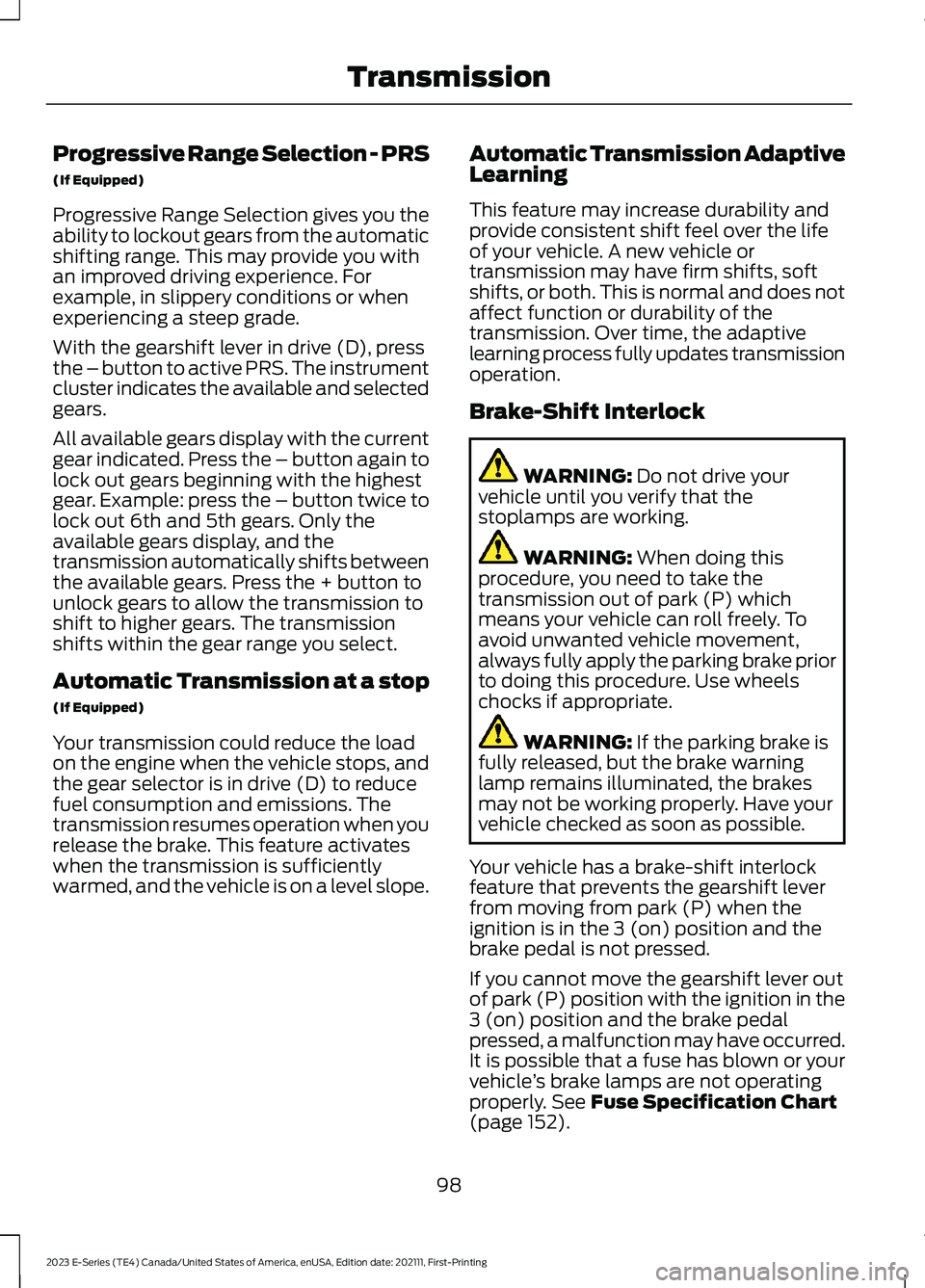
Note:When pressing the button on thegearshift lever, you can cycle through theavailable drive modes.
Your vehicle has a SelectShift Automatic™transmission gearshift lever. TheSelectShift Automatic transmission givesyou the ability to change gears up or downwithout a clutch.
To prevent the engine from running at toolow an RPM, which may cause it to stall,SelectShift still makes some downshiftsif it has determined that you have notdownshifted in time. Although SelectShiftmakes some downshifts for you, it stillallows you to downshift at any time if theSelectShift determines that damage tothe engine does not occur fromover-revving.
SelectShift does not upshift, even if theengine is approaching the RPM limit. Shiftmanually by pressing the + button.
Note:Engine damage may occur if youmaintain excessive engine revving withoutshifting.
SelectShift does not automatically upshift,even if the engine is approaching the RPMlimit. Shift manually by pressing the (+)paddle.
97
2023 E-Series (TE4) Canada/United States of America, enUSA, Edition date: 202111, First-PrintingTransmissionE161509 E318028
Page 101 of 292
Progressive Range Selection - PRS
(If Equipped)
Progressive Range Selection gives you theability to lockout gears from the automaticshifting range. This may provide you withan improved driving experience. Forexample, in slippery conditions or whenexperiencing a steep grade.
With the gearshift lever in drive (D), pressthe – button to active PRS. The instrumentcluster indicates the available and selectedgears.
All available gears display with the currentgear indicated. Press the – button again tolock out gears beginning with the highestgear. Example: press the – button twice tolock out 6th and 5th gears. Only theavailable gears display, and thetransmission automatically shifts betweenthe available gears. Press the + button tounlock gears to allow the transmission toshift to higher gears. The transmissionshifts within the gear range you select.
Automatic Transmission at a stop
(If Equipped)
Your transmission could reduce the loadon the engine when the vehicle stops, andthe gear selector is in drive (D) to reducefuel consumption and emissions. Thetransmission resumes operation when yourelease the brake. This feature activateswhen the transmission is sufficientlywarmed, and the vehicle is on a level slope.
Automatic Transmission AdaptiveLearning
This feature may increase durability andprovide consistent shift feel over the lifeof your vehicle. A new vehicle ortransmission may have firm shifts, softshifts, or both. This is normal and does notaffect function or durability of thetransmission. Over time, the adaptivelearning process fully updates transmissionoperation.
Brake-Shift Interlock
WARNING: Do not drive yourvehicle until you verify that thestoplamps are working.
WARNING: When doing thisprocedure, you need to take thetransmission out of park (P) whichmeans your vehicle can roll freely. Toavoid unwanted vehicle movement,always fully apply the parking brake priorto doing this procedure. Use wheelschocks if appropriate.
WARNING: If the parking brake isfully released, but the brake warninglamp remains illuminated, the brakesmay not be working properly. Have yourvehicle checked as soon as possible.
Your vehicle has a brake-shift interlockfeature that prevents the gearshift leverfrom moving from park (P) when theignition is in the 3 (on) position and thebrake pedal is not pressed.
If you cannot move the gearshift lever outof park (P) position with the ignition in the3 (on) position and the brake pedalpressed, a malfunction may have occurred.It is possible that a fuse has blown or yourvehicle’s brake lamps are not operatingproperly. See Fuse Specification Chart(page 152).
98
2023 E-Series (TE4) Canada/United States of America, enUSA, Edition date: 202111, First-PrintingTransmission
Page 106 of 292
PRINCIPLE OF OPERATION
The traction control system helps avoiddrive wheel spin and loss of traction.
If your vehicle begins to slide, the systemapplies the brakes to individual wheelsand, when needed, reduces engine powerat the same time. If the wheels spin whenaccelerating on slippery or loose surfaces,the system reduces engine power in orderto increase traction.
USING TRACTION CONTROL
WARNING: Operating your vehiclewith the traction control disabled couldlead to an increased risk of loss of vehiclecontrol, vehicle rollover, personal injuryand death.
The system automatically turns on eachtime you switch the ignition on.
If your vehicle is stuck in mud or snow,switch traction control off to allow thewheels to spin.
Switching the System Off
The button for the tractioncontrol system is located on theinstrument panel.
When you switch the system off, the TCSoff lamp illuminates in the instrumentcluster.
Use the switch again to return the tractioncontrol system to normal operation.
System Indicator Lights andMessages
The traction control lighttemporarily illuminates onengine start-up and flasheswhen a driving condition activates thesystem.
The traction control off lighttemporarily illuminates onengine start-up and stays onwhen the traction control system isswitched off or a problem occurs in thesystem.
103
2023 E-Series (TE4) Canada/United States of America, enUSA, Edition date: 202111, First-PrintingTraction ControlE194301 E138639 E225466
Page 113 of 292

WARNING: The system only warnsof vehicles detected by the radar sensor.In some cases there may be no warningor a delayed warning. Apply the brakeswhen necessary. Failure to follow thisinstruction could result in personal injuryor death.
Note:When you are following a vehicle andyou switch on a direction indicator, adaptivecruise control may provide a smalltemporary acceleration to help you pass.
Note:The brakes may emit noise whenapplied by the system.
When a vehicle ahead of you enters thesame lane or a slower vehicle is ahead inthe same lane, the vehicle speed adjuststo maintain a preset gap distance. Avehicle graphic illuminates in theinstrument cluster.
Your vehicle maintains a consistent gapfrom the vehicle ahead until any of thefollowing occur:
•The vehicle in front of you acceleratesto a speed above the set speed.
•The vehicle in front of you moves outof the lane you are in.
•Your vehicle speed falls below 12 mph(20 km/h).
•You set a new gap distance.
The system applies the brakes to slow yourvehicle to maintain a safe gap distancefrom the vehicle in front. The system onlyapplies limited braking. You can overridethe system by applying the brakes.
If the system determines that its maximumbraking level is not sufficient, an audiblewarning sounds, a message appears in theinformation display and an indicatorflashes when the system continues tobrake. Take immediate action.
Setting the Gap Distance
You can decrease or increase the distancebetween your vehicle and the vehicle infront by pressing the gap control.
Press and release to decreasethe gap distance.
Press and release to increase thegap distance.
The selected gap appears in theinformation display as shown by the barsin the image.
Note:The gap setting is time dependentand therefore the distance adjusts with yourvehicle speed.
Note:It is your responsibility to select a gapappropriate to the driving conditions.
110
2023 E-Series (TE4) Canada/United States of America, enUSA, Edition date: 202111, First-PrintingCruise Control (If Equipped)E263697 E263696 E233874
Page 168 of 292
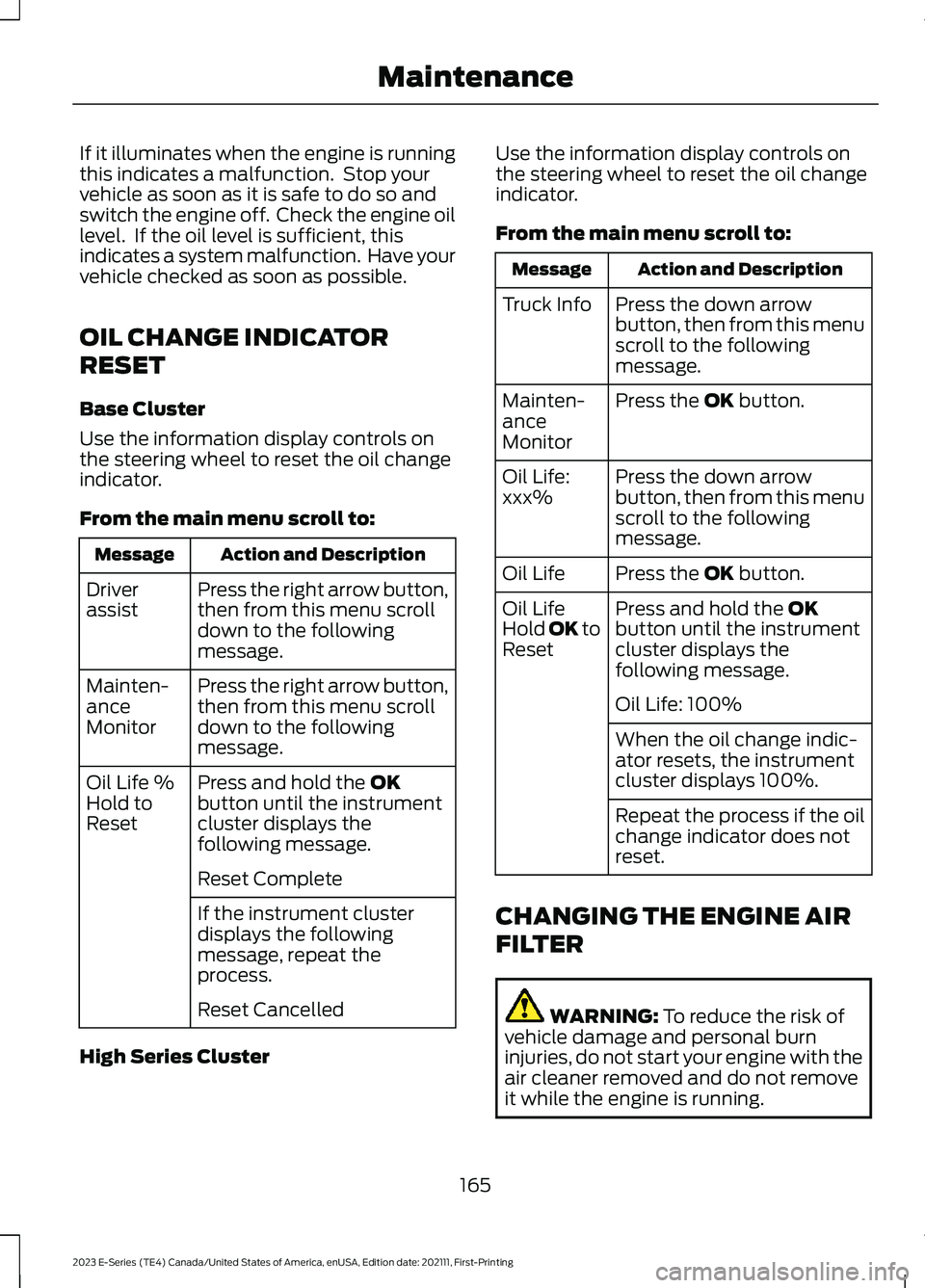
If it illuminates when the engine is runningthis indicates a malfunction. Stop yourvehicle as soon as it is safe to do so andswitch the engine off. Check the engine oillevel. If the oil level is sufficient, thisindicates a system malfunction. Have yourvehicle checked as soon as possible.
OIL CHANGE INDICATOR
RESET
Base Cluster
Use the information display controls onthe steering wheel to reset the oil changeindicator.
From the main menu scroll to:
Action and DescriptionMessage
Press the right arrow button,then from this menu scrolldown to the followingmessage.
Driverassist
Press the right arrow button,then from this menu scrolldown to the followingmessage.
Mainten-anceMonitor
Press and hold the OKbutton until the instrumentcluster displays thefollowing message.
Oil Life %Hold toReset
Reset Complete
If the instrument clusterdisplays the followingmessage, repeat theprocess.
Reset Cancelled
High Series Cluster
Use the information display controls onthe steering wheel to reset the oil changeindicator.
From the main menu scroll to:
Action and DescriptionMessage
Press the down arrowbutton, then from this menuscroll to the followingmessage.
Truck Info
Press the OK button.Mainten-anceMonitor
Press the down arrowbutton, then from this menuscroll to the followingmessage.
Oil Life:xxx%
Press the OK button.Oil Life
Press and hold the OKbutton until the instrumentcluster displays thefollowing message.
Oil LifeHold OK toReset
Oil Life: 100%
When the oil change indic-ator resets, the instrumentcluster displays 100%.
Repeat the process if the oilchange indicator does notreset.
CHANGING THE ENGINE AIR
FILTER
WARNING: To reduce the risk ofvehicle damage and personal burninjuries, do not start your engine with theair cleaner removed and do not removeit while the engine is running.
165
2023 E-Series (TE4) Canada/United States of America, enUSA, Edition date: 202111, First-PrintingMaintenance
Page 174 of 292
Checking Automatic TransmissionFluid
For scheduled intervals of the fluid checksand changes, See ScheduledMaintenance (page 247). Yourtransmission does not consume fluid.However, if the transmission is not workingproperly, for example, if the transmissionslips or shifts slowly, or if you notice somesign of fluid leakage, check the fluid levelas soon as possible.
Automatic transmission fluid expandswhen warmed. Obtain an accurate readingas follows :
1.Drive the vehicle approximately 19 mi(30 km) to reach normal operatingtemperature via the transmission fluidtemperature gauge on the instrumentcluster.
2.Park the vehicle on a level surface andengage the parking brake.
3.With the engine running, parking brakeengaged and your foot on the brakepedal, move the gearshift lever throughall of the gear ranges. Allow sufficienttime for each gear to engage.
4.Put the transmission in park (P) andleave the engine running.
5.Remove the dipstick, wiping it cleanwith a clean, dry, lint free rag.
6.Install the dipstick, fully seating it in thefiller tube.
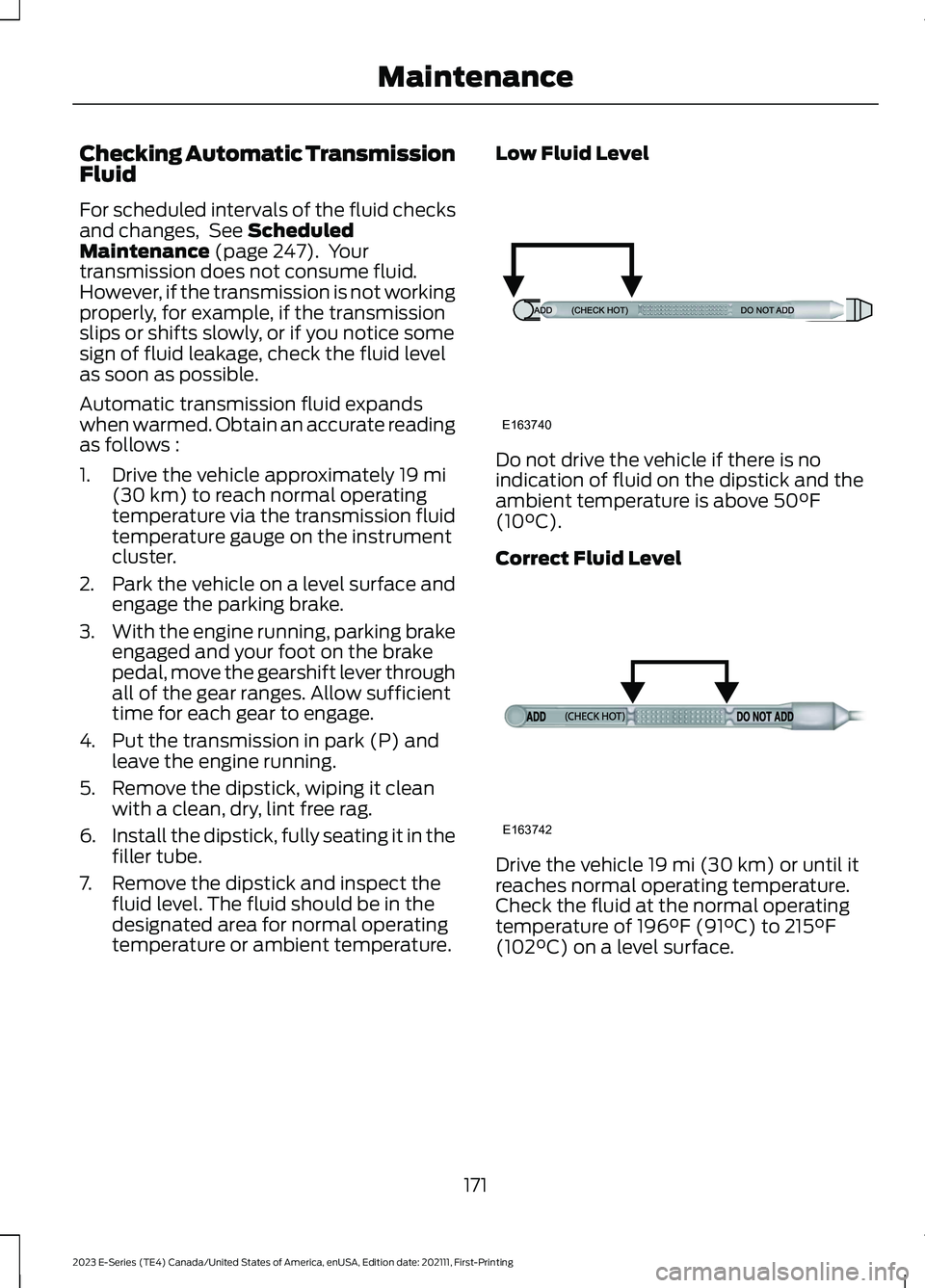
7.Remove the dipstick and inspect thefluid level. The fluid should be in thedesignated area for normal operatingtemperature or ambient temperature.
Low Fluid Level
Do not drive the vehicle if there is noindication of fluid on the dipstick and theambient temperature is above 50°F(10°C).
Correct Fluid Level
Drive the vehicle 19 mi (30 km) or until itreaches normal operating temperature.Check the fluid at the normal operatingtemperature of 196°F (91°C) to 215°F(102°C) on a level surface.
171
2023 E-Series (TE4) Canada/United States of America, enUSA, Edition date: 202111, First-PrintingMaintenanceE163740 E163742
Page 188 of 292
CLEANING THE INSTRUMENT
PANEL AND INSTRUMENT
CLUSTER LENS
WARNING: Do not use chemicalsolvents or strong detergents whencleaning the steering wheel orinstrument panel to avoid contaminationof the airbag system.
Note:Follow the same procedure ascleaning leather seats for cleaning leatherinstrument panels and leather interior trimsurfaces. See Cleaning Leather Seats(page 185).
Clean the instrument panel and clusterlens with a clean, damp and soft cloth,then use a clean, dry and soft cloth to drythese areas.
•Avoid cleaners or polishes that increasethe gloss of the upper portion of theinstrument panel. The dull finish in thisarea helps protect you fromundesirable windshield reflection.
•Do not use any household cleaningproducts or glass cleaners as thesemay damage the finish of theinstrument panel, interior trim andcluster lens.
•Wash or wipe your hands clean if youhave been in contact with certainproducts such as insect repellent andsuntan lotion to avoid possible damageto the interior painted surfaces.
•Do not allow air fresheners and handsanitizers to spill onto interior surfaces.If a spill occurs, wipe off immediately.Your warranty may not cover thesedamages.
If a staining liquid like coffee or juice hasbeen spilled on the instrument panel or oninterior trim surfaces:
1.Wipe up spilled liquid using a clean,soft cloth as quickly as possible.
2.Use Motorcraft Premium Leather andVinyl Cleaner or a commerciallyavailable leather cleaning product forautomotive interiors. Test any cleaneror stain remover on an inconspicuousarea.
3.Alternatively, wipe the surface with aclean, soft cloth and a mild soap andwater solution. Dry the area with aclean, soft cloth.
4.If necessary, apply more soap andwater solution or cleaning product toa clean, soft cloth and press it onto thesoiled area. Allow this to set at roomtemperature for 30 minutes.
5.Remove the soaked cloth, then with aclean, damp cloth, use a rubbingmotion for 60 seconds on the soiledarea.
6.Dry the area with a clean, soft cloth.
CLEANING LEATHER SEATS
Note:Follow the same procedure ascleaning leather seats for cleaning leatherinstrument panels and leather interior trimsurfaces.
For routine cleaning, wipe the surface witha soft, damp cloth and a mild soap andwater solution. Dry the area with a clean,soft cloth.
For cleaning and removing stains such asdye transfer, use Motorcraft PremiumLeather and Vinyl Cleaner or acommercially available leather cleaningproduct for automotive interiors.
Note:Test any cleaner or stain remover onan inconspicuous area.
185
2023 E-Series (TE4) Canada/United States of America, enUSA, Edition date: 202111, First-PrintingVehicle Care
Page 288 of 292
A
A/CSee: Climate Control...........................................74About This Manual...........................................7ABSSee: Brakes...........................................................100ABS driving hintsSee: Hints on Driving With Anti-LockBrakes.................................................................101Accessories....................................................242AccessoriesSee: Replacement PartsRecommendation............................................10ACCSee: Using Adaptive Cruise Control............108Adjusting the Headlamps..........................176Adjusting the Steering Wheel...................49Airbag Disposal................................................41Air ConditioningSee: Climate Control...........................................74Air Conditioning System Capacity andSpecification..............................................230Air FilterSee: Changing the Engine Air Filter..............165Appendices....................................................259At a Glance........................................................18Audible Warnings and Indicators.............64Audio System.................................................237General Information..........................................237Audio Unit.......................................................237Autolamps........................................................53Automatic High Beam Control..................55Automatic High Beam ControlIndicators........................................................55Automatic Transmission.............................96Automatic Transmission Fluid Capacityand Specification.......................................231Automatic Transmission FluidCheck..............................................................170Auxiliary Power Points.................................80Auxiliary Switches.......................................243
B
BatterySee: Changing the 12V Battery.......................174
Bonnet LockSee: Opening and Closing the Hood...........162Booster Seats..................................................26Brake Fluid Check..........................................173Brake Fluid Specification..........................232Brakes...............................................................100General Information.........................................100Breaking-In......................................................139Bulb Specification Chart...........................226
C
Canceling the Set Speed..........................108Capacities and Specifications................224Car WashSee: Cleaning the Exterior...............................182Catalytic Converter........................................93Changing a Bulb............................................178Changing a Fuse...........................................160Changing a Road Wheel............................215Changing the 12V Battery...........................174Changing the Engine Air Filter.................165Changing the Wiper Blades.......................177Checking the Wiper Blades.......................177Child Restraint and SeatbeltMaintenance.................................................34Child Restraint Positioning.........................28Child Safety......................................................20General Information............................................20Cleaning Leather Seats..............................185Cleaning Products.........................................181Cleaning the Engine.....................................183Cleaning the Exterior...................................182Cleaning the Instrument Panel andInstrument Cluster Lens.........................185Cleaning the Interior....................................184Cleaning the Wheels...................................186Cleaning the Windows and WiperBlades............................................................184Climate Control...............................................74Connected Vehicle......................................236Connected Vehicle –Troubleshooting............................................236Connecting the Vehicle to a MobileNetwork............................................................236Connected Vehicle Data...............................15Connected Vehicle Limitations..............236Connected Vehicle Requirements.........236
285
2023 E-Series (TE4) Canada/United States of America, enUSA, Edition date: 202111, First-PrintingIndex
Page 290 of 292
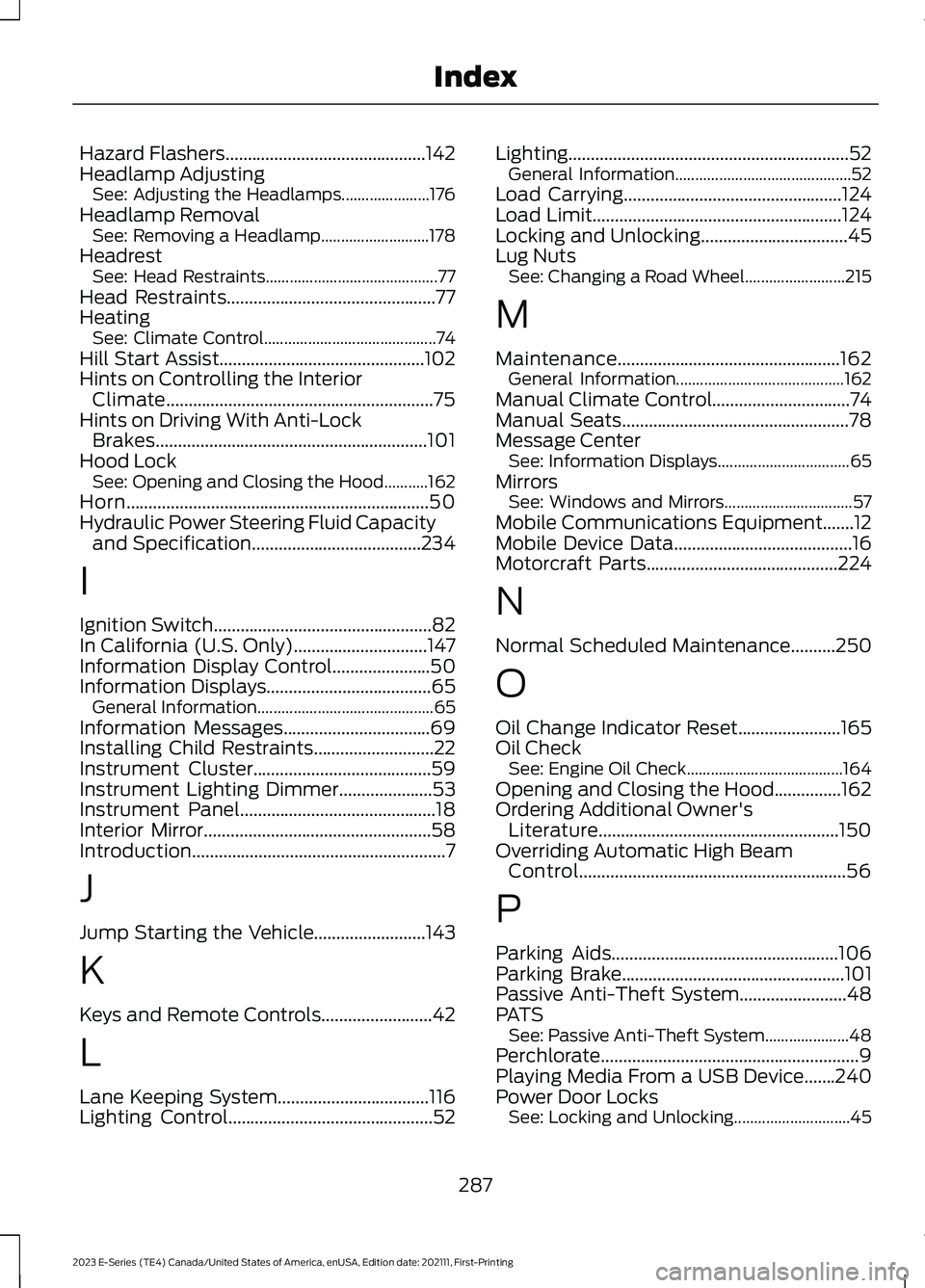
Hazard Flashers.............................................142Headlamp AdjustingSee: Adjusting the Headlamps......................176Headlamp RemovalSee: Removing a Headlamp...........................178HeadrestSee: Head Restraints...........................................77Head Restraints...............................................77HeatingSee: Climate Control...........................................74Hill Start Assist..............................................102Hints on Controlling the InteriorClimate............................................................75Hints on Driving With Anti-LockBrakes.............................................................101Hood LockSee: Opening and Closing the Hood...........162Horn....................................................................50Hydraulic Power Steering Fluid Capacityand Specification......................................234
I
Ignition Switch.................................................82In California (U.S. Only)..............................147Information Display Control......................50Information Displays.....................................65General Information............................................65Information Messages.................................69Installing Child Restraints...........................22Instrument Cluster........................................59Instrument Lighting Dimmer.....................53Instrument Panel............................................18Interior Mirror...................................................58Introduction.........................................................7
J
Jump Starting the Vehicle.........................143
K
Keys and Remote Controls.........................42
L
Lane Keeping System..................................116Lighting Control..............................................52
Lighting...............................................................52General Information............................................52Load Carrying.................................................124Load Limit........................................................124Locking and Unlocking.................................45Lug NutsSee: Changing a Road Wheel.........................215
M
Maintenance..................................................162General Information..........................................162Manual Climate Control...............................74Manual Seats...................................................78Message CenterSee: Information Displays.................................65MirrorsSee: Windows and Mirrors................................57Mobile Communications Equipment.......12Mobile Device Data........................................16Motorcraft Parts...........................................224
N
Normal Scheduled Maintenance..........250
O
Oil Change Indicator Reset.......................165Oil CheckSee: Engine Oil Check.......................................164Opening and Closing the Hood...............162Ordering Additional Owner'sLiterature......................................................150Overriding Automatic High BeamControl............................................................56
P
Parking Aids...................................................106Parking Brake..................................................101Passive Anti-Theft System........................48PATSSee: Passive Anti-Theft System.....................48Perchlorate..........................................................9Playing Media From a USB Device.......240Power Door LocksSee: Locking and Unlocking.............................45
287
2023 E-Series (TE4) Canada/United States of America, enUSA, Edition date: 202111, First-PrintingIndex