tires FORD E SERIES 2023 Owners Manual
[x] Cancel search | Manufacturer: FORD, Model Year: 2023, Model line: E SERIES, Model: FORD E SERIES 2023Pages: 292, PDF Size: 6.81 MB
Page 7 of 292
Changing a Bulb...........................................178
Vehicle Care
General Information....................................181
Cleaning Products........................................181
Cleaning the Exterior..................................182
Waxing.............................................................183
Cleaning the Engine....................................183
Cleaning the Windows and Wiper Blades.........................................................................184
Cleaning the Interior...................................184
Cleaning the Instrument Panel andInstrument Cluster Lens.......................185
Cleaning Leather Seats.............................185
Repairing Minor Paint Damage..............186
Cleaning the Wheels..................................186
Vehicle Storage............................................186
Wheels and Tires
General Information...................................189
Tire Care.........................................................190
Using Snow Chains...................................208
Tire Pressure Monitoring System.........209
Changing a Road Wheel...........................215
Technical Specifications..........................222
Capacities and Specifications
Engine Specifications................................224
Motorcraft Parts..........................................224
Bulb Specification Chart..........................226
Engine Oil Capacity and Specification.........................................................................227
Cooling System Capacity andSpecification............................................228
Fuel Tank Capacity.....................................229
Air Conditioning System Capacity andSpecification............................................230
Washer Fluid Specification.....................230
Automatic Transmission Fluid Capacityand Specification.....................................231
Brake Fluid Specification.........................232
Rear Axle Fluid Capacity andSpecification.............................................232
Hydraulic Power Steering Fluid Capacityand Specification...................................234
Vehicle Identification
Vehicle Identification Number...............235
Connected Vehicle
Connected Vehicle Requirements........236
Connected Vehicle Limitations.............236
Connecting the Vehicle to a MobileNetwork......................................................236
Connected Vehicle – Troubleshooting........................................................................236
Audio System
General Information...................................237
Audio Unit......................................................237
Connecting a Bluetooth® Device.........240
Streaming Bluetooth Audio...................240
Playing Media From a USB Device......240
USB Port.........................................................241
Using Voice Recognition...........................241
Accessories
Accessories...................................................242
Auxiliary Switches......................................243
Ford Protect
Ford Protect..................................................245
Scheduled Maintenance
General Maintenance Information.......247
Normal Scheduled Maintenance.........250
Special Operating Conditions ScheduledMaintenance.............................................252
4
2023 E-Series (TE4) Canada/United States of America, enUSA, Edition date: 202111, First-PrintingTable of Contents
Page 58 of 292
WHAT IS AUTOMATIC HIGH
BEAM CONTROL
The system turns on high beams if it is darkenough and no other traffic is present. If itdetects an approaching vehicle’sheadlamps or tail lamps, or street lightingahead, the system turns the high beamsoff. Low beams remain on.
A camera sensor, centrally mountedbehind the windshield of your vehicle,continuously monitors conditions to turnthe high beams on and off.
SWITCHING AUTOMATIC HIGH
BEAM CONTROL ON AND OFF
Switch the system on or off using theinformation display. See GeneralInformation (page 65).
Activating the Automatic HighBeam Control
Switch the lighting control to theautolamps position to activate.See Autolamps (page 53).
Note:Automatic high beams are notavailable when you do not turn onautolamps.
When active, the high beams turn on if allof the following occur:
•The ambient light level is low enough.
•There is no traffic in front of yourvehicle.
•The vehicle speed is greater thanapproximately 32 mph (52 km/h).
When active, the high beams turn off if anyof the following occur:
•The ambient light level is high enoughthat it does not require high beams.
•The system detects an approachingvehicle's headlamps or tail lamps.
•The system detects severe rain, snowor fog.
•The camera is blocked.
•The vehicle speed falls belowapproximately 27 mph (44 km/h).
Note:The deactivation speed is lower oncurves.
Note:There could be a delay in high beamreactivation in certain curvy road situations.
Note:If you have a blocked sensor, thesystem may not operate properly. Keep thewindshield free from obstruction or damage.
Note:The system may not operate properlyin cold or inclement conditions. You canswitch on the high beams by overriding thesystem.
Note:If the system detects a blockage, forexample bird droppings, bug splatter, snowor ice, the system goes into low beam modeuntil you clear the blockage. If you have ablocked camera, a message may appear inthe information display.
Note:Using much larger tires or equippingvehicle accessories such as snowplows canmodify your vehicle's ride height anddegrade automatic high beam controlperformance.
AUTOMATIC HIGH BEAM
CONTROL INDICATORS
The indicator illuminates toconfirm when the system isready to assist.
55
2023 E-Series (TE4) Canada/United States of America, enUSA, Edition date: 202111, First-PrintingAutomatic High Beam Control
Page 66 of 292
Engine Coolant TemperatureWarning Lamp
If it illuminates when your vehicleis moving, this indicates that theengine is overheating. Stop yourvehicle as soon as it is safe to do so andswitch the engine off. Have your vehiclechecked as soon as possible.
Engine Oil
It illuminates when you switchthe ignition on.
If it illuminates when the engineis running this indicates a malfunction.Stop your vehicle as soon as it is safe todo so and switch the engine off. Check theengine oil level. If the oil level is sufficient,this indicates a system malfunction. Haveyour vehicle checked as soon as possible.
See Engine Oil Check (page 164).
Fasten Seatbelt Warning Lamp
It illuminates and a tone soundsuntil you fasten the seatbelts.
Headlamp High Beam Indicator
It illuminates when you switchthe headlamp high beam on.
Low Fuel Level Warning Lamp
If it illuminates when you aredriving, refuel as soon aspossible.
Low Tire Pressure Warning Lamp
(If Equipped)
It illuminates if the tire pressurein one or more tires is below thecorrect tire pressure.
It also illuminates momentarily when youswitch the ignition on to confirm the lampis functional. If it does not illuminate whenyou switch the ignition on, or begins toflash at any time, have the system checkedby your authorized dealer.
PowertrainMalfunction/Electronic ThrottleControl
Illuminates when the systemdetects a powertrain fault, havean authorized dealer check thesystem as soon as possible.
Service Engine Soon
If it illuminates when the engineis running this indicates amalfunction. The On BoardDiagnostics system has detected amalfunction of the vehicle emission controlsystem.
If it flashes, engine misfire may beoccurring. Increased exhaust gastemperatures could damage the catalyticconverter or other vehicle components.Avoid heavy acceleration and decelerationand have your vehicle servicedimmediately.
It illuminates when you switch the ignitionon prior to engine start to check the bulband to indicate whether your vehicle isready for Inspection and Maintenance(I/M) testing.
Normally, it illuminates until the engine iscranked and automatically turns off if nomalfunctions are present. However, if after15 seconds it flashes eight times, thisindicates that your vehicle is not ready forInspection and Maintenance (I/M) testing.See Emission Law (page 92).
63
2023 E-Series (TE4) Canada/United States of America, enUSA, Edition date: 202111, First-PrintingInstrument Cluster E71880
Page 102 of 292
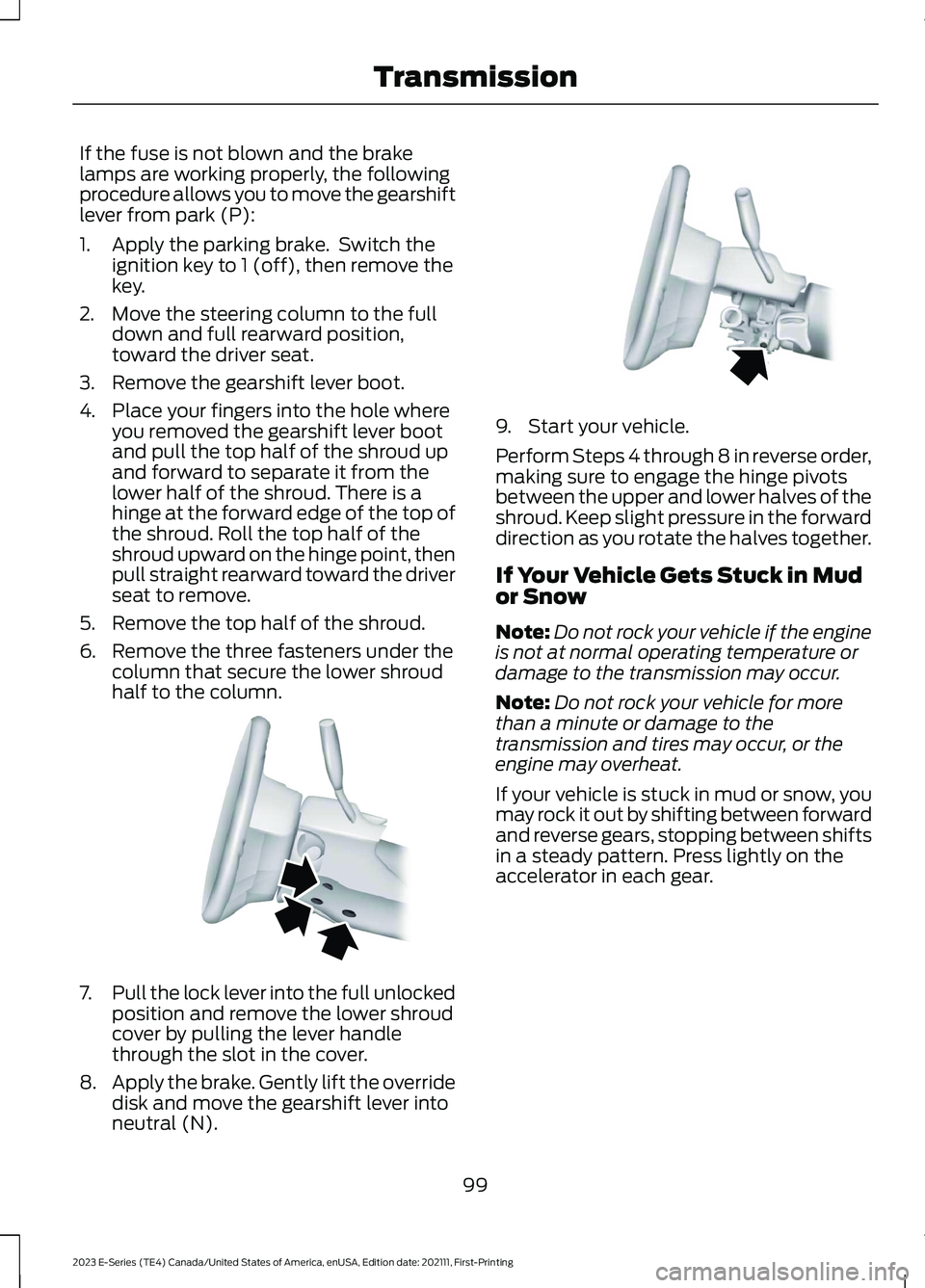
If the fuse is not blown and the brakelamps are working properly, the followingprocedure allows you to move the gearshiftlever from park (P):
1.Apply the parking brake. Switch theignition key to 1 (off), then remove thekey.
2.Move the steering column to the fulldown and full rearward position,toward the driver seat.
3.Remove the gearshift lever boot.
4.Place your fingers into the hole whereyou removed the gearshift lever bootand pull the top half of the shroud upand forward to separate it from thelower half of the shroud. There is ahinge at the forward edge of the top ofthe shroud. Roll the top half of theshroud upward on the hinge point, thenpull straight rearward toward the driverseat to remove.
5.Remove the top half of the shroud.
6.Remove the three fasteners under thecolumn that secure the lower shroudhalf to the column.
7.Pull the lock lever into the full unlockedposition and remove the lower shroudcover by pulling the lever handlethrough the slot in the cover.
8.Apply the brake. Gently lift the overridedisk and move the gearshift lever intoneutral (N).
9.Start your vehicle.
Perform Steps 4 through 8 in reverse order,making sure to engage the hinge pivotsbetween the upper and lower halves of theshroud. Keep slight pressure in the forwarddirection as you rotate the halves together.
If Your Vehicle Gets Stuck in Mudor Snow
Note:Do not rock your vehicle if the engineis not at normal operating temperature ordamage to the transmission may occur.
Note:Do not rock your vehicle for morethan a minute or damage to thetransmission and tires may occur, or theengine may overheat.
If your vehicle is stuck in mud or snow, youmay rock it out by shifting between forwardand reverse gears, stopping between shiftsin a steady pattern. Press lightly on theaccelerator in each gear.
99
2023 E-Series (TE4) Canada/United States of America, enUSA, Edition date: 202111, First-PrintingTransmissionE163185 E163186
Page 107 of 292
PRINCIPLE OF OPERATION
WARNING: Vehicle modificationsinvolving braking system, aftermarketroof racks, suspension, steering system,tire construction and wheel and tire sizemay change the handling characteristicsof your vehicle and may adversely affectthe performance of the electronicstability control system. In addition,installing any stereo loudspeakers mayinterfere with and adversely affect theelectronic stability control system. Installany aftermarket stereo loudspeaker asfar as possible from the front centerconsole, the tunnel, and the front seatsin order to minimize the risk of interferingwith the electronic stability controlsensors. Reducing the effectiveness ofthe electronic stability control systemcould lead to an increased risk of loss ofvehicle control, vehicle rollover, personalinjury and death.
WARNING: Remember that evenadvanced technology cannot defy thelaws of physics. It’s always possible tolose control of a vehicle due toinappropriate driver input for theconditions. Aggressive driving on anyroad condition can cause you to losecontrol of your vehicle increasing the riskof personal injury or property damage.Activation of the electronic stabilitycontrol system is an indication that atleast some of the tires have exceededtheir ability to grip the road; this couldreduce the operator’s ability to controlthe vehicle potentially resulting in a lossof vehicle control, vehicle rollover,personal injury and death. If yourelectronic stability control systemactivates, SLOW DOWN.
The system automatically turns on eachtime you switch the ignition on.
If a fault occurs in either the stabilitycontrol or the traction control system, youmay experience the following conditions:
•The stability and traction control lightilluminates steadily.
•The stability control and tractioncontrol systems do not enhance yourvehicle's ability to maintain traction ofthe wheels.
If a driving condition activates either thestability control or the traction controlsystem you may experience the followingconditions:
•The stability and traction control lightflashes.
•Your vehicle slows down.
•Reduced engine power.
•A vibration in the brake pedal.
•The brake pedal is stiffer than usual.
•If the driving condition is severe andyour foot is not on the brake, the brakepedal may move as the system applieshigher brake force.
The stability control system has severalfeatures built into it to help you maintaincontrol of your vehicle:
Electronic Stability Control
The system enhances your vehicle’s abilityto prevent skids or lateral slides byapplying brakes to one or more of thewheels individually and, if necessary,reducing engine power.
Traction Control
The system enhances your vehicle’s abilityto maintain traction of the wheels bydetecting and controlling wheel spin. SeeUsing Traction Control (page 103).
104
2023 E-Series (TE4) Canada/United States of America, enUSA, Edition date: 202111, First-PrintingStability Control
Page 115 of 292
Automatic cancellation can occur whenthe tires lose traction or you apply theparking brake.
Hilly Condition and Trailer TowUsage
You should select a lower gear when thesystem is active in situations such asprolonged downhill driving on steepgrades, for example in mountainous areas.The system needs additional enginebraking in these situations to reduce theload on the vehicle’s regular brake systemto prevent it from overheating.
Note:An audible alarm sounds and thesystem shuts down if it applies the brakesfor an extended period of time. This allowsthe brakes to cool. The system functionsnormally again after the brakes cool.
Note:When towing with adaptive cruisecontrol, switch on Tow/Haul Mode.
Switching Adaptive Cruise ControlOff
Press and release the buttonwhen the system is in standbymode, or switch the ignition off.
Note:The set speed and gap setting iserased when you switch the system off.
Detection Issues
WARNING: On rare occasions,detection issues can occur due to theroad infrastructures, for example bridges,tunnels and safety barriers. In thesecases, the system may brake late orunexpectedly. At all times, you areresponsible for controlling your vehicle,supervising the system and intervening,if required.
WARNING: If the systemmalfunctions, have your vehicle checkedas soon as possible.
The radar sensor has a limited field of view.It may not detect vehicles at all or detecta vehicle later than expected in somesituations. The lead vehicle graphic doesnot illuminate if the system does notdetect a vehicle in front of you.
112
2023 E-Series (TE4) Canada/United States of America, enUSA, Edition date: 202111, First-PrintingCruise Control (If Equipped)E265297 E71621
Page 129 of 292
WARNING: Exceeding theSafety Compliance Certificationlabel vehicle weight limits canadversely affect theperformance and handling ofyour vehicle, cause vehicledamage and can result in theloss of control of your vehicle,serious personal injury or death.
Maximum Loaded TrailerWeight
Maximum loaded trailer weight isthe highest possible weight of afully loaded trailer the vehicle cantow. Consult an authorized dealer(or the RV and Trailer TowingGuide available at an authorizeddealer) for more detailed
information.
GCWR (Gross CombinedWeight Rating)
GCWR is the maximum allowableweight of the vehicle and theloaded trailer, including all cargoand passengers, that the vehiclecan handle without riskingdamage. (Important: The towingvehicle’s braking system is ratedfor operation at Gross Vehicle
Weight Rating, not at GrossCombined Weight Rating.)Separate functional brakes should
be used for safe control of towedvehicles and for trailers where theGross Combined Weight of thetowing vehicle plus the trailerexceed the Gross Vehicle WeightRating of the towing vehicle.
The gross combined weight mustnever exceed the Gross CombinedWeight Rating.
Note: For trailer towinginformation refer to the RV andTrailer Towing Guide available atan authorized dealer.
WARNING: Do not exceedthe GVWR or the GAWRspecified on the certificationlabel.
WARNING: Do not usereplacement tires with lowerload carrying capacities than theoriginal tires because they maylower your vehicle's GVWR andGAWR limitations. Replacementtires with a higher limit than theoriginal tires do not increase theGVWR and GAWR limitations.
WARNING: Exceeding anyvehicle weight rating canadversely affect theperformance and handling ofyour vehicle, cause vehicledamage and can result in theloss of control of your vehicle,serious personal injury or death.
126
2023 E-Series (TE4) Canada/United States of America, enUSA, Edition date: 202111, First-PrintingLoad Carrying
Page 132 of 292
TOWING A TRAILER
WARNING: Do not exceedthe GVWR or the GAWRspecified on the certificationlabel.
WARNING: Towing trailersbeyond the maximumrecommended gross trailerweight exceeds the limit of yourvehicle and could result in enginedamage, transmission damage,structural damage, loss ofvehicle control, vehicle rolloverand personal injury.
Your vehicle may have electricalitems, for example fuses or relays,related to towing. See Fuses(page 152).
Your vehicle's load capacitydesignation is by weight, not byvolume, so you cannot necessarilyuse all available space whenloading your vehicle.
Towing a trailer places an extraload on your vehicle's engine,transmission, axle, brakes, tiresand suspension. Inspect thesecomponents periodically during,and after, any towing operation.
Load Placement
To help minimize how trailermovement affects your vehiclewhen driving:
•Load the heaviest items closestto the trailer floor.
•Load the heaviest itemscentered between the left andright side trailer tires.
•Load the heaviest items abovethe trailer axles or just slightlyforward toward the trailertongue. Do not allow the finaltrailer tongue weight to goabove or below 10-15% of theloaded trailer weight.
•Select a draw bar with thecorrect rise or drop. When boththe loaded vehicle and trailerare connected, the trailer frameshould be level, or slightlyangled down toward yourvehicle, when viewed from theside.
When driving with a trailer orpayload, a slight takeoff vibrationor shudder may be present due tothe increased payload weight.Additional information regardingcorrect trailer loading and settingyour vehicle up for towing islocated in another chapter of thisOwner's Manual. See Load Limit(page 124). You can also find theinformation in the RV & TrailerTowing Guide. See an authorizeddealer.
129
2023 E-Series (TE4) Canada/United States of America, enUSA, Edition date: 202111, First-PrintingTowing
Page 137 of 292
•Stoplamps: Using the manual controllever illuminates both the trailer brakelamps and your vehicle brake lampsexcept the center high mountedstoplamp, if you make the properelectrical connection to the trailer.Pressing your vehicle brake pedal alsoilluminates both trailer and vehiclebrake lamps.
Procedure for Adjusting Gain
Note:Only perform this procedure in atraffic-free environment at speeds ofapproximately 20-25 mph (30-40 km/h).
The gain setting sets the trailer brakecontroller for the specific towing condition.You should change the setting as towingconditions change. Changes to towingconditions include trailer load, vehicle load,road conditions and weather.
Set the gain to provide the maximumtrailer braking assistance while makingsure the trailer wheels do not lock whenusing the brakes. Locked trailer wheelsmay lead to trailer instability.
1.Make sure the trailer brakes are in goodworking condition, functioning normallyand properly adjusted. See your trailerdealer if necessary.
2.Connect the trailer and make theelectrical connections according to thetrailer manufacturer's instructions.
3.When you plug in a trailer with electricor electric-over-hydraulic brakes, amessage confirming connectionappears in the information display.
4.Use the gain adjustment (+ and -)buttons to increase or decrease thegain setting to the desired startingpoint. A gain setting of 6.0 is a goodstarting point for heavier loads.
5.In a traffic-free environment, tow thetrailer on a dry, level surface at a speedof 20-25 mph (30-40 km/h) andsqueeze the manual control levercompletely.
6.If the trailer wheels lock up, indicatedby squealing tires, reduce the gainsetting. If the trailer wheels turn freely,increase the gain setting. Repeat Steps5 and 6 until the gain setting is at apoint just below trailer wheel lock-up.If towing a heavier trailer, trailer wheellock-up may not be attainable evenwith the maximum gain setting of 10.
Explanation of Information DisplayWarning Messages
Note:An authorized dealer can diagnosethe trailer brake controller to determineexactly which trailer fault has occurred.However, your Ford warranty does not coverthis diagnosis if the fault is with the trailer.
A message indicating a trailer brakemodule fault may display in response tofaults sensed by the trailer brake controller,accompanied by a single tone. If thismessage appears, contact an authorizeddealer as soon as possible for diagnosisand repair. The controller may stillfunction, but performance may bedegraded.
A message indicating a trailer wiring faultmay display when there is a short circuiton the electric brake output wire. If thismessage displays, accompanied by asingle tone, with no trailer connected, theproblem is with your vehicle wiringbetween the trailer brake controller andthe 7-pin connector at the bumper. If themessage only displays with a trailerconnected, the problem is with the trailer
134
2023 E-Series (TE4) Canada/United States of America, enUSA, Edition date: 202111, First-PrintingTowing
Page 139 of 292
When Towing a Trailer
•Do not drive faster than 70 mph(113 km/h) during the first 500 mi(800 km).
•Do not make full-throttle starts.
•Check your hitch, electrical connectionsand trailer wheel lug nuts thoroughlyafter you have traveled 50 mi (80 km).
•When stopped in congested or heavytraffic during hot weather, place thegearshift in park (P) to aid engine andtransmission cooling and to help A/Cperformance.
•Switch off the speed control withheavy loads or in hilly terrain. Thespeed control may turn offautomatically when you are towing onlong, steep grades.
•Shift to a lower gear when driving downa long or steep hill. Do not apply thebrakes continuously, as they mayoverheat and become less effective.
•If your transmission is equipped with aGrade Assist or Tow/Haul feature, usethis feature when towing. This providesengine braking and helps eliminateexcessive transmission shifting foroptimum fuel economy andtransmission cooling.
•If your vehicle is equipped withAdvanceTrac with roll stability control,this system may turn on during typicalcornering maneuvers with a heavilyloaded trailer. This is normal. Turningthe corner at a slower speed whiletowing may reduce this tendency.
•Allow more distance for stopping witha trailer attached. Anticipate stops andbrake gradually.
•Avoid parking on a grade. However, ifyou must park on a grade:
1.Turn the steering wheel to point yourvehicle tires away from traffic flow.
2.Set your vehicle parking brake.
3.Place the automatic transmission inpark (P).
4.Place wheel chocks in front and backof the trailer wheels. (Chocks notincluded with vehicle.)
Your vehicle may be equipped with atemporary or conventional spare tire. Atemporary spare tire is different in size(diameter or width), tread-type(All-Season or All Terrain) or is from adifferent manufacturer than the road tireson your vehicle. Consult information on thetire label or Safety Compliance label forlimitations when using.
Launching or Retrieving a Boat orPersonal Watercraft (PWC)
Note:Disconnect the wiring to the trailerbefore backing the trailer into the water.
Note:Reconnect the wiring to the trailerafter removing the trailer from the water.
When backing down a ramp during boatlaunching or retrieval:
•Do not allow the static water level torise above the bottom edge of the rearbumper.
•Do not allow waves to break higherthan 6 in (15 cm) above the bottomedge of the rear bumper.
Exceeding these limits may allow water toenter vehicle components:
•Causing internal damage to thecomponents.
•Affecting driveability, emissions andreliability.
Replace the rear axle lubricant anytimethe rear axle has been submerged in water.Water may have contaminated the rearaxle lubricant, which is not normallychecked or changed unless a leak issuspected or other axle repair is required.
136
2023 E-Series (TE4) Canada/United States of America, enUSA, Edition date: 202111, First-PrintingTowing