display FORD ECOSPORT 2018 Owners Manual
[x] Cancel search | Manufacturer: FORD, Model Year: 2018, Model line: ECOSPORT, Model: FORD ECOSPORT 2018Pages: 452, PDF Size: 17.04 MB
Page 369 of 452
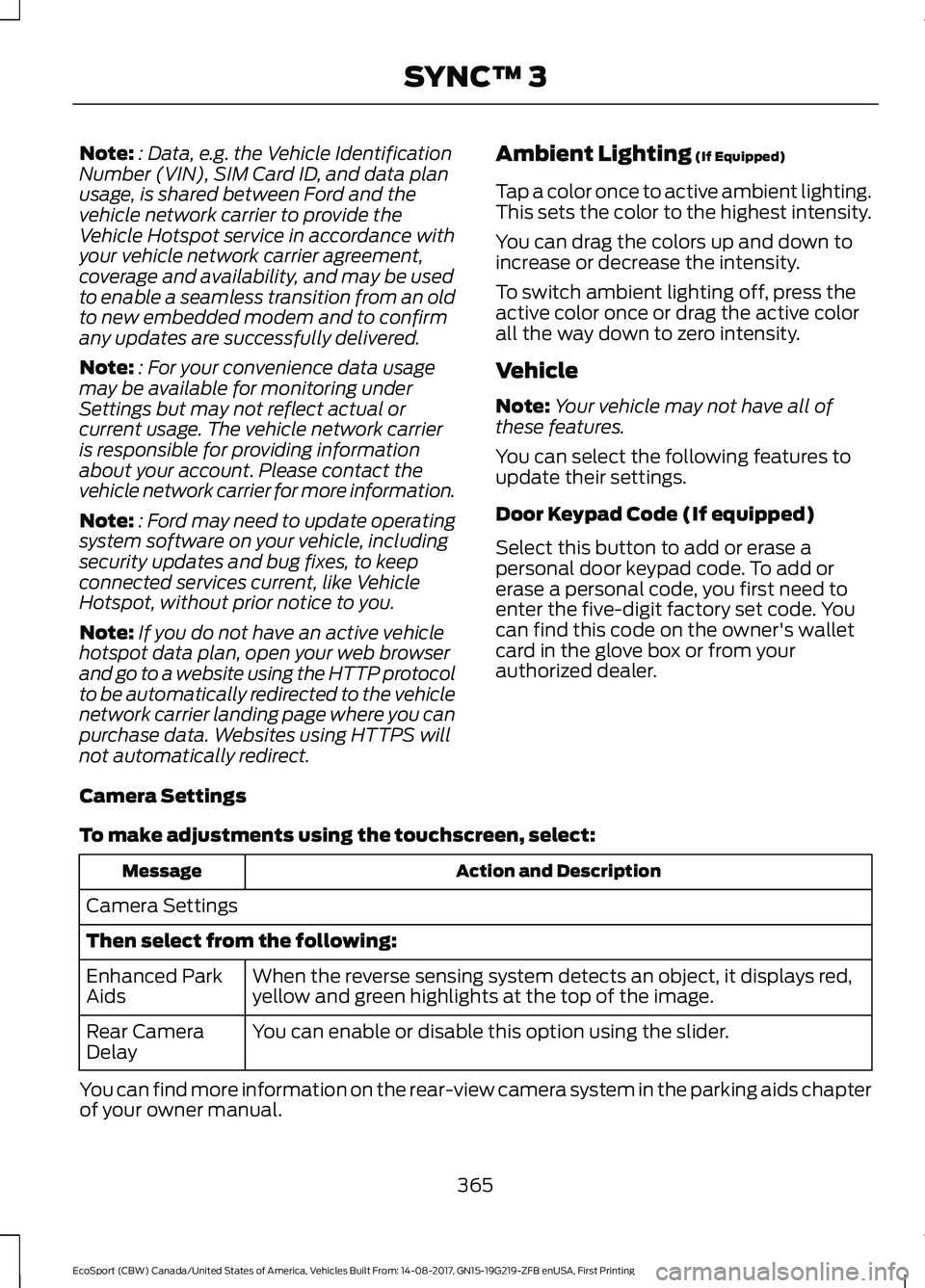
Note:: Data, e.g. the Vehicle IdentificationNumber (VIN), SIM Card ID, and data planusage, is shared between Ford and thevehicle network carrier to provide theVehicle Hotspot service in accordance withyour vehicle network carrier agreement,coverage and availability, and may be usedto enable a seamless transition from an oldto new embedded modem and to confirmany updates are successfully delivered.
Note:: For your convenience data usagemay be available for monitoring underSettings but may not reflect actual orcurrent usage. The vehicle network carrieris responsible for providing informationabout your account. Please contact thevehicle network carrier for more information.
Note:: Ford may need to update operatingsystem software on your vehicle, includingsecurity updates and bug fixes, to keepconnected services current, like VehicleHotspot, without prior notice to you.
Note:If you do not have an active vehiclehotspot data plan, open your web browserand go to a website using the HTTP protocolto be automatically redirected to the vehiclenetwork carrier landing page where you canpurchase data. Websites using HTTPS willnot automatically redirect.
Ambient Lighting (If Equipped)
Tap a color once to active ambient lighting.This sets the color to the highest intensity.
You can drag the colors up and down toincrease or decrease the intensity.
To switch ambient lighting off, press theactive color once or drag the active colorall the way down to zero intensity.
Vehicle
Note:Your vehicle may not have all ofthese features.
You can select the following features toupdate their settings.
Door Keypad Code (If equipped)
Select this button to add or erase apersonal door keypad code. To add orerase a personal code, you first need toenter the five-digit factory set code. Youcan find this code on the owner's walletcard in the glove box or from yourauthorized dealer.
Camera Settings
To make adjustments using the touchscreen, select:
Action and DescriptionMessage
Camera Settings
Then select from the following:
When the reverse sensing system detects an object, it displays red,yellow and green highlights at the top of the image.Enhanced ParkAids
You can enable or disable this option using the slider.Rear CameraDelay
You can find more information on the rear-view camera system in the parking aids chapterof your owner manual.
365EcoSport (CBW) Canada/United States of America, Vehicles Built From: 14-08-2017, GN15-19G219-ZFB enUSA, First PrintingSYNC™ 3
Page 370 of 452
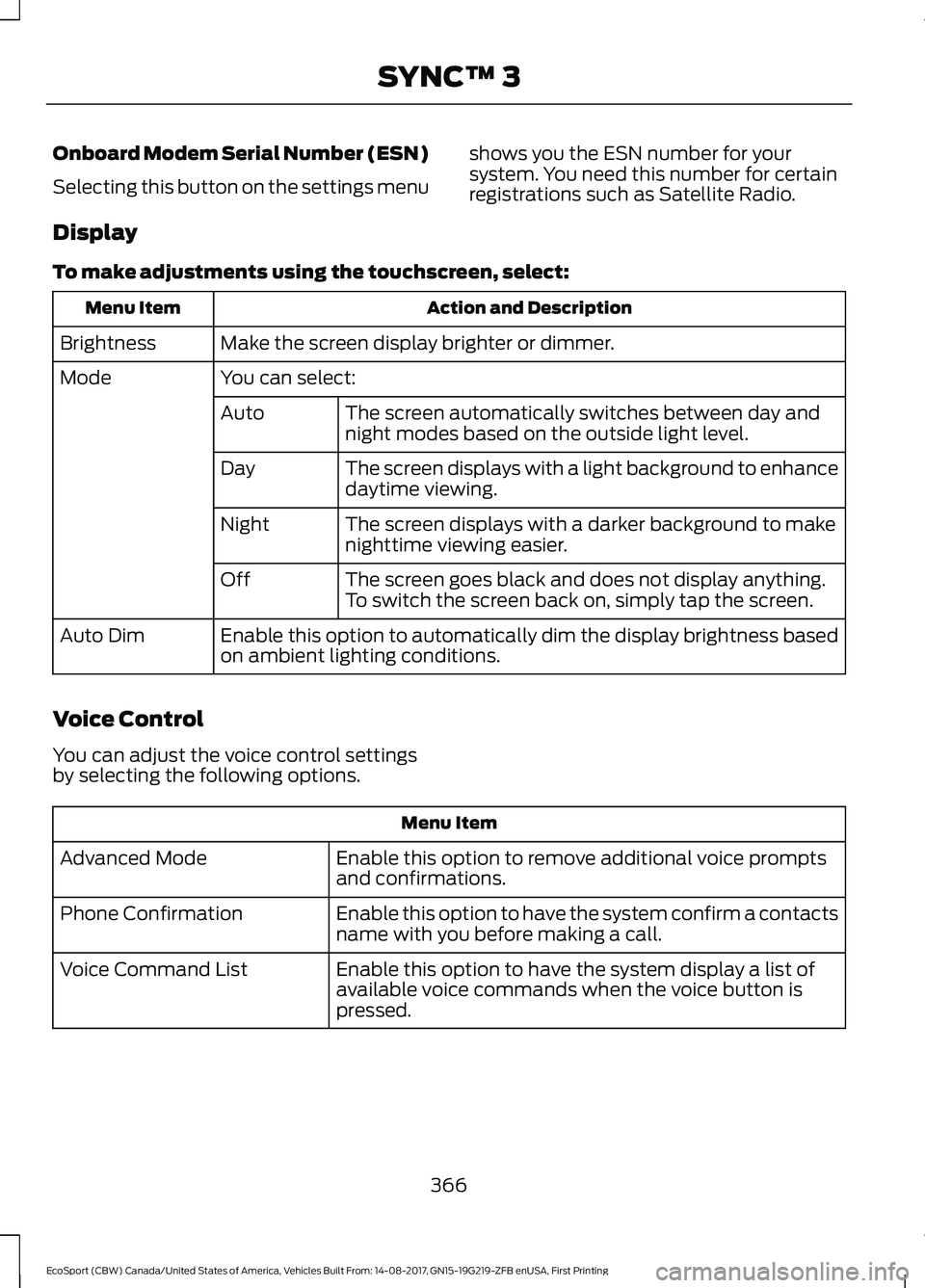
Onboard Modem Serial Number (ESN)
Selecting this button on the settings menu
shows you the ESN number for yoursystem. You need this number for certainregistrations such as Satellite Radio.
Display
To make adjustments using the touchscreen, select:
Action and DescriptionMenu Item
Make the screen display brighter or dimmer.Brightness
You can select:Mode
The screen automatically switches between day andnight modes based on the outside light level.Auto
The screen displays with a light background to enhancedaytime viewing.Day
The screen displays with a darker background to makenighttime viewing easier.Night
The screen goes black and does not display anything.To switch the screen back on, simply tap the screen.Off
Enable this option to automatically dim the display brightness basedon ambient lighting conditions.Auto Dim
Voice Control
You can adjust the voice control settingsby selecting the following options.
Menu Item
Enable this option to remove additional voice promptsand confirmations.Advanced Mode
Enable this option to have the system confirm a contactsname with you before making a call.Phone Confirmation
Enable this option to have the system display a list ofavailable voice commands when the voice button ispressed.
Voice Command List
366EcoSport (CBW) Canada/United States of America, Vehicles Built From: 14-08-2017, GN15-19G219-ZFB enUSA, First PrintingSYNC™ 3
Page 379 of 452
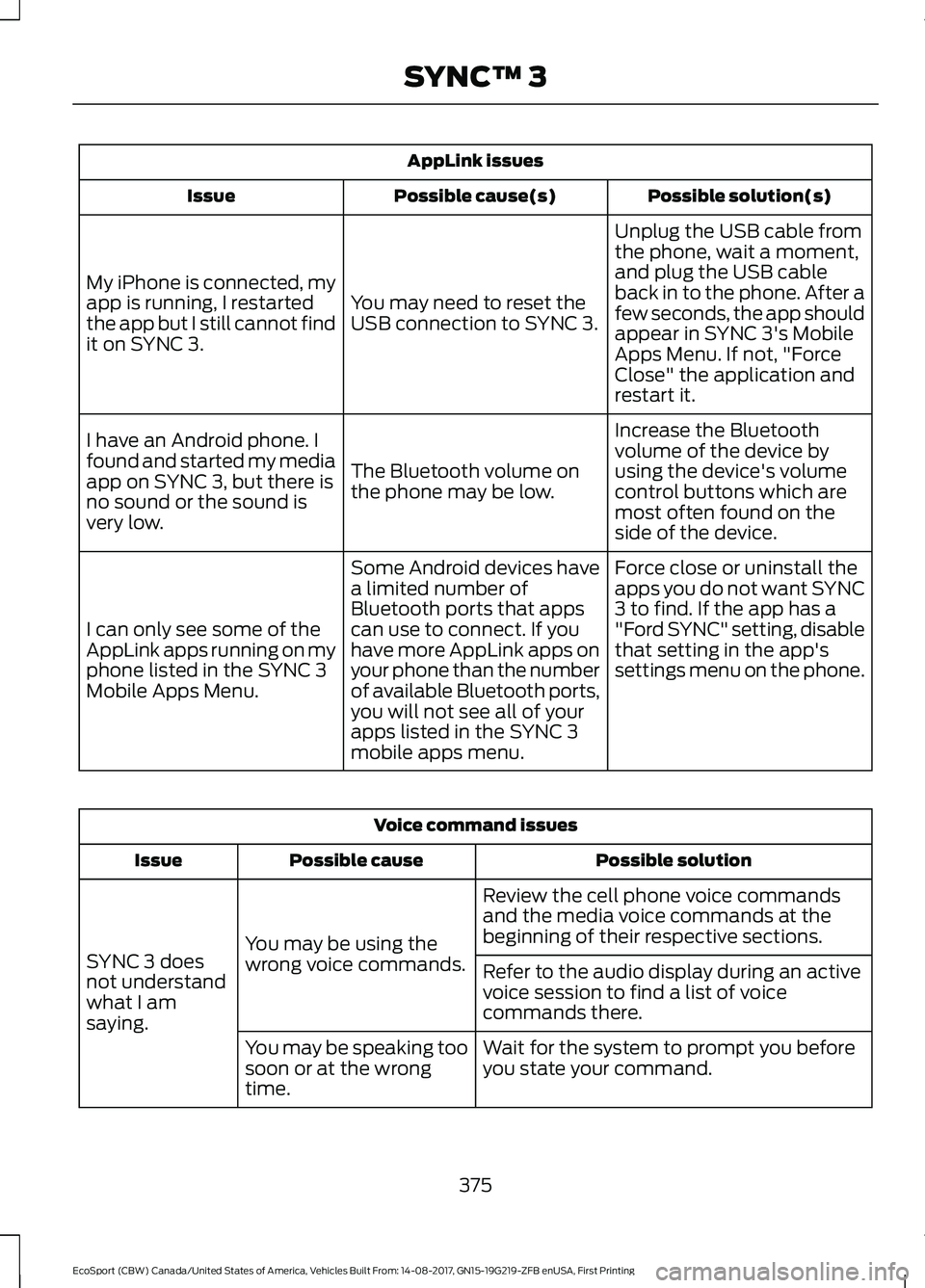
AppLink issues
Possible solution(s)Possible cause(s)Issue
Unplug the USB cable fromthe phone, wait a moment,and plug the USB cableback in to the phone. After afew seconds, the app shouldappear in SYNC 3's MobileApps Menu. If not, "ForceClose" the application andrestart it.
You may need to reset theUSB connection to SYNC 3.
My iPhone is connected, myapp is running, I restartedthe app but I still cannot findit on SYNC 3.
Increase the Bluetoothvolume of the device byusing the device's volumecontrol buttons which aremost often found on theside of the device.
The Bluetooth volume onthe phone may be low.
I have an Android phone. Ifound and started my mediaapp on SYNC 3, but there isno sound or the sound isvery low.
Force close or uninstall theapps you do not want SYNC3 to find. If the app has a"Ford SYNC" setting, disablethat setting in the app'ssettings menu on the phone.
Some Android devices havea limited number ofBluetooth ports that appscan use to connect. If youhave more AppLink apps onyour phone than the numberof available Bluetooth ports,you will not see all of yourapps listed in the SYNC 3mobile apps menu.
I can only see some of theAppLink apps running on myphone listed in the SYNC 3Mobile Apps Menu.
Voice command issues
Possible solutionPossible causeIssue
Review the cell phone voice commandsand the media voice commands at thebeginning of their respective sections.You may be using thewrong voice commands.SYNC 3 doesnot understandwhat I amsaying.
Refer to the audio display during an activevoice session to find a list of voicecommands there.
Wait for the system to prompt you beforeyou state your command.You may be speaking toosoon or at the wrongtime.
375EcoSport (CBW) Canada/United States of America, Vehicles Built From: 14-08-2017, GN15-19G219-ZFB enUSA, First PrintingSYNC™ 3
Page 380 of 452
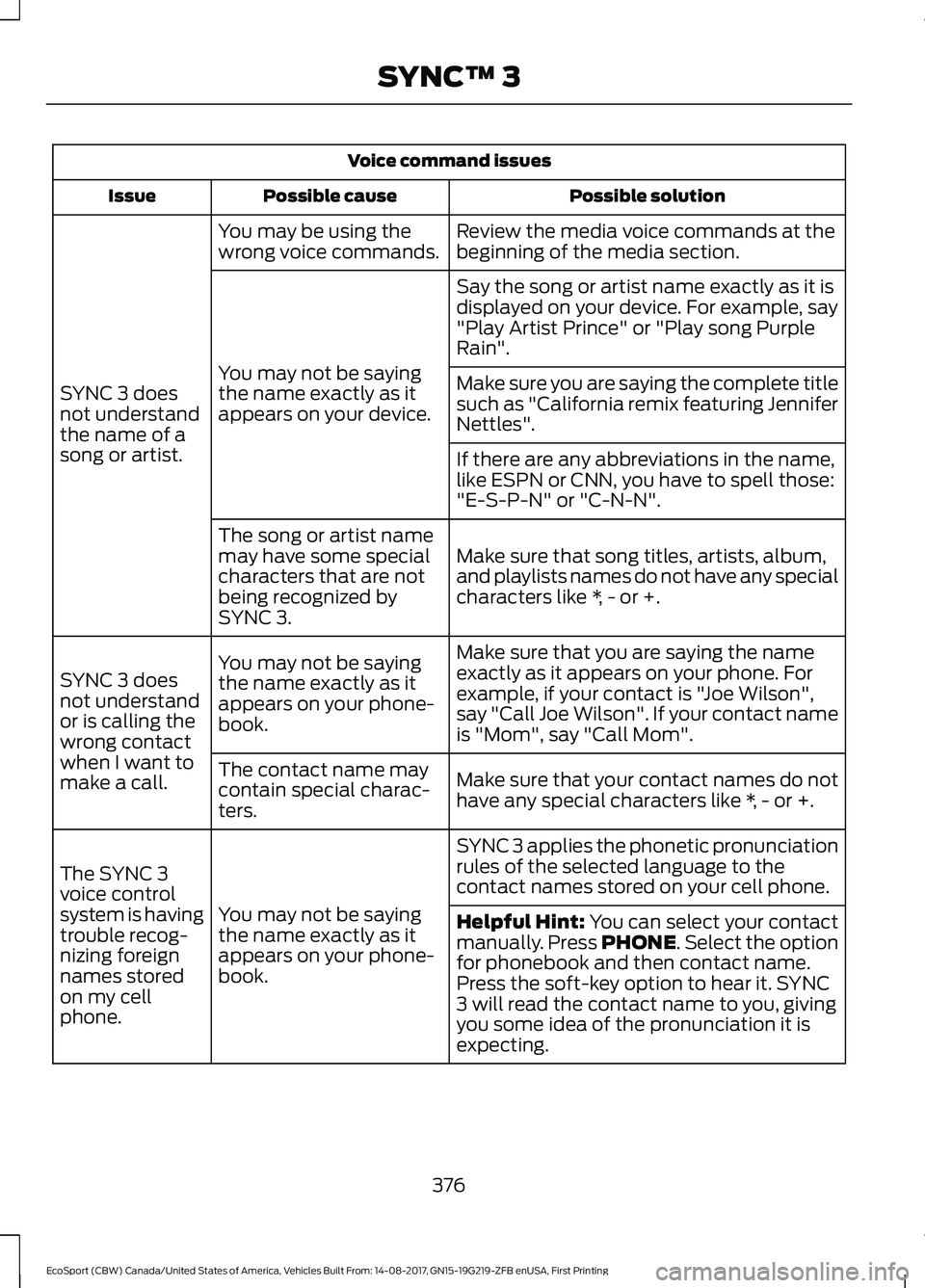
Voice command issues
Possible solutionPossible causeIssue
Review the media voice commands at thebeginning of the media section.You may be using thewrong voice commands.
SYNC 3 doesnot understandthe name of asong or artist.
Say the song or artist name exactly as it isdisplayed on your device. For example, say"Play Artist Prince" or "Play song PurpleRain".
You may not be sayingthe name exactly as itappears on your device.
Make sure you are saying the complete titlesuch as "California remix featuring JenniferNettles".
If there are any abbreviations in the name,like ESPN or CNN, you have to spell those:"E-S-P-N" or "C-N-N".
Make sure that song titles, artists, album,and playlists names do not have any specialcharacters like *, - or +.
The song or artist namemay have some specialcharacters that are notbeing recognized bySYNC 3.
Make sure that you are saying the nameexactly as it appears on your phone. Forexample, if your contact is "Joe Wilson",say "Call Joe Wilson". If your contact nameis "Mom", say "Call Mom".
You may not be sayingthe name exactly as itappears on your phone-book.
SYNC 3 doesnot understandor is calling thewrong contactwhen I want tomake a call.Make sure that your contact names do nothave any special characters like *, - or +.
The contact name maycontain special charac-ters.
SYNC 3 applies the phonetic pronunciationrules of the selected language to thecontact names stored on your cell phone.
You may not be sayingthe name exactly as itappears on your phone-book.
The SYNC 3voice controlsystem is havingtrouble recog-nizing foreignnames storedon my cellphone.
Helpful Hint: You can select your contactmanually. Press PHONE. Select the optionfor phonebook and then contact name.Press the soft-key option to hear it. SYNC3 will read the contact name to you, givingyou some idea of the pronunciation it isexpecting.
376EcoSport (CBW) Canada/United States of America, Vehicles Built From: 14-08-2017, GN15-19G219-ZFB enUSA, First PrintingSYNC™ 3
Page 382 of 452
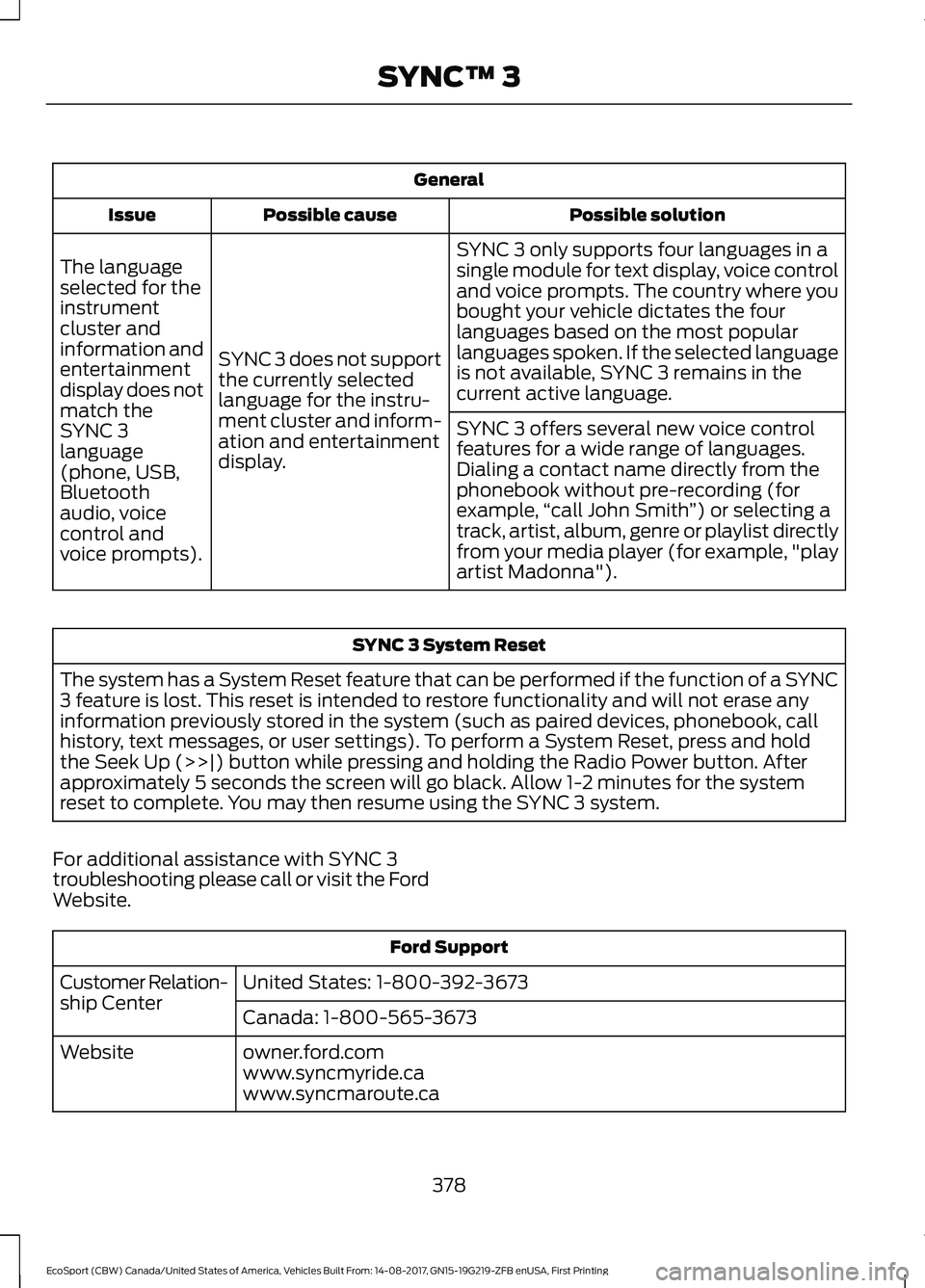
General
Possible solutionPossible causeIssue
SYNC 3 only supports four languages in asingle module for text display, voice controland voice prompts. The country where youbought your vehicle dictates the fourlanguages based on the most popularlanguages spoken. If the selected languageis not available, SYNC 3 remains in thecurrent active language.
SYNC 3 does not supportthe currently selectedlanguage for the instru-ment cluster and inform-ation and entertainmentdisplay.
The languageselected for theinstrumentcluster andinformation andentertainmentdisplay does notmatch theSYNC 3SYNC 3 offers several new voice controlfeatures for a wide range of languages.Dialing a contact name directly from thephonebook without pre-recording (forexample,“call John Smith”) or selecting atrack, artist, album, genre or playlist directlyfrom your media player (for example, "playartist Madonna").
language(phone, USB,Bluetoothaudio, voicecontrol andvoice prompts).
SYNC 3 System Reset
The system has a System Reset feature that can be performed if the function of a SYNC3 feature is lost. This reset is intended to restore functionality and will not erase anyinformation previously stored in the system (such as paired devices, phonebook, callhistory, text messages, or user settings). To perform a System Reset, press and holdthe Seek Up (>>|) button while pressing and holding the Radio Power button. Afterapproximately 5 seconds the screen will go black. Allow 1-2 minutes for the systemreset to complete. You may then resume using the SYNC 3 system.
For additional assistance with SYNC 3troubleshooting please call or visit the FordWebsite.
Ford Support
United States: 1-800-392-3673Customer Relation-ship CenterCanada: 1-800-565-3673
owner.ford.comWebsitewww.syncmyride.cawww.syncmaroute.ca
378EcoSport (CBW) Canada/United States of America, Vehicles Built From: 14-08-2017, GN15-19G219-ZFB enUSA, First PrintingSYNC™ 3
Page 387 of 452
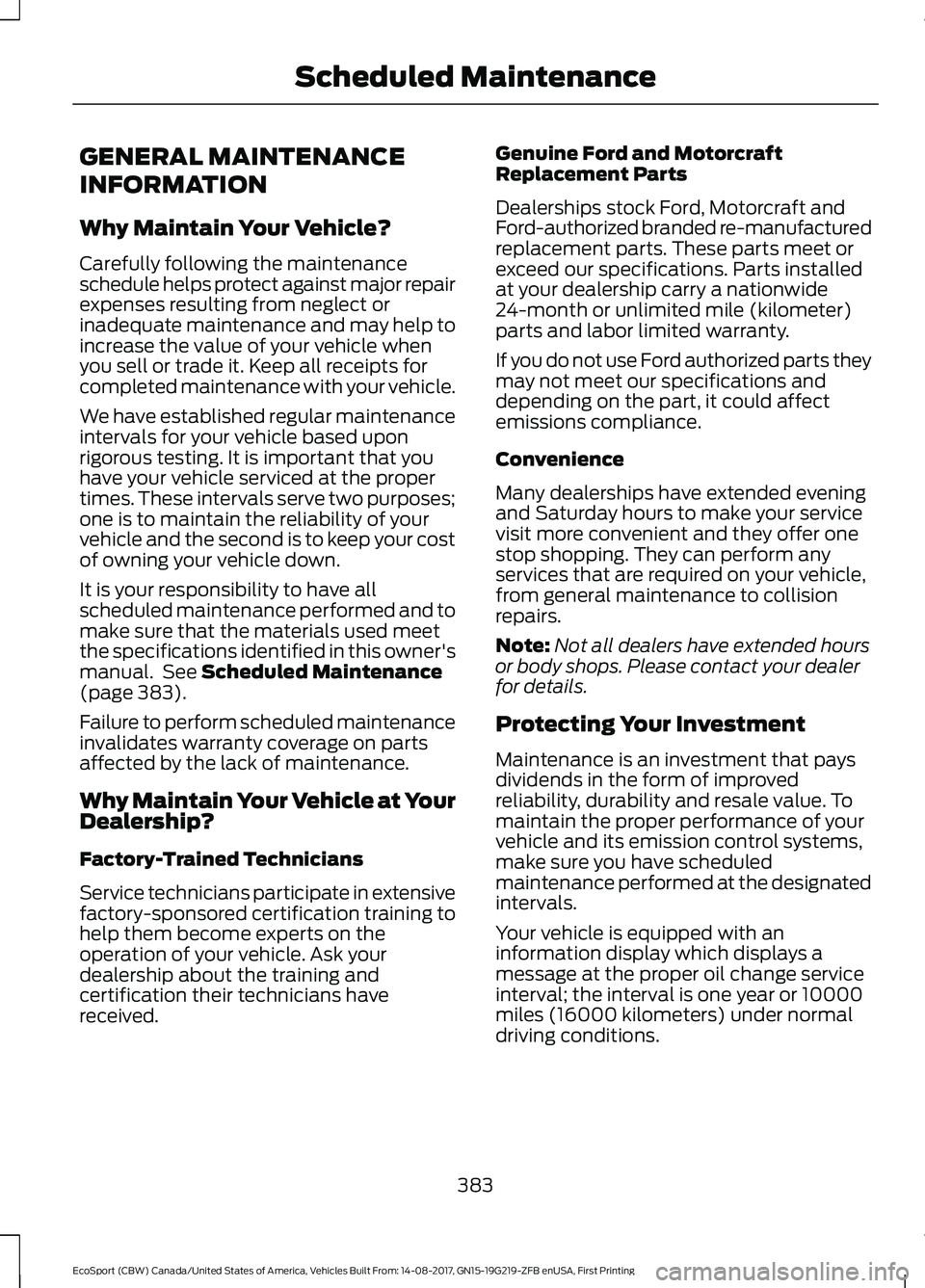
GENERAL MAINTENANCE
INFORMATION
Why Maintain Your Vehicle?
Carefully following the maintenanceschedule helps protect against major repairexpenses resulting from neglect orinadequate maintenance and may help toincrease the value of your vehicle whenyou sell or trade it. Keep all receipts forcompleted maintenance with your vehicle.
We have established regular maintenanceintervals for your vehicle based uponrigorous testing. It is important that youhave your vehicle serviced at the propertimes. These intervals serve two purposes;one is to maintain the reliability of yourvehicle and the second is to keep your costof owning your vehicle down.
It is your responsibility to have allscheduled maintenance performed and tomake sure that the materials used meetthe specifications identified in this owner'smanual. See Scheduled Maintenance(page 383).
Failure to perform scheduled maintenanceinvalidates warranty coverage on partsaffected by the lack of maintenance.
Why Maintain Your Vehicle at YourDealership?
Factory-Trained Technicians
Service technicians participate in extensivefactory-sponsored certification training tohelp them become experts on theoperation of your vehicle. Ask yourdealership about the training andcertification their technicians havereceived.
Genuine Ford and MotorcraftReplacement Parts
Dealerships stock Ford, Motorcraft andFord-authorized branded re-manufacturedreplacement parts. These parts meet orexceed our specifications. Parts installedat your dealership carry a nationwide24-month or unlimited mile (kilometer)parts and labor limited warranty.
If you do not use Ford authorized parts theymay not meet our specifications anddepending on the part, it could affectemissions compliance.
Convenience
Many dealerships have extended eveningand Saturday hours to make your servicevisit more convenient and they offer onestop shopping. They can perform anyservices that are required on your vehicle,from general maintenance to collisionrepairs.
Note:Not all dealers have extended hoursor body shops. Please contact your dealerfor details.
Protecting Your Investment
Maintenance is an investment that paysdividends in the form of improvedreliability, durability and resale value. Tomaintain the proper performance of yourvehicle and its emission control systems,make sure you have scheduledmaintenance performed at the designatedintervals.
Your vehicle is equipped with aninformation display which displays amessage at the proper oil change serviceinterval; the interval is one year or 10000miles (16000 kilometers) under normaldriving conditions.
383EcoSport (CBW) Canada/United States of America, Vehicles Built From: 14-08-2017, GN15-19G219-ZFB enUSA, First PrintingScheduled Maintenance
Page 388 of 452
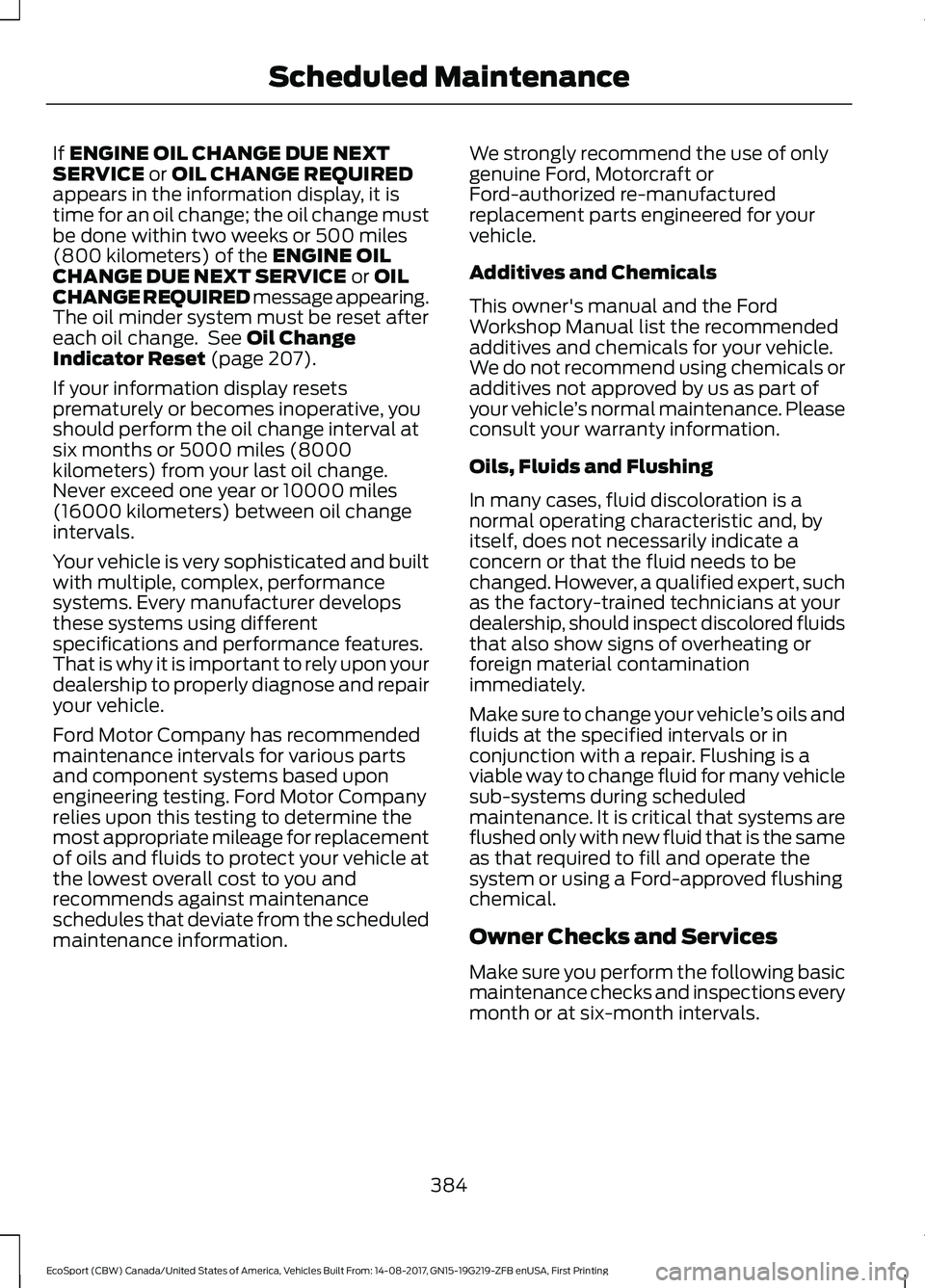
If ENGINE OIL CHANGE DUE NEXTSERVICE or OIL CHANGE REQUIREDappears in the information display, it istime for an oil change; the oil change mustbe done within two weeks or 500 miles(800 kilometers) of the ENGINE OILCHANGE DUE NEXT SERVICE or OILCHANGE REQUIRED message appearing.The oil minder system must be reset aftereach oil change. See Oil ChangeIndicator Reset (page 207).
If your information display resetsprematurely or becomes inoperative, youshould perform the oil change interval atsix months or 5000 miles (8000kilometers) from your last oil change.Never exceed one year or 10000 miles(16000 kilometers) between oil changeintervals.
Your vehicle is very sophisticated and builtwith multiple, complex, performancesystems. Every manufacturer developsthese systems using differentspecifications and performance features.That is why it is important to rely upon yourdealership to properly diagnose and repairyour vehicle.
Ford Motor Company has recommendedmaintenance intervals for various partsand component systems based uponengineering testing. Ford Motor Companyrelies upon this testing to determine themost appropriate mileage for replacementof oils and fluids to protect your vehicle atthe lowest overall cost to you andrecommends against maintenanceschedules that deviate from the scheduledmaintenance information.
We strongly recommend the use of onlygenuine Ford, Motorcraft orFord-authorized re-manufacturedreplacement parts engineered for yourvehicle.
Additives and Chemicals
This owner's manual and the FordWorkshop Manual list the recommendedadditives and chemicals for your vehicle.We do not recommend using chemicals oradditives not approved by us as part ofyour vehicle’s normal maintenance. Pleaseconsult your warranty information.
Oils, Fluids and Flushing
In many cases, fluid discoloration is anormal operating characteristic and, byitself, does not necessarily indicate aconcern or that the fluid needs to bechanged. However, a qualified expert, suchas the factory-trained technicians at yourdealership, should inspect discolored fluidsthat also show signs of overheating orforeign material contaminationimmediately.
Make sure to change your vehicle’s oils andfluids at the specified intervals or inconjunction with a repair. Flushing is aviable way to change fluid for many vehiclesub-systems during scheduledmaintenance. It is critical that systems areflushed only with new fluid that is the sameas that required to fill and operate thesystem or using a Ford-approved flushingchemical.
Owner Checks and Services
Make sure you perform the following basicmaintenance checks and inspections everymonth or at six-month intervals.
384EcoSport (CBW) Canada/United States of America, Vehicles Built From: 14-08-2017, GN15-19G219-ZFB enUSA, First PrintingScheduled Maintenance
Page 390 of 452
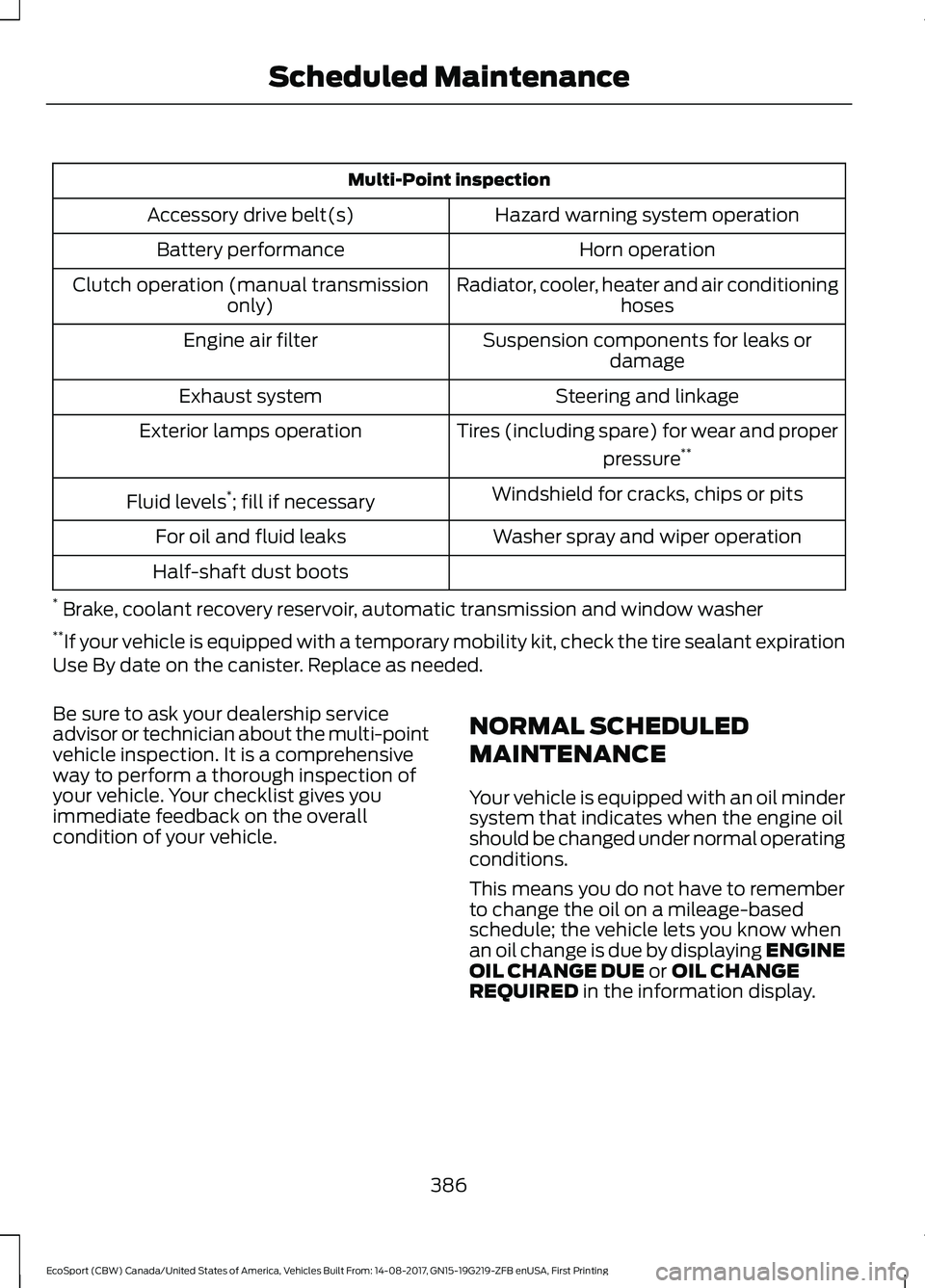
Multi-Point inspection
Hazard warning system operationAccessory drive belt(s)
Horn operationBattery performance
Radiator, cooler, heater and air conditioninghosesClutch operation (manual transmissiononly)
Suspension components for leaks ordamageEngine air filter
Steering and linkageExhaust system
Tires (including spare) for wear and proper
pressure**Exterior lamps operation
Windshield for cracks, chips or pitsFluid levels*; fill if necessary
Washer spray and wiper operationFor oil and fluid leaks
Half-shaft dust boots
* Brake, coolant recovery reservoir, automatic transmission and window washer**If your vehicle is equipped with a temporary mobility kit, check the tire sealant expirationUse By date on the canister. Replace as needed.
Be sure to ask your dealership serviceadvisor or technician about the multi-pointvehicle inspection. It is a comprehensiveway to perform a thorough inspection ofyour vehicle. Your checklist gives youimmediate feedback on the overallcondition of your vehicle.
NORMAL SCHEDULED
MAINTENANCE
Your vehicle is equipped with an oil mindersystem that indicates when the engine oilshould be changed under normal operatingconditions.
This means you do not have to rememberto change the oil on a mileage-basedschedule; the vehicle lets you know whenan oil change is due by displaying ENGINEOIL CHANGE DUE or OIL CHANGEREQUIRED in the information display.
386EcoSport (CBW) Canada/United States of America, Vehicles Built From: 14-08-2017, GN15-19G219-ZFB enUSA, First PrintingScheduled Maintenance
Page 393 of 452
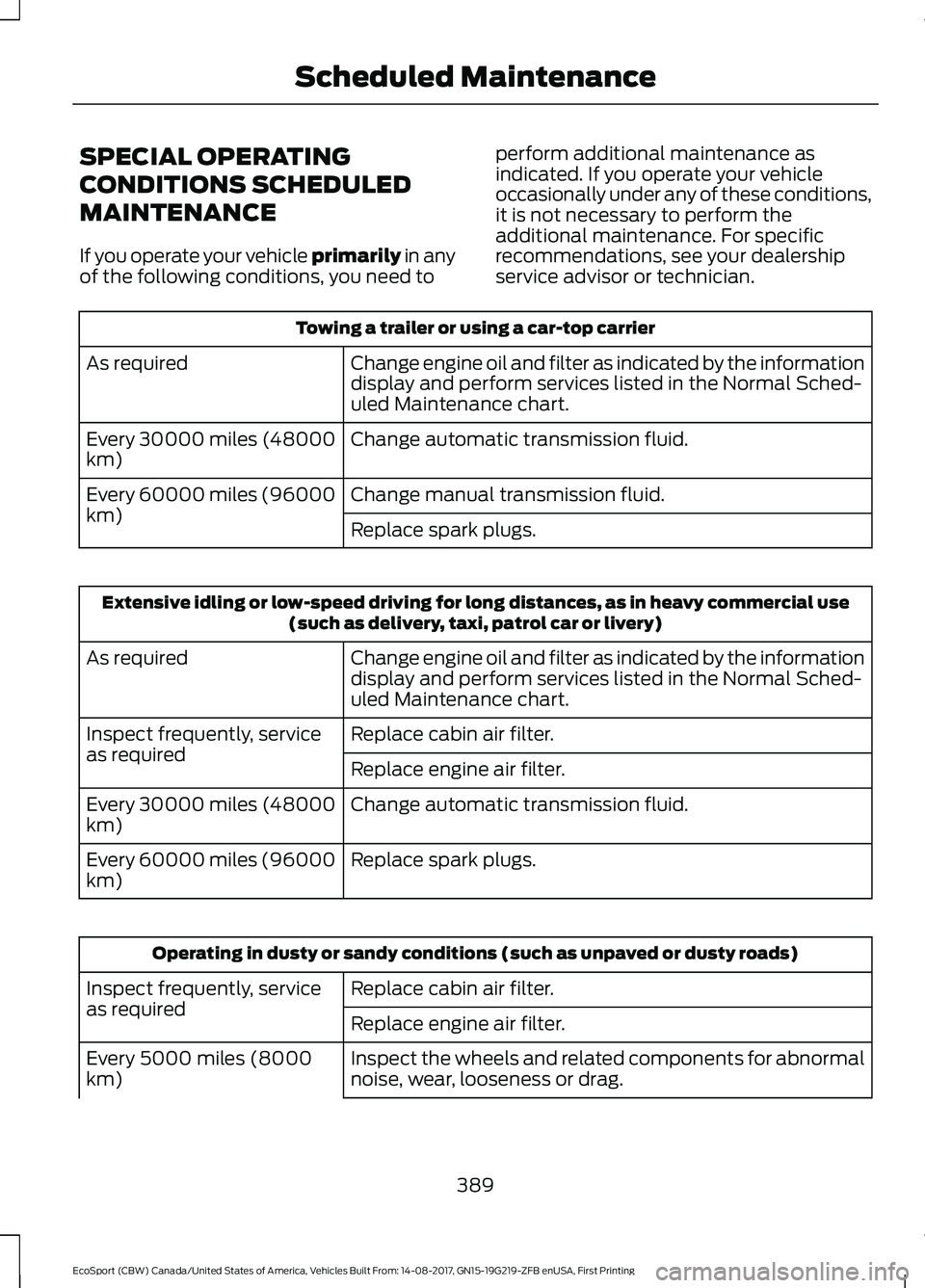
SPECIAL OPERATING
CONDITIONS SCHEDULED
MAINTENANCE
If you operate your vehicle primarily in anyof the following conditions, you need to
perform additional maintenance asindicated. If you operate your vehicleoccasionally under any of these conditions,it is not necessary to perform theadditional maintenance. For specificrecommendations, see your dealershipservice advisor or technician.
Towing a trailer or using a car-top carrier
Change engine oil and filter as indicated by the informationdisplay and perform services listed in the Normal Sched-uled Maintenance chart.
As required
Change automatic transmission fluid.Every 30000 miles (48000km)
Change manual transmission fluid.Every 60000 miles (96000km)Replace spark plugs.
Extensive idling or low-speed driving for long distances, as in heavy commercial use(such as delivery, taxi, patrol car or livery)
Change engine oil and filter as indicated by the informationdisplay and perform services listed in the Normal Sched-uled Maintenance chart.
As required
Replace cabin air filter.Inspect frequently, serviceas requiredReplace engine air filter.
Change automatic transmission fluid.Every 30000 miles (48000km)
Replace spark plugs.Every 60000 miles (96000km)
Operating in dusty or sandy conditions (such as unpaved or dusty roads)
Replace cabin air filter.Inspect frequently, serviceas requiredReplace engine air filter.
Inspect the wheels and related components for abnormalnoise, wear, looseness or drag.Every 5000 miles (8000km)
389EcoSport (CBW) Canada/United States of America, Vehicles Built From: 14-08-2017, GN15-19G219-ZFB enUSA, First PrintingScheduled Maintenance
Page 422 of 452
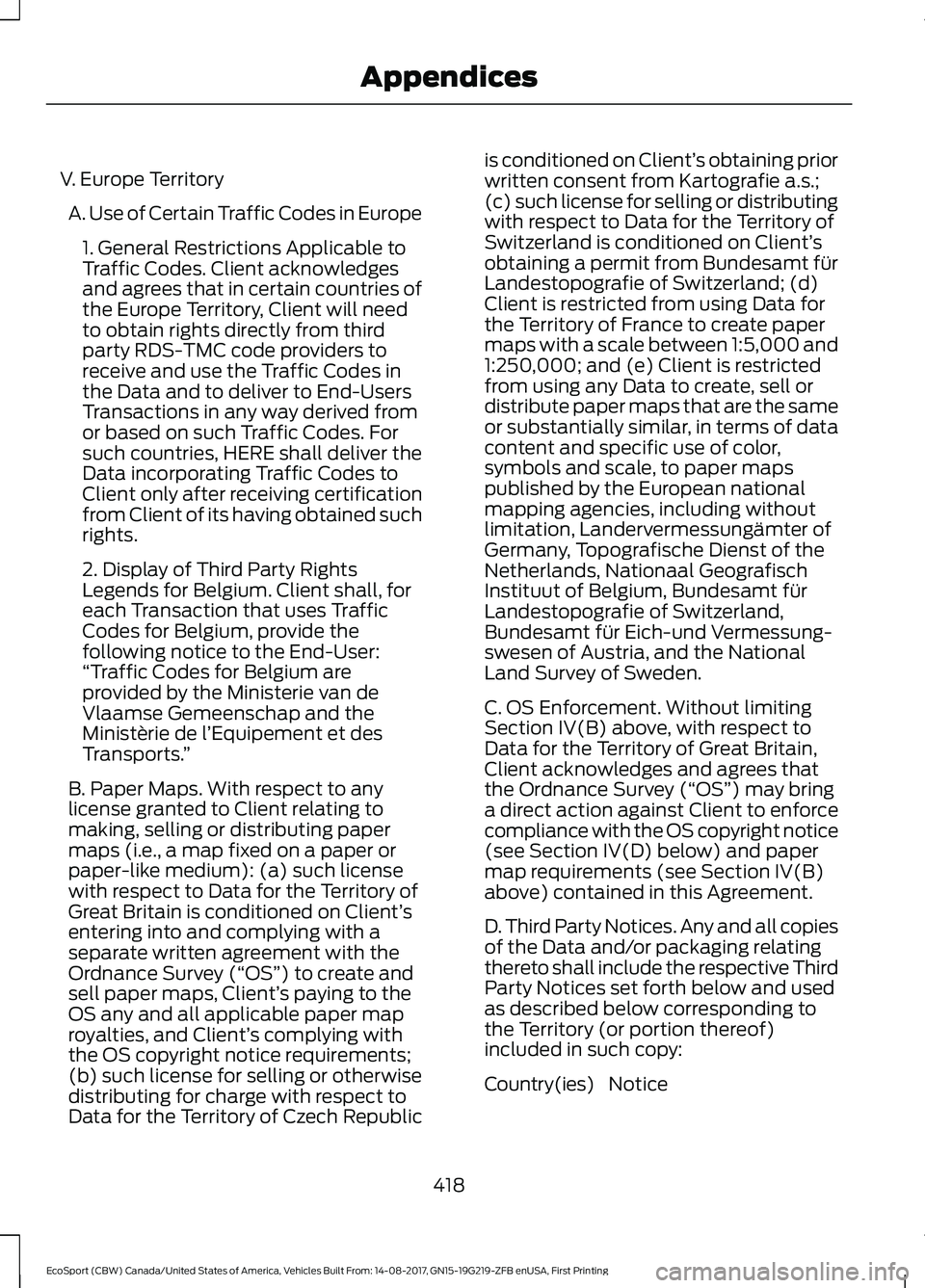
V. Europe Territory
A. Use of Certain Traffic Codes in Europe
1. General Restrictions Applicable toTraffic Codes. Client acknowledgesand agrees that in certain countries ofthe Europe Territory, Client will needto obtain rights directly from thirdparty RDS-TMC code providers toreceive and use the Traffic Codes inthe Data and to deliver to End-UsersTransactions in any way derived fromor based on such Traffic Codes. Forsuch countries, HERE shall deliver theData incorporating Traffic Codes toClient only after receiving certificationfrom Client of its having obtained suchrights.
2. Display of Third Party RightsLegends for Belgium. Client shall, foreach Transaction that uses TrafficCodes for Belgium, provide thefollowing notice to the End-User:“Traffic Codes for Belgium areprovided by the Ministerie van deVlaamse Gemeenschap and theMinistèrie de l’Equipement et desTransports.”
B. Paper Maps. With respect to anylicense granted to Client relating tomaking, selling or distributing papermaps (i.e., a map fixed on a paper orpaper-like medium): (a) such licensewith respect to Data for the Territory ofGreat Britain is conditioned on Client’sentering into and complying with aseparate written agreement with theOrdnance Survey (“OS”) to create andsell paper maps, Client’s paying to theOS any and all applicable paper maproyalties, and Client’s complying withthe OS copyright notice requirements;(b) such license for selling or otherwisedistributing for charge with respect toData for the Territory of Czech Republic
is conditioned on Client’s obtaining priorwritten consent from Kartografie a.s.;(c) such license for selling or distributingwith respect to Data for the Territory ofSwitzerland is conditioned on Client’sobtaining a permit from Bundesamt fürLandestopografie of Switzerland; (d)Client is restricted from using Data forthe Territory of France to create papermaps with a scale between 1:5,000 and1:250,000; and (e) Client is restrictedfrom using any Data to create, sell ordistribute paper maps that are the sameor substantially similar, in terms of datacontent and specific use of color,symbols and scale, to paper mapspublished by the European nationalmapping agencies, including withoutlimitation, Landervermessungämter ofGermany, Topografische Dienst of theNetherlands, Nationaal GeografischInstituut of Belgium, Bundesamt fürLandestopografie of Switzerland,Bundesamt für Eich-und Vermessung-swesen of Austria, and the NationalLand Survey of Sweden.
C. OS Enforcement. Without limitingSection IV(B) above, with respect toData for the Territory of Great Britain,Client acknowledges and agrees thatthe Ordnance Survey (“OS”) may bringa direct action against Client to enforcecompliance with the OS copyright notice(see Section IV(D) below) and papermap requirements (see Section IV(B)above) contained in this Agreement.
D. Third Party Notices. Any and all copiesof the Data and/or packaging relatingthereto shall include the respective ThirdParty Notices set forth below and usedas described below corresponding tothe Territory (or portion thereof)included in such copy:
NoticeCountry(ies)
418EcoSport (CBW) Canada/United States of America, Vehicles Built From: 14-08-2017, GN15-19G219-ZFB enUSA, First PrintingAppendices