instrument panel FORD ECOSPORT 2018 User Guide
[x] Cancel search | Manufacturer: FORD, Model Year: 2018, Model line: ECOSPORT, Model: FORD ECOSPORT 2018Pages: 452, PDF Size: 17.04 MB
Page 186 of 452
Vehicles Sold in Canada: GettingRoadside Assistance
To fully assist you should you have avehicle concern, Ford Motor Company ofCanada, Limited offers a complimentaryroadside assistance program. Thisprogram is eligible within Canada or thecontinental United States.
This program is separate from the NewVehicle Limited Warranty, but the coverageis concurrent with the powertrain coverageperiod of your vehicle.
Canadian customers who require roadsideassistance, call 1-800-665-2006.
Vehicles Sold in Canada: UsingRoadside Assistance
Complete the roadside assistanceidentification card and place it in yourwallet for quick reference.
In Canada, this card is found in theWarranty Guide in the glove compartmentof your vehicle.
Vehicles Sold in Canada: RoadsideAssistance Program Coverage
The service is available 24 hours a day,seven days a week.
Canadian roadside coverage and benefitsmay differ from the U.S. coverage.
If you require more information, pleaserefer to the coverage section of yourwarranty guide, call us in Canada at1-800-665-2006, or visit our website atwww.ford.ca.
HAZARD FLASHERS
The hazard warning button islocated on the instrument panel.
Use it when your vehicle is creating a safetyhazard for other motorists.
Press the button to turn on the hazardwarning function, and the front and reardirection indicators will flash.
Press the button again to turn them off.
Note:If used when the engine is notrunning, the battery will lose charge. Theremay be insufficient power to restart yourengine.
Note:Depending on applicable laws andregulations in the country for which yourvehicle was originally built, the hazardwarning flashers may flash if you brakeheavily.
FUEL SHUTOFF
WARNING
If your vehicle has been involved in acrash, have the fuel system checked.Failure to follow this instructioncould result in fire, personal injury or death.
In the event of a moderate to severecollision, this vehicle includes a fuel pumpshutoff feature that stops the flow of fuelto the engine. Not every impact will causea shutoff.
Should your vehicle shut off after acollision, you may restart your vehicle. Forvehicles equipped with a key system:
1.Switch off the ignition.
2.Switch to start position.
3.Switch off the ignition.
4.Switch on the ignition to re-enable thefuel pump.
For vehicles equipped with a push buttonstart system:
1.Press the START/STOP button toswitch off the ignition.
2.Press the brake pedal and press theSTART/STOP button to switch on theignition.
182EcoSport (CBW) Canada/United States of America, Vehicles Built From: 14-08-2017, GN15-19G219-ZFB enUSA, First PrintingRoadside Emergencies
Page 203 of 452
Protected componentsFuse amp ratingFuse
Start-Stop switch.
Central lock relay.20AF05Central unlock relay internal.
Power windows switches.10AF06Power sunroof switch & module inverter.
Not used.30AF07
Not used.5AF08
Electrochromic inside mirror.5AF09Overdrive off switch.Passenger Airbag detection ON / OFF.
Smart data link connector.10AF10
Telematic control unit (embeddedmodem).5AF11
Not used.-F12
Driver unlock relay.15AF13
Not used.30AF14
Extended power module relay starter.15AF15
Not used.15AF16
SYNC.15AF17Mini electronic finish panel.
Not used.7.5AF18
Not used.7.5AF19
Security Horn.10AF20
Climate Control Head.7.5AF21
Steering column control module.7.5AF22Smart data link logic.Instrument cluster.
Audio control module.20AF23
Extended power mode module.20AF24
Not used.30AF25
199EcoSport (CBW) Canada/United States of America, Vehicles Built From: 14-08-2017, GN15-19G219-ZFB enUSA, First PrintingFuses
Page 236 of 452
•Spray Motorcraft Engine Shampoo andDegreaser on all parts that requirecleaning and pressure rinse clean. InCanada, use Motorcraft EngineShampoo.
•Never wash or rinse the engine while itis hot or running; water in the runningengine may cause internal damage.
•Never wash or rinse any ignition coil,spark plug wire or spark plug well, orthe area in and around these locations.
•Cover the battery, power distributionbox, and air filter assembly to preventwater damage when cleaning theengine.
CLEANING THE WINDOWS AND
WIPER BLADES
Car wash chemicals and environmentalfallout can result in windshield and wiperblade contamination. Dirty windshield andwipers will result in poor windshield wiperoperation. Keep the windshield and wiperblades clean to maintain windshield wiperperformance.
To clean the windshield and wiper blades:
•Clean the windshield with anon-abrasive glass cleaner. Whencleaning the interior of the windshield,avoid getting any glass cleaner on theinstrument panel or door panels. Wipeany glass cleaner off these surfacesimmediately.
•For windshields contaminated withtree sap, chemicals, wax or bugs, cleanthe entire windshield using steel wool(no greater than 0000 grade) in acircular motion and rinse with water.
•Clean the wiper blades with isopropylrubbing alcohol or windshield washerconcentrate.
Note: Do not use razor blades or othersharp objects to clean or remove decalsfrom the inside of the heated rear window.The vehicle warranty does not coverdamage caused to the heated rear windowgrid lines.
CLEANING THE INTERIOR
WARNINGS
Do not use cleaning solvents, bleachor dye on the vehicle's seatbelts, asthese actions may weaken the beltwebbing.
On vehicles equipped withseat-mounted airbags, do not usechemical solvents or strongdetergents. Such products couldcontaminate the side airbag system andaffect performance of the side airbag in acrash.
For fabric, carpets, cloth seats and seatsequipped with side airbags:
•Remove dust and loose dirt with avacuum cleaner.
•Remove light stains and soil withMotorcraft Professional StrengthCarpet & Upholstery Cleaner.
•If grease or tar is present on thematerial, spot-clean the area first withMotorcraft Spot and Stain Remover. InCanada, use Motorcraft Multi-PurposeCleaner.
•If a ring forms on the fabric after spotcleaning, clean the entire areaimmediately (but do not oversaturate)or the ring will set.
•Do not use household cleaningproducts or glass cleaners, which canstain and discolor the fabric and affectthe flame retardant abilities of the seatmaterials.
232EcoSport (CBW) Canada/United States of America, Vehicles Built From: 14-08-2017, GN15-19G219-ZFB enUSA, First PrintingVehicle Care
Page 237 of 452
CLEANING THE INSTRUMENT
PANEL AND INSTRUMENT
CLUSTER LENS
WARNING
Do not use chemical solvents orstrong detergents when cleaning thesteering wheel or instrument panelto avoid contamination of the airbagsystem.
Note:Follow the same procedure ascleaning leather seats for cleaning leatherinstrument panels and leather interior trimsurfaces. See Cleaning Leather Seats(page 233).
Clean the instrument panel and clusterlens with a clean, damp and soft cloth,then use a clean, dry and soft cloth to drythese areas.
•Avoid cleaners or polishes that increasethe gloss of the upper portion of theinstrument panel. The dull finish in thisarea helps protect you fromundesirable windshield reflection.
•Do not use any household cleaningproducts or glass cleaners as thesemay damage the finish of theinstrument panel, interior trim andcluster lens.
•Wash or wipe your hands clean if youhave been in contact with certainproducts such as insect repellent andsuntan lotion to avoid possible damageto the interior painted surfaces.
•Do not allow air fresheners and handsanitizers to spill onto interior surfaces.If a spill occurs, wipe off immediately.Your warranty may not cover thesedamages.
If a staining liquid like coffee or juice hasbeen spilled on the instrument panel or oninterior trim surfaces:
1.Wipe up spilled liquid using a clean,soft cloth as quickly as possible.
2.Use Motorcraft Premium Leather andVinyl Cleaner or a commerciallyavailable leather cleaning product forautomotive interiors. Test any cleaneror stain remover on an inconspicuousarea.
3.Alternatively, wipe the surface with aclean, soft cloth and a mild soap andwater solution. Dry the area with aclean, soft cloth.
4.If necessary, apply more soap andwater solution or cleaning product toa clean, soft cloth and press it onto thesoiled area. Allow this to set at roomtemperature for 30 minutes.
5.Remove the soaked cloth, then with aclean, damp cloth, use a rubbingmotion for 60 seconds on the soiledarea.
6.Dry the area with a clean, soft cloth.
CLEANING LEATHER SEATS (If
Equipped)
Note:Follow the same procedure ascleaning leather seats for cleaning leatherinstrument panels and leather interior trimsurfaces.
For routine cleaning, wipe the surface witha soft, damp cloth and a mild soap andwater solution. Dry the area with a clean,soft cloth.
For cleaning and removing stains such asdye transfer, use Motorcraft PremiumLeather and Vinyl Cleaner or acommercially available leather cleaningproduct for automotive interiors.
Note:Test any cleaner or stain remover onan inconspicuous area.
233EcoSport (CBW) Canada/United States of America, Vehicles Built From: 14-08-2017, GN15-19G219-ZFB enUSA, First PrintingVehicle Care
Page 246 of 452
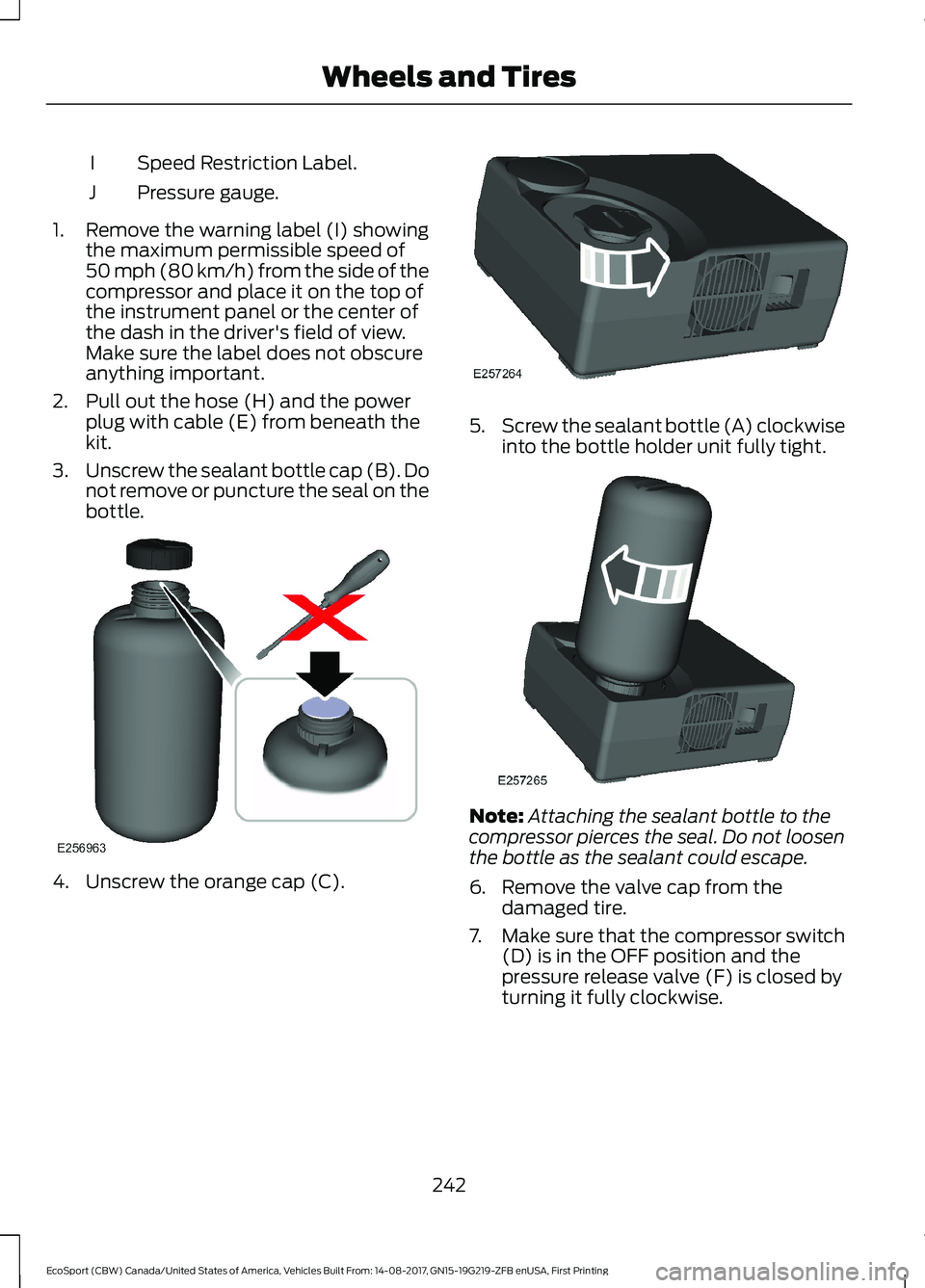
Speed Restriction Label.I
Pressure gauge.J
1.Remove the warning label (I) showingthe maximum permissible speed of50 mph (80 km/h) from the side of thecompressor and place it on the top ofthe instrument panel or the center ofthe dash in the driver's field of view.Make sure the label does not obscureanything important.
2.Pull out the hose (H) and the powerplug with cable (E) from beneath thekit.
3.Unscrew the sealant bottle cap (B). Donot remove or puncture the seal on thebottle.
4.Unscrew the orange cap (C).
5.Screw the sealant bottle (A) clockwiseinto the bottle holder unit fully tight.
Note:Attaching the sealant bottle to thecompressor pierces the seal. Do not loosenthe bottle as the sealant could escape.
6.Remove the valve cap from thedamaged tire.
7.Make sure that the compressor switch(D) is in the OFF position and thepressure release valve (F) is closed byturning it fully clockwise.
242EcoSport (CBW) Canada/United States of America, Vehicles Built From: 14-08-2017, GN15-19G219-ZFB enUSA, First PrintingWheels and Tires
Page 281 of 452
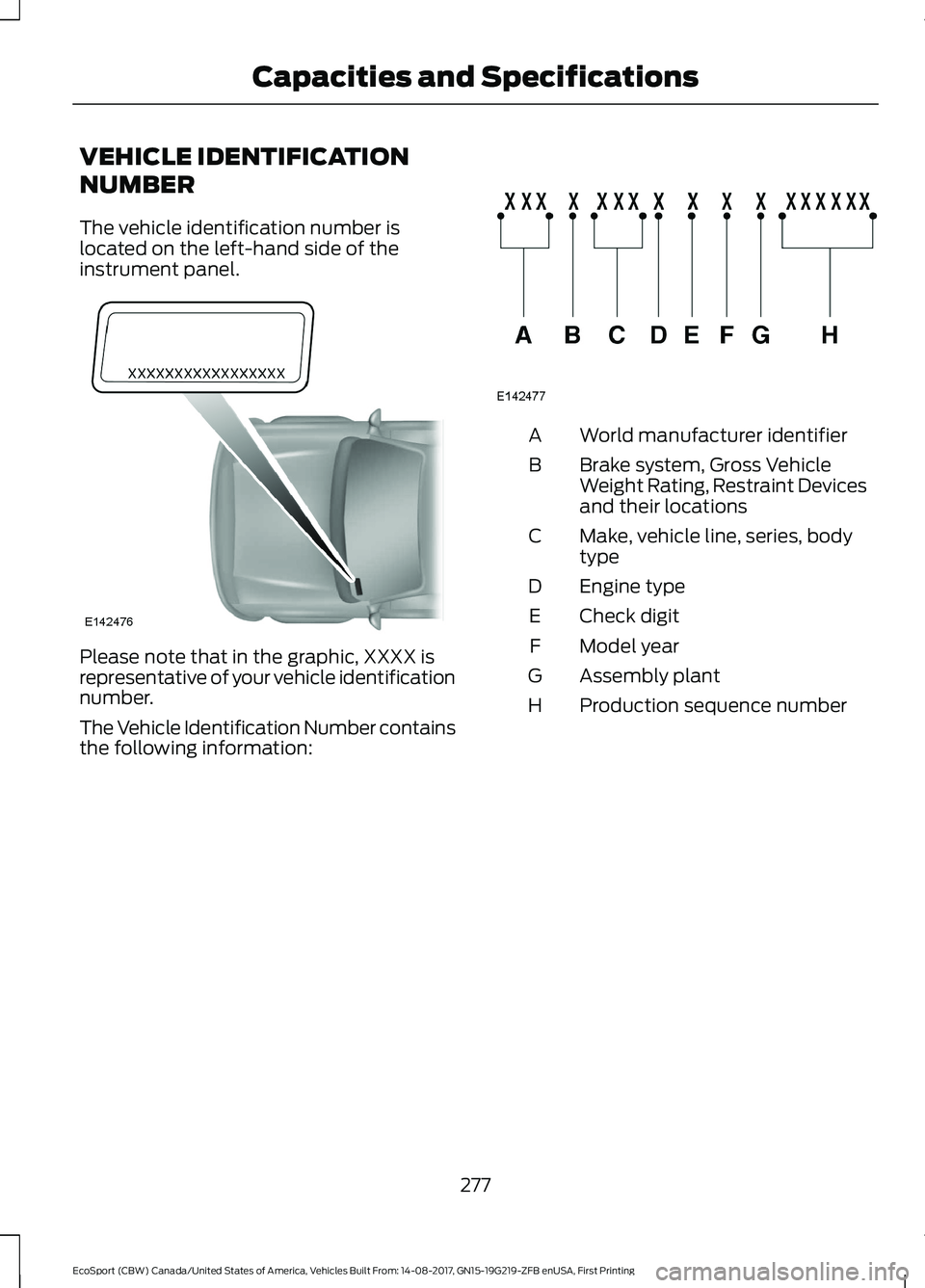
VEHICLE IDENTIFICATION
NUMBER
The vehicle identification number islocated on the left-hand side of theinstrument panel.
Please note that in the graphic, XXXX isrepresentative of your vehicle identificationnumber.
The Vehicle Identification Number containsthe following information:
World manufacturer identifierA
Brake system, Gross VehicleWeight Rating, Restraint Devicesand their locations
B
Make, vehicle line, series, bodytypeC
Engine typeD
Check digitE
Model yearF
Assembly plantG
Production sequence numberH
277EcoSport (CBW) Canada/United States of America, Vehicles Built From: 14-08-2017, GN15-19G219-ZFB enUSA, First PrintingCapacities and Specifications
Page 315 of 452
Cleaning the Touchscreen
You can remove fingerprints with a dry,clean, soft cloth.
If dirt or fingerprints are still on the screen,apply a small amount of alcohol to thecloth and try to clean it again.
Note: Do not use detergent or any type ofsolvent to clean the touchscreen.
Note:Do not pour or spray alcohol onto thetouchscreen.
Using Voice Recognition
Using voice commands allows you to keepyour hands on the wheel and eyes on theroad. The system provides feedbackthrough audible tones, prompts, questionsand spoken confirmations depending onthe situation and the chosen level ofinteraction (voice settings).
The system also asks short questions(confirmation prompts) when it is not sureof your request or when there are multiplepossible responses to your request.
When using voice commands, words andicons may appear in the status barindicating the status of the voice commandsession. See Using Voice Recognition(page 291).
Using the Steering Wheel Controls
Depending on your vehicle and optionpackage, you can use different controls onyour steering wheel to interact with thetouchscreen system in different ways.
VOL: Control the volume of audio output.
Voice: Press to start a voice session. Pressagain to stop the voice prompt andimmediately begin speaking. Press andhold to end a voice session.
SEEK NEXT:
•While in radio mode, press to seekbetween memory presets or press andhold to fast seek.
•While in USB, Bluetooth Audio or CDmode, press to seek between songs orpress and hold to fast seek.
SEEK PREVIOUS:
•While in radio mode, press to seekbetween memory presets or press andhold to fast seek.
•While in USB, Bluetooth Audio or CDmode, press to seek between songs orpress and hold to fast seek.
PHONE ACCEPT: Press to answer a callor switch between calls.
PHONE REJECT: Press to end a call orreject an incoming call.
Note:On some models,SEEK NEXT maybe combined with PHONE REJECT andSEEK PREVIOUS may be combined withPHONE ACCEPT.
See Steering Wheel (page 65).
Using Your Bezel Controls
Depending on your vehicle and optionpackage, you may also have these controlson your instrument panel:
•Power or VOL: Press to switch theaudio system on and off, or turn toadjust the volume.
•Sound Settings: Press to access theaudio settings.
•Seek: Press to seek through radiostations or audio tracks.
•Play or Pause: Press to either play orpause a track.
•Tune: Turn to manually tune radiostations.
•Display: Press to switch the display onor off.
311EcoSport (CBW) Canada/United States of America, Vehicles Built From: 14-08-2017, GN15-19G219-ZFB enUSA, First PrintingSYNC™ 3
Page 338 of 452
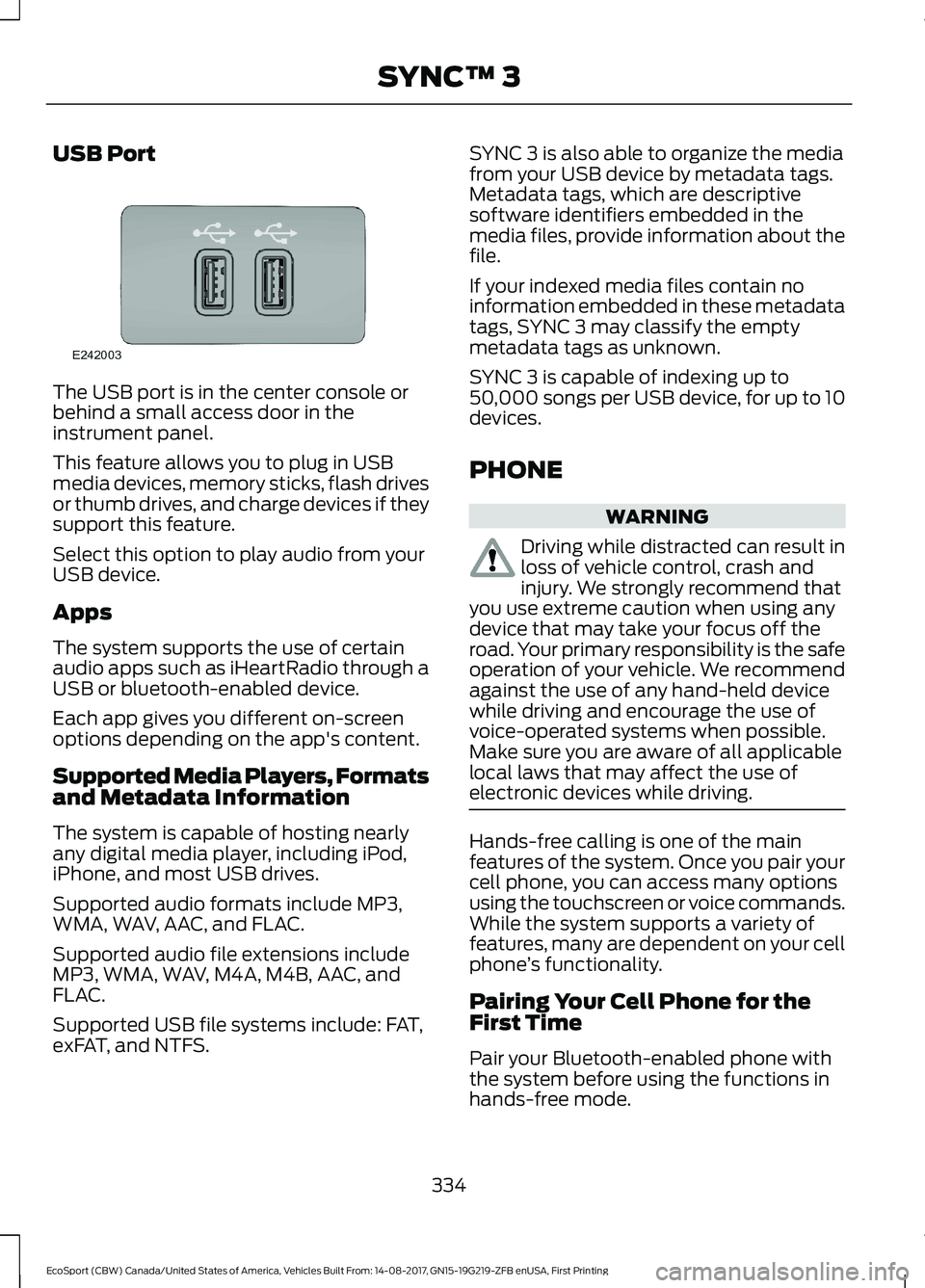
USB Port
The USB port is in the center console orbehind a small access door in theinstrument panel.
This feature allows you to plug in USBmedia devices, memory sticks, flash drivesor thumb drives, and charge devices if theysupport this feature.
Select this option to play audio from yourUSB device.
Apps
The system supports the use of certainaudio apps such as iHeartRadio through aUSB or bluetooth-enabled device.
Each app gives you different on-screenoptions depending on the app's content.
Supported Media Players, Formatsand Metadata Information
The system is capable of hosting nearlyany digital media player, including iPod,iPhone, and most USB drives.
Supported audio formats include MP3,WMA, WAV, AAC, and FLAC.
Supported audio file extensions includeMP3, WMA, WAV, M4A, M4B, AAC, andFLAC.
Supported USB file systems include: FAT,exFAT, and NTFS.
SYNC 3 is also able to organize the mediafrom your USB device by metadata tags.Metadata tags, which are descriptivesoftware identifiers embedded in themedia files, provide information about thefile.
If your indexed media files contain noinformation embedded in these metadatatags, SYNC 3 may classify the emptymetadata tags as unknown.
SYNC 3 is capable of indexing up to50,000 songs per USB device, for up to 10devices.
PHONE
WARNING
Driving while distracted can result inloss of vehicle control, crash andinjury. We strongly recommend thatyou use extreme caution when using anydevice that may take your focus off theroad. Your primary responsibility is the safeoperation of your vehicle. We recommendagainst the use of any hand-held devicewhile driving and encourage the use ofvoice-operated systems when possible.Make sure you are aware of all applicablelocal laws that may affect the use ofelectronic devices while driving.
Hands-free calling is one of the mainfeatures of the system. Once you pair yourcell phone, you can access many optionsusing the touchscreen or voice commands.While the system supports a variety offeatures, many are dependent on your cellphone’s functionality.
Pairing Your Cell Phone for theFirst Time
Pair your Bluetooth-enabled phone withthe system before using the functions inhands-free mode.
334EcoSport (CBW) Canada/United States of America, Vehicles Built From: 14-08-2017, GN15-19G219-ZFB enUSA, First PrintingSYNC™ 3
Page 441 of 452
Side Repeater......................................................222Vanity lamp..........................................................225Changing a Fuse..........................................200Fuses......................................................................200Changing a Road Wheel...........................265Dissimilar Spare Wheel and Tire AssemblyInformation.....................................................265Installing a Road Wheel..................................269Jacking and Lifting Points..............................268Removing a Road Wheel................................268Vehicle Jack..........................................................267Vehicles With a Spare Wheel.......................266Changing the 12V Battery..........................213Remove and Reinstall the Battery...............214Changing the Engine Air Filter.................227Changing the Air Filter Element....................227Changing the Wiper Blades......................215Rear Window Wiper Blade..............................215Windshield Wiper Blades.................................215Checking MyKey System Status...............52MyKey Distance.....................................................52Number of Admin Keys......................................53Number of MyKeys...............................................52Checking the Wiper Blades.......................215Child Restraint and SeatbeltMaintenance.................................................34Child Restraint Positioning.........................25Child Safety.......................................................16General Information.............................................16Child Safety Locks.........................................26Rear Left-Hand Door..........................................26Rear Right-Hand Door........................................27Cleaning Leather Seats.............................233Cleaning Products.......................................229Cleaning the Engine.....................................231Cleaning the Exterior..................................230Cleaning the Headlamps................................230Exterior Chrome Parts.....................................230Exterior Plastic Parts.........................................231Stripes or Graphics.............................................231Underbody.............................................................231Under Hood...........................................................231Cleaning the Instrument Panel andInstrument Cluster Lens.........................233Cleaning the Interior....................................232Cleaning the Wheels..................................234Cleaning the Windows and WiperBlades............................................................232
Clearing All MyKeys.......................................52Climate Control..............................................98Principle of Operation........................................98Cold Weather Precautions........................178Coolant CheckSee: Engine Coolant Check...........................208Cool Box.............................................................117Crash Sensors and Airbag Indicator........43Creating a MyKey.............................................51Vehicles With a Key..............................................51Vehicles With Push-Button Start....................51Cross Traffic Alert.........................................159Blocked Sensors..................................................161Switching the System Off and On................161System Errors........................................................161System Lights, Messages and AudibleAlerts...................................................................161System Limitations.............................................161Using the Cross Traffic Alert System..........159Cruise Control.................................................66Principle of Operation.......................................156Cruise controlSee: Using Cruise Control................................156Customer Assistance.................................186
D
Data Recording..................................................9Event Data Recording..........................................10Service Data Recording........................................9Daytime Running Lamps.............................73Type 1 - Conventional (Non-Configurable)....................................................73Type 2 - Configurable..........................................73Direction Indicators........................................74Doors and Locks.............................................54Drive Belt Routing - 1.0LEcoBoost™.................................................228Drive Belt Routing - 2.0L...........................228Driver and Passenger Airbags....................37Children and Airbags..........................................38Proper Driver and Front Passenger SeatingAdjustment........................................................37Driver and Passenger Knee Airbags.........41Driving Aids.....................................................158Driving Hints....................................................178Driving Through Water................................178
437EcoSport (CBW) Canada/United States of America, Vehicles Built From: 14-08-2017, GN15-19G219-ZFB enUSA, First PrintingIndex
Page 443 of 452
Fuel Quality - Gasoline................................127Choosing the Right Fuel...................................127Fuel Shutoff....................................................182Fuse Box Locations......................................193Battey Fuse Box..................................................193Engine Compartment Fuse Box....................193Passenger Compartment Fuse Box............193Fuses.................................................................193Fuse Specification Chart...........................193Battery Fuse Box...............................................200Engine Compartment Fuse Box....................194Passenger Compartment Fuse Box............198
G
Gauges...............................................................80Engine Coolant Temperature Gauge.............81Fuel Gauge...............................................................81Information Display............................................80GearboxSee: Transmission..............................................138General Information on RadioFrequencies...................................................45General Maintenance Information.......383Multi-Point Inspection.....................................385Owner Checks and Services.........................384Protecting Your Investment...........................383Why Maintain Your Vehicle?.........................383Why Maintain Your Vehicle at YourDealership?.....................................................383Getting Assistance Outside the U.S. andCanada..........................................................189Getting the Services You Need...............186Away From Home..............................................186Glasses Holder................................................117
H
HandbrakeSee: Parking Brake..............................................147Hazard Flashers............................................182Headlamp AdjustingSee: Adjusting the Headlamps......................216Headlamp Exit Delay.....................................72Headlamp RemovalSee: Removing a Headlamp............................217HeadrestSee: Head Restraints........................................104
Head Restraints............................................104Adjusting the Head Restraint.........................105Heated Exterior Mirrors..............................103Windshield Wiper De-icer...............................103Heated Rear Window - Vehicles With:Electronic Automatic TemperatureControl (EATC)...........................................103Heated Rear Window - Vehicles With:Electronic Manual TemperatureControl (EMTC)..........................................103Heated Seats...................................................114Heated Steering Wheel...............................66HeatingSee: Climate Control..........................................98Hill Start Assist..............................................147Switching the System On and Off...............148Using Hill Start Assist.......................................148Hints on Controlling the Interior Climate- Vehicles With: Electronic AutomaticTemperature Control (EATC).................101Defogging the Side Windows in ColdWeather..............................................................101General Hints........................................................101Maximum Cooling Using the InstrumentPanel and Footwell Air Vents...................102Quickly Cooling the Interior.............................101Quickly Heating the Interior.............................101Recommended Settings for Cooling...........101Recommended Settings for Heating...........101Hints on Controlling the Interior Climate- Vehicles With: Electronic ManualTemperature Control (EMTC)..............102Defogging the Side Windows in ColdWeather.............................................................102General Hints.......................................................102Maximum Cooling Using the InstrumentPanel and Footwell Air Vents...................102Quickly Cooling the Interior............................102Quickly Heating the Interior............................102Recommended Settings for Cooling...........102Recommended Settings for Heating..........102Hints on Driving With Anti-LockBrakes............................................................146Home Screen..................................................317Hood LockSee: Opening and Closing the Hood..........202
439EcoSport (CBW) Canada/United States of America, Vehicles Built From: 14-08-2017, GN15-19G219-ZFB enUSA, First PrintingIndex