remote control FORD ECOSPORT 2018 User Guide
[x] Cancel search | Manufacturer: FORD, Model Year: 2018, Model line: ECOSPORT, Model: FORD ECOSPORT 2018Pages: 452, PDF Size: 17.04 MB
Page 60 of 452
Autounlock
Autounlock unlocks all the doors when allof the following occur:
•The ignition is on, all the doors areclosed, and your vehicle has beenmoving at a speed greater than12.4 mph (20 km/h).
•Your vehicle comes to a stop and youswitch the ignition off or to theaccessory position.
•You open the driver door within 10minutes of switching the ignition off orto accessory.
Note:If you electronically lock your vehicleafter you switch the ignition off with thedriver door closed, the doors will notautounlock.
You can switch this feature on or off in theinformation display. See InformationDisplays (page 85).
Smart Unlock
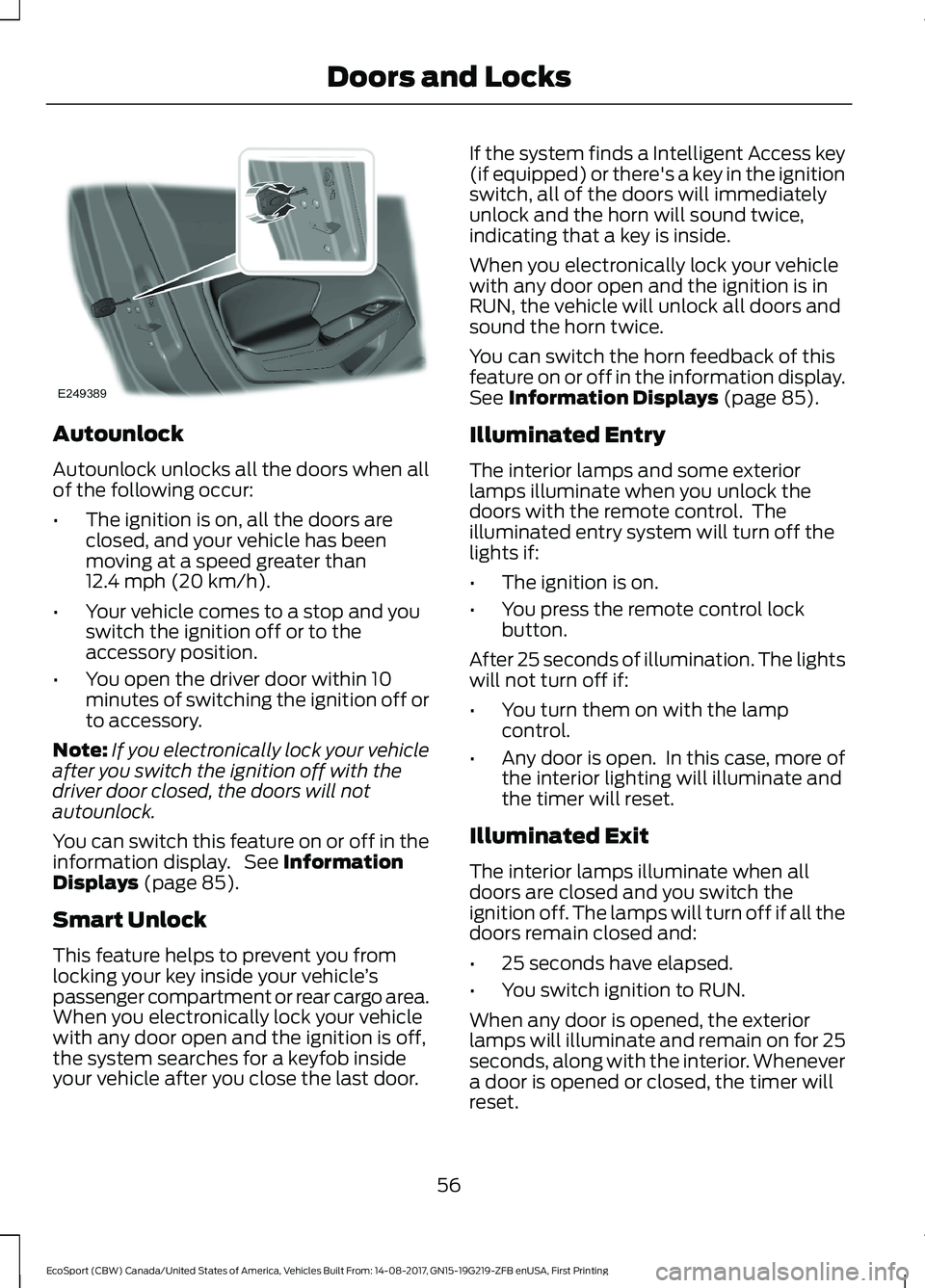
This feature helps to prevent you fromlocking your key inside your vehicle’spassenger compartment or rear cargo area.When you electronically lock your vehiclewith any door open and the ignition is off,the system searches for a keyfob insideyour vehicle after you close the last door.
If the system finds a Intelligent Access key(if equipped) or there's a key in the ignitionswitch, all of the doors will immediatelyunlock and the horn will sound twice,indicating that a key is inside.
When you electronically lock your vehiclewith any door open and the ignition is inRUN, the vehicle will unlock all doors andsound the horn twice.
You can switch the horn feedback of thisfeature on or off in the information display.See Information Displays (page 85).
Illuminated Entry
The interior lamps and some exteriorlamps illuminate when you unlock thedoors with the remote control. Theilluminated entry system will turn off thelights if:
•The ignition is on.
•You press the remote control lockbutton.
After 25 seconds of illumination. The lightswill not turn off if:
•You turn them on with the lampcontrol.
•Any door is open. In this case, more ofthe interior lighting will illuminate andthe timer will reset.
Illuminated Exit
The interior lamps illuminate when alldoors are closed and you switch theignition off. The lamps will turn off if all thedoors remain closed and:
•25 seconds have elapsed.
•You switch ignition to RUN.
When any door is opened, the exteriorlamps will illuminate and remain on for 25seconds, along with the interior. Whenevera door is opened or closed, the timer willreset.
56EcoSport (CBW) Canada/United States of America, Vehicles Built From: 14-08-2017, GN15-19G219-ZFB enUSA, First PrintingDoors and Locks
Page 61 of 452
KEYLESS ENTRY (If Equipped)
General Information
Note:The system may not function if thekey is close to metal objects or electronicdevices such as cell phones.
The system will not function if:
•Your vehicle battery has no charge.
•The passive key frequencies arejammed.
•The passive key battery is flat.
Note:If the system does not function, youwill need to use the key blade to lock andunlock your vehicle.
The system allows you to operate yourvehicle without the use of a key or remotecontrol.
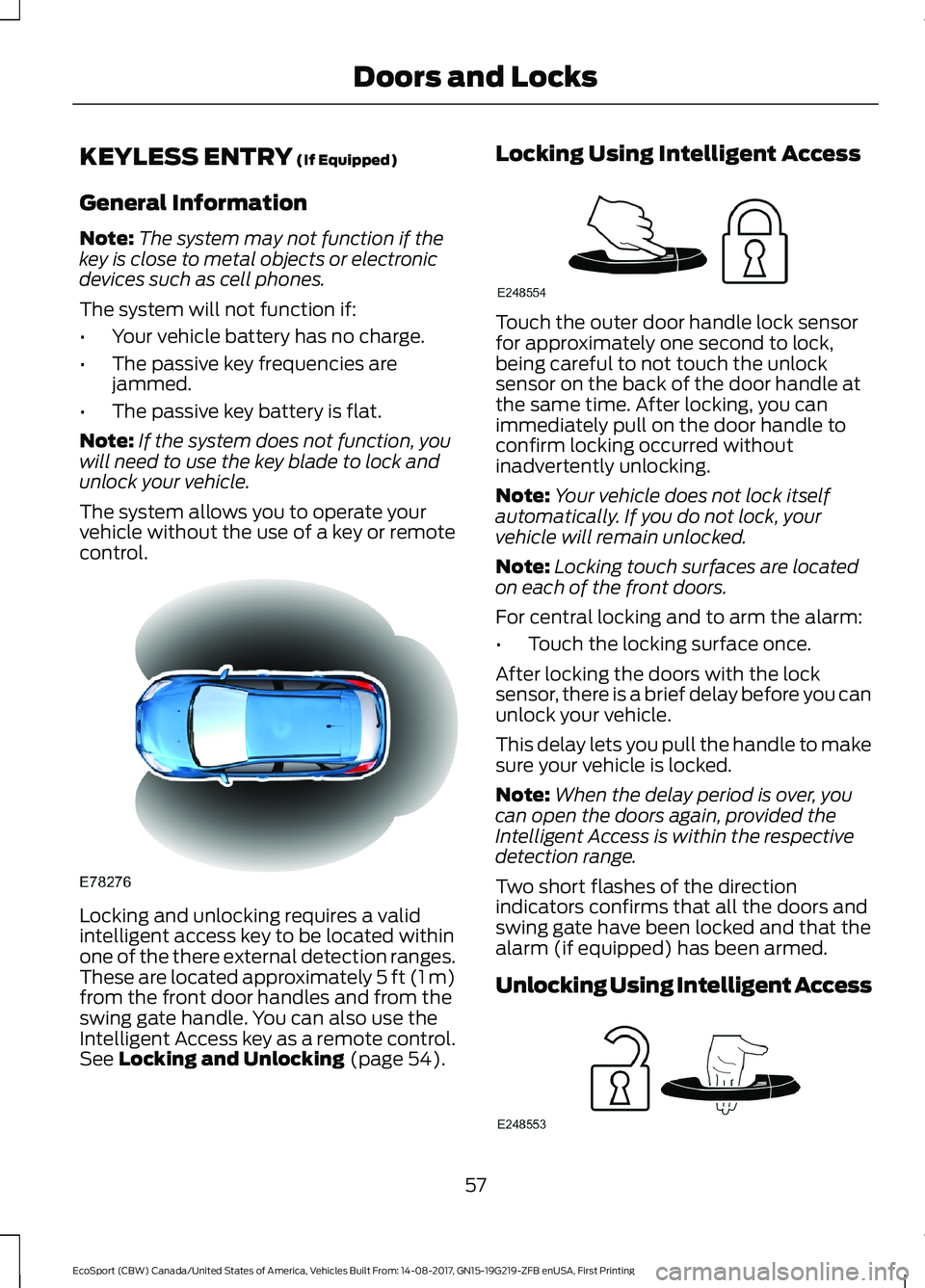
Locking and unlocking requires a validintelligent access key to be located withinone of the there external detection ranges.These are located approximately 5 ft (1 m)from the front door handles and from theswing gate handle. You can also use theIntelligent Access key as a remote control.See Locking and Unlocking (page 54).
Locking Using Intelligent Access
Touch the outer door handle lock sensorfor approximately one second to lock,being careful to not touch the unlocksensor on the back of the door handle atthe same time. After locking, you canimmediately pull on the door handle toconfirm locking occurred withoutinadvertently unlocking.
Note:Your vehicle does not lock itselfautomatically. If you do not lock, yourvehicle will remain unlocked.
Note:Locking touch surfaces are locatedon each of the front doors.
For central locking and to arm the alarm:
•Touch the locking surface once.
After locking the doors with the locksensor, there is a brief delay before you canunlock your vehicle.
This delay lets you pull the handle to makesure your vehicle is locked.
Note:When the delay period is over, youcan open the doors again, provided theIntelligent Access is within the respectivedetection range.
Two short flashes of the directionindicators confirms that all the doors andswing gate have been locked and that thealarm (if equipped) has been armed.
Unlocking Using Intelligent Access
57EcoSport (CBW) Canada/United States of America, Vehicles Built From: 14-08-2017, GN15-19G219-ZFB enUSA, First PrintingDoors and Locks
Page 62 of 452
Note:Your vehicle remains locked forlonger than three days, the system will enteran energy-saving mode. This is to reducethe discharge of your vehicle battery. Whenyour vehicle is unlocked while in this mode,the reaction time of the system may be alittle longer than normal. To exit theenergy-saving mode, unlock your vehicle.
With your intelligent access key within 5 ft(1 m) of your vehicle, touch the unlocksensor on the back of the door handle fora brief period and then pull on the doorhandle to unlock, being careful to nottouch the lock sensor at the same time orpulling the door handle too quickly. Theintelligent access system requires a briefdelay to authenticate your intelligentaccess key fob.
Note:Keep the door handle clean to makesure the system operates correctly.
Note:A valid passive key must be locatedwithin the detection range of that door.
One long flash of the direction indicatorsconfirms that all the doors and swing gatehave been unlocked and that the alarm (ifequipped) has been disarmed.
Unlocking only Driver Door
If the unlocking function is reprogrammedso that only the driver door is unlocked SeeRemote Control (page 45). Note thefollowing:
If the driver door is the first door which isunlocked, the other doors and swing gatewill remain locked. All the other doors canbe unlocked from inside your vehicle bypressing the unlock button located at thefront part of the front inner handles. Doorscan be unlocked individually by pulling theinterior door handles on those doors.
If the front passenger door is the first doorwhich is unlocked, all the doors will beunlocked.
Disabled Keys
Any keys left inside your vehicle interiorwhen it is locked will be disabled.
You cannot use a disabled key to switchthe ignition on or start the engine.
You must enable all Intelligent Accessagain in order to use them.
To enable all your Intelligent Access,unlock your vehicle using a passive key orthe remote control unlocking function.
All Intelligent Access will then be enabledif you switch the ignition on or your vehicleis started using a valid key.
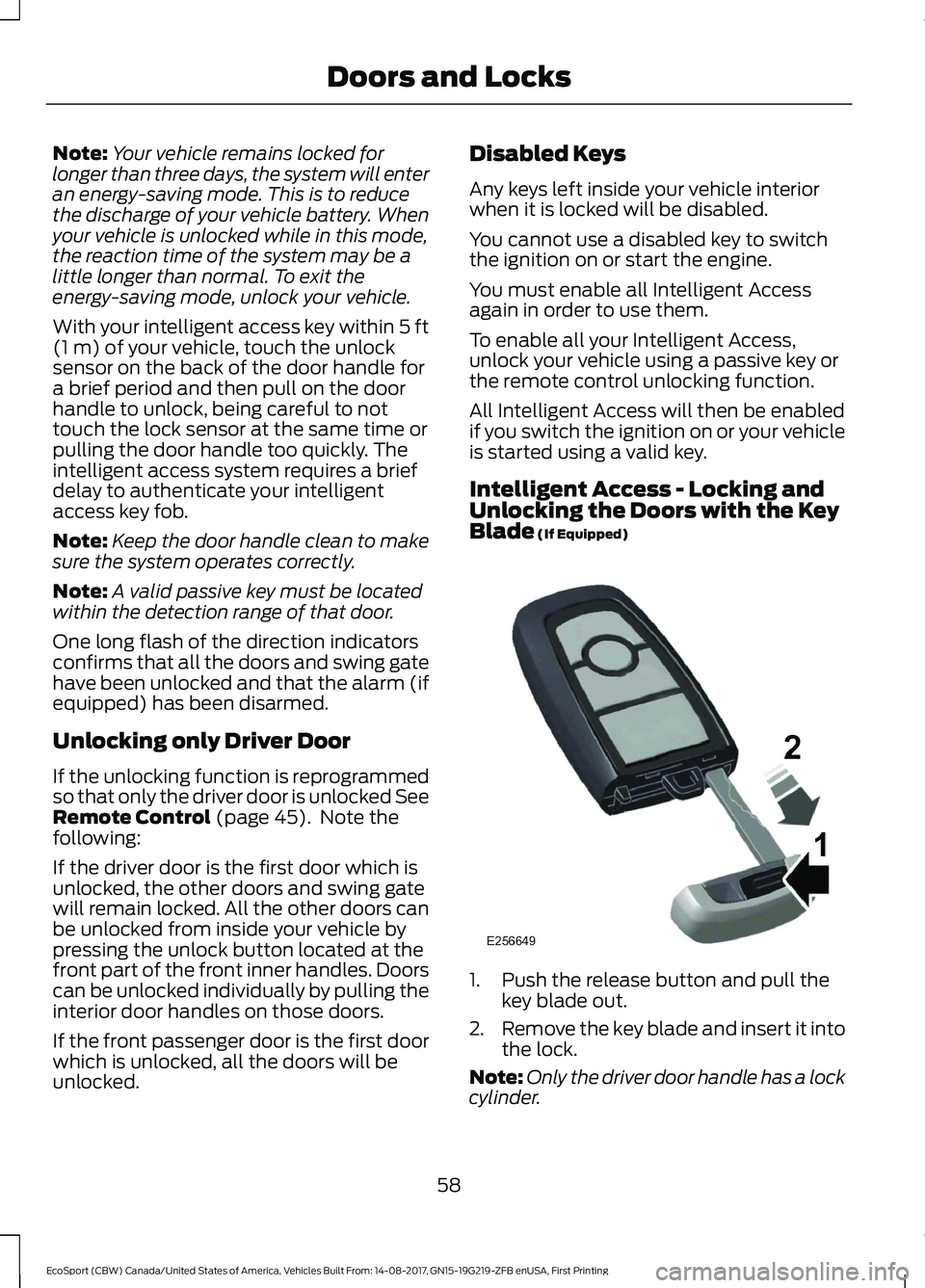
Intelligent Access - Locking andUnlocking the Doors with the KeyBlade (If Equipped)
1.Push the release button and pull thekey blade out.
2.Remove the key blade and insert it intothe lock.
Note:Only the driver door handle has a lockcylinder.
58EcoSport (CBW) Canada/United States of America, Vehicles Built From: 14-08-2017, GN15-19G219-ZFB enUSA, First PrintingDoors and Locks
Page 65 of 452
PASSIVE ANTI-THEFT
SYSTEM
Principle of Operation
The system prevents someone fromstarting the engine with an incorrectlycoded key.
Note: The system is not compatible withnon-Ford aftermarket remote start systems.Use of these systems may result in enginestarting problems and a loss of securityprotection
Note: Metallic objects, electronic devicesor a second coded key on the same keychain may result in vehicle startingproblems, especially if they are too close tothe key when starting your vehicle. Preventthese objects from touching the coded keywhen starting your vehicle. Switch theignition off, move all objects on the keychain away from the coded key and restartyour vehicle if a problem occurs.
Note: Do not leave a duplicate coded keyin your vehicle. Always take your keys andlock all doors when leaving your vehicle.
SecuriLock®
The system is an engine immobilizationsystem. It is designed to help prevent theengine from being started unless a codedkey programmed to your vehicle is used.Using the wrong key may prevent theengine from starting. A message mayappear in the information display.
If you are unable to start the engine with acorrectly coded key, a malfunction hashappened and a message may appear inthe information display.
Automatic Arming
When you switch the ignition off the engineimmobilizer will arm automatically after ashort time.
Automatic Disarming
When you switch the ignition on, the engineimmobilizer will disarm automatically if acorrectly coded key is used. If you areunable to start the engine with a correctlycoded key, have your vehicle checked byan Authorized Dealer.
Replacement Keys
Note:Your vehicle comes equipped withtwo remote controls with a folding key bladeor two intelligent access keys.
The remote controls with a folding keyblade functions as a programmed ignitionkey that operates all the locks and startsthe vehicle, as well as a remote control.
The intelligent access key functions as aprogrammed key that operates the driverdoor lock and activates the intelligentaccess with push button start system, aswell as a remote control.
If your programmed transmitters orstandard SecuriLock® coded keys are lostor stolen and you do not have an extracoded key, you will need to have yourvehicle towed to an authorized dealer. Youneed to erase the key codes from yourvehicle and program new coded keys.
Store an extra programmed key away fromthe vehicle in a safe place to help preventany inconveniences. See your authorizeddealer to purchase additional spare orreplacement keys.
Note:Have all of your remaining keyserased and recoded if you lose a key. Havereplacement keys coded together withrecoding your remaining keys. See anauthorized dealer for further information.
Note:Do not shield your keys with metalobjects. This may prevent the receiver fromrecognizing a coded key.
61EcoSport (CBW) Canada/United States of America, Vehicles Built From: 14-08-2017, GN15-19G219-ZFB enUSA, First PrintingSecurity
Page 66 of 452
Programming a Spare Remote ControlWith a Folding Key Blade
You can program your own integratedkeyhead transmitter or standardSecuriLock coded keys to your vehicle.This procedure will program both thevehicle immobilizer keycode and theremote entry portion of the remote controlto your vehicle.
You must have two previouslyprogrammed coded keys and the newunprogrammed key readily accessible.
Contact an authorized dealer to have thespare key programmed if two previouslyprogrammed keys are not available.
Make sure that the ignition is switched offbefore beginning this procedure. Carry outall steps within 30 seconds of starting thesequence. Stop and wait for at least oneminute before starting again if you carryout any steps out of sequence.
Note:You can program a maximum of fourcoded keys to your vehicle.
Read and understand the entire procedurebefore you begin.
1.Insert the first previously programmedcoded key into the ignition.
2.Switch the ignition from off to on. Keepthe ignition on for at least 3 seconds,but no more than 10 seconds.
3.Switch the ignition off and remove thefirst coded key from the ignition.
4.After at least 3 seconds but within 10seconds of switching the ignition off,insert the second previously coded keyinto the ignition.
5.Switch the ignition from off to on. Keepthe ignition on for at least 3 seconds,but no more than 10 seconds.
6.Switch the ignition off and remove thesecond previously programmed codedkey from the ignition.
7.After at least 3 seconds but within 10seconds of switching the ignition offand removing the previouslyprogrammed coded key, insert the newunprogrammed key into the ignition.
8.Switch the ignition from off to on. Keepthe ignition on for at least six seconds.
9.Remove the newly programmed codedkey from the ignition.
If you have successfully programmed thecoded key, it will start your vehicle andoperate the remote entry system.
If programming was unsuccessful, wait 10seconds and repeat Steps 1 through 8.
If programming remains unsuccessful,have your vehicle checked by an authorizeddealer.
Wait 20 seconds and repeat Steps 1through 9 to program an additional key.
Programming a Spare IntelligentAccess Key
Note:You can program a maximum of fourkeys to your vehicle.
You must have two previouslyprogrammed intelligent access keys insideyour vehicle and the new unprogrammedintelligent access key readily accessible.You can purchase replacement keys orremote controls from an authorized dealer.
Make sure that the ignition is switched offbefore beginning this procedure. Make surethat you close all the doors beforebeginning and that they remain closedthroughout the procedure. Carry out allsteps within 30 seconds of starting thesequence. Stop and wait for at least oneminute before starting again if you carryout any steps out of sequence.
Read and understand the entire procedurebefore you begin.
Remove the key blade from thetransmitter.
62EcoSport (CBW) Canada/United States of America, Vehicles Built From: 14-08-2017, GN15-19G219-ZFB enUSA, First PrintingSecurity
Page 67 of 452
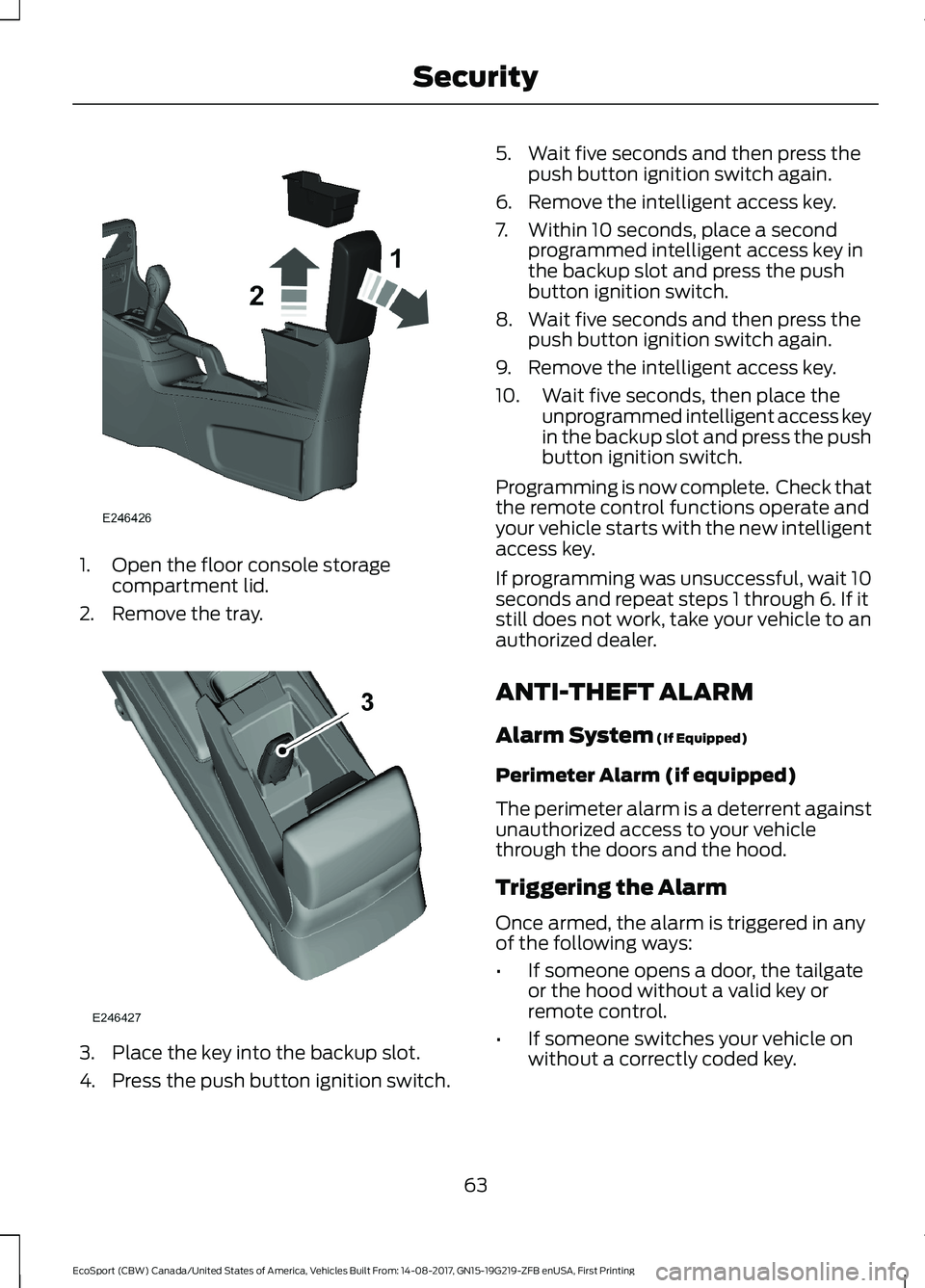
1.Open the floor console storagecompartment lid.
2.Remove the tray.
3.Place the key into the backup slot.
4.Press the push button ignition switch.
5.Wait five seconds and then press thepush button ignition switch again.
6.Remove the intelligent access key.
7.Within 10 seconds, place a secondprogrammed intelligent access key inthe backup slot and press the pushbutton ignition switch.
8.Wait five seconds and then press thepush button ignition switch again.
9.Remove the intelligent access key.
10.Wait five seconds, then place theunprogrammed intelligent access keyin the backup slot and press the pushbutton ignition switch.
Programming is now complete. Check thatthe remote control functions operate andyour vehicle starts with the new intelligentaccess key.
If programming was unsuccessful, wait 10seconds and repeat steps 1 through 6. If itstill does not work, take your vehicle to anauthorized dealer.
ANTI-THEFT ALARM
Alarm System (If Equipped)
Perimeter Alarm (if equipped)
The perimeter alarm is a deterrent againstunauthorized access to your vehiclethrough the doors and the hood.
Triggering the Alarm
Once armed, the alarm is triggered in anyof the following ways:
•If someone opens a door, the tailgateor the hood without a valid key orremote control.
•If someone switches your vehicle onwithout a correctly coded key.
63EcoSport (CBW) Canada/United States of America, Vehicles Built From: 14-08-2017, GN15-19G219-ZFB enUSA, First PrintingSecurity
Page 68 of 452
If the alarm is triggered, the alarm horn willsound for 30 seconds and the hazardwarning flasher will flash for five minutes.
Any further attempts to perform one of theabove will trigger the alarm again.
Arming the Alarm
With ignition OFF and doors closed, lockthe vehicle via Remote Control or exteriordoor handle. Alarm will be armed after 20seconds.
Arming the alarm can also be achieved bylocking the vehicle using the trim switcheswhile a side door is open and closing alldoors, or using the driver's door cylinder.In these two last cases, alarm will bearmed after 20 seconds.
Note:Alarm will arm due to an auto-relock.See Doors and Locks (page 54).
Disarming the Alarm
Vehicles Without Intelligent AccessSystem
Disarm and silence the alarm by unlockingthe doors with the key and switching yourvehicle on with a correctly coded key orunlocking the doors with the remotecontrol.
Vehicles with Intelligent AccessSystem
Note:A valid intelligent access key mustbe located within the detection range ofthat door for entry.
Disarm the alarm by performing aintelligent access entry, or switching yourvehicle on, or unlocking the vehicle withthe remote control.
Disarm the alarm by performing a keylessentry, or switching your vehicle on, orunlocking the vehicle with the remotecontrol.
64EcoSport (CBW) Canada/United States of America, Vehicles Built From: 14-08-2017, GN15-19G219-ZFB enUSA, First PrintingSecurity
Page 96 of 452
Keyless Vehicle
ActionMessage
Displayed if the key is not detected by the system. SeePush Button Ignition Switch (page 120).No Key Detected
Displayed as a reminder to turn off the vehicle. SeePush Button Ignition Switch (page 120).Switch ignition off.
Displayed as a reminder to press the brake whilestarting the vehicle.To START Press Brake
Displayed when a valid key is not detected within thevehicle. See Push Button Ignition Switch (page 120).Key Not Inside vehicle
Displays when the key battery is low. Change thebattery as soon as possible. See Remote Control(page 45).
Key Battery low Replace soon
Lighting
ActionMessage
Displays if an electrical malfunction occurs with theheadlamp system. Have your vehicle checked as soonas possible.
Check Headlamp System Seemanual
Maintenance
ActionMessage
Indicates the brake fluid level is low and the brakesystem should be inspected immediately. See BrakeFluid Check (page 212).
Brake fluid level low Servicenow
Indicates that the vehicle sold date has beensuccessful updated. If this date has not been set,contact your authorized dealer.
Maintenance Set initial date
Displays when the date and time are not set.Maintenance Set date
92EcoSport (CBW) Canada/United States of America, Vehicles Built From: 14-08-2017, GN15-19G219-ZFB enUSA, First PrintingInformation Displays
Page 124 of 452
Starting the Engine
Turn the key to position III. Release thekey when the engine starts.
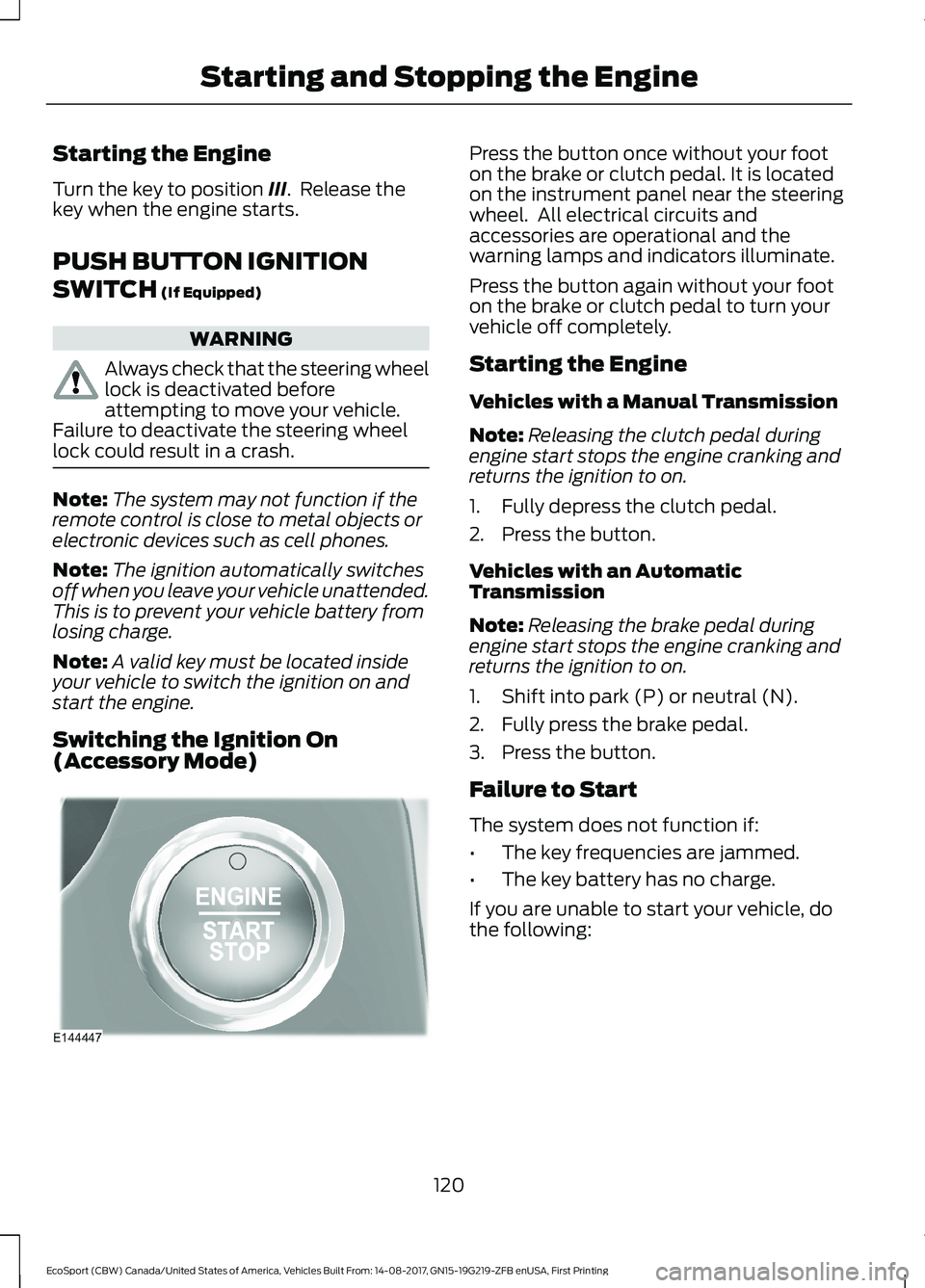
PUSH BUTTON IGNITION
SWITCH (If Equipped)
WARNING
Always check that the steering wheellock is deactivated beforeattempting to move your vehicle.Failure to deactivate the steering wheellock could result in a crash.
Note:The system may not function if theremote control is close to metal objects orelectronic devices such as cell phones.
Note:The ignition automatically switchesoff when you leave your vehicle unattended.This is to prevent your vehicle battery fromlosing charge.
Note:A valid key must be located insideyour vehicle to switch the ignition on andstart the engine.
Switching the Ignition On(Accessory Mode)
Press the button once without your footon the brake or clutch pedal. It is locatedon the instrument panel near the steeringwheel. All electrical circuits andaccessories are operational and thewarning lamps and indicators illuminate.
Press the button again without your footon the brake or clutch pedal to turn yourvehicle off completely.
Starting the Engine
Vehicles with a Manual Transmission
Note:Releasing the clutch pedal duringengine start stops the engine cranking andreturns the ignition to on.
1.Fully depress the clutch pedal.
2.Press the button.
Vehicles with an AutomaticTransmission
Note:Releasing the brake pedal duringengine start stops the engine cranking andreturns the ignition to on.
1.Shift into park (P) or neutral (N).
2.Fully press the brake pedal.
3.Press the button.
Failure to Start
The system does not function if:
•The key frequencies are jammed.
•The key battery has no charge.
If you are unable to start your vehicle, dothe following:
120EcoSport (CBW) Canada/United States of America, Vehicles Built From: 14-08-2017, GN15-19G219-ZFB enUSA, First PrintingStarting and Stopping the Engine
Page 189 of 452
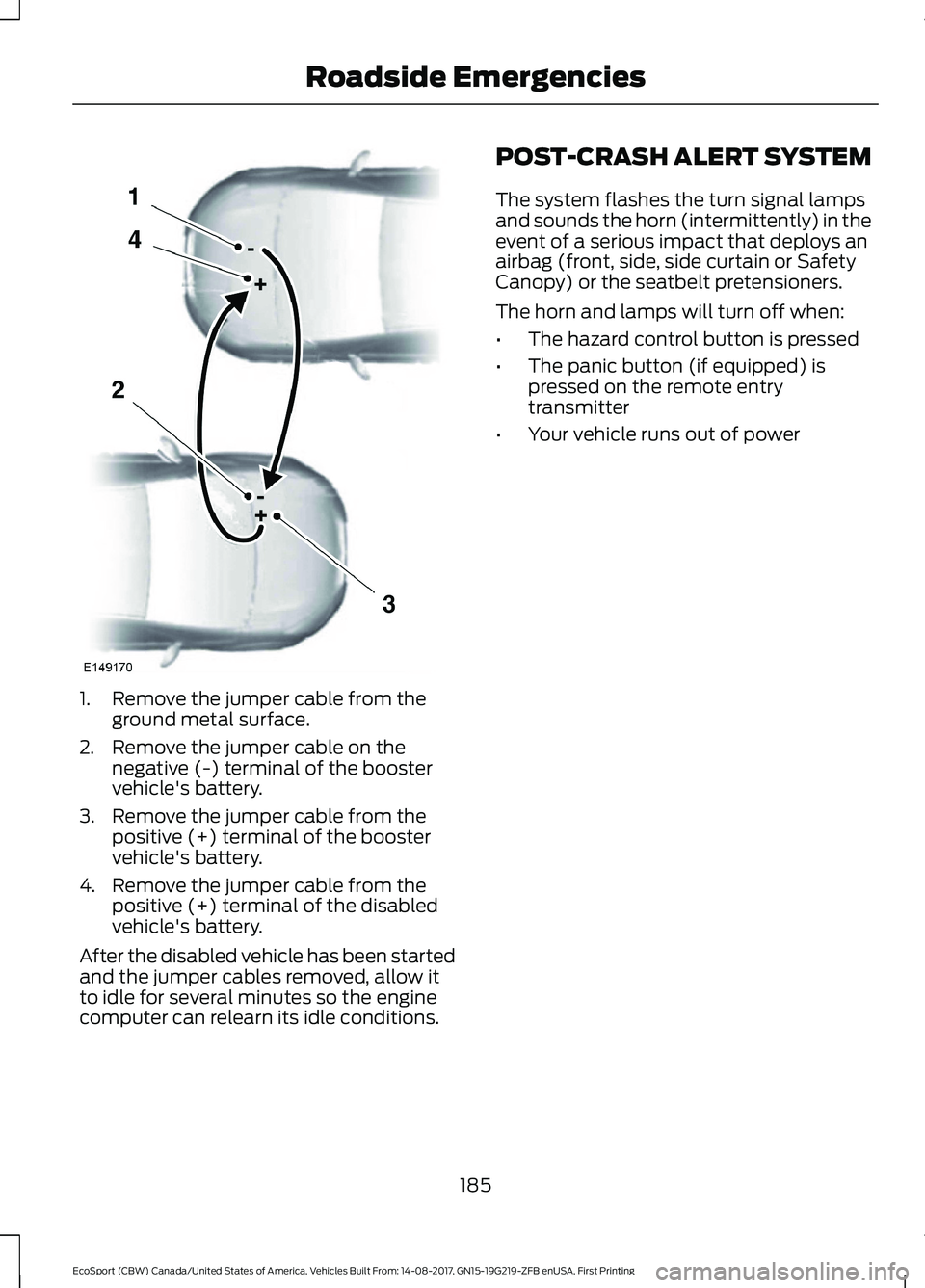
1.Remove the jumper cable from theground metal surface.
2.Remove the jumper cable on thenegative (-) terminal of the boostervehicle's battery.
3.Remove the jumper cable from thepositive (+) terminal of the boostervehicle's battery.
4.Remove the jumper cable from thepositive (+) terminal of the disabledvehicle's battery.
After the disabled vehicle has been startedand the jumper cables removed, allow itto idle for several minutes so the enginecomputer can relearn its idle conditions.
POST-CRASH ALERT SYSTEM
The system flashes the turn signal lampsand sounds the horn (intermittently) in theevent of a serious impact that deploys anairbag (front, side, side curtain or SafetyCanopy) or the seatbelt pretensioners.
The horn and lamps will turn off when:
•The hazard control button is pressed
•The panic button (if equipped) ispressed on the remote entrytransmitter
•Your vehicle runs out of power
185EcoSport (CBW) Canada/United States of America, Vehicles Built From: 14-08-2017, GN15-19G219-ZFB enUSA, First PrintingRoadside Emergencies