light FORD ECOSPORT 2018 Owner's Manual
[x] Cancel search | Manufacturer: FORD, Model Year: 2018, Model line: ECOSPORT, Model: FORD ECOSPORT 2018Pages: 452, PDF Size: 17.04 MB
Page 80 of 452
POWER WINDOWS
WARNINGS
Do not leave children unattended inyour vehicle and do not let them playwith the power windows. Failure tofollow this instruction could result inpersonal injury.
When closing the power windows,verify they are free of obstruction andmake sure that children and pets arenot in the proximity of the windowopenings.
Note:If the power window is operatedmany times on a short period the switchmay be inactivated for some moment toavoid overheat on power window system.
Note:You may hear a pulsing noise whenjust one of the windows is open. Lower theopposite window slightly to reduce thisnoise.
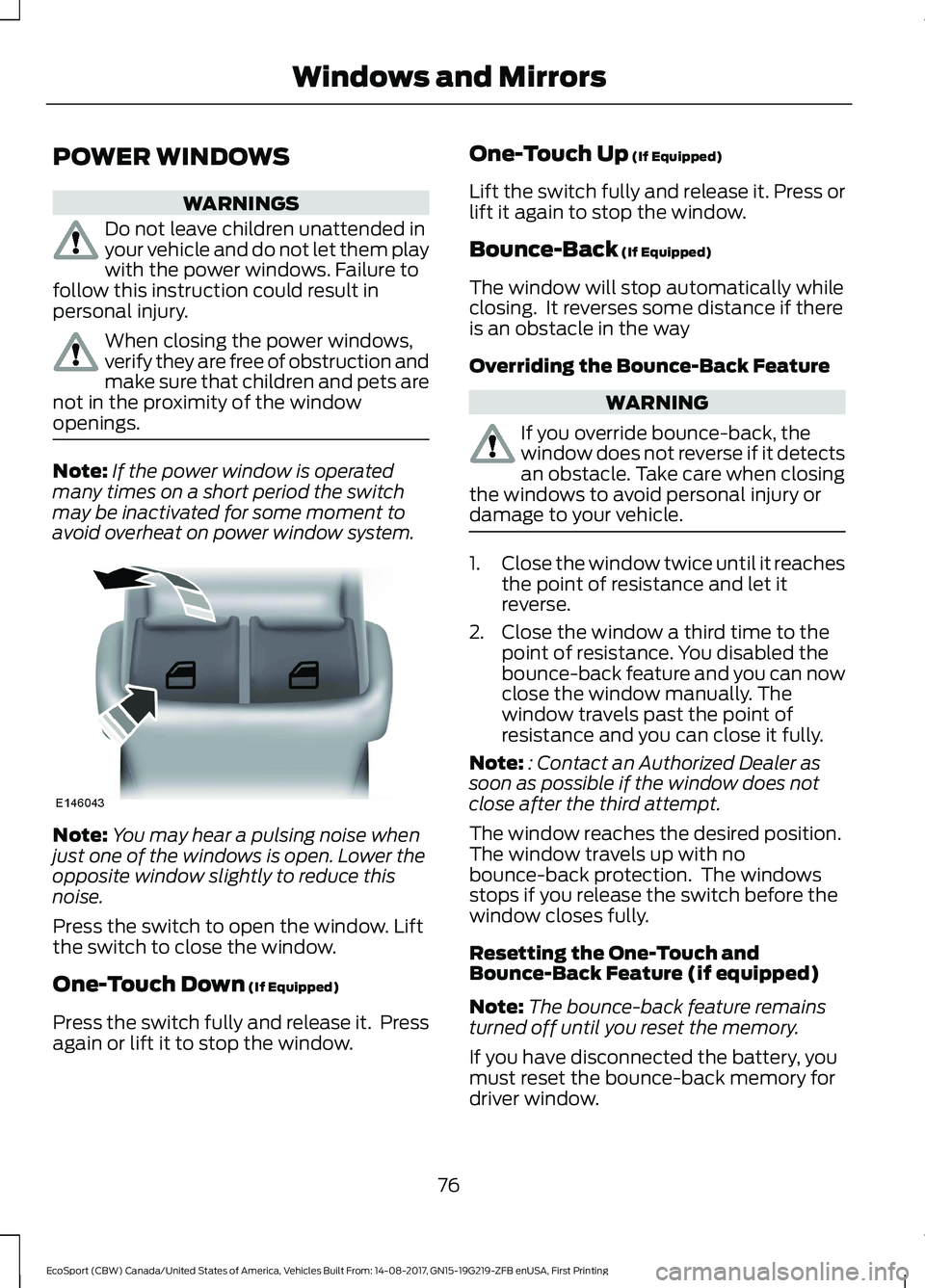
Press the switch to open the window. Liftthe switch to close the window.
One-Touch Down (If Equipped)
Press the switch fully and release it. Pressagain or lift it to stop the window.
One-Touch Up (If Equipped)
Lift the switch fully and release it. Press orlift it again to stop the window.
Bounce-Back (If Equipped)
The window will stop automatically whileclosing. It reverses some distance if thereis an obstacle in the way
Overriding the Bounce-Back Feature
WARNING
If you override bounce-back, thewindow does not reverse if it detectsan obstacle. Take care when closingthe windows to avoid personal injury ordamage to your vehicle.
1.Close the window twice until it reachesthe point of resistance and let itreverse.
2.Close the window a third time to thepoint of resistance. You disabled thebounce-back feature and you can nowclose the window manually. Thewindow travels past the point ofresistance and you can close it fully.
Note:: Contact an Authorized Dealer assoon as possible if the window does notclose after the third attempt.
The window reaches the desired position.The window travels up with nobounce-back protection. The windowsstops if you release the switch before thewindow closes fully.
Resetting the One-Touch andBounce-Back Feature (if equipped)
Note:The bounce-back feature remainsturned off until you reset the memory.
If you have disconnected the battery, youmust reset the bounce-back memory fordriver window.
76EcoSport (CBW) Canada/United States of America, Vehicles Built From: 14-08-2017, GN15-19G219-ZFB enUSA, First PrintingWindows and Mirrors
Page 82 of 452
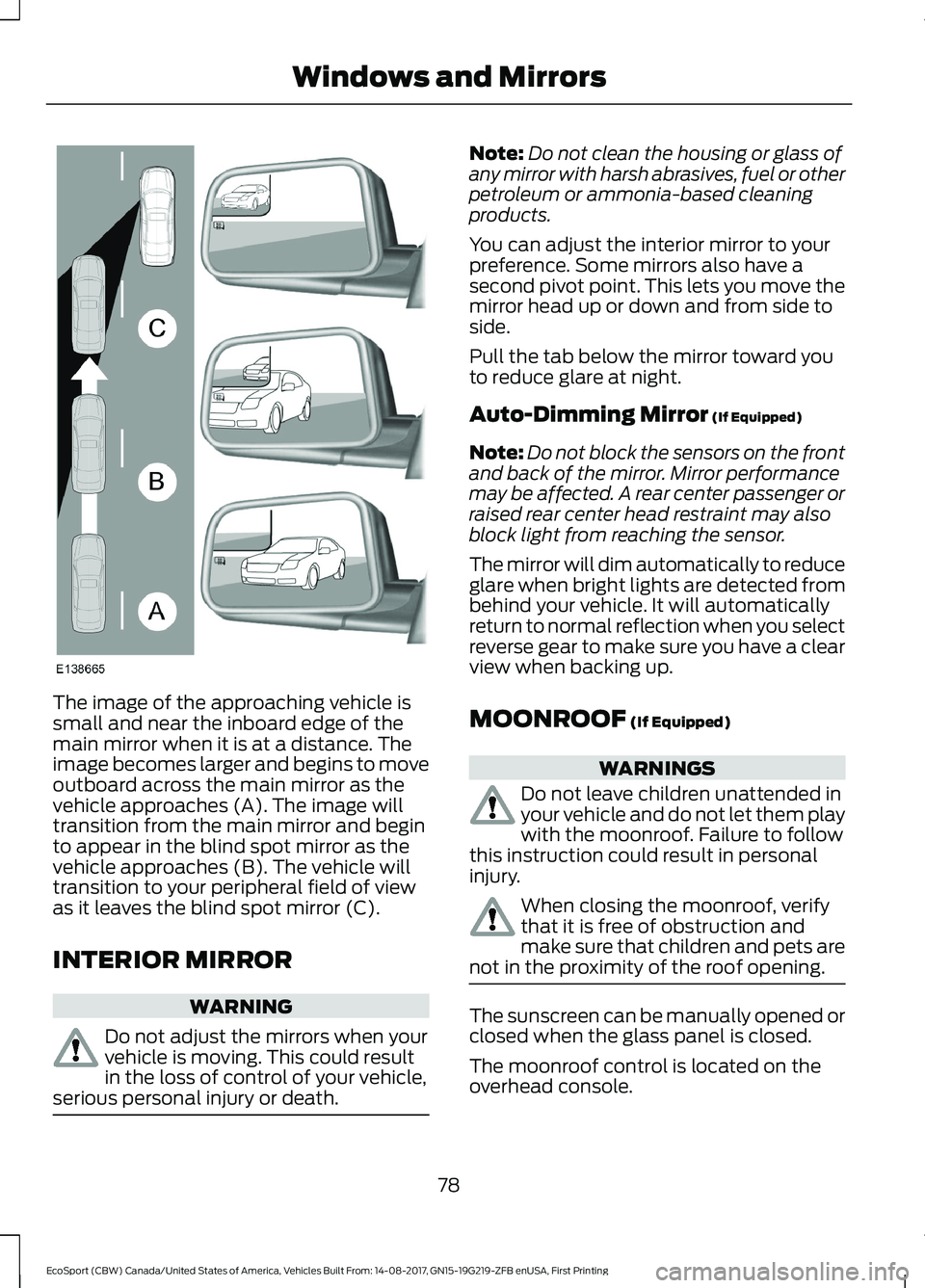
The image of the approaching vehicle issmall and near the inboard edge of themain mirror when it is at a distance. Theimage becomes larger and begins to moveoutboard across the main mirror as thevehicle approaches (A). The image willtransition from the main mirror and beginto appear in the blind spot mirror as thevehicle approaches (B). The vehicle willtransition to your peripheral field of viewas it leaves the blind spot mirror (C).
INTERIOR MIRROR
WARNING
Do not adjust the mirrors when yourvehicle is moving. This could resultin the loss of control of your vehicle,serious personal injury or death.
Note:Do not clean the housing or glass ofany mirror with harsh abrasives, fuel or otherpetroleum or ammonia-based cleaningproducts.
You can adjust the interior mirror to yourpreference. Some mirrors also have asecond pivot point. This lets you move themirror head up or down and from side toside.
Pull the tab below the mirror toward youto reduce glare at night.
Auto-Dimming Mirror (If Equipped)
Note:Do not block the sensors on the frontand back of the mirror. Mirror performancemay be affected. A rear center passenger orraised rear center head restraint may alsoblock light from reaching the sensor.
The mirror will dim automatically to reduceglare when bright lights are detected frombehind your vehicle. It will automaticallyreturn to normal reflection when you selectreverse gear to make sure you have a clearview when backing up.
MOONROOF (If Equipped)
WARNINGS
Do not leave children unattended inyour vehicle and do not let them playwith the moonroof. Failure to followthis instruction could result in personalinjury.
When closing the moonroof, verifythat it is free of obstruction andmake sure that children and pets arenot in the proximity of the roof opening.
The sunscreen can be manually opened orclosed when the glass panel is closed.
The moonroof control is located on theoverhead console.
78EcoSport (CBW) Canada/United States of America, Vehicles Built From: 14-08-2017, GN15-19G219-ZFB enUSA, First PrintingWindows and Mirrors
Page 85 of 452
Engine Coolant TemperatureGauge
WARNING
Do not remove the coolant reservoircap when the cooling system is hot.Wait 10 minutes for the coolingsystem to cool down. Cover the coolantreservoir cap with a thick cloth to preventthe possibility of scalding and slowlyremove the cap. Failure to follow thisinstruction could result in personal injury.
At normal operating temperature theindicator will remain in the center section.
If the needle enters the red section, theengine is overheating. Stop the engine,switch the ignition off and determine thecause once the engine has cooled down.See Engine Coolant Check (page 208).
Note:Do not restart the engine until thecause of overheating has been determinedand resolved.
Fuel Gauge
Switch the ignition on. The fuel gauge willindicate approximately how much fuel isleft in the fuel tank. The fuel gauge mayvary slightly when your vehicle is movingor on a gradient.
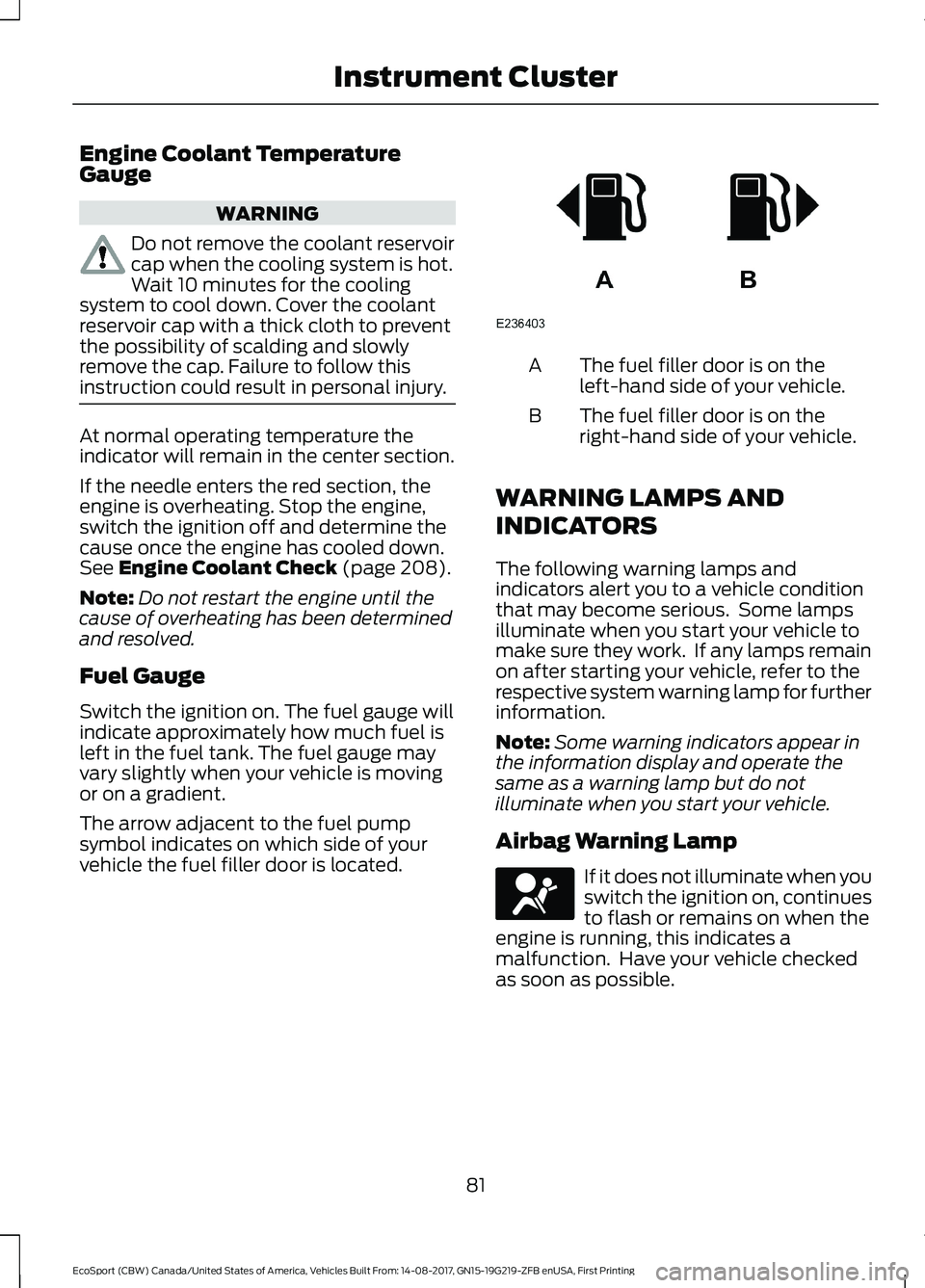
The arrow adjacent to the fuel pumpsymbol indicates on which side of yourvehicle the fuel filler door is located.
The fuel filler door is on theleft-hand side of your vehicle.A
The fuel filler door is on theright-hand side of your vehicle.B
WARNING LAMPS AND
INDICATORS
The following warning lamps andindicators alert you to a vehicle conditionthat may become serious. Some lampsilluminate when you start your vehicle tomake sure they work. If any lamps remainon after starting your vehicle, refer to therespective system warning lamp for furtherinformation.
Note:Some warning indicators appear inthe information display and operate thesame as a warning lamp but do notilluminate when you start your vehicle.
Airbag Warning Lamp
If it does not illuminate when youswitch the ignition on, continuesto flash or remains on when theengine is running, this indicates amalfunction. Have your vehicle checkedas soon as possible.
81EcoSport (CBW) Canada/United States of America, Vehicles Built From: 14-08-2017, GN15-19G219-ZFB enUSA, First PrintingInstrument Cluster
Page 89 of 452
GENERAL INFORMATION
WARNING
Driving while distracted can result inloss of vehicle control, crash andinjury. We strongly recommend thatyou use extreme caution when using anydevice that may take your focus off theroad. Your primary responsibility is the safeoperation of your vehicle. We recommendagainst the use of any hand-held devicewhile driving and encourage the use ofvoice-operated systems when possible.Make sure you are aware of all applicablelocal laws that may affect the use ofelectronic devices while driving.
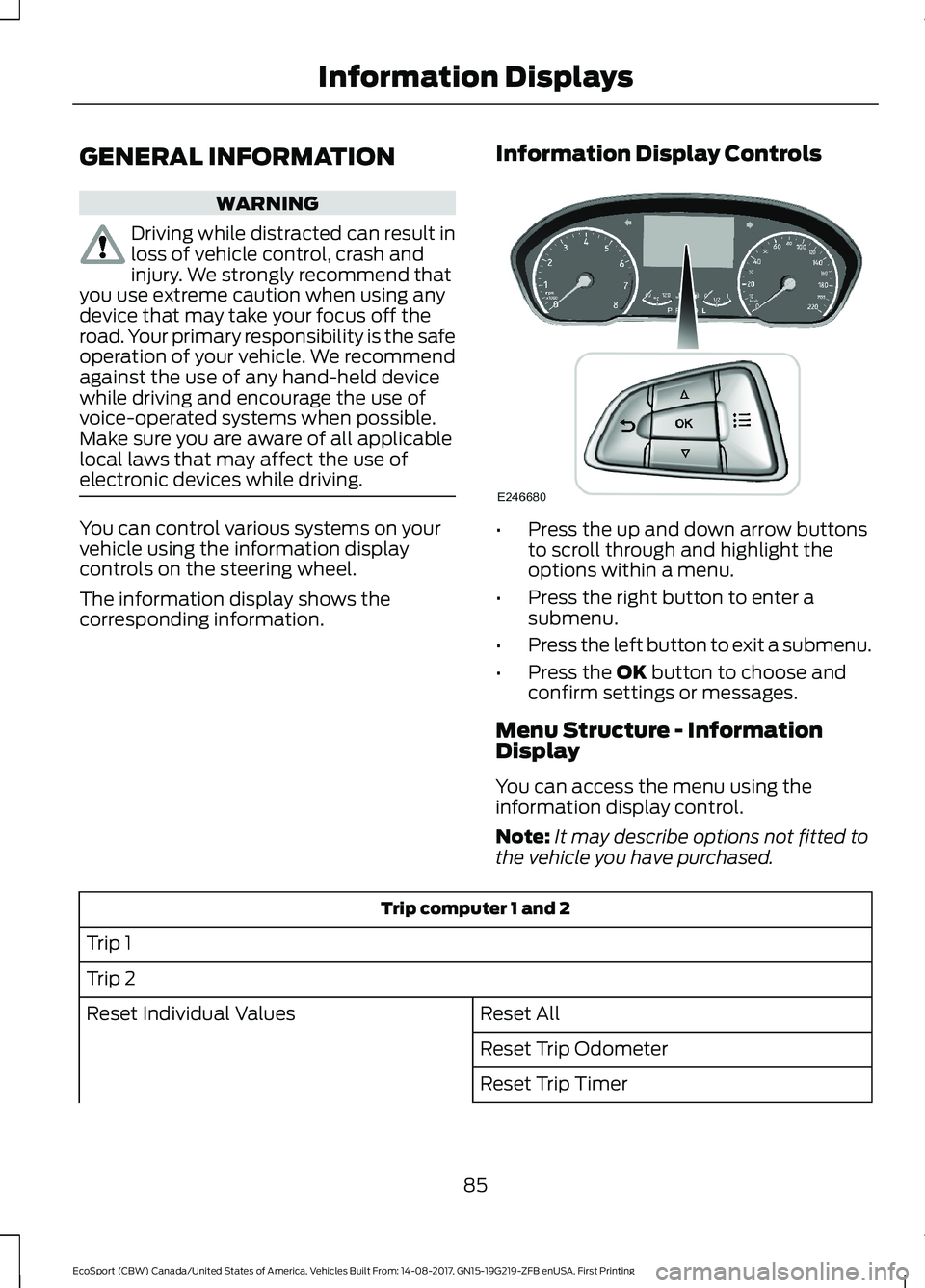
You can control various systems on yourvehicle using the information displaycontrols on the steering wheel.
The information display shows thecorresponding information.
Information Display Controls
•Press the up and down arrow buttonsto scroll through and highlight theoptions within a menu.
•Press the right button to enter asubmenu.
•Press the left button to exit a submenu.
•Press the OK button to choose andconfirm settings or messages.
Menu Structure - InformationDisplay
You can access the menu using theinformation display control.
Note:It may describe options not fitted tothe vehicle you have purchased.
Trip computer 1 and 2
Trip 1
Trip 2
Reset AllReset Individual Values
Reset Trip Odometer
Reset Trip Timer
85EcoSport (CBW) Canada/United States of America, Vehicles Built From: 14-08-2017, GN15-19G219-ZFB enUSA, First PrintingInformation Displays
Page 91 of 452
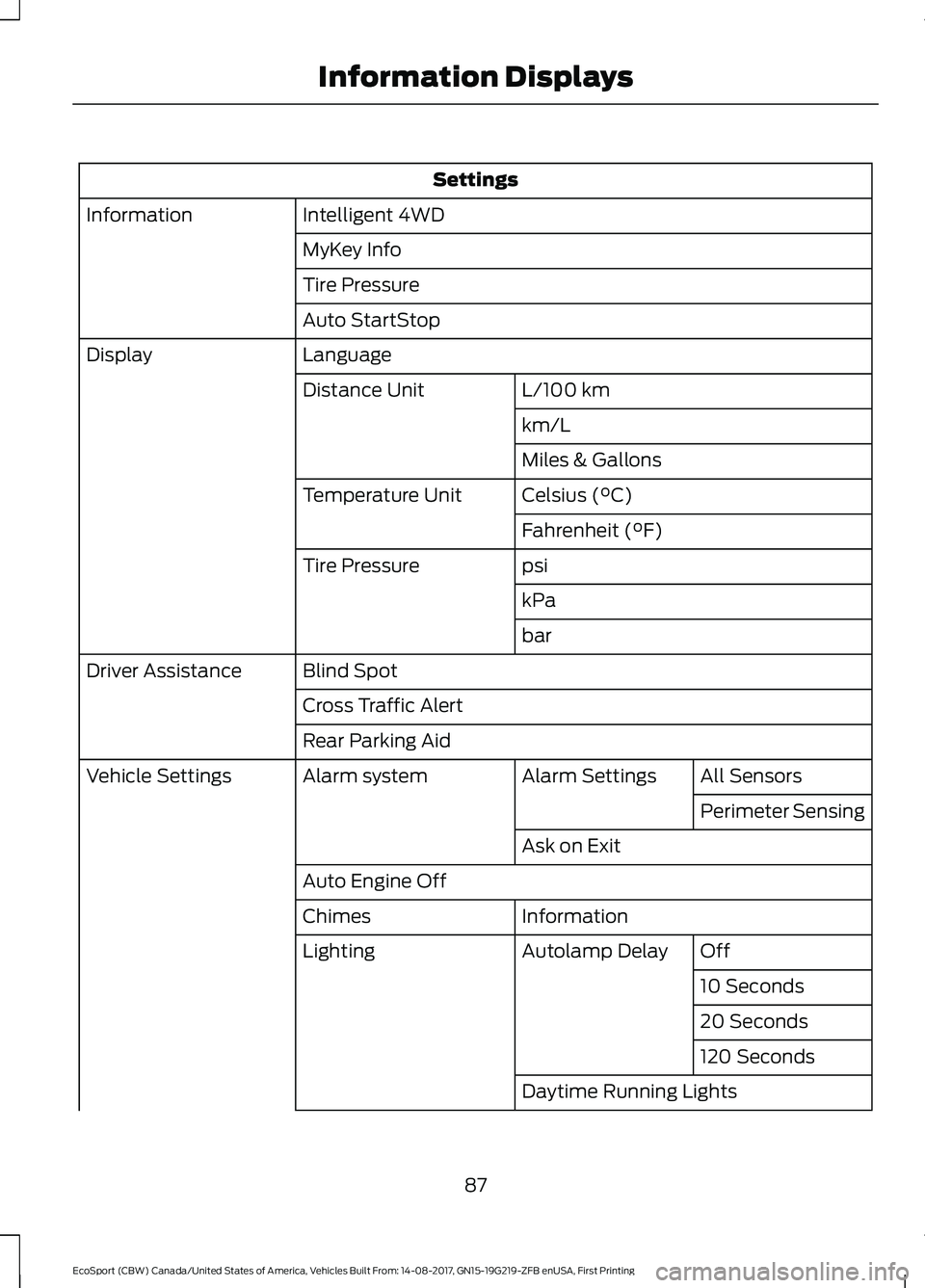
Settings
Intelligent 4WDInformation
MyKey Info
Tire Pressure
Auto StartStop
LanguageDisplay
L/100 kmDistance Unit
km/L
Miles & Gallons
Celsius (°C)Temperature Unit
Fahrenheit (°F)
psiTire Pressure
kPa
bar
Blind SpotDriver Assistance
Cross Traffic Alert
Rear Parking Aid
All SensorsAlarm SettingsAlarm systemVehicle Settings
Perimeter Sensing
Ask on Exit
Auto Engine Off
InformationChimes
OffAutolamp DelayLighting
10 Seconds
20 Seconds
120 Seconds
Daytime Running Lights
87EcoSport (CBW) Canada/United States of America, Vehicles Built From: 14-08-2017, GN15-19G219-ZFB enUSA, First PrintingInformation Displays
Page 96 of 452
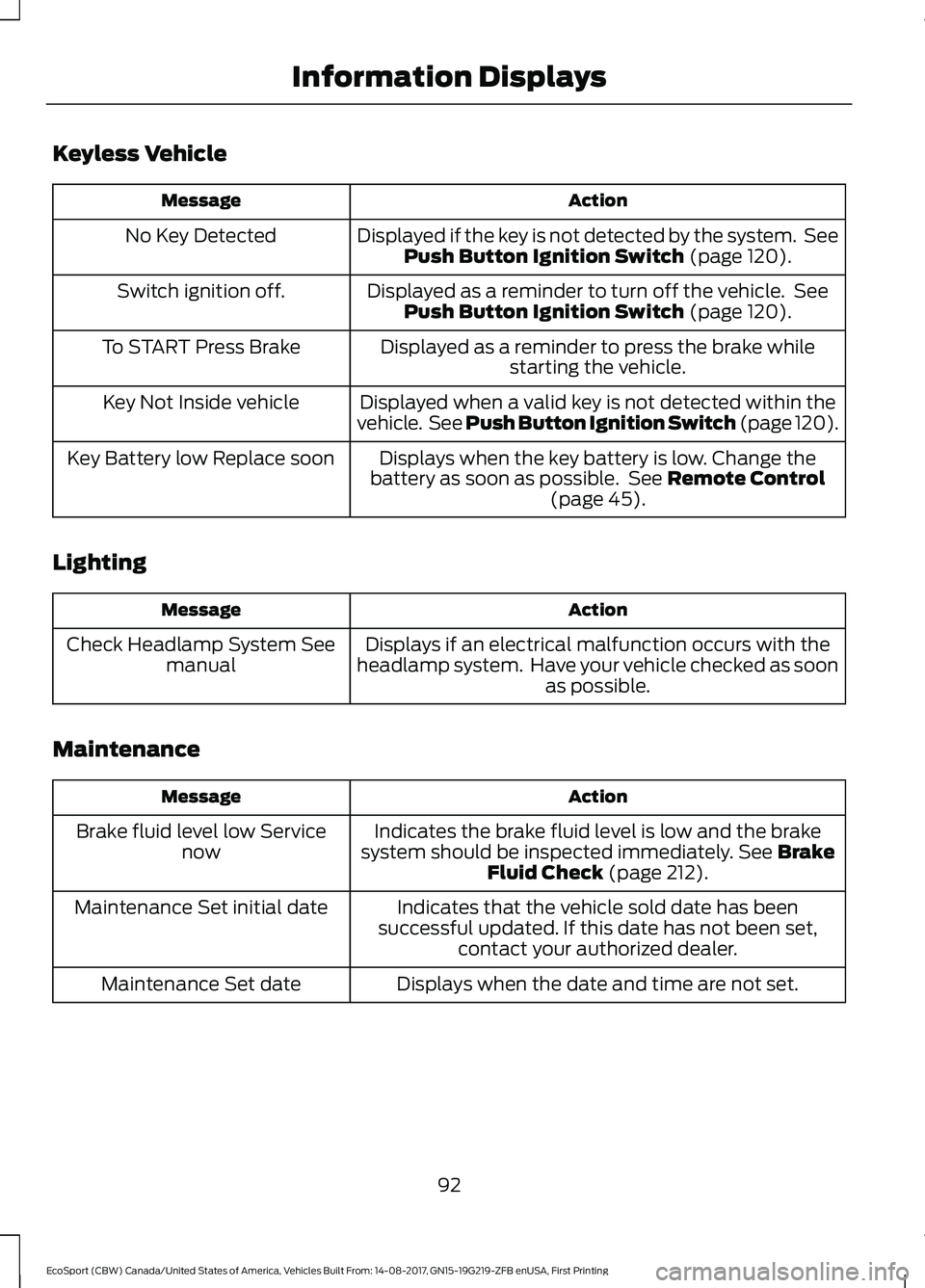
Keyless Vehicle
ActionMessage
Displayed if the key is not detected by the system. SeePush Button Ignition Switch (page 120).No Key Detected
Displayed as a reminder to turn off the vehicle. SeePush Button Ignition Switch (page 120).Switch ignition off.
Displayed as a reminder to press the brake whilestarting the vehicle.To START Press Brake
Displayed when a valid key is not detected within thevehicle. See Push Button Ignition Switch (page 120).Key Not Inside vehicle
Displays when the key battery is low. Change thebattery as soon as possible. See Remote Control(page 45).
Key Battery low Replace soon
Lighting
ActionMessage
Displays if an electrical malfunction occurs with theheadlamp system. Have your vehicle checked as soonas possible.
Check Headlamp System Seemanual
Maintenance
ActionMessage
Indicates the brake fluid level is low and the brakesystem should be inspected immediately. See BrakeFluid Check (page 212).
Brake fluid level low Servicenow
Indicates that the vehicle sold date has beensuccessful updated. If this date has not been set,contact your authorized dealer.
Maintenance Set initial date
Displays when the date and time are not set.Maintenance Set date
92EcoSport (CBW) Canada/United States of America, Vehicles Built From: 14-08-2017, GN15-19G219-ZFB enUSA, First PrintingInformation Displays
Page 103 of 452
MANUAL CLIMATE CONTROL
- VEHICLES WITH:
ELECTRONIC MANUAL
TEMPERATURE CONTROL
(EMTC)
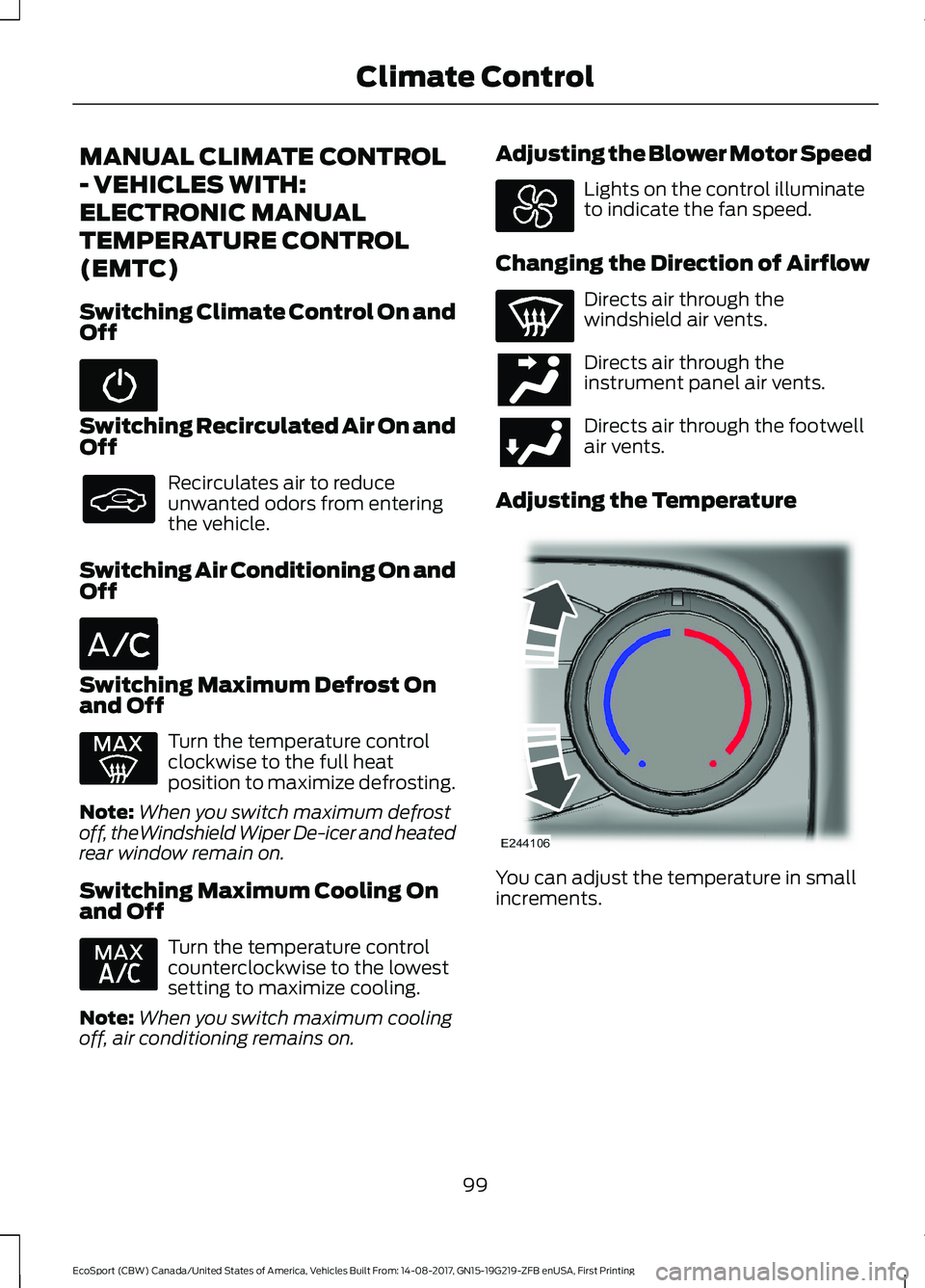
Switching Climate Control On andOff
Switching Recirculated Air On andOff
Recirculates air to reduceunwanted odors from enteringthe vehicle.
Switching Air Conditioning On andOff
Switching Maximum Defrost Onand Off
Turn the temperature controlclockwise to the full heatposition to maximize defrosting.
Note:When you switch maximum defrostoff, theWindshield Wiper De-icer and heatedrear window remain on.
Switching Maximum Cooling Onand Off
Turn the temperature controlcounterclockwise to the lowestsetting to maximize cooling.
Note:When you switch maximum coolingoff, air conditioning remains on.
Adjusting the Blower Motor Speed
Lights on the control illuminateto indicate the fan speed.
Changing the Direction of Airflow
Directs air through thewindshield air vents.
Directs air through theinstrument panel air vents.
Directs air through the footwellair vents.
Adjusting the Temperature
You can adjust the temperature in smallincrements.
99EcoSport (CBW) Canada/United States of America, Vehicles Built From: 14-08-2017, GN15-19G219-ZFB enUSA, First PrintingClimate Control
Page 104 of 452
AUTOMATIC CLIMATE
CONTROL - VEHICLES WITH:
ELECTRONIC AUTOMATIC
TEMPERATURE CONTROL
(EATC)
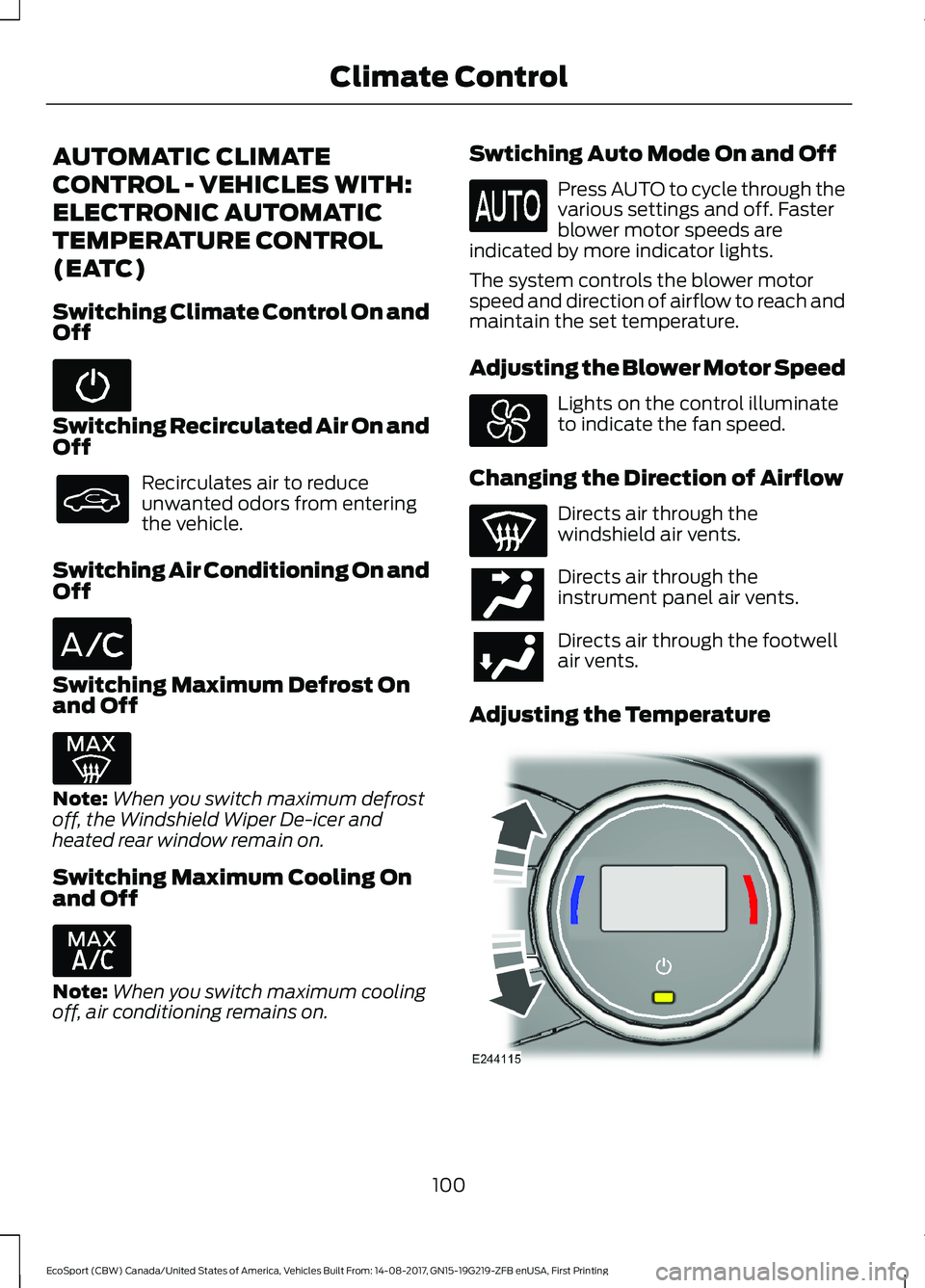
Switching Climate Control On andOff
Switching Recirculated Air On andOff
Recirculates air to reduceunwanted odors from enteringthe vehicle.
Switching Air Conditioning On andOff
Switching Maximum Defrost Onand Off
Note:When you switch maximum defrostoff, the Windshield Wiper De-icer andheated rear window remain on.
Switching Maximum Cooling Onand Off
Note:When you switch maximum coolingoff, air conditioning remains on.
Swtiching Auto Mode On and Off
Press AUTO to cycle through thevarious settings and off. Fasterblower motor speeds areindicated by more indicator lights.
The system controls the blower motorspeed and direction of airflow to reach andmaintain the set temperature.
Adjusting the Blower Motor Speed
Lights on the control illuminateto indicate the fan speed.
Changing the Direction of Airflow
Directs air through thewindshield air vents.
Directs air through theinstrument panel air vents.
Directs air through the footwellair vents.
Adjusting the Temperature
100EcoSport (CBW) Canada/United States of America, Vehicles Built From: 14-08-2017, GN15-19G219-ZFB enUSA, First PrintingClimate Control
Page 108 of 452
SITTING IN THE CORRECT
POSITION
WARNINGS
Do not recline the seatback too faras this can cause the occupant toslide under the seatbelt, resulting inserious injury in the event of a collision.
Do not place objects higher than thetop of the seat backrest. Failure tofollow this instruction could result inpersonal injury or death in the event of asudden stop or crash.
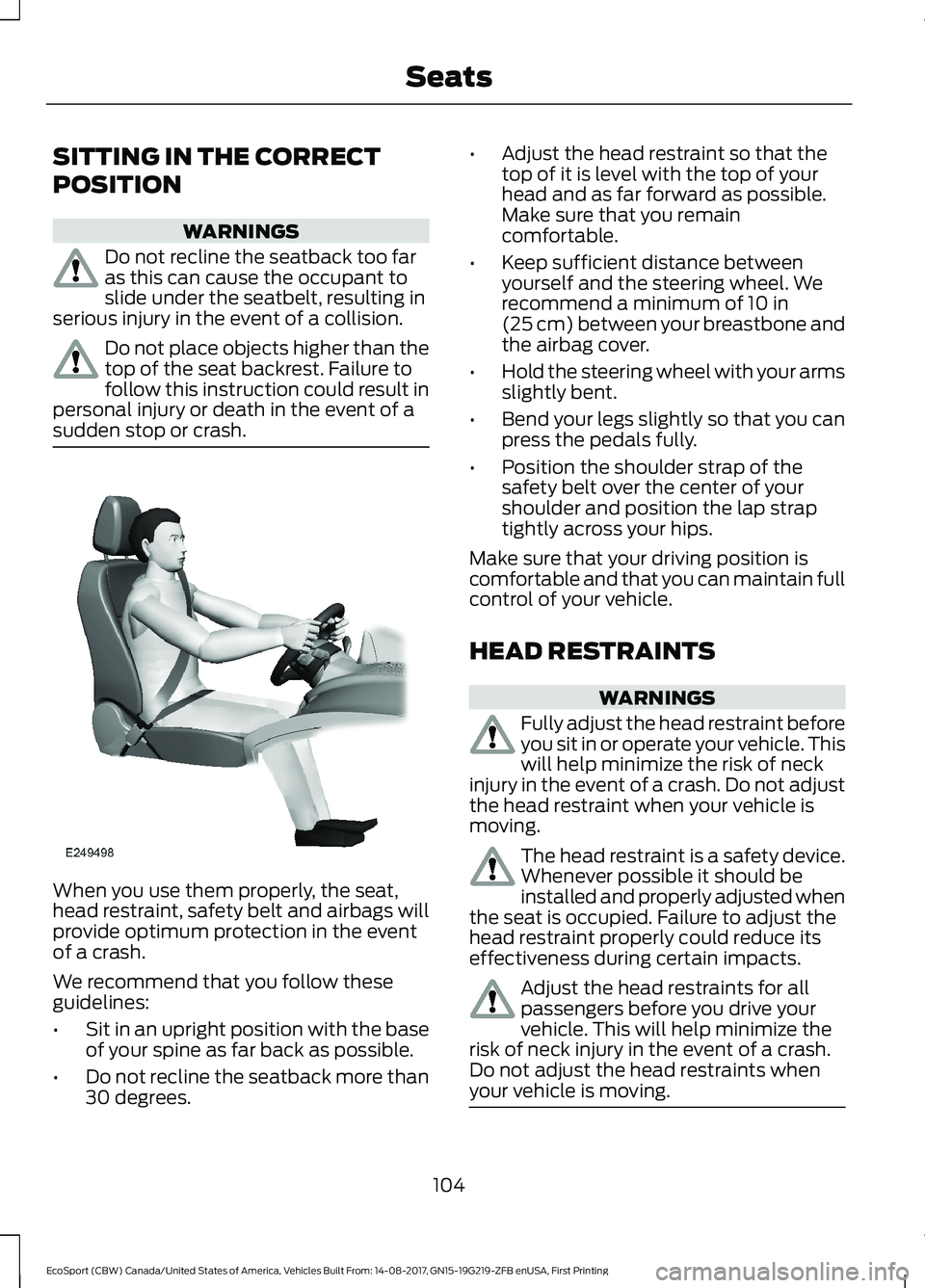
When you use them properly, the seat,head restraint, safety belt and airbags willprovide optimum protection in the eventof a crash.
We recommend that you follow theseguidelines:
•Sit in an upright position with the baseof your spine as far back as possible.
•Do not recline the seatback more than30 degrees.
•Adjust the head restraint so that thetop of it is level with the top of yourhead and as far forward as possible.Make sure that you remaincomfortable.
•Keep sufficient distance betweenyourself and the steering wheel. Werecommend a minimum of 10 in(25 cm) between your breastbone andthe airbag cover.
•Hold the steering wheel with your armsslightly bent.
•Bend your legs slightly so that you canpress the pedals fully.
•Position the shoulder strap of thesafety belt over the center of yourshoulder and position the lap straptightly across your hips.
Make sure that your driving position iscomfortable and that you can maintain fullcontrol of your vehicle.
HEAD RESTRAINTS
WARNINGS
Fully adjust the head restraint beforeyou sit in or operate your vehicle. Thiswill help minimize the risk of neckinjury in the event of a crash. Do not adjustthe head restraint when your vehicle ismoving.
The head restraint is a safety device.Whenever possible it should beinstalled and properly adjusted whenthe seat is occupied. Failure to adjust thehead restraint properly could reduce itseffectiveness during certain impacts.
Adjust the head restraints for allpassengers before you drive yourvehicle. This will help minimize therisk of neck injury in the event of a crash.Do not adjust the head restraints whenyour vehicle is moving.
104EcoSport (CBW) Canada/United States of America, Vehicles Built From: 14-08-2017, GN15-19G219-ZFB enUSA, First PrintingSeats
Page 118 of 452
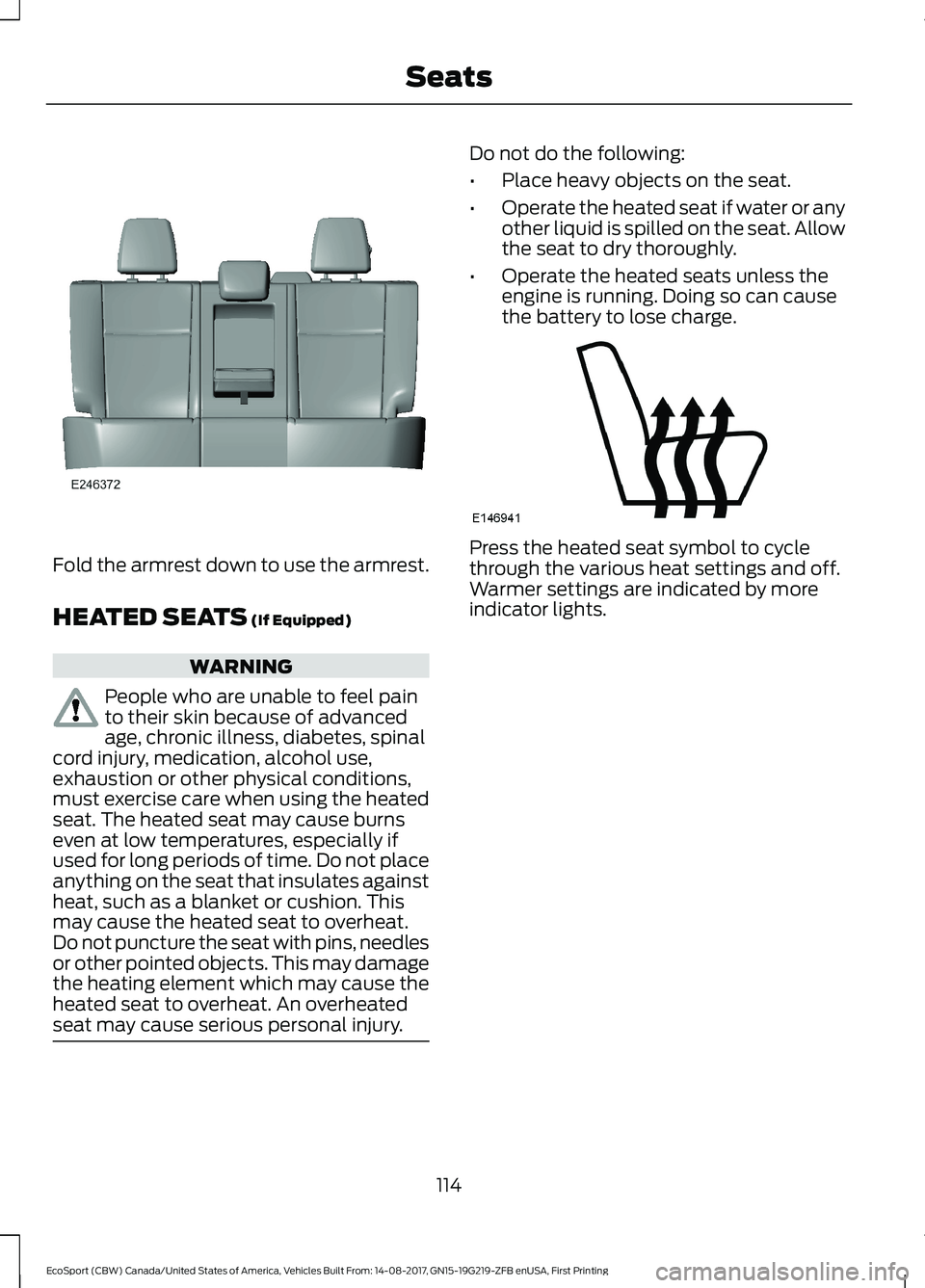
Fold the armrest down to use the armrest.
HEATED SEATS (If Equipped)
WARNING
People who are unable to feel painto their skin because of advancedage, chronic illness, diabetes, spinalcord injury, medication, alcohol use,exhaustion or other physical conditions,must exercise care when using the heatedseat. The heated seat may cause burnseven at low temperatures, especially ifused for long periods of time. Do not placeanything on the seat that insulates againstheat, such as a blanket or cushion. Thismay cause the heated seat to overheat.Do not puncture the seat with pins, needlesor other pointed objects. This may damagethe heating element which may cause theheated seat to overheat. An overheatedseat may cause serious personal injury.
Do not do the following:
•Place heavy objects on the seat.
•Operate the heated seat if water or anyother liquid is spilled on the seat. Allowthe seat to dry thoroughly.
•Operate the heated seats unless theengine is running. Doing so can causethe battery to lose charge.
Press the heated seat symbol to cyclethrough the various heat settings and off.Warmer settings are indicated by moreindicator lights.
114EcoSport (CBW) Canada/United States of America, Vehicles Built From: 14-08-2017, GN15-19G219-ZFB enUSA, First PrintingSeats