tow FORD ECOSPORT 2018 Owner's Manual
[x] Cancel search | Manufacturer: FORD, Model Year: 2018, Model line: ECOSPORT, Model: FORD ECOSPORT 2018Pages: 452, PDF Size: 17.04 MB
Page 110 of 452
Installing the Head Restraint
Align the steel stems into the guide sleevesand push the head restraint down until itlocks.
Folding the Head Restraint
1.Press and hold button E.
2.Pull the head restraint back up to reset.
Tilting Head Restraints
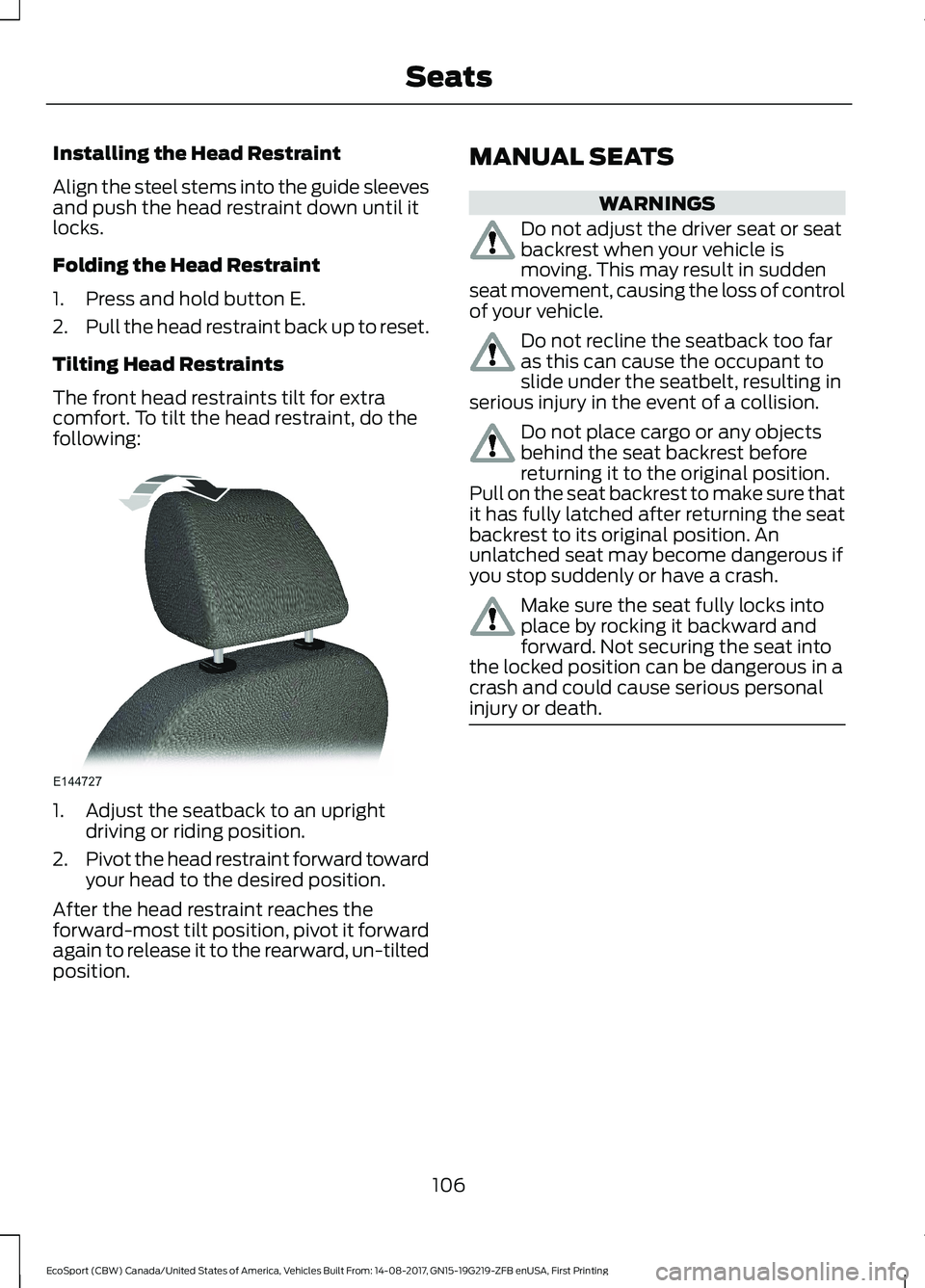
The front head restraints tilt for extracomfort. To tilt the head restraint, do thefollowing:
1.Adjust the seatback to an uprightdriving or riding position.
2.Pivot the head restraint forward towardyour head to the desired position.
After the head restraint reaches theforward-most tilt position, pivot it forwardagain to release it to the rearward, un-tiltedposition.
MANUAL SEATS
WARNINGS
Do not adjust the driver seat or seatbackrest when your vehicle ismoving. This may result in suddenseat movement, causing the loss of controlof your vehicle.
Do not recline the seatback too faras this can cause the occupant toslide under the seatbelt, resulting inserious injury in the event of a collision.
Do not place cargo or any objectsbehind the seat backrest beforereturning it to the original position.Pull on the seat backrest to make sure thatit has fully latched after returning the seatbackrest to its original position. Anunlatched seat may become dangerous ifyou stop suddenly or have a crash.
Make sure the seat fully locks intoplace by rocking it backward andforward. Not securing the seat intothe locked position can be dangerous in acrash and could cause serious personalinjury or death.
106EcoSport (CBW) Canada/United States of America, Vehicles Built From: 14-08-2017, GN15-19G219-ZFB enUSA, First PrintingSeats
Page 128 of 452
•Make sure the system is unplugged andproperly stowed before starting anddriving your vehicle. Make sure theprotective cover seals the prongs of theblock heater cord plug when not in use.
•Make sure the heater system ischecked for proper operation beforewinter.
Using the Engine Block Heater
Make sure the receptacle terminals areclean and dry prior to use. Clean them witha dry cloth if necessary.
The heater uses 0.4 to 1.0 kilowatt-hoursof energy per hour of use. The system doesnot have a thermostat. It achievesmaximum temperature afterapproximately three hours of operation.Using the heater longer than three hoursdoes not improve system performance andunnecessarily uses electricity.
AUTOMATIC ENGINE
SHUTDOWN
For vehicles with a keyless ignition, thisautomatically shuts down your vehicle ifit has been idling for an extended period.The ignition also turns off to save batterypower. Before your vehicle shuts down, amessage appears in the informationdisplay showing a timer counting down. Ifyou do not intervene within 30 seconds,your vehicle shuts down. Start your vehicleas normal.
Automatic Engine Shutdown Override
Note: You cannot permanently switch offthe automatic shutdown.
You can stop the shutdown, or reset thetimer, at any point before the 30-secondcountdown has expired by doing any of thefollowing:
•Interacting with your vehicle, forexample pressing the brake oraccelerator pedal.
124EcoSport (CBW) Canada/United States of America, Vehicles Built From: 14-08-2017, GN15-19G219-ZFB enUSA, First PrintingStarting and Stopping the Engine
Page 132 of 452
Some fuel stations, particularly those inhigh altitude areas, offer fuels posted asregular unleaded gasoline with an octanerating below 87.
For best overall vehicle and engineperformance, premium fuel with an octanerating of 91 or higher is recommended. Theperformance gained by using premium fuelis most noticeable in hot weather as wellas other conditions, for example whentowing a trailer. See Towing (page 171).
Do not be concerned if the enginesometimes knocks lightly. However, if theengine knocks heavily while using fuel withthe recommended octane rating, contactan authorized dealer to prevent any enginedamage.
We recommend Top Tier detergentgasolines, where available to help minimizeengine deposits and maintain optimalvehicle and engine performance. Foradditional information, refer towww.toptiergas.com.
Note:Use of any fuel for which the vehiclewas not designed can impair the emissioncontrol system, cause loss of vehicleperformance, and cause damage to theengine which may not be covered by thevehicle Warranty.
Do not use:
•Diesel fuel.
•Fuels containing kerosene or paraffin.
•Fuel containing more than 15% ethanolor E85 fuel.
•Fuels containing methanol.
•Fuels containing metallic-basedadditives, including manganese-basedcompounds.
•Fuels containing the octane boosteradditive, methylcyclopentadienylmanganese tricarbonyl (MMT).
•Leaded fuel, using leaded fuel isprohibited by law.
The use of fuels with metallic compoundssuch as methylcyclopentadienylmanganese tricarbonyl (commonly knownas MMT), which is a manganese-basedfuel additive, will impair engineperformance and affect the emissioncontrol system.
FUEL FILLER FUNNEL
LOCATION
The fuel filler funnel is under the luggagecompartment floor covering.
RUNNING OUT OF FUEL
Running out of fuel can cause damage notcovered by the vehicle Warranty.
If your vehicle runs out of fuel:
•Add a minimum of 1.3 gal (5 L) of fuelto restart the engine.
•You may need to switch the ignitionfrom off to on several times afterrefueling to allow the fuel system topump the fuel from the tank to theengine. When restarting, cranking timetakes a few seconds longer thannormal.
Note:If your vehicle is on a steep slope,more fuel may be required.
Filling a Portable Fuel Container
WARNING
Flow of fuel through a fuel pumpnozzle can produce static electricity.This can cause a fire if you are fillingan ungrounded fuel container.
128EcoSport (CBW) Canada/United States of America, Vehicles Built From: 14-08-2017, GN15-19G219-ZFB enUSA, First PrintingFuel and Refueling
Page 139 of 452
•Incorrect fuel for climatic conditions.
•Incorrect engine oil viscosity forclimactic conditions.
Note:Some vehicles have a lifetime fuelfilter that is integrated with the fuel tank.Regular maintenance or replacement is notneeded.
Note:If these checks do not help youcorrect the concern, have your vehiclechecked as soon as possible.
Noise Emissions Warranty,Prohibited Tampering Acts andMaintenance
On January 1, 1978, Federal regulationbecame effective governing the noiseemission on trucks over 10,000 lb(4,536 kg) Gross Vehicle Weight Rating(GVWR). The preceding statementsconcerning prohibited tampering acts andmaintenance, and the noise warrantyfound in the Warranty Guide, areapplicable to complete chassis cabs over10,000 lb (4,536 kg) GVWR.
CATALYTIC CONVERTER
WARNINGS
Do not park, idle or drive your vehicleon dry grass or other dry groundcover. The emission system heats upthe engine compartment and exhaustsystem, creating the risk of fire.
The normal operating temperatureof the exhaust system is very high.Never work around or attempt torepair any part of the exhaust system untilit has cooled. Use special care whenworking around the catalytic converter.The catalytic converter heats up to a veryhigh temperature after only a short periodof engine operation and stays hot after theengine is switched off.
WARNINGS
Exhaust leaks may result in entry ofharmful and potentially lethal fumesinto the passenger compartment. Ifyou smell exhaust fumes inside yourvehicle, have your vehicle inspectedimmediately. Do not drive if you smellexhaust fumes.
Your vehicle has various emission controlcomponents and a catalytic converter thatenables it to comply with applicableexhaust emission standards.
To make sure that the catalytic converterand other emission control componentscontinue to work properly:
•Do not crank the engine for more than10 seconds at a time.
•Do not run the engine with a spark pluglead disconnected.
•Do not push-start or tow-start yourvehicle. Use booster cables. SeeCatalytic Converter (page 135).
•Use only the specified fuel listed.
•Do not switch the ignition off when yourvehicle is moving.
•Avoid running out of fuel.
•Have the items listed in scheduledmaintenance information performedaccording to the specified schedule.
Note:Resulting component damage maynot be covered by the vehicle Warranty.
The scheduled maintenance items listedin scheduled maintenance information areessential to the life and performance ofyour vehicle and to its emissions system.
If you use anything other than Ford,Motorcraft or Ford-authorized parts formaintenance replacements or for serviceof components affecting emission control,such non-Ford parts should be equivalentto genuine Ford Motor Company parts inperformance and durability.
135EcoSport (CBW) Canada/United States of America, Vehicles Built From: 14-08-2017, GN15-19G219-ZFB enUSA, First PrintingEngine Emission Control
Page 143 of 452
SelectShift™ AutomaticTransmission
This feature gives you the ability to changegears up or down as desired.
Downshifts are allowed unless the enginespeed after the shift exceeds themaximum allowable limit.
In order to prevent engine stalls,SelectShift automatically downshifts atlow engine speeds.
Note:Engine damage may occur if youmaintain excessive engine revving withoutshifting.
SelectShift does not automatically upshift,even if the engine is approaching the RPMlimit, unless the accelerator pedal is at fulltravel.
Take notice of the shift indicator lamp,which alerts you when to shift to make sureyou achieve the highest level of efficiencyand fuel economy.
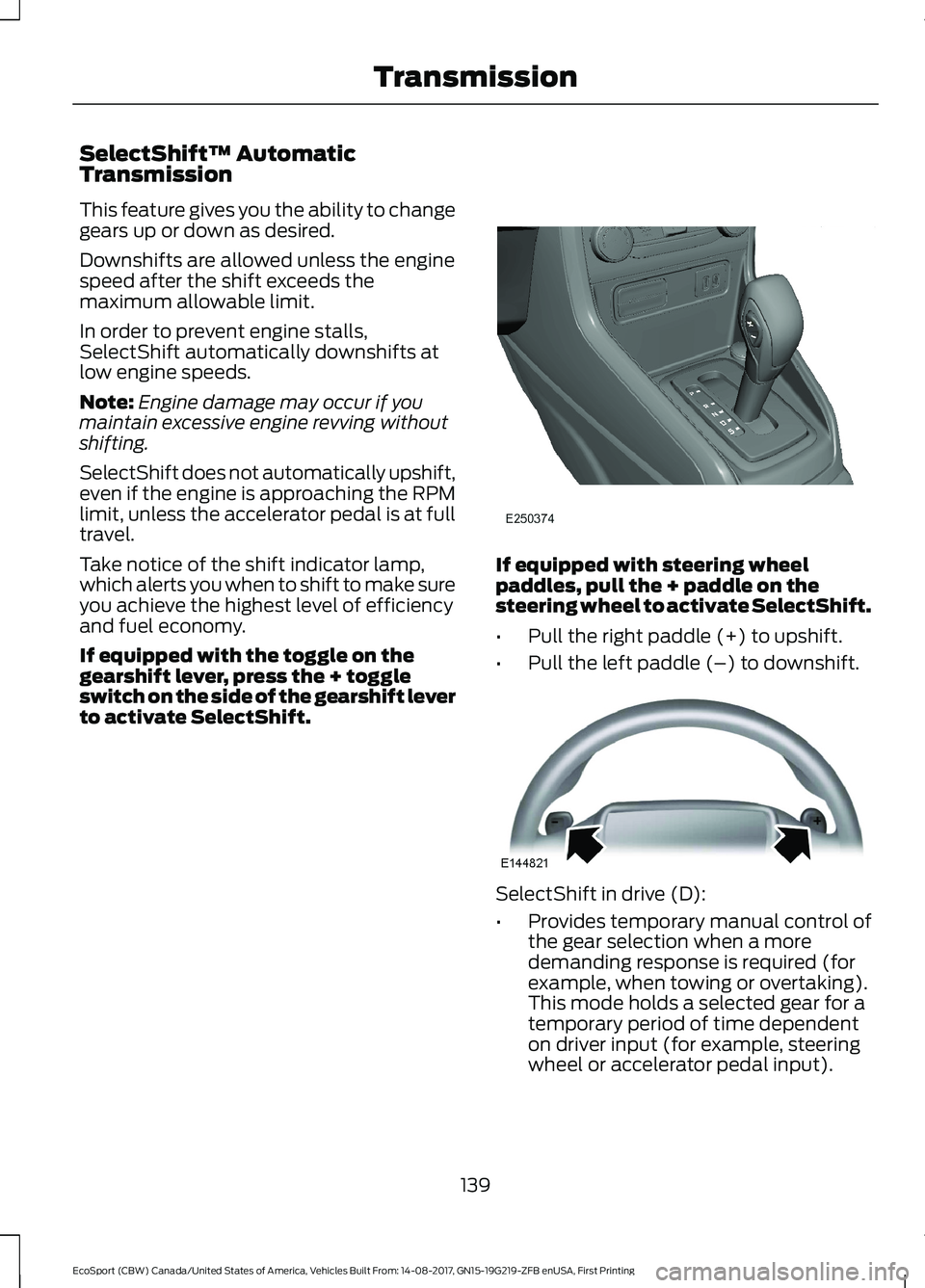
If equipped with the toggle on thegearshift lever, press the + toggleswitch on the side of the gearshift leverto activate SelectShift.
If equipped with steering wheelpaddles, pull the + paddle on thesteering wheel to activate SelectShift.
•Pull the right paddle (+) to upshift.
•Pull the left paddle (–) to downshift.
SelectShift in drive (D):
•Provides temporary manual control ofthe gear selection when a moredemanding response is required (forexample, when towing or overtaking).This mode holds a selected gear for atemporary period of time dependenton driver input (for example, steeringwheel or accelerator pedal input).
139EcoSport (CBW) Canada/United States of America, Vehicles Built From: 14-08-2017, GN15-19G219-ZFB enUSA, First PrintingTransmission
Page 150 of 452
GENERAL INFORMATION
Wet brakes result in reduced brakingefficiency. Gently press the brake pedal afew times when driving from a car wash orstanding water to dry the brakes.
Brake Over Accelerator
In the event the accelerator pedalbecomes stuck or entrapped, apply steadyand firm pressure to the brake pedal toslow the vehicle and reduce engine power.If you experience this condition, apply thebrakes and bring your vehicle to a safestop. Shift the transmission to park (P)(automatic transmission) or to a low gear(manual transmission), switch the engineoff and apply the parking brake.
Inspect the accelerator pedal and the areaaround it for any items or debris that maybe obstructing its movement. If none arefound and the condition persists, have yourvehicle towed to the dealer for service.
Emergency Brake Assist
Emergency brake assist detects when youbrake heavily by measuring the rate atwhich you press the brake pedal. Itprovides maximum braking efficiency aslong as you press the pedal. Emergencybrake assist can reduce stopping distancesin critical situations.
Anti-lock Brake System (If Equipped)
This system helps you maintain steeringcontrol and vehicle stability duringemergency stops by keeping the brakesfrom locking.
This lamp momentarilyilluminates when you switch theignition on. If the light does notilluminate during start up, remains on orflashes, the system may be disabled. Havethe system checked by an authorizeddealer. If the anti-lock brake system isdisabled, normal braking is still effective.
If the brake warning lampilluminates when you release theparking brake, have the systemchecked by an authorized dealer.
Note: Occasional brake noise is normal. Ifa metal-to-metal, continuous grinding orcontinuous squeal sound is present, thebrake linings may be worn-out. If yourvehicle has continuous vibration or shudderin the steering wheel while braking, haveyour vehicle checked by an authorizeddealer.
Note: Brake dust may accumulate on thewheels, even under normal drivingconditions. Some dust is inevitable as thebrakes wear. See Cleaning the Wheels(page 234).
Note:Depending on applicable laws andregulations in the country for which yourvehicle was originally built, the brake lampsmay flash during heavy braking. Followingthis the hazard warning flashers may alsoflash when your vehicle comes to a stop.
See Warning Lamps andIndicators (page 81).
HINTS ON DRIVING WITH
ANTI-LOCK BRAKES
The anti-lock braking system does noteliminate the risks when:
•You drive too closely to the vehicle infront of you.
•Your vehicle is hydroplaning.
146EcoSport (CBW) Canada/United States of America, Vehicles Built From: 14-08-2017, GN15-19G219-ZFB enUSA, First PrintingBrakes
Page 151 of 452
•You take corners too fast.
•The road surface is poor.
Note: If the system activates, the brakepedal may pulse and may travel further.Maintain pressure on the brake pedal. Youmay also hear a noise from the system. Thisis normal.
PARKING BRAKE
Vehicles With AutomaticTransmission
WARNING
Always set the parking brake fullyand leave your vehicle with thetransmission selector lever inposition P.
Note:If you park your vehicle on a hill andfacing uphill move the transmission selectorlever to position P and turn the steeringwheel away from the curb.
Note:If you park your vehicle on a hill andfacing downhill move the transmissionselector lever to position P and turn thesteering wheel toward the curb.
Vehicles With ManualTransmission
WARNING
Always set the parking brake fully.
Note:If you park your vehicle on a hill andfacing uphill select first gear and turn thesteering wheel away from the curb.
Note:If you park your vehicle on a hill andfacing downhill select reverse gear and turnthe steering wheel toward the curb.
All Vehicles
Note:Do not press the release button whilepulling the lever up.
To apply the parking brake:
1.Press the foot brake pedal firmly.
2.Pull the parking brake lever up to itsfullest extent.
To release the parking brake:
1.Press the brake pedal firmly.
2.Pull the lever up slightly.
3.Press the release button and push thelever down.
HILL START ASSIST
WARNINGS
The system does not replace theparking brake. When you leave yourvehicle, always apply the parkingbrake and shift the transmission into park(P) for automatic transmission or first gearfor manual transmission.
You must remain in your vehiclewhen the system turns on. At alltimes, you are responsible forcontrolling your vehicle, supervising thesystem and intervening, if required. Failureto take care may result in the loss ofcontrol of your vehicle, serious personalinjury or death.
The system turns off if there is amalfunction or if you excessively revthe engine.
The system makes it easier to pull awaywhen your vehicle is on a slope without theneed to use the parking brake.
147EcoSport (CBW) Canada/United States of America, Vehicles Built From: 14-08-2017, GN15-19G219-ZFB enUSA, First PrintingBrakes
Page 156 of 452
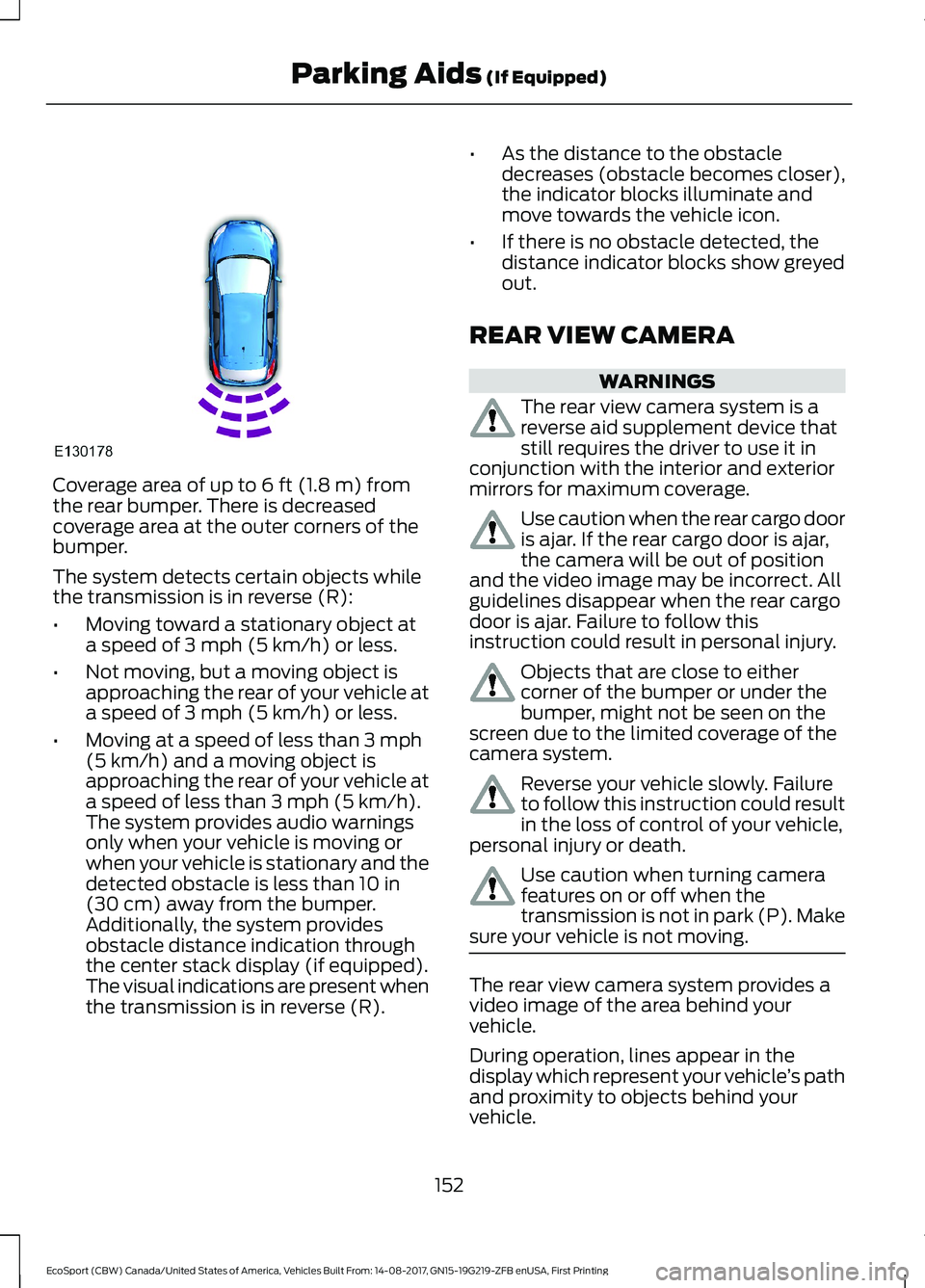
Coverage area of up to 6 ft (1.8 m) fromthe rear bumper. There is decreasedcoverage area at the outer corners of thebumper.
The system detects certain objects whilethe transmission is in reverse (R):
•Moving toward a stationary object ata speed of 3 mph (5 km/h) or less.
•Not moving, but a moving object isapproaching the rear of your vehicle ata speed of 3 mph (5 km/h) or less.
•Moving at a speed of less than 3 mph(5 km/h) and a moving object isapproaching the rear of your vehicle ata speed of less than 3 mph (5 km/h).The system provides audio warningsonly when your vehicle is moving orwhen your vehicle is stationary and thedetected obstacle is less than 10 in(30 cm) away from the bumper.Additionally, the system providesobstacle distance indication throughthe center stack display (if equipped).The visual indications are present whenthe transmission is in reverse (R).
•As the distance to the obstacledecreases (obstacle becomes closer),the indicator blocks illuminate andmove towards the vehicle icon.
•If there is no obstacle detected, thedistance indicator blocks show greyedout.
REAR VIEW CAMERA
WARNINGS
The rear view camera system is areverse aid supplement device thatstill requires the driver to use it inconjunction with the interior and exteriormirrors for maximum coverage.
Use caution when the rear cargo dooris ajar. If the rear cargo door is ajar,the camera will be out of positionand the video image may be incorrect. Allguidelines disappear when the rear cargodoor is ajar. Failure to follow thisinstruction could result in personal injury.
Objects that are close to eithercorner of the bumper or under thebumper, might not be seen on thescreen due to the limited coverage of thecamera system.
Reverse your vehicle slowly. Failureto follow this instruction could resultin the loss of control of your vehicle,personal injury or death.
Use caution when turning camerafeatures on or off when thetransmission is not in park (P). Makesure your vehicle is not moving.
The rear view camera system provides avideo image of the area behind yourvehicle.
During operation, lines appear in thedisplay which represent your vehicle’s pathand proximity to objects behind yourvehicle.
152EcoSport (CBW) Canada/United States of America, Vehicles Built From: 14-08-2017, GN15-19G219-ZFB enUSA, First PrintingParking Aids (If Equipped)
Page 157 of 452
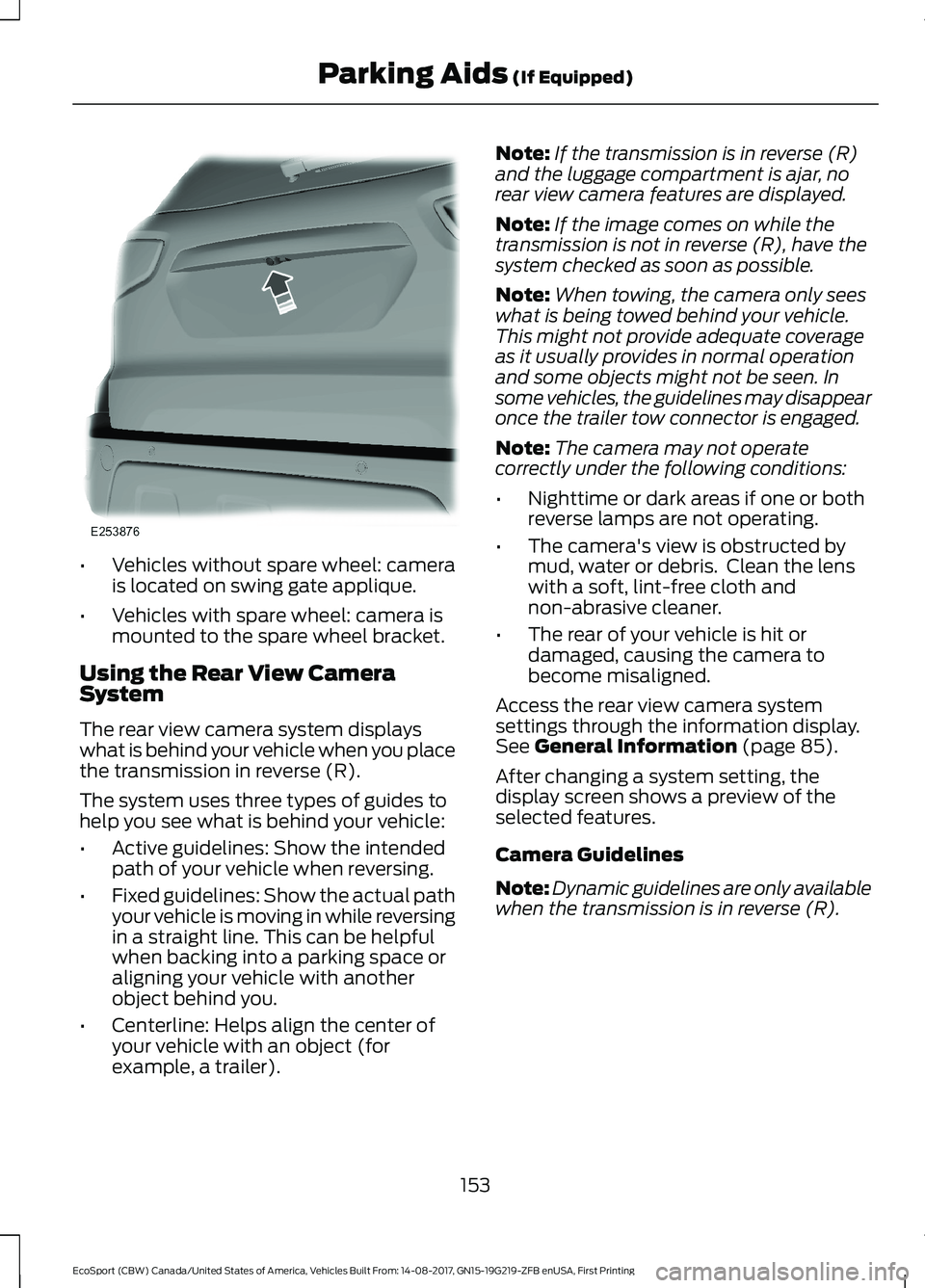
•Vehicles without spare wheel: camerais located on swing gate applique.
•Vehicles with spare wheel: camera ismounted to the spare wheel bracket.
Using the Rear View CameraSystem
The rear view camera system displayswhat is behind your vehicle when you placethe transmission in reverse (R).
The system uses three types of guides tohelp you see what is behind your vehicle:
•Active guidelines: Show the intendedpath of your vehicle when reversing.
•Fixed guidelines: Show the actual pathyour vehicle is moving in while reversingin a straight line. This can be helpfulwhen backing into a parking space oraligning your vehicle with anotherobject behind you.
•Centerline: Helps align the center ofyour vehicle with an object (forexample, a trailer).
Note:If the transmission is in reverse (R)and the luggage compartment is ajar, norear view camera features are displayed.
Note:If the image comes on while thetransmission is not in reverse (R), have thesystem checked as soon as possible.
Note:When towing, the camera only seeswhat is being towed behind your vehicle.This might not provide adequate coverageas it usually provides in normal operationand some objects might not be seen. Insome vehicles, the guidelines may disappearonce the trailer tow connector is engaged.
Note:The camera may not operatecorrectly under the following conditions:
•Nighttime or dark areas if one or bothreverse lamps are not operating.
•The camera's view is obstructed bymud, water or debris. Clean the lenswith a soft, lint-free cloth andnon-abrasive cleaner.
•The rear of your vehicle is hit ordamaged, causing the camera tobecome misaligned.
Access the rear view camera systemsettings through the information display.See General Information (page 85).
After changing a system setting, thedisplay screen shows a preview of theselected features.
Camera Guidelines
Note:Dynamic guidelines are only availablewhen the transmission is in reverse (R).
153EcoSport (CBW) Canada/United States of America, Vehicles Built From: 14-08-2017, GN15-19G219-ZFB enUSA, First PrintingParking Aids (If Equipped)
Page 158 of 452
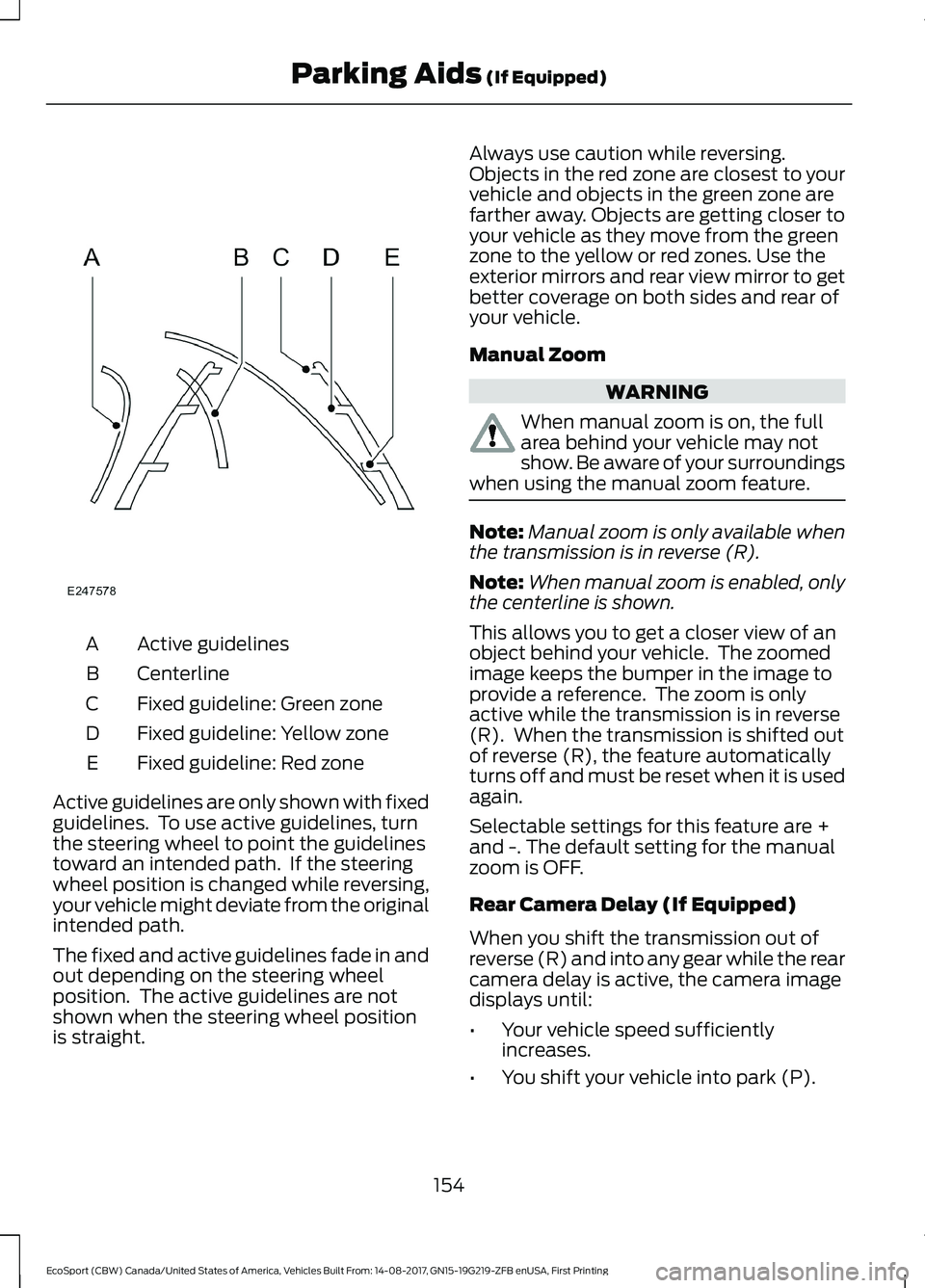
Active guidelinesA
CenterlineB
Fixed guideline: Green zoneC
Fixed guideline: Yellow zoneD
Fixed guideline: Red zoneE
Active guidelines are only shown with fixedguidelines. To use active guidelines, turnthe steering wheel to point the guidelinestoward an intended path. If the steeringwheel position is changed while reversing,your vehicle might deviate from the originalintended path.
The fixed and active guidelines fade in andout depending on the steering wheelposition. The active guidelines are notshown when the steering wheel positionis straight.
Always use caution while reversing.Objects in the red zone are closest to yourvehicle and objects in the green zone arefarther away. Objects are getting closer toyour vehicle as they move from the greenzone to the yellow or red zones. Use theexterior mirrors and rear view mirror to getbetter coverage on both sides and rear ofyour vehicle.
Manual Zoom
WARNING
When manual zoom is on, the fullarea behind your vehicle may notshow. Be aware of your surroundingswhen using the manual zoom feature.
Note:Manual zoom is only available whenthe transmission is in reverse (R).
Note:When manual zoom is enabled, onlythe centerline is shown.
This allows you to get a closer view of anobject behind your vehicle. The zoomedimage keeps the bumper in the image toprovide a reference. The zoom is onlyactive while the transmission is in reverse(R). When the transmission is shifted outof reverse (R), the feature automaticallyturns off and must be reset when it is usedagain.
Selectable settings for this feature are +and -. The default setting for the manualzoom is OFF.
Rear Camera Delay (If Equipped)
When you shift the transmission out ofreverse (R) and into any gear while the rearcamera delay is active, the camera imagedisplays until:
•Your vehicle speed sufficientlyincreases.
•You shift your vehicle into park (P).
154EcoSport (CBW) Canada/United States of America, Vehicles Built From: 14-08-2017, GN15-19G219-ZFB enUSA, First PrintingParking Aids (If Equipped)