ESP FORD ECOSPORT 2018 Workshop Manual
[x] Cancel search | Manufacturer: FORD, Model Year: 2018, Model line: ECOSPORT, Model: FORD ECOSPORT 2018Pages: 452, PDF Size: 17.04 MB
Page 279 of 452
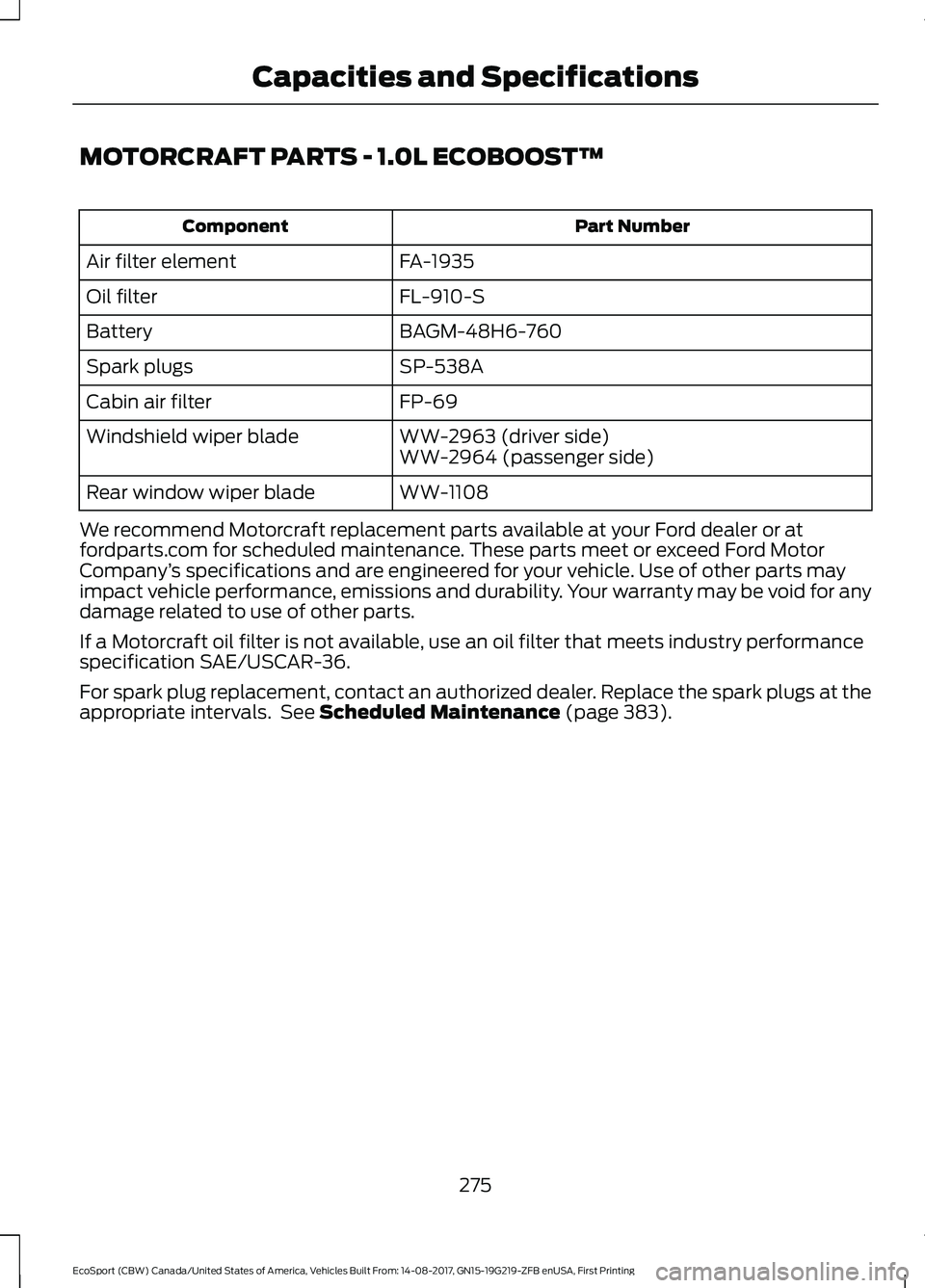
MOTORCRAFT PARTS - 1.0L ECOBOOST™
Part NumberComponent
FA-1935Air filter element
FL-910-SOil filter
BAGM-48H6-760Battery
SP-538ASpark plugs
FP-69Cabin air filter
WW-2963 (driver side)Windshield wiper bladeWW-2964 (passenger side)
WW-1108Rear window wiper blade
We recommend Motorcraft replacement parts available at your Ford dealer or atfordparts.com for scheduled maintenance. These parts meet or exceed Ford MotorCompany’s specifications and are engineered for your vehicle. Use of other parts mayimpact vehicle performance, emissions and durability. Your warranty may be void for anydamage related to use of other parts.
If a Motorcraft oil filter is not available, use an oil filter that meets industry performancespecification SAE/USCAR-36.
For spark plug replacement, contact an authorized dealer. Replace the spark plugs at theappropriate intervals. See Scheduled Maintenance (page 383).
275EcoSport (CBW) Canada/United States of America, Vehicles Built From: 14-08-2017, GN15-19G219-ZFB enUSA, First PrintingCapacities and Specifications
Page 280 of 452
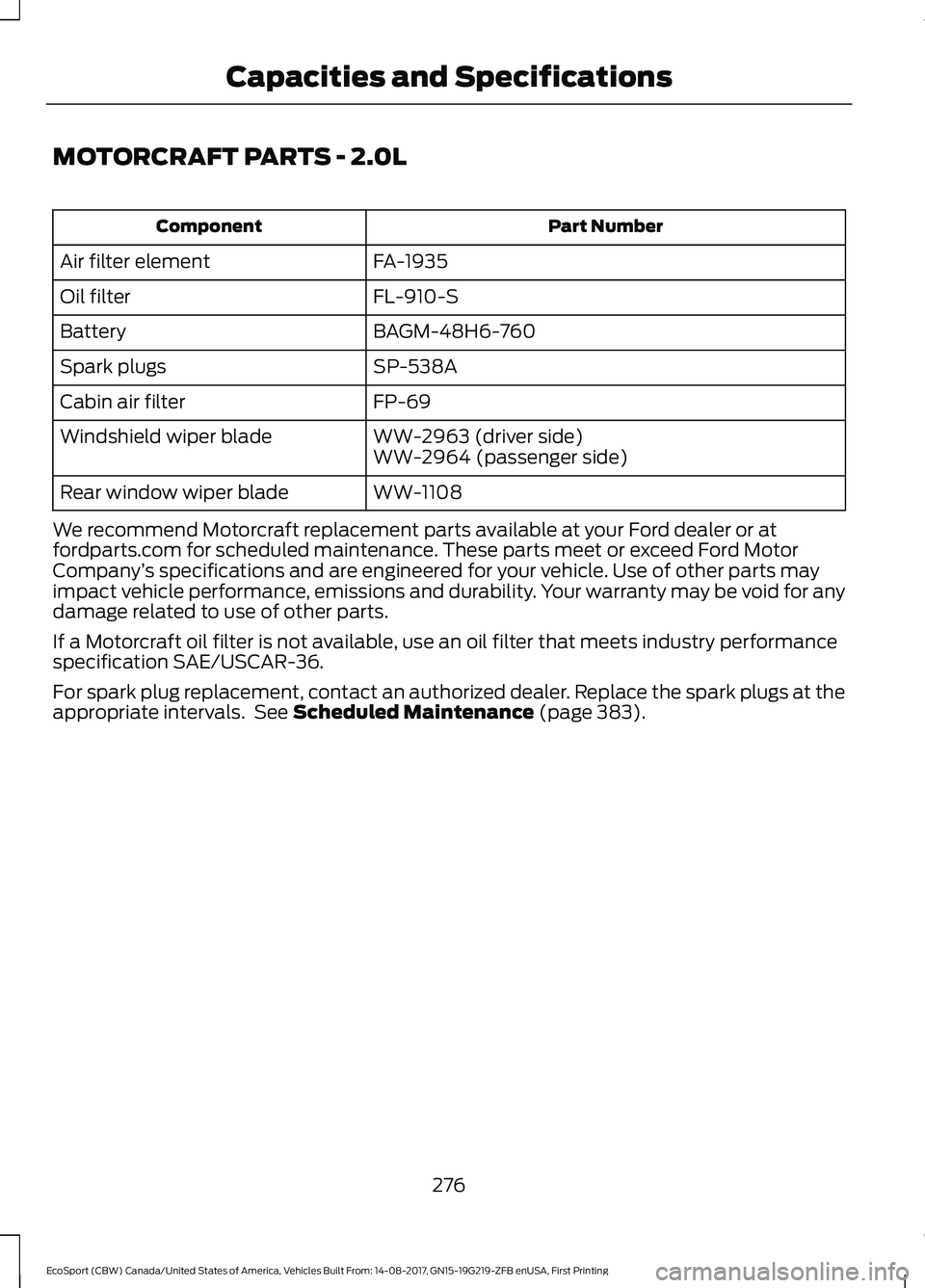
MOTORCRAFT PARTS - 2.0L
Part NumberComponent
FA-1935Air filter element
FL-910-SOil filter
BAGM-48H6-760Battery
SP-538ASpark plugs
FP-69Cabin air filter
WW-2963 (driver side)Windshield wiper bladeWW-2964 (passenger side)
WW-1108Rear window wiper blade
We recommend Motorcraft replacement parts available at your Ford dealer or atfordparts.com for scheduled maintenance. These parts meet or exceed Ford MotorCompany’s specifications and are engineered for your vehicle. Use of other parts mayimpact vehicle performance, emissions and durability. Your warranty may be void for anydamage related to use of other parts.
If a Motorcraft oil filter is not available, use an oil filter that meets industry performancespecification SAE/USCAR-36.
For spark plug replacement, contact an authorized dealer. Replace the spark plugs at theappropriate intervals. See Scheduled Maintenance (page 383).
276EcoSport (CBW) Canada/United States of America, Vehicles Built From: 14-08-2017, GN15-19G219-ZFB enUSA, First PrintingCapacities and Specifications
Page 289 of 452
GENERAL INFORMATION
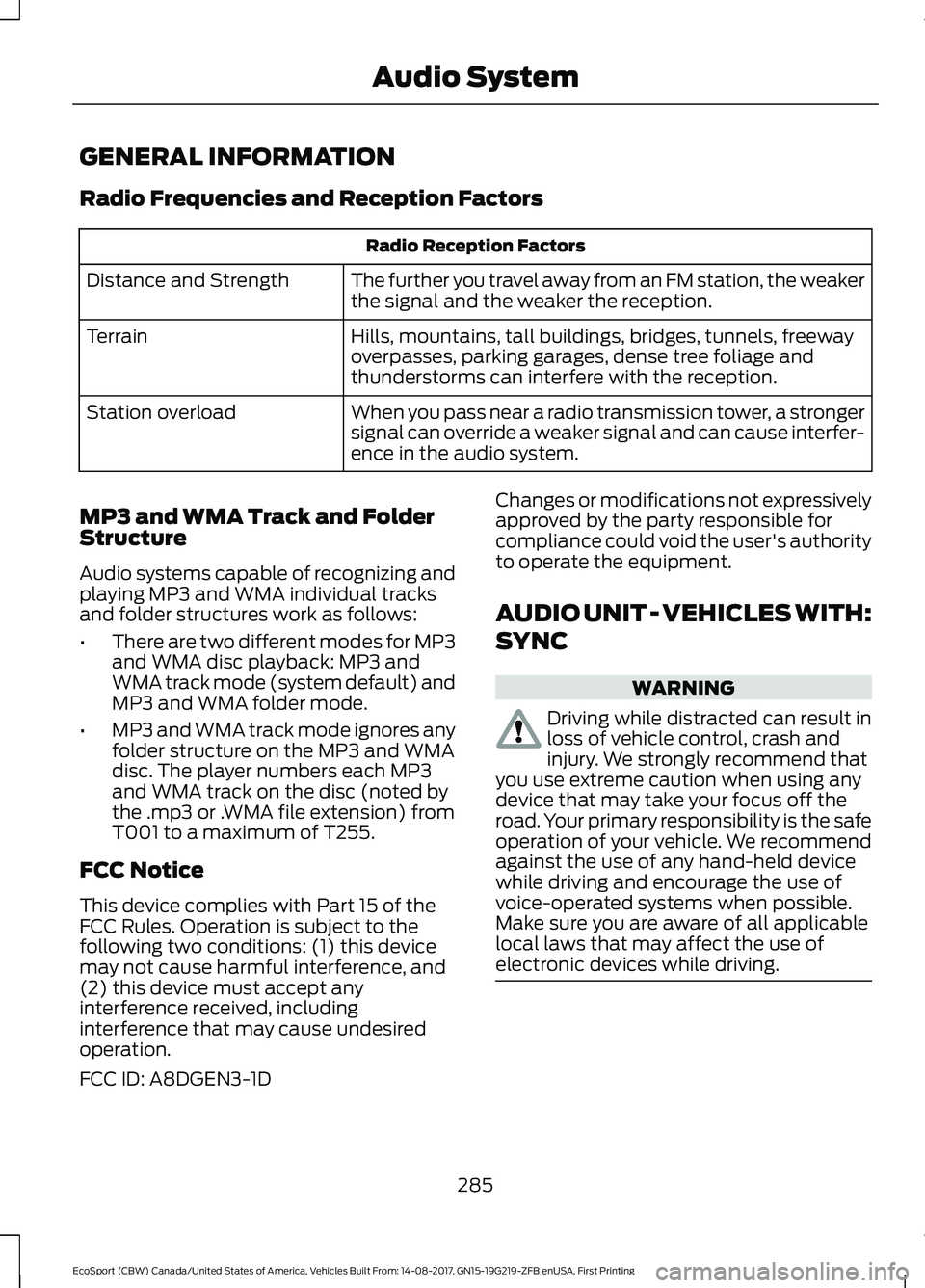
Radio Frequencies and Reception Factors
Radio Reception Factors
The further you travel away from an FM station, the weakerthe signal and the weaker the reception.Distance and Strength
Hills, mountains, tall buildings, bridges, tunnels, freewayoverpasses, parking garages, dense tree foliage andthunderstorms can interfere with the reception.
Terrain
When you pass near a radio transmission tower, a strongersignal can override a weaker signal and can cause interfer-ence in the audio system.
Station overload
MP3 and WMA Track and FolderStructure
Audio systems capable of recognizing andplaying MP3 and WMA individual tracksand folder structures work as follows:
•There are two different modes for MP3and WMA disc playback: MP3 andWMA track mode (system default) andMP3 and WMA folder mode.
•MP3 and WMA track mode ignores anyfolder structure on the MP3 and WMAdisc. The player numbers each MP3and WMA track on the disc (noted bythe .mp3 or .WMA file extension) fromT001 to a maximum of T255.
FCC Notice
This device complies with Part 15 of theFCC Rules. Operation is subject to thefollowing two conditions: (1) this devicemay not cause harmful interference, and(2) this device must accept anyinterference received, includinginterference that may cause undesiredoperation.
FCC ID: A8DGEN3-1D
Changes or modifications not expressivelyapproved by the party responsible forcompliance could void the user's authorityto operate the equipment.
AUDIO UNIT - VEHICLES WITH:
SYNC
WARNING
Driving while distracted can result inloss of vehicle control, crash andinjury. We strongly recommend thatyou use extreme caution when using anydevice that may take your focus off theroad. Your primary responsibility is the safeoperation of your vehicle. We recommendagainst the use of any hand-held devicewhile driving and encourage the use ofvoice-operated systems when possible.Make sure you are aware of all applicablelocal laws that may affect the use ofelectronic devices while driving.
285EcoSport (CBW) Canada/United States of America, Vehicles Built From: 14-08-2017, GN15-19G219-ZFB enUSA, First PrintingAudio System
Page 292 of 452
Using a Cell Phone
You can make a call from arecent call list, contact list or diala number.
AUDIO UNIT - VEHICLES WITH:
SYNC 3
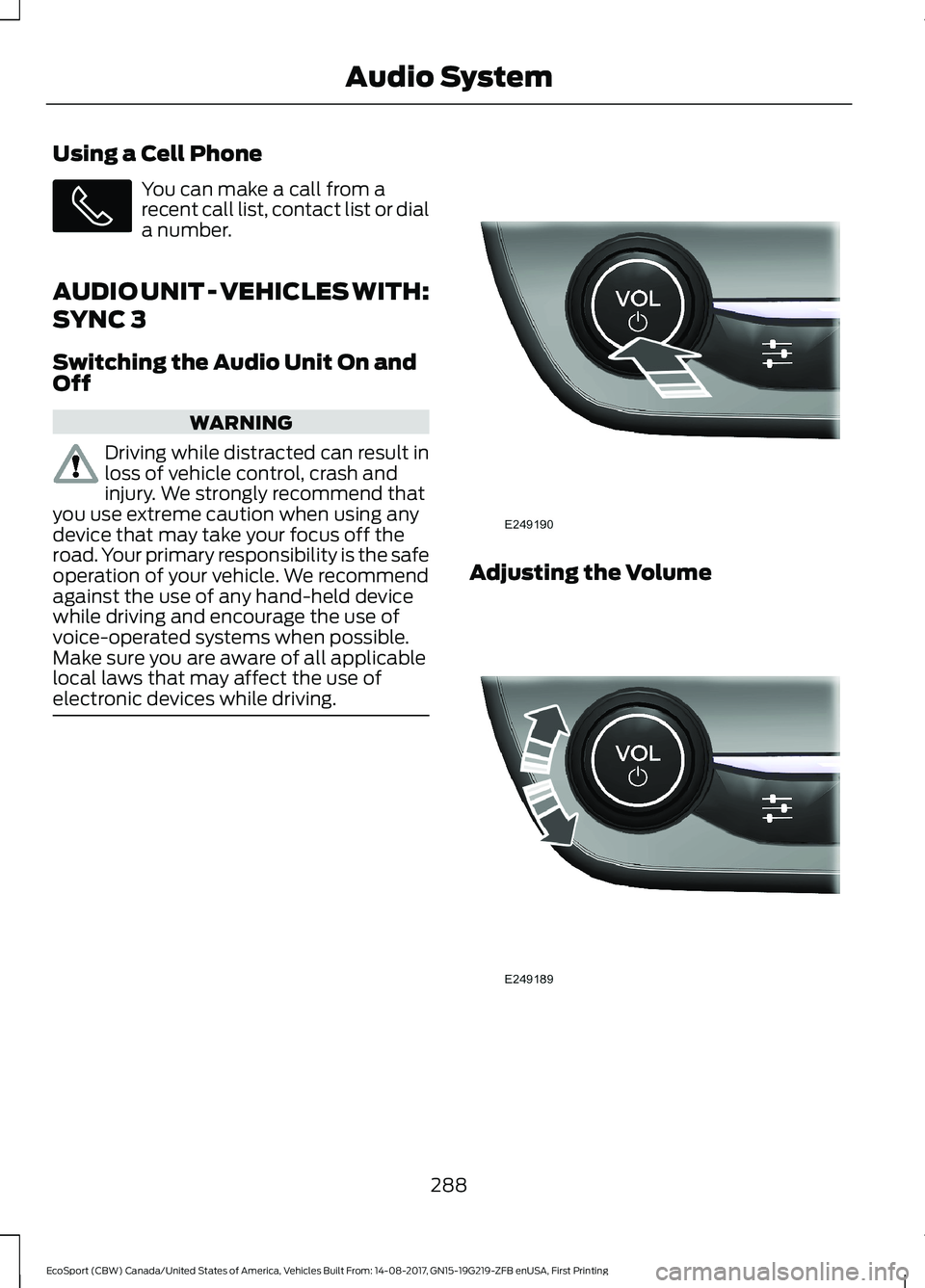
Switching the Audio Unit On andOff
WARNING
Driving while distracted can result inloss of vehicle control, crash andinjury. We strongly recommend thatyou use extreme caution when using anydevice that may take your focus off theroad. Your primary responsibility is the safeoperation of your vehicle. We recommendagainst the use of any hand-held devicewhile driving and encourage the use ofvoice-operated systems when possible.Make sure you are aware of all applicablelocal laws that may affect the use ofelectronic devices while driving.
Adjusting the Volume
288EcoSport (CBW) Canada/United States of America, Vehicles Built From: 14-08-2017, GN15-19G219-ZFB enUSA, First PrintingAudio System
Page 293 of 452
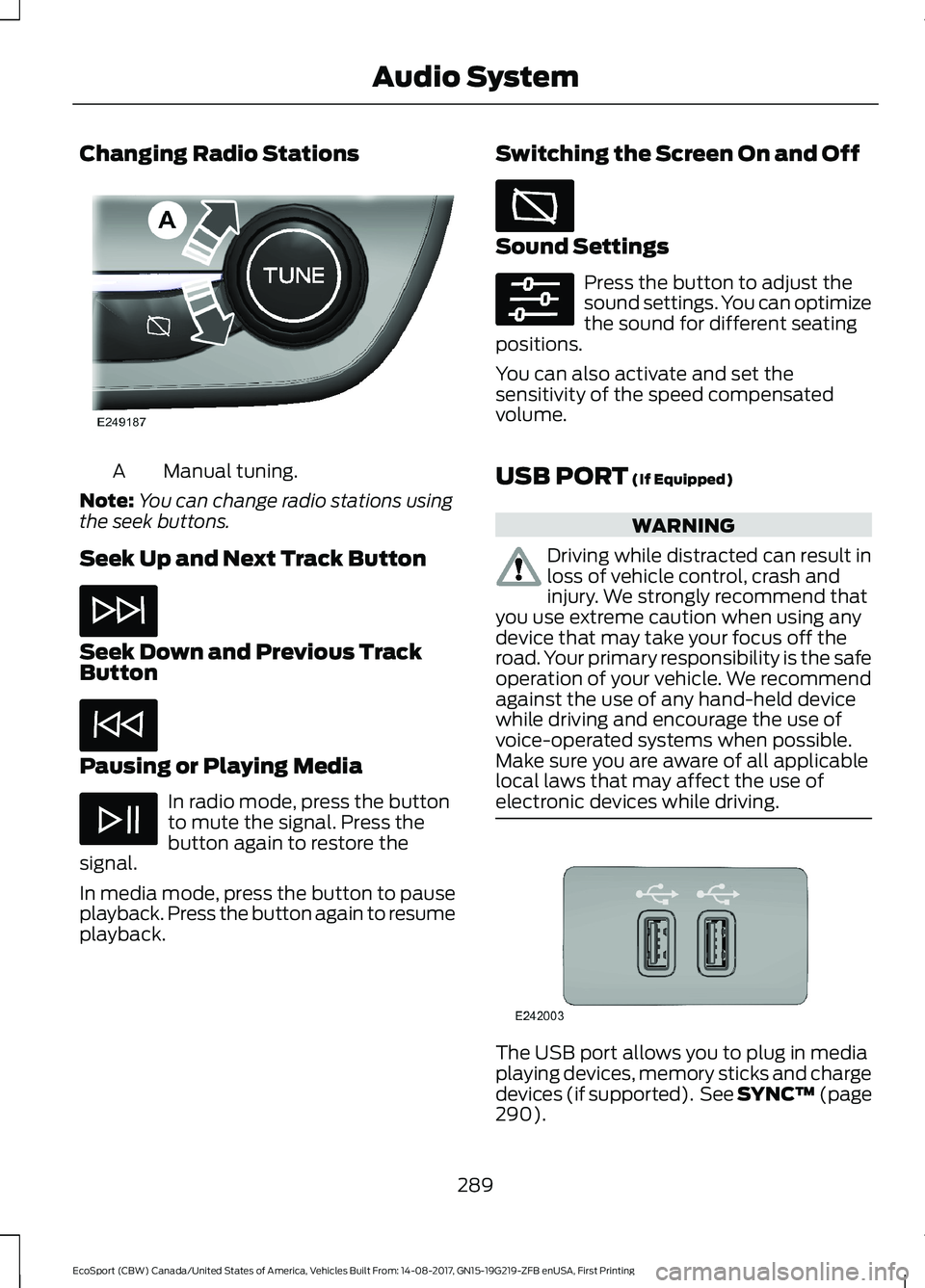
Changing Radio Stations
Manual tuning.A
Note:You can change radio stations usingthe seek buttons.
Seek Up and Next Track Button
Seek Down and Previous TrackButton
Pausing or Playing Media
In radio mode, press the buttonto mute the signal. Press thebutton again to restore thesignal.
In media mode, press the button to pauseplayback. Press the button again to resumeplayback.
Switching the Screen On and Off
Sound Settings
Press the button to adjust thesound settings. You can optimizethe sound for different seatingpositions.
You can also activate and set thesensitivity of the speed compensatedvolume.
USB PORT (If Equipped)
WARNING
Driving while distracted can result inloss of vehicle control, crash andinjury. We strongly recommend thatyou use extreme caution when using anydevice that may take your focus off theroad. Your primary responsibility is the safeoperation of your vehicle. We recommendagainst the use of any hand-held devicewhile driving and encourage the use ofvoice-operated systems when possible.Make sure you are aware of all applicablelocal laws that may affect the use ofelectronic devices while driving.
The USB port allows you to plug in mediaplaying devices, memory sticks and chargedevices (if supported). See SYNC™ (page290).
289EcoSport (CBW) Canada/United States of America, Vehicles Built From: 14-08-2017, GN15-19G219-ZFB enUSA, First PrintingAudio System
Page 294 of 452
GENERAL INFORMATION
SYNC is an in-vehicle communicationssystem that works with yourBluetooth-enabled cellular phone andportable media player. This allows you to:
•Make and receive calls.
•Access and play music from yourportable music player.
•Use 911 Assist or Emergency Assistanceand applications via SYNC AppLink.*
•Access phonebook contacts and musicusing voice commands.
•Stream music from your connectedphone.
•Text message.
•Use the advanced voice recognitionsystem.
•Charge your USB device (if your devicesupports this).*These features are not available in allmarkets and may require activation.Available AppLink enabled apps vary bymarket.
Make sure that you review your device'smanual before using it with SYNC.
Support
SYNC support is available at your regionalFord website. See SYNC™Troubleshooting (page 299).
SYNC Owner Account
Why do I need a SYNC owner account?
•Essential for keeping up with the latestsoftware downloads available forSYNC.
•Access to customer support for anyquestions you may have.
Driving Restrictions
For your safety, certain features arespeed-dependent and restricted when yourvehicle is traveling over 3 mi (5 km).
Safety Information
WARNING
Driving while distracted can result inloss of vehicle control, crash andinjury. We strongly recommend thatyou use extreme caution when using anydevice that may take your focus off theroad. Your primary responsibility is the safeoperation of your vehicle. We recommendagainst the use of any hand-held devicewhile driving and encourage the use ofvoice-operated systems when possible.Make sure you are aware of all applicablelocal laws that may affect the use ofelectronic devices while driving.
When using SYNC:
•Do not operate playing devices if thepower cords or cables are broken, splitor damaged. Place cords and cablesout of the way, so they do not interferewith the operation of pedals, seats,compartments or safe driving abilities.
•Do not leave playing devices in yourvehicle during extreme conditions as itcould cause them damage. See yourdevice's manual for further information.
•Do not attempt to service or repair thesystem. See an authorized dealer.
Privacy Information
When a cellular phone is connected toSYNC, the system creates a profile withinyour vehicle that is linked to that cellularphone. This profile is created in order tooffer you more cellular features and tooperate more efficiently. Among otherthings, this profile may contain data aboutyour cellular phone book, text messages
290EcoSport (CBW) Canada/United States of America, Vehicles Built From: 14-08-2017, GN15-19G219-ZFB enUSA, First PrintingSYNC™
Page 299 of 452
911 Assist
WARNINGS
Unless the 911 Assist setting is set onbefore a crash, the system will notdial for help which could delayresponse time, potentially increasing therisk of serious injury or death after a crash.
Do not wait for 911 Assist to make anemergency call if you can do ityourself. Dial emergency servicesimmediately to avoid delayed responsetime which could increase the risk ofserious injury or death after a crash. If youdo not hear 911 Assist within five secondsof the crash, the system or phone may bedamaged or non-functional.
Always place your phone in a securelocation in your vehicle so it does notbecome a projectile or get damagedin a crash. Failure to do so may causeserious injury to someone or damage thephone which could prevent 911 Assist fromworking properly.
Note:The SYNC 911 Assist feature must beset on before the incident.
Note:The SYNC 911 Assist feature onlyoperates in the U.S., Canada or in a territoryin which 911 is the emergency number.
Note:Before setting this feature on, makesure that you read the 911 Assist PrivacyNotice later in this section for importantinformation.
Note:If any user switches 911 Assist to onor off, that setting applies for all pairedphones. If 911 Assist is switched off, eithera voice message plays or a display messageor an icon comes on when your vehicle isstarted and after a previously paired phoneconnects.
Note:Every phone operates differently.While SYNC 911 Assist works with mostcellular phones, some may have troubleusing this feature.
If a crash deploys an airbag (excludingknee airbags and rear inflatable safetybelts [if equipped]) or activates the fuelpump shut-off, your SYNC-equippedvehicle may be able to contact emergencyservices by dialing 911 through a paired andconnected Bluetooth-enabled phone.
See SYNC™ (page 290). Importantinformation about airbag deployment is inthis chapter.
See Roadside Emergencies (page 181).Important information about the fuel pumpshut-off is in this chapter.
Setting 911 Assist On or Off
Press the Settings button then select:
Action and DescriptionMenuItem
Select the desired option, onor off.911 Assist
To make sure that 911 Assist worksproperly:
•SYNC must be powered and workingproperly at the time of the incident andthroughout feature activation and use.
•The 911 Assist feature must be set onbefore the incident.
•You must pair and connect aBluetooth-enabled and compatiblecell phone to SYNC.
•A connected Bluetooth-enabled phonemust have the ability to make andmaintain an outgoing call at the timeof the incident.
•A connected Bluetooth-enabled phonemust have adequate network coverage,battery power and signal strength.
•The vehicle must have battery powerand be located in the U.S., Canada orin a territory in which 911 is theemergency number.
295EcoSport (CBW) Canada/United States of America, Vehicles Built From: 14-08-2017, GN15-19G219-ZFB enUSA, First PrintingSYNC™
Page 302 of 452
•To allow your vehicle to providelocation information, including: GPSand speed.
•To allow the app to send pushnotifications using the vehicle displayand voice capabilities while running ina background state. Push notificationsmay be particularly useful for news orlocation based apps.
Note:You only need to grant permissionsthe first time you use an app with SYNC.
Note:Ford is not responsible or liable forany damages or loss of privacy relating tousage of an app, or dissemination of anyvehicle data that you approve Ford toprovide to an app.
Enabling SYNC Mobile Apps
In order to enable mobile apps, SYNCrequires user consent to send and receiveapp authorization information and updatesusing the data plan associated with theconnected device.
Data is sent to Ford in the United Statesthrough the connected device. Theinformation is encrypted and includes yourVIN, SYNC module number, anonymoususage statistics and debugginginformation. Updates may take placeautomatically.
Note:You must enable mobile apps foreach connected device the first time youselect a mobile app using the system.
Note:Standard data rates apply. Ford isnot responsible for any additional chargesyou may receive from your service provider,when your vehicle sends or receives datathrough the connected device. This includesany additional charges incurred due todriving in areas when roaming out of a homenetwork.
USING SYNC™ WITH YOUR
MEDIA PLAYER
SYNC supports digital media sourcesincluding: iPod, Bluetooth devices, andmost USB drives. SYNC also supportsaudio formats, such as MP3, WMA, WAVand ACC.
Media Sources
The AUX button allows you to view andselect available media sources.
Press the AUX button to view yoursources. Use the directional arrows and OKbutton to select your source. You can alsouse the steering wheel audio controls.
Audio Voice Commands
Press the voice button. You cando things like play a specific songor album, skip to the next song,or tune to a radio station. When prompted,say a command. See the following tablefor example commands. Not allcommands may be available on yourvehicle.
Command
___ List of Commands
Help
Pause
Play
Next Track
Previous Track
AM ___
FM ___
CD Player
298EcoSport (CBW) Canada/United States of America, Vehicles Built From: 14-08-2017, GN15-19G219-ZFB enUSA, First PrintingSYNC™
Page 306 of 452
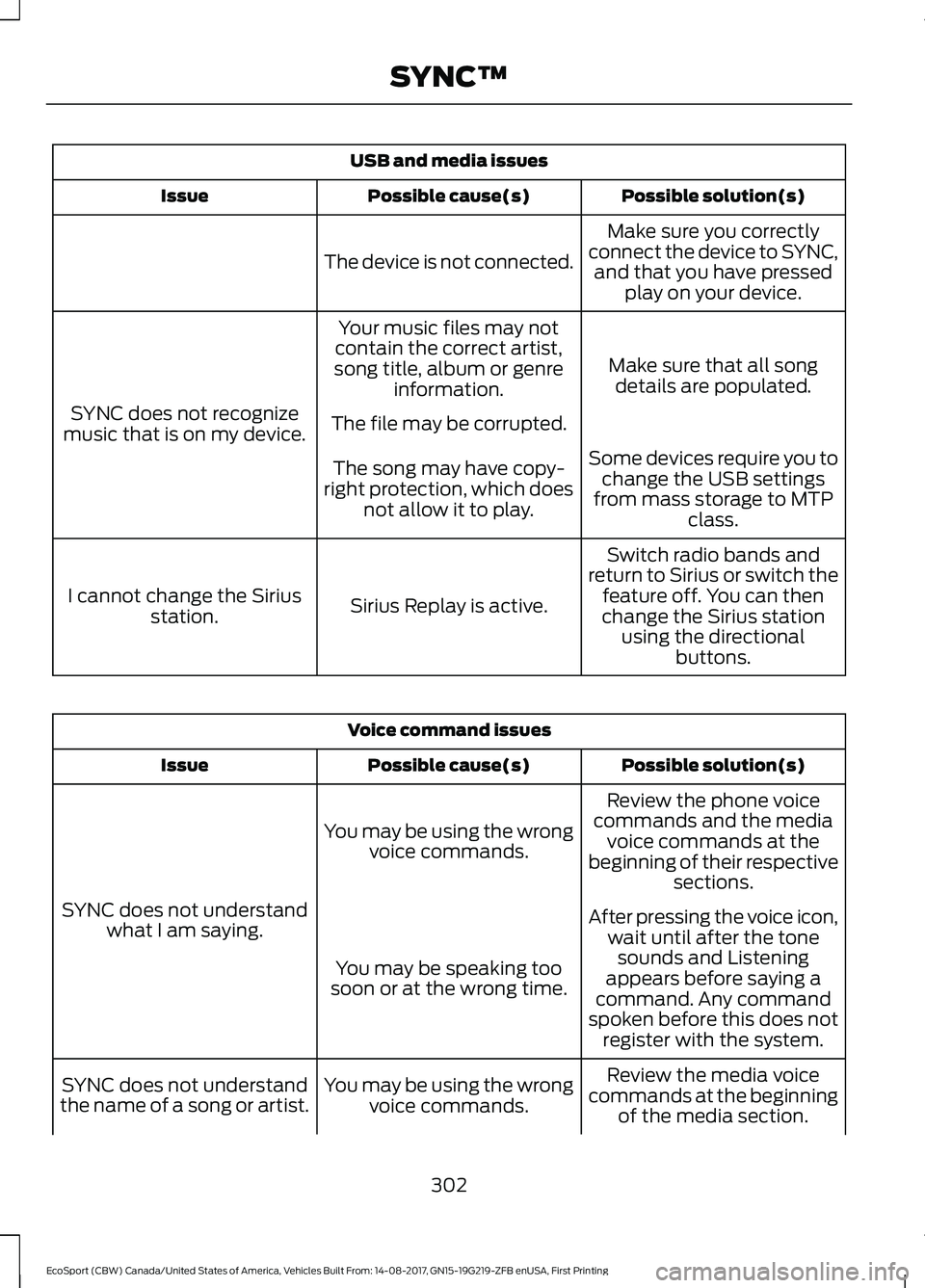
USB and media issues
Possible solution(s)Possible cause(s)Issue
Make sure you correctlyconnect the device to SYNC,and that you have pressedplay on your device.
The device is not connected.
Make sure that all songdetails are populated.
Your music files may notcontain the correct artist,song title, album or genreinformation.
SYNC does not recognizemusic that is on my device.The file may be corrupted.
Some devices require you tochange the USB settingsfrom mass storage to MTPclass.
The song may have copy-right protection, which doesnot allow it to play.
Switch radio bands andreturn to Sirius or switch thefeature off. You can thenchange the Sirius stationusing the directionalbuttons.
Sirius Replay is active.I cannot change the Siriusstation.
Voice command issues
Possible solution(s)Possible cause(s)Issue
Review the phone voicecommands and the mediavoice commands at thebeginning of their respectivesections.
You may be using the wrongvoice commands.
SYNC does not understandwhat I am saying.After pressing the voice icon,wait until after the tonesounds and Listeningappears before saying acommand. Any commandspoken before this does notregister with the system.
You may be speaking toosoon or at the wrong time.
Review the media voicecommands at the beginningof the media section.
You may be using the wrongvoice commands.SYNC does not understandthe name of a song or artist.
302EcoSport (CBW) Canada/United States of America, Vehicles Built From: 14-08-2017, GN15-19G219-ZFB enUSA, First PrintingSYNC™
Page 311 of 452
GENERAL INFORMATION
WARNING
Driving while distracted can result inloss of vehicle control, crash andinjury. We strongly recommend thatyou use extreme caution when using anydevice that may take your focus off theroad. Your primary responsibility is the safeoperation of your vehicle. We recommendagainst the use of any hand-held devicewhile driving and encourage the use ofvoice-operated systems when possible.Make sure you are aware of all applicablelocal laws that may affect the use ofelectronic devices while driving.
Getting to Know Your System
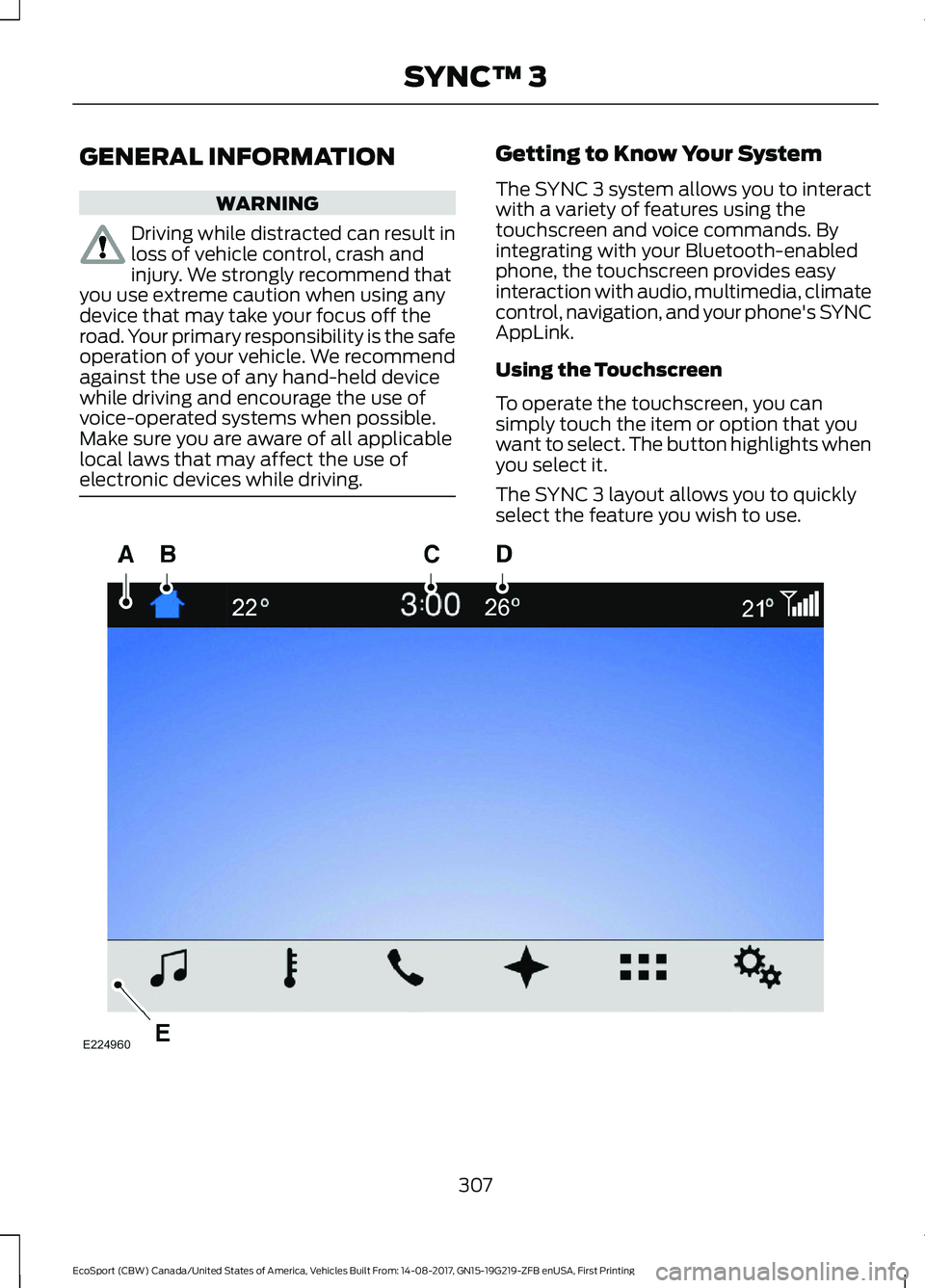
The SYNC 3 system allows you to interactwith a variety of features using thetouchscreen and voice commands. Byintegrating with your Bluetooth-enabledphone, the touchscreen provides easyinteraction with audio, multimedia, climatecontrol, navigation, and your phone's SYNCAppLink.
Using the Touchscreen
To operate the touchscreen, you cansimply touch the item or option that youwant to select. The button highlights whenyou select it.
The SYNC 3 layout allows you to quicklyselect the feature you wish to use.
307EcoSport (CBW) Canada/United States of America, Vehicles Built From: 14-08-2017, GN15-19G219-ZFB enUSA, First PrintingSYNC™ 3