steering FORD ECOSPORT 2020 Workshop Manual
[x] Cancel search | Manufacturer: FORD, Model Year: 2020, Model line: ECOSPORT, Model: FORD ECOSPORT 2020Pages: 448, PDF Size: 16.57 MB
Page 350 of 448
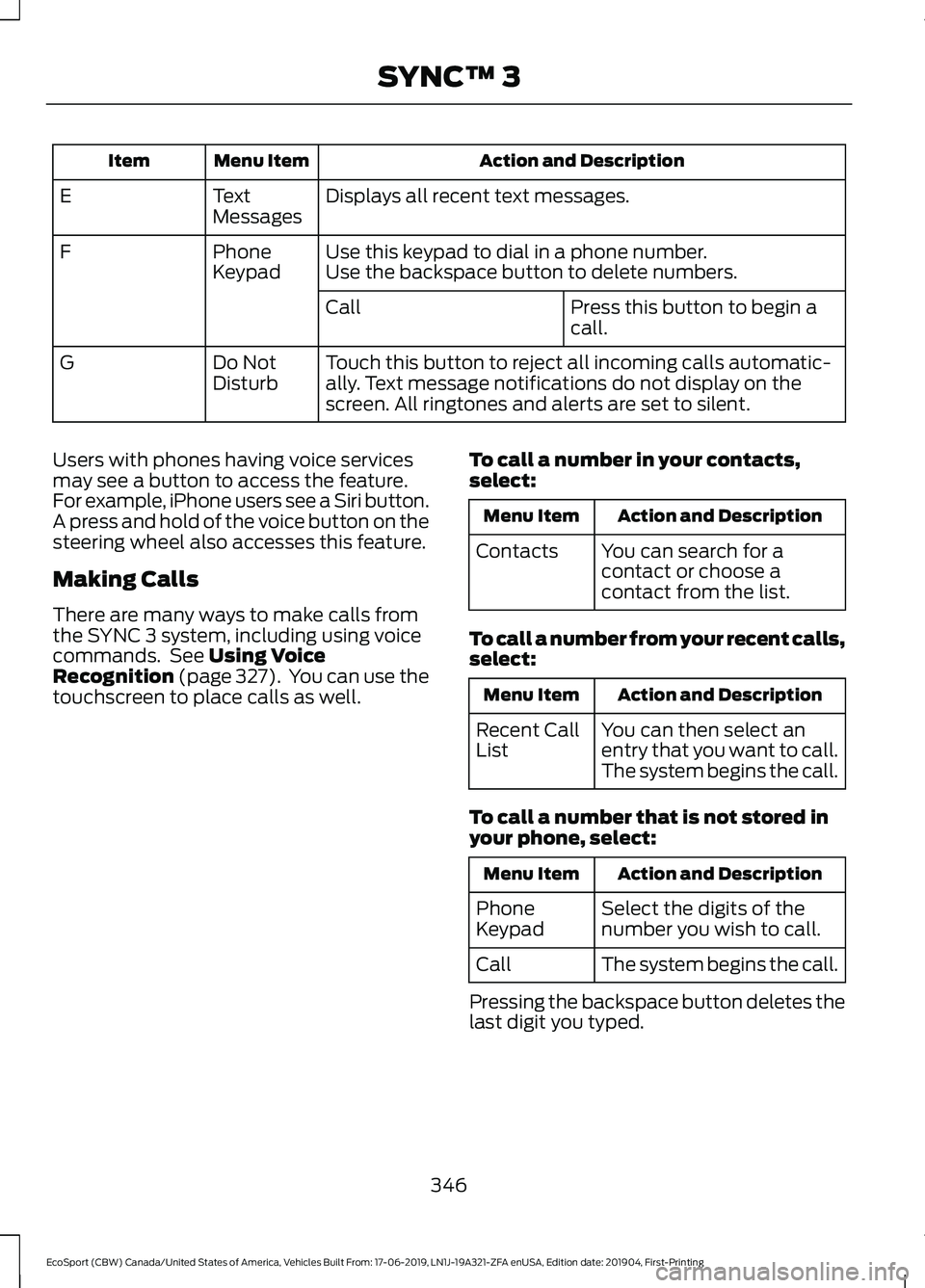
Action and DescriptionMenu ItemItem
Displays all recent text messages.TextMessagesE
Use this keypad to dial in a phone number.PhoneKeypadFUse the backspace button to delete numbers.
Press this button to begin acall.Call
Touch this button to reject all incoming calls automatic-ally. Text message notifications do not display on thescreen. All ringtones and alerts are set to silent.
Do NotDisturbG
Users with phones having voice servicesmay see a button to access the feature.For example, iPhone users see a Siri button.A press and hold of the voice button on thesteering wheel also accesses this feature.
Making Calls
There are many ways to make calls fromthe SYNC 3 system, including using voicecommands. See Using VoiceRecognition (page 327). You can use thetouchscreen to place calls as well.
To call a number in your contacts,select:
Action and DescriptionMenu Item
You can search for acontact or choose acontact from the list.
Contacts
To call a number from your recent calls,select:
Action and DescriptionMenu Item
You can then select anentry that you want to call.The system begins the call.
Recent CallList
To call a number that is not stored inyour phone, select:
Action and DescriptionMenu Item
Select the digits of thenumber you wish to call.PhoneKeypad
The system begins the call.Call
Pressing the backspace button deletes thelast digit you typed.
346
EcoSport (CBW) Canada/United States of America, Vehicles Built From: 17-06-2019, LN1J-19A321-ZFA enUSA, Edition date: 201904, First-PrintingSYNC™ 3
Page 351 of 448
Receiving Calls
During an incoming call, an audible tonesounds. Caller information appears in thedisplay if it is available.
To accept the call, select:
Menu Item
Accept
Note:You can also accept the call bypressing the phone button on the steeringwheel.
To reject the call, select:
Menu Item
Reject
Note:You can also reject the call bypressing the phone button on the steeringwheel.
Ignore the call by doing nothing. SYNC 3logs it as a missed call.
During a Phone Call
During a phone call, the contacts nameand number display on the screen alongwith the call duration.
The phone status items are also visible:
•Signal Strength.
•Battery.
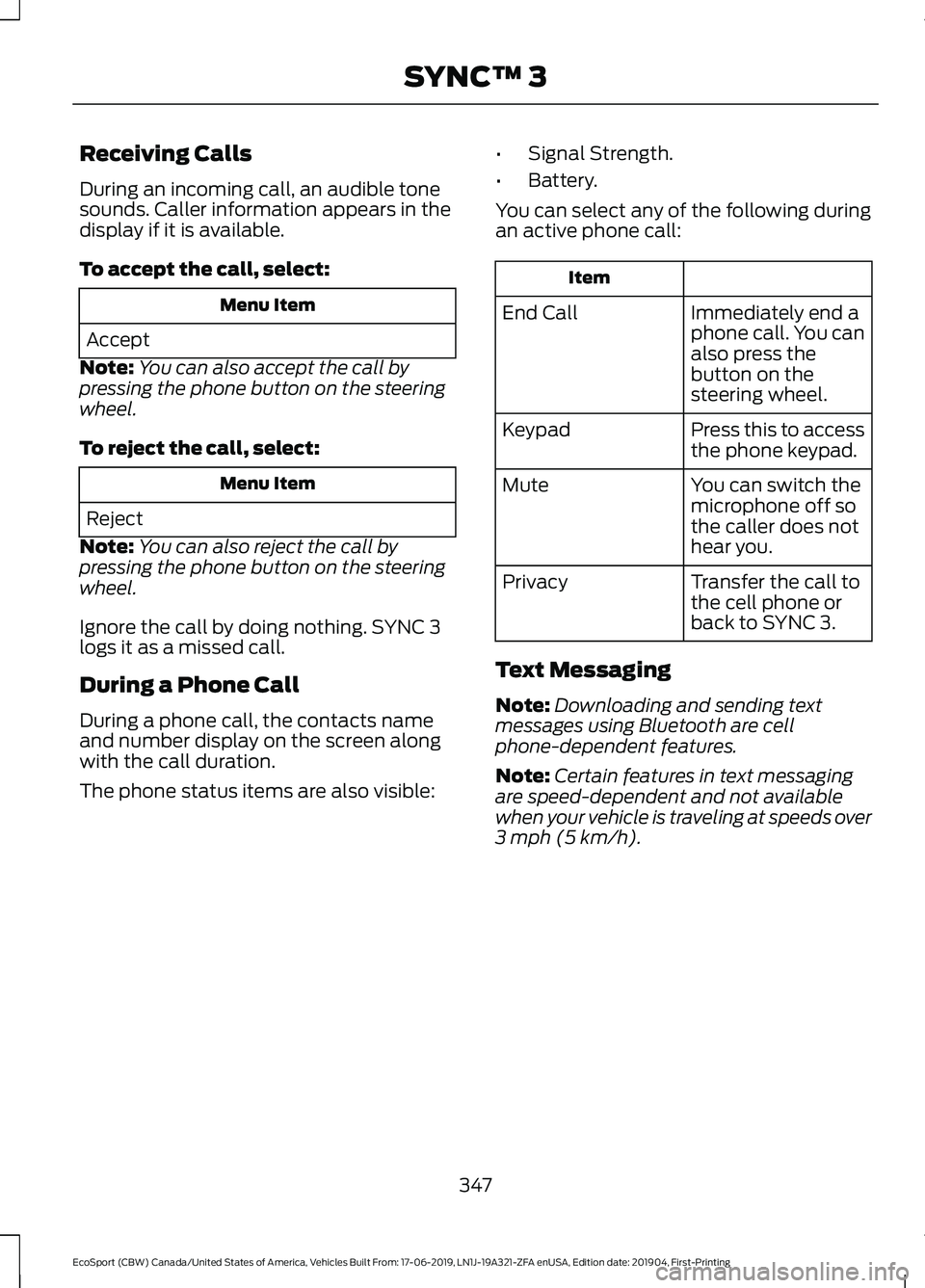
You can select any of the following duringan active phone call:
Item
Immediately end aphone call. You canalso press thebutton on thesteering wheel.
End Call
Press this to accessthe phone keypad.Keypad
You can switch themicrophone off sothe caller does nothear you.
Mute
Transfer the call tothe cell phone orback to SYNC 3.
Privacy
Text Messaging
Note:Downloading and sending textmessages using Bluetooth are cellphone-dependent features.
Note:Certain features in text messagingare speed-dependent and not availablewhen your vehicle is traveling at speeds over3 mph (5 km/h).
347
EcoSport (CBW) Canada/United States of America, Vehicles Built From: 17-06-2019, LN1J-19A321-ZFA enUSA, Edition date: 201904, First-PrintingSYNC™ 3
Page 357 of 448
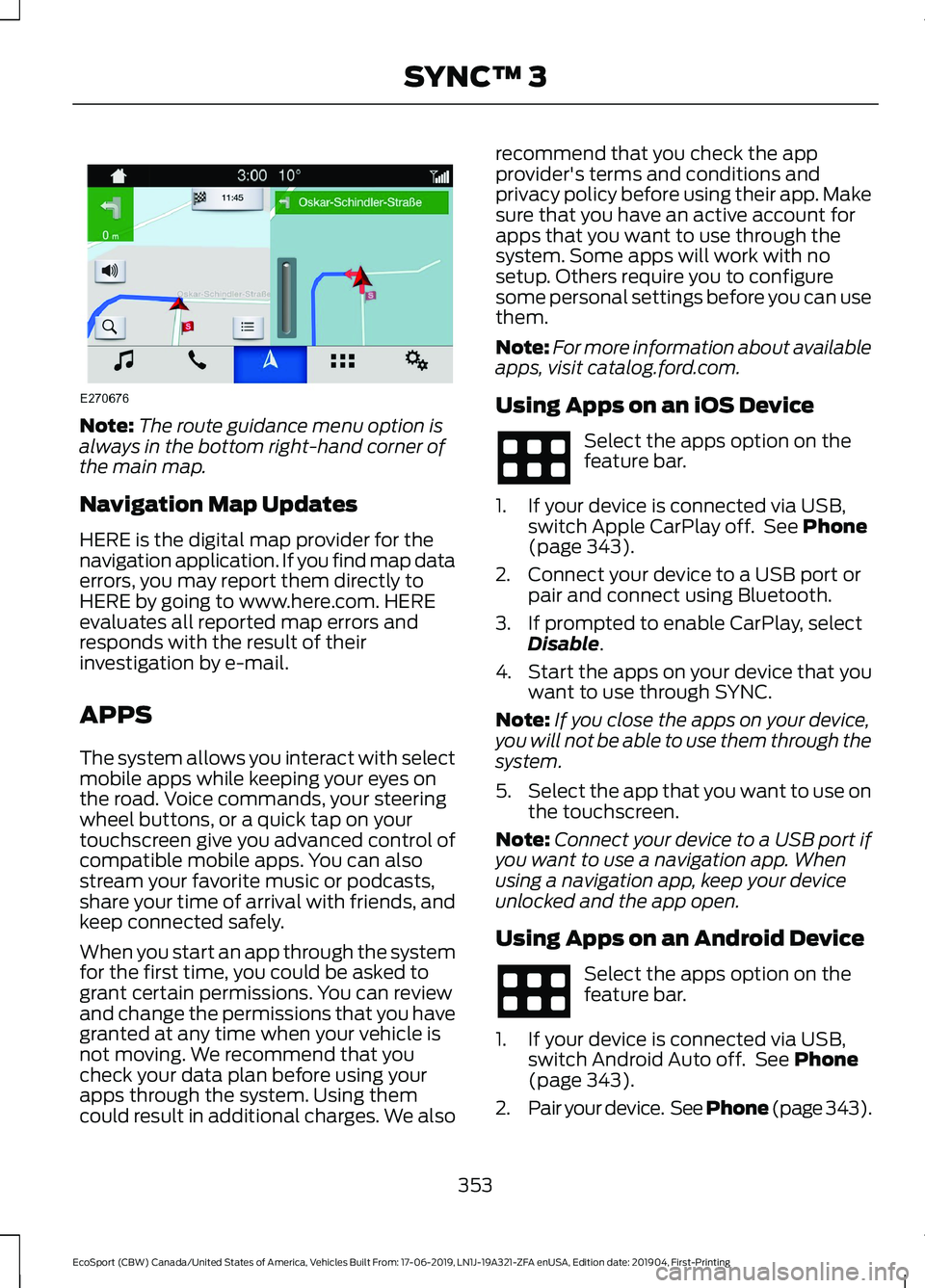
Note:The route guidance menu option isalways in the bottom right-hand corner ofthe main map.
Navigation Map Updates
HERE is the digital map provider for thenavigation application. If you find map dataerrors, you may report them directly toHERE by going to www.here.com. HEREevaluates all reported map errors andresponds with the result of theirinvestigation by e-mail.
APPS
The system allows you interact with selectmobile apps while keeping your eyes onthe road. Voice commands, your steeringwheel buttons, or a quick tap on yourtouchscreen give you advanced control ofcompatible mobile apps. You can alsostream your favorite music or podcasts,share your time of arrival with friends, andkeep connected safely.
When you start an app through the systemfor the first time, you could be asked togrant certain permissions. You can reviewand change the permissions that you havegranted at any time when your vehicle isnot moving. We recommend that youcheck your data plan before using yourapps through the system. Using themcould result in additional charges. We also
recommend that you check the appprovider's terms and conditions andprivacy policy before using their app. Makesure that you have an active account forapps that you want to use through thesystem. Some apps will work with nosetup. Others require you to configuresome personal settings before you can usethem.
Note:For more information about availableapps, visit catalog.ford.com.
Using Apps on an iOS Device
Select the apps option on thefeature bar.
1.If your device is connected via USB,switch Apple CarPlay off. See Phone(page 343).
2.Connect your device to a USB port orpair and connect using Bluetooth.
3.If prompted to enable CarPlay, selectDisable.
4.Start the apps on your device that youwant to use through SYNC.
Note:If you close the apps on your device,you will not be able to use them through thesystem.
5.Select the app that you want to use onthe touchscreen.
Note:Connect your device to a USB port ifyou want to use a navigation app. Whenusing a navigation app, keep your deviceunlocked and the app open.
Using Apps on an Android Device
Select the apps option on thefeature bar.
1.If your device is connected via USB,switch Android Auto off. See Phone(page 343).
2.Pair your device. See Phone (page 343).
353
EcoSport (CBW) Canada/United States of America, Vehicles Built From: 17-06-2019, LN1J-19A321-ZFA enUSA, Edition date: 201904, First-PrintingSYNC™ 3
Page 361 of 448
SYNC™ 3 TROUBLESHOOTING
Voice Recognition
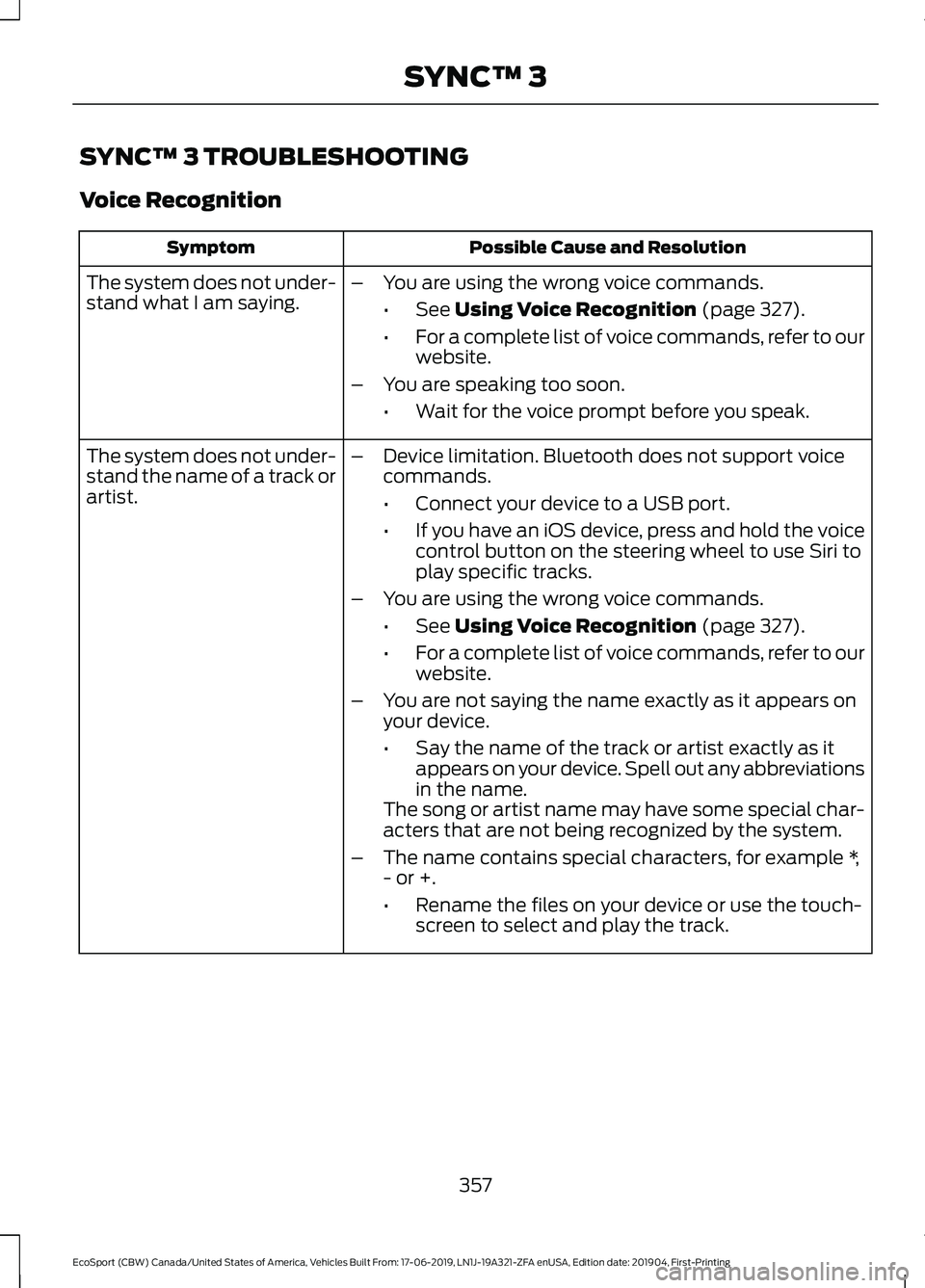
Possible Cause and ResolutionSymptom
The system does not under-stand what I am saying.–You are using the wrong voice commands.
•See Using Voice Recognition (page 327).
•For a complete list of voice commands, refer to ourwebsite.
–You are speaking too soon.
•Wait for the voice prompt before you speak.
The system does not under-stand the name of a track orartist.
–Device limitation. Bluetooth does not support voicecommands.
•Connect your device to a USB port.
•If you have an iOS device, press and hold the voicecontrol button on the steering wheel to use Siri toplay specific tracks.
–You are using the wrong voice commands.
•See Using Voice Recognition (page 327).
•For a complete list of voice commands, refer to ourwebsite.
–You are not saying the name exactly as it appears onyour device.
•Say the name of the track or artist exactly as itappears on your device. Spell out any abbreviationsin the name.The song or artist name may have some special char-acters that are not being recognized by the system.
–The name contains special characters, for example *,- or +.
•Rename the files on your device or use the touch-screen to select and play the track.
357
EcoSport (CBW) Canada/United States of America, Vehicles Built From: 17-06-2019, LN1J-19A321-ZFA enUSA, Edition date: 201904, First-PrintingSYNC™ 3
Page 363 of 448
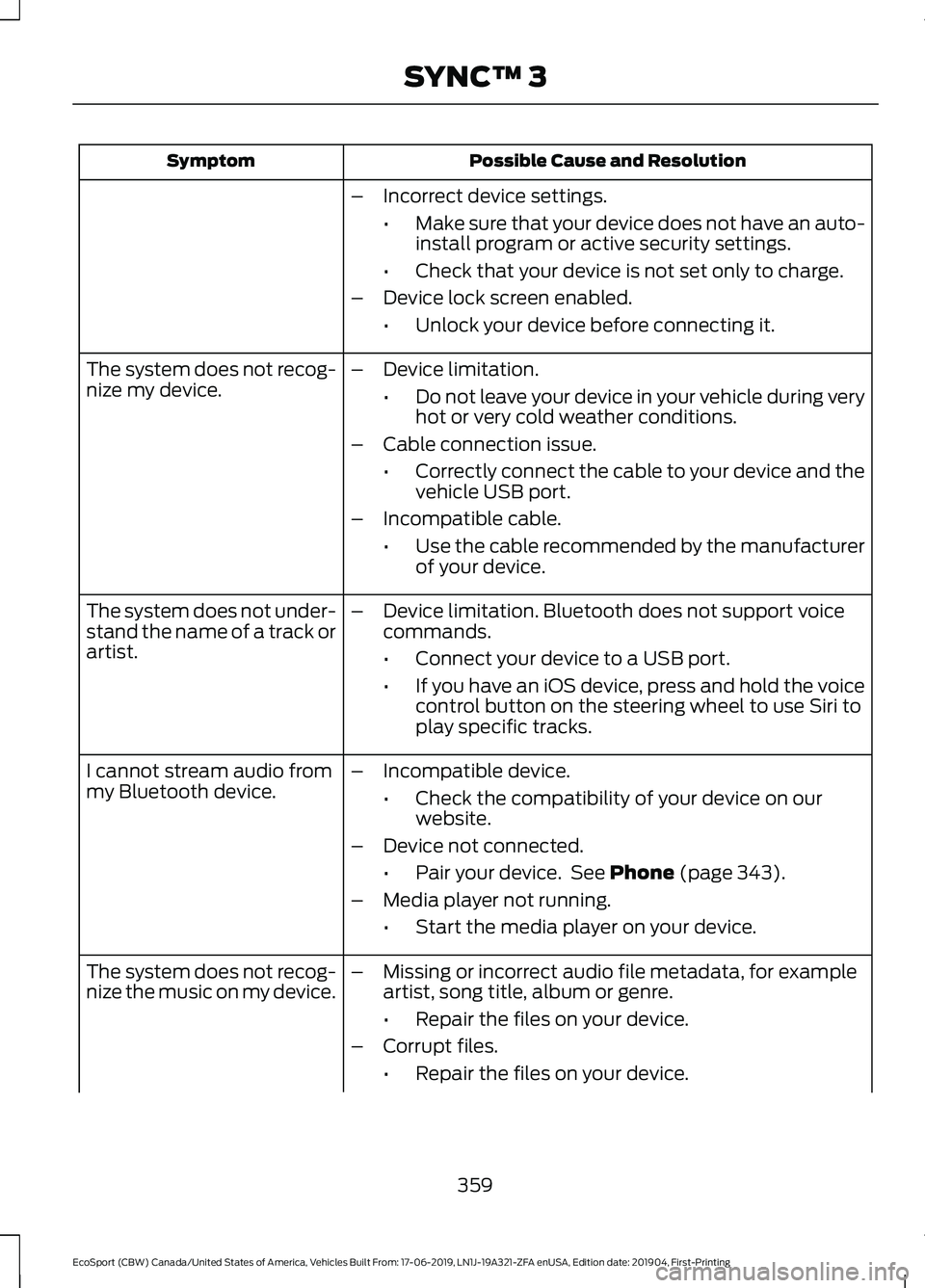
Possible Cause and ResolutionSymptom
–Incorrect device settings.
•Make sure that your device does not have an auto-install program or active security settings.
•Check that your device is not set only to charge.
–Device lock screen enabled.
•Unlock your device before connecting it.
The system does not recog-nize my device.–Device limitation.
•Do not leave your device in your vehicle during veryhot or very cold weather conditions.
–Cable connection issue.
•Correctly connect the cable to your device and thevehicle USB port.
–Incompatible cable.
•Use the cable recommended by the manufacturerof your device.
The system does not under-stand the name of a track orartist.
–Device limitation. Bluetooth does not support voicecommands.
•Connect your device to a USB port.
•If you have an iOS device, press and hold the voicecontrol button on the steering wheel to use Siri toplay specific tracks.
I cannot stream audio frommy Bluetooth device.–Incompatible device.
•Check the compatibility of your device on ourwebsite.
–Device not connected.
•Pair your device. See Phone (page 343).
–Media player not running.
•Start the media player on your device.
The system does not recog-nize the music on my device.–Missing or incorrect audio file metadata, for exampleartist, song title, album or genre.
•Repair the files on your device.
–Corrupt files.
•Repair the files on your device.
359
EcoSport (CBW) Canada/United States of America, Vehicles Built From: 17-06-2019, LN1J-19A321-ZFA enUSA, Edition date: 201904, First-PrintingSYNC™ 3
Page 380 of 448
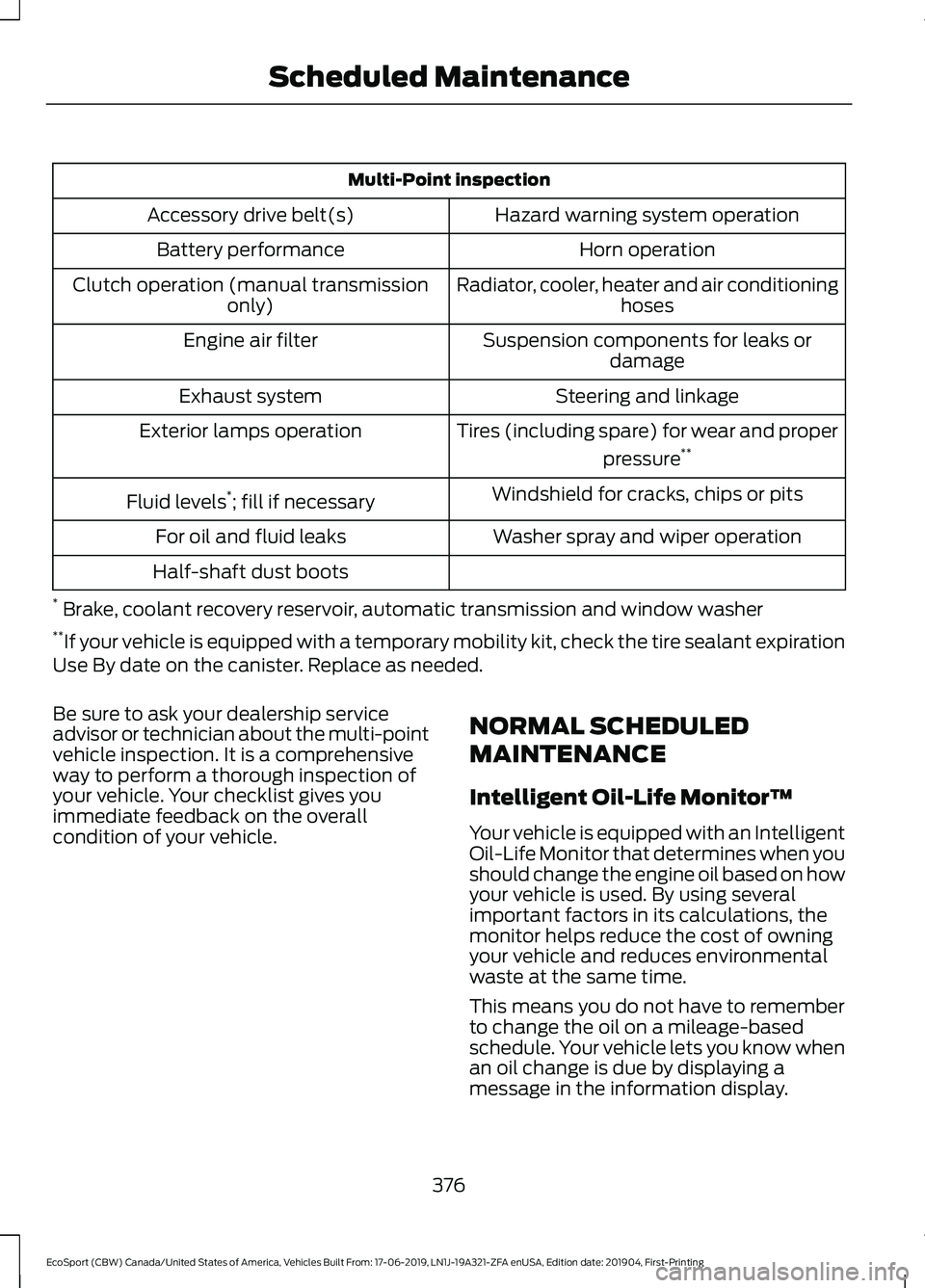
Multi-Point inspection
Hazard warning system operationAccessory drive belt(s)
Horn operationBattery performance
Radiator, cooler, heater and air conditioninghosesClutch operation (manual transmissiononly)
Suspension components for leaks ordamageEngine air filter
Steering and linkageExhaust system
Tires (including spare) for wear and proper
pressure**Exterior lamps operation
Windshield for cracks, chips or pitsFluid levels*; fill if necessary
Washer spray and wiper operationFor oil and fluid leaks
Half-shaft dust boots
* Brake, coolant recovery reservoir, automatic transmission and window washer**If your vehicle is equipped with a temporary mobility kit, check the tire sealant expirationUse By date on the canister. Replace as needed.
Be sure to ask your dealership serviceadvisor or technician about the multi-pointvehicle inspection. It is a comprehensiveway to perform a thorough inspection ofyour vehicle. Your checklist gives youimmediate feedback on the overallcondition of your vehicle.
NORMAL SCHEDULED
MAINTENANCE
Intelligent Oil-Life Monitor™
Your vehicle is equipped with an IntelligentOil-Life Monitor that determines when youshould change the engine oil based on howyour vehicle is used. By using severalimportant factors in its calculations, themonitor helps reduce the cost of owningyour vehicle and reduces environmentalwaste at the same time.
This means you do not have to rememberto change the oil on a mileage-basedschedule. Your vehicle lets you know whenan oil change is due by displaying amessage in the information display.
376
EcoSport (CBW) Canada/United States of America, Vehicles Built From: 17-06-2019, LN1J-19A321-ZFA enUSA, Edition date: 201904, First-PrintingScheduled Maintenance
Page 382 of 448
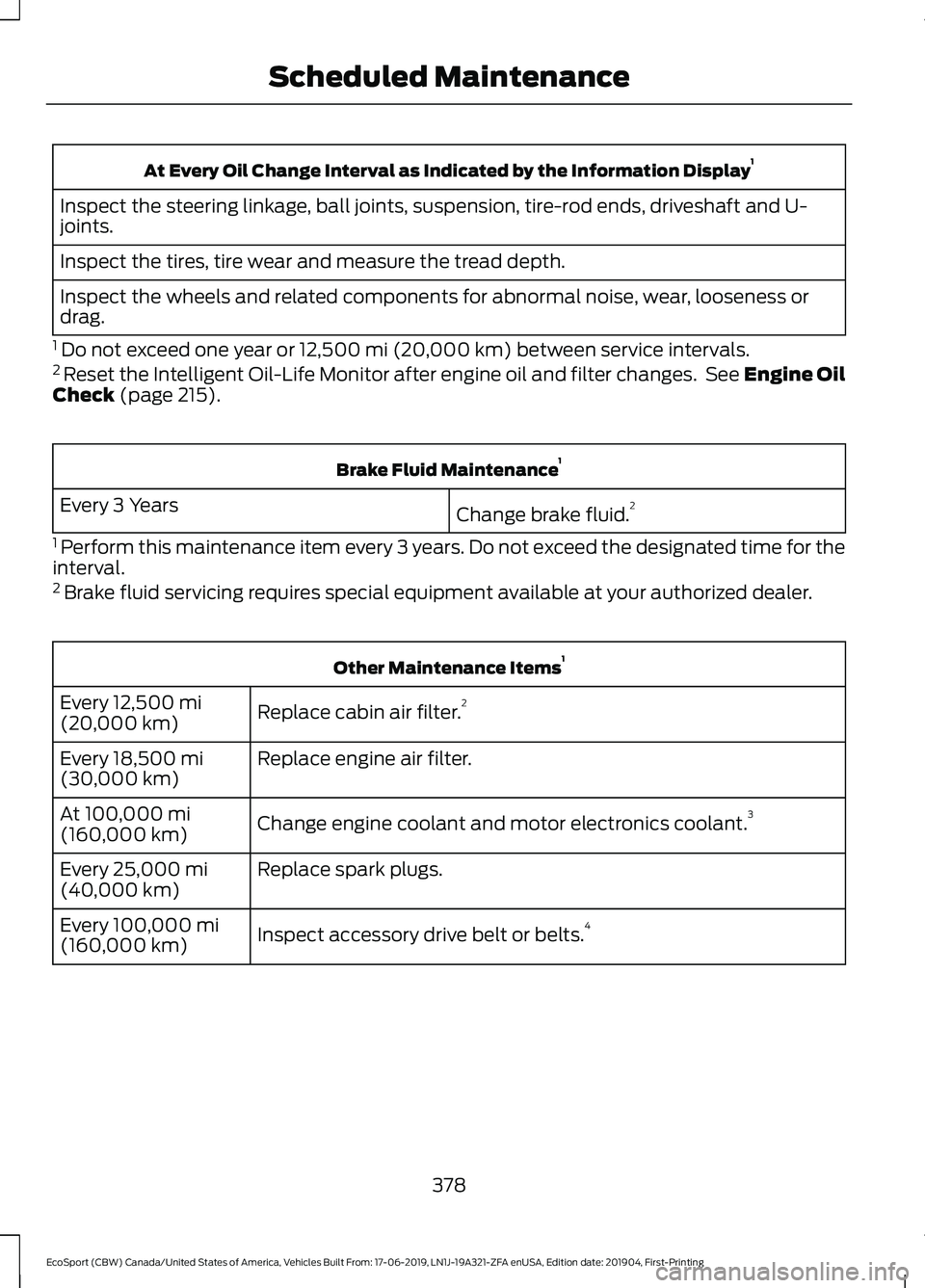
At Every Oil Change Interval as Indicated by the Information Display1
Inspect the steering linkage, ball joints, suspension, tire-rod ends, driveshaft and U-joints.
Inspect the tires, tire wear and measure the tread depth.
Inspect the wheels and related components for abnormal noise, wear, looseness ordrag.
1 Do not exceed one year or 12,500 mi (20,000 km) between service intervals.2 Reset the Intelligent Oil-Life Monitor after engine oil and filter changes. See Engine OilCheck (page 215).
Brake Fluid Maintenance1
Change brake fluid.2Every 3 Years
1 Perform this maintenance item every 3 years. Do not exceed the designated time for theinterval.2 Brake fluid servicing requires special equipment available at your authorized dealer.
Other Maintenance Items1
Replace cabin air filter.2Every 12,500 mi(20,000 km)
Replace engine air filter.Every 18,500 mi(30,000 km)
Change engine coolant and motor electronics coolant.3At 100,000 mi(160,000 km)
Replace spark plugs.Every 25,000 mi(40,000 km)
Inspect accessory drive belt or belts.4Every 100,000 mi(160,000 km)
378
EcoSport (CBW) Canada/United States of America, Vehicles Built From: 17-06-2019, LN1J-19A321-ZFA enUSA, Edition date: 201904, First-PrintingScheduled Maintenance
Page 435 of 448
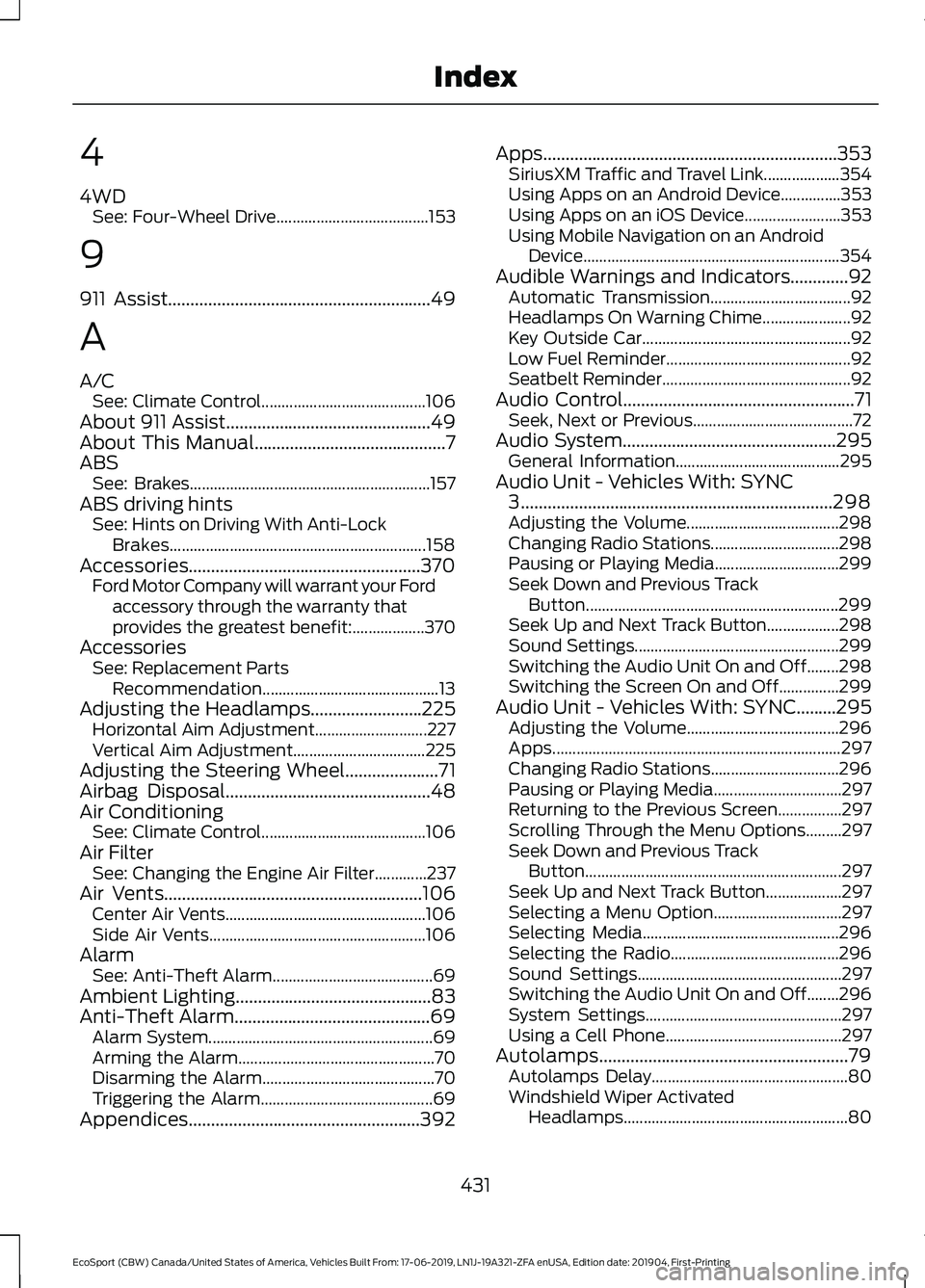
4
4WDSee: Four-Wheel Drive......................................153
9
911 Assist...........................................................49
A
A/CSee: Climate Control.........................................106About 911 Assist..............................................49About This Manual...........................................7ABSSee: Brakes............................................................157ABS driving hintsSee: Hints on Driving With Anti-LockBrakes................................................................158Accessories....................................................370Ford Motor Company will warrant your Fordaccessory through the warranty thatprovides the greatest benefit:..................370AccessoriesSee: Replacement PartsRecommendation............................................13Adjusting the Headlamps.........................225Horizontal Aim Adjustment............................227Vertical Aim Adjustment.................................225Adjusting the Steering Wheel.....................71Airbag Disposal..............................................48Air ConditioningSee: Climate Control.........................................106Air FilterSee: Changing the Engine Air Filter.............237Air Vents..........................................................106Center Air Vents..................................................106Side Air Vents......................................................106AlarmSee: Anti-Theft Alarm........................................69Ambient Lighting............................................83Anti-Theft Alarm............................................69Alarm System........................................................69Arming the Alarm.................................................70Disarming the Alarm...........................................70Triggering the Alarm...........................................69Appendices....................................................392
Apps..................................................................353SiriusXM Traffic and Travel Link...................354Using Apps on an Android Device...............353Using Apps on an iOS Device........................353Using Mobile Navigation on an AndroidDevice................................................................354Audible Warnings and Indicators.............92Automatic Transmission...................................92Headlamps On Warning Chime......................92Key Outside Car....................................................92Low Fuel Reminder..............................................92Seatbelt Reminder...............................................92Audio Control....................................................71Seek, Next or Previous........................................72Audio System................................................295General Information.........................................295Audio Unit - Vehicles With: SYNC3......................................................................298Adjusting the Volume......................................298Changing Radio Stations................................298Pausing or Playing Media...............................299Seek Down and Previous TrackButton...............................................................299Seek Up and Next Track Button..................298Sound Settings...................................................299Switching the Audio Unit On and Off........298Switching the Screen On and Off...............299Audio Unit - Vehicles With: SYNC.........295Adjusting the Volume......................................296Apps........................................................................297Changing Radio Stations................................296Pausing or Playing Media................................297Returning to the Previous Screen................297Scrolling Through the Menu Options.........297Seek Down and Previous TrackButton................................................................297Seek Up and Next Track Button...................297Selecting a Menu Option................................297Selecting Media.................................................296Selecting the Radio..........................................296Sound Settings...................................................297Switching the Audio Unit On and Off........296System Settings.................................................297Using a Cell Phone............................................297Autolamps........................................................79Autolamps Delay.................................................80Windshield Wiper ActivatedHeadlamps........................................................80
431
EcoSport (CBW) Canada/United States of America, Vehicles Built From: 17-06-2019, LN1J-19A321-ZFA enUSA, Edition date: 201904, First-PrintingIndex
Page 440 of 448
Heated Rear Window - Vehicles With:Electronic Manual TemperatureControl (EMTC)...........................................112Heated Seats..................................................125Heated Steering Wheel................................72HeatingSee: Climate Control.........................................106Hill Start Assist..............................................158Switching the System On and Off...............159Using Hill Start Assist.......................................159Hints on Controlling the Interior Climate- Vehicles With: Electronic AutomaticTemperature Control (EATC).................110Defogging or Clearing the Windshield ofThin Ice...............................................................110Defogging the Side Windows in ColdWeather..............................................................110General Hints........................................................110Quickly Cooling the Interior.............................110Recommended Settings for Cooling...........110Recommended Settings for Heating...........110Hints on Controlling the Interior Climate- Vehicles With: Electronic ManualTemperature Control (EMTC).................111Defogging or Clearing the Windshield ofThin Ice.................................................................111Defogging the Side Windows in ColdWeather...............................................................111General Hints..........................................................111Quickly Cooling the Interior...............................111Quickly Heating the Interior..............................111Recommended Settings for Cooling.............111Recommended Settings for Heating.............111Hints on Driving With Anti-LockBrakes............................................................158Hood LockSee: Opening and Closing the Hood............212
I
Ignition Switch...............................................130Starting the Engine.............................................131Switching the Ignition Off...............................130Switching the Ignition On................................130Switching the Ignition to AccessoryMode..................................................................130In California (U.S. Only)..............................197Information Display Control.......................72
Information Displays.....................................93General Information............................................93Information Messages.................................96Accessory Power..................................................97Airbag........................................................................97Alarm.........................................................................97Battery and Charging System.........................98Brake System........................................................98Engine......................................................................99Fuel System...........................................................99Hill Start Assist.....................................................99Keyless Vehicle...................................................100Lighting..................................................................100Maintenance........................................................100MyKey......................................................................101Park Aid..................................................................102Park Brake.............................................................102Power Steering....................................................103Stability Control..................................................103Starting System .................................................103Tire Pressure Monitoring System...................98Traction Control..................................................104Transmission........................................................104Vehicle Settings..................................................105Installing Child Restraints...........................20Child Seats..............................................................20Using Lap and Shoulder Belts.........................20Using Lower Anchors and Tethers forCHildren (LATCH)............................................23Using Tether Straps.............................................24Instrument Cluster........................................88Instrument Lighting Dimmer.....................80Interior Lamps.................................................82Courtesy lamp.......................................................82Reading lamps......................................................82Vanity lamp............................................................83Interior Mirror...................................................86Auto-Dimming Mirror.........................................86Introduction.........................................................7
J
Jump Starting the Vehicle.........................192Connecting the Jumper Cables.....................193Jump Starting......................................................194Preparing Your Vehicle......................................192Removing the Jumper Cables........................194
436
EcoSport (CBW) Canada/United States of America, Vehicles Built From: 17-06-2019, LN1J-19A321-ZFA enUSA, Edition date: 201904, First-PrintingIndex
Page 444 of 448
Notice to Owners of Pickup Trucks andUtility Type Vehicles........................................15On Board Diagnostics Data LinkConnector............................................................15Special Instructions..............................................14Using Your Vehicle as an Ambulance............15Using Your Vehicle With a Snowplow...........15Special Operating Conditions ScheduledMaintenance...............................................379Exceptions.............................................................381Speed ControlSee: Cruise Control.............................................167Stability Control.............................................161Principle of Operation........................................161Starter SwitchSee: Ignition Switch...........................................130Starting a Gasoline Engine........................133Cold or Hot Engine..............................................133Engine Idle Speed after Starting...................134Failure to Start.....................................................134Fuel Flooded Engine..........................................133Starting and Stopping the Engine.........130General Information..........................................130Steering.............................................................173Electric Power Steering.....................................173Steering Wheel.................................................71Storage Compartments.............................129SunroofSee: Moonroof......................................................86Supplementary Restraints System.........39Principle of Operation........................................39Symbols Glossary.............................................7SYNC™ 3.........................................................319General Information..........................................319SYNC™ 3 Troubleshooting......................357Additional Information andAssistance.......................................................369Apps.......................................................................364Navigation............................................................363Personal Profiles................................................367Phone......................................................................361Resetting the System......................................369USB and Bluetooth Audio..............................358Voice Recognition..............................................357Wi-Fi Connectivity.............................................366SYNC™ Applications andServices........................................................306911 Assist..............................................................306
SYNC Mobile Apps...........................................308SYNC™...........................................................302General Information.........................................302SYNC™ Troubleshooting..........................310
T
Tailgate..............................................................65Closing the Tailgate............................................66Opening the Tailgate..........................................65Technical SpecificationsSee: Capacities and Specifications............278The Better Business Bureau (BBB) AutoLine Program (U.S. Only).......................198Tire Care..........................................................255Glossary of Tire Terminology.........................257Information About Uniform Tire QualityGrading.............................................................255Information Contained on the TireSidewall...........................................................258Temperature A B C............................................256Traction AA A B C..............................................256Treadwear............................................................256Tire Inflation When PuncturedSee: Tire Sealant and Inflator Kit.................249Tire Pressure Monitoring System............271Changing Tires With a Tire PressureMonitoring System........................................272Understanding Your Tire PressureMonitoring System .......................................273Tire Repair KitSee: Tire Sealant and Inflator Kit.................249Tire Sealant and Inflator Kit....................249First stage: reinflating the tire with sealingcompound and air.........................................251General Information.........................................249Second stage: checking tire pressure........254Tips for use of the kit.......................................250What to do after the tire has beensealed................................................................255What to do when a tire is punctured.........250TiresSee: Wheels and Tires.....................................248Towing a Trailer..............................................181Load Placement...................................................181Towing Points................................................185Front Towing Point.............................................185Rear Towing Point..............................................186
440
EcoSport (CBW) Canada/United States of America, Vehicles Built From: 17-06-2019, LN1J-19A321-ZFA enUSA, Edition date: 201904, First-PrintingIndex