wheel FORD ECOSPORT 2020 Manual Online
[x] Cancel search | Manufacturer: FORD, Model Year: 2020, Model line: ECOSPORT, Model: FORD ECOSPORT 2020Pages: 448, PDF Size: 16.57 MB
Page 279 of 448
When Inflating Your Tires
WARNING: Do not use the tirepressure displayed in the informationdisplay as a tire pressure gauge. Failureto follow this instruction could result inpersonal injury or death.
When putting air into your tires (such as ata gas station or in your garage), the tirepressure monitoring system will notrespond immediately to the air added toyour tires.
It could take up to two minutes of drivingover 20 mph (32 km/h) for the light to turnoff after you have filled your tires to therecommended inflation pressure.
How Temperature Affects Your TirePressure
The tire pressure monitoring systemmonitors tire pressure in each pneumatictire. While driving in a normal manner, atypical passenger tire inflation pressurecould increase about 2–4 psi (14–28 kPa)from a cold start situation. If the vehicle isstationary overnight with the outsidetemperature significantly lower than thedaytime temperature, the tire pressurecould decrease about 3 psi (21 kPa) for adrop of 30°F (17°C) in ambienttemperature. This lower pressure valuecould be detected by the tire pressuremonitoring system as being significantlylower than the recommended inflationpressure and activate the system warninglight for low tire pressure. If the low tirepressure warning light is on, visually checkeach tire to verify that no tire is flat. If oneor more tires are flat, repair as necessary.Check the air pressure in the road tires. Ifany tire is under-inflated, carefully drivethe vehicle to the nearest location whereair can be added to the tires. Inflate all thetires to the recommended inflationpressure.
Tire Pressure Monitoring System ResetProcedure
WARNING: To determine therequired pressure(s) for your vehicle, seethe Safety Compliance CertificationLabel (on the door hinge pillar,door-latch post or the door edge thatmeets the door-latch post, next to thedriver seat) or the Tire Label on theB-Pillar or the edge of the driver door.
Note:You need to perform the tire pressuremonitoring system reset procedure aftereach tire rotation.
To provide the vehicle's load carryingcapability, some vehicles require differentrecommended tire pressures in the fronttires as compared to the rear tires. The tirepressure monitoring system equipped onthese vehicles is designed to illuminate thelow tire pressure warning light at twodifferent pressures; one for the front tiresand one for the rear tires.
Since tires need to be rotated to provideconsistent performance and maximum tirelife, the tire pressure monitoring systemneeds to know when the tires are rotatedto determine which set of tires are on thefront and which are on the rear. With thisinformation, the system can detect andproperly warn of low tire pressures.
System reset tips:
275
EcoSport (CBW) Canada/United States of America, Vehicles Built From: 17-06-2019, LN1J-19A321-ZFA enUSA, Edition date: 201904, First-PrintingWheels and Tires
Page 280 of 448
•To reduce the chances of interferencefrom another vehicle, perform thesystem reset procedure at least 3 ft(1 m) away from another Ford MotorCompany vehicle undergoing thesystem reset procedure at the sametime.
•Do not wait more than two minutesbetween resetting each tire sensor orthe system can time-out and you haveto repeat the entire procedure on allfour wheels.
•A double horn sounds indicating theneed to repeat the procedure.
Performing the System Reset Procedure
Read the entire procedure beforeattempting.
1.Drive the vehicle above 20 mph(32 km/h) for at least two minutes,then park in a safe location where youcan easily get to all four tires and haveaccess to an air pump.
2.Place the ignition in the off position andkeep the key in the ignition.
3.Cycle the ignition to the on positionwith the engine off.
4.Turn the hazard flashers on then offthree times. You must accomplish thiswithin 10 seconds. If you successfullyenter the reset mode, the horn soundsonce, the system indicator flashes anda message shows in the informationdisplay. If this does not occur, pleasetry again starting at step 2. If afterrepeated attempts to enter the resetmode, the horn does not sound, thesystem indicator does not flash and nomessage shows in the informationdisplay, seek service from yourauthorized dealer.
5.Train the tire pressure monitoringsystem sensors in the tires using thefollowing system reset sequencestarting with the left front tire in thefollowing clockwise order: Left front -driver side front tire, Right front -passenger side front tire, Right rear -passenger side rear tire, Left rear -driver side rear tire.
6.Remove the valve cap from the valvestem on the left front tire. Decrease theair pressure until the horn sounds.
Note:The single horn tone confirms thatthe sensor identification code has beenlearned by the module for this position. If adouble horn is heard, the reset procedurewas unsuccessful, and you must repeat it.
7.Remove the valve cap from the valvestem on the right front tire. Decreasethe air pressure until the horn sounds.
8.Remove the valve cap from the valvestem on the right rear tire. Decrease theair pressure until the horn sounds.
9.Remove the valve cap from the valvestem on the left rear tire. Decrease theair pressure until the horn sounds.Training is complete after the hornsounds for the last tire trained, driverside rear tire, the system indicatorstops flashing, and a message showsin the information display.
10.Turn the ignition off. If two short hornbeeps are heard, the reset procedurewas unsuccessful and you mustrepeat it. If after repeating theprocedure and two short beeps areheard when the ignition is turned tooff, seek assistance from yourauthorized dealer.
276
EcoSport (CBW) Canada/United States of America, Vehicles Built From: 17-06-2019, LN1J-19A321-ZFA enUSA, Edition date: 201904, First-PrintingWheels and Tires
Page 281 of 448
11.Set all four tires to the recommendedair pressure as indicated on theSafety Compliance CertificationLabel, affixed to either the door hingepillar, door-latch post, or the door
edge that meets the door-latch post,next to the driver seating position orTire Label located on the B-Pillar orthe edge of the driver door.
LUG NUTS
Lug Nut Torque
WARNING: When you install a wheel, always remove any corrosion, dirt or foreignmaterials present on the mounting surfaces of the wheel or the surface of the wheelhub, brake drum or brake disc that contacts the wheel. Make sure to secure any fastenersthat attach the rotor to the hub so they do not interfere with the mounting surfaces ofthe wheel. Installing wheels without correct metal-to-metal contact at the wheelmounting surfaces can cause the wheel nuts to loosen and the wheel to come off whileyour vehicle is in motion, resulting in loss of vehicle control, personal injury or death.
lb.ft (Nm)Bolt Size
100 lb.ft (135 Nm)M12 x 1.5
41 lb.ft (55 Nm)M12 x 1.51
1Spare Wheel carrier.
277
EcoSport (CBW) Canada/United States of America, Vehicles Built From: 17-06-2019, LN1J-19A321-ZFA enUSA, Edition date: 201904, First-PrintingWheels and Tires
Page 307 of 448
things, this profile may contain data aboutyour cellular phone book, text messages(read and unread), and call history,including history of calls when your cellularphone was not connected to the system.In addition, if you connect a media device,the system creates and retains an index ofsupported media content. The system alsorecords a short development log ofapproximately 10 minutes of all recentsystem activity. The log profile and othersystem data may be used to improve thesystem and help diagnose any problemsthat may occur.
The cellular profile, media device index,and development log will remain in thevehicle unless you delete them and aregenerally accessible only in the vehiclewhen you connect the cellular phone ormedia player. If you no longer plan to usethe system or the vehicle, we recommendyou perform a Master Reset to erase allstored information.
No one can access system data withoutspecial equipment and access to thevehicle's SYNC module. Ford MotorCompany and Ford of Canada will notaccess the system data for any purposeother than as described absent consent, a
court order, or where required by lawenforcement, other governmentauthorities, or other third parties actingwith lawful authority. Other parties mayseek to access the informationindependently of Ford Motor Company andFord of Canada. For further privacyinformation, see the section on 911 Assist.See SYNC™ Applications and Services(page 306).
USING VOICE RECOGNITION
This system helps you control manyfeatures using voice commands. Thisallows you to keep your hands on thewheel and focus on what is around you.
Initiating a Voice Session
Press the voice button. A list ofavailable voice commandsappears in the display.
Global Voice Commands
These voice commands are alwaysavailable. You can say them at any time.
Global voice commands
Gives you available commands you can useon the current screen.Help
Gives you a list of possible voicecommands.List of Commands
This command ends the voice session. Youcan also cancel a session by pressing seekup, seek down, or holding the voice buttonfor two or more seconds.
Cancel
303
EcoSport (CBW) Canada/United States of America, Vehicles Built From: 17-06-2019, LN1J-19A321-ZFA enUSA, Edition date: 201904, First-PrintingSYNC™
Page 310 of 448
Using Voice Commands
Make sure to switch on yourphone's Bluetooth featurebefore starting the search. Seeyour device's manual if necessary.
Press the voice button and whenprompted say:
Action and Descrip-tionVoice Command
Follow the instruc-tions on the audiodisplay.
Pair Phone
Phone Voice Commands
Press the voice button. You cando things like place a phone calland access text messages.When prompted, say a command. See thefollowing table for examples ofcommands.
Voice Command
___ List of Commands
Help
Call ___
Dial ___
Text Messages
__ is a dynamic listing, meaning that itcould be the name of anything, such as acontact or phone number.
Phone Controls
Use the phone buttons on your steeringwheel to answer, reject, or hang up a call.
Accessing Features through thePhone Menu
You can access your call history,phonebook, sent text messages, as wellas access phone and system settings.
1.Press the PHONE button to enter thephone menu.
2.Scroll through the menu to viewcontacts, text messages, and thephone dialer.
SYNC™ APPLICATIONS AND
SERVICES
•911 Assist: Can alert 911 in the event ofan emergency.
•SYNC AppLink: Allows you to connectto and use certain applications (if yourphone is compatible).
These features may require activation.Available AppLink enabled apps vary bymarket.
911 Assist
WARNING: Unless the 911 Assistsetting is set on before a crash, thesystem will not dial for help which coulddelay response time, potentiallyincreasing the risk of serious injury ordeath after a crash.
WARNING: Do not wait for 911Assist to make an emergency call if youcan do it yourself. Dial emergencyservices immediately to avoid delayedresponse time which could increase therisk of serious injury or death after acrash. If you do not hear 911 Assist withinfive seconds of the crash, the system orphone may be damaged ornon-functional.
306
EcoSport (CBW) Canada/United States of America, Vehicles Built From: 17-06-2019, LN1J-19A321-ZFA enUSA, Edition date: 201904, First-PrintingSYNC™
Page 312 of 448
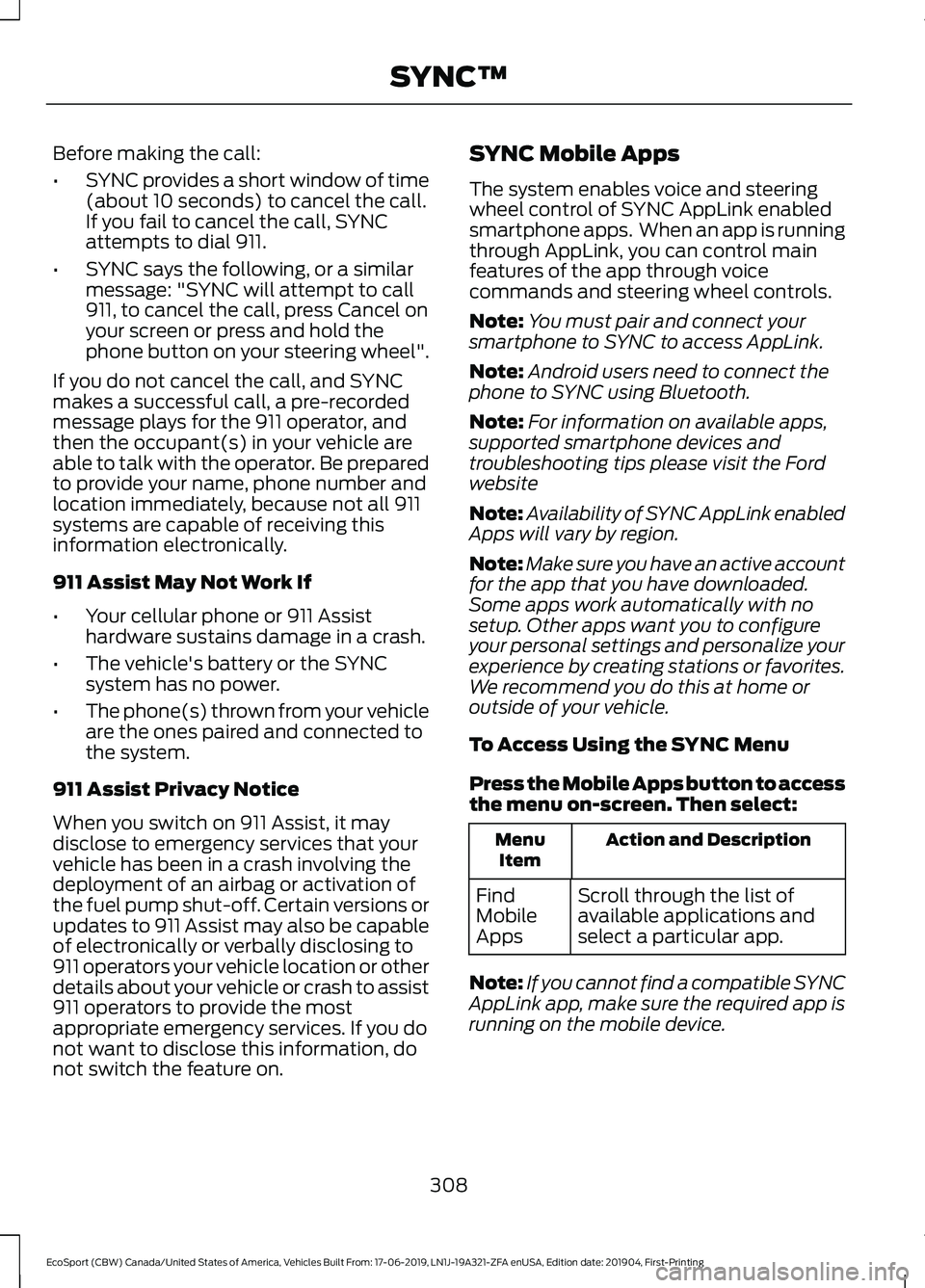
Before making the call:
•SYNC provides a short window of time(about 10 seconds) to cancel the call.If you fail to cancel the call, SYNCattempts to dial 911.
•SYNC says the following, or a similarmessage: "SYNC will attempt to call911, to cancel the call, press Cancel onyour screen or press and hold thephone button on your steering wheel".
If you do not cancel the call, and SYNCmakes a successful call, a pre-recordedmessage plays for the 911 operator, andthen the occupant(s) in your vehicle areable to talk with the operator. Be preparedto provide your name, phone number andlocation immediately, because not all 911systems are capable of receiving thisinformation electronically.
911 Assist May Not Work If
•Your cellular phone or 911 Assisthardware sustains damage in a crash.
•The vehicle's battery or the SYNCsystem has no power.
•The phone(s) thrown from your vehicleare the ones paired and connected tothe system.
911 Assist Privacy Notice
When you switch on 911 Assist, it maydisclose to emergency services that yourvehicle has been in a crash involving thedeployment of an airbag or activation ofthe fuel pump shut-off. Certain versions orupdates to 911 Assist may also be capableof electronically or verbally disclosing to911 operators your vehicle location or otherdetails about your vehicle or crash to assist911 operators to provide the mostappropriate emergency services. If you donot want to disclose this information, donot switch the feature on.
SYNC Mobile Apps
The system enables voice and steeringwheel control of SYNC AppLink enabledsmartphone apps. When an app is runningthrough AppLink, you can control mainfeatures of the app through voicecommands and steering wheel controls.
Note:You must pair and connect yoursmartphone to SYNC to access AppLink.
Note:Android users need to connect thephone to SYNC using Bluetooth.
Note:For information on available apps,supported smartphone devices andtroubleshooting tips please visit the Fordwebsite
Note:Availability of SYNC AppLink enabledApps will vary by region.
Note:Make sure you have an active accountfor the app that you have downloaded.Some apps work automatically with nosetup. Other apps want you to configureyour personal settings and personalize yourexperience by creating stations or favorites.We recommend you do this at home oroutside of your vehicle.
To Access Using the SYNC Menu
Press the Mobile Apps button to accessthe menu on-screen. Then select:
Action and DescriptionMenuItem
Scroll through the list ofavailable applications andselect a particular app.
FindMobileApps
Note:If you cannot find a compatible SYNCAppLink app, make sure the required app isrunning on the mobile device.
308
EcoSport (CBW) Canada/United States of America, Vehicles Built From: 17-06-2019, LN1J-19A321-ZFA enUSA, Edition date: 201904, First-PrintingSYNC™
Page 313 of 448
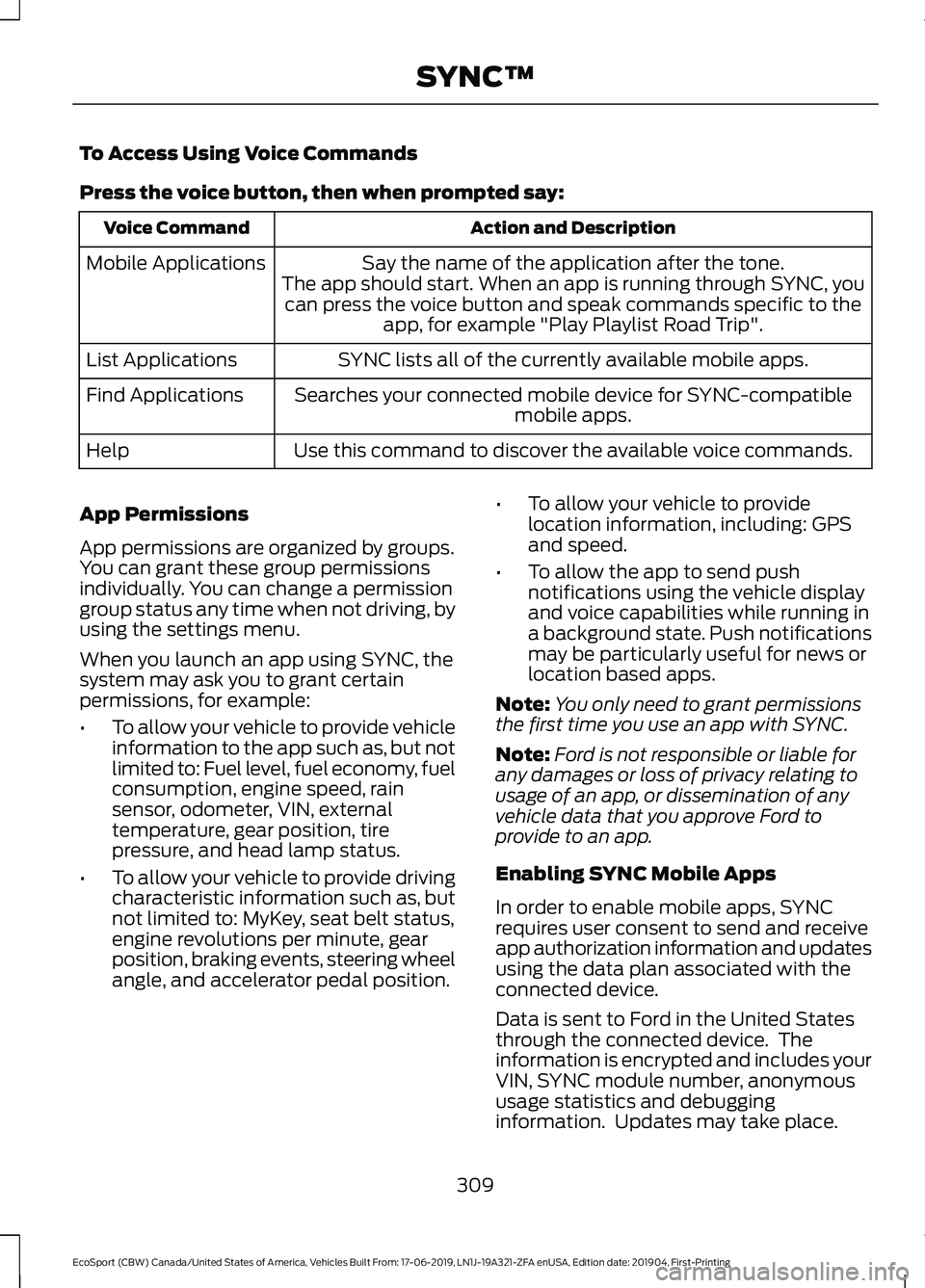
To Access Using Voice Commands
Press the voice button, then when prompted say:
Action and DescriptionVoice Command
Say the name of the application after the tone.The app should start. When an app is running through SYNC, youcan press the voice button and speak commands specific to theapp, for example "Play Playlist Road Trip".
Mobile Applications
SYNC lists all of the currently available mobile apps.List Applications
Searches your connected mobile device for SYNC-compatiblemobile apps.Find Applications
Use this command to discover the available voice commands.Help
App Permissions
App permissions are organized by groups.You can grant these group permissionsindividually. You can change a permissiongroup status any time when not driving, byusing the settings menu.
When you launch an app using SYNC, thesystem may ask you to grant certainpermissions, for example:
•To allow your vehicle to provide vehicleinformation to the app such as, but notlimited to: Fuel level, fuel economy, fuelconsumption, engine speed, rainsensor, odometer, VIN, externaltemperature, gear position, tirepressure, and head lamp status.
•To allow your vehicle to provide drivingcharacteristic information such as, butnot limited to: MyKey, seat belt status,engine revolutions per minute, gearposition, braking events, steering wheelangle, and accelerator pedal position.
•To allow your vehicle to providelocation information, including: GPSand speed.
•To allow the app to send pushnotifications using the vehicle displayand voice capabilities while running ina background state. Push notificationsmay be particularly useful for news orlocation based apps.
Note:You only need to grant permissionsthe first time you use an app with SYNC.
Note:Ford is not responsible or liable forany damages or loss of privacy relating tousage of an app, or dissemination of anyvehicle data that you approve Ford toprovide to an app.
Enabling SYNC Mobile Apps
In order to enable mobile apps, SYNCrequires user consent to send and receiveapp authorization information and updatesusing the data plan associated with theconnected device.
Data is sent to Ford in the United Statesthrough the connected device. Theinformation is encrypted and includes yourVIN, SYNC module number, anonymoususage statistics and debugginginformation. Updates may take place.
309
EcoSport (CBW) Canada/United States of America, Vehicles Built From: 17-06-2019, LN1J-19A321-ZFA enUSA, Edition date: 201904, First-PrintingSYNC™
Page 314 of 448
Note:You must enable mobile apps foreach connected device the first time youselect a mobile app using the system.
Note:Standard data rates apply. Ford isnot responsible for any additional chargesyou may receive from your service provider,when your vehicle sends or receives datathrough the connected device. This includesany additional charges incurred due todriving in areas when roaming out of a homenetwork.
USING SYNC™ WITH YOUR
MEDIA PLAYER
SYNC supports digital media sourcesincluding: iPod, Bluetooth devices, andmost USB drives. SYNC also supportsaudio formats, such as MP3, WMA, WAVand ACC.
Media Sources
The AUX or MEDIA button allows you toview and select available media sources.
Press the AUX or MEDIA button to viewyour sources. Use the directional arrowsand OK button to select your source. Youcan also use the steering wheel audiocontrols.
Audio Voice Commands
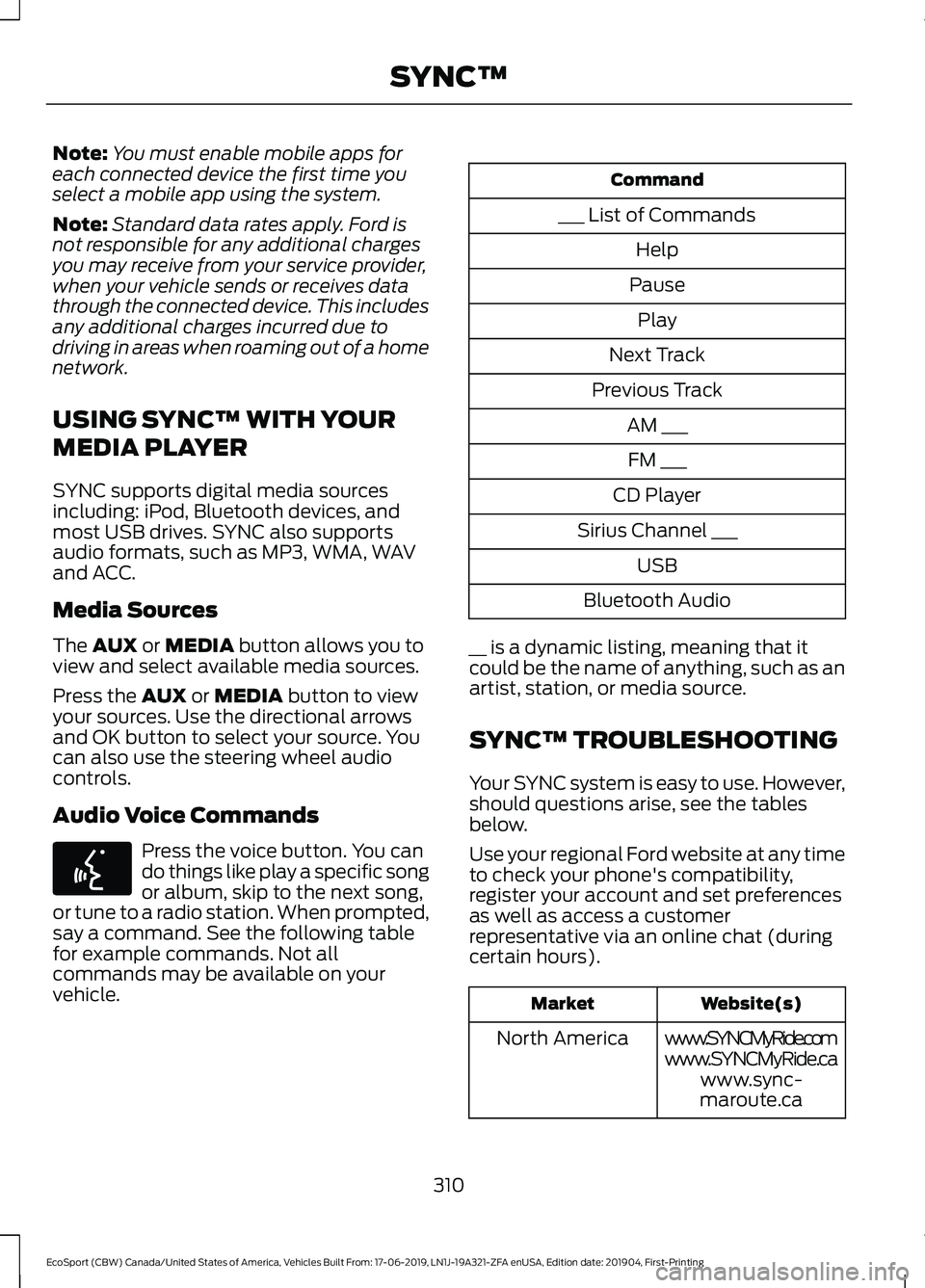
Press the voice button. You cando things like play a specific songor album, skip to the next song,or tune to a radio station. When prompted,say a command. See the following tablefor example commands. Not allcommands may be available on yourvehicle.
Command
___ List of Commands
Help
Pause
Play
Next Track
Previous Track
AM ___
FM ___
CD Player
Sirius Channel ___
USB
Bluetooth Audio
__ is a dynamic listing, meaning that itcould be the name of anything, such as anartist, station, or media source.
SYNC™ TROUBLESHOOTING
Your SYNC system is easy to use. However,should questions arise, see the tablesbelow.
Use your regional Ford website at any timeto check your phone's compatibility,register your account and set preferencesas well as access a customerrepresentative via an online chat (duringcertain hours).
Website(s)Market
www.SYNCMyRide.comNorth Americawww.SYNCMyRide.cawww.sync-maroute.ca
310
EcoSport (CBW) Canada/United States of America, Vehicles Built From: 17-06-2019, LN1J-19A321-ZFA enUSA, Edition date: 201904, First-PrintingSYNC™
Page 327 of 448
Cleaning the Touchscreen
You can remove fingerprints with a dry,clean, soft cloth.
If dirt or fingerprints are still on the screen,apply a small amount of alcohol to thecloth and try to clean it again.
Note: Do not use detergent or any type ofsolvent to clean the touchscreen.
Note:Do not pour or spray alcohol onto thetouchscreen.
Using Voice Recognition
Using voice commands allows you to keepyour hands on the wheel and eyes on theroad. The system provides feedbackthrough audible tones, prompts, questionsand spoken confirmations depending onthe situation and the chosen level ofinteraction (voice settings).
The system also asks short questions(confirmation prompts) when it is not sureof your request or when there are multiplepossible responses to your request.
When using voice commands, words andicons may appear in the status barindicating the status of the voice commandsession. See Using Voice Recognition(page 327).
Using the Steering Wheel Controls
Depending on your vehicle and optionpackage, you can use different controls onyour steering wheel to interact with thetouchscreen system in different ways.
VOL: Control the volume of audio output.
Voice: Press to start a voice session. Pressagain to stop the voice prompt andimmediately begin speaking. Press andhold to end a voice session.
SEEK NEXT:
•While in radio mode, press to seekbetween memory presets or press andhold to fast seek.
•While in USB, Bluetooth Audio or CDmode, press to seek between songs orpress and hold to fast seek.
SEEK PREVIOUS:
•While in radio mode, press to seekbetween memory presets or press andhold to fast seek.
•While in USB, Bluetooth Audio or CDmode, press to seek between songs orpress and hold to fast seek.
PHONE ACCEPT: Press to answer a callor switch between calls.
PHONE REJECT: Press to end a call orreject an incoming call.
Note:On some models,SEEK NEXT maybe combined with PHONE REJECT andSEEK PREVIOUS may be combined withPHONE ACCEPT.
See Steering Wheel (page 71).
Using Your Bezel Controls
Depending on your vehicle and optionpackage, you may also have these controlson your instrument panel:
•Power or VOL: Press to switch theaudio system on and off, or turn toadjust the volume.
•Sound Settings: Press to access theaudio settings.
•Seek: Press to seek through radiostations or audio tracks.
•Play or Pause: Press to either play orpause a track.
•Tune: Turn to manually tune radiostations.
•Display: Press to switch the display onor off.
323
EcoSport (CBW) Canada/United States of America, Vehicles Built From: 17-06-2019, LN1J-19A321-ZFA enUSA, Edition date: 201904, First-PrintingSYNC™ 3
Page 331 of 448
To switch this feature off:
Menu Item
Settings
In this menu selection, youcan change the selectionfor automatic updates toOFF.
AutomaticSystemUpdates
Support
The SYNC support team is available tohelp you with any questions you are notable to answer on your own.
Monday-Saturday, 8:30am-8:00pm EST.
Sunday, 10:30am-7:30pm EST.
United States: 1-800-392-3673.
Canada: 1-800-565-3673.
Times are subject to change due toholidays.
Privacy Information
When you connect a cellular phone toSYNC 3, the system creates a profile withinyour vehicle that links to that cellularphone. This profile helps in offering youmore cellular features and operating moreefficiently. Among other things, this profilemay contain data about your cellularphone book, text messages (read andunread), and call history, including historyof calls when your cell phone was notconnected to the system. In addition, if youconnect a media device, the systemcreates and retains an index of supportedmedia content. The system also records ashort diagnostic log of approximately 10minutes of all recent system activity. Thelog profile and other system data may beused to improve the system and helpdiagnose any problems that may occur.
The cellular profile, media device index,and diagnostic log remain in your vehicleunless you delete them and are generallyaccessible only in your vehicle when thecellular phone or media player isconnected.
If you sell or transfer your vehicle, werecommend you perform a Master Resetto erase all stored information. You canfind more information about the MasterReset in General Settings. See Settings(page 355). System data cannot beaccessed without special equipment andaccess to your vehicle's SYNC 3 module.Ford Motor Company and Ford of Canadado not access the system data for anypurpose other than as described absentconsent, a court order, or where requiredby law enforcement, other governmentauthorities, or other third parties actingwith lawful authority. Other parties mayseek to access the informationindependently of Ford Motor Company andFord of Canada.
USING VOICE RECOGNITION
The SYNC 3 system allows you to use voicecommands, to control features like audioand phone. By using voice commands, youcan keep your hands on the wheel and youreyes on the road.
You can access each feature controlled bySYNC 3 through a variety of commands.
To activate the SYNC 3 voicecommands push the voicebutton on the steering wheel andwait for the prompt.
___ is a dynamic listing, meaning that it canbe the name of anything, such as artist, thename of contact or number. The contextand the description of the command tellyou what to say for this dynamic option.
There are some commands that work forevery feature, these commands are:
327
EcoSport (CBW) Canada/United States of America, Vehicles Built From: 17-06-2019, LN1J-19A321-ZFA enUSA, Edition date: 201904, First-PrintingSYNC™ 3