instrument panel FORD EDGE 2012 1.G Owners Manual
[x] Cancel search | Manufacturer: FORD, Model Year: 2012, Model line: EDGE, Model: FORD EDGE 2012 1.GPages: 396, PDF Size: 3.25 MB
Page 57 of 396
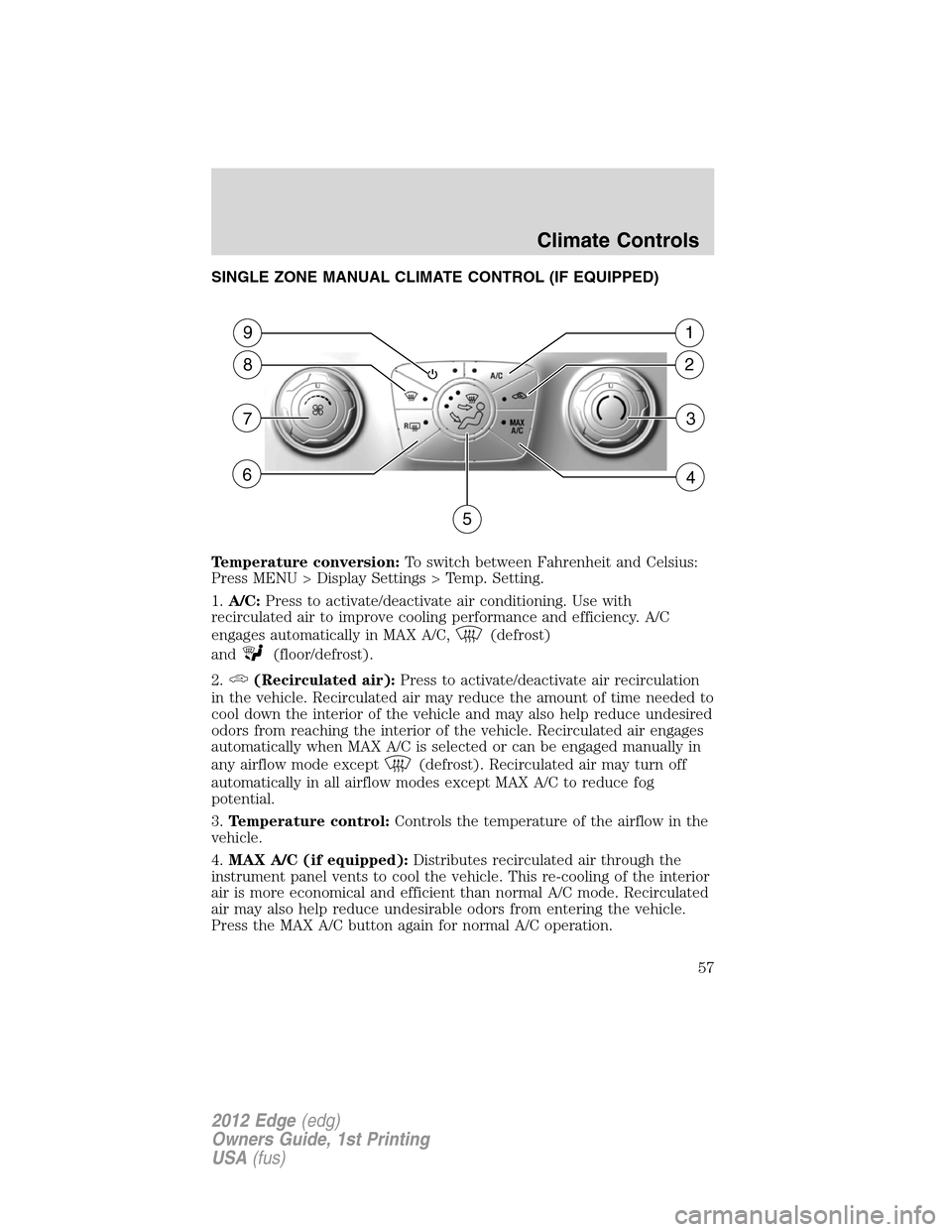
SINGLE ZONE MANUAL CLIMATE CONTROL (IF EQUIPPED)
Temperature conversion:To switch between Fahrenheit and Celsius:
Press MENU > Display Settings > Temp. Setting.
1.A/C:Press to activate/deactivate air conditioning. Use with
recirculated air to improve cooling performance and efficiency. A/C
engages automatically in MAX A/C,
(defrost)
and
(floor/defrost).
2.
(Recirculated air):Press to activate/deactivate air recirculation
in the vehicle. Recirculated air may reduce the amount of time needed to
cool down the interior of the vehicle and may also help reduce undesired
odors from reaching the interior of the vehicle. Recirculated air engages
automatically when MAX A/C is selected or can be engaged manually in
any airflow mode except
(defrost). Recirculated air may turn off
automatically in all airflow modes except MAX A/C to reduce fog
potential.
3.Temperature control:Controls the temperature of the airflow in the
vehicle.
4.MAX A/C (if equipped):Distributes recirculated air through the
instrument panel vents to cool the vehicle. This re-cooling of the interior
air is more economical and efficient than normal A/C mode. Recirculated
air may also help reduce undesirable odors from entering the vehicle.
Press the MAX A/C button again for normal A/C operation.
2
1
5
3
4
8
9
7
6
Climate Controls
57
2012 Edge(edg)
Owners Guide, 1st Printing
USA(fus)
Page 58 of 396
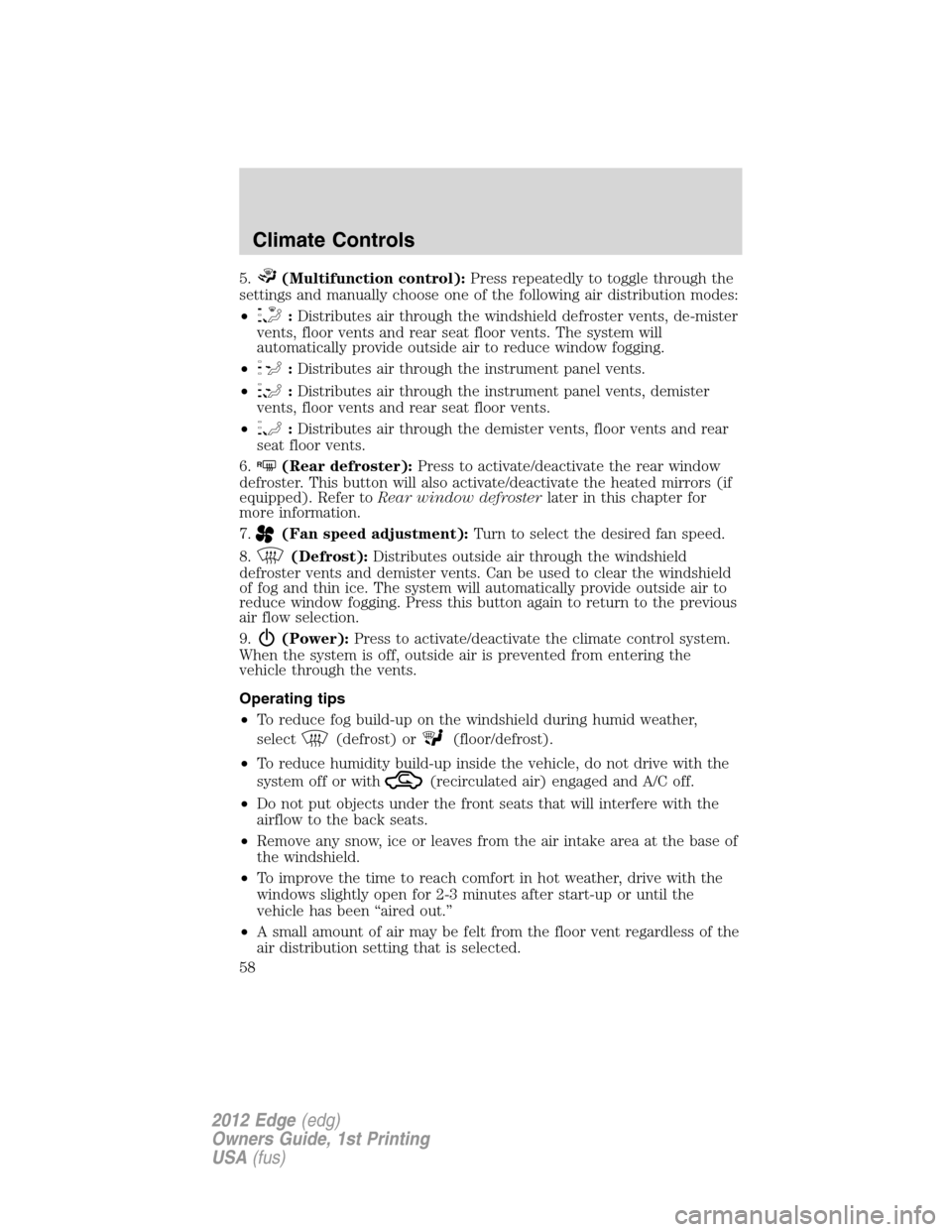
5.(Multifunction control):Press repeatedly to toggle through the
settings and manually choose one of the following air distribution modes:
•
:Distributes air through the windshield defroster vents, de-mister
vents, floor vents and rear seat floor vents. The system will
automatically provide outside air to reduce window fogging.
•
:Distributes air through the instrument panel vents.
•
:Distributes air through the instrument panel vents, demister
vents, floor vents and rear seat floor vents.
•
:Distributes air through the demister vents, floor vents and rear
seat floor vents.
6.
R(Rear defroster):Press to activate/deactivate the rear window
defroster. This button will also activate/deactivate the heated mirrors (if
equipped). Refer toRear window defrosterlater in this chapter for
more information.
7.
(Fan speed adjustment):Turn to select the desired fan speed.
8.
(Defrost):Distributes outside air through the windshield
defroster vents and demister vents. Can be used to clear the windshield
of fog and thin ice. The system will automatically provide outside air to
reduce window fogging. Press this button again to return to the previous
air flow selection.
9.
(Power):Press to activate/deactivate the climate control system.
When the system is off, outside air is prevented from entering the
vehicle through the vents.
Operating tips
•To reduce fog build-up on the windshield during humid weather,
select
(defrost) or(floor/defrost).
•To reduce humidity build-up inside the vehicle, do not drive with the
system off or with
(recirculated air) engaged and A/C off.
•Do not put objects under the front seats that will interfere with the
airflow to the back seats.
•Remove any snow, ice or leaves from the air intake area at the base of
the windshield.
•To improve the time to reach comfort in hot weather, drive with the
windows slightly open for 2-3 minutes after start-up or until the
vehicle has been “aired out.”
•A small amount of air may be felt from the floor vent regardless of the
air distribution setting that is selected.
Climate Controls
58
2012 Edge(edg)
Owners Guide, 1st Printing
USA(fus)
Page 59 of 396
For maximum cooling performance in MAX A/C mode:
1. Select MAX A/C.
2. Move temperature control selector to the coolest setting.
3. Set the fan to the highest speed initially. As the interior starts to cool
down, adjust the fan speed to maintain comfort.
To aid in side window defogging/demisting in cold weather:
1. Select
(panel/floor).
2. Select A/C.
3. Adjust the temperature control to maintain comfort.
4. Set the fan speed to the highest setting.
5. Direct the outer instrument panel vents toward the side windows.
To increase airflow to the outer instrument panel vents, close the vents
located in the middle of the instrument panel.
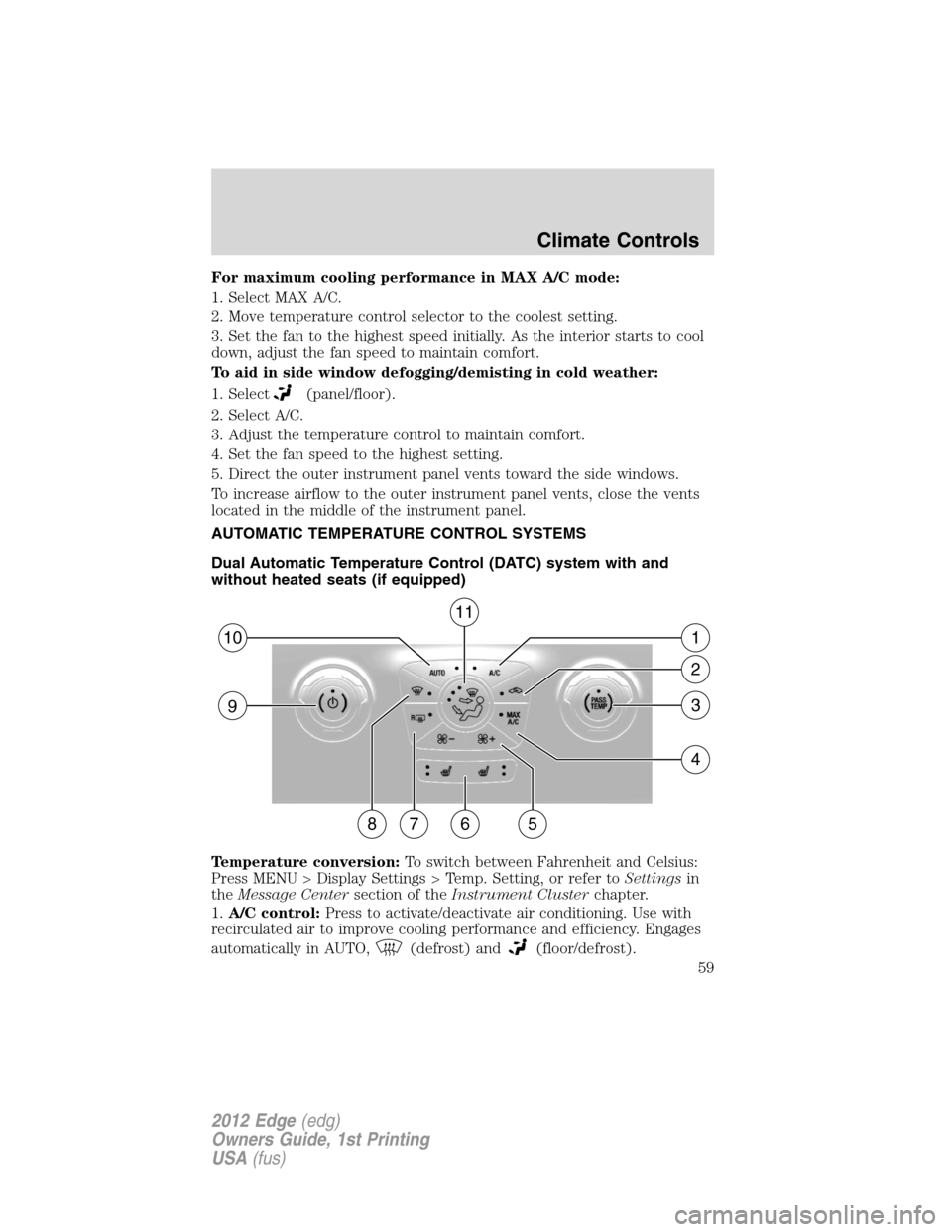
AUTOMATIC TEMPERATURE CONTROL SYSTEMS
Dual Automatic Temperature Control (DATC) system with and
without heated seats (if equipped)
Temperature conversion:To switch between Fahrenheit and Celsius:
Press MENU > Display Settings > Temp. Setting, or refer toSettingsin
theMessage Centersection of theInstrument Clusterchapter.
1.A/C control:Press to activate/deactivate air conditioning. Use with
recirculated air to improve cooling performance and efficiency. Engages
automatically in AUTO,
(defrost) and(floor/defrost).
57
93
4
2
110
86
11
Climate Controls
59
2012 Edge(edg)
Owners Guide, 1st Printing
USA(fus)
Page 60 of 396
2.(Recirculated air):Press to activate/deactivate air recirculation
in cabin. Recirculated air may reduce the amount of time to cool down
the interior of the vehicle and may also help reduce undesired odors
from reaching the interior of the vehicle. Recirculated air engages
automatically when MAX A/C is selected or can be engaged manually in
any airflow mode except
(defrost). Recirculated air may turn off
automatically in all airflow modes except MAX A/C to reduce fog
potential.
3.PASS TEMP:Press to activate dual zone (separate passenger
temperature control) and turn the dial to increase/decrease the
temperature for the passenger side of the vehicle. Press again to
deactivate passenger temperature control and return to single zone
temperature control where the driver settings control the temperature
for the entire vehicle.
4.MAX A/C:Distributes recirculated air through the instrument panel
vents to cool the vehicle. This re-cooling of the interior air is more
economical and efficient. Recirculated air may also help reduce
undesirable odors from entering the vehicle. Press the MAX A/C button
again for normal A/C operation.
5.
(Fan speed control):Press to manually increase or decrease the
fan speed.
6.
(Heated seats, if equipped):Press to activate/deactivate the
driver or passenger heated seat. Refer toHeated seatsin theSeating
and Safety Restraintschapter for more information.
7.
R(Rear defroster):Press to activate/deactivate the rear defroster.
This button will also activate/deactivate the heated mirrors (if equipped).
Refer toRear window defrosterlater in this chapter for more
information.
8.
(Defrost):Distributes outside air through the windshield
defroster vents and demister vents. Can be used to clear the windshield
of fog and thin ice. Press this button again to return to the previous air
flow selection. To return to full automatic control, touch AUTO.
9.
(Power/Driver temperature control):Press to
activate/deactivate the climate control system. When the system is off,
outside air is prevented from entering the vehicle through the vents.
Turn to adjust the temperature for either the driver side of the vehicle
(dual zone) or the entire vehicle cabin (single zone) if the passenger
side temperature is not activated.
10.AUTO:Press to engage full automatic operation. Select the desired
temperature using the temperature control. The system will
Climate Controls
60
2012 Edge(edg)
Owners Guide, 1st Printing
USA(fus)
Page 61 of 396
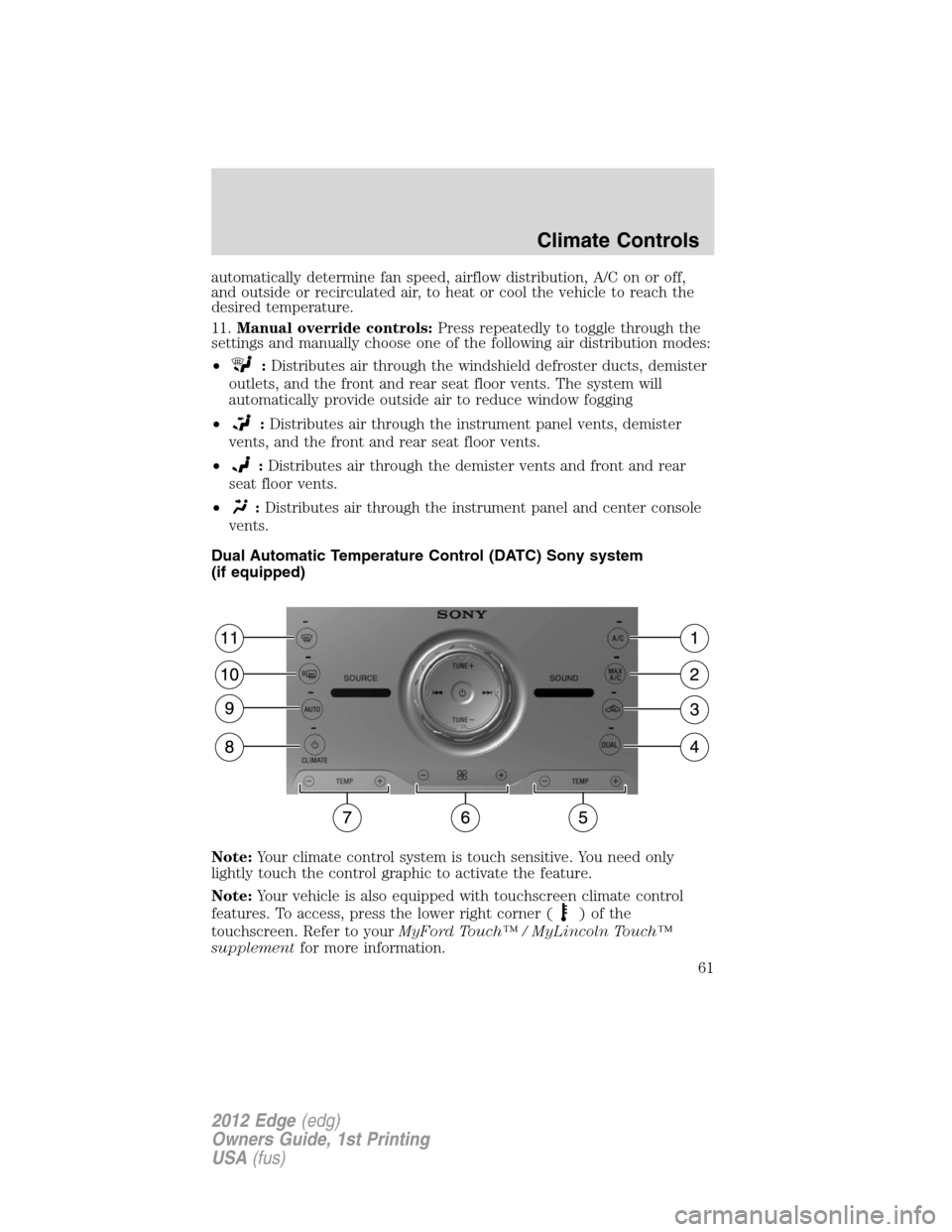
automatically determine fan speed, airflow distribution, A/C on or off,
and outside or recirculated air, to heat or cool the vehicle to reach the
desired temperature.
11.Manual override controls:Press repeatedly to toggle through the
settings and manually choose one of the following air distribution modes:
•
:Distributes air through the windshield defroster ducts, demister
outlets, and the front and rear seat floor vents. The system will
automatically provide outside air to reduce window fogging
•
:Distributes air through the instrument panel vents, demister
vents, and the front and rear seat floor vents.
•
:Distributes air through the demister vents and front and rear
seat floor vents.
•
:Distributes air through the instrument panel and center console
vents.
Dual Automatic Temperature Control (DATC) Sony system
(if equipped)
Note:Your climate control system is touch sensitive. You need only
lightly touch the control graphic to activate the feature.
Note:Your vehicle is also equipped with touchscreen climate control
features. To access, press the lower right corner (
)ofthe
touchscreen. Refer to yourMyFord Touch™ / MyLincoln Touch™
supplementfor more information.
Climate Controls
61
2012 Edge(edg)
Owners Guide, 1st Printing
USA(fus)
Page 62 of 396
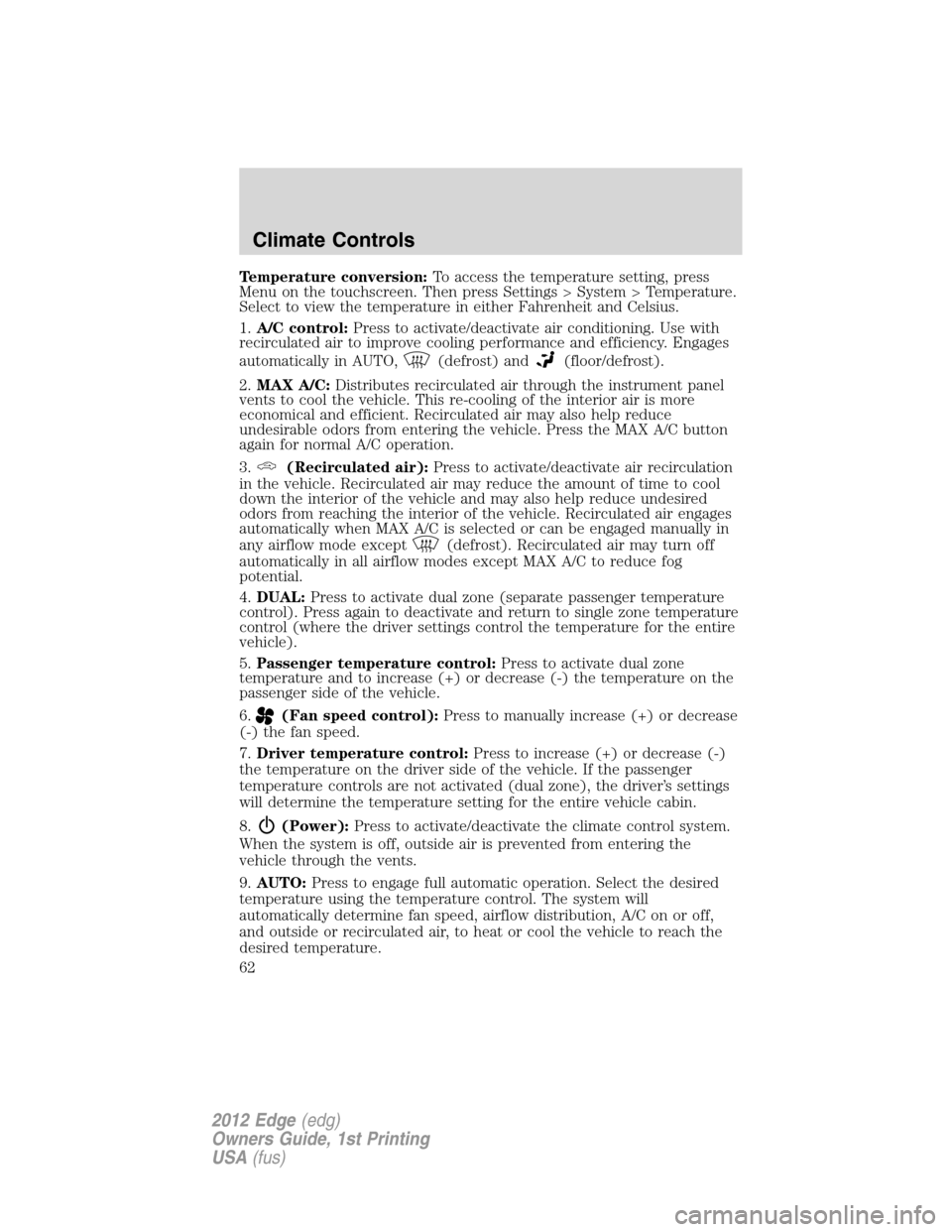
Temperature conversion:To access the temperature setting, press
Menu on the touchscreen. Then press Settings > System > Temperature.
Select to view the temperature in either Fahrenheit and Celsius.
1.A/C control:Press to activate/deactivate air conditioning. Use with
recirculated air to improve cooling performance and efficiency. Engages
automatically in AUTO,
(defrost) and(floor/defrost).
2.MAX A/C:Distributes recirculated air through the instrument panel
vents to cool the vehicle. This re-cooling of the interior air is more
economical and efficient. Recirculated air may also help reduce
undesirable odors from entering the vehicle. Press the MAX A/C button
again for normal A/C operation.
3.
(Recirculated air):Press to activate/deactivate air recirculation
in the vehicle. Recirculated air may reduce the amount of time to cool
down the interior of the vehicle and may also help reduce undesired
odors from reaching the interior of the vehicle. Recirculated air engages
automatically when MAX A/C is selected or can be engaged manually in
any airflow mode except
(defrost). Recirculated air may turn off
automatically in all airflow modes except MAX A/C to reduce fog
potential.
4.DUAL:Press to activate dual zone (separate passenger temperature
control). Press again to deactivate and return to single zone temperature
control (where the driver settings control the temperature for the entire
vehicle).
5.Passenger temperature control:Press to activate dual zone
temperature and to increase (+) or decrease (-) the temperature on the
passenger side of the vehicle.
6.
(Fan speed control):Press to manually increase (+) or decrease
(-) the fan speed.
7.Driver temperature control:Press to increase (+) or decrease (-)
the temperature on the driver side of the vehicle. If the passenger
temperature controls are not activated (dual zone), the driver’s settings
will determine the temperature setting for the entire vehicle cabin.
8.
(Power):Press to activate/deactivate the climate control system.
When the system is off, outside air is prevented from entering the
vehicle through the vents.
9.AUTO:Press to engage full automatic operation. Select the desired
temperature using the temperature control. The system will
automatically determine fan speed, airflow distribution, A/C on or off,
and outside or recirculated air, to heat or cool the vehicle to reach the
desired temperature.
Climate Controls
62
2012 Edge(edg)
Owners Guide, 1st Printing
USA(fus)
Page 64 of 396
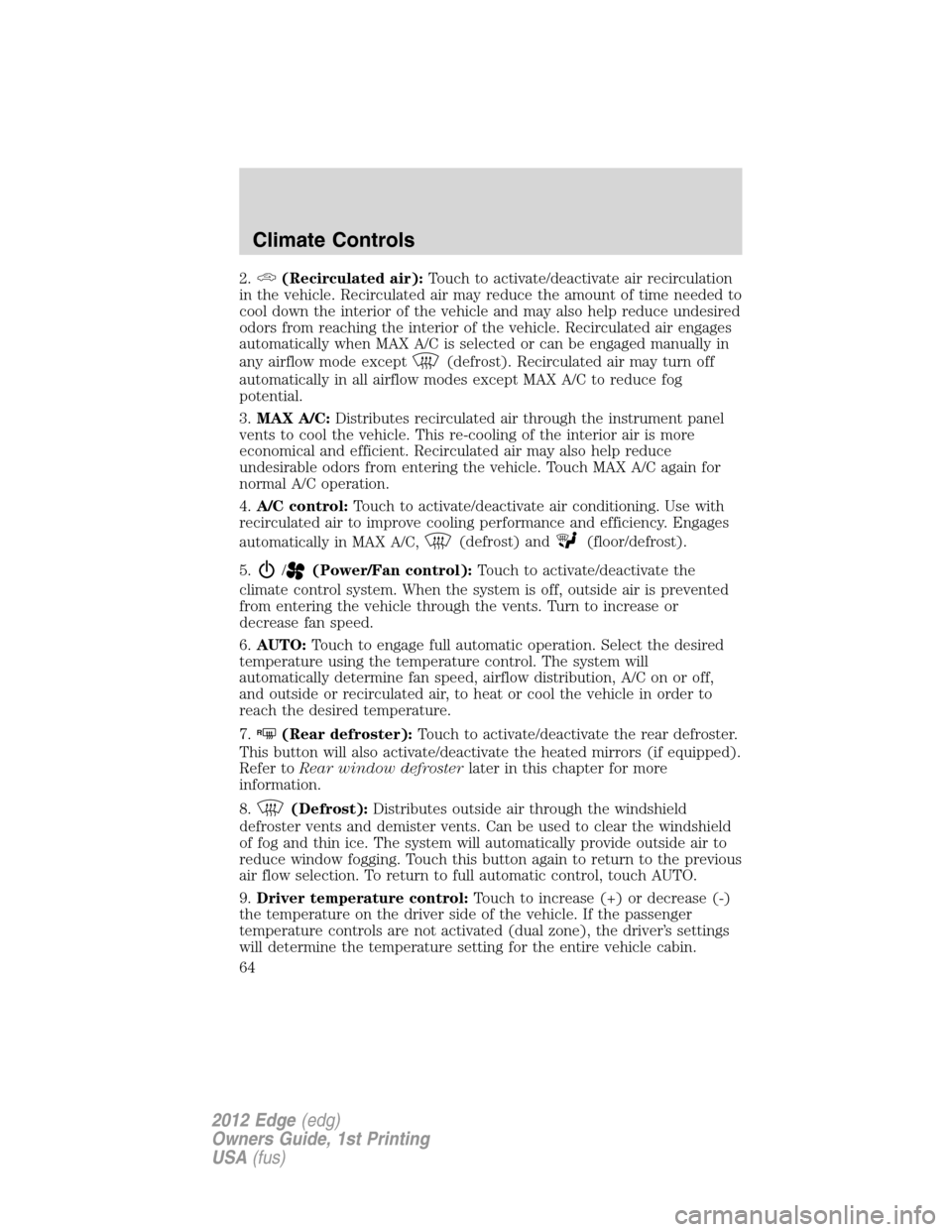
2.(Recirculated air):Touch to activate/deactivate air recirculation
in the vehicle. Recirculated air may reduce the amount of time needed to
cool down the interior of the vehicle and may also help reduce undesired
odors from reaching the interior of the vehicle. Recirculated air engages
automatically when MAX A/C is selected or can be engaged manually in
any airflow mode except
(defrost). Recirculated air may turn off
automatically in all airflow modes except MAX A/C to reduce fog
potential.
3.MAX A/C:Distributes recirculated air through the instrument panel
vents to cool the vehicle. This re-cooling of the interior air is more
economical and efficient. Recirculated air may also help reduce
undesirable odors from entering the vehicle. Touch MAX A/C again for
normal A/C operation.
4.A/C control:Touch to activate/deactivate air conditioning. Use with
recirculated air to improve cooling performance and efficiency. Engages
automatically in MAX A/C,
(defrost) and(floor/defrost).
5.
/(Power/Fan control):Touch to activate/deactivate the
climate control system. When the system is off, outside air is prevented
from entering the vehicle through the vents. Turn to increase or
decrease fan speed.
6.AUTO:Touch to engage full automatic operation. Select the desired
temperature using the temperature control. The system will
automatically determine fan speed, airflow distribution, A/C on or off,
and outside or recirculated air, to heat or cool the vehicle in order to
reach the desired temperature.
7.
R(Rear defroster):Touch to activate/deactivate the rear defroster.
This button will also activate/deactivate the heated mirrors (if equipped).
Refer toRear window defrosterlater in this chapter for more
information.
8.
(Defrost):Distributes outside air through the windshield
defroster vents and demister vents. Can be used to clear the windshield
of fog and thin ice. The system will automatically provide outside air to
reduce window fogging. Touch this button again to return to the previous
air flow selection. To return to full automatic control, touch AUTO.
9.Driver temperature control:Touch to increase (+) or decrease (-)
the temperature on the driver side of the vehicle. If the passenger
temperature controls are not activated (dual zone), the driver’s settings
will determine the temperature setting for the entire vehicle cabin.
Climate Controls
64
2012 Edge(edg)
Owners Guide, 1st Printing
USA(fus)
Page 66 of 396
To aid in side window defogging/demisting in cold weather:
1. Select
.
2. Select A/C.
3. Adjust the temperature control to maintain comfort.
4. Set the fan to the highest speed.
5. Direct the outer instrument panel vents toward the side windows.
To increase airflow to the outer instrument panel vents, close the vents
located in the middle of the instrument panel.
Touchscreen features
If your vehicle is equipped with a touchscreen system, you can access
climate features via the touchscreen and voice commands. Refer to the
Climate Controlchapter in yourMyFord Touch™ supplementfor more
information.
REAR WINDOW DEFROSTER
R
The rear defroster control is located on the climate control panel and
works to clear the rear window of fog and thin ice.
The engine must be running to operate the rear window defroster.
Press
Rto turn the rear window defroster on. An indicator light on the
button will illuminate when active. The rear window defroster turns off
automatically after a predetermined amount of time, if a low battery
condition is detected or when the ignition is turned to the off or
accessory position. To manually turn off the rear window defroster at any
time, press the control again.
If your vehicle is equipped with both rear defroster and heated mirrors,
the same button will activate both. Refer toHeated outside mirrorsin
theDriver Controlschapter.
Do not use razor blades or other sharp objects to clean the inside
of the rear window or to remove decals from the inside of the
rear window. This may cause damage to the heated grid lines and
will not be covered by your warranty.
Climate Controls
66
2012 Edge(edg)
Owners Guide, 1st Printing
USA(fus)
Page 69 of 396
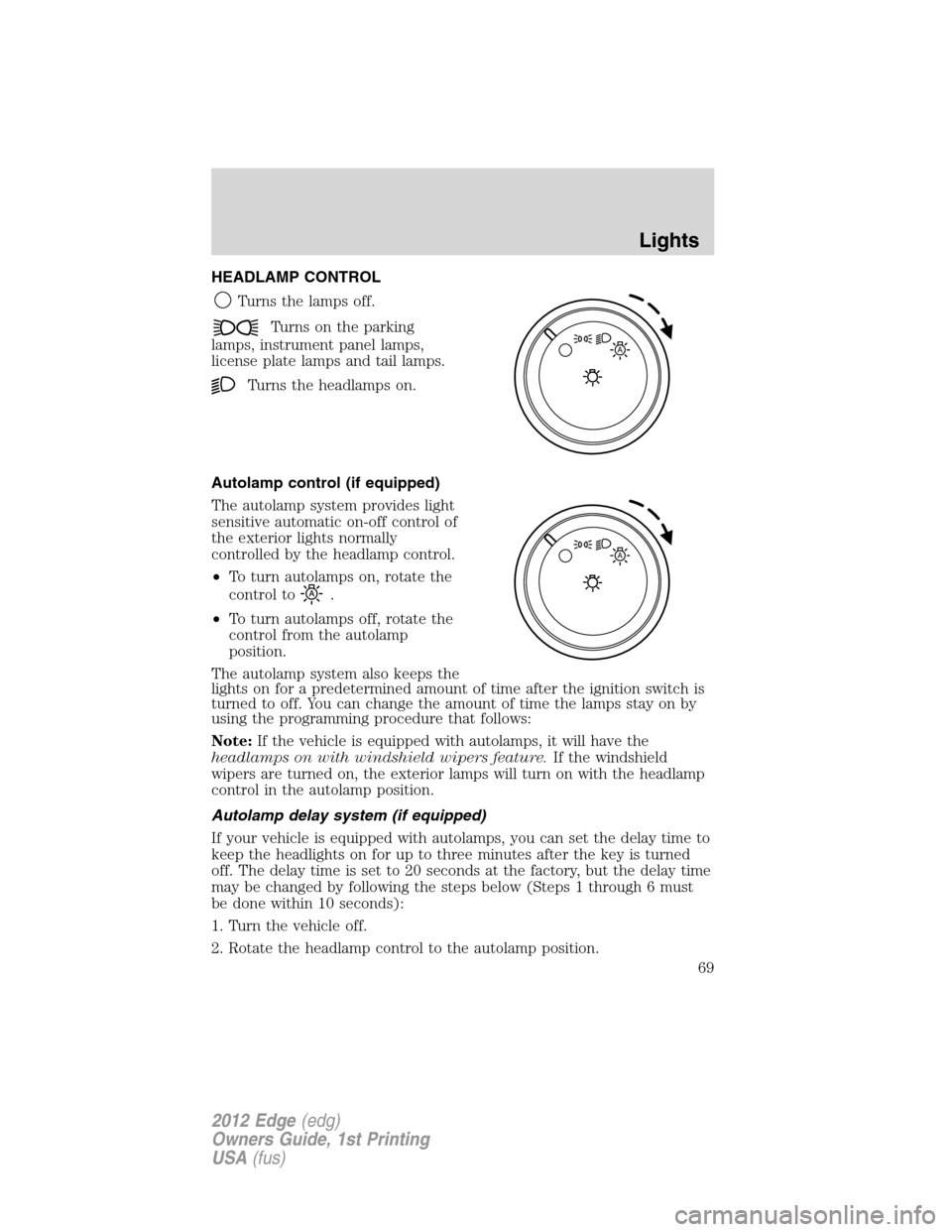
HEADLAMP CONTROL
Turns the lamps off.
Turns on the parking
lamps, instrument panel lamps,
license plate lamps and tail lamps.
Turns the headlamps on.
Autolamp control (if equipped)
The autolamp system provides light
sensitive automatic on-off control of
the exterior lights normally
controlled by the headlamp control.
•To turn autolamps on, rotate the
control to
.
•To turn autolamps off, rotate the
control from the autolamp
position.
The autolamp system also keeps the
lights on for a predetermined amount of time after the ignition switch is
turned to off. You can change the amount of time the lamps stay on by
using the programming procedure that follows:
Note:If the vehicle is equipped with autolamps, it will have the
headlamps on with windshield wipers feature.If the windshield
wipers are turned on, the exterior lamps will turn on with the headlamp
control in the autolamp position.
Autolamp delay system (if equipped)
If your vehicle is equipped with autolamps, you can set the delay time to
keep the headlights on for up to three minutes after the key is turned
off. The delay time is set to 20 seconds at the factory, but the delay time
may be changed by following the steps below (Steps 1 through 6 must
be done within 10 seconds):
1. Turn the vehicle off.
2. Rotate the headlamp control to the autolamp position.
A
A
Lights
69
2012 Edge(edg)
Owners Guide, 1st Printing
USA(fus)
Page 71 of 396
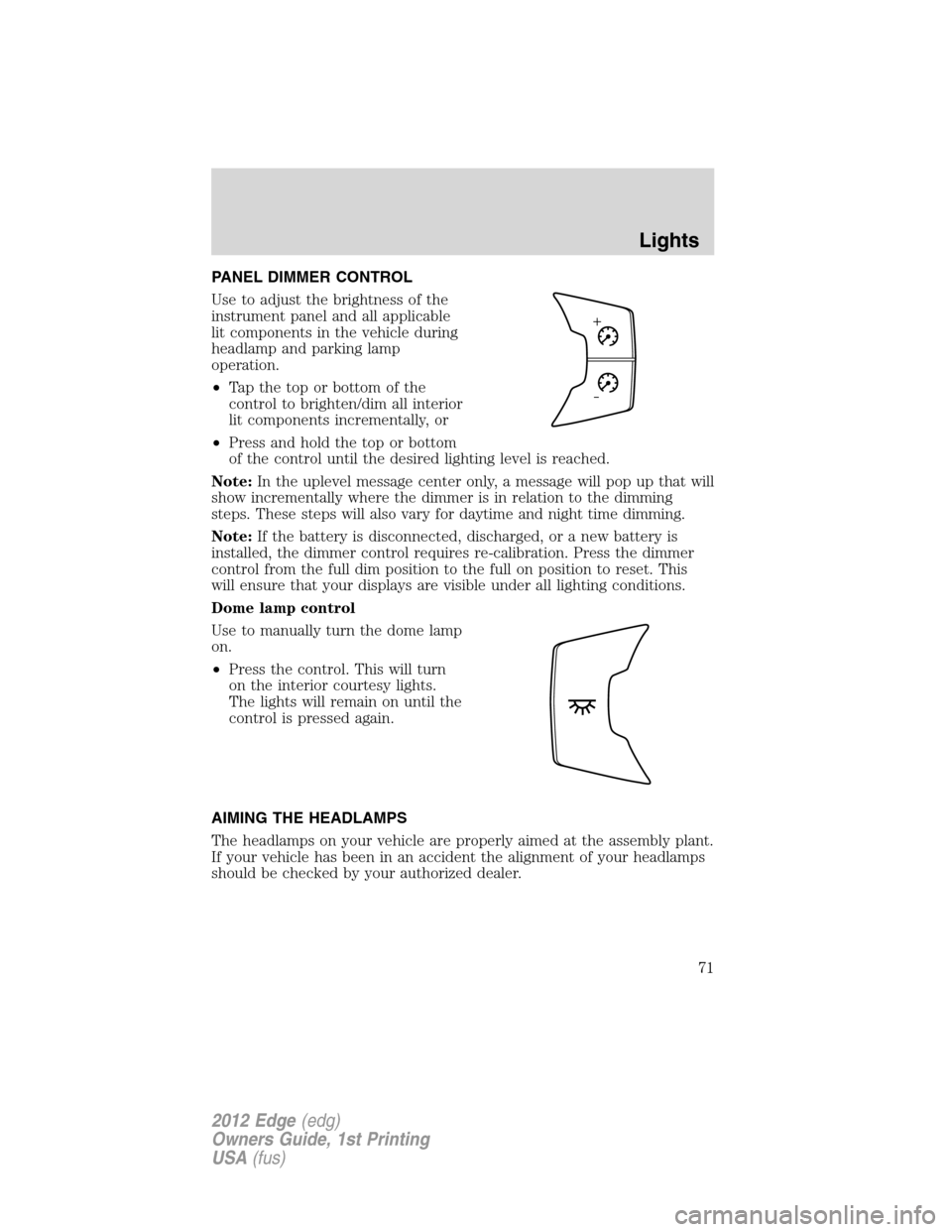
PANEL DIMMER CONTROL
Use to adjust the brightness of the
instrument panel and all applicable
lit components in the vehicle during
headlamp and parking lamp
operation.
•Tapthetoporbottomofthe
control to brighten/dim all interior
lit components incrementally, or
•Press and hold the top or bottom
of the control until the desired lighting level is reached.
Note:In the uplevel message center only, a message will pop up that will
show incrementally where the dimmer is in relation to the dimming
steps. These steps will also vary for daytime and night time dimming.
Note:If the battery is disconnected, discharged, or a new battery is
installed, the dimmer control requires re-calibration. Press the dimmer
control from the full dim position to the full on position to reset. This
will ensure that your displays are visible under all lighting conditions.
Dome lamp control
Use to manually turn the dome lamp
on.
•Press the control. This will turn
on the interior courtesy lights.
The lights will remain on until the
control is pressed again.
AIMING THE HEADLAMPS
The headlamps on your vehicle are properly aimed at the assembly plant.
If your vehicle has been in an accident the alignment of your headlamps
should be checked by your authorized dealer.
Lights
71
2012 Edge(edg)
Owners Guide, 1st Printing
USA(fus)