cruise control FORD EDGE 2013 1.G User Guide
[x] Cancel search | Manufacturer: FORD, Model Year: 2013, Model line: EDGE, Model: FORD EDGE 2013 1.GPages: 526, PDF Size: 5.98 MB
Page 214 of 526
At startup, the system sets the gap to the last selected setting. Once
activated, the driver can deactivate the system at any time by pressing
the brake pedal, pressing the steering wheel ON/OFF control or pressing
the RES/CNCL control. In addition, the driver can temporarily increase
the vehicle speed above the current speed by manually pressing on the
accelerator pedal.
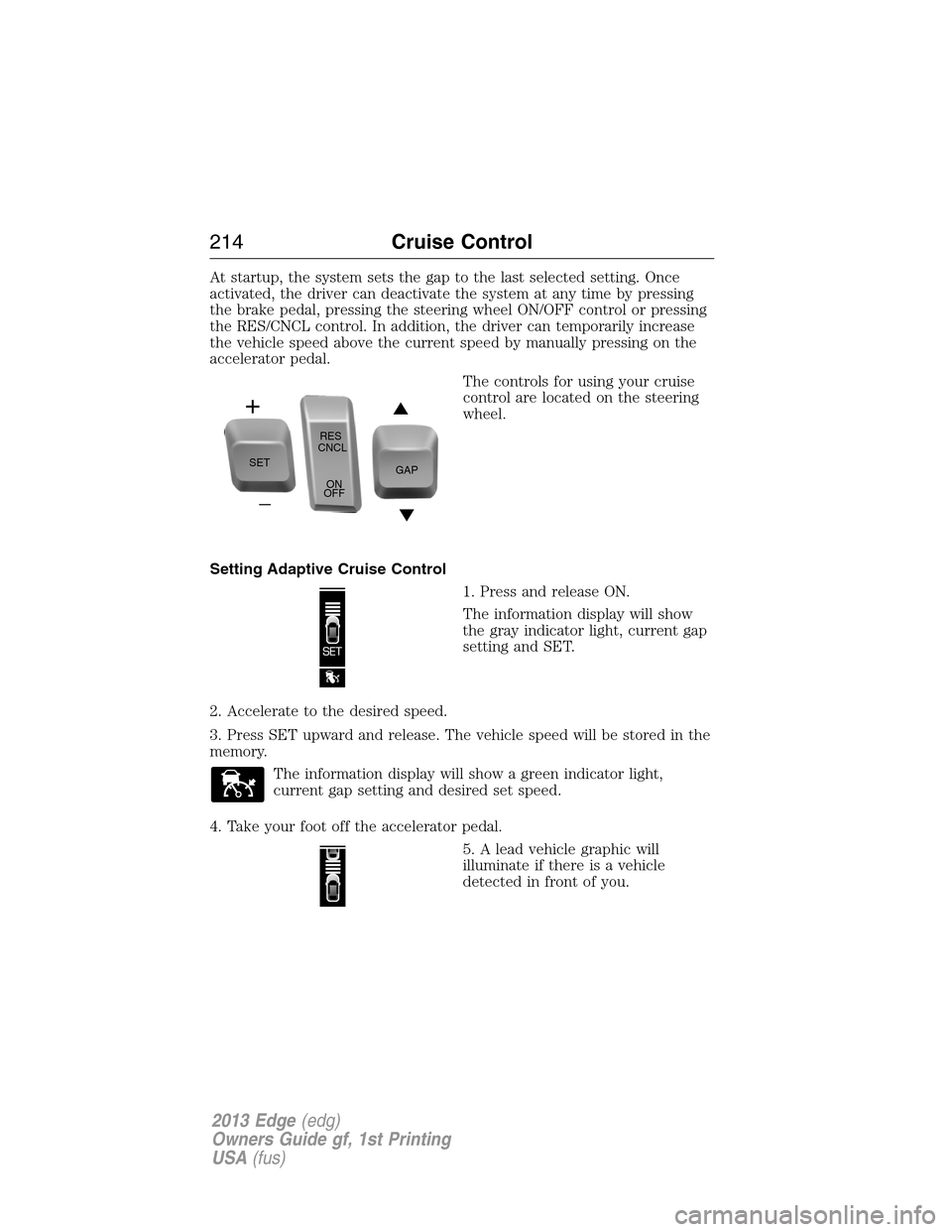
The controls for using your cruise
control are located on the steering
wheel.
Setting Adaptive Cruise Control
1. Press and release ON.
The information display will show
the gray indicator light, current gap
setting and SET.
2. Accelerate to the desired speed.
3. Press SET upward and release. The vehicle speed will be stored in the
memory.
The information display will show a green indicator light,
current gap setting and desired set speed.
4. Take your foot off the accelerator pedal.
5. A lead vehicle graphic will
illuminate if there is a vehicle
detected in front of you.
SETRES
CNCL
ON
OFFGAP
214Cruise Control
2013 Edge(edg)
Owners Guide gf, 1st Printing
USA(fus)
Page 215 of 526
Following a Vehicle
WARNING:When following a vehicle in front of you, the vehicle
will not decelerate automatically to a stop, nor will the vehicle
always decelerate quickly enough to avoid a collision without driver
intervention. Always apply the brakes when necessary. Failing to do so
may result in a collision, serious injury or death.
WARNING:Adaptive cruise control only warns of vehicles
detected by the radar sensor. In some cases there may be no
warning or the warning may be delayed. The driver should always apply
the brakes when necessary. Failing to do so may result in a collision,
serious injury or death.
Note:The brakes may emit a sound when they are being modulated by
the adaptive cruise control system.
When a vehicle ahead of you enters the same lane or a slower vehicle is
ahead in the same lane, the vehicle speed will adjust automatically to
maintain a preset gap distance. The distance setting is adjustable.
The lead vehicle graphic will be illuminated.
The vehicle will maintain a constant distance between the vehicle ahead
until:
•the vehicle in front of you accelerates to a speed above the set speed
•the vehicle in front of you moves out of your lane or out of view
•the vehicle speed falls below 16 mph (26 km/h)
•a new gap distance is set.
The vehicle brakes will be automatically applied to slow the vehicle to
maintain a safe distance from the vehicle in front. The maximum braking
which is applied by the system is limited and can be overridden by the
driver applying the brakes.
If the system predicts that its maximum braking level will not be
sufficient, an audible warning will sound while the system continues to
brake. This is accompanied by a heads-up display; a red warning bar
illuminating on the windshield. The driver should take immediate action.
Cruise Control215
2013 Edge(edg)
Owners Guide gf, 1st Printing
USA(fus)
Page 216 of 526
Setting the Gap Distance
Note:It is the driver’s responsibility to select a gap appropriate to the
driving conditions.
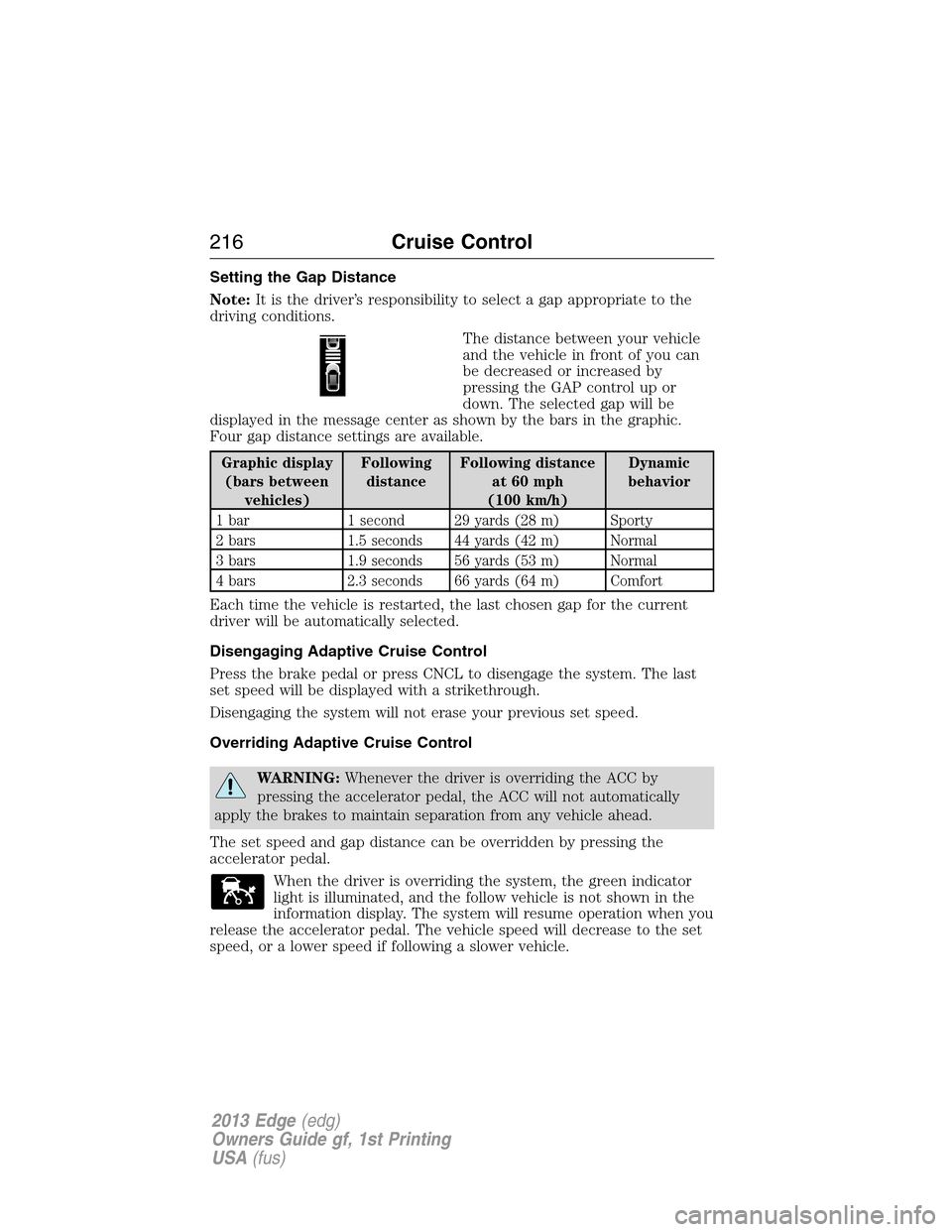
The distance between your vehicle
and the vehicle in front of you can
be decreased or increased by
pressing the GAP control up or
down. The selected gap will be
displayed in the message center as shown by the bars in the graphic.
Four gap distance settings are available.
Graphic display
(bars between
vehicles)Following
distanceFollowing distance
at 60 mph
(100 km/h)Dynamic
behavior
1 bar 1 second 29 yards (28 m) Sporty
2 bars 1.5 seconds 44 yards (42 m) Normal
3 bars 1.9 seconds 56 yards (53 m) Normal
4 bars 2.3 seconds 66 yards (64 m) Comfort
Each time the vehicle is restarted, the last chosen gap for the current
driver will be automatically selected.
Disengaging Adaptive Cruise Control
Press the brake pedal or press CNCL to disengage the system. The last
set speed will be displayed with a strikethrough.
Disengaging the system will not erase your previous set speed.
Overriding Adaptive Cruise Control
WARNING:Whenever the driver is overriding the ACC by
pressing the accelerator pedal, the ACC will not automatically
apply the brakes to maintain separation from any vehicle ahead.
The set speed and gap distance can be overridden by pressing the
accelerator pedal.
When the driver is overriding the system, the green indicator
light is illuminated, and the follow vehicle is not shown in the
information display. The system will resume operation when you
release the accelerator pedal. The vehicle speed will decrease to the set
speed, or a lower speed if following a slower vehicle.
216Cruise Control
2013 Edge(edg)
Owners Guide gf, 1st Printing
USA(fus)
Page 217 of 526
Changing the Set Speed
There are three ways to change the set speed:
•Accelerate or brake to the desired speed and press SET upward and
release.
•Increase or decrease the speed by holding SET upward or downward
until the desired set speed is shown on the information display. The
vehicle speed will gradually change to the selected speed.
•Increase or decrease the speed in increments of 1 mph (2 km/h) by
briefly pressing the SET upward or downward.
The system may apply the brakes to slow the vehicle down to the new
set speed. The set speed will display continuously in the information
display while the system is active.
Resuming the Set Speed
Note:Resume should only be used if the driver is aware of the set speed
and intends to return to it.
Press and release RES/CNCL. The vehicle will return to the previously
set speed. The set speed will display continuously in the information
display while the system is active.
Low Speed Automatic Cancellation
The system is not functional at vehicle speeds below 16 mph (26 km/h).
An audible alarm will sound and the automatic braking will be released if
the vehicle drops below this speed.
Hilly Condition Usage
Note:An audible alarm will sound and the system will shut down if it is
applying brakes for an extended period of time. This allows the brakes to
cool down. The system will function normally again when the brakes
have cooled down.
You should select a lower gear position when the system is active in
situations such as prolonged downhill driving on steep grades (i.e.,
driving in mountainous areas). Additional engine braking is needed in
these situations to reduce the load on the vehicle’s regular brake system
to prevent them from overheating.
Switching Off Adaptive Cruise Control
Note:The set speed memory is erased when you turn off the system.
Press and release OFF or turn off the ignition.
Cruise Control217
2013 Edge(edg)
Owners Guide gf, 1st Printing
USA(fus)
Page 218 of 526
Detection Issues
The radar sensor has a limited field of vision. It may not detect vehicles at
all or detect a vehicle later than expected in some situations. The lead
vehicle graphic will not illuminate if a vehicle is not detected in front of you.
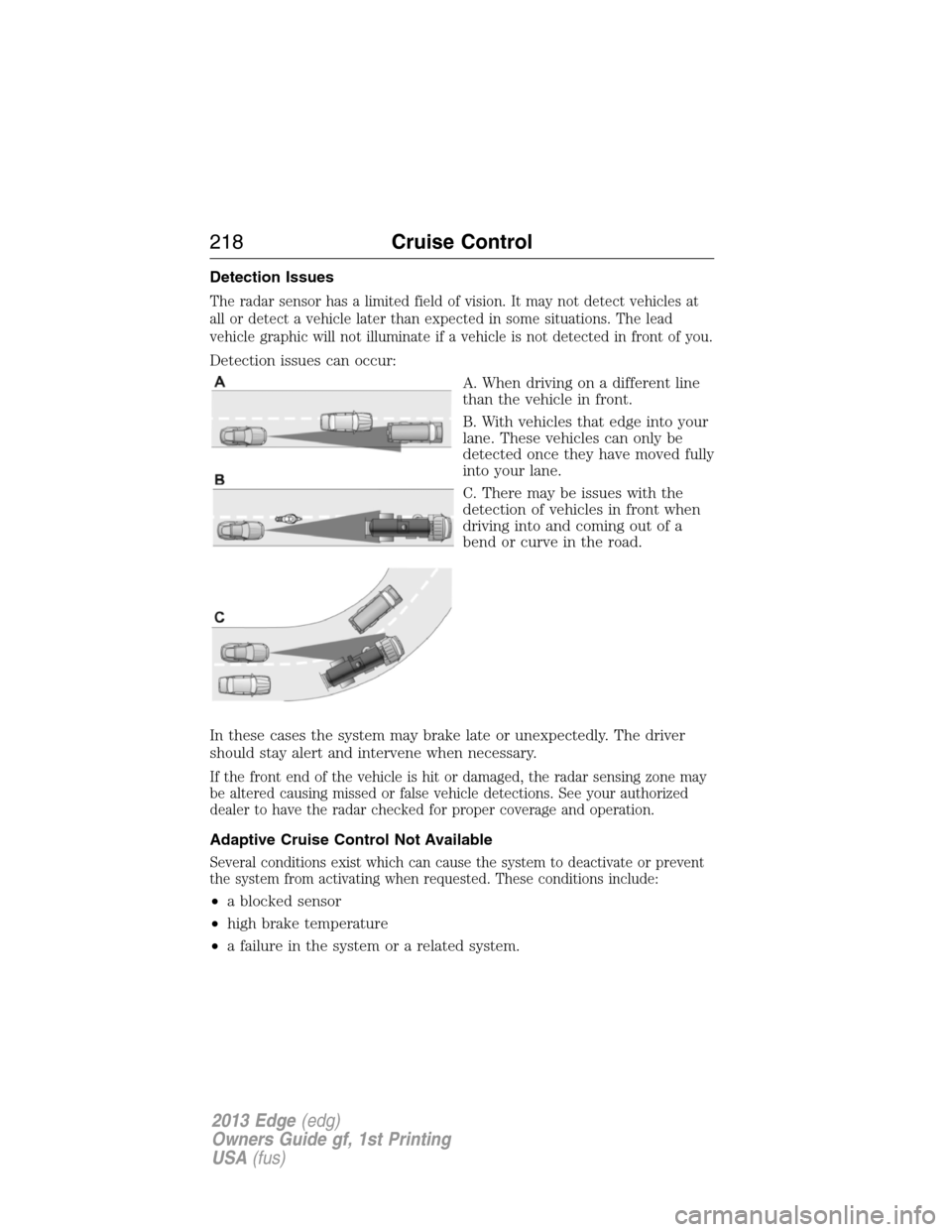
Detection issues can occur:
A. When driving on a different line
than the vehicle in front.
B. With vehicles that edge into your
lane. These vehicles can only be
detected once they have moved fully
into your lane.
C. There may be issues with the
detection of vehicles in front when
driving into and coming out of a
bend or curve in the road.
In these cases the system may brake late or unexpectedly. The driver
should stay alert and intervene when necessary.
If the front end of the vehicle is hit or damaged, the radar sensing zone may
be altered causing missed or false vehicle detections. See your authorized
dealer to have the radar checked for proper coverage and operation.
Adaptive Cruise Control Not Available
Several conditions exist which can cause the system to deactivate or prevent
the system from activating when requested. These conditions include:
•a blocked sensor
•high brake temperature
•a failure in the system or a related system.
218Cruise Control
2013 Edge(edg)
Owners Guide gf, 1st Printing
USA(fus)
Page 219 of 526
Blocked Sensor
WARNING:Do not use ACC when towing a trailer with brake
controls. Aftermarket trailer brakes will not function properly
when ACC is activated because the brakes are electronically controlled.
Failing to do so may result in loss of vehicle control, which could result
in serious injury.
WARNING:Do not use tires sizes other than those
recommended because this can affect the normal operation of
ACC. Failing to do so may result in a loss of vehicle control, which
could result in serious injury.
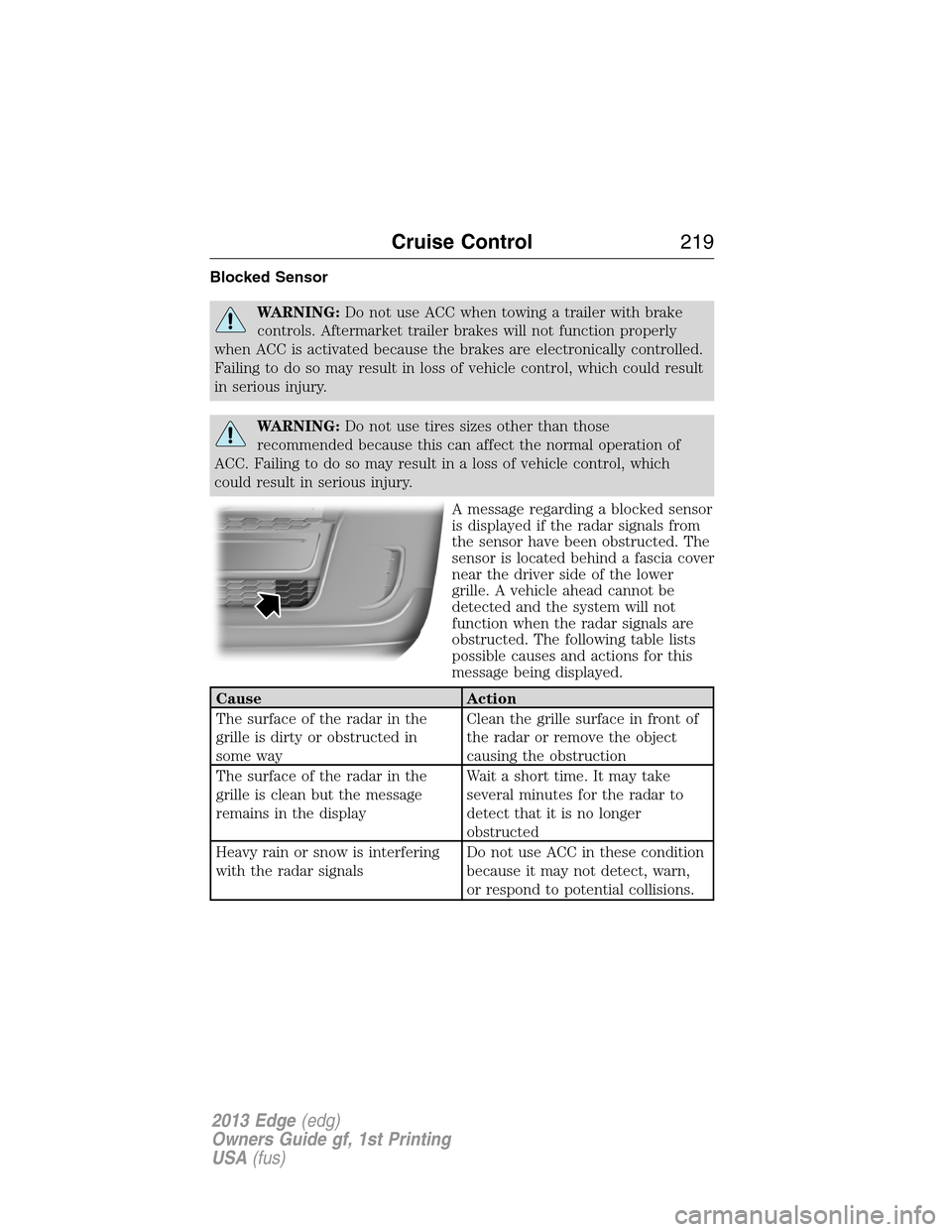
A message regarding a blocked sensor
is displayed if the radar signals from
the sensor have been obstructed. The
sensor is located behind a fascia cover
near the driver side of the lower
grille. A vehicle ahead cannot be
detected and the system will not
function when the radar signals are
obstructed. The following table lists
possible causes and actions for this
message being displayed.
Cause Action
The surface of the radar in the
grille is dirty or obstructed in
some wayClean the grille surface in front of
the radar or remove the object
causing the obstruction
The surface of the radar in the
grille is clean but the message
remains in the displayWait a short time. It may take
several minutes for the radar to
detect that it is no longer
obstructed
Heavy rain or snow is interfering
with the radar signalsDo not use ACC in these condition
because it may not detect, warn,
or respond to potential collisions.
Cruise Control219
2013 Edge(edg)
Owners Guide gf, 1st Printing
USA(fus)
Page 220 of 526
Cause Action
Swirling water, or snow or ice on
the surface of the road may
interfere with the radar signalsDo not use ACC in these condition
because it may not detect, warn,
or respond to potential collisions.
Desert / remote area with no other
vehicles and no roadside objectsWait a short time or switch to
normal cruise control.
Due to the nature of radar technology, it is possible to get a blockage
warning and not be blocked. This can happen, for example, when driving
in sparse rural or desert environments. A false blocked condition will
either self clear or clear after a key cycle.
Switching to Normal Cruise Control
WARNING:Normal cruise control will not brake due to slower
vehicles. Always be aware of which mode is selected and apply
the brakes when necessary.
You can manually change from adaptive cruise control to normal cruise
control through the information display.
The cruise control indicator light will replace the adaptive
cruise control indicator light if normal cruise control is selected.
The gap setting will not be displayed, the system will not
automatically respond to lead vehicles and automatic braking will not be
activated. The system will default to adaptive cruise control when the
engine is started.
220Cruise Control
2013 Edge(edg)
Owners Guide gf, 1st Printing
USA(fus)
Page 271 of 526
Fuse/Relay
NumberFuse Amp
RatingProtected Components
60 15A* Stop lamps
61 10A* Rear seat release
62 10A* A/C clutch
63 15A* TT stop/turn lamps relay
64 20A* Rear wiper motor
65 15A* Fuel pump
66 — Powertrain control module
(PCM) relay
67 20A* Vehicle power (VPWR) #2
68 15A* VPWR #4
69 15A* VPWR #1 (3.5/3.7L engines)
20A* VPWR #1 (2.0L engine)
70 10A* A/C relay, VPWR #3, All-wheel
drive module (3.5/3.7L engines),
Active grille shutter (AGS) (2.0L
engine)
71 — Not used
72 — Not used
73 — Not used
74 — Not used
75 — A/C clutch diode (3.5/3.7L
engines)
76 — Not used
77 — TT park lamps relay
78 20A* Right HID headlamps
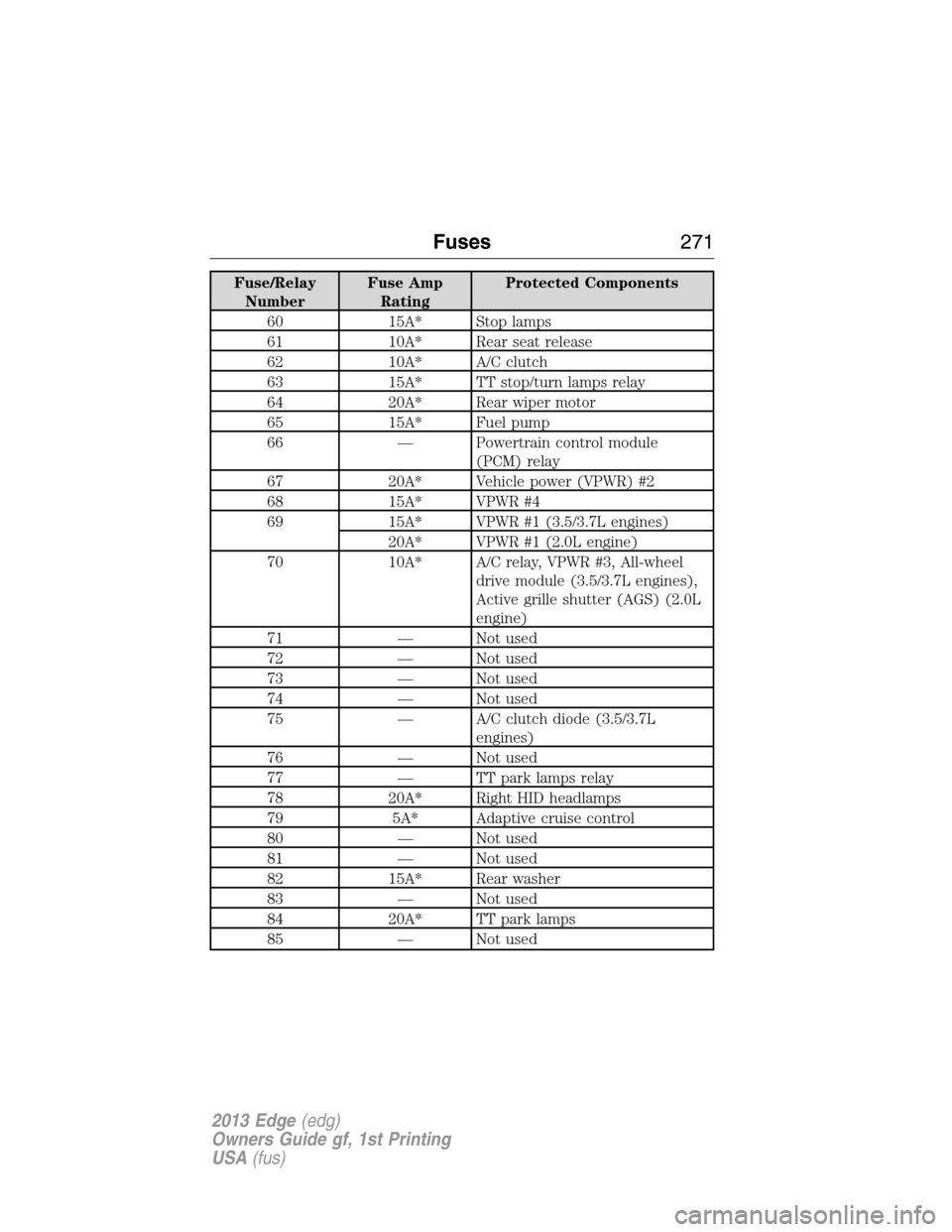
79 5A* Adaptive cruise control
80 — Not used
81 — Not used
82 15A* Rear washer
83 — Not used
84 20A* TT park lamps
85 — Not used
Fuses271
2013 Edge(edg)
Owners Guide gf, 1st Printing
USA(fus)
Page 272 of 526
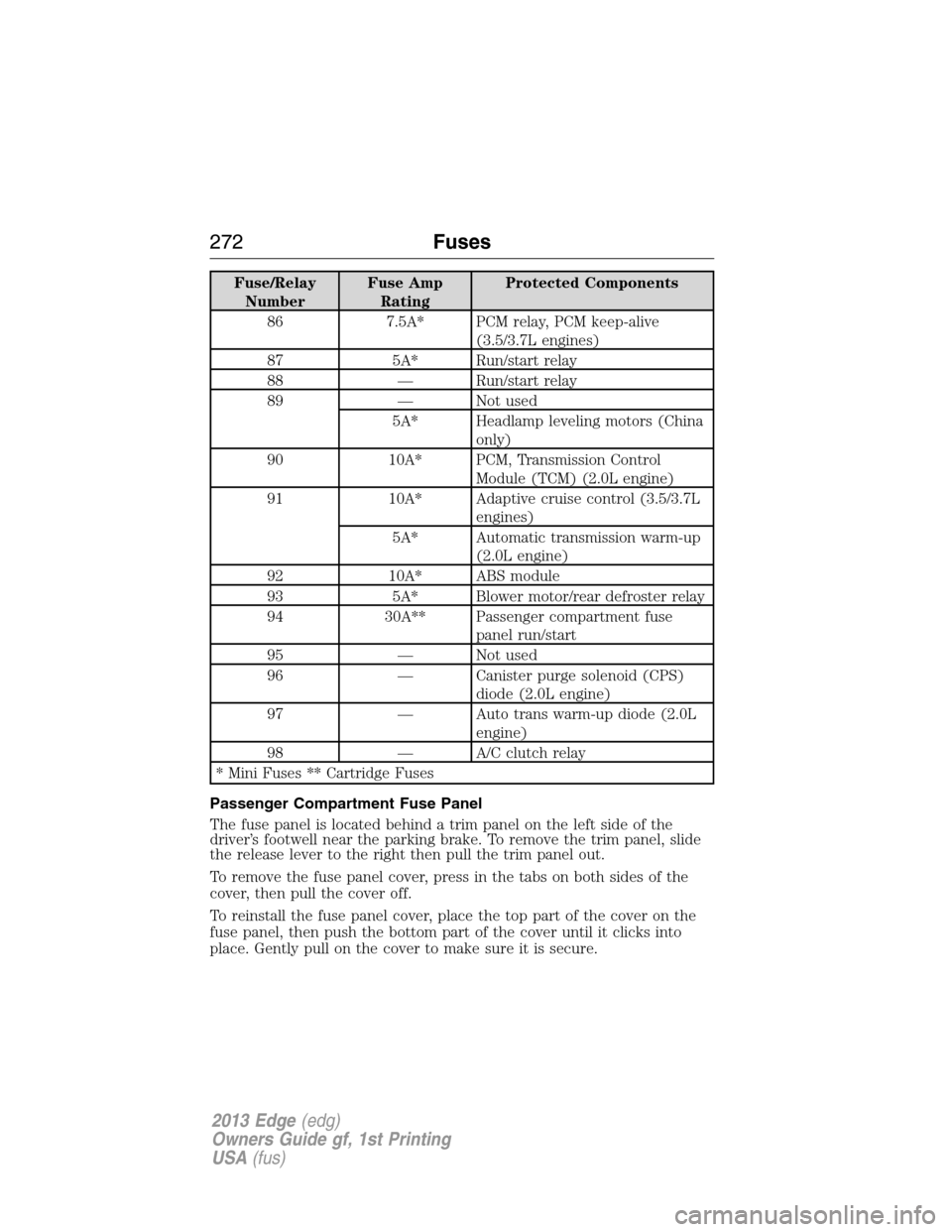
Fuse/Relay
NumberFuse Amp
RatingProtected Components
86 7.5A* PCM relay, PCM keep-alive
(3.5/3.7L engines)
87 5A* Run/start relay
88 — Run/start relay
89 — Not used
5A* Headlamp leveling motors (China
only)
90 10A* PCM, Transmission Control
Module (TCM) (2.0L engine)
91 10A* Adaptive cruise control (3.5/3.7L
engines)
5A* Automatic transmission warm-up
(2.0L engine)
92 10A* ABS module
93 5A* Blower motor/rear defroster relay
94 30A** Passenger compartment fuse
panel run/start
95 — Not used
96 — Canister purge solenoid (CPS)
diode (2.0L engine)
97 — Auto trans warm-up diode (2.0L
engine)
98 — A/C clutch relay
* Mini Fuses ** Cartridge Fuses
Passenger Compartment Fuse Panel
The fuse panel is located behind a trim panel on the left side of the
driver’s footwell near the parking brake. To remove the trim panel, slide
the release lever to the right then pull the trim panel out.
To remove the fuse panel cover, press in the tabs on both sides of the
cover, then pull the cover off.
To reinstall the fuse panel cover, place the top part of the cover on the
fuse panel, then push the bottom part of the cover until it clicks into
place. Gently pull on the cover to make sure it is secure.
272Fuses
2013 Edge(edg)
Owners Guide gf, 1st Printing
USA(fus)
Page 519 of 526
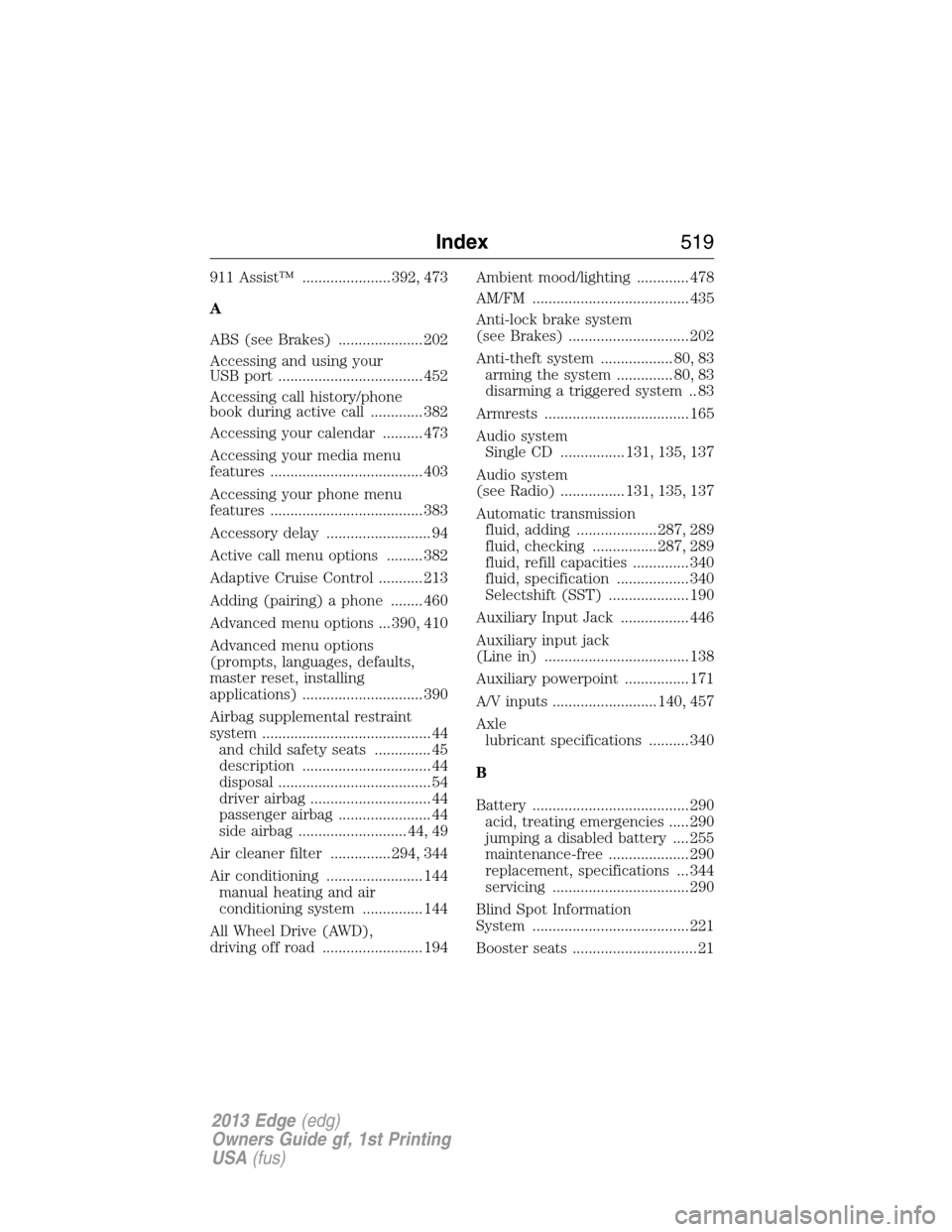
911 Assist™ ...................... 392, 473
A
ABS (see Brakes) ..................... 202
Accessing and using your
USB port .................................... 452
Accessing call history/phone
book during active call ............. 382
Accessing your calendar .......... 473
Accessing your media menu
features ...................................... 403
Accessing your phone menu
features ...................................... 383
Accessory delay .......................... 94
Active call menu options ......... 382
Adaptive Cruise Control ........... 213
Adding (pairing) a phone ........ 460
Advanced menu options ... 390, 410
Advanced menu options
(prompts, languages, defaults,
master reset, installing
applications) .............................. 390
Airbag supplemental restraint
system .......................................... 44
and child safety seats .............. 45
description ................................ 44
disposal ...................................... 54
driver airbag .............................. 44
passenger airbag ....................... 44
side airbag ........................... 44, 49
Air cleaner filter ............... 294, 344
Air conditioning ........................ 144
manual heating and air
conditioning system ............... 144
All Wheel Drive (AWD),
driving off road ......................... 194Ambient mood/lighting ............. 478
AM/FM ....................................... 435
Anti-lock brake system
(see Brakes) .............................. 202
Anti-theft system .................. 80, 83
arming the system .............. 80, 83
disarming a triggered system .. 83
Armrests .................................... 165
Audio system
Single CD ................ 131, 135, 137
Audio system
(see Radio) ................ 131, 135, 137
Automatic transmission
fluid, adding .................... 287, 289
fluid, checking ................ 287, 289
fluid, refill capacities .............. 340
fluid, specification .................. 340
Selectshift (SST) .................... 190
Auxiliary Input Jack ................. 446
Auxiliary input jack
(Line in) .................................... 138
Auxiliary powerpoint ................ 171
A/V inputs .......................... 140, 457
Axle
lubricant specifications .......... 340
B
Battery ....................................... 290
acid, treating emergencies ..... 290
jumping a disabled battery .... 255
maintenance-free .................... 290
replacement, specifications ... 344
servicing .................................. 290
Blind Spot Information
System ....................................... 221
Booster seats ............................... 21
Index519
2013 Edge(edg)
Owners Guide gf, 1st Printing
USA(fus)