instrument panel FORD EDGE 2014 1.G User Guide
[x] Cancel search | Manufacturer: FORD, Model Year: 2014, Model line: EDGE, Model: FORD EDGE 2014 1.GPages: 540, PDF Size: 7.52 MB
Page 133 of 540
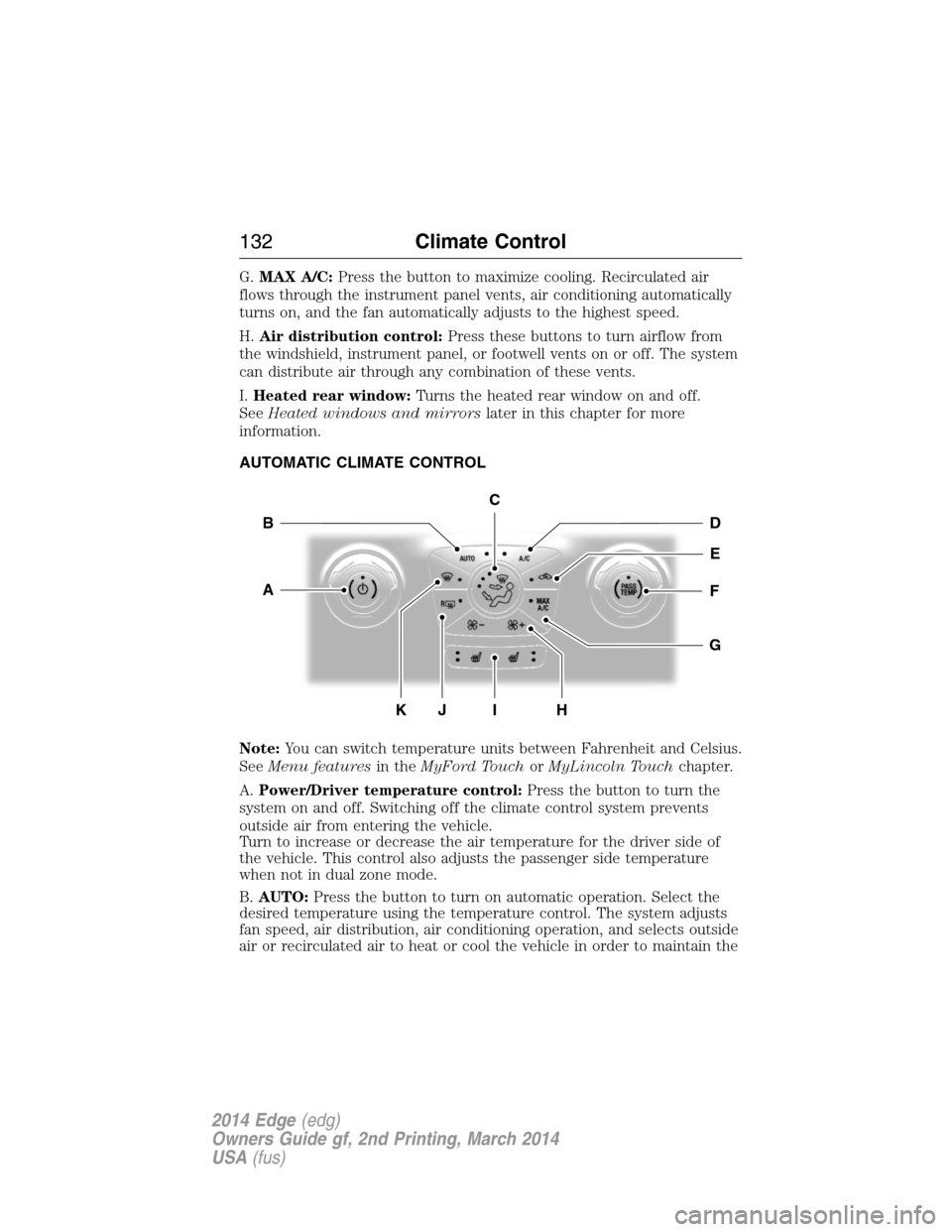
G.MAX A/C:Press the button to maximize cooling. Recirculated air
flows through the instrument panel vents, air conditioning automatically
turns on, and the fan automatically adjusts to the highest speed.
H.Air distribution control:Press these buttons to turn airflow from
the windshield, instrument panel, or footwell vents on or off. The system
can distribute air through any combination of these vents.
I.Heated rear window:Turns the heated rear window on and off.
SeeHeated windows and mirrorslater in this chapter for more
information.
AUTOMATIC CLIMATE CONTROL
Note:You can switch temperature units between Fahrenheit and Celsius.
SeeMenu featuresin theMyFord TouchorMyLincoln Touchchapter.
A.Power/Driver temperature control:Press the button to turn the
system on and off. Switching off the climate control system prevents
outside air from entering the vehicle.
Turn to increase or decrease the air temperature for the driver side of
the vehicle. This control also adjusts the passenger side temperature
when not in dual zone mode.
B.AUTO:Press the button to turn on automatic operation. Select the
desired temperature using the temperature control. The system adjusts
fan speed, air distribution, air conditioning operation, and selects outside
air or recirculated air to heat or cool the vehicle in order to maintain the
G
HK
E
DB
FA
I
C
J
132Climate Control
2014 Edge(edg)
Owners Guide gf, 2nd Printing, March 2014
USA(fus)
Page 134 of 540
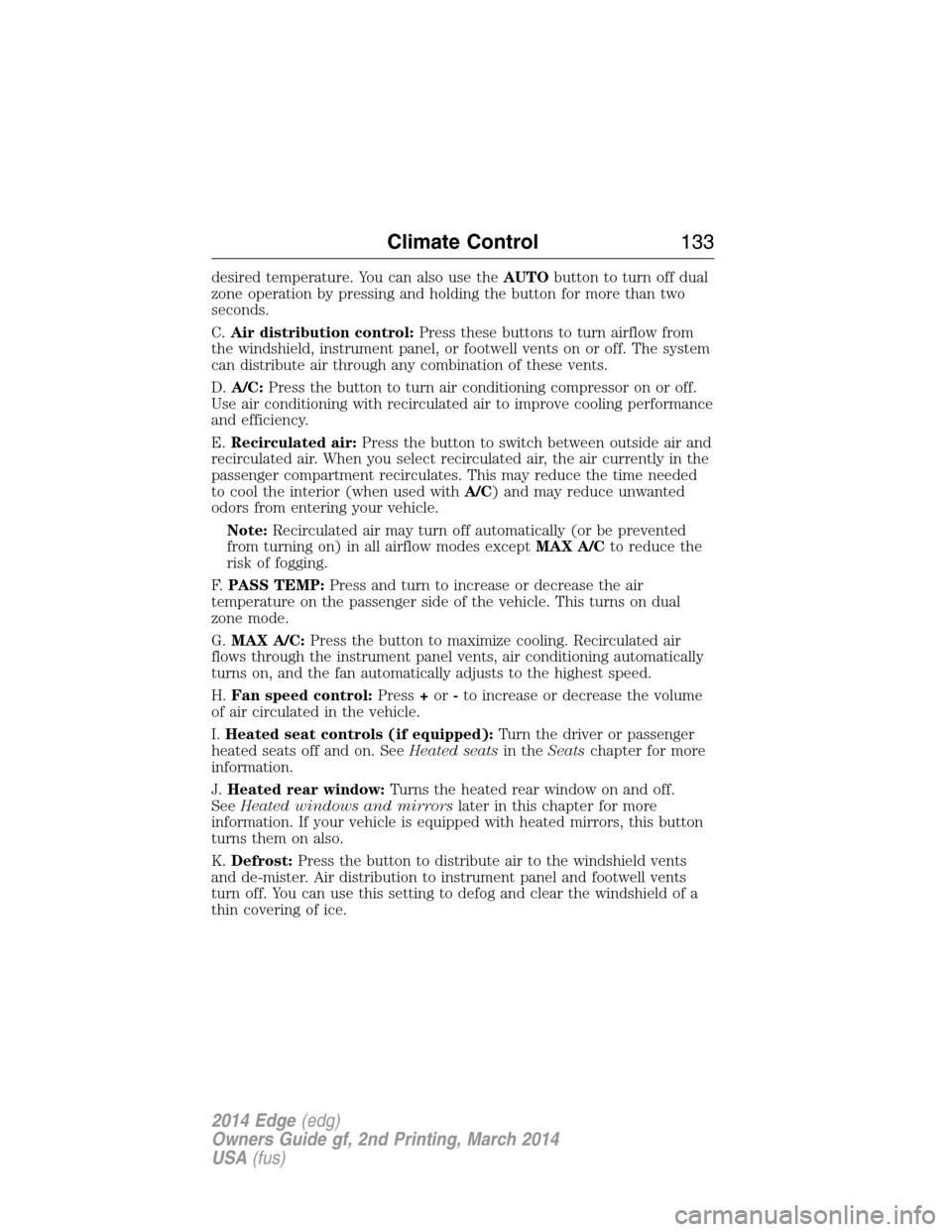
desired temperature. You can also use theAUTObutton to turn off dual
zone operation by pressing and holding the button for more than two
seconds.
C.Air distribution control:Press these buttons to turn airflow from
the windshield, instrument panel, or footwell vents on or off. The system
can distribute air through any combination of these vents.
D.A/C:Press the button to turn air conditioning compressor on or off.
Use air conditioning with recirculated air to improve cooling performance
and efficiency.
E.Recirculated air:Press the button to switch between outside air and
recirculated air. When you select recirculated air, the air currently in the
passenger compartment recirculates. This may reduce the time needed
to cool the interior (when used withA/C) and may reduce unwanted
odors from entering your vehicle.
Note:Recirculated air may turn off automatically (or be prevented
from turning on) in all airflow modes exceptMAX A/Cto reduce the
risk of fogging.
F.PASS TEMP:Press and turn to increase or decrease the air
temperature on the passenger side of the vehicle. This turns on dual
zone mode.
G.MAX A/C:Press the button to maximize cooling. Recirculated air
flows through the instrument panel vents, air conditioning automatically
turns on, and the fan automatically adjusts to the highest speed.
H.Fan speed control:Press+or-to increase or decrease the volume
of air circulated in the vehicle.
I.Heated seat controls (if equipped):Turn the driver or passenger
heated seats off and on. SeeHeated seatsin theSeatschapter for more
information.
J.Heated rear window:Turns the heated rear window on and off.
SeeHeated windows and mirrorslater in this chapter for more
information. If your vehicle is equipped with heated mirrors, this button
turns them on also.
K.Defrost:Press the button to distribute air to the windshield vents
and de-mister. Air distribution to instrument panel and footwell vents
turn off. You can use this setting to defog and clear the windshield of a
thin covering of ice.
Climate Control133
2014 Edge(edg)
Owners Guide gf, 2nd Printing, March 2014
USA(fus)
Page 135 of 540
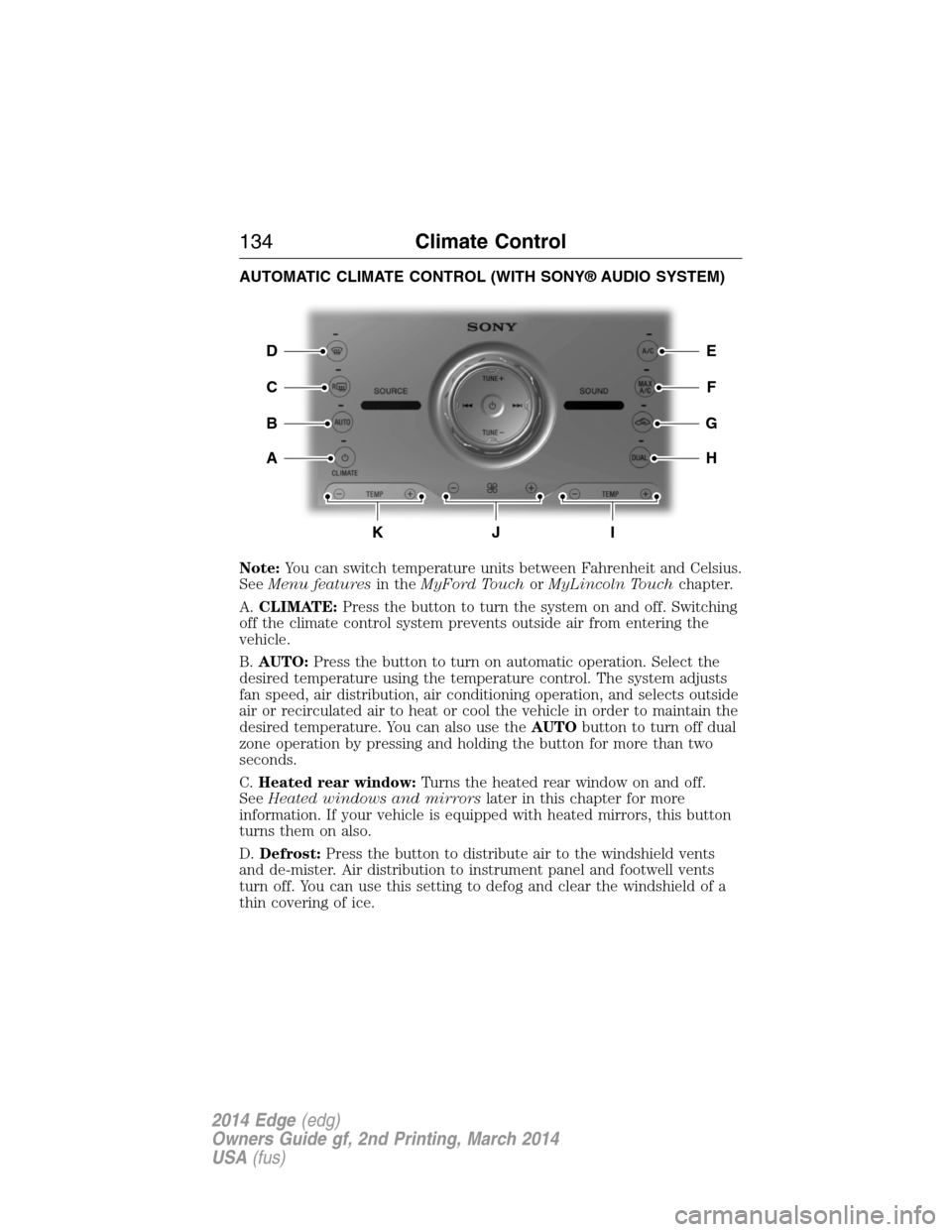
AUTOMATIC CLIMATE CONTROL (WITH SONY® AUDIO SYSTEM)
Note:You can switch temperature units between Fahrenheit and Celsius.
SeeMenu featuresin theMyFord TouchorMyLincoln Touchchapter.
A.CLIMATE:Press the button to turn the system on and off. Switching
off the climate control system prevents outside air from entering the
vehicle.
B.AUTO:Press the button to turn on automatic operation. Select the
desired temperature using the temperature control. The system adjusts
fan speed, air distribution, air conditioning operation, and selects outside
air or recirculated air to heat or cool the vehicle in order to maintain the
desired temperature. You can also use theAUTObutton to turn off dual
zone operation by pressing and holding the button for more than two
seconds.
C.Heated rear window:Turns the heated rear window on and off.
SeeHeated windows and mirrorslater in this chapter for more
information. If your vehicle is equipped with heated mirrors, this button
turns them on also.
D.Defrost:Press the button to distribute air to the windshield vents
and de-mister. Air distribution to instrument panel and footwell vents
turn off. You can use this setting to defog and clear the windshield of a
thin covering of ice.
E
F
G
H
D
C
A
B
KJI
134Climate Control
2014 Edge(edg)
Owners Guide gf, 2nd Printing, March 2014
USA(fus)
Page 136 of 540
E.A/C:Press the button to turn air conditioning compressor on or off.
Use air conditioning with recirculated air to improve cooling performance
and efficiency.
F.MAX A/C:Press the button to maximize cooling. Recirculated air
flows through the instrument panel vents, air conditioning automatically
turns on, and the fan automatically adjusts to the highest speed.
G.Recirculated air:Press the button to switch between outside air and
recirculated air. When you select recirculated air, the air currently in the
passenger compartment recirculates. This may reduce the time needed
to cool the interior (when used withA/C) and may reduce unwanted
odors from entering your vehicle.
Note:Recirculated air may turn off automatically (or be prevented
from turning on) in all airflow modes exceptMAX A/Cto reduce risk
of fogging.
H.DUAL:Press the button to allow the passenger to set their
temperature independent of the driver temperature.
I.Passenger temperature control:Press+or-to increase or decrease
the air temperature on the passenger side of the vehicle. This turns on
dual zone mode.
J.Fan speed control:Press+or-to increase or decrease the volume
of air circulated in the vehicle.
K.Driver temperature control:Press+or-to increase or decrease
the air temperature for the driver side of the vehicle. This control also
adjusts the passenger side temperature when not in dual zone mode.
Climate Control135
2014 Edge(edg)
Owners Guide gf, 2nd Printing, March 2014
USA(fus)
Page 138 of 540
E.MAX A/C:Press the button to maximize cooling. Recirculated air
flows through the instrument panel vents, air conditioning automatically
turns on, and the fan automatically adjusts to the highest speed.
F.A/C:Press the button to turn air conditioning compressor on or off.
Use air conditioning with recirculated air to improve cooling performance
and efficiency.
G.AUTO:Press the button to turn on automatic operation. Select the
desired temperature using the temperature control. The system adjusts
fan speed, air distribution, air conditioning operation, and selects outside
air or recirculated air to heat or cool the vehicle in order to maintain the
desired temperature. You can also use theAUTObutton to turn off dual
zone operation by pressing and holding the button for more than two
seconds.
H.Heated rear window:Turns the heated rear window on and off.
SeeHeated windows and mirrorslater in this chapter for more
information. If your vehicle is equipped with heated mirrors, this button
turns them on also.
I.Defrost:Press the button to distribute air to the windshield vents and
de-mister. Air distribution to instrument panel and footwell vents turn
off. You can use this setting to defog and clear the windshield of a thin
covering of ice.
GENERAL OPERATING TIPS
General Hints
Note:
Prolonged use of recirculated air may cause the windows to fog up.
Note:You may feel a small amount of air from the footwell air vents
regardless of the air distribution setting.
Note:To reduce humidity build-up inside your vehicle, do not drive with
the system switched off or with recirculated air always switched on.
Note:Do not place objects under the front seats as this may interfere
with the airflow to the rear seats.
Note:Remove any snow, ice or leaves from the air intake area at the
base of the windshield.
Note:To improve the time to reach comfort in hot weather, drive with
the windows slightly open for 2-3 minutes after start-up or until your
vehicle airs out.
Climate Control137
2014 Edge(edg)
Owners Guide gf, 2nd Printing, March 2014
USA(fus)
Page 139 of 540
Manual Climate Control
Note:To reduce fogging of the windshield during humid weather, adjust
the air distribution control to the windshield air vents position.
Automatic Climate Control
Note:Adjusting the settings when your vehicle interior is extremely hot
or cold is not necessary. The system automatically adjusts to heat or cool
the cabin to your selected temperature as quickly as possible. For the
system to function efficiently, the instrument panel and side air vents
should be fully open.
Note:If you selectAUTOduring cold outside temperatures, the system
directs airflow to the windshield and side window vents. In addition, the
fan may run at a slower speed until the engine warms up.
Note:If you selectAUTOduring hot outside temperatures, or when the
inside of the vehicle is hot, the system automatically uses recirculated air
to maximize interior cooling. When the interior reaches the selected
temperature, the system automatically switches to using outside air.
Heating the Interior Quickly
Vehicles with manual climate
controlVehicles with automatic
climate control
1 Adjust the fan speed to the
highest speed setting.Press theAUTObutton.
2 Adjust the temperature control
to the highest setting.Adjust the temperature control
to the desired setting.
3 Select the footwell air vents
using the air distribution
buttons.
138Climate Control
2014 Edge(edg)
Owners Guide gf, 2nd Printing, March 2014
USA(fus)
Page 140 of 540
Recommended Settings for Heating
Vehicles with manual climate
controlVehicles with automatic
climate control
1 Adjust the fan speed to the
center setting.Press theAUTObutton.
2 Adjust the temperature control
to the midway point of the hot
settings.Adjust the temperature control
to the desired setting. Use 72°F
(22°C) as a starting point, then
adjust the setting as necessary.
3 Select the footwell air vents
using the air distribution
buttons.
Cooling the Interior Quickly
Vehicles with manual climate
controlVehicles with automatic
climate control
1 Adjust the temperature control
to theMAX A/Cposition.Press theMAX A/Cbutton.
2 Drive with the windows open for
2-3 minutes.
Recommended Settings for Cooling
Vehicles with manual climate
controlVehicles with automatic
climate control
1 Adjust the fan speed to the
center setting.Press theAUTObutton.
2 Adjust the temperature control
to the midway point of the cold
settings.Adjust the temperature control
to the desired setting. Use 72°F
(22°C) as a starting point, then
adjust the setting as necessary.
3 Select the instrument panel air
vents using the air distribution
buttons.
Climate Control139
2014 Edge(edg)
Owners Guide gf, 2nd Printing, March 2014
USA(fus)
Page 141 of 540
Side Window Defogging in Cold Weather
Vehicles with manual climate
controlVehicles with automatic
climate control
1 Select the instrument panel and
footwell air vents positions
through the air distribution
control.Press the defrost button.
2 Press theA/Cbutton. Adjust the temperature control
to the desired setting. Use 72°F
(22°C) as a starting point, then
adjust the setting as necessary.
3 Adjust the temperature control
to the desired setting.
4 Adjust the fan speed to the
highest setting.
5 Direct the instrument panel side
air vents toward the side
windows.
6 Close the instrument panel
vents.
HEATED WINDOWS AND MIRRORS
Heated Rear Window
Note:The vehicle must be running to use this feature.
Press the control to clear the rear window of thin ice and fog. Press the
control again within 15 minutes to switch it off. It turns off automatically
after approximately 15 minutes, or when you switch off the ignition.
Do not use razor blades or other sharp objects to clean the inside
of the rear window or to remove decals from the inside of the
rear window. This may cause damage to the heated grid lines.
Your warranty does not cover this damage.
140Climate Control
2014 Edge(edg)
Owners Guide gf, 2nd Printing, March 2014
USA(fus)
Page 152 of 540
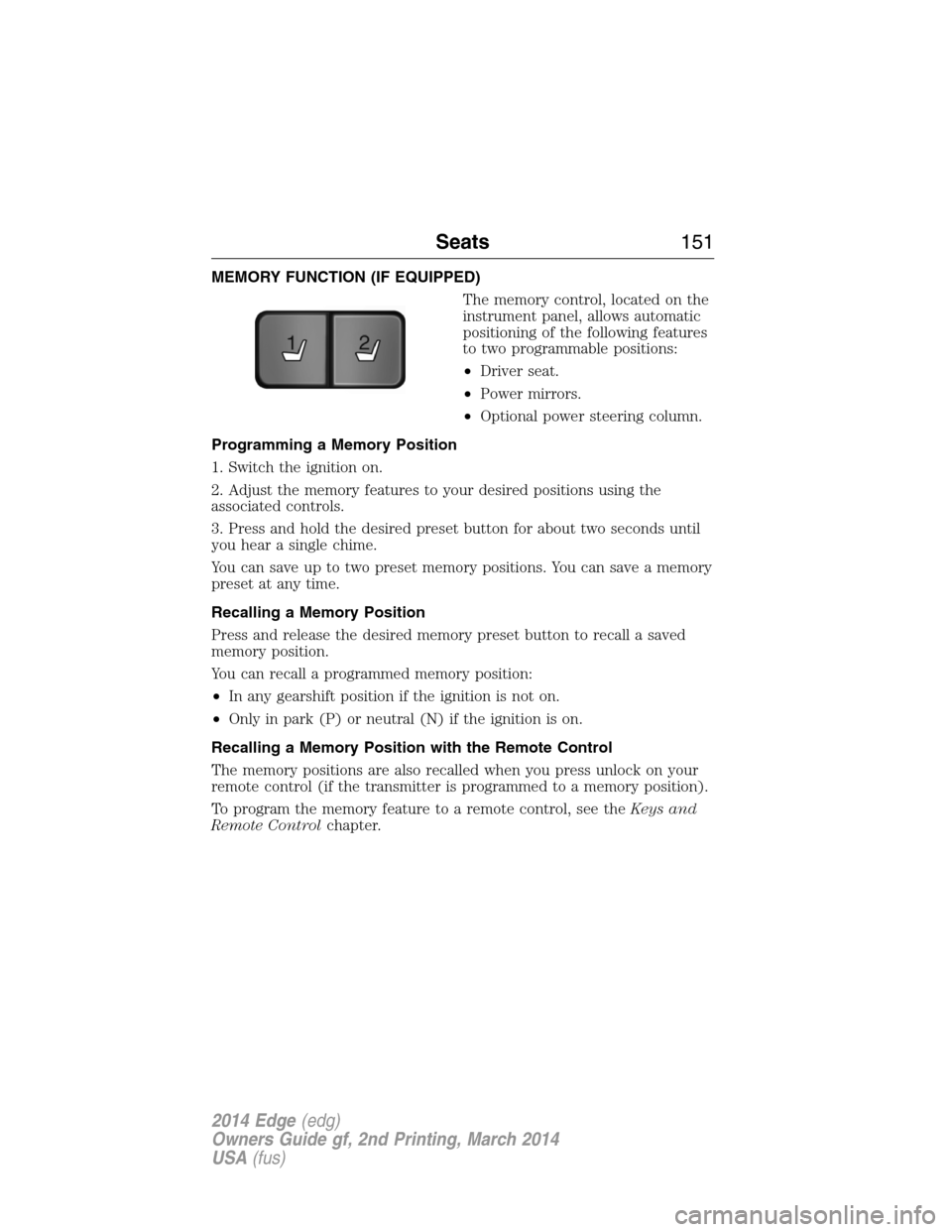
MEMORY FUNCTION (IF EQUIPPED)
The memory control, located on the
instrument panel, allows automatic
positioning of the following features
to two programmable positions:
•Driver seat.
•Power mirrors.
•Optional power steering column.
Programming a Memory Position
1. Switch the ignition on.
2. Adjust the memory features to your desired positions using the
associated controls.
3. Press and hold the desired preset button for about two seconds until
you hear a single chime.
You can save up to two preset memory positions. You can save a memory
preset at any time.
Recalling a Memory Position
Press and release the desired memory preset button to recall a saved
memory position.
You can recall a programmed memory position:
•In any gearshift position if the ignition is not on.
•Only in park (P) or neutral (N) if the ignition is on.
Recalling a Memory Position with the Remote Control
The memory positions are also recalled when you press unlock on your
remote control (if the transmitter is programmed to a memory position).
To program the memory feature to a remote control, see theKeys and
Remote Controlchapter.
21
Seats151
2014 Edge(edg)
Owners Guide gf, 2nd Printing, March 2014
USA(fus)
Page 161 of 540
AUXILIARY POWER POINTS
Note:Do not insert objects other than an accessory plug into the power
point. This will damage the outlet and blow the fuse.
Note:Do not hang any type of accessory or accessory bracket from the
plug.
Note:Improper use of the power outlet can cause damage not covered
by your warranty.
Note:Do not plug optional electrical accessories into the cigarette
lighter socket (if equipped). Improper use of the lighter can cause
damage not covered by your warranty, and can result in fire or serious
injury.
Auxiliary power points may be found:
•on the passenger side of the center console near the instrument panel
•in the center console storage compartment
•on the rear of the center console
•on the left rear quarter panel, accessible from the liftgate or behind
the rear seat.
Do not use the power point for operating the cigarette lighter element
(if equipped).
Do not use the power point(s) over the vehicle capacity of 12 volts DC
180 watts or a fuse may blow.
Run the engine for full capacity use of the power point and to avoid
discharge of the battery. To prevent the battery from being discharged:
•Do not use the power point longer than necessary when the engine is
not running.
•Do not leave devices plugged in overnight or when the vehicle is
parked for extended periods.
Always keep the power point caps closed when not in use.
160Auxiliary Power Points
2014 Edge(edg)
Owners Guide gf, 2nd Printing, March 2014
USA(fus)