ECO mode FORD EDGE 2014 1.G Owner's Manual
[x] Cancel search | Manufacturer: FORD, Model Year: 2014, Model line: EDGE, Model: FORD EDGE 2014 1.GPages: 540, PDF Size: 7.52 MB
Page 181 of 540
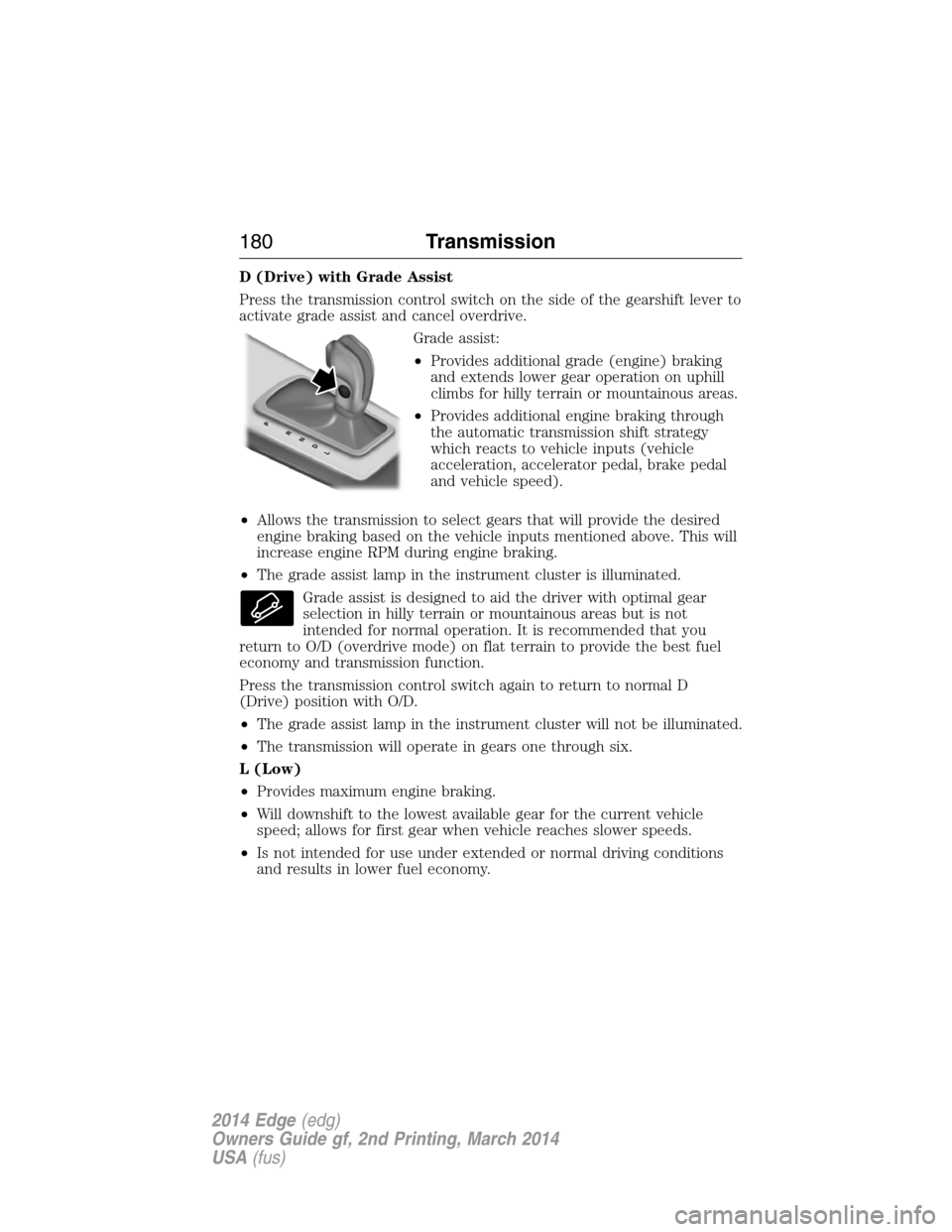
D (Drive) with Grade Assist
Press the transmission control switch on the side of the gearshift lever to
activate grade assist and cancel overdrive.
Grade assist:
•Provides additional grade (engine) braking
and extends lower gear operation on uphill
climbs for hilly terrain or mountainous areas.
•Provides additional engine braking through
the automatic transmission shift strategy
which reacts to vehicle inputs (vehicle
acceleration, accelerator pedal, brake pedal
and vehicle speed).
•Allows the transmission to select gears that will provide the desired
engine braking based on the vehicle inputs mentioned above. This will
increase engine RPM during engine braking.
•The grade assist lamp in the instrument cluster is illuminated.
Grade assist is designed to aid the driver with optimal gear
selection in hilly terrain or mountainous areas but is not
intended for normal operation. It is recommended that you
return to O/D (overdrive mode) on flat terrain to provide the best fuel
economy and transmission function.
Press the transmission control switch again to return to normal D
(Drive) position with O/D.
•The grade assist lamp in the instrument cluster will not be illuminated.
•The transmission will operate in gears one through six.
L (Low)
•Provides maximum engine braking.
•Will downshift to the lowest available gear for the current vehicle
speed; allows for first gear when vehicle reaches slower speeds.
•Is not intended for use under extended or normal driving conditions
and results in lower fuel economy.
PRNDL
180Transmission
2014 Edge(edg)
Owners Guide gf, 2nd Printing, March 2014
USA(fus)
Page 186 of 540
USING YOUR ALL-WHEEL DRIVE (AWD) SYSTEM (IF EQUIPPED)
AWD uses all four wheels to power the vehicle. This increases traction,
enabling you to drive over terrain and road conditions that a
conventional two-wheel drive vehicles cannot. The AWD system is active
all the time and requires no input from the operator.
Note:Your AWD vehicle is not intended for off-road use. The AWD
feature gives your vehicle some limited off-road capabilities in which
driving surfaces are relatively level, obstruction-free and otherwise
similar to normal on-road driving conditions. Operating your vehicle
under other than those conditions could subject the vehicle to excessive
stress which might result in damage which is not covered under your
warranty.
Note:When an AWD system fault is present, the warning Check AWD
will display in the information display. The AWD system is not
functioning correctly and defaulted to front-wheel drive. When this
warning is displayed, have your vehicle serviced at an authorized dealer.
Note:The AWD Off message may also be displayed in the information
display if the AWD system has overheated and defaulted to front-wheel
drive. This condition may occur if the vehicle was operated in extreme
conditions with excessive wheel slip, such as deep sand. To resume
normal AWD function as soon as possible, stop the vehicle in a safe
location and stop the engine for at least 10 minutes. After the engine has
been restarted and the AWD system has adequately cooled, the AWD Off
message will turn off and normal AWD function will return. In the event
the engine is not stopped, the AWD Off message will turn off when the
system cools and normal AWD function returns.
Do not use a spare tire of a different size other than the tire provided.
If the mini-spare tire is installed, the AWD system may disable
automatically and enter front-wheel drive only mode to protect driveline
components. This condition may be indicated by an AWD Off message in
the information display. If there is an AWD Off message in the message
center from using the spare tire, this indicator should turn off after
reinstalling the repaired or replaced normal road tire and cycling the
ignition off and on. It is recommended to reinstall the repaired or
replaced road tire as soon as possible. Major dissimilar tire sizes between
the front and rear axles could cause the AWD system to stop functioning
and default to front-wheel drive or damage the AWD system.
All-Wheel Drive (If Equipped)185
2014 Edge(edg)
Owners Guide gf, 2nd Printing, March 2014
USA(fus)
Page 242 of 540
Front-wheel drive vehicles must have the front wheels placed on a tow
dolly when towing your vehicle from the rear using wheel lift equipment.
This prevents damage to the transmission.
Towing an all-wheel drive vehicle requires that all wheels be off the
ground, such as using a wheel lift and dollies or flatbed equipment.
This prevents damage to the transmission, all-wheel drive system and
vehicle.
TOWING THE VEHICLE ON FOUR WHEELS
Emergency Towing
If your vehicle becomes inoperable (without access to wheel dollies,
car-hauling trailer, or flatbed transport vehicle), it can be flat-towed
(all wheels on the ground, regardless of the powertrain and transmission
configuration) under the following conditions:
•Your vehicle is facing forward for towing in a forward direction.
•Place the transmission in positionN.SeeAutomatic transmissionin
theTransmissionchapter if you cannot move the transmission
intoN.
•Maximum speed is 35 mph (56 km/h).
•Maximum distance is 50 miles (80 kilometers).
Recreational Towing
Vehicles Equipped with a 2.0L Engine
Note:Put your climate control system in recirculated air mode to
prevent exhaust fumes from entering your vehicle. See theClimate
Controlchapter.
Follow these guidelines if you have a need for recreational towing,
such as towing your vehicle behind a motorhome. We designed these
guidelines to prevent damage to your transmission.
Front-wheel drive vehiclesCANNOTbe flat-towed (all wheels on the
ground) as vehicle or transmission damage may occur. You must place
the front wheels on a two-wheel tow dolly. If you are using a tow dolly,
follow the instructions specified by the equipment provider.
Towing241
2014 Edge(edg)
Owners Guide gf, 2nd Printing, March 2014
USA(fus)
Page 244 of 540
BREAKING-IN
You need to break in new tires for approximately 300 miles
(480 kilometers). During this time, your vehicle may exhibit some unique
driving characteristics. Avoid driving too fast during the first 1000 miles
(1600 kilometers). Vary your speed frequently and change up through
the gears early. Do not labor the engine. Do not tow during the first
1000 miles (1600 kilometers).
ECONOMICAL DRIVING
Fuel economy is affected by several things, such as how you drive, the
conditions you drive under and how you maintain your vehicle.
There are some things to keep in mind that may improve your fuel
economy:
•Accelerate and slow down in a smooth, moderate fashion.
•Drive at steady speeds without stopping.
•Anticipate stops; slowing down may eliminate the need to stop.
•Combine errands and minimize stop-and-go driving.
•Close the windows for high-speed driving.
•Drive at reasonable speeds (traveling at 55 mph [88 km/h] uses 15%
less fuel than traveling at 65 mph [105 km/h]).
•Keep the tires properly inflated and use only the recommended size.
•Use the recommended engine oil.
•Perform all regularly scheduled maintenance.
There are also some things you may not want to do because they may
reduce your fuel economy:
•Sudden or hard accelerations.
•Rev the engine before turning it off.
•Idle for periods longer than one minute.
•Warm up your vehicle on cold mornings.
•Use the air conditioner or front defroster.
•Use the speed control in hilly terrain.
•Rest your foot on the brake pedal while driving.
Driving Hints243
2014 Edge(edg)
Owners Guide gf, 2nd Printing, March 2014
USA(fus)
Page 249 of 540
FUEL SHUTOFF
WARNING:Failure to inspect and if necessary repair fuel leaks
after a collision may increase the risk of fire and serious injury.
Ford Motor Company recommends that the fuel system be inspected by
an authorized dealer after any collision.
In the event of a moderate to severe collision, this vehicle includes a fuel
pump shutoff feature that stops the flow of fuel to the engine. Not every
impact will cause a shutoff.
Should your vehicle shut off after a collision, you may restart your
vehicle. For vehicles equipped with a key system:
1. Switch off the ignition.
2. Switch on the ignition.
3. Repeat Steps 1 and 2 to re-enable fuel pump.
For vehicles equipped with a push button start system:
1. Press theSTART/STOPbutton to switch off the ignition.
2. Press the brake pedal and press theSTART/STOPbutton to start the
vehicle.
3. Remove your foot from the brake pedal and press theSTART/STOP
button to switch off the ignition.
4. You can either attempt to start the engine by pressing the brake pedal
and theSTART/STOPbutton, or switch on the ignition only by pressing
theSTART/STOPbutton without pressing the brake pedal. Both ways
re-enable the fuel system.
Note:When you try to restart your vehicle after a fuel shutoff, the
vehicle makes sure that various systems are safe to restart. Once your
vehicle determines that the systems are safe, then the vehicle will allow
you to restart.
Note:In the event that your vehicle does not restart after your third
attempt, contact an authorized dealer.
248Roadside Emergencies
2014 Edge(edg)
Owners Guide gf, 2nd Printing, March 2014
USA(fus)
Page 279 of 540
Engine fluid temperature management (EcoBoost engine only)
WARNING:To reduce the risk of collision and injury, be
prepared that the vehicle speed may reduce and the vehicle may
not be able to accelerate with full power until the fluid temperatures
reduce.
Your vehicle has been designed to pull a trailer, but because of the added
load, the vehicle’s engine may temporarily reach higher temperatures
during severe operating conditions such as ascending a long or steep
grade while pulling a trailer in hot ambient temperatures.
At this time, you may notice your engine coolant temperature gauge
needle move toward the H (hot) and the POWER REDUCED TO LOWER
TEMP message may appear on the message center.
You may notice a reduction in the vehicle’s speed caused by reduced
engine power. Your vehicle has been designed to enter this mode if
certain high temperature/high load conditions take place in order to
manage the engine’s fluid temperatures. The amount of speed reduction
will depend on the vehicle loading, towing, grade, ambient temperature,
and other factors. If this occurs, there is no need to pull off the road.
The vehicle can continue to be driven while this message is active.
The air conditioning may also cycle on and off during severe operating
conditions to protect overheating of the engine. When the engine coolant
temperature decreases to a more normal operating temperature, the air
conditioning will turn on once again.
If you notice any of the following:
•the engine coolant temperature gauge moves fully into the red (hot)
area
•the coolant temperature warning light illuminates
•the service engine soon indicator illuminates
1. Pull off the road as soon as safely possible and place the vehicle in
P (Park).
2. Leave the engine running until the coolant temperature gauge needle
moves away from the H range. After several minutes, if this does not
happen, follow the remaining steps.
3. Turn the engine off and wait for it to cool before checking the coolant
level.
278Maintenance
2014 Edge(edg)
Owners Guide gf, 2nd Printing, March 2014
USA(fus)
Page 281 of 540
When Fail-Safe Mode is Activated
WARNING:Fail-safe mode is for use during emergencies only.
Operate the vehicle in fail-safe mode only as long as necessary to
bring the vehicle to rest in a safe location and seek immediate repairs.
When in fail-safe mode, the vehicle will have limited power, will not be
able to maintain high-speed operation, and may completely shut down
without warning, potentially losing engine power, power steering assist,
and power brake assist, which may increase the possibility of a crash
resulting in serious injury.
WARNING:Never remove the coolant reservoir cap while the
engine is running or hot.
You have limited engine power when in the fail-safe mode, so drive the
vehicle with caution. The vehicle will not be able to maintain high-speed
operation and the engine will run rough. Remember that the engine is
capable of completely shutting down automatically to prevent engine
damage, therefore:
1. Pull off the road as soon as safely possible and turn off the engine.
2. Arrange for the vehicle to be taken to an authorized dealer.
3. If this is not possible, wait a short period for the engine to cool.
4. Check the coolant level and replenish if low.
5. Restart the engine and take your vehicle to an authorized dealer.
Note:Driving the vehicle without repairing the engine problem increases
the chance of engine damage. Take your vehicle to an authorized dealer
as soon as possible.
TRANSMISSION FLUID CHECK
6F50 transmission (if equipped)
WARNING:The dipstick cap and surrounding components may
be hot; gloves are recommended.
Note:Automatic transmission fluid expands when warmed. To obtain
an accurate fluid check, drive the vehicle until it is warmed up
(approximately 20 miles [30 km]). If your vehicle has been operated for
280Maintenance
2014 Edge(edg)
Owners Guide gf, 2nd Printing, March 2014
USA(fus)
Page 351 of 540
MP3 Track and Folder Structure
Audio systems capable of recognizing and playing MP3 individual tracks
and folder structures work as follows:
•There are two different modes for MP3 disc playback: MP3 track
mode (system default) and MP3 folder mode.
•MP3 track mode ignores any folder structure on the MP3 disc. The
player numbers each MP3 track on the disc (noted by the .mp3 file
extension) from T001 to a maximum of T255.Note:The maximum
number of playable MP3 files may be less depending on the structure
of the CD and exact model of radio present.
•MP3 folder mode represents a folder structure consisting of one level
of folders. The CD player numbers all MP3 tracks on the disc (noted
by the .mp3 file extension) and all folders containing MP3 files, from
F001 (folder) T001 (track) to F253 T255.
•Creating discs with only one level of folders helps with navigation
through the disc files.
If you are burning your own MP3 discs, it is important to understand
how the system reads the structures you create. While various files may
be present, (files with extensions other than mp3), only files with the
.mp3 extension are played; other files are ignored by the system. This
enables you to use the same MP3 disc for a variety of tasks on your work
computer, home computer and your in-vehicle system.
In track mode, the system displays and plays the structure as if it were
only one level deep (all .mp3 files play, regardless of being in a specific
folder). In folder mode, the system only plays the .mp3 files in the
current folder.
350Audio System
2014 Edge(edg)
Owners Guide gf, 2nd Printing, March 2014
USA(fus)
Page 357 of 540
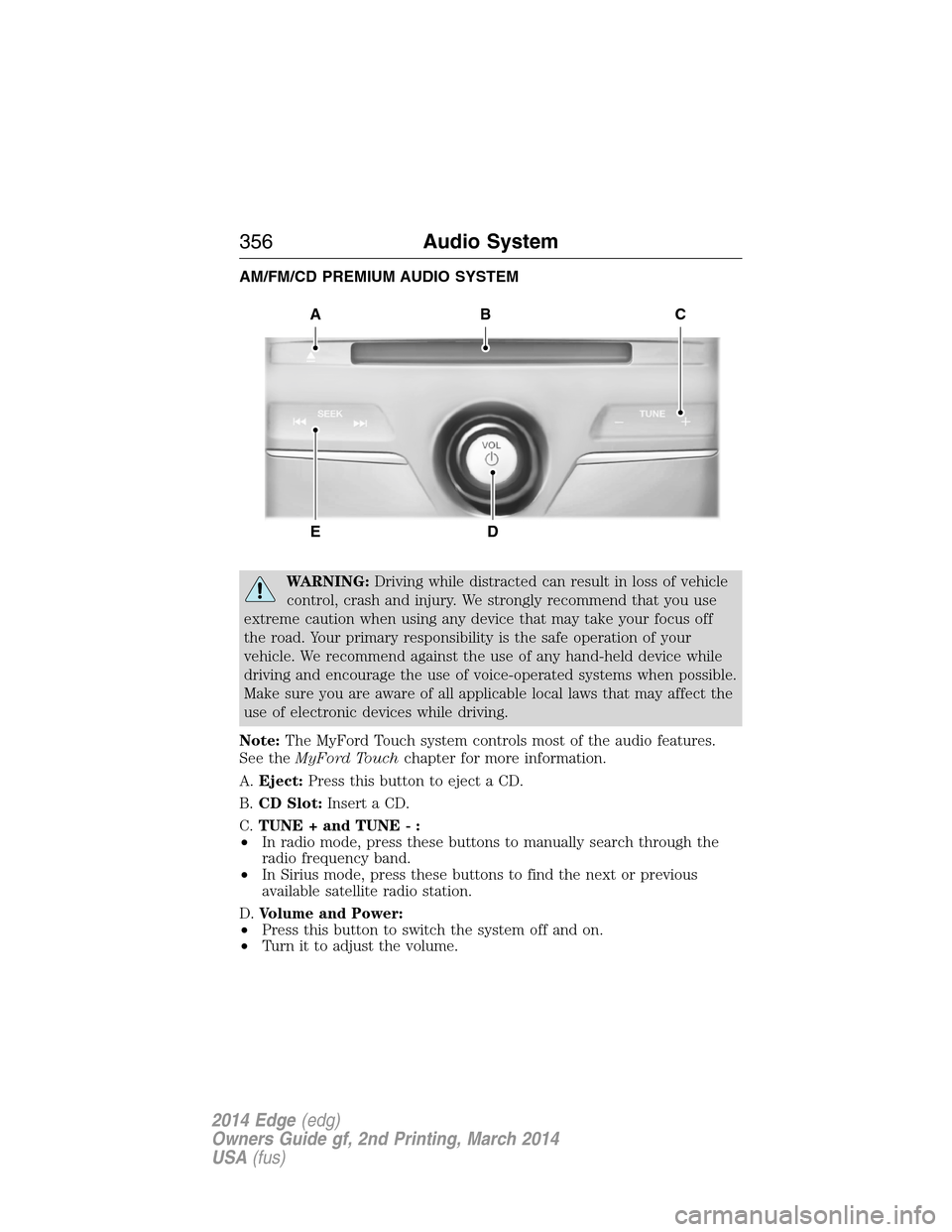
AM/FM/CD PREMIUM AUDIO SYSTEM
WARNING:Driving while distracted can result in loss of vehicle
control, crash and injury. We strongly recommend that you use
extreme caution when using any device that may take your focus off
the road. Your primary responsibility is the safe operation of your
vehicle. We recommend against the use of any hand-held device while
driving and encourage the use of voice-operated systems when possible.
Make sure you are aware of all applicable local laws that may affect the
use of electronic devices while driving.
Note:The MyFord Touch system controls most of the audio features.
See theMyFord Touchchapter for more information.
A.Eject:Press this button to eject a CD.
B.CD Slot:Insert a CD.
C.TUNE + and TUNE - :
•In radio mode, press these buttons to manually search through the
radio frequency band.
•In Sirius mode, press these buttons to find the next or previous
available satellite radio station.
D.Volume and Power:
•Press this button to switch the system off and on.
•Turn it to adjust the volume.
A
ED
BC
356Audio System
2014 Edge(edg)
Owners Guide gf, 2nd Printing, March 2014
USA(fus)
Page 358 of 540
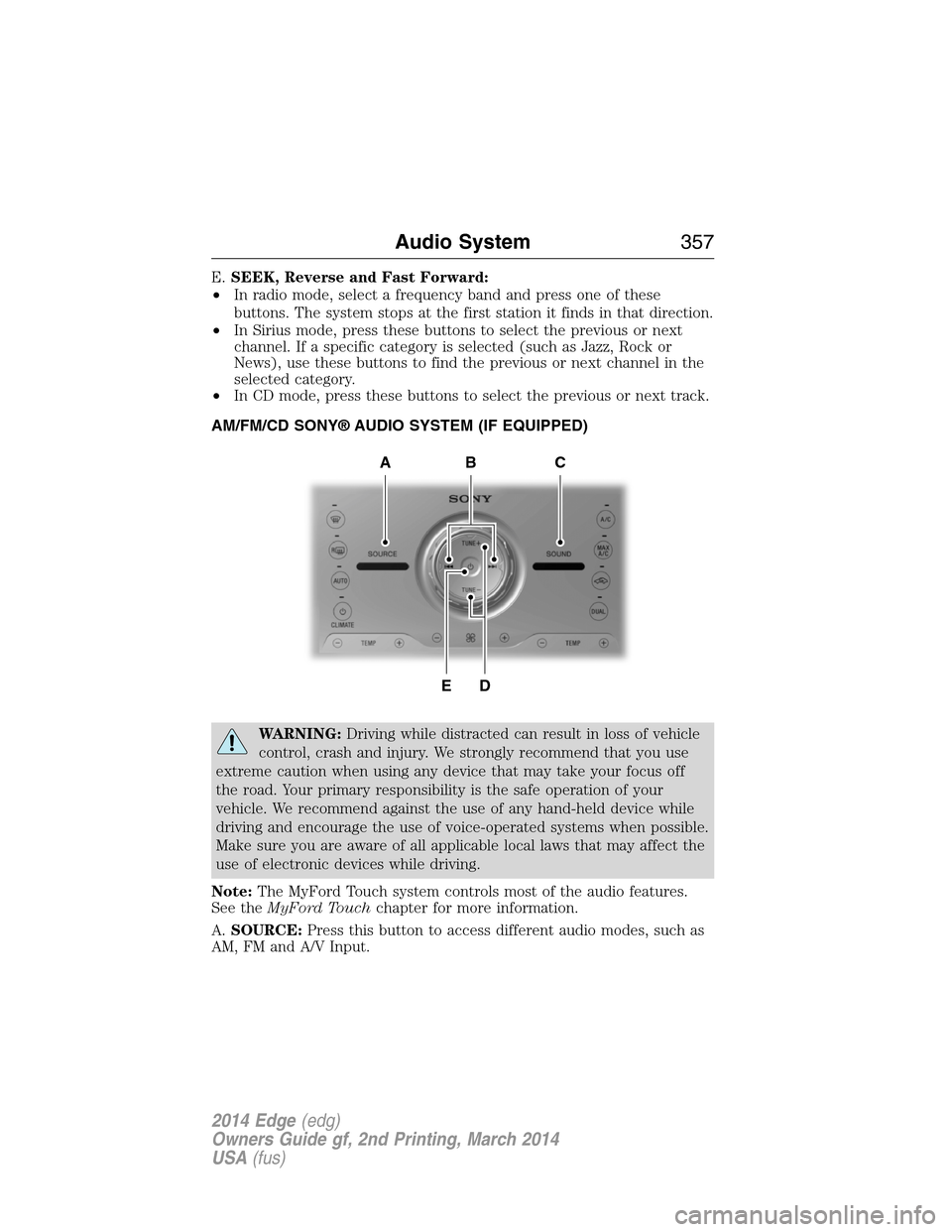
E.SEEK, Reverse and Fast Forward:
•In radio mode, select a frequency band and press one of these
buttons. The system stops at the first station it finds in that direction.
•In Sirius mode, press these buttons to select the previous or next
channel. If a specific category is selected (such as Jazz, Rock or
News), use these buttons to find the previous or next channel in the
selected category.
•In CD mode, press these buttons to select the previous or next track.
AM/FM/CD SONY® AUDIO SYSTEM (IF EQUIPPED)
WARNING:Driving while distracted can result in loss of vehicle
control, crash and injury. We strongly recommend that you use
extreme caution when using any device that may take your focus off
the road. Your primary responsibility is the safe operation of your
vehicle. We recommend against the use of any hand-held device while
driving and encourage the use of voice-operated systems when possible.
Make sure you are aware of all applicable local laws that may affect the
use of electronic devices while driving.
Note:The MyFord Touch system controls most of the audio features.
See theMyFord Touchchapter for more information.
A.SOURCE:Press this button to access different audio modes, such as
AM, FM and A/V Input.
DE
ACB
Audio System357
2014 Edge(edg)
Owners Guide gf, 2nd Printing, March 2014
USA(fus)