radio FORD EDGE 2014 1.G Workshop Manual
[x] Cancel search | Manufacturer: FORD, Model Year: 2014, Model line: EDGE, Model: FORD EDGE 2014 1.GPages: 540, PDF Size: 7.52 MB
Page 443 of 540
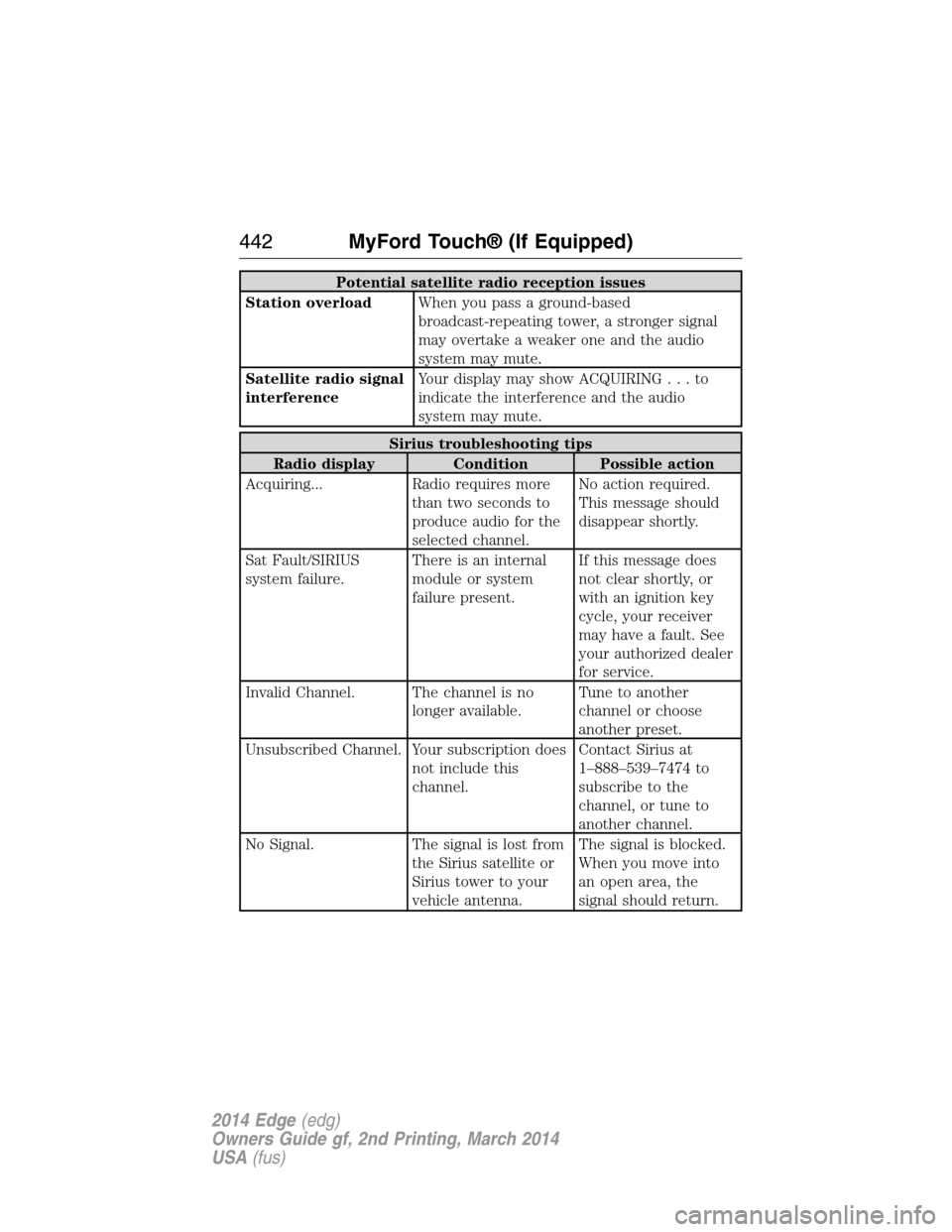
Potential satellite radio reception issues
Station overloadWhen you pass a ground-based
broadcast-repeating tower, a stronger signal
may overtake a weaker one and the audio
system may mute.
Satellite radio signal
interferenceYour display may show ACQUIRING...to
indicate the interference and the audio
system may mute.
Sirius troubleshooting tips
Radio display Condition Possible action
Acquiring... Radio requires more
than two seconds to
produce audio for the
selected channel.No action required.
This message should
disappear shortly.
Sat Fault/SIRIUS
system failure.There is an internal
module or system
failure present.If this message does
not clear shortly, or
with an ignition key
cycle, your receiver
may have a fault. See
your authorized dealer
for service.
Invalid Channel. The channel is no
longer available.Tune to another
channel or choose
another preset.
Unsubscribed Channel. Your subscription does
not include this
channel.Contact Sirius at
1–888–539–7474 to
subscribe to the
channel, or tune to
another channel.
No Signal. The signal is lost from
the Sirius satellite or
Sirius tower to your
vehicle antenna.The signal is blocked.
When you move into
an open area, the
signal should return.
442MyFord Touch® (If Equipped)
2014 Edge(edg)
Owners Guide gf, 2nd Printing, March 2014
USA(fus)
Page 444 of 540
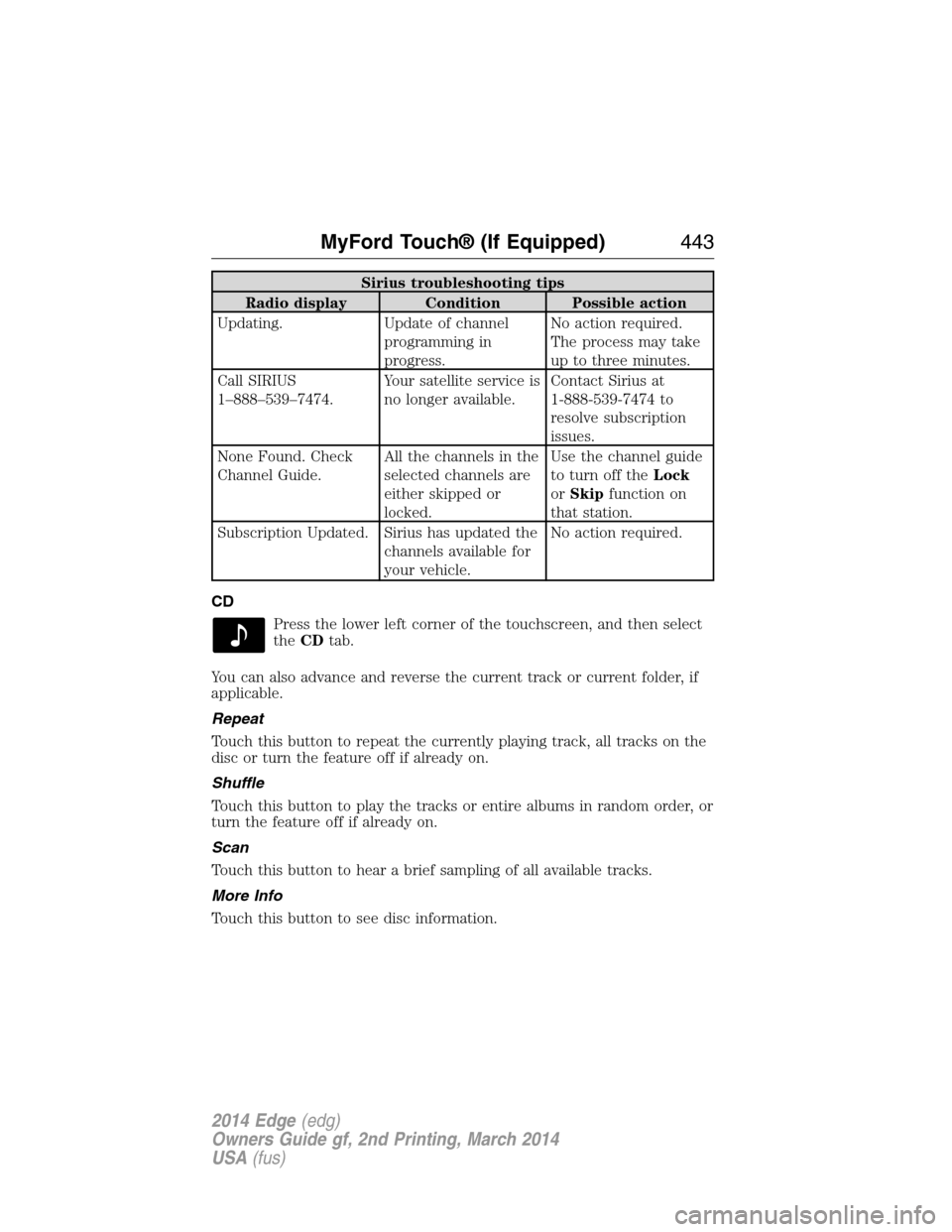
Sirius troubleshooting tips
Radio display Condition Possible action
Updating. Update of channel
programming in
progress.No action required.
The process may take
up to three minutes.
Call SIRIUS
1–888–539–7474.Your satellite service is
no longer available.Contact Sirius at
1-888-539-7474 to
resolve subscription
issues.
None Found. Check
Channel Guide.All the channels in the
selected channels are
either skipped or
locked.Use the channel guide
to turn off theLock
orSkipfunction on
that station.
Subscription Updated. Sirius has updated the
channels available for
your vehicle.No action required.
CD
Press the lower left corner of the touchscreen, and then select
theCDtab.
You can also advance and reverse the current track or current folder, if
applicable.
Repeat
Touch this button to repeat the currently playing track, all tracks on the
disc or turn the feature off if already on.
Shuffle
Touch this button to play the tracks or entire albums in random order, or
turn the feature off if already on.
Scan
Touch this button to hear a brief sampling of all available tracks.
More Info
Touch this button to see disc information.
MyFord Touch® (If Equipped)443
2014 Edge(edg)
Owners Guide gf, 2nd Printing, March 2014
USA(fus)
Page 451 of 540
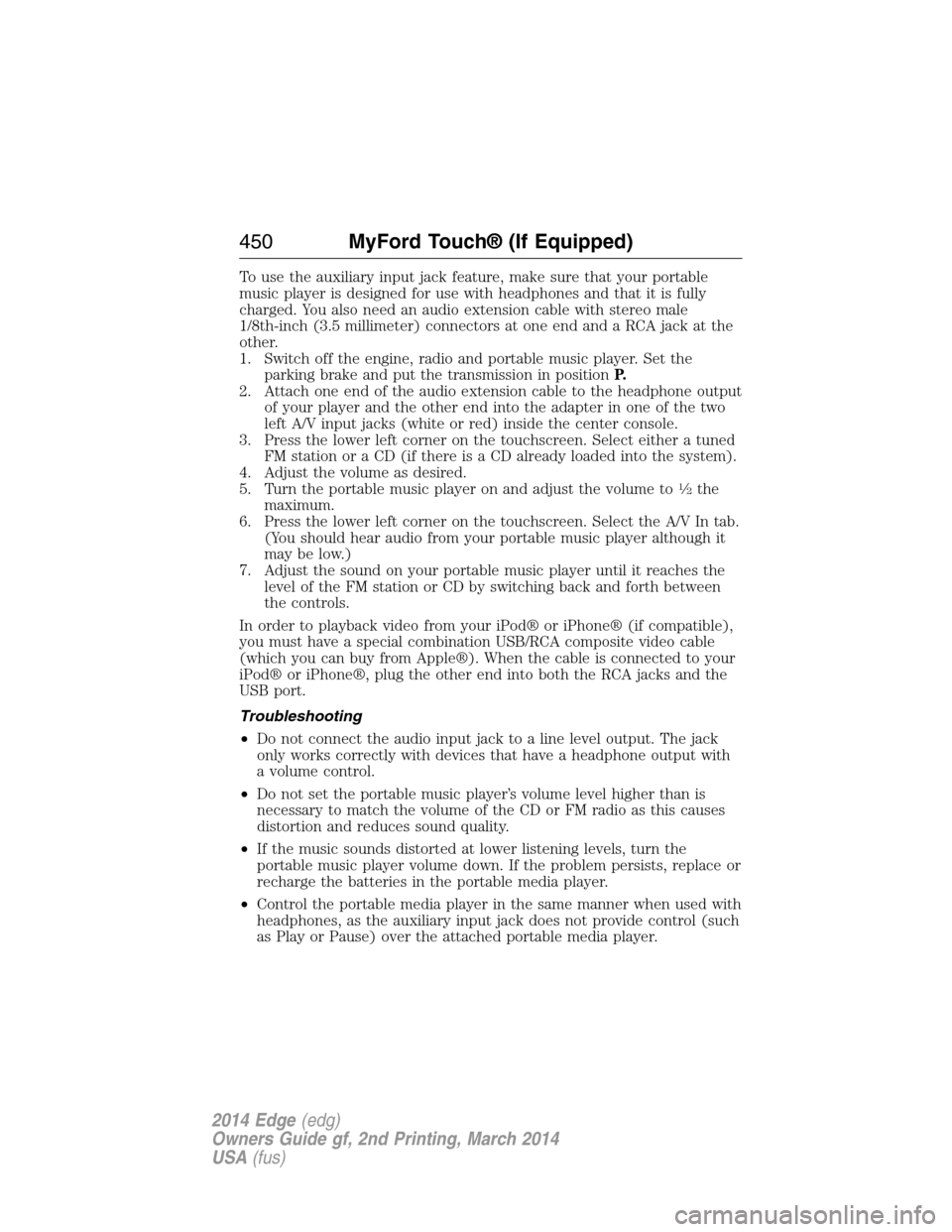
To use the auxiliary input jack feature, make sure that your portable
music player is designed for use with headphones and that it is fully
charged. You also need an audio extension cable with stereo male
1/8th-inch (3.5 millimeter) connectors at one end and a RCA jack at the
other.
1. Switch off the engine, radio and portable music player. Set the
parking brake and put the transmission in positionP.
2. Attach one end of the audio extension cable to the headphone output
of your player and the other end into the adapter in one of the two
left A/V input jacks (white or red) inside the center console.
3. Press the lower left corner on the touchscreen. Select either a tuned
FM station or a CD (if there is a CD already loaded into the system).
4. Adjust the volume as desired.
5. Turn the portable music player on and adjust the volume to
12the
maximum.
6. Press the lower left corner on the touchscreen. Select the A/V In tab.
(You should hear audio from your portable music player although it
may be low.)
7. Adjust the sound on your portable music player until it reaches the
level of the FM station or CD by switching back and forth between
the controls.
In order to playback video from your iPod® or iPhone® (if compatible),
you must have a special combination USB/RCA composite video cable
(which you can buy from Apple®). When the cable is connected to your
iPod® or iPhone®, plug the other end into both the RCA jacks and the
USB port.
Troubleshooting
•Do not connect the audio input jack to a line level output. The jack
only works correctly with devices that have a headphone output with
a volume control.
•Do not set the portable music player’s volume level higher than is
necessary to match the volume of the CD or FM radio as this causes
distortion and reduces sound quality.
•If the music sounds distorted at lower listening levels, turn the
portable music player volume down. If the problem persists, replace or
recharge the batteries in the portable media player.
•Control the portable media player in the same manner when used with
headphones, as the auxiliary input jack does not provide control (such
as Play or Pause) over the attached portable media player.
450MyFord Touch® (If Equipped)
2014 Edge(edg)
Owners Guide gf, 2nd Printing, March 2014
USA(fus)
Page 453 of 540
Pairing Your Phone for the First Time
WARNING:Driving while distracted can result in loss of vehicle
control, crash and injury. We strongly recommend that you use
extreme caution when using any device that may take your focus off
the road. Your primary responsibility is the safe operation of your
vehicle. We recommend against the use of any hand-held device while
driving and encourage the use of voice-operated systems when possible.
Make sure you are aware of all applicable local laws that may affect the
use of electronic devices while driving.
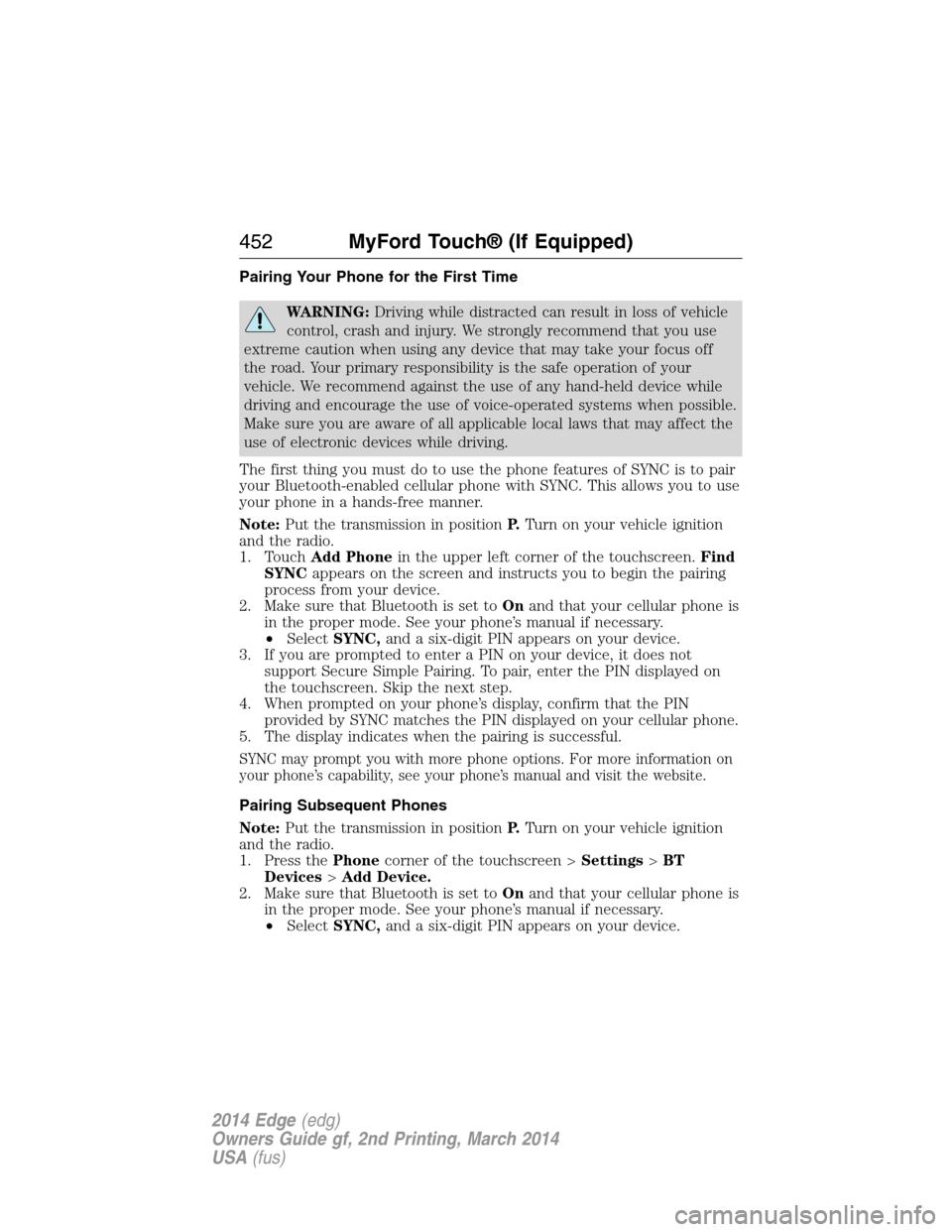
The first thing you must do to use the phone features of SYNC is to pair
your Bluetooth-enabled cellular phone with SYNC. This allows you to use
your phone in a hands-free manner.
Note:Put the transmission in positionP.Turn on your vehicle ignition
and the radio.
1. TouchAdd Phonein the upper left corner of the touchscreen.Find
SYNCappears on the screen and instructs you to begin the pairing
process from your device.
2. Make sure that Bluetooth is set toOnand that your cellular phone is
in the proper mode. See your phone’s manual if necessary.
•SelectSYNC,and a six-digit PIN appears on your device.
3. If you are prompted to enter a PIN on your device, it does not
support Secure Simple Pairing. To pair, enter the PIN displayed on
the touchscreen. Skip the next step.
4. When prompted on your phone’s display, confirm that the PIN
provided by SYNC matches the PIN displayed on your cellular phone.
5. The display indicates when the pairing is successful.
SYNC may prompt you with more phone options. For more information on
your phone’s capability, see your phone’s manual and visit the website.
Pairing Subsequent Phones
Note:Put the transmission in positionP.Turn on your vehicle ignition
and the radio.
1. Press thePhonecorner of the touchscreen >Settings>BT
Devices>Add Device.
2. Make sure that Bluetooth is set toOnand that your cellular phone is
in the proper mode. See your phone’s manual if necessary.
•SelectSYNC,and a six-digit PIN appears on your device.
452MyFord Touch® (If Equipped)
2014 Edge(edg)
Owners Guide gf, 2nd Printing, March 2014
USA(fus)
Page 478 of 540
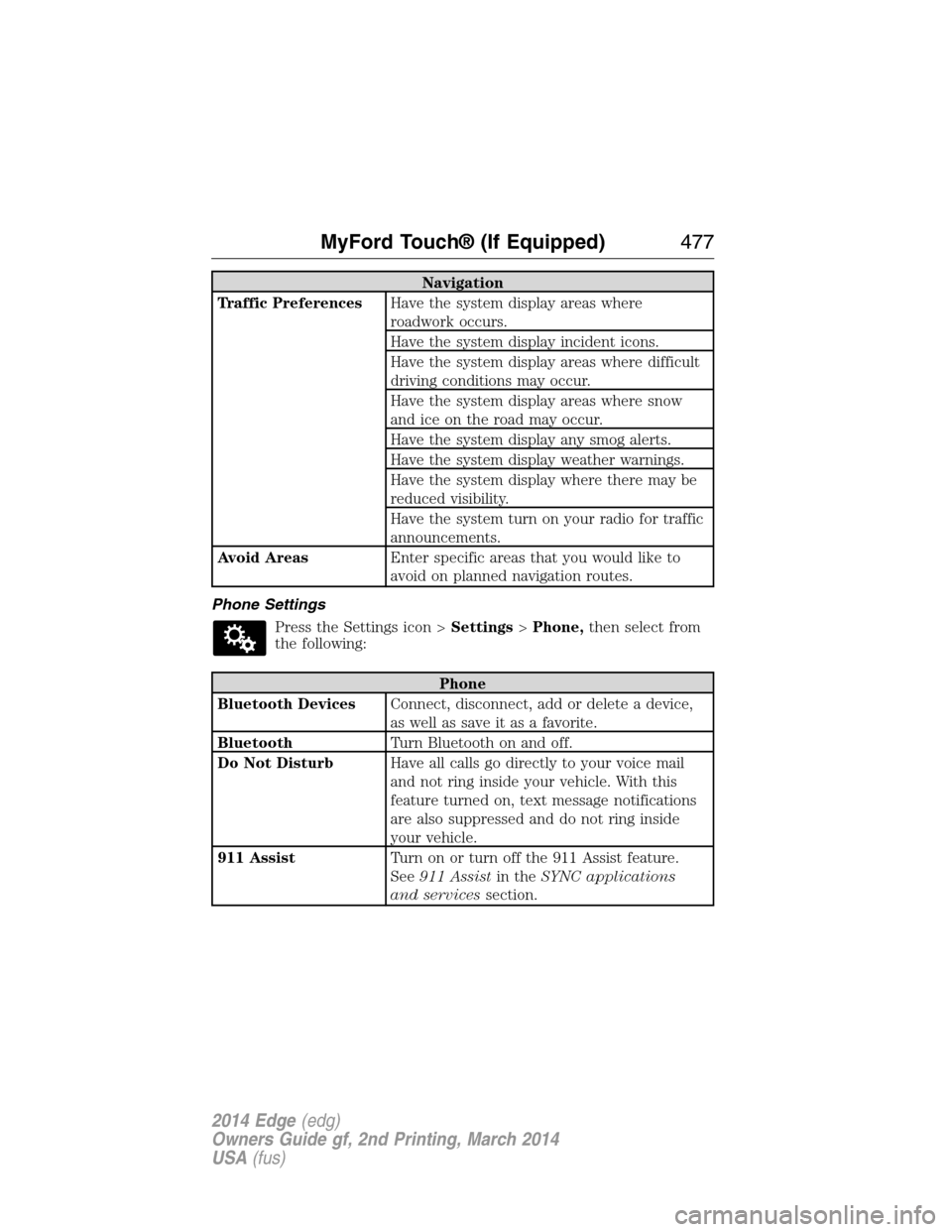
Navigation
Traffic PreferencesHave the system display areas where
roadwork occurs.
Have the system display incident icons.
Have the system display areas where difficult
driving conditions may occur.
Have the system display areas where snow
and ice on the road may occur.
Have the system display any smog alerts.
Have the system display weather warnings.
Have the system display where there may be
reduced visibility.
Have the system turn on your radio for traffic
announcements.
Avoid AreasEnter specific areas that you would like to
avoid on planned navigation routes.
Phone Settings
Press the Settings icon >Settings>Phone,then select from
the following:
Phone
Bluetooth DevicesConnect, disconnect, add or delete a device,
as well as save it as a favorite.
BluetoothTurn Bluetooth on and off.
Do Not DisturbHave all calls go directly to your voice mail
and not ring inside your vehicle. With this
feature turned on, text message notifications
are also suppressed and do not ring inside
your vehicle.
911 AssistTurn on or turn off the 911 Assist feature.
See911 Assistin theSYNC applications
and servicessection.
MyFord Touch® (If Equipped)477
2014 Edge(edg)
Owners Guide gf, 2nd Printing, March 2014
USA(fus)
Page 482 of 540
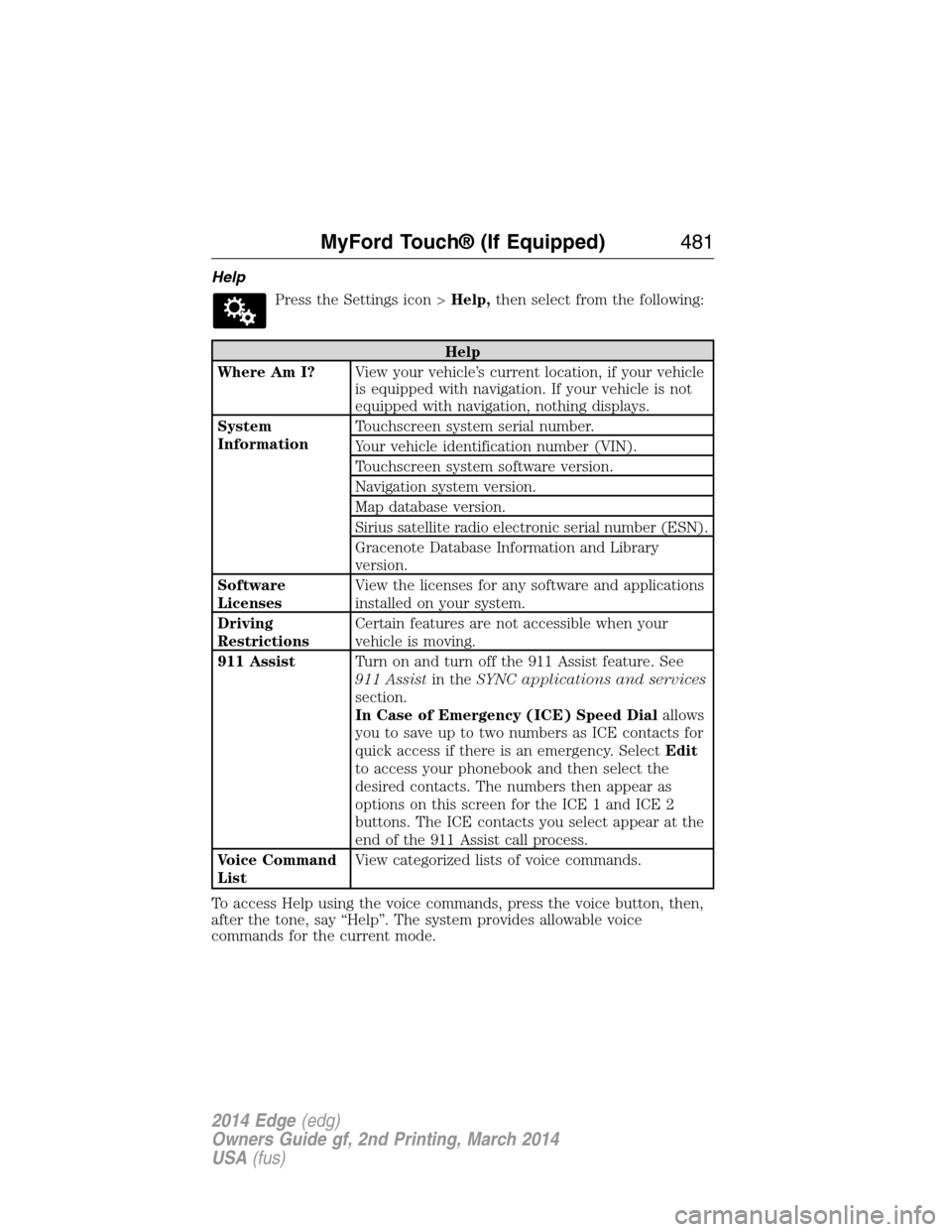
Help
Press the Settings icon >Help,then select from the following:
Help
Where Am I?View your vehicle’s current location, if your vehicle
is equipped with navigation. If your vehicle is not
equipped with navigation, nothing displays.
System
InformationTouchscreen system serial number.
Your vehicle identification number (VIN).
Touchscreen system software version.
Navigation system version.
Map database version.
Sirius satellite radio electronic serial number (ESN).
Gracenote Database Information and Library
version.
Software
LicensesView the licenses for any software and applications
installed on your system.
Driving
RestrictionsCertain features are not accessible when your
vehicle is moving.
911 AssistTurn on and turn off the 911 Assist feature. See
911 Assistin theSYNC applications and services
section.
In Case of Emergency (ICE) Speed Dialallows
you to save up to two numbers as ICE contacts for
quick access if there is an emergency. SelectEdit
to access your phonebook and then select the
desired contacts. The numbers then appear as
options on this screen for the ICE 1 and ICE 2
buttons. The ICE contacts you select appear at the
end of the 911 Assist call process.
Voice Command
ListView categorized lists of voice commands.
To access Help using the voice commands, press the voice button, then,
after the tone, say “Help”. The system provides allowable voice
commands for the current mode.
MyFord Touch® (If Equipped)481
2014 Edge(edg)
Owners Guide gf, 2nd Printing, March 2014
USA(fus)
Page 515 of 540
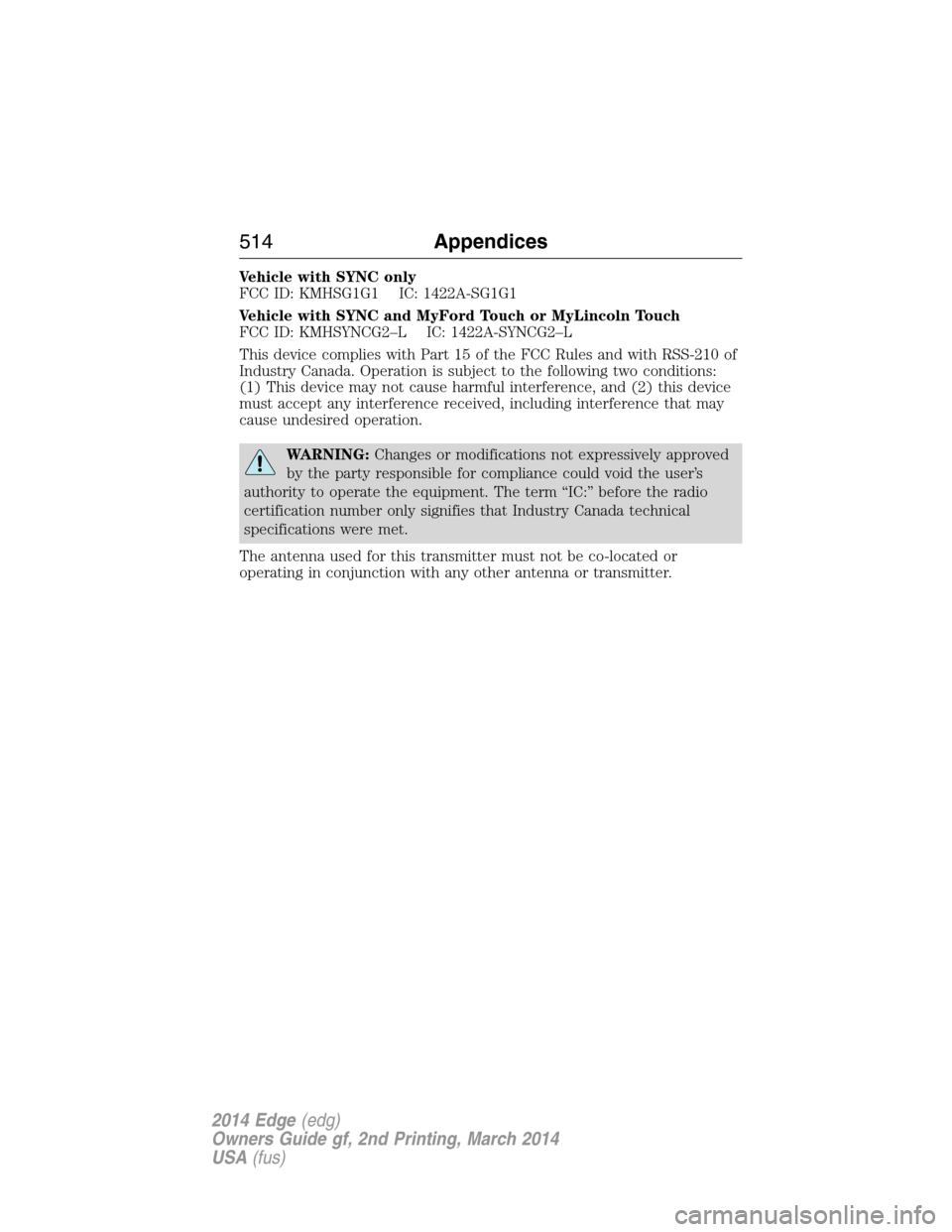
Vehicle with SYNC only
FCC ID: KMHSG1G1 IC: 1422A-SG1G1
Vehicle with SYNC and MyFord Touch or MyLincoln Touch
FCC ID: KMHSYNCG2–L IC: 1422A-SYNCG2–L
This device complies with Part 15 of the FCC Rules and with RSS-210 of
Industry Canada. Operation is subject to the following two conditions:
(1) This device may not cause harmful interference, and (2) this device
must accept any interference received, including interference that may
cause undesired operation.
WARNING:Changes or modifications not expressively approved
by the party responsible for compliance could void the user’s
authority to operate the equipment. The term “IC:” before the radio
certification number only signifies that Industry Canada technical
specifications were met.
The antenna used for this transmitter must not be co-located or
operating in conjunction with any other antenna or transmitter.
514Appendices
2014 Edge(edg)
Owners Guide gf, 2nd Printing, March 2014
USA(fus)
Page 533 of 540
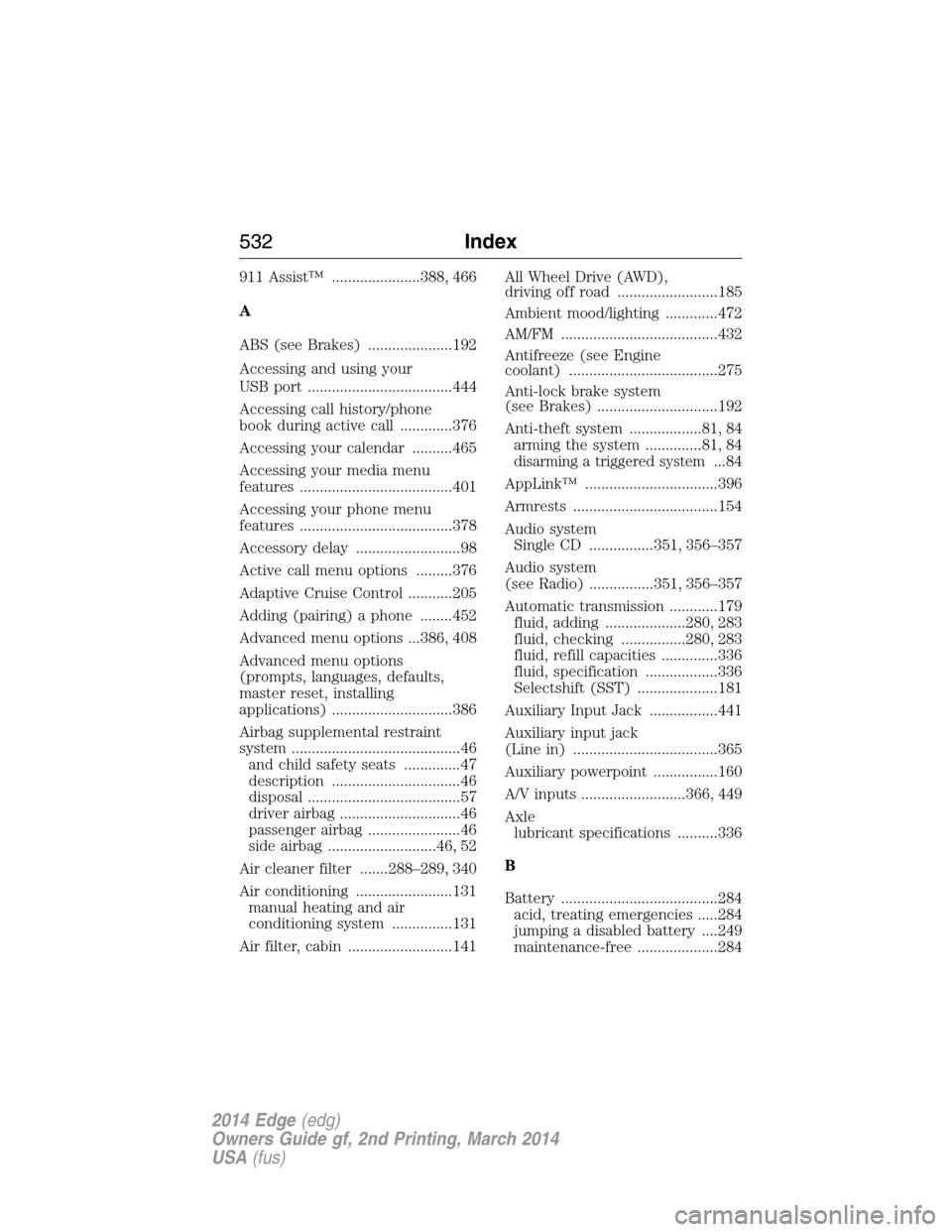
911 Assist™ ......................388, 466
A
ABS (see Brakes) .....................192
Accessing and using your
USB port ....................................444
Accessing call history/phone
book during active call .............376
Accessing your calendar ..........465
Accessing your media menu
features ......................................401
Accessing your phone menu
features ......................................378
Accessory delay ..........................98
Active call menu options .........376
Adaptive Cruise Control ...........205
Adding (pairing) a phone ........452
Advanced menu options ...386, 408
Advanced menu options
(prompts, languages, defaults,
master reset, installing
applications) ..............................386
Airbag supplemental restraint
system ..........................................46
and child safety seats ..............47
description ................................46
disposal ......................................57
driver airbag ..............................46
passenger airbag .......................46
side airbag ...........................46, 52
Air cleaner filter .......288–289, 340
Air conditioning ........................131
manual heating and air
conditioning system ...............131
Air filter, cabin ..........................141All Wheel Drive (AWD),
driving off road .........................185
Ambient mood/lighting .............472
AM/FM .......................................432
Antifreeze (see Engine
coolant) .....................................275
Anti-lock brake system
(see Brakes) ..............................192
Anti-theft system ..................81, 84
arming the system ..............81, 84
disarming a triggered system...84
AppLink™ .................................396
Armrests ....................................154
Audio system
Single CD ................351, 356–357
Audio system
(see Radio) ................351, 356–357
Automatic transmission ............179
fluid, adding ....................280, 283
fluid, checking ................280, 283
fluid, refill capacities ..............336
fluid, specification ..................336
Selectshift (SST) ....................181
Auxiliary Input Jack .................441
Auxiliary input jack
(Line in) ....................................365
Auxiliary powerpoint ................160
A/V inputs ..........................366, 449
Axle
lubricant specifications ..........336
B
Battery .......................................284
acid, treating emergencies .....284
jumping a disabled battery ....249
maintenance-free ....................284
532Index
2014 Edge(edg)
Owners Guide gf, 2nd Printing, March 2014
USA(fus)
Page 536 of 540
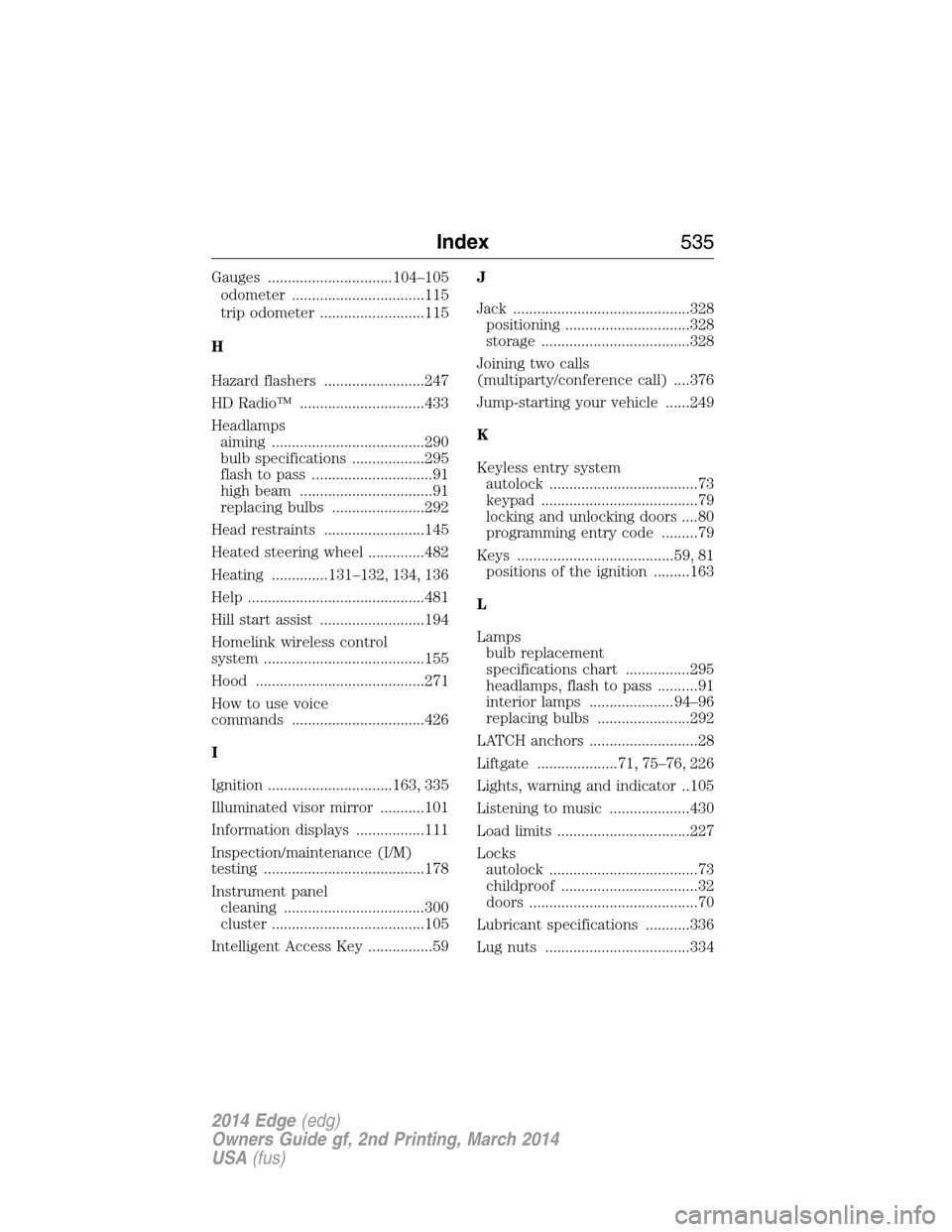
Gauges ...............................104–105
odometer .................................115
trip odometer ..........................115
H
Hazard flashers .........................247
HD Radio™ ...............................433
Headlamps
aiming ......................................290
bulb specifications ..................295
flash to pass ..............................91
high beam .................................91
replacing bulbs .......................292
Head restraints .........................145
Heated steering wheel ..............482
Heating ..............131–132, 134, 136
Help ............................................481
Hill start assist ..........................194
Homelink wireless control
system ........................................155
Hood ..........................................271
How to use voice
commands .................................426
I
Ignition ...............................163, 335
Illuminated visor mirror ...........101
Information displays .................111
Inspection/maintenance (I/M)
testing ........................................178
Instrument panel
cleaning ...................................300
cluster ......................................105
Intelligent Access Key ................59J
Jack ............................................328
positioning ...............................328
storage .....................................328
Joining two calls
(multiparty/conference call) ....376
Jump-starting your vehicle ......249
K
Keyless entry system
autolock .....................................73
keypad .......................................79
locking and unlocking doors ....80
programming entry code .........79
Keys .......................................59, 81
positions of the ignition .........163
L
Lamps
bulb replacement
specifications chart ................295
headlamps, flash to pass ..........91
interior lamps .....................94–96
replacing bulbs .......................292
LATCH anchors ...........................28
Liftgate ....................71, 75–76, 226
Lights, warning and indicator ..105
Listening to music ....................430
Load limits .................................227
Locks
autolock .....................................73
childproof ..................................32
doors ..........................................70
Lubricant specifications ...........336
Lug nuts ....................................334
Index535
2014 Edge(edg)
Owners Guide gf, 2nd Printing, March 2014
USA(fus)
Page 538 of 540
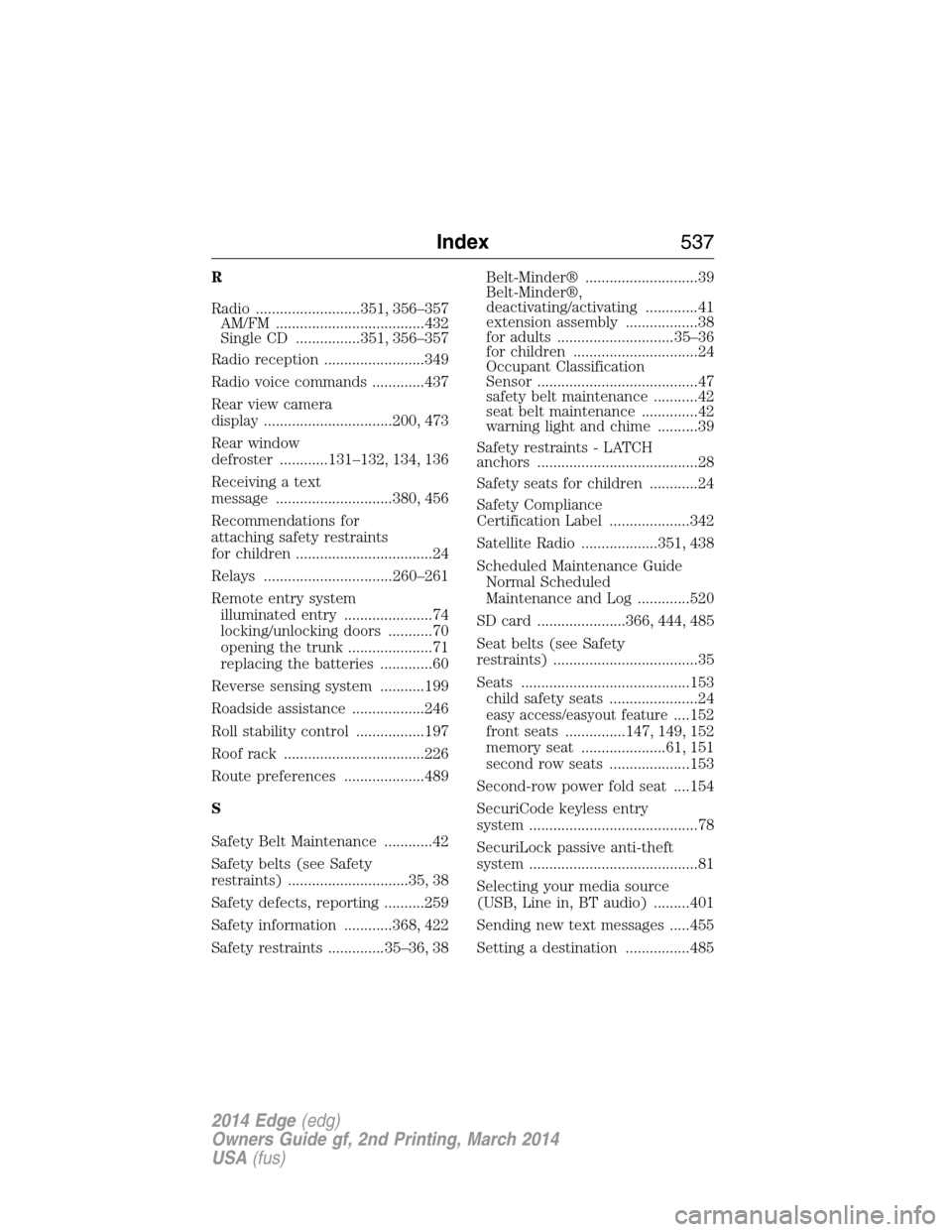
R
Radio ..........................351, 356–357
AM/FM .....................................432
Single CD ................351, 356–357
Radio reception .........................349
Radio voice commands .............437
Rear view camera
display ................................200, 473
Rear window
defroster ............131–132, 134, 136
Receiving a text
message .............................380, 456
Recommendations for
attaching safety restraints
for children ..................................24
Relays ................................260–261
Remote entry system
illuminated entry ......................74
locking/unlocking doors ...........70
opening the trunk .....................71
replacing the batteries .............60
Reverse sensing system ...........199
Roadside assistance ..................246
Roll stability control .................197
Roof rack ...................................226
Route preferences ....................489
S
Safety Belt Maintenance ............42
Safety belts (see Safety
restraints) ..............................35, 38
Safety defects, reporting ..........259
Safety information ............368, 422
Safety restraints ..............35–36, 38Belt-Minder® ............................39
Belt-Minder®,
deactivating/activating .............41
extension assembly ..................38
for adults .............................35–36
for children ...............................24
Occupant Classification
Sensor ........................................47
safety belt maintenance ...........42
seat belt maintenance ..............42
warning light and chime ..........39
Safety restraints - LATCH
anchors ........................................28
Safety seats for children ............24
Safety Compliance
Certification Label ....................342
Satellite Radio ...................351, 438
Scheduled Maintenance Guide
Normal Scheduled
Maintenance and Log .............520
SD card ......................366, 444, 485
Seat belts (see Safety
restraints) ....................................35
Seats ..........................................153
child safety seats ......................24
easy access/easyout feature....152
front seats ...............147, 149, 152
memory seat .....................61, 151
second row seats ....................153
Second-row power fold seat ....154
SecuriCode keyless entry
system ..........................................78
SecuriLock passive anti-theft
system ..........................................81
Selecting your media source
(USB, Line in, BT audio) .........401
Sending new text messages .....455
Setting a destination ................485
Index537
2014 Edge(edg)
Owners Guide gf, 2nd Printing, March 2014
USA(fus)