wheel FORD EDGE 2015 2.G Owners Manual
[x] Cancel search | Manufacturer: FORD, Model Year: 2015, Model line: EDGE, Model: FORD EDGE 2015 2.GPages: 508, PDF Size: 6.2 MB
Page 335 of 508
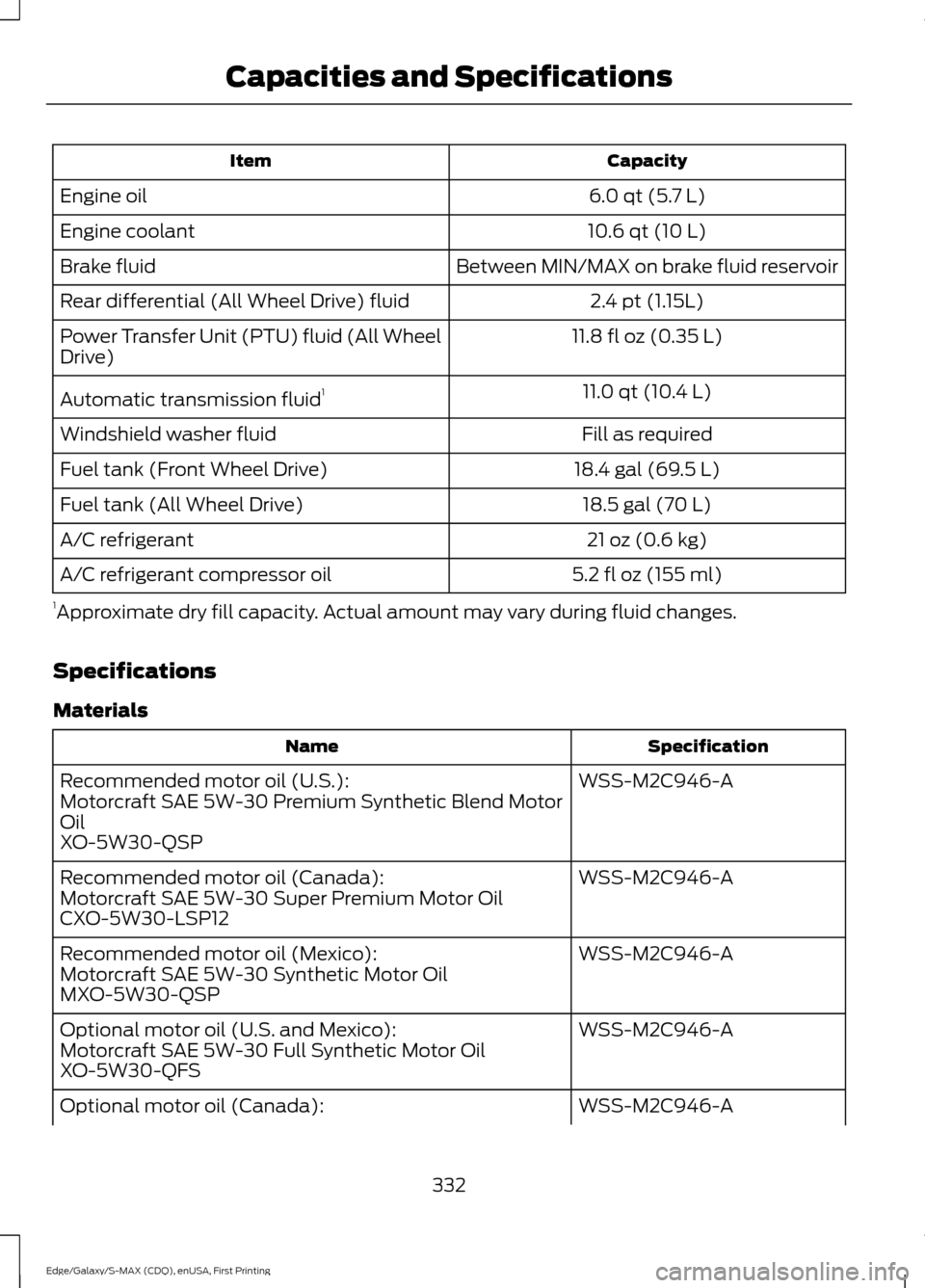
Capacity
Item
6.0 qt (5.7 L)
Engine oil
10.6 qt (10 L)
Engine coolant
Between MIN/MAX on brake fluid reservoir
Brake fluid
2.4 pt (1.15L)
Rear differential (All Wheel Drive) fluid
11.8 fl oz (0.35 L)
Power Transfer Unit (PTU) fluid (All Wheel
Drive)
11.0 qt (10.4 L)
Automatic transmission fluid 1
Fill as required
Windshield washer fluid
18.4 gal (69.5 L)
Fuel tank (Front Wheel Drive)
18.5 gal (70 L)
Fuel tank (All Wheel Drive)
21 oz (0.6 kg)
A/C refrigerant
5.2 fl oz (155 ml)
A/C refrigerant compressor oil
1 Approximate dry fill capacity. Actual amount may vary during fluid changes.
Specifications
Materials Specification
Name
WSS-M2C946-A
Recommended motor oil (U.S.):
Motorcraft SAE 5W-30 Premium Synthetic Blend Motor
Oil
XO-5W30-QSP
WSS-M2C946-A
Recommended motor oil (Canada):
Motorcraft SAE 5W-30 Super Premium Motor Oil
CXO-5W30-LSP12
WSS-M2C946-A
Recommended motor oil (Mexico):
Motorcraft SAE 5W-30 Synthetic Motor Oil
MXO-5W30-QSP
WSS-M2C946-A
Optional motor oil (U.S. and Mexico):
Motorcraft SAE 5W-30 Full Synthetic Motor Oil
XO-5W30-QFS
WSS-M2C946-A
Optional motor oil (Canada):
332
Edge/Galaxy/S-MAX (CDQ), enUSA, First Printing Capacities and Specifications
Page 336 of 508
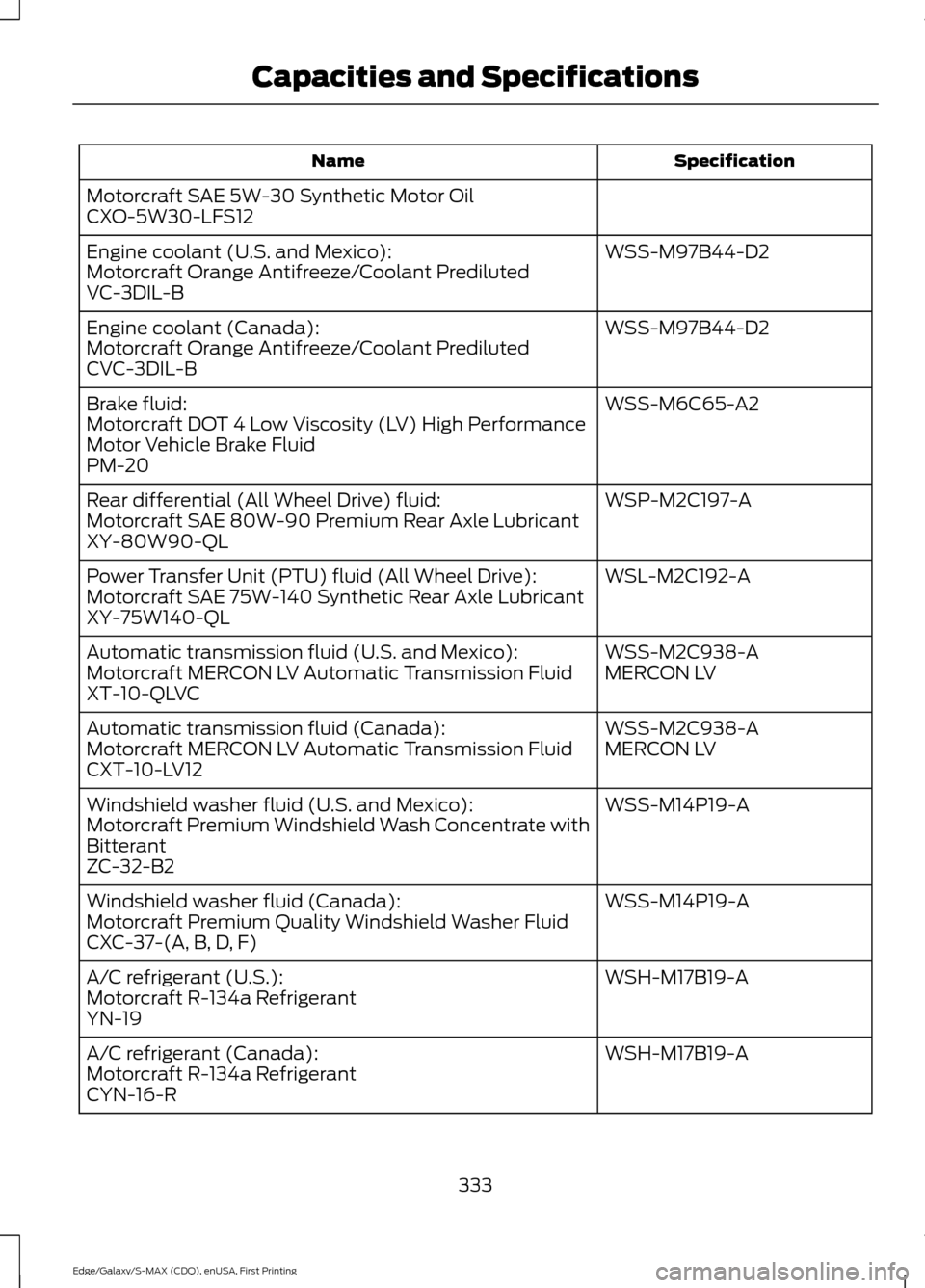
Specification
Name
Motorcraft SAE 5W-30 Synthetic Motor Oil
CXO-5W30-LFS12 WSS-M97B44-D2
Engine coolant (U.S. and Mexico):
Motorcraft Orange Antifreeze/Coolant Prediluted
VC-3DIL-B
WSS-M97B44-D2
Engine coolant (Canada):
Motorcraft Orange Antifreeze/Coolant Prediluted
CVC-3DIL-B
WSS-M6C65-A2
Brake fluid:
Motorcraft DOT 4 Low Viscosity (LV) High Performance
Motor Vehicle Brake Fluid
PM-20
WSP-M2C197-A
Rear differential (All Wheel Drive) fluid:
Motorcraft SAE 80W-90 Premium Rear Axle Lubricant
XY-80W90-QL
WSL-M2C192-A
Power Transfer Unit (PTU) fluid (All Wheel Drive):
Motorcraft SAE 75W-140 Synthetic Rear Axle Lubricant
XY-75W140-QL
WSS-M2C938-A
Automatic transmission fluid (U.S. and Mexico):
MERCON LV
Motorcraft MERCON LV Automatic Transmission Fluid
XT-10-QLVC
WSS-M2C938-A
Automatic transmission fluid (Canada):
MERCON LV
Motorcraft MERCON LV Automatic Transmission Fluid
CXT-10-LV12
WSS-M14P19-A
Windshield washer fluid (U.S. and Mexico):
Motorcraft Premium Windshield Wash Concentrate with
Bitterant
ZC-32-B2
WSS-M14P19-A
Windshield washer fluid (Canada):
Motorcraft Premium Quality Windshield Washer Fluid
CXC-37-(A, B, D, F)
WSH-M17B19-A
A/C refrigerant (U.S.):
Motorcraft R-134a Refrigerant
YN-19
WSH-M17B19-A
A/C refrigerant (Canada):
Motorcraft R-134a Refrigerant
CYN-16-R
333
Edge/Galaxy/S-MAX (CDQ), enUSA, First Printing Capacities and Specifications
Page 338 of 508
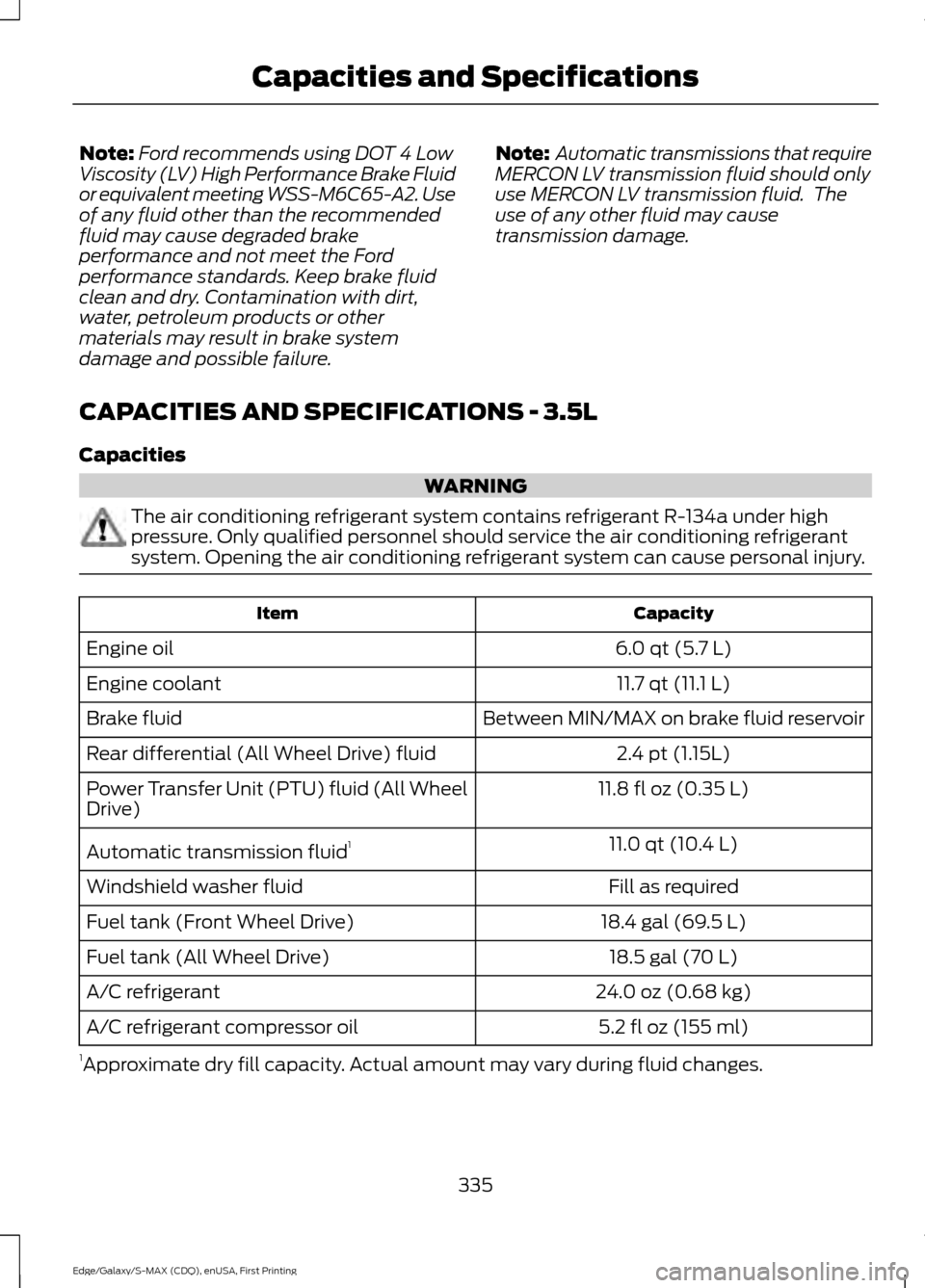
Note:
Ford recommends using DOT 4 Low
Viscosity (LV) High Performance Brake Fluid
or equivalent meeting WSS-M6C65-A2. Use
of any fluid other than the recommended
fluid may cause degraded brake
performance and not meet the Ford
performance standards. Keep brake fluid
clean and dry. Contamination with dirt,
water, petroleum products or other
materials may result in brake system
damage and possible failure. Note:
Automatic transmissions that require
MERCON LV transmission fluid should only
use MERCON LV transmission fluid. The
use of any other fluid may cause
transmission damage.
CAPACITIES AND SPECIFICATIONS - 3.5L
Capacities WARNING
The air conditioning refrigerant system contains refrigerant R-134a under high
pressure. Only qualified personnel should service the air conditioning refrigerant
system. Opening the air conditioning refrigerant system can cause personal injury.
Capacity
Item
6.0 qt (5.7 L)
Engine oil
11.7 qt (11.1 L)
Engine coolant
Between MIN/MAX on brake fluid reservoir
Brake fluid
2.4 pt (1.15L)
Rear differential (All Wheel Drive) fluid
11.8 fl oz (0.35 L)
Power Transfer Unit (PTU) fluid (All Wheel
Drive)
11.0 qt (10.4 L)
Automatic transmission fluid 1
Fill as required
Windshield washer fluid
18.4 gal (69.5 L)
Fuel tank (Front Wheel Drive)
18.5 gal (70 L)
Fuel tank (All Wheel Drive)
24.0 oz (0.68 kg)
A/C refrigerant
5.2 fl oz (155 ml)
A/C refrigerant compressor oil
1 Approximate dry fill capacity. Actual amount may vary during fluid changes.
335
Edge/Galaxy/S-MAX (CDQ), enUSA, First Printing Capacities and Specifications
Page 339 of 508
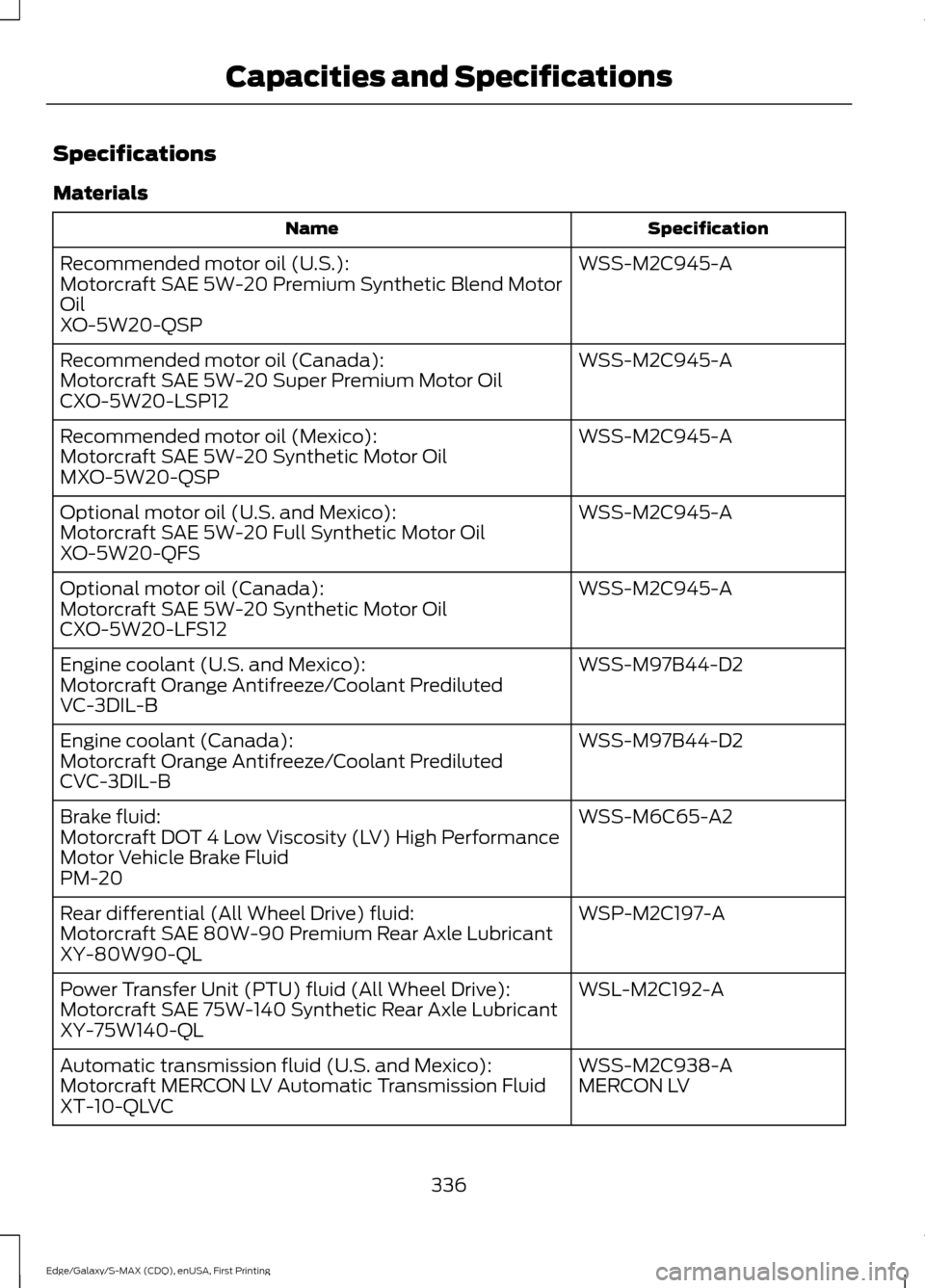
Specifications
Materials
Specification
Name
WSS-M2C945-A
Recommended motor oil (U.S.):
Motorcraft SAE 5W-20 Premium Synthetic Blend Motor
Oil
XO-5W20-QSP
WSS-M2C945-A
Recommended motor oil (Canada):
Motorcraft SAE 5W-20 Super Premium Motor Oil
CXO-5W20-LSP12
WSS-M2C945-A
Recommended motor oil (Mexico):
Motorcraft SAE 5W-20 Synthetic Motor Oil
MXO-5W20-QSP
WSS-M2C945-A
Optional motor oil (U.S. and Mexico):
Motorcraft SAE 5W-20 Full Synthetic Motor Oil
XO-5W20-QFS
WSS-M2C945-A
Optional motor oil (Canada):
Motorcraft SAE 5W-20 Synthetic Motor Oil
CXO-5W20-LFS12
WSS-M97B44-D2
Engine coolant (U.S. and Mexico):
Motorcraft Orange Antifreeze/Coolant Prediluted
VC-3DIL-B
WSS-M97B44-D2
Engine coolant (Canada):
Motorcraft Orange Antifreeze/Coolant Prediluted
CVC-3DIL-B
WSS-M6C65-A2
Brake fluid:
Motorcraft DOT 4 Low Viscosity (LV) High Performance
Motor Vehicle Brake Fluid
PM-20
WSP-M2C197-A
Rear differential (All Wheel Drive) fluid:
Motorcraft SAE 80W-90 Premium Rear Axle Lubricant
XY-80W90-QL
WSL-M2C192-A
Power Transfer Unit (PTU) fluid (All Wheel Drive):
Motorcraft SAE 75W-140 Synthetic Rear Axle Lubricant
XY-75W140-QL
WSS-M2C938-A
Automatic transmission fluid (U.S. and Mexico):
MERCON LV
Motorcraft MERCON LV Automatic Transmission Fluid
XT-10-QLVC
336
Edge/Galaxy/S-MAX (CDQ), enUSA, First Printing Capacities and Specifications
Page 359 of 508
System data cannot be accessed without
special equipment and access to the
vehicle's SYNC module. Ford Motor
Company and Ford of Canada will not
access the system data for any purpose
other than as described absent consent, a
court order, or where required by law
enforcement, other government
authorities, or other third parties acting
with lawful authority. Other parties may
seek to access the information
independently of Ford Motor Company and
Ford of Canada. For further privacy
information, see the sections on 911 Assist,
Vehicle Health Report, and Traffic,
Directions and Information.
USING VOICE RECOGNITION
This system helps you control many
features using voice commands. This
allows you to keep your hands on the
wheel and focus on what is around you.
Initiating a Voice Session
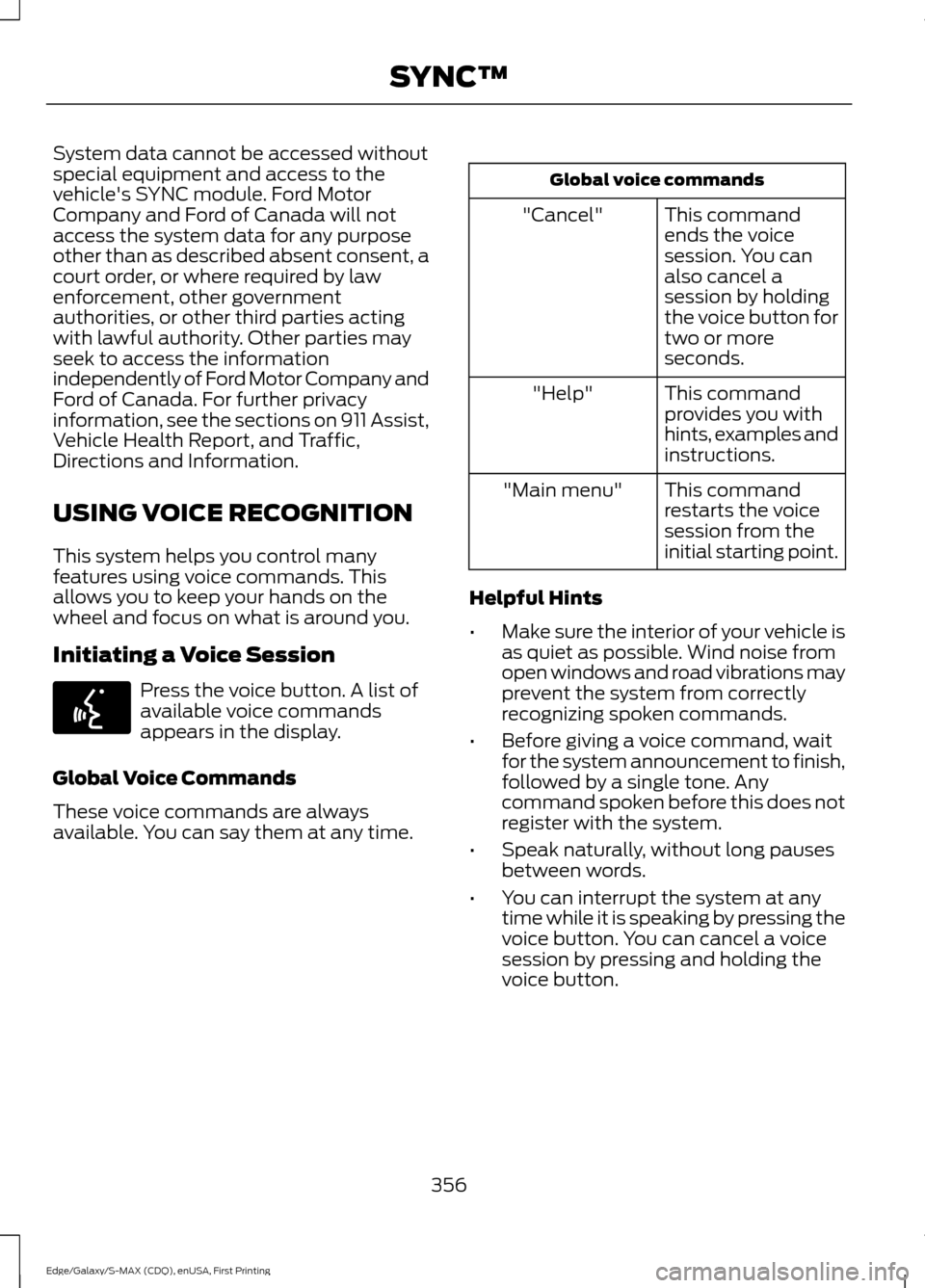
Press the voice button. A list of
available voice commands
appears in the display.
Global Voice Commands
These voice commands are always
available. You can say them at any time. Global voice commands
This command
ends the voice
session. You can
also cancel a
session by holding
the voice button for
two or more
seconds.
"Cancel"
This command
provides you with
hints, examples and
instructions.
"Help"
This command
restarts the voice
session from the
initial starting point.
"Main menu"
Helpful Hints
• Make sure the interior of your vehicle is
as quiet as possible. Wind noise from
open windows and road vibrations may
prevent the system from correctly
recognizing spoken commands.
• Before giving a voice command, wait
for the system announcement to finish,
followed by a single tone. Any
command spoken before this does not
register with the system.
• Speak naturally, without long pauses
between words.
• You can interrupt the system at any
time while it is speaking by pressing the
voice button. You can cancel a voice
session by pressing and holding the
voice button.
356
Edge/Galaxy/S-MAX (CDQ), enUSA, First Printing SYNC™E142599
Page 363 of 508
Phone book commands: When you ask
SYNC to access things such as a
phonebook name or number, the
requested information appears in the
display to view. Press the phone button
and say, "Call" to call the contact. "DIAL"
"411 (four-one-one)", "911" (nine-one- one)
"700" (seven hundred) "800" (eight hundred) "900" (nine hundred)
"Clear" (deletes all entered digits) "Delete" (deletes last set of digits entered)
"Number <0-9>" "Plus"
"Pound" (#) "Star" (*)
Note: To exit dial mode, press and hold the
phone button or press any button on the
audio system. "MESSAGES"
"Listen to text message <#>" "Forward text message""Reply to text message" "Call sender" Making Calls Press the voice button. When
prompted, say:
1. Say "Call
2. When the system confirms the number,
say, "Dial" again to initiate the call.
To erase the last spoken digit, say,
"Delete". To erase all spoken digits, say,
"Clear".
To end the call, press the end call button
on the steering wheel or select the end call
option in the audio display.
Receiving Calls
When receiving a call, you can:
• Answer the call by pressing the accept
call button on the steering wheel or by
selecting the accept call option in the
audio display.
• Reject the call by pressing the reject
call button on the steering wheel or by
selecting the reject call option in the
audio display.
• Ignore the call by doing nothing.
Phone Options during an Active
Call
During an active call, you have more menu
features that become available, such as
putting a call on hold or joining calls.
To access this menu, choose one of the
options available at the bottom of the
audio display or select
More to choose
from the following options:
360
Edge/Galaxy/S-MAX (CDQ), enUSA, First Printing SYNC™E142599
Page 372 of 508
5. Press OK when the desired option
appears in the radio display. Set On or
Set Off
appears in the display as
confirmation.
Off selections include:
• Off with reminder: Provides a display
and voice reminder at phone
connection at vehicle start.
• Off without reminder: Provides a
display reminder only without a voice
reminder at phone connection.
To make sure that 911 Assist works
correctly:
• SYNC must be powered and working
properly at the time of the incident and
throughout feature activation and use.
• The 911 Assist feature must be set on
before the incident.
• You must pair and connect a
Bluetooth-enabled and compatible
cell phone to SYNC.
• A connected Bluetooth-enabled phone
must have the ability to make and
maintain an outgoing call at the time
of the incident.
• A connected Bluetooth-enabled phone
must have adequate network coverage,
battery power and signal strength.
• The vehicle must have battery power
and be located in the U.S., Canada or
in a territory in which 911 is the
emergency number.
In the Event of a Crash
Not all crashes will deploy an airbag or
activate the fuel pump shut-off (the
triggers for 911 Assist). If a connected cell
phone sustains damage or loses its
connection to SYNC during a crash, SYNC
will search for and try to connect to a
previously paired cell phone; SYNC will
then attempt to call the emergency
services. Before making the call:
•
SYNC provides a short window of time
(about 10 seconds) to cancel the call.
If you fail to cancel the call, SYNC
attempts to dial 911.
• SYNC says the following, or a similar
message: "SYNC will attempt to call
911, to cancel the call, press Cancel on
your screen or press and hold the
phone button on your steering wheel."
If you do not cancel the call, and SYNC
makes a successful call, a pre-recorded
message plays for the 911 operator, and
then the occupant(s) in your vehicle is able
to talk with the operator. Be prepared to
provide your name, phone number and
location immediately, because not all 911
systems are capable of receiving this
information electronically.
911 Assist May Not Work If
• Your cellular phone or 911 Assist
hardware sustains damage in a crash.
• The vehicle's battery or the SYNC
system has no power.
• The phones(s) previously paired or
connected to the system are thrown
from the vehicle
911 Assist Privacy Notice
When you turn on 911 Assist, it may
disclose to emergency services that your
vehicle has been in a crash involving the
deployment of an airbag or activation of
the fuel pump shut-off. Certain versions or
updates to 911 Assist may also be capable
of electronically or verbally disclosing to
911 operators your vehicle location or other
details about your vehicle or crash to assist
911 operators to provide the most
appropriate emergency services. If you do
not want to disclose this information, do
not turn the feature on.
369
Edge/Galaxy/S-MAX (CDQ), enUSA, First Printing SYNC™
Page 373 of 508
SYNC Mobile Apps
The system enables voice and steering
wheel control of SYNC AppLink enabled
smartphone apps. Once an app is running
through AppLink, you can control main
features of the app through voice
commands and steering wheel controls.
Note:
You must pair and connect your
smartphone to SYNC to access AppLink.
Note: iPhone users need to connect the
phone to the USB port.
Note: Android users need to connect the
phone to SYNC using Bluetooth.
Note: For information on available apps,
supported smartphone devices and
troubleshooting tips please visit the Ford
website.
Note: Make sure you have an active account
for the app that you have downloaded.
Some apps work automatically with no
setup. Other apps want you to configure
your personal settings and personalize your
experience by creating stations or favorites.
We recommend you do this at home or
outside of your vehicle.
Note: AppLink is not available if your
vehicle is equipped with the MyFordTouch
system.
To Access Using the SYNC Menu
1. Press the MENU button to access the
menu on-screen.
2. Select
SyncApplications.
3. Select
Mobile Apps.
4. Scroll through the list of available applications and select a particular app
or select
Find New Apps.
Note: If a SYNC AppLink compatible app
cannot be found, make sure the required
app is running on the mobile device. Accessing an App's Menu
Once an app is running through SYNC,
press the right arrow button on the steering
wheel control to access the app menu.
You can access various app features from
here, for example thumbs up and thumbs
down.
Press the left arrow button on the steering
wheel control to exit the app menu.
To Access Using Voice Commands
1. Press the voice icon.
2. When prompted, say "Mobile Apps".
3. Say the name of the application after
the tone.
4. The app should start. While an app is running through SYNC, you can press
the voice button and speak commands
specific to the app, for example "Play
Playlist Road Trip". Say, "Help" to
discover the available voice
commands.
SYNC Mobile App Voice Commands
The following voice commands are always
available:
• "Mobile apps": SYNC prompts you to
say the name of an app to start it on
SYNC.
• "List mobile apps": SYNC lists all of the
currently available mobile apps.
• "Find new apps": searches your
connected mobile device for
SYNC-compatible mobile apps.
• "
you can say the name of a mobile app
to start the mobile app on SYNC.
• "
lists the available voice commands for
the specified app if the app is running
on SYNC.
370
Edge/Galaxy/S-MAX (CDQ), enUSA, First Printing SYNC™
Page 374 of 508
App Permissions
App permissions are organized by groups.
You can grant these group permissions
individually. You can change a permission
group status any time when not driving, by
using the settings menu.
When you launch an app using SYNC, the
system may ask you to grant certain
permissions, for example:
•
To allow your vehicle to provide vehicle
information to the app such as, but not
limited to: Fuel level, fuel economy, fuel
consumption, engine speed, rain
sensor, odometer, VIN, external
temperature, gear position, tire
pressure, and head lamp status.
• To allow your vehicle to provide driving
characteristic information such as, but
not limited to: MyKey, seat belt status,
engine revolutions per minute, gear
position, braking events, steering wheel
angle, and accelerator pedal position.
• To allow your vehicle to provide
location information, including: GPS
and speed.
• To allow the app to send push
notifications using the vehicle display
and voice capabilities while running in
a background state. Push notifications
may be particularly useful for news or
location based apps.
Note: You only need to grant permissions
the first time you use an app with SYNC.
Note: Ford is not responsible or liable for
any damages or loss of privacy relating to
usage of an app, or dissemination of any
vehicle data that you approve Ford to
provide to an app.
Enabling and Disabling App
Permissions Using the SYNC Menu
1. Press the MENU button to access the
SYNC menu. 2. Select
SyncApplications > Mobile
Apps > App Settings.
3. Select the specific app or
All Apps.
4. If push notifications are supported, this
setting is listed. Select to enable or
disable the feature as required.
Enabling SYNC Mobile Apps
In order to enable mobile apps, SYNC
requires user consent to send and receive
app authorization information and updates
using the data plan associated with the
connected device.
Data is sent to Ford in the United States
through the connected device. The
information is encrypted and includes your
VIN, SYNC module number, anonymous
usage statistics and debugging
information. Updates may take place
automatically.
Note: You must enable mobile apps for
each connected device the first time you
select a mobile app using the system.
Note: Standard data rates apply. Ford is
not responsible for any additional charges
you may receive from your service provider,
when your vehicle sends or receives data
through the connected device. This includes
any additional charges incurred due to
driving in areas when roaming out of a home
network.
App Status
You can view the current status of an app
in the settings menu.
There are three possible statuses:
• Update Needed
: The system has
detected a new app requiring
authorization or a general permissions
update is required.
• Up-To-Date
: No update is required.
• Updating
: The system is trying to
receive an update.
371
Edge/Galaxy/S-MAX (CDQ), enUSA, First Printing SYNC™
Page 393 of 508
Press to select any of the following:
•
AM.
• FM.
• SIRIUS.
• CD.
• USB.
• BT Stereo.
• SD Card.
• Line In.
Using the Touch Screen
To turn a feature on and off, just touch the
graphic with your finger. To get the best
performance from the touch-sensitive
controls:
• Make sure your hands are clean and
dry.
• Since the touchscreen operates based
on the touch of a finger, you may have
trouble using it if you are wearing
gloves.
• Keep metal and other conductive
material away from the surface of the
touchscreen as this may cause
electronic interference (for example,
inadvertently turning on a feature other
than the one you meant to turn on).
Using the Bezel Controls
Depending on your vehicle and option
package, you may also have these controls
on your bezel:
• Power: Switch the media or climate
features off and on.
• VOL
: Control the volume of playing
media.
• Seek
and Tune: Use as you normally
would in media modes. •
Eject
: Eject a CD from the
entertainment system.
• Climate Control
: Control the
temperature, fan speed or settings of
the climate control system.
Using Your Steering Wheel
Controls
Depending on your vehicle and option
package, you can use your steering wheel
controls to interact with the touchscreen
system.
• VOL
: Control the volume of audio
output.
• Mute
: Mute the audio output.
• Voice
: Press to start a voice session.
Press again to end an active voice
prompt, so you can begin speaking.
Press and hold to end a voice session.
• SEEK DOWN
and PHONE ACCEPT:
• While in radio mode, press to seek
between memory presets.
• While in USB or CD mode, press to
seek between tracks or press and
hold to fast seek.
• While in phone mode, press to
answer a call or switch between
calls.
• SEEK UP
and PHONE REJECT:
• While in radio mode, press to seek
between memory presets.
• While in USB or CD mode, press to
seek between tracks or press and
hold to fast seek.
• While in phone mode, press to end
a call or reject an incoming call.
See
Steering Wheel (page 74).
390
Edge/Galaxy/S-MAX (CDQ), enUSA, First Printing MyFord Touch
™
(If Equipped)