oil FORD EDGE 2015 2.G User Guide
[x] Cancel search | Manufacturer: FORD, Model Year: 2015, Model line: EDGE, Model: FORD EDGE 2015 2.GPages: 508, PDF Size: 6.2 MB
Page 256 of 508
Protected components
Fuse amp rating
Fuse or relay number
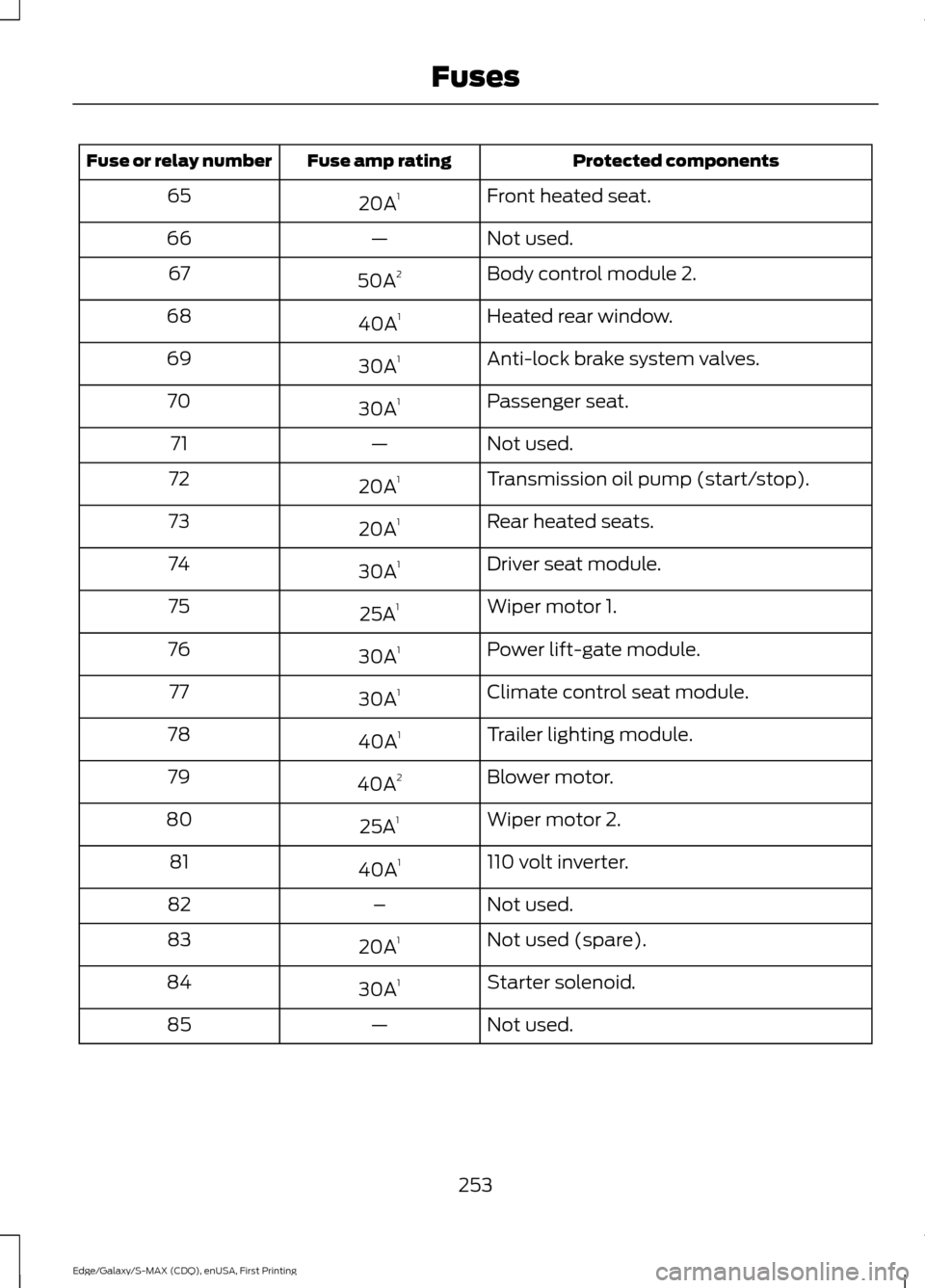
Front heated seat.
20A 1
65
Not used.
—
66
Body control module 2.
50A 2
67
Heated rear window.
40A 1
68
Anti-lock brake system valves.
30A 1
69
Passenger seat.
30A 1
70
Not used.
—
71
Transmission oil pump (start/stop).
20A 1
72
Rear heated seats.
20A 1
73
Driver seat module.
30A 1
74
Wiper motor 1.
25A 1
75
Power lift-gate module.
30A 1
76
Climate control seat module.
30A 1
77
Trailer lighting module.
40A 1
78
Blower motor.
40A 2
79
Wiper motor 2.
25A 1
80
110 volt inverter.
40A 1
81
Not used.
–
82
Not used (spare).
20A 1
83
Starter solenoid.
30A 1
84
Not used.
—
85
253
Edge/Galaxy/S-MAX (CDQ), enUSA, First Printing Fuses
Page 257 of 508
Protected components
Fuse amp rating
Fuse or relay number
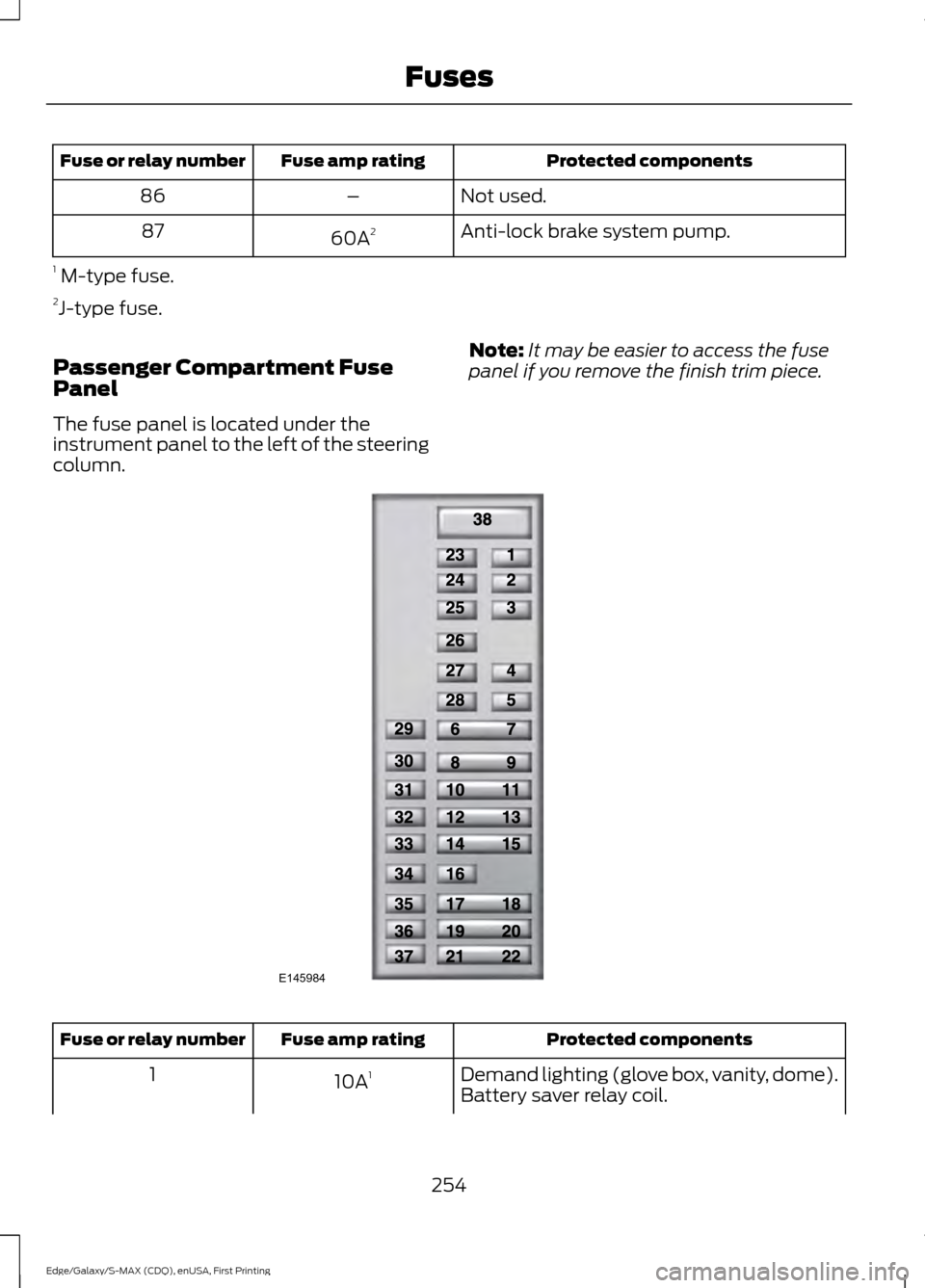
Not used.
–
86
Anti-lock brake system pump.
60A 2
87
1 M-type fuse.
2 J-type fuse.
Passenger Compartment Fuse
Panel
The fuse panel is located under the
instrument panel to the left of the steering
column. Note:
It may be easier to access the fuse
panel if you remove the finish trim piece. Protected components
Fuse amp rating
Fuse or relay number
Demand lighting (glove box, vanity, dome).
10A 1
1
Battery saver relay coil.
254
Edge/Galaxy/S-MAX (CDQ), enUSA, First Printing FusesE145984
Page 258 of 508
Protected components
Fuse amp rating
Fuse or relay number
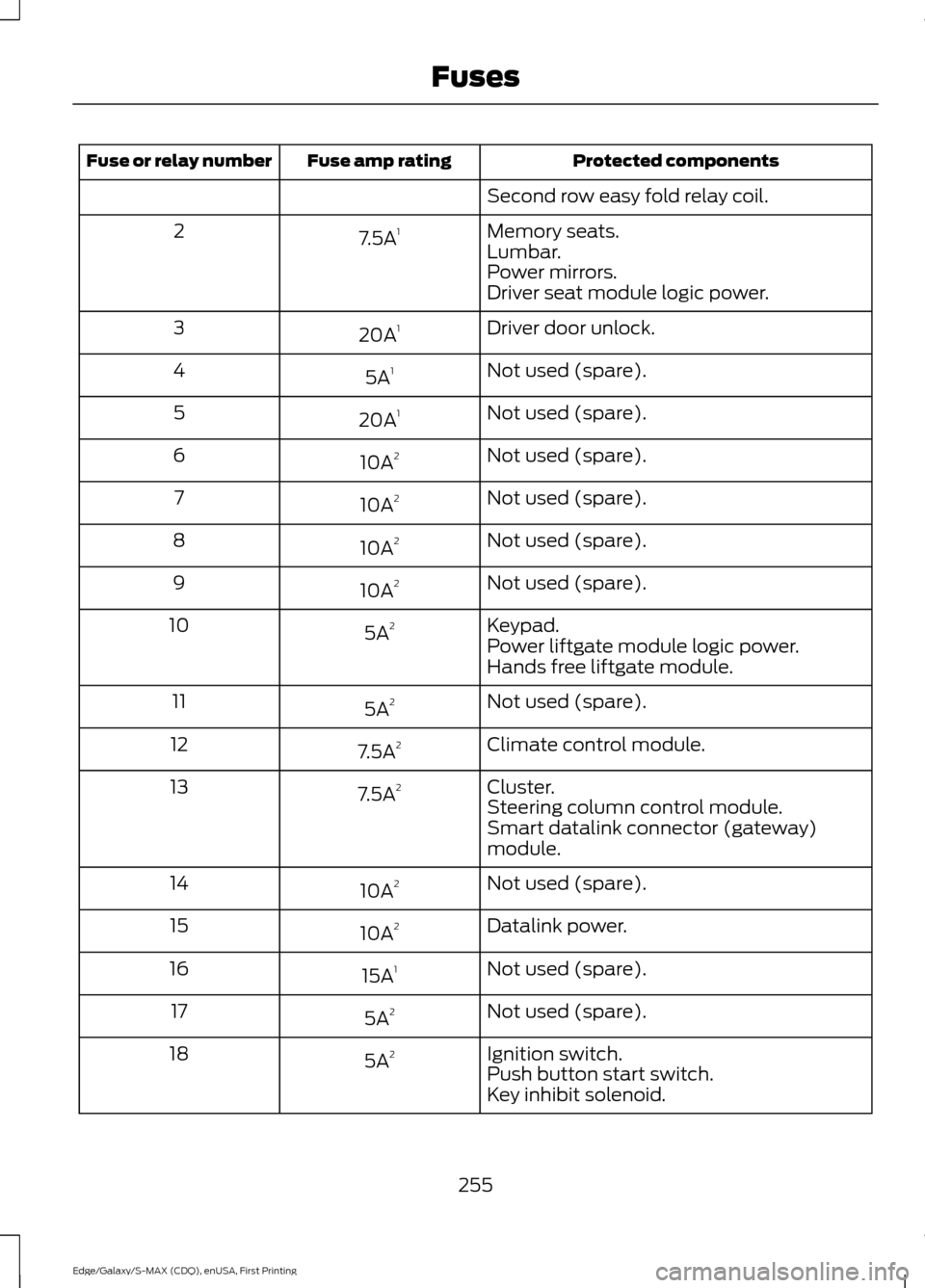
Second row easy fold relay coil.
Memory seats.
7.5A 1
2
Lumbar.
Power mirrors.
Driver seat module logic power.
Driver door unlock.
20A 1
3
Not used (spare).
5A 1
4
Not used (spare).
20A 1
5
Not used (spare).
10A 2
6
Not used (spare).
10A 2
7
Not used (spare).
10A 2
8
Not used (spare).
10A 2
9
Keypad.
5A 2
10
Power liftgate module logic power.
Hands free liftgate module.
Not used (spare).
5A 2
11
Climate control module.
7.5A 2
12
Cluster.
7.5A 2
13
Steering column control module.
Smart datalink connector (gateway)
module.
Not used (spare).
10A 2
14
Datalink power.
10A 2
15
Not used (spare).
15A 1
16
Not used (spare).
5A 2
17
Ignition switch.
5A 2
18
Push button start switch.
Key inhibit solenoid.
255
Edge/Galaxy/S-MAX (CDQ), enUSA, First Printing Fuses
Page 262 of 508

4. Open the hood. The hood strut
automatically supports the hood.
Closing the Hood
1. Lower the hood and allow it to drop under its own weight for the last 8-12
in (20-30 cm).
Note: Make sure that the hood is correctly
closed.
UNDER HOOD OVERVIEW - 2.0L ECOBOOST™ Engine coolant reservoir. See Engine Coolant Check (page 263).
A
Brake fluid reservoir (right-hand drive).
See Brake Fluid Check (page 268).
B
Engine oil dipstick.
See Engine Oil Dipstick (page 262).
C
Engine oil filler cap.
See Engine Oil Check (page 262).
D
Brake fluid reservoir (left-hand drive).
See Brake Fluid Check (page 268).
E
Battery.
See Changing the 12V Battery (page 269).
F
259
Edge/Galaxy/S-MAX (CDQ), enUSA, First Printing MaintenanceE191432
4 A
IH
EBCDFG
E188729
Page 263 of 508
Power distribution box. See Fuses (page 248).
G
Air filter assembly.
See Changing the Engine Air Filter (page 278).
H
Windshield washer fluid reservoir.
See Washer Fluid Check (page 269).
I
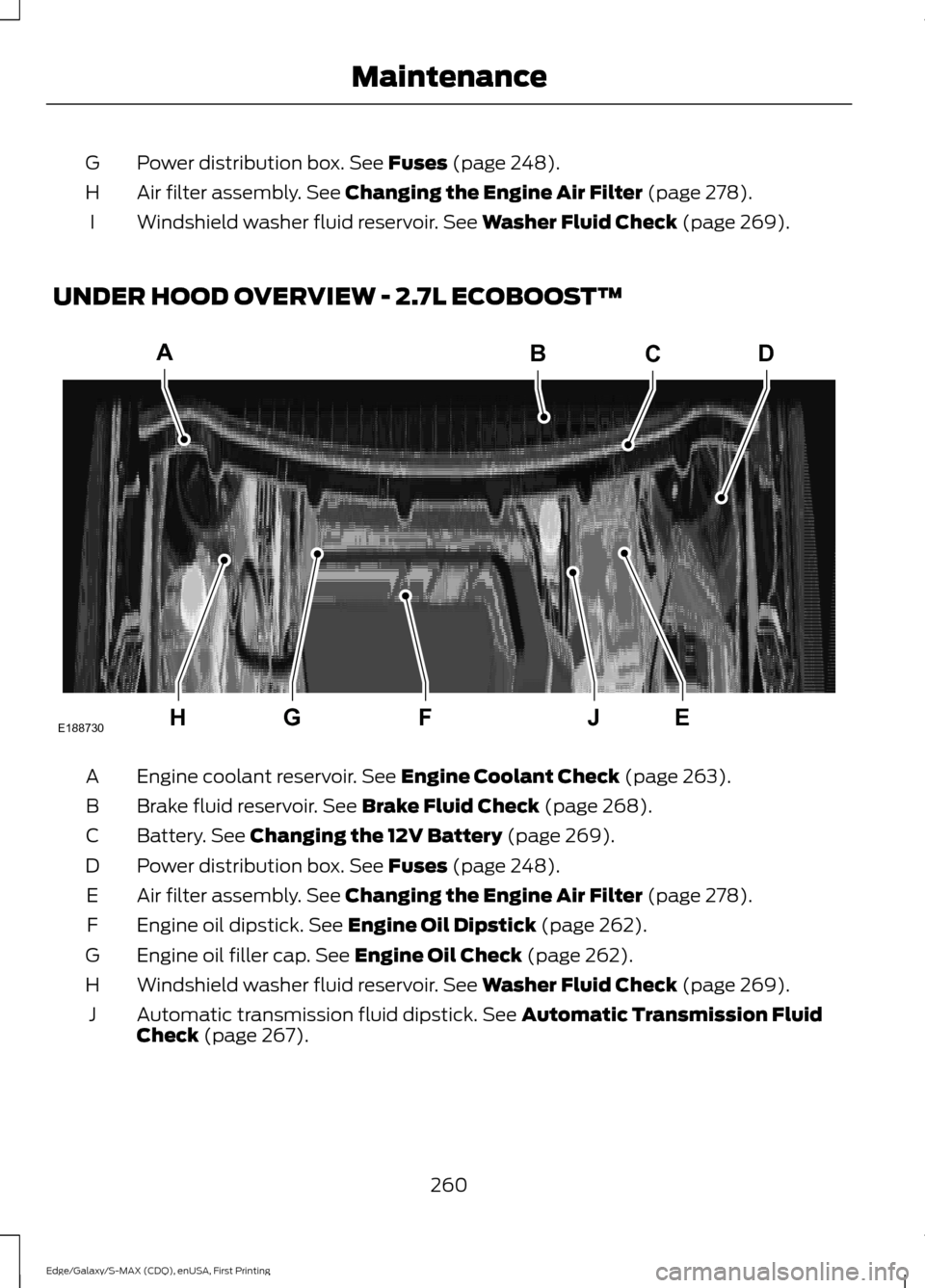
UNDER HOOD OVERVIEW - 2.7L ECOBOOST™ Engine coolant reservoir.
See Engine Coolant Check (page 263).
A
Brake fluid reservoir.
See Brake Fluid Check (page 268).
B
Battery.
See Changing the 12V Battery (page 269).
C
Power distribution box.
See Fuses (page 248).
D
Air filter assembly.
See Changing the Engine Air Filter (page 278).
E
Engine oil dipstick.
See Engine Oil Dipstick (page 262).
F
Engine oil filler cap.
See Engine Oil Check (page 262).
G
Windshield washer fluid reservoir.
See Washer Fluid Check (page 269).
H
Automatic transmission fluid dipstick.
See Automatic Transmission Fluid
Check (page 267).
J
260
Edge/Galaxy/S-MAX (CDQ), enUSA, First Printing MaintenanceA
HEJFG
BCD
E188730
Page 264 of 508
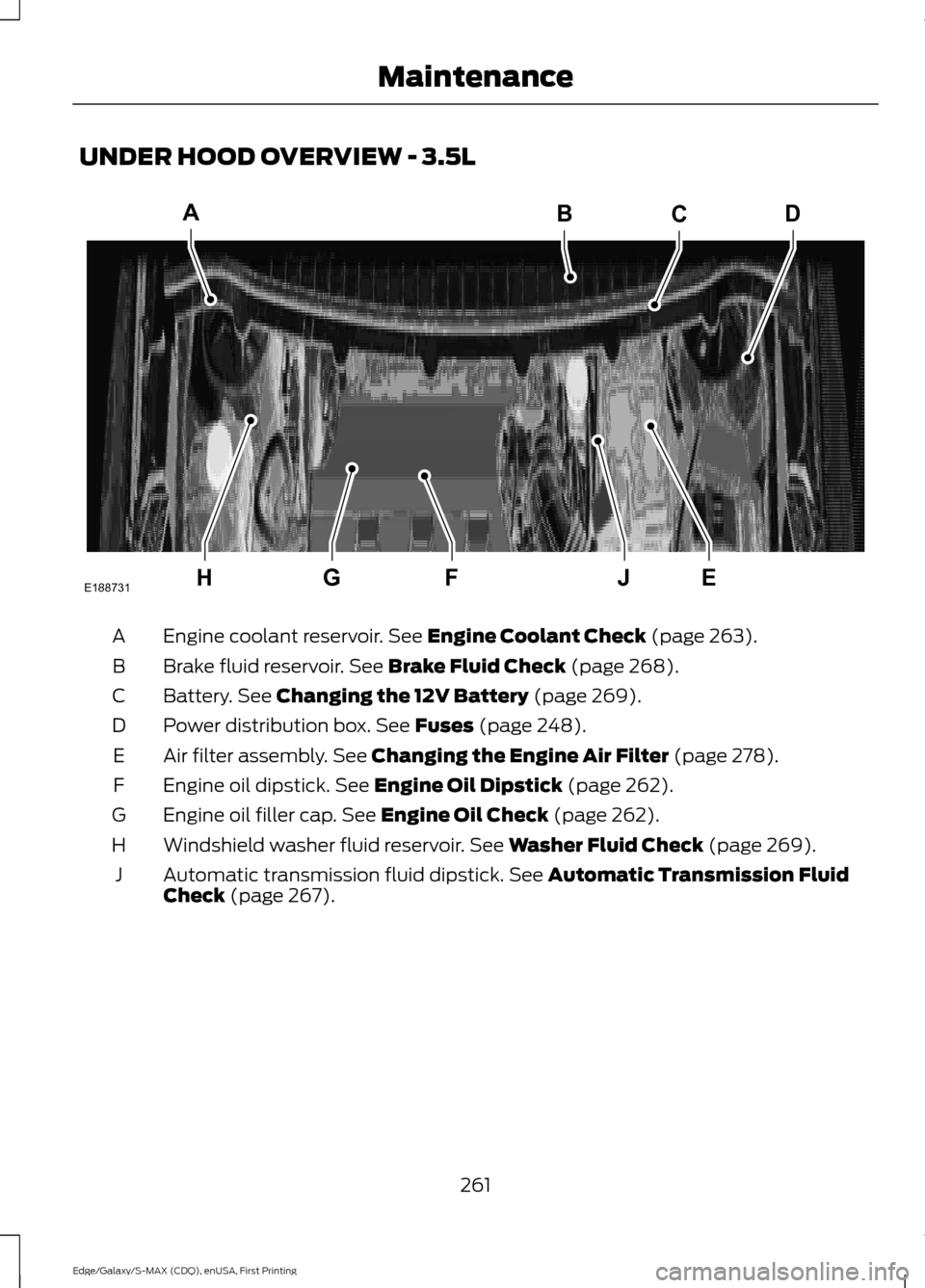
UNDER HOOD OVERVIEW - 3.5L
Engine coolant reservoir. See Engine Coolant Check (page 263).
A
Brake fluid reservoir.
See Brake Fluid Check (page 268).
B
Battery.
See Changing the 12V Battery (page 269).
C
Power distribution box.
See Fuses (page 248).
D
Air filter assembly.
See Changing the Engine Air Filter (page 278).
E
Engine oil dipstick.
See Engine Oil Dipstick (page 262).
F
Engine oil filler cap.
See Engine Oil Check (page 262).
G
Windshield washer fluid reservoir.
See Washer Fluid Check (page 269).
H
Automatic transmission fluid dipstick.
See Automatic Transmission Fluid
Check (page 267).
J
261
Edge/Galaxy/S-MAX (CDQ), enUSA, First Printing MaintenanceHEJFG
ABCD
E188731
Page 265 of 508
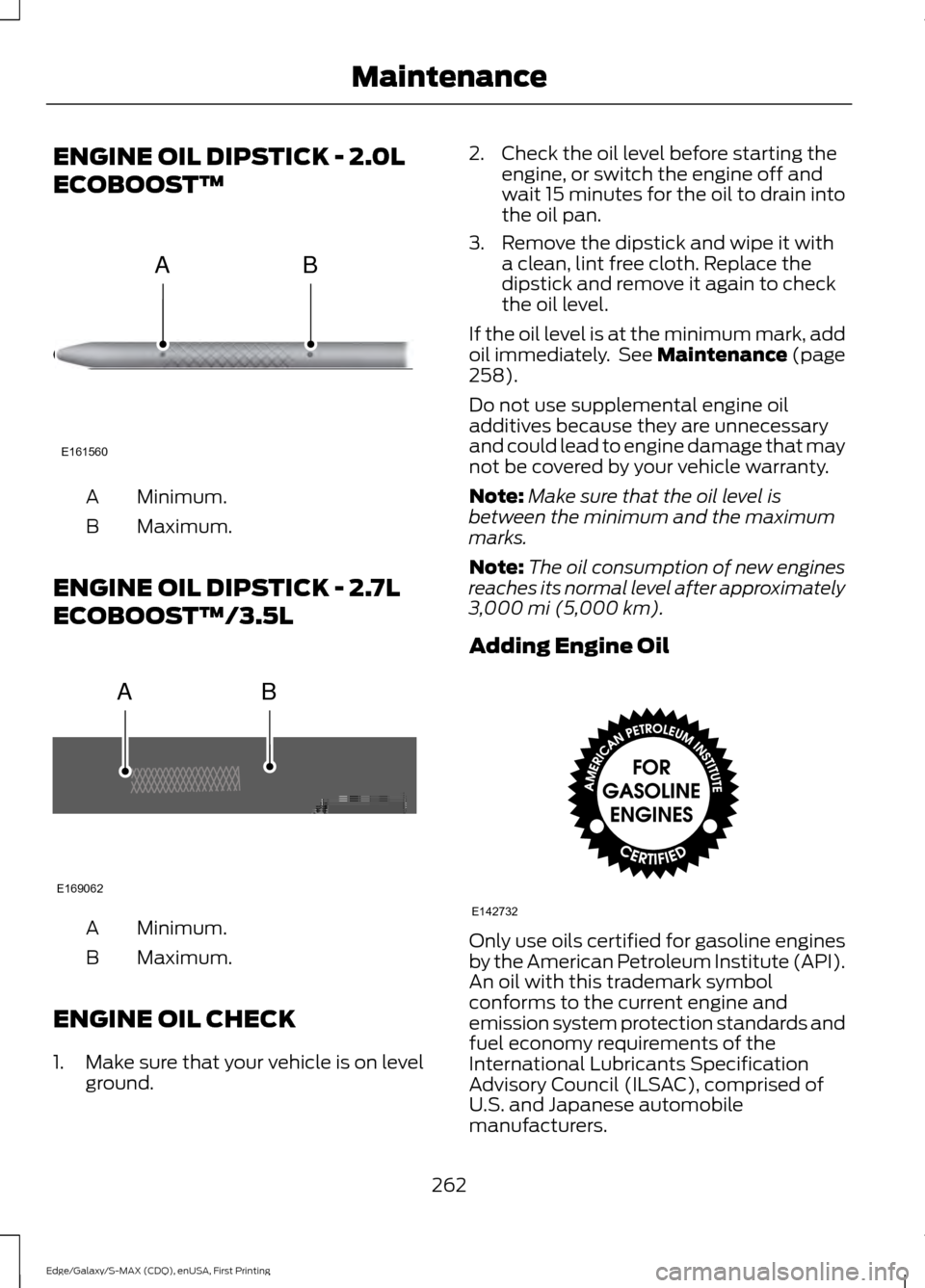
ENGINE OIL DIPSTICK - 2.0L
ECOBOOST™
Minimum.
A
Maximum.
B
ENGINE OIL DIPSTICK - 2.7L
ECOBOOST™/3.5L Minimum.
A
Maximum.
B
ENGINE OIL CHECK
1. Make sure that your vehicle is on level ground. 2. Check the oil level before starting the
engine, or switch the engine off and
wait 15 minutes for the oil to drain into
the oil pan.
3. Remove the dipstick and wipe it with a clean, lint free cloth. Replace the
dipstick and remove it again to check
the oil level.
If the oil level is at the minimum mark, add
oil immediately. See Maintenance (page
258).
Do not use supplemental engine oil
additives because they are unnecessary
and could lead to engine damage that may
not be covered by your vehicle warranty.
Note: Make sure that the oil level is
between the minimum and the maximum
marks.
Note: The oil consumption of new engines
reaches its normal level after approximately
3,000 mi (5,000 km)
.
Adding Engine Oil Only use oils certified for gasoline engines
by the American Petroleum Institute (API).
An oil with this trademark symbol
conforms to the current engine and
emission system protection standards and
fuel economy requirements of the
International Lubricants Specification
Advisory Council (ILSAC), comprised of
U.S. and Japanese automobile
manufacturers.
262
Edge/Galaxy/S-MAX (CDQ), enUSA, First Printing MaintenanceE161560
AB AB
E169062 E142732
Page 266 of 508
WARNINGS
Only add oil when the engine is cold.
If the engine is hot, wait 10 minutes
for the engine to cool down.
Do not remove the filler cap when
the engine is running.
1. Remove the engine oil filler cap.
2. Add engine oil that meets Ford
specifications. See Maintenance
(page 258).
3. Wipe off any spilled oil.
4. Replace the engine oil filler cap. Turn it clockwise until you feel a strong
resistance.
Note: Do not add oil further than the
maximum mark. Oil levels above the
maximum mark may cause engine damage.
Note: Soak up any spillage with an
absorbent cloth immediately.
OIL CHANGE INDICATOR
RESET
Use the information display controls on
the steering wheel to reset the oil change
indicator.
From the main menu scroll to: Action and description
Message
Press the right arrow button,
then from this menu scroll
to the following message.
Settings
Press the right arrow button,
then from this menu scroll
to the following message.
Vehicle
Press the right arrow button,
then from this menu scroll
to the following message.
Oil Life Action and description
Message
Press and hold the
OK
button until the instrument
cluster displays the
following message.
Hold OK to
Reset
Reset Successful
When the oil change indic-
ator resets the instrument
cluster displays 100%.
Remaining Life
{00}%
If the instrument cluster
displays one of the following
messages, repeat the
process.
Not Reset
Reset Cancelled
ENGINE COOLANT CHECK WARNINGS
Do not add engine coolant when the
engine is hot. Steam and scalding
liquids released from a hot cooling
system can burn you badly. Also, spilling
coolant on hot engine parts can burn you. Do not put engine coolant in the
windshield washer fluid container. If
sprayed on the windshield, engine
coolant could make it difficult to see
through the windshield. To reduce the risk of personal injury,
make sure the engine is cool before
unscrewing the coolant pressure
relief cap. The cooling system is under
pressure. Steam and hot liquid can come
out forcefully when you loosen the cap
slightly.
263
Edge/Galaxy/S-MAX (CDQ), enUSA, First Printing Maintenance
Page 284 of 508
•
Never wash or rinse any ignition coil,
spark plug wire or spark plug well, or
the area in and around these locations.
• Cover the battery, power distribution
box, and air filter assembly to prevent
water damage when cleaning the
engine.
CLEANING THE WINDOWS AND
WIPER BLADES
Car wash chemicals and environmental
fallout can result in windshield and wiper
blade contamination. Dirty windshield and
wipers will result in poor windshield wiper
operation. Keep the windshield and wiper
blades clean to maintain windshield wiper
performance.
To clean the windshield and wiper blades:
• Clean the windshield with a
non-abrasive glass cleaner.
• For windshields contaminated with
tree sap, chemicals, wax or bugs, clean
the entire windshield using steel wool
(no greater than 0000 grade) in a
circular motion and rinse with water.
• Clean the wiper blades with isopropyl
rubbing alcohol or windshield washer
concentrate.
Note: Do not use razor blades or other
sharp objects to clean or remove decals
from the inside of the heated rear window.
The vehicle warranty does not cover
damage caused to the heated rear window
grid lines.
CLEANING THE INTERIOR WARNINGS
Do not use cleaning solvents, bleach
or dye on the vehicle
’s safety belts,
as these actions may weaken the
belt webbing. WARNINGS
On vehicles equipped with
seat-mounted airbags, do not use
chemical solvents or strong
detergents. Such products could
contaminate the side airbag system and
affect performance of the side airbag in a
collision. For fabric, carpets, cloth seats, safety belts
and seats equipped with side airbags:
•
Remove dust and loose dirt with a
vacuum cleaner.
• Remove light stains and soil with
Motorcraft Professional Strength
Carpet & Upholstery Cleaner.
• If grease or tar is present on the
material, spot-clean the area first with
Motorcraft Spot and Stain Remover. In
Canada, use Motorcraft Multi-Purpose
Cleaner.
• If a ring forms on the fabric after spot
cleaning, clean the entire area
immediately (but do not oversaturate)
or the ring will set.
• Do not use household cleaning
products or glass cleaners, which can
stain and discolor the fabric and affect
the flame retardant abilities of the seat
materials.
CLEANING THE INSTRUMENT
PANEL AND INSTRUMENT
CLUSTER LENS WARNING
Do not use chemical solvents or
strong detergents when cleaning the
steering wheel or instrument panel
to avoid contamination of the airbag
system. 281
Edge/Galaxy/S-MAX (CDQ), enUSA, First Printing Vehicle Care
Page 285 of 508
Note:
Follow the same procedure as
cleaning leather seats for cleaning leather
instrument panels and leather interior trim
surfaces. See Cleaning Leather Seats
(page 282).
Clean the instrument panel and cluster
lens with a clean, damp and soft cloth,
then use a clean, dry and soft cloth to dry
these areas.
• Avoid cleaners or polishes that increase
the gloss of the upper portion of the
instrument panel. The dull finish in this
area helps protect you from
undesirable windshield reflection.
• Do not use any household cleaning
products or glass cleaners as these
may damage the finish of the
instrument panel, interior trim and
cluster lens.
• Wash or wipe your hands clean if you
have been in contact with certain
products such as insect repellent and
suntan lotion to avoid possible damage
to the interior painted surfaces.
• Do not allow air fresheners and hand
sanitizers to spill onto interior surfaces.
If a spill occurs, wipe off immediately.
Your warranty may not cover these
damages.
If a staining liquid like coffee or juice has
been spilled on the instrument panel or on
interior trim surfaces:
1. Wipe up spilled liquid using a clean, soft cloth as quickly as possible.
2. Use Motorcraft Premium Leather and Vinyl Cleaner or a commercially
available leather cleaning product for
automotive interiors. Test any cleaner
or stain remover on an inconspicuous
area.
3. Alternatively, wipe the surface with a clean, soft cloth and a mild soap and
water solution. Dry the area with a
clean, soft cloth. 4. If necessary, apply more soap and
water solution or cleaning product to
a clean, soft cloth and press it onto the
soiled area. Allow this to set at room
temperature for 30 minutes.
5. Remove the soaked cloth, then with a clean, damp cloth, use a rubbing
motion for 60 seconds on the soiled
area.
6. Dry the area with a clean, soft cloth.
CLEANING LEATHER SEATS
(If
Equipped)
Note: Follow the same procedure as
cleaning leather seats for cleaning leather
instrument panels and leather interior trim
surfaces.
For routine cleaning, wipe the surface with
a soft, damp cloth and a mild soap and
water solution. Dry the area with a clean,
soft cloth.
For cleaning and removing spots and stains
such as dye transfer, use Motorcraft
Premium Leather and Vinyl Cleaner or a
commercially available leather cleaning
product for automotive interiors.
Note: Test any cleaner or stain remover on
an inconspicuous area.
You should:
• Remove dust and loose dirt with a
vacuum cleaner.
• Clean and treat spills and stains as
soon as possible.
Do not use the following products as these
may damage the leather:
• Oil and petroleum or silicone-based
leather conditioners.
• Household cleaners.
282
Edge/Galaxy/S-MAX (CDQ), enUSA, First Printing Vehicle Care