roof FORD EDGE 2015 2.G User Guide
[x] Cancel search | Manufacturer: FORD, Model Year: 2015, Model line: EDGE, Model: FORD EDGE 2015 2.GPages: 508, PDF Size: 6.2 MB
Page 221 of 508
For correct roof rack system function, you
must place loads directly on crossbars
affixed to the roof rack side rails. When
using the roof rack system, we recommend
you use Ford Genuine Accessory crossbars
designed specifically for your vehicle.
Make sure that you securely fasten the
load. Check the tightness of the load
before driving and at each fuel stop.
LOAD LIMIT
Vehicle Loading - with and
without a Trailer
This section will guide you in the
proper loading of your vehicle,
trailer or both, to keep your loaded
vehicle weight within its design
rating capability, with or without
a trailer. Properly loading your
vehicle will provide maximum
return of vehicle design
performance. Before loading your
vehicle, familiarize yourself with
the following terms for
determining your vehicle
’s weight
ratings, with or without a trailer,
from the vehicle ’s Tire Label or
Safety Compliance Certification
Label:
Base Curb Weight - is the weight
of the vehicle including a full tank
of fuel and all standard
equipment. It does not include
passengers, cargo, or optional
equipment.
Vehicle Curb Weight -
is the
weight of your new vehicle when
you picked it up from your
authorized dealer plus any
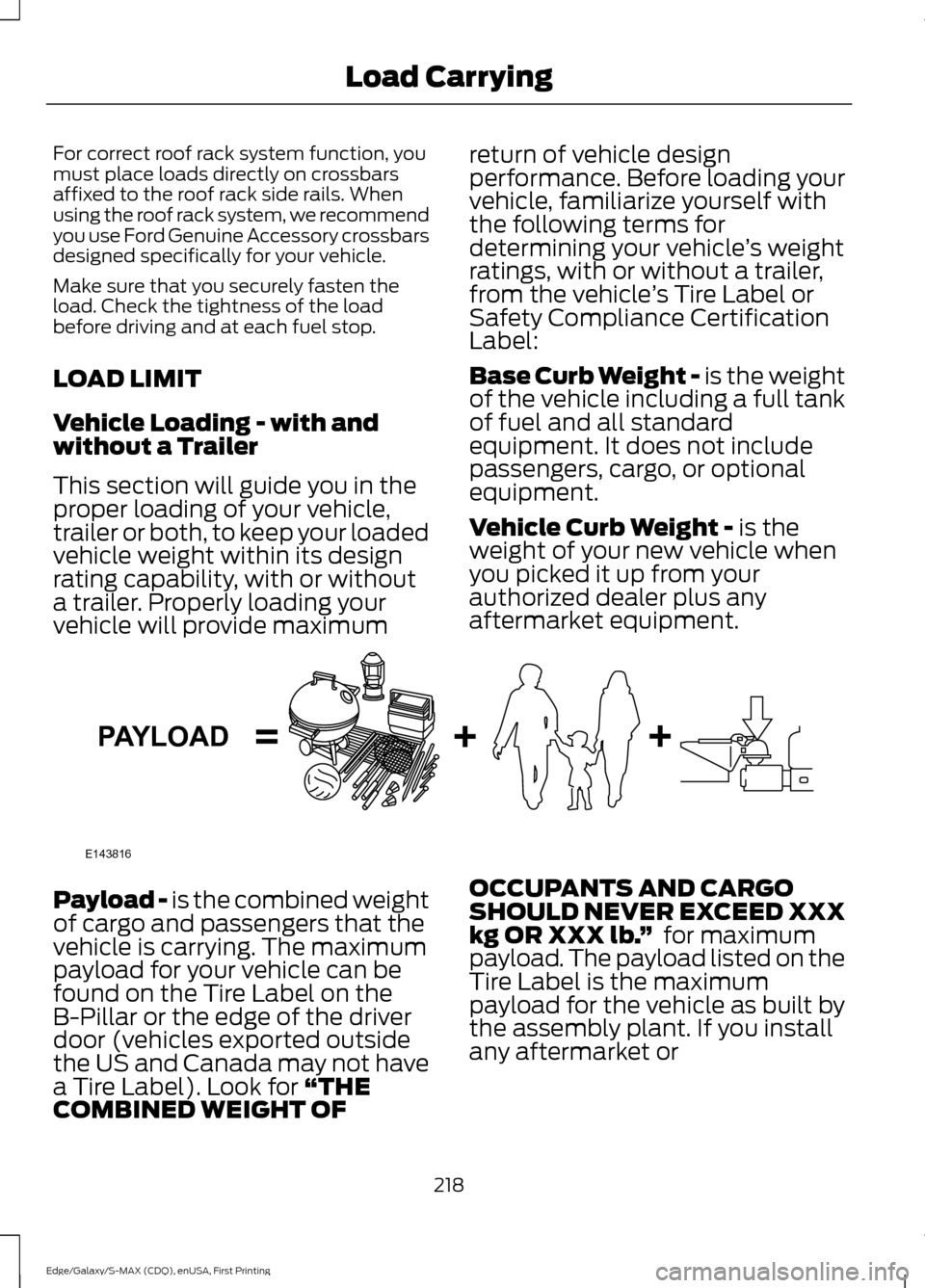
aftermarket equipment. Payload -
is the combined weight
of cargo and passengers that the
vehicle is carrying. The maximum
payload for your vehicle can be
found on the Tire Label on the
B-Pillar or the edge of the driver
door (vehicles exported outside
the US and Canada may not have
a Tire Label). Look for
“THE
COMBINED WEIGHT OF OCCUPANTS AND CARGO
SHOULD NEVER EXCEED XXX
kg OR XXX lb.
” for maximum
payload. The payload listed on the
Tire Label is the maximum
payload for the vehicle as built by
the assembly plant. If you install
any aftermarket or
218
Edge/Galaxy/S-MAX (CDQ), enUSA, First Printing Load CarryingE143816PAYLOAD
Page 247 of 508
THE BETTER BUSINESS
BUREAU (BBB) AUTO LINE
PROGRAM (U.S. ONLY)
Your satisfaction is important to Ford
Motor Company and to your dealer. If a
warranty concern has not been resolved
using the three-step procedure outlined
earlier in this chapter in the Getting the
Services you need section, you may be
eligible to participate in the BBB AUTO
LINE program.
The BBB AUTO LINE program consists of
two parts – mediation and arbitration.
During mediation, a representative of the
BBB will contact both you and Ford Motor
Company to explore options for settlement
of the claim. If an agreement is not reached
during mediation or you do not want to
participate in mediation, and if your claim
is eligible, you may participate in the
arbitration process. An arbitration hearing
will be scheduled so that you can present
your case in an informal setting before an
impartial person. The arbitrator will
consider the testimony provided and make
a decision after the hearing.
Disputes submitted to the BBB AUTO LINE
program are usually decided within forty
days after you file your claim with the BBB.
You are not bound by the decision, and
may reject the decision and proceed to
court where all findings of the BBB Auto
Line dispute, and decision, are admissible
in the court action. Should you choose to
accept the BBB AUTO LINE decision, Ford
is then bound by the decision, and must
comply with the decision within 30 days
of receipt of your acceptance letter.
BBB AUTO LINE Application: Using the
information provided below, please call or
write to request a program application.
You will be asked for your name and
address, general information about your
new vehicle, information about your
warranty concerns, and any steps you have
already taken to try to resolve them. A
Customer Claim Form will be mailed that
will need to be completed, signed and
returned to the BBB along with proof of
ownership. Upon receipt, the BBB will
review the claim for eligibility under the
Program Summary Guidelines.
You can get more information by
calling BBB AUTO LINE at
1-800-955-5100, or writing to:
BBB AUTO LINE
3033 Wilson Boulevard, Suite 600
Arlington, Virginia 22201
BBB AUTO LINE applications can also be
requested by calling the Ford Motor
Company Customer Relationship Center
at 1-800-392-3673.
Note:
Ford Motor Company reserves the
right to change eligibility limitations, modify
procedures, or to discontinue this process
at any time without notice and without
obligation.
UTILIZING THE
MEDIATION/ARBITRATION
PROGRAM (CANADA ONLY)
For vehicles delivered to authorized
Canadian dealers. In those cases where
you continue to feel that the efforts by Ford
of Canada and the authorized dealer to
resolve a factory-related vehicle service
concern have been unsatisfactory, Ford of
Canada participates in an impartial third
party mediation/arbitration program
administered by the Canadian Motor
Vehicle Arbitration Plan (CAMVAP).
The CAMVAP program is a straight forward
and relatively speedy alternative to resolve
a disagreement when all other efforts to
produce a settlement have failed. This
procedure is without cost to you and is
designed to eliminate the need for lengthy
and expensive legal proceedings.
244
Edge/Galaxy/S-MAX (CDQ), enUSA, First Printing Customer Assistance
Page 259 of 508
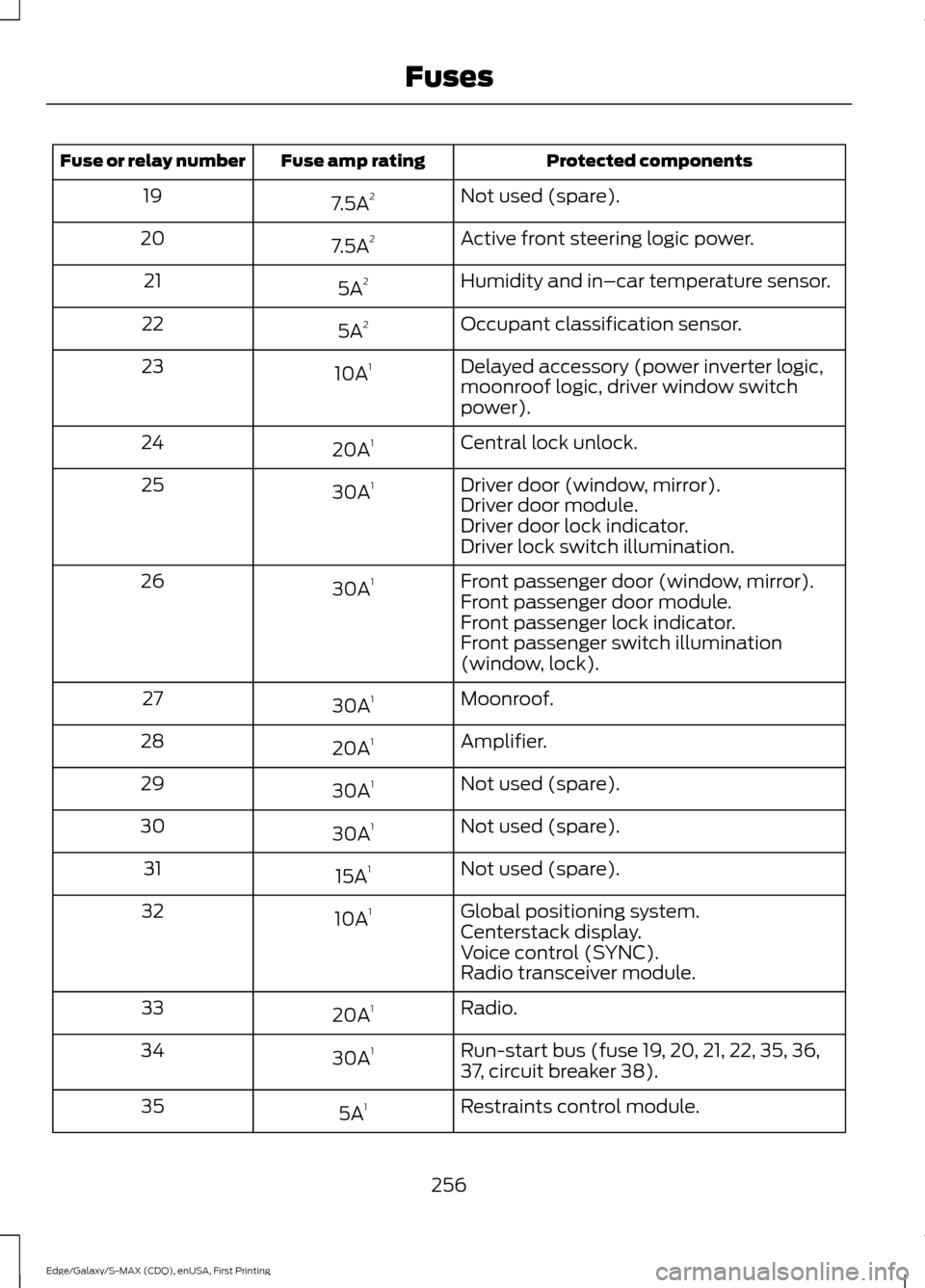
Protected components
Fuse amp rating
Fuse or relay number
Not used (spare).
7.5A 2
19
Active front steering logic power.
7.5A 2
20
Humidity and in–car temperature sensor.
5A 2
21
Occupant classification sensor.
5A 2
22
Delayed accessory (power inverter logic,
moonroof logic, driver window switch
power).
10A
1
23
Central lock unlock.
20A 1
24
Driver door (window, mirror).
30A 1
25
Driver door module.
Driver door lock indicator.
Driver lock switch illumination.
Front passenger door (window, mirror).
30A 1
26
Front passenger door module.
Front passenger lock indicator.
Front passenger switch illumination
(window, lock).
Moonroof.
30A 1
27
Amplifier.
20A 1
28
Not used (spare).
30A 1
29
Not used (spare).
30A 1
30
Not used (spare).
15A 1
31
Global positioning system.
10A 1
32
Centerstack display.
Voice control (SYNC).
Radio transceiver module.
Radio.
20A 1
33
Run-start bus (fuse 19, 20, 21, 22, 35, 36,
37, circuit breaker 38).
30A
1
34
Restraints control module.
5A 1
35
256
Edge/Galaxy/S-MAX (CDQ), enUSA, First Printing Fuses
Page 283 of 508
Note:
Never use abrasive materials, for
example steel wool or plastic pads as they
can scratch the chrome surface.
Note: Do not use chrome cleaner, metal
cleaner or polish on wheels or wheel covers.
Exterior Plastic Parts
For routine cleaning we recommend
Motorcraft Detail Wash. If tar or grease
spots are present, we recommend
Motorcraft Bug and Tar Remover.
Stripes or Graphics (If Equipped)
Do not use a commercial or high-pressure
sprayer on the surface or edge of stripes
and graphics. This can damage them and
cause the edges to peel away from the
vehicle surface.
Underbody
Flush the complete underside of your
vehicle frequently. Keep body and door
drain holes free of debris or foreign
material.
WAXING
Regular waxing is necessary to protect your
car's paint from the elements. We
recommend that you wash and wax the
painted surface once or twice a year.
When washing and waxing, park your
vehicle in a shaded area out of direct
sunlight. Always wash your vehicle before
applying wax.
• Use a quality wax that does not contain
abrasives.
• Follow the manufacturer ’s instructions
to apply and remove the wax.
• Apply a small amount of wax in a
back-and-forth motion, not in circles. •
Do not allow wax to come in contact
with any non-body (low-gloss black)
colored trim. The wax will discolor or
stain the parts over time.
•Roof racks.
• Bumpers.
• Grained door handles.
• Side moldings.
• Mirror housings.
• Windshield cowl area.
• Do not apply wax to glass areas.
• After waxing, your car's paint should
feel smooth, and be free of streaks and
smudges.
CLEANING THE ENGINE
Engines are more efficient when they are
clean because grease and dirt buildup keep
the engine warmer than normal.
When washing:
• Take care when using a power washer
to clean the engine. The high-pressure
fluid could penetrate the sealed parts
and cause damage.
• Do not spray a hot engine with cold
water to avoid cracking the engine
block or other engine components.
• Spray Motorcraft Engine Shampoo and
Degreaser on all parts that require
cleaning and pressure rinse clean. In
Canada, use Motorcraft Engine
Shampoo.
• Never wash or rinse the engine while it
is hot or running; water in the running
engine may cause internal damage.
280
Edge/Galaxy/S-MAX (CDQ), enUSA, First Printing Vehicle Care
Page 454 of 508
For a complete listing of the accessories
that are available for your vehicle, please
contact an authorized dealer or visit our
online store at www.Accessories.Ford.com
(United States only).
Ford Motor Company repairs or replaces
any properly authorized dealer-installed
Ford Original Accessory found to be
defective in factory-supplied materials or
workmanship during the warranty period,
as well as any component damaged by the
defective accessories.
Ford Motor Company warrants your
vehicle's accessory through the warranty
that provides the greatest benefit:
•
24 months, unlimited mileage.
• The remainder of your new vehicle
limited warranty.
Contact an authorized dealer for details
and a copy of the warranty.
Exterior Style
• Side window deflectors.
• Splash guards.
Interior Style
• Ambient lighting.
• Electrochromic compass and
temperature interior mirrors.
• Floor mats.
• Rear seat entertainment system*.
Lifestyle
• Ash cup or coin holder.
• Cargo organization and management.
• Cross bars and roof rails.
• Roof rack and carriers*.
• SUV camping tent*.
• Trailer hitches, wiring harnesses and
accessories. Peace of Mind
•
Bumper- and hitch-mounted parking
sensors*.
• Bumper protector.
• Car cover*.
• Cargo area protector.
• Cargo security shade.
• Keyless entry keypad.
• Remote start.
• Vehicle security.
• Wheel locks.
*Ford Licensed Accessory. The accessory
manufacturer designs, develops and
therefore warrants Ford Licensed
Accessories, and does not design or test
these accessories to Ford Motor Company
engineering requirements. Contact an
authorized Ford dealer for the accessory
manufacturer's limited warranty details
and request a copy of the Ford Licensed
Accessories product limited warranty from
the accessory manufacturer.
451
Edge/Galaxy/S-MAX (CDQ), enUSA, First Printing Accessories
Page 492 of 508
with or in communication with any
positioning devices or any mobile or
wireless-connected electronic or computer
devices, including without limitation
cellular phones, palmtop and handheld
computers, pagers, and personal digital
assistants or PDAs. You agree to cease
using this Data if you fail to comply with
these terms and conditions.
Limited Warranty
NAV2 warrants that (a) the Data will
perform substantially in accordance with
the accompanying written materials for a
period of ninety (90) days from the date
of receipt, and (b) any support services
provided by NAV2 shall be substantially as
described in applicable written materials
provided to you by NAV2, and NAV2’
s
support engineers will make commercially
reasonable efforts to solve any problem
issues.
rigCustomer Remedies
NAV2 and its suppliers’ entire liability and
your exclusive remedy shall be, at NAV2’ s
sole discretion, either (a) return of the price
paid, if any, or (b) repair or replacement of
the Data that do not meet NAV2’ s Limited
Warranty and that are returned to NAV2
with a copy of your receipt. This Limited
Warranty is void if failure of the Data has
resulted from accident, abuse, or
misapplication. Any replacement Data will
be warranted for the remainder of the
original warranty period or thirty (30) days,
whichever is longer. Neither these remedies
nor any product support services offered
by NAV2 are available without proof of
purchase from an authorized international
source. No Other Warranty:
EXCEPT FOR THE LMITED WARRANTY
SET FORTH ABOVE AND TO THE EXTENT
PERMITTED BY APPLICABLE LAW, NAV2
AND ITS LICENSORS (INCLUDING THEIR
LICENSORS AND SUPPLIERS) DISCLAIM
ANY WARRANTIES, EXPRESS OR IMPLIED,
OF QUALITY, PERFORMANCE,
MERCHANTABILITY, FITNESS FOR A
PARTICULAR PURPOSE, OWNERSHIP OR
NON-INFRINGEMENT. Certain warranty
exclusions may not be permitted under
applicable law, so to that extent the above
exclusion may not apply to you.
Limited Liability:
TO THE EXTENT PERMITTED BY
APPLICABLE LAW, NAV2 AND ITS
LICENSORS (INCLUDING THEIR
LICENSORS AND SUPPLIERS) SHALL NOT
BE LIABLE TO YOU: IN RESPECT OF ANY
CLAIM, DEMAND OR ACTION,
IRRESPECTIVE OF THE NATURE OF THE
CAUSE OF THE CLAIM, DEMAND OR
ACTION ALLEGING ANY LOSS, INJURY OR
DAMAGES, DIRECT OR INDIRECT, WHICH
MAY RESULT FROM THE USE OR
POSSESSION OF THE INFORMATION; OR
FOR ANY LOSS OF PROFIT, REVENUE,
CONTRACTS OR SAVINGS, OR ANY
OTHER DIRECT, INDIRECT, INCIDENTAL,
SPECIAL OR CONSEQUENTIAL DAMAGES
ARISING OUT OF YOUR USE OF OR
INABILITY TO USE THIS INFORMATION,
ANY DEFECT IN THE INFROMATION, OR
THE BREACH OF THESE TERMS OR
CONDITIONS, WHETHER IN AN ACTION
IN CONTRACT OR TORT OR BASED ON A
WARRANTY, EVEN IF NAV2 OR ITS
LICENSORS HAVE BEEN ADVISED OF THE
POSSIBILITY OF SUCH DAMAGES. UNDER
NO CIRCUMSTANCES SHALL NAV2’
s OR
ITS SUPPLIERS ’ LIABILITY HEREUNDER
EXCEED THE PRICE PAID. Certain liability
exclusions may not be permitted under
applicable law, so to that extent the above
exclusion may not apply to you.
489
Edge/Galaxy/S-MAX (CDQ), enUSA, First Printing Appendices
Page 503 of 508
Instrument Cluster.........................................93
Instrument Lighting Dimmer.....................83
Interior Lamps
.................................................85
Front Interior Lamp............................................. 85
Rear Interior Lamp............................................... 87
Interior Mirror...................................................90 Auto-Dimming Mirror......................................... 90
Introduction.........................................................7
J
Jump Starting the Vehicle........................239 Connecting the Jumper Cables.................... 239
Jump Starting..................................................... 240
Preparing Your Vehicle..................................... 239
Removing the Jumper Cables....................... 240
K
Keyless Entry
...................................................68
SECURICODE™ KEYLESS ENTRY
KEYPAD.............................................................. 68
Keyless Starting - Vehicles With: Push Button Start................................................150
Ignition Modes...................................................... 151
Keys and Remote Controls.........................47
L
Lane Keeping System................................204 Switching the System On and Off..............205
Lighting Control
...............................................81
Headlamp Flasher............................................... 82
High Beams............................................................. 81
Lighting...............................................................81 General Information............................................. 81
Load Carriers See: Roof Racks and Load Carriers..............217
Load Carrying
..................................................217
Load Limit........................................................218 Special Loading Instructions for Owners of
Pick-up Trucks and Utility-type
Vehicles............................................................. 225
Vehicle Loading - with and without a Trailer.................................................................. 218Locking and Unlocking................................60
Activating Intelligent Access............................ 62
Autolock .................................................................. 63
Auto Relock............................................................ 63
Autounlock............................................................. 63
Battery Saver......................................................... 64
Enabling or Disabling Autolock and Autounlock........................................................ 63
Illuminated Entry.................................................. 63
Illuminated Exit..................................................... 64
Locking and Unlocking the Doors with the Key Blade............................................................. 61
Power Door Locks................................................ 60
Remote Control.................................................... 60
Smart Unlocks for Integrated Keyhead Transmitter........................................................ 62
Smart Unlocks for Intelligent Access Keys...................................................................... 62
Locks..................................................................60
Lug Nuts See: Changing a Road Wheel......................... 315
M
Maintenance.................................................258 General Information......................................... 258
Manual Climate Control - Vehicles With: Electronic Manual Temperature
Control (EMTC)
..........................................124
Manual Liftgate..............................................64 Closing the Liftgate............................................. 65
Opening the Liftgate........................................... 64
Manual Seats
.................................................135
Media Hub......................................................353
Memory Function
..........................................137
Easy Entry and Exit Feature............................ 139
Linking a PreSet Position to your Remote Control or Intelligent Access Key
Fob...................................................................... 138
Saving a PreSet Position................................. 138
Message Center See: Information Displays............................... 100
Mirrors See: Heated Windows and Mirrors................131
See: Windows and Mirrors............................... 88
Mobile Communications Equipment
.......12
Moonroof............................................................91 Opening and Closing the Moonroof...............91
500
Edge/Galaxy/S-MAX (CDQ), enUSA, First Printing Index
Page 505 of 508
Refueling.........................................................160
Easy Fuel ™ Capless Fuel System.................161
Remote Control...............................................47 Car Finder................................................................. 51
Integrated Keyhead Transmitters .................. 47
Intelligent Access Key........................................ 48
Remote Start ......................................................... 51
Replacing the Battery......................................... 49
Sounding a Panic Alarm..................................... 51
Using the Key Blade............................................ 48
Remote Start...................................................131
Automatic Settings............................................ 132
Removing a Headlamp..............................274
Repairing Minor Paint Damage..............283
Replacement Parts Recommendation.........................................11
Collision Repairs..................................................... 11
Scheduled Maintenance and Mechanical Repairs................................................................... 11
Warranty on Replacement Parts..................... 12
Replacing a Lost Key or Remote Control.............................................................53
Reporting Safety Defects (Canada Only)..............................................................247
Reporting Safety Defects (U.S. Only)..............................................................246
Roadside Assistance...................................237 Vehicles Sold in Canada: Getting Roadside
Assistance........................................................ 237
Vehicles Sold in Canada: Using Roadside Assistance........................................................ 237
Vehicles Sold in the United States: Getting Roadside Assistance.................................... 237
Vehicles Sold in the United States: Using Roadside Assistance.................................... 237
Roadside Emergencies
..............................237
Roof Racks and Load Carriers..................217
Running-In See: Breaking-In................................................. 234
Running Out of Fuel....................................159 Adding Fuel From a Portable Fuel
Container.......................................................... 160
Filling a Portable Fuel Container.................. 160
S
Safety Belt Height Adjustment
.................34 Safety Belt Minder
.........................................35
Belt-Minder™........................................................ 35
Safety Belts
......................................................29
Principle of Operation........................................ 29
Safety Belt Warning Lamp and Indicator Chime..............................................................34
Conditions of operation..................................... 34
Safety Canopy ™
............................................44
Safety Precautions......................................158
Satellite Radio..............................................349 Satellite Radio Electronic Serial Number
(ESN)................................................................ 350
Satellite Radio Reception Factors..............350
SIRIUS® Satellite Radio Service.................350
Troubleshooting.................................................. 351
Scheduled Maintenance Record
...........463
Scheduled Maintenance...........................455
Seats..................................................................133
Security
................................................................71
Settings............................................................397 Clock....................................................................... 397
Display................................................................... 398
Settings................................................................ 400
Sound.................................................................... 398
Vehicle................................................................... 399
Side Airbags.....................................................42
Side Sensing System..................................185 Obstacle Distance Indicator.......................... 186
Sitting in the Correct Position..................133
Snow Chains See: Using Snow Chains................................... 311
Special Notices................................................12 New Vehicle Limited Warranty......................... 12
On-board Diagnostics (OBD-II)....................... 12
Special Instructions.............................................. 12
Special Operating Conditions Scheduled Maintenance...............................................461
Exceptions............................................................ 463
Speed Control See: Cruise Control............................................ 196
Stability Control
.............................................181
Principle of Operation........................................ 181
Starter Switch See: Ignition Switch........................................... 150
502
Edge/Galaxy/S-MAX (CDQ), enUSA, First Printing Index
Page 506 of 508
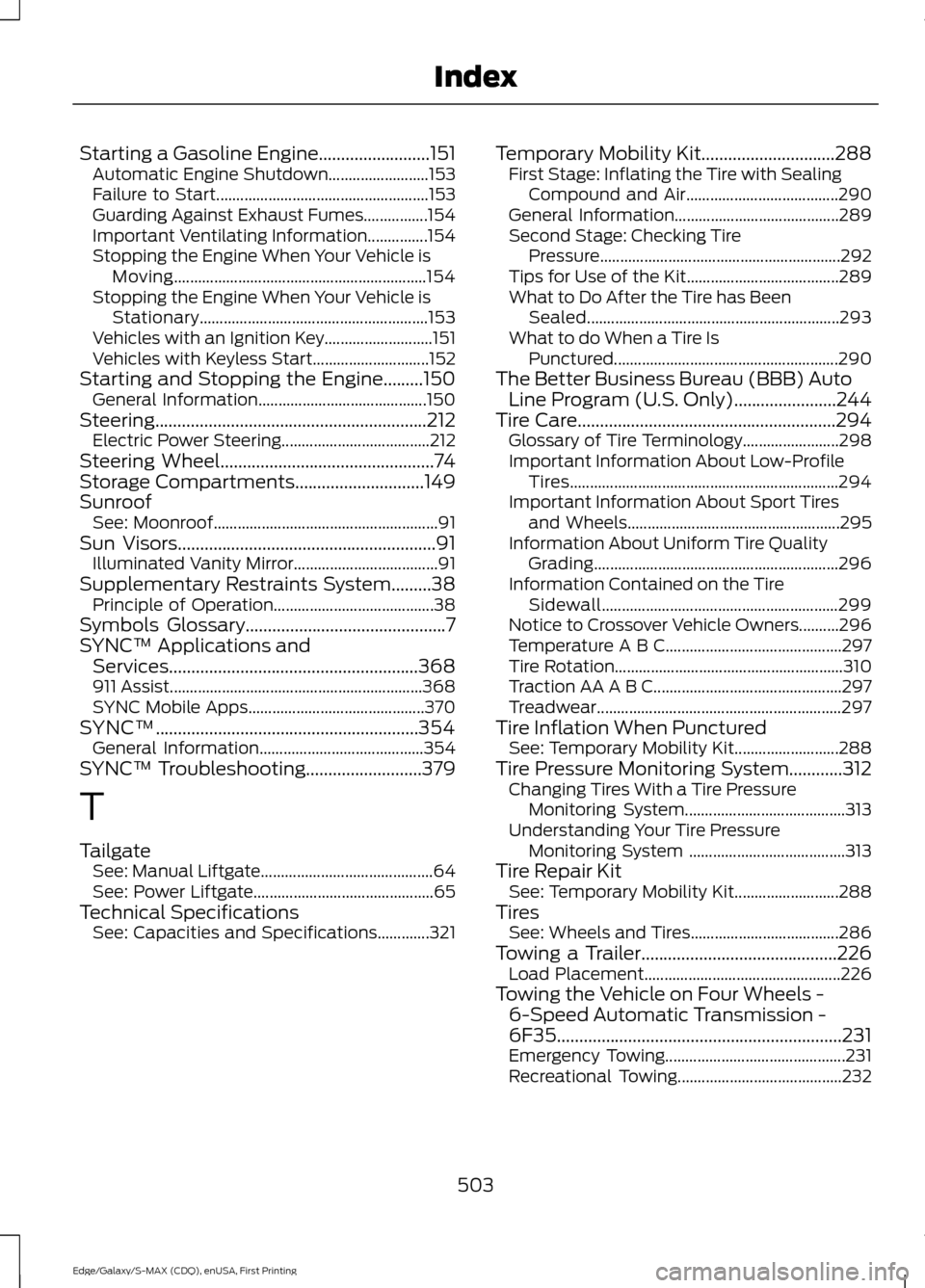
Starting a Gasoline Engine.........................151
Automatic Engine Shutdown......................... 153
Failure to Start..................................................... 153
Guarding Against Exhaust Fumes................154
Important Ventilating Information...............154
Stopping the Engine When Your Vehicle is Moving............................................................... 154
Stopping the Engine When Your Vehicle is Stationary......................................................... 153
Vehicles with an Ignition Key........................... 151
Vehicles with Keyless Start............................. 152
Starting and Stopping the Engine.........150 General Information.......................................... 150
Steering.............................................................212 Electric Power Steering..................................... 212
Steering Wheel................................................74
Storage Compartments.............................149
Sunroof See: Moonroof........................................................ 91
Sun Visors
..........................................................91
Illuminated Vanity Mirror.................................... 91
Supplementary Restraints System.........38 Principle of Operation........................................ 38
Symbols Glossary
.............................................7
SYNC™ Applications and Services
........................................................368
911 Assist............................................................... 368
SYNC Mobile Apps............................................ 370
SYNC™...........................................................354 General Information......................................... 354
SYNC™ Troubleshooting
..........................379
T
Tailgate See: Manual Liftgate........................................... 64
See: Power Liftgate............................................. 65
Technical Specifications See: Capacities and Specifications.............321 Temporary Mobility Kit..............................288
First Stage: Inflating the Tire with Sealing
Compound and Air...................................... 290
General Information......................................... 289
Second Stage: Checking Tire Pressure............................................................ 292
Tips for Use of the Kit...................................... 289
What to Do After the Tire has Been Sealed............................................................... 293
What to do When a Tire Is Punctured........................................................ 290
The Better Business Bureau (BBB) Auto Line Program (U.S. Only)
.......................244
Tire Care..........................................................294
Glossary of Tire Terminology........................ 298
Important Information About Low-Profile Tires................................................................... 294
Important Information About Sport Tires and Wheels..................................................... 295
Information About Uniform Tire Quality Grading............................................................. 296
Information Contained on the Tire Sidewall........................................................... 299
Notice to Crossover Vehicle Owners..........296
Temperature A B C............................................ 297
Tire Rotation......................................................... 310
Traction AA A B C............................................... 297
Treadwear............................................................. 297
Tire Inflation When Punctured See: Temporary Mobility Kit.......................... 288
Tire Pressure Monitoring System............312 Changing Tires With a Tire Pressure
Monitoring System........................................ 313
Understanding Your Tire Pressure Monitoring System ....................................... 313
Tire Repair Kit See: Temporary Mobility Kit.......................... 288
Tires See: Wheels and Tires..................................... 286
Towing a Trailer
............................................226
Load Placement................................................. 226
Towing the Vehicle on Four Wheels - 6-Speed Automatic Transmission -
6F35
................................................................231
Emergency Towing............................................. 231
Recreational Towing......................................... 232
503
Edge/Galaxy/S-MAX (CDQ), enUSA, First Printing Index