suspension FORD EDGE 2015 2.G User Guide
[x] Cancel search | Manufacturer: FORD, Model Year: 2015, Model line: EDGE, Model: FORD EDGE 2015 2.GPages: 508, PDF Size: 6.2 MB
Page 313 of 508
Tire and Wheel Alignment
A bad jolt from hitting a curb or
pothole can cause the front end
of your vehicle to become
misaligned or cause damage to
your tires. If your vehicle seems to
pull to one side when you’re
driving, the wheels may be out of
alignment. Have an authorized
dealer check the wheel alignment
periodically.
Wheel misalignment in the front
or the rear can cause uneven and
rapid treadwear of your tires and
should be corrected by an
authorized dealer. Front-wheel
drive vehicles and those with an
independent rear suspension may
require alignment of all four
wheels.
The tires should also be balanced
periodically. An unbalanced tire
and wheel assembly may result in
irregular tire wear.
Tire Rotation
Note:
If your tires show uneven
wear ask an authorized dealer to
check for and correct any wheel
misalignment, tire imbalance or
mechanical problem involved
before tire rotation. Note:
Your vehicle may be
equipped with a dissimilar spare
wheel and tire assembly. A
dissimilar spare wheel and tire
assembly is defined as a spare
wheel and tire assembly that is
different in brand, size or
appearance from the road tires and
wheels. If you have a dissimilar
spare wheel and tire assembly it is
intended for temporary use only
and should not be used in a tire
rotation.
Note: After having your tires
rotated, inflation pressure must be
checked and adjusted to the
vehicle requirements.
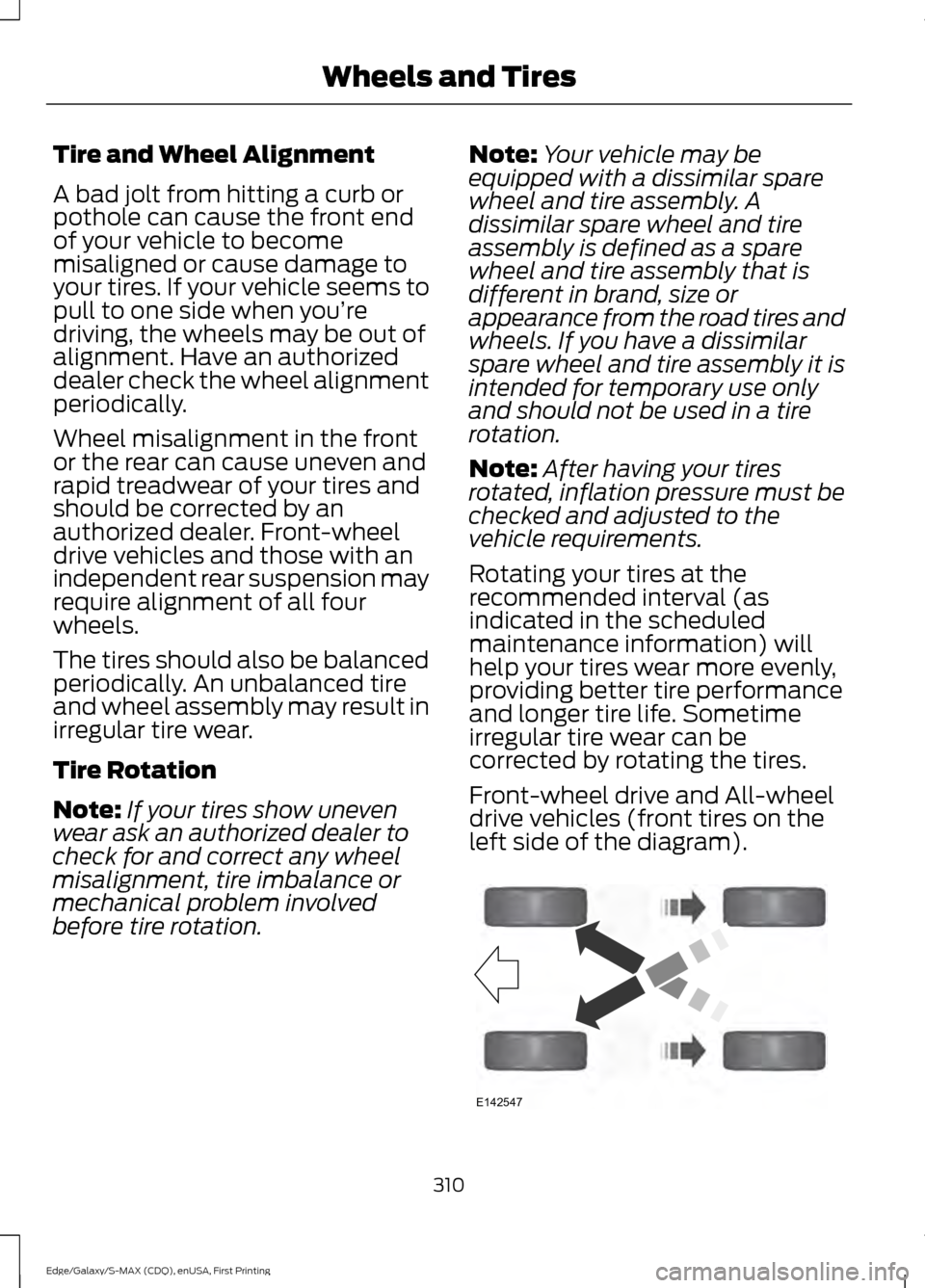
Rotating your tires at the
recommended interval (as
indicated in the scheduled
maintenance information) will
help your tires wear more evenly,
providing better tire performance
and longer tire life. Sometime
irregular tire wear can be
corrected by rotating the tires.
Front-wheel drive and All-wheel
drive vehicles (front tires on the
left side of the diagram). 310
Edge/Galaxy/S-MAX (CDQ), enUSA, First Printing Wheels and TiresE142547
Page 314 of 508
USING SUMMER TIRES
Summer tires provide superior
performance on wet and dry roads.
Summer tires do not have the Mud and
Snow (M+S or M/S) tire traction rating on
the tire side wall. Since summer tires do
not have the same traction performance
as All-season or Snow tires, we do not
recommend using summer tires when
temperatures drop to about 40ºF (5ºC)
or below (depending on tire wear and
environmental conditions) or in snow and
ice conditions. Like any tire, summer tire
performance is affected by tire wear and
environmental conditions. If you must drive
in those conditions, we recommend using
Mud and Snow (M+S, M/S), All-season or
Snow tires.
Always store your summer tires indoors at
temperatures above 20ºF (-7ºC). The
rubber compounds used in these tires lose
flexibility and may develop surface cracks
in the tread area at temperatures below
20ºF (-7ºC). If the tires have been
subjected to 20ºF (-7ºC) or less, warm
them in a heated space to at least 40ºF
(5ºC) for at least 24 hours before installing
them on a vehicle, or moving the vehicle
with the tires installed, or checking tire
inflation. Do not place tires near heaters
or heating devices used to warm the room
where the tires are stored. Do not apply
heat or blow heated air directly on the tires.
Always inspect the tires after storage
periods and before use.
USING SNOW CHAINS WARNING
Snow tires must be the same size,
load index, speed rating as those
originally provided by Ford. Use of
any tire or wheel not recommended by
Ford can affect the safety and
performance of your vehicle, which could
result in an increased risk of loss of vehicle
control, vehicle rollover, personal injury and
death. Additionally, the use of
non-recommended tires and wheels could
cause steering, suspension, axle, transfer
case or power transfer unit failure. The tires on your vehicle may have
all-weather treads to provide traction in
rain and snow. However, in some climates,
you may need to use snow tires and cables.
If you need to use cables, we recommend
that you use steel wheels (of the same size
and specifications), as cables may chip
aluminum wheels.
Follow these guidelines when using snow
tires and traction device:
•
If possible, avoid fully loading your
vehicle.
• Purchase chains or cables from a
manufacturer that clearly labels body
to tire dimension restrictions.
• Use no larger than 10 mm cables or
chains ONLY on the front axle with
235/60R18 tires. Do not use chains or
cables on any other size tires.
• The snow chains or cables must be
mounted in pairs on the front axle.
• When driving with tire cables, do not
exceed 30 mph (48 km/h) or the
maximum speed recommended by the
chain manufacturer, whichever is less.
311
Edge/Galaxy/S-MAX (CDQ), enUSA, First Printing Wheels and Tires
Page 461 of 508
Multi-Point inspection
Hazard warning system operation
Accessory drive belt(s)
Horn operation
Battery performance
Radiator, cooler, heater and air conditioninghoses
Engine air filter
Suspension components for leaks ordamage
Exhaust system
Steering and linkage
Exterior lamps operation
Tires (including spare) for wear and properpressure**
Fluid levels *
; fill if necessary
Windshield for cracks, chips or pits
For oil and fluid leaks
Washer spray and wiper operation
Half-shaft dust boots
* Brake, coolant recovery reservoir, automatic transmission and window washer
** If your vehicle is equipped with a temporary mobility kit, check the tire sealant expiration
Use By date on the canister. Replace as needed.
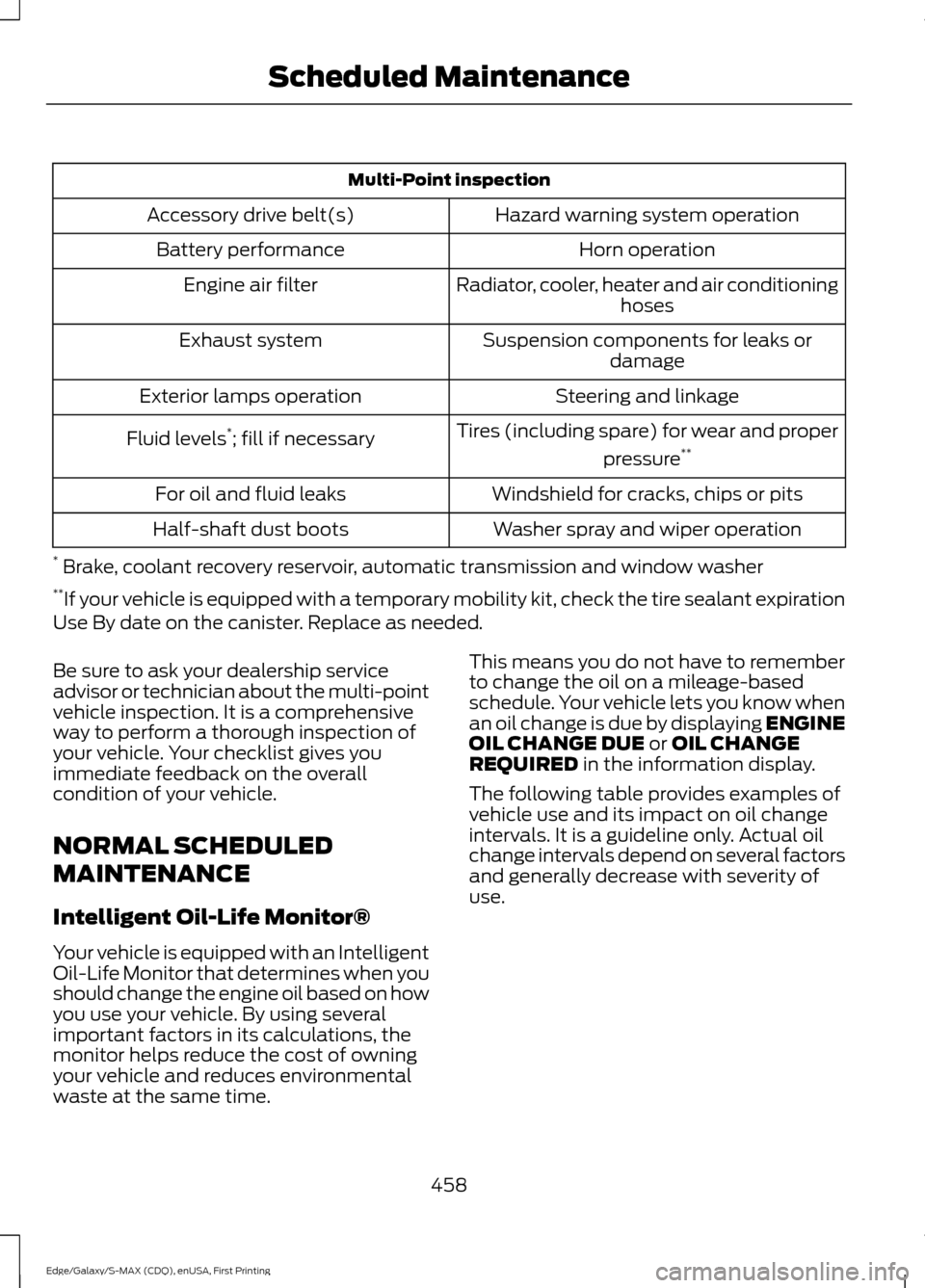
Be sure to ask your dealership service
advisor or technician about the multi-point
vehicle inspection. It is a comprehensive
way to perform a thorough inspection of
your vehicle. Your checklist gives you
immediate feedback on the overall
condition of your vehicle.
NORMAL SCHEDULED
MAINTENANCE
Intelligent Oil-Life Monitor®
Your vehicle is equipped with an Intelligent
Oil-Life Monitor that determines when you
should change the engine oil based on how
you use your vehicle. By using several
important factors in its calculations, the
monitor helps reduce the cost of owning
your vehicle and reduces environmental
waste at the same time. This means you do not have to remember
to change the oil on a mileage-based
schedule. Your vehicle lets you know when
an oil change is due by displaying ENGINE
OIL CHANGE DUE or OIL CHANGE
REQUIRED in the information display.
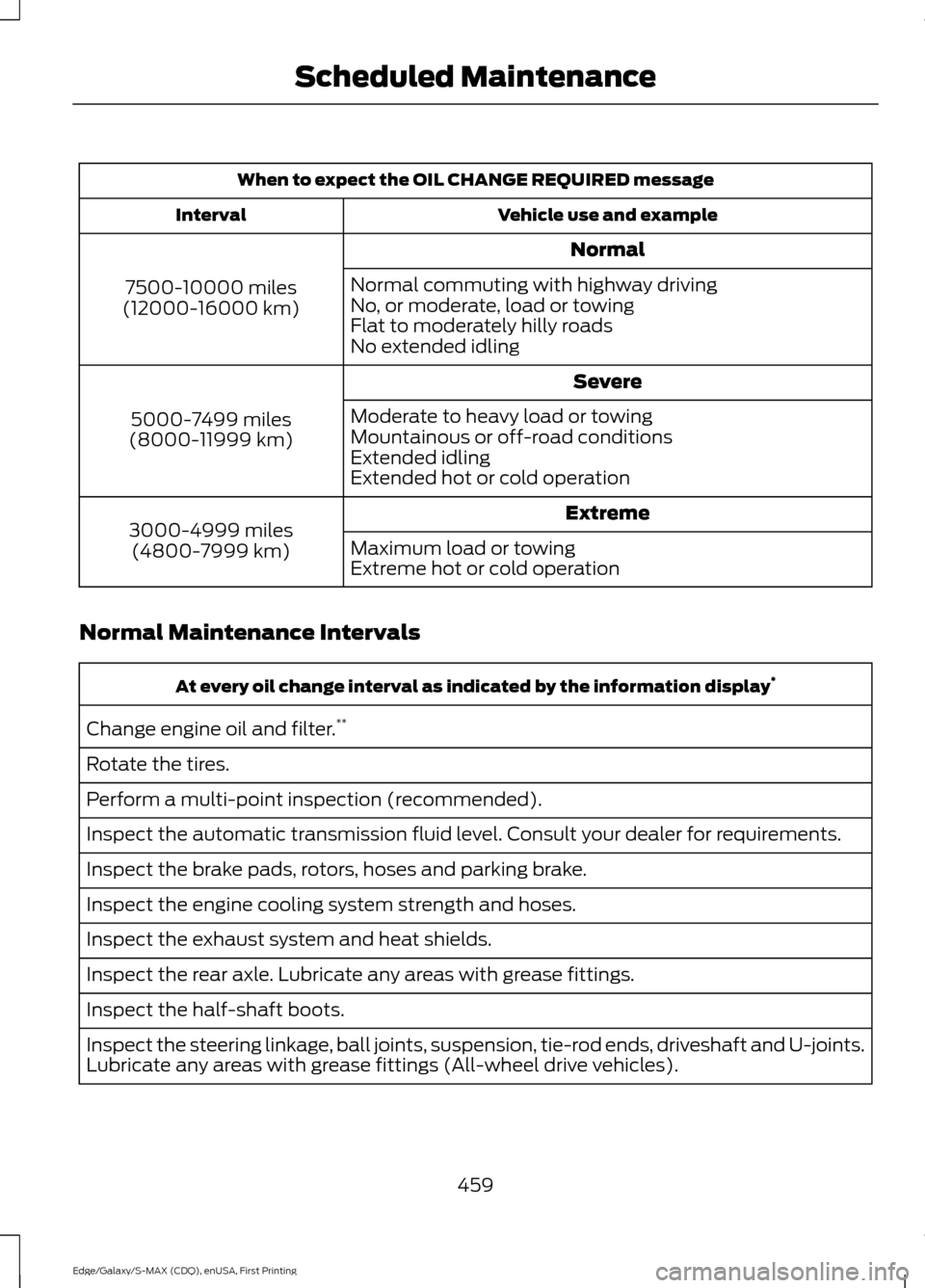
The following table provides examples of
vehicle use and its impact on oil change
intervals. It is a guideline only. Actual oil
change intervals depend on several factors
and generally decrease with severity of
use.
458
Edge/Galaxy/S-MAX (CDQ), enUSA, First Printing Scheduled Maintenance
Page 462 of 508
When to expect the OIL CHANGE REQUIRED message
Vehicle use and example
Interval
Normal
7500-10000 miles
(12000-16000 km) Normal commuting with highway driving
No, or moderate, load or towing
Flat to moderately hilly roads
No extended idling
Severe
5000-7499 miles
(8000-11999 km) Moderate to heavy load or towing
Mountainous or off-road conditions
Extended idling
Extended hot or cold operation
Extreme
3000-4999 miles
(4800-7999 km) Maximum load or towing
Extreme hot or cold operation
Normal Maintenance Intervals At every oil change interval as indicated by the information display
*
Change engine oil and filter. **
Rotate the tires.
Perform a multi-point inspection (recommended).
Inspect the automatic transmission fluid level. Consult your dealer for requirements.
Inspect the brake pads, rotors, hoses and parking brake.
Inspect the engine cooling system strength and hoses.
Inspect the exhaust system and heat shields.
Inspect the rear axle. Lubricate any areas with grease fittings.
Inspect the half-shaft boots.
Inspect the steering linkage, ball joints, suspension, tie-rod ends, driveshaft and U-joints.
Lubricate any areas with grease fittings (All-wheel drive vehicles).
459
Edge/Galaxy/S-MAX (CDQ), enUSA, First Printing Scheduled Maintenance
Page 500 of 508
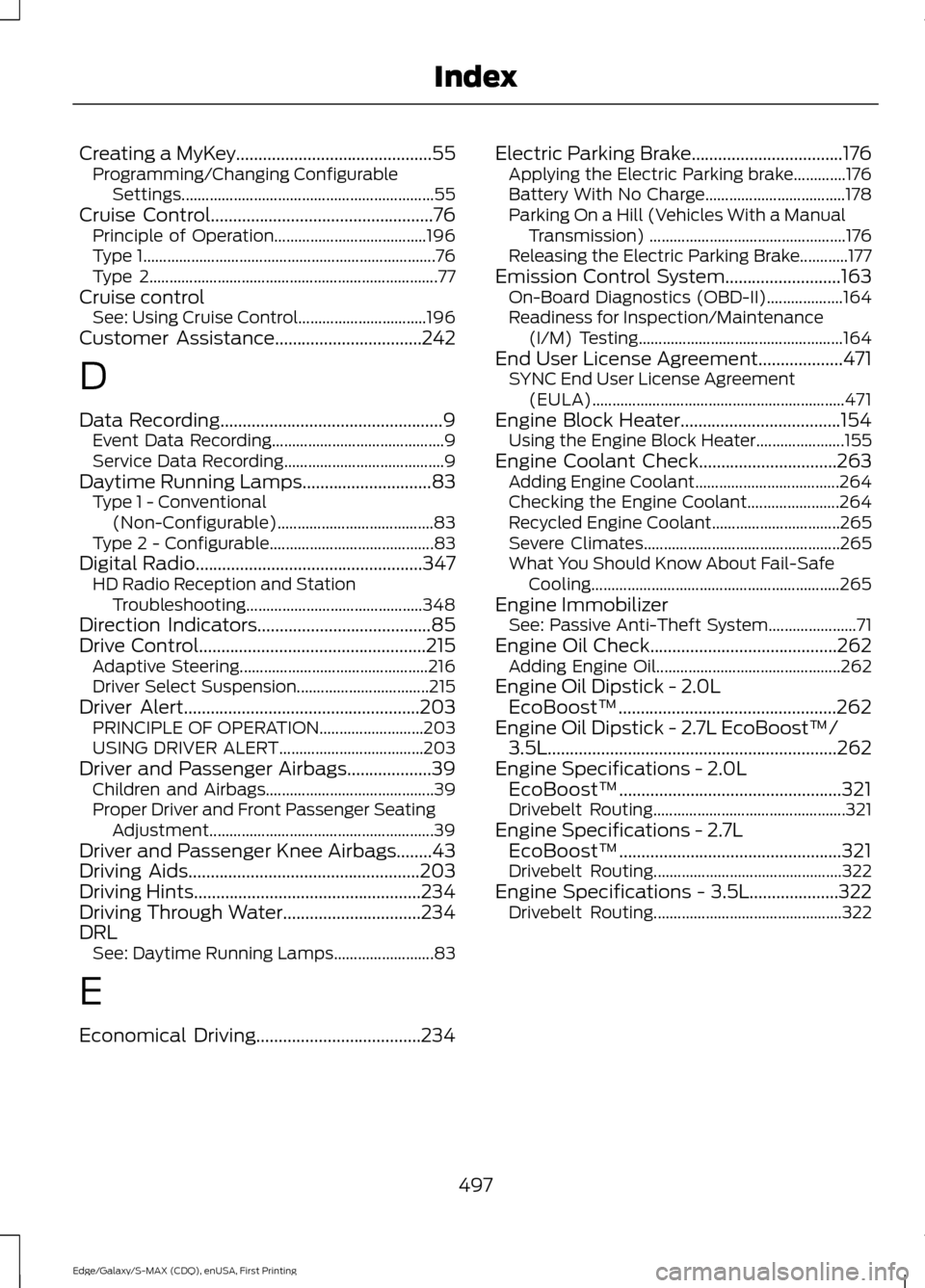
Creating a MyKey............................................55
Programming/Changing Configurable
Settings............................................................... 55
Cruise Control
..................................................76
Principle of Operation...................................... 196
Type 1........................................................................\
. 76
Type 2........................................................................\
77
Cruise control See: Using Cruise Control................................ 196
Customer Assistance.................................242
D
Data Recording
..................................................9
Event Data Recording........................................... 9
Service Data Recording........................................ 9
Daytime Running Lamps
.............................83
Type 1 - Conventional
(Non-Configurable)....................................... 83
Type 2 - Configurable......................................... 83
Digital Radio
...................................................347
HD Radio Reception and Station
Troubleshooting............................................ 348
Direction Indicators
.......................................85
Drive Control...................................................215
Adaptive Steering............................................... 216
Driver Select Suspension................................. 215
Driver Alert.....................................................203 PRINCIPLE OF OPERATION.......................... 203
USING DRIVER ALERT.................................... 203
Driver and Passenger Airbags...................39 Children and Airbags.......................................... 39
Proper Driver and Front Passenger Seating Adjustment........................................................ 39
Driver and Passenger Knee Airbags........43
Driving Aids
....................................................203
Driving Hints...................................................234
Driving Through Water...............................234
DRL See: Daytime Running Lamps......................... 83
E
Economical Driving.....................................234 Electric Parking Brake
..................................176
Applying the Electric Parking brake.............176
Battery With No Charge................................... 178
Parking On a Hill (Vehicles With a Manual Transmission) ................................................. 176
Releasing the Electric Parking Brake............177
Emission Control System..........................163 On-Board Diagnostics (OBD-II)................... 164
Readiness for Inspection/Maintenance (I/M) Testing................................................... 164
End User License Agreement...................471 SYNC End User License Agreement
(EULA)............................................................... 471
Engine Block Heater....................................154 Using the Engine Block Heater...................... 155
Engine Coolant Check
...............................263
Adding Engine Coolant.................................... 264
Checking the Engine Coolant....................... 264
Recycled Engine Coolant................................ 265
Severe Climates................................................. 265
What You Should Know About Fail-Safe Cooling.............................................................. 265
Engine Immobilizer See: Passive Anti-Theft System...................... 71
Engine Oil Check..........................................262 Adding Engine Oil.............................................. 262
Engine Oil Dipstick - 2.0L EcoBoost™.................................................262
Engine Oil Dipstick - 2.7L EcoBoost™/ 3.5L
.................................................................262
Engine Specifications - 2.0L EcoBoost™..................................................321
Drivebelt Routing................................................ 321
Engine Specifications - 2.7L EcoBoost™..................................................321
Drivebelt Routing............................................... 322
Engine Specifications - 3.5L....................322 Drivebelt Routing............................................... 322
497
Edge/Galaxy/S-MAX (CDQ), enUSA, First Printing Index