lights FORD EDGE 2015 2.G Owner's Manual
[x] Cancel search | Manufacturer: FORD, Model Year: 2015, Model line: EDGE, Model: FORD EDGE 2015 2.GPages: 508, PDF Size: 6.2 MB
Page 460 of 508
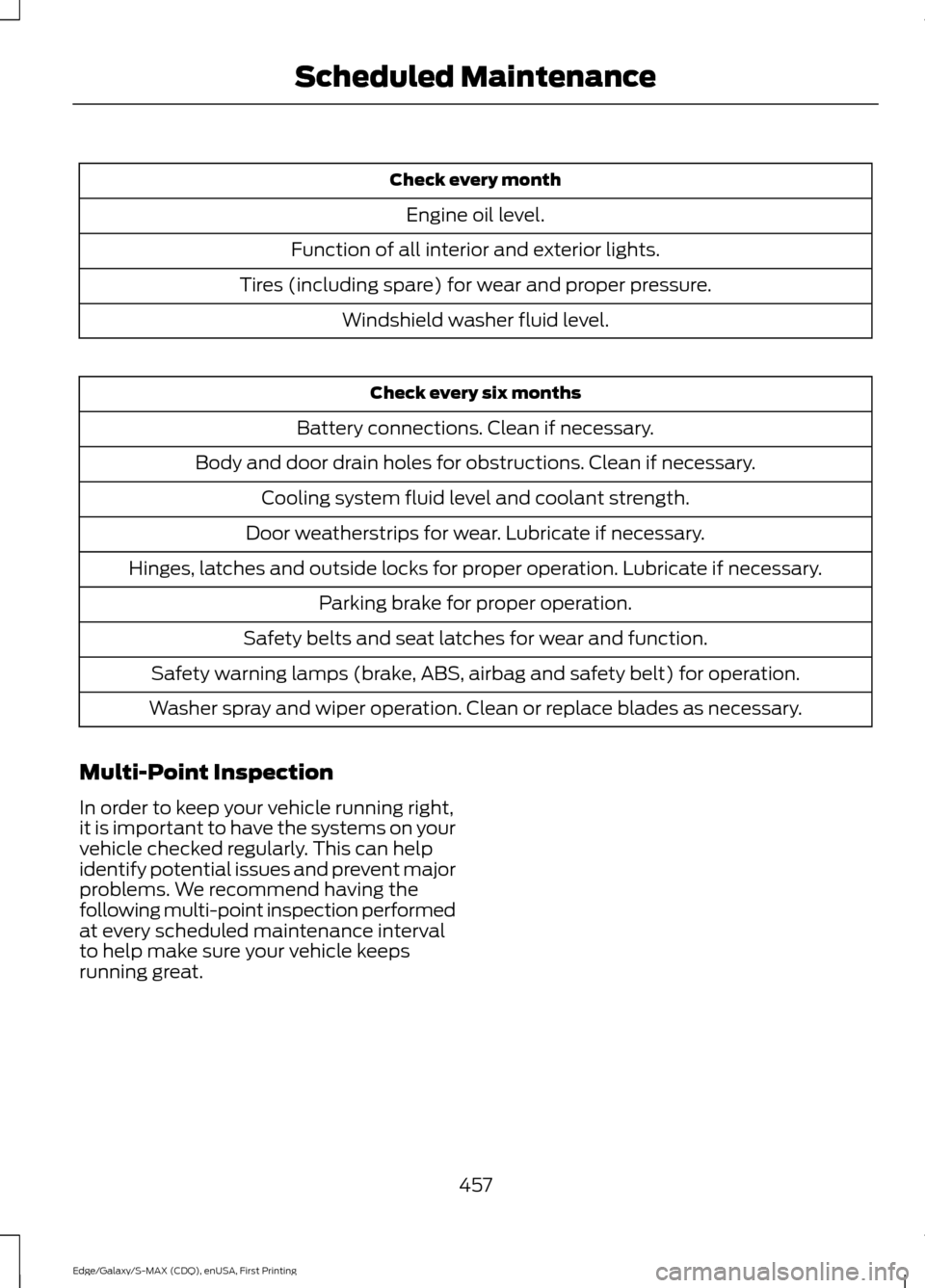
Check every month
Engine oil level.
Function of all interior and exterior lights.
Tires (including spare) for wear and proper pressure. Windshield washer fluid level. Check every six months
Battery connections. Clean if necessary.
Body and door drain holes for obstructions. Clean if necessary. Cooling system fluid level and coolant strength.
Door weatherstrips for wear. Lubricate if necessary.
Hinges, latches and outside locks for proper operation. Lubricate if necessary. Parking brake for proper operation.
Safety belts and seat latches for wear and function.
Safety warning lamps (brake, ABS, airbag and safety belt) for operation.
Washer spray and wiper operation. Clean or replace blades as necessary.
Multi-Point Inspection
In order to keep your vehicle running right,
it is important to have the systems on your
vehicle checked regularly. This can help
identify potential issues and prevent major
problems. We recommend having the
following multi-point inspection performed
at every scheduled maintenance interval
to help make sure your vehicle keeps
running great.
457
Edge/Galaxy/S-MAX (CDQ), enUSA, First Printing Scheduled Maintenance
Page 507 of 508
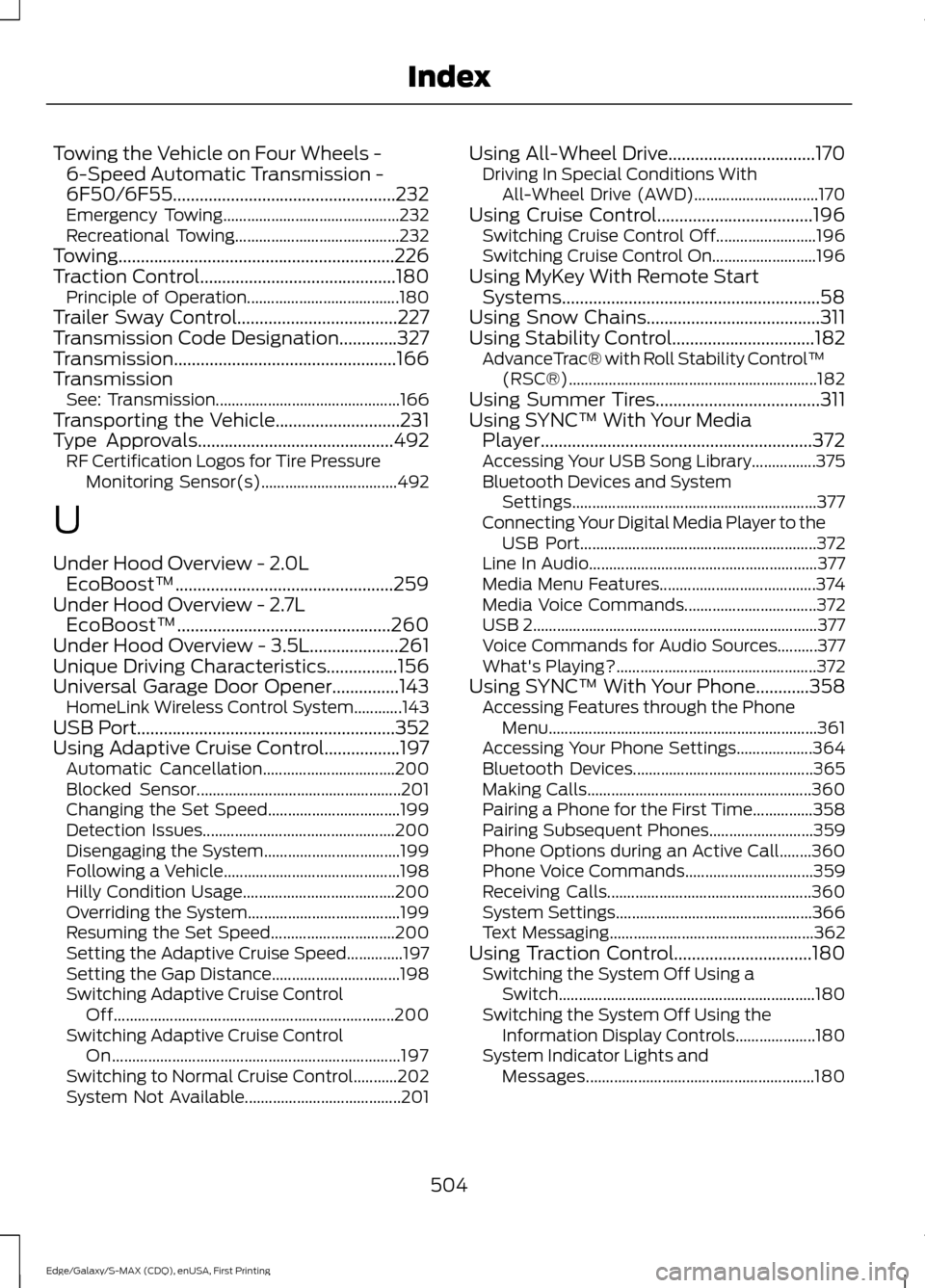
Towing the Vehicle on Four Wheels -
6-Speed Automatic Transmission -
6F50/6F55..................................................232
Emergency Towing............................................ 232
Recreational Towing......................................... 232
Towing..............................................................226
Traction Control............................................180 Principle of Operation...................................... 180
Trailer Sway Control....................................227
Transmission Code Designation.............327
Transmission..................................................166
Transmission See: Transmission.............................................. 166
Transporting the Vehicle............................231
Type Approvals
............................................492
RF Certification Logos for Tire Pressure
Monitoring Sensor(s).................................. 492
U
Under Hood Overview - 2.0L EcoBoost™.................................................259
Under Hood Overview - 2.7L EcoBoost™................................................260
Under Hood Overview - 3.5L....................261
Unique Driving Characteristics................156
Universal Garage Door Opener...............143 HomeLink Wireless Control System............143
USB Port..........................................................352
Using Adaptive Cruise Control.................197 Automatic Cancellation................................. 200
Blocked Sensor................................................... 201
Changing the Set Speed................................. 199
Detection Issues................................................ 200
Disengaging the System.................................. 199
Following a Vehicle............................................ 198
Hilly Condition Usage...................................... 200
Overriding the System...................................... 199
Resuming the Set Speed............................... 200
Setting the Adaptive Cruise Speed..............197
Setting the Gap Distance................................ 198
Switching Adaptive Cruise Control Off...................................................................... 200
Switching Adaptive Cruise Control On........................................................................\
197
Switching to Normal Cruise Control...........202
System Not Available....................................... 201Using All-Wheel Drive.................................170
Driving In Special Conditions With
All-Wheel Drive (AWD)............................... 170
Using Cruise Control...................................196 Switching Cruise Control Off......................... 196
Switching Cruise Control On.......................... 196
Using MyKey With Remote Start Systems..........................................................58
Using Snow Chains.......................................311
Using Stability Control................................182 AdvanceTrac® with Roll Stability Control ™
(RSC®).............................................................. 182
Using Summer Tires.....................................311
Using SYNC™ With Your Media Player.............................................................372
Accessing Your USB Song Library................375
Bluetooth Devices and System Settings............................................................. 377
Connecting Your Digital Media Player to the USB Port........................................................... 372
Line In Audio......................................................... 377
Media Menu Features....................................... 374
Media Voice Commands................................. 372
USB 2
....................................................................... 377
Voice Commands for Audio Sources..........377
What's Playing?.................................................. 372
Using SYNC™ With Your Phone
............358
Accessing Features through the Phone
Menu................................................................... 361
Accessing Your Phone Settings................... 364
Bluetooth Devices............................................. 365
Making Calls........................................................ 360
Pairing a Phone for the First Time...............358
Pairing Subsequent Phones.......................... 359
Phone Options during an Active Call........360
Phone Voice Commands................................ 359
Receiving Calls................................................... 360
System Settings................................................. 366
Text Messaging................................................... 362
Using Traction Control...............................180 Switching the System Off Using a
Switch................................................................ 180
Switching the System Off Using the Information Display Controls.................... 180
System Indicator Lights and Messages......................................................... 180
504
Edge/Galaxy/S-MAX (CDQ), enUSA, First Printing Index