tow FORD EDGE 2015 2.G Owner's Guide
[x] Cancel search | Manufacturer: FORD, Model Year: 2015, Model line: EDGE, Model: FORD EDGE 2015 2.GPages: 508, PDF Size: 6.2 MB
Page 189 of 508
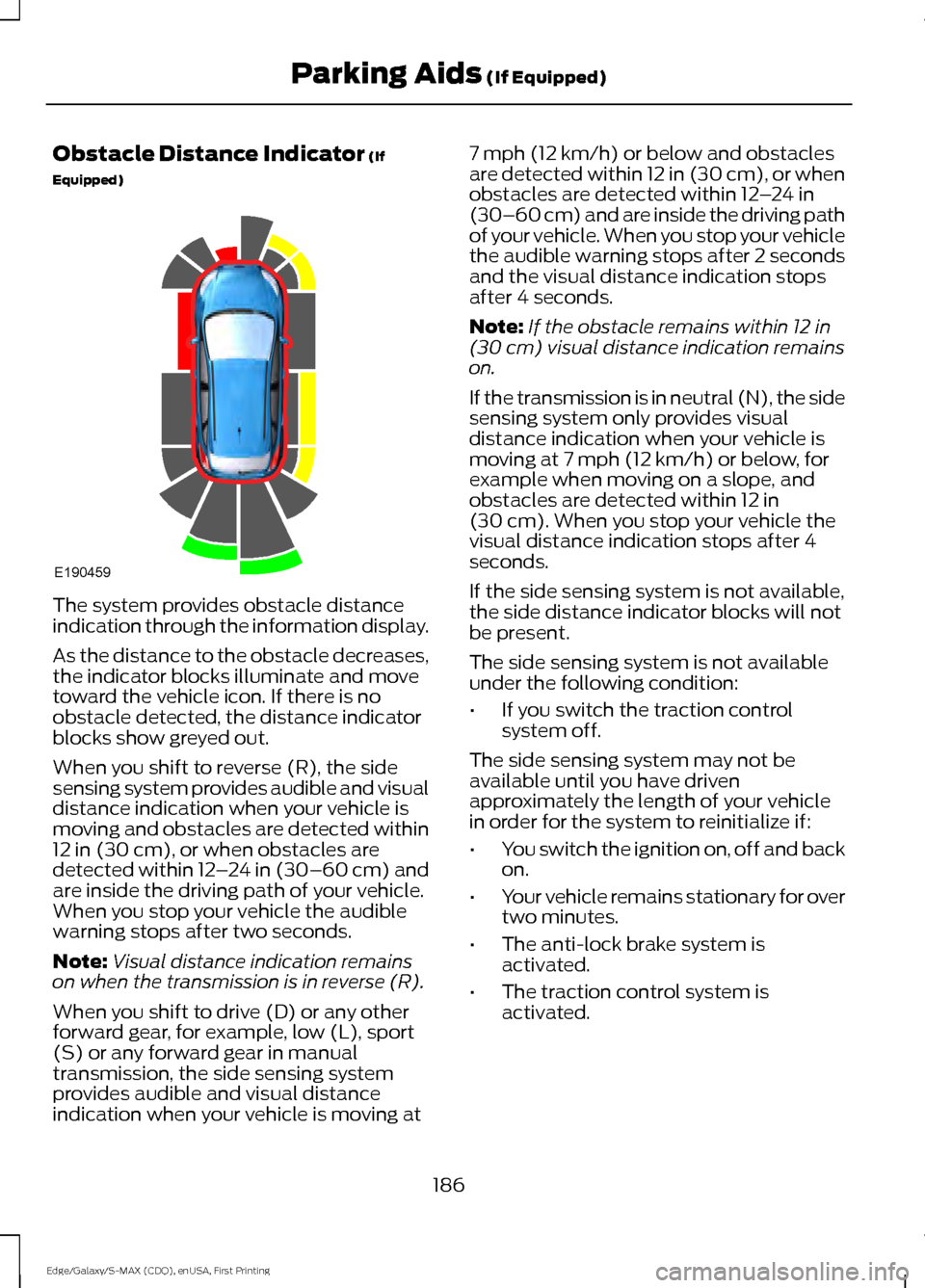
Obstacle Distance Indicator (If
Equipped) The system provides obstacle distance
indication through the information display.
As the distance to the obstacle decreases,
the indicator blocks illuminate and move
toward the vehicle icon. If there is no
obstacle detected, the distance indicator
blocks show greyed out.
When you shift to reverse (R), the side
sensing system provides audible and visual
distance indication when your vehicle is
moving and obstacles are detected within
12 in (30 cm)
, or when obstacles are
detected within 12 –24 in (30–60 cm) and
are inside the driving path of your vehicle.
When you stop your vehicle the audible
warning stops after two seconds.
Note: Visual distance indication remains
on when the transmission is in reverse (R).
When you shift to drive (D) or any other
forward gear, for example, low (L), sport
(S) or any forward gear in manual
transmission, the side sensing system
provides audible and visual distance
indication when your vehicle is moving at 7 mph (12 km/h)
or below and obstacles
are detected within 12 in (30 cm), or when
obstacles are detected within
12 –24 in
(30–60 cm) and are inside the driving path
of your vehicle. When you stop your vehicle
the audible warning stops after 2 seconds
and the visual distance indication stops
after 4 seconds.
Note: If the obstacle remains within
12 in
(30 cm) visual distance indication remains
on.
If the transmission is in neutral (N), the side
sensing system only provides visual
distance indication when your vehicle is
moving at
7 mph (12 km/h) or below, for
example when moving on a slope, and
obstacles are detected within
12 in
(30 cm). When you stop your vehicle the
visual distance indication stops after 4
seconds.
If the side sensing system is not available,
the side distance indicator blocks will not
be present.
The side sensing system is not available
under the following condition:
• If you switch the traction control
system off.
The side sensing system may not be
available until you have driven
approximately the length of your vehicle
in order for the system to reinitialize if:
• You switch the ignition on, off and back
on.
• Your vehicle remains stationary for over
two minutes.
• The anti-lock brake system is
activated.
• The traction control system is
activated.
186
Edge/Galaxy/S-MAX (CDQ), enUSA, First Printing Parking Aids
(If Equipped)E190459
Page 190 of 508
ACTIVE PARK ASSIST (If Equipped)
Parallel Parking, Perpendicular
Parking, Park Out Assist
WARNINGS
You must remain in your vehicle
when the system turns on. At all
times, you are responsible for
controlling your vehicle, supervising the
system and intervening if required. Failure
to take care may result in the loss of
control of your vehicle, serious personal
injury or death. The sensors may not detect objects
in heavy rain or other conditions that
cause disruptive reflections.
Note:
The driver is always responsible for
controlling the vehicle, supervising the
system and intervening if required by
grabbing the steering wheel or pushing the
active park assist button.
The system detects an available parallel
or perpendicular parking space and
automatically steers your vehicle into the
space (hands-free) while you control the
accelerator, gearshift and brakes. The
system visually and audibly guides you to
park your vehicle.
If you are uncomfortable with the proximity
to any vehicle or object, you may choose
to override the system.
Park Out Assist automatically steers your
vehicle out of a parallel parking space
(hands-free) while you control the
accelerator, gearshift and brakes. The
system visually and audibly guides you to
enter traffic.
Note: The blindspot information system
does not detect traffic alongside or behind
your vehicle during a park assist maneuver. The system may not correctly operate in
any of the following conditions:
•
You use a spare tire or a tire
significantly worn more than the other
tires.
• You use a unauthorized tire size.
• You try to park on a tight curve.
• Something passes between the front
bumper and the parking space (a
pedestrian or cyclist).
• The edge of the neighboring parked
vehicle is high off the ground (for
example, a bus, tow truck or flatbed
truck).
• The weather conditions are poor
(heavy rain, snow, fog, etc).
Note: Keep the sensors, located on the
bumper or fascia, free from snow, ice and
large accumulations of dirt. Covered sensors
can affect the system's accuracy. Do not
clean the sensors with sharp objects.
Note: The sensors may not detect objects
with surfaces that absorb ultrasonic waves
or cause ultrasonic interference (motorcycle
exhaust, truck air brakes or horns).
Do not use the system if:
• You have attached a foreign object
(bike rack or trailer) to the front or rear
of your vehicle or close to the sensors.
• You have attached an overhanging
object (surfboard) to the roof.
• A foreign object damages or obstructs
the front or rear bumper or side
sensors.
• The correct tire size is not in use on your
vehicle (for example, a mini-spare tire).
Using Active Park Assist - Parallel
Parking Press the button located on the
center console near the gearshift
lever or the right side of the
center stack once.
187
Edge/Galaxy/S-MAX (CDQ), enUSA, First Printing Parking Aids (If Equipped)E146186
Page 194 of 508
The system determines the clearance to
the front and rear of your vehicle and
automatically steers your vehicle out of a
parallel parking space (hands-free) while
you control the accelerator, gearshift and
brakes. The system visually and audibly
guides you to enter traffic.
After the system has directed your vehicle
past the adjacent vehicle or object, it
guides you to take control of the steering
to complete the exit from the parking spot.
The system may not function correctly if
something passes between the front
bumper and the parking space (a
pedestrian or cyclist) or if the edge of the
neighboring parked vehicle is high off the
ground (for example, a bus, tow truck or
flatbed truck).
Note:
If the clearance in front of your
vehicle allows easy departure, the Park Out
Assist feature might not be available.
Note: You are responsible for controlling
your vehicle and making sure the path is
clear prior to pulling into traffic.
Note: This system is not intended to assist
in exiting perpendicular parking spaces,
damages to your vehicle may occur.
Note: If your vehicle speed exceeds 6 mph
(9 km/h) or the maneuver is interrupted
(driver input), the system switches off and
you need to take full control of your vehicle. Deactivating the Active Park
Assist Feature
Manually deactivate the system by:
•
Pressing the active park assist button
twice.
• Grabbing the steering wheel during an
active maneuver.
• Driving above approximately
22 mph
(35 km/h) for 30 seconds during an
active park search.
• Driving above
6 mph (9 km/h) during
automatic steering.
• Switching off the traction control
system.
Certain vehicle conditions can also
deactivate the system, such as:
• Traction control has activated.
• There is an anti-lock brake system
activation or failure.
If a problem occurs with the system, a
warning message displays accompanied
by a tone. Occasional system messages
may occur in normal operation. For
recurring or frequent system faults, contact
an authorized dealer to have your vehicle
serviced.
Troubleshooting the System The system does not look for a space
The traction control system may be off.
The transmission is in reverse ( R). Your vehicle must be moving forward to be able to
detect a parking space.
191
Edge/Galaxy/S-MAX (CDQ), enUSA, First Printing Parking Aids
(If Equipped)
Page 197 of 508
Note:
When towing, the camera only sees
what you are towing. This might not provide
adequate coverage as it usually provides in
normal operation and some objects might
not be seen. In some vehicles, the guidelines
may disappear when you connect the trailer
tow connector.
The camera may not operate correctly
under the following conditions:
• Nighttime or dark areas if one or both
reverse lamps are not operating.
• Mud, water or debris obstructs the
camera's view. Clean the lens with a
soft, lint-free cloth and non-abrasive
cleaner.
• The rear of your vehicle is hit or
damaged, causing the camera to
become misaligned.
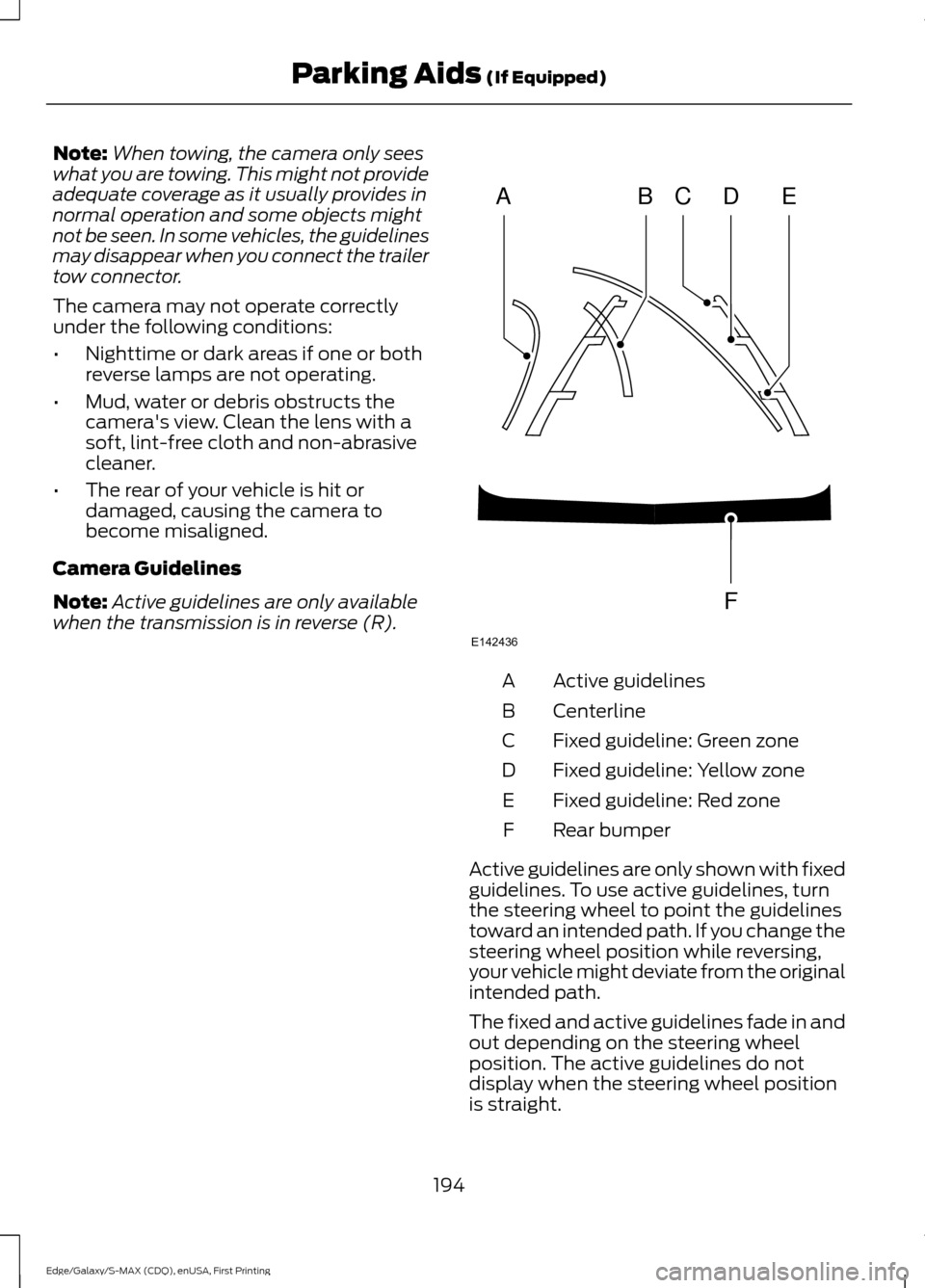
Camera Guidelines
Note: Active guidelines are only available
when the transmission is in reverse (R). Active guidelines
A
Centerline
B
Fixed guideline: Green zone
C
Fixed guideline: Yellow zone
D
Fixed guideline: Red zone
E
Rear bumper
F
Active guidelines are only shown with fixed
guidelines. To use active guidelines, turn
the steering wheel to point the guidelines
toward an intended path. If you change the
steering wheel position while reversing,
your vehicle might deviate from the original
intended path.
The fixed and active guidelines fade in and
out depending on the steering wheel
position. The active guidelines do not
display when the steering wheel position
is straight.
194
Edge/Galaxy/S-MAX (CDQ), enUSA, First Printing Parking Aids (If Equipped)ABCD
F
E
E142436
Page 204 of 508
Detection issues can occur:
When driving on a different line
than the vehicle in front.
A
With vehicles that edge into your
lane. The system can only detect
these vehicles once they move
fully into your lane.
B
There may be issues with the
detection of vehicles in front
when driving into and coming out
of a bend or curve in the road.
C
In these cases the system may brake late
or unexpectedly. The driver should stay
alert and intervene when necessary.
If something hits the front of your vehicle
or damage occurs, the radar-sensing zone
may change. This could cause missed or
false vehicle detections. See an authorized
dealer to have the radar checked for
correct operation.
System Not Available
Conditions that can cause the system to
deactivate or prevent the system from
activating when requested include:
• A blocked sensor.
• High brake temperature.
• A failure in the system or a related
system. Blocked Sensor WARNINGS
Do not use the system when towing
a trailer with brake controls.
Aftermarket trailer brakes will not
function properly when you switch the
system on because the brakes are
electronically controlled. Failing to do so
may result in loss of vehicle control, which
could result in serious injury. Do not use tire sizes other than those
recommended because this can
affect the normal operation of the
system. Failing to do so may result in a loss
of vehicle control, which could result in
serious injury. A message displays if something obstructs
the radar signals from the sensor. The
sensor is located on the lower grille. The
system cannot detect a vehicle ahead and
does not function when something
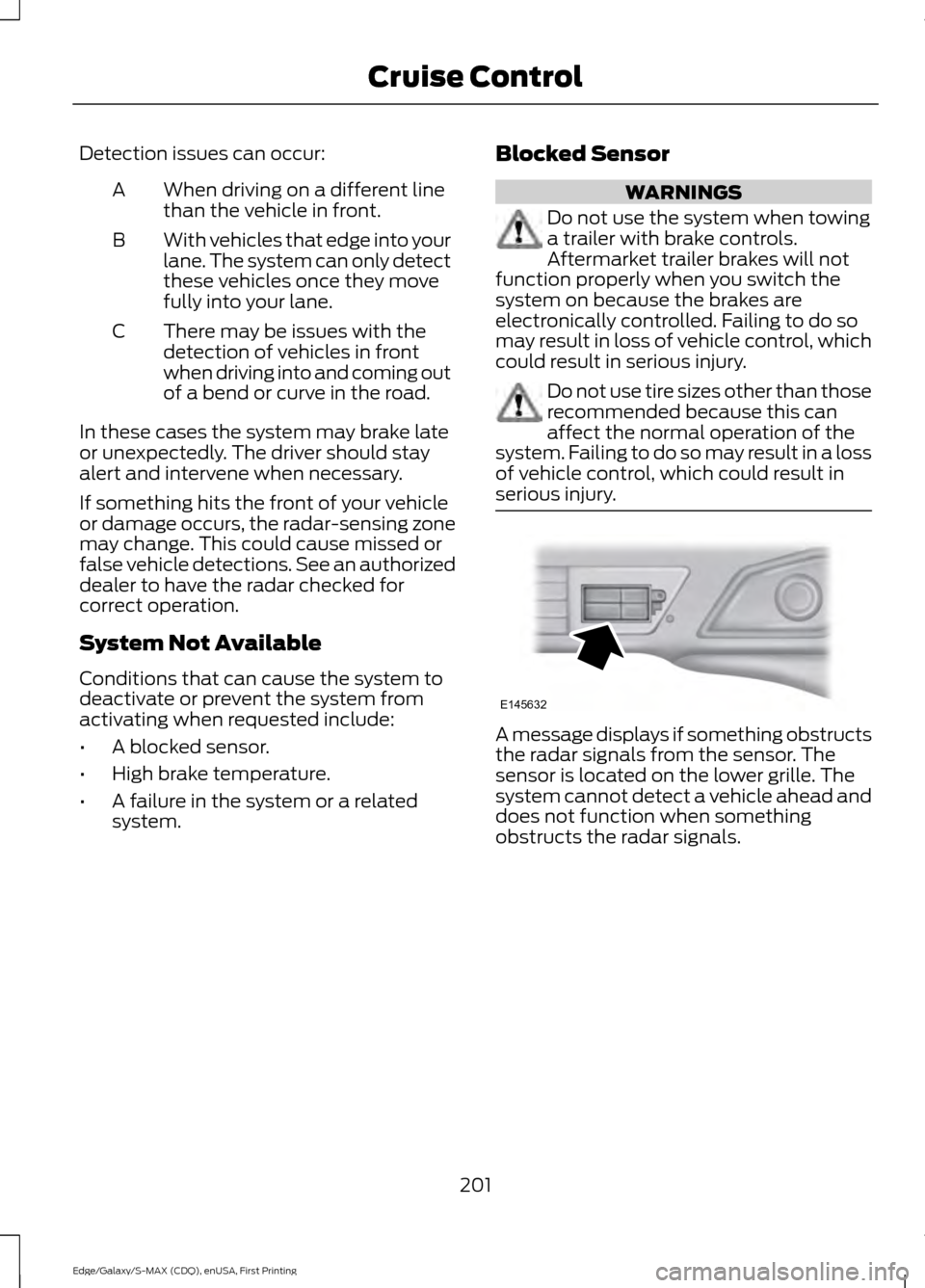
obstructs the radar signals.
201
Edge/Galaxy/S-MAX (CDQ), enUSA, First Printing Cruise ControlE145632
Page 208 of 508
Switching the System On and Off
Note:
The system on or off setting is stored
until it is manually changed, unless a MyKey
is detected. If the system detects a MyKey
it defaults to on and the mode is set to Alert.
Note: If a MyKey is detected, pressing the
button will not affect the on or off status of
the system. Press the button located on the
left steering wheel stalk to
switch the system on or off.
System Settings
The system has optional setting menus
available. To view or adjust the settings,
See General Information (page 100). The
system stores the last-known selection for
each of these settings. You do not need to
readjust your settings each time you turn
on the system.
Mode:
This setting allows you to select
which of the system features you can
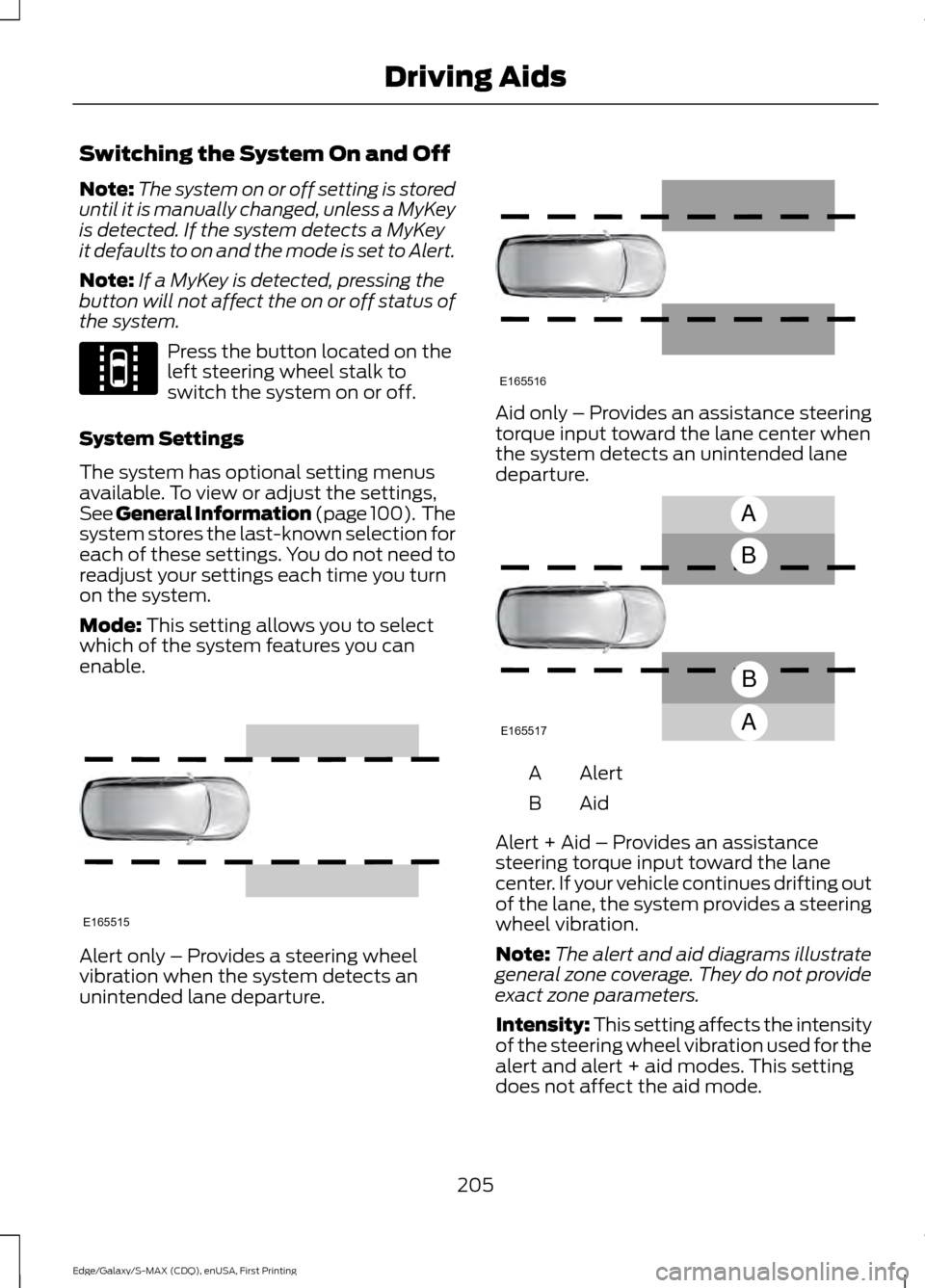
enable. Alert only – Provides a steering wheel
vibration when the system detects an
unintended lane departure. Aid only – Provides an assistance steering
torque input toward the lane center when
the system detects an unintended lane
departure.
Alert
A
AidB
Alert + Aid – Provides an assistance
steering torque input toward the lane
center. If your vehicle continues drifting out
of the lane, the system provides a steering
wheel vibration.
Note: The alert and aid diagrams illustrate
general zone coverage. They do not provide
exact zone parameters.
Intensity: This setting affects the intensity
of the steering wheel vibration used for the
alert and alert + aid modes. This setting
does not affect the aid mode.
205
Edge/Galaxy/S-MAX (CDQ), enUSA, First Printing Driving AidsE144813 E165515 E165516 A
B
A
B
E165517
Page 214 of 508
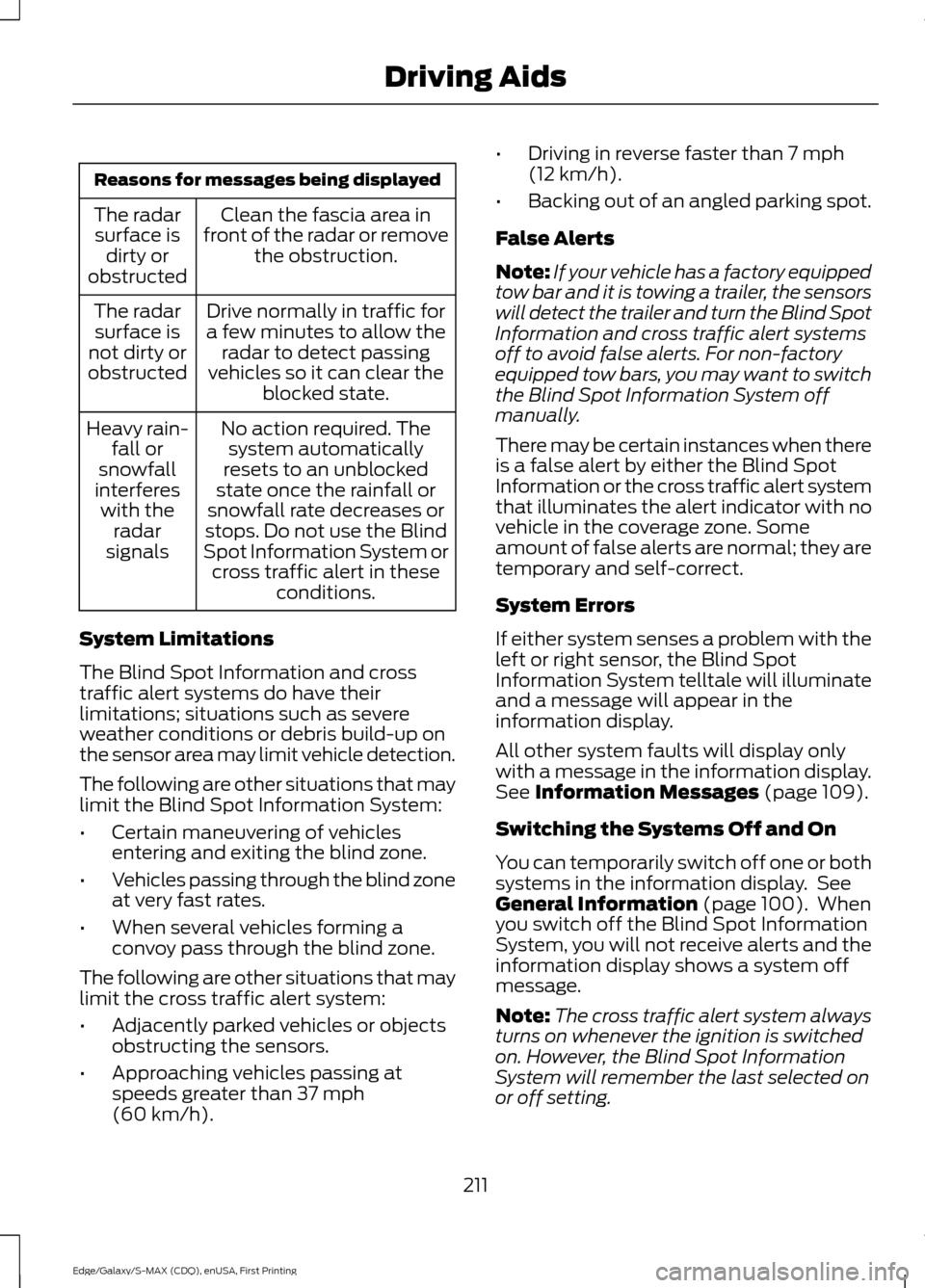
Reasons for messages being displayed
Clean the fascia area in
front of the radar or remove the obstruction.
The radar
surface is dirty or
obstructed
Drive normally in traffic for
a few minutes to allow the radar to detect passing
vehicles so it can clear the blocked state.
The radar
surface is
not dirty or
obstructed
No action required. Thesystem automatically
resets to an unblocked
state once the rainfall or
snowfall rate decreases or
stops. Do not use the Blind
Spot Information System or cross traffic alert in these conditions.
Heavy rain-
fall or
snowfall
interferes with the radar
signals
System Limitations
The Blind Spot Information and cross
traffic alert systems do have their
limitations; situations such as severe
weather conditions or debris build-up on
the sensor area may limit vehicle detection.
The following are other situations that may
limit the Blind Spot Information System:
• Certain maneuvering of vehicles
entering and exiting the blind zone.
• Vehicles passing through the blind zone
at very fast rates.
• When several vehicles forming a
convoy pass through the blind zone.
The following are other situations that may
limit the cross traffic alert system:
• Adjacently parked vehicles or objects
obstructing the sensors.
• Approaching vehicles passing at
speeds greater than 37 mph
(60 km/h). •
Driving in reverse faster than
7 mph
(12 km/h).
• Backing out of an angled parking spot.
False Alerts
Note: If your vehicle has a factory equipped
tow bar and it is towing a trailer, the sensors
will detect the trailer and turn the Blind Spot
Information and cross traffic alert systems
off to avoid false alerts. For non-factory
equipped tow bars, you may want to switch
the Blind Spot Information System off
manually.
There may be certain instances when there
is a false alert by either the Blind Spot
Information or the cross traffic alert system
that illuminates the alert indicator with no
vehicle in the coverage zone. Some
amount of false alerts are normal; they are
temporary and self-correct.
System Errors
If either system senses a problem with the
left or right sensor, the Blind Spot
Information System telltale will illuminate
and a message will appear in the
information display.
All other system faults will display only
with a message in the information display.
See
Information Messages (page 109).
Switching the Systems Off and On
You can temporarily switch off one or both
systems in the information display. See
General Information
(page 100). When
you switch off the Blind Spot Information
System, you will not receive alerts and the
information display shows a system off
message.
Note: The cross traffic alert system always
turns on whenever the ignition is switched
on. However, the Blind Spot Information
System will remember the last selected on
or off setting.
211
Edge/Galaxy/S-MAX (CDQ), enUSA, First Printing Driving Aids
Page 223 of 508
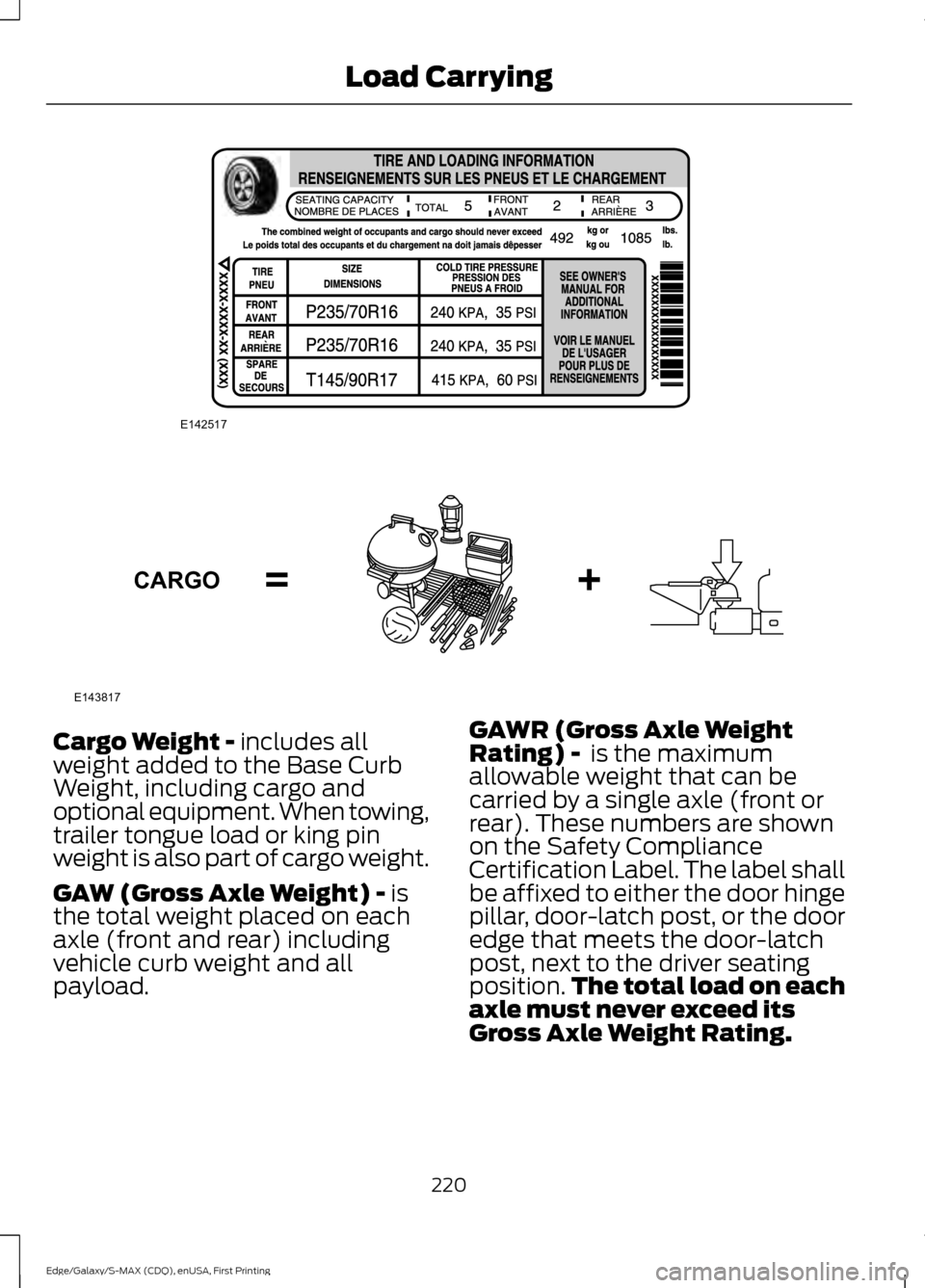
Cargo Weight - includes all
weight added to the Base Curb
Weight, including cargo and
optional equipment. When towing,
trailer tongue load or king pin
weight is also part of cargo weight.
GAW (Gross Axle Weight) -
is
the total weight placed on each
axle (front and rear) including
vehicle curb weight and all
payload. GAWR (Gross Axle Weight
Rating) -
is the maximum
allowable weight that can be
carried by a single axle (front or
rear). These numbers are shown
on the Safety Compliance
Certification Label. The label shall
be affixed to either the door hinge
pillar, door-latch post, or the door
edge that meets the door-latch
post, next to the driver seating
position. The total load on each
axle must never exceed its
Gross Axle Weight Rating.
220
Edge/Galaxy/S-MAX (CDQ), enUSA, First Printing Load CarryingE142517 E143817CARGO
Page 224 of 508
Note:
For trailer towing
information refer to the RV and
Trailer Towing Guide available at
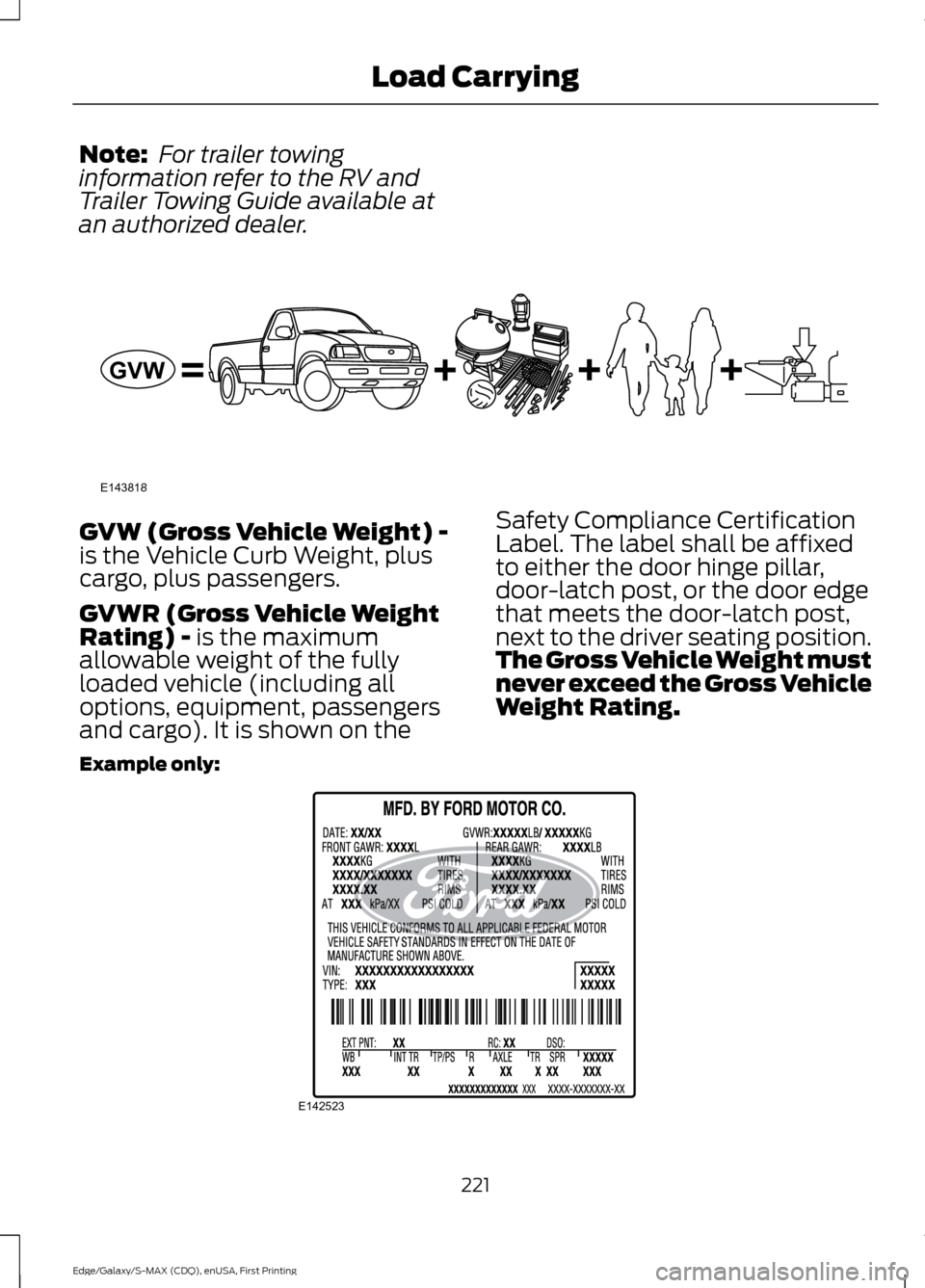
an authorized dealer. GVW (Gross Vehicle Weight) -
is the Vehicle Curb Weight, plus
cargo, plus passengers.
GVWR (Gross Vehicle Weight
Rating) - is the maximum
allowable weight of the fully
loaded vehicle (including all
options, equipment, passengers
and cargo). It is shown on the Safety Compliance Certification
Label. The label shall be affixed
to either the door hinge pillar,
door-latch post, or the door edge
that meets the door-latch post,
next to the driver seating position.
The Gross Vehicle Weight must
never exceed the Gross Vehicle
Weight Rating.
Example only: 221
Edge/Galaxy/S-MAX (CDQ), enUSA, First Printing Load CarryingE143818GVW E142523
Page 225 of 508
WARNING
Exceeding the Safety
Compliance Certification
Label vehicle weight rating limits
could result in substandard
vehicle handling or performance,
engine, transmission and/or
structural damage, serious
damage to the vehicle, loss of
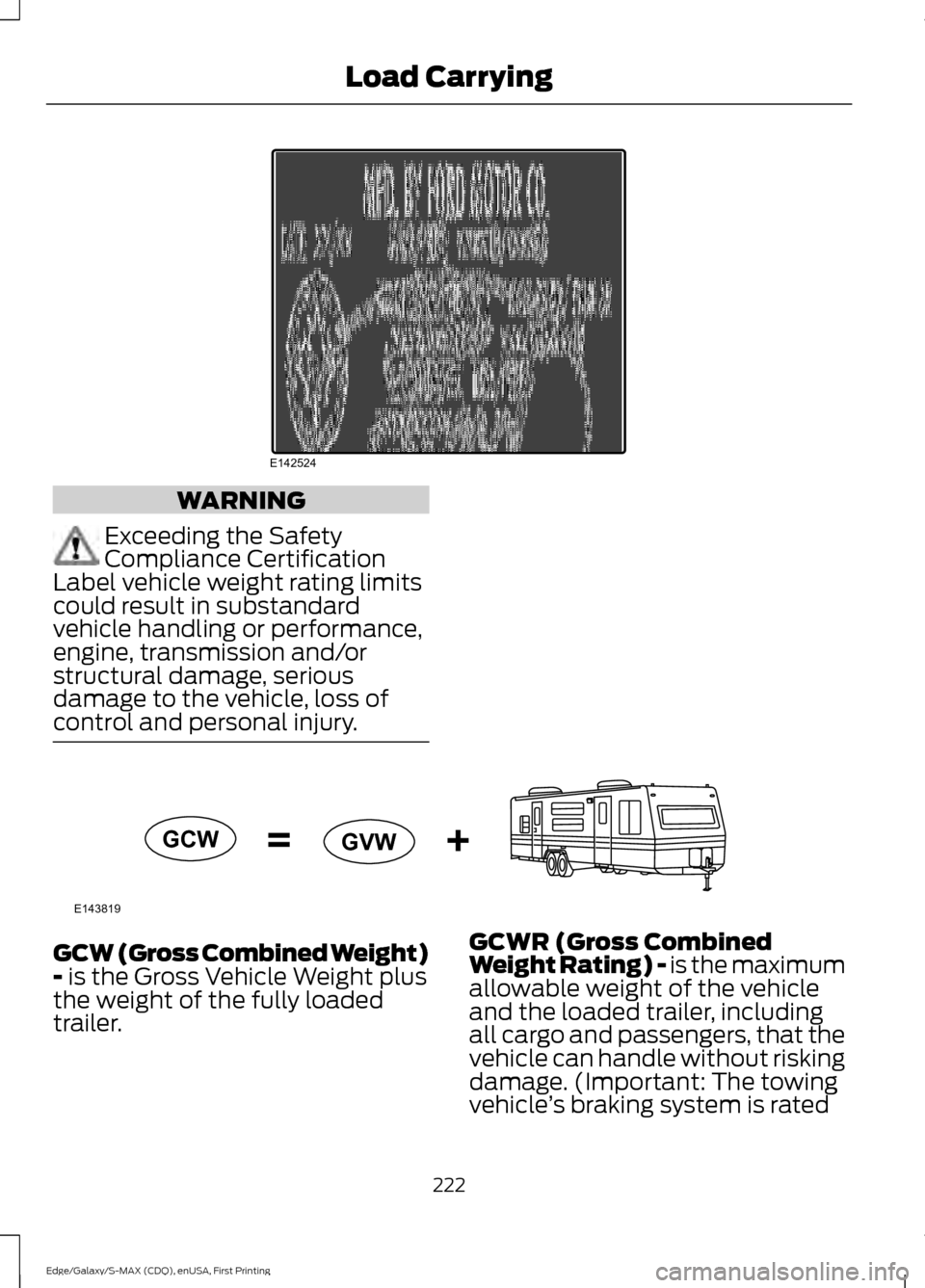
control and personal injury. GCW (Gross Combined Weight)
- is the Gross Vehicle Weight plus
the weight of the fully loaded
trailer. GCWR (Gross Combined
Weight Rating) - is the maximum
allowable weight of the vehicle
and the loaded trailer, including
all cargo and passengers, that the
vehicle can handle without risking
damage. (Important: The towing
vehicle
’s braking system is rated
222
Edge/Galaxy/S-MAX (CDQ), enUSA, First Printing Load CarryingE142524 E143819GCW
GVW