child lock FORD EDGE 2016 2.G User Guide
[x] Cancel search | Manufacturer: FORD, Model Year: 2016, Model line: EDGE, Model: FORD EDGE 2016 2.GPages: 451, PDF Size: 6.18 MB
Page 34 of 451
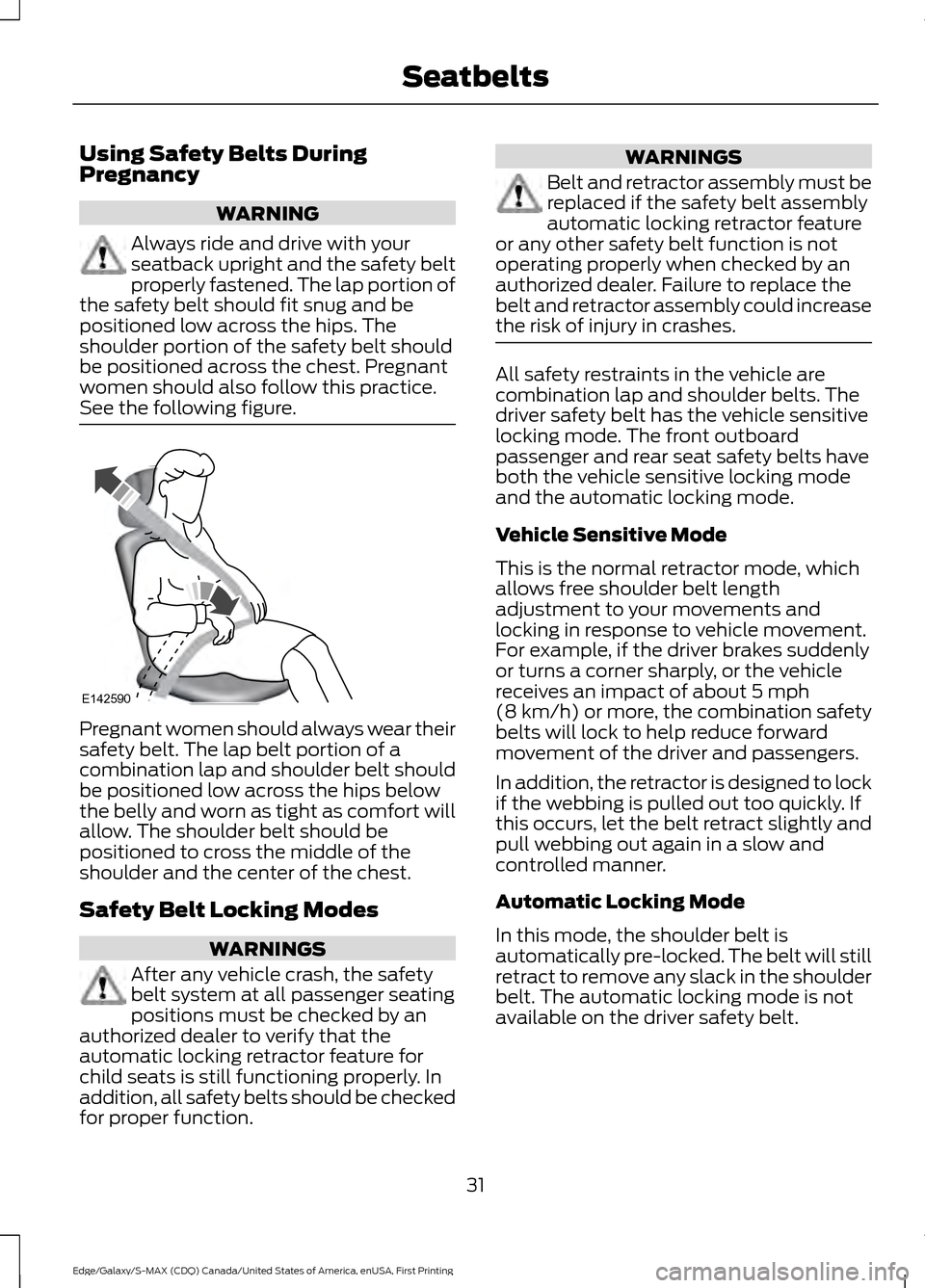
Using Safety Belts During
Pregnancy
WARNING
Always ride and drive with your
seatback upright and the safety belt
properly fastened. The lap portion of
the safety belt should fit snug and be
positioned low across the hips. The
shoulder portion of the safety belt should
be positioned across the chest. Pregnant
women should also follow this practice.
See the following figure. Pregnant women should always wear their
safety belt. The lap belt portion of a
combination lap and shoulder belt should
be positioned low across the hips below
the belly and worn as tight as comfort will
allow. The shoulder belt should be
positioned to cross the middle of the
shoulder and the center of the chest.
Safety Belt Locking Modes
WARNINGS
After any vehicle crash, the safety
belt system at all passenger seating
positions must be checked by an
authorized dealer to verify that the
automatic locking retractor feature for
child seats is still functioning properly. In
addition, all safety belts should be checked
for proper function. WARNINGS
Belt and retractor assembly must be
replaced if the safety belt assembly
automatic locking retractor feature
or any other safety belt function is not
operating properly when checked by an
authorized dealer. Failure to replace the
belt and retractor assembly could increase
the risk of injury in crashes. All safety restraints in the vehicle are
combination lap and shoulder belts. The
driver safety belt has the vehicle sensitive
locking mode. The front outboard
passenger and rear seat safety belts have
both the vehicle sensitive locking mode
and the automatic locking mode.
Vehicle Sensitive Mode
This is the normal retractor mode, which
allows free shoulder belt length
adjustment to your movements and
locking in response to vehicle movement.
For example, if the driver brakes suddenly
or turns a corner sharply, or the vehicle
receives an impact of about 5 mph
(8 km/h) or more, the combination safety
belts will lock to help reduce forward
movement of the driver and passengers.
In addition, the retractor is designed to lock
if the webbing is pulled out too quickly. If
this occurs, let the belt retract slightly and
pull webbing out again in a slow and
controlled manner.
Automatic Locking Mode
In this mode, the shoulder belt is
automatically pre-locked. The belt will still
retract to remove any slack in the shoulder
belt. The automatic locking mode is not
available on the driver safety belt.
31
Edge/Galaxy/S-MAX (CDQ) Canada/United States of America, enUSA, First Printing SeatbeltsE142590
Page 35 of 451
When to Use the Automatic Locking
Mode
This mode should be used any time a child
safety seat, except a booster, is installed
in passenger front or rear seating positions.
Children 12 years old and under should be
properly restrained in a rear seating
position whenever possible. See Child
Safety (page 15).
How to Use the Automatic Locking
Mode
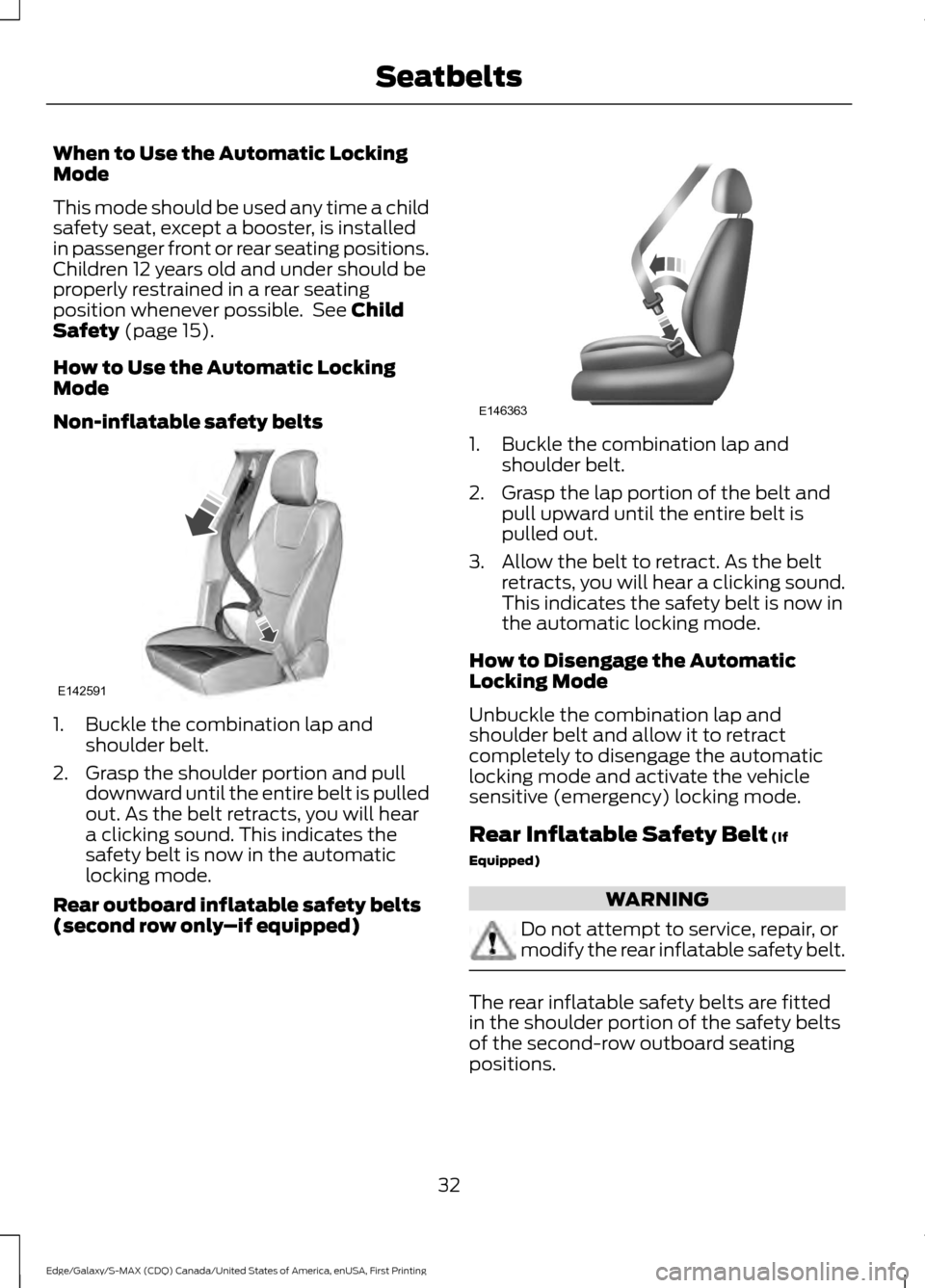
Non-inflatable safety belts 1. Buckle the combination lap and
shoulder belt.
2. Grasp the shoulder portion and pull downward until the entire belt is pulled
out. As the belt retracts, you will hear
a clicking sound. This indicates the
safety belt is now in the automatic
locking mode.
Rear outboard inflatable safety belts
(second row only –if equipped) 1. Buckle the combination lap and
shoulder belt.
2. Grasp the lap portion of the belt and pull upward until the entire belt is
pulled out.
3. Allow the belt to retract. As the belt retracts, you will hear a clicking sound.
This indicates the safety belt is now in
the automatic locking mode.
How to Disengage the Automatic
Locking Mode
Unbuckle the combination lap and
shoulder belt and allow it to retract
completely to disengage the automatic
locking mode and activate the vehicle
sensitive (emergency) locking mode.
Rear Inflatable Safety Belt
(If
Equipped) WARNING
Do not attempt to service, repair, or
modify the rear inflatable safety belt.
The rear inflatable safety belts are fitted
in the shoulder portion of the safety belts
of the second-row outboard seating
positions.
32
Edge/Galaxy/S-MAX (CDQ) Canada/United States of America, enUSA, First Printing SeatbeltsE142591 E146363
Page 36 of 451
Note:
The rear inflatable safety belts are
compatible with most infant and child
safety car seats and belt positioning booster
seats when properly installed. This is
because they are designed to fill with a
cooled gas at a lower pressure and at a
slower rate than traditional airbags. After
inflation, the shoulder portion of the safety
belt remains cool to the touch.
The rear inflatable safety belt consists of
the following:
• An inflatable bag located in the
shoulder safety belt webbing.
• Lap safety belt webbing with
automatic locking mode.
• The same warning light, electronic
control and diagnostic unit as used for
the front safety belts.
• Impact sensors located in various parts
of the vehicle.
How does the rear inflatable safety belt
system work?
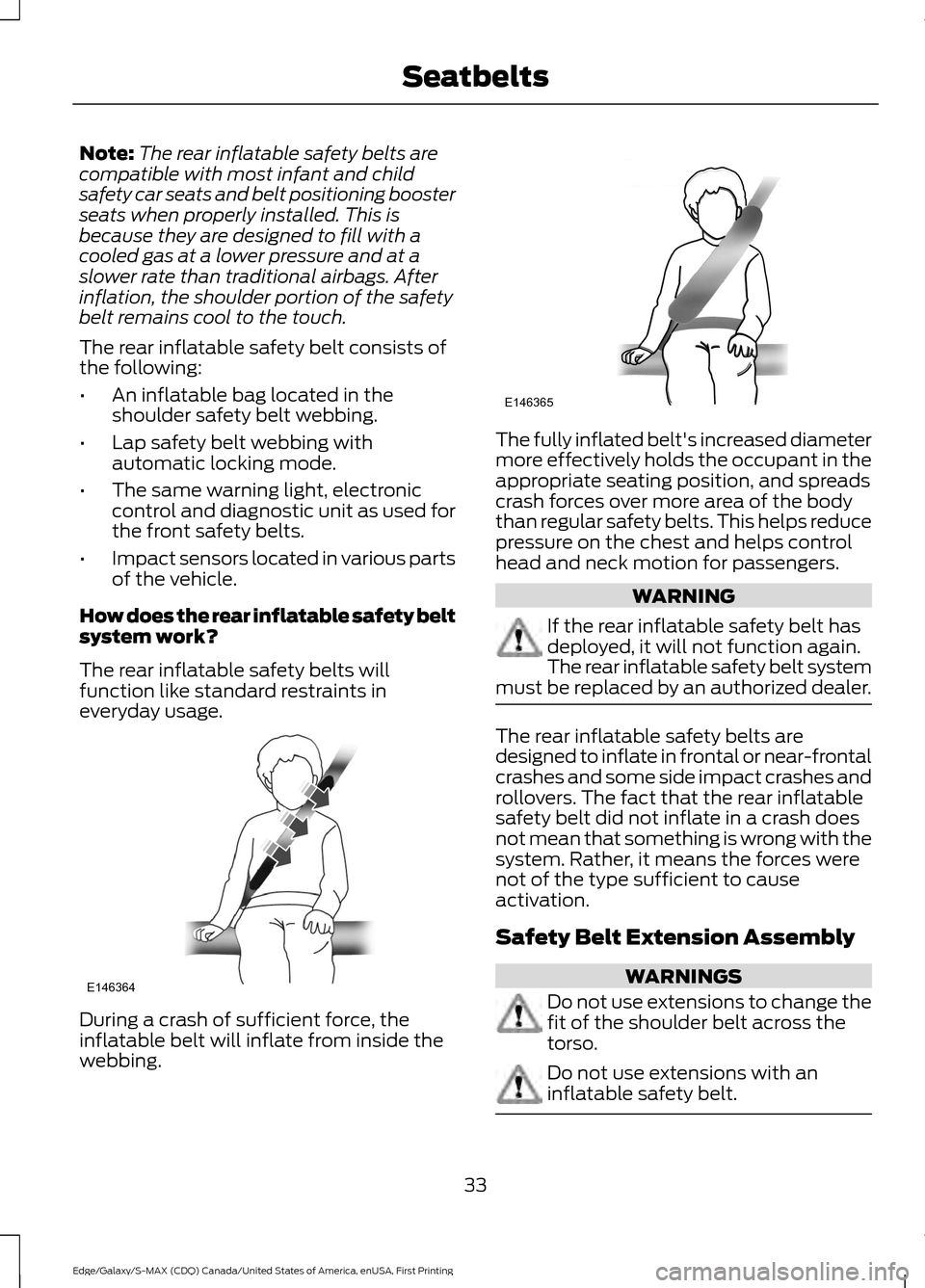
The rear inflatable safety belts will
function like standard restraints in
everyday usage. During a crash of sufficient force, the
inflatable belt will inflate from inside the
webbing. The fully inflated belt's increased diameter
more effectively holds the occupant in the
appropriate seating position, and spreads
crash forces over more area of the body
than regular safety belts. This helps reduce
pressure on the chest and helps control
head and neck motion for passengers.
WARNING
If the rear inflatable safety belt has
deployed, it will not function again.
The rear inflatable safety belt system
must be replaced by an authorized dealer. The rear inflatable safety belts are
designed to inflate in frontal or near-frontal
crashes and some side impact crashes and
rollovers. The fact that the rear inflatable
safety belt did not inflate in a crash does
not mean that something is wrong with the
system. Rather, it means the forces were
not of the type sufficient to cause
activation.
Safety Belt Extension Assembly
WARNINGS
Do not use extensions to change the
fit of the shoulder belt across the
torso.
Do not use extensions with an
inflatable safety belt.
33
Edge/Galaxy/S-MAX (CDQ) Canada/United States of America, enUSA, First Printing SeatbeltsE146364 E146365
Page 66 of 451
POWER LIFTGATE (If Equipped)
WARNINGS
It is extremely dangerous to ride in a
cargo area, inside or outside of a
vehicle. In a crash, people riding in
these areas are more likely to be seriously
injured or killed. Do not allow people to ride
in any area of your vehicle that is not
equipped with seats and seatbelts. Make
sure everyone in your vehicle is in a seat
and properly using a seatbelt. Failure to
follow this warning could result in serious
personal injury or death. Make sure to close and latch the
liftgate to prevent drawing exhaust
fumes into your vehicle. This will also
prevent passengers and cargo from falling
out. If you must drive with the liftgate open,
keep the vents or windows open so outside
air comes into your vehicle. Failure to
follow this warning could result in serious
personal injury. Keep keys out of reach of children.
Do not allow children to operate or
play near an open or moving power
liftgate. You should supervise the
operation of the power liftgate at all times. Note:
Make sure that you close the liftgate
before operating or moving your vehicle,
especially in an enclosure, like a garage or
a parking structure. This could damage the
liftgate and its components.
Note: Do not hang anything, for example
a bike rack, from the glass or liftgate. This
could damage the liftgate and its
components.
The liftgate only operates with the
transmission in park (P).
If there is a problem with the open or close
request, a tone will sound for one of the
following reasons: •
The ignition is on and the transmission
is not in park (P).
• The battery voltage is below the
minimum operating voltage.
• The liftgate is not fully closed and your
vehicle speed is at or above
3 mph
(5 km/h).
If the liftgate starts to close after it has
fully opened, this indicates there may be
excessive weight on the liftgate or a
possible gas strut failure. A repetitive tone
sounds and the liftgate closes under
control. Remove any excessive weight from
the liftgate. If the liftgate continues to
close after opening, have the system
checked by an authorized dealer.
Opening and Closing the Liftgate WARNING
Make sure all persons are clear of the
power liftgate area before using the
power liftgate control.
Note:
Be careful when opening or closing
the liftgate in a garage or other enclosed
area to avoid damaging the liftgate.
Note: Do not leave the liftgate open while
driving. This could damage the liftgate and
its components.
From the Instrument Panel Press the button on the
instrument panel.
With the Remote Control Press the button twice within
three seconds.
63
Edge/Galaxy/S-MAX (CDQ) Canada/United States of America, enUSA, First Printing LocksE138633 E138630
Page 89 of 451
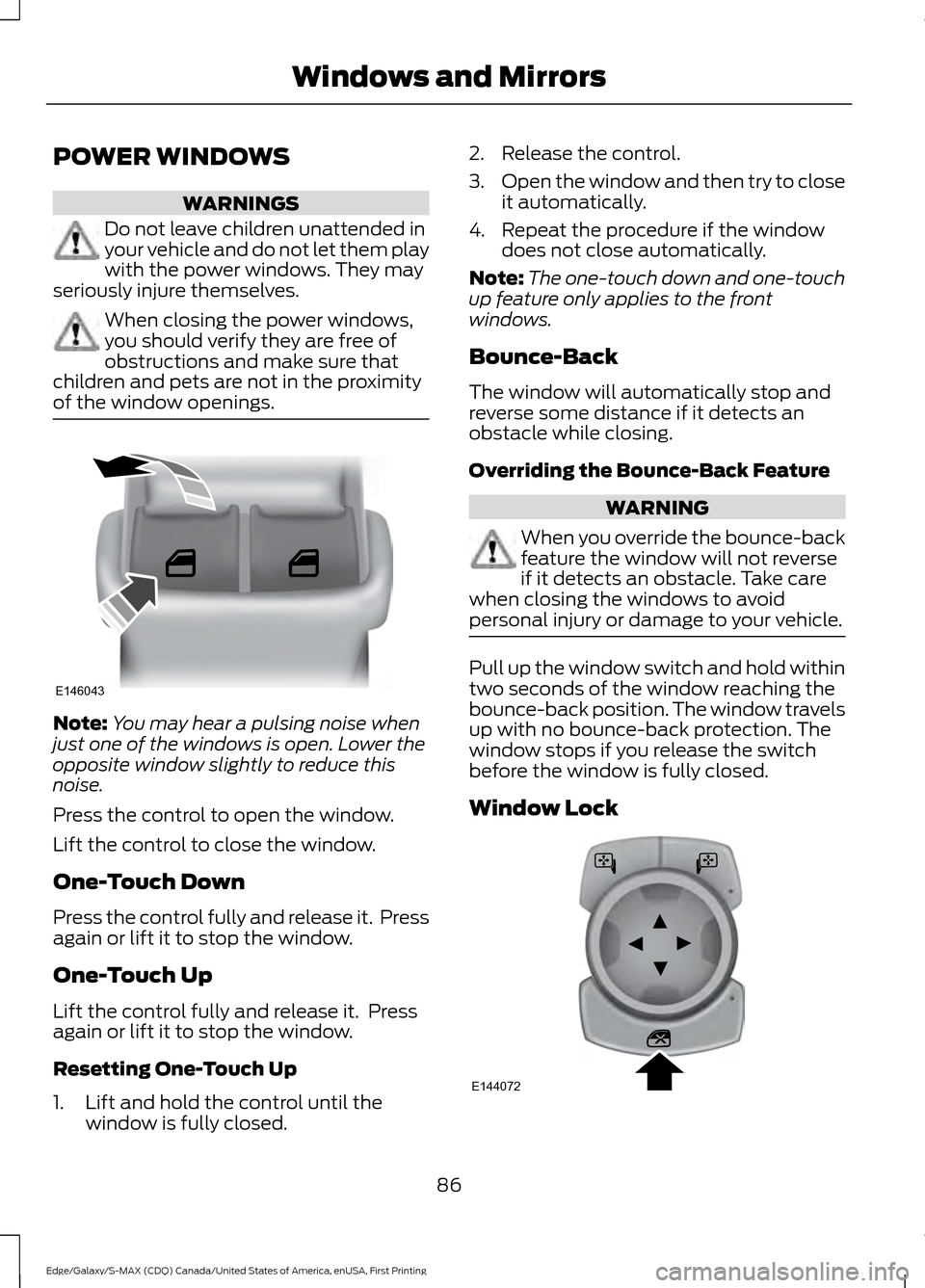
POWER WINDOWS
WARNINGS
Do not leave children unattended in
your vehicle and do not let them play
with the power windows. They may
seriously injure themselves. When closing the power windows,
you should verify they are free of
obstructions and make sure that
children and pets are not in the proximity
of the window openings. Note:
You may hear a pulsing noise when
just one of the windows is open. Lower the
opposite window slightly to reduce this
noise.
Press the control to open the window.
Lift the control to close the window.
One-Touch Down
Press the control fully and release it. Press
again or lift it to stop the window.
One-Touch Up
Lift the control fully and release it. Press
again or lift it to stop the window.
Resetting One-Touch Up
1. Lift and hold the control until the window is fully closed. 2. Release the control.
3.
Open the window and then try to close
it automatically.
4. Repeat the procedure if the window does not close automatically.
Note: The one-touch down and one-touch
up feature only applies to the front
windows.
Bounce-Back
The window will automatically stop and
reverse some distance if it detects an
obstacle while closing.
Overriding the Bounce-Back Feature WARNING
When you override the bounce-back
feature the window will not reverse
if it detects an obstacle. Take care
when closing the windows to avoid
personal injury or damage to your vehicle. Pull up the window switch and hold within
two seconds of the window reaching the
bounce-back position. The window travels
up with no bounce-back protection. The
window stops if you release the switch
before the window is fully closed.
Window Lock
86
Edge/Galaxy/S-MAX (CDQ) Canada/United States of America, enUSA, First Printing Windows and MirrorsE146043 E144072
Page 92 of 451
INTERIOR MIRROR
WARNING
Do not adjust the mirror when your
vehicle is moving.
Note:
Do not clean the housing or glass of
any mirror with harsh abrasives, fuel or other
petroleum or ammonia-based cleaning
products.
You can adjust the interior mirror to your
preference. Some mirrors also have a
second pivot point. This lets you move the
mirror head up or down and from side to
side.
Pull the tab below the mirror toward you
to reduce glare at night.
Auto-Dimming Mirror (If Equipped)
Note: Do not block the sensors on the front
and back of the mirror. Mirror performance
may be affected. A rear center passenger or
raised rear center head restraint may also
block light from reaching the sensor.
The mirror will dim automatically to reduce
glare when bright lights are detected from
behind your vehicle. It will automatically
return to normal reflection when you select
reverse gear to make sure you have a clear
view when backing up. SUN VISORS Rotate the sun visor toward the side
window and extend it rearward for extra
shade.
Illuminated Vanity Mirror
Lift the cover to switch the lamp on.
MOONROOF
(If Equipped)
WARNINGS
Do not let children play with the
moonroof or leave them unattended
in the vehicle. They may seriously
hurt themselves.
89
Edge/Galaxy/S-MAX (CDQ) Canada/United States of America, enUSA, First Printing Windows and MirrorsE138666 E162197
Page 277 of 451
CHANGING THE 12V BATTERY
WARNINGS
Batteries normally produce explosive
gases which can cause personal
injury. Therefore, do not allow
flames, sparks or lighted substances to
come near the battery. When working near
the battery, always shield your face and
protect your eyes. Always provide correct
ventilation. When lifting a plastic-cased battery,
excessive pressure on the end walls
could cause acid to flow through the
vent caps, resulting in personal injury and
damage to the vehicle or battery. Lift the
battery with a battery carrier or with your
hands on opposite corners. Keep batteries out of reach of
children. Batteries contain sulfuric
acid. Avoid contact with skin, eyes or
clothing. Shield your eyes when working
near the battery to protect against possible
splashing of acid solution. In case of acid
contact with skin or eyes, flush
immediately with water for a minimum of
15 minutes and get prompt medical
attention. If acid is swallowed, call a
physician immediately. Battery posts, terminals and related
accessories contain lead and lead
compounds. Wash hands after
handling. Your vehicle has a Motorcraft®
maintenance-free battery which normally
does not require additional water during
its life of service.
Note:
If your vehicle's battery has a cover
or shield, make sure it is reinstalled after the
battery has been cleaned or replaced.
Note: See an authorized dealer for low
voltage battery access, testing, or
replacement. When a low voltage battery replacement
is necessary, see an authorized dealer to
replace the low voltage battery with a Ford
recommended replacement low voltage
battery that matches the electrical
requirements of the vehicle.
To ensure proper operation of the battery
management system (BMS), do not allow
a technician to connect any electrical
device ground connection directly to the
low voltage battery negative post. A
connection at the low voltage battery
negative post can cause inaccurate
measurements of the battery condition
and potential incorrect system operation.
Note:
If a person adds electrical or
electronic accessories or components to the
vehicle, the accessories or components may
adversely affect the low voltage battery
performance and durability and may also
affect the performance of other electrical
systems in the vehicle.
For longer, trouble-free operation, keep the
top of the battery clean and dry. Also,
make certain the battery cables are always
tightly fastened to the battery terminals.
If you see any corrosion on the battery or
terminals, remove the cables from the
terminals and clean with a wire brush. You
can neutralize the acid with a solution of
baking soda and water.
When a battery replacement is required,
the battery should only be replaced with
a Ford recommended replacement battery
that matches the electrical requirements
of the vehicle.
Because your vehicle ’s engine is
electronically-controlled by a computer,
some engine control settings are
maintained by power from the low voltage
battery. Some engine computer settings,
like the idle trim and fuel trim strategy,
optimize the driveability and performance
of the engine. Some other computer
settings, like the clock and radio station
274
Edge/Galaxy/S-MAX (CDQ) Canada/United States of America, enUSA, First Printing Maintenance
Page 441 of 451
Automatic Transmission...........................166
Automatic Transmission Adaptive
Learning............................................................ 168
Brake-Shift Interlock.......................................... 167
If Your Vehicle Gets Stuck In Mud or Snow.................................................................. 168
SelectShift Automatic ™
Transmission................................................... 166
Understanding the Positions of Your Automatic Transmission............................ 166
Automatic Transmission Fluid Check - 2.0L EcoBoost™.......................................270
Automatic Transmission Fluid Check - 2.7L EcoBoost™/3.5L...............................271
Adding Transmission Fluid ............................. 272
Checking the Transmission Fluid Level ........................................................................\
....... 271
Auto-Start-Stop...........................................156 Disabling Auto StartStop................................. 157
Enabling Auto StartStop................................. 156
Autowipers........................................................76
Auxiliary Power Points................................147 110 Volt AC Power Point.................................... 147
12 Volt DC Power Point...................................... 147
Locations................................................................ 147
AWD See: All-Wheel Drive.......................................... 170
B
Battery See: Changing the 12V Battery...................... 274
Blind Spot Information System.............209 Switching the System Off and On.................211
System Errors........................................................ 211
Using the System.............................................. 209
Bonnet Lock See: Opening and Closing the Hood...........261
Booster Seats..................................................24 Types of Booster Seats...................................... 25
Brake Fluid Check.........................................272
Brakes................................................................175 General Information........................................... 175
Breaking-In.....................................................235
Bulb Specification Chart..........................280 C
Cabin Air Filter...............................................130
California Proposition 65..............................11
Capacities and Specifications - 2.0L
EcoBoost™.................................................332
Specifications...................................................... 333
Capacities and Specifications - 2.7L EcoBoost™.................................................335
Specifications..................................................... 336
Capacities and Specifications - 3.5L................................................................339
Specifications..................................................... 340
Capacities and Specifications................325
Cargo Nets
.......................................................219
Car Wash See: Cleaning the Exterior.............................. 283
Center Console
..............................................149
Changing a Bulb...........................................278 Headlamp............................................................. 279
LED Lamps........................................................... 279
License Plate Lamp.......................................... 280
Changing a Fuse..........................................260 Fuses...................................................................... 260
Changing a Road Wheel............................319 Dissimilar Spare Wheel and Tire Assembly
Information...................................................... 319
Stowing the flat tire .......................................... 322
Tire Change Procedure.................................... 320
Changing the 12V Battery..........................274
Changing the Engine Air Filter.................282
Changing the Wiper Blades.....................275 Service Position.................................................. 275
Checking MyKey System Status...............55
Checking the Wiper Blades......................275
Child Restraint and Seatbelt Maintenance
.................................................36
Child Restraint Positioning.........................26
Child Safety.......................................................15
General Information............................................. 15
Child Safety Locks..........................................27 Left-Hand Side..................................................... 28
Right-Hand Side................................................... 28
Cleaning Leather Seats.............................287
Cleaning Products
.......................................283
Cleaning the Alloy Wheels.......................287
Cleaning the Engine....................................285
438
Edge/Galaxy/S-MAX (CDQ) Canada/United States of America, enUSA, First Printing Index
Page 442 of 451
Cleaning the Exterior..................................283
Exterior Chrome Parts..................................... 284
Exterior Plastic Parts........................................ 284
Stripes or Graphics........................................... 284
Underbody........................................................... 284
Cleaning the Instrument Panel and Instrument Cluster Lens........................286
Cleaning the Interior...................................286
Cleaning the Windows and Wiper Blades...........................................................285
Clearing All MyKeys.......................................54
Climate Control.............................................123
Climate Controlled Seats..........................140
Cooled Seats......................................................... 141
Cold Weather Precautions
.......................235
Collision Warning System.........................216 PRINCIPLE OF OPERATION........................... 216
Coolant Check See: Engine Coolant Check............................ 267
Crash Sensors and Airbag Indicator
........45
Creating a MyKey............................................53 Programming/Changing Configurable
Settings............................................................... 53
Cross Traffic Alert..........................................211 False Alerts............................................................ 214
Switching the System Off and On................214
System Errors....................................................... 214
System Lights, Messages and Audible Alerts................................................................... 213
System Limitations............................................ 213
Using the System................................................. 211
Cruise Control
..................................................74
Principle of Operation....................................... 197
Type 1........................................................................\
. 74
Type 2........................................................................\
75
Cruise control See: Using Cruise Control................................ 197
Customer Assistance
.................................243
D
Data Recording
..................................................9
Event Data Recording........................................... 9
Service Data Recording........................................ 9
Daytime Running Lamps..............................81 Type 1 - Conventional
(Non-Configurable)........................................ 81
Type 2 - Configurable.......................................... 81Digital Radio...................................................351
HD Radio Reception and Station
Troubleshooting............................................ 352
Direction Indicators.......................................83
Drive Control
...................................................218
Adaptive Steering............................................... 218
Driver Alert.....................................................204 PRINCIPLE OF OPERATION.......................... 204
USING DRIVER ALERT.................................... 204
Driver and Passenger Airbags...................39 Children and Airbags.......................................... 39
Proper Driver and Front Passenger Seating Adjustment........................................................ 39
Driver and Passenger Knee Airbags........43
Driving Aids....................................................204
Driving Hints
...................................................235
Driving Through Water...............................235
DRL See: Daytime Running Lamps.......................... 81
E
Economical Driving.....................................235
Electric Parking Brake
..................................176
Applying the Electric Parking brake.............176
Battery With No Charge................................... 178
Parking On a Hill (Vehicles With a Manual Transmission) ................................................. 176
Releasing the Electric Parking Brake............177
Emission Control System..........................163 On-Board Diagnostics (OBD-II)................... 164
Readiness for Inspection/Maintenance (I/M) Testing................................................... 164
End User License Agreement..................418 VEHICLE SOFTWARE END USER LICENSE
AGREEMENT (EULA) ................................. 418
Engine Block Heater....................................154 Using the Engine Block Heater...................... 154
Engine Coolant Check................................267 Adding Engine Coolant................................... 268
Checking the Engine Coolant....................... 268
Recycled Engine Coolant................................ 269
Severe Climates................................................. 269
What You Should Know About Fail-Safe Cooling............................................................. 269
Engine Immobilizer See: Passive Anti-Theft System..................... 69
439
Edge/Galaxy/S-MAX (CDQ) Canada/United States of America, enUSA, First Printing Index
Page 445 of 451
Installing Child Restraints............................16
Child Seats............................................................... 16
Using Lap and Shoulder Belts.......................... 17
Using Lower Anchors and Tethers for CHildren (LATCH)............................................. 21
Using Tether Straps............................................. 23
Instrument Cluster
..........................................91
Instrument Lighting Dimmer......................81
Interior Lamps
.................................................83
Front Interior Lamp............................................. 83
Rear Interior Lamp............................................... 84
Interior Mirror...................................................89 Auto-Dimming Mirror......................................... 89
Introduction.........................................................7
J
Jump Starting the Vehicle
........................240
Connecting the Jumper Cables.................... 240
Jump Starting....................................................... 241
Preparing Your Vehicle.................................... 240
Removing the Jumper Cables........................ 241
K
Keyless Entry...................................................66 SECURICODE™ KEYLESS ENTRY
KEYPAD.............................................................. 66
Keyless Starting - Vehicles With: Push Button Start................................................150
Starting Your Vehicle.......................................... 151
Switching the Ignition On................................ 150
Keys and Remote Controls.........................47
L
Lane Keeping System
................................205
Switching the System On and Off..............206
Lighting Control
..............................................79
Headlamp Flasher............................................... 80
High Beams............................................................ 79
Lighting
...............................................................79
General Information............................................ 79
Load Carriers See: Roof Racks and Load Carriers..............219
Load Carrying
.................................................219 Load Limit
.......................................................220
Special Loading Instructions for Owners of
Pick-up Trucks and Utility-type
Vehicles............................................................ 226
Vehicle Loading - with and without a Trailer................................................................. 220
Locking and Unlocking
.................................58
Activating Intelligent Access........................... 60
Autolock ................................................................... 61
Auto Relock............................................................ 60
Autounlock.............................................................. 61
Battery Saver.......................................................... 61
Illuminated Entry................................................... 61
Illuminated Exit...................................................... 61
Locking and Unlocking the Doors with the Key Blade........................................................... 59
Power Door Locks................................................ 58
Remote Control.................................................... 58
Smart Unlocks for Intelligent Access Keys...................................................................... 60
Locks...................................................................58
Lug Nuts See: Changing a Road Wheel........................ 319
M
Maintenance..................................................261 General Information.......................................... 261
Manual Climate Control - Vehicles With: Electronic Manual Temperature
Control (EMTC)
..........................................123
Manual Liftgate...............................................62
Closing the Liftgate............................................. 62
Opening the Liftgate........................................... 62
Manual Seats
.................................................134
Media Hub......................................................356
Memory Function.........................................136
Easy Entry and Exit Feature............................ 138
Linking a PreSet Position to your Remote Control or Intelligent Access Key
Fob....................................................................... 137
Saving a PreSet Position.................................. 137
Message Center See: Information Displays................................. 98
Mirrors See: Heated Windows and Mirrors..............130
See: Windows and Mirrors............................... 86
Mobile Communications Equipment
.......12
442
Edge/Galaxy/S-MAX (CDQ) Canada/United States of America, enUSA, First Printing Index