tow FORD EDGE 2016 2.G Repair Manual
[x] Cancel search | Manufacturer: FORD, Model Year: 2016, Model line: EDGE, Model: FORD EDGE 2016 2.GPages: 451, PDF Size: 6.18 MB
Page 323 of 451
1.
T-type mini-spare: This spare tire
begins with the letter T for tire size and
may have Temporary Use Only molded in
the sidewall.
2. Full-size dissimilar spare with label
on wheel:
This spare tire has a label on
the wheel that states: THIS WHEEL AND
TIRE ASSEMBLY FOR TEMPORARY USE
ONLY.
When driving with one of the dissimilar
spare tires listed above, do not:
• Exceed
50 mph (80 km/h).
• Load the vehicle beyond maximum
vehicle load rating listed on the Safety
Compliance Label.
• Tow a trailer.
• Use snow chains on the end of the
vehicle with the dissimilar spare tire.
• Use more than one dissimilar spare tire
at a time.
• Use commercial car washing
equipment.
• Try to repair the dissimilar spare tire.
Use of one of the dissimilar spare tires
listed above at any one wheel location can
lead to impairment of the following:
• Handling, stability and braking
performance.
• Comfort and noise.
• Ground clearance and parking at curbs.
• Winter weather driving capability.
• Wet weather driving capability.
• All-wheel driving capability (if
applicable).
3. Full-size dissimilar spare without
label on wheel
When driving with the full-size dissimilar
spare wheel and tire assembly, do not:
• Exceed
70 mph (113 km/h).
• Use more than one dissimilar spare
wheel and tire assembly at a time. •
Use commercial car washing
equipment.
• Use snow chains on the end of the
vehicle with the dissimilar spare wheel
and tire assembly.
The usage of a full-size dissimilar spare
wheel and tire assembly can lead to
impairment of the following:
• Handling, stability and braking
performance.
• Comfort and noise.
• Ground clearance and parking at curbs.
• Winter weather driving capability.
• Wet weather driving capability.
• All-wheel driving capability.
When driving with the full-size dissimilar
spare wheel and tire assembly additional
caution should be given to:
• Towing a trailer.
• Driving vehicles equipped with a
camper body.
• Driving vehicles with a load on the
cargo rack.
Drive cautiously when using a full-size
dissimilar spare wheel and tire assembly
and seek service as soon as possible.
Tire Change Procedure
(If Equipped) WARNINGS
When one of the front wheels is off
the ground, the transmission alone
will not prevent the vehicle from
moving or slipping off the jack, even if the
transmission is in park (P). To help prevent your vehicle from
moving when you change a tire, be
sure to place the transmission in park
(P), set the parking brake and block (in
both directions) the wheel that is
diagonally opposite (other side and end of
the vehicle) to the tire being changed.
320
Edge/Galaxy/S-MAX (CDQ) Canada/United States of America, enUSA, First Printing Wheels and Tires
Page 325 of 451
10. Position the jack so that the vehicle
downward flange rests in the jack
saddle flange as shown above. Raise
the vehicle by using the lug wrench
to turn the jack nut clockwise. Once
the flat tire is raised above the
ground, remove the lug nuts with the
lug wrench.
11. Replace the flat tire with the spare tire, making sure the valve stem is
facing outward. Reinstall the lug nuts
until the wheel is snug against the
hub. Do not fully tighten the lug nuts
until the wheel has been lowered.
12. Lower the wheel by turning the jack handle counterclockwise.13.
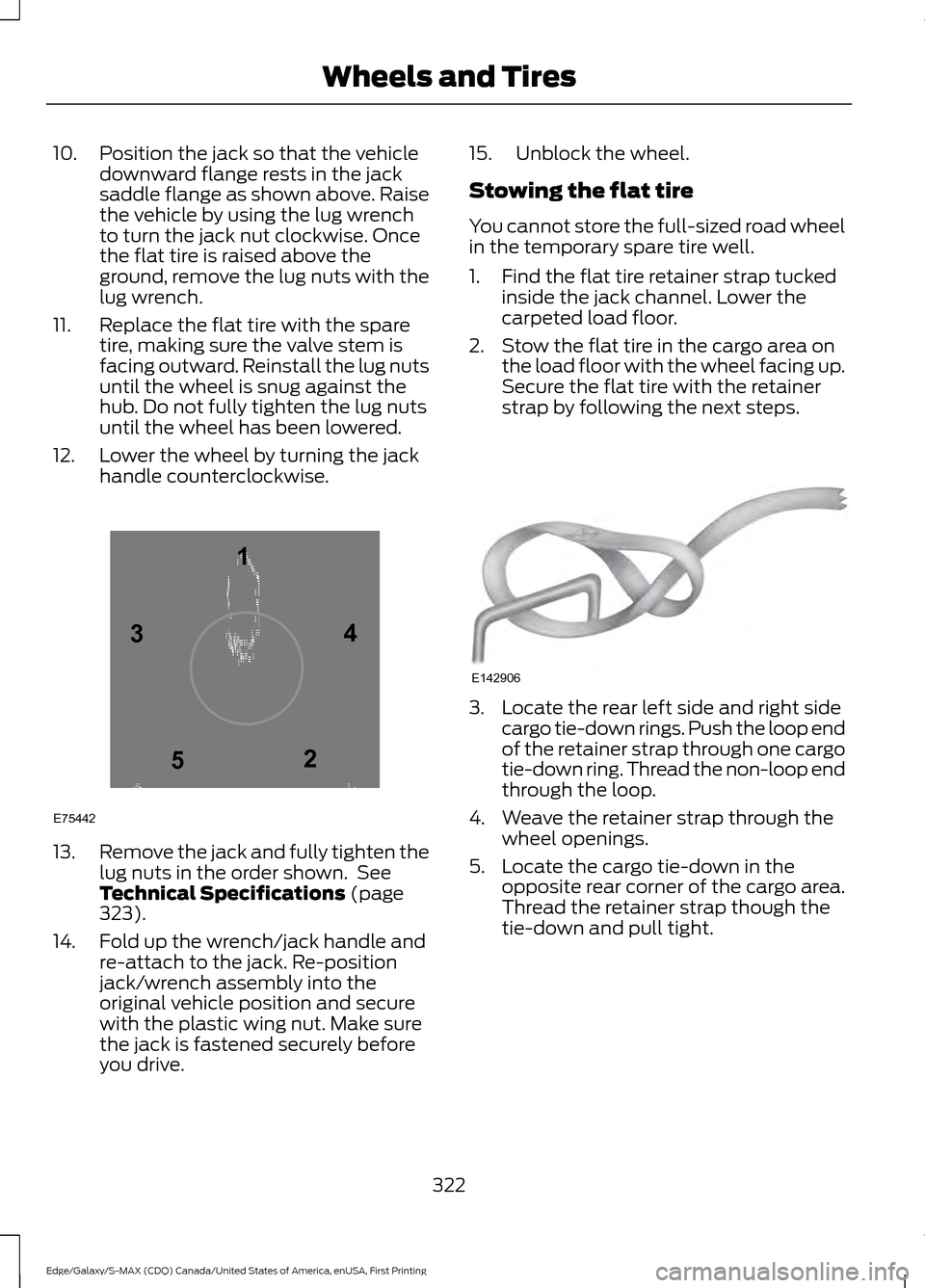
Remove the jack and fully tighten the
lug nuts in the order shown. See
Technical Specifications (page
323).
14. Fold up the wrench/jack handle and re-attach to the jack. Re-position
jack/wrench assembly into the
original vehicle position and secure
with the plastic wing nut. Make sure
the jack is fastened securely before
you drive. 15. Unblock the wheel.
Stowing the flat tire
You cannot store the full-sized road wheel
in the temporary spare tire well.
1. Find the flat tire retainer strap tucked
inside the jack channel. Lower the
carpeted load floor.
2. Stow the flat tire in the cargo area on the load floor with the wheel facing up.
Secure the flat tire with the retainer
strap by following the next steps. 3. Locate the rear left side and right side
cargo tie-down rings. Push the loop end
of the retainer strap through one cargo
tie-down ring. Thread the non-loop end
through the loop.
4. Weave the retainer strap through the wheel openings.
5. Locate the cargo tie-down in the opposite rear corner of the cargo area.
Thread the retainer strap though the
tie-down and pull tight.
322
Edge/Galaxy/S-MAX (CDQ) Canada/United States of America, enUSA, First Printing Wheels and Tires12
3
4
5
E75442 E142906
Page 346 of 451
GENERAL INFORMATION
Radio Frequencies and Reception
Factors
AM and FM frequencies are established by
the Federal Communications Commission
(FCC) and the Canadian Radio and
Telecommunications Commission (CRTC).
Those frequencies are:
•
AM: 530, 540-1700, 1710 kHz
• FM: 87.9-107.7, 107.9 MHz Radio Reception Factors
The further you travel from an AM or FM station, the
weaker the signal and the weaker the reception.
Distance and strength
Hills, mountains, tall buildings, bridges, tunnels, freeway
overpasses, parking garages, dense tree foliage and
thunderstorms can interfere with the reception.
Terrain
When you pass a ground-based broadcast repeating
tower, a stronger signal may overtake a weaker one and
result in the audio system muting.
Station overload
CD and CD Player Information
Note: CD units play commercially pressed
4.75-inch (12 centimeter) audio compact
discs only. Due to technical incompatibility,
certain recordable and re-recordable
compact discs may not function correctly
when used in Ford CD players.
Note: Do not insert CDs with homemade
paper (adhesive) labels into the CD player
as the label may peel and cause the CD to
become jammed. You should use a
permanent felt tip marker rather than
adhesive labels on your homemade CDs.
Ballpoint pens may damage CDs. Please
contact an authorized dealer for further
information.
Note: Do not use any irregularly shaped
discs or discs with a scratch protection film
attached.
Always handle discs by their edges only.
Clean the disc with an approved CD
cleaner only. Wipe it from the center of the
disc toward the edge. Do not clean in a
circular motion. Do not expose discs to direct sunlight or
heat sources for extended periods.
MP3 and WMA Track and Folder
Structure
Audio systems capable of recognizing and
playing MP3 and WMA individual tracks
and folder structures work as follows:
•
There are two different modes for MP3
and WMA disc playback: MP3 and
WMA track mode (system default) and
MP3 and WMA folder mode.
• MP3 and WMA track mode ignores any
folder structure on the MP3 and WMA
disc. The player numbers each MP3
and WMA track on the disc (noted by
the MP3 or WMA file extension) from
T001 to a maximum of T255. The
maximum number of playable MP3 and
WMA files may be less depending on
the structure of the CD and exact
model of radio present.
343
Edge/Galaxy/S-MAX (CDQ) Canada/United States of America, enUSA, First Printing Audio System
Page 357 of 451
Note:
This receiver includes the eCos
real-time operating system. eCos is
published under the eCos License.
Satellite Radio Reception Factors Potential satellite radio reception issues
For optimal reception performance, keep the antenna
clear of snow and ice build-up and keep luggage and other
material as far away from the antenna as possible.
Antenna obstructions
Hills, mountains, tall buildings, bridges, tunnels, freeway
overpasses, parking garages, dense tree foliage and
thunderstorms can interfere with your reception.
Terrain
When you pass a ground-based broadcast-repeating
tower, a stronger signal may overtake a weaker one and
the audio system may mute.
Station overload
Your display may show ACQUIRING . . . to indicate the
interference and the audio system may mute.
Satellite radio signal interfer-
ence
SIRIUS® Satellite Radio Service
Note: SIRIUS reserves the unrestricted right
to change, rearrange, add or delete
programming including canceling, moving
or adding particular channels, and its prices,
at any time, with or without notice to you.
Ford Motor Company shall not be
responsible for any such programming
changes. SIRIUS satellite radio is a
subscription-based satellite radio service
that broadcasts a variety of music, sports,
news, weather, traffic and entertainment
programming. Your factory-installed
SIRIUS satellite radio system includes
hardware and a limited subscription term,
which begins on the date of sale or lease
of your vehicle. See an authorized dealer
for availability.
For more information on extended
subscription terms (a service fee is
required), the online media player and a
complete list of SIRIUS satellite radio
channels, and other features, please visit
www.siriusxm.com in the United States,
www.siriusxm.ca in Canada, or call SIRIUS
at 1-888-539-7474.
Satellite Radio Electronic Serial
Number (ESN)
You need your ESN to activate, modify or
track your satellite radio account. When in
satellite radio mode, tune to channel 0.
354
Edge/Galaxy/S-MAX (CDQ) Canada/United States of America, enUSA, First Printing Audio SystemE142593
Page 358 of 451
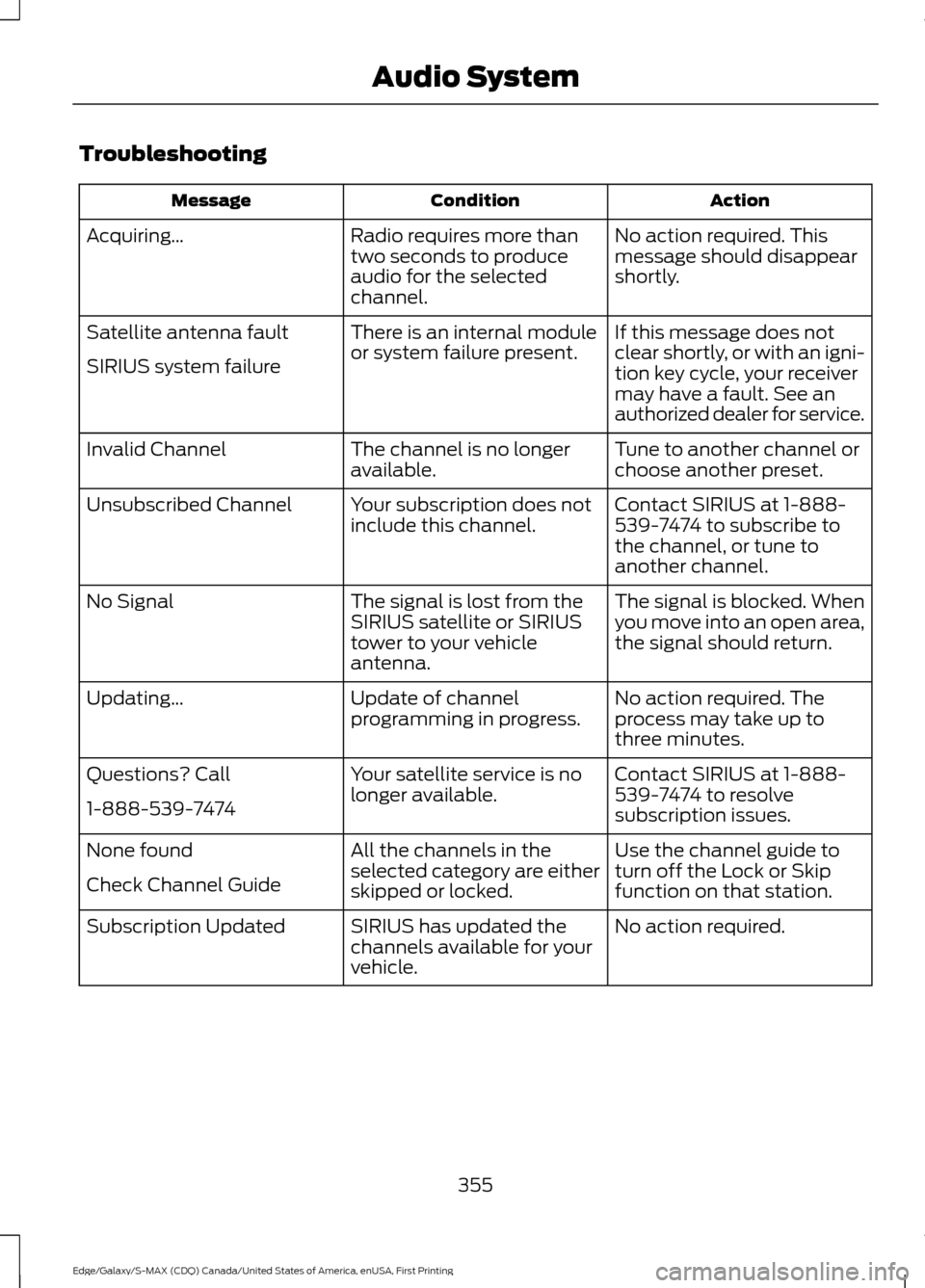
Troubleshooting
Action
Condition
Message
No action required. This
message should disappear
shortly.
Radio requires more than
two seconds to produce
audio for the selected
channel.
Acquiring\b
If this message does not
clear shortly, or with an igni-
tion key cycle, your receiver
may have a fault. See an
authorized dealer for service.
There is an internal module
or system failure present.
Satellite antenna fault
SIRIUS system failure
Tune to another channel or
choose another preset.
The channel is no longer
available.
Invalid Channel
Contact SIRIUS at 1-888-
539-7474 to subscribe to
the channel, or tune to
another channel.
Your subscription does not
include this channel.
Unsubscribed Channel
The signal is blocked. When
you move into an open area,
the signal should return.
The signal is lost from the
SIRIUS satellite or SIRIUS
tower to your vehicle
antenna.
No Signal
No action required. The
process may take up to
three minutes.
Update of channel
programming in progress.
Updating\b
Contact SIRIUS at 1-888-
539-7474 to resolve
subscription issues.
Your satellite service is no
longer available.
Questions? Call
1-888-539-7474
Use the channel guide to
turn off the Lock or Skip
function on that station.
All the channels in the
selected category are either
skipped or locked.
None found
Check Channel Guide
No action required.
SIRIUS has updated the
channels available for your
vehicle.
Subscription Updated
355
Edge/Galaxy/S-MAX (CDQ) Canada/United States of America, enUSA, First Printing Audio System
Page 400 of 451
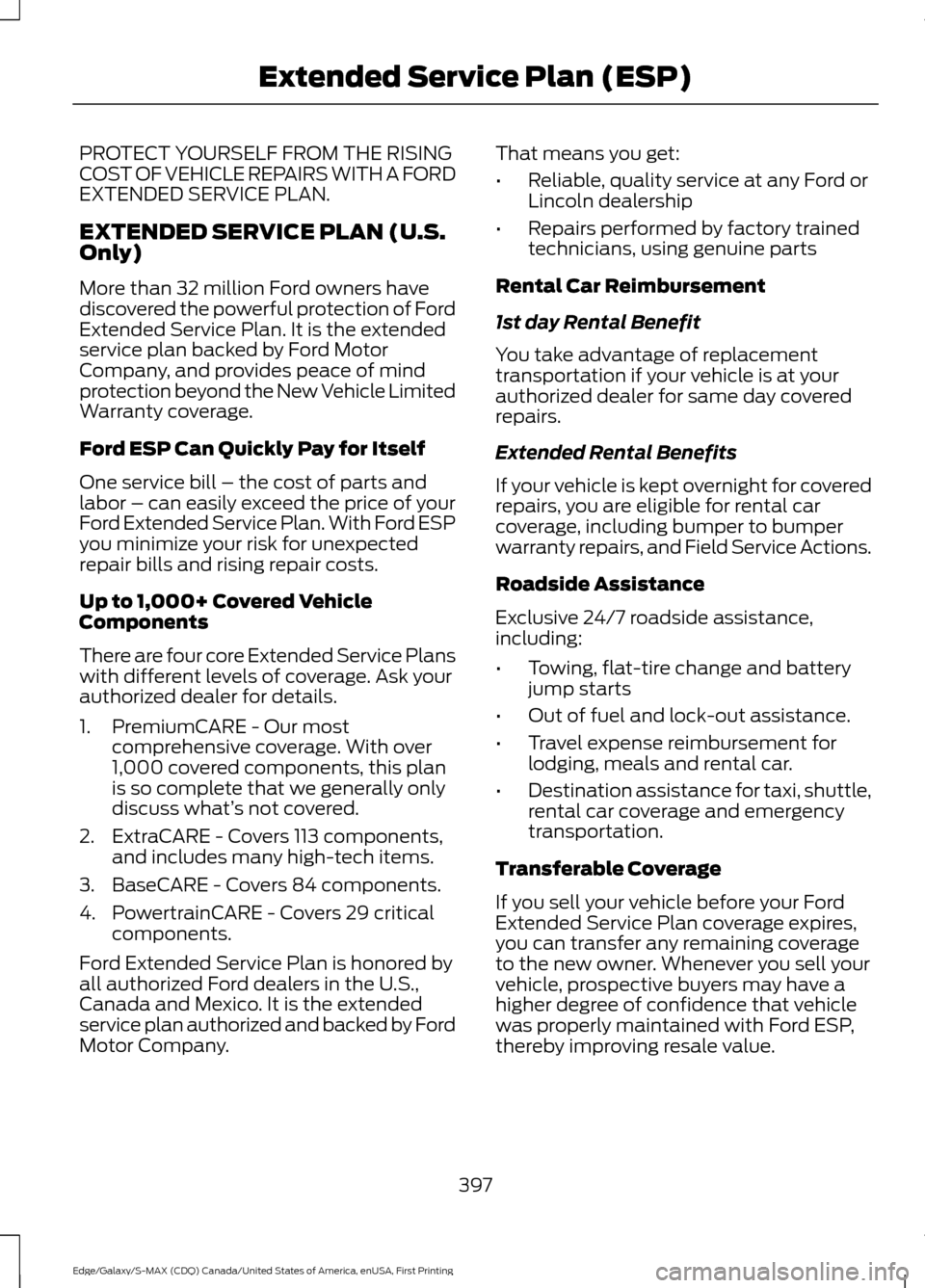
PROTECT YOURSELF FROM THE RISING
COST OF VEHICLE REPAIRS WITH A FORD
EXTENDED SERVICE PLAN.
EXTENDED SERVICE PLAN (U.S.
Only)
More than 32 million Ford owners have
discovered the powerful protection of Ford
Extended Service Plan. It is the extended
service plan backed by Ford Motor
Company, and provides peace of mind
protection beyond the New Vehicle Limited
Warranty coverage.
Ford ESP Can Quickly Pay for Itself
One service bill – the cost of parts and
labor – can easily exceed the price of your
Ford Extended Service Plan. With Ford ESP
you minimize your risk for unexpected
repair bills and rising repair costs.
Up to 1,000+ Covered Vehicle
Components
There are four core Extended Service Plans
with different levels of coverage. Ask your
authorized dealer for details.
1. PremiumCARE - Our most
comprehensive coverage. With over
1,000 covered components, this plan
is so complete that we generally only
discuss what’ s not covered.
2. ExtraCARE - Covers 113 components, and includes many high-tech items.
3. BaseCARE - Covers 84 components.
4. PowertrainCARE - Covers 29 critical components.
Ford Extended Service Plan is honored by
all authorized Ford dealers in the U.S.,
Canada and Mexico. It is the extended
service plan authorized and backed by Ford
Motor Company. That means you get:
•
Reliable, quality service at any Ford or
Lincoln dealership
• Repairs performed by factory trained
technicians, using genuine parts
Rental Car Reimbursement
1st day Rental Benefit
You take advantage of replacement
transportation if your vehicle is at your
authorized dealer for same day covered
repairs.
Extended Rental Benefits
If your vehicle is kept overnight for covered
repairs, you are eligible for rental car
coverage, including bumper to bumper
warranty repairs, and Field Service Actions.
Roadside Assistance
Exclusive 24/7 roadside assistance,
including:
• Towing, flat-tire change and battery
jump starts
• Out of fuel and lock-out assistance.
• Travel expense reimbursement for
lodging, meals and rental car.
• Destination assistance for taxi, shuttle,
rental car coverage and emergency
transportation.
Transferable Coverage
If you sell your vehicle before your Ford
Extended Service Plan coverage expires,
you can transfer any remaining coverage
to the new owner. Whenever you sell your
vehicle, prospective buyers may have a
higher degree of confidence that vehicle
was properly maintained with Ford ESP,
thereby improving resale value.
397
Edge/Galaxy/S-MAX (CDQ) Canada/United States of America, enUSA, First Printing Extended Service Plan (ESP)
Page 401 of 451
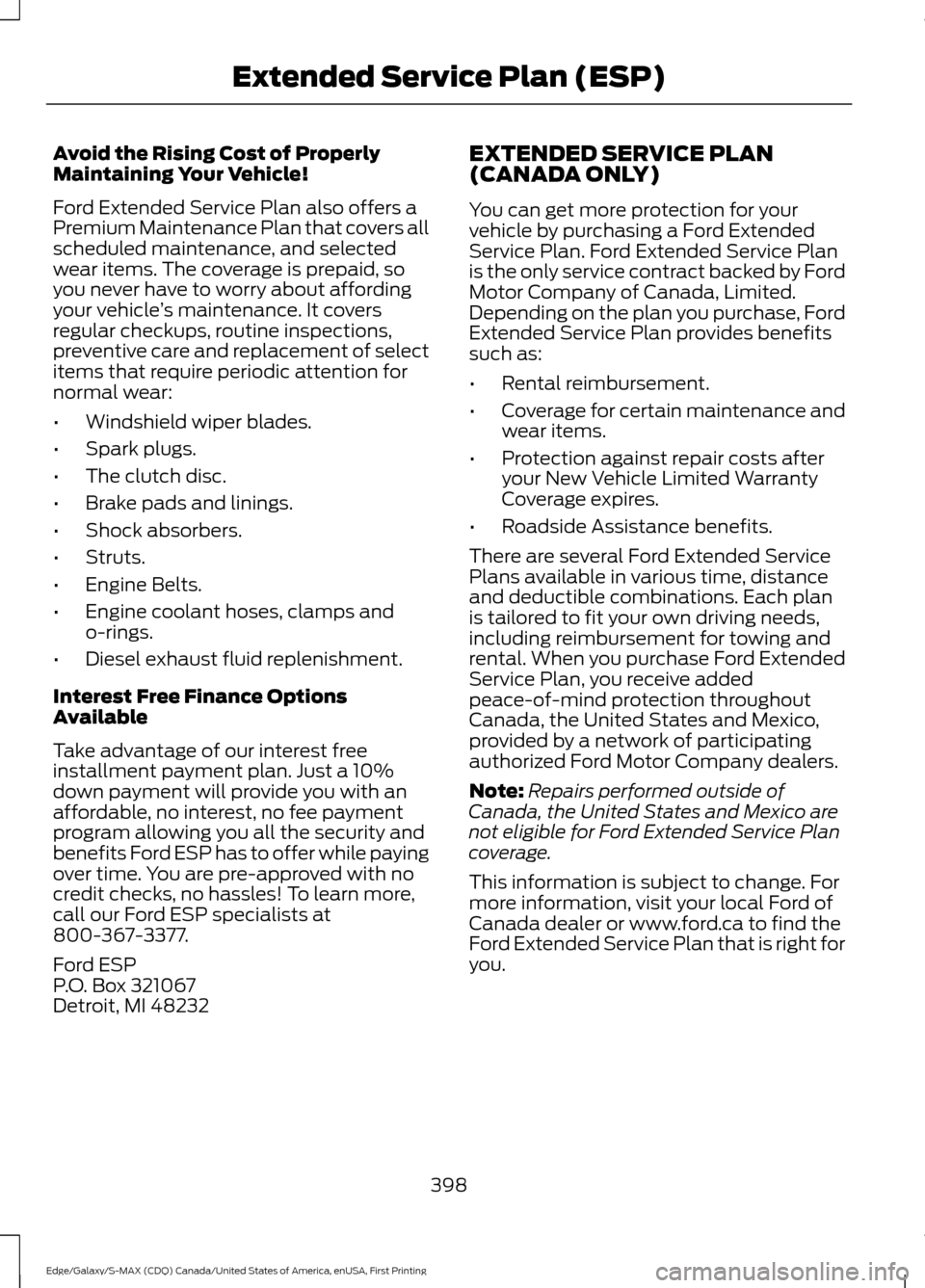
Avoid the Rising Cost of Properly
Maintaining Your Vehicle!
Ford Extended Service Plan also offers a
Premium Maintenance Plan that covers all
scheduled maintenance, and selected
wear items. The coverage is prepaid, so
you never have to worry about affording
your vehicle
’s maintenance. It covers
regular checkups, routine inspections,
preventive care and replacement of select
items that require periodic attention for
normal wear:
• Windshield wiper blades.
• Spark plugs.
• The clutch disc.
• Brake pads and linings.
• Shock absorbers.
• Struts.
• Engine Belts.
• Engine coolant hoses, clamps and
o-rings.
• Diesel exhaust fluid replenishment.
Interest Free Finance Options
Available
Take advantage of our interest free
installment payment plan. Just a 10%
down payment will provide you with an
affordable, no interest, no fee payment
program allowing you all the security and
benefits Ford ESP has to offer while paying
over time. You are pre-approved with no
credit checks, no hassles! To learn more,
call our Ford ESP specialists at
800-367-3377.
Ford ESP
P.O. Box 321067
Detroit, MI 48232 EXTENDED SERVICE PLAN
(CANADA ONLY)
You can get more protection for your
vehicle by purchasing a Ford Extended
Service Plan. Ford Extended Service Plan
is the only service contract backed by Ford
Motor Company of Canada, Limited.
Depending on the plan you purchase, Ford
Extended Service Plan provides benefits
such as:
•
Rental reimbursement.
• Coverage for certain maintenance and
wear items.
• Protection against repair costs after
your New Vehicle Limited Warranty
Coverage expires.
• Roadside Assistance benefits.
There are several Ford Extended Service
Plans available in various time, distance
and deductible combinations. Each plan
is tailored to fit your own driving needs,
including reimbursement for towing and
rental. When you purchase Ford Extended
Service Plan, you receive added
peace-of-mind protection throughout
Canada, the United States and Mexico,
provided by a network of participating
authorized Ford Motor Company dealers.
Note: Repairs performed outside of
Canada, the United States and Mexico are
not eligible for Ford Extended Service Plan
coverage.
This information is subject to change. For
more information, visit your local Ford of
Canada dealer or www.ford.ca to find the
Ford Extended Service Plan that is right for
you.
398
Edge/Galaxy/S-MAX (CDQ) Canada/United States of America, enUSA, First Printing Extended Service Plan (ESP)
Page 406 of 451
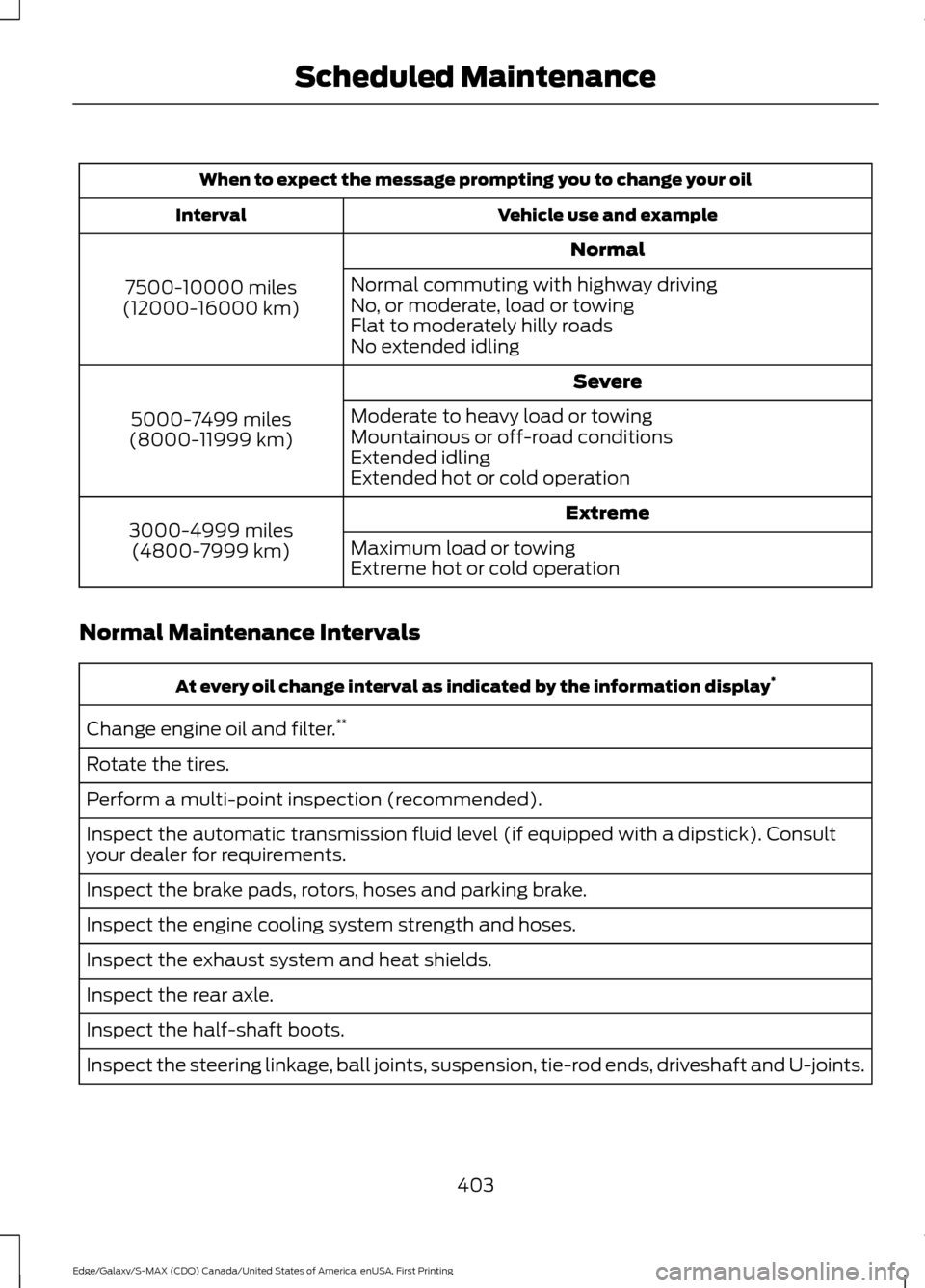
When to expect the message prompting you to change your oil
Vehicle use and example
Interval
Normal
7500-10000 miles
(12000-16000 km) Normal commuting with highway driving
No, or moderate, load or towing
Flat to moderately hilly roads
No extended idling
Severe
5000-7499 miles
(8000-11999 km) Moderate to heavy load or towing
Mountainous or off-road conditions
Extended idling
Extended hot or cold operation
Extreme
3000-4999 miles
(4800-7999 km) Maximum load or towing
Extreme hot or cold operation
Normal Maintenance Intervals At every oil change interval as indicated by the information display
*
Change engine oil and filter. **
Rotate the tires.
Perform a multi-point inspection (recommended).
Inspect the automatic transmission fluid level (if equipped with a dipstick). Consult
your dealer for requirements.
Inspect the brake pads, rotors, hoses and parking brake.
Inspect the engine cooling system strength and hoses.
Inspect the exhaust system and heat shields.
Inspect the rear axle.
Inspect the half-shaft boots.
Inspect the steering linkage, ball joints, suspension, tie-rod ends, driveshaft and U-joints.
403
Edge/Galaxy/S-MAX (CDQ) Canada/United States of America, enUSA, First Printing Scheduled Maintenance
Page 408 of 451
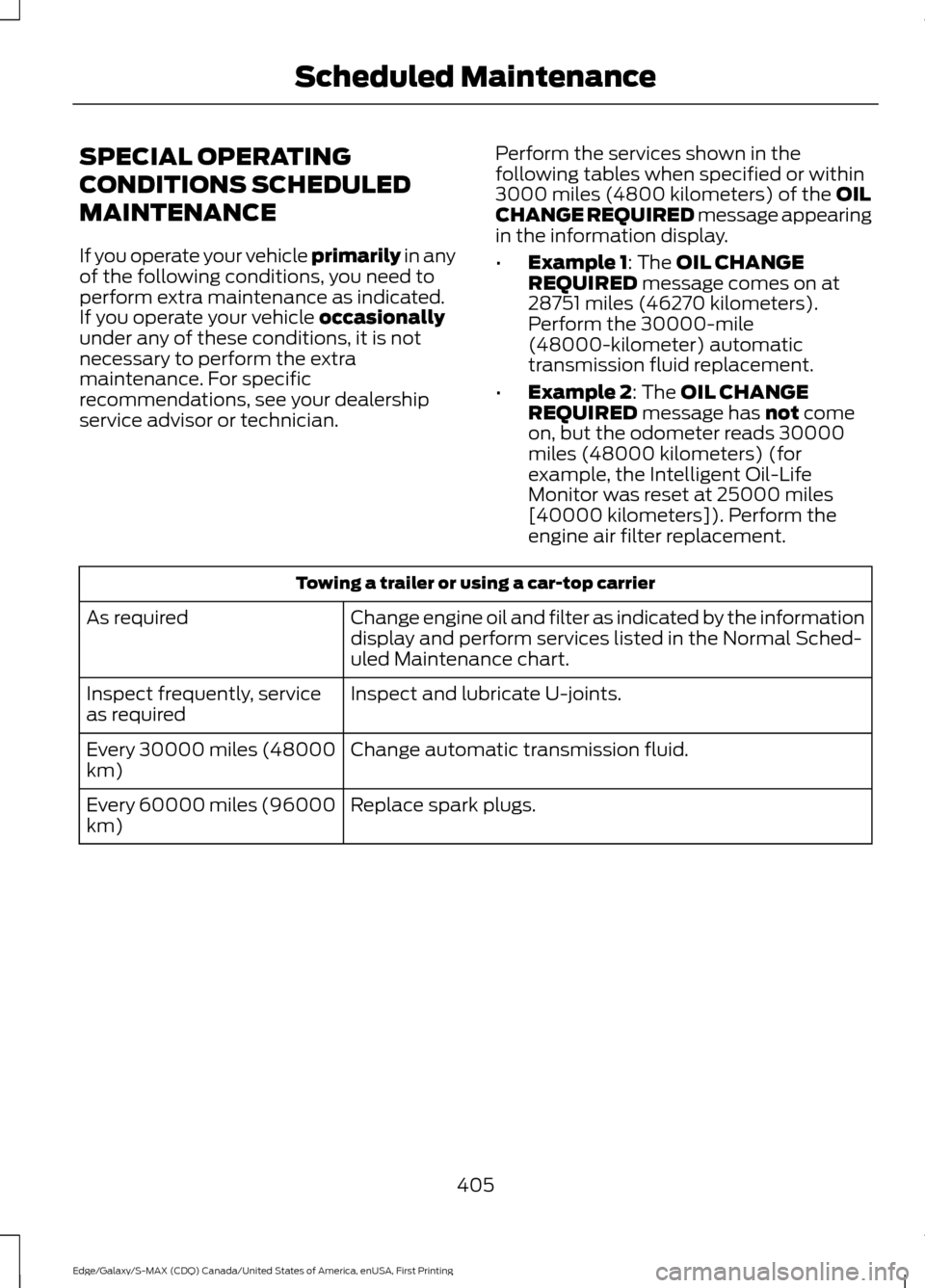
SPECIAL OPERATING
CONDITIONS SCHEDULED
MAINTENANCE
If you operate your vehicle primarily in any
of the following conditions, you need to
perform extra maintenance as indicated.
If you operate your vehicle
occasionally
under any of these conditions, it is not
necessary to perform the extra
maintenance. For specific
recommendations, see your dealership
service advisor or technician. Perform the services shown in the
following tables when specified or within
3000 miles (4800 kilometers) of the
OIL
CHANGE REQUIRED message appearing
in the information display.
• Example 1
: The OIL CHANGE
REQUIRED message comes on at
28751 miles (46270 kilometers).
Perform the 30000-mile
(48000-kilometer) automatic
transmission fluid replacement.
• Example 2
: The OIL CHANGE
REQUIRED message has not come
on, but the odometer reads 30000
miles (48000 kilometers) (for
example, the Intelligent Oil-Life
Monitor was reset at 25000 miles
[40000 kilometers]). Perform the
engine air filter replacement. Towing a trailer or using a car-top carrier
Change engine oil and filter as indicated by the information
display and perform services listed in the Normal Sched-
uled Maintenance chart.
As required
Inspect and lubricate U-joints.
Inspect frequently, service
as required
Change automatic transmission fluid.
Every 30000 miles (48000
km)
Replace spark plugs.
Every 60000 miles (96000
km)
405
Edge/Galaxy/S-MAX (CDQ) Canada/United States of America, enUSA, First Printing Scheduled Maintenance
Page 441 of 451
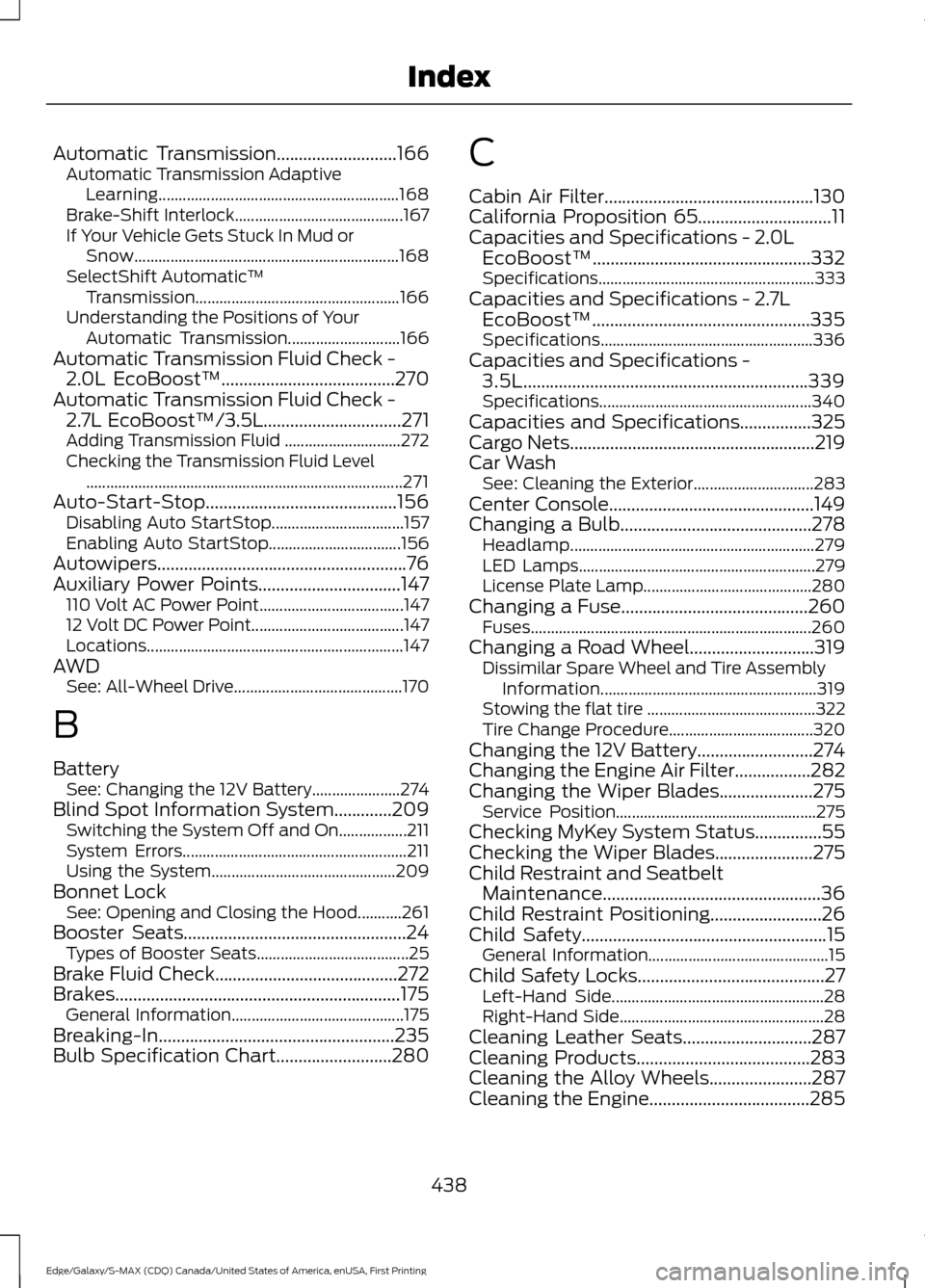
Automatic Transmission...........................166
Automatic Transmission Adaptive
Learning............................................................ 168
Brake-Shift Interlock.......................................... 167
If Your Vehicle Gets Stuck In Mud or Snow.................................................................. 168
SelectShift Automatic ™
Transmission................................................... 166
Understanding the Positions of Your Automatic Transmission............................ 166
Automatic Transmission Fluid Check - 2.0L EcoBoost™.......................................270
Automatic Transmission Fluid Check - 2.7L EcoBoost™/3.5L...............................271
Adding Transmission Fluid ............................. 272
Checking the Transmission Fluid Level ........................................................................\
....... 271
Auto-Start-Stop...........................................156 Disabling Auto StartStop................................. 157
Enabling Auto StartStop................................. 156
Autowipers........................................................76
Auxiliary Power Points................................147 110 Volt AC Power Point.................................... 147
12 Volt DC Power Point...................................... 147
Locations................................................................ 147
AWD See: All-Wheel Drive.......................................... 170
B
Battery See: Changing the 12V Battery...................... 274
Blind Spot Information System.............209 Switching the System Off and On.................211
System Errors........................................................ 211
Using the System.............................................. 209
Bonnet Lock See: Opening and Closing the Hood...........261
Booster Seats..................................................24 Types of Booster Seats...................................... 25
Brake Fluid Check.........................................272
Brakes................................................................175 General Information........................................... 175
Breaking-In.....................................................235
Bulb Specification Chart..........................280 C
Cabin Air Filter...............................................130
California Proposition 65..............................11
Capacities and Specifications - 2.0L
EcoBoost™.................................................332
Specifications...................................................... 333
Capacities and Specifications - 2.7L EcoBoost™.................................................335
Specifications..................................................... 336
Capacities and Specifications - 3.5L................................................................339
Specifications..................................................... 340
Capacities and Specifications................325
Cargo Nets
.......................................................219
Car Wash See: Cleaning the Exterior.............................. 283
Center Console
..............................................149
Changing a Bulb...........................................278 Headlamp............................................................. 279
LED Lamps........................................................... 279
License Plate Lamp.......................................... 280
Changing a Fuse..........................................260 Fuses...................................................................... 260
Changing a Road Wheel............................319 Dissimilar Spare Wheel and Tire Assembly
Information...................................................... 319
Stowing the flat tire .......................................... 322
Tire Change Procedure.................................... 320
Changing the 12V Battery..........................274
Changing the Engine Air Filter.................282
Changing the Wiper Blades.....................275 Service Position.................................................. 275
Checking MyKey System Status...............55
Checking the Wiper Blades......................275
Child Restraint and Seatbelt Maintenance
.................................................36
Child Restraint Positioning.........................26
Child Safety.......................................................15
General Information............................................. 15
Child Safety Locks..........................................27 Left-Hand Side..................................................... 28
Right-Hand Side................................................... 28
Cleaning Leather Seats.............................287
Cleaning Products
.......................................283
Cleaning the Alloy Wheels.......................287
Cleaning the Engine....................................285
438
Edge/Galaxy/S-MAX (CDQ) Canada/United States of America, enUSA, First Printing Index