lights FORD EDGE 2017 2.G Owner's Manual
[x] Cancel search | Manufacturer: FORD, Model Year: 2017, Model line: EDGE, Model: FORD EDGE 2017 2.GPages: 544, PDF Size: 25.27 MB
Page 383 of 544
Sending a Text Message
Note:
You can only send a text message to
one recipient at a time.
1. Select the send option when the desired selection highlights in the audio
display.
2. Select the confirmation option when the contact appears.
3. Press the OK button again to confirm when the system asks if you want to
send the message. A pre-defined
signature appears on each text
message. Note:
You can send text messages either
by choosing a contact from the phonebook
and selecting the text option from the audio
display or by replying to a received message
in the inbox.
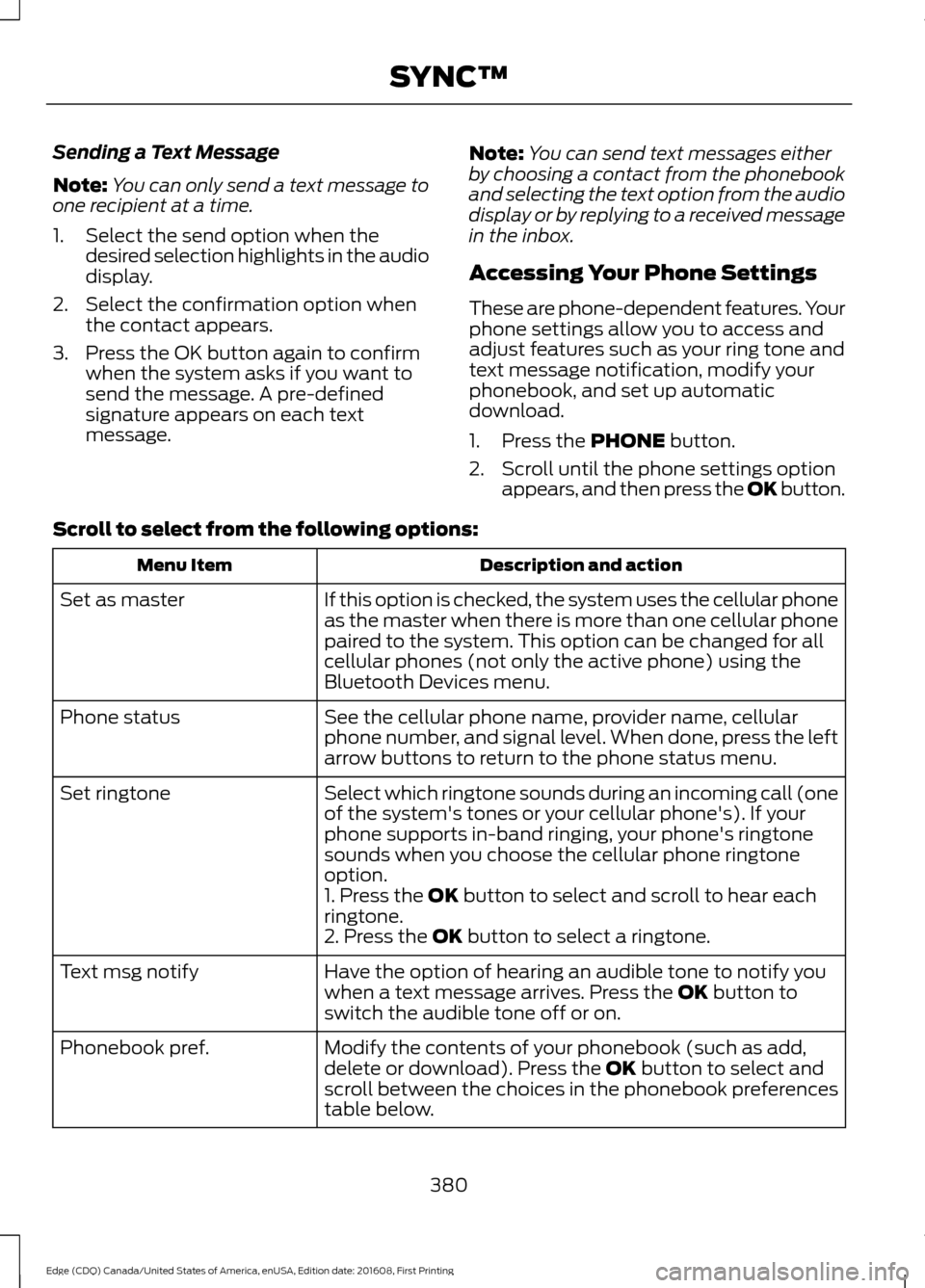
Accessing Your Phone Settings
These are phone-dependent features. Your
phone settings allow you to access and
adjust features such as your ring tone and
text message notification, modify your
phonebook, and set up automatic
download.
1. Press the PHONE button.
2. Scroll until the phone settings option appears, and then press the OK button.
Scroll to select from the following options: Description and action
Menu Item
If this option is checked, the system uses the cellular phone
as the master when there is more than one cellular phone
paired to the system. This option can be changed for all
cellular phones (not only the active phone) using the
Bluetooth Devices menu.
Set as master
See the cellular phone name, provider name, cellular
phone number, and signal level. When done, press the left
arrow buttons to return to the phone status menu.
Phone status
Select which ringtone sounds during an incoming call (one
of the system's tones or your cellular phone's). If your
phone supports in-band ringing, your phone's ringtone
sounds when you choose the cellular phone ringtone
option.
Set ringtone
1. Press the
OK button to select and scroll to hear each
ringtone.
2. Press the
OK button to select a ringtone.
Have the option of hearing an audible tone to notify you
when a text message arrives. Press the
OK button to
switch the audible tone off or on.
Text msg notify
Modify the contents of your phonebook (such as add,
delete or download). Press the
OK button to select and
scroll between the choices in the phonebook preferences
table below.
Phonebook pref.
380
Edge (CDQ) Canada/United States of America, enUSA, Edition date: 201608, First Printing SYNC™
Page 442 of 544
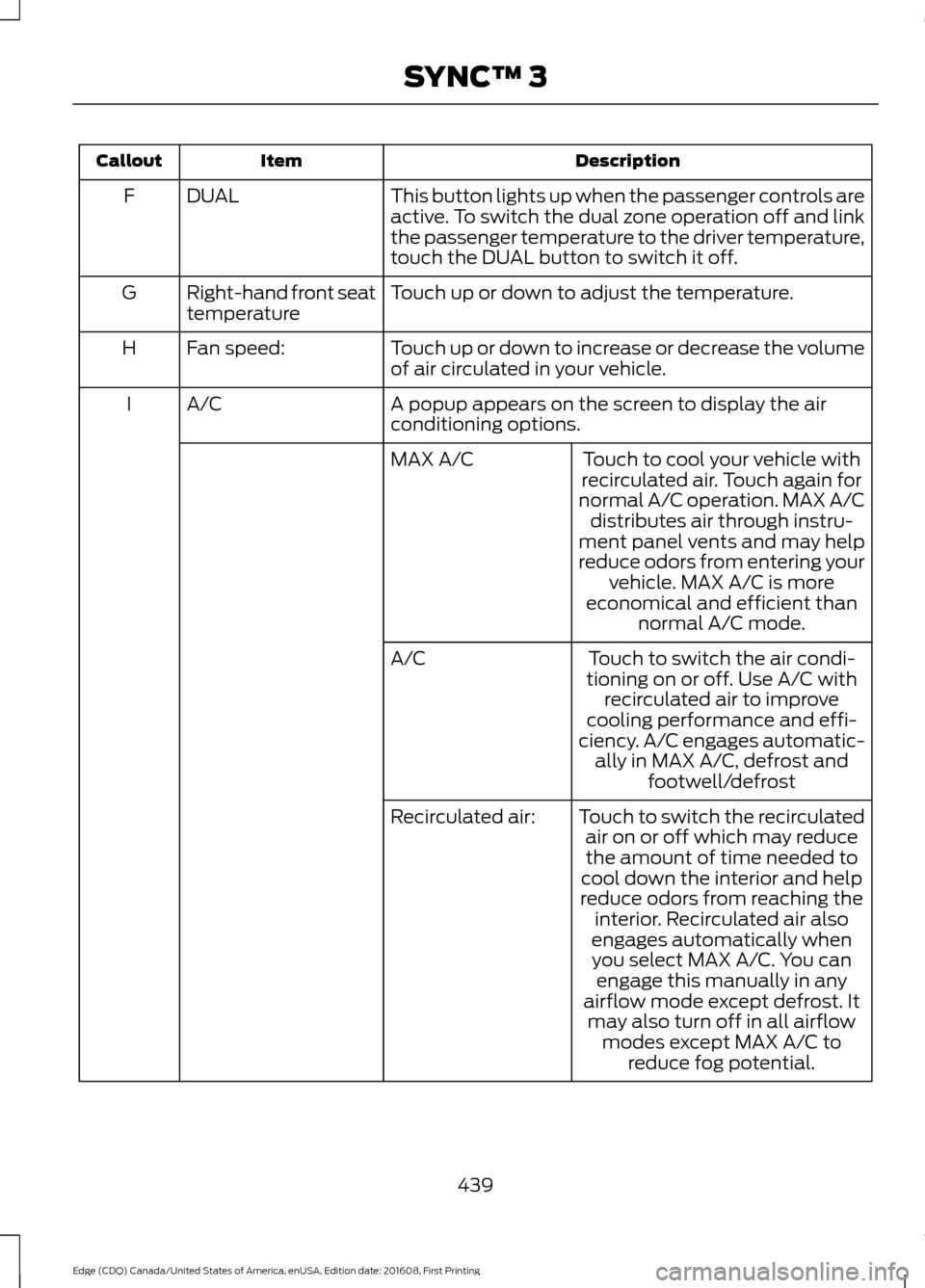
Description
Item
Callout
This button lights up when the passenger controls are
active. To switch the dual zone operation off and link
the passenger temperature to the driver temperature,
touch the DUAL button to switch it off.
DUAL
F
Touch up or down to adjust the temperature.
Right-hand front seat
temperature
G
Touch up or down to increase or decrease the volume
of air circulated in your vehicle.
Fan speed:
H
A popup appears on the screen to display the air
conditioning options.
A/C
I
Touch to cool your vehicle with
recirculated air. Touch again for
normal A/C operation. MAX A/C distributes air through instru-
ment panel vents and may help
reduce odors from entering your vehicle. MAX A/C is more
economical and efficient than normal A/C mode.
MAX A/C
Touch to switch the air condi-
tioning on or off. Use A/C with recirculated air to improve
cooling performance and effi-
ciency. A/C engages automatic- ally in MAX A/C, defrost and footwell/defrost
A/C
Touch to switch the recirculatedair on or off which may reducethe amount of time needed to
cool down the interior and help
reduce odors from reaching the interior. Recirculated air also
Recirculated air:
engages automatically whenyou select MAX A/C. You can engage this manually in any
airflow mode except defrost. It may also turn off in all airflow modes except MAX A/C to reduce fog potential.
439
Edge (CDQ) Canada/United States of America, enUSA, Edition date: 201608, First Printing SYNC™ 3
Page 450 of 544
3D city models are complete 3D models
of entire city areas including navigable
roads, parks, rivers and rendered buildings.
3D landmarks and city models appear in
3D map mode only. Coverage of these
varies and improves with updated map
releases.
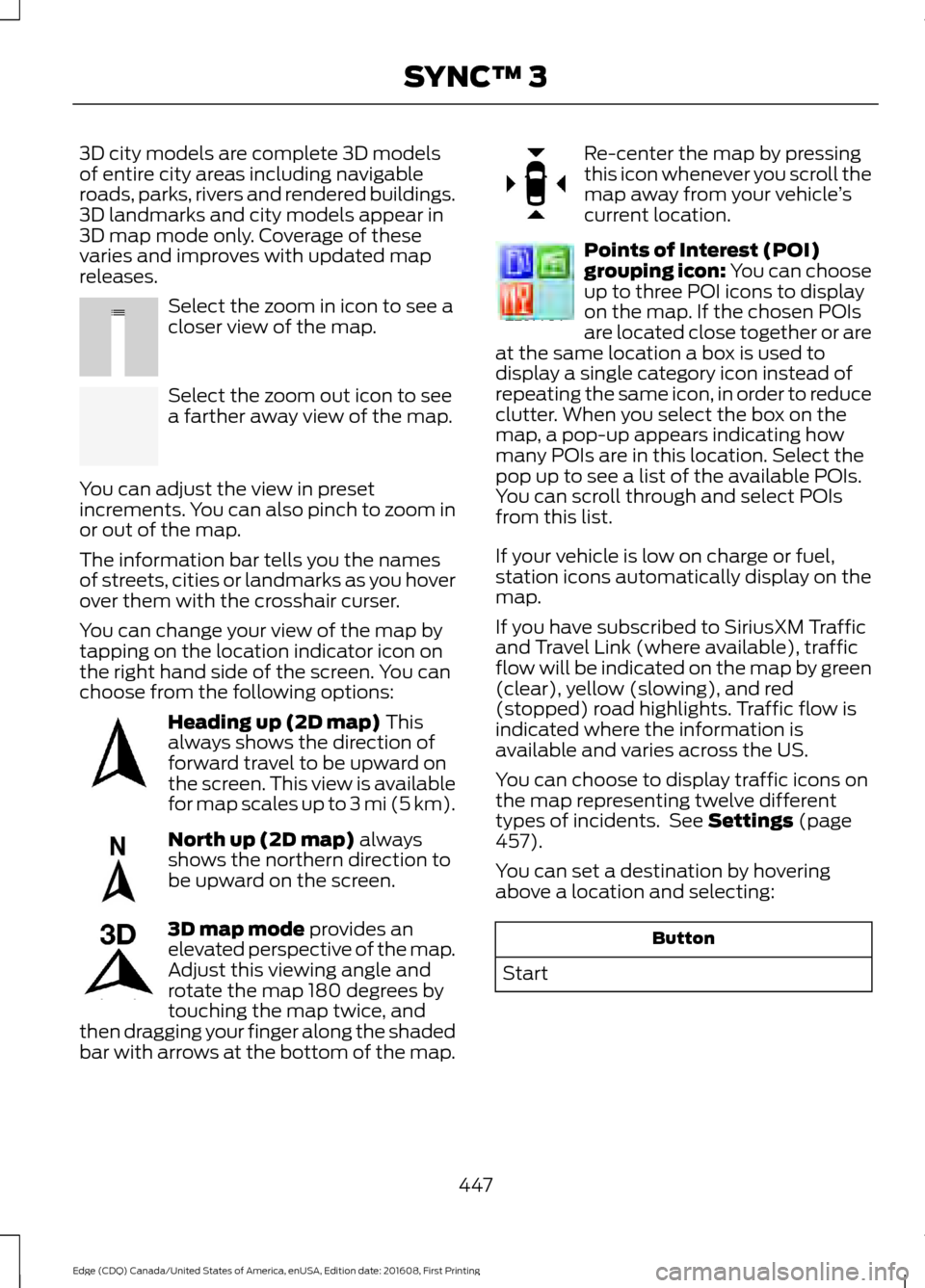
Select the zoom in icon to see a
closer view of the map.
Select the zoom out icon to see
a farther away view of the map.
You can adjust the view in preset
increments. You can also pinch to zoom in
or out of the map.
The information bar tells you the names
of streets, cities or landmarks as you hover
over them with the crosshair curser.
You can change your view of the map by
tapping on the location indicator icon on
the right hand side of the screen. You can
choose from the following options: Heading up (2D map) This
always shows the direction of
forward travel to be upward on
the screen. This view is available
for map scales up to
3 mi (5 km). North up (2D map)
always
shows the northern direction to
be upward on the screen. 3D map mode
provides an
elevated perspective of the map.
Adjust this viewing angle and
rotate the map 180 degrees by
touching the map twice, and
then dragging your finger along the shaded
bar with arrows at the bottom of the map. Re-center the map by pressing
this icon whenever you scroll the
map away from your vehicle
’s
current location. Points of Interest (POI)
grouping icon: You can choose
up to three POI icons to display
on the map. If the chosen POIs
are located close together or are
at the same location a box is used to
display a single category icon instead of
repeating the same icon, in order to reduce
clutter. When you select the box on the
map, a pop-up appears indicating how
many POIs are in this location. Select the
pop up to see a list of the available POIs.
You can scroll through and select POIs
from this list.
If your vehicle is low on charge or fuel,
station icons automatically display on the
map.
If you have subscribed to SiriusXM Traffic
and Travel Link (where available), traffic
flow will be indicated on the map by green
(clear), yellow (slowing), and red
(stopped) road highlights. Traffic flow is
indicated where the information is
available and varies across the US.
You can choose to display traffic icons on
the map representing twelve different
types of incidents. See
Settings (page
457).
You can set a destination by hovering
above a location and selecting: Button
Start
447
Edge (CDQ) Canada/United States of America, enUSA, Edition date: 201608, First Printing SYNC™ 3E207752 E207753 E207750 E207749 E207748 E207751 E207754
Page 491 of 544
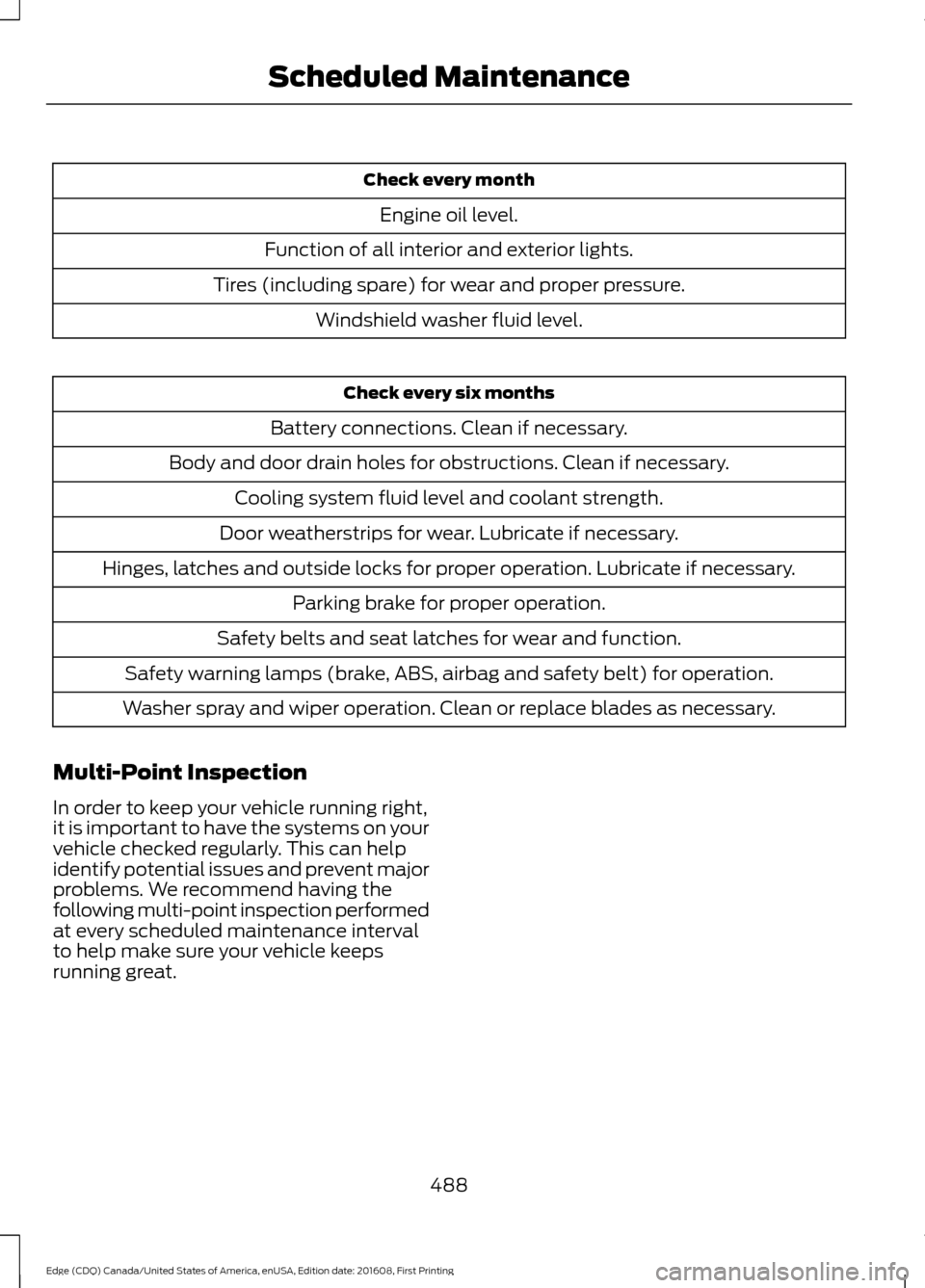
Check every month
Engine oil level.
Function of all interior and exterior lights.
Tires (including spare) for wear and proper pressure. Windshield washer fluid level. Check every six months
Battery connections. Clean if necessary.
Body and door drain holes for obstructions. Clean if necessary. Cooling system fluid level and coolant strength.
Door weatherstrips for wear. Lubricate if necessary.
Hinges, latches and outside locks for proper operation. Lubricate if necessary. Parking brake for proper operation.
Safety belts and seat latches for wear and function.
Safety warning lamps (brake, ABS, airbag and safety belt) for operation.
Washer spray and wiper operation. Clean or replace blades as necessary.
Multi-Point Inspection
In order to keep your vehicle running right,
it is important to have the systems on your
vehicle checked regularly. This can help
identify potential issues and prevent major
problems. We recommend having the
following multi-point inspection performed
at every scheduled maintenance interval
to help make sure your vehicle keeps
running great.
488
Edge (CDQ) Canada/United States of America, enUSA, Edition date: 201608, First Printing Scheduled Maintenance
Page 536 of 544
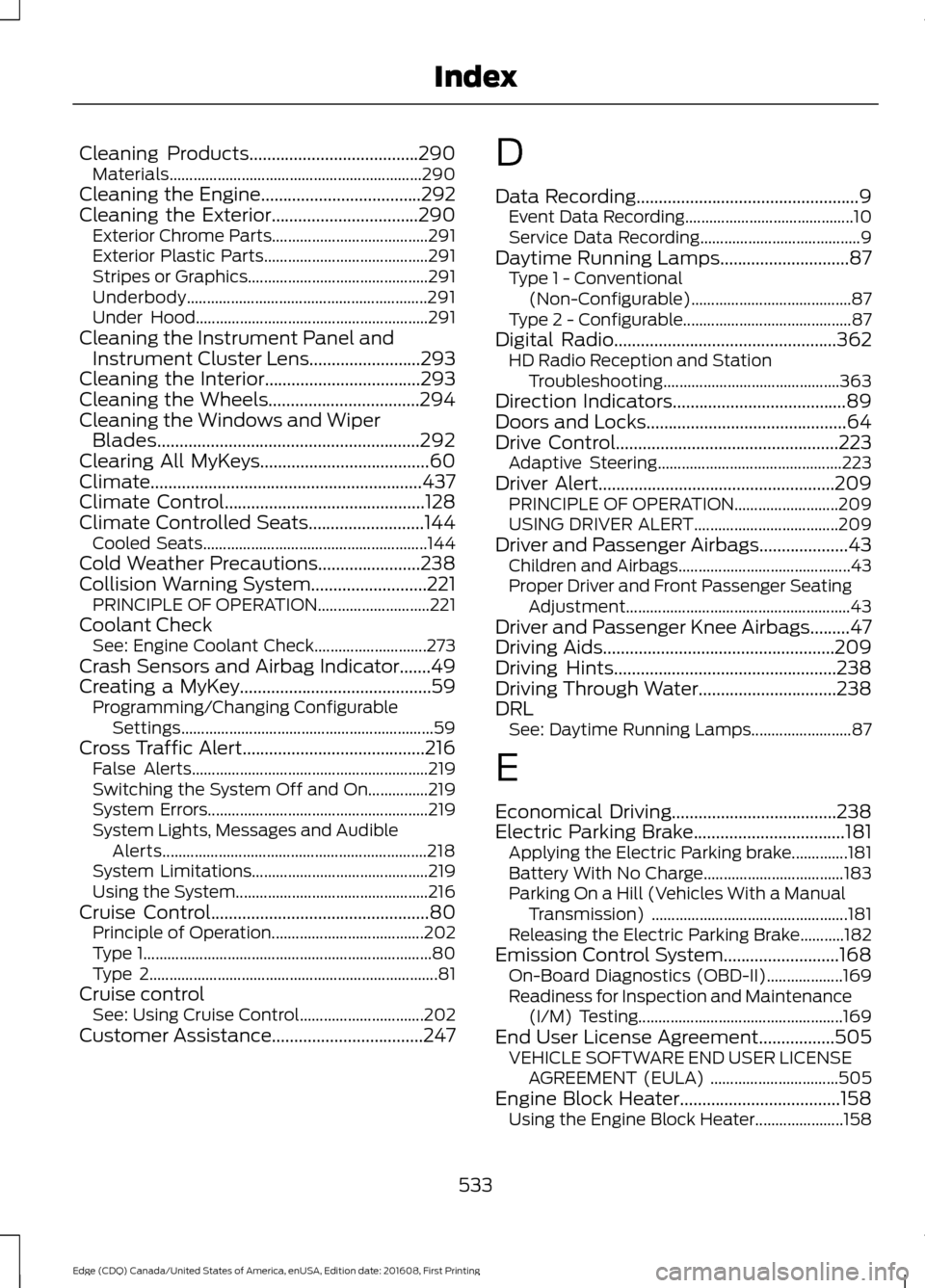
Cleaning Products......................................290
Materials............................................................... 290
Cleaning the Engine....................................292
Cleaning the Exterior.................................290 Exterior Chrome Parts....................................... 291
Exterior Plastic Parts......................................... 291
Stripes or Graphics............................................. 291
Underbody............................................................ 291
Under Hood.......................................................... 291
Cleaning the Instrument Panel and Instrument Cluster Lens.........................293
Cleaning the Interior...................................293
Cleaning the Wheels..................................294
Cleaning the Windows and Wiper Blades...........................................................292
Clearing All MyKeys......................................60
Climate.............................................................437
Climate Control.............................................128
Climate Controlled Seats..........................144
Cooled Seats........................................................ 144
Cold Weather Precautions.......................238
Collision Warning System..........................221 PRINCIPLE OF OPERATION............................ 221
Coolant Check See: Engine Coolant Check............................ 273
Crash Sensors and Airbag Indicator.......49
Creating a MyKey...........................................59 Programming/Changing Configurable
Settings............................................................... 59
Cross Traffic Alert.........................................216 False Alerts........................................................... 219
Switching the System Off and On...............219
System Errors....................................................... 219
System Lights, Messages and Audible Alerts.................................................................. 218
System Limitations............................................ 219
Using the System................................................ 216
Cruise Control
.................................................80
Principle of Operation...................................... 202
Type 1........................................................................\
80
Type 2........................................................................\
81
Cruise control See: Using Cruise Control............................... 202
Customer Assistance
..................................247 D
Data Recording
..................................................9
Event Data Recording.......................................... 10
Service Data Recording........................................ 9
Daytime Running Lamps
.............................87
Type 1 - Conventional
(Non-Configurable)........................................ 87
Type 2 - Configurable.......................................... 87
Digital Radio
..................................................362
HD Radio Reception and Station
Troubleshooting............................................ 363
Direction Indicators
.......................................89
Doors and Locks.............................................64
Drive Control
..................................................223
Adaptive Steering.............................................. 223
Driver Alert
.....................................................209
PRINCIPLE OF OPERATION.......................... 209
USING DRIVER ALERT.................................... 209
Driver and Passenger Airbags....................43 Children and Airbags........................................... 43
Proper Driver and Front Passenger Seating Adjustment........................................................ 43
Driver and Passenger Knee Airbags.........47
Driving Aids
....................................................209
Driving Hints..................................................238
Driving Through Water...............................238
DRL See: Daytime Running Lamps......................... 87
E
Economical Driving.....................................238
Electric Parking Brake
..................................181
Applying the Electric Parking brake..............181
Battery With No Charge................................... 183
Parking On a Hill (Vehicles With a Manual Transmission) ................................................. 181
Releasing the Electric Parking Brake...........182
Emission Control System..........................168 On-Board Diagnostics (OBD-II)...................169
Readiness for Inspection and Maintenance
(I/M) Testing................................................... 169
End User License Agreement
.................505
VEHICLE SOFTWARE END USER LICENSE
AGREEMENT (EULA) ................................ 505
Engine Block Heater....................................158 Using the Engine Block Heater...................... 158
533
Edge (CDQ) Canada/United States of America, enUSA, Edition date: 201608, First Printing Index
Page 544 of 544
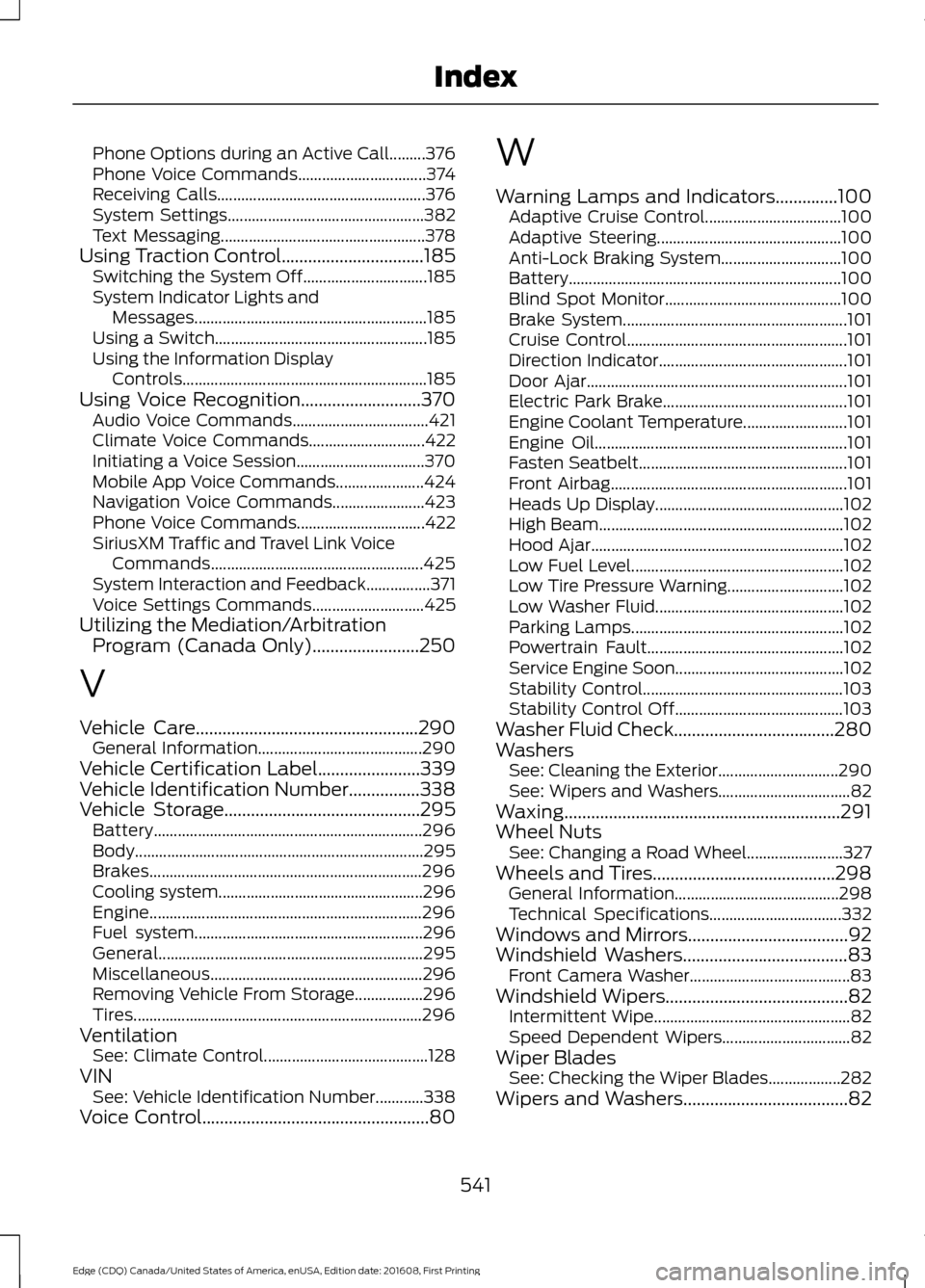
Phone Options during an Active Call.........376
Phone Voice Commands................................
374
Receiving Calls.................................................... 376
System Settings................................................. 382
Text Messaging................................................... 378
Using Traction Control................................185 Switching the System Off............................... 185
System Indicator Lights and Messages.......................................................... 185
Using a Switch..................................................... 185
Using the Information Display Controls............................................................. 185
Using Voice Recognition...........................370 Audio Voice Commands.................................. 421
Climate Voice Commands............................. 422
Initiating a Voice Session................................ 370
Mobile App Voice Commands...................... 424
Navigation Voice Commands.......................423
Phone Voice Commands................................ 422
SiriusXM Traffic and Travel Link Voice Commands..................................................... 425
System Interaction and Feedback................371
Voice Settings Commands............................ 425
Utilizing the Mediation/Arbitration Program (Canada Only)........................250
V
Vehicle Care..................................................290 General Information......................................... 290
Vehicle Certification Label.......................339
Vehicle Identification Number................338
Vehicle Storage............................................295 Battery................................................................... 296
Body........................................................................\
295
Brakes.................................................................... 296
Cooling system................................................... 296
Engine.................................................................... 296
Fuel system......................................................... 296
General.................................................................. 295
Miscellaneous..................................................... 296
Removing Vehicle From Storage.................296
Tires........................................................................\
296
Ventilation See: Climate Control......................................... 128
VIN See: Vehicle Identification Number............338
Voice Control...................................................80 W
Warning Lamps and Indicators..............100
Adaptive Cruise Control.................................. 100
Adaptive Steering.............................................. 100
Anti-Lock Braking System.............................. 100
Battery.................................................................... 100
Blind Spot Monitor............................................ 100
Brake System........................................................ 101
Cruise Control....................................................... 101
Direction Indicator............................................... 101
Door Ajar................................................................. 101
Electric Park Brake.............................................. 101
Engine Coolant Temperature.......................... 101
Engine Oil............................................................... 101
Fasten Seatbelt.................................................... 101
Front Airbag........................................................... 101
Heads Up Display............................................... 102
High Beam............................................................. 102
Hood Ajar............................................................... 102
Low Fuel Level..................................................... 102
Low Tire Pressure Warning............................. 102
Low Washer Fluid............................................... 102
Parking Lamps..................................................... 102
Powertrain Fault................................................. 102
Service Engine Soon.......................................... 102
Stability Control.................................................. 103
Stability Control Off.......................................... 103
Washer Fluid Check....................................280
Washers See: Cleaning the Exterior.............................. 290
See: Wipers and Washers................................. 82
Waxing..............................................................291
Wheel Nuts See: Changing a Road Wheel........................ 327
Wheels and Tires.........................................298 General Information......................................... 298
Technical Specifications................................. 332
Windows and Mirrors....................................92
Windshield Washers
.....................................83
Front Camera Washer........................................ 83
Windshield Wipers
.........................................82
Intermittent Wipe................................................. 82
Speed Dependent Wipers................................ 82
Wiper Blades See: Checking the Wiper Blades.................. 282
Wipers and Washers
.....................................82
541
Edge (CDQ) Canada/United States of America, enUSA, Edition date: 201608, First Printing Index