tow FORD EDGE 2017 2.G Owners Manual
[x] Cancel search | Manufacturer: FORD, Model Year: 2017, Model line: EDGE, Model: FORD EDGE 2017 2.GPages: 544, PDF Size: 25.27 MB
Page 5 of 544
Steering Wheel
Adjusting the Steering Wheel - Vehicles
With: Manual Adjustable Steering
Column...........................................................78
Adjusting the Steering Wheel - Vehicles With: Power Adjustable Steering
Column...........................................................78
Audio Control - Vehicles With: Voice Control............................................................79
Audio Control - Vehicles Without: Voice Control............................................................79
Voice Control...................................................80
Cruise Control.................................................80
Information Display Control........................81
Heated Steering Wheel
................................81
Wipers and Washers
Windshield Wipers
.........................................82
Autowipers.......................................................82
Windshield Washers
.....................................83
Rear Window Wiper and Washers..........84
Lighting
General Information
.....................................85
Lighting Control
..............................................85
Autolamps
........................................................86
Instrument Lighting Dimmer......................87
Headlamp Exit Delay....................................87
Daytime Running Lamps
.............................87
Automatic High Beam Control.................88
Direction Indicators
.......................................89
Interior Lamps.................................................89
Ambient Lighting
.............................................91
Windows and Mirrors
Power Windows
..............................................92
Global Opening
...............................................93
Exterior Mirrors
................................................93
Interior Mirror
...................................................95
Sun Visors.........................................................95
Moonroof..........................................................95 Instrument Cluster
Gauges................................................................97
Warning Lamps and Indicators..............100
Audible Warnings and Indicators...........103
Information Displays
General Information....................................104
Information Messages
.................................113
Climate Control
Manual Climate Control - Vehicles With: Electronic Manual Temperature
Control (EMTC).........................................128
Automatic Climate Control - Vehicles With: Dual Automatic Temperature
Control (DATC)/Premium AM/FM/
CD
...................................................................129
Automatic Climate Control - Vehicles With: Sony Audio System
.......................131
Hints on Controlling the Interior Climate.........................................................133
Heated Windows and Mirrors..................134
Cabin Air Filter................................................135
Remote Start
..................................................135
Seats
Sitting in the Correct Position..................136
Head Restraints
............................................136
Manual Seats
.................................................138
Power Seats
...................................................138
Memory Function.........................................140
Rear Seats
.......................................................142
Heated Seats
..................................................143
Climate Controlled Seats..........................144
Rear Seat Armrest........................................145
Universal Garage Door Opener
Universal Garage Door Opener...............146
2
Edge (CDQ) Canada/United States of America, enUSA, Edition date: 201608, First Printing Table of Contents
Page 6 of 544
Auxiliary Power Points
Auxiliary Power Points.................................151
Storage Compartments
Center Console..............................................153
Overhead Console........................................153
Starting and Stopping the Engine
General Information....................................154
Keyless Starting
............................................154
Starting a Gasoline Engine
........................155
Engine Block Heater....................................158
Unique Driving Character- istics
Auto-Start-Stop...........................................160
Fuel and Refueling
Safety Precautions
.......................................162
Fuel Quality.....................................................163
Fuel Filler Funnel Location........................163
Running Out of Fuel
....................................163
Refueling.........................................................164
Fuel Consumption
........................................167
Emission Control System..........................168
Transmission
Automatic Transmission
.............................171
All-Wheel Drive
Using All-Wheel Drive
.................................175
Brakes
General Information....................................180
Hints on Driving With Anti-Lock Brakes
...........................................................180
Electric Parking Brake
..................................181
Hill Start Assist..............................................183 Traction Control
Principle of Operation
.................................185
Using Traction Control................................185
Stability Control
Principle of Operation................................186
Using Stability Control
................................187
Parking Aids
Principle of Operation................................188
Rear Parking Aid
...........................................188
Front Parking Aid..........................................189
Side Sensing System..................................190
Active Park Assist.........................................192
Rear View Camera.......................................198
180 Degree Camera.....................................201
Cruise Control
Principle of Operation
................................202
Using Cruise Control...................................202
Using Adaptive Cruise Control...............203
Driving Aids
Driver Alert
.....................................................209
Lane Keeping System.................................210
Blind Spot Information System
...............214
Cross Traffic Alert.........................................216
Steering............................................................219
Collision Warning System..........................221
Drive Control
..................................................223
Load Carrying
Rear Under Floor Storage.........................224
Cargo Nets......................................................224
Roof Racks and Load Carriers.................224
Load Limit
.......................................................225
Towing
Towing a Trailer
............................................230
3
Edge (CDQ) Canada/United States of America, enUSA, Edition date: 201608, First Printing Table of Contents
Page 7 of 544
Trailer Sway Control.....................................231
Recommended Towing Weights.............231
Essential Towing Checks..........................233
Towing the Vehicle on Four Wheels -
6-Speed Automatic Transmission -
6F35..............................................................235
Towing the Vehicle on Four Wheels - 6-Speed Automatic Transmission -
6F50/6F55................................................235
Driving Hints
Breaking-In.....................................................238
Economical Driving.....................................238
Cold Weather Precautions.......................238
Driving Through Water...............................238
Floor Mats.......................................................239
Roadside Emergencies
Roadside Assistance...................................241
Hazard Warning Flashers..........................242
Fuel Shutoff
...................................................242
Jump Starting the Vehicle........................243
Post-Crash Alert System..........................245
Transporting the Vehicle
...........................245
Customer Assistance
Getting the Services You Need...............247
In California (U.S. Only)............................248
The Better Business Bureau (BBB) Auto Line Program (U.S. Only).....................249
Utilizing the Mediation/Arbitration Program (Canada Only).......................250
Getting Assistance Outside the U.S. and Canada........................................................250
Ordering Additional Owner's Literature......................................................251
Reporting Safety Defects (U.S. Only).............................................................252
Reporting Safety Defects (Canada Only).............................................................252 Fuses
Fuse Specification Chart
..........................254
Changing a Fuse..........................................264
Maintenance
General Information...................................266
Opening and Closing the Hood..............266
Under Hood Overview - 2.0L EcoBoost™...............................................268
Under Hood Overview - 2.7L EcoBoost™...............................................269
Under Hood Overview - 3.5L...................270
Engine Oil Dipstick - 2.0L EcoBoost™.................................................271
Engine Oil Dipstick - 2.7L EcoBoost™.................................................271
Engine Oil Dipstick - 3.5L...........................271
Engine Oil Check............................................271
Oil Change Indicator Reset.......................273
Engine Coolant Check
................................273
Automatic Transmission Fluid Check - 2.0L EcoBoost™.......................................277
Automatic Transmission Fluid Check - 2.7L EcoBoost™/3.5L
.............................277
Brake Fluid Check........................................279
Power Steering Fluid Check....................280
Washer Fluid Check....................................280
Fuel Filter
........................................................280
Changing the 12V Battery.........................280
Checking the Wiper Blades......................282
Changing the Wiper Blades.....................282
Adjusting the Headlamps.........................283
Removing a Headlamp.............................285
Changing a Bulb...........................................285
Bulb Specification Chart...........................287
Changing the Engine Air Filter................289
Vehicle Care
General Information
...................................290
Cleaning Products
......................................290
4
Edge (CDQ) Canada/United States of America, enUSA, Edition date: 201608, First Printing Table of Contents
Page 18 of 544

PROTECTING THE
ENVIRONMENT
You must play your part in protecting the
environment. Correct vehicle usage and
the authorized disposal of waste, cleaning
and lubrication materials are significant
steps toward this aim.
15
Edge (CDQ) Canada/United States of America, enUSA, Edition date: 201608, First Printing Environment
Page 25 of 544
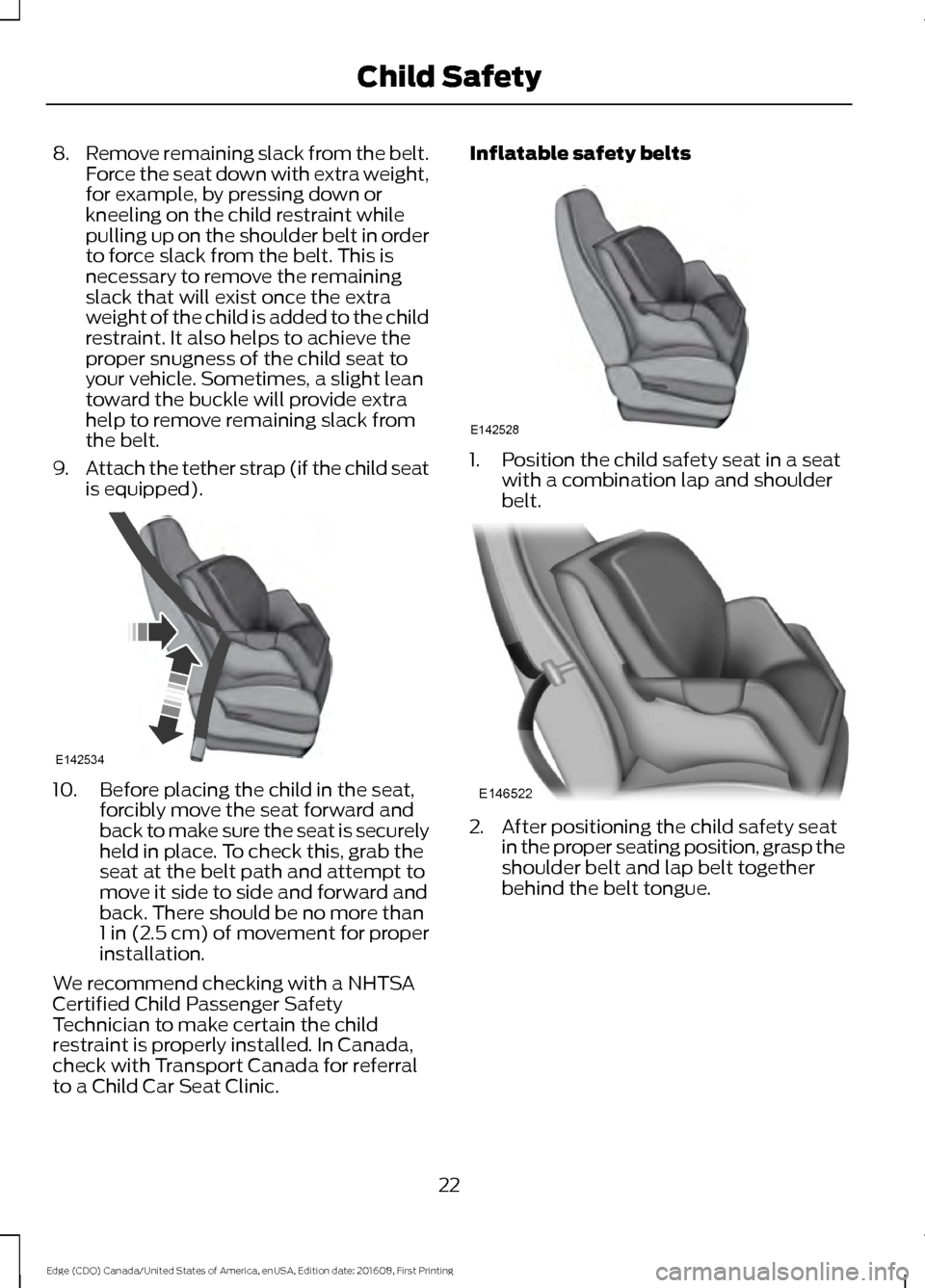
8.
Remove remaining slack from the belt.
Force the seat down with extra weight,
for example, by pressing down or
kneeling on the child restraint while
pulling up on the shoulder belt in order
to force slack from the belt. This is
necessary to remove the remaining
slack that will exist once the extra
weight of the child is added to the child
restraint. It also helps to achieve the
proper snugness of the child seat to
your vehicle. Sometimes, a slight lean
toward the buckle will provide extra
help to remove remaining slack from
the belt.
9. Attach the tether strap (if the child seat
is equipped). 10. Before placing the child in the seat,
forcibly move the seat forward and
back to make sure the seat is securely
held in place. To check this, grab the
seat at the belt path and attempt to
move it side to side and forward and
back. There should be no more than
1 in (2.5 cm) of movement for proper
installation.
We recommend checking with a NHTSA
Certified Child Passenger Safety
Technician to make certain the child
restraint is properly installed. In Canada,
check with Transport Canada for referral
to a Child Car Seat Clinic. Inflatable safety belts
1. Position the child safety seat in a seat
with a combination lap and shoulder
belt. 2. After positioning the child safety seat
in the proper seating position, grasp the
shoulder belt and lap belt together
behind the belt tongue.
22
Edge (CDQ) Canada/United States of America, enUSA, Edition date: 201608, First Printing Child SafetyE142534 E142528 E146522
Page 27 of 544
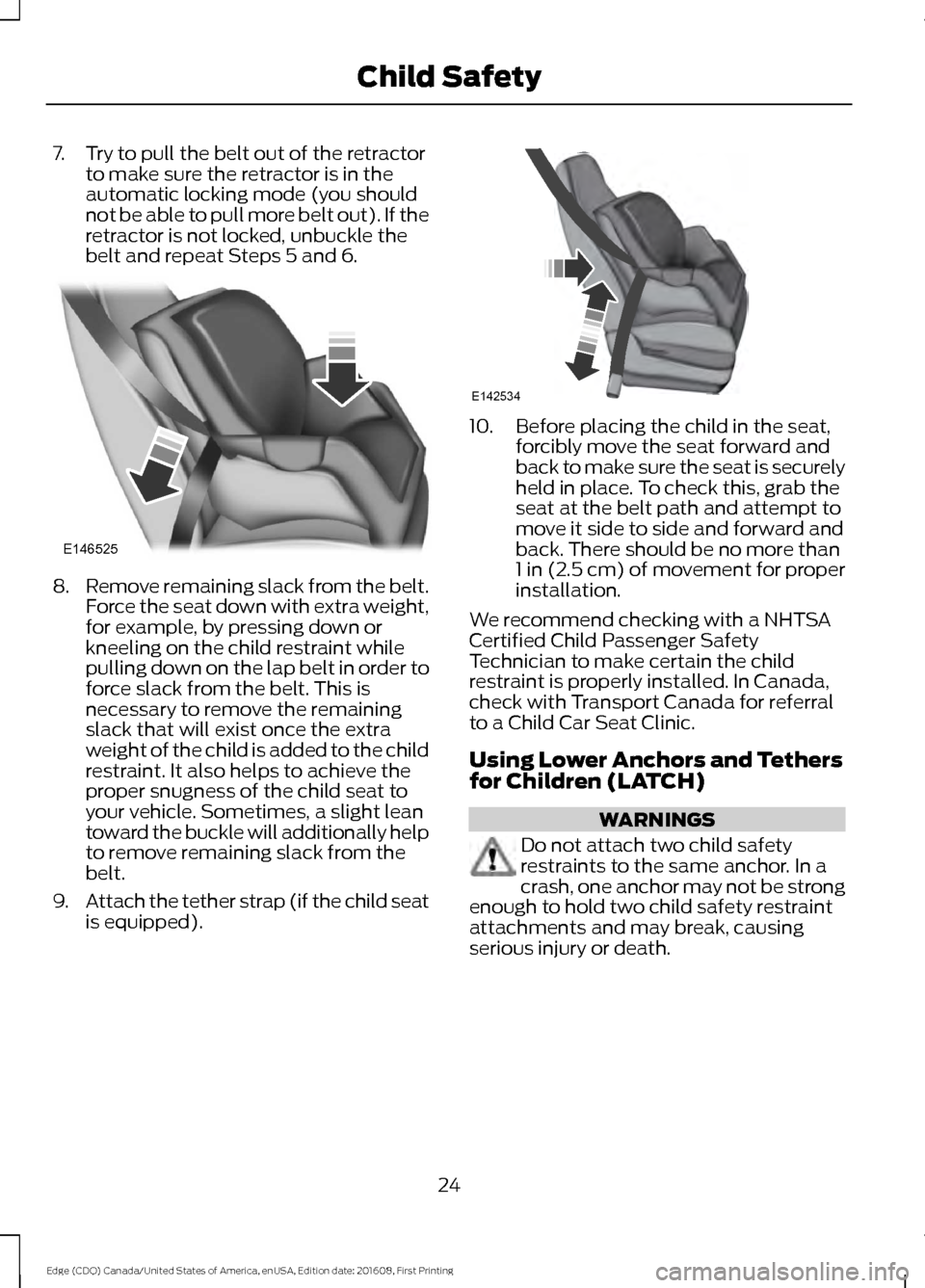
7. Try to pull the belt out of the retractor
to make sure the retractor is in the
automatic locking mode (you should
not be able to pull more belt out). If the
retractor is not locked, unbuckle the
belt and repeat Steps 5 and 6. 8.
Remove remaining slack from the belt.
Force the seat down with extra weight,
for example, by pressing down or
kneeling on the child restraint while
pulling down on the lap belt in order to
force slack from the belt. This is
necessary to remove the remaining
slack that will exist once the extra
weight of the child is added to the child
restraint. It also helps to achieve the
proper snugness of the child seat to
your vehicle. Sometimes, a slight lean
toward the buckle will additionally help
to remove remaining slack from the
belt.
9. Attach the tether strap (if the child seat
is equipped). 10. Before placing the child in the seat,
forcibly move the seat forward and
back to make sure the seat is securely
held in place. To check this, grab the
seat at the belt path and attempt to
move it side to side and forward and
back. There should be no more than
1 in (2.5 cm) of movement for proper
installation.
We recommend checking with a NHTSA
Certified Child Passenger Safety
Technician to make certain the child
restraint is properly installed. In Canada,
check with Transport Canada for referral
to a Child Car Seat Clinic.
Using Lower Anchors and Tethers
for Children (LATCH) WARNINGS
Do not attach two child safety
restraints to the same anchor. In a
crash, one anchor may not be strong
enough to hold two child safety restraint
attachments and may break, causing
serious injury or death.
24
Edge (CDQ) Canada/United States of America, enUSA, Edition date: 201608, First Printing Child SafetyE146525 E142534
Page 33 of 544
WARNINGS
manufacturer. A safety seat that is
improperly installed or utilized, is
inappropriate for your child's height, age,
or weight or does not properly fit the child
may increase the risk of serious injury or
death. Never let a passenger hold a child on
his or her lap while your vehicle is
moving. The passenger cannot
protect the child from injury in a crash,
which may result in serious injury or death. Never use pillows, books, or towels
to boost a child. They can slide
around and increase the likelihood
of injury or death in a crash. WARNINGS
Always restrain an unoccupied child
seat or booster seat. These objects
may become projectiles in a crash or
sudden stop, which may increase the risk
of serious injury. Never place, or allow a child to place,
the shoulder belt under a child's arm
or behind the back because it
reduces the protection for the upper part
of the body and may increase the risk of
injury or death in a crash. To avoid risk of injury, do not leave
children or pets unattended in your
vehicle.
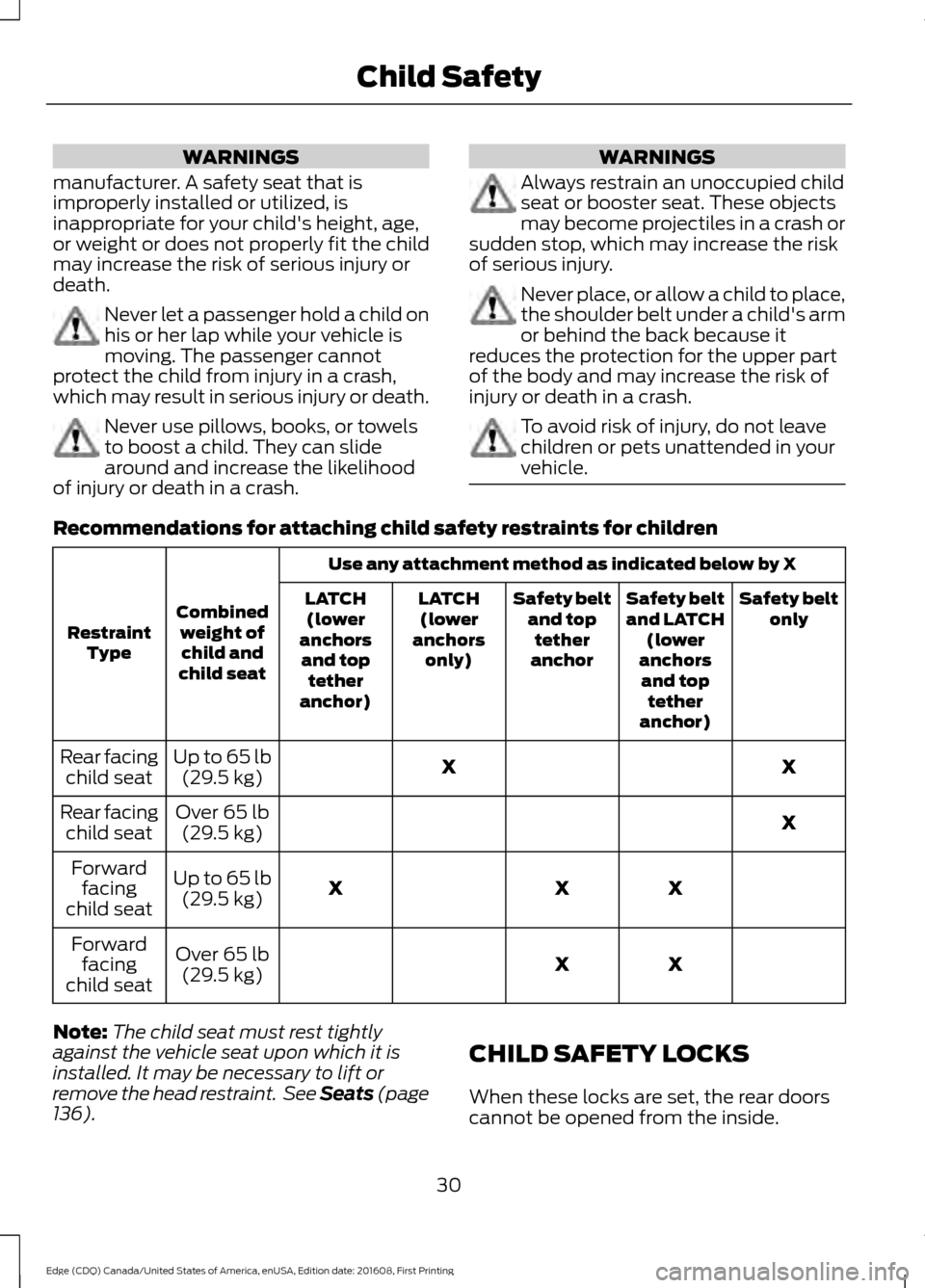
Recommendations for attaching child safety restraints for children
Use any attachment method as indicated below by X
Combined weight ofchild and
child seat
Restraint
Type Safety belt
only
Safety belt
and LATCH
(lower
anchors and top tether
anchor)
Safety belt
and toptether
anchor
LATCH
(lower
anchors only)
LATCH
(lower
anchors and top tether
anchor)
X
X
Up to 65 lb
(29.5 kg)
Rear facing
child seat
X
Over
65 lb
(29.5 kg)
Rear facing
child seat
X
X
X
Up to
65 lb
(29.5 kg)
Forward
facing
child seat
X
X
Over
65 lb
(29.5 kg)
Forward
facing
child seat
Note: The child seat must rest tightly
against the vehicle seat upon which it is
installed. It may be necessary to lift or
remove the head restraint. See Seats (page
136
). CHILD SAFETY LOCKS
When these locks are set, the rear doors
cannot be opened from the inside.
30
Edge (CDQ) Canada/United States of America, enUSA, Edition date: 201608, First Printing Child Safety
Page 49 of 544
feet comfortably extended on the floor.
Sitting improperly can increase the chance
of injury in a crash event. For example, if
an occupant slouches, lies down, turns
sideways, sits forward, leans forward or
sideways, or puts one or both feet up, the
chance of injury during a crash is greatly
increased.
If you think that the status of the passenger
airbag off indicator lamp is incorrect, check
for the following:
•
Objects lodged underneath the seat
• Objects between the seat cushion and
the center console
• Objects hanging off the seat back
• Objects stowed in the seat back map
pocket
• Objects placed on the occupant's lap
• Cargo interference with the seat
• Other passengers pushing or pulling on
the seat
• Rear passenger feet and knees resting
or pushing on the seat
The conditions listed above may cause the
weight of a properly seated occupant to
be incorrectly interpreted by the front
passenger sensing system. The person in
the front passenger seat may appear
heavier or lighter due to the conditions
described in the list above. Make sure the front passenger
sensing system is operating
properly. See Crash Sensors
and Airbag Indicator (page 49).
If the airbag readiness light is lit, do the
following:
The driver and adult passengers should
check for objects lodged underneath the
front passenger seat, or cargo interfering
with the seat. If there are lodged objects, or cargo is
interfering with the seat, take the following
steps to remove the obstruction:
•
Pull the vehicle over.
• Turn the vehicle off.
• Driver and adult passengers should
check for any objects lodged
underneath the front passenger seat
or cargo interfering with the seat.
• Remove the obstruction(s) (if found).
• Restart the vehicle.
• Wait at least two minutes and verify
that the airbag readiness light is no
longer illuminated.
• If the airbag readiness light remains
illuminated, this may or may not be a
problem due to the front passenger
sensing system.
Do not attempt to repair or service the
system. Take your vehicle immediately to
an authorized dealer.
If it is necessary to modify an advanced
front airbag system to accommodate a
person with disabilities, contact the Ford
Customer Relationship Center. See
Getting the Services You Need
(page
247).
SIDE AIRBAGS WARNINGS
Do not place objects or mount
equipment on or near the airbag
cover, on the side of the seatbacks
(of the front seats), or in front seat areas
that may come into contact with a
deploying airbag. Failure to follow these
instructions may increase the risk of
personal injury in the event of a crash.
46
Edge (CDQ) Canada/United States of America, enUSA, Edition date: 201608, First Printing Supplementary Restraints SystemE67017
Page 52 of 544
The system consists of the following:
•
Safety Canopy curtain airbags located
above the trim panels over the front
and rear side windows identified by a
label or wording on the headliner or
roof-pillar trim.
• A flexible headliner which opens above
the side doors to allow air curtain
deployment · Crash sensors and monitoring
system with a readiness
indicator. See Crash Sensors
and Airbag Indicator (page 49).
Properly restrain children 12 years old and
under in the rear seats. The Safety Canopy
will not interfere with children restrained
using a properly installed child or booster
seat because it is designed to inflate
downward from the headliner above the
doors along the side window opening.
The design and development of the Safety
Canopy included recommended testing
procedures that were developed by a
group of automotive safety experts known
as the Side Airbag Technical Working
Group. These recommended testing
procedures help reduce the risk of injuries
related to the deployment of side airbags
(including the Safety Canopy).
CRASH SENSORS AND
AIRBAG INDICATOR WARNING
Modifying or adding equipment to
the front end of your vehicle
(including hood, bumper system,
frame, front end body structure, tow hooks
and hood pins) may affect the
performance of the airbag system,
increasing the risk of injury. Do not modify
or add equipment to the front end of your
vehicle. Your vehicle has a collection of crash and
occupant sensors which provide
information to the restraints control
module. The restraints control module
deploys (activates) the front seatbelt
pretensioners, driver airbag, passenger
airbag, knee airbag(s), seat mounted side
airbags, the Safety Canopy and optional
rear inflatable seatbelts. Based on the type
of crash, the restraints control module
deploys the appropriate safety devices.
The restraints control module also
monitors the readiness of the above safety
devices plus the crash and occupant
sensors. The readiness of the safety
system is indicated by a warning indicator
light in the instrument cluster or by a
backup tone if the warning light is not
working. Routine maintenance of the
airbag is not required.
A difficulty with the system is indicated by
one or more of the following:
•
The readiness light will not illuminate
immediately after the ignition is
switched on.
• The readiness light either flashes or
stays lit.
• A series of five beeps will be heard. The
tone pattern repeats periodically until
the problem, the light or both are
repaired.
If any of these things happen, even
intermittently, have the supplemental
restraint system serviced at an authorized
dealer immediately. Unless serviced, the
system may not function properly in the
event of a crash.
49
Edge (CDQ) Canada/United States of America, enUSA, Edition date: 201608, First Printing Supplementary Restraints SystemE67017 E67017
Page 54 of 544
GENERAL INFORMATION ON
RADIO FREQUENCIES
This device complies with Part 15 of the
FCC Rules and with Industry Canada
license-exempt RSS standard(s).
Operation is subject to the following two
conditions: (1) This device may not cause
harmful interference, and (2) This device
must accept any interference received,
including interference that may cause
undesired operation.
Note:
Changes or modifications not
expressively approved by the party
responsible for compliance could void the
user's authority to operate the equipment.
The term IC before the radio certification
number only signifies that Industry Canada
technical specifications were met.
The typical operating range for your
transmitter is approximately
33 ft (10 m).
Vehicles with the remote start feature will
have a greater range.
One of the following could cause a
decrease in operating range:
• Weather conditions.
• Nearby radio towers.
• Structures around the vehicle.
• Other vehicles parked next to your
vehicle.
The radio frequency used by your remote
control can also be used by other radio
transmitters, for example amateur radios,
medical equipment, wireless headphones,
wireless remote controls, cell phones,
battery chargers and alarm systems. If the
frequencies are jammed, you will not be
able to use your remote control. You can
lock and unlock the doors with the key.
Note: Make sure to lock your vehicle before
leaving it unattended. Note:
If you are in range, the remote control
will operate if you press any button
unintentionally.
Note: The remote control contains sensitive
electrical components. Exposure to moisture
or impact may cause permanent damage.
Intelligent Access
The system uses a radio frequency signal
to communicate with your vehicle and
authorize your vehicle to unlock when one
of the following conditions are met:
• You activate the front exterior door
handle switch.
• You press the luggage compartment
button.
• You press a button on the transmitter.
If excessive radio frequency interference
is present in the area or if the transmitter
battery is low, you may need to
mechanically unlock your door. You can
use the mechanical key blade in your
intelligent access key to open the driver
door in this situation. See
Remote
Control (page 51).
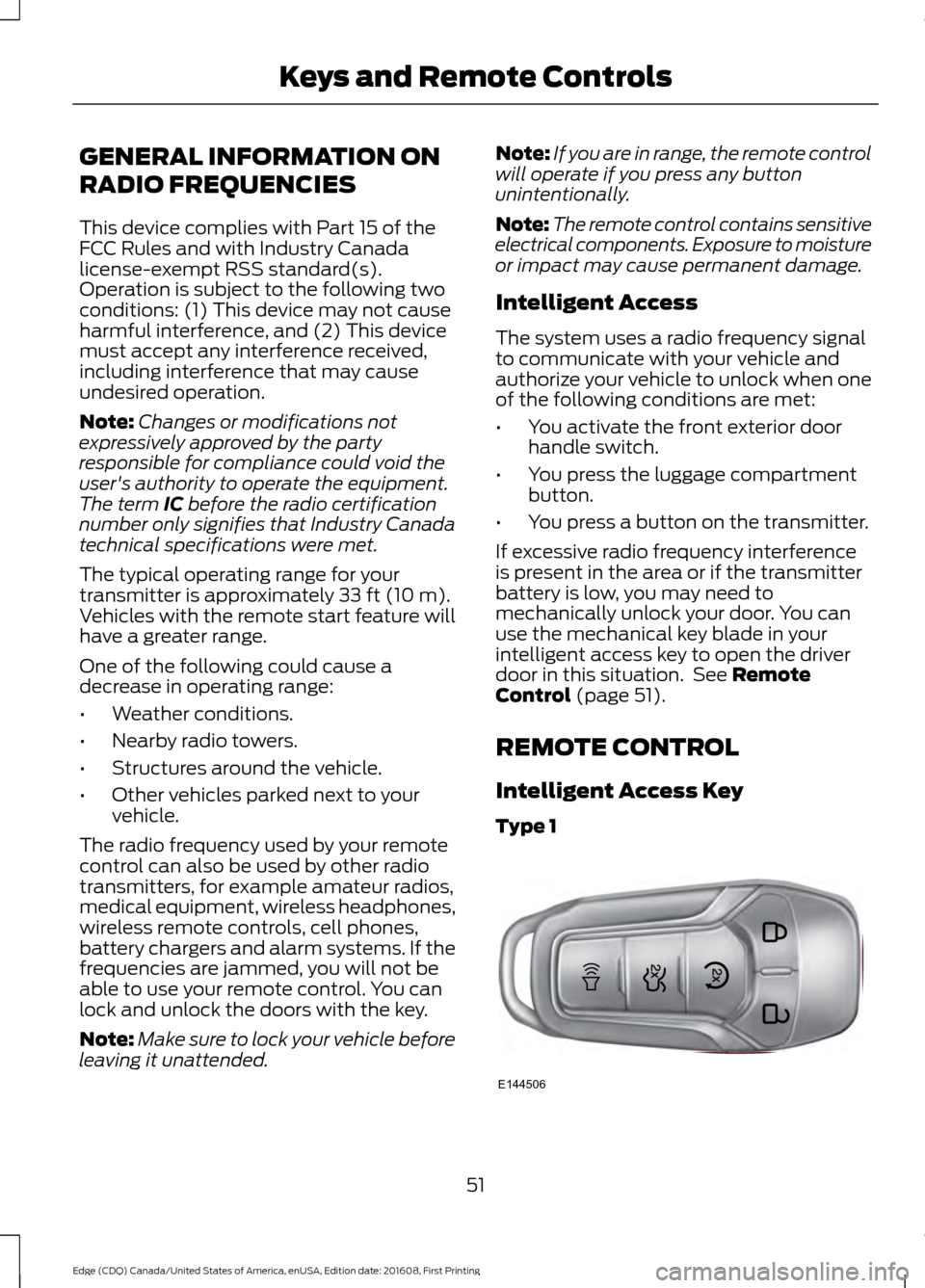
REMOTE CONTROL
Intelligent Access Key
Type 1 51
Edge (CDQ) Canada/United States of America, enUSA, Edition date: 201608, First Printing Keys and Remote ControlsE144506