tow FORD EDGE 2017 2.G User Guide
[x] Cancel search | Manufacturer: FORD, Model Year: 2017, Model line: EDGE, Model: FORD EDGE 2017 2.GPages: 544, PDF Size: 25.27 MB
Page 85 of 544
WINDSHIELD WIPERS
Note:
Fully defrost the windshield before
you switch the windshield wipers on.
Note: Make sure you switch the windshield
wipers off before entering a car wash.
Note: Clean the windshield and wiper
blades if they begin to leave streaks or
smears. If that does not resolve the issue,
install new wiper blades.
Note: Do not operate the wipers on a dry
windshield. This may scratch the glass,
damage the wiper blades or cause the wiper
motor to burn out. Always use the
windshield washers before wiping a dry
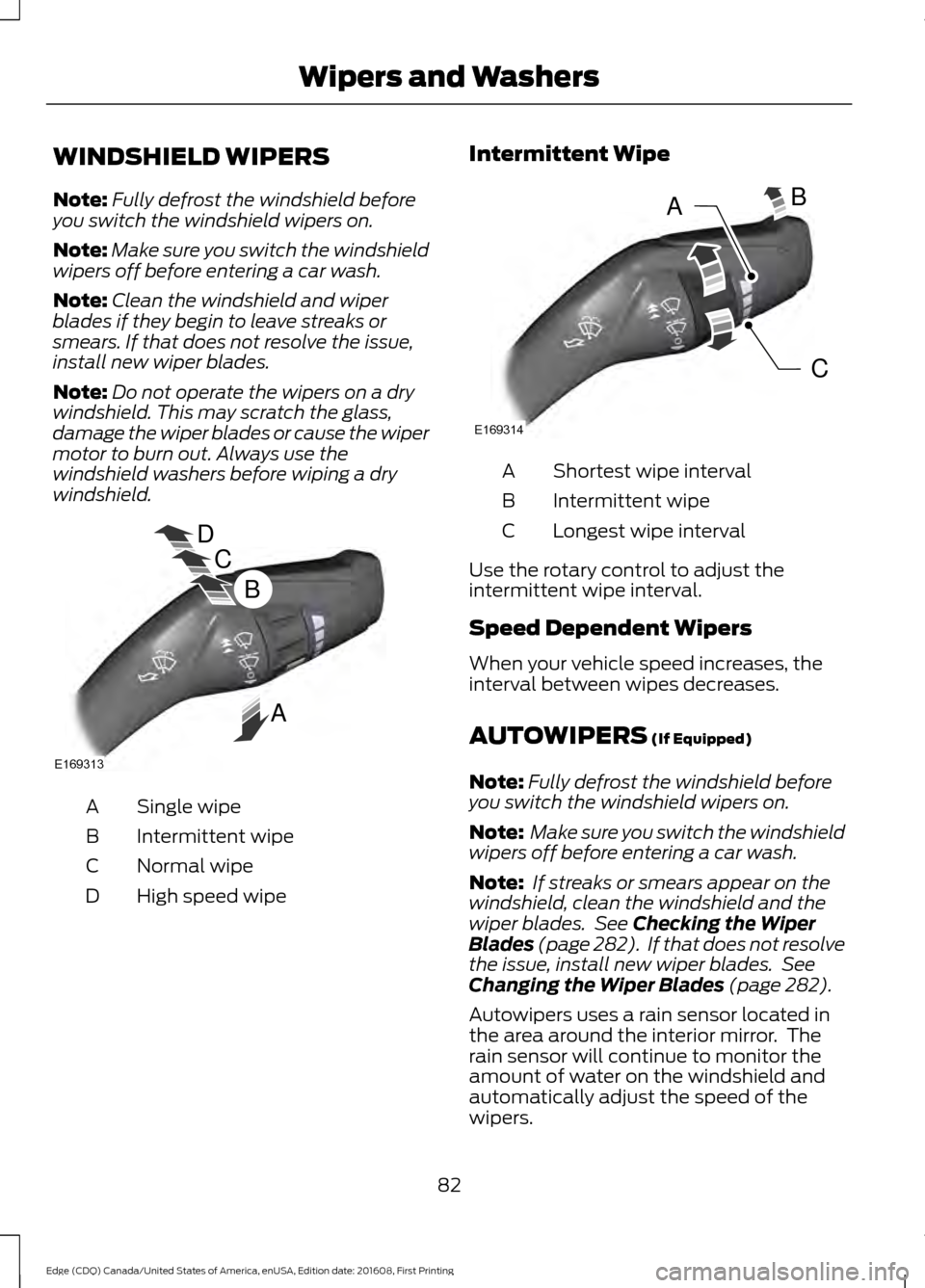
windshield. Single wipe
A
Intermittent wipe
B
Normal wipe
C
High speed wipe
D Intermittent Wipe Shortest wipe interval
A
Intermittent wipe
B
Longest wipe interval
C
Use the rotary control to adjust the
intermittent wipe interval.
Speed Dependent Wipers
When your vehicle speed increases, the
interval between wipes decreases.
AUTOWIPERS (If Equipped)
Note: Fully defrost the windshield before
you switch the windshield wipers on.
Note: Make sure you switch the windshield
wipers off before entering a car wash.
Note: If streaks or smears appear on the
windshield, clean the windshield and the
wiper blades. See
Checking the Wiper
Blades (page 282). If that does not resolve
the issue, install new wiper blades. See
Changing the Wiper Blades
(page 282).
Autowipers uses a rain sensor located in
the area around the interior mirror. The
rain sensor will continue to monitor the
amount of water on the windshield and
automatically adjust the speed of the
wipers.
82
Edge (CDQ) Canada/United States of America, enUSA, Edition date: 201608, First Printing Wipers and WashersD
C
B
E169313A C
BA
E169314
Page 86 of 544
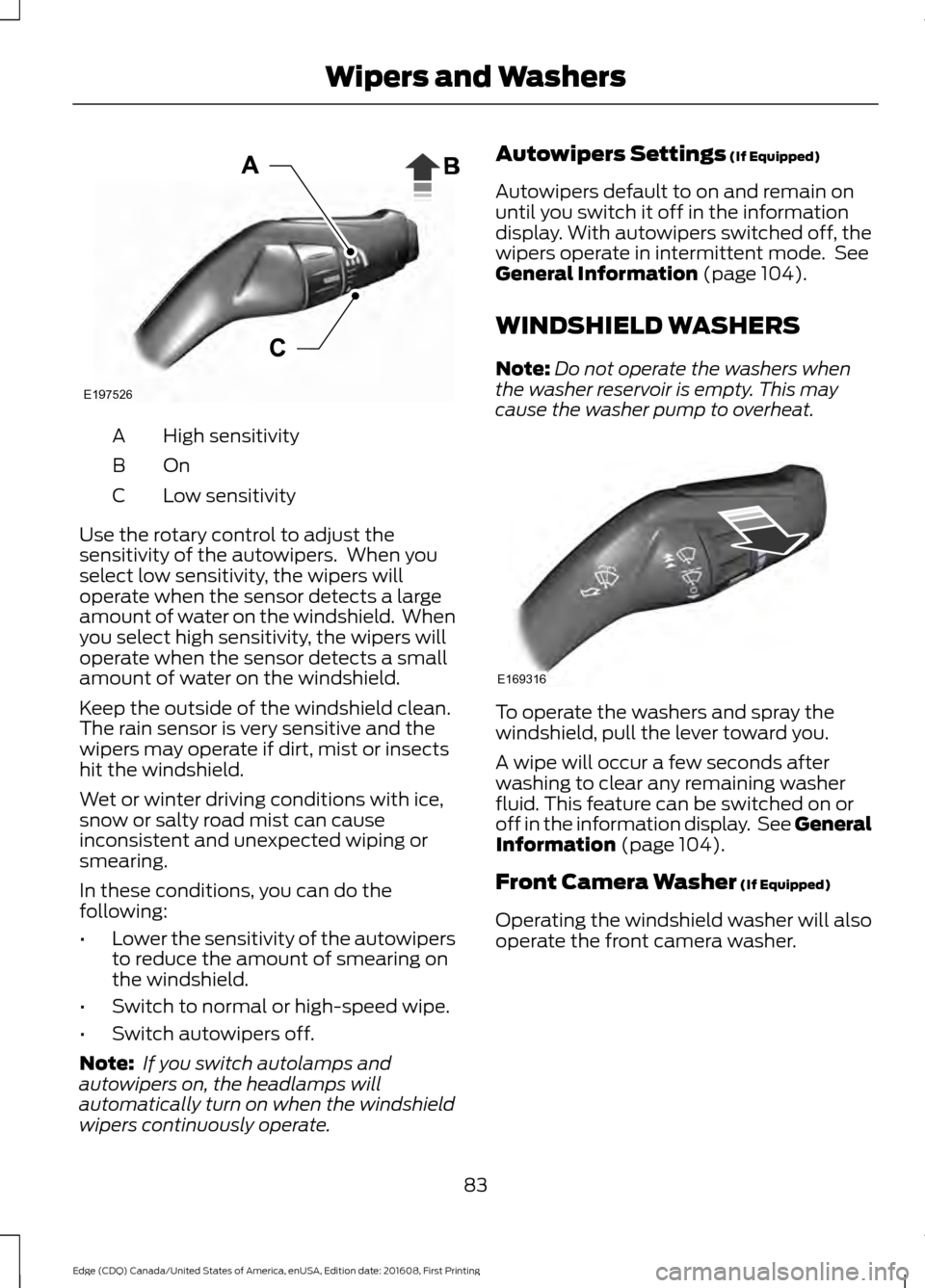
High sensitivity
A
OnB
Low sensitivity
C
Use the rotary control to adjust the
sensitivity of the autowipers. When you
select low sensitivity, the wipers will
operate when the sensor detects a large
amount of water on the windshield. When
you select high sensitivity, the wipers will
operate when the sensor detects a small
amount of water on the windshield.
Keep the outside of the windshield clean.
The rain sensor is very sensitive and the
wipers may operate if dirt, mist or insects
hit the windshield.
Wet or winter driving conditions with ice,
snow or salty road mist can cause
inconsistent and unexpected wiping or
smearing.
In these conditions, you can do the
following:
• Lower the sensitivity of the autowipers
to reduce the amount of smearing on
the windshield.
• Switch to normal or high-speed wipe.
• Switch autowipers off.
Note: If you switch autolamps and
autowipers on, the headlamps will
automatically turn on when the windshield
wipers continuously operate. Autowipers Settings (If Equipped)
Autowipers default to on and remain on
until you switch it off in the information
display. With autowipers switched off, the
wipers operate in intermittent mode. See
General Information
(page 104).
WINDSHIELD WASHERS
Note: Do not operate the washers when
the washer reservoir is empty. This may
cause the washer pump to overheat. To operate the washers and spray the
windshield, pull the lever toward you.
A wipe will occur a few seconds after
washing to clear any remaining washer
fluid. This feature can be switched on or
off in the information display. See General
Information
(page 104).
Front Camera Washer
(If Equipped)
Operating the windshield washer will also
operate the front camera washer.
83
Edge (CDQ) Canada/United States of America, enUSA, Edition date: 201608, First Printing Wipers and WashersE197526 E169316
Page 88 of 544
GENERAL INFORMATION
Condensation in Lamp Assemblies
Exterior lamps have vents to
accommodate normal changes in air
pressure.
Condensation can be a natural by-product
of this design. When moist air enters the
lamp assembly through the vents, there is
a possibility that condensation can occur
when the temperature is cold. When
normal condensation occurs, a fine mist
can form on the interior of the lens. The
fine mist eventually clears and exits
through the vents during normal operation.
Clearing time may take as long as 48 hours
under dry weather conditions.
Examples of acceptable condensation are:
•
The presence of a fine mist (no streaks,
drip marks or large droplets).
• A fine mist covers less than 50% of the
lens.
Examples of unacceptable condensation
are:
• A water puddle inside the lamp.
• Streaks, drip marks or large droplets
present on the interior of the lens.
If you see any unacceptable condensation,
have your vehicle checked by an authorized
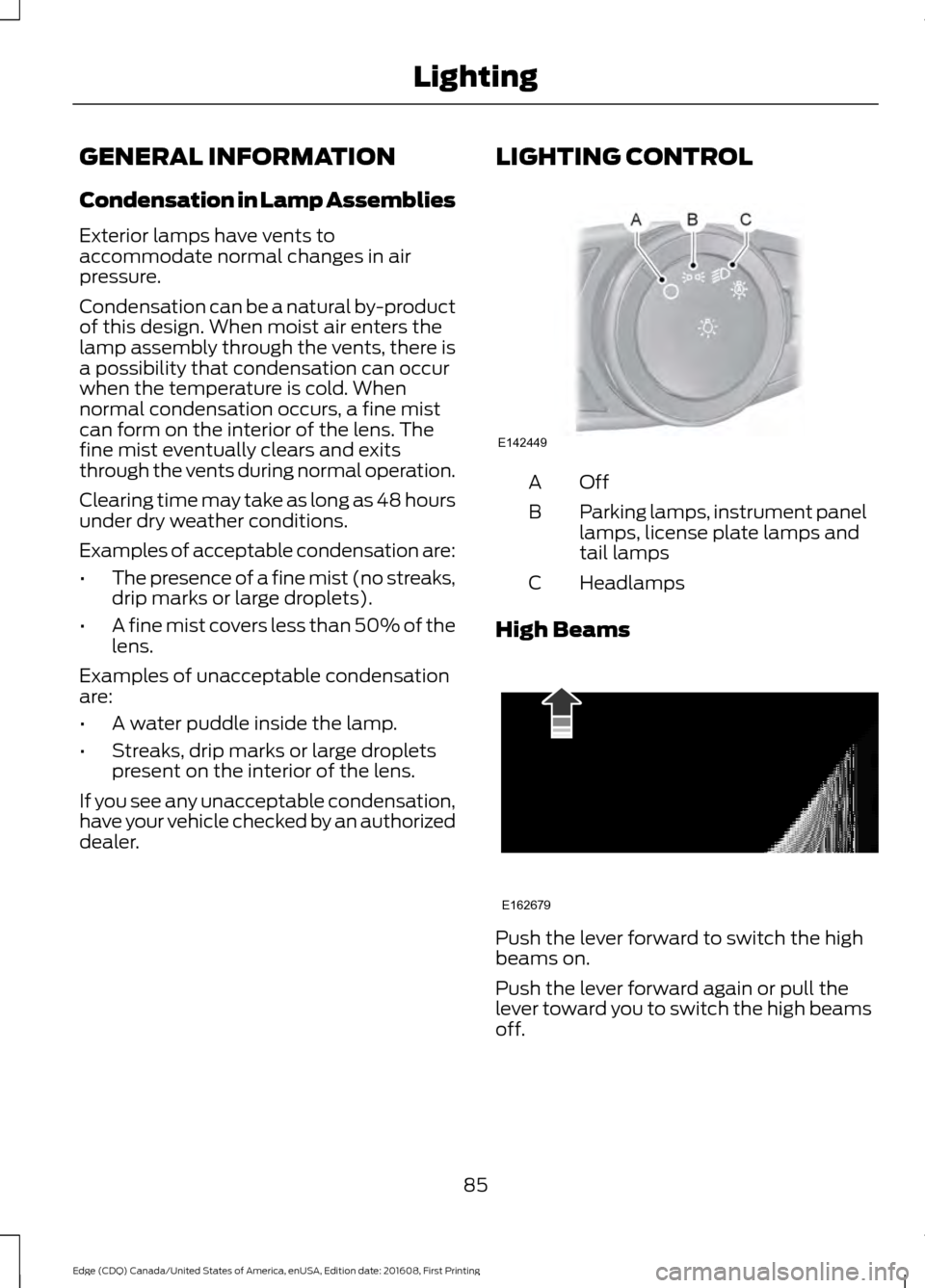
dealer. LIGHTING CONTROL OffA
Parking lamps, instrument panel
lamps, license plate lamps and
tail lamps
B
Headlamps
C
High Beams Push the lever forward to switch the high
beams on.
Push the lever forward again or pull the
lever toward you to switch the high beams
off.
85
Edge (CDQ) Canada/United States of America, enUSA, Edition date: 201608, First Printing LightingE142449 E162679
Page 89 of 544
Headlamp Flasher
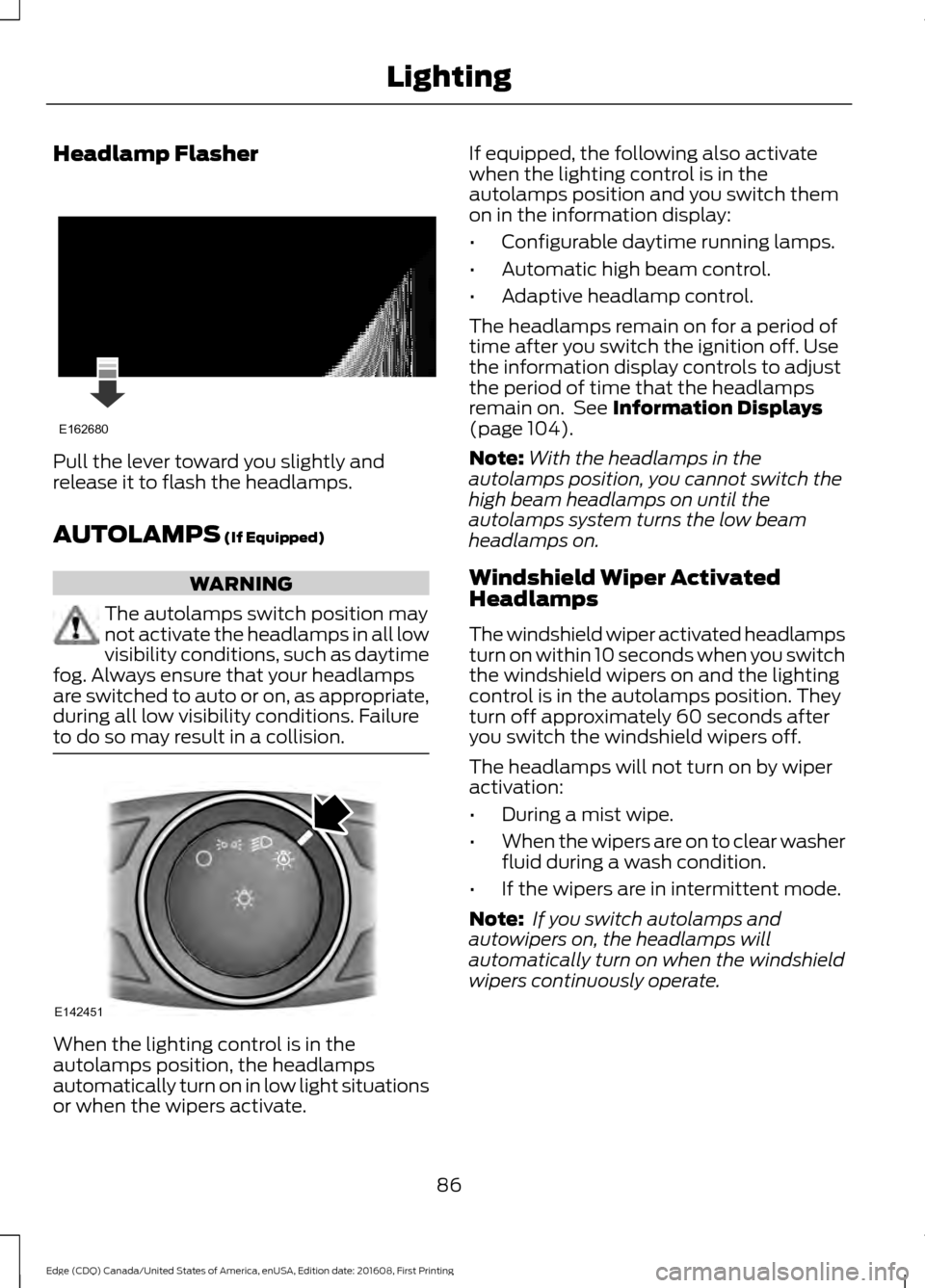
Pull the lever toward you slightly and
release it to flash the headlamps.
AUTOLAMPS (If Equipped)
WARNING
The autolamps switch position may
not activate the headlamps in all low
visibility conditions, such as daytime
fog. Always ensure that your headlamps
are switched to auto or on, as appropriate,
during all low visibility conditions. Failure
to do so may result in a collision. When the lighting control is in the
autolamps position, the headlamps
automatically turn on in low light situations
or when the wipers activate. If equipped, the following also activate
when the lighting control is in the
autolamps position and you switch them
on in the information display:
•
Configurable daytime running lamps.
• Automatic high beam control.
• Adaptive headlamp control.
The headlamps remain on for a period of
time after you switch the ignition off. Use
the information display controls to adjust
the period of time that the headlamps
remain on. See
Information Displays
(page 104).
Note: With the headlamps in the
autolamps position, you cannot switch the
high beam headlamps on until the
autolamps system turns the low beam
headlamps on.
Windshield Wiper Activated
Headlamps
The windshield wiper activated headlamps
turn on within 10 seconds when you switch
the windshield wipers on and the lighting
control is in the autolamps position. They
turn off approximately 60 seconds after
you switch the windshield wipers off.
The headlamps will not turn on by wiper
activation:
• During a mist wipe.
• When the wipers are on to clear washer
fluid during a wash condition.
• If the wipers are in intermittent mode.
Note: If you switch autolamps and
autowipers on, the headlamps will
automatically turn on when the windshield
wipers continuously operate.
86
Edge (CDQ) Canada/United States of America, enUSA, Edition date: 201608, First Printing LightingE162680 E142451
Page 90 of 544
INSTRUMENT LIGHTING
DIMMER
Note:
If you disconnect the battery or it
becomes discharged, the illuminated
components will switch to the maximum
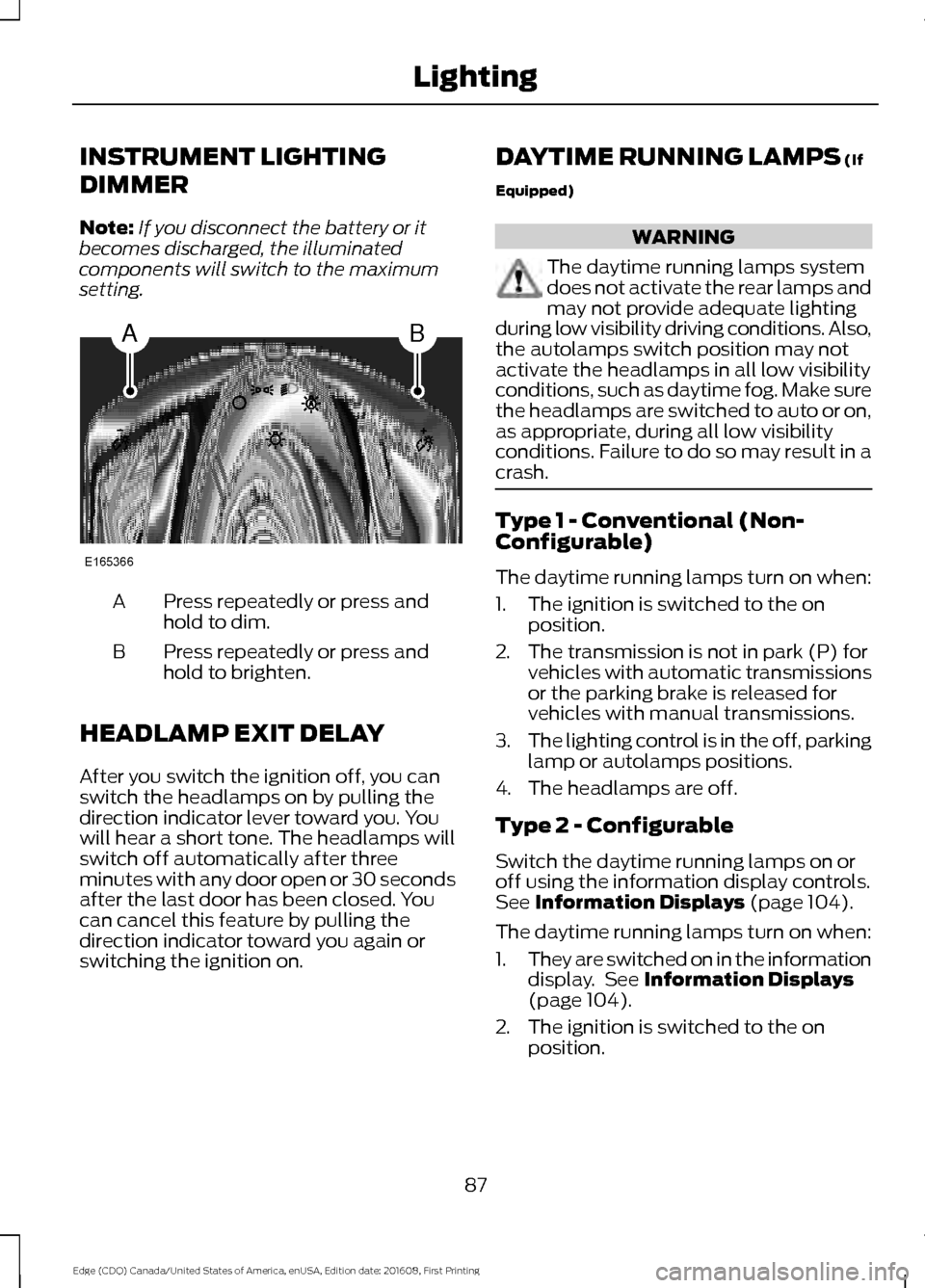
setting. Press repeatedly or press and
hold to dim.
A
Press repeatedly or press and
hold to brighten.
B
HEADLAMP EXIT DELAY
After you switch the ignition off, you can
switch the headlamps on by pulling the
direction indicator lever toward you. You
will hear a short tone. The headlamps will
switch off automatically after three
minutes with any door open or 30 seconds
after the last door has been closed. You
can cancel this feature by pulling the
direction indicator toward you again or
switching the ignition on. DAYTIME RUNNING LAMPS (If
Equipped) WARNING
The daytime running lamps system
does not activate the rear lamps and
may not provide adequate lighting
during low visibility driving conditions. Also,
the autolamps switch position may not
activate the headlamps in all low visibility
conditions, such as daytime fog. Make sure
the headlamps are switched to auto or on,
as appropriate, during all low visibility
conditions. Failure to do so may result in a
crash. Type 1 - Conventional (Non-
Configurable)
The daytime running lamps turn on when:
1. The ignition is switched to the on
position.
2. The transmission is not in park (P) for vehicles with automatic transmissions
or the parking brake is released for
vehicles with manual transmissions.
3. The lighting control is in the off, parking
lamp or autolamps positions.
4. The headlamps are off.
Type 2 - Configurable
Switch the daytime running lamps on or
off using the information display controls.
See
Information Displays (page 104).
The daytime running lamps turn on when:
1. They are switched on in the information
display. See
Information Displays
(page 104).
2. The ignition is switched to the on position.
87
Edge (CDQ) Canada/United States of America, enUSA, Edition date: 201608, First Printing LightingAB
E165366
Page 96 of 544
Press the control to lock or unlock the rear
window controls. It illuminates when you
lock the rear window controls.
Accessory Delay
The window switches remain operational
for several minutes when you switch the
ignition off or until you open either front
door.
GLOBAL OPENING
You can use the remote control to operate
the windows with the ignition off.
Note:
You can enable or disable this feature
in the information display, or see an
authorized dealer. See General
Information (page 104).
Note: To operate this feature, accessory
delay must not be active.
Remote Control Front Windows
You can open the windows for a short time
after you unlock your vehicle with the
remote control. After you unlock your
vehicle, press and hold the remote control
unlock button to open the windows.
Release the button once movement starts.
Press the lock or unlock button to stop
movement.
EXTERIOR MIRRORS
Power Exterior Mirrors WARNING
Do not adjust the mirrors when your
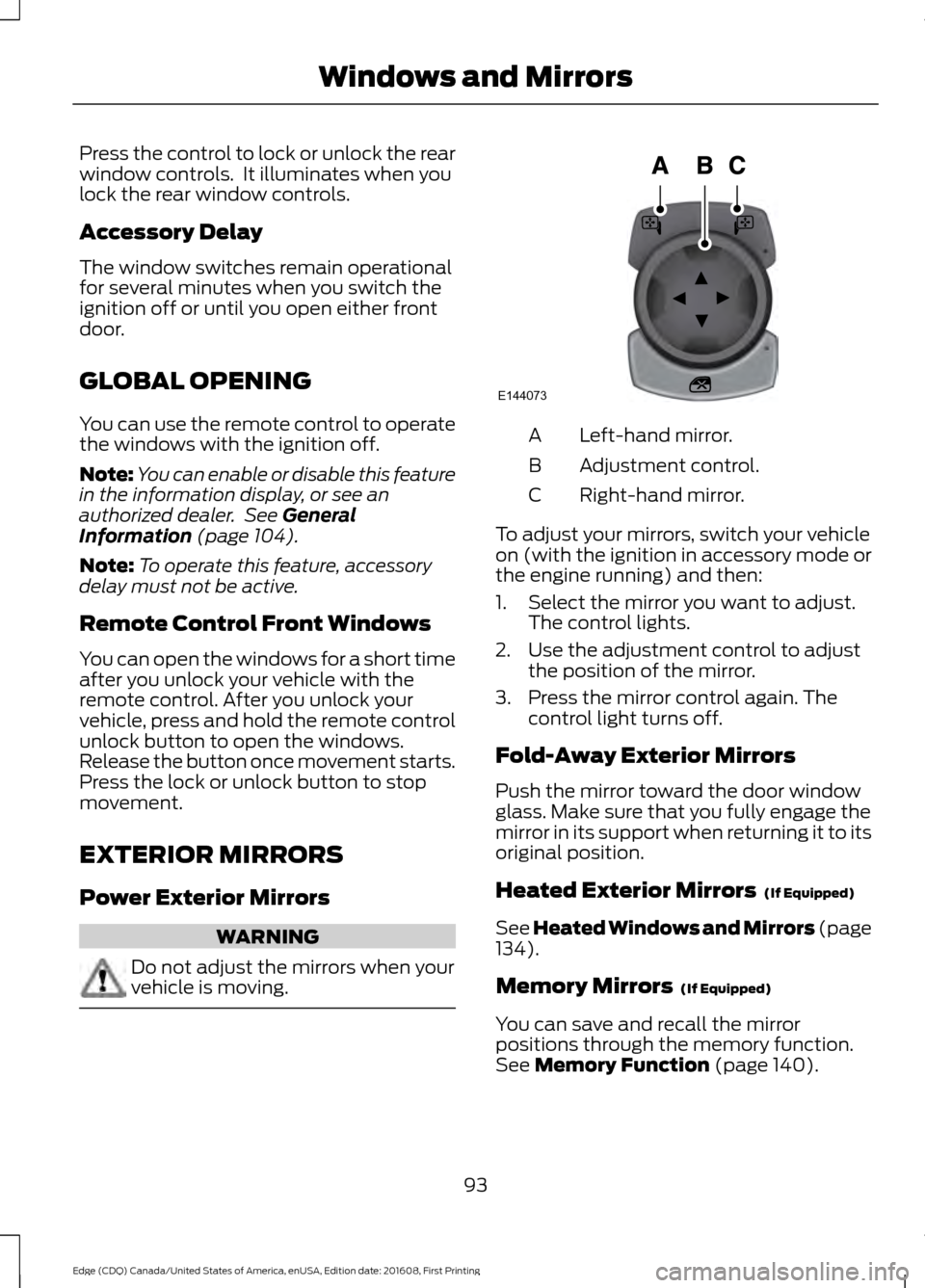
vehicle is moving. Left-hand mirror.
A
Adjustment control.
B
Right-hand mirror.
C
To adjust your mirrors, switch your vehicle
on (with the ignition in accessory mode or
the engine running) and then:
1. Select the mirror you want to adjust. The control lights.
2. Use the adjustment control to adjust the position of the mirror.
3. Press the mirror control again. The control light turns off.
Fold-Away Exterior Mirrors
Push the mirror toward the door window
glass. Make sure that you fully engage the
mirror in its support when returning it to its
original position.
Heated Exterior Mirrors
(If Equipped)
See Heated Windows and Mirrors (page
134
).
Memory Mirrors
(If Equipped)
You can save and recall the mirror
positions through the memory function.
See
Memory Function (page 140).
93
Edge (CDQ) Canada/United States of America, enUSA, Edition date: 201608, First Printing Windows and MirrorsE144073
Page 98 of 544
INTERIOR MIRROR
WARNING
Do not adjust the mirror when your
vehicle is moving.
Note:
Do not clean the housing or glass of
any mirror with harsh abrasives, fuel or other
petroleum or ammonia-based cleaning
products.
You can adjust the interior mirror to your
preference. Some mirrors also have a
second pivot point. This lets you move the
mirror head up or down and from side to
side.
Pull the tab below the mirror toward you
to reduce glare at night.
Auto-Dimming Mirror (If Equipped)
Note: Do not block the sensors on the front
and back of the mirror. Mirror performance
may be affected. A rear center passenger or
raised rear center head restraint may also
block light from reaching the sensor.
The mirror will dim automatically to reduce
glare when bright lights are detected from
behind your vehicle. It will automatically
return to normal reflection when you select
reverse gear to make sure you have a clear
view when backing up. SUN VISORS Rotate the sun visor toward the side
window and extend it rearward for extra
shade.
Illuminated Vanity Mirror
Lift the cover to switch the lamp on.
MOONROOF
(If Equipped)
WARNINGS
Do not let children play with the
moonroof or leave them unattended
in the vehicle. They may seriously
hurt themselves.
95
Edge (CDQ) Canada/United States of America, enUSA, Edition date: 201608, First Printing Windows and MirrorsE138666 E162197
Page 101 of 544
Trip Computer
See General Information (page 104).
Vehicle Settings and Personalization
See
General Information (page 104).
Engine Coolant Temperature
Gauge
Shows the temperature of the engine
coolant. At normal operating temperature,
the needle remains in the center section.
If the needle enters the red section, the
engine is overheating. Stop the engine,
switch the ignition off and determine the
cause once the engine has cooled down.
Note: Do not restart the engine until the
cause of overheating has been resolved. WARNING
Never remove the coolant reservoir
cap while the engine is running or hot.
Fuel Gauge
Note:
The fuel gauge may vary slightly
when your vehicle is moving or on a gradient. Switch the ignition on. The fuel gauge
indicates approximately how much fuel is
left in the fuel tank. The arrow adjacent to
the fuel pump symbol indicates on which
side of your vehicle the fuel filler door is
located.
The needle should move toward F when
you refuel your vehicle. If the needle points
to E after adding fuel, this indicates your
vehicle needs service soon.
After refueling some variability in needle
position is normal:
•
It may take a short time for the needle
to reach F after leaving the gas station.
This is normal and depends upon the
slope of pavement at the gas station.
• The fuel amount dispensed into the
tank is a little less or more than the
gauge indicated. This is normal and
depends upon the slope of pavement
at the gas station.
• If the gas station nozzle shuts off
before the tank is full, try a different
gas pump nozzle.
Low Fuel Reminder
A low fuel reminder triggers at
50 mi
(80 km) to empty.
98
Edge (CDQ) Canada/United States of America, enUSA, Edition date: 201608, First Printing Instrument Cluster
Page 129 of 544
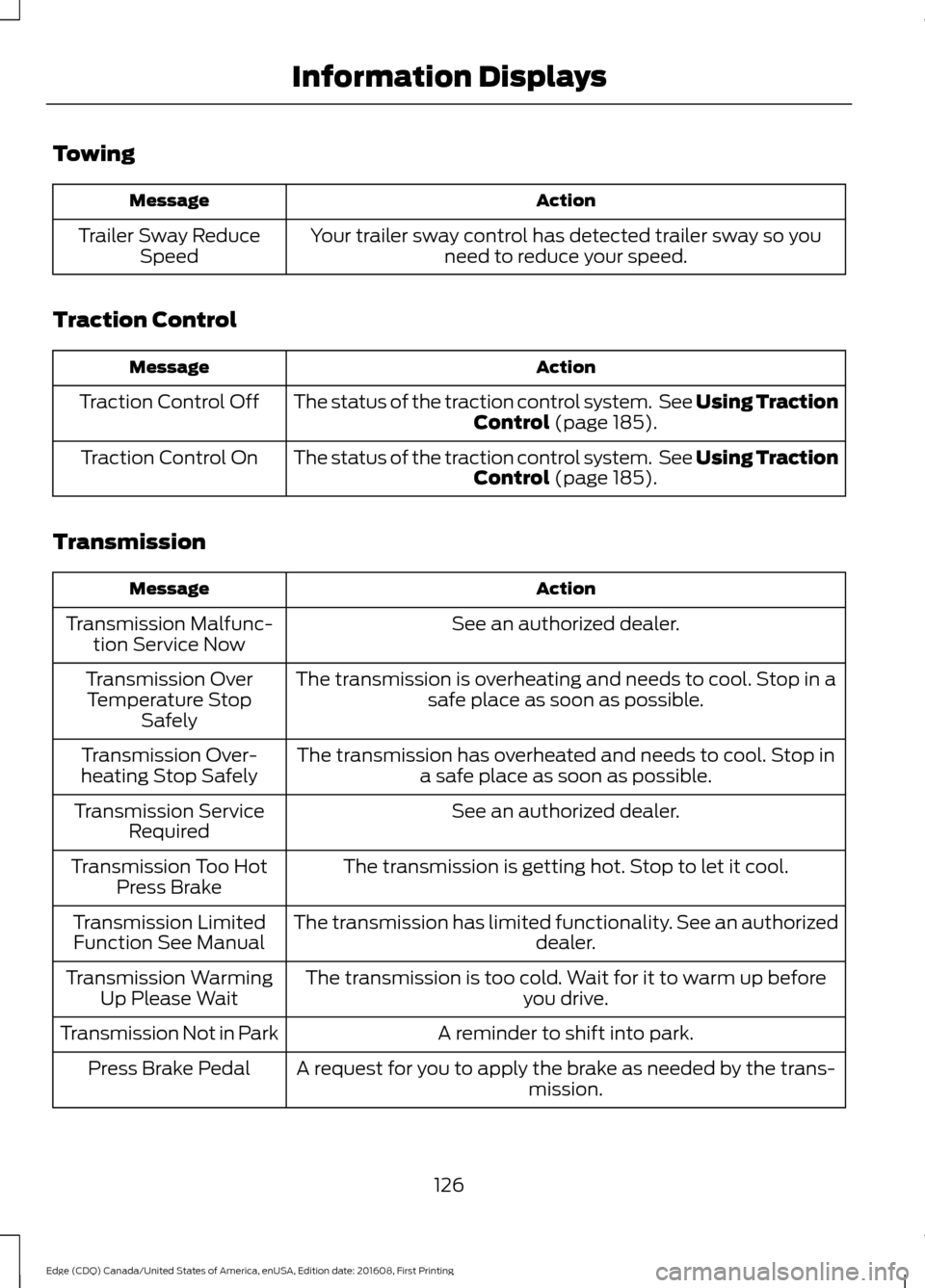
Towing
Action
Message
Your trailer sway control has detected trailer sway so youneed to reduce your speed.
Trailer Sway Reduce
Speed
Traction Control Action
Message
The status of the traction control system. See Using Traction
Control (page 185).
Traction Control Off
The status of the traction control system. See
Using Traction
Control (page 185).
Traction Control On
Transmission Action
Message
See an authorized dealer.
Transmission Malfunc-
tion Service Now
The transmission is overheating and needs to cool. Stop in asafe place as soon as possible.
Transmission Over
Temperature Stop Safely
The transmission has overheated and needs to cool. Stop ina safe place as soon as possible.
Transmission Over-
heating Stop Safely
See an authorized dealer.
Transmission Service
Required
The transmission is getting hot. Stop to let it cool.
Transmission Too Hot
Press Brake
The transmission has limited functionality. See an authorized dealer.
Transmission Limited
Function See Manual
The transmission is too cold. Wait for it to warm up beforeyou drive.
Transmission Warming
Up Please Wait
A reminder to shift into park.
Transmission Not in Park
A request for you to apply the brake as needed by the trans-mission.
Press Brake Pedal
126
Edge (CDQ) Canada/United States of America, enUSA, Edition date: 201608, First Printing Information Displays
Page 137 of 544
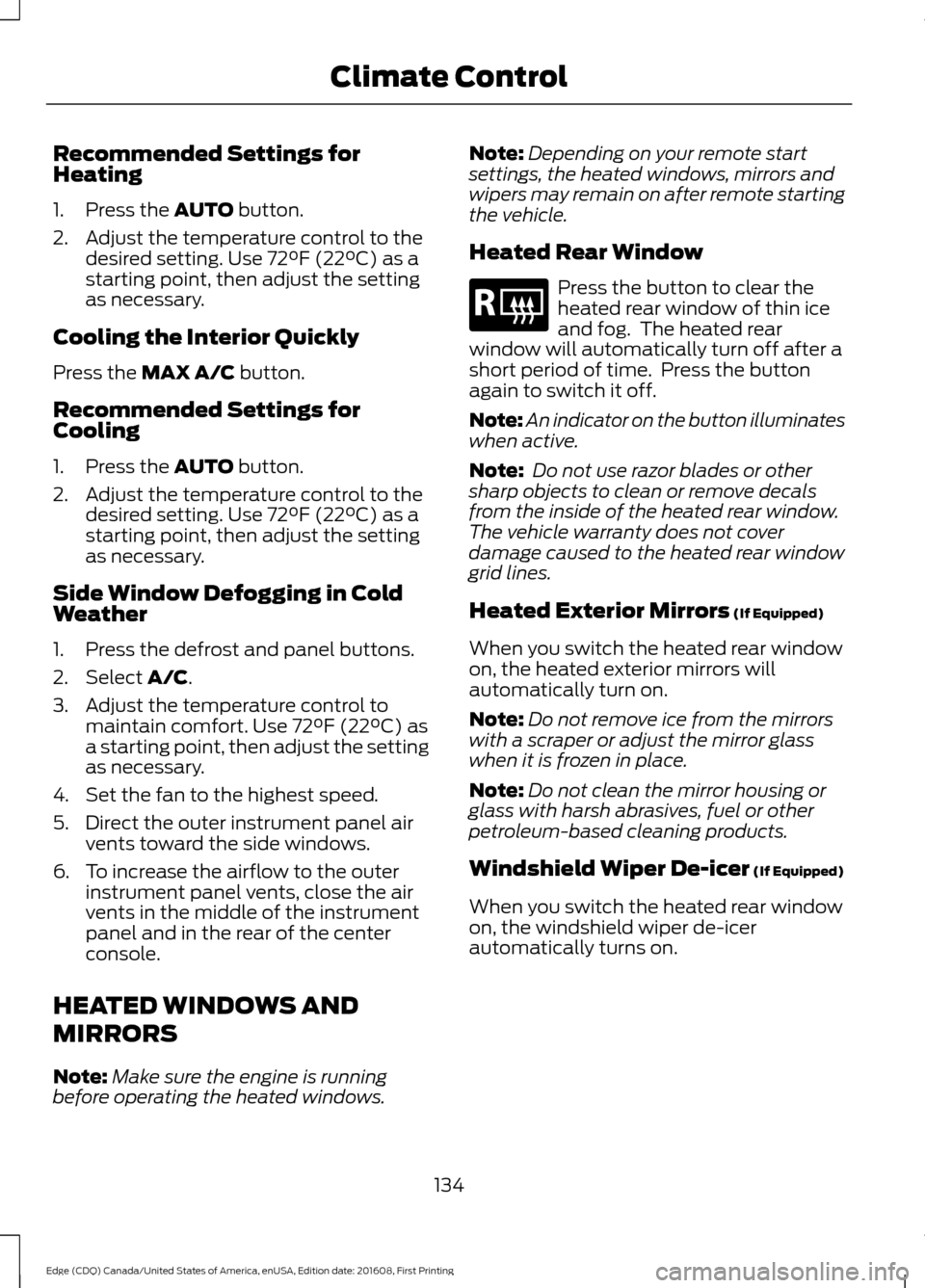
Recommended Settings for
Heating
1. Press the AUTO button.
2. Adjust the temperature control to the desired setting. Use 72°F (22°C) as a
starting point, then adjust the setting
as necessary.
Cooling the Interior Quickly
Press the
MAX A/C button.
Recommended Settings for
Cooling
1. Press the
AUTO button.
2. Adjust the temperature control to the desired setting. Use 72°F (22°C) as a
starting point, then adjust the setting
as necessary.
Side Window Defogging in Cold
Weather
1. Press the defrost and panel buttons.
2. Select
A/C.
3. Adjust the temperature control to maintain comfort. Use 72°F (22°C) as
a starting point, then adjust the setting
as necessary.
4. Set the fan to the highest speed.
5. Direct the outer instrument panel air vents toward the side windows.
6. To increase the airflow to the outer instrument panel vents, close the air
vents in the middle of the instrument
panel and in the rear of the center
console.
HEATED WINDOWS AND
MIRRORS
Note: Make sure the engine is running
before operating the heated windows. Note:
Depending on your remote start
settings, the heated windows, mirrors and
wipers may remain on after remote starting
the vehicle.
Heated Rear Window Press the button to clear the
heated rear window of thin ice
and fog. The heated rear
window will automatically turn off after a
short period of time. Press the button
again to switch it off.
Note: An indicator on the button illuminates
when active.
Note: Do not use razor blades or other
sharp objects to clean or remove decals
from the inside of the heated rear window.
The vehicle warranty does not cover
damage caused to the heated rear window
grid lines.
Heated Exterior Mirrors
(If Equipped)
When you switch the heated rear window
on, the heated exterior mirrors will
automatically turn on.
Note: Do not remove ice from the mirrors
with a scraper or adjust the mirror glass
when it is frozen in place.
Note: Do not clean the mirror housing or
glass with harsh abrasives, fuel or other
petroleum-based cleaning products.
Windshield Wiper De-icer
(If Equipped)
When you switch the heated rear window
on, the windshield wiper de-icer
automatically turns on.
134
Edge (CDQ) Canada/United States of America, enUSA, Edition date: 201608, First Printing Climate ControlE184884