lock FORD EDGE 2018 Service Manual
[x] Cancel search | Manufacturer: FORD, Model Year: 2018, Model line: EDGE, Model: FORD EDGE 2018Pages: 557, PDF Size: 7.02 MB
Page 110 of 557
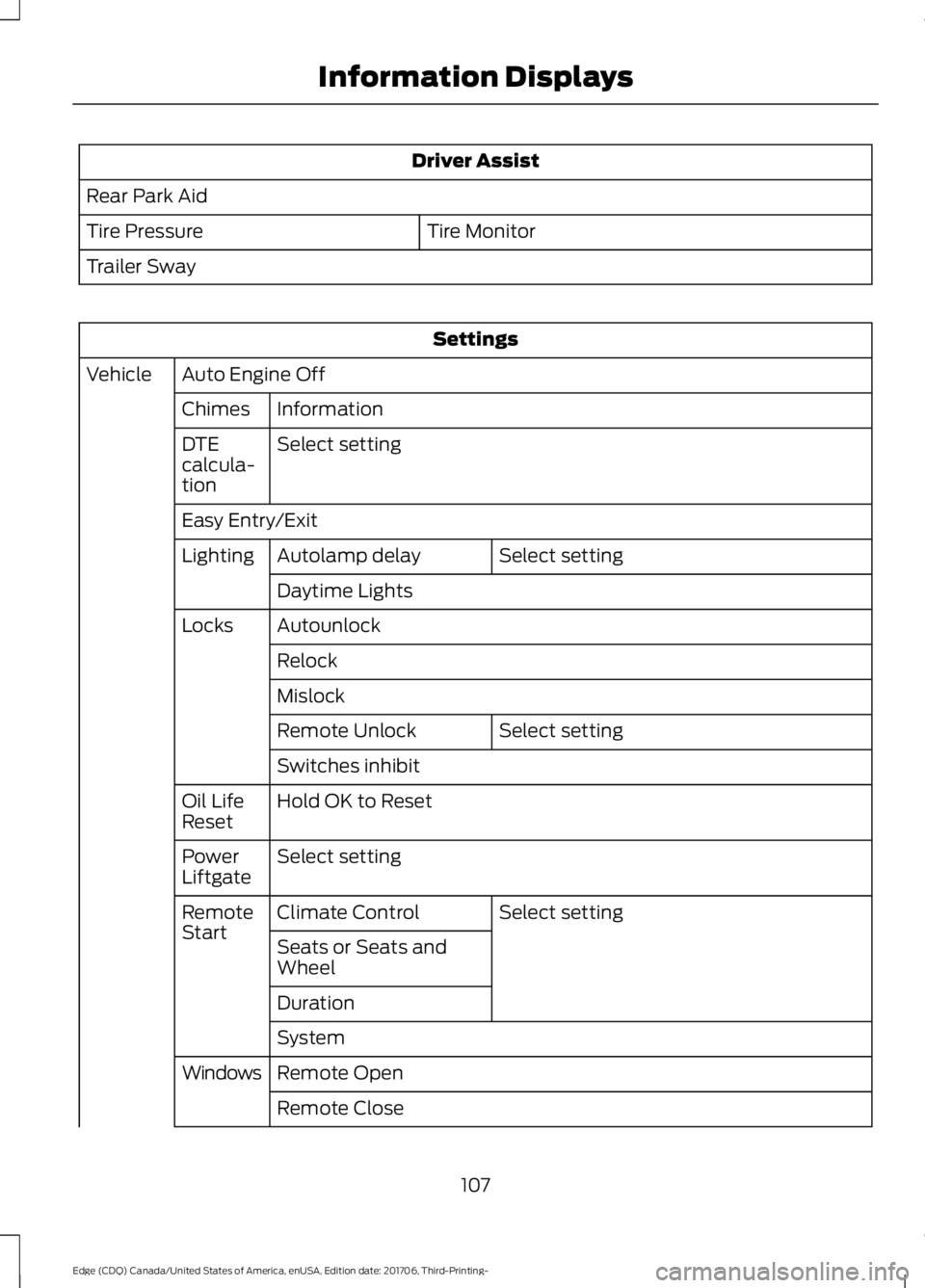
Driver Assist
Rear Park Aid Tire Monitor
Tire Pressure
Trailer Sway Settings
Auto Engine Off
Vehicle
Information
Chimes
Select setting
DTE
calcula-
tion
Easy Entry/Exit
Select setting
Autolamp delay
Lighting
Daytime Lights
Autounlock
Locks
Relock
Mislock Select setting
Remote Unlock
Switches inhibit
Hold OK to Reset
Oil Life
Reset
Select setting
Power
Liftgate
Select setting
Climate Control
Remote
Start
Seats or Seats and
Wheel
Duration
System
Remote Open
Windows
Remote Close
107
Edge (CDQ) Canada/United States of America, enUSA, Edition date: 201706, Third-Printing- Information Displays
Page 115 of 557
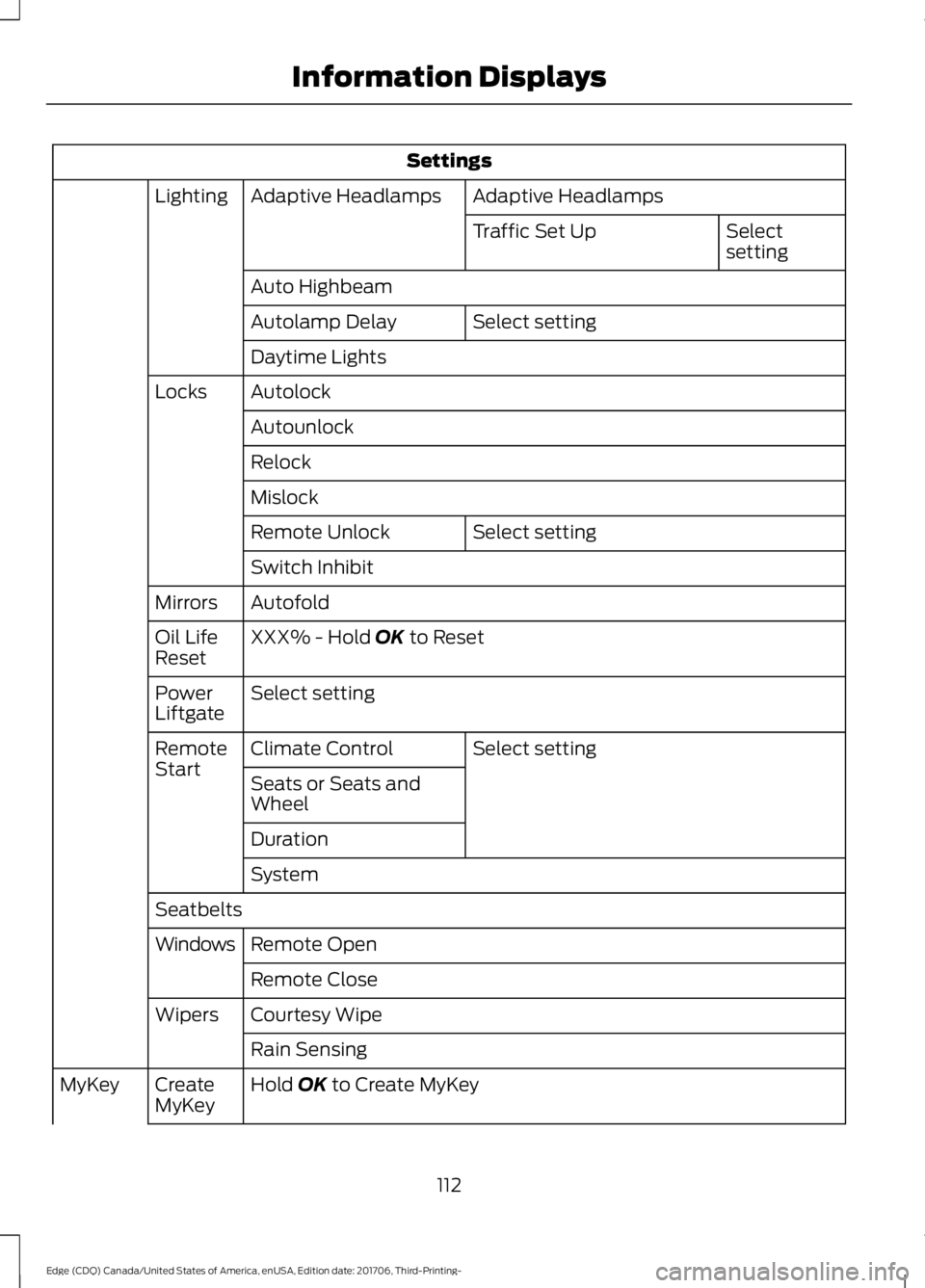
Settings
Adaptive Headlamps
Adaptive Headlamps
Lighting
Select
setting
Traffic Set Up
Auto Highbeam Select setting
Autolamp Delay
Daytime Lights
Autolock
Locks
Autounlock
Relock
Mislock Select setting
Remote Unlock
Switch Inhibit
Autofold
Mirrors
XXX% - Hold OK to Reset
Oil Life
Reset
Select setting
Power
Liftgate
Select setting
Climate Control
Remote
Start
Seats or Seats and
Wheel
Duration
System
Seatbelts Remote Open
Windows
Remote Close
Courtesy Wipe
Wipers
Rain Sensing
Hold
OK to Create MyKey
Create
MyKey
MyKey
112
Edge (CDQ) Canada/United States of America, enUSA, Edition date: 201706, Third-Printing- Information Displays
Page 117 of 557
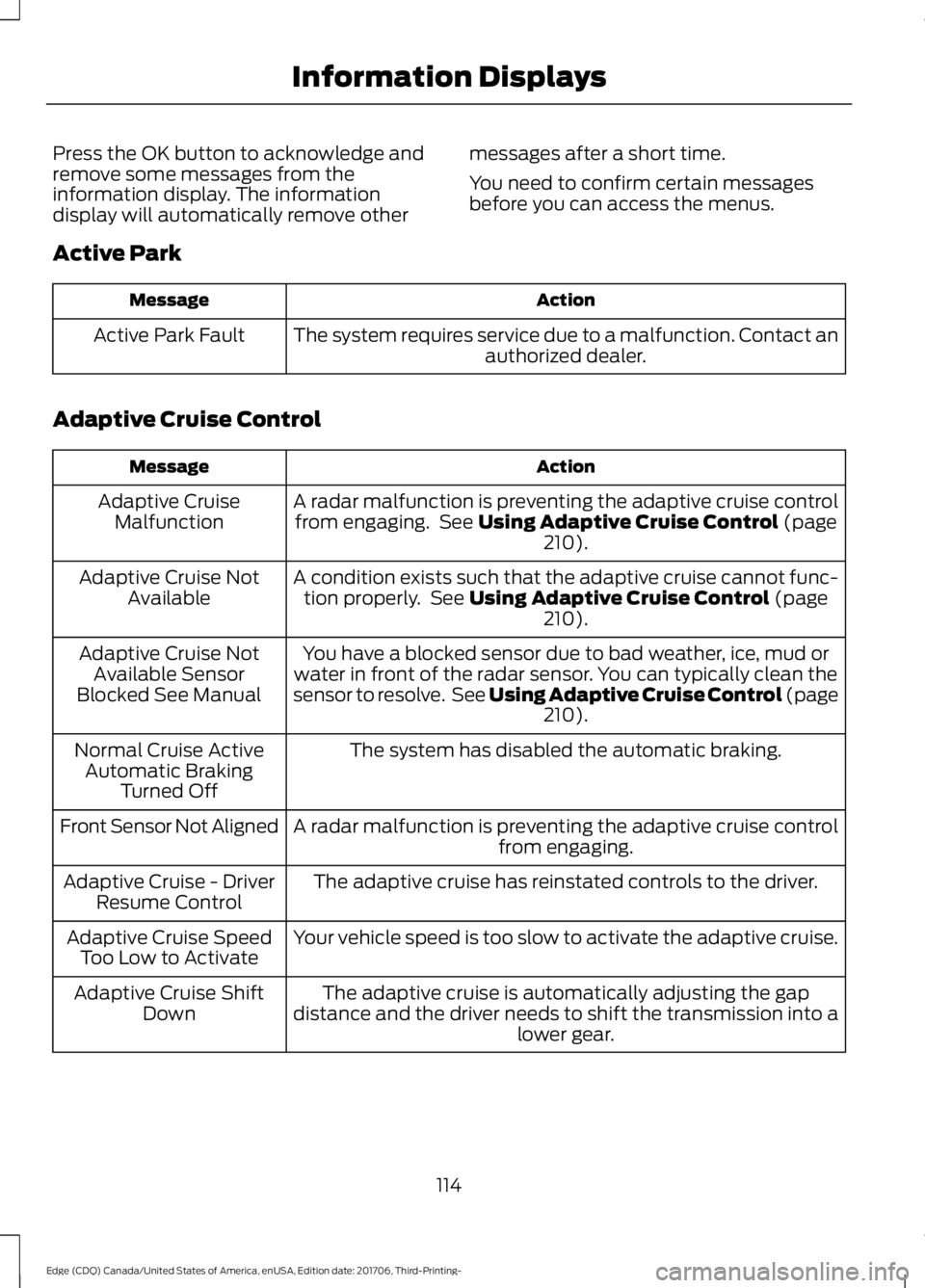
Press the OK button to acknowledge and
remove some messages from the
information display. The information
display will automatically remove other
messages after a short time.
You need to confirm certain messages
before you can access the menus.
Active Park Action
Message
The system requires service due to a malfunction. Contact an authorized dealer.
Active Park Fault
Adaptive Cruise Control Action
Message
A radar malfunction is preventing the adaptive cruise controlfrom engaging. See Using Adaptive Cruise Control (page
210).
Adaptive Cruise
Malfunction
A condition exists such that the adaptive cruise cannot func-tion properly. See
Using Adaptive Cruise Control (page
210).
Adaptive Cruise Not
Available
You have a blocked sensor due to bad weather, ice, mud or
water in front of the radar sensor. You can typically clean the
sensor to resolve. See Using Adaptive Cruise Control (page 210
).
Adaptive Cruise Not
Available Sensor
Blocked See Manual
The system has disabled the automatic braking.
Normal Cruise Active
Automatic Braking Turned Off
A radar malfunction is preventing the adaptive cruise control from engaging.
Front Sensor Not Aligned
The adaptive cruise has reinstated controls to the driver.
Adaptive Cruise - Driver
Resume Control
Your vehicle speed is too slow to activate the adaptive cruise.
Adaptive Cruise Speed
Too Low to Activate
The adaptive cruise is automatically adjusting the gap
distance and the driver needs to shift the transmission into a lower gear.
Adaptive Cruise Shift
Down
114
Edge (CDQ) Canada/United States of America, enUSA, Edition date: 201706, Third-Printing- Information Displays
Page 118 of 557
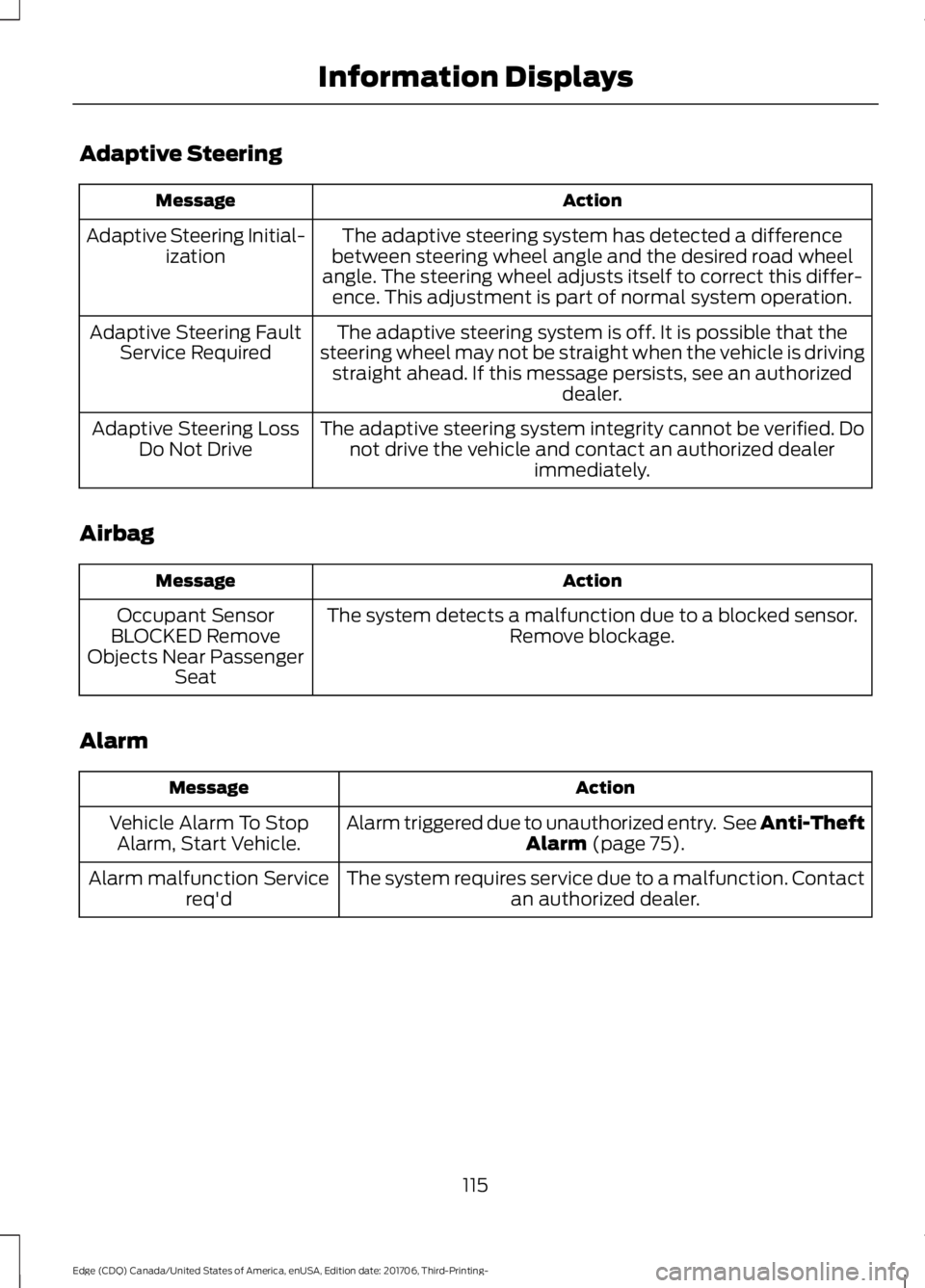
Adaptive Steering
Action
Message
The adaptive steering system has detected a difference
between steering wheel angle and the desired road wheel
angle. The steering wheel adjusts itself to correct this differ- ence. This adjustment is part of normal system operation.
Adaptive Steering Initial-
ization
The adaptive steering system is off. It is possible that the
steering wheel may not be straight when the vehicle is driving straight ahead. If this message persists, see an authorized dealer.
Adaptive Steering Fault
Service Required
The adaptive steering system integrity cannot be verified. Donot drive the vehicle and contact an authorized dealer immediately.
Adaptive Steering Loss
Do Not Drive
Airbag Action
Message
The system detects a malfunction due to a blocked sensor. Remove blockage.
Occupant Sensor
BLOCKED Remove
Objects Near Passenger Seat
Alarm Action
Message
Alarm triggered due to unauthorized entry. See Anti-Theft Alarm (page 75).
Vehicle Alarm To Stop
Alarm, Start Vehicle.
The system requires service due to a malfunction. Contactan authorized dealer.
Alarm malfunction Service
req'd
115
Edge (CDQ) Canada/United States of America, enUSA, Edition date: 201706, Third-Printing- Information Displays
Page 121 of 557
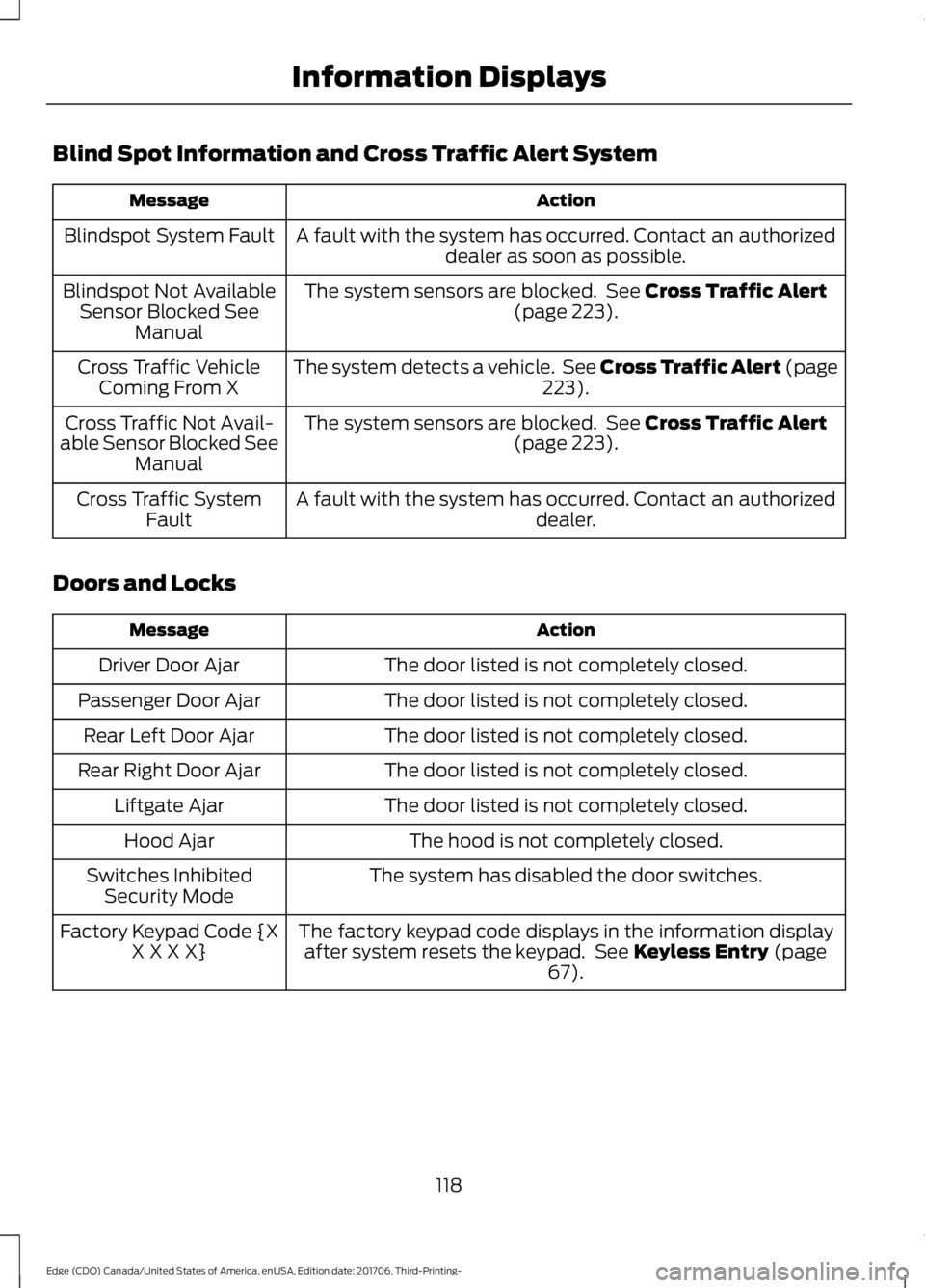
Blind Spot Information and Cross Traffic Alert System
Action
Message
A fault with the system has occurred. Contact an authorizeddealer as soon as possible.
Blindspot System Fault
The system sensors are blocked. See Cross Traffic Alert
(page 223).
Blindspot Not Available
Sensor Blocked See Manual
The system detects a vehicle. See Cross Traffic Alert (page 223
).
Cross Traffic Vehicle
Coming From X
The system sensors are blocked. See
Cross Traffic Alert
(page 223).
Cross Traffic Not Avail-
able Sensor Blocked See Manual
A fault with the system has occurred. Contact an authorized dealer.
Cross Traffic System
Fault
Doors and Locks Action
Message
The door listed is not completely closed.
Driver Door Ajar
The door listed is not completely closed.
Passenger Door Ajar
The door listed is not completely closed.
Rear Left Door Ajar
The door listed is not completely closed.
Rear Right Door Ajar
The door listed is not completely closed.
Liftgate Ajar
The hood is not completely closed.
Hood Ajar
The system has disabled the door switches.
Switches Inhibited
Security Mode
The factory keypad code displays in the information displayafter system resets the keypad. See
Keyless Entry (page
67).
Factory Keypad Code {X
X X X X}
118
Edge (CDQ) Canada/United States of America, enUSA, Edition date: 201706, Third-Printing- Information Displays
Page 122 of 557
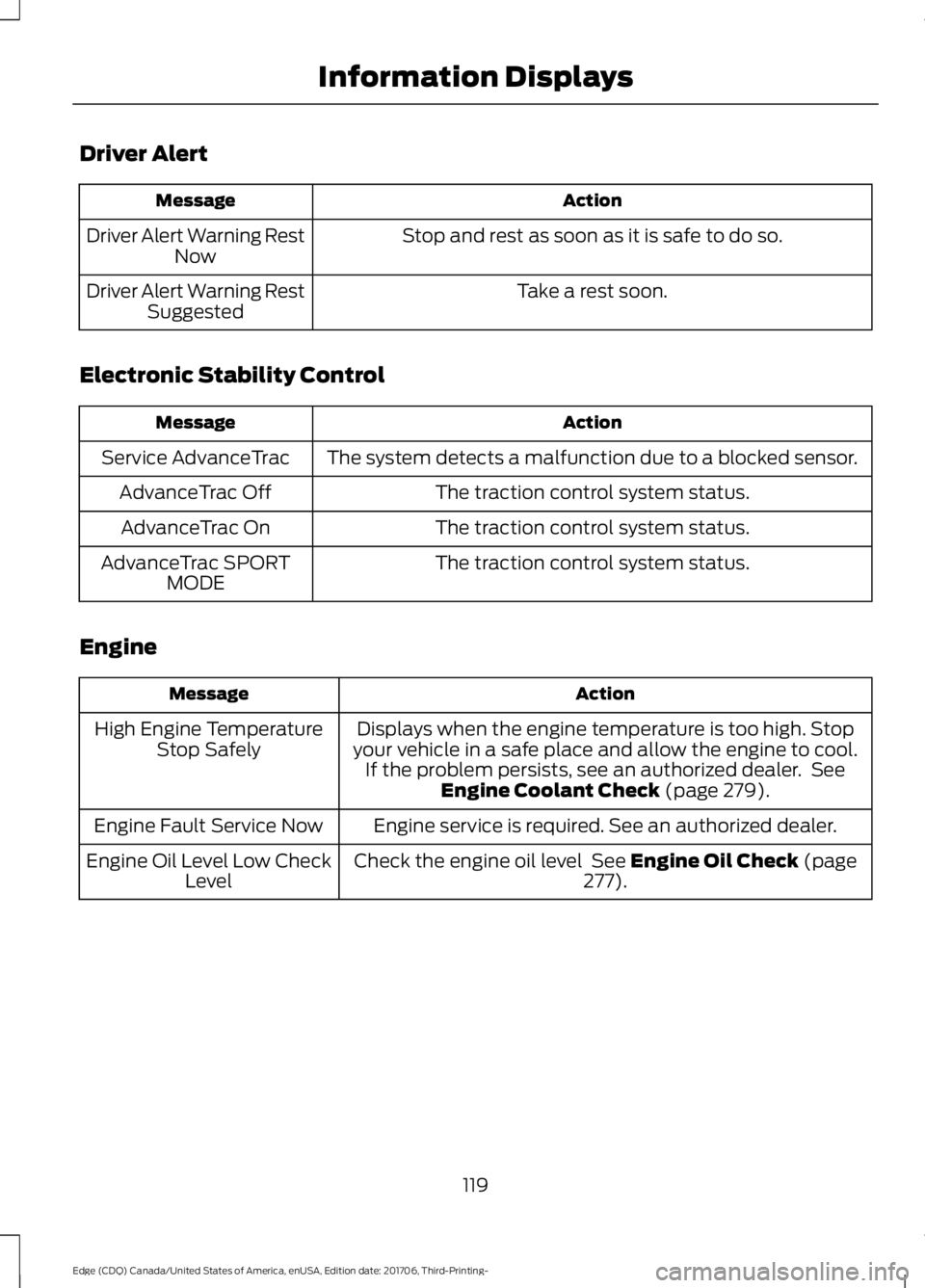
Driver Alert
Action
Message
Stop and rest as soon as it is safe to do so.
Driver Alert Warning Rest
Now
Take a rest soon.
Driver Alert Warning Rest
Suggested
Electronic Stability Control Action
Message
The system detects a malfunction due to a blocked sensor.
Service AdvanceTrac
The traction control system status.
AdvanceTrac Off
The traction control system status.
AdvanceTrac On
The traction control system status.
AdvanceTrac SPORT
MODE
Engine Action
Message
Displays when the engine temperature is too high. Stop
your vehicle in a safe place and allow the engine to cool. If the problem persists, see an authorized dealer. See Engine Coolant Check (page 279).
High Engine Temperature
Stop Safely
Engine service is required. See an authorized dealer.
Engine Fault Service Now
Check the engine oil level
See Engine Oil Check (page
277).
Engine Oil Level Low Check
Level
119
Edge (CDQ) Canada/United States of America, enUSA, Edition date: 201706, Third-Printing- Information Displays
Page 127 of 557
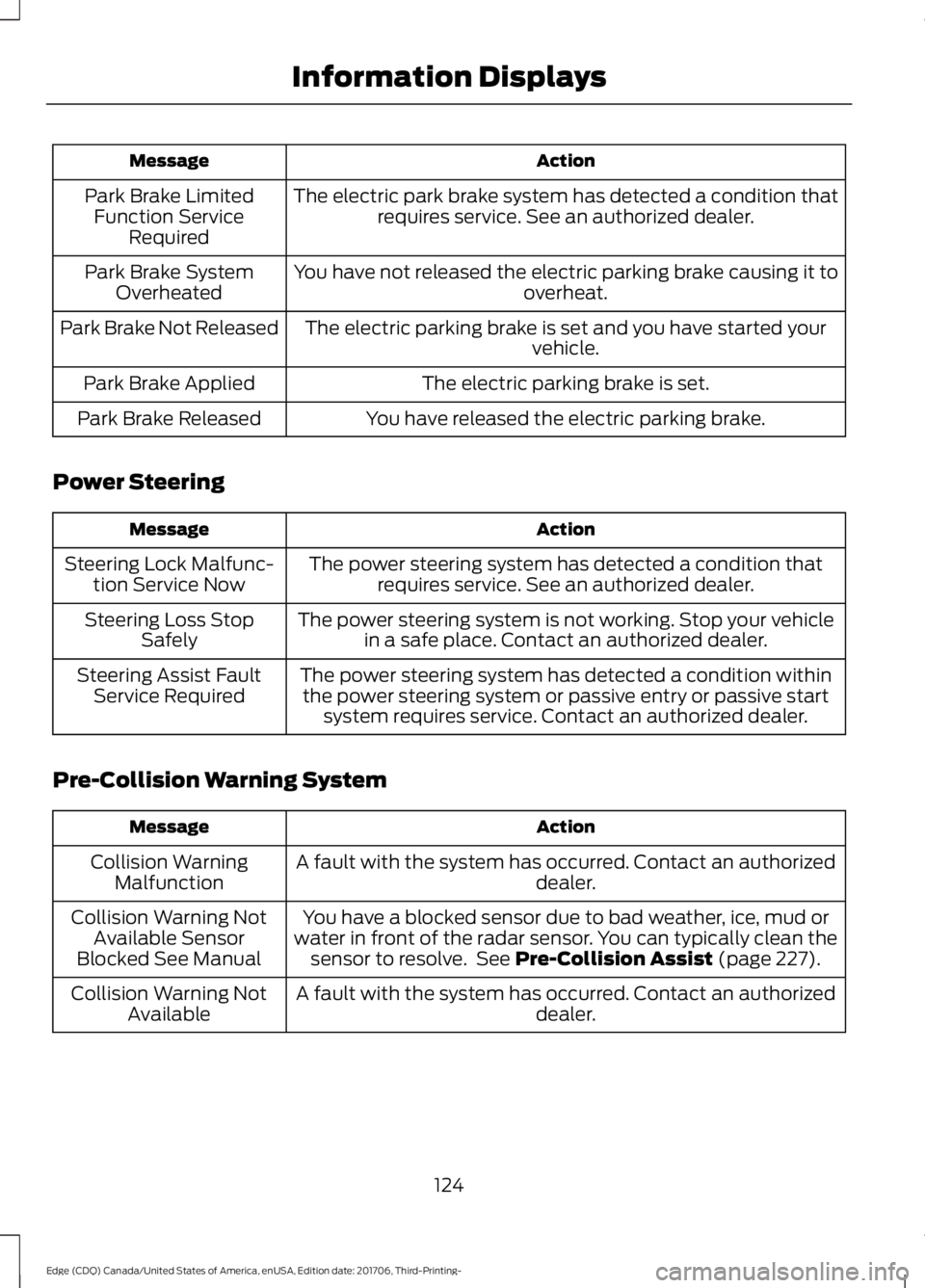
Action
Message
The electric park brake system has detected a condition thatrequires service. See an authorized dealer.
Park Brake Limited
Function Service Required
You have not released the electric parking brake causing it to overheat.
Park Brake System
Overheated
The electric parking brake is set and you have started your vehicle.
Park Brake Not Released
The electric parking brake is set.
Park Brake Applied
You have released the electric parking brake.
Park Brake Released
Power Steering Action
Message
The power steering system has detected a condition thatrequires service. See an authorized dealer.
Steering Lock Malfunc-
tion Service Now
The power steering system is not working. Stop your vehiclein a safe place. Contact an authorized dealer.
Steering Loss Stop
Safely
The power steering system has detected a condition withinthe power steering system or passive entry or passive start system requires service. Contact an authorized dealer.
Steering Assist Fault
Service Required
Pre-Collision Warning System Action
Message
A fault with the system has occurred. Contact an authorized dealer.
Collision Warning
Malfunction
You have a blocked sensor due to bad weather, ice, mud or
water in front of the radar sensor. You can typically clean the sensor to resolve. See Pre-Collision Assist (page 227).
Collision Warning Not
Available Sensor
Blocked See Manual
A fault with the system has occurred. Contact an authorized dealer.
Collision Warning Not
Available
124
Edge (CDQ) Canada/United States of America, enUSA, Edition date: 201706, Third-Printing- Information Displays
Page 130 of 557
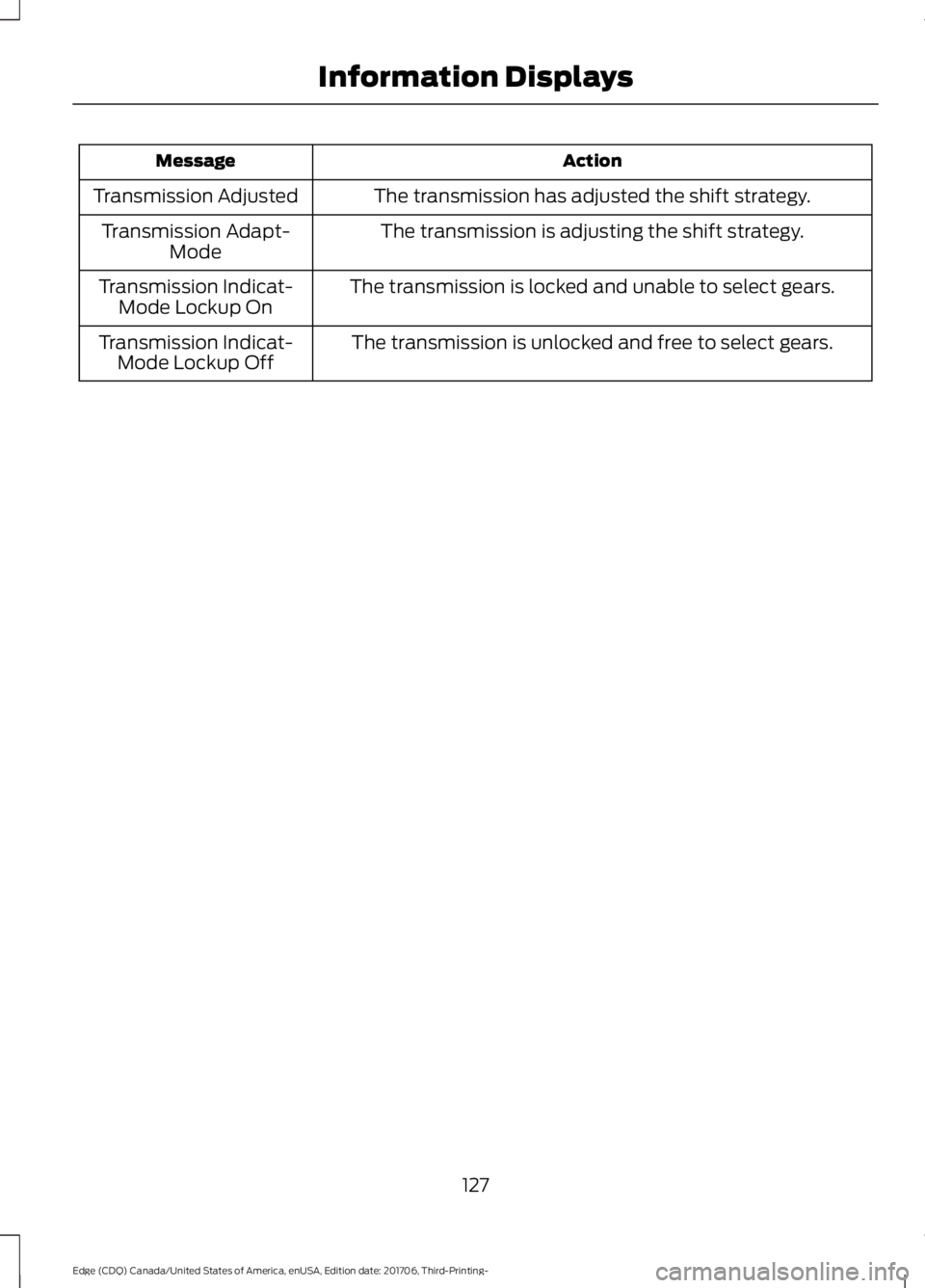
Action
Message
The transmission has adjusted the shift strategy.
Transmission Adjusted
The transmission is adjusting the shift strategy.
Transmission Adapt-
Mode
The transmission is locked and unable to select gears.
Transmission Indicat-
Mode Lockup On
The transmission is unlocked and free to select gears.
Transmission Indicat-
Mode Lockup Off
127
Edge (CDQ) Canada/United States of America, enUSA, Edition date: 201706, Third-Printing- Information Displays
Page 144 of 557
WARNING: The head restraint is a
safety device. Whenever possible it should
be installed and properly adjusted when
the seat is occupied. Failure to adjust the
head restraint properly could reduce its
effectiveness during certain impacts.
Note: Adjust the seat backrest to an upright
driving position before adjusting the head
restraint. Adjust the head restraint so that
the top of it is level with the top of your head
and as far forward as possible. Make sure
that you remain comfortable. If you are
extremely tall, adjust the head restraint to
its highest position.
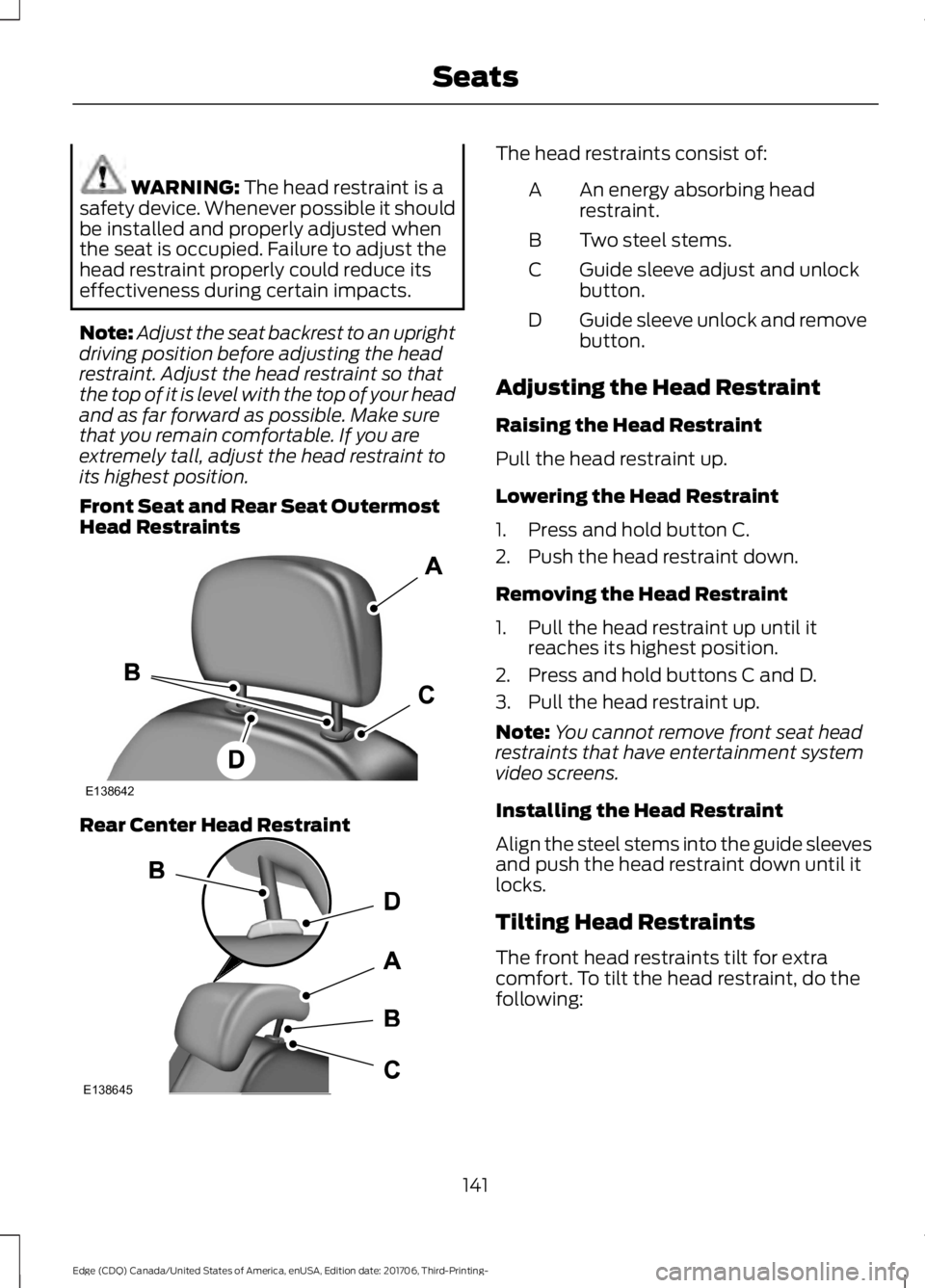
Front Seat and Rear Seat Outermost
Head Restraints Rear Center Head Restraint The head restraints consist of:
An energy absorbing head
restraint.
A
Two steel stems.
B
Guide sleeve adjust and unlock
button.
C
Guide sleeve unlock and remove
button.
D
Adjusting the Head Restraint
Raising the Head Restraint
Pull the head restraint up.
Lowering the Head Restraint
1. Press and hold button C.
2. Push the head restraint down.
Removing the Head Restraint
1. Pull the head restraint up until it reaches its highest position.
2. Press and hold buttons C and D.
3. Pull the head restraint up.
Note: You cannot remove front seat head
restraints that have entertainment system
video screens.
Installing the Head Restraint
Align the steel stems into the guide sleeves
and push the head restraint down until it
locks.
Tilting Head Restraints
The front head restraints tilt for extra
comfort. To tilt the head restraint, do the
following:
141
Edge (CDQ) Canada/United States of America, enUSA, Edition date: 201706, Third-Printing- SeatsE138642 E138645
Page 145 of 557
1. Adjust the seat backrest to an upright
driving or riding position.
2. Pivot the head restraint forward toward
your head to the desired position.
After the head restraint reaches the
forward-most tilt position, pivoting it
forward again will then release it to the
rearward, un-tilted position.
MANUAL SEATS (If Equipped) WARNING:
Do not adjust the driver
seat or seat backrest when your vehicle is
moving. This may result in sudden seat
movement, causing the loss of control of
your vehicle. WARNING: Make sure the seat fully
locks into place by rocking it backward and
forward. Not securing the seat into the
locked position can be dangerous in a
crash and could cause serious personal
injury or death. WARNING:
Reclining the seatback
can cause an occupant to slide under the
seat's seatbelt, resulting in severe personal
injuries in the event of a crash.
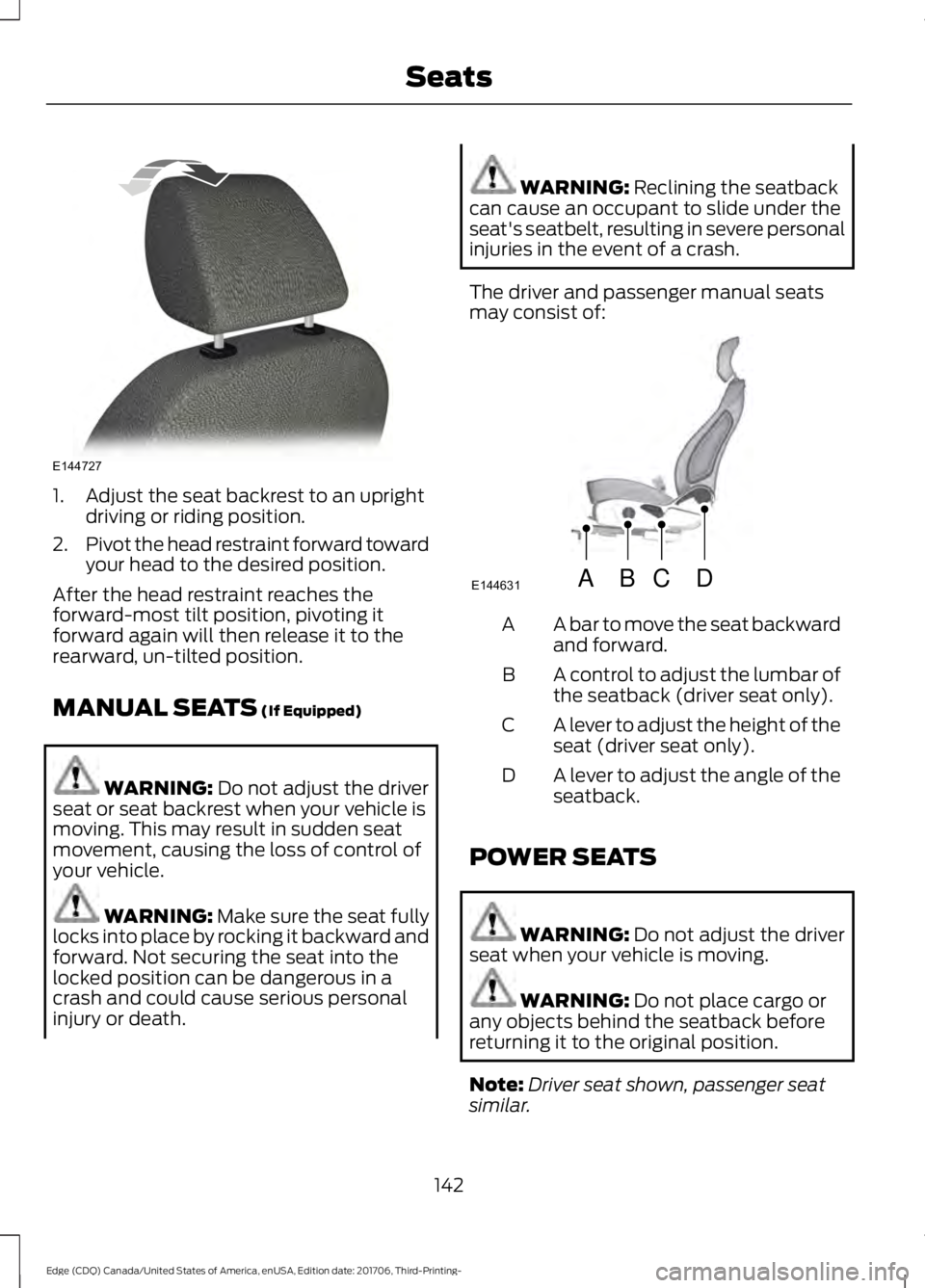
The driver and passenger manual seats
may consist of: A bar to move the seat backward
and forward.
A
A control to adjust the lumbar of
the seatback (driver seat only).
B
A lever to adjust the height of the
seat (driver seat only).
C
A lever to adjust the angle of the
seatback.
D
POWER SEATS WARNING:
Do not adjust the driver
seat when your vehicle is moving. WARNING:
Do not place cargo or
any objects behind the seatback before
returning it to the original position.
Note: Driver seat shown, passenger seat
similar.
142
Edge (CDQ) Canada/United States of America, enUSA, Edition date: 201706, Third-Printing- SeatsE144727 ABCD
E144631