wheel FORD EDGE 2019 Owner's Manual
[x] Cancel search | Manufacturer: FORD, Model Year: 2019, Model line: EDGE, Model: FORD EDGE 2019Pages: 547, PDF Size: 40.86 MB
Page 110 of 547
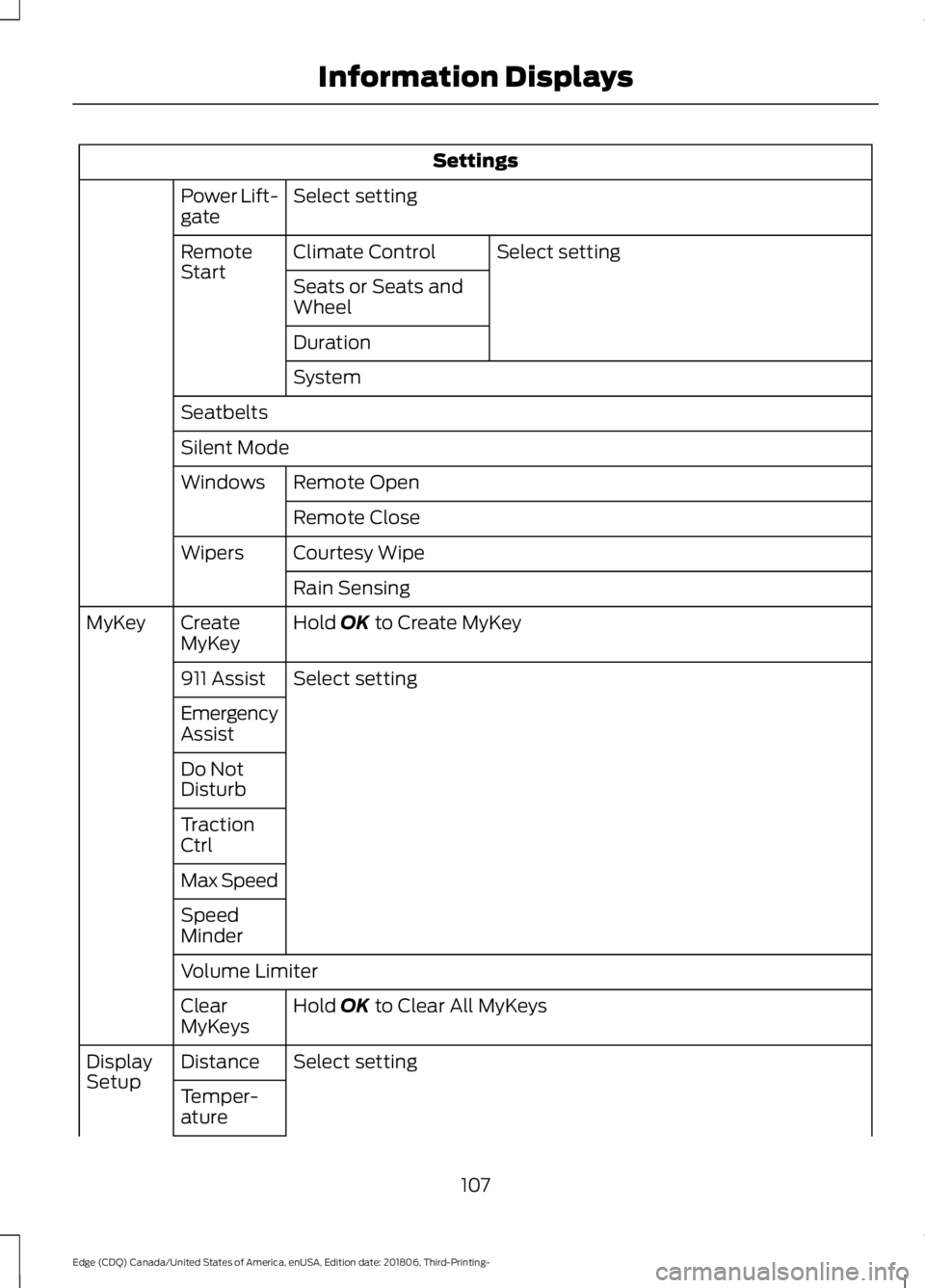
Settings
Select setting
Power Lift-
gate
Select setting
Climate Control
Remote
Start
Seats or Seats and
Wheel
Duration
System
Seatbelts
Silent Mode Remote Open
Windows
Remote Close
Courtesy Wipe
Wipers
Rain Sensing
Hold OK to Create MyKey
Create
MyKey
MyKey
Select setting
911 Assist
Emergency
Assist
Do Not
Disturb
Traction
Ctrl
Max Speed
Speed
Minder
Volume Limiter
Hold
OK to Clear All MyKeys
Clear
MyKeys
Select setting
Distance
Display
Setup
Temper-
ature
107
Edge (CDQ) Canada/United States of America, enUSA, Edition date: 201806, Third-Printing- Information Displays
Page 113 of 547
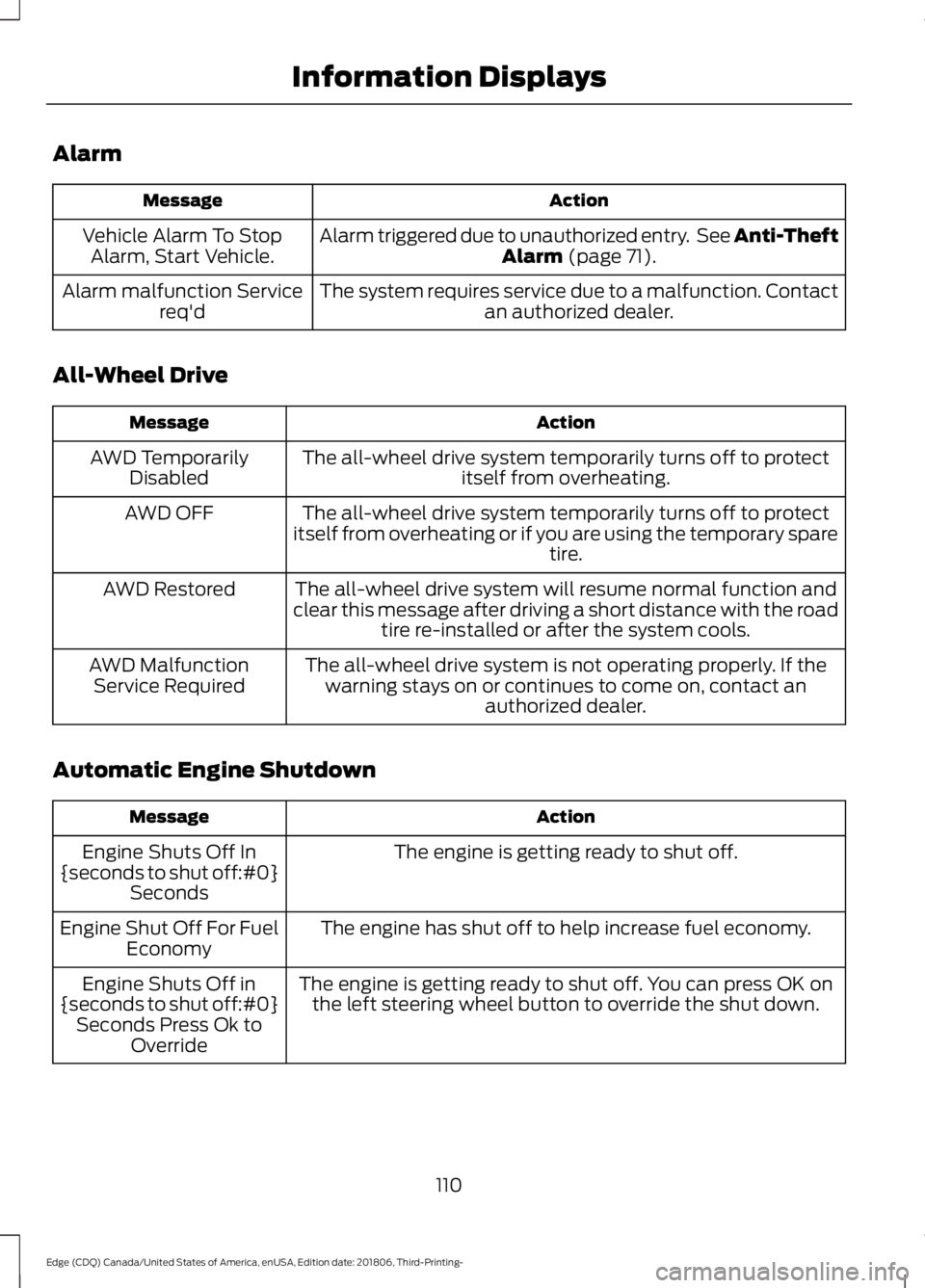
Alarm
Action
Message
Alarm triggered due to unauthorized entry. See Anti-Theft Alarm (page 71).
Vehicle Alarm To Stop
Alarm, Start Vehicle.
The system requires service due to a malfunction. Contactan authorized dealer.
Alarm malfunction Service
req'd
All-Wheel Drive Action
Message
The all-wheel drive system temporarily turns off to protectitself from overheating.
AWD Temporarily
Disabled
The all-wheel drive system temporarily turns off to protect
itself from overheating or if you are using the temporary spare tire.
AWD OFF
The all-wheel drive system will resume normal function and
clear this message after driving a short distance with the road tire re-installed or after the system cools.
AWD Restored
The all-wheel drive system is not operating properly. If thewarning stays on or continues to come on, contact an authorized dealer.
AWD Malfunction
Service Required
Automatic Engine Shutdown Action
Message
The engine is getting ready to shut off.
Engine Shuts Off In
{seconds to shut off:#0} Seconds
The engine has shut off to help increase fuel economy.
Engine Shut Off For Fuel
Economy
The engine is getting ready to shut off. You can press OK onthe left steering wheel button to override the shut down.
Engine Shuts Off in
{seconds to shut off:#0} Seconds Press Ok to Override
110
Edge (CDQ) Canada/United States of America, enUSA, Edition date: 201806, Third-Printing- Information Displays
Page 119 of 547
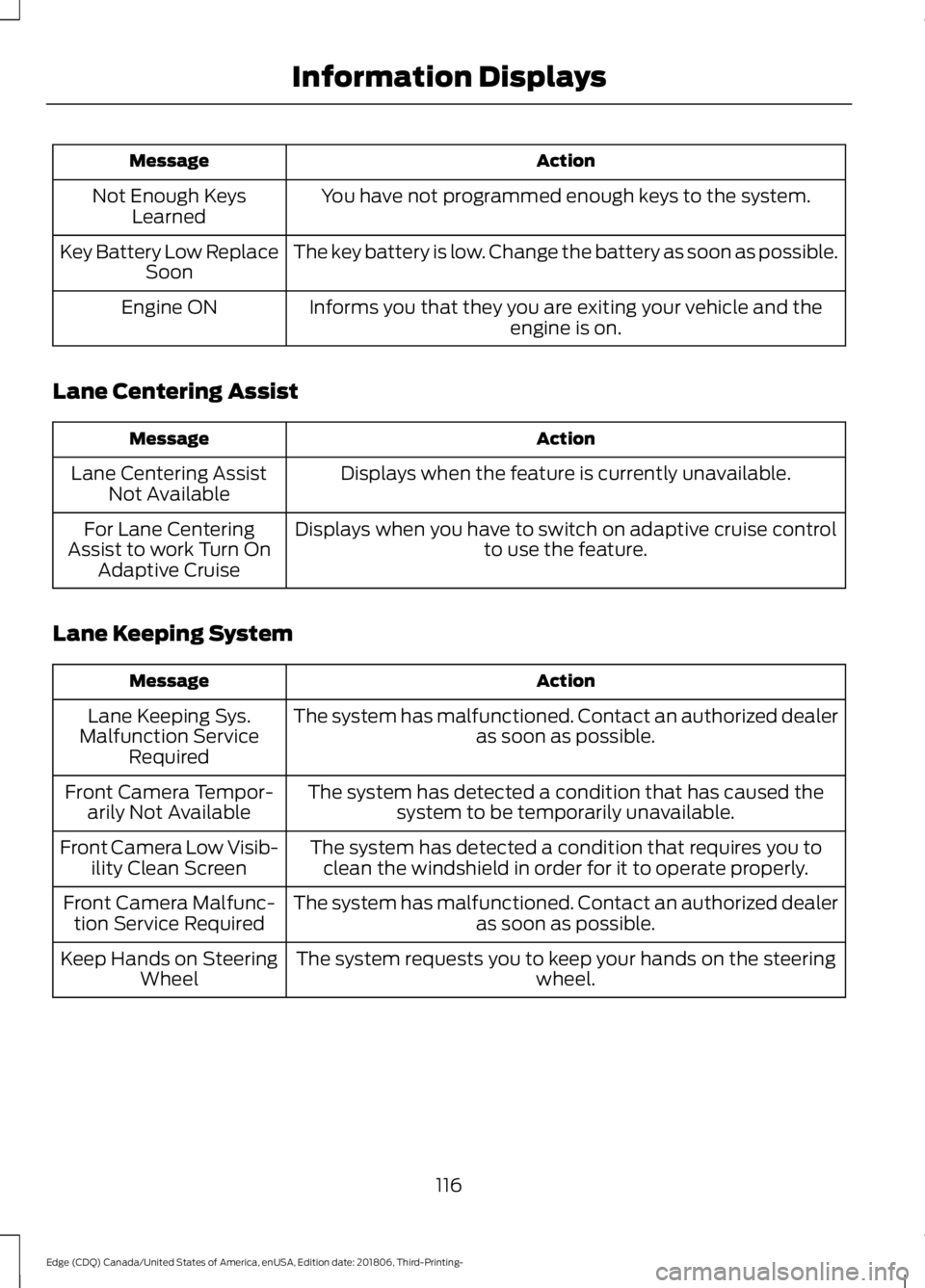
Action
Message
You have not programmed enough keys to the system.
Not Enough Keys
Learned
The key battery is low. Change the battery as soon as possible.
Key Battery Low Replace
Soon
Informs you that they you are exiting your vehicle and the engine is on.
Engine ON
Lane Centering Assist Action
Message
Displays when the feature is currently unavailable.
Lane Centering Assist
Not Available
Displays when you have to switch on adaptive cruise control to use the feature.
For Lane Centering
Assist to work Turn On Adaptive Cruise
Lane Keeping System Action
Message
The system has malfunctioned. Contact an authorized dealer as soon as possible.
Lane Keeping Sys.
Malfunction Service Required
The system has detected a condition that has caused thesystem to be temporarily unavailable.
Front Camera Tempor-
arily Not Available
The system has detected a condition that requires you toclean the windshield in order for it to operate properly.
Front Camera Low Visib-
ility Clean Screen
The system has malfunctioned. Contact an authorized dealeras soon as possible.
Front Camera Malfunc-
tion Service Required
The system requests you to keep your hands on the steering wheel.
Keep Hands on Steering
Wheel
116
Edge (CDQ) Canada/United States of America, enUSA, Edition date: 201806, Third-Printing- Information Displays
Page 137 of 547
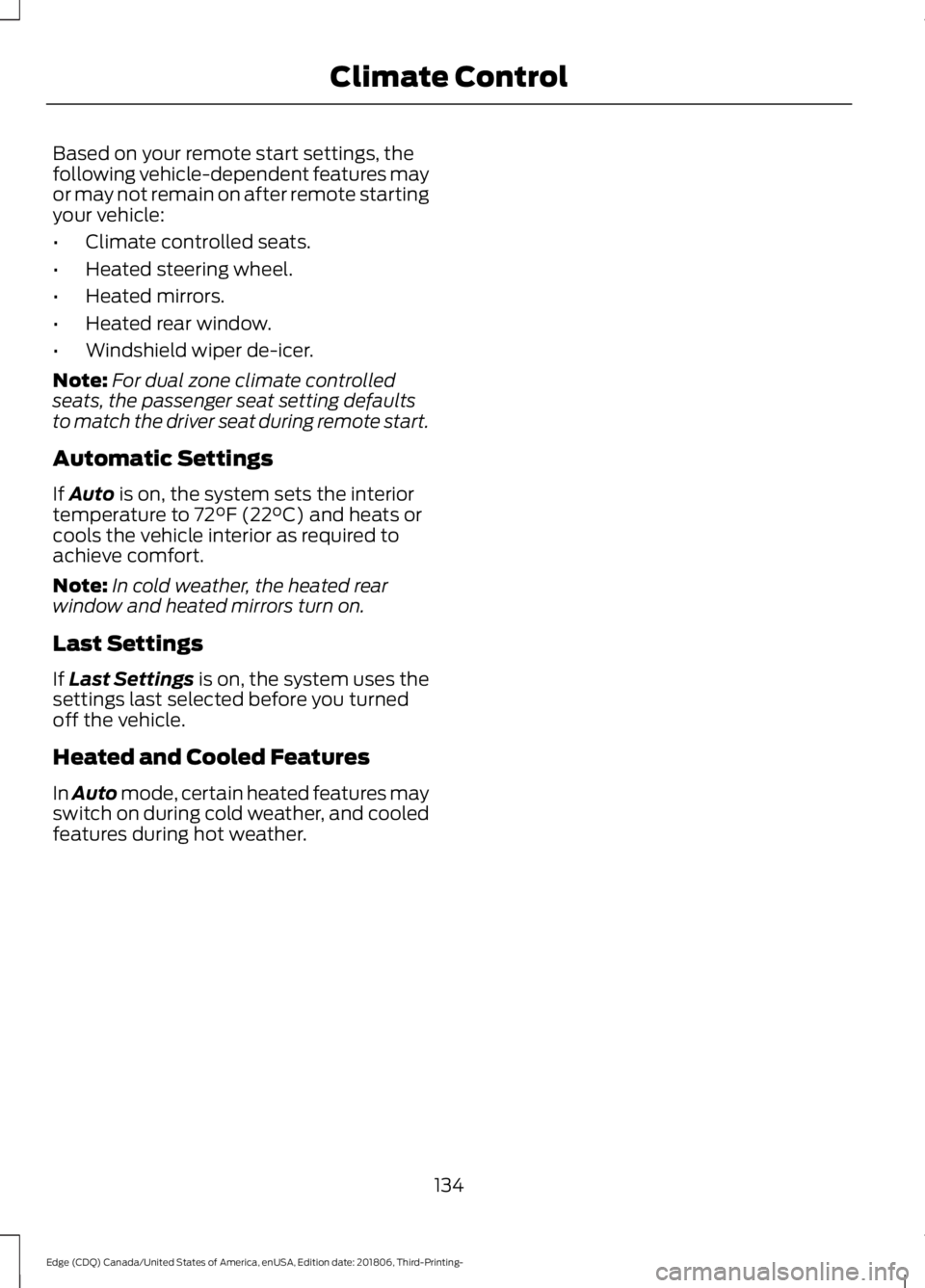
Based on your remote start settings, the
following vehicle-dependent features may
or may not remain on after remote starting
your vehicle:
•
Climate controlled seats.
• Heated steering wheel.
• Heated mirrors.
• Heated rear window.
• Windshield wiper de-icer.
Note: For dual zone climate controlled
seats, the passenger seat setting defaults
to match the driver seat during remote start.
Automatic Settings
If Auto is on, the system sets the interior
temperature to 72°F (22°C) and heats or
cools the vehicle interior as required to
achieve comfort.
Note: In cold weather, the heated rear
window and heated mirrors turn on.
Last Settings
If
Last Settings is on, the system uses the
settings last selected before you turned
off the vehicle.
Heated and Cooled Features
In Auto mode, certain heated features may
switch on during cold weather, and cooled
features during hot weather.
134
Edge (CDQ) Canada/United States of America, enUSA, Edition date: 201806, Third-Printing- Climate Control
Page 138 of 547
SITTING IN THE CORRECT
POSITION
WARNING: Sitting improperly, out
of position or with the seatback reclined
too far can take weight off the seat
cushion and affect the decision of the
passenger sensing system, resulting in
serious injury or death in the event of a
crash. Always sit upright against your
seat back, with your feet on the floor. WARNING:
Do not recline the
seatback too far as this can cause the
occupant to slide under the seatbelt,
resulting in serious injury in the event of
a collision. WARNING:
Do not place objects
higher than the top of the seat backrest.
Failure to follow this instruction could
result in personal injury or death in the
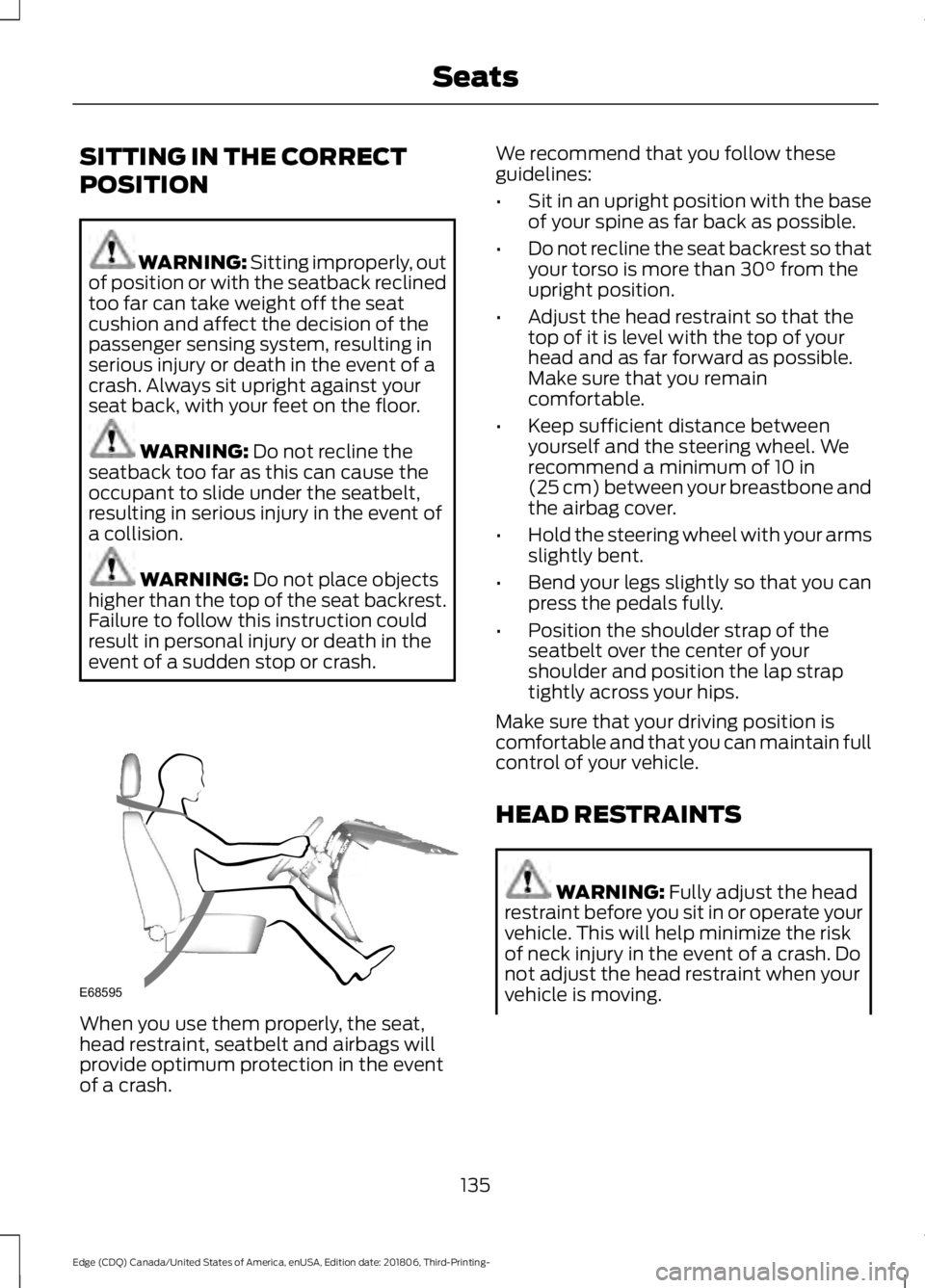
event of a sudden stop or crash. When you use them properly, the seat,
head restraint, seatbelt and airbags will
provide optimum protection in the event
of a crash. We recommend that you follow these
guidelines:
•
Sit in an upright position with the base
of your spine as far back as possible.
• Do not recline the seat backrest so that
your torso is more than
30° from the
upright position.
• Adjust the head restraint so that the
top of it is level with the top of your
head and as far forward as possible.
Make sure that you remain
comfortable.
• Keep sufficient distance between
yourself and the steering wheel. We
recommend a minimum of
10 in
(25 cm) between your breastbone and
the airbag cover.
• Hold the steering wheel with your arms
slightly bent.
• Bend your legs slightly so that you can
press the pedals fully.
• Position the shoulder strap of the
seatbelt over the center of your
shoulder and position the lap strap
tightly across your hips.
Make sure that your driving position is
comfortable and that you can maintain full
control of your vehicle.
HEAD RESTRAINTS WARNING:
Fully adjust the head
restraint before you sit in or operate your
vehicle. This will help minimize the risk
of neck injury in the event of a crash. Do
not adjust the head restraint when your
vehicle is moving.
135
Edge (CDQ) Canada/United States of America, enUSA, Edition date: 201806, Third-Printing- SeatsE68595
Page 163 of 547
AUTO-START-STOP
The system helps reduce fuel consumption
by automatically stopping and restarting
the engine when your vehicle has stopped.
The engine restarts automatically when
you release the brake pedal.
In some situations, your vehicle may restart
automatically, for example:
•
To maintain interior comfort.
• To recharge the battery.
Note: Power assist steering is turned off
when the engine is off. WARNING: Apply the parking
brake, shift into park (P), switch the
ignition off and remove the key before
you leave your vehicle. Failure to follow
this instruction could result in personal
injury or death. WARNING:
Apply the parking
brake, shift into park (P), switch the
ignition off and remove the key before
you open the hood or have any service
or repair work completed. If you do not
switch the ignition off, the engine could
restart at any time. Failure to follow this
instruction could result in personal injury
or death. WARNING:
The system may
require the engine to automatically
restart when the auto-start-stop
indicator illuminates green or flashes
amber. Failure to follow this instruction
could result in personal injury.
The Auto-Start-Stop system status is
available at a glance within the information
display. See Information Displays (page
98
). Enabling Auto-Start-Stop
The system automatically enables every
time you start your vehicle if:
•
You do not press the Auto-Start-Stop
button (button is not illuminated).
• Your vehicle exceeds an initial speed
of
3 mph (5 km/h) after you have
initially started your vehicle.
• Your vehicle is stopped.
• Your foot is on the brake pedal.
• The transmission is in drive (D).
• The driver door is closed.
• There is adequate brake vacuum.
• The interior compartment has been
cooled or warmed to an acceptable
level.
• The front windshield defroster is off.
• The steering wheel is not turned rapidly
or is not at a sharp angle.
• The vehicle is not on a steep road
grade.
• The battery is within optimal operating
conditions (battery state of charge and
temperature in range).
• The engine coolant is at operating
temperature.
• Elevation is below approximately
11,810 ft (3,600 m)
.
• Ambient temperature is moderate. The green Auto-Start-Stop
indicator light on the instrument
cluster illuminates to indicate
when the automatic engine stop occurs. If you have an instrument cluster
equipped with a grey
Auto-Start-Stop indicator light,
it illuminates when automatic engine stop
is not available due to not meeting one of
the above noted conditions.
160
Edge (CDQ) Canada/United States of America, enUSA, Edition date: 201806, Third-Printing- Unique Driving Characteristics E146361
Page 176 of 547
AUTOMATIC TRANSMISSION
WARNING: Always fully apply the
parking brake and make sure you shift
into park (P). Failure to follow this
instruction could result in personal injury
or death. WARNING:
Do not apply the brake
pedal and accelerator pedal
simultaneously. Applying both pedals
simultaneously for more than a few
seconds will limit engine performance,
which may result in difficulty maintaining
speed in traffic and could lead to serious
injury. WARNING:
When your vehicle is
stationary, keep the brake pedal fully
pressed when shifting gears. Failure to
follow this instruction could result in
personal injury, death or property
damage.
Note: You may not be able to shift out of
park (P) unless the intelligent access key is
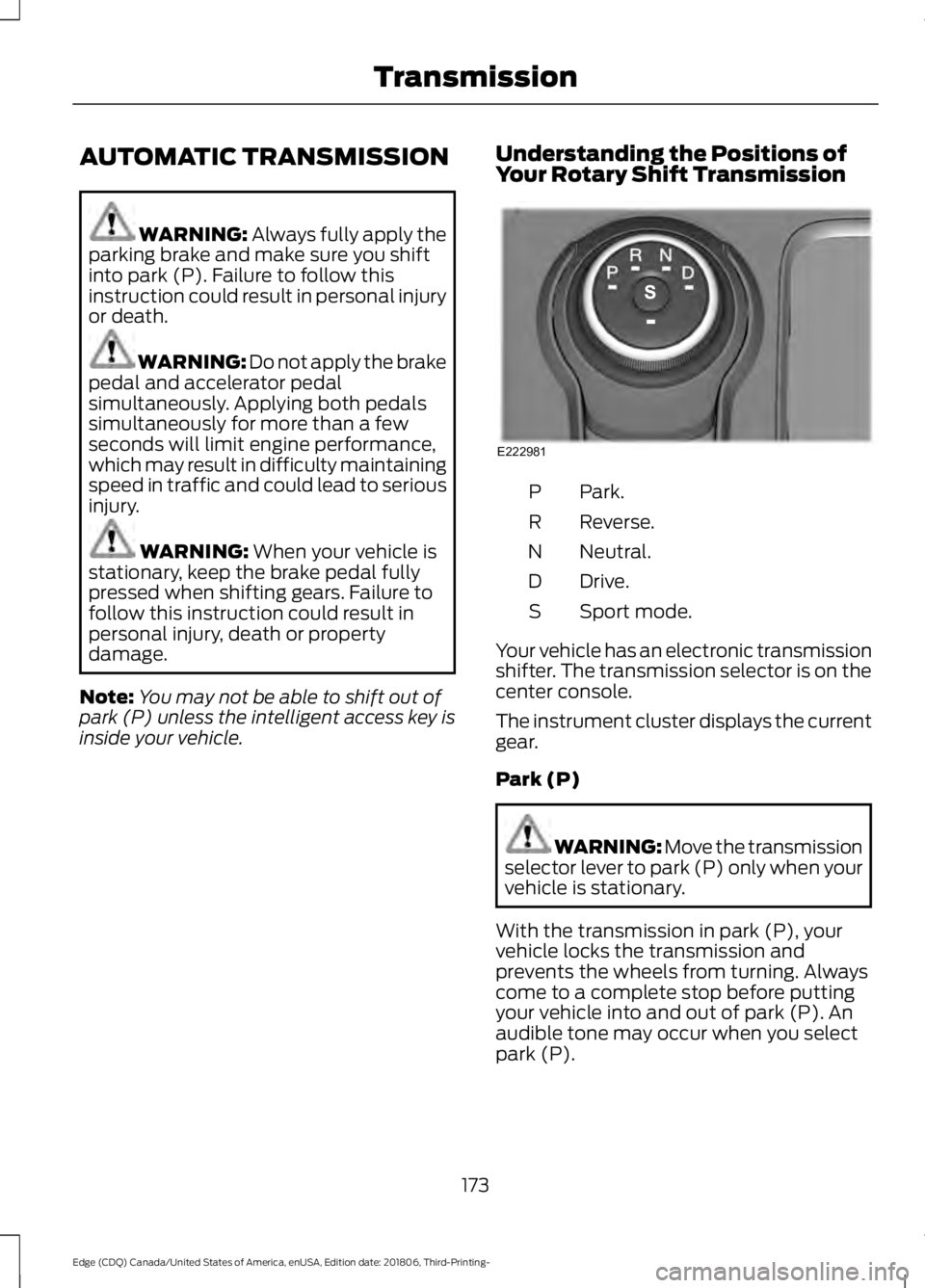
inside your vehicle. Understanding the Positions of
Your Rotary Shift Transmission Park.
P
Reverse.
R
Neutral.
N
Drive.
D
Sport mode.
S
Your vehicle has an electronic transmission
shifter. The transmission selector is on the
center console.
The instrument cluster displays the current
gear.
Park (P) WARNING: Move the transmission
selector lever to park (P) only when your
vehicle is stationary.
With the transmission in park (P), your
vehicle locks the transmission and
prevents the wheels from turning. Always
come to a complete stop before putting
your vehicle into and out of park (P). An
audible tone may occur when you select
park (P).
173
Edge (CDQ) Canada/United States of America, enUSA, Edition date: 201806, Third-Printing- TransmissionE222981
Page 178 of 547
Extended usage of Stay in Neutral mode
may result in a battery voltage reduction
to level where the vehicle may no longer
start.
Do not tow your vehicle in this mode.
To enter Stay in Neutral mode, do the
following:
1. Bring your vehicle to a complete stop.
2. Shift into neutral (N).
Note:
A message appears in the
information display.
3. Press the sport (S) button.
Note: A confirmation message appears in
the information display when your vehicle
has entered Stay in Neutral mode and the
neutral (N) button on the transmission
selector slowly blinks.
To exit Stay in Neutral mode, press the
brake pedal and shift into another gear.
Drive (D)
Drive (D) is the normal driving position for
the optimum fuel economy and
smoothness. Shift the transmission
selector to drive (D) to allow your vehicle
to move forward and shift automatically
through the forward gears.
The transmission shifts to the appropriate
gear for optimum performance based on
ambient temperature, road slope, vehicle
load and your input.
Sport Mode (S)
With the transmission selector in sport (S),
the driver can change gears up or down.
By moving the transmission selector lever
from drive position drive (D) to sport (S)
you can shift up or down the gear by using
shift buttons on the steering wheel. See
SelectShift Automatic ™ transmission
section. SelectShift Automatic
™
Transmission (If Equipped)
Your vehicle has a SelectShift Automatic
transmission selector lever. The
SelectShift Automatic transmission gives
you the ability to change gears up or down
as desired.
Downshifts are allowed unless the engine
speed after the shift exceeds the
maximum allowable limit.
In order to prevent engine stalls,
SelectShift automatically downshifts at
low engine speeds.
Note: Engine damage may occur if you
maintain excessive engine revving without
shifting.
SelectShift does not automatically upshift,
even if the engine is approaching the RPM
limit, unless the accelerator pedal is at full
travel.
Take notice of the shift indicator lamp,
which alerts you when to shift to help you
achieve the optimum level of efficiency
and fuel economy.
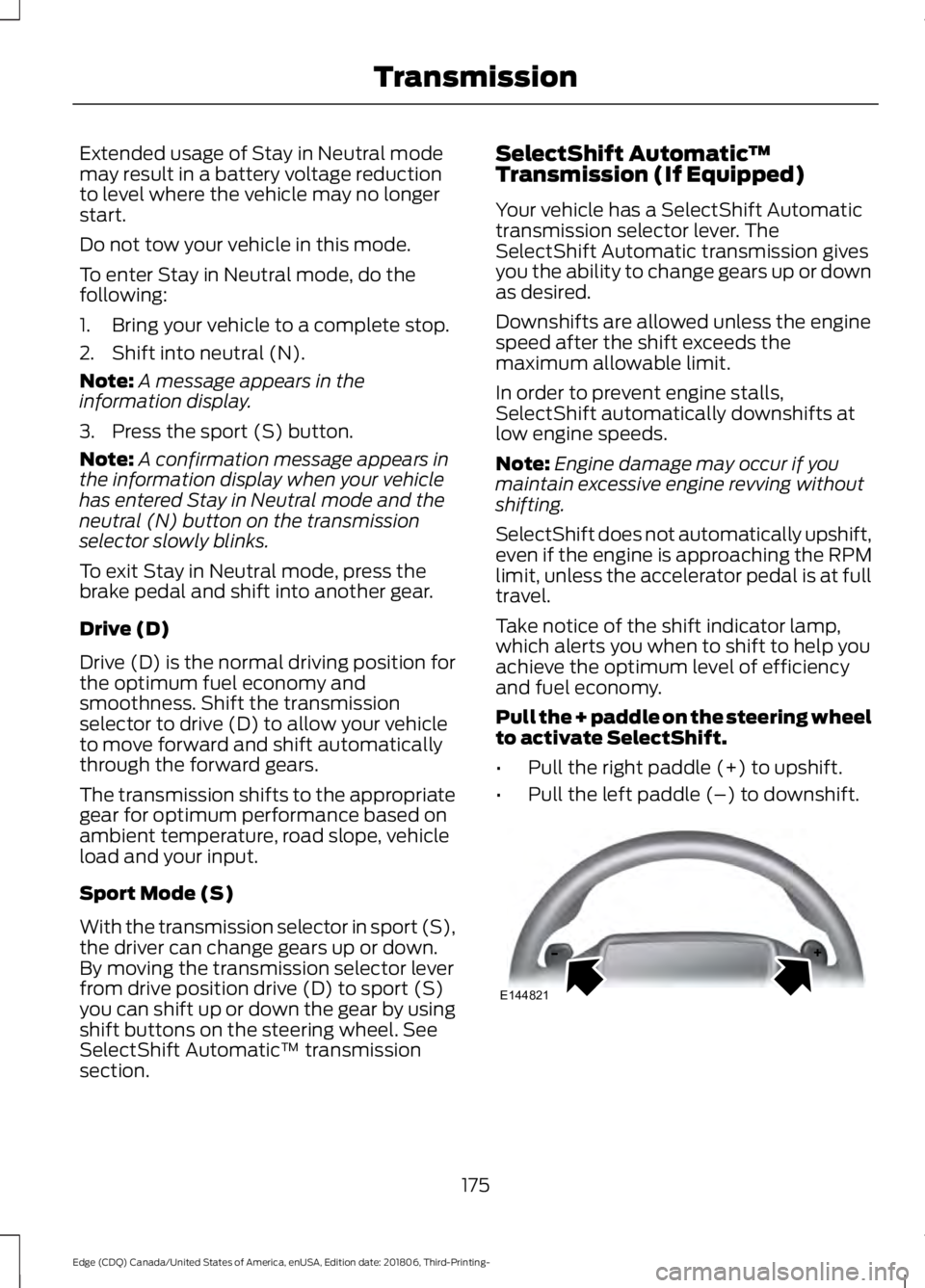
Pull the + paddle on the steering wheel
to activate SelectShift.
• Pull the right paddle (+) to upshift.
• Pull the left paddle (–) to downshift. 175
Edge (CDQ) Canada/United States of America, enUSA, Edition date: 201806, Third-Printing- TransmissionE144821
Page 179 of 547
SelectShift in drive (D):
•
Provides temporary manual control of
the gear selection when you require a
more demanding response, for
example, when towing or overtaking.
This mode holds a selected gear for a
temporary period of time dependent
on driver input, for example, steering
wheel or accelerator pedal input.
SelectShift in sport (S):
• Provides a permanent manual gear
selection, where you can select the
gear.
To exit SelectShift mode:
• Press and hold the + paddle on the
steering wheel to deactivate
SelectShift mode in drive (D) or sport
(S).
OR
• Diesel vehicles only: Press and hold the
+ toggle or + steering wheel paddle for
a few seconds.
The instrument cluster displays your
current gear. If you request a gear that is
not available due to vehicle conditions, too
low or too high engine speed, the current
gear flashes three times.
Note: At full accelerator pedal travel, the
transmission may automatically downshift
for maximum performance.
Manual Park Release WARNING: When doing this
procedure, you need to take the
transmission out of park (P) which
means your vehicle can roll freely. To
avoid unwanted vehicle movement,
always fully apply the parking brake prior
to doing this procedure. Use wheels
chocks if appropriate. WARNING:
If the parking brake is
fully released, but the brake warning
lamp remains illuminated, the brakes
may not be working properly. Have your
vehicle checked as soon as possible. WARNING:
Do not drive your
vehicle until you verify that the
stoplamps are working.
Use the manual park release to move your
transmission from the park (P) position in
the event of an electrical malfunction or
emergency.
Activating the Manual Park Release
Cable
1. Apply the parking brake. See Electric
Parking Brake
(page 185).
Note: If vehicle battery is dead, for example,
no electrical power available, an external
power may be required to apply the parking
brake.
176
Edge (CDQ) Canada/United States of America, enUSA, Edition date: 201806, Third-Printing- Transmission
Page 180 of 547
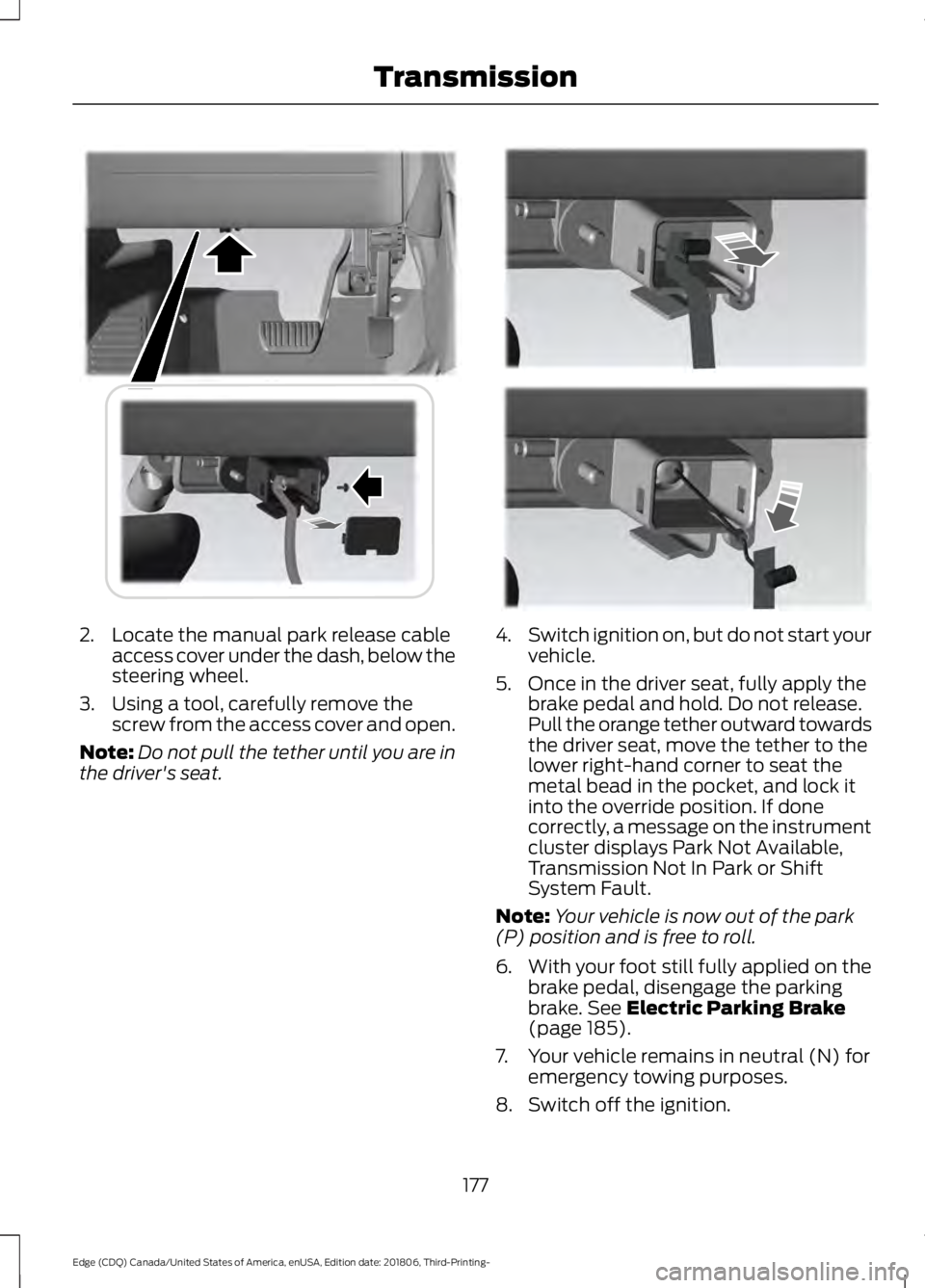
2. Locate the manual park release cable
access cover under the dash, below the
steering wheel.
3. Using a tool, carefully remove the screw from the access cover and open.
Note: Do not pull the tether until you are in
the driver's seat. 4.
Switch ignition on, but do not start your
vehicle.
5. Once in the driver seat, fully apply the brake pedal and hold. Do not release.
Pull the orange tether outward towards
the driver seat, move the tether to the
lower right-hand corner to seat the
metal bead in the pocket, and lock it
into the override position. If done
correctly, a message on the instrument
cluster displays Park Not Available,
Transmission Not In Park or Shift
System Fault.
Note: Your vehicle is now out of the park
(P) position and is free to roll.
6. With your foot still fully applied on the
brake pedal, disengage the parking
brake. See Electric Parking Brake
(page 185).
7. Your vehicle remains in neutral (N) for emergency towing purposes.
8. Switch off the ignition.
177
Edge (CDQ) Canada/United States of America, enUSA, Edition date: 201806, Third-Printing- TransmissionE307294 E307295