gear FORD EDGE 2019 Owner's Guide
[x] Cancel search | Manufacturer: FORD, Model Year: 2019, Model line: EDGE, Model: FORD EDGE 2019Pages: 547, PDF Size: 40.86 MB
Page 308 of 547
•
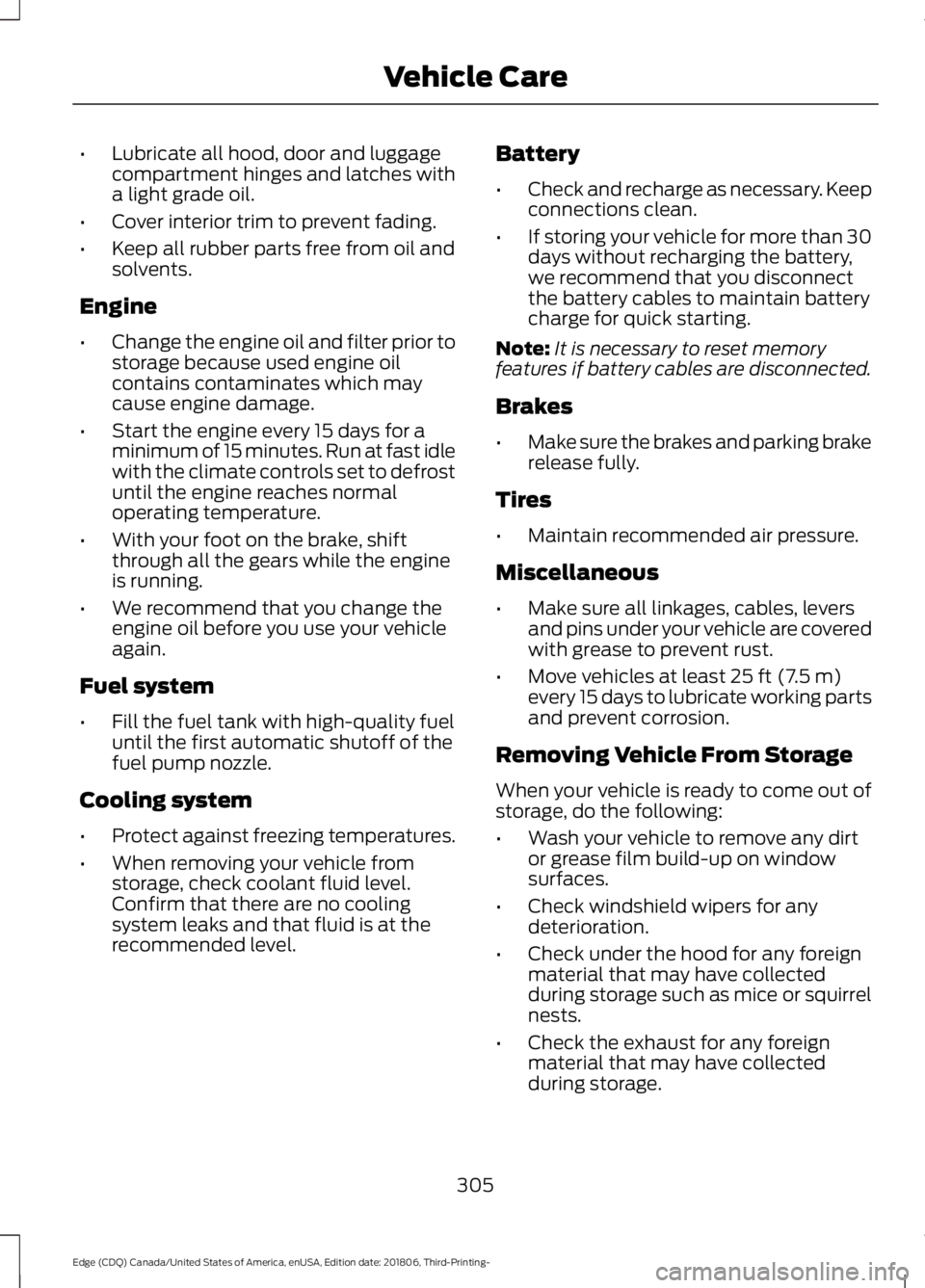
Lubricate all hood, door and luggage
compartment hinges and latches with
a light grade oil.
• Cover interior trim to prevent fading.
• Keep all rubber parts free from oil and
solvents.
Engine
• Change the engine oil and filter prior to
storage because used engine oil
contains contaminates which may
cause engine damage.
• Start the engine every 15 days for a
minimum of 15 minutes. Run at fast idle
with the climate controls set to defrost
until the engine reaches normal
operating temperature.
• With your foot on the brake, shift
through all the gears while the engine
is running.
• We recommend that you change the
engine oil before you use your vehicle
again.
Fuel system
• Fill the fuel tank with high-quality fuel
until the first automatic shutoff of the
fuel pump nozzle.
Cooling system
• Protect against freezing temperatures.
• When removing your vehicle from
storage, check coolant fluid level.
Confirm that there are no cooling
system leaks and that fluid is at the
recommended level. Battery
•
Check and recharge as necessary. Keep
connections clean.
• If storing your vehicle for more than 30
days without recharging the battery,
we recommend that you disconnect
the battery cables to maintain battery
charge for quick starting.
Note: It is necessary to reset memory
features if battery cables are disconnected.
Brakes
• Make sure the brakes and parking brake
release fully.
Tires
• Maintain recommended air pressure.
Miscellaneous
• Make sure all linkages, cables, levers
and pins under your vehicle are covered
with grease to prevent rust.
• Move vehicles at least 25 ft (7.5 m)
every 15 days to lubricate working parts
and prevent corrosion.
Removing Vehicle From Storage
When your vehicle is ready to come out of
storage, do the following:
• Wash your vehicle to remove any dirt
or grease film build-up on window
surfaces.
• Check windshield wipers for any
deterioration.
• Check under the hood for any foreign
material that may have collected
during storage such as mice or squirrel
nests.
• Check the exhaust for any foreign
material that may have collected
during storage.
305
Edge (CDQ) Canada/United States of America, enUSA, Edition date: 201806, Third-Printing- Vehicle Care
Page 380 of 547
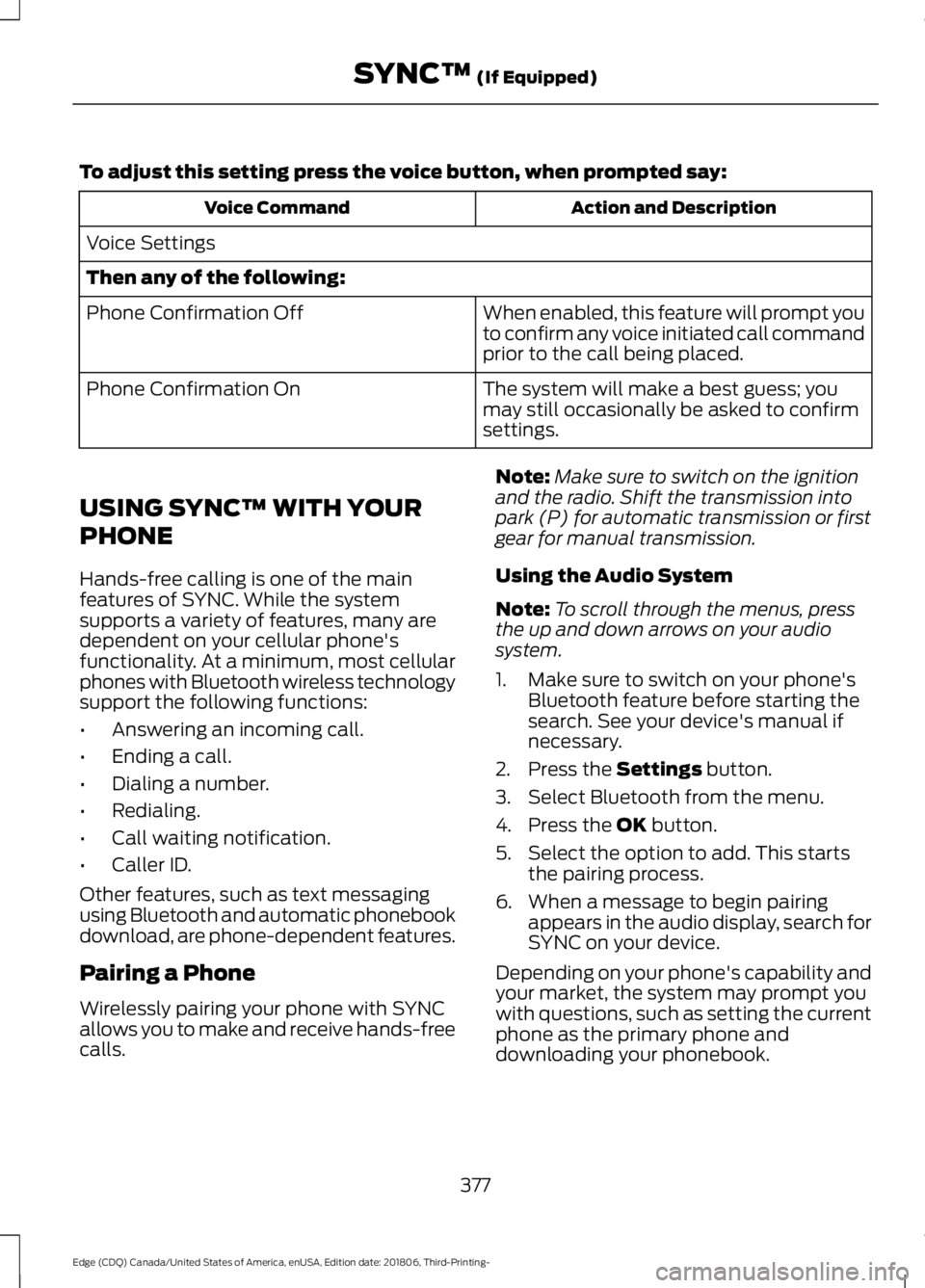
To adjust this setting press the voice button, when prompted say:
Action and Description
Voice Command
Voice Settings
Then any of the following: When enabled, this feature will prompt you
to confirm any voice initiated call command
prior to the call being placed.
Phone Confirmation Off
The system will make a best guess; you
may still occasionally be asked to confirm
settings.
Phone Confirmation On
USING SYNC™ WITH YOUR
PHONE
Hands-free calling is one of the main
features of SYNC. While the system
supports a variety of features, many are
dependent on your cellular phone's
functionality. At a minimum, most cellular
phones with Bluetooth wireless technology
support the following functions:
• Answering an incoming call.
• Ending a call.
• Dialing a number.
• Redialing.
• Call waiting notification.
• Caller ID.
Other features, such as text messaging
using Bluetooth and automatic phonebook
download, are phone-dependent features.
Pairing a Phone
Wirelessly pairing your phone with SYNC
allows you to make and receive hands-free
calls. Note:
Make sure to switch on the ignition
and the radio. Shift the transmission into
park (P) for automatic transmission or first
gear for manual transmission.
Using the Audio System
Note: To scroll through the menus, press
the up and down arrows on your audio
system.
1. Make sure to switch on your phone's Bluetooth feature before starting the
search. See your device's manual if
necessary.
2. Press the Settings button.
3. Select Bluetooth from the menu.
4. Press the
OK button.
5. Select the option to add. This starts the pairing process.
6. When a message to begin pairing appears in the audio display, search for
SYNC on your device.
Depending on your phone's capability and
your market, the system may prompt you
with questions, such as setting the current
phone as the primary phone and
downloading your phonebook.
377
Edge (CDQ) Canada/United States of America, enUSA, Edition date: 201806, Third-Printing- SYNC™
(If Equipped)
Page 384 of 547
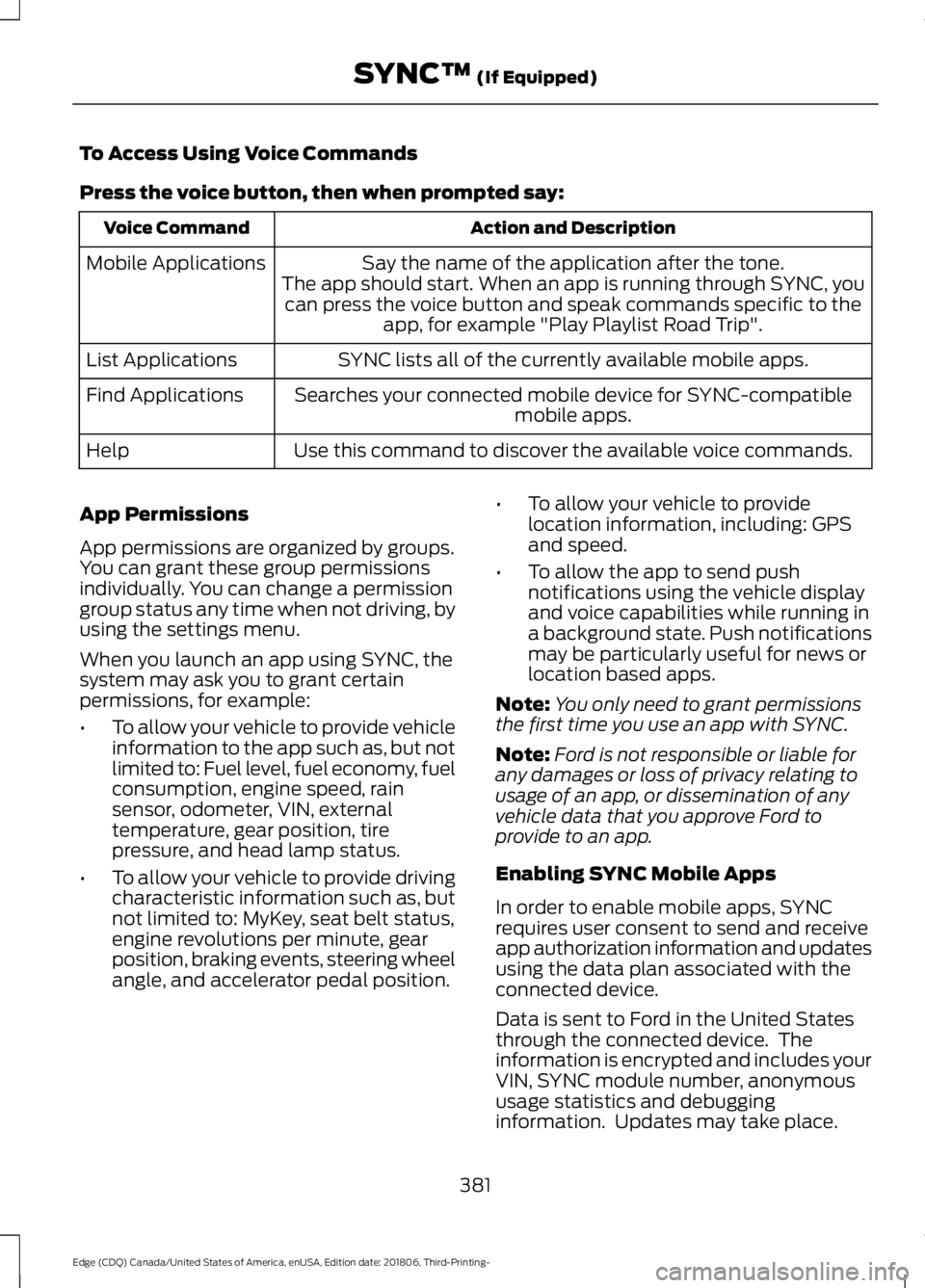
To Access Using Voice Commands
Press the voice button, then when prompted say:
Action and Description
Voice Command
Say the name of the application after the tone.
The app should start. When an app is running through SYNC, you can press the voice button and speak commands specific to the app, for example "Play Playlist Road Trip".
Mobile Applications
SYNC lists all of the currently available mobile apps.
List Applications
Searches your connected mobile device for SYNC-compatible mobile apps.
Find Applications
Use this command to discover the available voice commands.
Help
App Permissions
App permissions are organized by groups.
You can grant these group permissions
individually. You can change a permission
group status any time when not driving, by
using the settings menu.
When you launch an app using SYNC, the
system may ask you to grant certain
permissions, for example:
• To allow your vehicle to provide vehicle
information to the app such as, but not
limited to: Fuel level, fuel economy, fuel
consumption, engine speed, rain
sensor, odometer, VIN, external
temperature, gear position, tire
pressure, and head lamp status.
• To allow your vehicle to provide driving
characteristic information such as, but
not limited to: MyKey, seat belt status,
engine revolutions per minute, gear
position, braking events, steering wheel
angle, and accelerator pedal position. •
To allow your vehicle to provide
location information, including: GPS
and speed.
• To allow the app to send push
notifications using the vehicle display
and voice capabilities while running in
a background state. Push notifications
may be particularly useful for news or
location based apps.
Note: You only need to grant permissions
the first time you use an app with SYNC.
Note: Ford is not responsible or liable for
any damages or loss of privacy relating to
usage of an app, or dissemination of any
vehicle data that you approve Ford to
provide to an app.
Enabling SYNC Mobile Apps
In order to enable mobile apps, SYNC
requires user consent to send and receive
app authorization information and updates
using the data plan associated with the
connected device.
Data is sent to Ford in the United States
through the connected device. The
information is encrypted and includes your
VIN, SYNC module number, anonymous
usage statistics and debugging
information. Updates may take place.
381
Edge (CDQ) Canada/United States of America, enUSA, Edition date: 201806, Third-Printing- SYNC™ (If Equipped)
Page 539 of 547
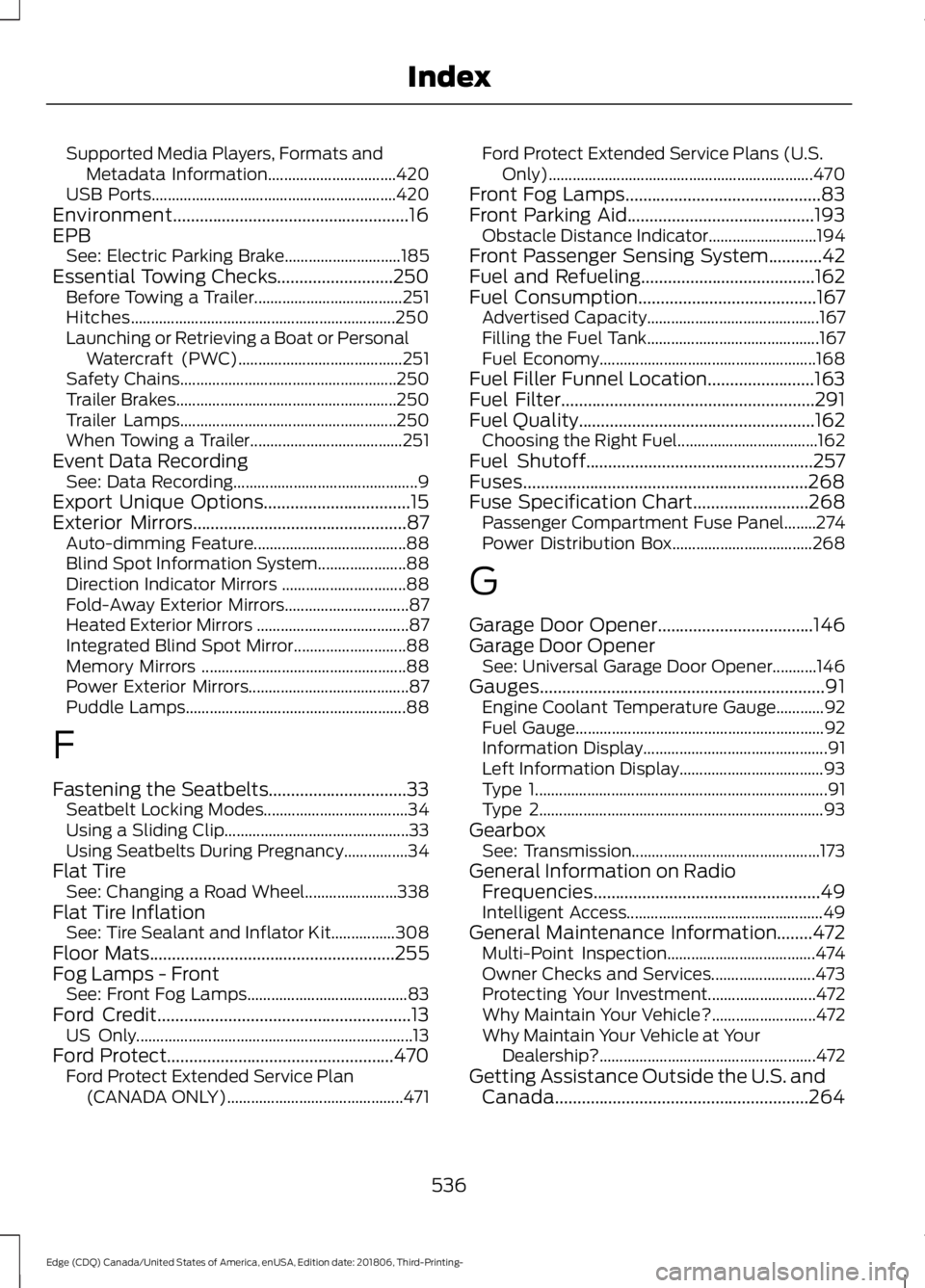
Supported Media Players, Formats and
Metadata Information................................ 420
USB Ports............................................................. 420
Environment.....................................................16
EPB See: Electric Parking Brake............................. 185
Essential Towing Checks..........................250
Before Towing a Trailer..................................... 251
Hitches.................................................................. 250
Launching or Retrieving a Boat or Personal Watercraft (PWC)......................................... 251
Safety Chains...................................................... 250
Trailer Brakes....................................................... 250
Trailer Lamps...................................................... 250
When Towing a Trailer...................................... 251
Event Data Recording See: Data Recording.............................................. 9
Export Unique Options.................................15
Exterior Mirrors
................................................87
Auto-dimming Feature...................................... 88
Blind Spot Information System...................... 88
Direction Indicator Mirrors ............................... 88
Fold-Away Exterior Mirrors............................... 87
Heated Exterior Mirrors ......................................87
Integrated Blind Spot Mirror............................ 88
Memory Mirrors ................................................... 88
Power Exterior Mirrors........................................ 87
Puddle Lamps....................................................... 88
F
Fastening the Seatbelts...............................33 Seatbelt Locking Modes.................................... 34
Using a Sliding Clip.............................................. 33
Using Seatbelts During Pregnancy................34
Flat Tire See: Changing a Road Wheel....................... 338
Flat Tire Inflation See: Tire Sealant and Inflator Kit................308
Floor Mats
.......................................................255
Fog Lamps - Front See: Front Fog Lamps........................................ 83
Ford Credit
.........................................................13
US Only..................................................................... 13
Ford Protect...................................................470 Ford Protect Extended Service Plan
(CANADA ONLY)............................................ 471Ford Protect Extended Service Plans (U.S.
Only).................................................................. 470
Front Fog Lamps............................................83
Front Parking Aid..........................................193 Obstacle Distance Indicator........................... 194
Front Passenger Sensing System............42
Fuel and Refueling
.......................................162
Fuel Consumption........................................167 Advertised Capacity........................................... 167
Filling the Fuel Tank........................................... 167
Fuel Economy...................................................... 168
Fuel Filler Funnel Location
........................163
Fuel Filter.........................................................291
Fuel Quality.....................................................162
Choosing the Right Fuel................................... 162
Fuel Shutoff
...................................................257
Fuses................................................................268
Fuse Specification Chart..........................268 Passenger Compartment Fuse Panel........274
Power Distribution Box................................... 268
G
Garage Door Opener...................................146
Garage Door Opener See: Universal Garage Door Opener...........146
Gauges................................................................91 Engine Coolant Temperature Gauge............92
Fuel Gauge.............................................................. 92
Information Display.............................................. 91
Left Information Display.................................... 93
Type 1........................................................................\
. 91
Type 2....................................................................... 93
Gearbox See: Transmission............................................... 173
General Information on Radio Frequencies...................................................49
Intelligent Access................................................. 49
General Maintenance Information........472 Multi-Point Inspection..................................... 474
Owner Checks and Services.......................... 473
Protecting Your Investment........................... 472
Why Maintain Your Vehicle?.......................... 472
Why Maintain Your Vehicle at Your Dealership?...................................................... 472
Getting Assistance Outside the U.S. and Canada.........................................................264
536
Edge (CDQ) Canada/United States of America, enUSA, Edition date: 201806, Third-Printing- Index