gear FORD EDGE 2019 Owner's Manual
[x] Cancel search | Manufacturer: FORD, Model Year: 2019, Model line: EDGE, Model: FORD EDGE 2019Pages: 547, PDF Size: 40.86 MB
Page 200 of 547
•
The front bumper, rear bumper or the
side sensors are damaged.
• The correct tire size is not in use on your
vehicle. For example, a mini-spare tire.
Using Active Park Assist
Selecting an Active Park Assist Mode Press the button once to
activate parallel parking. Press
the button a second time to
activate perpendicular parking. If you press
the button again the system switches off.
If your vehicle is parked and after you
switch the ignition on, you can use the
information display to toggle through the
modes. Press the button to switch the
system on and open the system menu in
the information display.
Note: If your vehicle is parked, the default
mode is parallel park out assist. However,
if you did not use active park assist to
parallel park your vehicle, use the
information display to select park out assist.
Note: You can repeatedly press the active
park assist button to toggle through the
modes only after moving your vehicle
approximately 33 ft (10 m).
To toggle through the modes, use the
buttons on the information display to
select the following:
• Parallel parking.
• Perpendicular parking.
• Parallel park out assist.
• Switch the system off.
Note: There is no time limit for toggling
through the modes. Parallel Parking
The system detects available parallel
parking spaces and steers your vehicle into
the space. You control the accelerator,
gearshift and brakes. The system visually
and audibly guides you into a parallel
parking space. Press the button once to search
for a parking space.
Note: You can also switch the system on
after you have already driven partially or
completely past a parking space. Press the
active park assist button and the system
informs you if you have recently passed a
suitable parking space.
When the vehicle speed is less than
22 mph (35 km/h), the system scans both
sides of your vehicle for an available
parking space. A message and a graphic
appear in the information display to
indicate the system is searching for a
parking space. Use the direction indicator
lever to search for a parking space on the
driver or passenger side of your vehicle.
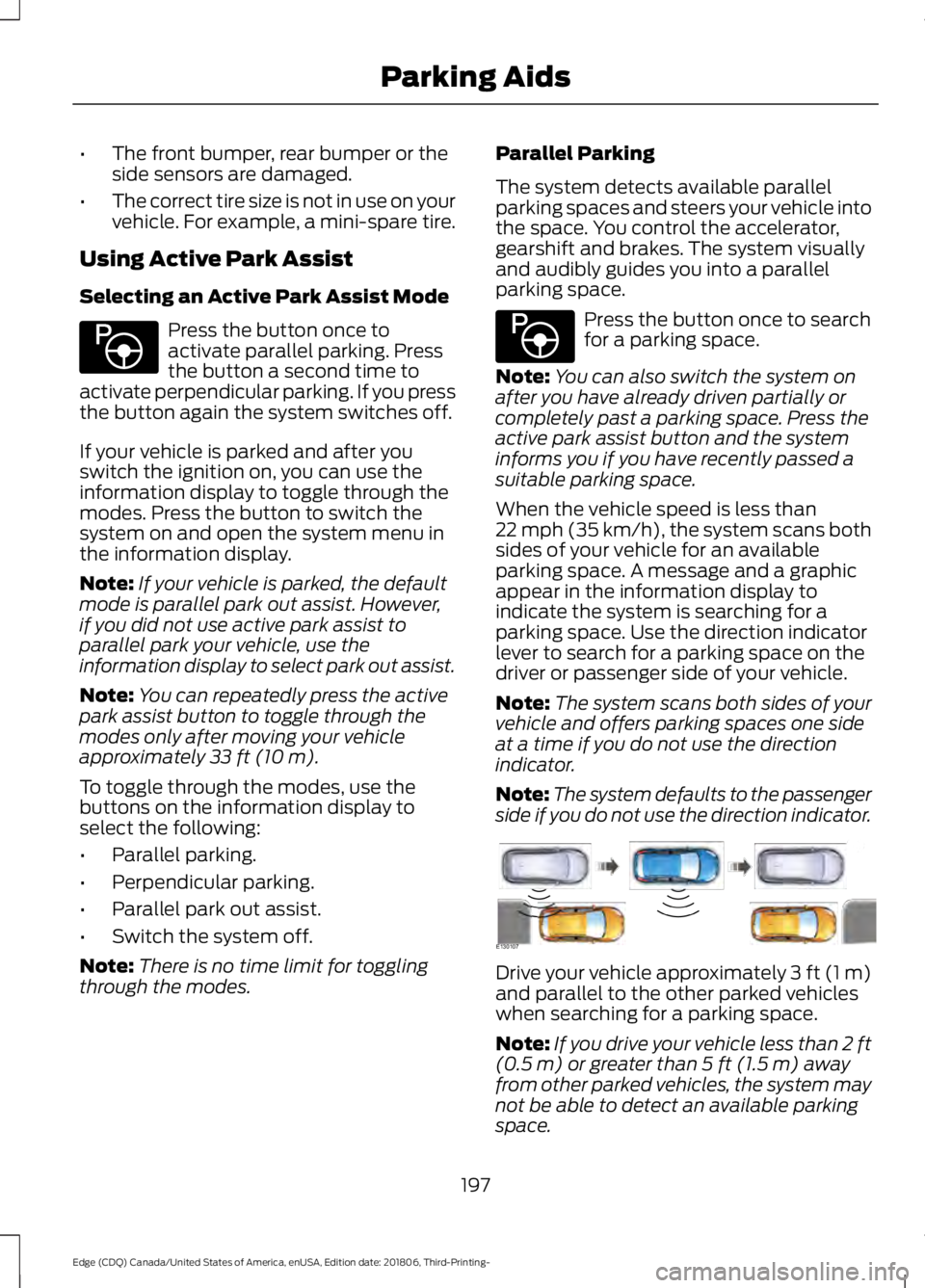
Note: The system scans both sides of your
vehicle and offers parking spaces one side
at a time if you do not use the direction
indicator.
Note: The system defaults to the passenger
side if you do not use the direction indicator. Drive your vehicle approximately 3 ft (1 m)
and parallel to the other parked vehicles
when searching for a parking space.
Note:
If you drive your vehicle less than 2 ft
(0.5 m)
or greater than 5 ft (1.5 m) away
from other parked vehicles, the system may
not be able to detect an available parking
space.
197
Edge (CDQ) Canada/United States of America, enUSA, Edition date: 201806, Third-Printing- Parking AidsE146186 E146186 E130107
Page 202 of 547
Perpendicular Parking
The system detects available
perpendicular parking spaces and steers
your vehicle into the space. You control the
accelerator, gearshift and brakes. The
system visually and audibly guides you into
a perpendicular parking space.
Press the button twice to search
for a parking space.
When the vehicle speed is less than 19 mph
(30 km/h), the system scans both sides of
your vehicle for an available parking space.
A message and a graphic appear in the
information display to indicate the system
is searching for a parking space. Use the
direction indicator lever to search for a
parking space on the driver or passenger
side of your vehicle.
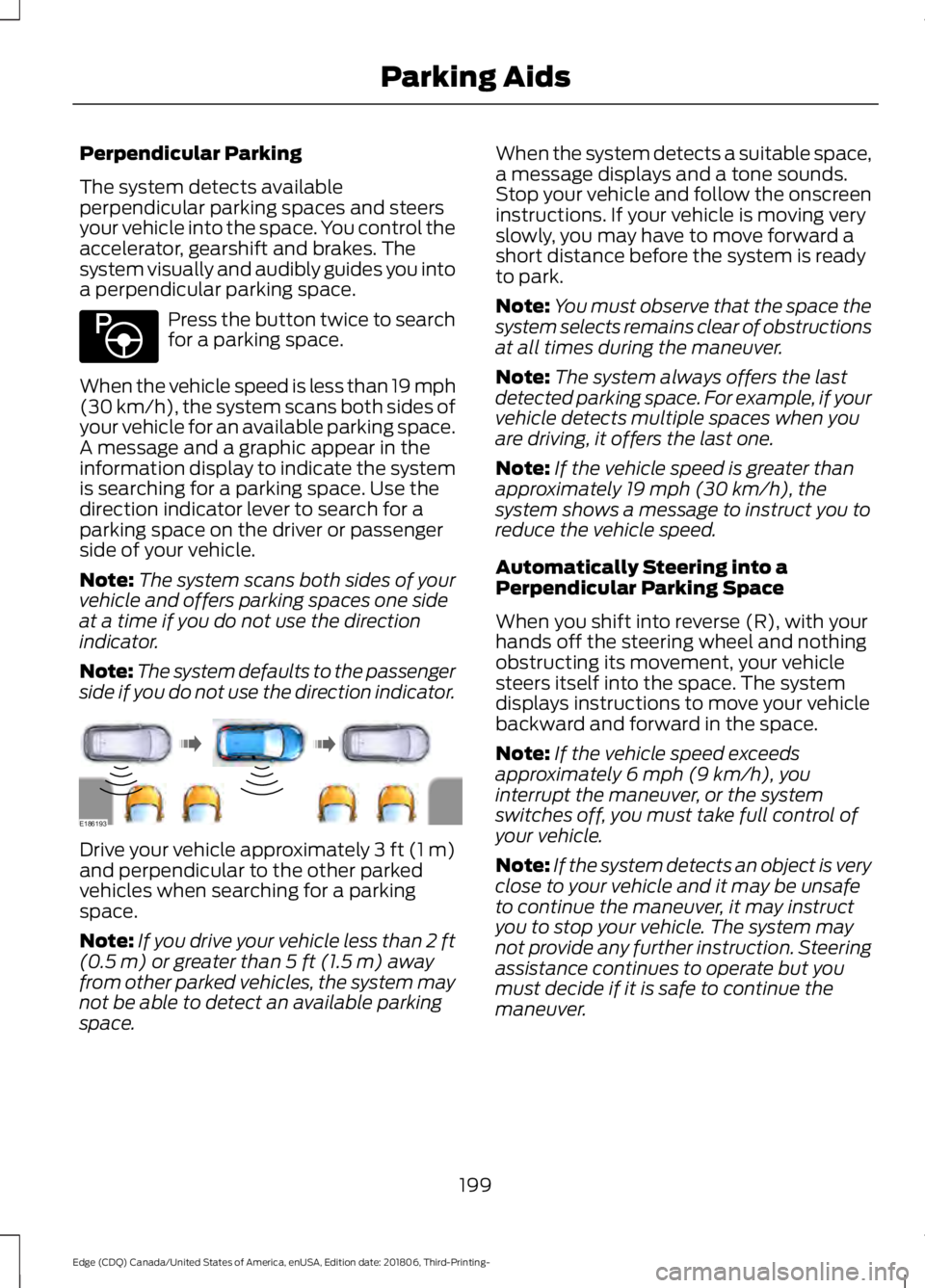
Note: The system scans both sides of your
vehicle and offers parking spaces one side
at a time if you do not use the direction
indicator.
Note: The system defaults to the passenger
side if you do not use the direction indicator. Drive your vehicle approximately 3 ft (1 m)
and perpendicular to the other parked
vehicles when searching for a parking
space.
Note:
If you drive your vehicle less than 2 ft
(0.5 m)
or greater than 5 ft (1.5 m) away
from other parked vehicles, the system may
not be able to detect an available parking
space. When the system detects a suitable space,
a message displays and a tone sounds.
Stop your vehicle and follow the onscreen
instructions. If your vehicle is moving very
slowly, you may have to move forward a
short distance before the system is ready
to park.
Note:
You must observe that the space the
system selects remains clear of obstructions
at all times during the maneuver.
Note: The system always offers the last
detected parking space. For example, if your
vehicle detects multiple spaces when you
are driving, it offers the last one.
Note: If the vehicle speed is greater than
approximately
19 mph (30 km/h), the
system shows a message to instruct you to
reduce the vehicle speed.
Automatically Steering into a
Perpendicular Parking Space
When you shift into reverse (R), with your
hands off the steering wheel and nothing
obstructing its movement, your vehicle
steers itself into the space. The system
displays instructions to move your vehicle
backward and forward in the space.
Note: If the vehicle speed exceeds
approximately
6 mph (9 km/h), you
interrupt the maneuver, or the system
switches off, you must take full control of
your vehicle.
Note: If the system detects an object is very
close to your vehicle and it may be unsafe
to continue the maneuver, it may instruct
you to stop your vehicle. The system may
not provide any further instruction. Steering
assistance continues to operate but you
must decide if it is safe to continue the
maneuver.
199
Edge (CDQ) Canada/United States of America, enUSA, Edition date: 201806, Third-Printing- Parking AidsE146186 E186193
Page 203 of 547
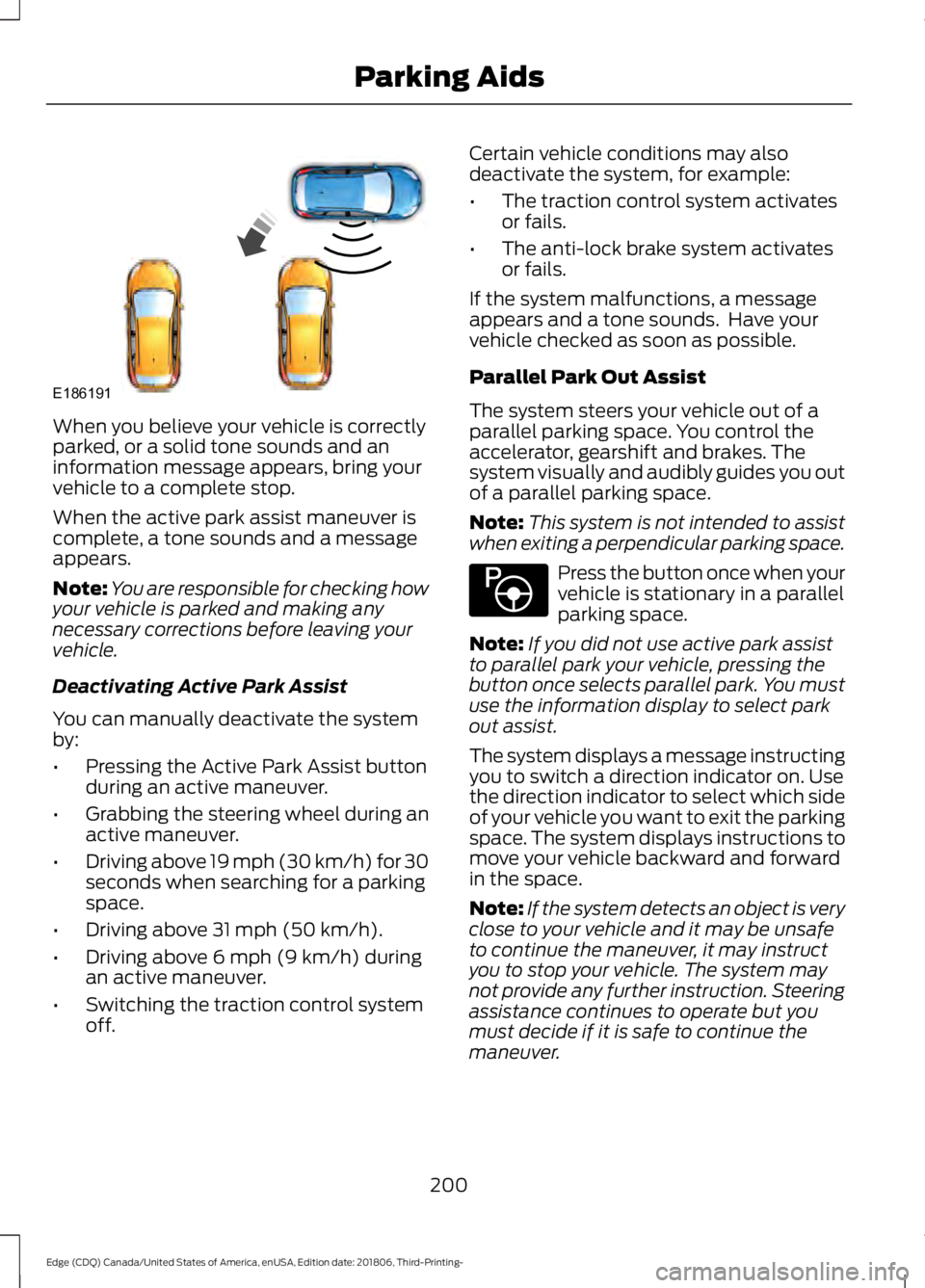
When you believe your vehicle is correctly
parked, or a solid tone sounds and an
information message appears, bring your
vehicle to a complete stop.
When the active park assist maneuver is
complete, a tone sounds and a message
appears.
Note:
You are responsible for checking how
your vehicle is parked and making any
necessary corrections before leaving your
vehicle.
Deactivating Active Park Assist
You can manually deactivate the system
by:
• Pressing the Active Park Assist button
during an active maneuver.
• Grabbing the steering wheel during an
active maneuver.
• Driving above 19 mph (30 km/h) for 30
seconds when searching for a parking
space.
• Driving above
31 mph (50 km/h).
• Driving above
6 mph (9 km/h) during
an active maneuver.
• Switching the traction control system
off. Certain vehicle conditions may also
deactivate the system, for example:
•
The traction control system activates
or fails.
• The anti-lock brake system activates
or fails.
If the system malfunctions, a message
appears and a tone sounds. Have your
vehicle checked as soon as possible.
Parallel Park Out Assist
The system steers your vehicle out of a
parallel parking space. You control the
accelerator, gearshift and brakes. The
system visually and audibly guides you out
of a parallel parking space.
Note: This system is not intended to assist
when exiting a perpendicular parking space. Press the button once when your
vehicle is stationary in a parallel
parking space.
Note: If you did not use active park assist
to parallel park your vehicle, pressing the
button once selects parallel park. You must
use the information display to select park
out assist.
The system displays a message instructing
you to switch a direction indicator on. Use
the direction indicator to select which side
of your vehicle you want to exit the parking
space. The system displays instructions to
move your vehicle backward and forward
in the space.
Note: If the system detects an object is very
close to your vehicle and it may be unsafe
to continue the maneuver, it may instruct
you to stop your vehicle. The system may
not provide any further instruction. Steering
assistance continues to operate but you
must decide if it is safe to continue the
maneuver.
200
Edge (CDQ) Canada/United States of America, enUSA, Edition date: 201806, Third-Printing- Parking AidsE186191 E146186
Page 208 of 547
Manual Zoom
WARNING: When manual zoom
is on, the full area behind your vehicle
may not show. Be aware of your
surroundings when using the manual
zoom feature.
Note: Manual zoom is only available when
the transmission is in reverse (R).
Note: When you enable manual zoom, only
the centerline is shown.
Selectable settings for this feature are
Zoom in (+) and Zoom out (-). Press the
symbol in the camera screen to change the
view. The default setting is Zoom OFF.
This allows you to get a closer view of an
object behind your vehicle. The zoomed
image keeps the bumper in the image to
provide a reference. The zoom is only
active while the transmission is in reverse
(R).
Rear Camera Delay
Selectable settings for this feature are ON
and OFF. The default setting for the rear
camera delay is OFF.
When shifting the transmission out of
reverse (R) and into any gear other than
park (P), the camera image remains in the
display until:
• Your vehicle speed sufficiently
increases.
• You shift your vehicle into park (P)
(automatic transmission).
• You apply the parking brake (manual
transmission). 180 DEGREE CAMERA (IF EQUIPPED) WARNING: Objects that are close
to either corner of the bumper or under
the bumper, might not be seen on the
screen due to the limited coverage of the
camera system. WARNING:
The front camera
system still requires the driver to use it
in conjunction with looking out of your
vehicle. WARNING:
Use caution when
turning camera features on or off when
the transmission is not in park (P). Make
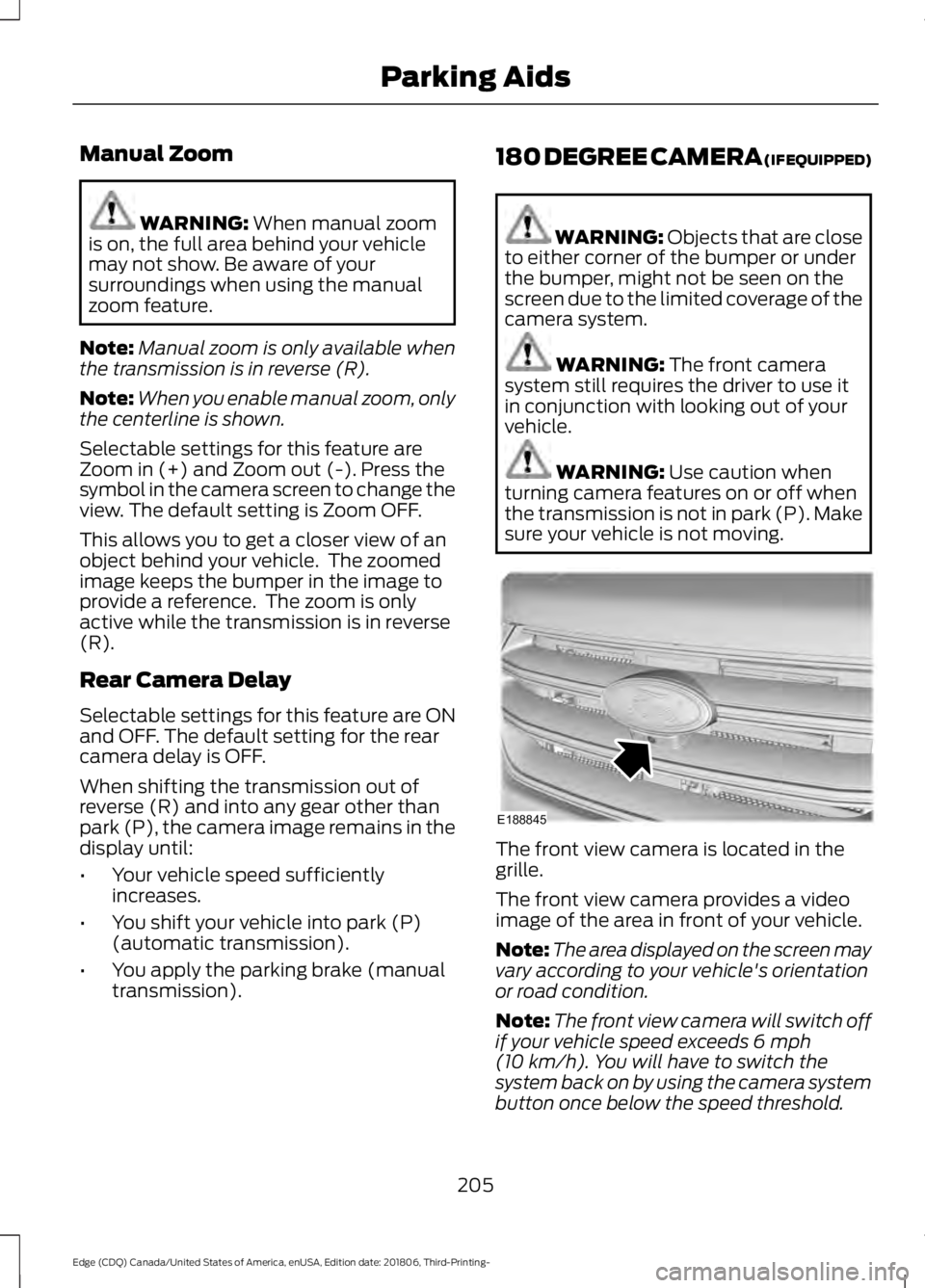
sure your vehicle is not moving. The front view camera is located in the
grille.
The front view camera provides a video
image of the area in front of your vehicle.
Note:
The area displayed on the screen may
vary according to your vehicle's orientation
or road condition.
Note: The front view camera will switch off
if your vehicle speed exceeds
6 mph
(10 km/h). You will have to switch the
system back on by using the camera system
button once below the speed threshold.
205
Edge (CDQ) Canada/United States of America, enUSA, Edition date: 201806, Third-Printing- Parking AidsE188845
Page 210 of 547
PRINCIPLE OF OPERATION
Cruise control lets you maintain a set
speed without keeping your foot on the
accelerator pedal. You can use cruise
control when your vehicle speed is greater
than 20 mph (30 km/h).
USING CRUISE CONTROL WARNING:
Do not use cruise
control on winding roads, in heavy traffic
or when the road surface is slippery. This
could result in loss of vehicle control,
serious injury or death. WARNING:
When you are going
downhill, your vehicle speed could
increase above the set speed. The
system does not apply the brakes.
To help the system to maintain the set
speed when going downhill, downshift to
a lower gear.
Your vehicle speed could decrease below
the set speed when driving uphill.
Note: The system cancels if your vehicle
speed drops below 10 mph (16 km/h) under
the set speed when driving uphill. The cruise controls are on the steering
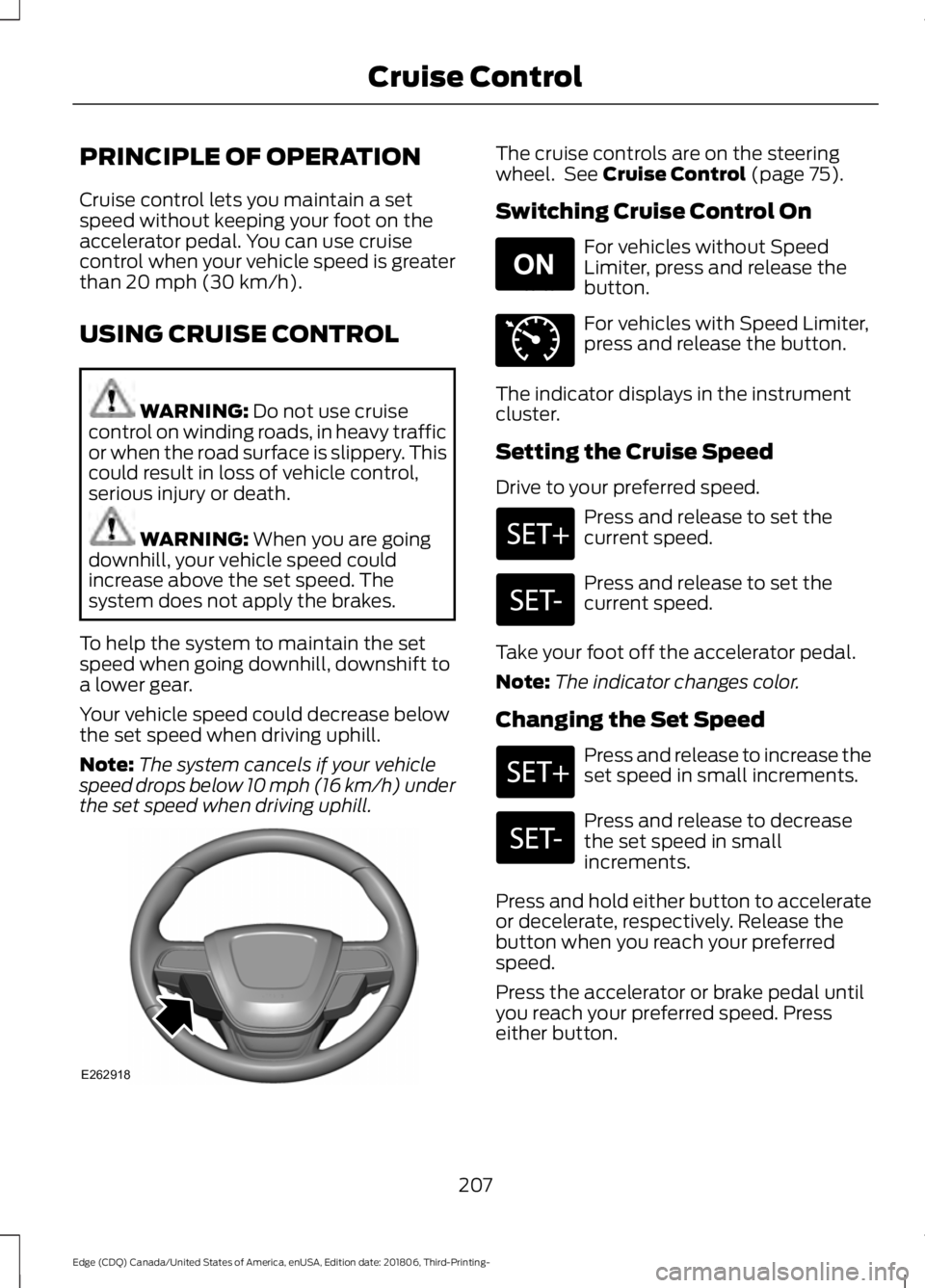
wheel. See
Cruise Control (page 75).
Switching Cruise Control On For vehicles without Speed
Limiter, press and release the
button.
For vehicles with Speed Limiter,
press and release the button.
The indicator displays in the instrument
cluster.
Setting the Cruise Speed
Drive to your preferred speed. Press and release to set the
current speed.
Press and release to set the
current speed.
Take your foot off the accelerator pedal.
Note: The indicator changes color.
Changing the Set Speed Press and release to increase the
set speed in small increments.
Press and release to decrease
the set speed in small
increments.
Press and hold either button to accelerate
or decelerate, respectively. Release the
button when you reach your preferred
speed.
Press the accelerator or brake pedal until
you reach your preferred speed. Press
either button.
207
Edge (CDQ) Canada/United States of America, enUSA, Edition date: 201806, Third-Printing- Cruise ControlE262918 E265296 E71340
Page 215 of 547
Resuming the Set Speed
Press and release the button.
Your vehicle speed returns to the
previously set speed and gap setting. The
set speed displays continuously in the
information display when the system is
active.
Note: Only use resume if you are aware of
the set speed and intend to return to it.
Automatic Cancellation
Automatic cancellation can also occur
when:
• The tires lose traction.
• You apply the parking brake.
Park Brake Application
Automatic parking brake application and
cancellation occurs if:
• You unbuckle the seatbelt and open
the door after you stop the vehicle.
• You hold the vehicle at a stop
continuously for more than three
minutes.
Hilly Condition Usage
You should select a lower gear when the
system is active in situations such as
prolonged downhill driving on steep
grades, for example in mountainous areas.
The system needs additional engine
braking in these situations to reduce the
load on the vehicle ’s regular brake system
to prevent it from overheating.
Note: An audible alarm sounds and the
system shuts down if it applies brakes for
an extended period of time. This allows the
brakes to cool. The system functions
normally again after the brakes cool. Switching Adaptive Cruise Control
Off For vehicles without Speed
Limiter, press and release the
button when the system is in
standby mode or switch the ignition off. For vehicles with Speed Limiter,
press and release the button
when the system is in standby
mode or switch the ignition off.
Note: You erase the set speed when you
switch the system off.
Detection Issues WARNING: On rare occasions,
detection issues can occur due to the
road infrastructures, for example bridges,
tunnels and safety barriers. In these
cases, the system may brake late or
unexpectedly. At all times, you are
responsible for controlling your vehicle,
supervising the system and intervening,
if required. WARNING:
If the system
malfunctions, have your vehicle checked
as soon as possible.
The radar sensor has a limited field of view.
It may not detect vehicles at all or detect
a vehicle later than expected in some
situations. The lead vehicle graphic does
not illuminate if the system does not
detect a vehicle in front of you.
212
Edge (CDQ) Canada/United States of America, enUSA, Edition date: 201806, Third-Printing- Cruise ControlE265299 E294678 E144529
Page 222 of 547
Automatic Cancellation
Automatic cancellation can also occur
when:
•
The tires lose traction.
• You apply the parking brake.
Park Brake Application
Automatic parking brake application and
cancellation occurs if:
• You unbuckle the seatbelt and open
the driver door after you stop your
vehicle.
• You hold your vehicle at a stop
continuously for more than three
minutes.
Hilly Condition Usage
You should select a lower gear when the
system is active in situations such as
prolonged downhill driving on steep
grades, for example in mountainous areas.
The system needs additional engine
braking in these situations to reduce the
load on the vehicle ’s regular brake system
to prevent it from overheating.
Note: An audible alarm sounds and the
system shuts down if it applies brakes for
an extended period of time. This allows the
brakes to cool. The system functions
normally again after the brakes cool.
Switching Adaptive Cruise Control
Off For vehicles without Speed
Limiter, press and release the
button when the system is in
standby mode or switch the ignition off. For vehicles with Speed Limiter,
press and release the button
when the system is in standby
mode or switch the ignition off.
Note: You erase the set speed when you
switch the system off. Detection Issues WARNING: On rare occasions,
detection issues can occur due to the
road infrastructures, for example bridges,
tunnels and safety barriers. In these
cases, the system may brake late or
unexpectedly. At all times, you are
responsible for controlling your vehicle,
supervising the system and intervening,
if required. WARNING:
If the system
malfunctions, have your vehicle checked
as soon as possible.
The radar sensor has a limited field of view.
It may not detect vehicles at all or detect
a vehicle later than expected in some
situations. The lead vehicle graphic does
not illuminate if the system does not
detect a vehicle in front of you.
219
Edge (CDQ) Canada/United States of America, enUSA, Edition date: 201806, Third-Printing- Cruise ControlE294678 E144529
Page 254 of 547
Before Towing a Trailer
Practice turning, stopping and backing up
to get the feel of your vehicle-trailer
combination before starting on a trip.
When turning, make wider turns so the
trailer wheels clear curbs and other
obstacles.
When Towing a Trailer
•
Do not drive faster than 70 mph
(113 km/h) during the first 500 mi
(800 km).
• Do not make full-throttle starts.
• Check your hitch, electrical connections
and trailer wheel lug nuts thoroughly
after you have traveled 50 mi (80 km).
• When stopped in congested or heavy
traffic during hot weather, place the
transmission in park (P) to aid engine
and transmission cooling and to help
A/C performance.
• Turn off the speed control with heavy
loads or in hilly terrain. The speed
control may turn off automatically
when you are towing on long, steep
grades.
• Shift to a lower gear when driving down
a long or steep hill. Do not apply the
brakes continuously, as they may
overheat and become less effective.
• If your transmission is equipped with a
Grade Assist or Tow/Haul feature, use
this feature when towing. This provides
engine braking and helps eliminate
excessive transmission shifting for
optimum fuel economy and
transmission cooling.
• Allow more distance for stopping with
a trailer attached. Anticipate stops and
brake gradually.
• Avoid parking on a grade. However, if
you must park on a grade:
1. Turn the steering wheel to point your vehicle tires away from traffic flow. 2. Set your vehicle parking brake.
3. Place the transmission in park (P).
4. Place wheel chocks in front and back
of the trailer wheels. Chocks are not
included with your vehicle.
Launching or Retrieving a Boat or
Personal Watercraft (PWC)
Note: Disconnect the wiring to the trailer
before
backing the trailer into the water.
Note: Reconnect the wiring to the trailer
after
removing the trailer from the water.
When backing down a ramp during boat
launching or retrieval:
• Do not allow the static water level to
rise above the bottom edge of the rear
bumper.
• Do not allow waves to break higher
than
6 in (15 cm) above the bottom
edge of the rear bumper.
Exceeding these limits may allow water to
enter vehicle components:
• Causing internal damage to the
components.
• Affecting driveability, emissions, and
reliability.
Replace the rear axle lubricant anytime
you submerge the rear axle in water. Water
may contaminate the rear axle lubricant,
which is not a normal maintenance
inspection item unless there is a possibility
of a leak or other axle repair is required.
251
Edge (CDQ) Canada/United States of America, enUSA, Edition date: 201806, Third-Printing- Towing
Page 257 of 547
BREAKING-IN
You need to break in new tires for
approximately 300 mi (480 km). During
this time, your vehicle may exhibit some
unusual driving characteristics.
Avoid driving too fast during the first
1,000 mi (1,600 km)
. Vary your speed
frequently and change up through the
gears early. Do not labor the engine.
Do not tow during the first
1,000 mi
(1,600 km).
ECONOMICAL DRIVING
Fuel economy is affected by several things
such as how you drive, the conditions you
drive under and how you maintain your
vehicle.
There are some things to keep in mind that
may improve your fuel economy:
• Accelerate and slow down in a smooth,
moderate fashion.
• Drive at steady speeds.
• Anticipate stops; slowing down may
eliminate the need to stop.
• Combine errands and minimize
stop-and-go driving (When running
errands, go to the furthest destination
first and then work your way back
home).
• Close the windows for high-speed
driving.
• Drive at reasonable speeds.
• Keep the tires properly inflated and use
only the recommended size.
• Use the recommended engine oil.
• Perform all regularly scheduled
maintenance. There are also some things you may want
to avoid doing because they reduce your
fuel economy:
•
Avoid sudden or hard accelerations.
• Avoid revving the engine before turning
off the car.
• Avoid long idle periods.
• Do not warm up your vehicle on cold
mornings.
• Reduce the use of air conditioning and
heat.
• Avoid using speed control in hilly
terrain.
• Do not rest your foot on the brake
pedal while driving.
• Avoid carrying unnecessary weight.
• Avoid adding particular accessories to
your vehicle (e.g. bug deflectors,
rollbars/light bars, running boards, ski
racks).
• Avoid driving with the wheels out of
alignment.
COLD WEATHER
PRECAUTIONS
The functional operation of some
components and systems can be affected
at temperatures below
-13°F (-25°C).
DRIVING THROUGH WATER WARNING:
Do not drive through
flowing or deep water as you may lose
control of your vehicle.
Note: Driving through standing water can
cause vehicle damage.
Note: Engine damage can occur if water
enters the air filter.
254
Edge (CDQ) Canada/United States of America, enUSA, Edition date: 201806, Third-Printing- Driving Hints
Page 279 of 547
Protected Component
Fuse Rating
Fuse or Relay
Number
Embedded modem.
Not used (spare).
5A 2
11
Climate control module.
7.5A 2
12
Gear shift module.
Cluster.
7.5A 2
13
Steering column control module.
Smart datalink connector (gateway)
module.
Extended power module.
10A 2
14
Datalink power.
10A 2
15
Not used (spare).
15A 1
16
Not used (spare).
5A 2
17
Push button start switch.
5A 2
18
Extended power module.
7.5A 2
19
Not used (spare).
7.5A 2
20
Humidity and in–car temperature sensor.
5A 2
21
Occupant classification system.
5A 2
22
Delayed accessory (power inverter logic,
moonroof logic, driver window switch
power).
10A
1
23
Central lock/unlock.
20A 1
24
Driver door (window, mirror).
30A 1
25
Driver door module.
Driver door lock indicator.
Driver lock switch illumination.
Front passenger door (window, mirror).
30A 1
26
Front passenger door module.
Front passenger lock indicator.
276
Edge (CDQ) Canada/United States of America, enUSA, Edition date: 201806, Third-Printing- Fuses