instrument cluster FORD EDGE 2019 Owners Manual
[x] Cancel search | Manufacturer: FORD, Model Year: 2019, Model line: EDGE, Model: FORD EDGE 2019Pages: 547, PDF Size: 40.86 MB
Page 5 of 547
Steering Wheel
Adjusting the Steering Wheel - Vehicles
With: Manual Adjustable Steering
Column ..........................................................73
Adjusting the Steering Wheel - Vehicles With: Power Adjustable Steering
Column ..........................................................
73
Audio Control ..................................................
74
Voice Control ...................................................
75
Cruise Control .................................................
75
Information Display Control ......................
76
Heated Steering Wheel ...............................
76
Wipers and Washers
Autowipers .......................................................
77
Windshield Washers .....................................
77
Rear Window Wiper and Washers ..........
78
Lighting
General Information .....................................
79
Lighting Control .............................................
79
Autolamps .......................................................
80
Instrument Lighting Dimmer ....................
80
Headlamp Exit Delay ....................................
81
Daytime Running Lamps .............................
81
Automatic High Beam Control .................
82
Front Fog Lamps ...........................................
83
Adaptive Headlamps ...................................
83
Direction Indicators ......................................
84
Interior Lamps ................................................
84
Ambient Lighting ..........................................
85
Windows and Mirrors
Power Windows ............................................
86
Global Opening ..............................................
87
Exterior Mirrors ...............................................
87
Interior Mirror ..................................................
89
Sun Visors ........................................................
89
Moonroof .........................................................
89Instrument Cluster
Gauges
...............................................................
91
Warning Lamps and Indicators ...............
94
Audible Warnings and Indicators ............
97
Information Displays
General Information ....................................
98
Information Messages ..............................
108
Climate Control
Manual Climate Control ............................
124
Automatic Climate Control - Vehicles With: AM/FM/CD/SYNC/Dual
Automatic Temperature Control
(DATC)/Touchscreen Display .............
125
Automatic Climate Control - Vehicles With: AM/FM/CD/SYNC ........................
127
Automatic Climate Control - Vehicles With: Bang and Olufsen Audio System
........................................................................\
.
129
Hints on Controlling the Interior Climate ........................................................................\
.
130
Heated Windshield ......................................
133
Heated Rear Window .................................
133
Heated Exterior Mirrors ..............................
133
Cabin Air Filter ...............................................
133
Remote Start .................................................
133
Seats
Sitting in the Correct Position .................
135
Head Restraints ............................................
135
Manual Seats .................................................
137
Power Seats ..................................................
138
Memory Function ........................................
140
Rear Seats ......................................................
142
Heated Seats .................................................
143
Climate Controlled Seats .........................
144
Garage Door Opener
Universal Garage Door Opener ..............
146
2
Edge (CDQ) Canada/United States of America, enUSA, Edition date: 201806, Third-Printing- Table of Contents
Page 8 of 547
Vehicle Care
General Information
..................................299
Cleaning Products ......................................
299
Cleaning the Exterior .................................
299
Waxing .............................................................
301
Cleaning the Engine ...................................
301
Cleaning the Windows and Wiper Blades ........................................................................\
.
301
Cleaning the Interior ..................................
302
Cleaning the Instrument Panel and Instrument Cluster Lens ......................
302
Cleaning Leather Seats ............................
303
Repairing Minor Paint Damage .............
304
Cleaning the Wheels .................................
304
Vehicle Storage ...........................................
304
Body Styling Kits ........................................
306
Wheels and Tires
General Information ..................................
307
Tire Sealant and Inflator Kit ...................
308
Tire Care ..........................................................
315
Using Summer Tires ...................................
331
Using Snow Chains .....................................
331
Tire Pressure Monitoring System ..........
332
Changing a Road Wheel ..........................
338
Technical Specifications ..........................
344
Capacities and Specifications
Engine Specifications - 2.0L EcoBoost™ ........................................................................\
345
Engine Specifications - 2.7L EcoBoost™ ........................................................................\
345
Motorcraft Parts - 2.0L EcoBoost™ ....
346
Motorcraft Parts - 2.7L EcoBoost™ ......
347
Vehicle Identification Number ..............
348
Vehicle Certification Label ......................
349
Transmission Code Designation ...........
349
Capacities and Specifications - 2.0L EcoBoost™ ..............................................
350Capacities and Specifications - 2.7L
EcoBoost™ ...............................................
354
Bulb Specification Chart .........................
358
Wi-Fi Hotspot
Creating a Wi-Fi Hotspot ........................
360
Changing the Wi-Fi Hotspot Name or Password ..................................................
360
Audio System
General Information ...................................
361
Audio Unit - Vehicles With: AM/FM/CD/ SYNC ...........................................................
362
Audio Unit - Vehicles With: Bang and Olufsen Audio System ..........................
365
Audio Unit - Vehicles With: AM/FM/CD/ SYNC/Touchscreen Display ...............
366
Digital Radio .................................................
367
Satellite Radio .............................................
369
Audio Input Jack ..........................................
372
USB Port .........................................................
372
Media Hub ......................................................
373
SYNC™
General Information ..................................
374
Using Voice Recognition ...........................
375
Using SYNC™ With Your Phone ............
377
SYNC™ Applications and Services ......
378
Using SYNC™ With Your Media Player ........................................................................\
382
SYNC™ Troubleshooting ........................
382
SYNC™ 3
General Information ...................................
391
Home Screen ...............................................
403
Using Voice Recognition ..........................
404
Entertainment ...............................................
411
Climate ............................................................
421
Phone ..............................................................
423
Navigation .....................................................
429
Apps .................................................................
437
5
Edge (CDQ) Canada/United States of America, enUSA, Edition date: 201806, Third-Printing- Table of Contents
Page 20 of 547
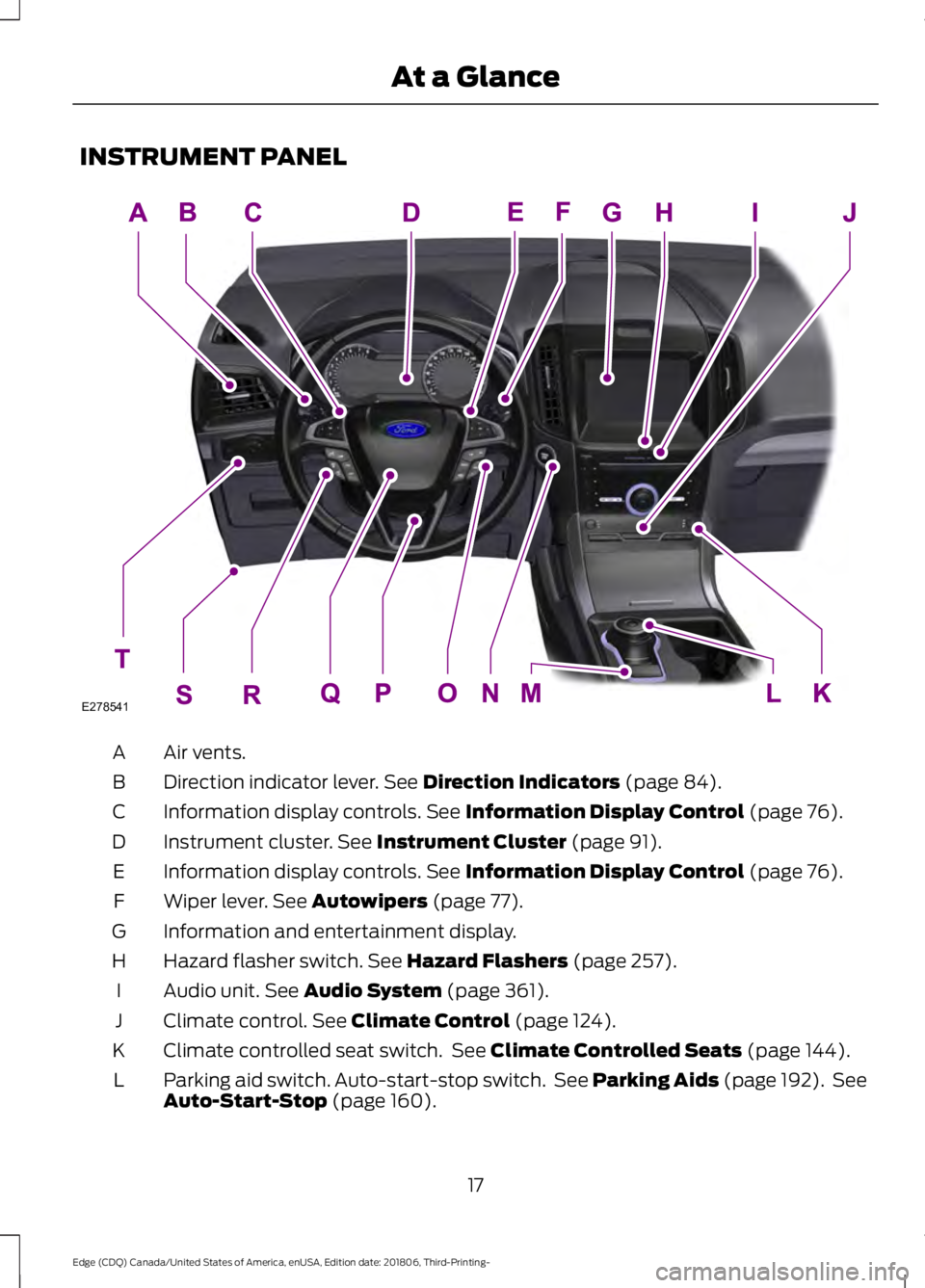
INSTRUMENT PANEL
Air vents.
A
Direction indicator lever. See Direction Indicators (page 84).
B
Information display controls.
See Information Display Control (page 76).
C
Instrument cluster.
See Instrument Cluster (page 91).
D
Information display controls.
See Information Display Control (page 76).
E
Wiper lever.
See Autowipers (page 77).
F
Information and entertainment display.
G
Hazard flasher switch.
See Hazard Flashers (page 257).
H
Audio unit.
See Audio System (page 361).
I
Climate control.
See Climate Control (page 124).
J
Climate controlled seat switch. See
Climate Controlled Seats (page 144).
K
Parking aid switch. Auto-start-stop switch. See Parking Aids (page 192). See
Auto-Start-Stop
(page 160).
L
17
Edge (CDQ) Canada/United States of America, enUSA, Edition date: 201806, Third-Printing- At a GlanceE278541
Page 51 of 547
The restraints control module also
monitors the readiness of the above safety
devices plus the crash and occupant
sensors. The readiness of the safety
system is indicated by a warning indicator
light in the instrument cluster or by a
backup tone if the warning light is not
working. Routine maintenance of the
airbag is not required.
A difficulty with the system is indicated by
one or more of the following:
•
The readiness light will not illuminate
immediately after you switch the
ignition on.
• The readiness light either flashes or
stays lit.
• A series of five beeps is heard. The tone
pattern repeats periodically until the
problem, the light or both are repaired.
If any of these things happen, even
intermittently, have the supplemental
restraint system serviced at an authorized
dealer immediately. Unless serviced, the
system may not function properly in the
event of a crash.
The restraint system is designed to
activate when the vehicle sustains
conditions sufficient to cause the restraint
control module to deploy a safety device. The fact that not all the safety devices
activate for all occupants in a crash does
not mean something is wrong with the
system. Rather, it means the restraints
control module determined the accident
conditions (crash severity, type of crash,
belt usage) were not appropriate to
activate these safety devices.
•
The front airbags are designed to
activate only in frontal and near-frontal
crashes (not rollovers, side impacts or
rear impacts) unless the crash causes
sufficient frontal deceleration.
• The seatbelt pretensioners are
designed to activate in frontal,
near-frontal and side crashes, and in
rollovers.
• The knee airbag(s) may deploy based
on crash severity and occupant
conditions.
• The side airbags are designed to inflate
in certain side impact crashes or
rollover events. Side airbags may
activate in other types of crashes if your
vehicle experiences sufficient sideways
motion or deformation, or a certain
likelihood of rollover.
• The Safety Canopy is designed to
inflate in certain side impact crashes
or rollover events. The Safety Canopy
may activate in other types of crashes
if your vehicle experiences sufficient
sideways motion or deformation, or a
certain likelihood of rollover.
AIRBAG DISPOSAL
Contact your authorized dealer as soon as
possible. Airbags must be disposed of by
qualified personnel.
48
Edge (CDQ) Canada/United States of America, enUSA, Edition date: 201806, Third-Printing- Supplementary Restraints SystemE67017
Page 72 of 547
When operating the power liftgate after
you have programmed a lower height than
fully open, you can fully open the liftgate
by manually pushing it upward to the
maximum open position.
Obstacle Detection
When Closing
The system stops when it detects an
obstacle. A tone sounds and the system
reverses to open. Once you remove the
obstacle, you can power close the liftgate.
Note:
Entering your vehicle while the
liftgate is closing can cause your vehicle to
bounce and activate obstacle detection. To
prevent this, let the power liftgate close
completely before you enter your vehicle.
Before driving off, check the instrument
cluster for a liftgate or door ajar message or
warning indicator. Failure to do this could
result in unintentionally leaving the liftgate
open while driving.
When Opening
The system stops when it detects an
obstacle and a tone sounds. Once you
remove the obstacle, you can continue to
operate the liftgate.
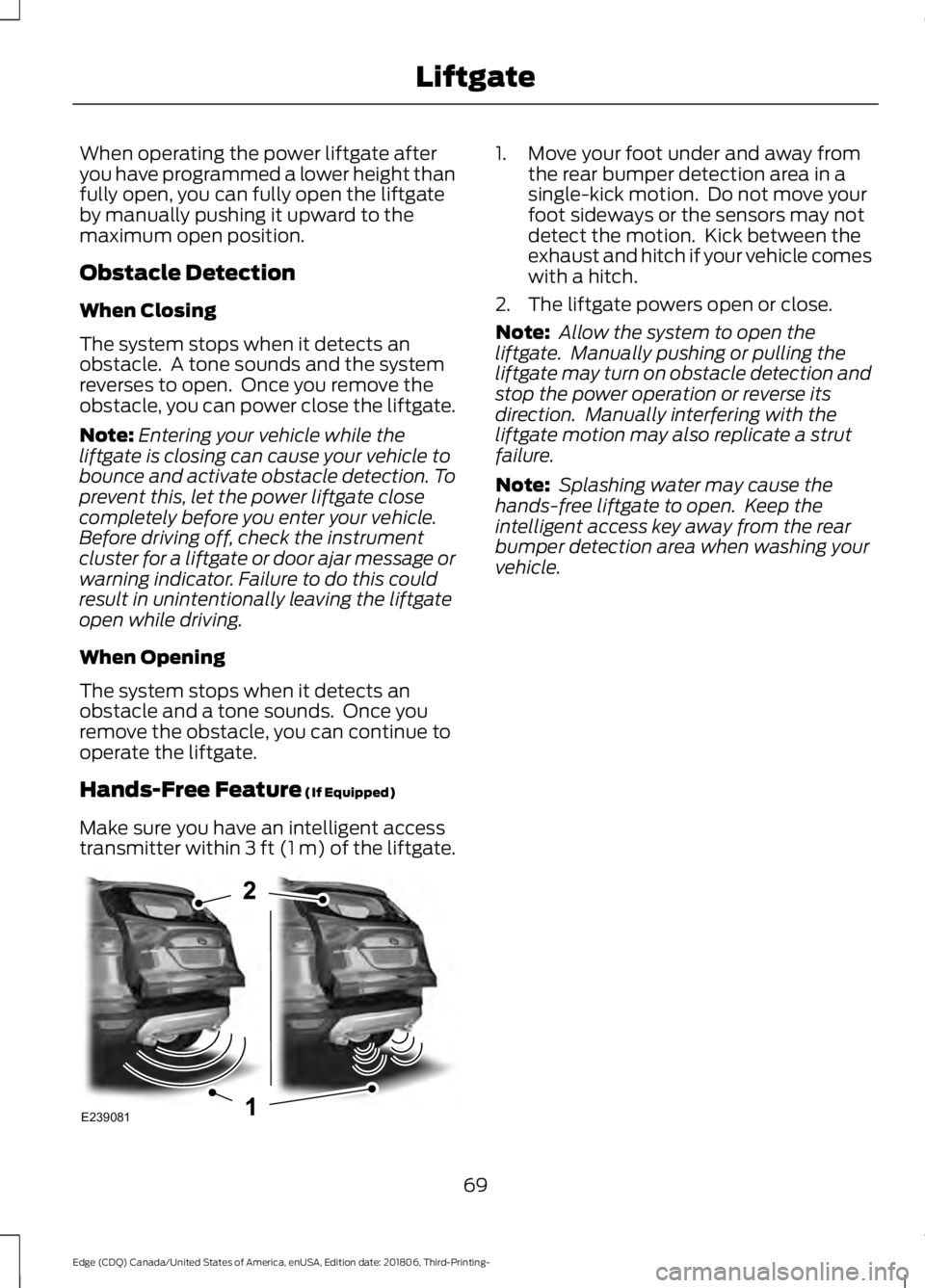
Hands-Free Feature (If Equipped)
Make sure you have an intelligent access
transmitter within
3 ft (1 m) of the liftgate. 1. Move your foot under and away from
the rear bumper detection area in a
single-kick motion. Do not move your
foot sideways or the sensors may not
detect the motion. Kick between the
exhaust and hitch if your vehicle comes
with a hitch.
2. The liftgate powers open or close.
Note: Allow the system to open the
liftgate. Manually pushing or pulling the
liftgate may turn on obstacle detection and
stop the power operation or reverse its
direction. Manually interfering with the
liftgate motion may also replicate a strut
failure.
Note: Splashing water may cause the
hands-free liftgate to open. Keep the
intelligent access key away from the rear
bumper detection area when washing your
vehicle.
69
Edge (CDQ) Canada/United States of America, enUSA, Edition date: 201806, Third-Printing- LiftgateE239081
Page 94 of 547
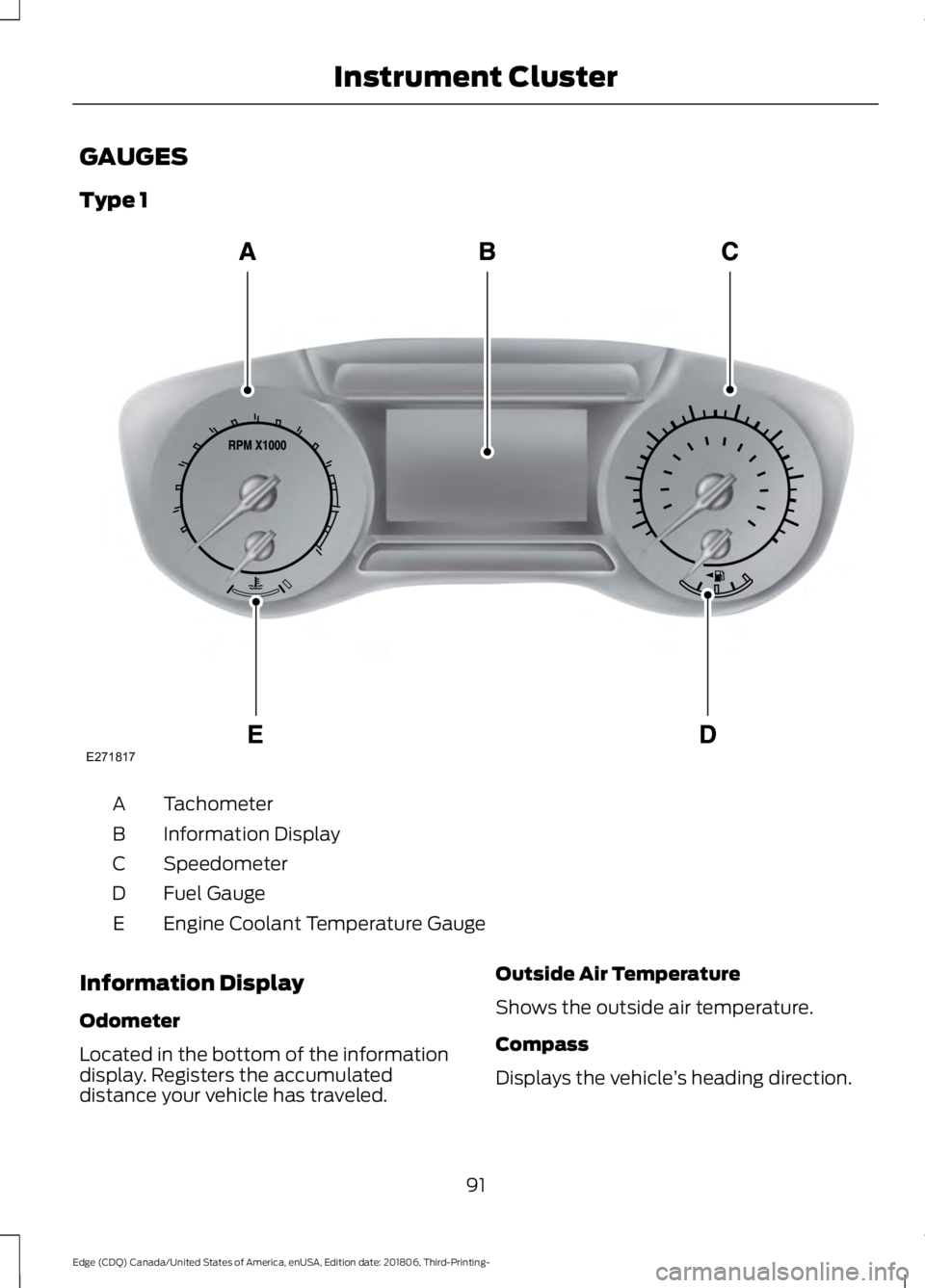
GAUGES
Type 1
Tachometer
A
Information Display
B
Speedometer
C
Fuel Gauge
D
Engine Coolant Temperature Gauge
E
Information Display
Odometer
Located in the bottom of the information
display. Registers the accumulated
distance your vehicle has traveled. Outside Air Temperature
Shows the outside air temperature.
Compass
Displays the vehicle
’s heading direction.
91
Edge (CDQ) Canada/United States of America, enUSA, Edition date: 201806, Third-Printing- Instrument ClusterE271817
Page 95 of 547
Trip Computer
See General Information (page 98).
Vehicle Settings and Personalization
See
General Information (page 98).
Engine Coolant Temperature
Gauge
Shows the temperature of the engine
coolant. At normal operating temperature,
the needle remains in the center section.
If the needle enters the red section, the
engine is overheating. Stop the engine,
switch the ignition off and determine the
cause once the engine has cooled down.
Note: Do not restart the engine until the
cause of overheating has been resolved. WARNING:
Do not remove the
coolant reservoir cap when the cooling
system is hot. Wait 10 minutes for the
cooling system to cool down. Cover the
coolant reservoir cap with a thick cloth
to prevent the possibility of scalding and
slowly remove the cap. Failure to follow
this instruction could result in personal
injury. Fuel Gauge
The fuel gauge indicates about how much
fuel is in the fuel tank.
The arrow adjacent to the fuel pump
symbol indicates on which side of your
vehicle the fuel filler door is located.
Note:
The fuel gauge may vary slightly
when your vehicle is moving or on a slope.
Low Fuel Reminder
A low fuel level reminder displays and
sounds when the distance to empty
reaches
75 mi (120 km) to empty for
MyKey, and at 50 mi (80 km), 25 mi
(40 km), 10 mi (20 km) and 0 mi (0 km)
for all vehicle keys.
Note: The low fuel reminder can appear at
different fuel gauge positions depending on
fuel economy conditions. This variation is
normal.
92
Edge (CDQ) Canada/United States of America, enUSA, Edition date: 201806, Third-Printing- Instrument Cluster
Page 96 of 547
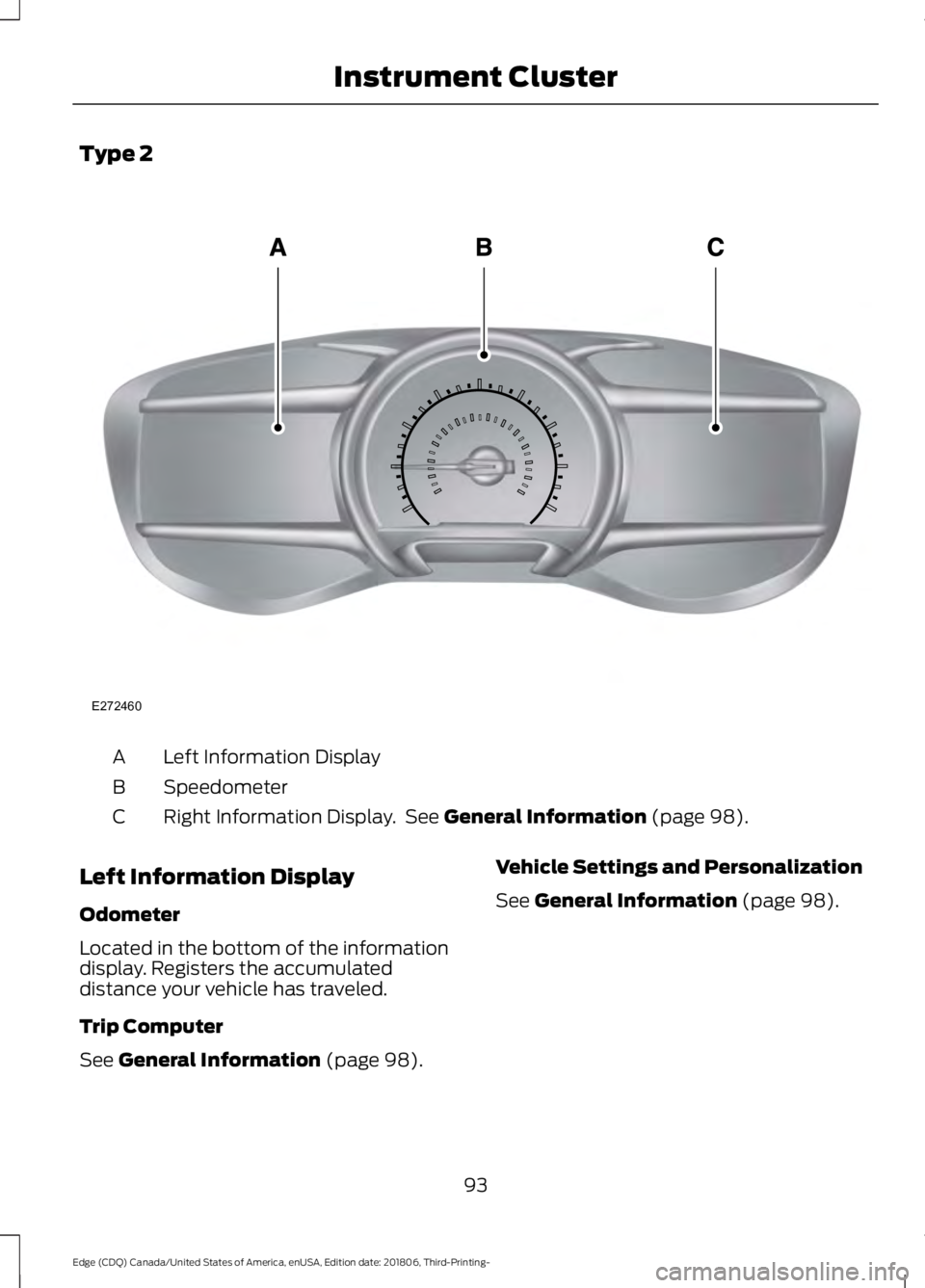
Type 2
Left Information Display
A
Speedometer
B
Right Information Display. See General Information (page 98).
C
Left Information Display
Odometer
Located in the bottom of the information
display. Registers the accumulated
distance your vehicle has traveled.
Trip Computer
See
General Information (page 98). Vehicle Settings and Personalization
See
General Information (page 98).
93
Edge (CDQ) Canada/United States of America, enUSA, Edition date: 201806, Third-Printing- Instrument ClusterE272460
Page 97 of 547
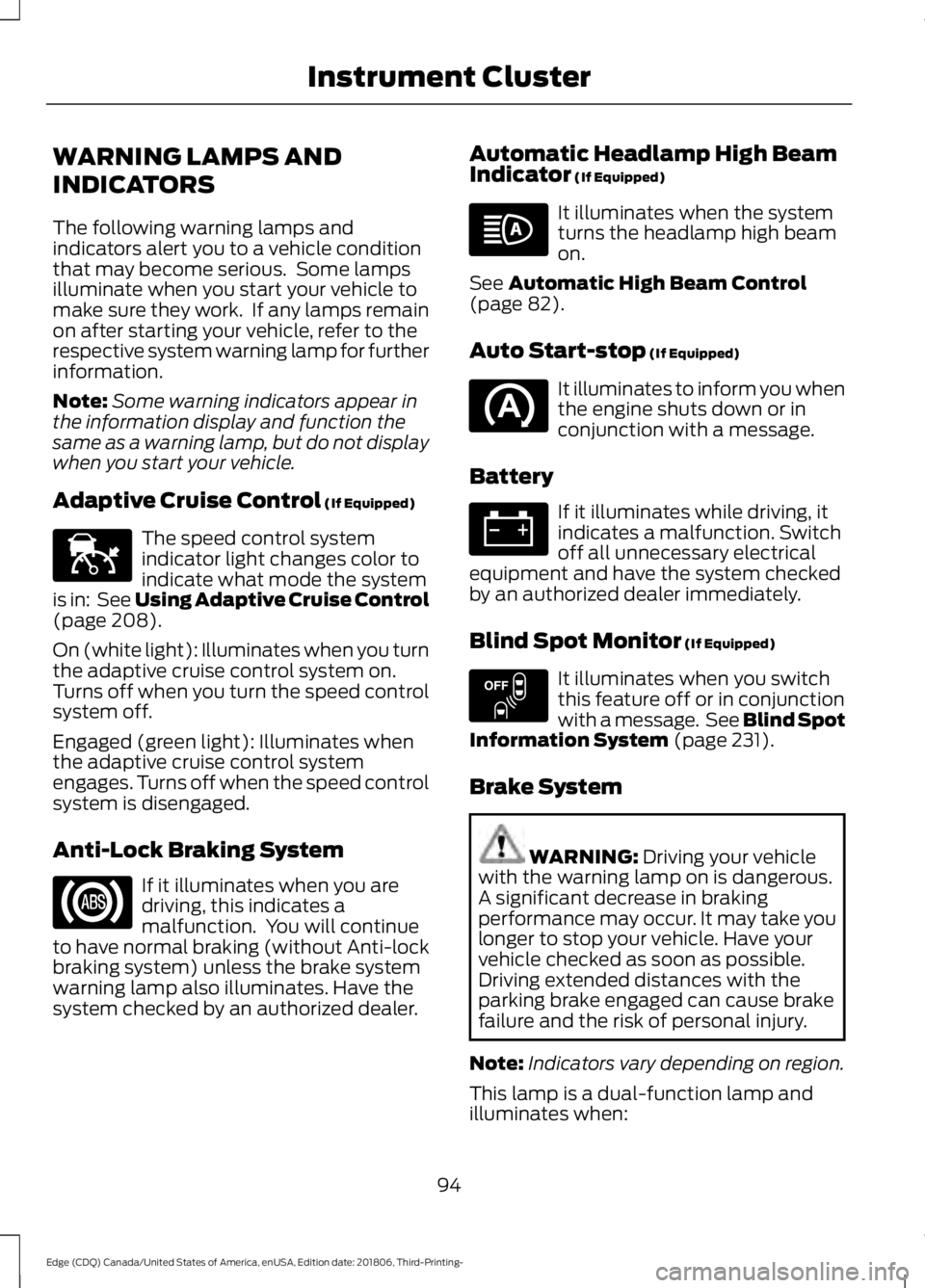
WARNING LAMPS AND
INDICATORS
The following warning lamps and
indicators alert you to a vehicle condition
that may become serious. Some lamps
illuminate when you start your vehicle to
make sure they work. If any lamps remain
on after starting your vehicle, refer to the
respective system warning lamp for further
information.
Note:
Some warning indicators appear in
the information display and function the
same as a warning lamp, but do not display
when you start your vehicle.
Adaptive Cruise Control (If Equipped) The speed control system
indicator light changes color to
indicate what mode the system
is in: See Using Adaptive Cruise Control
(page
208).
On (white light): Illuminates when you turn
the adaptive cruise control system on.
Turns off when you turn the speed control
system off.
Engaged (green light): Illuminates when
the adaptive cruise control system
engages. Turns off when the speed control
system is disengaged.
Anti-Lock Braking System If it illuminates when you are
driving, this indicates a
malfunction. You will continue
to have normal braking (without Anti-lock
braking system) unless the brake system
warning lamp also illuminates. Have the
system checked by an authorized dealer. Automatic Headlamp High Beam
Indicator
(If Equipped) It illuminates when the system
turns the headlamp high beam
on.
See
Automatic High Beam Control
(page 82).
Auto Start-stop
(If Equipped) It illuminates to inform you when
the engine shuts down or in
conjunction with a message.
Battery If it illuminates while driving, it
indicates a malfunction. Switch
off all unnecessary electrical
equipment and have the system checked
by an authorized dealer immediately.
Blind Spot Monitor
(If Equipped) It illuminates when you switch
this feature off or in conjunction
with a message. See Blind Spot
Information System
(page 231).
Brake System WARNING:
Driving your vehicle
with the warning lamp on is dangerous.
A significant decrease in braking
performance may occur. It may take you
longer to stop your vehicle. Have your
vehicle checked as soon as possible.
Driving extended distances with the
parking brake engaged can cause brake
failure and the risk of personal injury.
Note: Indicators vary depending on region.
This lamp is a dual-function lamp and
illuminates when:
94
Edge (CDQ) Canada/United States of America, enUSA, Edition date: 201806, Third-Printing- Instrument ClusterE144524 E151262
Page 98 of 547
•
You apply the parking brake with the
ignition on.
• Your vehicle has a brake fault or low
brake fluid level, regardless of parking
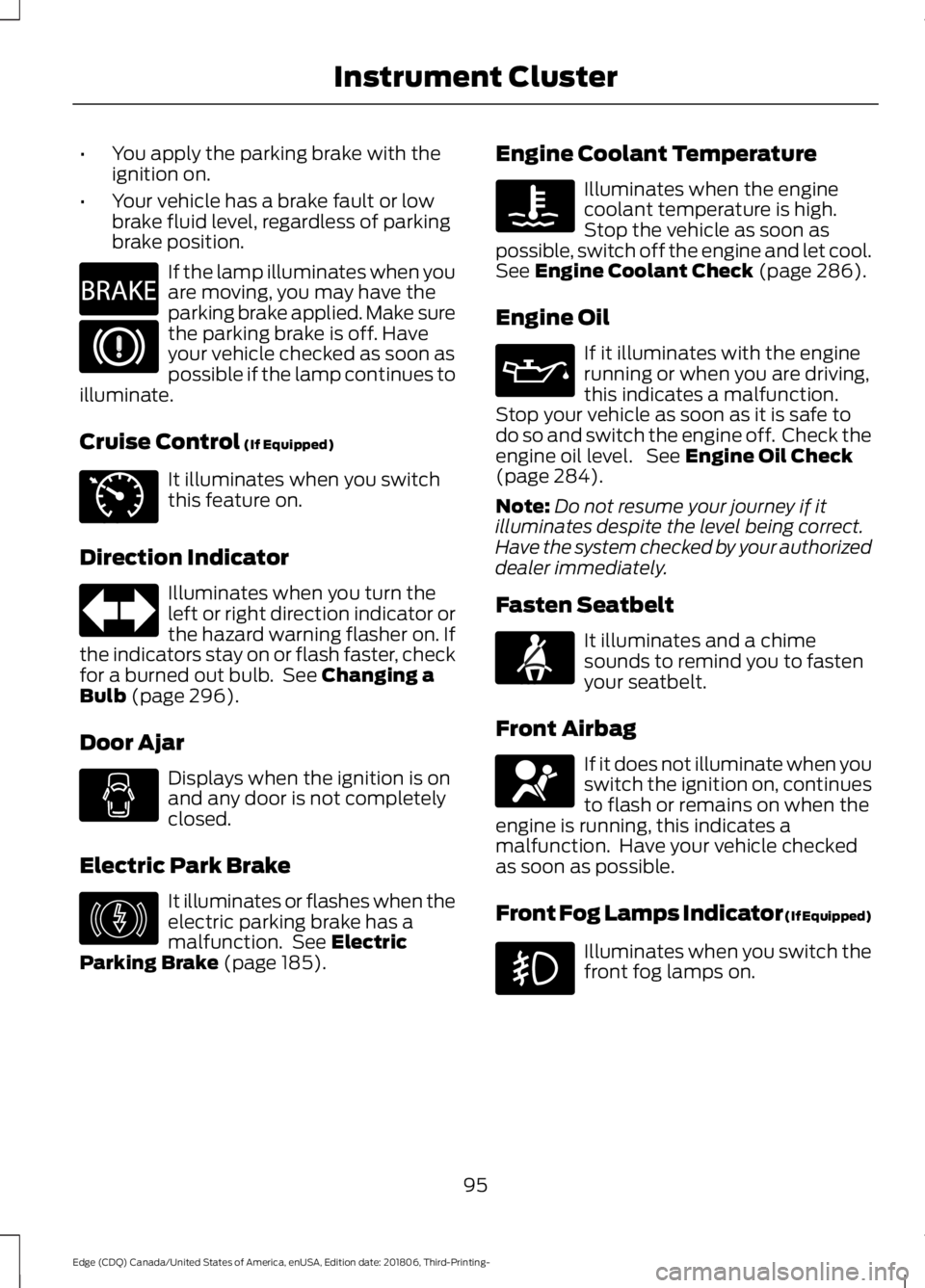
brake position. If the lamp illuminates when you
are moving, you may have the
parking brake applied. Make sure
the parking brake is off. Have
your vehicle checked as soon as
possible if the lamp continues to
illuminate.
Cruise Control (If Equipped) It illuminates when you switch
this feature on.
Direction Indicator Illuminates when you turn the
left or right direction indicator or
the hazard warning flasher on. If
the indicators stay on or flash faster, check
for a burned out bulb. See
Changing a
Bulb (page 296).
Door Ajar Displays when the ignition is on
and any door is not completely
closed.
Electric Park Brake It illuminates or flashes when the
electric parking brake has a
malfunction. See
Electric
Parking Brake (page 185). Engine Coolant Temperature Illuminates when the engine
coolant temperature is high.
Stop the vehicle as soon as
possible, switch off the engine and let cool.
See
Engine Coolant Check (page 286).
Engine Oil If it illuminates with the engine
running or when you are driving,
this indicates a malfunction.
Stop your vehicle as soon as it is safe to
do so and switch the engine off. Check the
engine oil level. See
Engine Oil Check
(page 284).
Note: Do not resume your journey if it
illuminates despite the level being correct.
Have the system checked by your authorized
dealer immediately.
Fasten Seatbelt It illuminates and a chime
sounds to remind you to fasten
your seatbelt.
Front Airbag If it does not illuminate when you
switch the ignition on, continues
to flash or remains on when the
engine is running, this indicates a
malfunction. Have your vehicle checked
as soon as possible.
Front Fog Lamps Indicator (If Equipped) Illuminates when you switch the
front fog lamps on.
95
Edge (CDQ) Canada/United States of America, enUSA, Edition date: 201806, Third-Printing- Instrument ClusterE270480 E71340 E146190 E71880 E67017