coolant level FORD EDGE 2020 User Guide
[x] Cancel search | Manufacturer: FORD, Model Year: 2020, Model line: EDGE, Model: FORD EDGE 2020Pages: 495, PDF Size: 6.38 MB
Page 306 of 495
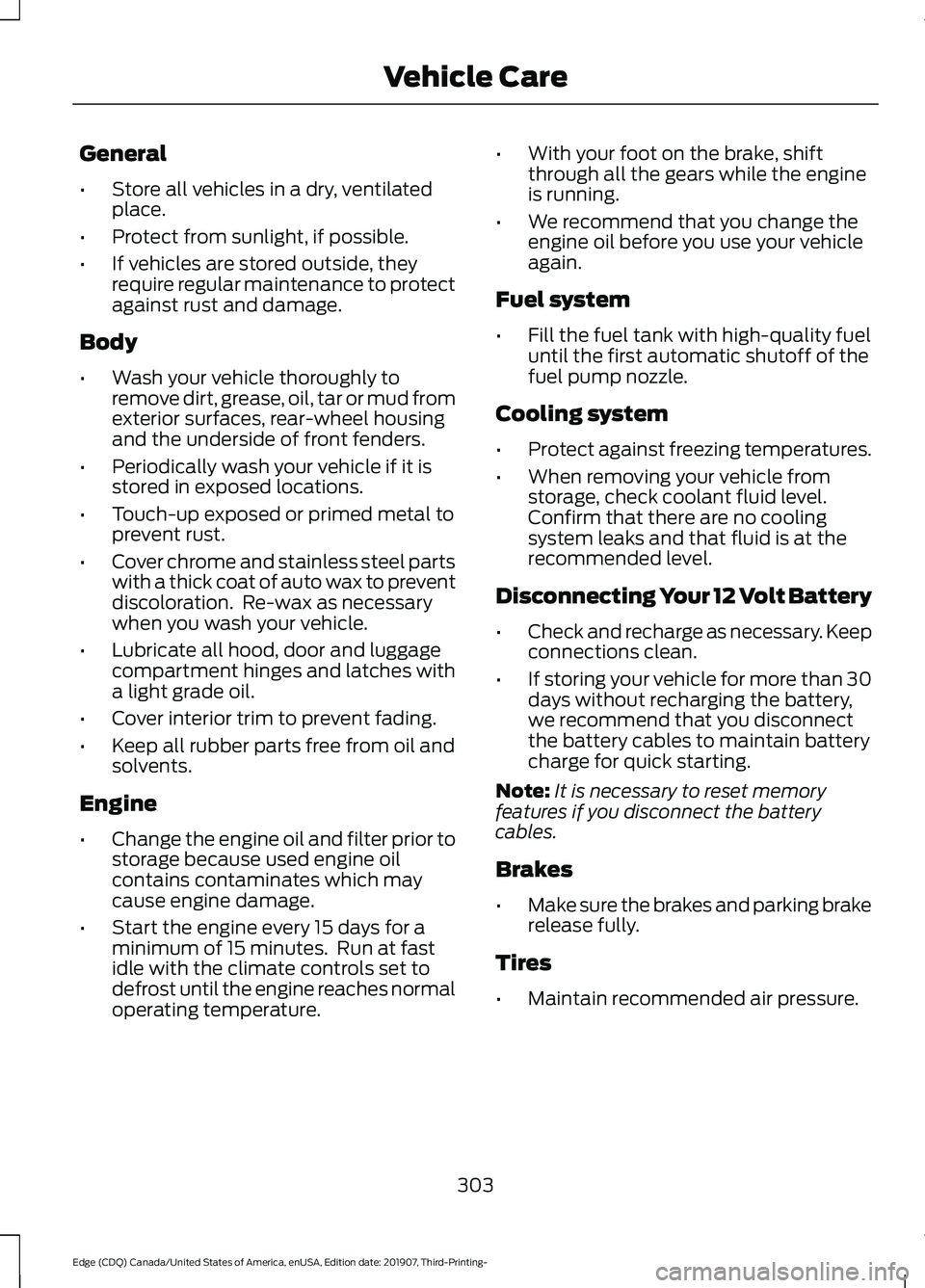
General
•
Store all vehicles in a dry, ventilated
place.
• Protect from sunlight, if possible.
• If vehicles are stored outside, they
require regular maintenance to protect
against rust and damage.
Body
• Wash your vehicle thoroughly to
remove dirt, grease, oil, tar or mud from
exterior surfaces, rear-wheel housing
and the underside of front fenders.
• Periodically wash your vehicle if it is
stored in exposed locations.
• Touch-up exposed or primed metal to
prevent rust.
• Cover chrome and stainless steel parts
with a thick coat of auto wax to prevent
discoloration. Re-wax as necessary
when you wash your vehicle.
• Lubricate all hood, door and luggage
compartment hinges and latches with
a light grade oil.
• Cover interior trim to prevent fading.
• Keep all rubber parts free from oil and
solvents.
Engine
• Change the engine oil and filter prior to
storage because used engine oil
contains contaminates which may
cause engine damage.
• Start the engine every 15 days for a
minimum of 15 minutes. Run at fast
idle with the climate controls set to
defrost until the engine reaches normal
operating temperature. •
With your foot on the brake, shift
through all the gears while the engine
is running.
• We recommend that you change the
engine oil before you use your vehicle
again.
Fuel system
• Fill the fuel tank with high-quality fuel
until the first automatic shutoff of the
fuel pump nozzle.
Cooling system
• Protect against freezing temperatures.
• When removing your vehicle from
storage, check coolant fluid level.
Confirm that there are no cooling
system leaks and that fluid is at the
recommended level.
Disconnecting Your 12 Volt Battery
• Check and recharge as necessary. Keep
connections clean.
• If storing your vehicle for more than 30
days without recharging the battery,
we recommend that you disconnect
the battery cables to maintain battery
charge for quick starting.
Note: It is necessary to reset memory
features if you disconnect the battery
cables.
Brakes
• Make sure the brakes and parking brake
release fully.
Tires
• Maintain recommended air pressure.
303
Edge (CDQ) Canada/United States of America, enUSA, Edition date: 201907, Third-Printing- Vehicle Care
Page 307 of 495
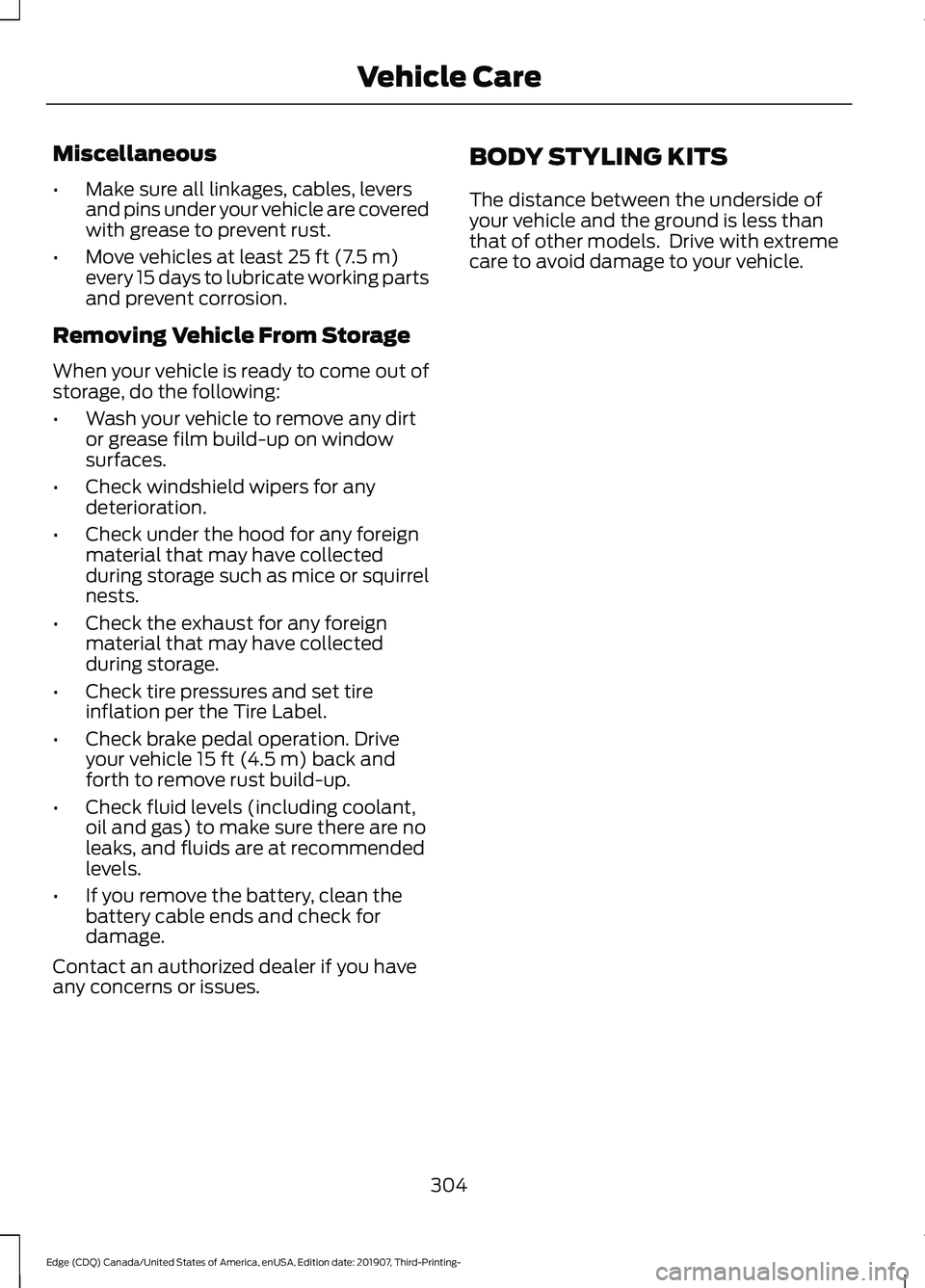
Miscellaneous
•
Make sure all linkages, cables, levers
and pins under your vehicle are covered
with grease to prevent rust.
• Move vehicles at least 25 ft (7.5 m)
every 15 days to lubricate working parts
and prevent corrosion.
Removing Vehicle From Storage
When your vehicle is ready to come out of
storage, do the following:
• Wash your vehicle to remove any dirt
or grease film build-up on window
surfaces.
• Check windshield wipers for any
deterioration.
• Check under the hood for any foreign
material that may have collected
during storage such as mice or squirrel
nests.
• Check the exhaust for any foreign
material that may have collected
during storage.
• Check tire pressures and set tire
inflation per the Tire Label.
• Check brake pedal operation. Drive
your vehicle
15 ft (4.5 m) back and
forth to remove rust build-up.
• Check fluid levels (including coolant,
oil and gas) to make sure there are no
leaks, and fluids are at recommended
levels.
• If you remove the battery, clean the
battery cable ends and check for
damage.
Contact an authorized dealer if you have
any concerns or issues. BODY STYLING KITS
The distance between the underside of
your vehicle and the ground is less than
that of other models. Drive with extreme
care to avoid damage to your vehicle.
304
Edge (CDQ) Canada/United States of America, enUSA, Edition date: 201907, Third-Printing- Vehicle Care
Page 434 of 495
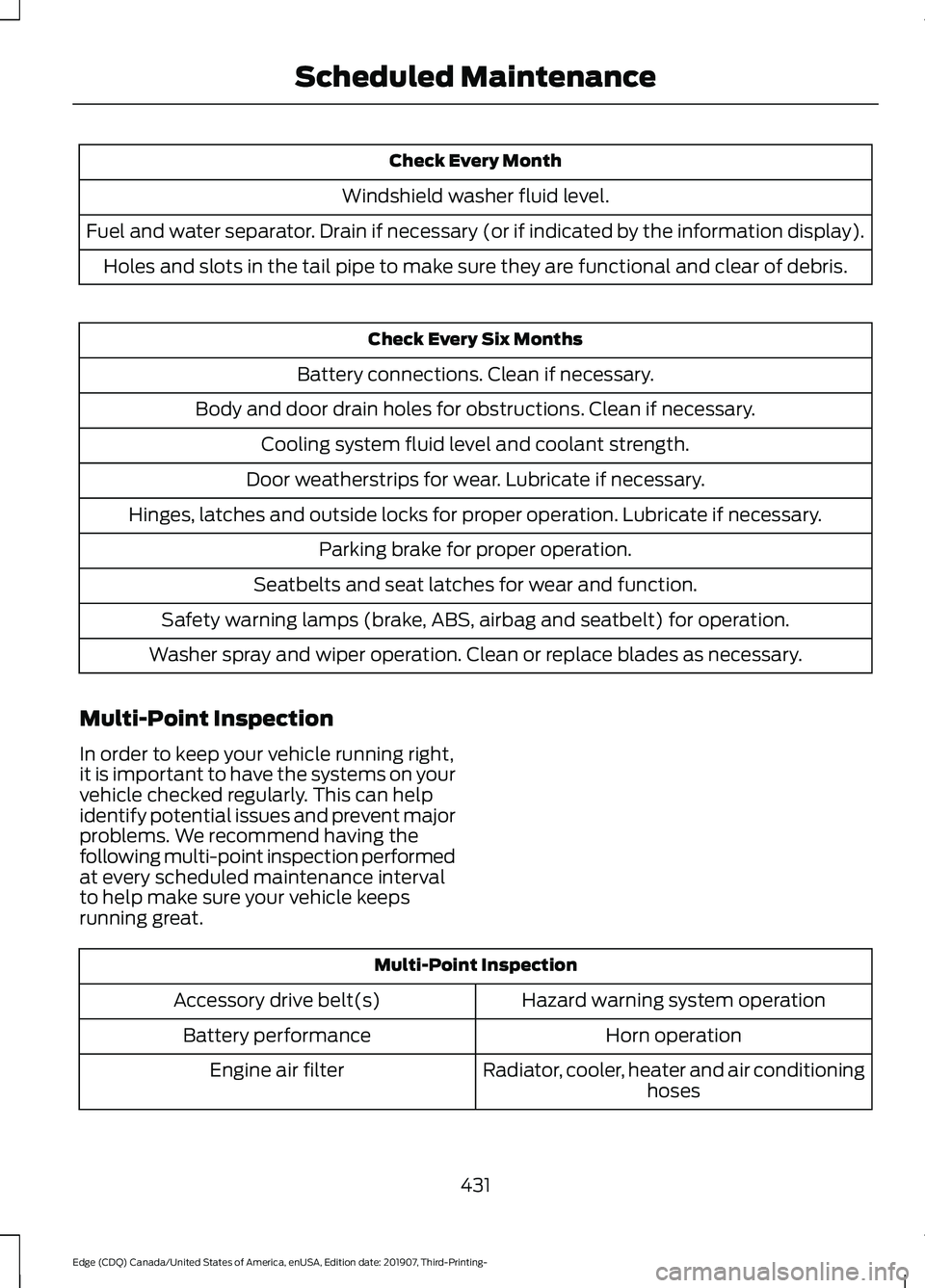
Check Every Month
Windshield washer fluid level.
Fuel and water separator. Drain if necessary (or if indicated by the information display). Holes and slots in the tail pipe to make sure they are functional and clear of debris. Check Every Six Months
Battery connections. Clean if necessary.
Body and door drain holes for obstructions. Clean if necessary. Cooling system fluid level and coolant strength.
Door weatherstrips for wear. Lubricate if necessary.
Hinges, latches and outside locks for proper operation. Lubricate if necessary. Parking brake for proper operation.
Seatbelts and seat latches for wear and function.
Safety warning lamps (brake, ABS, airbag and seatbelt) for operation.
Washer spray and wiper operation. Clean or replace blades as necessary.
Multi-Point Inspection
In order to keep your vehicle running right,
it is important to have the systems on your
vehicle checked regularly. This can help
identify potential issues and prevent major
problems. We recommend having the
following multi-point inspection performed
at every scheduled maintenance interval
to help make sure your vehicle keeps
running great. Multi-Point Inspection
Hazard warning system operation
Accessory drive belt(s)
Horn operation
Battery performance
Radiator, cooler, heater and air conditioninghoses
Engine air filter
431
Edge (CDQ) Canada/United States of America, enUSA, Edition date: 201907, Third-Printing- Scheduled Maintenance
Page 435 of 495
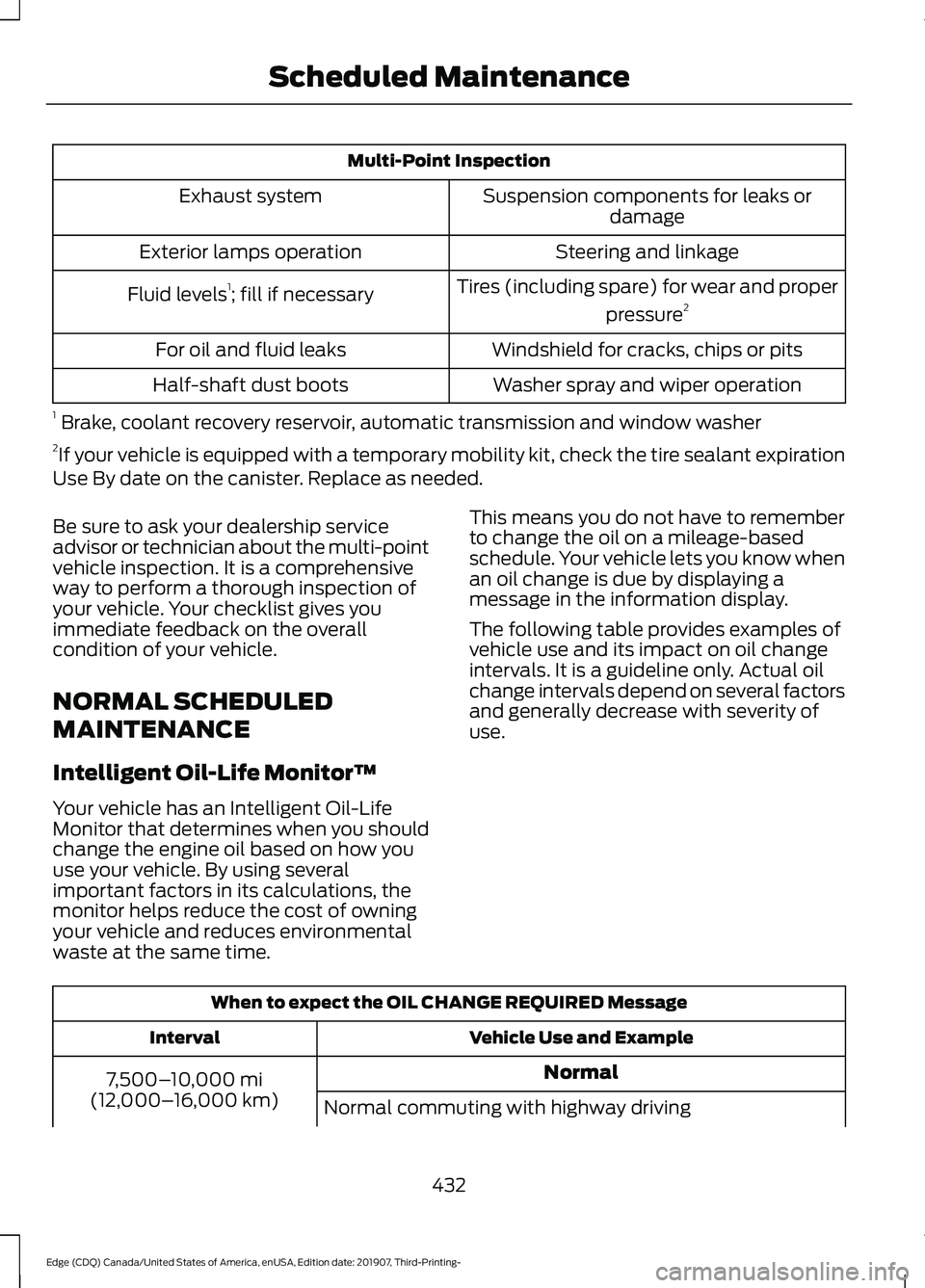
Multi-Point Inspection
Suspension components for leaks ordamage
Exhaust system
Steering and linkage
Exterior lamps operation
Tires (including spare) for wear and properpressure2
Fluid levels 1
; fill if necessary
Windshield for cracks, chips or pits
For oil and fluid leaks
Washer spray and wiper operation
Half-shaft dust boots
1 Brake, coolant recovery reservoir, automatic transmission and window washer
2 If your vehicle is equipped with a temporary mobility kit, check the tire sealant expiration
Use By date on the canister. Replace as needed.
Be sure to ask your dealership service
advisor or technician about the multi-point
vehicle inspection. It is a comprehensive
way to perform a thorough inspection of
your vehicle. Your checklist gives you
immediate feedback on the overall
condition of your vehicle.
NORMAL SCHEDULED
MAINTENANCE
Intelligent Oil-Life Monitor™
Your vehicle has an Intelligent Oil-Life
Monitor that determines when you should
change the engine oil based on how you
use your vehicle. By using several
important factors in its calculations, the
monitor helps reduce the cost of owning
your vehicle and reduces environmental
waste at the same time. This means you do not have to remember
to change the oil on a mileage-based
schedule. Your vehicle lets you know when
an oil change is due by displaying a
message in the information display.
The following table provides examples of
vehicle use and its impact on oil change
intervals. It is a guideline only. Actual oil
change intervals depend on several factors
and generally decrease with severity of
use.
When to expect the OIL CHANGE REQUIRED Message
Vehicle Use and Example
Interval
Normal
7,500– 10,000 mi
(12,000– 16,000 km)
Normal commuting with highway driving
432
Edge (CDQ) Canada/United States of America, enUSA, Edition date: 201907, Third-Printing- Scheduled Maintenance
Page 436 of 495
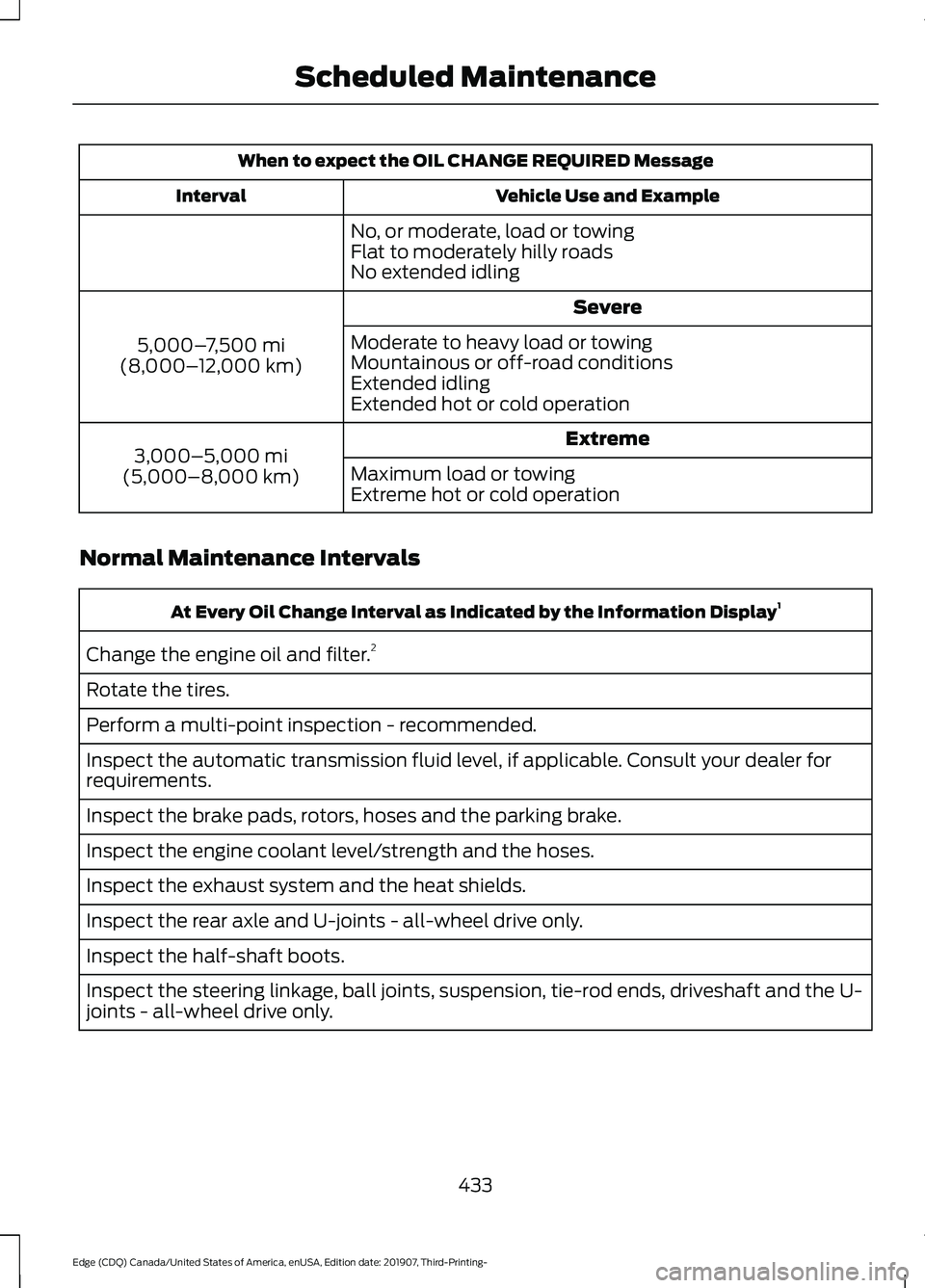
When to expect the OIL CHANGE REQUIRED Message
Vehicle Use and Example
Interval
No, or moderate, load or towing
Flat to moderately hilly roads
No extended idling Severe
5,000– 7,500 mi
(8,000– 12,000 km) Moderate to heavy load or towing
Mountainous or off-road conditions
Extended idling
Extended hot or cold operation
Extreme
3,000–5,000 mi
(5,000–8,000 km) Maximum load or towing
Extreme hot or cold operation
Normal Maintenance Intervals At Every Oil Change Interval as Indicated by the Information Display
1
Change the engine oil and filter. 2
Rotate the tires.
Perform a multi-point inspection - recommended.
Inspect the automatic transmission fluid level, if applicable. Consult your dealer for
requirements.
Inspect the brake pads, rotors, hoses and the parking brake.
Inspect the engine coolant level/strength and the hoses.
Inspect the exhaust system and the heat shields.
Inspect the rear axle and U-joints - all-wheel drive only.
Inspect the half-shaft boots.
Inspect the steering linkage, ball joints, suspension, tie-rod ends, driveshaft and the U-
joints - all-wheel drive only.
433
Edge (CDQ) Canada/United States of America, enUSA, Edition date: 201907, Third-Printing- Scheduled Maintenance
Page 494 of 495

Switching Adaptive Cruise Control
Off........................................................................\
215
Switching Adaptive Cruise Control On........................................................................\
. 212
Switching to Normal Cruise Control............218
System Not Available........................................ 216
Using Lane Centering........................................ 218
Using All-Wheel Drive..................................181 Driving in Special Conditions with All-Wheel
Drive (AWD)...................................................... 181
Using MyKey With Remote Start Systems...........................................................61
Using Snow Chains.....................................329
Using Stability Control................................192
Electronic Stability Control ............................ 192
Using Summer Tires...................................329
Using Traction Control
...............................190
Switching the System Off............................... 190
System Indicator Lights and Messages......................................................... 190
Using a Switch..................................................... 190
Using Voice Recognition...........................383 Apps....................................................................... 388
Automatic Blower Motor Speed Reduction........................................................ 389
Climate.................................................................. 385
Entertainment.................................................... 384
General.................................................................. 383
Navigation............................................................. 387
Phone.................................................................... 386
SiriusXM Traffic and Travel Link.................. 388
Voice Settings..................................................... 389
Utilizing the Mediation/Arbitration Program (Canada Only)
.........................261
V
Vehicle Care
...................................................297
General Information.......................................... 297
Vehicle Certification Label.......................345
Vehicle Identification Number................344
Vehicle Storage
............................................302
Body....................................................................... 303
Brakes.................................................................... 303
Cooling system................................................... 303
Disconnecting Your 12 Volt Battery.............303
Engine.................................................................... 303
Fuel system......................................................... 303General..................................................................
303
Miscellaneous..................................................... 304
Removing Vehicle From Storage.................304
Tires........................................................................\
303
Vehicle Wi-Fi Hotspot.................................371
Ventilation See: Climate Control.......................................... 131
VIN See: Vehicle Identification Number............344
Voice Control...................................................80
W
Warning Lamps and Indicators................101 Adaptive Cruise Control.................................... 101
Anti-Lock Braking System............................... 101
Automatic Headlamp High Beam Indicator............................................................. 101
Auto Start-stop.................................................... 101
Battery..................................................................... 101
Blind Spot Monitor.............................................. 101
Brake System........................................................ 101
Cruise Control...................................................... 102
Direction Indicator.............................................. 102
Door Ajar................................................................ 102
Electric Park Brake............................................. 102
Engine Coolant Temperature......................... 102
Engine Oil.............................................................. 102
Fasten Seatbelt................................................... 102
Front Airbag.......................................................... 102
Front Fog Lamps Indicator.............................. 102
High Beam............................................................. 102
Hill Start Assist Indicator................................. 102
Hood Ajar............................................................... 103
Lane Keeping Aid................................................ 103
Liftgate Ajar.......................................................... 103
Low Fuel Level..................................................... 103
Low Tire Pressure Warning............................. 103
Low Washer Fluid............................................... 103
Parking Lamps..................................................... 103
Powertrain Fault................................................. 103
Service Engine Soon.......................................... 103
Stability Control.................................................. 103
Stability Control Off.......................................... 104
Washer Fluid Check
....................................292
Washers See: Cleaning the Exterior.............................. 298
See: Wipers and Washers................................. 82
491
Edge (CDQ) Canada/United States of America, enUSA, Edition date: 201907, Third-Printing- Index