manual transmission FORD EDGE 2020 User Guide
[x] Cancel search | Manufacturer: FORD, Model Year: 2020, Model line: EDGE, Model: FORD EDGE 2020Pages: 495, PDF Size: 6.38 MB
Page 192 of 495
developed sufficient torque to prevent your
vehicle from rolling down the slope. This
is an advantage when pulling away on a
slope, for example from a car park ramp,
traffic lights or when reversing uphill into
a parking space.
The system activates on any slope that
causes your vehicle to roll.
Note:
There is no warning light to indicate
the system is either on or off.
Using Hill Start Assist
1. Press the brake pedal to bring your vehicle to a complete standstill. Keep
the brake pedal pressed and shift into
first gear when facing uphill or reverse
(R) when facing downhill.
2. If the sensors detect that your vehicle is on a slope, the system activates
automatically.
3. When you remove your foot from the brake pedal, your vehicle remains on
the slope without rolling away for
about two to three seconds. This hold
time automatically extends if you are
in the process of driving off.
4. Drive off in the normal manner. The system releases the brakes
automatically.
Note: When you remove your foot from the
brake pedal and press the pedal again when
the system is active, you will experience
significantly reduced brake pedal travel. This
is normal.
Switching the System On and Off
Vehicles with Manual Transmission
You can switch this feature on or off in the
information display. The system
remembers the last setting when you start
your vehicle. Vehicles with Automatic Transmission
You cannot turn the system on or off.
When you switch the ignition on, the
system automatically turns on.
189
Edge (CDQ) Canada/United States of America, enUSA, Edition date: 201907, Third-Printing- Brakes
Page 211 of 495
The fixed and active guidelines fade in and
out depending on the steering wheel
position. The active guidelines do not
display when the steering wheel position
is straight.
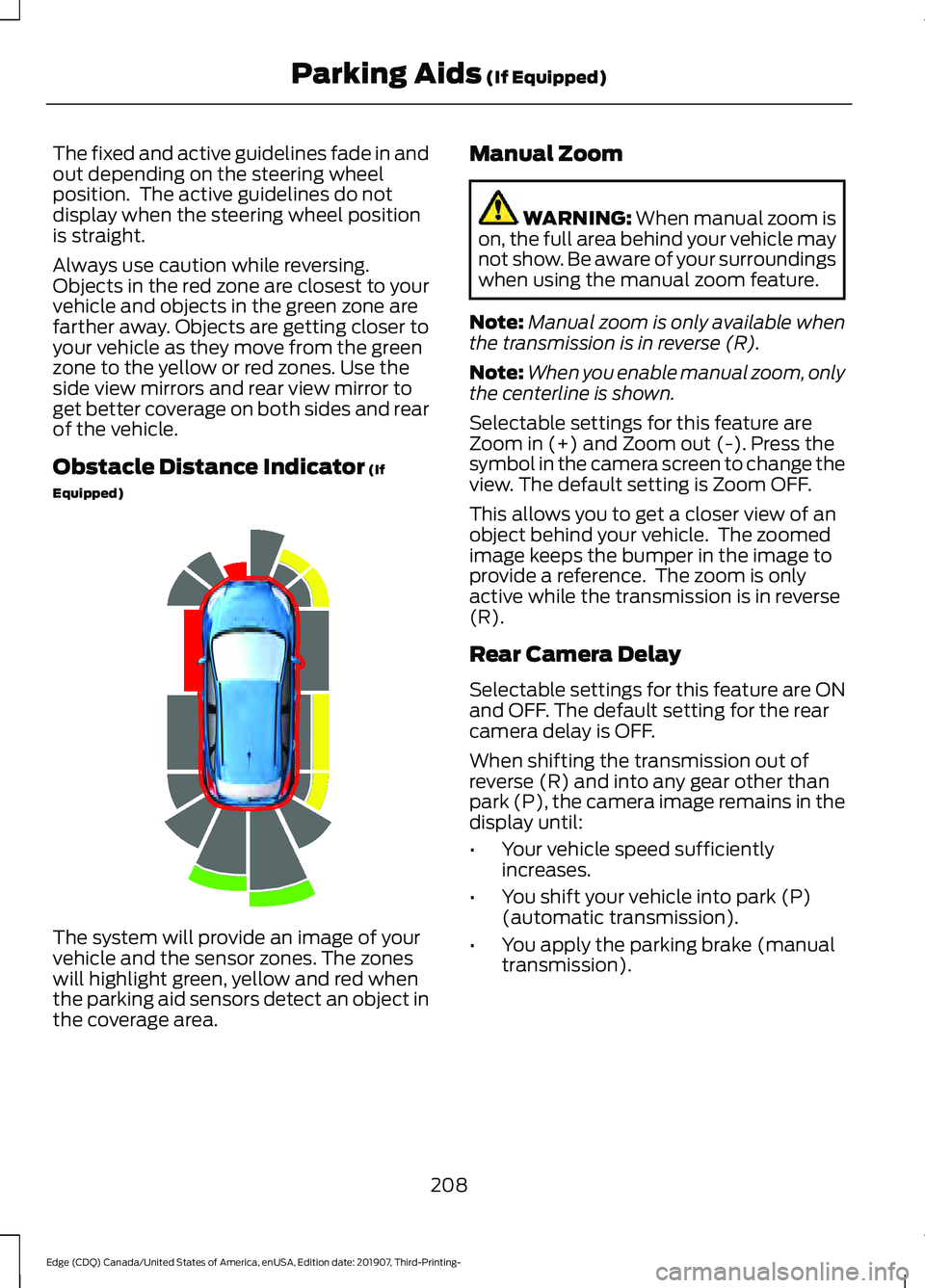
Always use caution while reversing.
Objects in the red zone are closest to your
vehicle and objects in the green zone are
farther away. Objects are getting closer to
your vehicle as they move from the green
zone to the yellow or red zones. Use the
side view mirrors and rear view mirror to
get better coverage on both sides and rear
of the vehicle.
Obstacle Distance Indicator (If
Equipped) The system will provide an image of your
vehicle and the sensor zones. The zones
will highlight green, yellow and red when
the parking aid sensors detect an object in
the coverage area. Manual Zoom WARNING:
When manual zoom is
on, the full area behind your vehicle may
not show. Be aware of your surroundings
when using the manual zoom feature.
Note: Manual zoom is only available when
the transmission is in reverse (R).
Note: When you enable manual zoom, only
the centerline is shown.
Selectable settings for this feature are
Zoom in (+) and Zoom out (-). Press the
symbol in the camera screen to change the
view. The default setting is Zoom OFF.
This allows you to get a closer view of an
object behind your vehicle. The zoomed
image keeps the bumper in the image to
provide a reference. The zoom is only
active while the transmission is in reverse
(R).
Rear Camera Delay
Selectable settings for this feature are ON
and OFF. The default setting for the rear
camera delay is OFF.
When shifting the transmission out of
reverse (R) and into any gear other than
park (P), the camera image remains in the
display until:
• Your vehicle speed sufficiently
increases.
• You shift your vehicle into park (P)
(automatic transmission).
• You apply the parking brake (manual
transmission).
208
Edge (CDQ) Canada/United States of America, enUSA, Edition date: 201907, Third-Printing- Parking Aids
(If Equipped)E190459
Page 230 of 495
The system is designed to detect vehicles
that may have entered the blind spot zone.
The detection area is on both sides of your
vehicle, extending rearward from the
exterior mirrors to approximately 13 ft
(4 m) beyond the rear bumper. The
detection area extends to approximately
59 ft (18 m)
beyond the rear bumper when
the vehicle speed is greater than 30 mph
(48 km/h) to alert you of faster
approaching vehicles.
Note: The system does not prevent contact
with other vehicles. It is not designed to
detect parked vehicles, pedestrians, animals
or other infrastructures.
Using the Blind Spot Information
System
Vehicles with Automatic Transmission
The system turns on when all of the
following occur:
• You start your vehicle.
• You shift into drive (D).
• The vehicle speed is greater than
6 mph (10 km/h)
.
Note: The system does not operate in park
(P) or reverse (R).
Vehicles with Manual Transmission
The system turns on when all of the
following occur:
• You start your vehicle.
• The vehicle speed is greater than
6 mph (10 km/h)
.
Note: The system does not operate in
reverse (R). System Lights and Messages
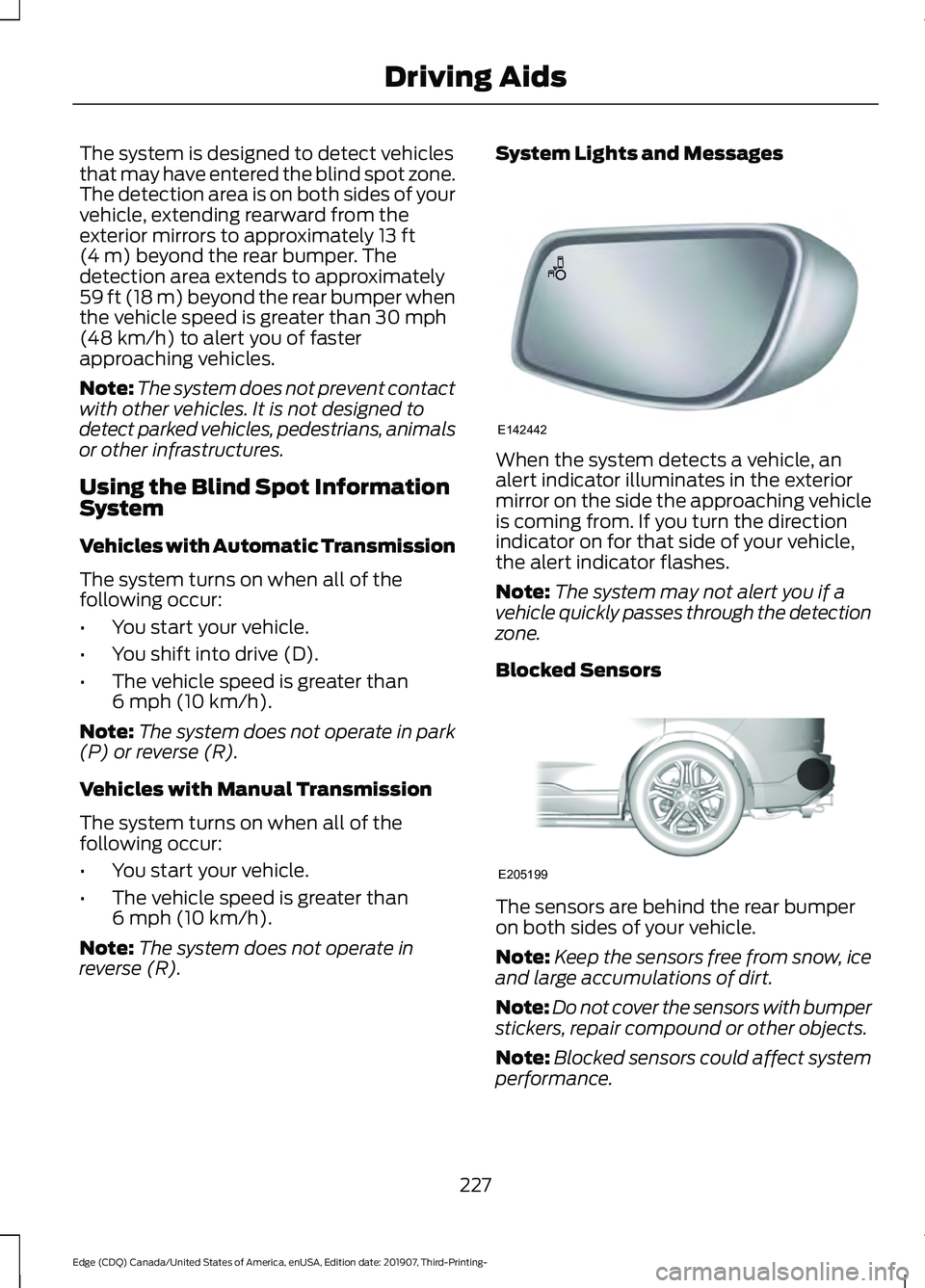
When the system detects a vehicle, an
alert indicator illuminates in the exterior
mirror on the side the approaching vehicle
is coming from. If you turn the direction
indicator on for that side of your vehicle,
the alert indicator flashes.
Note:
The system may not alert you if a
vehicle quickly passes through the detection
zone.
Blocked Sensors The sensors are behind the rear bumper
on both sides of your vehicle.
Note:
Keep the sensors free from snow, ice
and large accumulations of dirt.
Note: Do not cover the sensors with bumper
stickers, repair compound or other objects.
Note: Blocked sensors could affect system
performance.
227
Edge (CDQ) Canada/United States of America, enUSA, Edition date: 201907, Third-Printing- Driving AidsE142442 E205199
Page 252 of 495
TOWING THE VEHICLE ON
FOUR WHEELS - 2.0L
ECOBOOST™
Emergency Towing
WARNING: If your vehicle has a
steering wheel lock make sure the
ignition is in the accessory or on position
when being towed.
If your vehicle becomes inoperable without
access to wheel dollies or a vehicle
transport trailer, it can be flat-towed with
all wheels on the ground, regardless of the
powertrain and transmission configuration,
under the following conditions:
• Your vehicle is facing forward for
towing in a forward direction.
• Refer to the Manual Park Release
procedure. See
Automatic
Transmission (page 175). Failing to
do so could result in damage to the
transmission.
• Maximum speed is 35 mph (56 km/h).
• Maximum distance is
50 mi (80 km).
Note: If you are unsure of the vehicle ’s
configuration, contact an authorized dealer.
Recreational Towing - Front-Wheel
Drive Vehicles
(If Equipped)
You cannot recreational tow your vehicle
with all wheels on the ground because
vehicle or transmission damage could
occur. Place the front wheels on a
two-wheel tow dolly. If you are using a tow
dolly, follow the instructions specified by
the equipment provider. Recreational Towing - Rear-Wheel
Drive Vehicles
(If Equipped)
You cannot recreational tow your vehicle
with all wheels on the ground because
vehicle or transmission damage could
occur. We recommend towing your vehicle
with all four wheels off the ground, such
as when using a car-hauling trailer.
Otherwise, you cannot recreational tow
your vehicle.
Recreational Towing - All-Wheel
and Four-Wheel Drive Vehicles
(If
Equipped)
You cannot recreational tow your vehicle
with all wheels on the ground because
vehicle or transmission damage could
occur. We recommend towing your vehicle
with all four wheels off the ground, such
as when using a car-hauling trailer.
Otherwise, you cannot recreational tow
your vehicle.
TOWING THE VEHICLE ON
FOUR WHEELS - 2.7L
ECOBOOST™
Emergency Towing WARNING:
If your vehicle has a
steering wheel lock make sure the
ignition is in the accessory or on position
when being towed.
249
Edge (CDQ) Canada/United States of America, enUSA, Edition date: 201907, Third-Printing- Towing
Page 253 of 495
If your vehicle becomes inoperable without
access to wheel dollies or a vehicle
transport trailer, it can be flat-towed with
all wheels on the ground, regardless of the
powertrain and transmission configuration,
under the following conditions:
•
Your vehicle is facing forward for
towing in a forward direction.
• Refer to the Manual Park Release
procedure. See Automatic
Transmission (page 175). Failing to
do so may result in damage to the
transmission.
• Maximum speed is 35 mph (56 km/h).
• Maximum distance is
50 mi (80 km).
Recreational Towing
Note: Put your climate control system in
recirculated air mode to prevent exhaust
fumes from entering the vehicle. See
Climate Control
(page 131).
Follow these guidelines if you have a need
for recreational towing. An example of
recreational towing would be towing your
vehicle behind a motorhome. We designed
these guidelines to prevent damage to your
transmission.
You can recreational tow your vehicle with
all four wheels on the ground using the
Manual Park Release procedure, or with
all four wheels off the ground using a
vehicle transport trailer. If you are using a
vehicle transport trailer, follow the
instructions specified by the equipment
provider. If you recreational tow your vehicle with all
four wheels on the ground:
•
Only tow your vehicle in the forward
direction.
• Refer to the Manual Park Release
procedure. See
Automatic
Transmission (page 175). Failing to
do so may result in damage to the
transmission.
• Do not exceed
65 mph (105 km/h).
250
Edge (CDQ) Canada/United States of America, enUSA, Edition date: 201907, Third-Printing- Towing
Page 260 of 495
POST-CRASH ALERT SYSTEM
The system flashes the direction indicators
and sounds the horn (intermittently) in the
event of a serious impact that deploys an
airbag (front, side, side curtain or Safety
Canopy) or the seatbelt pretensioners.
The horn and indicators turn off when:
•
You press the hazard control button.
• You press the panic button on the
remote entry transmitter (if equipped).
• Your vehicle runs out of power.
• Sounding of the horn is only enabled
in specific markets.
TRANSPORTING THE VEHICLE If you need to have your vehicle towed,
contact a professional towing service or,
if you are a member of a roadside
assistance program, your roadside
assistance service provider.
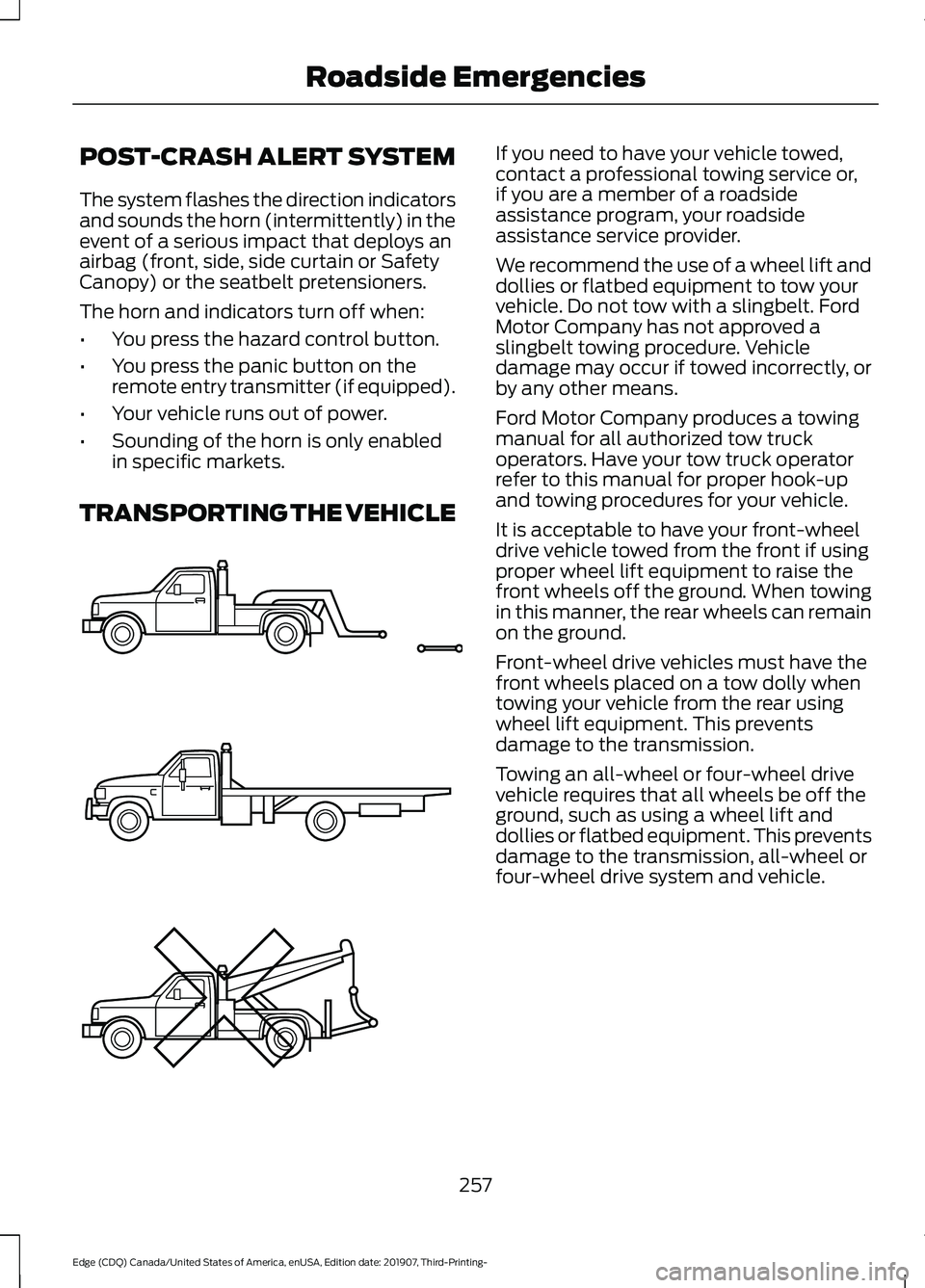
We recommend the use of a wheel lift and
dollies or flatbed equipment to tow your
vehicle. Do not tow with a slingbelt. Ford
Motor Company has not approved a
slingbelt towing procedure. Vehicle
damage may occur if towed incorrectly, or
by any other means.
Ford Motor Company produces a towing
manual for all authorized tow truck
operators. Have your tow truck operator
refer to this manual for proper hook-up
and towing procedures for your vehicle.
It is acceptable to have your front-wheel
drive vehicle towed from the front if using
proper wheel lift equipment to raise the
front wheels off the ground. When towing
in this manner, the rear wheels can remain
on the ground.
Front-wheel drive vehicles must have the
front wheels placed on a tow dolly when
towing your vehicle from the rear using
wheel lift equipment. This prevents
damage to the transmission.
Towing an all-wheel or four-wheel drive
vehicle requires that all wheels be off the
ground, such as using a wheel lift and
dollies or flatbed equipment. This prevents
damage to the transmission, all-wheel or
four-wheel drive system and vehicle.
257
Edge (CDQ) Canada/United States of America, enUSA, Edition date: 201907, Third-Printing- Roadside EmergenciesE143886
Page 483 of 495
Autolamps........................................................86
Windshield Wiper Activated
Headlamps........................................................ 86
Automatic Climate Control - Vehicles With: SYNC 3/Bang and Olufsen Audio
System...........................................................132
Setting the Blower Motor Speed.................. 132
Setting the Temperature.................................. 132
Switching Auto Mode On and Off................133
Switching Defrost On and Off........................ 133
Switching Maximum Air Conditioning On and Off............................................................... 133
Switching Maximum Defrost On and Off........................................................................\
133
Switching Recirculated Air On and Off........................................................................\
133
Switching the Air Conditioning On and Off........................................................................\
133
Switching the Climate Control On and Off........................................................................\
133
Automatic Climate Control - Vehicles With: SYNC 3................................................131
Setting the Blower Motor Speed................... 131
Setting the Temperature................................... 131
Switching Auto Mode On and Off.................131
Switching Defrost On and Off......................... 131
Switching Maximum Air Conditioning On and Off................................................................ 131
Switching Maximum Defrost On and Off........................................................................\
132
Switching Recirculated Air On and Off........................................................................\
132
Switching the Air Conditioning On and Off........................................................................\
. 131
Switching the Climate Control On and Off........................................................................\
. 131
Automatic High Beam Control...................91
Automatic High Beam Control Indicators.........................................................91
Automatic Transmission............................175 Automatic Transmission Adaptive
Learning............................................................ 180
If Your Vehicle Gets Stuck in Mud or Snow.................................................................. 180
Manual Park Release......................................... 178
SelectShift Automatic ™
Transmission.................................................... 177Understanding the Positions of Your Rotary
Shift Transmission......................................... 175
Automatic Transmission Fluid Check............................................................288
Auto-Start-Stop...........................................162 Disabling Auto-Start-Stop.............................. 163
Enabling Auto-Start-Stop............................... 162
Autowipers.......................................................82 Autowipers Settings............................................ 83
Auxiliary Power Points
................................153
110 Volt AC Power Point................................... 153
12 Volt DC Power Point..................................... 153
USB Port and Power Point Locations.........153
AWD See: All-Wheel Drive.......................................... 181
B
Battery See: Changing the 12V Battery..................... 289
Blind Spot Information System..............226 ........................................................................\
.......... 226
Switching the System On and Off..............228
System Errors...................................................... 228
Using the Blind Spot Information System............................................................... 227
BLIS See: Blind Spot Information System..........226
Body Styling Kits.........................................304
Bonnet Lock See: Opening and Closing the Hood...........277
Booster Seats
..................................................29
Types of Booster Seats...................................... 30
Brake Fluid Check........................................288 Brake Fluid Service Interval........................... 289
Brakes...............................................................186 General Information.......................................... 186
Breaking-In......................................................251
Bulb Specification Chart..........................366
C
Cabin Air Filter................................................135
Canceling the Set Speed............................211
Capacities and Specifications - 2.0L EcoBoost™.................................................346
Air Conditioning System................................. 346
480
Edge (CDQ) Canada/United States of America, enUSA, Edition date: 201907, Third-Printing- Index
Page 489 of 495
Traction Control..................................................
128
Transmission........................................................ 129
Installing Child Restraints...........................24
Child Seats.............................................................. 24
Using Lap and Shoulder Belts......................... 24
Using Lower Anchors and Tethers for CHildren (LATCH)............................................ 27
Using Tether Straps............................................. 28
Instrument Cluster
........................................98
Instrument Lighting Dimmer.....................86
Instrument Panel
...........................................20
Interior Lamps.................................................89
Front Interior Lamp............................................. 89
Rear Interior Lamps............................................ 89
Interior Mirror
...................................................96
Automatic Dimming Mirror.............................. 96
Manual Dimming Mirror..................................... 96
Introduction.........................................................7
J
Jump Starting the Vehicle........................255 Preparing Your Vehicle..................................... 255
To Connect the Booster Cables................... 255
To Start the Engine........................................... 256
K
Keyless Entry
....................................................67
SECURICODE™ KEYLESS ENTRY
KEYPAD............................................................... 67
Keyless Starting
.............................................157
Ignition Modes...................................................... 157
Keys and Remote Controls.........................52
L
Lane Keeping System.................................222 Switching the System On and Off...............223
Liftgate...............................................................70
Lighting Control
..............................................85
Flashing the Headlamp High Beam..............86
Headlamp High Beam........................................ 85
Lighting..............................................................85 General Information............................................ 85
Load Carriers See: Roof Racks and Load Carriers.............238
Load Carrying
.................................................237 Load Limit.......................................................238
Special Loading Instructions for Owners of
Pick-up Trucks and Utility-type
Vehicles............................................................. 242
Vehicle Loading - with and without a Trailer................................................................. 238
Locking and Unlocking.................................63 Activating Intelligent Access............................ 65
Autolock.................................................................. 66
Auto Relock............................................................ 66
Battery Saver.......................................................... 67
Illuminated Entry.................................................. 66
Illuminated Exit..................................................... 67
Locking and Unlocking the Doors with the Key Blade........................................................... 64
Power Door Locks................................................ 63
Remote Control.................................................... 63
Smart Unlocks for Intelligent Access Keys...................................................................... 65
Luggage Covers.............................................237
Lug Nuts See: Changing a Road Wheel........................ 333
M
Maintenance..................................................277 General Information.......................................... 277
Manual Liftgate
...............................................70
Closing the Liftgate............................................. 70
Opening the Liftgate........................................... 70
Manual Seats.................................................139 Adjusting the Seat Backrest........................... 139
Media Hub.....................................................380
Memory Function
..........................................142
Easy Entry and Exit Feature............................ 144
Linking a PreSet Position to your Remote Control or Intelligent Access Key
Fob...................................................................... 143
Saving a PreSet Position.................................. 143
Message Center See: Information Displays............................... 105
Mirrors See: Windows and Mirrors................................ 93
Mobile Communications Equipment.......15
Moonroof
..........................................................96
Opening and Closing the Moonroof..............97
Motorcraft Parts - 2.0L EcoBoost™.................................................342
486
Edge (CDQ) Canada/United States of America, enUSA, Edition date: 201907, Third-Printing- Index