key battery FORD EDGE 2021 User Guide
[x] Cancel search | Manufacturer: FORD, Model Year: 2021, Model line: EDGE, Model: FORD EDGE 2021Pages: 500, PDF Size: 8.52 MB
Page 129 of 500
WHAT IS REMOTE START
R
emo t e S t art S y s t em
The system allows you to remotely start
your vehicle and to adjust the interior
temperature according to the settings that
you chose.
REMOTE START
PRECAUTIONS
WARNING: Do not start the engine
in a closed garage or in other enclosed
areas. Exhaust fumes are toxic. Always
open the garage door before you start
the engine. Failure to follow this
instruction could result in personal injury
or death.
REMOTE START LIMITATIONS
Remote start does not work under the
following conditions:
• The alarm horn is sounding.
• The hood is open.
• The transmission is not in park (P).
• The ignition is on.
• The battery voltage is below the
minimum operating voltage.
Note: Do not use remote start if your fuel
level is low.
Note: You can use remote start with
FordPass. See Connecting the Vehicle to
a Wi-Fi Network (page 360).
ENABLING REMOTE START
1. Using the information display controls on the steering wheel, select Settings.
2. Select
Settings. 3. Select
Vehicle.
4. Select
Remote Start.
5. Switch
System on.
Note: To use remote start, make sure that
the modem is enabled. See
Enabling and
Disabling the Modem (page 360).
REMOTELY STARTING AND
STOPPING THE VEHICLE
Remotely Starting the Vehicle Press the button on the remote
control.
Within three seconds, press the
button on the remote control.
Within three seconds, press the
button again.
Note: You can also use FordPass to start
the vehicle.
Note: The turn signal lamps flash twice.
Note: The parking lamps turn on when the
vehicle is running.
Note: The horn sounds if the system fails
to start.
Note: All other vehicle systems remain off
when you have remotely started the vehicle.
Note: The vehicle remains secured when
you have remotely started the vehicle. A
valid key must be inside your vehicle to
switch the ignition on and drive your vehicle.
Remotely Stopping the Vehicle Within three seconds, press the
button on the remote control.
Within three seconds, press the
button again.
125
2021 Edge (CDQ) Canada/United States of America, enUSA, Edition date: 202011, First-Printing Remote Start
(If Equipped)E138623 E138625 E138625
Page 170 of 500
Starting and Stopping the Engine
– Frequently Asked Questions
Why is the engine idle speed high when
I am starting the engine?
The speed at which the engine idles
immediately after starting is optimized
to minimize vehicle emissions and
maximize cabin comfort and fuel
economy.
Why does the engine not crank? You can only attempt to start the
engine for a limited amount of time
before the starting system temporarily
disables. If you exceed the starting
time limit, a message may appear and
you cannot attempt to start the engine
for at least 15 minutes.
Why do I experience different driving
characteristics? If you disconnect the battery, your
vehicle may exhibit some unusual
driving characteristics for
approximately 5 mi (8 km) after you
reconnect it. This is because the engine
management system must realign
itself with the engine. You can
disregard any unusual driving
characteristics during this period.
Why can I not start the engine? If you cannot start the engine after 3
attempts, wait 10 seconds and do the
following:
1. Fully press the brake pedal.
Note: Make sure that the parking brake is
applied.
Note: Make sure that the transmission is in
park (P) or neutral (N).
2. Fully press the accelerator pedal and hold it there.
3. Press the push button ignition switch. Note:
The engine cranks for a short period
of time and then it stops.
4. Release the accelerator pedal. 5. Press the push button ignition switch.
Why does the system not detect a
passive key?
If the system does not detect a passive
key and you are unable to start the
engine, insert the passive key into the
backup position and press the push
button ignition switch to start the
engine.
See Accessing the Passive
Key Backup Position (page 164).
166
2021 Edge (CDQ) Canada/United States of America, enUSA, Edition date: 202011, First-Printing Starting and Stopping the EngineE321258
Page 269 of 500
ROADSIDE ASSISTANCE
Vehicles Sold in the United States:
Getting Roadside Assistance
To fully assist you should you have a
vehicle concern, Ford Motor Company
offers a complimentary roadside
assistance program. This program is
separate from the New Vehicle Limited
Warranty.
The service is available:
•
24 hours a day, seven days a week.
• For the coverage period supplied with
your vehicle.
Roadside Assistance covers:
• A flat tire change with a good spare
(except vehicles supplied with a tire
inflation kit).
• Battery jump start.
• Lock-out assistance (key replacement
cost is the customer's responsibility).
• Fuel delivery — independent service
contractors, if not prohibited by state,
local or municipal law, shall deliver up
to 2 gal (8 L) of gasoline or 5 gal (20 L)
of diesel fuel to a disabled vehicle.
Roadside assistance limits fuel delivery
service to two no-charge occurrences
within a 12-month period.
• Winch out — available within 100 ft
(30 m) of a paved or county
maintained road, no recoveries. •
Towing — independent service
contractors, if not prohibited by state,
local or municipal law, shall tow Ford
eligible vehicles to an authorized dealer
within
35 mi (56 km) of the
disablement location or to the nearest
authorized dealer. If a member
requests a tow to an authorized dealer
that is more than
35 mi (56 km) from
the disablement location, the member
shall be responsible for any mileage
costs in excess of
35 mi (56 km).
• Roadside Assistance includes up to
$200 for a towed trailer if the disabled
eligible vehicle requires service at the
nearest authorized dealer. If the towing
vehicle is operational but the trailer is
not, then the trailer does not qualify for
any roadside services.
Vehicles Sold in the United States:
Using Roadside Assistance
Complete the roadside assistance
identification card and place it in your
wallet for quick reference. This card is in
the Owner's Manual kit.
United States vehicle customers who
require Roadside Assistance, call
1-800-241-3673.
If you need to arrange roadside assistance
for yourself, Ford Motor Company
reimburses a reasonable amount for
towing to the nearest dealership within
35 mi (56 km)
. To obtain reimbursement
information, United States vehicle
customers call 1-800-241-3673.
Customers need to submit their original
receipts.
265
2021 Edge (CDQ) Canada/United States of America, enUSA, Edition date: 202011, First-Printing Crash and Breakdown Information
Page 270 of 500
Vehicles Sold in Canada: Getting
Roadside Assistance
To fully assist you should you have a
vehicle concern, Ford Motor Company of
Canada, Limited offers a complimentary
roadside assistance program. This
program is eligible within Canada or the
continental United States.
The service is available 24 hours a day,
seven days a week.
This program is separate from the New
Vehicle Limited Warranty, but the coverage
is concurrent with the powertrain coverage
period of your vehicle. Canadian roadside
coverage and benefits may differ from the
U.S. coverage.
If you require more information, please call
us in Canada at 1-800-665-2006, or visit
our website at www
.f or d . c a .
SWITCHING THE HAZARD
FLASHERS ON AND OFF The hazard flasher button is on
the instrument panel. Press the
button to switch the hazard
flashers on if your vehicle is creating a
safety hazard for other road users.
When you switch the hazard flashers on,
all front and rear direction indicators flash.
Note: The hazard flashers operate when
the ignition is in any position, or if the key is
not in the ignition. The battery loses charge
and could have insufficient power to restart
your vehicle.
Press the button again to switch them off. JUMP STARTING THE VEHICLE
Jump Starting Precautions WARNING:
Batteries normally
produce explosive gases which can
cause personal injury. Therefore, do not
allow flames, sparks or lighted
substances to come near the battery.
When working near the battery, always
shield your face and protect your eyes.
Always provide correct ventilation. WARNING:
Keep batteries out of
reach of children. Batteries contain
sulfuric acid. Avoid contact with skin,
eyes or clothing. Shield your eyes when
working near the battery to protect
against possible splashing of acid
solution. In case of acid contact with skin
or eyes, flush immediately with water for
a minimum of 15 minutes and get prompt
medical attention. If acid is swallowed,
call a physician immediately. WARNING:
Use only adequately
sized cables with insulated clamps. WARNING:
Make sure that the
cables are clear of any moving parts and
fuel delivery system parts. WARNING: Connect batteries with
only the same nominal voltage. WARNING: If the engine is running
while the hood is open, stay clear of
moving engine components. Failure to
follow this warning could result in serious
personal injury or death.
Do not attempt to push-start an automatic
transmission vehicle. This could cause
transmission damage.
266
2021 Edge (CDQ) Canada/United States of America, enUSA, Edition date: 202011, First-Printing Crash and Breakdown Information
Page 382 of 500
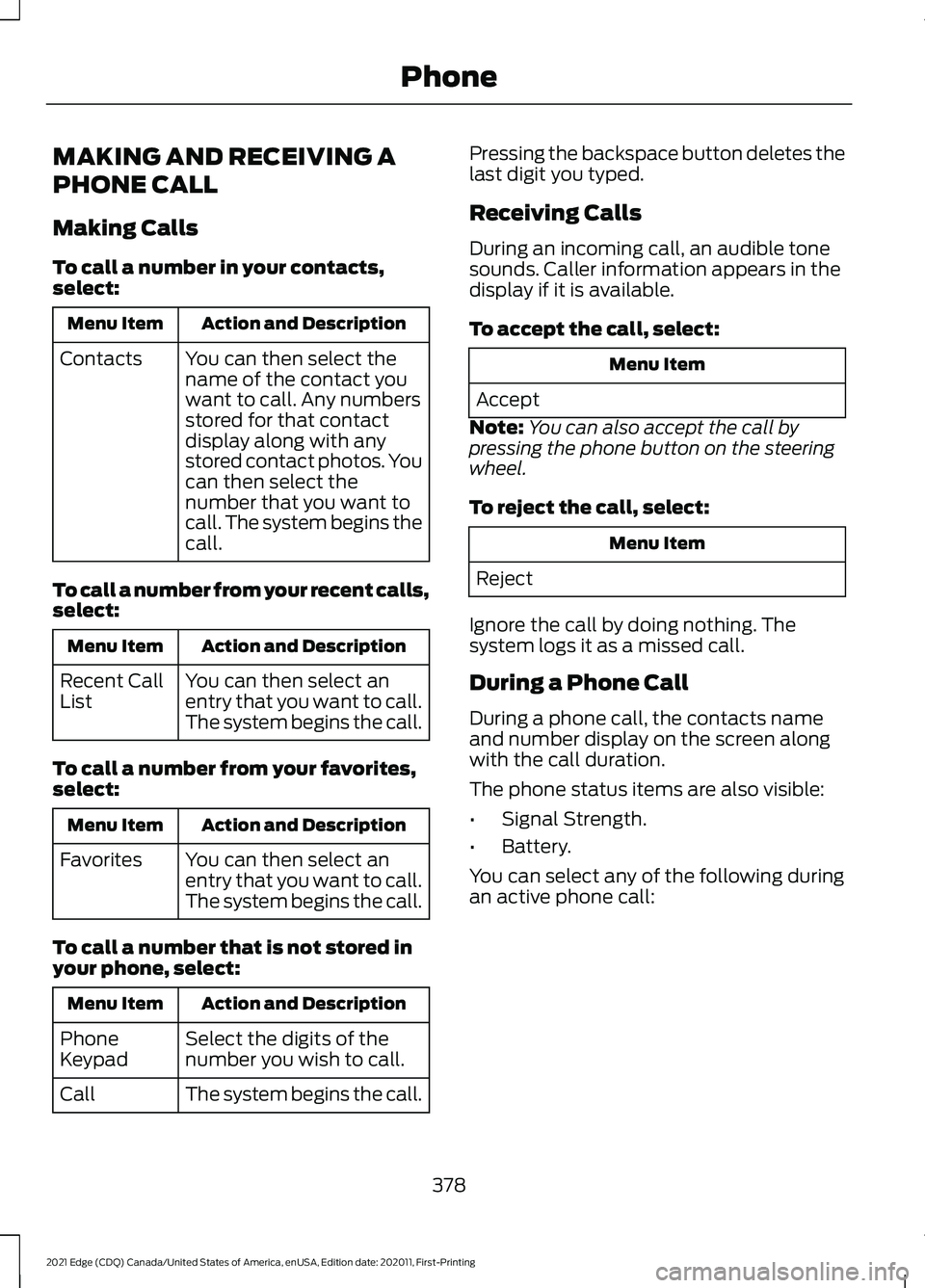
MAKING AND RECEIVING A
PHONE CALL
Making Calls
To call a number in your contacts,
select:
Action and Description
Menu Item
You can then select the
name of the contact you
want to call. Any numbers
stored for that contact
display along with any
stored contact photos. You
can then select the
number that you want to
call. The system begins the
call.
Contacts
To call a number from your recent calls,
select: Action and Description
Menu Item
You can then select an
entry that you want to call.
The system begins the call.
Recent Call
List
To call a number from your favorites,
select: Action and Description
Menu Item
You can then select an
entry that you want to call.
The system begins the call.
Favorites
To call a number that is not stored in
your phone, select: Action and Description
Menu Item
Select the digits of the
number you wish to call.
Phone
Keypad
The system begins the call.
Call Pressing the backspace button deletes the
last digit you typed.
Receiving Calls
During an incoming call, an audible tone
sounds. Caller information appears in the
display if it is available.
To accept the call, select:
Menu Item
Accept
Note: You can also accept the call by
pressing the phone button on the steering
wheel.
To reject the call, select: Menu Item
Reject
Ignore the call by doing nothing. The
system logs it as a missed call.
During a Phone Call
During a phone call, the contacts name
and number display on the screen along
with the call duration.
The phone status items are also visible:
• Signal Strength.
• Battery.
You can select any of the following during
an active phone call:
378
2021 Edge (CDQ) Canada/United States of America, enUSA, Edition date: 202011, First-Printing Phone
Page 480 of 500
Blind Spot Information System
Precautions..................................................231
Blind Spot Information System Requirements.............................................232
Blind Spot Information System – Troubleshooting........................................233
Blind Spot Information System – Information Messages................................ 233
Bluetooth®.....................................................381
Body Control Module Fuse Box.............286 Accessing the Body Control Module Fuse
Box..................................................................... 286
Identifying the Fuses in the Body Control Module Fuse Box........................................... 287
Locating the Body Control Module Fuse Box..................................................................... 286
Body Styling Kit Precautions....................312
Body Styling Kits...........................................312
Bonnet Lock See: Opening and Closing the Hood..........290
Booster Seats
..................................................39
Types of Booster Seats...................................... 39
Brake Fluid Specification
..........................188
Brake Over Accelerator...............................187
Brake Precautions........................................187
Brakes................................................................187 Anti-Lock Braking System............................... 187
Brakes – Troubleshooting............................... 188
Brakes – Troubleshooting.........................188 Brakes – Frequently Asked
Questions......................................................... 189
Brakes – Information Messages................... 189
Brakes – Warning Lamps................................ 188
Breaking-In.....................................................263 Brakes and Clutch............................................. 263
Tires........................................................................\
263
C
Calculating Payload
....................................249
Calculating the Load Limit.......................249
Helpful examples for calculating the
available amount of cargo and luggage
load capacity.................................................. 250
California Proposition 65 - United States of America
..................................................440
Canceling the Set Speed...........................213
Capacities and Specifications................347 Catalytic Converter.......................................176
Catalytic Converter –
Troubleshooting............................................. 176
Catalytic Converter Precautions
.............176
Catalytic Converter – Troubleshooting.........................................176
Catalytic Converter – Warning Lamps................................................................. 176
Changing a Flat Tire.....................................341 ........................................................................\
.......... 346
Dissimilar Spare Wheel and Tire Assembly Information...................................................... 341
Stowing the flat tire ......................................... 345
Tire Change Procedure.................................... 342
Changing a Road Wheel
............................341
Changing the 12V Battery.........................299 Remove and Reinstall the Battery.............300
Changing the Engine Air Filter................298
Changing the Fuel Filter............................298
Changing the Remote Control Battery.............................................................62
Changing the Vehicle Wi-Fi Hotspot Name or Password..................................364
Changing the Wi-Fi Hotspot Frequency........................................................ 365
Charging a Device
.........................................154
Charging a Wireless Device.......................157
Checking MyKey System Status
..............68
Checking the Brake Fluid...........................187
Checking the Coolant................................294 Adding Coolant.................................................. 295
Coolant Change................................................. 296
Engine Coolant Temperature Management.................................................. 297
Fail-Safe Cooling............................................... 296
Severe Climates................................................. 296
Checking the Seatbelts................................47
Checking the Tire Pressures....................326
Checking the Wiper Blades........................95
Children and Airbags....................................54
Child Restraint Anchor Points....................32 Locating the Child Restraint Lower Anchor
Points................................................................... 32
Locating the Child Restraint Top Tether Anchor Points................................................... 33
What Are the Child Restraint Anchor Points................................................................... 32
476
2021 Edge (CDQ) Canada/United States of America, enUSA, Edition date: 202011, First-Printing Index
Page 486 of 500
Information on the Tire Sidewall............316
Information on P Type Tires............................ 317
Inspecting the Tire for Damage..............327 Safety Practices.................................................. 327
Inspecting the Tire for Wear.....................327
Inspecting the Wheel Valve Stems............................................................328
Installing and Removing the Luggage Compartment Cargo Net.......................252
Installing and Removing the Luggage Compartment Cover................................252
Installing the Luggage Cover......................... 252
Removing the Luggage Cover....................... 253
Installing Child Restraints...........................34 Combining the Seatbelt and Lower Anchors
for Attaching Child Restraints.................... 38
Installing a Child Restraint in a Center Seat....................................................................... 37
Using Lower Anchors and Tethers for Children............................................................... 36
Using Seatbelts..................................................... 34
Using Tether Straps............................................. 38
Instrument Cluster Display.........................117 Personalized Settings....................................... 120
Trip Computer....................................................... 118
Instrument Cluster Display Main Menu................................................................117
Instrument Cluster Indicators...................116
Adaptive Cruise Control.................................... 116
Automatic Headlamp High Beam.................116
Auto-Start-Stop.................................................. 116
Blind Spot Monitor.............................................. 116
Cruise Control....................................................... 116
Front Airbag........................................................... 116
Front Fog Lamps.................................................. 116
High Beam.............................................................. 116
Hill Start Assist..................................................... 116
Lane Keeping Aid................................................. 116
Side Marker Lamps............................................. 116
Stability and Traction Control........................ 116
Turn Signal Lamps.............................................. 116
Instrument Cluster........................................113 Fuel Gauge............................................................. 113
Instrument Cluster Overview
....................113
Instrument Cluster Warning Lamps.......114 Anti-Lock Brake System.................................... 114
Battery..................................................................... 114
Brake System........................................................ 115Door Ajar.................................................................
115
Electric Park Brake.............................................. 115
Engine Coolant Temperature.......................... 115
Fasten Seatbelt.................................................... 115
Hood Ajar................................................................ 115
Liftgate Ajar............................................................ 115
Low Fuel Level...................................................... 115
Low Tire Pressure Warning.............................. 115
Low Washer Fluid Level..................................... 115
Malfunction Indicator Lamp............................ 115
Oil Pressure............................................................ 115
Powertrain Fault................................................... 115
Instrument Panel............................................27
Interior Air Quality.........................................132
Interior Bulbs................................................306 Interior Bulb Specification Chart.................306
Interior Lamp Function...............................105 Switching the Interior Lamp Function On
and Off.............................................................. 105
What Is the Interior Lamp Function............105
Interior Lighting
.............................................105
Ambient Lighting................................................ 106
Interior Lamp Function..................................... 105
Interior Lighting – Troubleshooting.............106
Interior Lighting – Troubleshooting........................................106
Interior Lighting – Frequently Asked Questions......................................................... 106
Interior Mirror.................................................109 Auto-Dimming Interior Mirror........................ 109
Interior Mirror Precautions........................109
Introduction.......................................................17
J
Jump Starting the Vehicle........................266 Jump Starting Precautions............................ 266
Jump Starting the Vehicle............................... 267
Preparing the Vehicle....................................... 267
K
Keyless Entry
....................................................74
Keyless Entry – Troubleshooting.................... 75
Keyless Entry Keypad....................................76 Keyless Entry Keypad –
Troubleshooting............................................... 78
Keyless Entry Keypad Limitations............76
482
2021 Edge (CDQ) Canada/United States of America, enUSA, Edition date: 202011, First-Printing Index
Page 490 of 500
Power Outlet Precautions.........................155
Power Seats...................................................136
Adjusting the Head Restraint..........................137
Adjusting the Lumbar Support...................... 139
Adjusting the Seat Backrest........................... 138
Adjusting the Seat Cushion............................ 138
Adjusting the Seat Height............................... 138
Folding the Seat Backrest............................... 142
Head Restraint Components......................... 136
Installing the Head Restraint......................... 138
Moving the Seat Backward and Forward............................................................. 138
Removing the Head Restraint........................ 137
Unfolding the Seat Backrest.......................... 142
Pre-Collision Assist Limitations.............238 Pedestrian Detection Limitations...............238
Pre-Collision Assist Precautions............237
Pre-Collision Assist.....................................237 Automatic Emergency Braking.................... 240
Distance Alert..................................................... 240
Distance Indication........................................... 239
Evasive Steering Assist..................................... 241
Pre-Collision Assist – Troubleshooting............................................ 242
Pre-Collision Assist – Troubleshooting........................................242
Pre-Collision Assist – Frequently Asked Questions......................................................... 243
Pre-Collision Assist – Information Messages......................................................... 242
Preparing Your Vehicle for Storage........313 12 Volt Battery...................................................... 313
Body........................................................................\
. 313
Brakes...................................................................... 313
Engine...................................................................... 313
General................................................................... 313
Hybrid Battery Systems ................................... 313
Tires........................................................................\
. 314
Programming a MyKey.................................67
Programming the Garage Door Opener to Your Garage Door Opener
Motor
..............................................................150
Programming the Garage Door Opener to Your Gate Opener Motor.....................151
Gate Operator / Canadian Programming.................................................... 151
Programming the Garage Door Opener to Your Hand-Held Transmitter...........149 Programming the Remote Control.........64
Properly Adjusting the Driver and Front
Passenger Seats..........................................53
Puncture See: Changing a Flat Tire................................. 341
Push Button Ignition Switch
....................160
Starting the Engine............................................ 160
Switching the Ignition Off............................... 160
Switching the Ignition to Accessory Mode.................................................................. 160
R
Radio Frequency Certification Labels...........................................................404
Blind Spot Information System Sensors............................................................ 404
Body Control Module...................................... 408
Cruise Control Module....................................... 411
Garage Door Opener......................................... 414
Keys and Remote Controls............................. 415
Radio Transceiver Module.............................. 420
SYNC...................................................................... 423
Telematics Control Unit.................................. 429
Tire Pressure Monitoring System Sensors............................................................. 429
Wireless Accessory Charging Module........437
Rear Exterior
....................................................30
Rear Occupant Alert System Audible Warnings.......................................................145
Rear Occupant Alert System Indicators......................................................145
Rear Occupant Alert System Limitations...................................................144
Rear Occupant Alert System Precautions..................................................144
Rear Occupant Alert System
...................144
Rear Parking Aid...........................................199 Locating the Rear Parking Aid
Sensors............................................................. 199
Rear Parking Aid Audible Warnings.............199
Rear Parking Aid Limitations.......................... 199
What is the Rear Parking Aid......................... 199
Rear Seats........................................................141 Heated Seats........................................................ 143
Manual Seats........................................................ 141
Power Seats.......................................................... 142
Rear View Camera Guide Lines..............203
486
2021 Edge (CDQ) Canada/United States of America, enUSA, Edition date: 202011, First-Printing Index
Page 491 of 500
Rear View Camera Object Distance
Indicators.....................................................204
Rear View Camera Precautions.............203
Rear View Camera......................................203
Rear View Camera Settings.......................... 204
Rear View Camera Settings....................204 Switching Rear View Camera Delay On and
Off...................................................................... 205
Zooming the Rear View Camera In and Out..................................................................... 204
Recalling a Preset Position.......................146 Linking a Preset Position to your Remote
Control .............................................................. 146
Recreationally Towing Your Vehicle - 2.0L EcoBoost™, AWD
...........................270
Recreationally Towing Your Vehicle - 2.0L EcoBoost™, FWD...........................270
Recreationally Towing Your Vehicle - 2.7L EcoBoost™........................................270
Refueling..........................................................173 Manually Opening the Fuel Filler
Door..................................................................... 174
Refueling System Overview............................ 173
Refueling Your Vehicle....................................... 173
Releasing the Electric Parking Brake if the Vehicle Battery Has Run Out of
Charge.............................................................191
Remote Control Limitations.......................61
Remotely Starting and Stopping the Vehicle............................................................125
Remotely Starting the Vehicle....................... 125
Remotely Stopping the Vehicle..................... 125
Remote Start Limitations..........................125
Remote Start Precautions
.........................125
Remote Start Remote Control Indicators......................................................126
Remote Control Feedback.............................. 126
Remote Start
..................................................125
Remote Start Settings...................................... 126
Remote Start Settings................................126 Setting the Remote Start Duration..............127
Switching Climate Control Auto Mode On
and Off............................................................... 126
Switching Climate Control Last Settings On and Off........................................................ 126
Switching the Heated Seat Settings On and Off........................................................................\
126Switching the Heated Steering Wheel
Settings On and Off...................................... 127
Removing the Key Blade.............................62
Removing Your Vehicle From Storage..........................................................314
Repairing Minor Paint Damage.................311
Replacement Parts Recommendation.....................................441
Collision Repairs................................................. 441
Scheduled Maintenance and Mechanical Repairs............................................................... 441
Warranty on Replacement Parts.................. 441
Replacing a Lost Key or Remote Control............................................................63
Replacing the Cabin Air Filter...................132
Replacing the Front Wiper Blades...........95
Replacing the Rear Wiper Blades
............96
Reporting Safety Defects (Canada Only)...............................................................277
Reporting Safety Defects (U.S. Only)...............................................................277
Reporting Safety Defects in Canada.........................................................402
Reporting Safety Defects in the United States...........................................................402
Reprogramming the Garage Door Opener............................................................151
Resetting the Stopping Position - Vehicles With: Power Adjustable
Steering Column..........................................93
Resetting Tire Pressure Monitoring System..........................................................338
Changing Tires With a Tire Pressure Monitoring System....................................... 338
Restarting the Engine..................................167
Resuming the Set Speed
...........................213
Resuming the Set Speed from a Complete
Stop.................................................................... 219
Reverse Wipe
...................................................95
Reverse Wipe Settings....................................... 95
What Is Reverse Wipe........................................ 95
Roadside Assistance
..................................265
Vehicles Sold in Canada: Getting Roadside
Assistance....................................................... 266
Vehicles Sold in the United States: Getting Roadside Assistance................................... 265
Vehicles Sold in the United States: Using Roadside Assistance................................... 265
487
2021 Edge (CDQ) Canada/United States of America, enUSA, Edition date: 202011, First-Printing Index