light FORD EDGE 2021 User Guide
[x] Cancel search | Manufacturer: FORD, Model Year: 2021, Model line: EDGE, Model: FORD EDGE 2021Pages: 500, PDF Size: 8.52 MB
Page 61 of 500
CRASH SENSORS AND
AIRBAG INDICATOR
WARNING: Modifying or adding
equipment to the front end of your
vehicle (including hood, bumper system,
frame, front end body structure, tow
hooks and hood pins) may affect the
performance of the airbag system,
increasing the risk of injury. Do not
modify or add equipment to the front
end of your vehicle.
Your vehicle has a collection of crash and
occupant sensors. These sensors provide
information to the restraints control
module which activates the following:
• Front and rear seatbelt pretensioners.
• Driver airbag.
• Passenger airbag.
• Knee airbag(s).
• Seat mounted side airbags.
• Safety Canopy.
Based on the type of crash, the restraints
control module deploys the appropriate
safety devices.
The restraints control module also
monitors the readiness of the above safety
devices plus the crash and occupant
sensors. The readiness of the safety
system is indicated by a warning indicator
light in the instrument cluster or by a
backup tone if the warning light is not
working. Routine maintenance of the
airbag is not required.
A difficulty with the system is indicated by
one or more of the following: The readiness light will not
illuminate immediately after you
switch the ignition on. •
The readiness light either flashes or
stays on.
• You hear a series of five tones. The
tone pattern repeats periodically until
the problem, the light or both are
repaired.
If any of these things happen, even
intermittently, have the supplemental
restraint system serviced immediately.
Unless serviced, the system may not
function properly in the event of a crash.
The fact that the seatbelt pretensioners
or front airbags did not activate for both
front seat occupants in a crash does not
mean that something is wrong with the
system. Rather, it means the restraints
control module determined the accident
conditions (crash severity, seatbelt usage)
were not appropriate to activate these
safety devices.
• The front airbags activate only in
frontal and near-frontal crashes. Front
airbags may activate in rollovers, side
impacts or rear impacts if the crash
causes sufficient frontal deceleration.
• The seatbelt pretensioners activate in
frontal, near-frontal and side crashes,
and in rollovers.
• The knee airbag(s) deploy based on
crash severity and occupant conditions.
• The side airbags inflate in certain side
impact crashes or rollover events. Side
airbags may activate in other types of
crashes if the vehicle experiences
sufficient sideways motion or
deformation.
• The Safety Canopy inflates in certain
side impact crashes or rollover events.
The Safety Canopy may activate in
other types of crashes if the vehicle
experiences sufficient sideways motion
or deformation, or a certain likelihood
of rollover.
57
2021 Edge (CDQ) Canada/United States of America, enUSA, Edition date: 202011, First-Printing AirbagsE67017
Page 79 of 500
With your passive key within 3 ft (1 m) of
your vehicle, press the exterior liftgate
release button inside of the liftgate handle.
The liftgate unlocks and opens. See
Opening the Liftgate From Outside
Your Vehicle
(page 80).
Locking the Doors With your passive key within
3 ft (1 m) of
your vehicle, touch the outer door handle
lock sensor for approximately one second
to lock, being careful not to touch the
unlock sensor on the back of the door
handle at the same time. After locking, you
can immediately pull on the door handle
to confirm locking occurred without
inadvertently unlocking.
KEYLESS ENTRY –
TROUBLESHOOTING
Keyless Entry – Frequently Asked
Questions
Why does the keypad not accept the
access code?
If you enter the access code too fast
on the keypad, the unlock function
may not work. Slowly re-enter the
access code.
Why does the passive key not work? The system deactivates passive keys
left inside your vehicle when you lock
it. You cannot switch the ignition on
using a deactivated passive key. Press
the unlock button on the remote
control to reactivate a passive key. Why does the keypad not function?
The keypad goes into an anti-scan
mode if you enter a wrong code seven
times. The anti-scan mode disables
the keypad for one minute and the red
light flashes.
75
2021 Edge (CDQ) Canada/United States of America, enUSA, Edition date: 202011, First-Printing Keyless Entry
(If Equipped)E248554
Page 82 of 500
USING THE KEYLESS ENTRY
KEYPAD
Unlocking the Doors
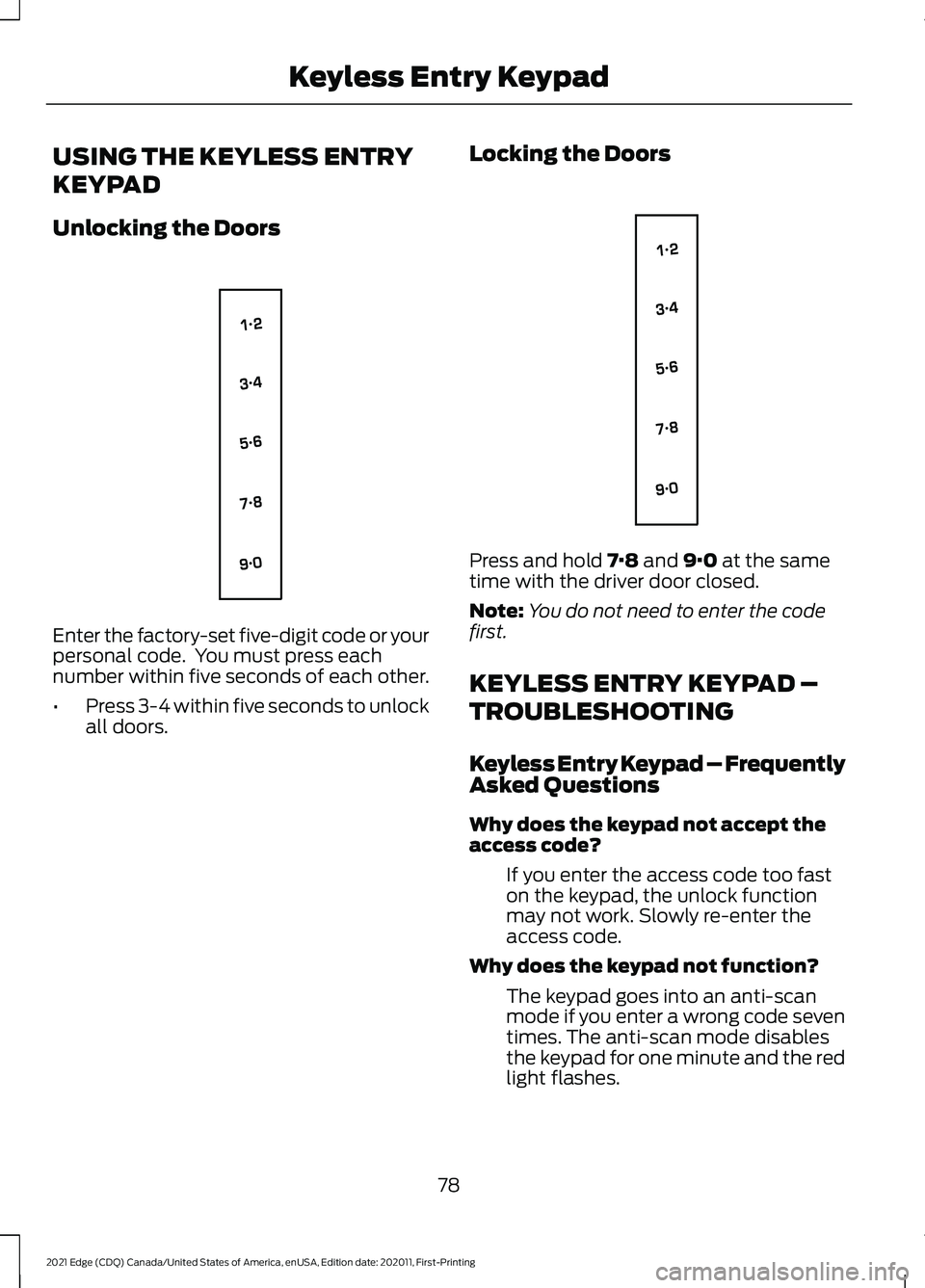
Enter the factory-set five-digit code or your
personal code. You must press each
number within five seconds of each other.
•
Press 3-4 within five seconds to unlock
all doors. Locking the Doors Press and hold 7·8 and 9·0 at the same
time with the driver door closed.
Note: You do not need to enter the code
first.
KEYLESS ENTRY KEYPAD –
TROUBLESHOOTING
Keyless Entry Keypad – Frequently
Asked Questions
Why does the keypad not accept the
access code?
If you enter the access code too fast
on the keypad, the unlock function
may not work. Slowly re-enter the
access code.
Why does the keypad not function? The keypad goes into an anti-scan
mode if you enter a wrong code seven
times. The anti-scan mode disables
the keypad for one minute and the red
light flashes.
78
2021 Edge (CDQ) Canada/United States of America, enUSA, Edition date: 202011, First-Printing Keyless Entry KeypadE138637 E138637
Page 99 of 500
When you select high sensitivity, the wipers
operate when the sensor detects a small
amount of water on the windshield.
When you select low sensitivity, the wipers
operate when the sensor detects a large
amount of water on the windshield.
SWITCHING THE REAR
WINDOW WIPER ON AND OFF
Fr
ont and R e ar W iper S t alk
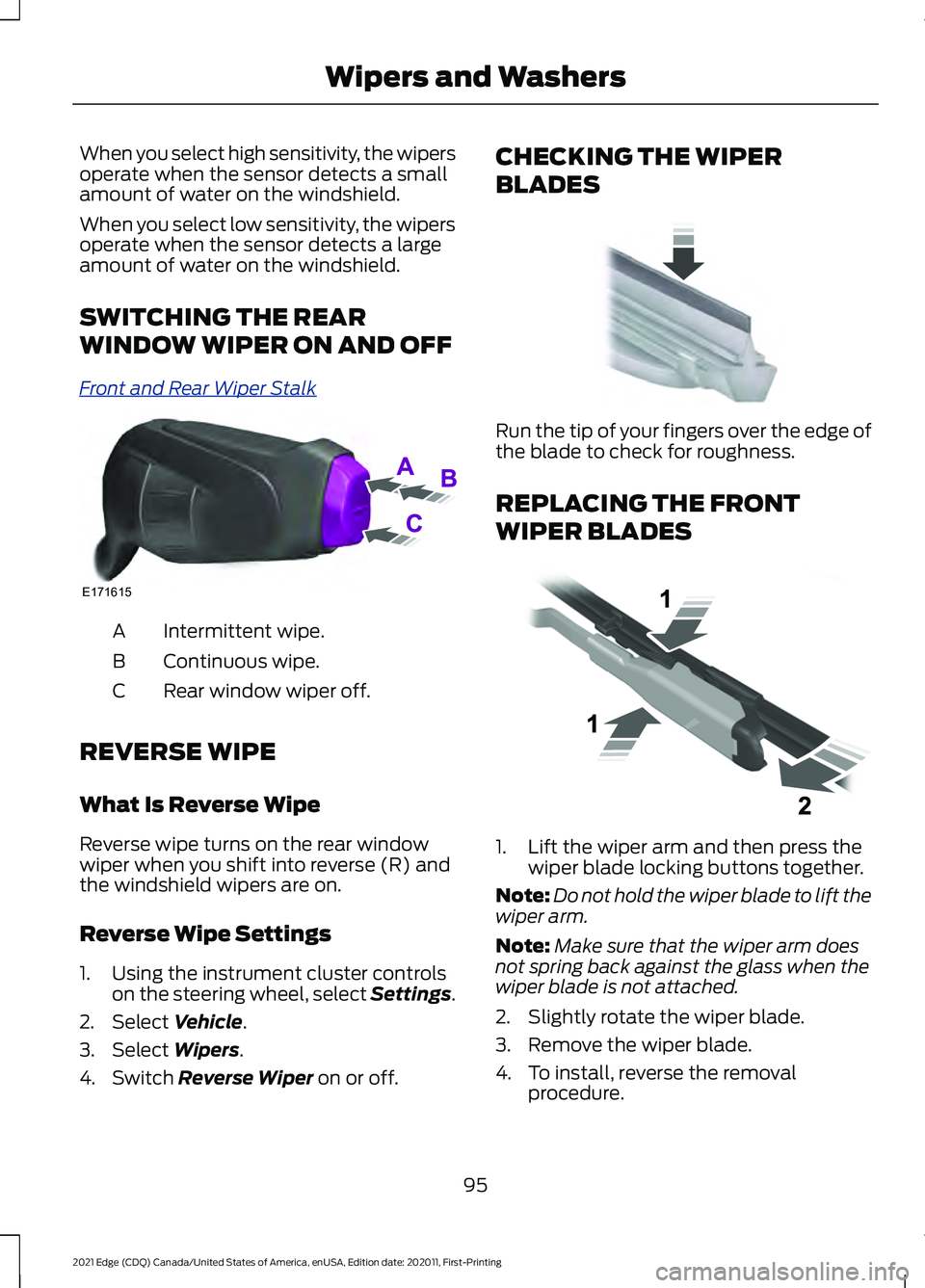
Intermittent wipe.
A
Continuous wipe.
B
Rear window wiper off.
C
REVERSE WIPE
What Is Reverse Wipe
Reverse wipe turns on the rear window
wiper when you shift into reverse (R) and
the windshield wipers are on.
Reverse Wipe Settings
1. Using the instrument cluster controls on the steering wheel, select Settings.
2. Select Vehicle.
3. Select
Wipers.
4. Switch
Reverse Wiper on or off. CHECKING THE WIPER
BLADES
Run the tip of your fingers over the edge of
the blade to check for roughness.
REPLACING THE FRONT
WIPER BLADES
1. Lift the wiper arm and then press the
wiper blade locking buttons together.
Note: Do not hold the wiper blade to lift the
wiper arm.
Note: Make sure that the wiper arm does
not spring back against the glass when the
wiper blade is not attached.
2. Slightly rotate the wiper blade.
3. Remove the wiper blade.
4. To install, reverse the removal procedure.
95
2021 Edge (CDQ) Canada/United States of America, enUSA, Edition date: 202011, First-Printing Wipers and WashersE171615 E142463 E129990
Page 102 of 500
EXTERIOR LIGHTING
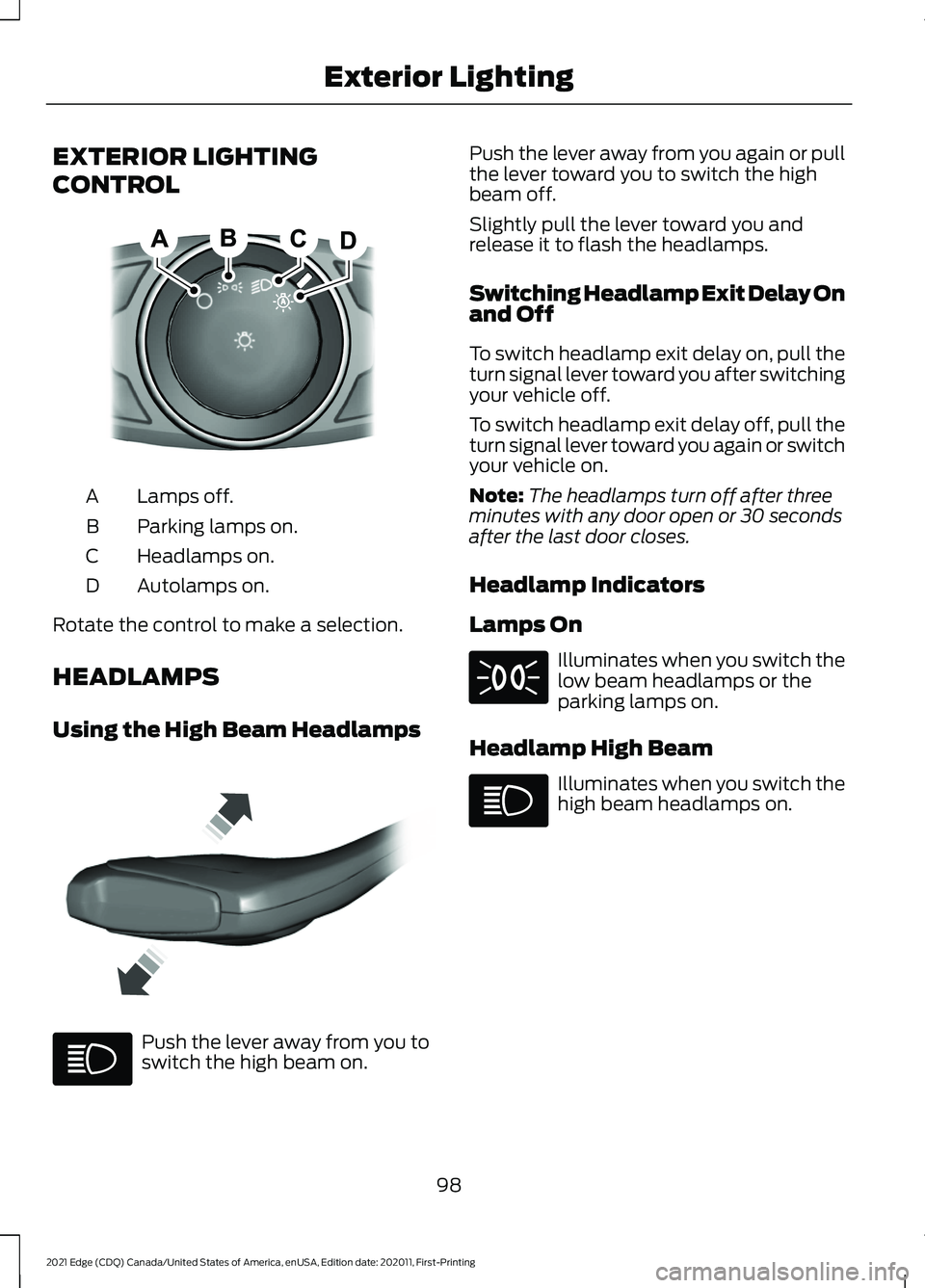
CONTROL
Lamps off.
A
Parking lamps on.
B
Headlamps on.
C
Autolamps on.
D
Rotate the control to make a selection.
HEADLAMPS
Using the High Beam Headlamps Push the lever away from you to
switch the high beam on. Push the lever away from you again or pull
the lever toward you to switch the high
beam off.
Slightly pull the lever toward you and
release it to flash the headlamps.
Switching Headlamp Exit Delay On
and Off
To switch headlamp exit delay on, pull the
turn signal lever toward you after switching
your vehicle off.
To switch headlamp exit delay off, pull the
turn signal lever toward you again or switch
your vehicle on.
Note:
The headlamps turn off after three
minutes with any door open or 30 seconds
after the last door closes.
Headlamp Indicators
Lamps On Illuminates when you switch the
low beam headlamps or the
parking lamps on.
Headlamp High Beam Illuminates when you switch the
high beam headlamps on.
98
2021 Edge (CDQ) Canada/United States of America, enUSA, Edition date: 202011, First-Printing Exterior LightingE322426 E339577
Page 103 of 500
HEADLAMPS –
TROUBLESHOOTING
Headlamps – Frequently Asked
Questions
Why is there condensation in the
headlamps?
Headlamps have vents to
accommodate normal changes in air
pressure. Condensation can be a
natural by-product of this design.
When moist air enters the lamp
assembly through the vents, there is a
possibility that condensation can
occur when the temperature is cold.
When normal condensation occurs, a
fine mist can form on the interior of the
lens. The fine mist eventually clears
and exits through the vents during
normal operation.
How much condensation is
acceptable? The presence of a fine mist, for
example no streaks, drip marks or
large droplets. A fine mist covers less
than 50% of the lens.
How long may it take for the
acceptable condensation to be
cleared? Clearing time may take as long as 48
hours under dry weather conditions.
How much condensation is
unacceptable? A water puddle inside the lamp.
Streaks, drip marks or large droplets
present on the interior of the lens.
What should I do if unacceptable
condensation is present? Have your vehicle checked as soon as
possible. Why do my headlamps turn off when I
have them switched on when I switch
my vehicle off?
The battery saver turns the headlamps
off after a short period of time after
you switch your vehicle off.
AUTOLAMPS
What Are Autolamps WARNING: The system does not
relieve you of your responsibility to drive
with due care and attention. You may
need to override the system if it does not
turn the headlamps on in low visibility
conditions, for example daytime fog.
Autolamps turn the headlamps on in low
light situations or when the windshield
wipers operate.
Autolamp Settings
1. Using the instrument cluster controls on the steering wheel, select Settings.
2. Select
Vehicle.
3. Select
Lighting.
4. Select
Autolamp Delay.
5. Select a setting and press the
OK
button.
99
2021 Edge (CDQ) Canada/United States of America, enUSA, Edition date: 202011, First-Printing Exterior Lighting
Page 104 of 500
EXTERIOR LAMPS
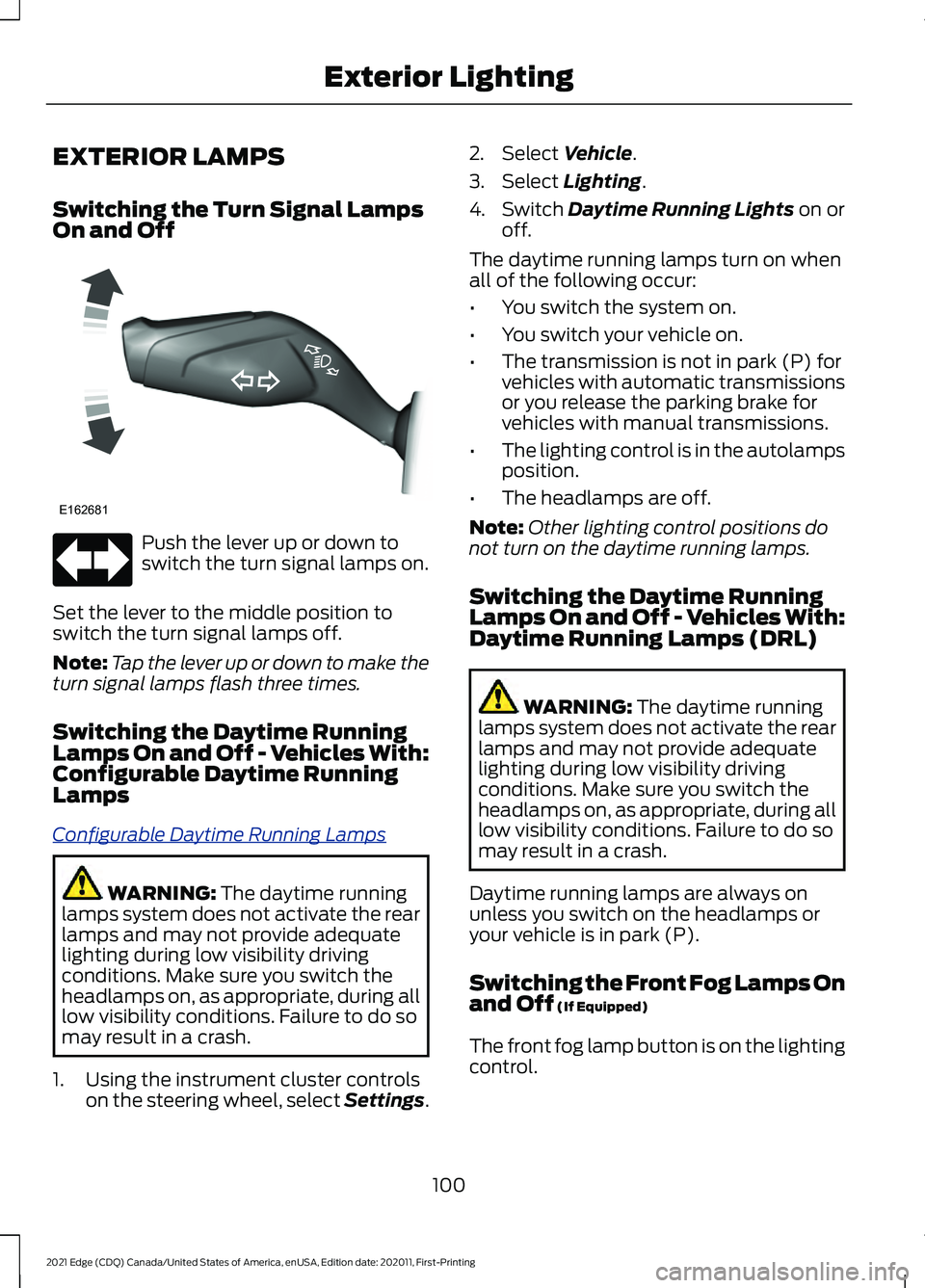
Switching the Turn Signal Lamps
On and Off
Push the lever up or down to
switch the turn signal lamps on.
Set the lever to the middle position to
switch the turn signal lamps off.
Note: Tap the lever up or down to make the
turn signal lamps flash three times.
Switching the Daytime Running
Lamps On and Off - Vehicles With:
Configurable Daytime Running
Lamps
C onfig ur abl e D a ytime R unning L amp s
WARNING: The daytime running
lamps system does not activate the rear
lamps and may not provide adequate
lighting during low visibility driving
conditions. Make sure you switch the
headlamps on, as appropriate, during all
low visibility conditions. Failure to do so
may result in a crash.
1. Using the instrument cluster controls on the steering wheel, select Settings. 2. Select
Vehicle.
3. Select
Lighting.
4. Switch
Daytime Running Lights on or
off.
The daytime running lamps turn on when
all of the following occur:
• You switch the system on.
• You switch your vehicle on.
• The transmission is not in park (P) for
vehicles with automatic transmissions
or you release the parking brake for
vehicles with manual transmissions.
• The lighting control is in the autolamps
position.
• The headlamps are off.
Note: Other lighting control positions do
not turn on the daytime running lamps.
Switching the Daytime Running
Lamps On and Off - Vehicles With:
Daytime Running Lamps (DRL) WARNING:
The daytime running
lamps system does not activate the rear
lamps and may not provide adequate
lighting during low visibility driving
conditions. Make sure you switch the
headlamps on, as appropriate, during all
low visibility conditions. Failure to do so
may result in a crash.
Daytime running lamps are always on
unless you switch on the headlamps or
your vehicle is in park (P).
Switching the Front Fog Lamps On
and Off
(If Equipped)
The front fog lamp button is on the lighting
control.
100
2021 Edge (CDQ) Canada/United States of America, enUSA, Edition date: 202011, First-Printing Exterior LightingE162681
Page 105 of 500
Press the button to switch the
front fog lamps on or off.
Note: Only switch the front fog lamps on
during reduced visibility.
Note: The brightness of the daytime running
lamps may decrease when the front fog
lamps are switched on.
Note: When the lighting control is in the
autolamps position, you cannot switch the
fog lamps on unless the headlamps are on.
Exterior Lamp Indicators
Front Fog Lamp It illuminates when you switch
the front fog lamps on.
Turn Signal Lamp It flashes when you switch the
turn signal lamps on.
Note: An increase in the rate of flashing
warns of a failed turn signal lamp bulb.
AUTOMATIC HIGH BEAM
CONTROL
How Does Automatic High Beam
Control Work
A ut o High Be ams
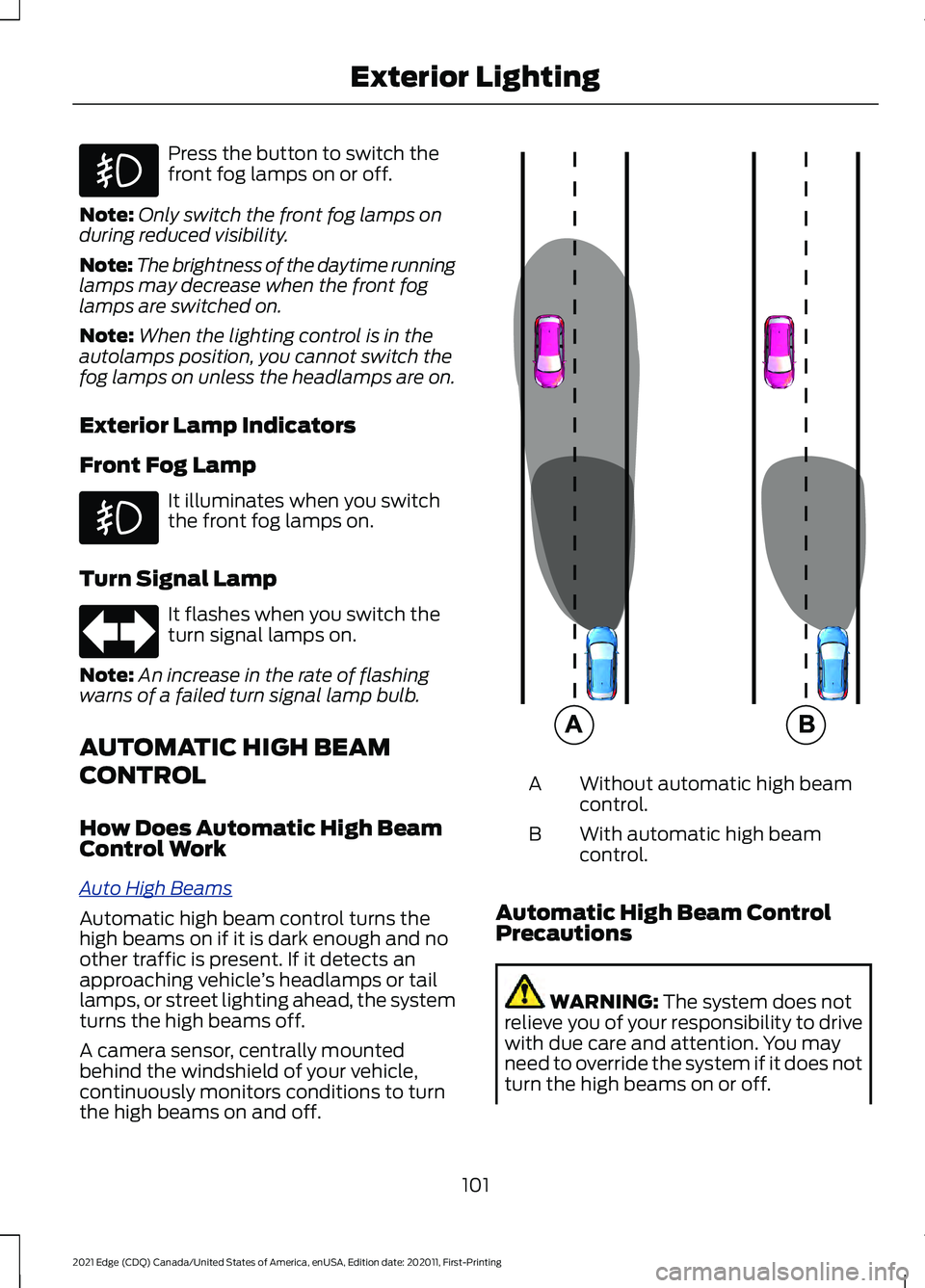
Automatic high beam control turns the
high beams on if it is dark enough and no
other traffic is present. If it detects an
approaching vehicle
’s headlamps or tail
lamps, or street lighting ahead, the system
turns the high beams off.
A camera sensor, centrally mounted
behind the windshield of your vehicle,
continuously monitors conditions to turn
the high beams on and off. Without automatic high beam
control.
A
With automatic high beam
control.
B
Automatic High Beam Control
Precautions WARNING: The system does not
relieve you of your responsibility to drive
with due care and attention. You may
need to override the system if it does not
turn the high beams on or off.
101
2021 Edge (CDQ) Canada/United States of America, enUSA, Edition date: 202011, First-Printing Exterior Lighting E327596
Page 106 of 500
WARNING: Do not use the system
in poor visibility, for example fog, heavy
rain, spray or snow. WARNING:
You may need to
override the system when approaching
other road users. WARNING:
You may need to
override the system during inclement
weather.
Automatic High Beam Control
Requirements
The system turns the high beams on if all
of the following occur:
• You switch the system on.
• You set the lighting control to the
autolamps position.
• The ambient light level is low enough
that you require high beams.
• There is no traffic in front of your
vehicle.
• The vehicle speed is greater than
approximately
32 mph (52 km/h).
Automatic High Beam Control
Limitations
The system turns the high beams off if any
of the following occur:
• You switch the system off.
• You set the lighting control to any
position except autolamps.
• The ambient light level is high enough
that you do not require high beams.
• The system detects an approaching
vehicle's headlamps or rear lamps.
• The system detects severe rain, snow
or fog. •
The system detects street lighting.
• The camera has reduced visibility.
• The vehicle speed falls below
approximately
27 mph (44 km/h).
Switching Automatic High Beam
Control On and Off
1. Using the instrument cluster controls on the steering wheel, select Settings.
2. Select
Vehicle.
3. Select
Lighting.
4. Switch
Auto High Beam on or off.
Automatic High Beam Control
Indicators Illuminates to confirm when the
system is ready to assist.
Overriding Automatic High Beam
Control Push the lever away from you to switch
the high beam on.
Push the lever away from you again to
switch the high beam off.
Push the lever away from you for a third
time to switch automatic high beam
control back on.
102
2021 Edge (CDQ) Canada/United States of America, enUSA, Edition date: 202011, First-Printing Exterior Lighting E162679
Page 107 of 500
AUTOMATIC HIGH BEAM CONTROL – TROUBLESHOOTING
Automatic High Beam Control – Information Messages
Description
Message
The camera has reduced visibility. Clean the windshield. If
the message continues to appear, have your vehicle checked
as soon as possible.
Front Camera Low Visib-
ility Clean Screen
The camera has malfunctioned. Wait a short period of time
for the camera to cool down. If the message continues to
appear, have your vehicle checked as soon as possible.
Front Camera Tempor-
arily Not Available
The camera has malfunctioned. Have your vehicle checked
as soon as possible.
Front Camera Malfunc-
tion Service Required
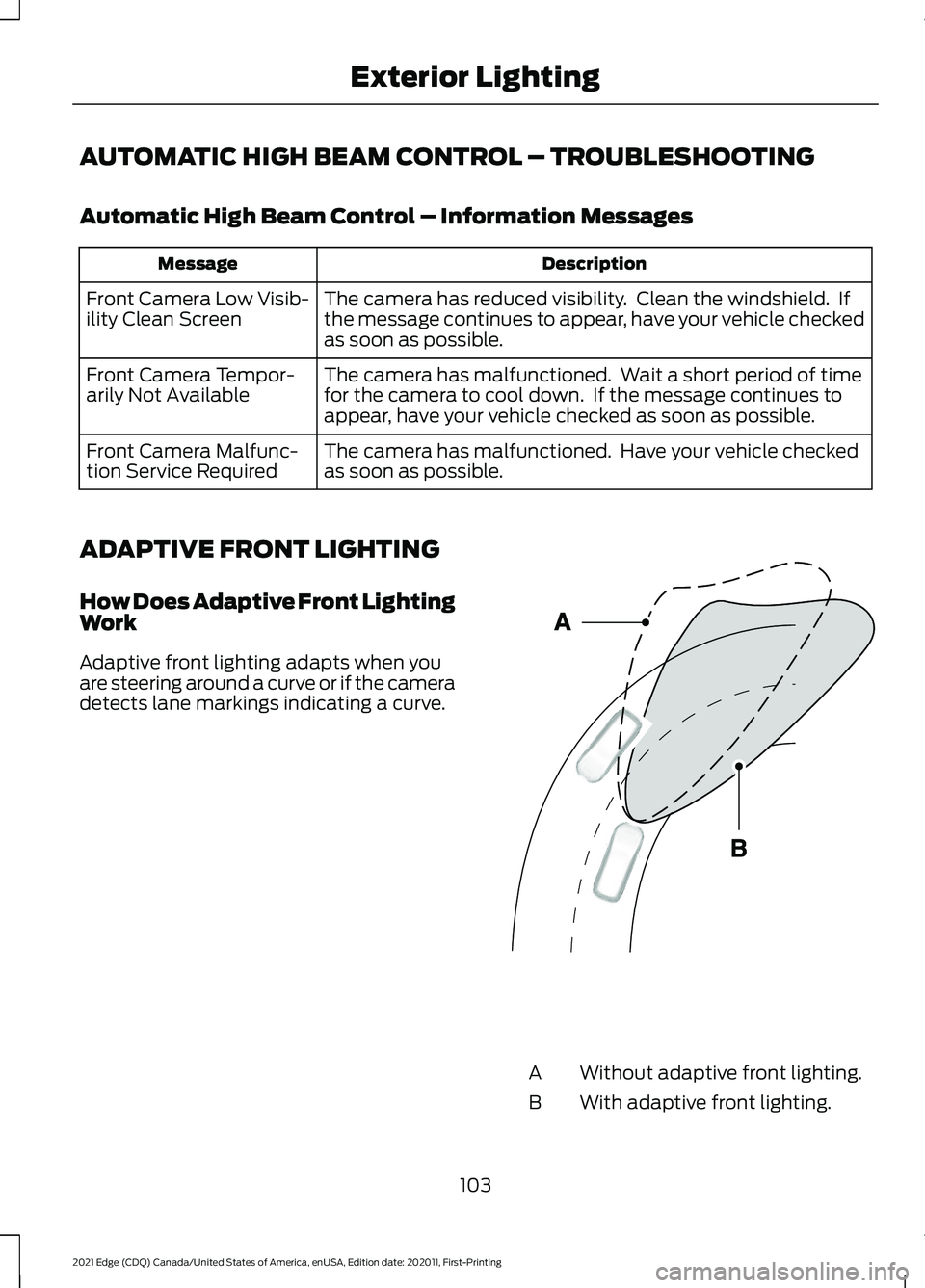
ADAPTIVE FRONT LIGHTING
How Does Adaptive Front Lighting
Work
Adaptive front lighting adapts when you
are steering around a curve or if the camera
detects lane markings indicating a curve. Without adaptive front lighting.
A
With adaptive front lighting.
B
103
2021 Edge (CDQ) Canada/United States of America, enUSA, Edition date: 202011, First-Printing Exterior LightingE161714