roof FORD EDGE 2021 User Guide
[x] Cancel search | Manufacturer: FORD, Model Year: 2021, Model line: EDGE, Model: FORD EDGE 2021Pages: 500, PDF Size: 8.52 MB
Page 278 of 500
You are required to submit your warranty
dispute to BBB AUTO LINE before asserting
in court any rights or remedies conferred
by California Civil Code Section 1793.22(b).
You are also required to use BBB AUTO
LINE before exercising rights or seeking
remedies created by the Federal
Magnuson-Moss Warranty Act, 15 U.S.C.
sec. 2301 et seq. If you choose to seek
redress by pursuing rights and remedies
not created by California Civil Code Section
1793.22(b) or the Magnuson-Moss
Warranty Act, resort to BBB AUTO LINE is
not required by those statutes.
THE BETTER BUSINESS
BUREAU (BBB) AUTO LINE
PROGRAM (U.S. ONLY)
Your satisfaction is important to Ford
Motor Company and to your dealer. If a
warranty concern has not been resolved
using the three-step procedure outlined
earlier in this chapter in the Getting the
Services you need section, you may be
eligible to participate in the BBB AUTO
LINE program.
The BBB AUTO LINE program consists of
two parts – mediation and arbitration.
During mediation, a representative of the
BBB will contact both you and Ford Motor
Company to explore options for settlement
of the claim. If an agreement is not reached
during mediation or you do not want to
participate in mediation, and if your claim
is eligible, you may participate in the
arbitration process. An arbitration hearing
will be scheduled so that you can present
your case in an informal setting before an
impartial person. The arbitrator will
consider the testimony provided and make
a decision after the hearing.
Disputes submitted to the BBB AUTO LINE
program are usually decided within forty
days after you file your claim with the BBB.
You are not bound by the decision, and
may reject the decision and proceed to
court where all findings of the BBB Auto
Line dispute, and decision, are admissible
in the court action. Should you choose to
accept the BBB AUTO LINE decision, Ford
is then bound by the decision, and must
comply with the decision within 30 days
of receipt of your acceptance letter.
BBB AUTO LINE Application: Using the
information provided below, please call or
write to request a program application.
You will be asked for your name and
address, general information about your
new vehicle, information about your
warranty concerns, and any steps you have
already taken to try to resolve them. A
Customer Claim Form will be mailed that
will need to be completed, signed and
returned to the BBB along with proof of
ownership. Upon receipt, the BBB will
review the claim for eligibility under the
Program Summary Guidelines.
You can get more information by
calling BBB AUTO LINE at
1-800-955-5100, or writing to:
BBB AUTO LINE
3033 Wilson Boulevard, Suite 600
Arlington, Virginia 22201
BBB AUTO LINE applications can also be
requested by calling the Ford Motor
Company Customer Relationship Center
at 1-800-392-3673.
For additional information refer to the
Better Business Bureau website.
Note:
Ford Motor Company reserves the
right to change eligibility limitations, modify
procedures, or to discontinue this process
at any time without notice and without
obligation.
274
2021 Edge (CDQ) Canada/United States of America, enUSA, Edition date: 202011, First-Printing Customer Assistance
Page 291 of 500
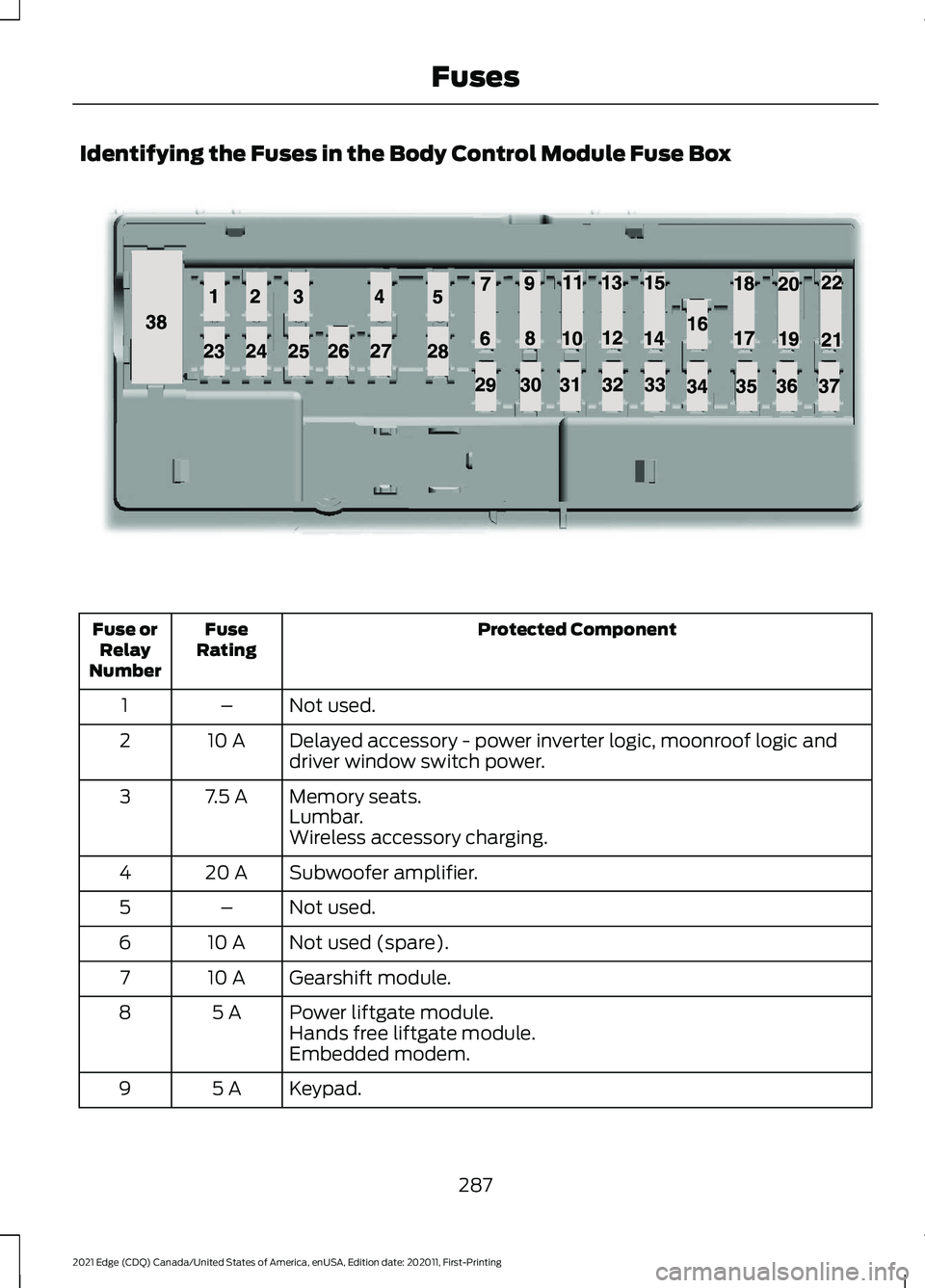
Identifying the Fuses in the Body Control Module Fuse Box
Protected Component
Fuse
Rating
Fuse or
Relay
Number
Not used.
–
1
Delayed accessory - power inverter logic, moonroof logic and
driver window switch power.
10 A
2
Memory seats.
7.5 A
3
Lumbar.
Wireless accessory charging.
Subwoofer amplifier.
20 A
4
Not used.
–
5
Not used (spare).
10 A
6
Gearshift module.
10 A
7
Power liftgate module.
5 A
8
Hands free liftgate module.
Embedded modem.
Keypad.
5 A
9
287
2021 Edge (CDQ) Canada/United States of America, enUSA, Edition date: 202011, First-Printing FusesE145984
Page 292 of 500
Protected Component
Fuse
Rating
Fuse or
Relay
Number
Not used.
–
10
Not used.
–
11
Climate control module.
7.5 A
12
Enhanced central gateway module.
Instrument cluster.
7.5 A
13
Steering column control module.
Not used (spare).
15 A
14
SYNC module.
15 A
15
Not used.
–
16
Headlamp control module.
7.5 A
17
Not used (spare).
7.5 A
18
Not used (spare).
5 A
19
Push button ignition switch.
5 A
20
In-vehicle temperature and humidity sensor.
5 A
21
Not used (spare).
5 A
22
Driver door window and mirror.
30 A
23
Driver door module.
Driver door lock indicator.
Driver lock switch illumination.
Moonroof.
30 A
24
Amplifier.
20 A
25
Front passenger door window and mirror.
30 A
26
Front passenger door module.
Front passenger lock indicator.
Front passenger switch illumination.
Not used (spare).
30 A
27
Not used (spare).
30 A
28
Enhanced central gateway power - OBD connector.
15 A
29
Not used (spare).
5 A
30
288
2021 Edge (CDQ) Canada/United States of America, enUSA, Edition date: 202011, First-Printing Fuses
Page 315 of 500
For heavy stains, spot clean the area. If a
ring forms on the fabric, clean the entire
area immediately, but do not oversaturate
or the ring could set.
We recommend that you only clean your
floor mats in the following way:
1. Remove dust and loose dirt with a
vacuum cleaner.
2. Wash rubber floor mats using mild soap and lukewarm or cold water.
3. Completely dry the floor mat before placing them back in your vehicle.
Cleaning Seatbelts WARNING: Do not use cleaning
solvents, bleach or dye on the vehicle's
seatbelts, as these actions may weaken
the belt webbing.
1. Wipe the surface with a soft, damp cloth and a mild soap and water
solution. Dry the area with a clean, soft
cloth.
Cleaning Storage Compartments
1. Remove dust and loose dirt with a vacuum cleaner.
2. Wipe the surface with a soft, damp cloth and a mild soap and water
solution. Dry the area with a clean, soft
cloth.
Cleaning Moonroof Tracks
1. Remove debris from the tracks with a vacuum cleaner.
2. Wipe the bulb seal and mating painted
roof metal surface with a soft, damp
cloth and a mild soap and water
solution. REPAIRING MINOR PAINT
DAMAGE
Authorized dealers have touch-up paint to
match your vehicle
’s color. Your vehicle
color code is printed on a sticker on the
front, left-hand side door jamb. Take your
color code to your authorized dealer to
make sure you get the correct color.
Before repairing minor paint damage, use
a cleaner to remove particles such as bird
droppings, tree sap, insect deposits, tar
spots, road salt and industrial fallout.
Read the instructions before using cleaning
products.
WAXING YOUR VEHICLE
Wax the high-gloss painted surface of your
prewashed vehicle once or twice a year.
We recommend that you only use an
approved quality wax that does not
contain abrasives. Follow the
manufacturer's instructions to apply and
remove the wax. For additional information
and assistance, we recommend that you
contact an authorized dealer.
When washing and waxing, park your
vehicle in a shaded area out of direct
sunlight.
Note: Avoid waxing unpainted or low-gloss
black colored parts, they discolor over time.
311
2021 Edge (CDQ) Canada/United States of America, enUSA, Edition date: 202011, First-Printing Vehicle Care
Page 405 of 500
Disputes submitted to the BBB AUTO LINE
program are usually decided within forty
days after you file your claim with the BBB.
You are not bound by the decision, and
may reject the decision and proceed to
court where all findings of the BBB Auto
Line dispute, and decision, are admissible
in the court action. Should you choose to
accept the BBB AUTO LINE decision, Ford
is then bound by the decision, and must
comply with the decision within 30 days
of receipt of your acceptance letter.
BBB AUTO LINE Application: Using the
information provided below, please call or
write to request a program application.
You will be asked for your name and
address, general information about your
new vehicle, information about your
warranty concerns, and any steps you have
already taken to try to resolve them. A
Customer Claim Form will be mailed that
will need to be completed, signed and
returned to the BBB along with proof of
ownership. Upon receipt, the BBB will
review the claim for eligibility under the
Program Summary Guidelines.
You can get more information by
calling BBB AUTO LINE at
1-800-955-5100, or writing to:
BBB AUTO LINE
3033 Wilson Boulevard, Suite 600
Arlington, Virginia 22201
BBB AUTO LINE applications can also be
requested by calling the Ford Motor
Company Customer Relationship Center
at 1-800-392-3673.
For additional information refer to the
Better Business Bureau website.
Note:
Ford Motor Company reserves the
right to change eligibility limitations, modify
procedures, or to discontinue this process
at any time without notice and without
obligation. THE MEDIATION AND
ARBITRATION PROGRAM -
CANADA
For vehicles delivered to authorized
Canadian dealers. In those cases where
you continue to feel that the efforts by Ford
of Canada and the authorized dealer to
resolve a factory-related vehicle service
concern have been unsatisfactory, Ford of
Canada participates in an impartial third
party mediation/arbitration program
administered by the Canadian Motor
Vehicle Arbitration Plan (CAMVAP).
The CAMVAP program is a straightforward
and relatively speedy alternative to resolve
a disagreement when all other efforts to
produce a settlement have failed. This
procedure is without cost to you and is
designed to eliminate the need for lengthy
and expensive legal proceedings.
In the CAMVAP program, impartial
third-party arbitrators conduct hearings at
mutually convenient times and places in
an informal environment. These impartial
arbitrators review the positions of the
parties, make decisions and, when
appropriate, render awards to resolve
disputes. CAMVAP decisions are fast, fair,
and final as the arbitrator
’s award is
binding on both you and Ford of Canada.
CAMVAP services are available in all
Canadian territories and provinces. For
more information, without charge or
obligation, call your CAMVAP Provincial
Administrator directly at 1-800-207-0685
or visit www.camvap.ca.
ORDERING A CANADIAN
FRENCH OWNER'S MANUAL
You can obtain a French owner's manual
from an authorized dealer or by contacting
Helm, LLC at:
401
2021 Edge (CDQ) Canada/United States of America, enUSA, Edition date: 202011, First-Printing Customer Information
Page 467 of 500
view it, and (ii) save it, provided that you
do not remove any copyright notices that
appear and do not modify the Data in any
way. You agree not to otherwise reproduce,
copy, modify, decompile, disassemble or
reverse engineer any portion of this Data,
and may not transfer or distribute it in any
form, for any purpose, except to the extent
permitted by mandatory laws.
Restrictions
Except where you have been specifically
licensed to do so by NAV2 , and without
limiting the preceding paragraph, you may
not (a) use this Data with any products,
systems, or applications installed or
otherwise connected to or in
communication with vehicles, capable of
vehicle navigation, positioning, dispatch,
real time route guidance, fleet
management or similar applications; or (b)
with or in communication with any
positioning devices or any mobile or
wireless-connected electronic or computer
devices, including without limitation
cellular phones, palmtop and handheld
computers, pagers, and personal digital
assistants or PDAs. You agree to cease
using this Data if you fail to comply with
these terms and conditions.
Limited Warranty
NAV2 warrants that (a) the Data will
perform substantially in accordance with
the accompanying written materials for a
period of ninety (90) days from the date
of receipt, and (b) any support services
provided by NAV2 shall be substantially as
described in applicable written materials
provided to you by NAV2, and NAV2’
s
support engineers will make commercially
reasonable efforts to solve any problem
issues. Customer Remedies
NAV2 and its suppliers’
entire liability and
your exclusive remedy shall be, at NAV2’ s
sole discretion, either (a) return of the price
paid, if any, or (b) repair or replacement of
the Data that do not meet NAV2’ s Limited
Warranty and that are returned to NAV2
with a copy of your receipt. This Limited
Warranty is void if failure of the Data has
resulted from accident, abuse, or
misapplication. Any replacement Data will
be warranted for the remainder of the
original warranty period or thirty (30) days,
whichever is longer. Neither these remedies
nor any product support services offered
by NAV2 are available without proof of
purchase from an authorized international
source.
No Other Warranty:
EXCEPT FOR THE LMITED WARRANTY
SET FORTH ABOVE AND TO THE EXTENT
PERMITTED BY APPLICABLE LAW, NAV2
AND ITS LICENSORS (INCLUDING THEIR
LICENSORS AND SUPPLIERS) DISCLAIM
ANY WARRANTIES, EXPRESS OR IMPLIED,
OF QUALITY, PERFORMANCE,
MERCHANTABILITY, FITNESS FOR A
PARTICULAR PURPOSE, OWNERSHIP OR
NON-INFRINGEMENT. Certain warranty
exclusions may not be permitted under
applicable law, so to that extent the above
exclusion may not apply to you.
Limited Liability:
TO THE EXTENT PERMITTED BY
APPLICABLE LAW, NAV2 AND ITS
LICENSORS (INCLUDING THEIR
LICENSORS AND SUPPLIERS) SHALL NOT
BE LIABLE TO YOU: IN RESPECT OF ANY
CLAIM, DEMAND OR ACTION,
IRRESPECTIVE OF THE NATURE OF THE
CAUSE OF THE CLAIM, DEMAND OR
ACTION ALLEGING ANY LOSS, INJURY OR
DAMAGES, DIRECT OR INDIRECT, WHICH
MAY RESULT FROM THE USE OR
POSSESSION OF THE INFORMATION; OR
463
2021 Edge (CDQ) Canada/United States of America, enUSA, Edition date: 202011, First-Printing Customer Information
Page 481 of 500
Child Restraints...............................................33
Child Restraint Position Information.............33
Child Restraints Recommendation...............34
Child Safety
.......................................................31
Child Restraint Anchor Points.......................... 32
Child Restraints..................................................... 33
Installing Child Restraints................................. 34
Child Safety Locks..........................................41 Left-Hand Side....................................................... 41
Right-Hand Side.................................................... 41
Child Safety Precautions
..............................31
Cleaning Products.......................................307 Materials............................................................... 307
Cleaning the Exterior..................................307 Cleaning Camera Lenses and
Sensors............................................................ 309
Cleaning Chrome, Aluminium or Stainless Steel.................................................................. 308
Cleaning Headlamps and Rear Lamps............................................................... 307
Cleaning Stripes or Graphics........................ 309
Cleaning the Engine Compartment...........308
Cleaning the Exterior Precautions...............307
Cleaning the Underbody................................ 309
Cleaning Wheels............................................... 308
Cleaning Windows and Wiper Blades............................................................... 308
Cleaning the Interior...................................309 Cleaning Carpets and Floor Mats.................310
Cleaning Displays and Screens..................... 310
Cleaning Fabric Seats and Headliners........................................................ 310
Cleaning Leather and Vinyl ............................ 310
Cleaning Moonroof Tracks............................... 311
Cleaning Plastic................................................. 309
Cleaning Seatbelts.............................................. 311
Cleaning Storage Compartments.................311
Cleaning the Instrument Panel.................... 309
Clearing All MyKeys.......................................67
Clearing the Garage Door Opener...........151
Climate Control
.............................................128
Auto Mode............................................................ 130
Climate Control – Troubleshooting..............131
Climate Control – Troubleshooting
........131
Climate Control – Frequently Asked
Questions........................................................... 131
Closing the Liftgate.......................................80 Closing the Hands-Free Liftgate.................... 85Closing the Liftgate From Inside Your
Vehicle................................................................. 84
Closing the Liftgate From Outside Your Vehicle................................................................ 80
Closing the Liftgate Using the Remote Control................................................................ 85
Cold Weather Precautions.......................263
Connected Vehicle
.....................................360
Connected Vehicle –
Troubleshooting............................................. 361
Connecting the Vehicle to a Mobile Network........................................................... 360
Connected Vehicle Data
..............................24
Connected Vehicle Limitations..............360
Connected Vehicle Requirements........360
Connected Vehicle – Troubleshooting.........................................361
Connected Vehicle – Frequently Asked Questions......................................................... 361
Connecting a Bluetooth® Device...........381
Connecting a Trailer....................................254 Safety Chains...................................................... 255
Trailer Lamps....................................................... 254
Trailer Towing Connector................................ 254
Connecting a Trailer Precautions..........254
Connecting the Vehicle to a Mobile Network.......................................................360
Connecting FordPass to the Modem.........360
Enabling and Disabling the Modem..........360
What Is the Modem.......................................... 360
Connecting the Vehicle to a Wi-Fi Network.......................................................360
Connecting Your Phone
.............................377
Contacting Us...................................................15
Argentina.................................................................. 15
Asia Pacific.............................................................. 15
Australia.................................................................... 15
Brazil........................................................................\
... 15
Canada...................................................................... 15
Caribbean, Central America and Israel.........15
Europe....................................................................... 15
Ford Credit - US Only........................................... 16
Middle East.............................................................. 16
New Zealand........................................................... 15
North Africa ............................................................ 15
Puerto Rico.............................................................. 16
South Korea............................................................ 16
Sub-Saharan Africa ............................................. 15
477
2021 Edge (CDQ) Canada/United States of America, enUSA, Edition date: 202011, First-Printing Index
Page 487 of 500
Keyless Entry Keypad Master Access
Code.................................................................76
Locking the Doors................................................. 77
Unlocking the Doors............................................ 76
Keyless Entry Keypad Personal Access Codes................................................................77
Programming a Personal Entry Code............77
Keyless Entry Keypad – Troubleshooting...........................................78
Keyless Entry Keypad – Frequently Asked Questions........................................................... 78
Keyless Entry Limitations
............................74
Keyless Entry Settings..................................74 Reprogramming the Unlocking
Function.............................................................. 74
Switching Keyless Entry On and Off..............74
Keyless Entry – Troubleshooting..............75 Keyless Entry – Frequently Asked
Questions........................................................... 75
Keys and Remote Controls..........................61 Keys and Remote Controls –
Troubleshooting.............................................. 65
Keys and Remote Controls – Troubleshooting..........................................65
Keys and Remote Controls – Information Messages........................................................... 65
L
Lane Centering.............................................220 How Does Lane Centering Work.................. 220
Lane Centering Alerts........................................ 221
Lane Centering Automatic Cancellation..................................................... 221
Lane Centering Indicators............................... 222
Lane Centering Limitations............................. 221
Lane Centering Precautions.......................... 220
Lane Centering Requirements...................... 220
Switching Lane Centering On and Off........221
Lane Keeping System Indicators............227
Lane Keeping System................................224 Aid Mode............................................................... 226
Alert and Aid Mode........................................... 226
Alert Mode............................................................ 226
Lane Keeping System – Troubleshooting............................................ 228
Lane Keeping System Limitations.........224
Lane Keeping System Precautions.......224 Lane Keeping System Settings...............225
Lane Keeping System –
Troubleshooting........................................228
Lane Keeping System – Frequently Asked Questions......................................................... 229
Lane Keeping System – Information Messages......................................................... 228
Launching or Retrieving a Boat or Personal Watercraft
................................258
Liftgate..............................................................80 Closing the Liftgate............................................. 80
Liftgate – Troubleshooting............................... 87
Opening the Liftgate.......................................... 80
Liftgate Obstacle Detection.......................87 Closing the Liftgate.............................................. 87
Opening the Liftgate........................................... 87
Liftgate Precautions......................................82
Liftgate – Troubleshooting.........................87 Liftgate – Frequently Asked
Questions........................................................... 88
Liftgate – Information Messages................... 87
Liftgate – Warning Lamps................................ 87
Live Traffic
......................................................384
Switching Live Traffic On and Off...............384
What Is Live Traffic........................................... 384
Load Carrying
................................................246
Roof Rack............................................................... 251
Load Carrying Precautions
.......................246
Loading Your Trailer.....................................257
Locating the 180 Degree Cameras.......206
Locating the Blind Spot Information System Sensors
.........................................232
Locating the Brake Fluid Reservoir.........187
Locating the Cabin Air Filter......................132
Locating the Cross Traffic Alert Sensors.........................................................235
Locating the Fuel Filler Funnel..................171
Locating the Keyless Entry Keypad.........76
Locating the Memory Function Buttons..........................................................146
Locating the Power Outlet........................155
Locating the Pre-Collision Assist Sensors.........................................................239
Locating the Rear View Camera............203
Locating the Safety Compliance Certification Labels
..................................247
Locating the Tire label................................315
483
2021 Edge (CDQ) Canada/United States of America, enUSA, Edition date: 202011, First-Printing Index
Page 488 of 500
Locating the Tire Sealant and Inflator
Kit...................................................................330
Locating the USB Ports..............................153 Charge Only USB Ports..................................... 153
Data Transfer USB Ports.................................. 153
Locating the Wireless Accessory Charger...........................................................157
Locating Your Vehicle...................................62
Locking the Rear Window Controls
........................................................108
Luggage Compartment.............................252
M
Maintenance.................................................290 Engine Oil.............................................................. 293
Exterior Bulbs...................................................... 303
Interior Bulbs....................................................... 306
Maintenance Precautions........................290
Making and Receiving a Phone Call.................................................................378
During a Phone Call.......................................... 378
Making Calls......................................................... 378
Receiving Calls.................................................... 378
Manually Dimming the Interior Mirror..............................................................109
Manually Releasing the Electric Parking Brake..............................................................190
........................................................................\
........... 190
Manually Shifting Gears.............................178 Shifting Using the Paddle Shifters...............178
Manual Park Release..................................180 Manual Park Release Precautions...............180
Using Manual Park Release............................ 180
What Is Manual Park Release........................ 180
Manual Seats
.................................................134
Adjusting the Head Restraint......................... 134
Adjusting the Lumbar Support...................... 136
Adjusting the Seat Backrest........................... 136
Adjusting the Seat Height............................... 136
Folding the Seat Backrest................................ 141
Head Restraint Components......................... 134
Installing the Head Restraint.......................... 135
Moving the Seat Backward and Forward............................................................. 135
Removing the Head Restraint........................ 135
Unfolding the Seat Backrest.......................... 142
Memory Function
.........................................146 Memory Function Precautions................146
Mislock................................................................72
Mislock Limitations.............................................. 72
Switching Mislock On and Off......................... 72
What Is Mislock..................................................... 72
Mobile Communications Equipment..................................................442
Mobile Device Data........................................25
Moonroof Bounce-Back
..............................112
Overriding Moonroof Bounce-Back..............112
What Is Moonroof Bounce-Back................... 112
Moonroof
...........................................................111
Moonroof Bounce-Back.................................... 112
Motorcraft Parts - 2.0L EcoBoost™.................................................349
Motorcraft Parts - 2.7L EcoBoost™ .................................................
350
Muting the Audio..........................................367
MyKey Settings
...............................................66
Configurable MyKey Settings.......................... 66
Non-Configurable MyKey Settings................66
MyKey – Troubleshooting
...........................68
MyKey – Frequently Asked Questions.........69
MyKey – Information Messages..................... 68
MyKey ™
............................................................66
MyKey Settings..................................................... 66
MyKey – Troubleshooting................................. 68
N
Navigation Map Updates.........................384
Navigation......................................................384 Adjusting the Map............................................. 384
Live Traffic............................................................ 384
Route Guidance................................................. 385
Setting a Destination....................................... 384
Waypoints............................................................ 385
Normal Scheduled Maintenance
..........394
Normal Maintenance Intervals..................... 395
Oil Change Reminder....................................... 394
O
Opening and Closing the Hood
.............290
Closing the Hood................................................ 291
Opening the Hood............................................ 290
Opening and Closing the Moonroof........111 Closing the Moonroof.......................................... 111
484
2021 Edge (CDQ) Canada/United States of America, enUSA, Edition date: 202011, First-Printing Index
Page 489 of 500
Opening the Moonroof.......................................
111
Opening and Closing the Sun Shade...............................................................111
Closing the Sun Shade....................................... 111
Opening the Sun Shade..................................... 111
Opening and Closing the Windows.......107 Accessory Delay.................................................. 107
One-Touch Close................................................ 107
One-Touch Open................................................ 107
Opening the Liftgate....................................80
Opening the Hands-Free Liftgate.................. 83
Opening the Liftgate From Inside Your Vehicle................................................................. 82
Opening the Liftgate From Outside Your Vehicle................................................................ 80
Opening the Liftgate Using the Remote Control................................................................ 80
Operating the Doors From Inside Your Vehicle..............................................................71
Individually Unlocking and Locking the Doors Using the Locking Button.................71
Operating the Doors From Outside Your Vehicle.............................................................70
Individually Unlocking and Locking the Doors Using the Key Blade.......................... 70
Unlocking and Locking the Doors Using the Key Blade............................................................ 70
Unlocking and Locking the Doors Using the Remote Control................................................ 70
Ordering a Canadian French Owner's Manual..........................................................401
Ordering Additional Owner's Literature.......................................................277
Obtaining a French Owner ’s Manual..........277
Our Sustainability Report........................400
Overriding the Set Speed..........................219
P
Parking Aid Indicators................................202
Parking Aid Precautions............................198
Parking Aids
....................................................198
Front Parking Aid................................................ 199
Parking Aids – Troubleshooting................... 202
Rear Parking Aid................................................. 199
Side Parking Aid................................................ 200Parking Aids – Troubleshooting.............202
Parking Aids – Information
Messages......................................................... 202
Passive Anti-Theft System
........................89
How Does the Passive Anti-Theft System
Work..................................................................... 89
What Is the Passive Anti-Theft System................................................................ 89
Perchlorate.....................................................441
Performing a Master Reset......................387
Personalized Settings
.................................120
Changing the Instrument Cluster Display
Language.......................................................... 120
Changing the Measure Unit............................. 121
Changing the Temperature Unit.................... 122
Changing the Tire Pressure Unit.................... 123
Switching the Instrument Cluster Display Audible Warnings On and Off................... 124
Personal Safety System Components
.................................................49
Personal Safety System ™..........................49
Phone Menu...................................................377 ........................................................................\
........... 377
Email....................................................................... 377
Favorites................................................................. 377
Messaging............................................................. 377
Phone List.............................................................. 377
Voice Control........................................................ 377
Phone................................................................377
Phone Precautions......................................377
Playing Media Using Bluetooth®...........381
Playing Media Using the USB Port
.........153
Playing or Pausing the Audio Source..........................................................366
Audio Unit............................................................ 366
Touchscreen........................................................ 366
Post-Crash Alert System..........................268 How Does the Post-Crash Alert System
Work.................................................................. 268
Post-Crash Alert System Limitations...................................................... 268
Switching the Post-Crash Alert System Off...................................................................... 268
What Is the Post-Crash Alert System.............................................................. 268
Power Outlet Indicators.............................155
Power Outlet Limitations
..........................155
Power Outlet..................................................155
485
2021 Edge (CDQ) Canada/United States of America, enUSA, Edition date: 202011, First-Printing Index