door lock FORD EDGE 2021 Owner's Manual
[x] Cancel search | Manufacturer: FORD, Model Year: 2021, Model line: EDGE, Model: FORD EDGE 2021Pages: 500, PDF Size: 8.52 MB
Page 152 of 500
WHAT IS THE GARAGE DOOR
OPENER
Univ
er s al G ar a g e D oor Opener: G e t ting
S t art e d
Univ er s al G ar a g e D oor Opener: HomeLink
Univ er s al G ar a g e D oor Opener Homelink f or
G enie Int ellic ode
Univ er s al G ar a g e D oor Opener: HomeLink
f or G enie Int ellic ode 2
HomeLink Wireless Control
System
WARNING: Do not use the system
with any garage door opener that does
not have the safety stop and reverse
feature as required by U.S. Federal
Safety Standards (this includes any
garage door opener manufactured
before April 1, 1982). A garage door
opener which cannot detect an object,
signaling the door to stop and reverse,
does not meet current federal safety
standards. Using a garage door opener
without these features increases the risk
of serious injury or death.
Note: Make sure that the garage door and
security device are free from obstruction
when you are programming. Do not program
the system with the vehicle in the garage.
Note: Make sure you keep the original
remote control transmitter for use in other
vehicles as well as for future system
programming.
Note: We recommend that upon the sale
or lease termination of your vehicle, you
erase the programmed function buttons for
security reasons. See Erasing the Function
Button Codes
later in this section. Note:
You can program a maximum of
three devices. To change or replace any of
the three devices after it has been initially
programmed, you must first erase the
current settings. See Erasing the Function
Button Codes
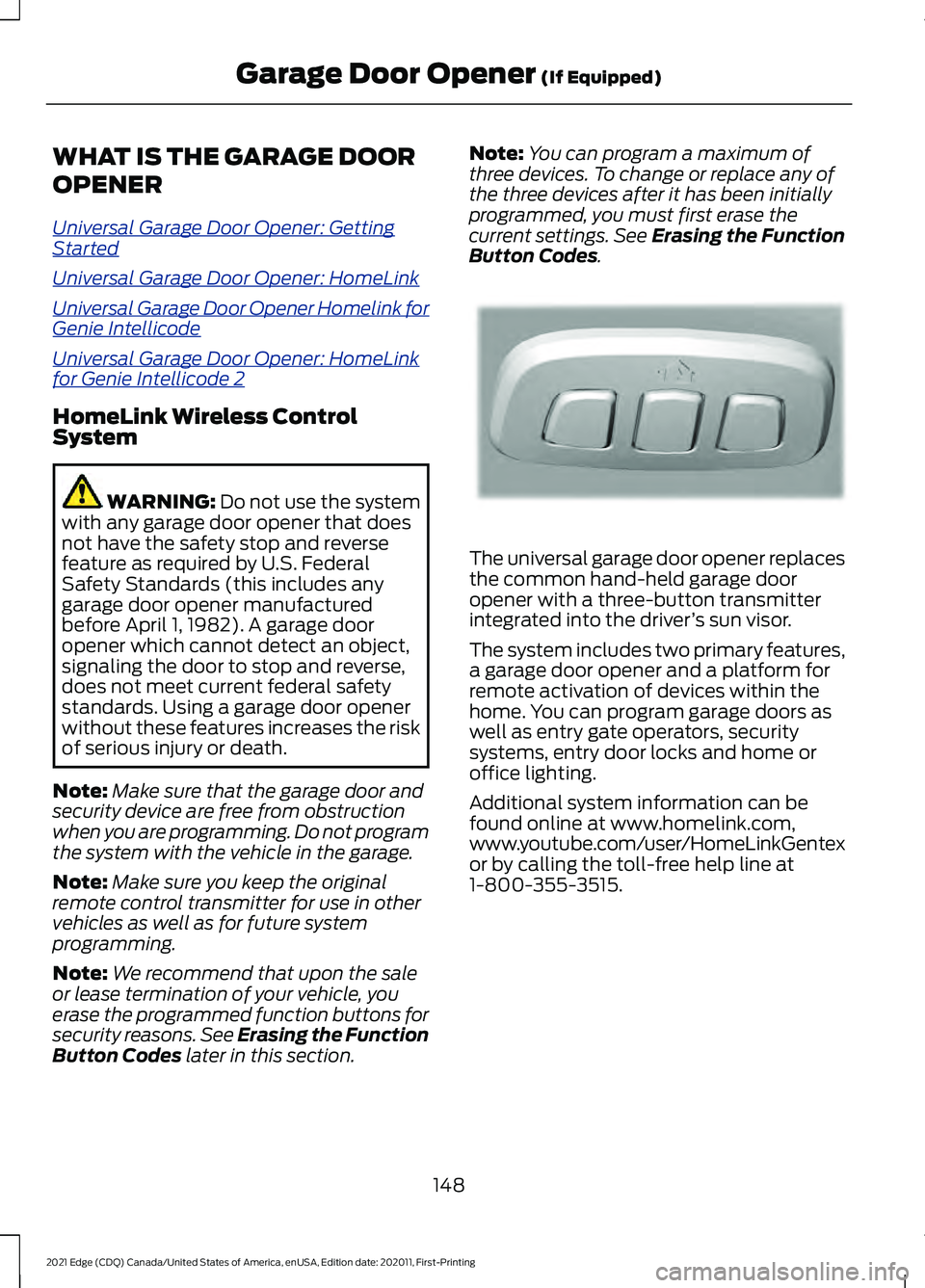
. The universal garage door opener replaces
the common hand-held garage door
opener with a three-button transmitter
integrated into the driver
’s sun visor.
The system includes two primary features,
a garage door opener and a platform for
remote activation of devices within the
home. You can program garage doors as
well as entry gate operators, security
systems, entry door locks and home or
office lighting.
Additional system information can be
found online at www.homelink.com,
www.youtube.com/user/HomeLinkGentex
or by calling the toll-free help line at
1-800-355-3515.
148
2021 Edge (CDQ) Canada/United States of America, enUSA, Edition date: 202011, First-Printing Garage Door Opener
(If Equipped)E188211
Page 153 of 500
HOW DOES THE GARAGE
DOOR OPENER WORK
The system includes two primary features,
a garage door opener and a platform for
remote activation of devices within the
home. You can program garage doors as
well as entry gate operators, security
systems, entry door locks and home or
office lighting.
Additional system information can be
found online at www.homelink.com or by
calling the toll-free help line at
1-800-355-3515.
Note:
You can program a maximum of
three devices. To change or replace any of
the three devices after it has been initially
programmed, you must first erase the
current settings. See Clearing the Garage
Door Opener (page 151).
GARAGE DOOR OPENER
PRECAUTIONS WARNING:
Do not use the system
with any garage door opener that does
not have the safety stop and reverse
feature as required by U.S. Federal
Safety Standards (this includes any
garage door opener manufactured
before April 1, 1982). A garage door
opener which cannot detect an object,
signaling the door to stop and reverse,
does not meet current federal safety
standards. Using a garage door opener
without these features increases the risk
of serious injury or death.
Note: Make sure that the garage door and
security device are free from obstruction
when you are programming. Do not program
the system with your vehicle in the garage. Note:
Make sure you keep the original
remote control transmitter for use in other
vehicles as well as for future system
programming.
Note: We recommend that upon the sale
or lease termination of your vehicle, you
erase the programmed function buttons for
security reasons. See Clearing the Garage
Door Opener
(page 151).
GARAGE DOOR OPENER
LIMITATIONS
Canadian radio-frequency laws require
transmitter signals to time-out (or quit)
after several seconds – which may not be
long enough for HomeLink to pick up the
signal.
U.S. gate operators time-out in the same
manner.
Note: If programming a garage door opener
or gate operator, it is advised to unplug the
device during the “cycling” process to
prevent possible overheating.
PROGRAMMING THE GARAGE
DOOR OPENER TO YOUR
HAND-HELD TRANSMITTER
This process is to program your in-vehicle
HomeLink function button with your
hand-held transmitter.
Note: The programming steps below
assume you will be programming HomeLink
that was not previously programmed. If your
HomeLink was previously programmed, you
may need to erase your HomeLink buttons.
See
Clearing the Garage Door Opener
(page 151).
149
2021 Edge (CDQ) Canada/United States of America, enUSA, Edition date: 202011, First-Printing Garage Door Opener
(If Equipped)
Page 165 of 500
Note:
The system may not function if the
passive key is close to metal objects or
electronic devices, for example keys or a cell
phone.
Note: A valid key must be inside your
vehicle to switch the ignition on and start
the engine.
STARTING THE ENGINE
Starting a Gasoline Engine
Before starting your vehicle, check the
following:
• Make sure that the headlamps and
electrical accessories are off.
• Make sure that the parking brake is on.
• Make sure that the transmission is in
park (P).
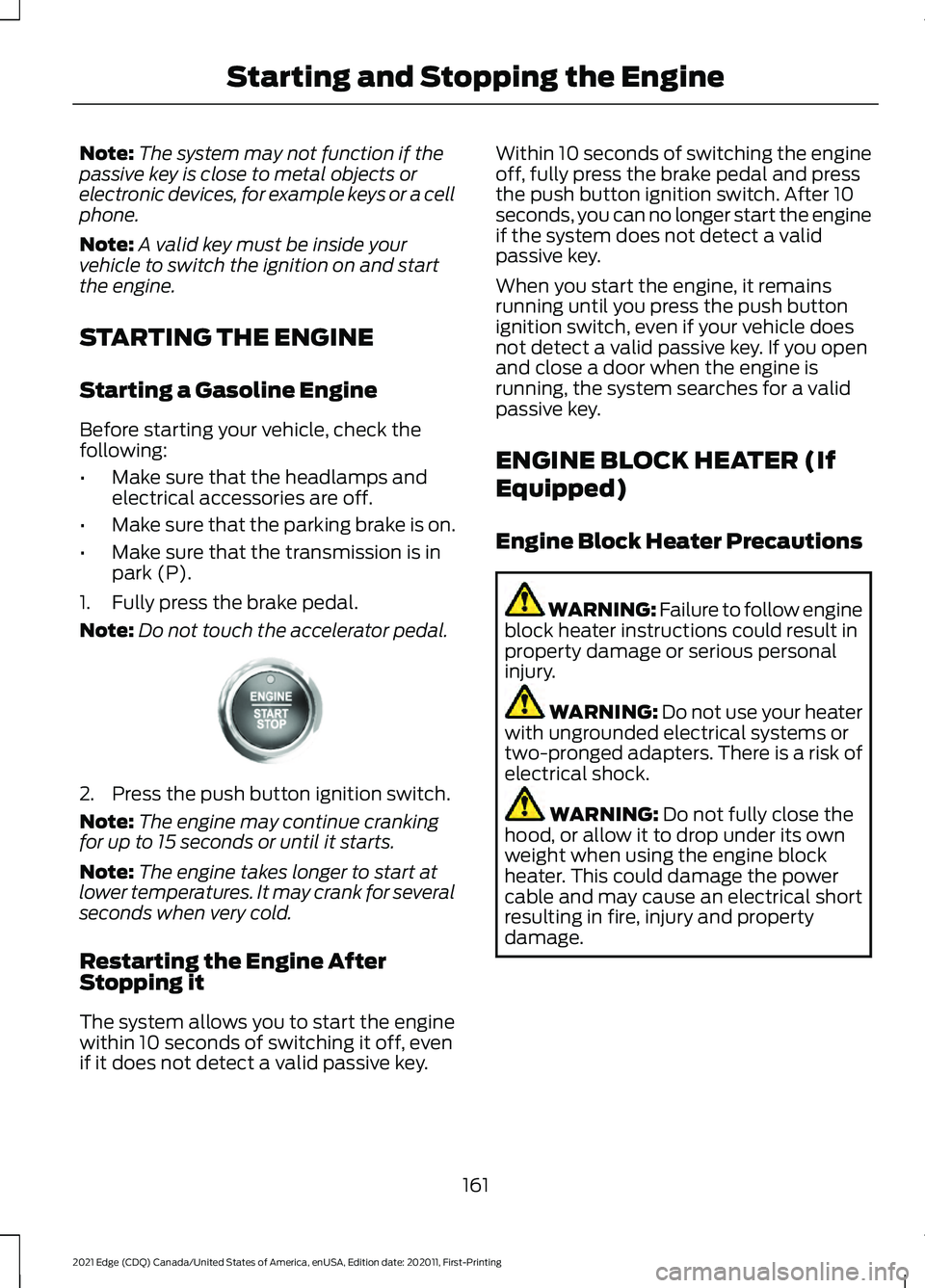
1. Fully press the brake pedal.
Note: Do not touch the accelerator pedal.2. Press the push button ignition switch.
Note:
The engine may continue cranking
for up to 15 seconds or until it starts.
Note: The engine takes longer to start at
lower temperatures. It may crank for several
seconds when very cold.
Restarting the Engine After
Stopping it
The system allows you to start the engine
within 10 seconds of switching it off, even
if it does not detect a valid passive key. Within 10 seconds of switching the engine
off, fully press the brake pedal and press
the push button ignition switch. After 10
seconds, you can no longer start the engine
if the system does not detect a valid
passive key.
When you start the engine, it remains
running until you press the push button
ignition switch, even if your vehicle does
not detect a valid passive key. If you open
and close a door when the engine is
running, the system searches for a valid
passive key.
ENGINE BLOCK HEATER (If
Equipped)
Engine Block Heater Precautions
WARNING: Failure to follow engine
block heater instructions could result in
property damage or serious personal
injury. WARNING: Do not use your heater
with ungrounded electrical systems or
two-pronged adapters. There is a risk of
electrical shock. WARNING:
Do not fully close the
hood, or allow it to drop under its own
weight when using the engine block
heater. This could damage the power
cable and may cause an electrical short
resulting in fire, injury and property
damage.
161
2021 Edge (CDQ) Canada/United States of America, enUSA, Edition date: 202011, First-Printing Starting and Stopping the EngineE321258
Page 166 of 500
We recommend that you do the following
for a safe and correct operation:
•
Use a 16-gauge outdoor extension cord
that is product certified by
Underwriter ’s Laboratory (UL) or
Canadian Standards Association
(CSA). This extension cord must be
suitable for use outdoors, in cold
temperatures, and be clearly marked
Suitable for Use with Outdoor
Appliances. Do not use an indoor
extension cord outdoors. This could
result in an electric shock or become a
fire hazard.
• Use as short an extension cord as
possible.
• Do not use multiple extension cords.
• Make sure that when in operation, the
extension cord plug and engine block
heater cord plug connections are free
and clear of water. This could cause an
electric shock or fire.
• If the engine block heater cord is under
the hood, do not remove the wiring
from its original location. Do not close
the hood on the extension wiring.
• Park your vehicle in a clean area, clear
of combustible materials.
• Firmly connect the engine block heater
cord and the extension cord.
• Check the extension cord for heat
anywhere when the system has been
operating for approximately 30
minutes.
• Unplug and properly stow the system
before starting and driving your vehicle.
The protective cover seals the
terminals of the engine block heater
cord plug when not in use.
• Check the engine block heater system
for proper operation before winter. How Does the Engine Block Heater
Work
The engine block heater warms the engine
coolant. This allows the climate control
system to quickly respond. The equipment
includes a heater element installed in the
engine block and a wire harness. You can
connect the system to a grounded
220-240 volt AC electrical source.
Note:
The engine block heater is most
effective when outdoor temperatures are
below 0°F (-18°C).
Using the Engine Block Heater
Make sure the receptacle terminals are
clean and dry prior to use. Clean them with
a dry cloth if necessary.
The heater uses 0.4 to 1.0 kilowatt-hours
of energy per hour of use. The system does
not have a thermostat. It achieves
maximum temperature after
approximately three hours of operation.
Using the engine block heater longer than
three hours does not improve system
performance and unnecessarily uses
electricity.
STOPPING THE ENGINE
Stopping the Engine When Your
Vehicle is Stationary
1. Shift into park (P).
2. Apply the parking brake.
3. Wait until the engine reaches idle speed. 162
2021 Edge (CDQ) Canada/United States of America, enUSA, Edition date: 202011, First-Printing Starting and Stopping the EngineE321258
Page 181 of 500
AUTOMATIC TRANSMISSION
PRECAUTIONS
WARNING: Always fully apply the
parking brake and make sure you shift
into park (P). Failure to follow this
instruction could result in personal injury
or death. WARNING:
Do not apply the brake
pedal and accelerator pedal
simultaneously. Applying both pedals
simultaneously for more than a few
seconds will limit engine performance,
which may result in difficulty maintaining
speed in traffic and could lead to serious
injury. WARNING:
When your vehicle is
stationary, keep the brake pedal fully
pressed when shifting gears. Failure to
follow this instruction could result in
personal injury, death or property
damage.
Note: Do not use supplemental
transmission fluid additives, treatments or
cleaning agents. Failure to follow this
instruction could result in vehicle damage
not covered by the vehicle warranty
AUTOMATIC TRANSMISSION
POSITIONS
Park (P) WARNING:
Move the transmission
selector lever to park (P) only when your
vehicle is stationary.
This position locks the driveline. Come to
a complete stop before putting your
vehicle into and out of park (P). The electric parking brake could apply
when you shift to park (P) without the
brake pedal fully pressed. The electric
parking brake applies when you shift to
park (P) on large slopes. The electric
parking brake releases with the drive away
release function.
See Electric Parking
Brake (page 190).
Note: A warning tone sounds if you open
the driver door and you have not shifted the
transmission selector to park (P).
Reverse (R) WARNING:
Move the transmission
selector lever to reverse (R) only when
your vehicle is stationary and the engine
is at idle speed.
This position allows your vehicle to move
backward. Come to a complete stop
before shifting into and out of reverse (R).
Neutral (N) WARNING:
In neutral (N) your
vehicle has the ability to roll freely. If you
intend to leave your vehicle, make sure
you apply the parking brake.
This position allows your vehicle to roll
free. Hold the brake pedal down when in
this position.
Note: You can start your vehicle in this
position.
Drive (D)
Drive (D) is the normal driving position, and
allows automatic upshifts and downshifts
through all available gears.
177
2021 Edge (CDQ) Canada/United States of America, enUSA, Edition date: 202011, First-Printing Automatic Transmission
Page 221 of 500
Optimal system performance requires a
clear view of the road by the
windshield-mounted camera.
Optimal performance may not occur if:
•
The camera is blocked.
• There is poor visibility or lighting
conditions.
• There are bad weather conditions.
SWITCHING ADAPTIVE
CRUISE CONTROL ON AND OFF
The cruise controls are on the steering
wheel. See Steering Wheel (page 26).
Switching Adaptive Cruise Control
On Press the button to set the
system in standby mode.
The indicator, current gap setting and set
speed appear in the information display.
Switching Adaptive Cruise Control
Off Press the button when the
system is in standby mode, or
switch the ignition off.
Note: You erase the set speed when you
switch the system off.
ADAPTIVE CRUISE CONTROL
AUTOMATIC CANCELLATION
The system may cancel if:
• The tires lose traction.
• You apply the parking brake. The system may cancel and set the parking
brake if:
•
You unbuckle the seatbelt and open
the driver door after you stop your
vehicle.
• Your vehicle is at a stop continuously
for more than three minutes.
The system may deactivate or prevent
activating when requested if:
• The vehicle has a blocked sensor.
• The brake temperature is too high.
• There is a failure in the system or a
related system.
SETTING THE ADAPTIVE
CRUISE CONTROL SPEED
Drive to the speed you prefer. Press either button to set the
current speed.
Take your foot off the accelerator pedal.
The indicator, current gap setting and set
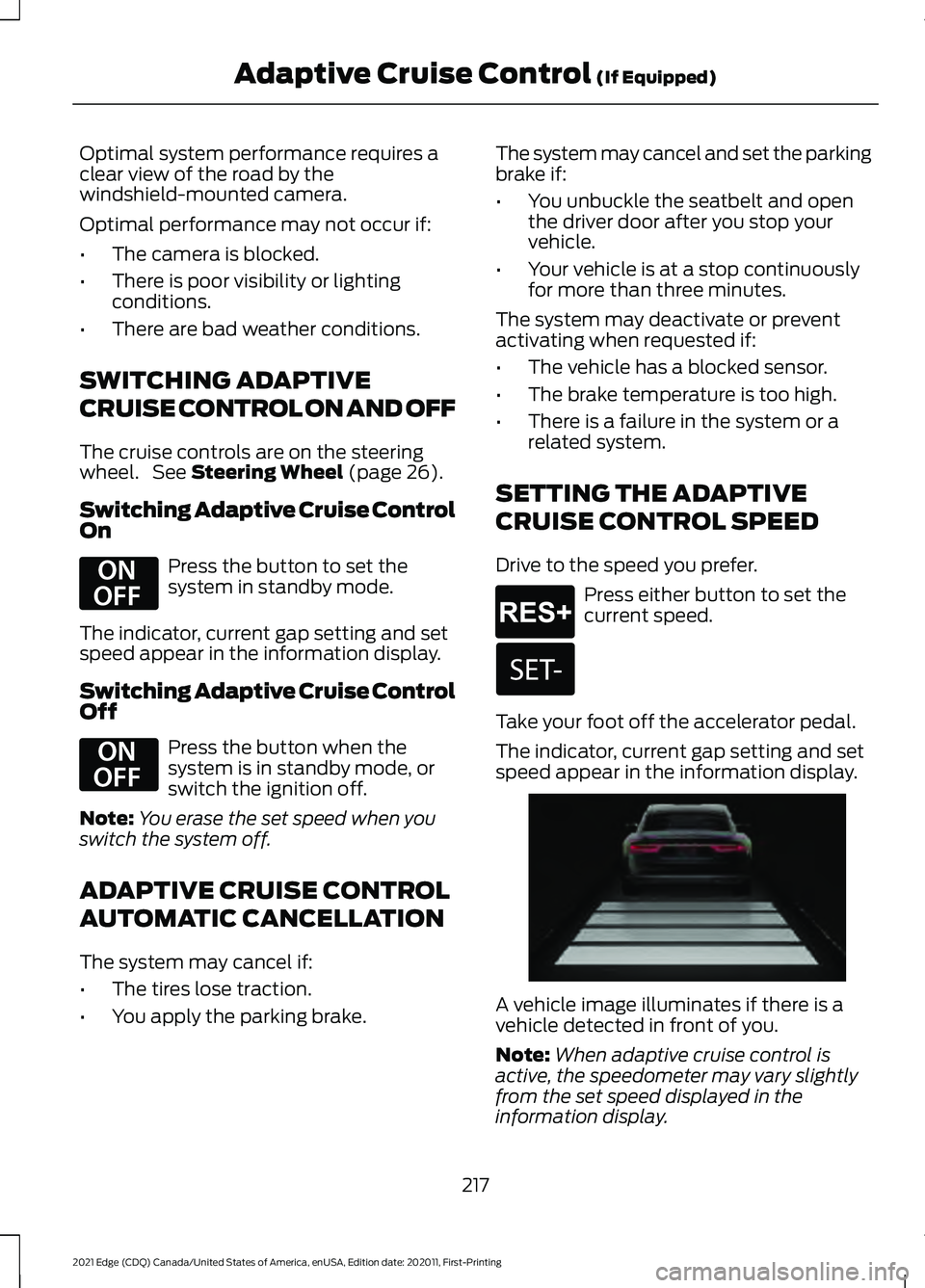
speed appear in the information display. A vehicle image illuminates if there is a
vehicle detected in front of you.
Note:
When adaptive cruise control is
active, the speedometer may vary slightly
from the set speed displayed in the
information display.
217
2021 Edge (CDQ) Canada/United States of America, enUSA, Edition date: 202011, First-Printing Adaptive Cruise Control
(If Equipped)E294678 E294678 E265299 E255686
Page 292 of 500
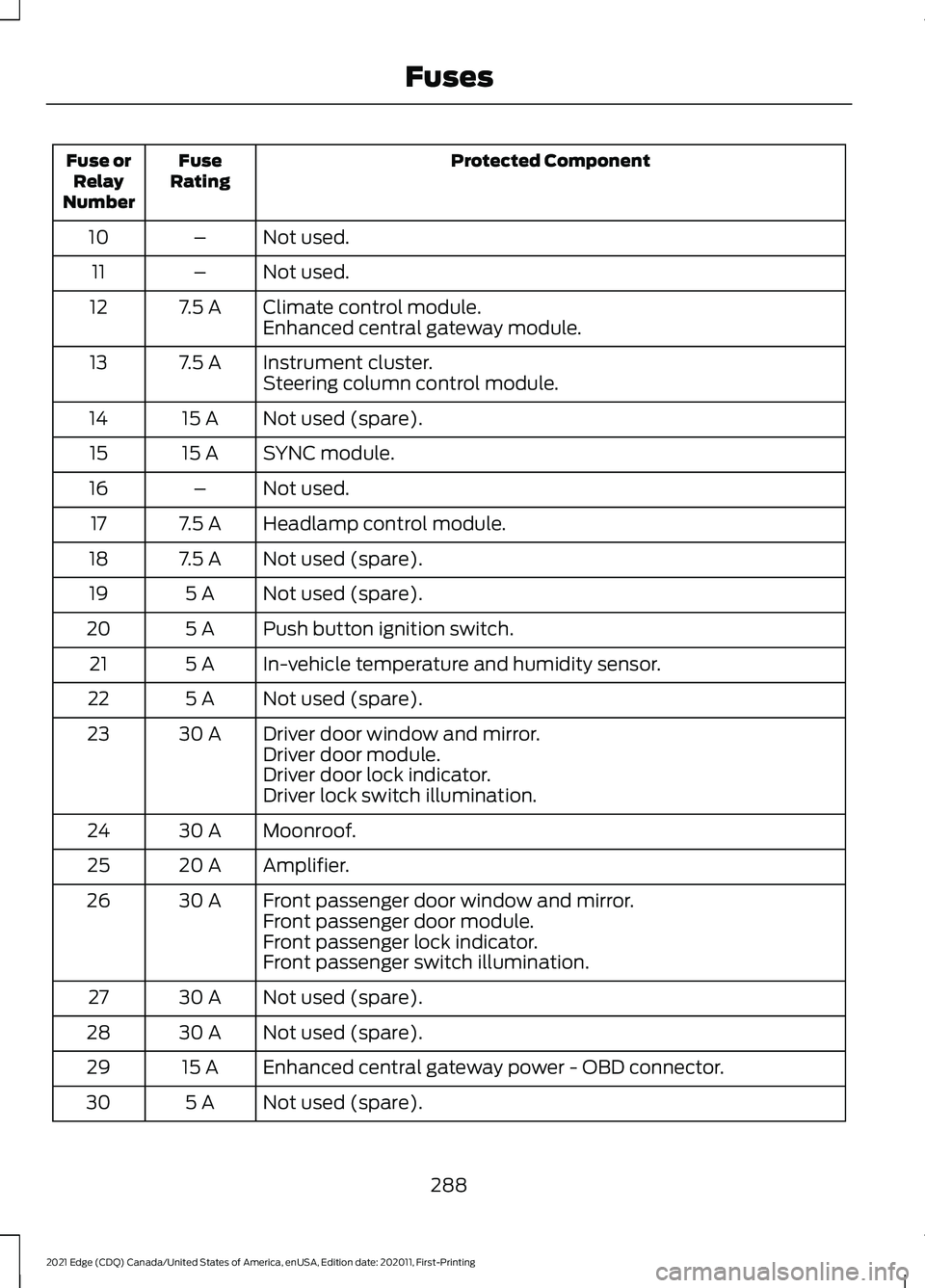
Protected Component
Fuse
Rating
Fuse or
Relay
Number
Not used.
–
10
Not used.
–
11
Climate control module.
7.5 A
12
Enhanced central gateway module.
Instrument cluster.
7.5 A
13
Steering column control module.
Not used (spare).
15 A
14
SYNC module.
15 A
15
Not used.
–
16
Headlamp control module.
7.5 A
17
Not used (spare).
7.5 A
18
Not used (spare).
5 A
19
Push button ignition switch.
5 A
20
In-vehicle temperature and humidity sensor.
5 A
21
Not used (spare).
5 A
22
Driver door window and mirror.
30 A
23
Driver door module.
Driver door lock indicator.
Driver lock switch illumination.
Moonroof.
30 A
24
Amplifier.
20 A
25
Front passenger door window and mirror.
30 A
26
Front passenger door module.
Front passenger lock indicator.
Front passenger switch illumination.
Not used (spare).
30 A
27
Not used (spare).
30 A
28
Enhanced central gateway power - OBD connector.
15 A
29
Not used (spare).
5 A
30
288
2021 Edge (CDQ) Canada/United States of America, enUSA, Edition date: 202011, First-Printing Fuses
Page 337 of 500
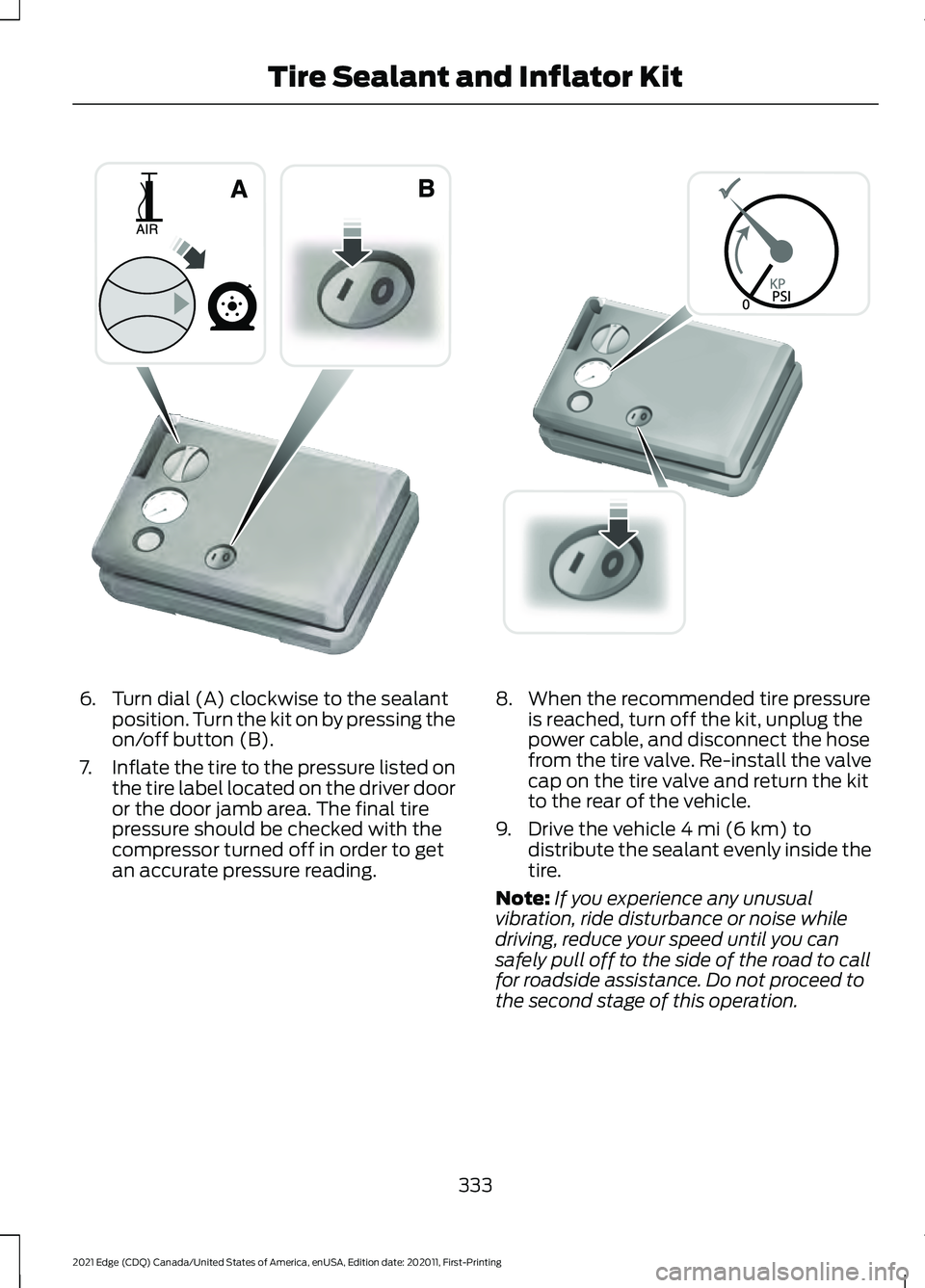
6. Turn dial (A) clockwise to the sealant
position. Turn the kit on by pressing the
on/off button (B).
7. Inflate the tire to the pressure listed on
the tire label located on the driver door
or the door jamb area. The final tire
pressure should be checked with the
compressor turned off in order to get
an accurate pressure reading. 8. When the recommended tire pressure
is reached, turn off the kit, unplug the
power cable, and disconnect the hose
from the tire valve. Re-install the valve
cap on the tire valve and return the kit
to the rear of the vehicle.
9. Drive the vehicle 4 mi (6 km) to
distribute the sealant evenly inside the
tire.
Note: If you experience any unusual
vibration, ride disturbance or noise while
driving, reduce your speed until you can
safely pull off to the side of the road to call
for roadside assistance. Do not proceed to
the second stage of this operation.
333
2021 Edge (CDQ) Canada/United States of America, enUSA, Edition date: 202011, First-Printing Tire Sealant and Inflator KitE175981 E175982
Page 366 of 500
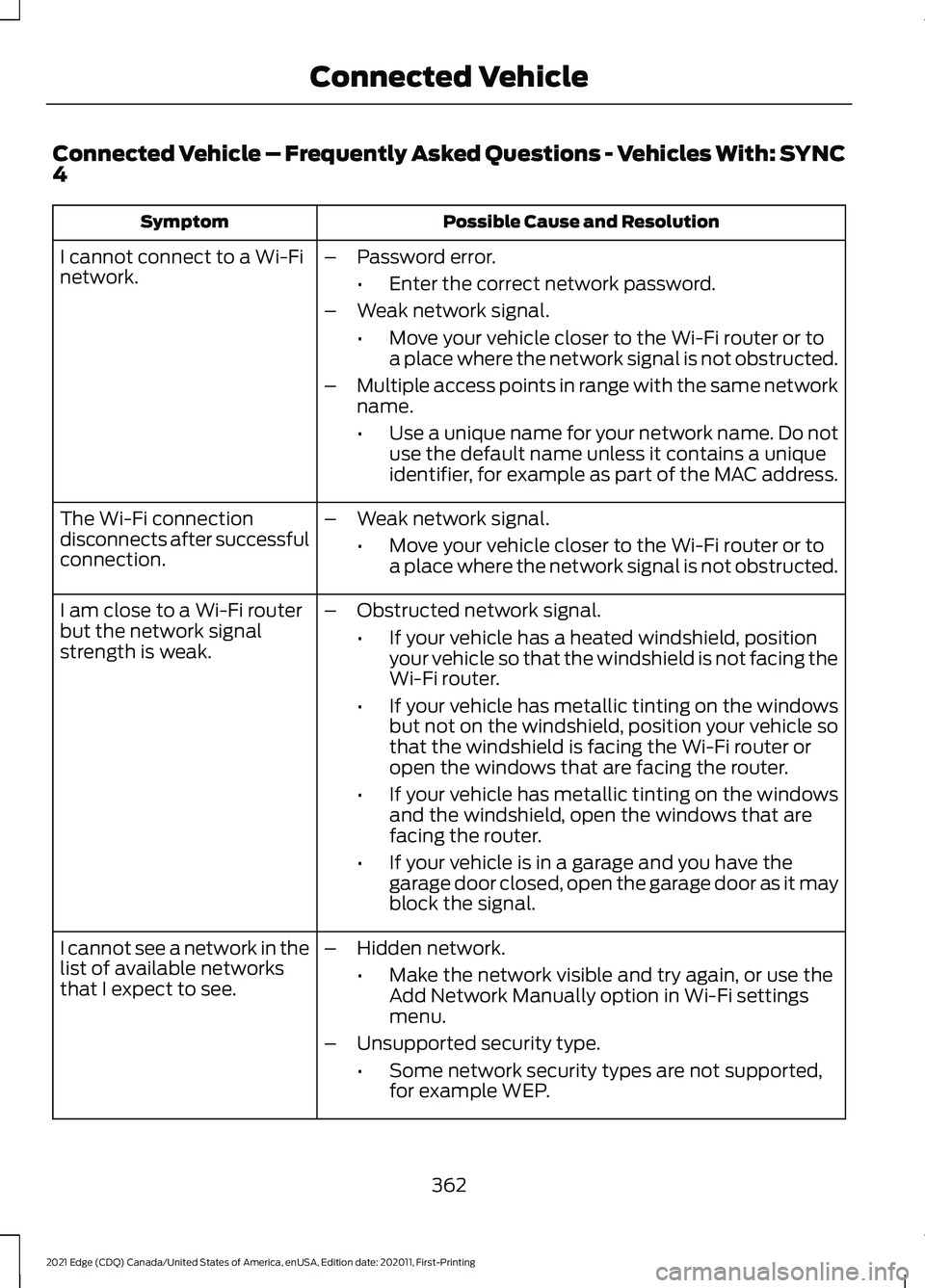
Connected Vehicle – Frequently Asked Questions - Vehicles With: SYNC
4
Possible Cause and Resolution
Symptom
I cannot connect to a Wi-Fi
network. –
Password error.
•Enter the correct network password.
– Weak network signal.
•Move your vehicle closer to the Wi-Fi router or to
a place where the network signal is not obstructed.
– Multiple access points in range with the same network
name.
•Use a unique name for your network name. Do not
use the default name unless it contains a unique
identifier, for example as part of the MAC address.
The Wi-Fi connection
disconnects after successful
connection. –
Weak network signal.
•Move your vehicle closer to the Wi-Fi router or to
a place where the network signal is not obstructed.
I am close to a Wi-Fi router
but the network signal
strength is weak. –
Obstructed network signal.
•If your vehicle has a heated windshield, position
your vehicle so that the windshield is not facing the
Wi-Fi router.
• If your vehicle has metallic tinting on the windows
but not on the windshield, position your vehicle so
that the windshield is facing the Wi-Fi router or
open the windows that are facing the router.
• If your vehicle has metallic tinting on the windows
and the windshield, open the windows that are
facing the router.
• If your vehicle is in a garage and you have the
garage door closed, open the garage door as it may
block the signal.
– Hidden network.
•Make the network visible and try again, or use the
Add Network Manually option in Wi-Fi settings
menu.
– Unsupported security type.
•Some network security types are not supported,
for example WEP.
I cannot see a network in the
list of available networks
that I expect to see.
362
2021 Edge (CDQ) Canada/United States of America, enUSA, Edition date: 202011, First-Printing Connected Vehicle
Page 390 of 500
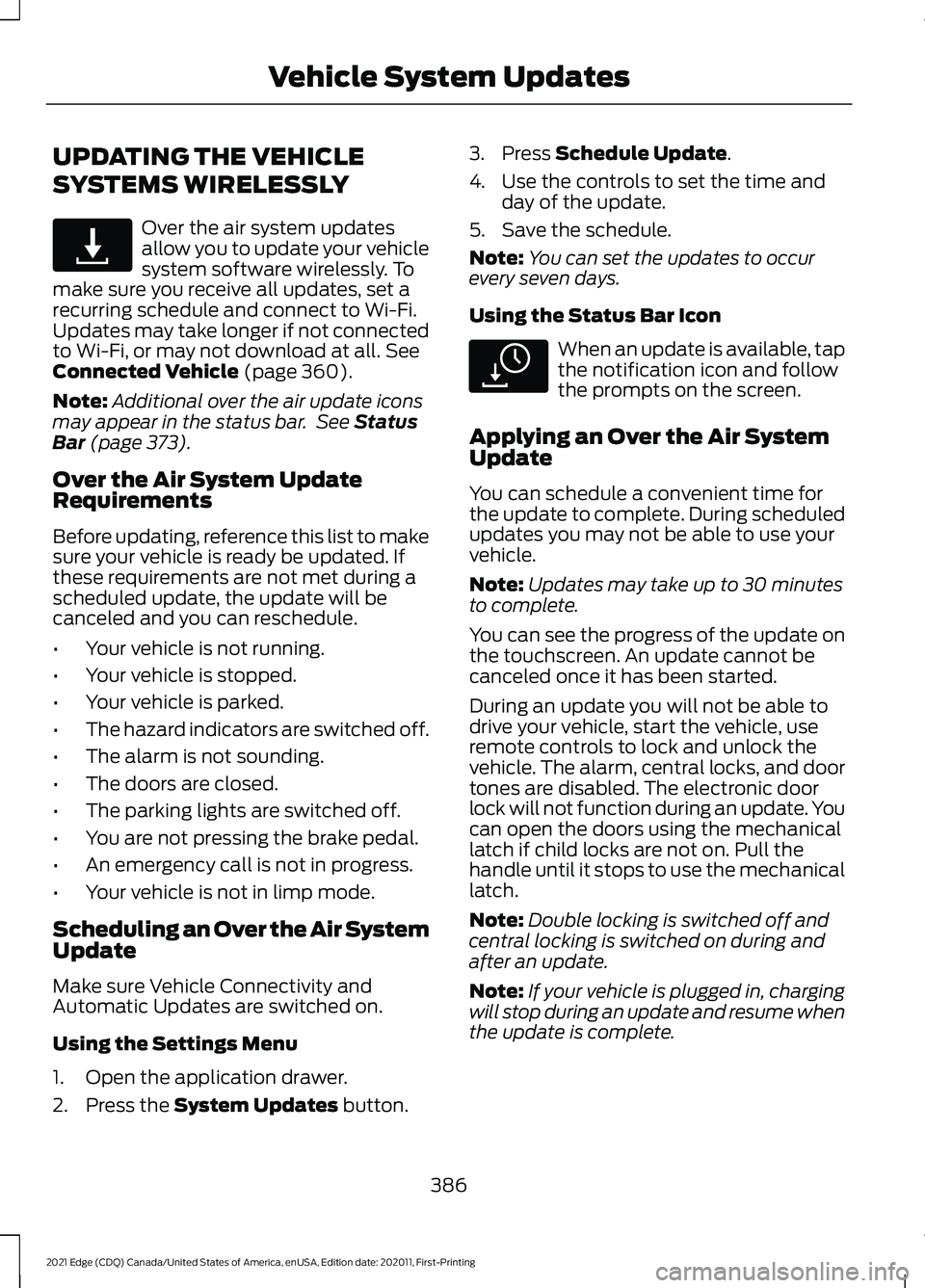
UPDATING THE VEHICLE
SYSTEMS WIRELESSLY
Over the air system updates
allow you to update your vehicle
system software wirelessly. To
make sure you receive all updates, set a
recurring schedule and connect to Wi-Fi.
Updates may take longer if not connected
to Wi-Fi, or may not download at all. See
Connected Vehicle (page 360).
Note: Additional over the air update icons
may appear in the status bar. See
Status
Bar (page 373).
Over the Air System Update
Requirements
Before updating, reference this list to make
sure your vehicle is ready be updated. If
these requirements are not met during a
scheduled update, the update will be
canceled and you can reschedule.
• Your vehicle is not running.
• Your vehicle is stopped.
• Your vehicle is parked.
• The hazard indicators are switched off.
• The alarm is not sounding.
• The doors are closed.
• The parking lights are switched off.
• You are not pressing the brake pedal.
• An emergency call is not in progress.
• Your vehicle is not in limp mode.
Scheduling an Over the Air System
Update
Make sure Vehicle Connectivity and
Automatic Updates are switched on.
Using the Settings Menu
1. Open the application drawer.
2. Press the
System Updates button. 3. Press
Schedule Update.
4. Use the controls to set the time and day of the update.
5. Save the schedule.
Note: You can set the updates to occur
every seven days.
Using the Status Bar Icon When an update is available, tap
the notification icon and follow
the prompts on the screen.
Applying an Over the Air System
Update
You can schedule a convenient time for
the update to complete. During scheduled
updates you may not be able to use your
vehicle.
Note: Updates may take up to 30 minutes
to complete.
You can see the progress of the update on
the touchscreen. An update cannot be
canceled once it has been started.
During an update you will not be able to
drive your vehicle, start the vehicle, use
remote controls to lock and unlock the
vehicle. The alarm, central locks, and door
tones are disabled. The electronic door
lock will not function during an update. You
can open the doors using the mechanical
latch if child locks are not on. Pull the
handle until it stops to use the mechanical
latch.
Note: Double locking is switched off and
central locking is switched on during and
after an update.
Note: If your vehicle is plugged in, charging
will stop during an update and resume when
the update is complete.
386
2021 Edge (CDQ) Canada/United States of America, enUSA, Edition date: 202011, First-Printing Vehicle System UpdatesE327789 E327785