instrument cluster FORD EDGE 2021 Owner's Manual
[x] Cancel search | Manufacturer: FORD, Model Year: 2021, Model line: EDGE, Model: FORD EDGE 2021Pages: 500, PDF Size: 8.52 MB
Page 121 of 500
USING THE INSTRUMENT
CLUSTER DISPLAY CONTROLS
WARNING: Driving while distracted
can result in loss of vehicle control, crash
and injury. We strongly recommend that
you use extreme caution when using any
device that may take your focus off the
road. Your primary responsibility is the
safe operation of your vehicle. We
recommend against the use of any
hand-held device while driving and
encourage the use of voice-operated
systems when possible. Make sure you
are aware of all applicable local laws
that may affect the use of electronic
devices while driving.
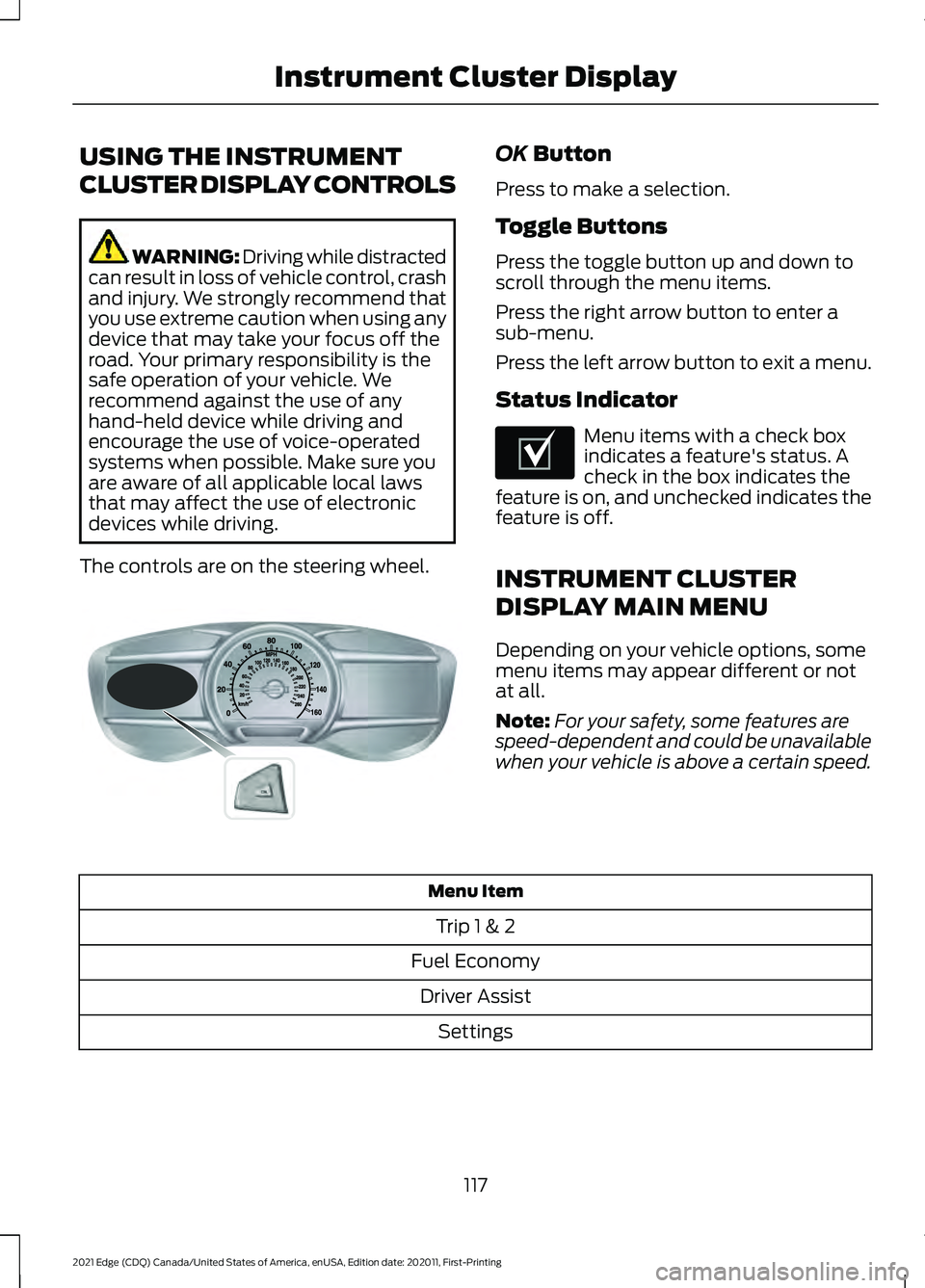
The controls are on the steering wheel. OK Button
Press to make a selection.
Toggle Buttons
Press the toggle button up and down to
scroll through the menu items.
Press the right arrow button to enter a
sub-menu.
Press the left arrow button to exit a menu.
Status Indicator Menu items with a check box
indicates a feature's status. A
check in the box indicates the
feature is on, and unchecked indicates the
feature is off.
INSTRUMENT CLUSTER
DISPLAY MAIN MENU
Depending on your vehicle options, some
menu items may appear different or not
at all.
Note: For your safety, some features are
speed-dependent and could be unavailable
when your vehicle is above a certain speed. Menu Item
Trip 1 & 2
Fuel Economy Driver Assist Settings
117
2021 Edge (CDQ) Canada/United States of America, enUSA, Edition date: 202011, First-Printing Instrument Cluster DisplayE144638 E204495
Page 122 of 500
TRIP COMPUTER
Accessing the Trip Computer
You can access the trip computer using
the steering wheel controls to navigate the
instrument cluster display. Action
Menu Item
Press the OK button.
Trip 1 & 2
118
2021 Edge (CDQ) Canada/United States of America, enUSA, Edition date: 202011, First-Printing Instrument Cluster Display
Page 123 of 500
Resetting the Trip Computer
You can reset values using the steering
wheel controls to navigate the instrument
cluster display. Action
Menu Item
Press the OK button.
Fuel Economy
Press and hold the
OK button until the
system reset confirmation appears.
Fuel Economy
Press and hold the
OK button until the
system reset confirmation appears.
Fuel History
Press and hold the
OK button until the
system reset confirmation appears.
Average Speed
119
2021 Edge (CDQ) Canada/United States of America, enUSA, Edition date: 202011, First-Printing Instrument Cluster Display
Page 124 of 500
Resetting the Individual Trip
Values
You can reset the trip values using the
steering wheel controls to navigate the
instrument cluster display. Action
Menu Item
Press the OK button.
Trip 1 & 2
Press and hold the
OK button until the
system reset confirmation appears.
Trip 1
Press and hold the
OK button until the
system reset confirmation appears.
Trip 2
CUSTOMIZING THE
INSTRUMENT CLUSTER
DISPLAY
You can change the gauge layout in the
cluster using the steering wheel controls
to navigate the instrument cluster display. Action
Menu Item
Press the
OK button.
Settings
Press the
OK button.
Display Setup
Press the
OK button. Choose a gaugedisplay.
Gauge Display
PERSONALIZED SETTINGS
Changing the Instrument Cluster
Display Language
You can change the language using the
steering wheel controls to navigate the
instrument cluster display.
120
2021 Edge (CDQ) Canada/United States of America, enUSA, Edition date: 202011, First-Printing Instrument Cluster Display
Page 125 of 500
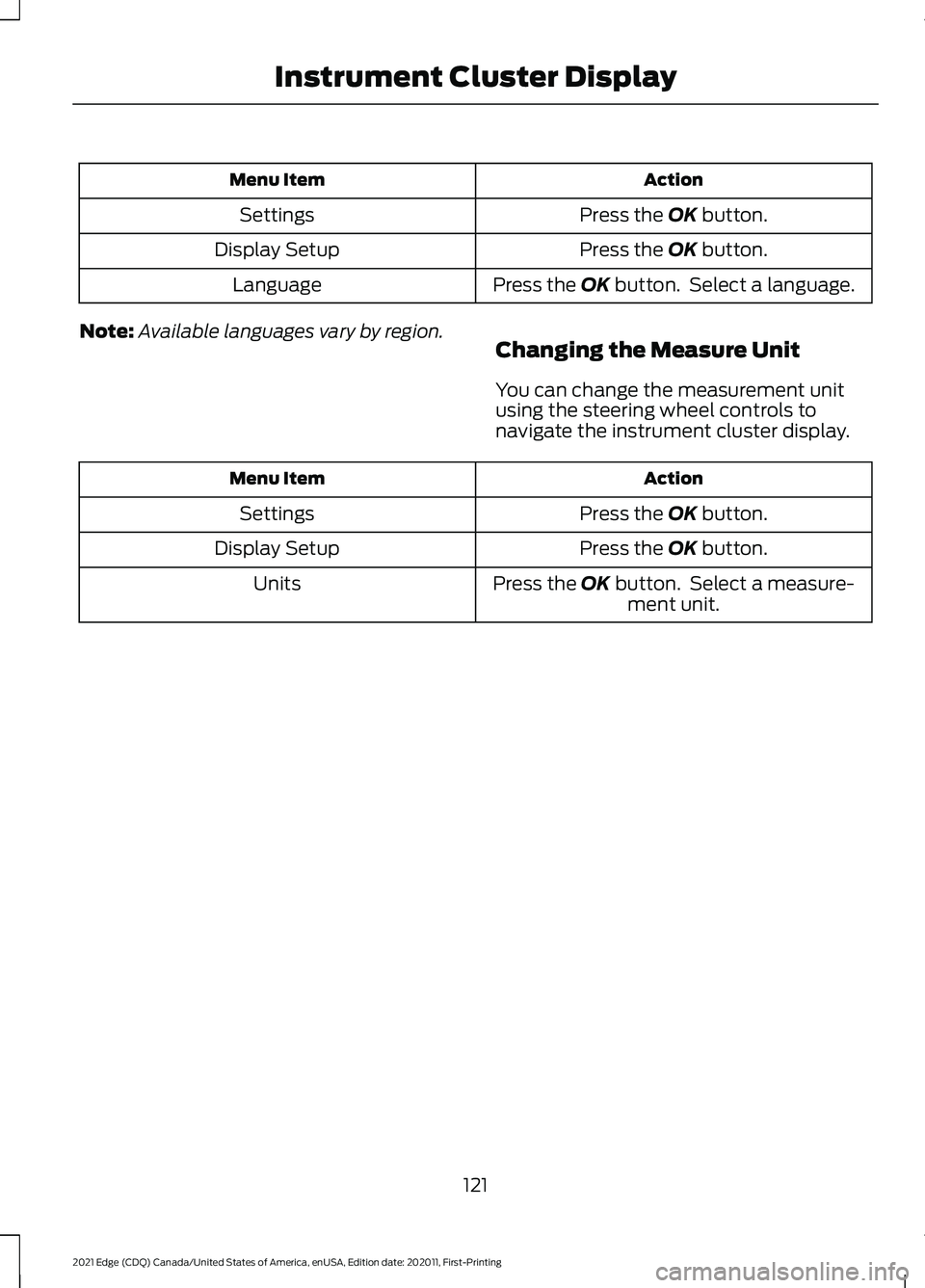
Action
Menu Item
Press the OK button.
Settings
Press the
OK button.
Display Setup
Press the
OK button. Select a language.
Language
Note: Available languages vary by region.
Changing the Measure Unit
You can change the measurement unit
using the steering wheel controls to
navigate the instrument cluster display. Action
Menu Item
Press the
OK button.
Settings
Press the
OK button.
Display Setup
Press the
OK button. Select a measure-ment unit.
Units
121
2021 Edge (CDQ) Canada/United States of America, enUSA, Edition date: 202011, First-Printing Instrument Cluster Display
Page 126 of 500
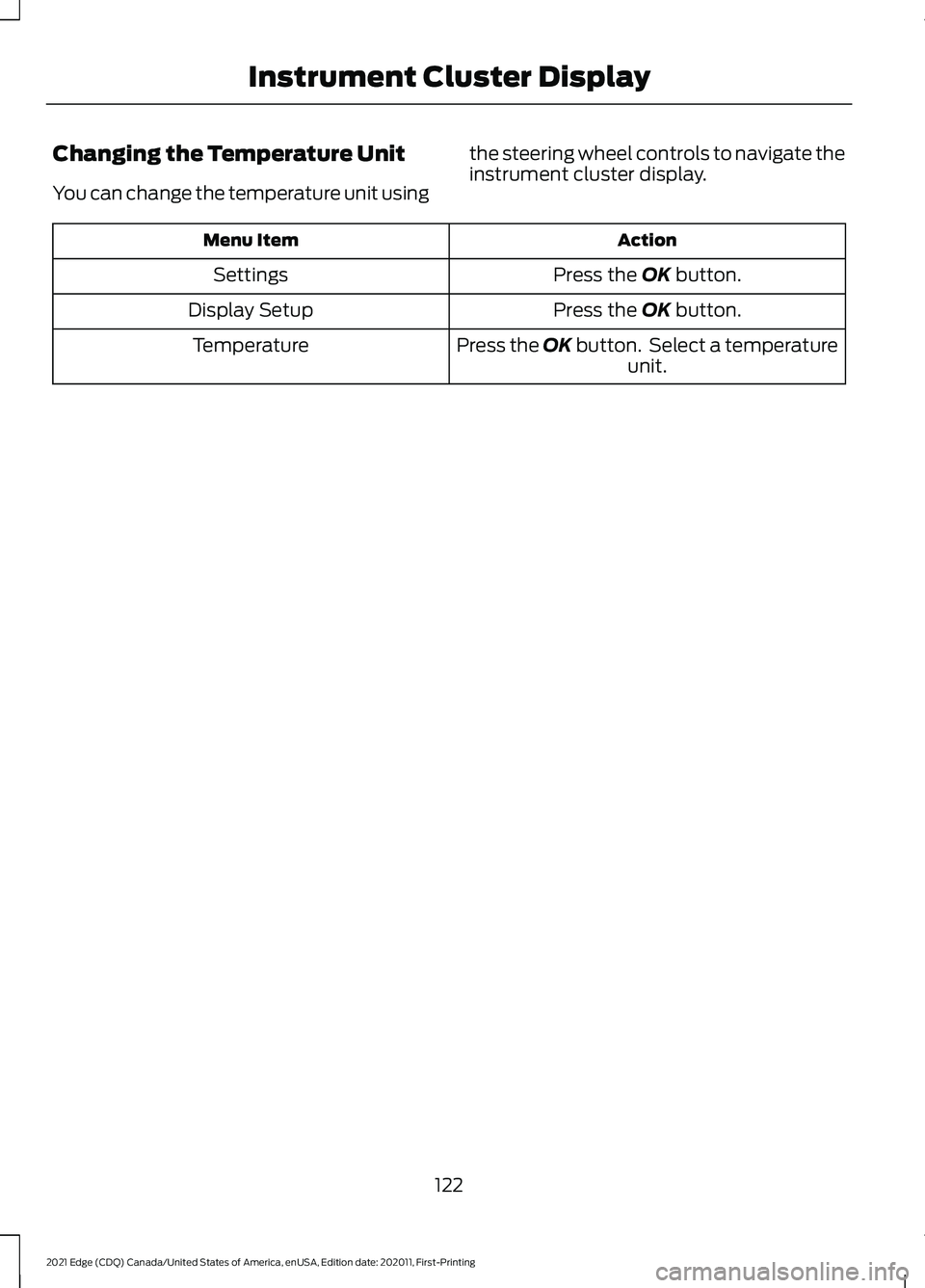
Changing the Temperature Unit
You can change the temperature unit using
the steering wheel controls to navigate the
instrument cluster display. Action
Menu Item
Press the OK button.
Settings
Press the
OK button.
Display Setup
Press the OK button. Select a temperatureunit.
Temperature
122
2021 Edge (CDQ) Canada/United States of America, enUSA, Edition date: 202011, First-Printing Instrument Cluster Display
Page 127 of 500
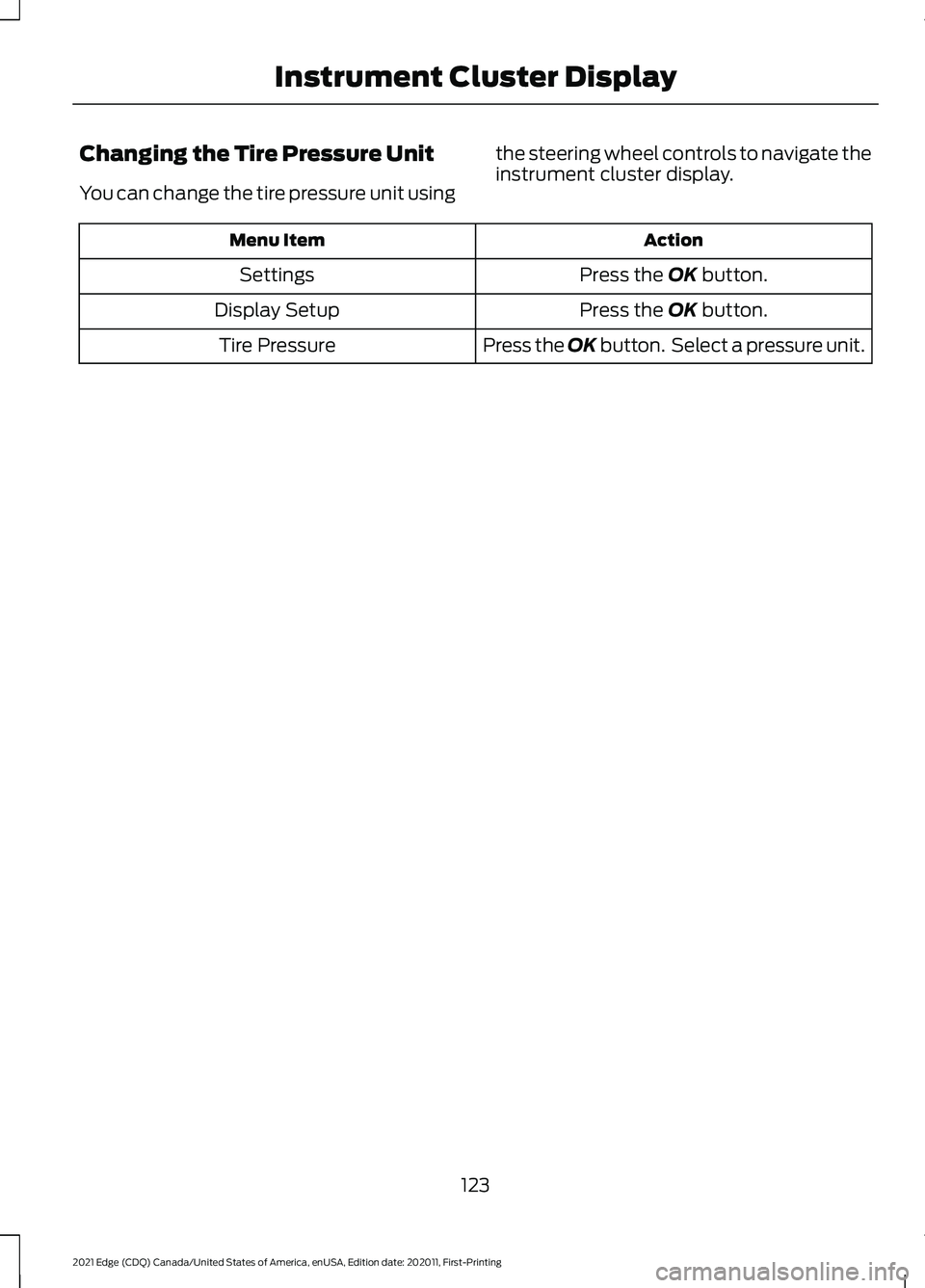
Changing the Tire Pressure Unit
You can change the tire pressure unit using
the steering wheel controls to navigate the
instrument cluster display. Action
Menu Item
Press the OK button.
Settings
Press the
OK button.
Display Setup
Press the OK button. Select a pressure unit.
Tire Pressure
123
2021 Edge (CDQ) Canada/United States of America, enUSA, Edition date: 202011, First-Printing Instrument Cluster Display
Page 128 of 500
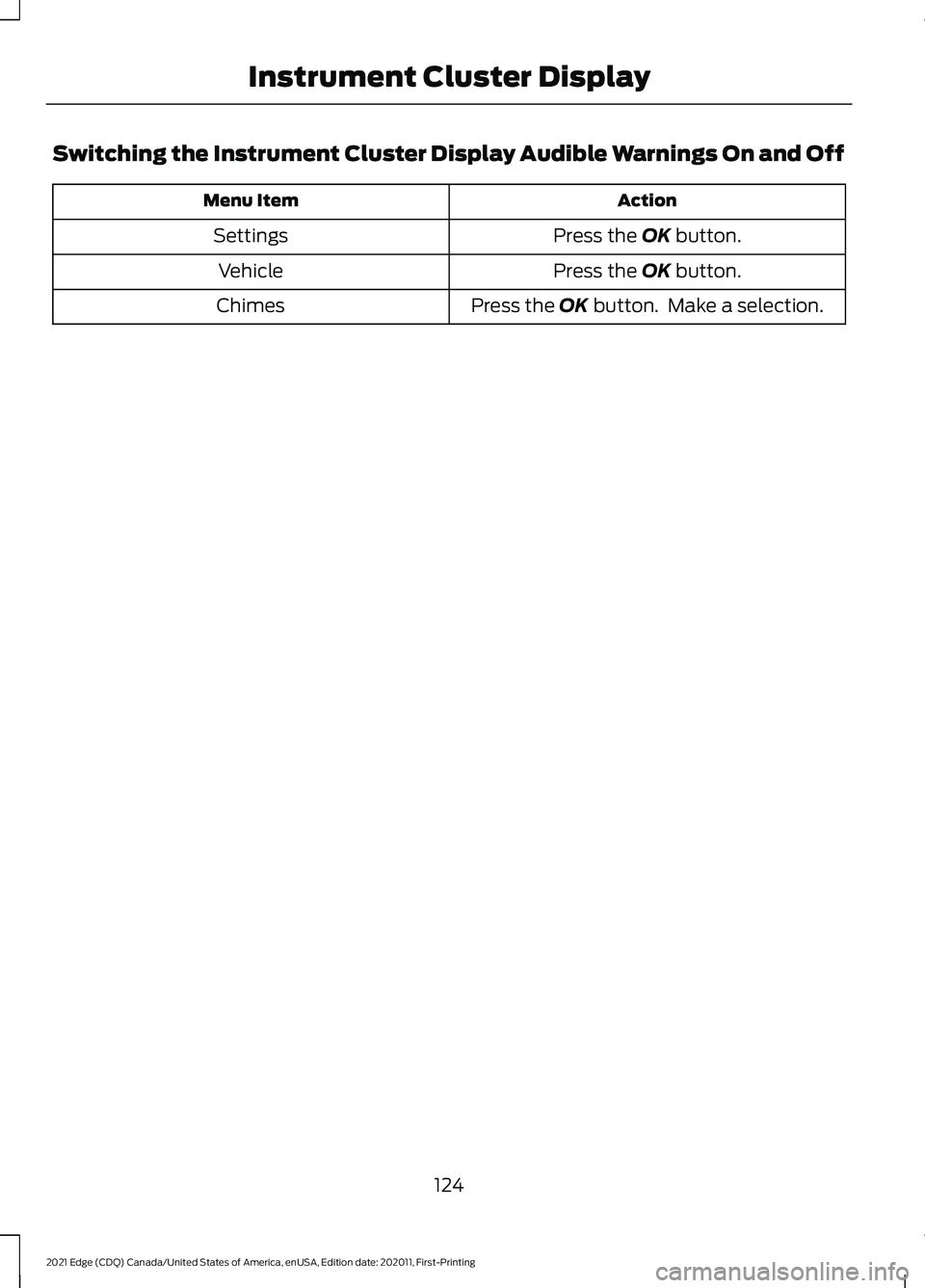
Switching the Instrument Cluster Display Audible Warnings On and Off
Action
Menu Item
Press the OK button.
Settings
Press the
OK button.
Vehicle
Press the
OK button. Make a selection.
Chimes
124
2021 Edge (CDQ) Canada/United States of America, enUSA, Edition date: 202011, First-Printing Instrument Cluster Display
Page 182 of 500
Sport (S)
Putting the vehicle in sport (S):
•
Provides additional engine braking and
extends lower gear operation to
enhance performance for uphill climbs,
hilly terrain or mountainous areas. This
increases engine RPM during engine
braking.
• Provides additional lower gear
operation through the automatic
transmission shift strategy.
• Provides gear selection more quickly
and at higher engine speeds.
Note: You can shift into sport at any vehicle
speed.
SHIFTING YOUR VEHICLE INTO
GEAR
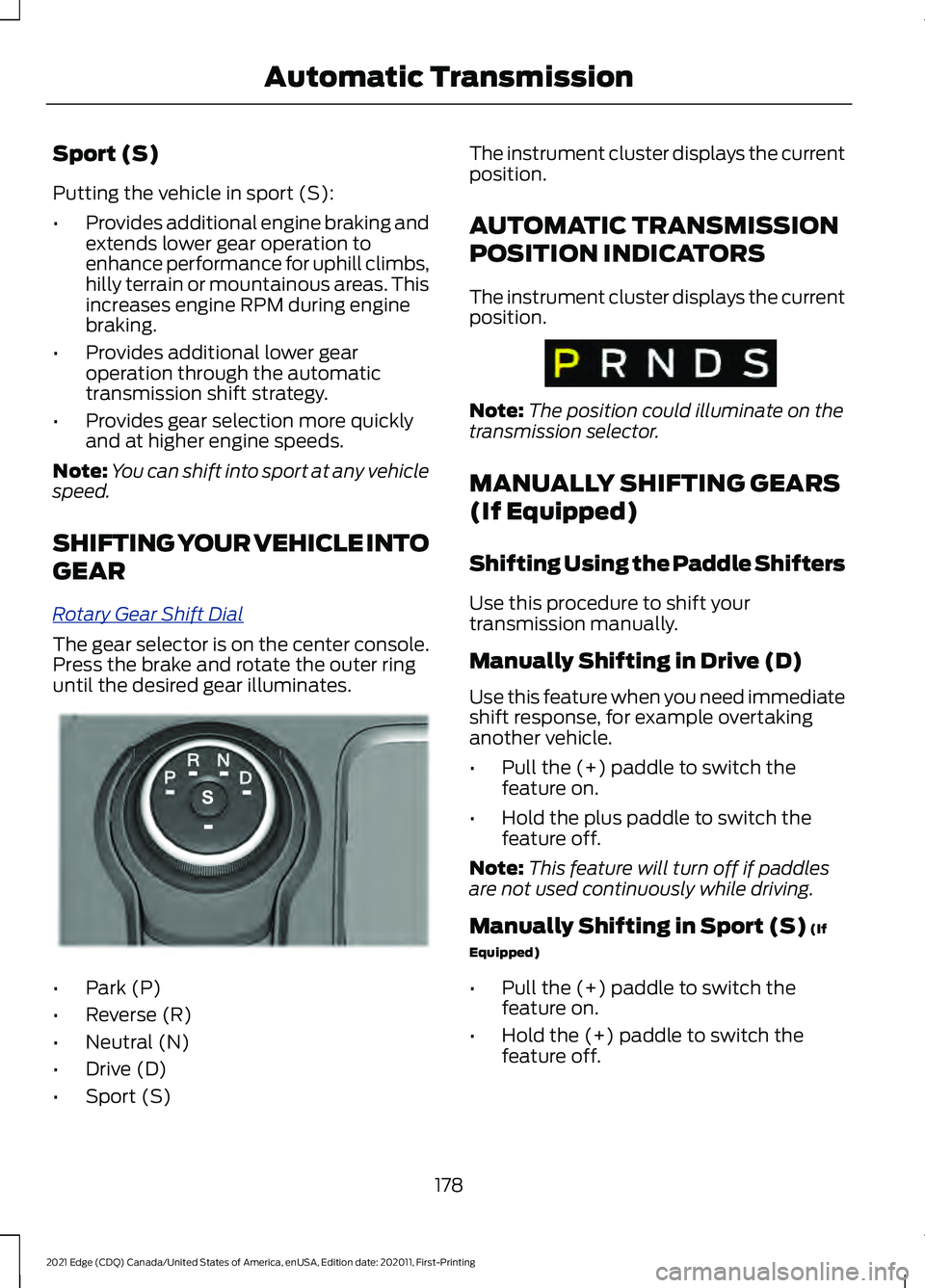
R o t ary G e ar Shift Dial
The gear selector is on the center console.
Press the brake and rotate the outer ring
until the desired gear illuminates.
•
Park (P)
• Reverse (R)
• Neutral (N)
• Drive (D)
• Sport (S) The instrument cluster displays the current
position.
AUTOMATIC TRANSMISSION
POSITION INDICATORS
The instrument cluster displays the current
position.
Note:
The position could illuminate on the
transmission selector.
MANUALLY SHIFTING GEARS
(If Equipped)
Shifting Using the Paddle Shifters
Use this procedure to shift your
transmission manually.
Manually Shifting in Drive (D)
Use this feature when you need immediate
shift response, for example overtaking
another vehicle.
• Pull the (+) paddle to switch the
feature on.
• Hold the plus paddle to switch the
feature off.
Note: This feature will turn off if paddles
are not used continuously while driving.
Manually Shifting in Sport (S) (If
Equipped)
• Pull the (+) paddle to switch the
feature on.
• Hold the (+) paddle to switch the
feature off.
178
2021 Edge (CDQ) Canada/United States of America, enUSA, Edition date: 202011, First-Printing Automatic TransmissionE222981 E317779
Page 183 of 500
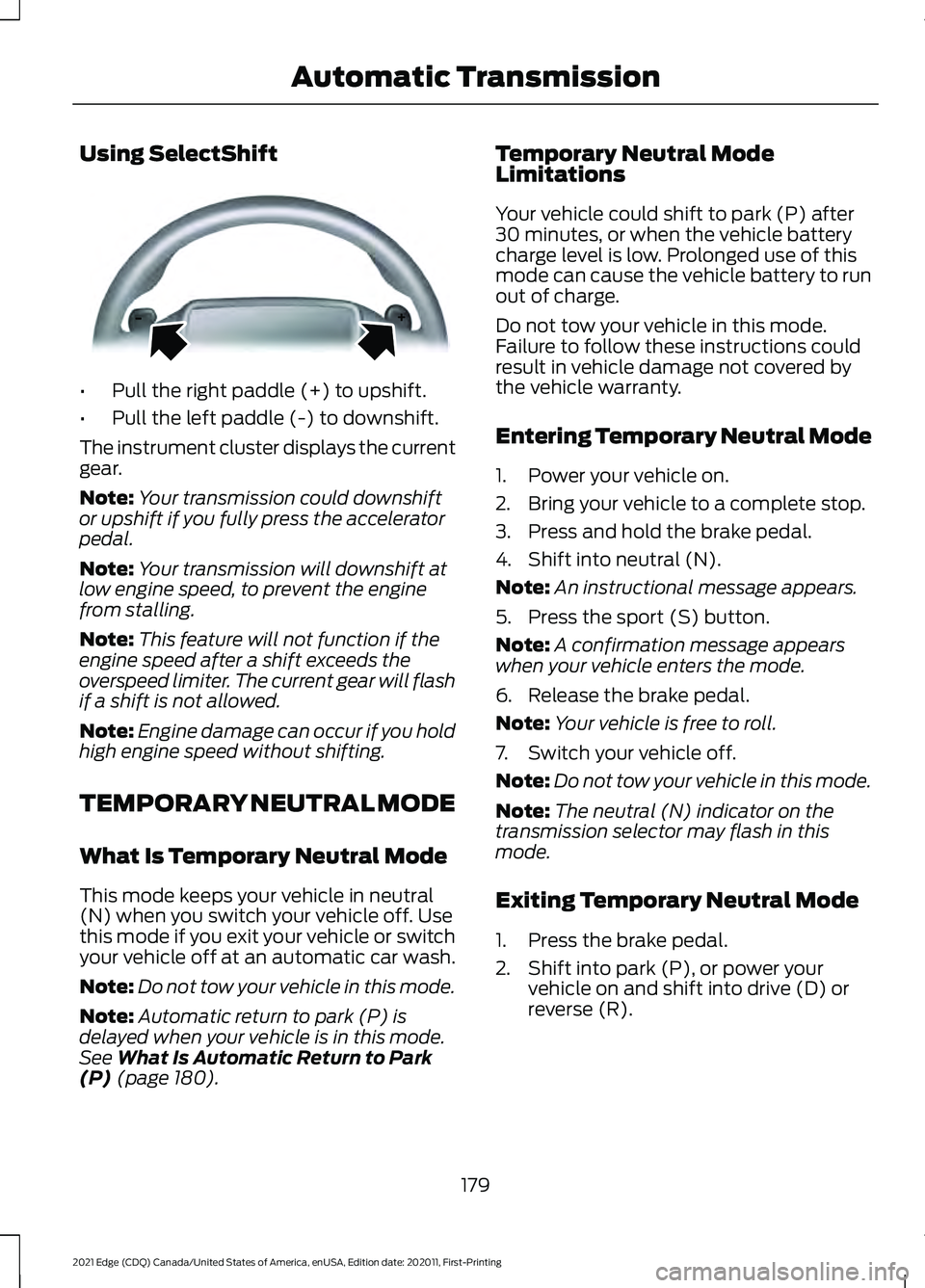
Using SelectShift
•
Pull the right paddle (+) to upshift.
• Pull the left paddle (-) to downshift.
The instrument cluster displays the current
gear.
Note: Your transmission could downshift
or upshift if you fully press the accelerator
pedal.
Note: Your transmission will downshift at
low engine speed, to prevent the engine
from stalling.
Note: This feature will not function if the
engine speed after a shift exceeds the
overspeed limiter. The current gear will flash
if a shift is not allowed.
Note: Engine damage can occur if you hold
high engine speed without shifting.
TEMPORARY NEUTRAL MODE
What Is Temporary Neutral Mode
This mode keeps your vehicle in neutral
(N) when you switch your vehicle off. Use
this mode if you exit your vehicle or switch
your vehicle off at an automatic car wash.
Note: Do not tow your vehicle in this mode.
Note: Automatic return to park (P) is
delayed when your vehicle is in this mode.
See What Is Automatic Return to Park
(P) (page 180). Temporary Neutral Mode
Limitations
Your vehicle could shift to park (P) after
30 minutes, or when the vehicle battery
charge level is low. Prolonged use of this
mode can cause the vehicle battery to run
out of charge.
Do not tow your vehicle in this mode.
Failure to follow these instructions could
result in vehicle damage not covered by
the vehicle warranty.
Entering Temporary Neutral Mode
1. Power your vehicle on.
2. Bring your vehicle to a complete stop.
3. Press and hold the brake pedal.
4. Shift into neutral (N).
Note:
An instructional message appears.
5. Press the sport (S) button.
Note: A confirmation message appears
when your vehicle enters the mode.
6. Release the brake pedal.
Note: Your vehicle is free to roll.
7. Switch your vehicle off.
Note: Do not tow your vehicle in this mode.
Note: The neutral (N) indicator on the
transmission selector may flash in this
mode.
Exiting Temporary Neutral Mode
1. Press the brake pedal.
2. Shift into park (P), or power your vehicle on and shift into drive (D) or
reverse (R).
179
2021 Edge (CDQ) Canada/United States of America, enUSA, Edition date: 202011, First-Printing Automatic TransmissionE144821