transmission FORD EDGE 2021 Owner's Manual
[x] Cancel search | Manufacturer: FORD, Model Year: 2021, Model line: EDGE, Model: FORD EDGE 2021Pages: 500, PDF Size: 8.52 MB
Page 189 of 500
Apply just enough power to the wheels to
climb the hill. Too much power will cause
the tires to slip, spin or lose traction, and
you could lose control of your vehicle.
When descending a steep hill, do not
descend the hill in neutral. Avoid sudden
hard braking to keep the front wheels
rolling and to maintain your vehicle's
steering.
Note:
If your vehicle has anti-lock brakes,
apply the brakes steadily. Do not pump the
brakes.
Note: If your vehicle gets stuck driving on
hilly or sloping terrain, it may be rocked out
by shifting between forward and reverse
gears, stopping between shifts in a steady
pattern. Press lightly on the accelerator in
each gear.
Note: Do not rock your vehicle if the engine
is not at normal operating temperature, as
damage to the transmission may occur.
Note: Do not rock your vehicle for more
than a minute, as damage to the
transmission and tires may occur or the
engine may overheat.
Driving on Snow and Ice WARNING: If you are driving in
slippery conditions that require tire
chains or cables, then it is critical that
you drive cautiously. Keep speeds down,
allow for longer stopping distances and
avoid aggressive steering to reduce the chances of a loss of vehicle control
which can lead to serious injury or death.
If the rear end of your vehicle slides while
cornering, steer in the direction of the
slide until you regain control of your
vehicle.
Avoid sudden applications of power and
quick changes of direction on snow and
ice. Apply the accelerator slowly and
steadily when starting from a full stop.
Avoid sudden braking. Although an
all-wheel drive vehicle accelerates better
than a two-wheel drive vehicle in snow and
ice, it cannot stop any faster as braking
occurs at all four wheels. Do not become
overconfident of the road conditions.
Make sure that you allow sufficient
distance between your vehicle and other
vehicles for stopping. On ice and snow, you
should drive more slowly than usual. In
emergency stopping situations, steadily
apply the brake. Your vehicle has a four
wheel anti-lock brake system, do not pump
the brake pedal.
See Anti-Lock Braking
System Limitations (page 187).
Note: If your vehicle gets stuck driving on
snow and ice, it may be rocked out by
shifting between forward and reverse gears,
stopping between shifts in a steady pattern.
Press lightly on the accelerator in each gear.
Note: Do not rock your vehicle if the engine
is not at normal operating temperature, as
damage to the transmission may occur.
Note: Do not rock your vehicle for more
than a minute, as damage to the
transmission and tires may occur or the
engine may overheat.
185
2021 Edge (CDQ) Canada/United States of America, enUSA, Edition date: 202011, First-Printing All-Wheel Drive
(If Equipped)
Page 191 of 500
BRAKE PRECAUTIONS
WARNING: Driving your vehicle
with the warning lamp on is dangerous.
A significant decrease in braking
performance may occur. It may take you
longer to stop your vehicle. Have your
vehicle checked as soon as possible.
Driving extended distances with the
parking brake engaged can cause brake
failure and the risk of personal injury.
Wet brakes result in reduced braking
efficiency. Gently press the brake pedal a
few times when driving from a car wash or
standing water to dry the brakes.
ANTI-LOCK BRAKING SYSTEM
Anti-Lock Braking System
Limitations
The anti-lock braking system does not
eliminate the risk of crash when:
• You drive too closely to the vehicle in
front of you.
• Your vehicle is hydroplaning.
• You take corners too fast.
• The road surface is poor.
Note: If the system activates, the brake
pedal could pulse and could travel further.
Maintain pressure on the brake pedal.
BRAKE OVER ACCELERATOR
In the event the accelerator pedal
becomes stuck or entrapped, apply steady
and firm pressure to the brake pedal to
slow the vehicle and reduce engine power.
If you experience this condition, apply the
brakes and bring your vehicle to a safe stop. Move the transmission to park (P),
switch the engine off and apply the parking
brake. Inspect the accelerator pedal for
any interference. If none are found and the
condition persists, have your vehicle towed
to the nearest authorized dealer.
LOCATING THE BRAKE FLUID
RESERVOIR
See
Under Hood Overview (page 291).
CHECKING THE BRAKE FLUID WARNING:
Do not use any fluid
other than the recommended brake fluid
as this will reduce brake efficiency. Use
of incorrect fluid could result in the loss
of vehicle control, serious personal injury
or death. WARNING:
Only use brake fluid
from a sealed container. Contamination
with dirt, water, petroleum products or
other materials may result in brake
system damage or failure. Failure to
adhere to this warning could result in the
loss of vehicle control, serious personal
injury or death. WARNING:
Do not allow the fluid
to touch your skin or eyes. If this
happens, rinse the affected areas
immediately with plenty of water and
contact your physician. WARNING:
The brake system
could be affected if the brake fluid level
is below the MIN mark or above the MAX
mark on the brake fluid reservoir.
187
2021 Edge (CDQ) Canada/United States of America, enUSA, Edition date: 202011, First-Printing Brakes
Page 200 of 500
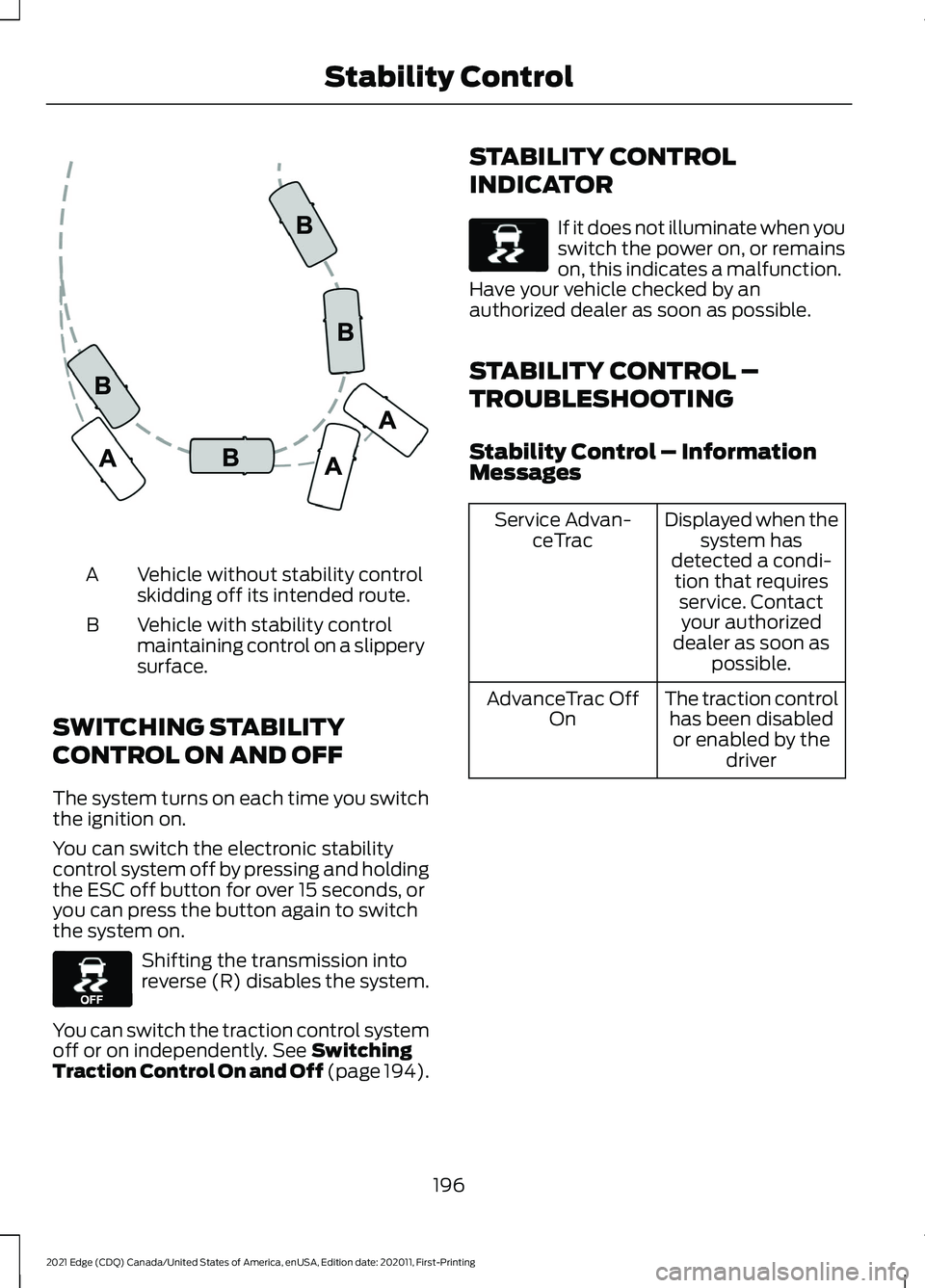
Vehicle without stability control
skidding off its intended route.
A
Vehicle with stability control
maintaining control on a slippery
surface.
B
SWITCHING STABILITY
CONTROL ON AND OFF
The system turns on each time you switch
the ignition on.
You can switch the electronic stability
control system off by pressing and holding
the ESC off button for over 15 seconds, or
you can press the button again to switch
the system on. Shifting the transmission into
reverse (R) disables the system.
You can switch the traction control system
off or on independently. See Switching
Traction Control On and Off (page 194). STABILITY CONTROL
INDICATOR If it does not illuminate when you
switch the power on, or remains
on, this indicates a malfunction.
Have your vehicle checked by an
authorized dealer as soon as possible.
STABILITY CONTROL –
TROUBLESHOOTING
Stability Control – Information
Messages Displayed when the
system has
detected a condi- tion that requires service. Contactyour authorized
dealer as soon as possible.
Service Advan-
ceTrac
The traction controlhas been disabledor enabled by the driver
AdvanceTrac Off
On
196
2021 Edge (CDQ) Canada/United States of America, enUSA, Edition date: 202011, First-Printing Stability ControlE72903 E130458 E138639
Page 205 of 500
The side parking aid may not function if:
•
You switch your vehicle on, off and
back on within a few seconds.
• Your vehicle remains stationary for over
two minutes.
• The anti-lock brake system activates.
• The traction control system activates.
• Your vehicle is in park (P).
• The steering wheel angle information
is not available. You must drive at least
492 ft (150 m) above 19 mph
(30 km/h) to reset the steering wheel
angle information.
Note: If you switch traction control off, the
side sensing system also turns off.
To reinitialize the system, drive the length
of your vehicle.
The side parking aid does not detect an
object that is moving toward the side of
your vehicle, for example another vehicle
moving at a low speed, if it does not pass
a front or rear parking aid sensor.
If the transmission is in reverse (R), the side
sensing system provides audible warnings.
When your vehicle is moving slowly,
obstacles are detected within
24 in
(60 cm) and are inside the driving path of
your vehicle. Once your vehicle reaches a
standstill condition, the audible warning
stops after a few seconds. Visual indication
is always present in reverse (R).
If your vehicle is in neutral (N), the side
sensing system provides visual indication
only when your vehicle is moving slowly
and there is a front or rear park aid
obstacle detected, and the side obstacle
is within
24 in (60 cm) from the side of
your vehicle. Once your vehicle reaches a
stop, the visual indication stops after a few
seconds. If the transmission is in drive (D) or any
other forward gear, the side sensing system
provides audible and visual warnings.
When your vehicle is moving slowly,
obstacles are detected within
24 in
(60 cm) and are inside the driving path of
your vehicle. Once your vehicle reaches a
standstill condition, the audible warning
and visual indication stops after a few
seconds.
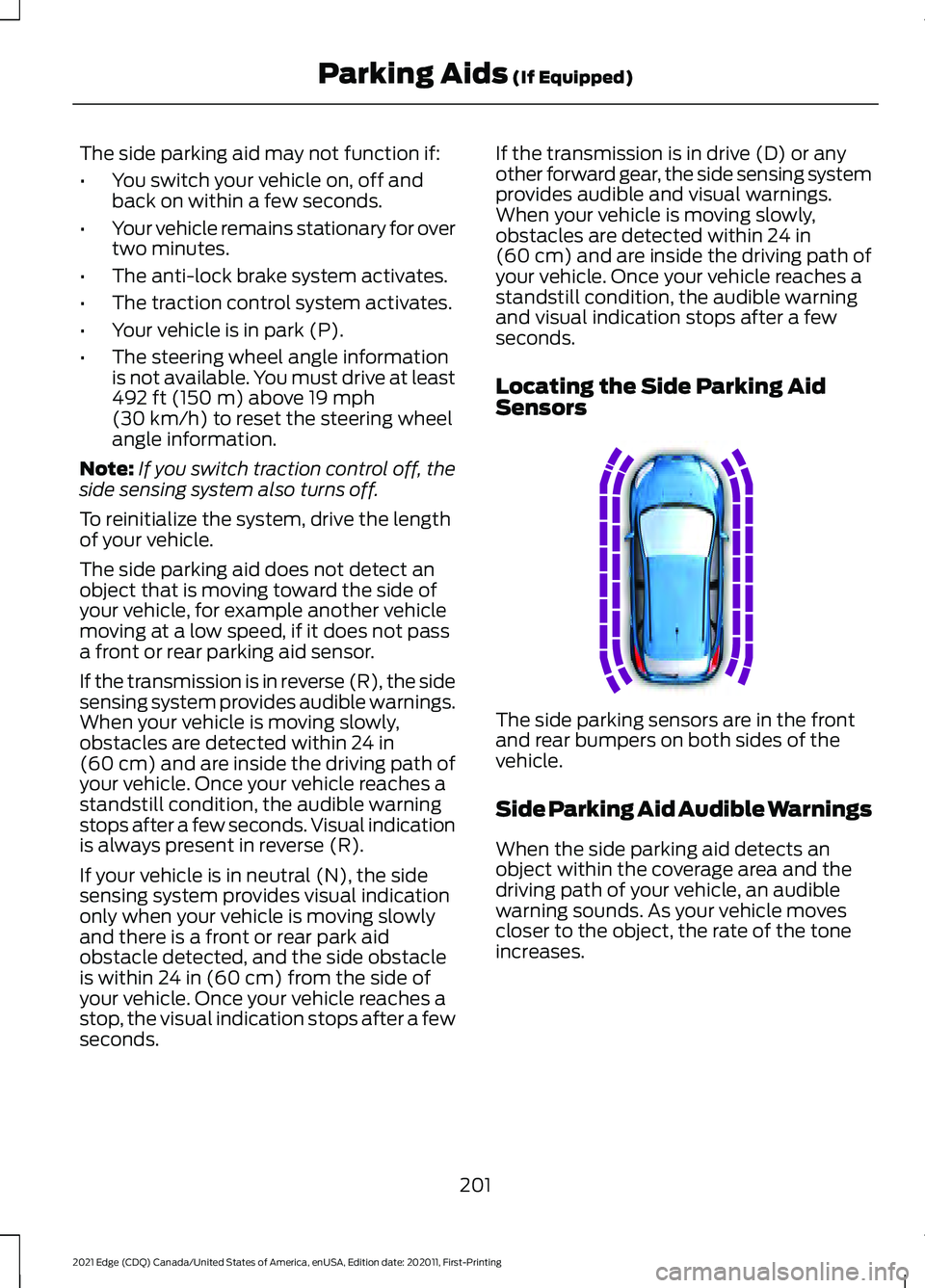
Locating the Side Parking Aid
Sensors The side parking sensors are in the front
and rear bumpers on both sides of the
vehicle.
Side Parking Aid Audible Warnings
When the side parking aid detects an
object within the coverage area and the
driving path of your vehicle, an audible
warning sounds. As your vehicle moves
closer to the object, the rate of the tone
increases.
201
2021 Edge (CDQ) Canada/United States of America, enUSA, Edition date: 202011, First-Printing Parking Aids
(If Equipped)E187810
Page 207 of 500
WHAT IS THE REAR VIEW
CAMERA
The rear view camera provides a video
image of the area behind your vehicle when
the transmission is in reverse (R).
REAR VIEW CAMERA
PRECAUTIONS
WARNING: The rear view camera
system is a reverse aid supplement
device that still requires the driver to use
it in conjunction with the interior and
exterior mirrors for maximum coverage. WARNING:
Objects that are close
to either corner of the bumper or under
the bumper, might not be seen on the
screen due to the limited coverage of the
camera system. WARNING:
Reverse your vehicle
slowly. Failure to follow this instruction
could result in the loss of control of your
vehicle, personal injury or death. WARNING:
Use caution when the
rear cargo door is ajar. If the rear cargo
door is ajar, the camera will be out of
position and the video image could be
incorrect. All guide lines disappear when
the rear cargo door is ajar. Failure to
follow this instruction could result in
personal injury. WARNING:
Use caution when
turning camera features on or off when
the transmission is not in park (P). Make
sure your vehicle is not moving. Note:
When towing, the camera only sees
what you are towing. This might not provide
adequate coverage and you might not see
some objects. In some vehicles, the guide
lines may disappear when you connect the
trailer tow connector.
LOCATING THE REAR VIEW
CAMERA
The rear view camera is located on the
cargo door. It provides a video image of the
area behind your vehicle.
REAR VIEW CAMERA GUIDE
LINES
Note: Active guide lines and fixed guide
lines are only available when the
transmission is in reverse (R).
Note: The centerline is only available if the
active or fixed guide lines are on.
203
2021 Edge (CDQ) Canada/United States of America, enUSA, Edition date: 202011, First-Printing Rear View Camera
Page 208 of 500
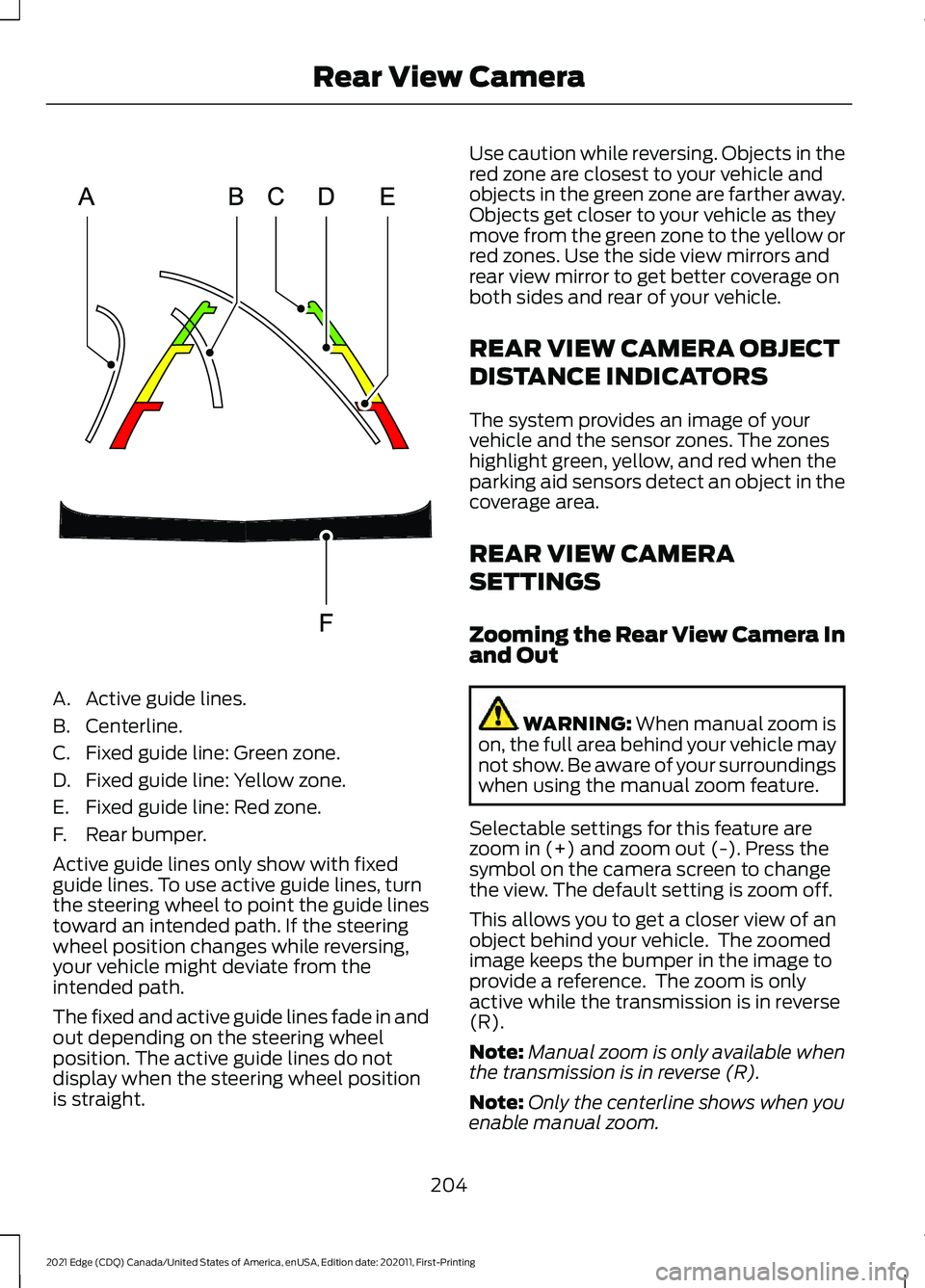
A. Active guide lines.
B. Centerline.
C. Fixed guide line: Green zone.
D. Fixed guide line: Yellow zone.
E. Fixed guide line: Red zone.
F. Rear bumper.
Active guide lines only show with fixed
guide lines. To use active guide lines, turn
the steering wheel to point the guide lines
toward an intended path. If the steering
wheel position changes while reversing,
your vehicle might deviate from the
intended path.
The fixed and active guide lines fade in and
out depending on the steering wheel
position. The active guide lines do not
display when the steering wheel position
is straight. Use caution while reversing. Objects in the
red zone are closest to your vehicle and
objects in the green zone are farther away.
Objects get closer to your vehicle as they
move from the green zone to the yellow or
red zones. Use the side view mirrors and
rear view mirror to get better coverage on
both sides and rear of your vehicle.
REAR VIEW CAMERA OBJECT
DISTANCE INDICATORS
The system provides an image of your
vehicle and the sensor zones. The zones
highlight green, yellow, and red when the
parking aid sensors detect an object in the
coverage area.
REAR VIEW CAMERA
SETTINGS
Zooming the Rear View Camera In
and Out
WARNING: When manual zoom is
on, the full area behind your vehicle may
not show. Be aware of your surroundings
when using the manual zoom feature.
Selectable settings for this feature are
zoom in (+) and zoom out (-). Press the
symbol on the camera screen to change
the view. The default setting is zoom off.
This allows you to get a closer view of an
object behind your vehicle. The zoomed
image keeps the bumper in the image to
provide a reference. The zoom is only
active while the transmission is in reverse
(R).
Note: Manual zoom is only available when
the transmission is in reverse (R).
Note: Only the centerline shows when you
enable manual zoom.
204
2021 Edge (CDQ) Canada/United States of America, enUSA, Edition date: 202011, First-Printing Rear View CameraE306774
Page 209 of 500
Switching Rear View Camera Delay
On and Off
Access the vehicle drawer on the
touchscreen.
1. Press SETTINGS.
2. Press
Driver Assistance.
3. Switch
Rear View Camera Delay on or
off.
When shifting the transmission out of
reverse (R) and into any gear other than
park (P), the camera image remains in the
display until:
• Your vehicle speed reaches
approximately
5 mph (8 km/h).
• You shift your vehicle into park (P).
205
2021 Edge (CDQ) Canada/United States of America, enUSA, Edition date: 202011, First-Printing Rear View Camera
Page 210 of 500
WHAT IS THE 180 DEGREE
CAMERA
The 180 degree camera system consists
of front and rear cameras.
HOW DOES THE 180 DEGREE
CAMERA WORK
The 180 degree camera system allows you
to see what is directly in front or behind
your vehicle, provides a cross traffic view
in front of your vehicle and provides
visibility when parking your vehicle.
180 DEGREE CAMERA
PRECAUTIONS
WARNING: The rear view camera
system is a reverse aid supplement
device that still requires the driver to use
it in conjunction with the interior and
exterior mirrors for maximum coverage. WARNING:
Objects that are close
to either corner of the bumper or under
the bumper, might not be seen on the
screen due to the limited coverage of the
camera system. WARNING:
Use caution when
turning camera features on or off when
the transmission is not in park (P). Make
sure your vehicle is not moving.
180 DEGREE CAMERA
LIMITATIONS
Note: The area displayed on the screen may
vary according to your vehicle's orientation
or road condition. Note:
The front view camera will switch off
if your vehicle speed exceeds
6 mph
(10 km/h). You will have to switch the
system back on by using the camera system
button once below the speed threshold.
Note: The camera system may not operate
correctly if mud, water or debris obstructs
the camera's view. You can clean the lens
with a soft, lint-free cloth and non-abrasive
cleaner or by using your front or rear washer.
See
Wipers and Washers (page 94).
LOCATING THE 180 DEGREE
CAMERAS
The front view camera is in the grille. The
rear view camera is on the liftgate.
180 DEGREE CAMERA
INDICATORS
The 180 degree camera provides an image
of your vehicle and the sensor zones. The
zones will highlight green, yellow, and red
when the parking aid sensors detect an
object in the coverage area.
180 DEGREE CAMERA
SETTINGS
Switching the 180 Degree Camera
On and Off The camera button is located on
the audio unit and allows you to
toggle through different camera
views.
Note: The camera system may not operate
correctly if mud, water or debris obstructs
the camera's view. You can clean the lens
with a soft, lint-free cloth and non-abrasive
cleaner or by using your front or rear washer.
See
Wipers and Washers (page 94).
206
2021 Edge (CDQ) Canada/United States of America, enUSA, Edition date: 202011, First-Printing 180 Degree CameraE188847
Page 213 of 500
Note:
The system detects other vehicles
and curbs to find a parking space.
3. Use the turn signal lever to search for a parking space on the driver or
passenger side of your vehicle.
Note: The system defaults to searching for
a parking spot on the passenger side of your
vehicle if you do not use the turn signal lever.
4. Drive your vehicle approximately 3 ft
(1 m) away from and parallel to the
other parked vehicles when searching
for a parking space.
Note: A tone sounds and a message
appears in the information and
entertainment display when active park
assist finds a parking space.
5. Press and hold the brake pedal.
6. Release the steering wheel and shift into reverse (R).
7. Use the accelerator and brake to control your vehicle's speed when
parking. You are responsible for
stopping your vehicle.
8. Active park assist is a multi-step process and requires you to shift the
transmission multiple times. Follow the
onscreen instructions until parking is
complete.
Note: You can slow down your vehicle at
any time by pressing the brake pedal.
Note: When parallel parking between
objects, the system will park closer to the
object in front of your vehicle to allow easier
access to the luggage compartment.
ENTERING A PERPENDICULAR
PARKING SPACE
1. Press the active park assist button.
2. Select perpendicular parking. Note:
Active park assist does not recognize
parking space lines and centers your vehicle
between objects.
Note: Active park assist backs your vehicle
into parking spaces.
3. Use the turn signal lever to search for a parking space on the driver or
passenger side of your vehicle.
Note: The system defaults to searching for
a parking spot on the passenger side of your
vehicle if you do not use the turn signal lever.
4. Drive your vehicle approximately
3 ft
(1 m) away from and perpendicular to
the other parked vehicles when
searching for a parking space.
Note: A tone sounds and a message
appears in the information and
entertainment display when active park
assist finds a parking space.
5. Press and hold the brake pedal.
6. Release the steering wheel and shift into reverse (R).
7. Use the accelerator and brake to control your vehicle's speed when
parking. You are responsible for
stopping your vehicle.
8. Active park assist is a multi-step process and requires you to shift the
transmission multiple times. Follow the
onscreen instructions until parking is
complete.
Note: Active park assist aligns the front-end
of your vehicle with the lane side of the
object next to it.
Note: When only one object is detected,
the system allows enough distance to open
the door on either side.
Note: You can slow down your vehicle at
any time by pressing the brake pedal.
209
2021 Edge (CDQ) Canada/United States of America, enUSA, Edition date: 202011, First-Printing Active Park Assist
(If Equipped)
Page 214 of 500
EXITING A PARKING SPACE
Active park assist only assists leaving
parallel parking spaces.
1. Press the active park assist button.
2. Select parallel park exit.
3. Use the turn signal to choose the
direction to exit the parking space.
4. Press and hold the brake pedal.
5. Release the steering wheel and shift into the instructed gear.
6. Release the parking brake.
7. Use the accelerator and brake to control your vehicle's speed when
exiting the parking space. You are
responsible for stopping your vehicle.
8. Active park assist is multi-step process
and requires you to shift the
transmission multiple times. Follow the
onscreen instructions until operation
is complete.
Note: After active park assist drives your
vehicle to a position where you can exit the
parking space in a forward movement, a
message appears instructing you to take full
control of your vehicle.
9. Take control of your vehicle.
Note: You can slow down your vehicle at
any time by pressing the brake pedal. ACTIVE PARK ASSIST –
TROUBLESHOOTING
Active Park Assist – Information
Messages Action
Message
The system
requires service.
Have your vehicle
checked as soon as possible.
Active Park Fault
Active Park Assist – Frequently
Asked Questions
Why does active park assist not
operate correctly? The system is unable to detect a
vehicle, curb or object to park next to
or in between. The system needs
boundary objects to operate correctly.
Why does active park assist not search
for a parking space? You have switched traction control off.
Why does active park assist not search
for a parking space? The transmission is in reverse (R). Your
vehicle must be moving forward to be
able to detect a parking space.
Why does active park assist not offer
a parking space? The sensors could be blocked. For
example, snow, ice or large
accumulations of dirt. Blocked sensors
can affect how the system functions.
Why does active park assist not offer
a parking space? The sensors in the front or rear bumper
could be damaged.
210
2021 Edge (CDQ) Canada/United States of America, enUSA, Edition date: 202011, First-Printing Active Park Assist (If Equipped)