phone FORD EDGE 2021 Owner's Guide
[x] Cancel search | Manufacturer: FORD, Model Year: 2021, Model line: EDGE, Model: FORD EDGE 2021Pages: 500, PDF Size: 8.52 MB
Page 467 of 500
view it, and (ii) save it, provided that you
do not remove any copyright notices that
appear and do not modify the Data in any
way. You agree not to otherwise reproduce,
copy, modify, decompile, disassemble or
reverse engineer any portion of this Data,
and may not transfer or distribute it in any
form, for any purpose, except to the extent
permitted by mandatory laws.
Restrictions
Except where you have been specifically
licensed to do so by NAV2 , and without
limiting the preceding paragraph, you may
not (a) use this Data with any products,
systems, or applications installed or
otherwise connected to or in
communication with vehicles, capable of
vehicle navigation, positioning, dispatch,
real time route guidance, fleet
management or similar applications; or (b)
with or in communication with any
positioning devices or any mobile or
wireless-connected electronic or computer
devices, including without limitation
cellular phones, palmtop and handheld
computers, pagers, and personal digital
assistants or PDAs. You agree to cease
using this Data if you fail to comply with
these terms and conditions.
Limited Warranty
NAV2 warrants that (a) the Data will
perform substantially in accordance with
the accompanying written materials for a
period of ninety (90) days from the date
of receipt, and (b) any support services
provided by NAV2 shall be substantially as
described in applicable written materials
provided to you by NAV2, and NAV2’
s
support engineers will make commercially
reasonable efforts to solve any problem
issues. Customer Remedies
NAV2 and its suppliers’
entire liability and
your exclusive remedy shall be, at NAV2’ s
sole discretion, either (a) return of the price
paid, if any, or (b) repair or replacement of
the Data that do not meet NAV2’ s Limited
Warranty and that are returned to NAV2
with a copy of your receipt. This Limited
Warranty is void if failure of the Data has
resulted from accident, abuse, or
misapplication. Any replacement Data will
be warranted for the remainder of the
original warranty period or thirty (30) days,
whichever is longer. Neither these remedies
nor any product support services offered
by NAV2 are available without proof of
purchase from an authorized international
source.
No Other Warranty:
EXCEPT FOR THE LMITED WARRANTY
SET FORTH ABOVE AND TO THE EXTENT
PERMITTED BY APPLICABLE LAW, NAV2
AND ITS LICENSORS (INCLUDING THEIR
LICENSORS AND SUPPLIERS) DISCLAIM
ANY WARRANTIES, EXPRESS OR IMPLIED,
OF QUALITY, PERFORMANCE,
MERCHANTABILITY, FITNESS FOR A
PARTICULAR PURPOSE, OWNERSHIP OR
NON-INFRINGEMENT. Certain warranty
exclusions may not be permitted under
applicable law, so to that extent the above
exclusion may not apply to you.
Limited Liability:
TO THE EXTENT PERMITTED BY
APPLICABLE LAW, NAV2 AND ITS
LICENSORS (INCLUDING THEIR
LICENSORS AND SUPPLIERS) SHALL NOT
BE LIABLE TO YOU: IN RESPECT OF ANY
CLAIM, DEMAND OR ACTION,
IRRESPECTIVE OF THE NATURE OF THE
CAUSE OF THE CLAIM, DEMAND OR
ACTION ALLEGING ANY LOSS, INJURY OR
DAMAGES, DIRECT OR INDIRECT, WHICH
MAY RESULT FROM THE USE OR
POSSESSION OF THE INFORMATION; OR
463
2021 Edge (CDQ) Canada/United States of America, enUSA, Edition date: 202011, First-Printing Customer Information
Page 473 of 500
ELECTROMAGNETIC
COMPATIBILITY
WARNING: Do not place objects
or mount equipment on or near the
airbag cover, on the side of the front or
rear seatbacks, or in areas that may
come into contact with a deploying
airbag. Failure to follow these
instructions may increase the risk of
personal injury in the event of a crash. WARNING: Do not fasten antenna
cables to vehicle wiring, fuel pipes and
brake pipes. WARNING:
Keep antenna and
power cables at least 4 in (10 cm) from
any electronic modules and airbags. Note:
We test and certify your vehicle to
meet electromagnetic compatibility
legislation. It is your responsibility to make
sure that any equipment an authorized
dealer installs on your vehicle complies with
applicable local legislation and other
requirements. Installation of some
aftermarket electronic devices could
degrade the performance of vehicle
functions, which use radio frequency signals
such as broadcast radio receiver, tire
pressure monitoring system, push button
start, Bluetooth®
connectivity or satellite
navigation.
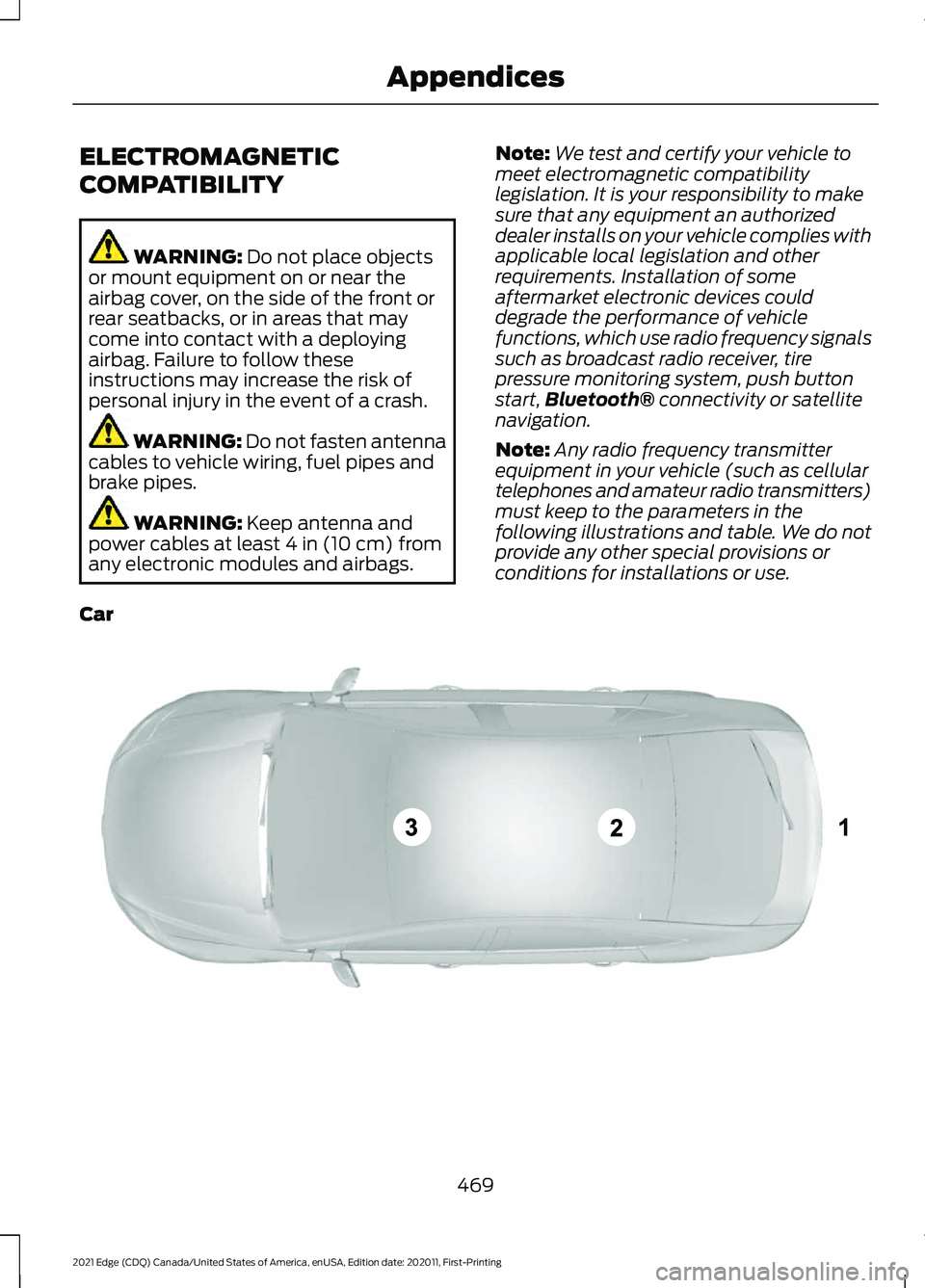
Note: Any radio frequency transmitter
equipment in your vehicle (such as cellular
telephones and amateur radio transmitters)
must keep to the parameters in the
following illustrations and table. We do not
provide any other special provisions or
conditions for installations or use.
Car 469
2021 Edge (CDQ) Canada/United States of America, enUSA, Edition date: 202011, First-Printing AppendicesE239120
Page 481 of 500
Child Restraints...............................................33
Child Restraint Position Information.............33
Child Restraints Recommendation...............34
Child Safety
.......................................................31
Child Restraint Anchor Points.......................... 32
Child Restraints..................................................... 33
Installing Child Restraints................................. 34
Child Safety Locks..........................................41 Left-Hand Side....................................................... 41
Right-Hand Side.................................................... 41
Child Safety Precautions
..............................31
Cleaning Products.......................................307 Materials............................................................... 307
Cleaning the Exterior..................................307 Cleaning Camera Lenses and
Sensors............................................................ 309
Cleaning Chrome, Aluminium or Stainless Steel.................................................................. 308
Cleaning Headlamps and Rear Lamps............................................................... 307
Cleaning Stripes or Graphics........................ 309
Cleaning the Engine Compartment...........308
Cleaning the Exterior Precautions...............307
Cleaning the Underbody................................ 309
Cleaning Wheels............................................... 308
Cleaning Windows and Wiper Blades............................................................... 308
Cleaning the Interior...................................309 Cleaning Carpets and Floor Mats.................310
Cleaning Displays and Screens..................... 310
Cleaning Fabric Seats and Headliners........................................................ 310
Cleaning Leather and Vinyl ............................ 310
Cleaning Moonroof Tracks............................... 311
Cleaning Plastic................................................. 309
Cleaning Seatbelts.............................................. 311
Cleaning Storage Compartments.................311
Cleaning the Instrument Panel.................... 309
Clearing All MyKeys.......................................67
Clearing the Garage Door Opener...........151
Climate Control
.............................................128
Auto Mode............................................................ 130
Climate Control – Troubleshooting..............131
Climate Control – Troubleshooting
........131
Climate Control – Frequently Asked
Questions........................................................... 131
Closing the Liftgate.......................................80 Closing the Hands-Free Liftgate.................... 85Closing the Liftgate From Inside Your
Vehicle................................................................. 84
Closing the Liftgate From Outside Your Vehicle................................................................ 80
Closing the Liftgate Using the Remote Control................................................................ 85
Cold Weather Precautions.......................263
Connected Vehicle
.....................................360
Connected Vehicle –
Troubleshooting............................................. 361
Connecting the Vehicle to a Mobile Network........................................................... 360
Connected Vehicle Data
..............................24
Connected Vehicle Limitations..............360
Connected Vehicle Requirements........360
Connected Vehicle – Troubleshooting.........................................361
Connected Vehicle – Frequently Asked Questions......................................................... 361
Connecting a Bluetooth® Device...........381
Connecting a Trailer....................................254 Safety Chains...................................................... 255
Trailer Lamps....................................................... 254
Trailer Towing Connector................................ 254
Connecting a Trailer Precautions..........254
Connecting the Vehicle to a Mobile Network.......................................................360
Connecting FordPass to the Modem.........360
Enabling and Disabling the Modem..........360
What Is the Modem.......................................... 360
Connecting the Vehicle to a Wi-Fi Network.......................................................360
Connecting Your Phone
.............................377
Contacting Us...................................................15
Argentina.................................................................. 15
Asia Pacific.............................................................. 15
Australia.................................................................... 15
Brazil........................................................................\
... 15
Canada...................................................................... 15
Caribbean, Central America and Israel.........15
Europe....................................................................... 15
Ford Credit - US Only........................................... 16
Middle East.............................................................. 16
New Zealand........................................................... 15
North Africa ............................................................ 15
Puerto Rico.............................................................. 16
South Korea............................................................ 16
Sub-Saharan Africa ............................................. 15
477
2021 Edge (CDQ) Canada/United States of America, enUSA, Edition date: 202011, First-Printing Index
Page 488 of 500
Locating the Tire Sealant and Inflator
Kit...................................................................330
Locating the USB Ports..............................153 Charge Only USB Ports..................................... 153
Data Transfer USB Ports.................................. 153
Locating the Wireless Accessory Charger...........................................................157
Locating Your Vehicle...................................62
Locking the Rear Window Controls
........................................................108
Luggage Compartment.............................252
M
Maintenance.................................................290 Engine Oil.............................................................. 293
Exterior Bulbs...................................................... 303
Interior Bulbs....................................................... 306
Maintenance Precautions........................290
Making and Receiving a Phone Call.................................................................378
During a Phone Call.......................................... 378
Making Calls......................................................... 378
Receiving Calls.................................................... 378
Manually Dimming the Interior Mirror..............................................................109
Manually Releasing the Electric Parking Brake..............................................................190
........................................................................\
........... 190
Manually Shifting Gears.............................178 Shifting Using the Paddle Shifters...............178
Manual Park Release..................................180 Manual Park Release Precautions...............180
Using Manual Park Release............................ 180
What Is Manual Park Release........................ 180
Manual Seats
.................................................134
Adjusting the Head Restraint......................... 134
Adjusting the Lumbar Support...................... 136
Adjusting the Seat Backrest........................... 136
Adjusting the Seat Height............................... 136
Folding the Seat Backrest................................ 141
Head Restraint Components......................... 134
Installing the Head Restraint.......................... 135
Moving the Seat Backward and Forward............................................................. 135
Removing the Head Restraint........................ 135
Unfolding the Seat Backrest.......................... 142
Memory Function
.........................................146 Memory Function Precautions................146
Mislock................................................................72
Mislock Limitations.............................................. 72
Switching Mislock On and Off......................... 72
What Is Mislock..................................................... 72
Mobile Communications Equipment..................................................442
Mobile Device Data........................................25
Moonroof Bounce-Back
..............................112
Overriding Moonroof Bounce-Back..............112
What Is Moonroof Bounce-Back................... 112
Moonroof
...........................................................111
Moonroof Bounce-Back.................................... 112
Motorcraft Parts - 2.0L EcoBoost™.................................................349
Motorcraft Parts - 2.7L EcoBoost™ .................................................
350
Muting the Audio..........................................367
MyKey Settings
...............................................66
Configurable MyKey Settings.......................... 66
Non-Configurable MyKey Settings................66
MyKey – Troubleshooting
...........................68
MyKey – Frequently Asked Questions.........69
MyKey – Information Messages..................... 68
MyKey ™
............................................................66
MyKey Settings..................................................... 66
MyKey – Troubleshooting................................. 68
N
Navigation Map Updates.........................384
Navigation......................................................384 Adjusting the Map............................................. 384
Live Traffic............................................................ 384
Route Guidance................................................. 385
Setting a Destination....................................... 384
Waypoints............................................................ 385
Normal Scheduled Maintenance
..........394
Normal Maintenance Intervals..................... 395
Oil Change Reminder....................................... 394
O
Opening and Closing the Hood
.............290
Closing the Hood................................................ 291
Opening the Hood............................................ 290
Opening and Closing the Moonroof........111 Closing the Moonroof.......................................... 111
484
2021 Edge (CDQ) Canada/United States of America, enUSA, Edition date: 202011, First-Printing Index
Page 489 of 500
Opening the Moonroof.......................................
111
Opening and Closing the Sun Shade...............................................................111
Closing the Sun Shade....................................... 111
Opening the Sun Shade..................................... 111
Opening and Closing the Windows.......107 Accessory Delay.................................................. 107
One-Touch Close................................................ 107
One-Touch Open................................................ 107
Opening the Liftgate....................................80
Opening the Hands-Free Liftgate.................. 83
Opening the Liftgate From Inside Your Vehicle................................................................. 82
Opening the Liftgate From Outside Your Vehicle................................................................ 80
Opening the Liftgate Using the Remote Control................................................................ 80
Operating the Doors From Inside Your Vehicle..............................................................71
Individually Unlocking and Locking the Doors Using the Locking Button.................71
Operating the Doors From Outside Your Vehicle.............................................................70
Individually Unlocking and Locking the Doors Using the Key Blade.......................... 70
Unlocking and Locking the Doors Using the Key Blade............................................................ 70
Unlocking and Locking the Doors Using the Remote Control................................................ 70
Ordering a Canadian French Owner's Manual..........................................................401
Ordering Additional Owner's Literature.......................................................277
Obtaining a French Owner ’s Manual..........277
Our Sustainability Report........................400
Overriding the Set Speed..........................219
P
Parking Aid Indicators................................202
Parking Aid Precautions............................198
Parking Aids
....................................................198
Front Parking Aid................................................ 199
Parking Aids – Troubleshooting................... 202
Rear Parking Aid................................................. 199
Side Parking Aid................................................ 200Parking Aids – Troubleshooting.............202
Parking Aids – Information
Messages......................................................... 202
Passive Anti-Theft System
........................89
How Does the Passive Anti-Theft System
Work..................................................................... 89
What Is the Passive Anti-Theft System................................................................ 89
Perchlorate.....................................................441
Performing a Master Reset......................387
Personalized Settings
.................................120
Changing the Instrument Cluster Display
Language.......................................................... 120
Changing the Measure Unit............................. 121
Changing the Temperature Unit.................... 122
Changing the Tire Pressure Unit.................... 123
Switching the Instrument Cluster Display Audible Warnings On and Off................... 124
Personal Safety System Components
.................................................49
Personal Safety System ™..........................49
Phone Menu...................................................377 ........................................................................\
........... 377
Email....................................................................... 377
Favorites................................................................. 377
Messaging............................................................. 377
Phone List.............................................................. 377
Voice Control........................................................ 377
Phone................................................................377
Phone Precautions......................................377
Playing Media Using Bluetooth®...........381
Playing Media Using the USB Port
.........153
Playing or Pausing the Audio Source..........................................................366
Audio Unit............................................................ 366
Touchscreen........................................................ 366
Post-Crash Alert System..........................268 How Does the Post-Crash Alert System
Work.................................................................. 268
Post-Crash Alert System Limitations...................................................... 268
Switching the Post-Crash Alert System Off...................................................................... 268
What Is the Post-Crash Alert System.............................................................. 268
Power Outlet Indicators.............................155
Power Outlet Limitations
..........................155
Power Outlet..................................................155
485
2021 Edge (CDQ) Canada/United States of America, enUSA, Edition date: 202011, First-Printing Index