parking brake FORD EDGE 2023 Owner's Manual
[x] Cancel search | Manufacturer: FORD, Model Year: 2023, Model line: EDGE, Model: FORD EDGE 2023Pages: 504, PDF Size: 14.96 MB
Page 190 of 504
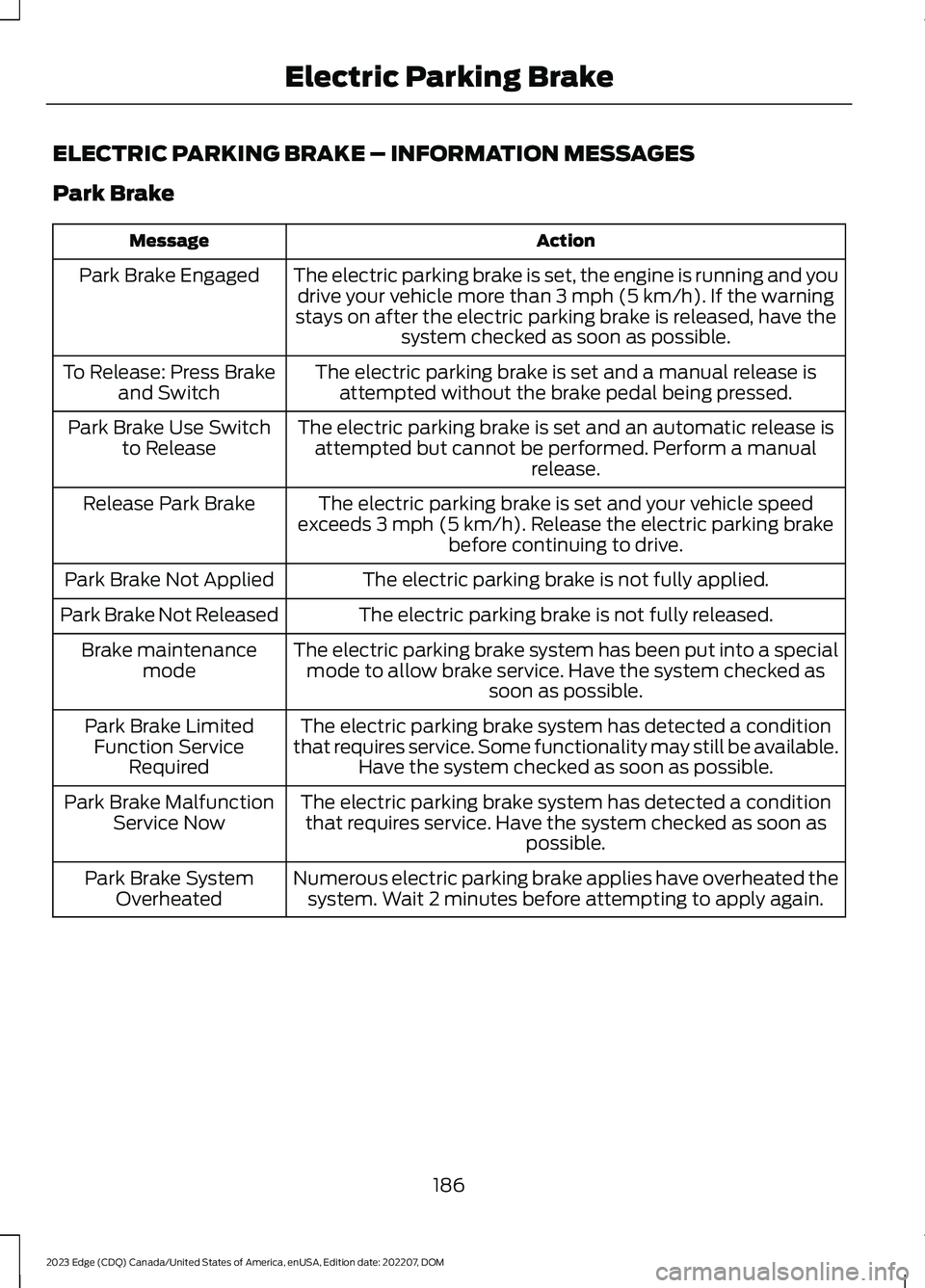
ELECTRIC PARKING BRAKE – INFORMATION MESSAGES
Park Brake
ActionMessage
The electric parking brake is set, the engine is running and youdrive your vehicle more than 3 mph (5 km/h). If the warningstays on after the electric parking brake is released, have thesystem checked as soon as possible.
Park Brake Engaged
The electric parking brake is set and a manual release isattempted without the brake pedal being pressed.To Release: Press Brakeand Switch
The electric parking brake is set and an automatic release isattempted but cannot be performed. Perform a manualrelease.
Park Brake Use Switchto Release
The electric parking brake is set and your vehicle speedexceeds 3 mph (5 km/h). Release the electric parking brakebefore continuing to drive.
Release Park Brake
The electric parking brake is not fully applied.Park Brake Not Applied
The electric parking brake is not fully released.Park Brake Not Released
The electric parking brake system has been put into a specialmode to allow brake service. Have the system checked assoon as possible.
Brake maintenancemode
The electric parking brake system has detected a conditionthat requires service. Some functionality may still be available.Have the system checked as soon as possible.
Park Brake LimitedFunction ServiceRequired
The electric parking brake system has detected a conditionthat requires service. Have the system checked as soon aspossible.
Park Brake MalfunctionService Now
Numerous electric parking brake applies have overheated thesystem. Wait 2 minutes before attempting to apply again.Park Brake SystemOverheated
186
2023 Edge (CDQ) Canada/United States of America, enUSA, Edition date: 202207, DOMElectric Parking Brake
Page 191 of 504
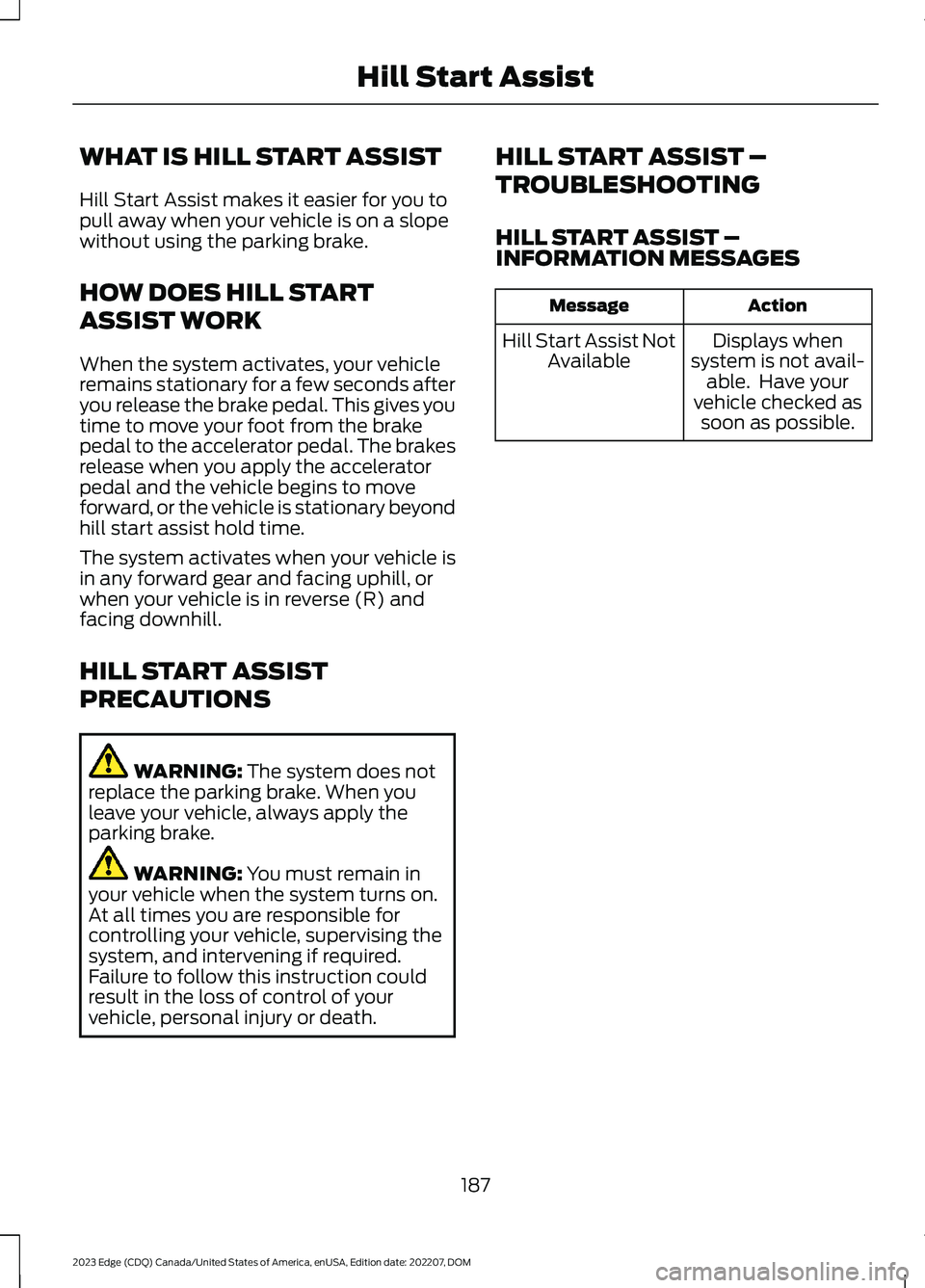
WHAT IS HILL START ASSIST
Hill Start Assist makes it easier for you topull away when your vehicle is on a slopewithout using the parking brake.
HOW DOES HILL START
ASSIST WORK
When the system activates, your vehicleremains stationary for a few seconds afteryou release the brake pedal. This gives youtime to move your foot from the brakepedal to the accelerator pedal. The brakesrelease when you apply the acceleratorpedal and the vehicle begins to moveforward, or the vehicle is stationary beyondhill start assist hold time.
The system activates when your vehicle isin any forward gear and facing uphill, orwhen your vehicle is in reverse (R) andfacing downhill.
HILL START ASSIST
PRECAUTIONS
WARNING: The system does notreplace the parking brake. When youleave your vehicle, always apply theparking brake.
WARNING: You must remain inyour vehicle when the system turns on.At all times you are responsible forcontrolling your vehicle, supervising thesystem, and intervening if required.Failure to follow this instruction couldresult in the loss of control of yourvehicle, personal injury or death.
HILL START ASSIST –
TROUBLESHOOTING
HILL START ASSIST –INFORMATION MESSAGES
ActionMessage
Displays whensystem is not avail-able. Have yourvehicle checked assoon as possible.
Hill Start Assist NotAvailable
187
2023 Edge (CDQ) Canada/United States of America, enUSA, Edition date: 202207, DOMHill Start Assist
Page 192 of 504
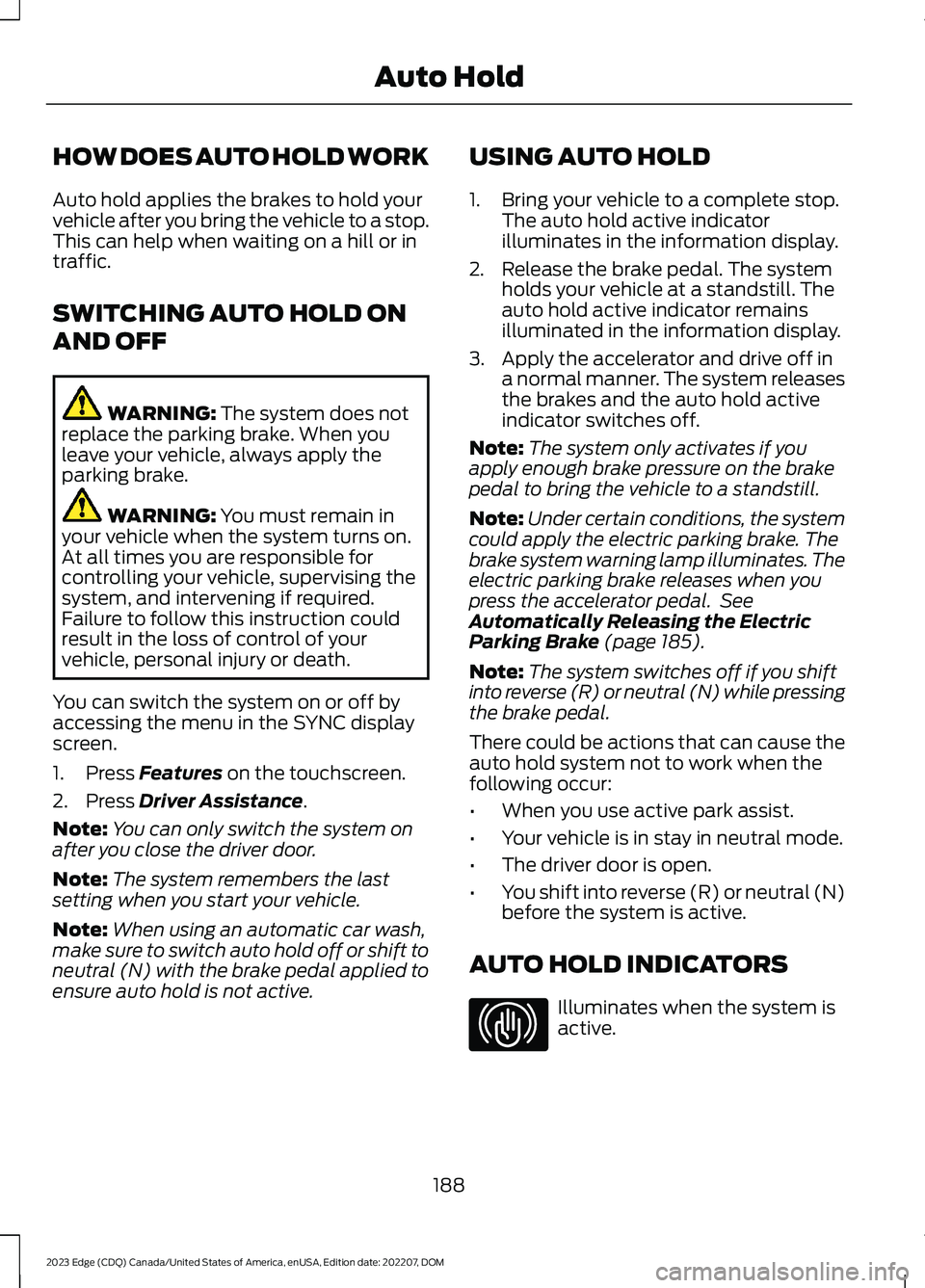
HOW DOES AUTO HOLD WORK
Auto hold applies the brakes to hold yourvehicle after you bring the vehicle to a stop.This can help when waiting on a hill or intraffic.
SWITCHING AUTO HOLD ON
AND OFF
WARNING: The system does notreplace the parking brake. When youleave your vehicle, always apply theparking brake.
WARNING: You must remain inyour vehicle when the system turns on.At all times you are responsible forcontrolling your vehicle, supervising thesystem, and intervening if required.Failure to follow this instruction couldresult in the loss of control of yourvehicle, personal injury or death.
You can switch the system on or off byaccessing the menu in the SYNC displayscreen.
1.Press Features on the touchscreen.
2.Press Driver Assistance.
Note:You can only switch the system onafter you close the driver door.
Note:The system remembers the lastsetting when you start your vehicle.
Note:When using an automatic car wash,make sure to switch auto hold off or shift toneutral (N) with the brake pedal applied toensure auto hold is not active.
USING AUTO HOLD
1.Bring your vehicle to a complete stop.The auto hold active indicatorilluminates in the information display.
2.Release the brake pedal. The systemholds your vehicle at a standstill. Theauto hold active indicator remainsilluminated in the information display.
3.Apply the accelerator and drive off ina normal manner. The system releasesthe brakes and the auto hold activeindicator switches off.
Note:The system only activates if youapply enough brake pressure on the brakepedal to bring the vehicle to a standstill.
Note:Under certain conditions, the systemcould apply the electric parking brake. Thebrake system warning lamp illuminates. Theelectric parking brake releases when youpress the accelerator pedal. SeeAutomatically Releasing the ElectricParking Brake (page 185).
Note:The system switches off if you shiftinto reverse (R) or neutral (N) while pressingthe brake pedal.
There could be actions that can cause theauto hold system not to work when thefollowing occur:
•When you use active park assist.
•Your vehicle is in stay in neutral mode.
•The driver door is open.
•You shift into reverse (R) or neutral (N)before the system is active.
AUTO HOLD INDICATORS
Illuminates when the system isactive.
188
2023 Edge (CDQ) Canada/United States of America, enUSA, Edition date: 202207, DOMAuto HoldE323448
Page 198 of 504
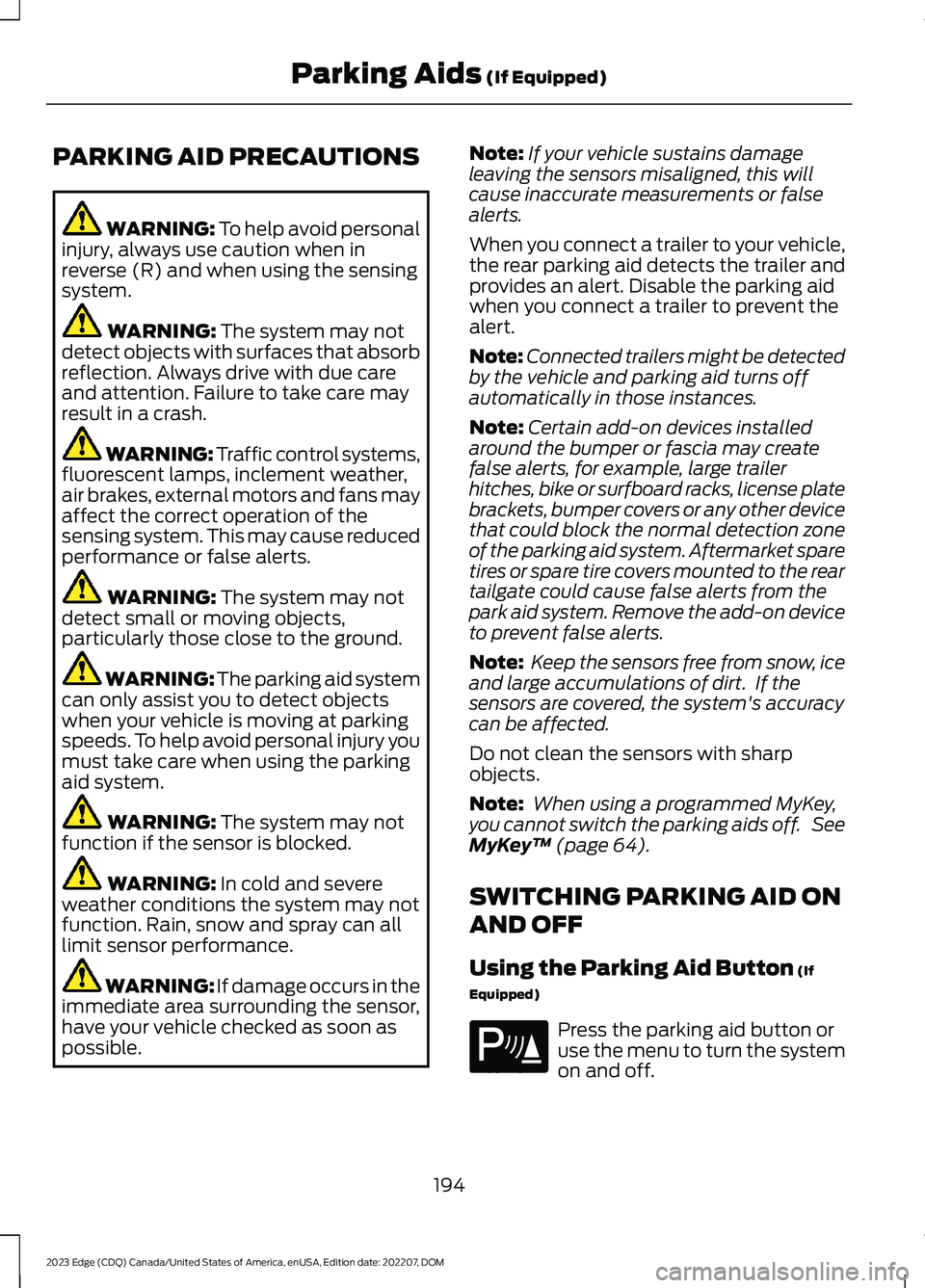
PARKING AID PRECAUTIONS
WARNING: To help avoid personalinjury, always use caution when inreverse (R) and when using the sensingsystem.
WARNING: The system may notdetect objects with surfaces that absorbreflection. Always drive with due careand attention. Failure to take care mayresult in a crash.
WARNING: Traffic control systems,fluorescent lamps, inclement weather,air brakes, external motors and fans mayaffect the correct operation of thesensing system. This may cause reducedperformance or false alerts.
WARNING: The system may notdetect small or moving objects,particularly those close to the ground.
WARNING: The parking aid systemcan only assist you to detect objectswhen your vehicle is moving at parkingspeeds. To help avoid personal injury youmust take care when using the parkingaid system.
WARNING: The system may notfunction if the sensor is blocked.
WARNING: In cold and severeweather conditions the system may notfunction. Rain, snow and spray can alllimit sensor performance.
WARNING: If damage occurs in theimmediate area surrounding the sensor,have your vehicle checked as soon aspossible.
Note:If your vehicle sustains damageleaving the sensors misaligned, this willcause inaccurate measurements or falsealerts.
When you connect a trailer to your vehicle,the rear parking aid detects the trailer andprovides an alert. Disable the parking aidwhen you connect a trailer to prevent thealert.
Note:Connected trailers might be detectedby the vehicle and parking aid turns offautomatically in those instances.
Note:Certain add-on devices installedaround the bumper or fascia may createfalse alerts, for example, large trailerhitches, bike or surfboard racks, license platebrackets, bumper covers or any other devicethat could block the normal detection zoneof the parking aid system. Aftermarket sparetires or spare tire covers mounted to the reartailgate could cause false alerts from thepark aid system. Remove the add-on deviceto prevent false alerts.
Note: Keep the sensors free from snow, iceand large accumulations of dirt. If thesensors are covered, the system's accuracycan be affected.
Do not clean the sensors with sharpobjects.
Note: When using a programmed MyKey,you cannot switch the parking aids off. SeeMyKey™ (page 64).
SWITCHING PARKING AID ON
AND OFF
Using the Parking Aid Button (If
Equipped)
Press the parking aid button oruse the menu to turn the systemon and off.
194
2023 Edge (CDQ) Canada/United States of America, enUSA, Edition date: 202207, DOMParking Aids (If Equipped)E139213
Page 201 of 504
The side parking aid may not function if:
•Your vehicle remains stationary for overtwo minutes.
•The anti-lock brake system activates.
•The traction control system activates.
•Your vehicle is in park (P).
•The steering wheel angle informationis not available. You must drive at least492 ft (150 m) above 19 mph(30 km/h) to reset the steering wheelangle information.
Note:If you switch traction control off, theside sensing system also turns off.
To reinitialize the system, drive the lengthof your vehicle.
The side parking aid does not detect anobject that is moving toward the side ofyour vehicle, for example another vehiclemoving at a low speed, if it does not passa front or rear parking aid sensor.
If the transmission is in reverse (R), the sidesensing system provides audible warnings.When your vehicle is moving slowly,obstacles are detected within 24 in(60 cm) and are inside the driving path ofyour vehicle. If your vehicle remainsstationary for a few seconds, the audiblewarning turns off. Visual indication isalways present in reverse (R).
If your vehicle is in neutral (N), the sidesensing system provides visual indicationonly when your vehicle is moving slowlyand there is a front or rear parking aidobstacle detected, and the side obstacleis within 24 in (60 cm) from the side ofyour vehicle. If your vehicle remainsstationary for a few seconds, the visualindication turns off.
If the transmission is in drive (D) or anyother forward gear, the side sensing systemprovides audible and visual warnings.When your vehicle is moving slowly,obstacles are detected within 24 in(60 cm) and are inside the driving path ofyour vehicle. If your vehicle remainsstationary for a few seconds, the visualindication and audible warning turns off.
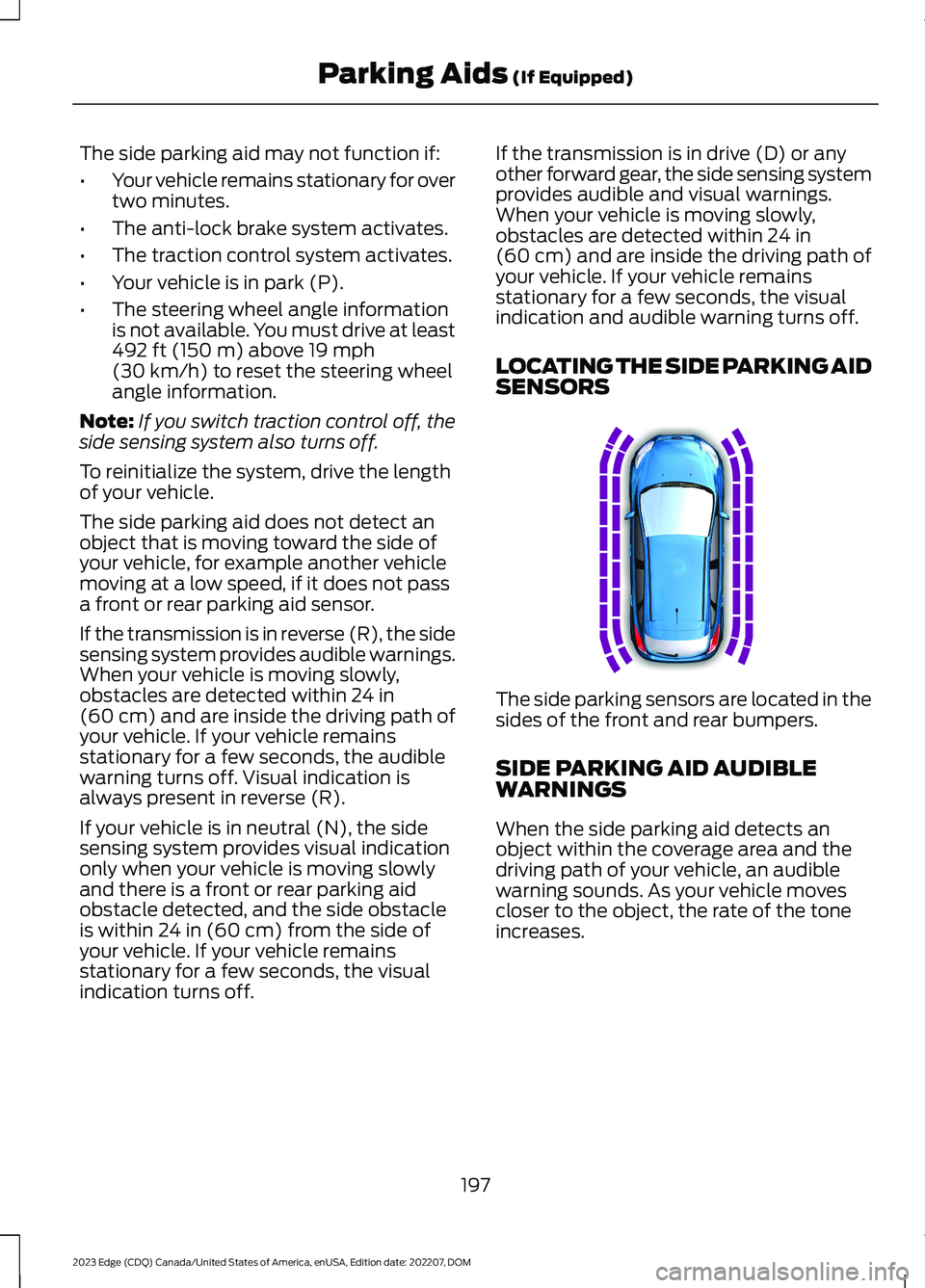
LOCATING THE SIDE PARKING AIDSENSORS
The side parking sensors are located in thesides of the front and rear bumpers.
SIDE PARKING AID AUDIBLEWARNINGS
When the side parking aid detects anobject within the coverage area and thedriving path of your vehicle, an audiblewarning sounds. As your vehicle movescloser to the object, the rate of the toneincreases.
197
2023 Edge (CDQ) Canada/United States of America, enUSA, Edition date: 202207, DOMParking Aids (If Equipped)E187810
Page 208 of 504
WHAT IS ACTIVE PARK
ASSIST
Enhanced Active Park Assist
Assists you with parking in and out ofparking spaces.
HOW DOES ACTIVE PARK
ASSIST WORK
Active park assist uses sensors to detectparking spaces. The system controlssteering as required to maneuver into orout of a parking space.
ACTIVE PARK ASSIST
PRECAUTIONS
WARNING: You must remain inyour vehicle when the system turns on.At all times you are responsible forcontrolling your vehicle, supervising thesystem, and intervening if required.Failure to follow this instruction couldresult in the loss of control of yourvehicle, personal injury or death.
WARNING: The sensors may notdetect objects in heavy rain or otherconditions that cause interference.
WARNING: You are responsible forcontrolling your vehicle at all times. Thesystem is designed to be an aid and doesnot relieve you of your responsibility todrive with due care and attention. Failureto follow this instruction could result inthe loss of control of your vehicle,personal injury or death.
WARNING: Active park assist doesnot apply the brakes under anycircumstances.
WARNING: Do not use the systemwith accessories that extend beyond thefront or rear of your vehicle, for examplea trailer hitch or bike rack. The system isnot able to make corrections for theadditional length of the accessories.
SWITCHING ACTIVE PARK
ASSIST ON AND OFF
Press the active park assistbutton to bring up full screennotifications.
Press the soft keys on the touchscreen toswitch between parallel park in,perpendicular park in or parallel park outparking modes.
Cancelling Active Park Assist
To cancel parking assistance at any time:
•Press the active park assist buttonduring operation.
•Grab the steering wheel duringoperation.
•Drive above 22 mph (35 km/h) for ashort period of time when searching fora parking space.
•Drive above 6 mph (9 km/h) duringoperation.
•Switch traction control off.
ENTERING A PARALLEL
PARKING SPACE
1.Press the active park assist button.
2.Select parallel park.
Note:The system detects other vehiclesand curbs to find a parking space.
204
2023 Edge (CDQ) Canada/United States of America, enUSA, Edition date: 202207, DOMActive Park Assist (If Equipped)E146186
Page 209 of 504
3.Use the turn signal lever to search fora parking space on the driver orpassenger side of your vehicle.
Note:The system defaults to searching fora parking spot on the passenger side of yourvehicle if you do not use the turn signal lever.
4.Drive your vehicle approximately 3 ft(1 m) away from and parallel to theother parked vehicles when searchingfor a parking space.
Note:A tone sounds and a messageappears in the information andentertainment display when active parkassist finds a parking space.
5.Press and hold the brake pedal.
6.Release the steering wheel and shiftinto reverse (R).
7.Use the accelerator and brake tocontrol your vehicle's speed whenparking. You are responsible forstopping your vehicle.
8.Active park assist is a multi-stepprocess and requires you to shift thetransmission multiple times. Follow theonscreen instructions until parking iscomplete.
Note:You can slow down your vehicle atany time by pressing the brake pedal.
Note:When parallel parking betweenobjects, the system will park closer to theobject in front of your vehicle to allow easieraccess to the luggage compartment.
ENTERING A PERPENDICULAR
PARKING SPACE
1.Press the active park assist button.
2.Select perpendicular parking.
Note:Active park assist does not recognizeparking space lines and centers your vehiclebetween objects.
Note:Active park assist backs your vehicleinto parking spaces.
3.Use the turn signal lever to search fora parking space on the driver orpassenger side of your vehicle.
Note:The system defaults to searching fora parking spot on the passenger side of yourvehicle if you do not use the turn signal lever.
4.Drive your vehicle approximately 3 ft(1 m) away from and perpendicular tothe other parked vehicles whensearching for a parking space.
Note:A tone sounds and a messageappears in the information andentertainment display when active parkassist finds a parking space.
5.Press and hold the brake pedal.
6.Release the steering wheel and shiftinto reverse (R).
7.Use the accelerator and brake tocontrol your vehicle's speed whenparking. You are responsible forstopping your vehicle.
8.Active park assist is a multi-stepprocess and requires you to shift thetransmission multiple times. Follow theonscreen instructions until parking iscomplete.
Note:Active park assist aligns the front-endof your vehicle with the lane side of theobject next to it.
Note:When only one object is detected,the system allows enough distance to openthe door on either side.
Note:You can slow down your vehicle atany time by pressing the brake pedal.
EXITING A PARKING SPACE
Active park assist only assists leavingparallel parking spaces.
1.Press the active park assist button.
205
2023 Edge (CDQ) Canada/United States of America, enUSA, Edition date: 202207, DOMActive Park Assist (If Equipped)
Page 210 of 504
2.Select parallel park exit.
3.Use the turn signal to choose thedirection to exit the parking space.
4.Press and hold the brake pedal.
5.Release the steering wheel and shiftinto the instructed gear.
6.Release the parking brake.
7.Use the accelerator and brake tocontrol your vehicle's speed whenexiting the parking space. You areresponsible for stopping your vehicle.
8.Active park assist is multi-step processand requires you to shift thetransmission multiple times. Follow theonscreen instructions until operationis complete.
Note:After active park assist drives yourvehicle to a position where you can exit theparking space in a forward movement, amessage appears instructing you to take fullcontrol of your vehicle.
9.Take control of your vehicle.
Note:You can slow down your vehicle atany time by pressing the brake pedal.
ACTIVE PARK ASSIST –
TROUBLESHOOTING
ACTIVE PARK ASSIST –INFORMATION MESSAGES
ActionMessage
The systemrequires service.Have your vehiclechecked as soon aspossible.
Active Park Fault
ACTIVE PARK ASSIST –FREQUENTLY ASKED QUESTIONS
Why does active park assist notoperate correctly?
The system is unable to detect avehicle, curb or object to park next toor in between. The system needsboundary objects to operate correctly.
Why does active park assist not searchfor a parking space?
You have switched traction control off.
Why does active park assist not searchfor a parking space?
The transmission is in reverse (R). Yourvehicle must be moving forward to beable to detect a parking space.
Why does active park assist not offera parking space?
The sensors could be blocked. Forexample, snow, ice or largeaccumulations of dirt. Blocked sensorscan affect how the system functions.
Why does active park assist not offera parking space?
The sensors in the front or rear bumpercould be damaged.
206
2023 Edge (CDQ) Canada/United States of America, enUSA, Edition date: 202207, DOMActive Park Assist (If Equipped)
Page 217 of 504
Optimal system performance requires aclear view of the road by thewindshield-mounted camera.
Optimal performance may not occur if:
•The camera is blocked.
•There is poor visibility or lightingconditions.
•There are bad weather conditions.
SWITCHING ADAPTIVE
CRUISE CONTROL ON AND OFF
The cruise controls are on the steeringwheel. See Steering Wheel (page 24).
Switching Adaptive Cruise ControlOn
Press the button to set thesystem in standby mode.
The indicator, current gap setting and setspeed appear in the information display.
Switching Adaptive Cruise ControlOff
Press the button when thesystem is in standby mode, orswitch the ignition off.
Note:You erase the set speed when youswitch the system off.
ADAPTIVE CRUISE CONTROL
AUTOMATIC CANCELLATION
The system may cancel if:
•The tires lose traction.
•You apply the parking brake.
The system may cancel and set the parkingbrake if:
•You unbuckle the seatbelt and openthe driver door after adaptive cruisecontrol stops your vehicle.
•Adaptive cruise control holds yourvehicle at a stop continuously for morethan three minutes.
The system may deactivate or preventactivating when requested if:
•The vehicle has a blocked sensor.
•The brake temperature is too high.
•There is a failure in the system or arelated system.
SETTING THE ADAPTIVE
CRUISE CONTROL SPEED
Drive to the speed you prefer.
Press either button to set thecurrent speed.
Take your foot off the accelerator pedal.
The indicator, current gap setting and setspeed appear in the information display.
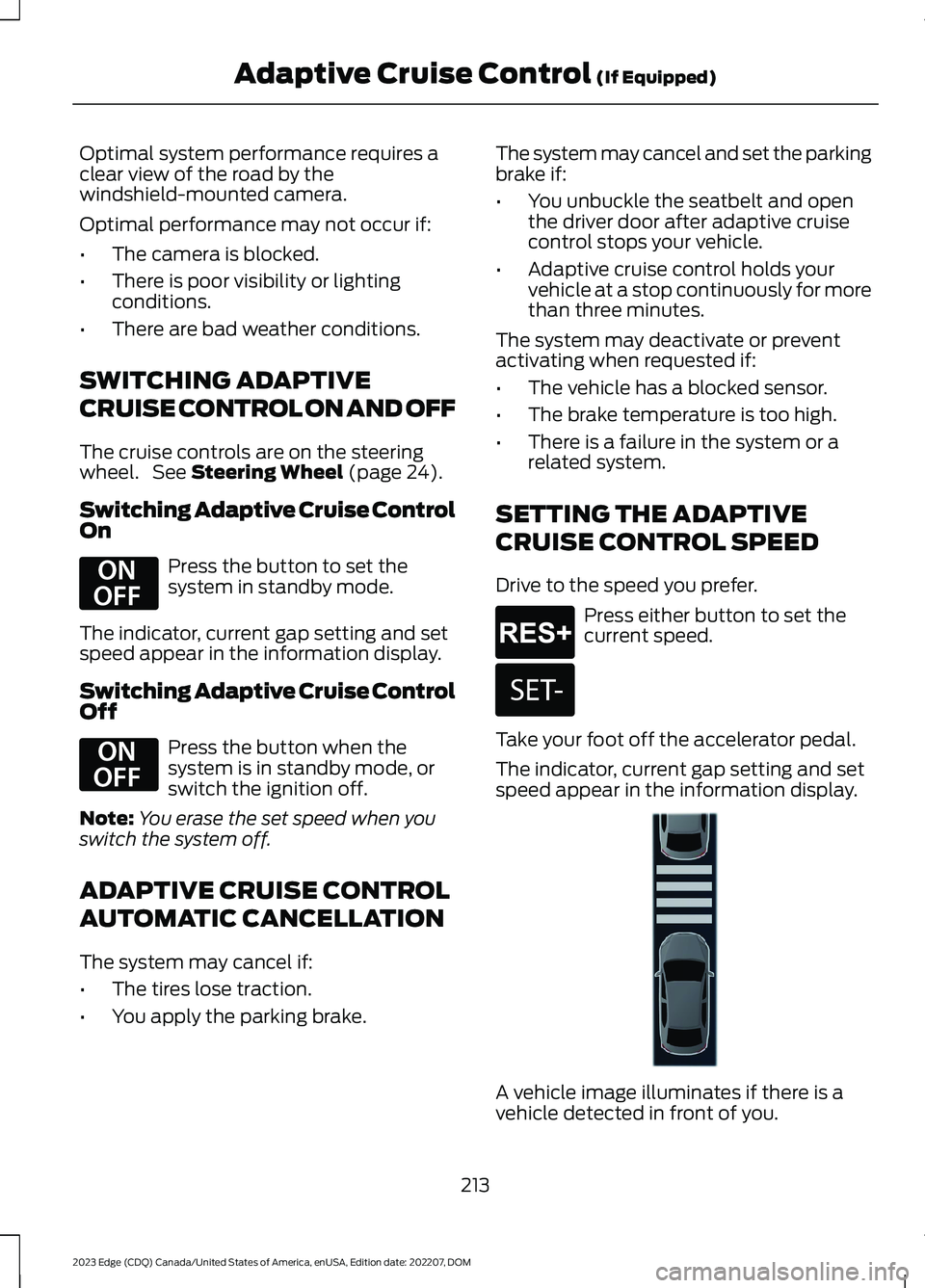
A vehicle image illuminates if there is avehicle detected in front of you.
213
2023 Edge (CDQ) Canada/United States of America, enUSA, Edition date: 202207, DOMAdaptive Cruise Control (If Equipped)E294678 E294678 E265299 E246885 E355761
Page 259 of 504
When towing a trailer:
•Obey country specific regulations fortowing a trailer.
•Do not drive faster than 70 mph(113 km/h) during the first 500 mi(800 km).
•Do not make full-throttle starts.
•Check your hitch, electrical connectionsand trailer wheel lug nuts thoroughlyafter you have traveled 50 mi (80 km).
•When stopped in congested or heavytraffic during hot weather, place thetransmission in park (P) to aid engineand transmission cooling and to helpA/C performance.
•Turn off the speed control with heavyloads or in hilly terrain. The speedcontrol may turn off when you aretowing on long, steep slopes.
•Shift to a lower gear when driving downa long or steep hill. Do not continuouslyapply the brakes, as they may overheatand become less effective.
•If your transmission has Grade Assistor Tow/Haul, use this feature whentowing. This provides engine brakingand helps eliminate excessivetransmission shifting for optimum fueleconomy and transmission cooling.
•Your vehicle has AdvanceTrac with rollstability control. When towing a trailer,additional loads could cause theAdvanceTrac system to engage duringcornering maneuvers. Reduce corneringspeeds to make sure that you canmaintain control of the vehicle andtrailer if the AdvanceTrac systemengages.
•Allow more distance for stopping witha trailer attached. Anticipate stops andgradually brake.
•Avoid parking on a slope. However, ifyou must park on a slope, turn thesteering wheel to point your vehicletires away from traffic flow, set theparking brake, place the transmissionin park (P) and place wheel chocks infront and back of the trailer wheels.
Note:Chocks are not included with yourvehicle.
LAUNCHING OR RETRIEVING
A BOAT OR PERSONAL
WATERCRAFT
When backing down a ramp during boatlaunching or retrieval:
•Do not allow the static water level torise above the bottom edge of the rearbumper.
•Do not allow waves to break higherthan 6 in (15 cm) above the bottomedge of the rear bumper.
Exceeding 6 in (15 cm) could allow waterto enter vehicle components, causinginternal damage to the components andaffecting driveability, emissions andreliability.
Note:Replace the rear axle lubricantanytime the rear axle has been submergedin water.
Note:Disconnect the trailer wiringconnector before backing the trailer into thewater.
Note:Reconnect the trailer wiringconnector after removing the trailer fromthe water.
255
2023 Edge (CDQ) Canada/United States of America, enUSA, Edition date: 202207, DOMTowing a Trailer