transmission FORD EDGE 2023 Owner's Manual
[x] Cancel search | Manufacturer: FORD, Model Year: 2023, Model line: EDGE, Model: FORD EDGE 2023Pages: 504, PDF Size: 14.96 MB
Page 196 of 504
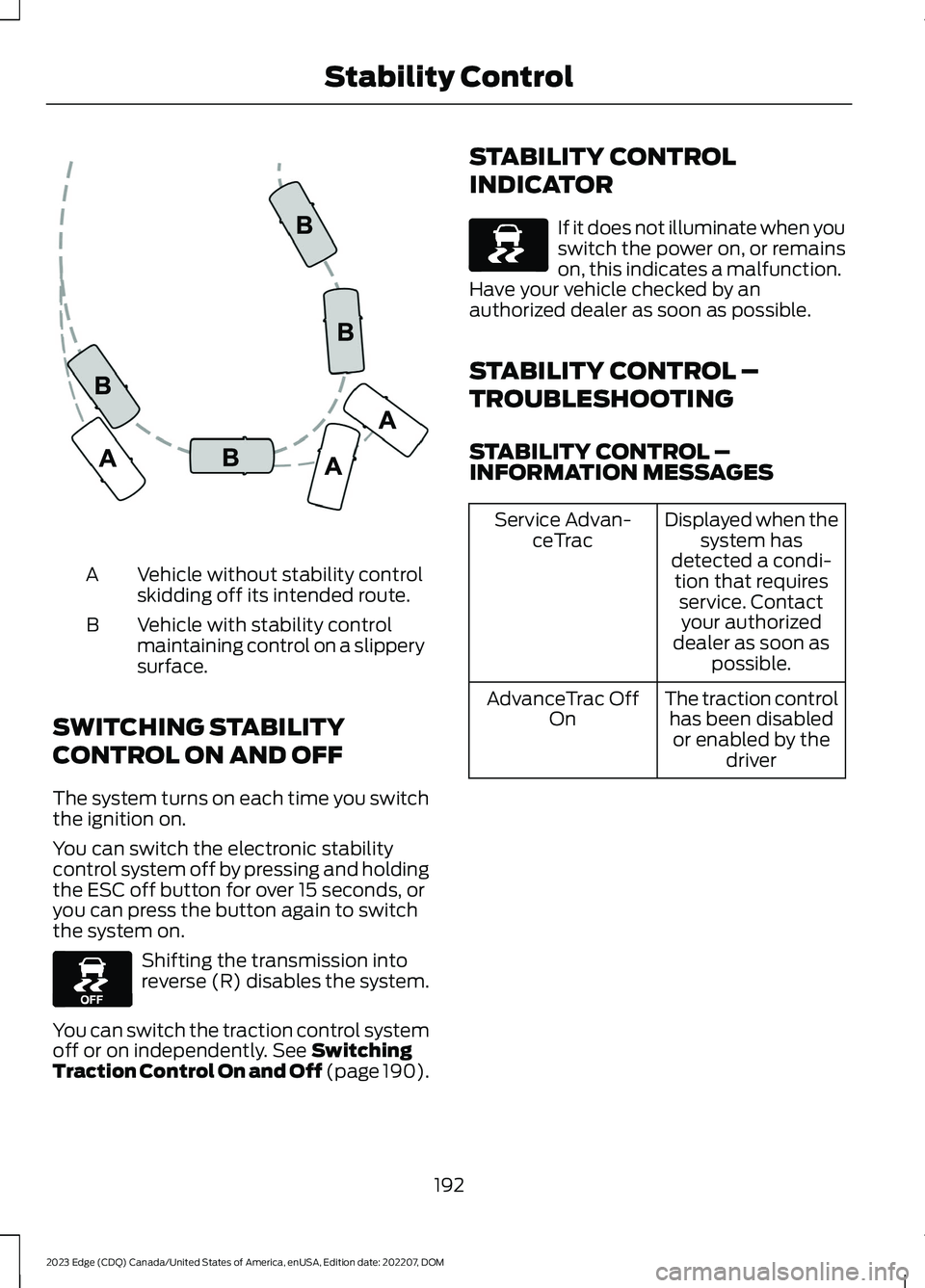
Vehicle without stability controlskidding off its intended route.A
Vehicle with stability controlmaintaining control on a slipperysurface.
B
SWITCHING STABILITY
CONTROL ON AND OFF
The system turns on each time you switchthe ignition on.
You can switch the electronic stabilitycontrol system off by pressing and holdingthe ESC off button for over 15 seconds, oryou can press the button again to switchthe system on.
Shifting the transmission intoreverse (R) disables the system.
You can switch the traction control systemoff or on independently. See SwitchingTraction Control On and Off (page 190).
STABILITY CONTROL
INDICATOR
If it does not illuminate when youswitch the power on, or remainson, this indicates a malfunction.Have your vehicle checked by anauthorized dealer as soon as possible.
STABILITY CONTROL –
TROUBLESHOOTING
STABILITY CONTROL –INFORMATION MESSAGES
Displayed when thesystem hasdetected a condi-tion that requiresservice. Contactyour authorizeddealer as soon aspossible.
Service Advan-ceTrac
The traction controlhas been disabledor enabled by thedriver
AdvanceTrac OffOn
192
2023 Edge (CDQ) Canada/United States of America, enUSA, Edition date: 202207, DOMStability ControlE72903 E130458 E138639
Page 201 of 504
The side parking aid may not function if:
•Your vehicle remains stationary for overtwo minutes.
•The anti-lock brake system activates.
•The traction control system activates.
•Your vehicle is in park (P).
•The steering wheel angle informationis not available. You must drive at least492 ft (150 m) above 19 mph(30 km/h) to reset the steering wheelangle information.
Note:If you switch traction control off, theside sensing system also turns off.
To reinitialize the system, drive the lengthof your vehicle.
The side parking aid does not detect anobject that is moving toward the side ofyour vehicle, for example another vehiclemoving at a low speed, if it does not passa front or rear parking aid sensor.
If the transmission is in reverse (R), the sidesensing system provides audible warnings.When your vehicle is moving slowly,obstacles are detected within 24 in(60 cm) and are inside the driving path ofyour vehicle. If your vehicle remainsstationary for a few seconds, the audiblewarning turns off. Visual indication isalways present in reverse (R).
If your vehicle is in neutral (N), the sidesensing system provides visual indicationonly when your vehicle is moving slowlyand there is a front or rear parking aidobstacle detected, and the side obstacleis within 24 in (60 cm) from the side ofyour vehicle. If your vehicle remainsstationary for a few seconds, the visualindication turns off.
If the transmission is in drive (D) or anyother forward gear, the side sensing systemprovides audible and visual warnings.When your vehicle is moving slowly,obstacles are detected within 24 in(60 cm) and are inside the driving path ofyour vehicle. If your vehicle remainsstationary for a few seconds, the visualindication and audible warning turns off.
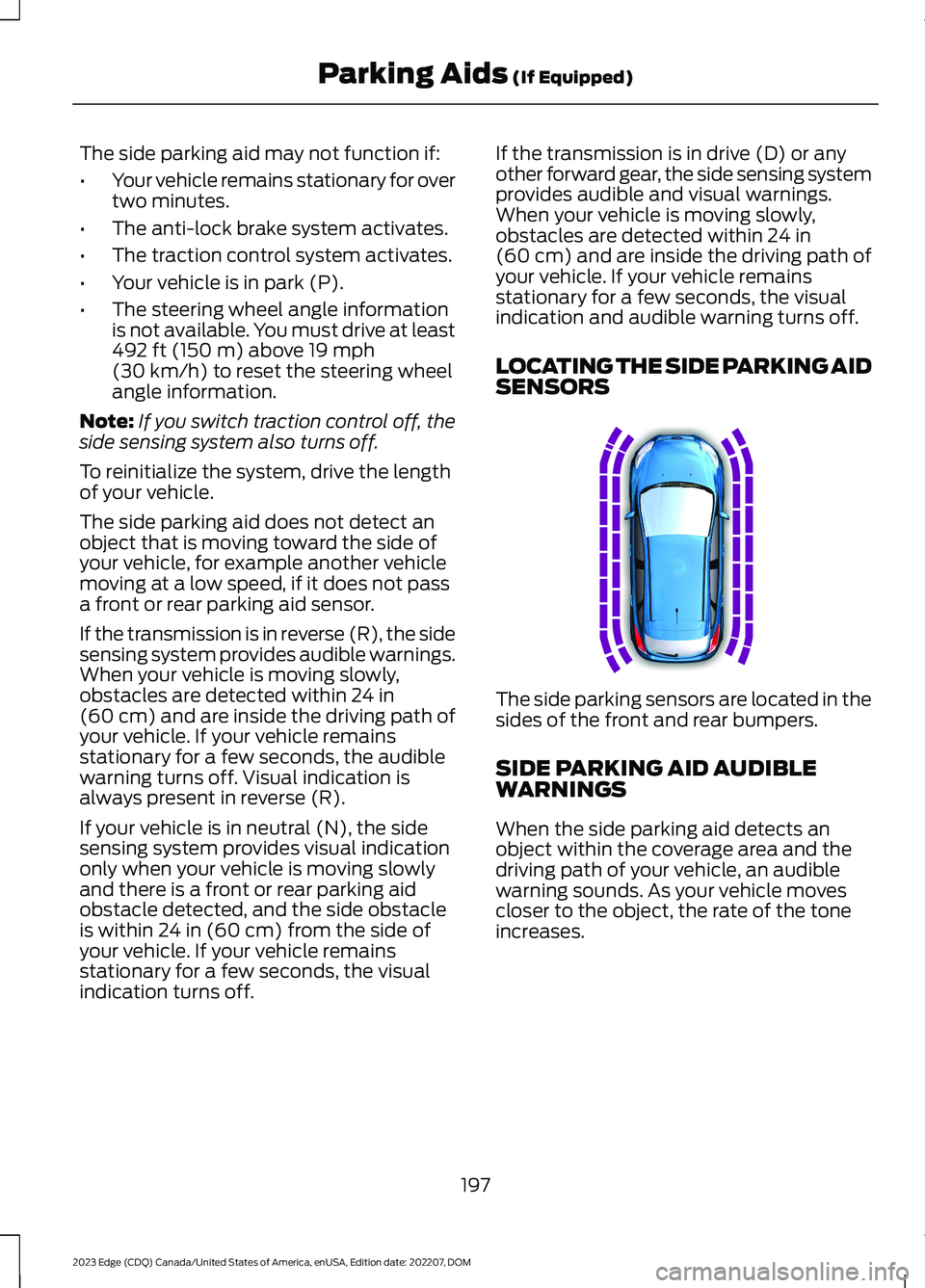
LOCATING THE SIDE PARKING AIDSENSORS
The side parking sensors are located in thesides of the front and rear bumpers.
SIDE PARKING AID AUDIBLEWARNINGS
When the side parking aid detects anobject within the coverage area and thedriving path of your vehicle, an audiblewarning sounds. As your vehicle movescloser to the object, the rate of the toneincreases.
197
2023 Edge (CDQ) Canada/United States of America, enUSA, Edition date: 202207, DOMParking Aids (If Equipped)E187810
Page 203 of 504
WHAT IS THE REAR VIEW
CAMERA
The rear view camera provides a videoimage of the area behind your vehicle whenthe transmission is in reverse (R).
REAR VIEW CAMERA
PRECAUTIONS
WARNING: The rear view camerasystem is a reverse aid supplementdevice that still requires the driver to useit in conjunction with the interior andexterior mirrors for maximum coverage.
WARNING: Objects that are closeto either corner of the bumper or underthe bumper, might not be seen on thescreen due to the limited coverage of thecamera system.
WARNING: Reverse your vehicleslowly. Failure to follow this instructioncould result in the loss of control of yourvehicle, personal injury or death.
WARNING: Use caution when therear cargo door is ajar. If the rear cargodoor is ajar, the camera will be out ofposition and the video image could beincorrect. All guide lines disappear whenthe rear cargo door is ajar. Failure tofollow this instruction could result inpersonal injury.
WARNING: Do not switch thecamera features on or off when yourvehicle is moving.
Note: When towing, the camera only seeswhat you are towing. This might not provideadequate coverage and you might not seesome objects. In some vehicles, the guidelines may disappear when you connect thetrailer tow connector.
LOCATING THE REAR VIEW
CAMERA
The rear view camera is located on thecargo door. It provides a video image of thearea behind your vehicle.
REAR VIEW CAMERA GUIDE
LINES
Note:Active guide lines and fixed guidelines are only available when thetransmission is in reverse (R).
Note:The centerline is only available if theactive or fixed guide lines are on.
199
2023 Edge (CDQ) Canada/United States of America, enUSA, Edition date: 202207, DOMRear View Camera
Page 204 of 504
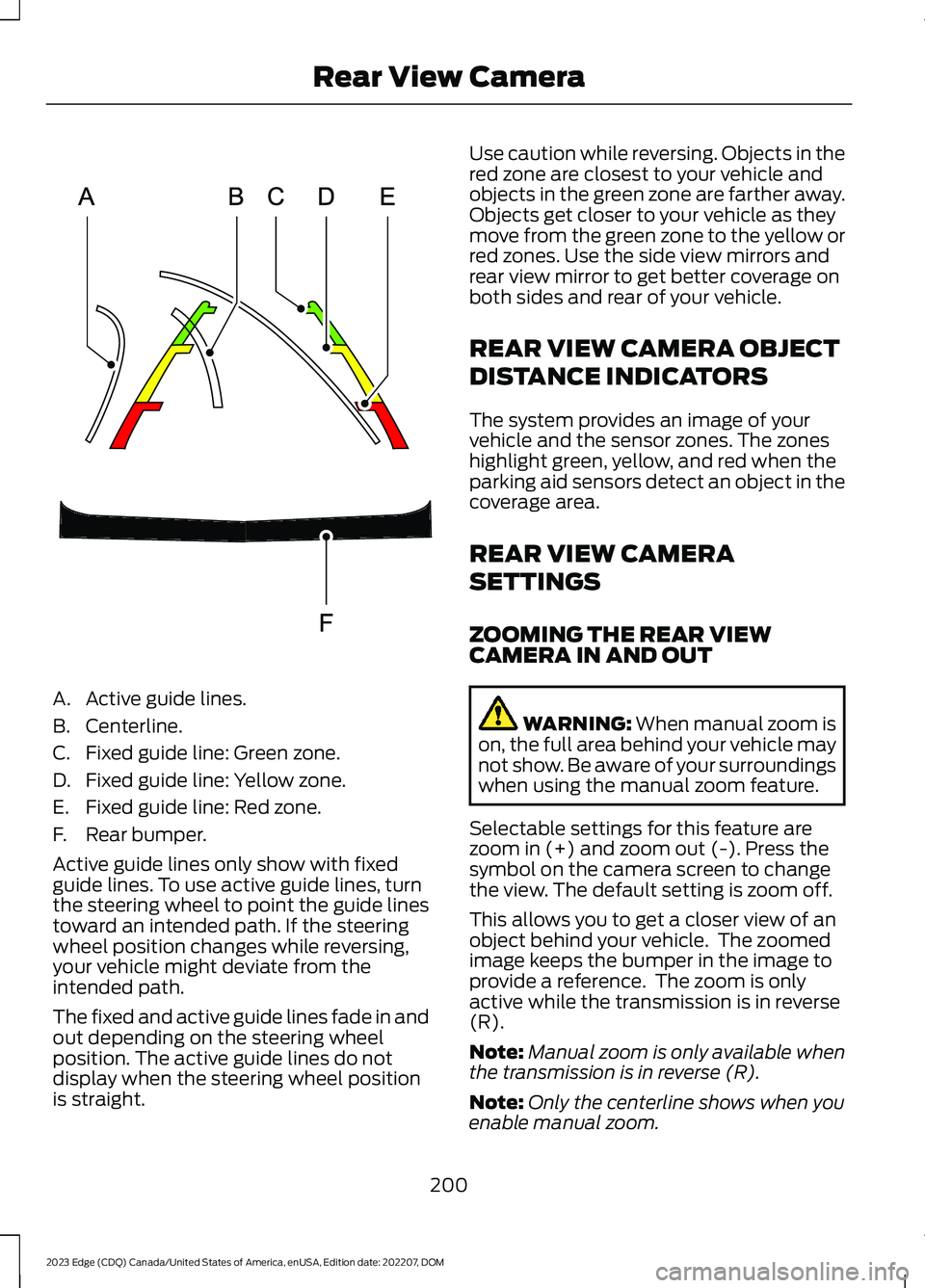
A.Active guide lines.
B.Centerline.
C.Fixed guide line: Green zone.
D.Fixed guide line: Yellow zone.
E.Fixed guide line: Red zone.
F.Rear bumper.
Active guide lines only show with fixedguide lines. To use active guide lines, turnthe steering wheel to point the guide linestoward an intended path. If the steeringwheel position changes while reversing,your vehicle might deviate from theintended path.
The fixed and active guide lines fade in andout depending on the steering wheelposition. The active guide lines do notdisplay when the steering wheel positionis straight.
Use caution while reversing. Objects in thered zone are closest to your vehicle andobjects in the green zone are farther away.Objects get closer to your vehicle as theymove from the green zone to the yellow orred zones. Use the side view mirrors andrear view mirror to get better coverage onboth sides and rear of your vehicle.
REAR VIEW CAMERA OBJECT
DISTANCE INDICATORS
The system provides an image of yourvehicle and the sensor zones. The zoneshighlight green, yellow, and red when theparking aid sensors detect an object in thecoverage area.
REAR VIEW CAMERA
SETTINGS
ZOOMING THE REAR VIEWCAMERA IN AND OUT
WARNING: When manual zoom ison, the full area behind your vehicle maynot show. Be aware of your surroundingswhen using the manual zoom feature.
Selectable settings for this feature arezoom in (+) and zoom out (-). Press thesymbol on the camera screen to changethe view. The default setting is zoom off.
This allows you to get a closer view of anobject behind your vehicle. The zoomedimage keeps the bumper in the image toprovide a reference. The zoom is onlyactive while the transmission is in reverse(R).
Note:Manual zoom is only available whenthe transmission is in reverse (R).
Note:Only the centerline shows when youenable manual zoom.
200
2023 Edge (CDQ) Canada/United States of America, enUSA, Edition date: 202207, DOMRear View CameraE306774
Page 205 of 504
SWITCHING REAR VIEW CAMERADELAY ON AND OFF
1.Press Settings on the touchscreen.
2.Press Vehicle Settings.
3.Switch Rear View Camera Delay on oroff.
When shifting the transmission out ofreverse (R) and into any gear other thanpark (P), the camera image remains in thedisplay until:
•Your vehicle speed reachesapproximately 5 mph (8 km/h).
•You shift your vehicle into park (P).
201
2023 Edge (CDQ) Canada/United States of America, enUSA, Edition date: 202207, DOMRear View Camera
Page 206 of 504
WHAT IS THE 180 DEGREE
CAMERA
The 180 degree camera system consistsof front and rear cameras.
HOW DOES THE 180 DEGREE
CAMERA WORK
The 180 degree camera system allows youto see what is directly in front or behindyour vehicle, provides a cross traffic viewin front of your vehicle and providesvisibility when parking your vehicle.
180 DEGREE CAMERA
PRECAUTIONS
WARNING: The rear view camerasystem is a reverse aid supplementdevice that still requires the driver to useit in conjunction with the interior andexterior mirrors for maximum coverage.
WARNING: Objects that are closeto either corner of the bumper or underthe bumper, might not be seen on thescreen due to the limited coverage of thecamera system.
WARNING: Use caution whenturning camera features on or off whenthe transmission is not in park (P). Makesure your vehicle is not moving.
180 DEGREE CAMERA
LIMITATIONS
Note:The area displayed on the screen mayvary according to your vehicle's orientationor road condition.
Note:The front view camera will switch offif your vehicle speed exceeds 6 mph(10 km/h). You will have to switch thesystem back on by using the camera systembutton once below the speed threshold.
Note:The camera system may not operatecorrectly if mud, water or debris obstructsthe camera's view. You can clean the lenswith a soft, lint-free cloth and non-abrasivecleaner or by using your front or rear washer.See Wipers (page 94).
LOCATING THE 180 DEGREE
CAMERAS
The front view camera is in the grille. Therear view camera is on the liftgate.
180 DEGREE CAMERA
INDICATORS
The 180 degree camera provides an imageof your vehicle and the sensor zones. Thezones will highlight green, yellow, and redwhen the parking aid sensors detect anobject in the coverage area.
180 DEGREE CAMERA
SETTINGS
SWITCHING THE 180 DEGREECAMERA ON AND OFF
The camera button is located onthe audio unit and allows you totoggle through different cameraviews.
Note:The camera system may not operatecorrectly if mud, water or debris obstructsthe camera's view. You can clean the lenswith a soft, lint-free cloth and non-abrasivecleaner or by using your front or rear washer.See Wipers (page 94).
202
2023 Edge (CDQ) Canada/United States of America, enUSA, Edition date: 202207, DOM180 Degree Camera (If Equipped)E188847
Page 209 of 504
3.Use the turn signal lever to search fora parking space on the driver orpassenger side of your vehicle.
Note:The system defaults to searching fora parking spot on the passenger side of yourvehicle if you do not use the turn signal lever.
4.Drive your vehicle approximately 3 ft(1 m) away from and parallel to theother parked vehicles when searchingfor a parking space.
Note:A tone sounds and a messageappears in the information andentertainment display when active parkassist finds a parking space.
5.Press and hold the brake pedal.
6.Release the steering wheel and shiftinto reverse (R).
7.Use the accelerator and brake tocontrol your vehicle's speed whenparking. You are responsible forstopping your vehicle.
8.Active park assist is a multi-stepprocess and requires you to shift thetransmission multiple times. Follow theonscreen instructions until parking iscomplete.
Note:You can slow down your vehicle atany time by pressing the brake pedal.
Note:When parallel parking betweenobjects, the system will park closer to theobject in front of your vehicle to allow easieraccess to the luggage compartment.
ENTERING A PERPENDICULAR
PARKING SPACE
1.Press the active park assist button.
2.Select perpendicular parking.
Note:Active park assist does not recognizeparking space lines and centers your vehiclebetween objects.
Note:Active park assist backs your vehicleinto parking spaces.
3.Use the turn signal lever to search fora parking space on the driver orpassenger side of your vehicle.
Note:The system defaults to searching fora parking spot on the passenger side of yourvehicle if you do not use the turn signal lever.
4.Drive your vehicle approximately 3 ft(1 m) away from and perpendicular tothe other parked vehicles whensearching for a parking space.
Note:A tone sounds and a messageappears in the information andentertainment display when active parkassist finds a parking space.
5.Press and hold the brake pedal.
6.Release the steering wheel and shiftinto reverse (R).
7.Use the accelerator and brake tocontrol your vehicle's speed whenparking. You are responsible forstopping your vehicle.
8.Active park assist is a multi-stepprocess and requires you to shift thetransmission multiple times. Follow theonscreen instructions until parking iscomplete.
Note:Active park assist aligns the front-endof your vehicle with the lane side of theobject next to it.
Note:When only one object is detected,the system allows enough distance to openthe door on either side.
Note:You can slow down your vehicle atany time by pressing the brake pedal.
EXITING A PARKING SPACE
Active park assist only assists leavingparallel parking spaces.
1.Press the active park assist button.
205
2023 Edge (CDQ) Canada/United States of America, enUSA, Edition date: 202207, DOMActive Park Assist (If Equipped)
Page 210 of 504
2.Select parallel park exit.
3.Use the turn signal to choose thedirection to exit the parking space.
4.Press and hold the brake pedal.
5.Release the steering wheel and shiftinto the instructed gear.
6.Release the parking brake.
7.Use the accelerator and brake tocontrol your vehicle's speed whenexiting the parking space. You areresponsible for stopping your vehicle.
8.Active park assist is multi-step processand requires you to shift thetransmission multiple times. Follow theonscreen instructions until operationis complete.
Note:After active park assist drives yourvehicle to a position where you can exit theparking space in a forward movement, amessage appears instructing you to take fullcontrol of your vehicle.
9.Take control of your vehicle.
Note:You can slow down your vehicle atany time by pressing the brake pedal.
ACTIVE PARK ASSIST –
TROUBLESHOOTING
ACTIVE PARK ASSIST –INFORMATION MESSAGES
ActionMessage
The systemrequires service.Have your vehiclechecked as soon aspossible.
Active Park Fault
ACTIVE PARK ASSIST –FREQUENTLY ASKED QUESTIONS
Why does active park assist notoperate correctly?
The system is unable to detect avehicle, curb or object to park next toor in between. The system needsboundary objects to operate correctly.
Why does active park assist not searchfor a parking space?
You have switched traction control off.
Why does active park assist not searchfor a parking space?
The transmission is in reverse (R). Yourvehicle must be moving forward to beable to detect a parking space.
Why does active park assist not offera parking space?
The sensors could be blocked. Forexample, snow, ice or largeaccumulations of dirt. Blocked sensorscan affect how the system functions.
Why does active park assist not offera parking space?
The sensors in the front or rear bumpercould be damaged.
206
2023 Edge (CDQ) Canada/United States of America, enUSA, Edition date: 202207, DOMActive Park Assist (If Equipped)
Page 257 of 504
TOWING A TRAILER
PRECAUTIONS
WARNING: Do not exceedthe GVWR or the GAWRspecified on the certificationlabel.
WARNING: Towing trailersbeyond the maximumrecommended gross trailerweight exceeds the limit of yourvehicle and could result in enginedamage, transmission damage,structural damage, loss ofvehicle control, vehicle rolloverand personal injury.
WARNING: Do not exceedthe lowest rating capacity foryour vehicle or trailer hitch.Overloading your vehicle ortrailer hitch can impair yourvehicle stability and handling.Failure to follow this instructioncould result in the loss of controlof your vehicle, personal injury ordeath.
WARNING: Make sure thatthe vertical load on the tow ballis between the minimum andmaximum recommended weightat all times. Failure to follow thisinstruction could result in theloss of control of your vehicle,personal injury or death.
WARNING: Do not cut,drill, weld or modify the trailerhitch. Modifying the trailer hitchcould reduce the hitch rating.
WARNING: The anti-lockbrake system does not controlthe trailer brakes.
TRAILER BRAKE
PRECAUTIONS
WARNING: Do not connect atrailer's hydraulic brake system directlyto your vehicle's brake system. Yourvehicle may not have enough brakingpower and your chances of having acollision greatly increase.
WARNING: Do not tow a trailerfitted with electric trailer brakes unlessyour vehicle is fitted with a compatibleaftermarket electronic trailer brakecontroller. Failure to follow thisinstruction could result in the loss ofcontrol of your vehicle, personal injury ordeath. For additional information andassistance, we recommend that youcontact an authorized dealer.
Electric brakes and manual, automatic orsurge-type trailer brakes are safe if youinstall them properly and adjust them tothe manufacturer's specifications. Thetrailer brakes must meet local and federalregulations.
The rating for the tow vehicle's brakingsystem operation is at the gross vehicleweight rating, not the gross combinedweight rating.
253
2023 Edge (CDQ) Canada/United States of America, enUSA, Edition date: 202207, DOMTowing a Trailer
Page 258 of 504
Certain states require functioning trailerbrakes for trailers over a specified weight.Be sure to check state regulations for thisspecified weight.
Ford Motor Company recommendsseparate functioning brake systems fortrailers weighing more than 1,500 lb(680 kg) when loaded.
TOWING A TRAILER
LIMITATIONS
The vehicle's load capacitydesignation is by weight, not byvolume, so you cannot necessarilyuse all available space whenloading a vehicle or trailer.
Note:Your vehicle could havereduced performance whenoperating at high altitudes andwhen heavily loaded or towing a
trailer. When driving at elevation,to match driving performance asperceived at sea level, reduce grossvehicle weight and grosscombination weight by 2% per1,000 ft (300 m) elevation.
LOADING YOUR TRAILER
To help minimize how trailermovement affects your vehiclewhen driving:
•Load the heaviest items closestto the trailer floor.
•Load the heaviest itemscentered between the left andright side trailer tires.
•Load the heaviest items abovethe trailer axles or just slightlyforward toward the trailertongue. Do not allow the finaltrailer tongue weight to goabove or below 10-15% of theloaded trailer weight. Thetrailer tongue weight shouldnever exceed 10% of themaximum towing capacity.
•Select a ball mount with thecorrect rise or drop. When boththe loaded vehicle and trailerare connected, the trailer frameshould be level, or slightlyangled down toward yourvehicle, when viewed from theside.
TRAILER TOWING HINTS
Towing a trailer places an extra load onyour vehicle's engine, transmission, axle,brakes, tires and suspension. Periodicallyinspect these components during and afterany towing operation.
When driving with a trailer or payload, aslight takeoff vibration or shudder may bepresent due to the increased payloadweight.
Your vehicle may have a temporary orconventional spare tire. A temporary sparetire is different in diameter or width,tread-type, or is from a differentmanufacturer than the road tires on yourvehicle. Consult information on the tirelabel or Safety Compliance label forlimitations when using.
254
2023 Edge (CDQ) Canada/United States of America, enUSA, Edition date: 202207, DOMTowing a Trailer