battery FORD EDGE 2023 Workshop Manual
[x] Cancel search | Manufacturer: FORD, Model Year: 2023, Model line: EDGE, Model: FORD EDGE 2023Pages: 504, PDF Size: 14.96 MB
Page 347 of 504
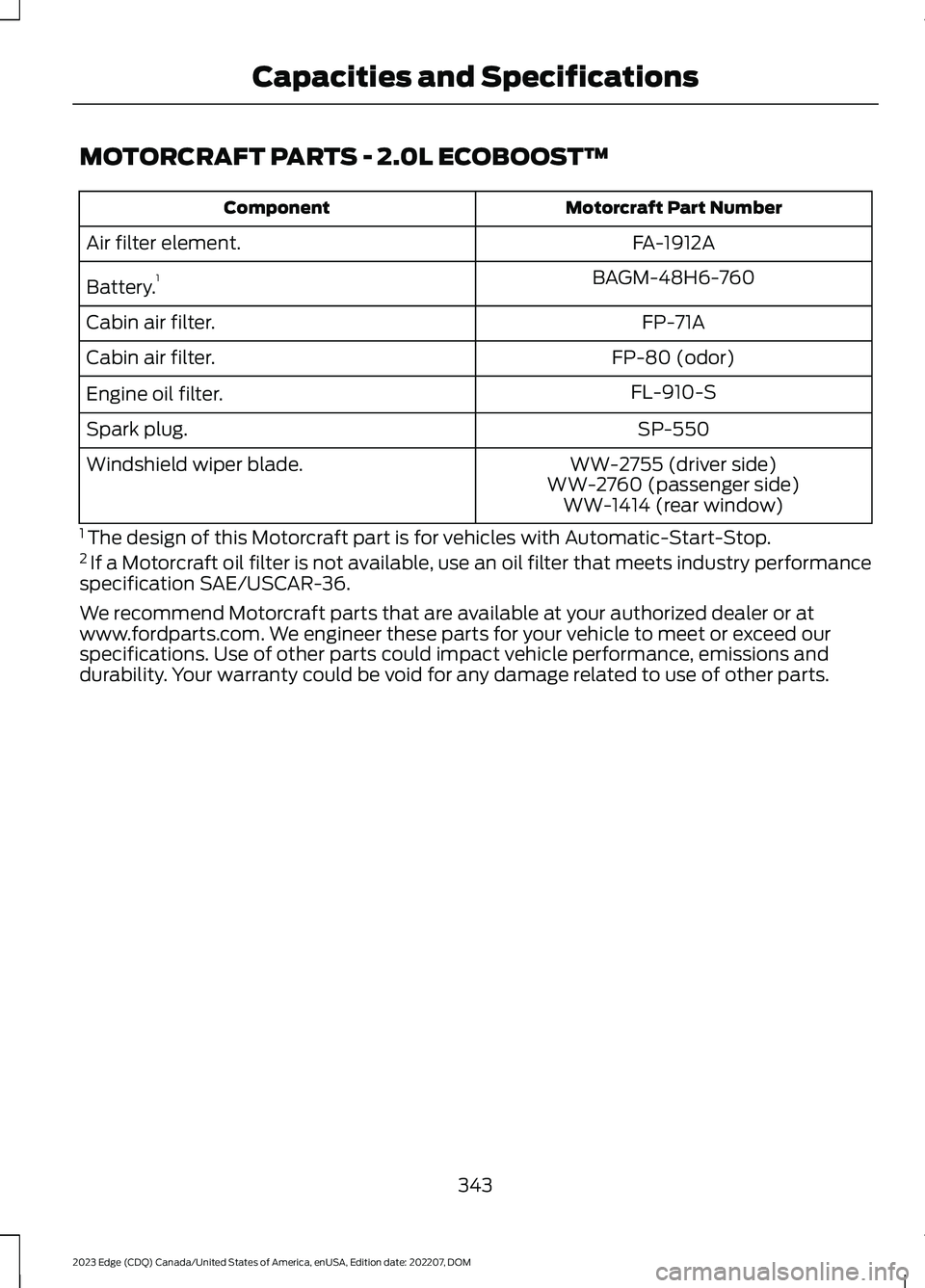
MOTORCRAFT PARTS - 2.0L ECOBOOST™
Motorcraft Part NumberComponent
FA-1912AAir filter element.
BAGM-48H6-760Battery.1
FP-71ACabin air filter.
FP-80 (odor)Cabin air filter.
FL-910-SEngine oil filter.
SP-550Spark plug.
WW-2755 (driver side)Windshield wiper blade.WW-2760 (passenger side)WW-1414 (rear window)
1 The design of this Motorcraft part is for vehicles with Automatic-Start-Stop.2 If a Motorcraft oil filter is not available, use an oil filter that meets industry performancespecification SAE/USCAR-36.
We recommend Motorcraft parts that are available at your authorized dealer or atwww.fordparts.com. We engineer these parts for your vehicle to meet or exceed ourspecifications. Use of other parts could impact vehicle performance, emissions anddurability. Your warranty could be void for any damage related to use of other parts.
343
2023 Edge (CDQ) Canada/United States of America, enUSA, Edition date: 202207, DOMCapacities and Specifications
Page 348 of 504
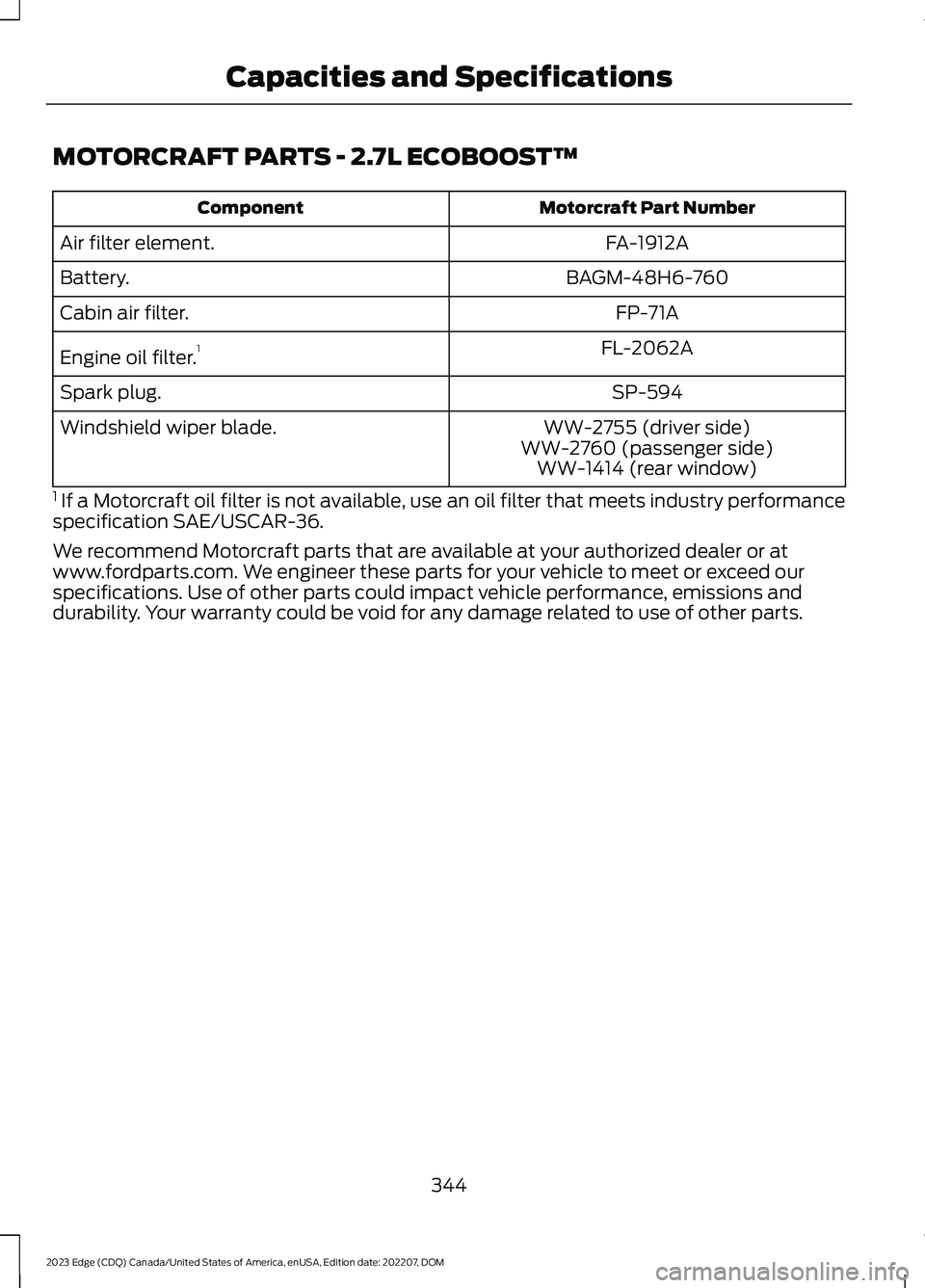
MOTORCRAFT PARTS - 2.7L ECOBOOST™
Motorcraft Part NumberComponent
FA-1912AAir filter element.
BAGM-48H6-760Battery.
FP-71ACabin air filter.
FL-2062AEngine oil filter.1
SP-594Spark plug.
WW-2755 (driver side)Windshield wiper blade.WW-2760 (passenger side)WW-1414 (rear window)
1 If a Motorcraft oil filter is not available, use an oil filter that meets industry performancespecification SAE/USCAR-36.
We recommend Motorcraft parts that are available at your authorized dealer or atwww.fordparts.com. We engineer these parts for your vehicle to meet or exceed ourspecifications. Use of other parts could impact vehicle performance, emissions anddurability. Your warranty could be void for any damage related to use of other parts.
344
2023 Edge (CDQ) Canada/United States of America, enUSA, Edition date: 202207, DOMCapacities and Specifications
Page 369 of 504
CENTER DISPLAY
PRECAUTIONS
WARNING: Driving while distractedcan result in loss of vehicle control, crashand injury. We strongly recommend thatyou use extreme caution when using anydevice that may take your focus off theroad. Your primary responsibility is thesafe operation of your vehicle. Werecommend against the use of anyhand-held device while driving andencourage the use of voice-operatedsystems when possible. Make sure youare aware of all applicable local lawsthat may affect the use of electronicdevices while driving.
CENTER DISPLAY
LIMITATIONS
Speed-restricted Features
For your safety, some features are notavailable while the vehicle is in motion ator above 5 mph (8 km/h). Settings thatare not critical while driving your vehicleare shown as restricted on your display.Some of these settings include:
•Software updates.
•Personal profiles setup.
•Valet mode setup.
•Driver assistance settings.
•MyKey setup.
•Door keypad code setup.
These restricted features becomeavailable when your vehicle is no longer inmotion.
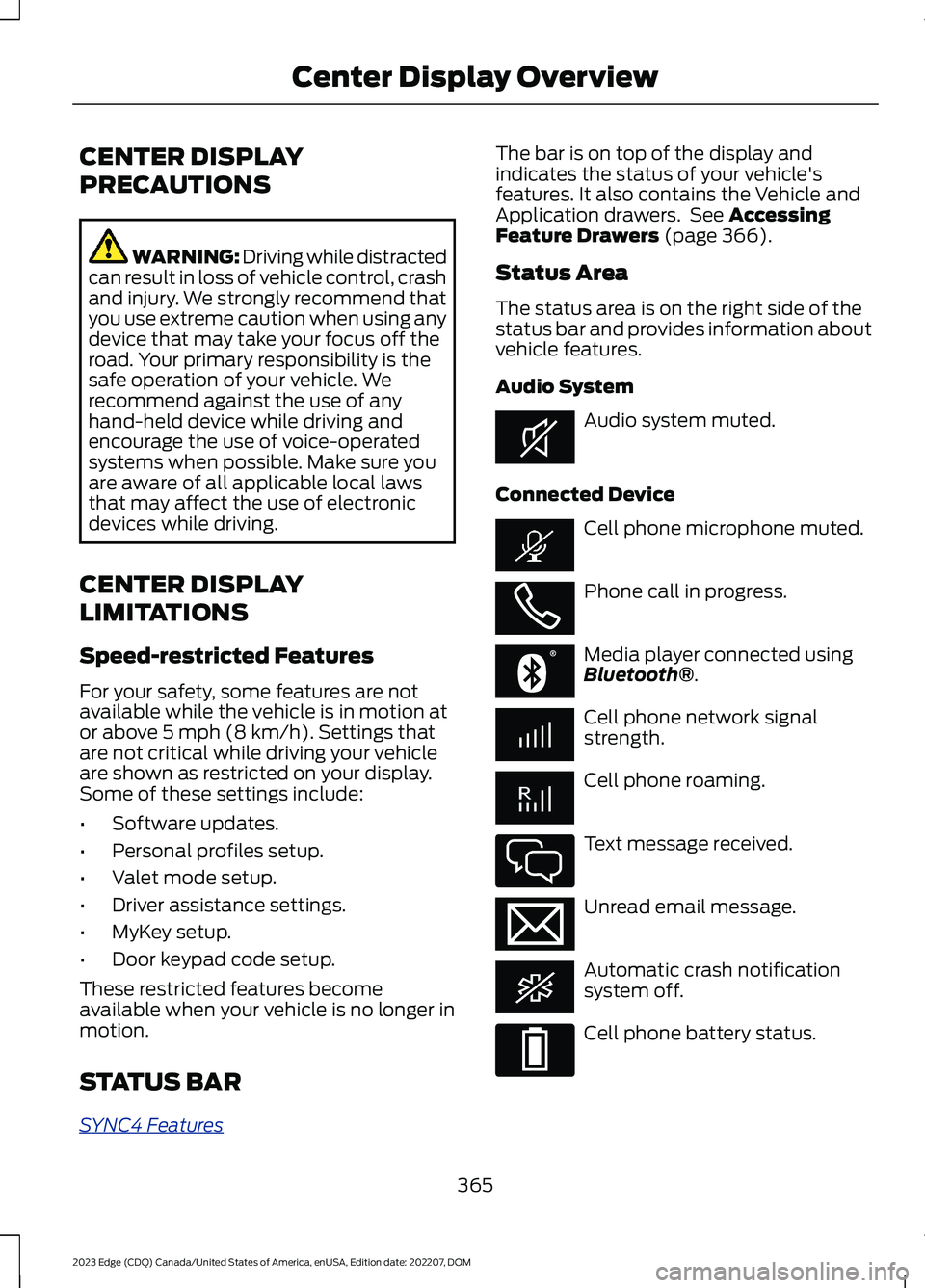
STATUS BAR
SYNC4 Features
The bar is on top of the display andindicates the status of your vehicle'sfeatures. It also contains the Vehicle andApplication drawers. See AccessingFeature Drawers (page 366).
Status Area
The status area is on the right side of thestatus bar and provides information aboutvehicle features.
Audio System
Audio system muted.
Connected Device
Cell phone microphone muted.
Phone call in progress.
Media player connected usingBluetooth®.
Cell phone network signalstrength.
Cell phone roaming.
Text message received.
Unread email message.
Automatic crash notificationsystem off.
Cell phone battery status.
365
2023 Edge (CDQ) Canada/United States of America, enUSA, Edition date: 202207, DOMCenter Display OverviewE353221 E353213 E353208 E335295 E353216 E335293
Page 376 of 504
MAKING AND RECEIVING A
PHONE CALL
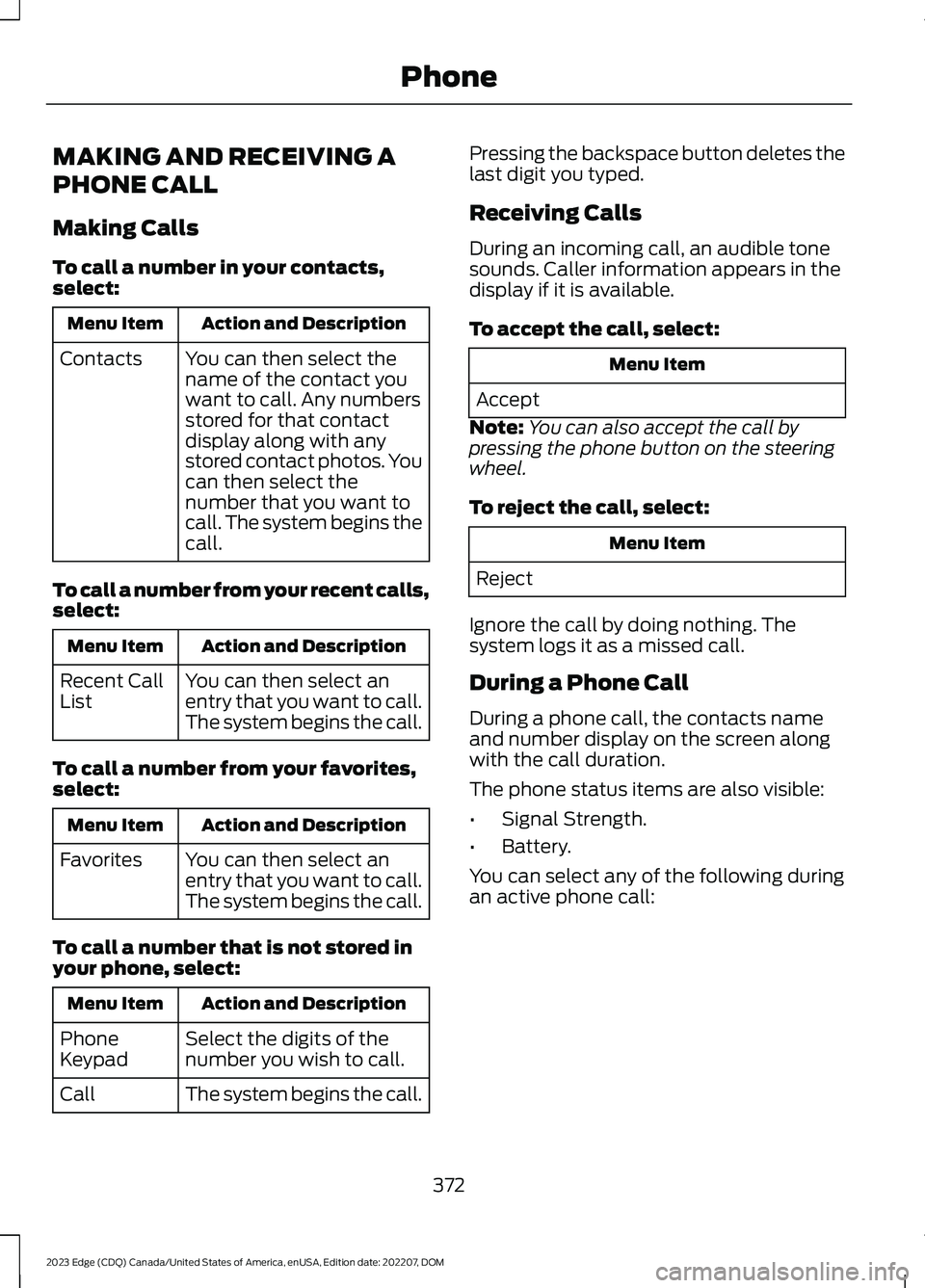
Making Calls
To call a number in your contacts,select:
Action and DescriptionMenu Item
You can then select thename of the contact youwant to call. Any numbersstored for that contactdisplay along with anystored contact photos. Youcan then select thenumber that you want tocall. The system begins thecall.
Contacts
To call a number from your recent calls,select:
Action and DescriptionMenu Item
You can then select anentry that you want to call.The system begins the call.
Recent CallList
To call a number from your favorites,select:
Action and DescriptionMenu Item
You can then select anentry that you want to call.The system begins the call.
Favorites
To call a number that is not stored inyour phone, select:
Action and DescriptionMenu Item
Select the digits of thenumber you wish to call.PhoneKeypad
The system begins the call.Call
Pressing the backspace button deletes thelast digit you typed.
Receiving Calls
During an incoming call, an audible tonesounds. Caller information appears in thedisplay if it is available.
To accept the call, select:
Menu Item
Accept
Note:You can also accept the call bypressing the phone button on the steeringwheel.
To reject the call, select:
Menu Item
Reject
Ignore the call by doing nothing. Thesystem logs it as a missed call.
During a Phone Call
During a phone call, the contacts nameand number display on the screen alongwith the call duration.
The phone status items are also visible:
•Signal Strength.
•Battery.
You can select any of the following duringan active phone call:
372
2023 Edge (CDQ) Canada/United States of America, enUSA, Edition date: 202207, DOMPhone
Page 386 of 504
This introduces new features and providesupdates to the vehicle's software systems.Make sure to switch Automatic Updateson, set a recurring update schedule andconnect your vehicle to Wi-Fi. Updatescould take longer when not connected toWi-Fi or could not download at all. SeeConnecting the Vehicle to a Wi-FiNetwork (page 354).
Your vehicle may be able to receivedrivable software updates, non-drivablesoftware updates or both. Drivablesoftware updates happen during normalvehicle usage and require limited inputfrom you. You are notified on yourtouchscreen and connected device priorto a non-drivable update.
Most updates complete in less than 30minutes, although some updates couldtake up to a few hours. Check yourtouchscreen or connected device for themost accurate estimated update time.
You are notified of the status of the vehiclesoftware update in the touchscreen andon your connected device. See SoftwareUpdate Indicators (page 383).
Vehicle Software UpdateRequirements
Non-drivable software updates do notinstall if any of the following occur:
•Your vehicle is running.
•Your vehicle is switched on.
•Your vehicle is not parked.
•The 12 V battery charge is too low.
•The hazard indicators are switched on.
•The alarm is sounding.
•The doors are open.
•The parking lamps are switched on.
•You are pressing the brake pedal.
•An emergency call is in process.
•Your vehicle is in limp home mode.
Vehicle Software UpdateLimitations
Once you begin a non-drivable softwareupdate, you cannot:
•Cancel the update.
•Lock, unlock or enter your vehicleunless you have a key blade.
•You can open the doors using themechanical latch if child locks arenot on.
•Drive your vehicle.
•Start your vehicle.
•Use the remote control to lock, unlockor start your vehicle.
•Use the alarm, central locks or doortones.
•Use the electronic door locks.
•Charge your vehicle.
•Charging resumes once the updatecompletes.
SOFTWARE UPDATE
SETTINGS
To access the Software Updates menu:
1.Access the vehicle drawer on thetouchscreen.
2.Press SETTINGS.
3.Press Software Updates.
You can do the following in the SoftwareUpdates menu:
•Switch Automatic Updates on and off.
•Schedule and install software updates.
•View software update details.
Press the button next to a menuoption for more information.
382
2023 Edge (CDQ) Canada/United States of America, enUSA, Edition date: 202207, DOMVehicle Software UpdatesE366956
Page 389 of 504
For a complete listing of the accessoriesthat are available for your vehicle, pleasecontact your authorized dealer or visit theonline store web site:
Web Address (United States)
www.Accessories.Ford.com
Web Address (Canada)
www.Accessories.Ford.ca
We will repair or replace any properlyauthorized dealer-installed Ford OriginalAccessory found to be defective infactory-supplied materials or workmanshipduring the warranty period, as well as anycomponent damaged by the defectiveaccessories.
We will warrant your Ford OriginalAccessory through the warranty thatprovides the greatest benefit:
•24 months, unlimited mileage.
•The remainder of your new vehiclelimited warranty.
Contact an authorized dealer for detailsand a copy of the warranty.
Ford Licensed Accessories are theaccessory manufacturer's designs. Themanufacturer develops and thereforewarrants Ford Licensed Accessories, anddoes not design or test these accessoriesto Ford Motor Company engineeringrequirements. Contact an authorized Forddealer for the manufacturer’s limitedwarranty details, and request a copy of theFord Licensed Accessories product limitedwarranty from the accessory manufacturer.
For maximum vehicle performance, keepthe following information in mind whenadding accessories or equipment to yourvehicle:
•When adding accessories, equipment,passengers and luggage to yourvehicle, do not exceed the total weightcapacity of the vehicle or of the frontor rear axle (GVWR or GAWR asindicated on the Safety ComplianceCertification label). Ask an authorizeddealer for specific weight information.
•The Federal CommunicationsCommission (FCC) and CanadianRadio TelecommunicationsCommission (CRTC) regulate the useof mobile communications systemsthat are equipped with radiotransmitters, for example two-wayradios, telephones and theft alarms.Any such equipment installed in yourvehicle should comply with FederalCommunications Commission (FCC)and Canadian RadioTelecommunications Commission(CRTC) regulations and should beinstalled only by an authorized dealer.
•An authorized dealer needs to installmobile communications systems.Improper installation may harm theoperation of your vehicle, particularlyif the manufacturer did not design themobile communication systemspecifically for automotive use.
•If you or an authorized Ford dealer addany non-Ford electrical or electronicaccessories or components to yourvehicle, you may adversely affectbattery performance and durability. Inaddition, you may also adversely affectthe performance of other electricalsystems in the vehicle.
385
2023 Edge (CDQ) Canada/United States of America, enUSA, Edition date: 202207, DOMAccessories
Page 390 of 504
WHAT IS FORD PROTECT
Protect yourself from the rising cost ofvehicle repairs with a Ford Protectextended service plan.
Ford Protect Extended ServicePlans - United States Only
Ford Protect extended service plans meanpeace of mind. Extended service plans arebacked by Ford Motor Company, andprovide more protection beyond the NewVehicle Limited Warranty coverage. Whenyou visit your Ford Dealer, insist on the FordProtect extended service plan.
Ford Protect Can Quickly Pay for Itself
One trip to the service center could easilyexceed the price of your Ford Protectextended service plan. With the FordProtect extended service plan, youminimize your risk for unexpected repairbills and rising repair costs.
Up to 1,000+ Covered VehicleComponents
There are four mechanical Ford Protectextended service plans with different levelsof coverage. Ask your authorized dealer fordetails.
1.PremiumCARE - Our mostcomprehensive coverage. With over1,000 covered components, this planis so complete it is probably easier tolist what is not covered.
2.ExtraCARE - Covers 113 components,and includes many high-tech items.
3.BaseCARE - Covers 84 components.
4.PowertrainCARE - Covers 29 criticalcomponents.
Ford Protect extended service plans arehonored by all authorized Ford dealers inthe United States, Canada and Mexico.
That means you get:
•Reliable, quality service at any Ford orLincoln dealership.
•Repairs performed by factory trainedtechnicians, using genuine parts.
Rental Car Reimbursement
First Day Rental Benefit
If you bring your car into your dealer forservice, we will give you a rental vehicle touse for the day.
Extended Rental Benefits
If your vehicle is kept overnight for coveredrepairs, you are eligible for rental carcoverage, warranty repairs, and fieldservice actions.
Roadside Assistance
Exclusive 24/7 roadside assistance,including:
•Towing, flat-tire change and batteryjump starts.
•Out of fuel and lock-out assistance.
•Travel expense reimbursement forlodging, meals and rental car.
•Assistance for taxi, shuttle, rental carcoverage or other transportation.
Transferable Coverage
If you sell your vehicle before your FordProtect extended service plan coverageexpires, you can transfer any remainingcoverage to the new owner. This shouldgive you and your potential buyer peace ofmind.
386
2023 Edge (CDQ) Canada/United States of America, enUSA, Edition date: 202207, DOMFord Protect
Page 394 of 504
Check Every Six Months
The battery connections. Clean if necessary.
The body and door drain holes for obstructions. Clean if necessary.
The cooling system fluid level and the coolant system strength.
The door weatherstrips for wear. Lubricate if necessary.
The hinges, latches and outside locks for proper operation. Lubricate if necessary.
The parking brake for proper operation.
The seatbelts and seat latches for wear and function.
Safety warning lamps, brake, ABS, airbag and seatbelt for operation.
The washer spray and wiper operation. Clean or replace blades as necessary.
Multi-Point Inspection
It is important to have the systems on yourvehicle regularly checked. This can helpidentify potential issues and prevent majorproblems. We recommend having thefollowing multi-point inspection performedat every scheduled maintenance intervalto help make sure your vehicle keepsrunning great.
Multi-Point Inspection
Hazard warning system operationAccessory drive belt or belts
Horn operationBattery performance
Radiator, cooler, heater and air conditioninghosesEngine air filter
Suspension components for leaks ordamageExhaust system
Steering and linkageExterior lamps operation
Tires including the spare for wear and
proper pressure2Fluid levels1; fill if necessary
390
2023 Edge (CDQ) Canada/United States of America, enUSA, Edition date: 202207, DOMScheduled Maintenance
Page 486 of 504
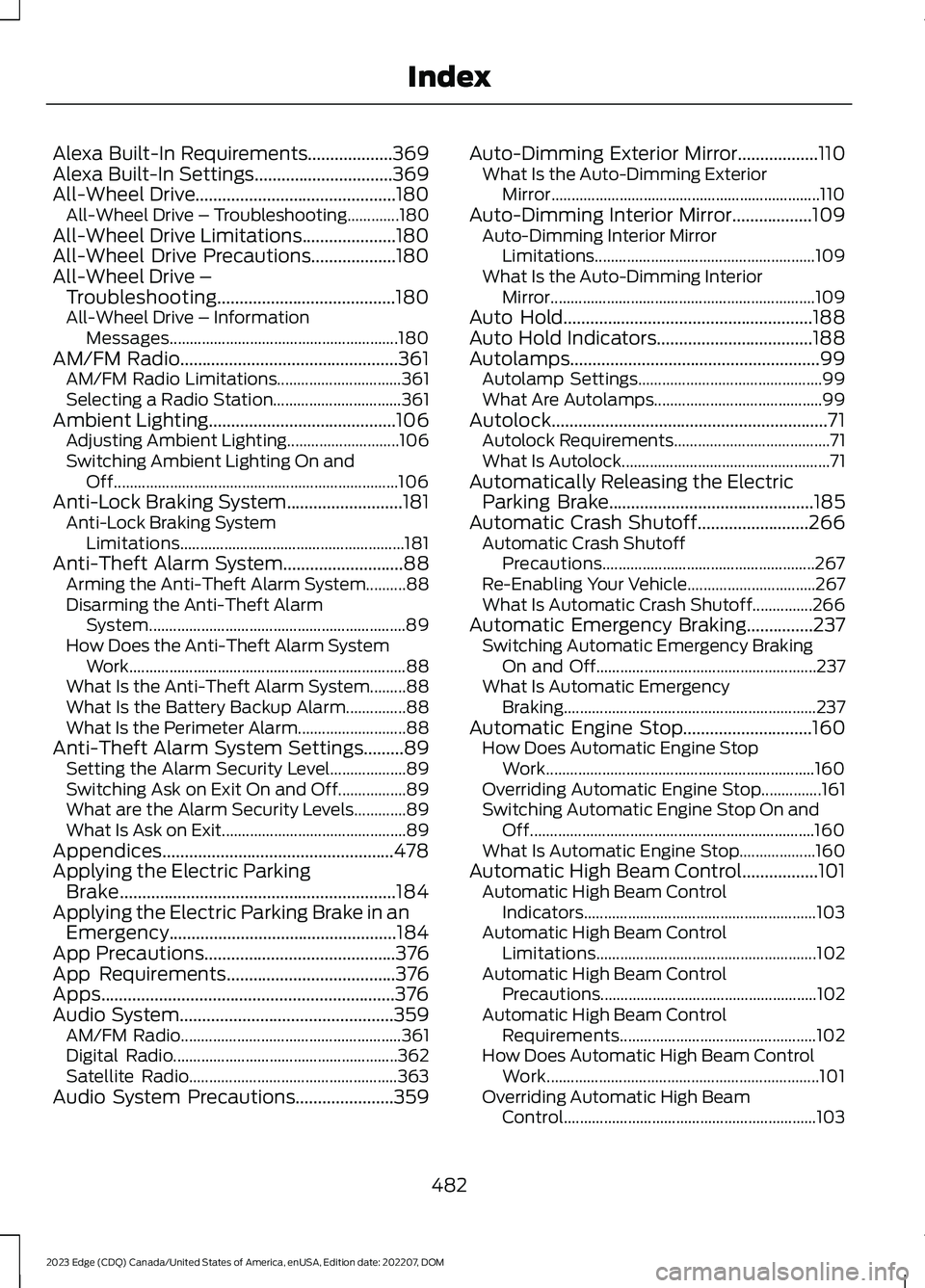
Alexa Built-In Requirements...................369Alexa Built-In Settings...............................369All-Wheel Drive.............................................180All-Wheel Drive – Troubleshooting.............180All-Wheel Drive Limitations.....................180All-Wheel Drive Precautions...................180All-Wheel Drive –Troubleshooting........................................180All-Wheel Drive – InformationMessages.........................................................180AM/FM Radio.................................................361AM/FM Radio Limitations...............................361Selecting a Radio Station................................361Ambient Lighting..........................................106Adjusting Ambient Lighting............................106Switching Ambient Lighting On andOff.......................................................................106Anti-Lock Braking System..........................181Anti-Lock Braking SystemLimitations........................................................181Anti-Theft Alarm System...........................88Arming the Anti-Theft Alarm System..........88Disarming the Anti-Theft AlarmSystem................................................................89How Does the Anti-Theft Alarm SystemWork.....................................................................88What Is the Anti-Theft Alarm System.........88What Is the Battery Backup Alarm...............88What Is the Perimeter Alarm...........................88Anti-Theft Alarm System Settings.........89Setting the Alarm Security Level...................89Switching Ask on Exit On and Off.................89What are the Alarm Security Levels.............89What Is Ask on Exit..............................................89Appendices....................................................478Applying the Electric ParkingBrake..............................................................184Applying the Electric Parking Brake in anEmergency...................................................184App Precautions...........................................376App Requirements......................................376Apps..................................................................376Audio System................................................359AM/FM Radio.......................................................361Digital Radio........................................................362Satellite Radio....................................................363Audio System Precautions......................359
Auto-Dimming Exterior Mirror..................110What Is the Auto-Dimming ExteriorMirror...................................................................110Auto-Dimming Interior Mirror..................109Auto-Dimming Interior MirrorLimitations.......................................................109What Is the Auto-Dimming InteriorMirror..................................................................109Auto Hold........................................................188Auto Hold Indicators...................................188Autolamps........................................................99Autolamp Settings..............................................99What Are Autolamps..........................................99Autolock..............................................................71Autolock Requirements.......................................71What Is Autolock....................................................71Automatically Releasing the ElectricParking Brake..............................................185Automatic Crash Shutoff.........................266Automatic Crash ShutoffPrecautions.....................................................267Re-Enabling Your Vehicle................................267What Is Automatic Crash Shutoff...............266Automatic Emergency Braking...............237Switching Automatic Emergency BrakingOn and Off.......................................................237What Is Automatic EmergencyBraking...............................................................237Automatic Engine Stop.............................160How Does Automatic Engine StopWork...................................................................160Overriding Automatic Engine Stop...............161Switching Automatic Engine Stop On andOff.......................................................................160What Is Automatic Engine Stop...................160Automatic High Beam Control.................101Automatic High Beam ControlIndicators..........................................................103Automatic High Beam ControlLimitations.......................................................102Automatic High Beam ControlPrecautions......................................................102Automatic High Beam ControlRequirements.................................................102How Does Automatic High Beam ControlWork....................................................................101Overriding Automatic High BeamControl...............................................................103
482
2023 Edge (CDQ) Canada/United States of America, enUSA, Edition date: 202207, DOMIndex
Page 487 of 504
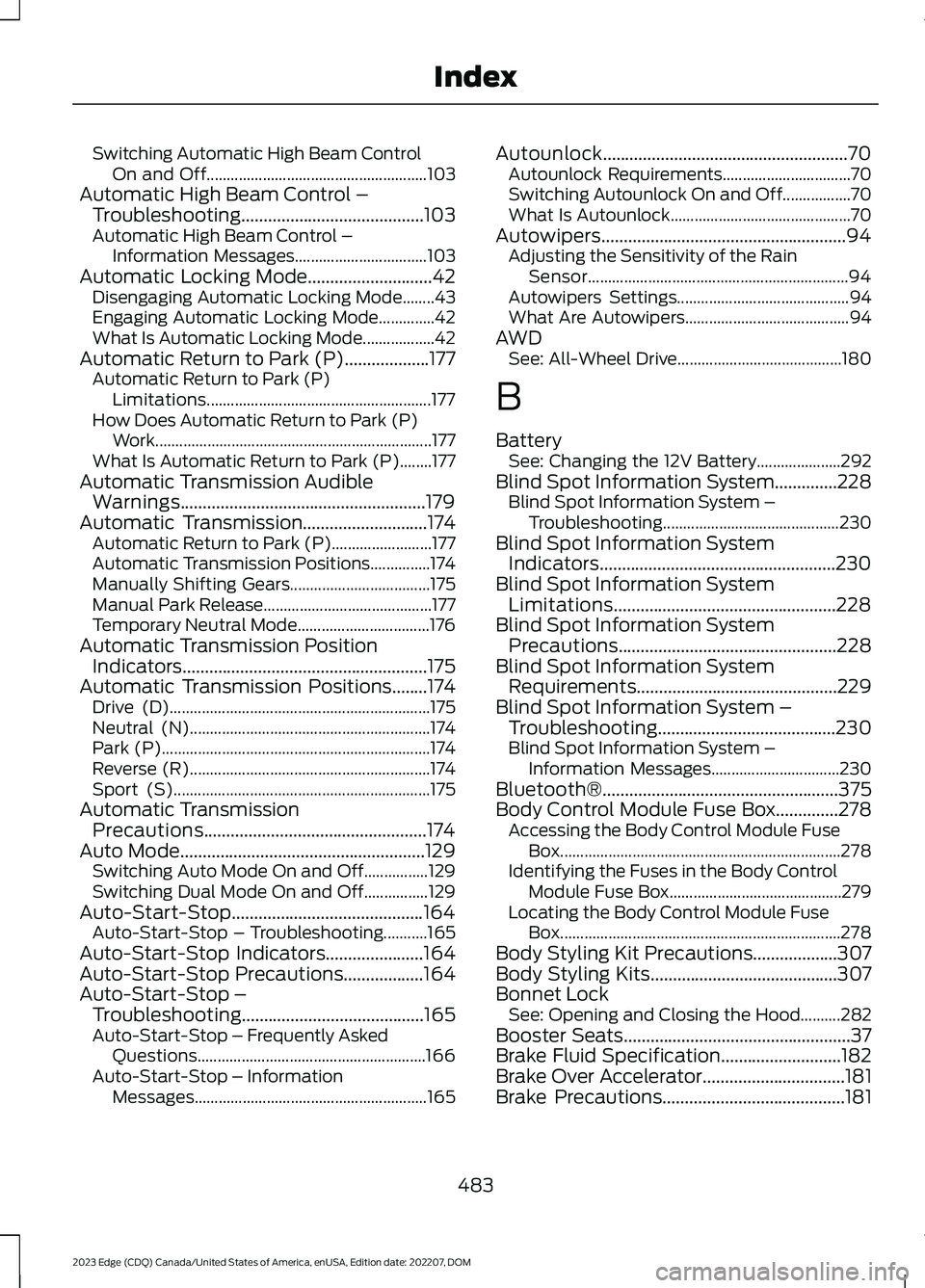
Switching Automatic High Beam ControlOn and Off.......................................................103Automatic High Beam Control –Troubleshooting.........................................103Automatic High Beam Control –Information Messages.................................103Automatic Locking Mode............................42Disengaging Automatic Locking Mode........43Engaging Automatic Locking Mode..............42What Is Automatic Locking Mode..................42Automatic Return to Park (P)...................177Automatic Return to Park (P)Limitations........................................................177How Does Automatic Return to Park (P)Work.....................................................................177What Is Automatic Return to Park (P)........177Automatic Transmission AudibleWarnings.......................................................179Automatic Transmission............................174Automatic Return to Park (P).........................177Automatic Transmission Positions...............174Manually Shifting Gears...................................175Manual Park Release..........................................177Temporary Neutral Mode.................................176Automatic Transmission PositionIndicators.......................................................175Automatic Transmission Positions........174Drive (D).................................................................175Neutral (N)............................................................174Park (P)...................................................................174Reverse (R)............................................................174Sport (S)................................................................175Automatic TransmissionPrecautions..................................................174Auto Mode.......................................................129Switching Auto Mode On and Off................129Switching Dual Mode On and Off................129Auto-Start-Stop...........................................164Auto-Start-Stop – Troubleshooting...........165Auto-Start-Stop Indicators......................164Auto-Start-Stop Precautions..................164Auto-Start-Stop –Troubleshooting.........................................165Auto-Start-Stop – Frequently AskedQuestions.........................................................166Auto-Start-Stop – InformationMessages..........................................................165
Autounlock.......................................................70Autounlock Requirements................................70Switching Autounlock On and Off.................70What Is Autounlock.............................................70Autowipers.......................................................94Adjusting the Sensitivity of the RainSensor.................................................................94Autowipers Settings...........................................94What Are Autowipers.........................................94AWDSee: All-Wheel Drive.........................................180
B
BatterySee: Changing the 12V Battery.....................292Blind Spot Information System..............228Blind Spot Information System –Troubleshooting............................................230Blind Spot Information SystemIndicators.....................................................230Blind Spot Information SystemLimitations..................................................228Blind Spot Information SystemPrecautions.................................................228Blind Spot Information SystemRequirements.............................................229Blind Spot Information System –Troubleshooting........................................230Blind Spot Information System –Information Messages................................230Bluetooth®.....................................................375Body Control Module Fuse Box..............278Accessing the Body Control Module FuseBox......................................................................278Identifying the Fuses in the Body ControlModule Fuse Box...........................................279Locating the Body Control Module FuseBox......................................................................278Body Styling Kit Precautions...................307Body Styling Kits..........................................307Bonnet LockSee: Opening and Closing the Hood..........282Booster Seats...................................................37Brake Fluid Specification...........................182Brake Over Accelerator................................181Brake Precautions.........................................181
483
2023 Edge (CDQ) Canada/United States of America, enUSA, Edition date: 202207, DOMIndex