wipers FORD EDGE 2023 Owners Manual
[x] Cancel search | Manufacturer: FORD, Model Year: 2023, Model line: EDGE, Model: FORD EDGE 2023Pages: 504, PDF Size: 14.96 MB
Page 7 of 504
Adjusting the Steering Wheel - VehiclesWith: Power Adjustable SteeringColumn.........................................................92
Resetting the Stopping Position -Vehicles With: Power AdjustableSteering Column.......................................93
Horn....................................................................93
Switching the Heated Steering WheelOn and Off...................................................93
Wipers and Washers
Wipers...............................................................94
Autowipers......................................................94
Switching the Rear Window Wiper Onand Off..........................................................95
Reverse Wipe..................................................95
Checking the Wiper Blades.......................95
Replacing the Front Wiper Blades..........95
Replacing the Rear Wiper Blades...........96
Washers............................................................96
Wipers and Washers – Troubleshooting...........................................................................97
Exterior Lighting
Exterior Lighting Control............................98
Headlamps......................................................98
Headlamps – Troubleshooting...............99
Autolamps.......................................................99
Exterior Lamps.............................................100
Automatic High Beam Control................101
Automatic High Beam Control –Troubleshooting......................................103
Adaptive Front Lighting............................104
Interior Lighting
Switching All of the Interior Lamps Onand Off........................................................105
Switching the Front Interior Lamps Onand Off........................................................105
Switching the Rear Interior Lamps Onand Off........................................................105
Interior Lamp Function..............................105
Adjusting the Instrument Panel LightingBrightness..................................................106
Ambient Lighting.........................................106
Interior Lighting – Troubleshooting......106
Windows
Opening and Closing the Windows......107
Global Opening............................................107
Window Bounce-Back..............................108
Locking the Rear Window Controls......108
Interior Mirror
Interior Mirror Precautions.......................109
Manually Dimming the Interior Mirror........................................................................109
Auto-Dimming Interior Mirror.................109
Exterior Mirrors
Adjusting the Exterior Mirrors..................110
Folding the Exterior Mirrors......................110
Auto-Dimming Exterior Mirror.................110
Moonroof
Opening and Closing the Sunshade.......111
Opening and Closing the Moonroof.......111
Venting the Moonroof..................................111
Moonroof Bounce-Back.............................112
Instrument Cluster
Instrument Cluster Overview...................113
Tachometer.....................................................113
Speedometer.................................................113
Fuel Gauge......................................................113
Engine Coolant Temperature Gauge..........................................................................114
Turbo Boost Gauge......................................114
What Are the Instrument ClusterWarning Lamps.........................................114
Instrument Cluster Warning Lamps......114
3
2023 Edge (CDQ) Canada/United States of America, enUSA, Edition date: 202207, DOMTable of Contents
Page 98 of 504
WIPERS
WIPER PRECAUTIONS
Do not operate the wipers on a drywindshield. This could scratch the glass ordamage the wiper blades. Use thewindshield washers before wiping a drywindshield.
Fully defrost the windshield before youswitch the windshield wipers on.
Switch the windshield wipers off beforeentering a car wash.
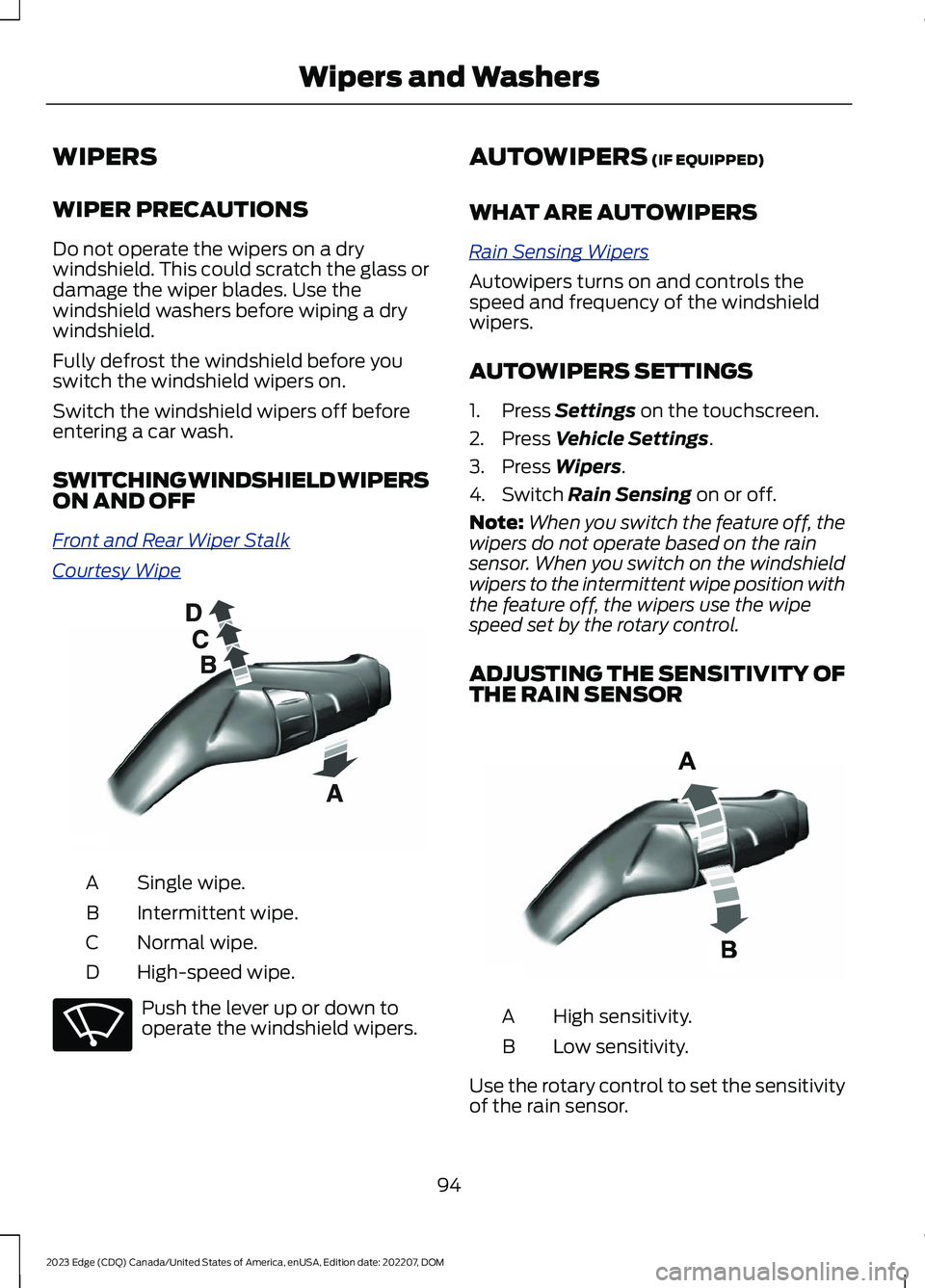
SWITCHING WINDSHIELD WIPERSON AND OFF
Front and Rear Wiper Stalk
Courtesy Wipe
Single wipe.A
Intermittent wipe.B
Normal wipe.C
High-speed wipe.D
Push the lever up or down tooperate the windshield wipers.
AUTOWIPERS (IF EQUIPPED)
WHAT ARE AUTOWIPERS
Rain Sensing Wipers
Autowipers turns on and controls thespeed and frequency of the windshieldwipers.
AUTOWIPERS SETTINGS
1.Press Settings on the touchscreen.
2.Press Vehicle Settings.
3.Press Wipers.
4.Switch Rain Sensing on or off.
Note:When you switch the feature off, thewipers do not operate based on the rainsensor. When you switch on the windshieldwipers to the intermittent wipe position withthe feature off, the wipers use the wipespeed set by the rotary control.
ADJUSTING THE SENSITIVITY OFTHE RAIN SENSOR
High sensitivity.A
Low sensitivity.B
Use the rotary control to set the sensitivityof the rain sensor.
94
2023 Edge (CDQ) Canada/United States of America, enUSA, Edition date: 202207, DOMWipers and WashersE197525 E270969 E331276
Page 99 of 504
When you select high sensitivity, the wipersoperate when the sensor detects a smallamount of water on the windshield.
When you select low sensitivity, the wipersoperate when the sensor detects a largeamount of water on the windshield.
SWITCHING THE REAR
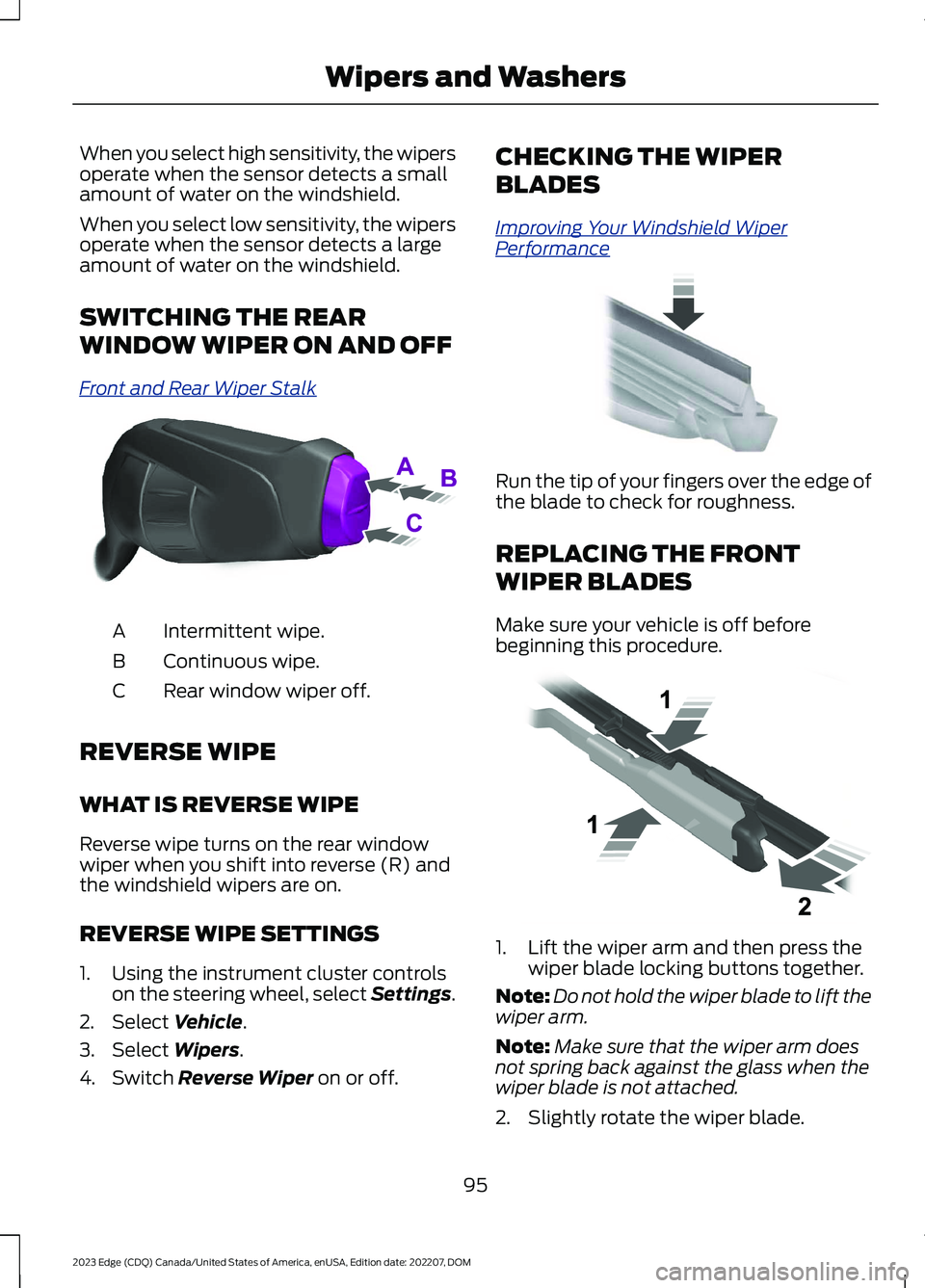
WINDOW WIPER ON AND OFF
Front and Rear Wiper Stalk
Intermittent wipe.A
Continuous wipe.B
Rear window wiper off.C
REVERSE WIPE
WHAT IS REVERSE WIPE
Reverse wipe turns on the rear windowwiper when you shift into reverse (R) andthe windshield wipers are on.
REVERSE WIPE SETTINGS
1.Using the instrument cluster controlson the steering wheel, select Settings.
2.Select Vehicle.
3.Select Wipers.
4.Switch Reverse Wiper on or off.
CHECKING THE WIPER
BLADES
Improving Your Windshield WiperPerformance
Run the tip of your fingers over the edge ofthe blade to check for roughness.
REPLACING THE FRONT
WIPER BLADES
Make sure your vehicle is off beforebeginning this procedure.
1.Lift the wiper arm and then press thewiper blade locking buttons together.
Note:Do not hold the wiper blade to lift thewiper arm.
Note:Make sure that the wiper arm doesnot spring back against the glass when thewiper blade is not attached.
2.Slightly rotate the wiper blade.
95
2023 Edge (CDQ) Canada/United States of America, enUSA, Edition date: 202207, DOMWipers and WashersE171615 E142463 E129990
Page 100 of 504
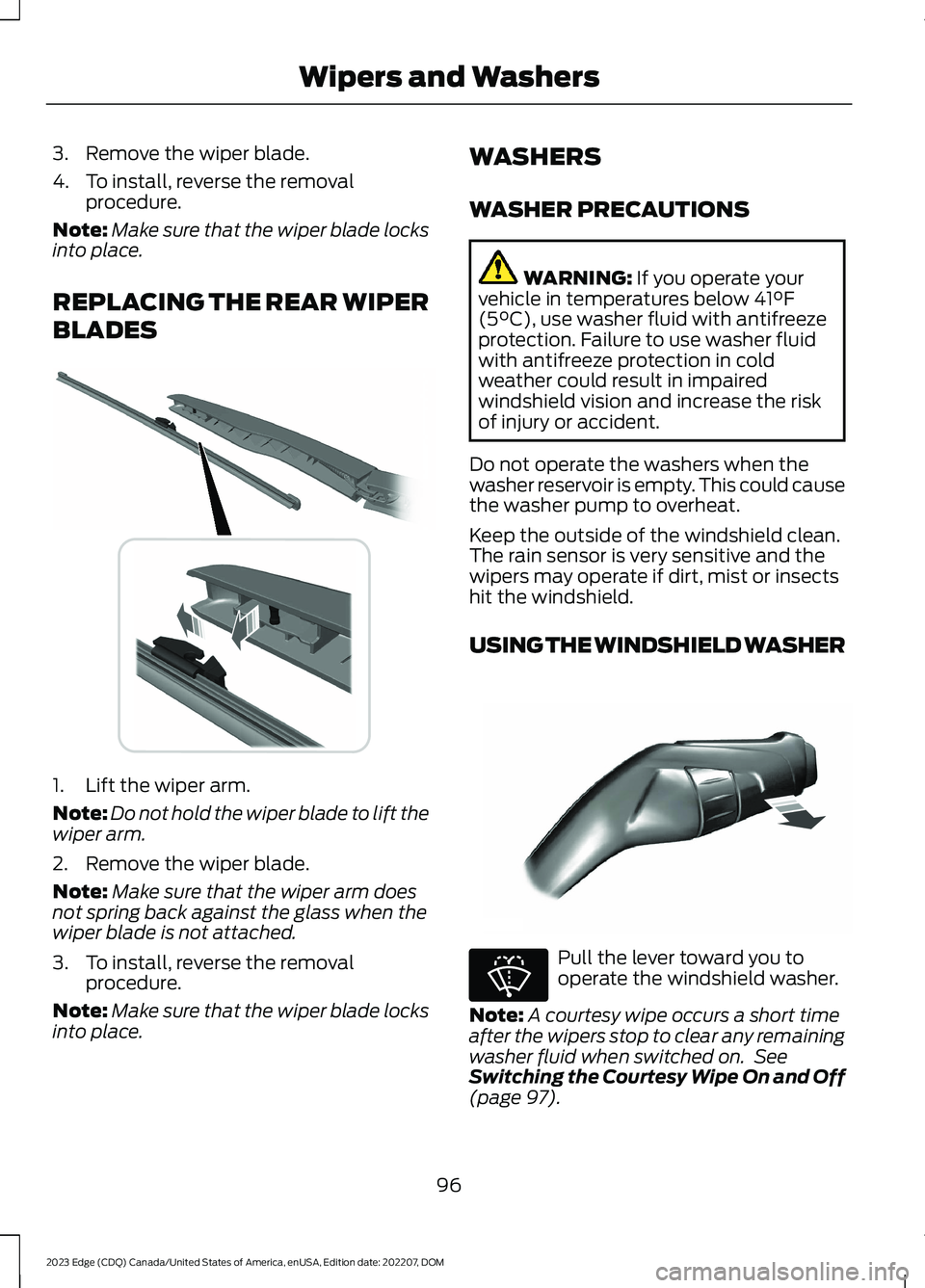
3.Remove the wiper blade.
4.To install, reverse the removalprocedure.
Note:Make sure that the wiper blade locksinto place.
REPLACING THE REAR WIPER
BLADES
1.Lift the wiper arm.
Note:Do not hold the wiper blade to lift thewiper arm.
2.Remove the wiper blade.
Note:Make sure that the wiper arm doesnot spring back against the glass when thewiper blade is not attached.
3.To install, reverse the removalprocedure.
Note:Make sure that the wiper blade locksinto place.
WASHERS
WASHER PRECAUTIONS
WARNING: If you operate yourvehicle in temperatures below 41°F(5°C), use washer fluid with antifreezeprotection. Failure to use washer fluidwith antifreeze protection in coldweather could result in impairedwindshield vision and increase the riskof injury or accident.
Do not operate the washers when thewasher reservoir is empty. This could causethe washer pump to overheat.
Keep the outside of the windshield clean.The rain sensor is very sensitive and thewipers may operate if dirt, mist or insectshit the windshield.
USING THE WINDSHIELD WASHER
Pull the lever toward you tooperate the windshield washer.
Note:A courtesy wipe occurs a short timeafter the wipers stop to clear any remainingwasher fluid when switched on. SeeSwitching the Courtesy Wipe On and Off(page 97).
96
2023 Edge (CDQ) Canada/United States of America, enUSA, Edition date: 202207, DOMWipers and Washers E271380 E197528 E270967
Page 101 of 504
SWITCHING THE COURTESY WIPEON AND OFF
1.Using the instrument cluster controlson the steering wheel, select Settings.
2.Select Vehicle.
3.Select Wipers.
4.Switch Courtesy Wipe on or off.
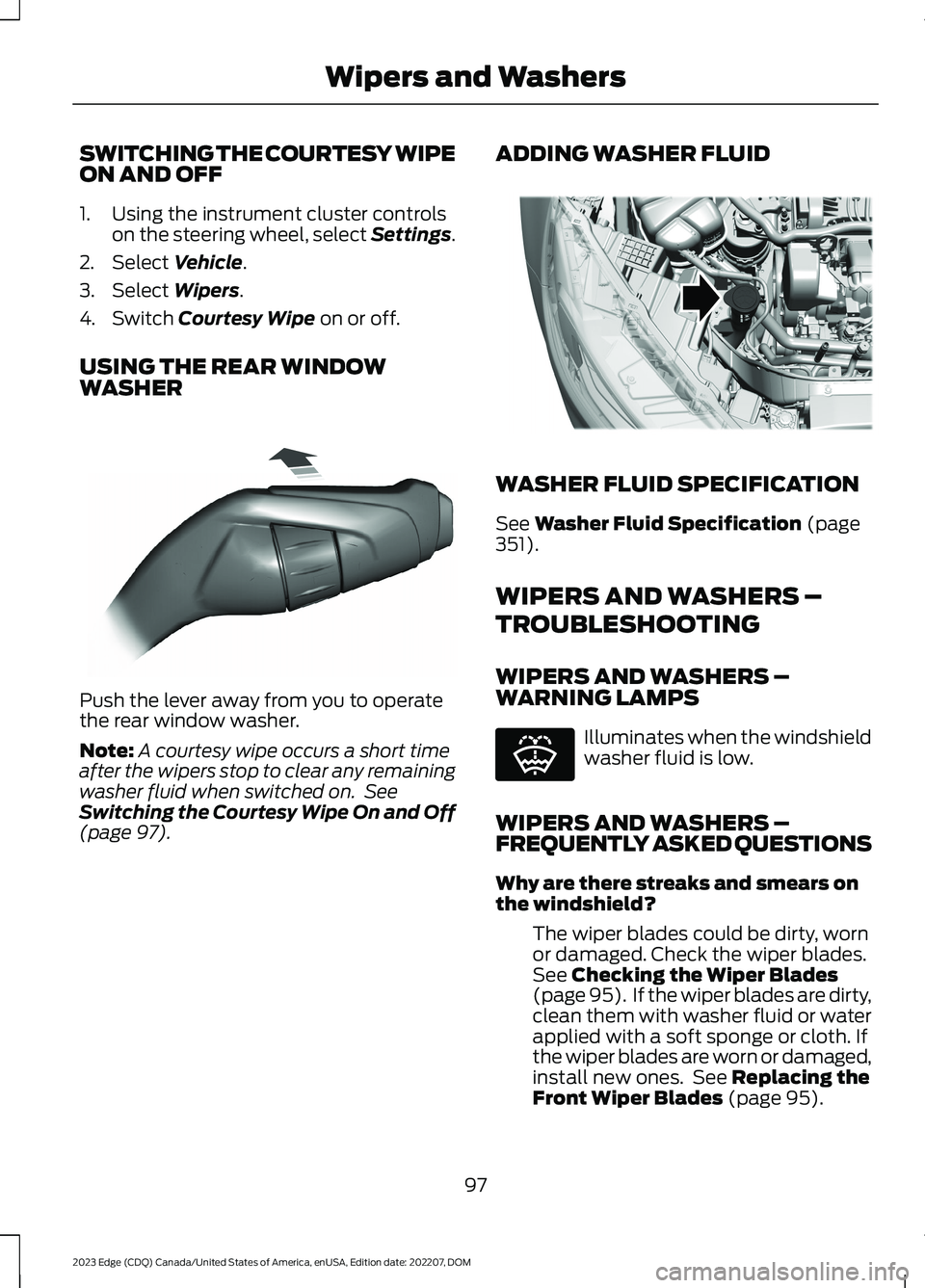
USING THE REAR WINDOWWASHER
Push the lever away from you to operatethe rear window washer.
Note:A courtesy wipe occurs a short timeafter the wipers stop to clear any remainingwasher fluid when switched on. SeeSwitching the Courtesy Wipe On and Off(page 97).
ADDING WASHER FLUID
WASHER FLUID SPECIFICATION
See Washer Fluid Specification (page351).
WIPERS AND WASHERS –
TROUBLESHOOTING
WIPERS AND WASHERS –WARNING LAMPS
Illuminates when the windshieldwasher fluid is low.
WIPERS AND WASHERS –FREQUENTLY ASKED QUESTIONS
Why are there streaks and smears onthe windshield?
The wiper blades could be dirty, wornor damaged. Check the wiper blades.See Checking the Wiper Blades(page 95). If the wiper blades are dirty,clean them with washer fluid or waterapplied with a soft sponge or cloth. Ifthe wiper blades are worn or damaged,install new ones. See Replacing theFront Wiper Blades (page 95).
97
2023 Edge (CDQ) Canada/United States of America, enUSA, Edition date: 202207, DOMWipers and WashersE167407 E330184 E132353
Page 103 of 504
HEADLAMPS –
TROUBLESHOOTING
HEADLAMPS – FREQUENTLYASKED QUESTIONS
Why is there condensation in theheadlamps?
•Headlamps have vents toaccommodate normal changes in airpressure. Condensation can be anatural by-product of this design.When moist air enters the lampassembly through the vents, there is apossibility that condensation can occurwhen the temperature is cold. Whennormal condensation occurs, a finemist can form on the interior of thelens. The fine mist eventually clearsand exits through the vents duringnormal operation.
How much condensation isacceptable?
•The presence of a fine mist, forexample no streaks, drip marks or largedroplets. A fine mist covers less than50% of the lens.
How long may it take for theacceptable condensation to becleared?
•Clearing time may take as long as 48hours under dry weather conditions.
How much condensation isunacceptable?
•A water puddle inside the lamp.Streaks, drip marks or large dropletspresent on the interior of the lens.
What should I do if unacceptablecondensation is present?
•Have your vehicle checked as soon aspossible.
Why do my headlamps turn offwhen I have them switched onwhen I switch my vehicle off?
•The battery saver turns the headlampsoff after a short period of time after youswitch your vehicle off.
AUTOLAMPS
WHAT ARE AUTOLAMPS
Automatic headlamps with wiper-activatedheadlamp feature
WARNING: The system does notrelieve you of your responsibility to drivewith due care and attention. You mayneed to override the system if it does notturn the headlamps on in low visibilityconditions, for example daytime fog.
Autolamps turn the headlamps on in lowlight situations or when the windshieldwipers operate.
AUTOLAMP SETTINGS
1.Using the instrument cluster controlson the steering wheel, select Settings.
2.Select Vehicle.
3.Select Lighting.
4.Select Autolamp Delay.
5.Select a setting and press the OKbutton.
99
2023 Edge (CDQ) Canada/United States of America, enUSA, Edition date: 202207, DOMExterior Lighting
Page 206 of 504
WHAT IS THE 180 DEGREE
CAMERA
The 180 degree camera system consistsof front and rear cameras.
HOW DOES THE 180 DEGREE
CAMERA WORK
The 180 degree camera system allows youto see what is directly in front or behindyour vehicle, provides a cross traffic viewin front of your vehicle and providesvisibility when parking your vehicle.
180 DEGREE CAMERA
PRECAUTIONS
WARNING: The rear view camerasystem is a reverse aid supplementdevice that still requires the driver to useit in conjunction with the interior andexterior mirrors for maximum coverage.
WARNING: Objects that are closeto either corner of the bumper or underthe bumper, might not be seen on thescreen due to the limited coverage of thecamera system.
WARNING: Use caution whenturning camera features on or off whenthe transmission is not in park (P). Makesure your vehicle is not moving.
180 DEGREE CAMERA
LIMITATIONS
Note:The area displayed on the screen mayvary according to your vehicle's orientationor road condition.
Note:The front view camera will switch offif your vehicle speed exceeds 6 mph(10 km/h). You will have to switch thesystem back on by using the camera systembutton once below the speed threshold.
Note:The camera system may not operatecorrectly if mud, water or debris obstructsthe camera's view. You can clean the lenswith a soft, lint-free cloth and non-abrasivecleaner or by using your front or rear washer.See Wipers (page 94).
LOCATING THE 180 DEGREE
CAMERAS
The front view camera is in the grille. Therear view camera is on the liftgate.
180 DEGREE CAMERA
INDICATORS
The 180 degree camera provides an imageof your vehicle and the sensor zones. Thezones will highlight green, yellow, and redwhen the parking aid sensors detect anobject in the coverage area.
180 DEGREE CAMERA
SETTINGS
SWITCHING THE 180 DEGREECAMERA ON AND OFF
The camera button is located onthe audio unit and allows you totoggle through different cameraviews.
Note:The camera system may not operatecorrectly if mud, water or debris obstructsthe camera's view. You can clean the lenswith a soft, lint-free cloth and non-abrasivecleaner or by using your front or rear washer.See Wipers (page 94).
202
2023 Edge (CDQ) Canada/United States of America, enUSA, Edition date: 202207, DOM180 Degree Camera (If Equipped)E188847
Page 313 of 504
Tires
Maintain recommended air pressure.
Note:If you intend on parking your vehiclefor an extended period after cleaning thewheels with a wheel cleaner, drive yourvehicle for a few minutes before doing so.This reduces the risk of corrosion of thebrake discs, brake pads and linings.
REMOVING YOUR VEHICLE
FROM STORAGE
When your vehicle is ready to come out ofstorage, do the following:
•We recommend that you change theengine oil before you use your vehicleagain.
•Wash your vehicle to remove any dirtor grease film build-up on windowsurfaces.
•Check windshield wipers for anydeterioration.
•Check the underhood for any foreignmaterials such as mice or squirrelnests.
•Check the exhaust for any foreignmaterials.
•Check tire pressures and set tireinflation per the Tire Label.
•Check brake pedal operation. Corrodedbrake rotors could cause brake noise.Drive your vehicle and gently apply andrelease the brakes repeatedly over a10-minute drive to reduce the corrosionfrom the brakes.
•Check fluid levels (including coolant,oil and gas) to make sure there are noleaks, and fluids are at recommendedlevels.
•If you remove the battery, clean thebattery cable ends and check fordamage.
Contact an authorized dealer if you haveany concerns or issues.
309
2023 Edge (CDQ) Canada/United States of America, enUSA, Edition date: 202207, DOMStoring Your Vehicle
Page 487 of 504
Switching Automatic High Beam ControlOn and Off.......................................................103Automatic High Beam Control –Troubleshooting.........................................103Automatic High Beam Control –Information Messages.................................103Automatic Locking Mode............................42Disengaging Automatic Locking Mode........43Engaging Automatic Locking Mode..............42What Is Automatic Locking Mode..................42Automatic Return to Park (P)...................177Automatic Return to Park (P)Limitations........................................................177How Does Automatic Return to Park (P)Work.....................................................................177What Is Automatic Return to Park (P)........177Automatic Transmission AudibleWarnings.......................................................179Automatic Transmission............................174Automatic Return to Park (P).........................177Automatic Transmission Positions...............174Manually Shifting Gears...................................175Manual Park Release..........................................177Temporary Neutral Mode.................................176Automatic Transmission PositionIndicators.......................................................175Automatic Transmission Positions........174Drive (D).................................................................175Neutral (N)............................................................174Park (P)...................................................................174Reverse (R)............................................................174Sport (S)................................................................175Automatic TransmissionPrecautions..................................................174Auto Mode.......................................................129Switching Auto Mode On and Off................129Switching Dual Mode On and Off................129Auto-Start-Stop...........................................164Auto-Start-Stop – Troubleshooting...........165Auto-Start-Stop Indicators......................164Auto-Start-Stop Precautions..................164Auto-Start-Stop –Troubleshooting.........................................165Auto-Start-Stop – Frequently AskedQuestions.........................................................166Auto-Start-Stop – InformationMessages..........................................................165
Autounlock.......................................................70Autounlock Requirements................................70Switching Autounlock On and Off.................70What Is Autounlock.............................................70Autowipers.......................................................94Adjusting the Sensitivity of the RainSensor.................................................................94Autowipers Settings...........................................94What Are Autowipers.........................................94AWDSee: All-Wheel Drive.........................................180
B
BatterySee: Changing the 12V Battery.....................292Blind Spot Information System..............228Blind Spot Information System –Troubleshooting............................................230Blind Spot Information SystemIndicators.....................................................230Blind Spot Information SystemLimitations..................................................228Blind Spot Information SystemPrecautions.................................................228Blind Spot Information SystemRequirements.............................................229Blind Spot Information System –Troubleshooting........................................230Blind Spot Information System –Information Messages................................230Bluetooth®.....................................................375Body Control Module Fuse Box..............278Accessing the Body Control Module FuseBox......................................................................278Identifying the Fuses in the Body ControlModule Fuse Box...........................................279Locating the Body Control Module FuseBox......................................................................278Body Styling Kit Precautions...................307Body Styling Kits..........................................307Bonnet LockSee: Opening and Closing the Hood..........282Booster Seats...................................................37Brake Fluid Specification...........................182Brake Over Accelerator................................181Brake Precautions.........................................181
483
2023 Edge (CDQ) Canada/United States of America, enUSA, Edition date: 202207, DOMIndex
Page 501 of 504
Using Auto Hold............................................188Using Keyless Entry........................................73Using MyKey With Remote StartSystems..........................................................66Using Snow Chains......................................319Using the Instrument Cluster DisplayControls..........................................................117Using the Keyless Entry Keypad................77Using the Remote Control..........................59Using the Tire Sealant and InflatorKit....................................................................326Using This Publication..................................16
V
Vehicle Care....................................................301Cleaning the Exterior........................................302Cleaning the Interior.........................................304Vehicle Identification Number................353Locating the Vehicle IdentificationNumber.............................................................353Vehicle Identification NumberOverview..........................................................353Vehicle Identification..................................353Vehicle Identification Number......................353Vehicle Interior................................................26Vehicle Software Updates.......................382Vehicle System Reset................................384Vehicle Wi-Fi Hotspot –Troubleshooting........................................358Vehicle Wi-Fi Hotspot – Frequently AskedQuestions........................................................358Vehicle Wi-Fi Hotspot................................357Vehicle Wi-Fi Hotspot –Troubleshooting............................................358VentilationSee: Climate Control.........................................128Venting the Moonroof...................................111Viewing the Tire Pressures.......................333Visual Search...................................................24Voice Interaction..........................................367Ford Assistant.....................................................367
W
Warranty Information.................................476Washer Fluid Specification.......................351
Washers.............................................................96Adding Washer Fluid...........................................97Switching the Courtesy Wipe On andOff.........................................................................97Using the Rear Window Washer.....................97Using the Windshield Washer.........................96Washer Fluid Specification...............................97Washer Precautions............................................96WashersSee: Wipers and Washers.................................94Waxing Your Vehicle..................................306Waypoints......................................................380Adding a Waypoint...........................................380Editing Waypoints.............................................380What Are the Instrument ClusterIndicators.......................................................115What Are the Instrument ClusterWarning Lamps...........................................114What Is 911 Assist...........................................57What Is a Connected Vehicle..................354What Is Active Park Assist.......................204What is Alexa Built-In................................369What Is Auto-Start-Stop...........................164What Is Blind Spot InformationSystem..........................................................228What Is Cross Traffic Alert.........................231What Is Cruise Control..............................208What Is Driver Alert......................................241What Is Ford Protect..................................386What Is Hill Start Assist..............................187What Is Keyless Entry....................................73What Is MyKey................................................64What Is Pre-Collision Assist....................234What Is Remote Start.................................125What Is the 180 Degree Camera............202What Is the Cabin Air Filter........................131What Is the Catalytic Converter..............173What Is the Electric Parking Brake.........184What Is the Gross Axle WeightRating............................................................244What Is the Gross Combined WeightRating............................................................245What Is the Gross Vehicle WeightRating............................................................244What Is the Keyless Entry Keypad............75What Is the Lane Keeping System.........221What Is the Maximum Loaded TrailerWeight...........................................................244
497
2023 Edge (CDQ) Canada/United States of America, enUSA, Edition date: 202207, DOMIndex