brakes FORD ESCAPE 2013 3.G User Guide
[x] Cancel search | Manufacturer: FORD, Model Year: 2013, Model line: ESCAPE, Model: FORD ESCAPE 2013 3.GPages: 423, PDF Size: 4.59 MB
Page 156 of 423
GENERAL INFORMATION
Note:Occasional brake noise is normal. If
a metal-to-metal, continuous grinding or
continuous squeal sound is present, the
brake linings may be worn-out and should
be inspected by an authorized dealer. If the
vehicle has continuous vibration or shudder
in the steering wheel while braking, the
vehicle should be inspected by an
authorized dealer.
Note: Brake dust may accumulate on the
wheels, even under normal driving
conditions. Some dust is inevitable as the
brakes wear and does not contribute to
brake noise. See Cleaning the Alloy
Wheels (page 240).
See Warning Lamps and
Indicators (page 80).
Wet brakes result in reduced braking
efficiency. Gently press the brake pedal a
few times when driving from a car wash or
standing water to dry the brakes.
Brake Over Accelerator
In the event the accelerator pedal
becomes stuck or entrapped, apply steady
and firm pressure to the brake pedal to
slow the vehicle and reduce engine power.
If you experience this condition, apply the
brakes and bring your vehicle to a safe
stop. Turn the engine off, shift to position
P and apply the parking brake, and then
inspect the accelerator pedal for any
interferences. If none are found and the
condition persists, have your vehicle towed
to the nearest authorized dealer. Emergency Brake Assist
Emergency brake assist detects when you
brake heavily by measuring the rate at
which you press the brake pedal. It
provides maximum braking efficiency as
long as you press the pedal. Emergency
brake assist can reduce stopping distances
in critical situations.
Anti-lock Brake System
This system helps you maintain steering
control during emergency stops by keeping
the brakes from locking.
This lamp momentarily
illuminates when the ignition is
turned on. If the light does not
illuminate during start up, remains on or
flashes, the anti-lock braking system may
be disabled and may need to be serviced.
If the system is disabled, normal
braking is still effective. If the
brake warning lamp illuminates
with the parking brake released, have your
brake system serviced immediately.
HINTS ON DRIVING WITH
ANTI-LOCK BRAKES
Note: When the system is operating, the
brake pedal will pulse and may travel
further. Maintain pressure on the brake
pedal. You may also hear a noise from the
system. This is normal.
The ABS will not eliminate the risks when:
• you drive too closely to the vehicle in
front of you
• your vehicle is hydroplaning
• you take corners too fast
• the road surface is poor.
156
Brakes
E138644
E138644
Page 157 of 423
PARKING BRAKE
WARNING
Always set the parking brake fully
and leave your vehicle with the
transmission selector lever in
position P.
Note: Do not press the release button while
pulling the lever up.
To apply the parking brake:
1. Press the foot brake pedal firmly.
2. Pull the parking brake lever up to its fullest extent.
Note: If you park your vehicle on a hill and
facing uphill, move the transmission selector
lever to position P and turn the steering
wheel away from the curb.
Note: If you park your vehicle on a hill and
facing downhill, move the transmission
selector lever to P and turn the steering
wheel toward the curb.
To release the parking brake:
1. Press the brake pedal firmly.
2. Pull the lever up slightly.
3. Press the release button and push the lever down.
157
Brakes
Page 158 of 423
PRINCIPLE OF OPERATION
The traction control system helps avoid
drive wheel spin and loss of traction.
If your vehicle begins to slide, the system
applies the brakes to individual wheels
and, when needed, reduces engine power
at the same time. If the wheels spin when
accelerating on slippery or loose surfaces,
the system reduces engine power in order
to increase traction.
USING TRACTION CONTROL
In certain situations (e.g. stuck in snow or
mud), turning the traction control off may
be beneficial as this allows the wheels to
spin with full engine power. Turn off the
traction control system using the
information display control. See General
Information (page 84).
System Indicator Lights and
Messages
WARNING
If a failure has been detected within
the AdvanceTrac system, the
stability control light will illuminate
steadily. Verify that the AdvanceTrac
system was not manually disabled using
the information display control. If the
stability control light still illuminates
steadily, have the system serviced by an
authorized dealer immediately. Operating
your vehicle with AdvanceTrac disabled
could lead to an increased risk of loss of
vehicle control, vehicle rollover, personal
injury and death.
The stability control light
temporarily illuminates on
engine start-up and flashes
when a driving condition activates the
stability system.
The stability control off light
temporarily illuminates on
engine start-up and stays on
when the traction control system is turned
off.
When the traction control system is turned
off or on, a message appears in the
information display showing system status.
158
Traction Control
E138639
Page 161 of 423
PARKING AID (IF EQUIPPED)
WARNINGS
To help avoid personal injury, please
read and understand the limitations
of the system as contained in this
section. Sensing is only an aid for some
(generally large and fixed) objects when
moving in reverse on a flat surface at
parking speeds. Traffic control systems,
inclement weather, air brakes, and external
motors and fans may also affect the
function of the sensing system; this may
include reduced performance or a false
activation.
To help avoid personal injury, always
use caution when in R (Reverse) and
when using the sensing system.
This system is not designed to
prevent contact with small or moving
objects. The system is designed to
provide a warning to assist the driver in
detecting large stationary objects to avoid
damaging the vehicle. The system may not
detect smaller objects, particularly those
close to the ground.
Certain add-on devices such as large
trailer hitches, bike or surfboard racks
and any device that may block the
normal detection zone of the system, may
create false beeps.
Note: Keep the sensors, located on the
bumper or fascia, free from snow, ice and
large accumulations of dirt. If the sensors
are covered, the system ’s accuracy can be
affected. Do not clean the sensors with
sharp objects.
Note: If your vehicle sustains damage to
the bumper or fascia, leaving it misaligned
or bent, the sensing zone may be altered
causing inaccurate measurement of
obstacles or false alarms. Note:
If your vehicle is equipped with
MyKey®, it is possible to prevent turning the
sensing system off. See MyKey® (page 49).
The sensing system warns the driver of
obstacles within a certain range of the
bumper area. The system turns on
automatically whenever the ignition is
switched on.
When receiving a detection warning, the
radio volume is reduced to a
predetermined level. After the warning
goes away, the radio volume returns to the
previous level.
Rear Sensing System
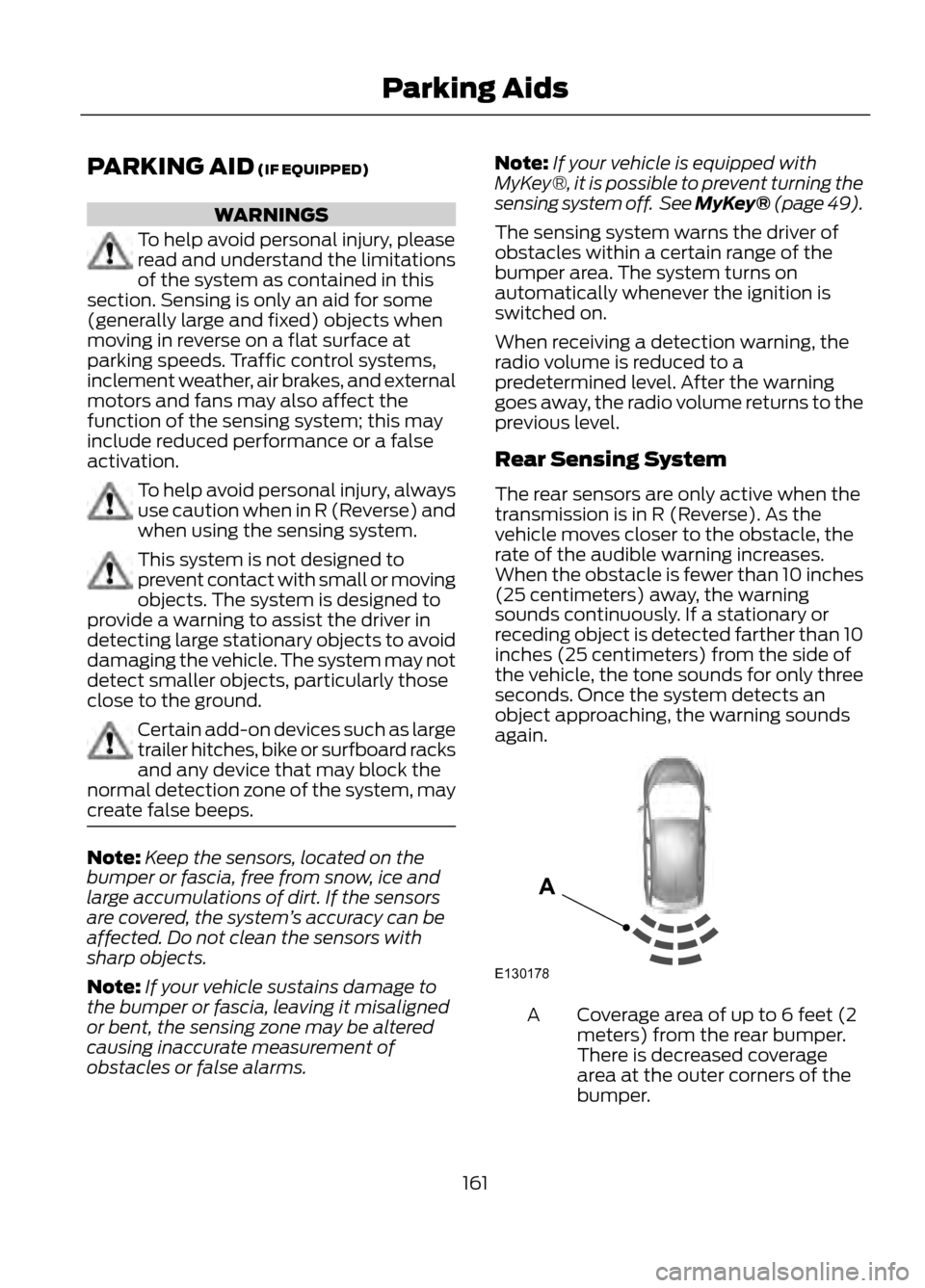
The rear sensors are only active when the
transmission is in R (Reverse). As the
vehicle moves closer to the obstacle, the
rate of the audible warning increases.
When the obstacle is fewer than 10 inches
(25 centimeters) away, the warning
sounds continuously. If a stationary or
receding object is detected farther than 10
inches (25 centimeters) from the side of
the vehicle, the tone sounds for only three
seconds. Once the system detects an
object approaching, the warning sounds
again.
Coverage area of up to 6 feet (2
meters) from the rear bumper.
There is decreased coverage
area at the outer corners of the
bumper.
A
161
Parking Aids
E130178
A
Page 163 of 423
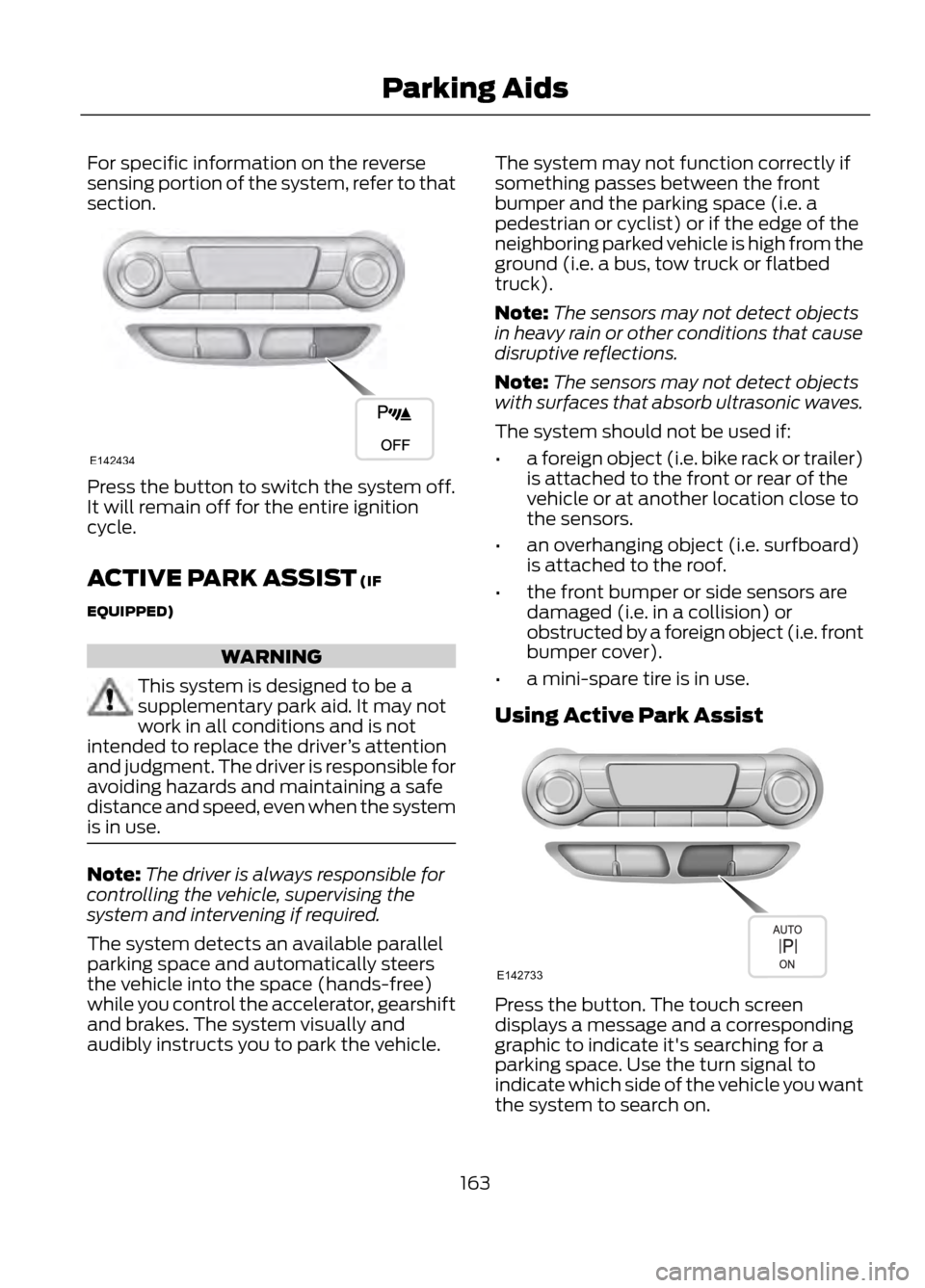
For specific information on the reverse
sensing portion of the system, refer to that
section.
Press the button to switch the system off.
It will remain off for the entire ignition
cycle.
ACTIVE PARK ASSIST (IF
EQUIPPED)
WARNING
This system is designed to be a
supplementary park aid. It may not
work in all conditions and is not
intended to replace the driver ’s attention
and judgment. The driver is responsible for
avoiding hazards and maintaining a safe
distance and speed, even when the system
is in use.
Note: The driver is always responsible for
controlling the vehicle, supervising the
system and intervening if required.
The system detects an available parallel
parking space and automatically steers
the vehicle into the space (hands-free)
while you control the accelerator, gearshift
and brakes. The system visually and
audibly instructs you to park the vehicle. The system may not function correctly if
something passes between the front
bumper and the parking space (i.e. a
pedestrian or cyclist) or if the edge of the
neighboring parked vehicle is high from the
ground (i.e. a bus, tow truck or flatbed
truck).
Note:
The sensors may not detect objects
in heavy rain or other conditions that cause
disruptive reflections.
Note: The sensors may not detect objects
with surfaces that absorb ultrasonic waves.
The system should not be used if:
• a foreign object (i.e. bike rack or trailer)
is attached to the front or rear of the
vehicle or at another location close to
the sensors.
• an overhanging object (i.e. surfboard)
is attached to the roof.
• the front bumper or side sensors are
damaged (i.e. in a collision) or
obstructed by a foreign object (i.e. front
bumper cover).
• a mini-spare tire is in use.
Using Active Park Assist
Press the button. The touch screen
displays a message and a corresponding
graphic to indicate it's searching for a
parking space. Use the turn signal to
indicate which side of the vehicle you want
the system to search on.
163
Parking Aids
E142434
E142733
Page 170 of 423
PRINCIPLE OF OPERATION
Cruise control lets you maintain a set
speed without keeping your foot on the
accelerator pedal.
USING CRUISE CONTROL
WARNING
Do not use cruise control in heavy
traffic or on roads that are winding,
slippery or unpaved.
Note:Vehicle speed may vary momentarily
when driving up or down a steep hill. Apply
the brakes if the vehicle speed increases
above the set speed while driving downhill.
Note: Cruise control will disengage if the
vehicle speed decreases more than 10 mph
(16 km/h) below your set speed while
driving uphill.
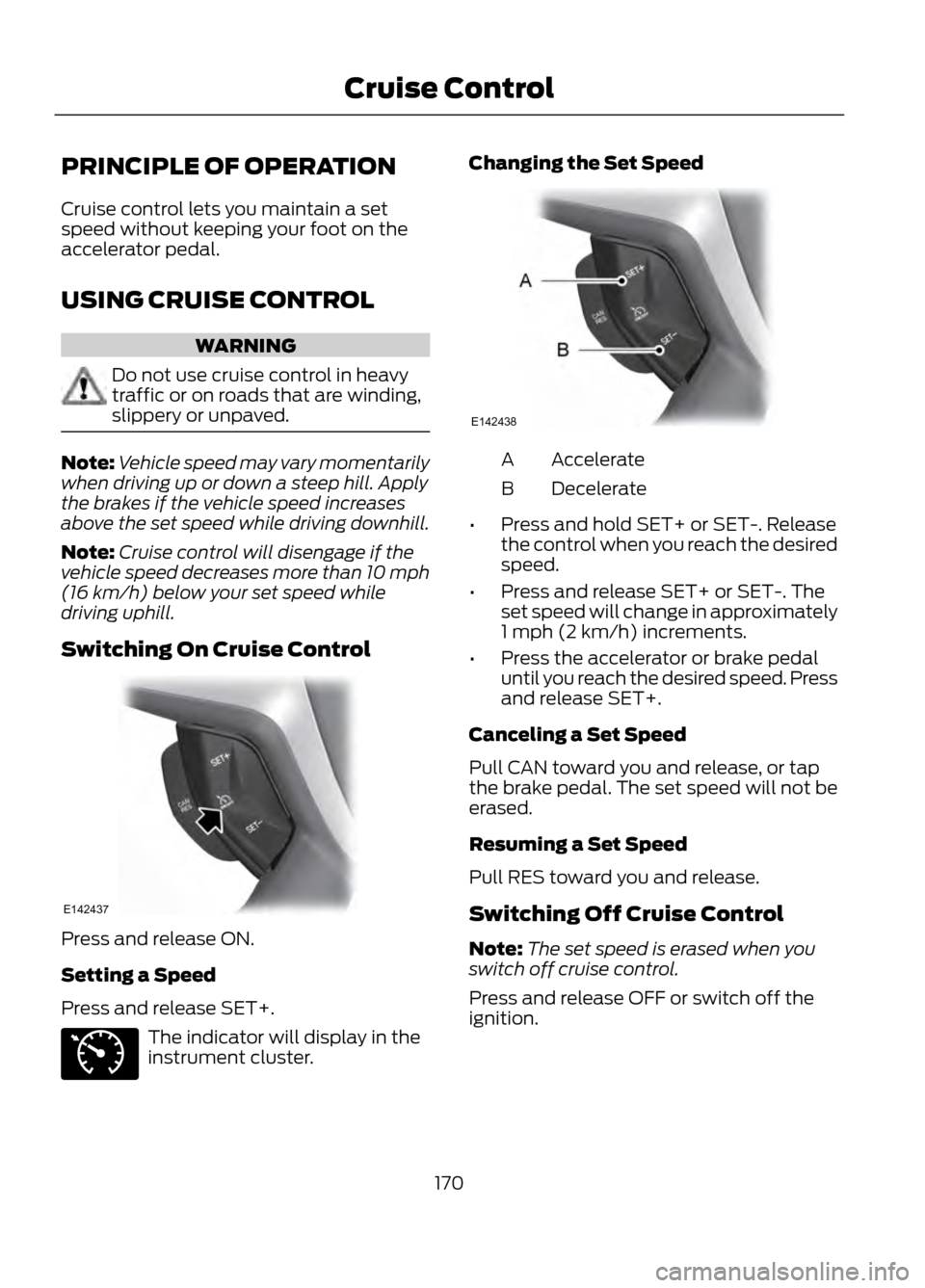
Switching On Cruise Control
Press and release ON.
Setting a Speed
Press and release SET+.
The indicator will display in the
instrument cluster. Changing the Set Speed
Accelerate
A
Decelerate
B
• Press and hold SET+ or SET-. Release
the control when you reach the desired
speed.
• Press and release SET+ or SET-. The
set speed will change in approximately
1 mph (2 km/h) increments.
• Press the accelerator or brake pedal
until you reach the desired speed. Press
and release SET+.
Canceling a Set Speed
Pull CAN toward you and release, or tap
the brake pedal. The set speed will not be
erased.
Resuming a Set Speed
Pull RES toward you and release.
Switching Off Cruise Control
Note: The set speed is erased when you
switch off cruise control.
Press and release OFF or switch off the
ignition.
170
Cruise Control
E142437
E71340
E142438
Page 184 of 423
WARNING
Exceeding the Safety Compliance
Certification Label vehicle weight
rating limits could result in
substandard vehicle handling or
performance, engine, transmission and/or
structural damage, serious damage to the
vehicle, loss of control and personal injury.
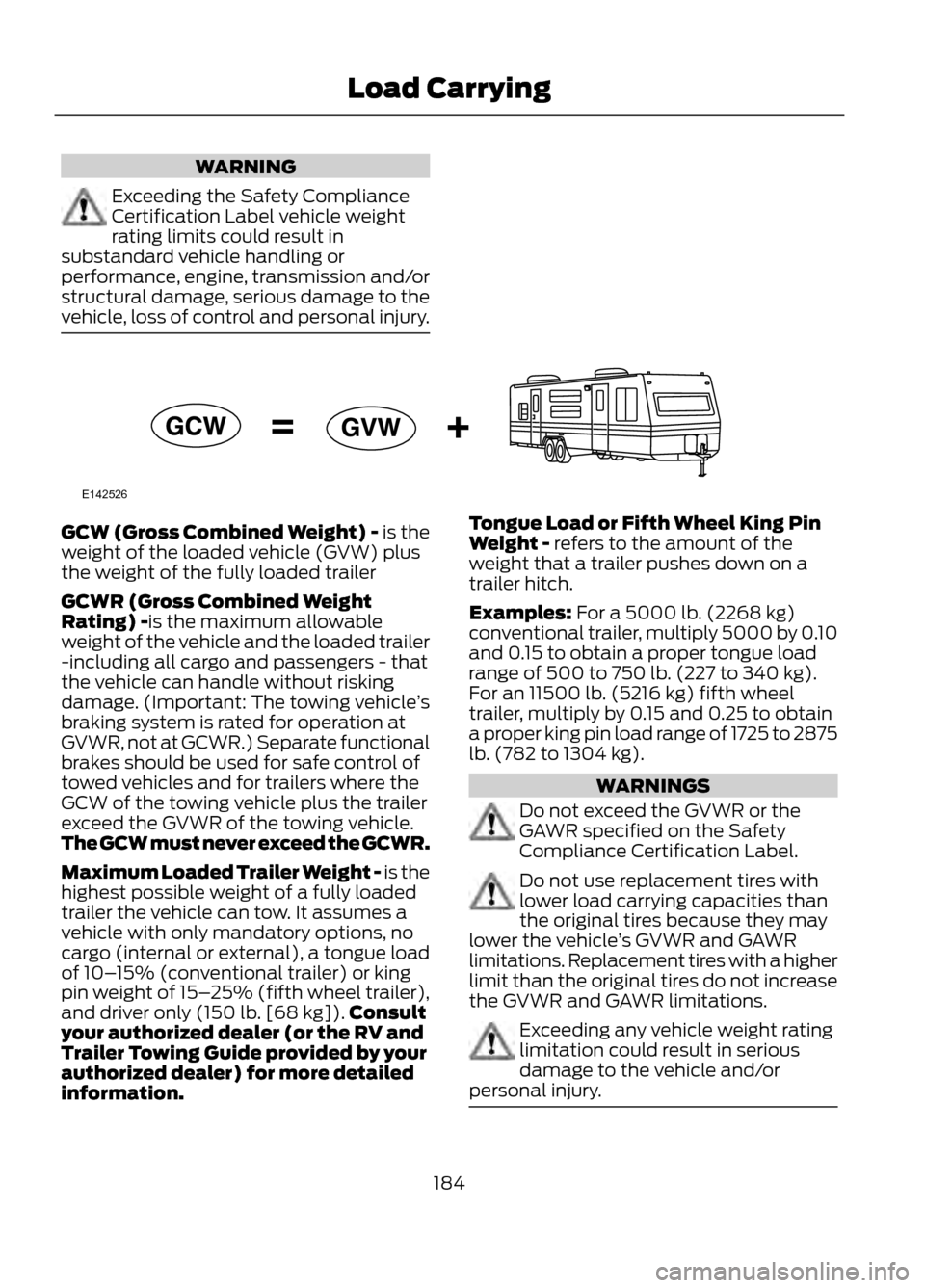
GCW (Gross Combined Weight) - is the
weight of the loaded vehicle (GVW) plus
the weight of the fully loaded trailer
GCWR (Gross Combined Weight
Rating) -is the maximum allowable
weight of the vehicle and the loaded trailer
-including all cargo and passengers - that
the vehicle can handle without risking
damage. (Important: The towing vehicle ’s
braking system is rated for operation at
GVWR, not at GCWR.) Separate functional
brakes should be used for safe control of
towed vehicles and for trailers where the
GCW of the towing vehicle plus the trailer
exceed the GVWR of the towing vehicle.
The GCW must never exceed the GCWR.
Maximum Loaded Trailer Weight - is the
highest possible weight of a fully loaded
trailer the vehicle can tow. It assumes a
vehicle with only mandatory options, no
cargo (internal or external), a tongue load
of 10– 15% (conventional trailer) or king
pin weight of 15– 25% (fifth wheel trailer),
and driver only (150 lb. [68 kg]). Consult
your authorized dealer (or the RV and
Trailer Towing Guide provided by your
authorized dealer) for more detailed
information. Tongue Load or Fifth Wheel King Pin
Weight - refers to the amount of the
weight that a trailer pushes down on a
trailer hitch.
Examples: For a 5000 lb. (2268 kg)
conventional trailer, multiply 5000 by 0.10
and 0.15 to obtain a proper tongue load
range of 500 to 750 lb. (227 to 340 kg).
For an 11500 lb. (5216 kg) fifth wheel
trailer, multiply by 0.15 and 0.25 to obtain
a proper king pin load range of 1725 to 2875
lb. (782 to 1304 kg).
WARNINGS
Do not exceed the GVWR or the
GAWR specified on the Safety
Compliance Certification Label.
Do not use replacement tires with
lower load carrying capacities than
the original tires because they may
lower the vehicle ’s GVWR and GAWR
limitations. Replacement tires with a higher
limit than the original tires do not increase
the GVWR and GAWR limitations.
Exceeding any vehicle weight rating
limitation could result in serious
damage to the vehicle and/or
personal injury.
184
Load Carrying
E142526
Page 188 of 423
TOWING A TRAILER
WARNINGS
Do not exceed the GVWR or the
GAWR specified on the certification
label.
Towing trailers beyond the maximum
recommended gross trailer weight
exceeds the limit of the vehicle and
could result in engine damage,
transmission damage, structural damage,
loss of vehicle control, vehicle rollover and
personal injury.
Your vehicle's load capacity is designated
by weight, not by volume, so you cannot
necessarily use all available space when
loading a vehicle.
Towing a trailer places an additional load
on your vehicle's engine, transmission, axle,
brakes, tires and suspension. Inspect these
components periodically during, and after,
any towing operation.
TRAILER SWAY CONTROL (IF
EQUIPPED)
Note: This feature does not prevent trailer
sway, but reduces it once it begins. Note:
This feature cannot stop all trailers
from swaying.
Note: In some cases, if vehicle speed is too
high, the system may activate multiple
times, gradually reducing vehicle speed.
This feature applies the vehicle brakes at
individual wheels and, if necessary, reduces
engine power. If the trailer begins to sway,
the stability control light flashes. The first
thing to do is slow the vehicle down, then
pull safely to the side of the road and
check for proper tongue load and trailer
load distribution. See Load Carrying
(page 177).
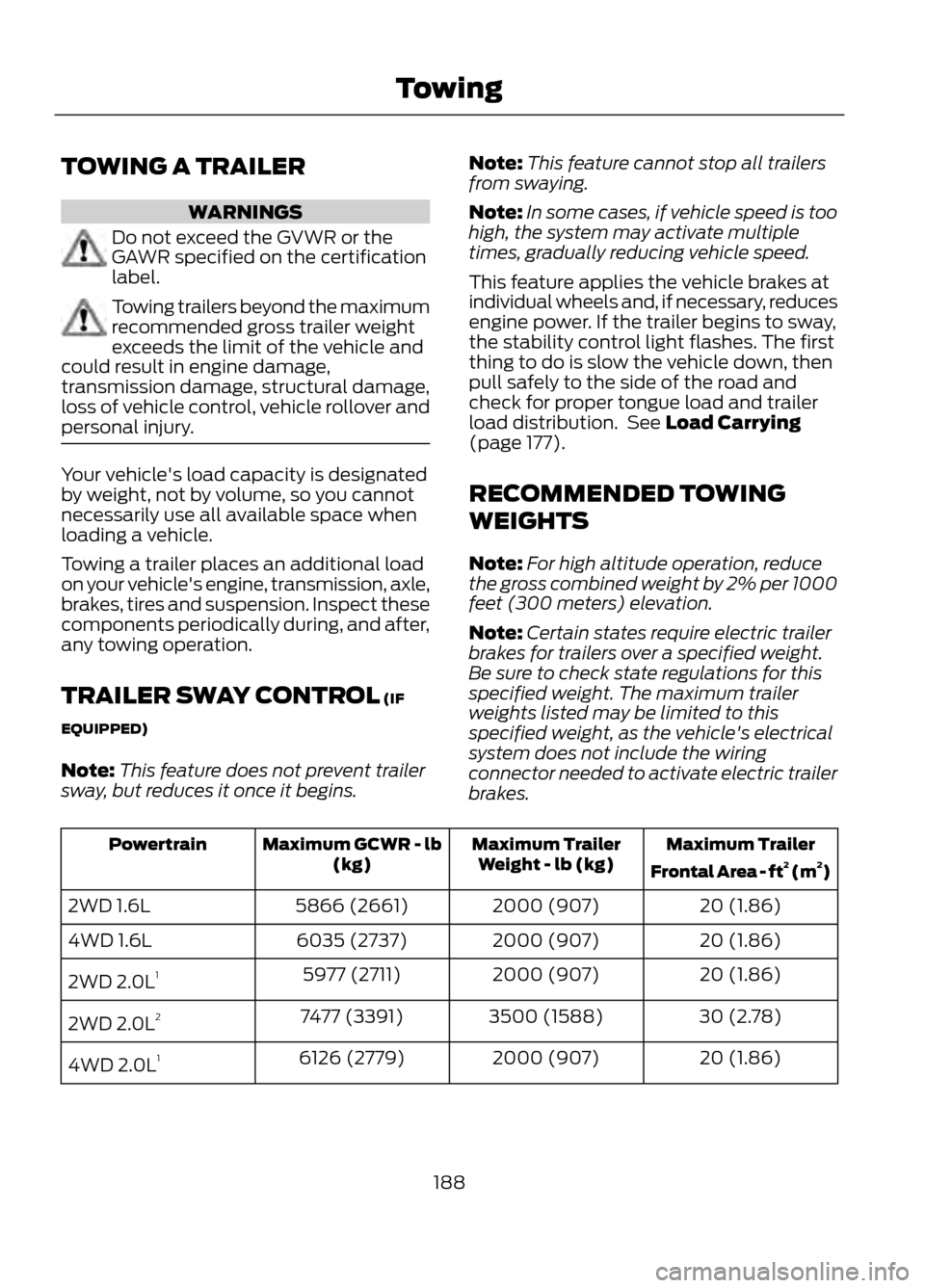
RECOMMENDED TOWING
WEIGHTS
Note: For high altitude operation, reduce
the gross combined weight by 2% per 1000
feet (300 meters) elevation.
Note: Certain states require electric trailer
brakes for trailers over a specified weight.
Be sure to check state regulations for this
specified weight. The maximum trailer
weights listed may be limited to this
specified weight, as the vehicle's electrical
system does not include the wiring
connector needed to activate electric trailer
brakes.
Maximum Trailer
Frontal Area - ft 2
(m 2
)
Maximum Trailer
Weight - lb (kg)
Maximum GCWR - lb
(kg)
Powertrain
20 (1.86)
2000 (907)
5866 (2661)
2WD 1.6L
20 (1.86)
2000 (907)
6035 (2737)
4WD 1.6L
20 (1.86)
2000 (907)
5977 (2711)
2WD 2.0L 1
30 (2.78)
3500 (1588)
7477 (3391)
2WD 2.0L 2
20 (1.86)
2000 (907)
6126 (2779)
4WD 2.0L 1
188
Towing
Page 190 of 423
ESSENTIAL TOWING CHECKS
Follow these guidelines to ensure safe
towing:
•Do not tow a trailer until your vehicle
has been driven at least 1000 miles
(1600 kilometers).
• Consult your local motor vehicle laws
for towing a trailer.
• Refer to the instructions included with
towing accessories for the proper
installation and adjustment
specifications.
• Service your vehicle more frequently if
you tow a trailer. Refer to your
scheduled maintenance information.
Load specification terms are found on the
tire label and Safety Compliance
Certification Label. Instructions on
calculating your vehicle's load can be
found earlier in this manual. See Load
Limit (page 179). Remember to account
for the trailer tongue weight as part of the
vehicle load when calculating the total
vehicle weight.
Hitches
Do not use a hitch that either clamps onto
the bumper or attaches to the axle.
Distribute the trailer load so 10-15% of the
total trailer weight is on the tongue.
Safety Chains
Note: Never attach safety chains to the
bumper.
Always connect the safety chains to the
vehicle's hook retainers. To connect the
safety chains, cross them under the trailer
tongue and allow slack for turning corners.
If you use a rental trailer, follow the rental
agency's instructions. Trailer Brakes
WARNING
Do not connect a trailer's hydraulic
brake system directly to your
vehicle's brake system. Your vehicle
may not have enough braking power and
your chances of having a collision greatly
increase.
Electric brakes and manual, automatic or
surge-type trailer brakes are safe if
installed properly and adjusted to the
manufacturer's specifications. The trailer
brakes must meet local and Federal
regulations.
The braking system of the tow vehicle is
rated for operation at the GVWR not
GCWR.
Trailer Lamps
Trailer lamps are required on most towed
vehicles. Ensure all running lights, brake
lights, turn signals and hazard lights are
working. Contact your authorized dealer
or trailer rental agency for proper
instructions and equipment for hooking up
the lamps.
Before Towing a Trailer
Practice turning, stopping and backing-up
to get the feel of the vehicle-trailer
combination before starting on a trip.
When turning, make wider turns so the
trailer wheels will clear curbs and other
obstacles.
190
Towing
Page 191 of 423
When Towing a Trailer
•Do not drive faster than 70 mph (113
km/h) during the first 500 miles (800
kilometers) and do not make
full-throttle starts.
• Check your hitch, electrical connections
and trailer wheel lug nuts thoroughly
after you have traveled 50 miles (80
km).
• Place the gearshift lever in position P
to aid in engine and transmission
cooling and A/C efficiency during hot
weather while stopped in traffic.
• Turn off the speed control. The speed
control may turn off automatically
when you are towing on long, steep
grades.
• Shift to a lower gear when driving down
a long or steep hill. Do not apply the
brakes continuously, as they may
overheat and become less effective.
• If your transmission is equipped with
the grade assist feature, use this
feature when towing. This provides
engine braking and helps eliminate
excessive transmission shifting for
optimum fuel economy and
transmission cooling.
• Allow more distance for stopping with
a trailer attached; anticipate stops and
brake gradually.
• Avoid parking on a grade. However, if
you must park on a grade, place wheel
chocks under the trailer's wheels.
TOWING POINTS (IF EQUIPPED)
Towing Eye Location
The screw-in towing eye is located in the
spare wheel well.
The towing eye must always be carried in
the vehicle. Installing the Towing Eye
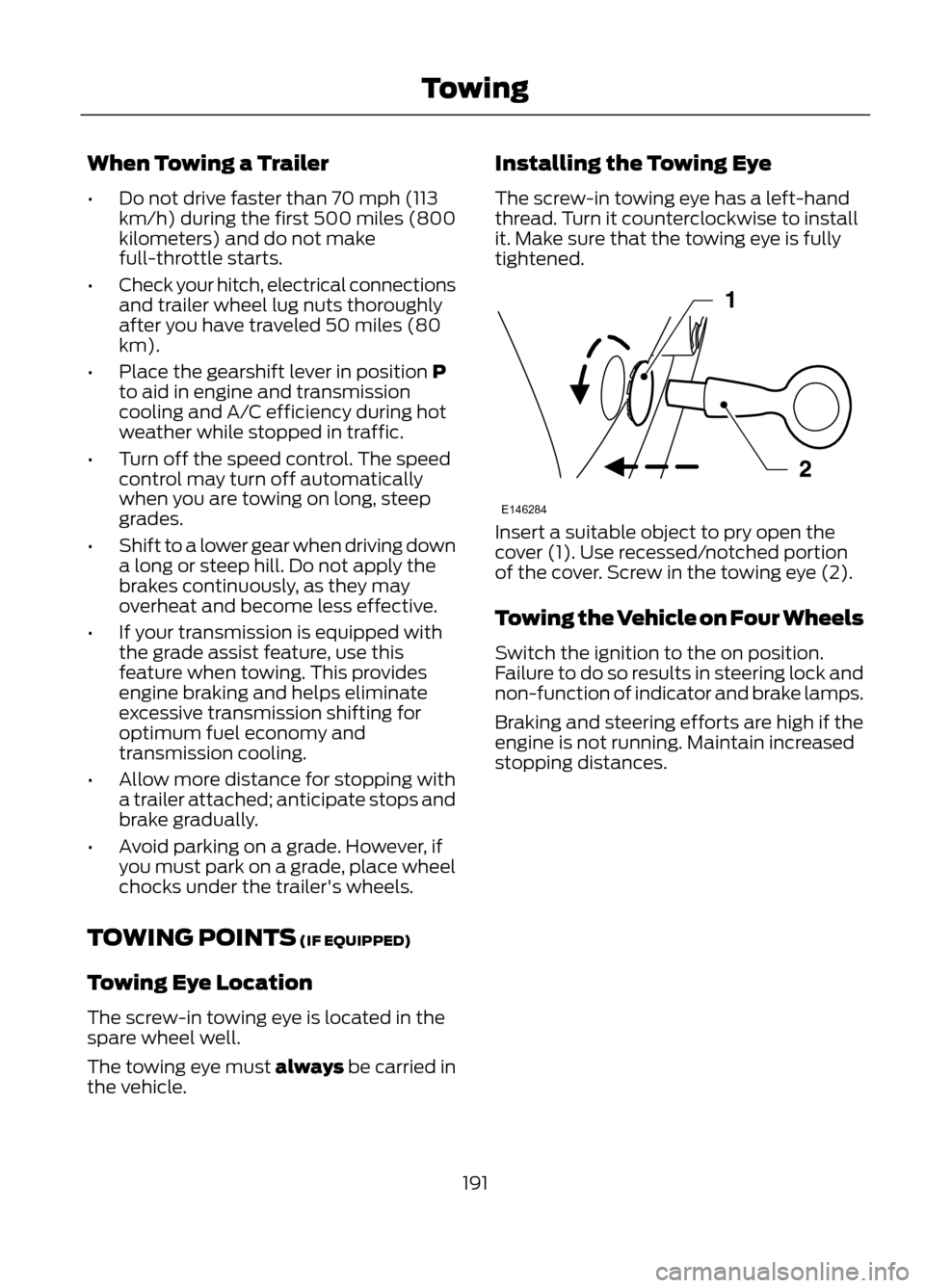
The screw-in towing eye has a left-hand
thread. Turn it counterclockwise to install
it. Make sure that the towing eye is fully
tightened.
Insert a suitable object to pry open the
cover (1). Use recessed/notched portion
of the cover. Screw in the towing eye (2).
Towing the Vehicle on Four Wheels
Switch the ignition to the on position.
Failure to do so results in steering lock and
non-function of indicator and brake lamps.
Braking and steering efforts are high if the
engine is not running. Maintain increased
stopping distances.
191
Towing
E146284