clock FORD ESCAPE 2013 3.G User Guide
[x] Cancel search | Manufacturer: FORD, Model Year: 2013, Model line: ESCAPE, Model: FORD ESCAPE 2013 3.GPages: 423, PDF Size: 4.59 MB
Page 231 of 423
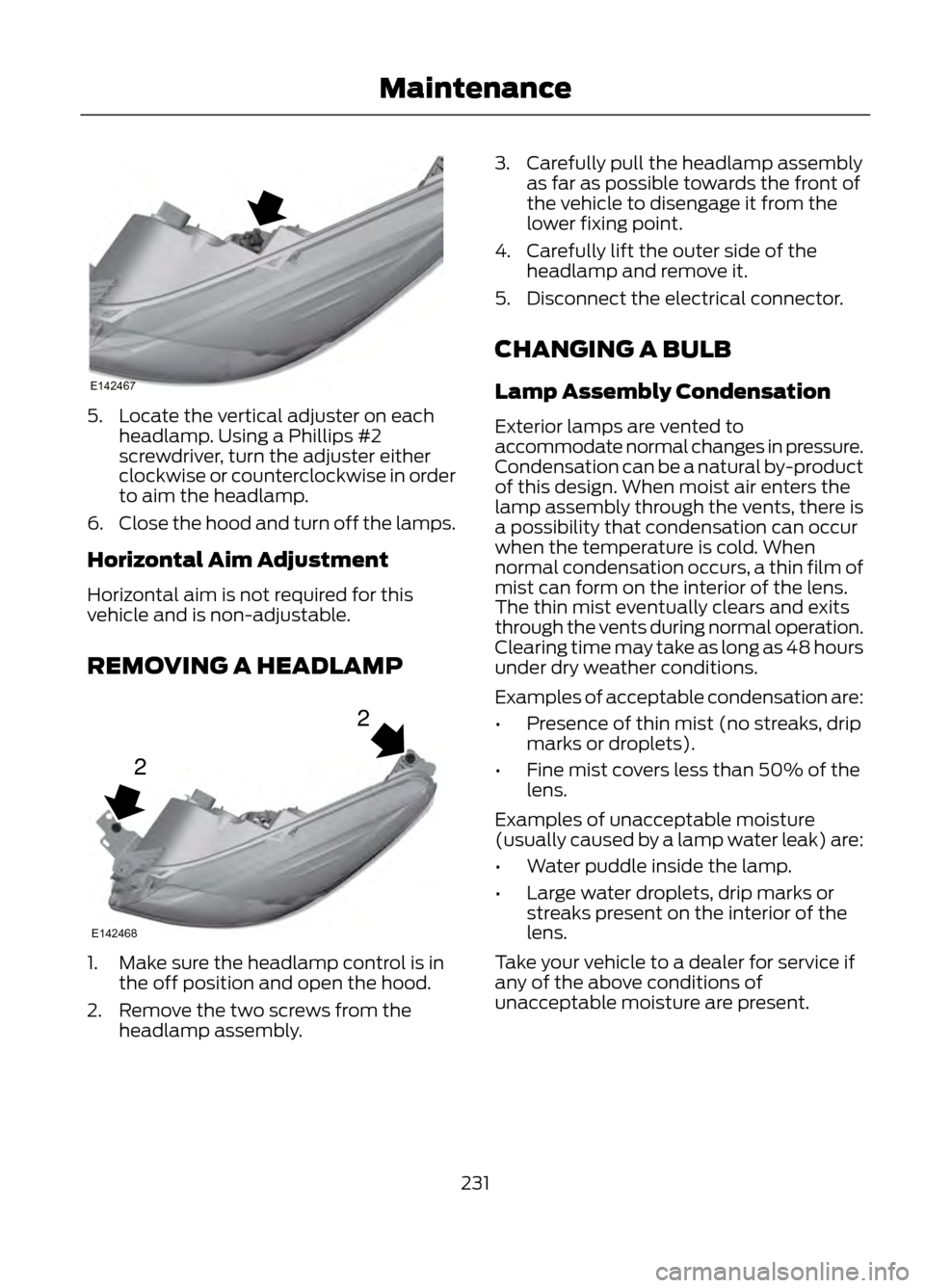
5. Locate the vertical adjuster on eachheadlamp. Using a Phillips #2
screwdriver, turn the adjuster either
clockwise or counterclockwise in order
to aim the headlamp.
6. Close the hood and turn off the lamps.
Horizontal Aim Adjustment
Horizontal aim is not required for this
vehicle and is non-adjustable.
REMOVING A HEADLAMP
1. Make sure the headlamp control is in the off position and open the hood.
2. Remove the two screws from the headlamp assembly. 3. Carefully pull the headlamp assembly
as far as possible towards the front of
the vehicle to disengage it from the
lower fixing point.
4. Carefully lift the outer side of the headlamp and remove it.
5. Disconnect the electrical connector.
CHANGING A BULB
Lamp Assembly Condensation
Exterior lamps are vented to
accommodate normal changes in pressure.
Condensation can be a natural by-product
of this design. When moist air enters the
lamp assembly through the vents, there is
a possibility that condensation can occur
when the temperature is cold. When
normal condensation occurs, a thin film of
mist can form on the interior of the lens.
The thin mist eventually clears and exits
through the vents during normal operation.
Clearing time may take as long as 48 hours
under dry weather conditions.
Examples of acceptable condensation are:
• Presence of thin mist (no streaks, drip
marks or droplets).
• Fine mist covers less than 50% of the
lens.
Examples of unacceptable moisture
(usually caused by a lamp water leak) are:
• Water puddle inside the lamp.
• Large water droplets, drip marks or
streaks present on the interior of the
lens.
Take your vehicle to a dealer for service if
any of the above conditions of
unacceptable moisture are present.
231
Maintenance
E142467
2
2
E142468
Page 232 of 423
Replacing Headlamp Bulbs
WARNING
Handle a halogen headlamp bulb
carefully and keep out of children’s
reach. Grasp the bulb by only its
plastic base and do not touch the glass.
The oil from your hand could cause the
bulb to break the next time the headlamps
are operated.
Note: If the bulb is accidentally touched, it
should be cleaned with rubbing alcohol
before being used.
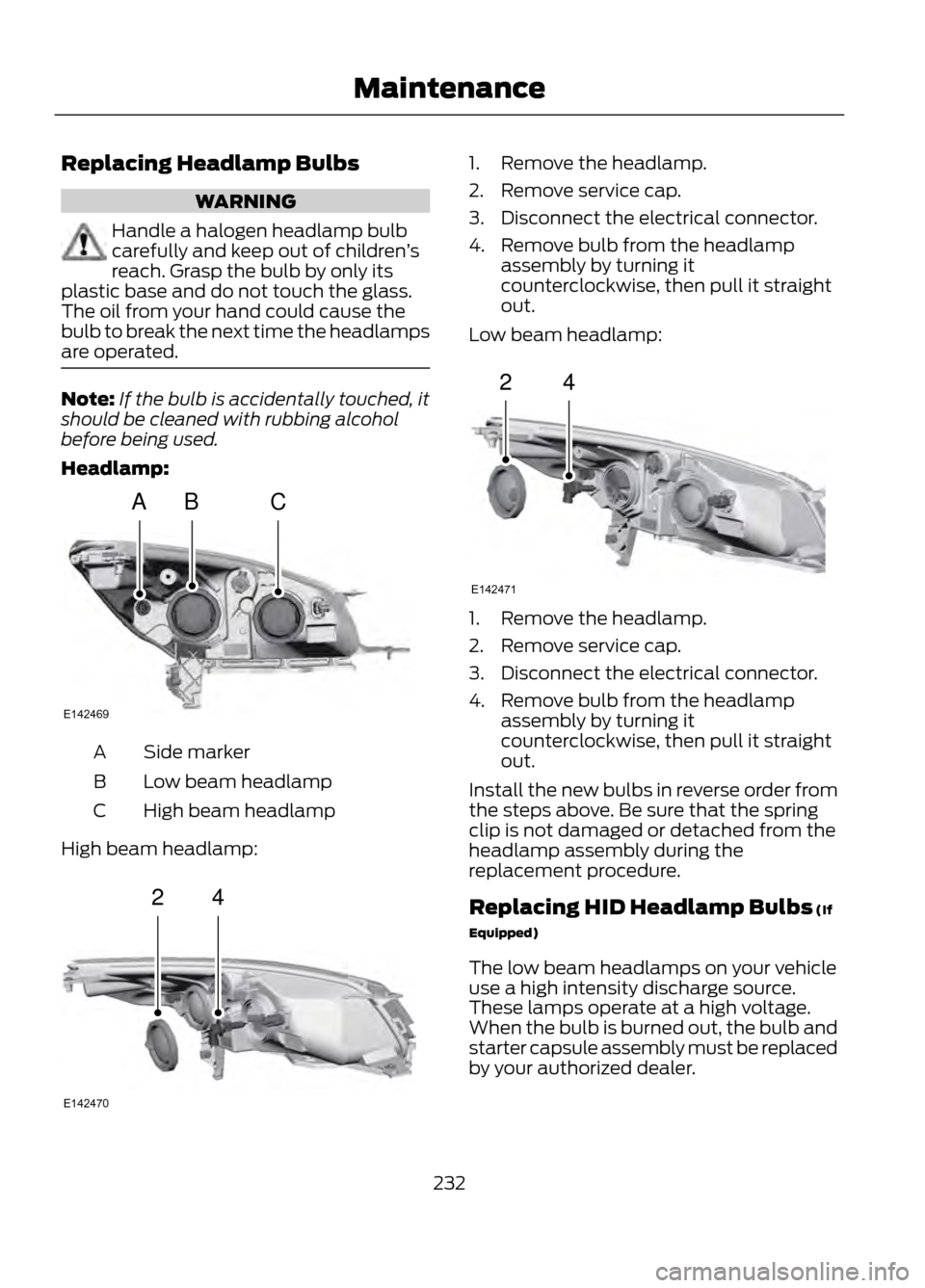
Headlamp:
Side marker
A
Low beam headlamp
B
High beam headlamp
C
High beam headlamp:
1. Remove the headlamp.
2. Remove service cap.
3. Disconnect the electrical connector.
4. Remove bulb from the headlamp assembly by turning it
counterclockwise, then pull it straight
out.
Low beam headlamp:
1. Remove the headlamp.
2. Remove service cap.
3. Disconnect the electrical connector.
4. Remove bulb from the headlamp assembly by turning it
counterclockwise, then pull it straight
out.
Install the new bulbs in reverse order from
the steps above. Be sure that the spring
clip is not damaged or detached from the
headlamp assembly during the
replacement procedure.
Replacing HID Headlamp Bulbs (If
Equipped)
The low beam headlamps on your vehicle
use a high intensity discharge source.
These lamps operate at a high voltage.
When the bulb is burned out, the bulb and
starter capsule assembly must be replaced
by your authorized dealer.
232
Maintenance
ABC
E142469
24
E142470
24
E142471
Page 233 of 423
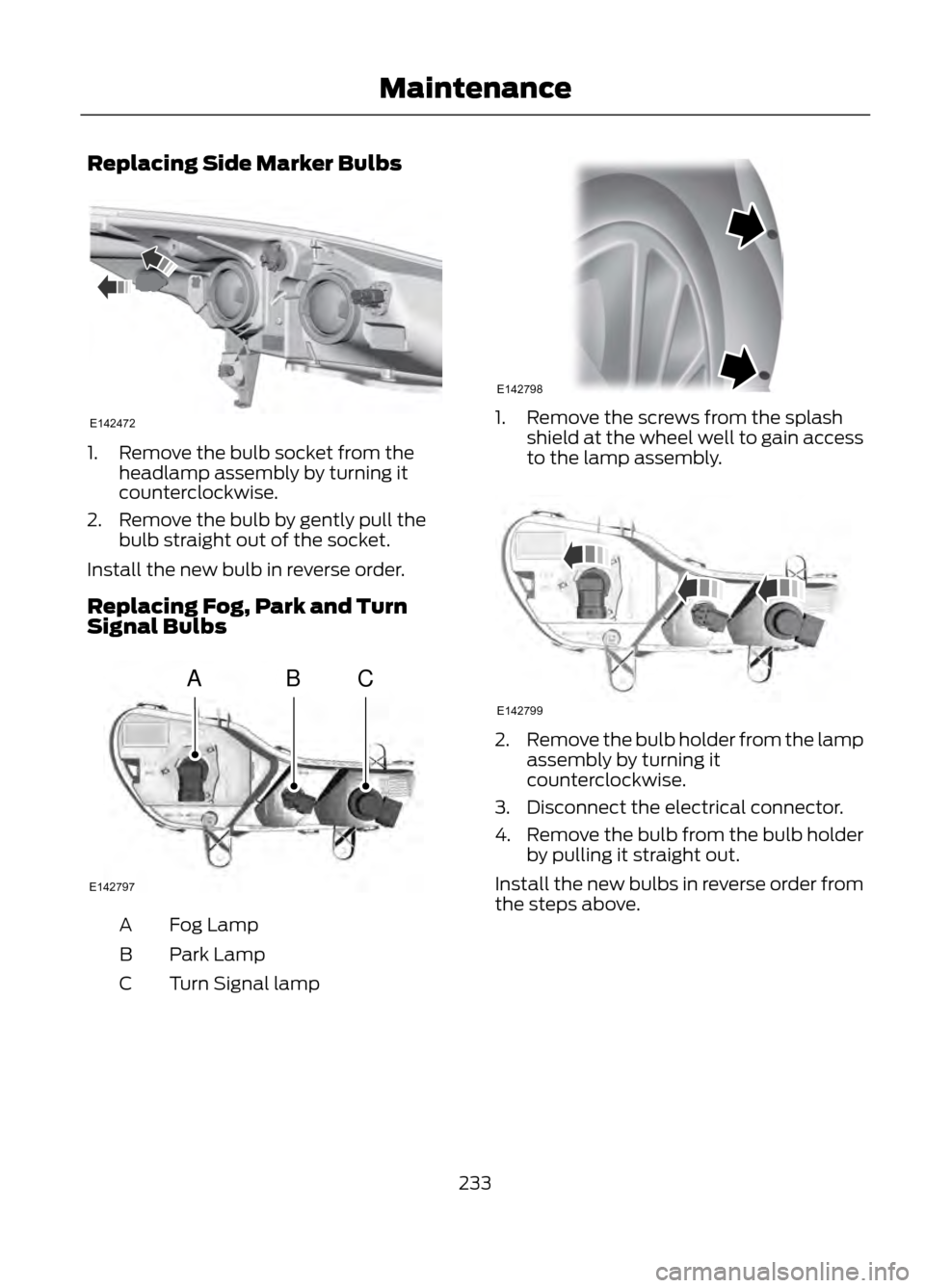
Replacing Side Marker Bulbs
1. Remove the bulb socket from theheadlamp assembly by turning it
counterclockwise.
2. Remove the bulb by gently pull the bulb straight out of the socket.
Install the new bulb in reverse order.
Replacing Fog, Park and Turn
Signal Bulbs
Fog Lamp
A
Park Lamp
B
Turn Signal lamp
C
1. Remove the screws from the splash
shield at the wheel well to gain access
to the lamp assembly.
2.Remove the bulb holder from the lamp
assembly by turning it
counterclockwise.
3. Disconnect the electrical connector.
4. Remove the bulb from the bulb holder
by pulling it straight out.
Install the new bulbs in reverse order from
the steps above.
233
Maintenance
E142472
ABC
E142797
E142798
E142799
Page 234 of 423
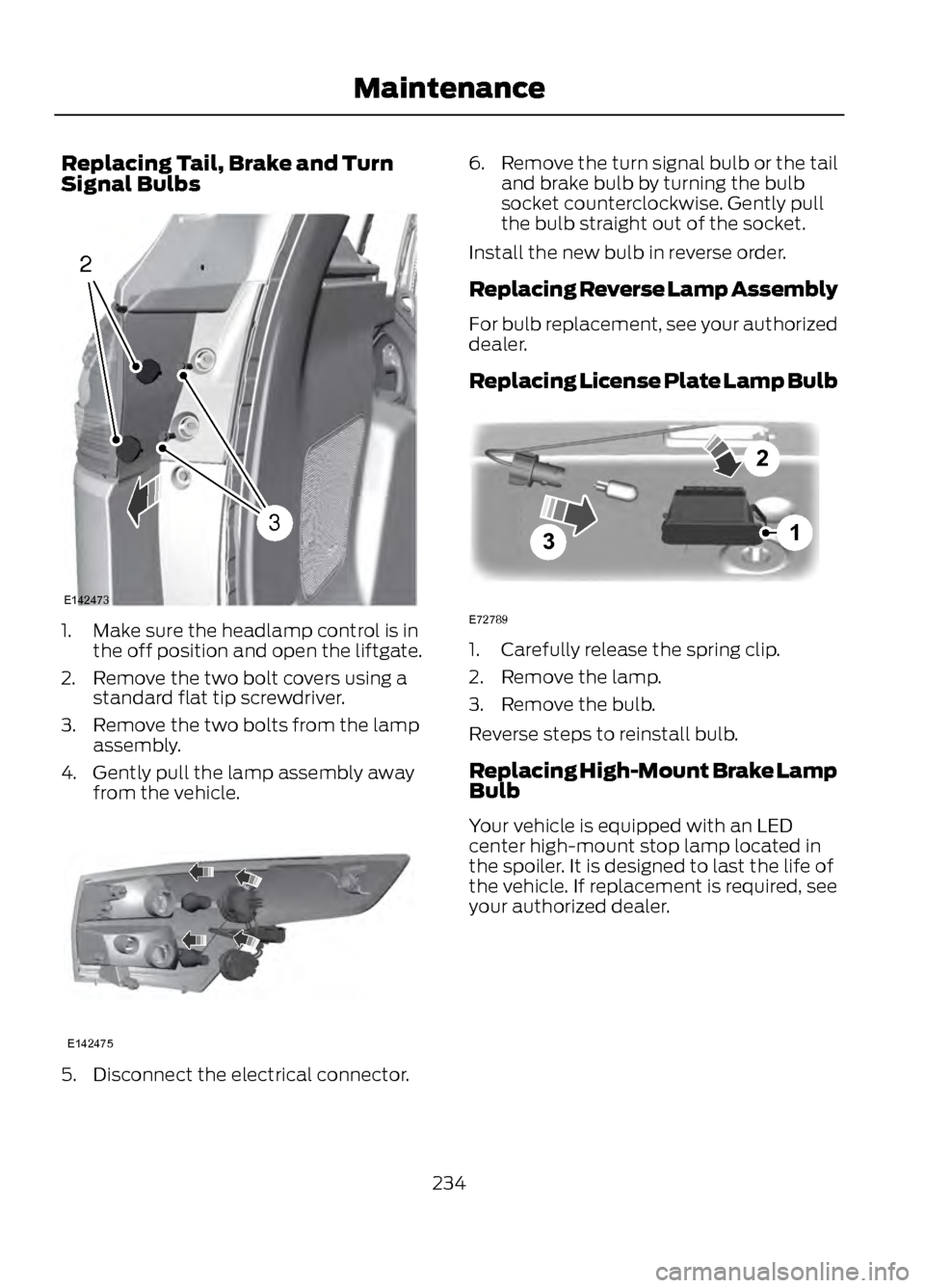
Replacing Tail, Brake and Turn
Signal Bulbs
1. Make sure the headlamp control is inthe off position and open the liftgate.
2. Remove the two bolt covers using a standard flat tip screwdriver.
3. Remove the two bolts from the lamp assembly.
4. Gently pull the lamp assembly away from the vehicle.
5. Disconnect the electrical connector. 6.
Remove the turn signal bulb or the tail
and brake bulb by turning the bulb
socket counterclockwise. Gently pull
the bulb straight out of the socket.
Install the new bulb in reverse order.
Replacing Reverse Lamp Assembly
For bulb replacement, see your authorized
dealer.
Replacing License Plate Lamp Bulb
1. Carefully release the spring clip.
2. Remove the lamp.
3. Remove the bulb.
Reverse steps to reinstall bulb.
Replacing High-Mount Brake Lamp
Bulb
Your vehicle is equipped with an LED
center high-mount stop lamp located in
the spoiler. It is designed to last the life of
the vehicle. If replacement is required, see
your authorized dealer.
234
Maintenance
2
3
E142473
E142475
3
2
1
E72789
Page 262 of 423
Tire Change Procedure
WARNINGS
When one of the front wheels is off
the ground, the transmission alone
will not prevent the vehicle from
moving or slipping off the jack, even if the
vehicle is in position P.
To help prevent the vehicle from
moving when you change a tire, be
sure the parking brake is set, then
block (in both directions) the wheel that
is diagonally opposite (other side and end
of the vehicle) to the tire being changed.
If the vehicle slips off the jack, you or
someone else could be seriously
injured.
Do not attempt to change a tire on
the side of the vehicle close to
moving traffic. Pull far enough off the
road to avoid the danger of being hit when
operating the jack or changing the wheel.
To lessen the risk of personal injury,
do not put any part of your body
under the vehicle while changing a
tire. Do not start the engine when your
vehicle is on the jack. The jack is only
meant for changing the tire.
Note: Passengers should not remain in the
vehicle when the vehicle is being jacked.
1. Park on a level surface, set the parking
brake and activate the hazard flashers.
2. Place the gearshift lever in position P and turn the engine off.
3. Remove the carpeted wheel cover.
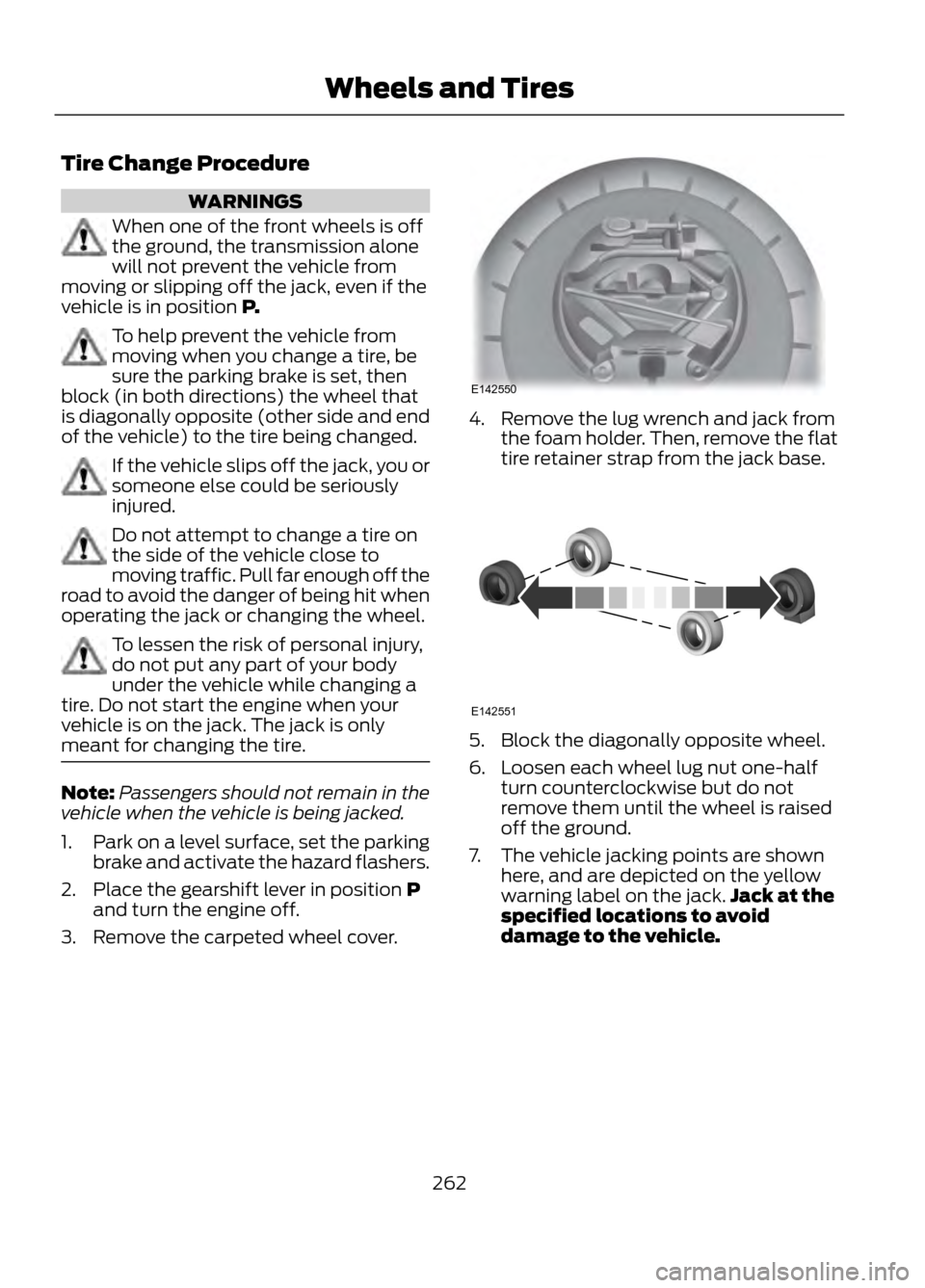
4. Remove the lug wrench and jack from the foam holder. Then, remove the flat
tire retainer strap from the jack base.
5. Block the diagonally opposite wheel.
6. Loosen each wheel lug nut one-halfturn counterclockwise but do not
remove them until the wheel is raised
off the ground.
7. The vehicle jacking points are shown here, and are depicted on the yellow
warning label on the jack. Jack at the
specified locations to avoid
damage to the vehicle.
262
Wheels and Tires
E142550
E142551
Page 263 of 423
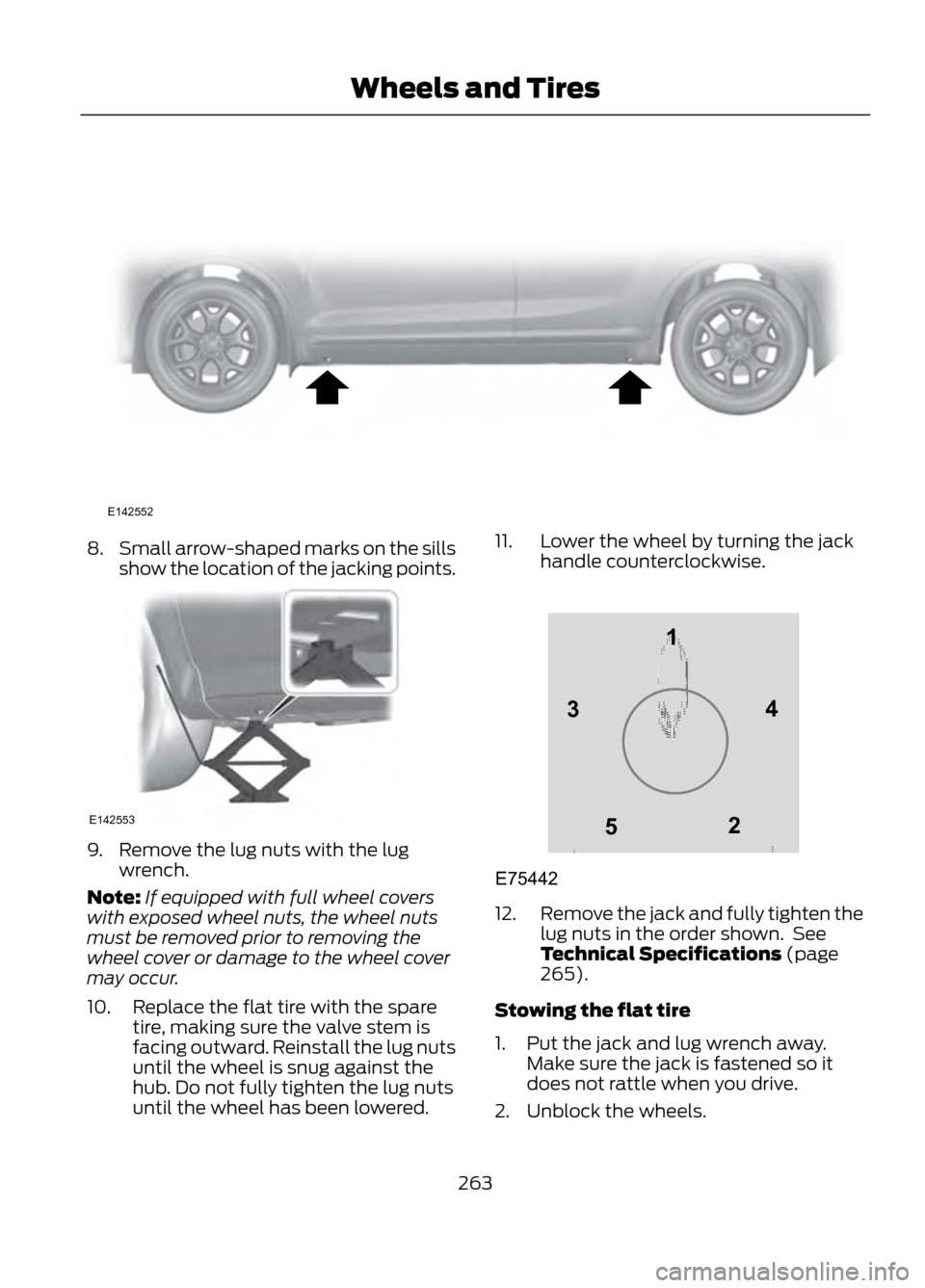
8.Small arrow-shaped marks on the sills
show the location of the jacking points.
9. Remove the lug nuts with the lug
wrench.
Note: If equipped with full wheel covers
with exposed wheel nuts, the wheel nuts
must be removed prior to removing the
wheel cover or damage to the wheel cover
may occur.
10. Replace the flat tire with the spare tire, making sure the valve stem is
facing outward. Reinstall the lug nuts
until the wheel is snug against the
hub. Do not fully tighten the lug nuts
until the wheel has been lowered. 11. Lower the wheel by turning the jack
handle counterclockwise.
12.Remove the jack and fully tighten the
lug nuts in the order shown. See
Technical Specifications (page
265).
Stowing the flat tire
1. Put the jack and lug wrench away. Make sure the jack is fastened so it
does not rattle when you drive.
2. Unblock the wheels.
263
Wheels and Tires
E142552
E142553
12
3
4
5
E75442
Page 315 of 423
GENERAL INFORMATION
WARNING
Driving while distracted can result in
loss of vehicle control, accident and
injury. Ford strongly recommends
that drivers use extreme caution when
using any device or feature that may take
their focus off the road. Your primary
responsibility is the safe operation of the
vehicle. We recommend against the use
of any handheld device while driving,
encourage the use of voice-operated
systems when possible and that you
become aware of applicable state and
local laws that may affect use of electronic
devices while driving.
Note: Some features are not available while
the vehicle is moving.
Note: You can also directly access the
Home screen and Information screen by
pressing the Home ("house" icon) and
Information ("i" icon) buttons on your
steering wheel controls.
This system uses a four-corner strategy to
provide quick access to vehicle features
and settings. The comprehensive
touchscreen provides easy interaction with
your mobile phone, multimedia, climate
control and navigation system. The corners
display any active modes within those
menus, such as your phone being
connected or the climate temperature.
MENU
Press to select any of the following:
• Clock
• Sound
• Settings
• Display •
Vehicle
• Help
INFORMATION
Press to select any of the following:
• SYNC® Services
• Notifications
• SYNC Apps
• SIRIUS® Travel Link ™
• Calendar
PHONE
Press to select any of the following:
• Quick Dial
• Call History
• Settings
• Phonebook
• Text Messaging
• Making and Receiving Calls
NAVIGATION
Press to select any of the following:
• My Home
• Previous Destinations
• Emergency
• Intersection
• Map
• Favorites
• Point of Interest
• Street Address
• City Center
ENTERTAINMENT
Press to select any of the following:
• AM or FM
• CD
• BT Stereo
• SD Card
• SIRIUS
315
MyFord Touch®
E142607
Page 326 of 423
Intersection"Enter city"
"Change city" "Enter state"
"Change state"
The dual mode feature is also available
when the voice system displays a list of
items to pick from during a voice session,
where you would be able to touch the line
item or say "Line 2". If a command is not
understood or there are multiple options,
the system returns a list for you to choose
from.
MENU
Under the menu setting, you can set your
clock, access and make adjustments to
the display, sound and vehicle settings as
well as access settings for specific modes
or the help feature.
Setting the Clock
Note: The date is set by your vehicle's GPS;
you cannot manually set the date.
Note: If the battery has been disconnected,
the vehicle needs to acquire a GPS signal
to update the clock. Once your vehicle
acquires the signal, it may take a few
minutes for the update to display the correct
time.
1. Press Menu, then Clock.
2. Press + and - to adjust the time.
From this screen, you can also make other
adjustments such as 12-hour or 24-hour
mode, activate GPS time synchronization
and have the system automatically update
new time zones.
Once you update any settings they are
automatically saved. Display Settings
To access and make adjustments to the
touchscreen display using the touchscreen,
press Menu, then Display. Select any of the
following:
•
Brightness
• Auto Dim On/Off
• Mode: Auto, Day or Night
• Edit Wallpaper
To access and make
adjustments to the touchscreen
display using voice commands,
press the voice button on your steering
wheel controls and, when prompted, say
"Display Settings".
Uploading Photos for Your Home
Screen Wallpaper
Note: You cannot load photos directly from
your camera. You must access the photos
from either your USB mass storage device
or from an SD card.
Your system allows you to upload and view
up to 32 photos. To upload photos, press
Menu, Display, then Edit Wallpaper. Follow
the system prompts to upload your
photographs.
Photo Display Limitations
Note: Photographs with extremely large
dimensions (i.e. 2048 x 1536) may not be
compatible and appear as a blank (black)
image on the display.
326
MyFord Touch®
E142599
Page 418 of 423
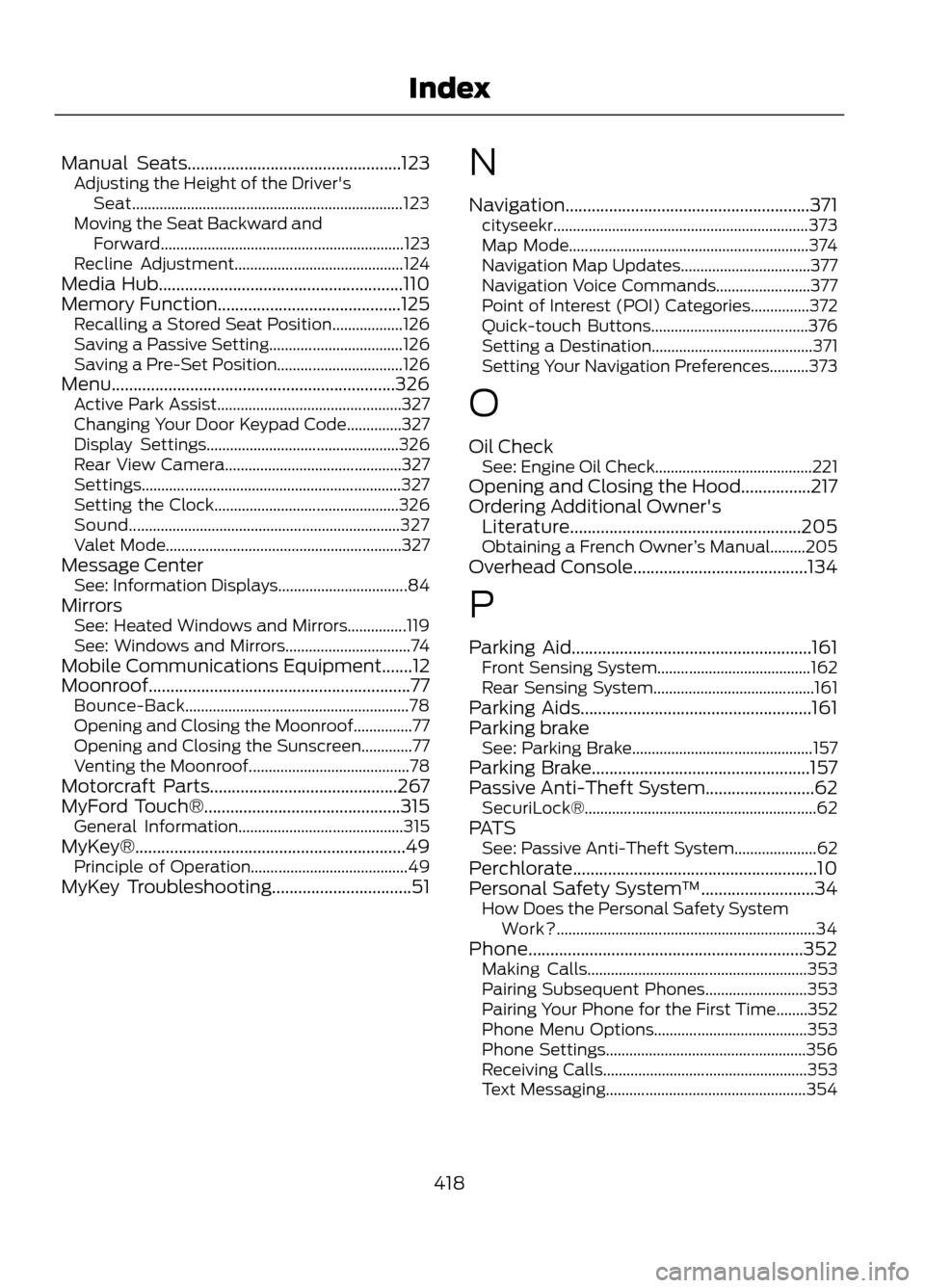
Manual Seats.................................................123Adjusting the Height of the Driver's
Seat..................................................................... 123
Moving the Seat Backward and Forward.............................................................. 123
Recline Adjustment........................................... 124
Media Hub........................................................110
Memory Function..........................................125 Recalling a Stored Seat Position..................126
Saving a Passive Setting.................................. 126
Saving a Pre-Set Position................................ 126
Menu.................................................................326 Active Park Assist............................................... 327
Changing Your Door Keypad Code..............327
Display Settings................................................. 326
Rear View Camera............................................. 327
Settings.................................................................. 327
Setting the Clock............................................... 326
Sound..................................................................... 327
Valet Mode............................................................ 327
Message Center See: Information Displays................................. 84
Mirrors See: Heated Windows and Mirrors...............119
See: Windows and Mirrors................................ 74
Mobile Communications Equipment.......12
Moonroof............................................................77 Bounce-Back......................................................... 78
Opening and Closing the Moonroof...............77
Opening and Closing the Sunscreen.............77
Venting the Moonroof......................................... 78
Motorcraft Parts...........................................267
MyFord Touch®.............................................315 General Information.......................................... 315
MyKey®..............................................................49 Principle of Operation........................................ 49
MyKey Troubleshooting................................51 N
Navigation........................................................371
cityseekr................................................................. 373
Map Mode............................................................. 374
Navigation Map Updates................................. 377
Navigation Voice Commands........................ 377
Point of Interest (POI) Categories...............372
Quick-touch Buttons........................................ 376
Setting a Destination......................................... 371
Setting Your Navigation Preferences..........373
O
Oil Check See: Engine Oil Check........................................ 221
Opening and Closing the Hood................217
Ordering Additional Owner's Literature.....................................................205
Obtaining a French Owner ’s Manual.........205
Overhead Console........................................134
P
Parking Aid.......................................................161 Front Sensing System....................................... 162
Rear Sensing System......................................... 161
Parking Aids.....................................................161
Parking brake See: Parking Brake.............................................. 157
Parking Brake..................................................157
Passive Anti-Theft System.........................62 SecuriLock®........................................................... 62
PATS See: Passive Anti-Theft System..................... 62
Perchlorate........................................................10
Personal Safety System ™..........................34
How Does the Personal Safety System
Work?.................................................................. 34
Phone...............................................................352 Making Calls........................................................ 353
Pairing Subsequent Phones.......................... 353
Pairing Your Phone for the First Time........352
Phone Menu Options....................................... 353
Phone Settings................................................... 356
Receiving Calls.................................................... 353
Text Messaging................................................... 354
418
Index