height FORD ESCAPE 2013 3.G User Guide
[x] Cancel search | Manufacturer: FORD, Model Year: 2013, Model line: ESCAPE, Model: FORD ESCAPE 2013 3.GPages: 423, PDF Size: 4.59 MB
Page 123 of 423

Tilting Head Restraints (If Equipped)
The front head restraints may have a tilting
feature for extra comfort. To tilt the head
restraint, do the following:
1. Adjust the seatback to an uprightdriving or riding position.
2. Pivot the head restraint forward toward
your head to the desired position.
After the head restraint reaches the
forward-most tilt position, pivoting it
forward again will then release it to the
rearward, un-tilted position.
MANUAL SEATS
WARNING
Do not adjust the driver's seat or
seatback when your vehicle is
moving.
Moving the Seat Backward and
Forward
WARNING
Rock the seat backward and forward
after releasing the lever to make sure
that it is fully engaged.
Adjusting the Height of the
Driver's Seat
123
Seats
E144727
E130249
E70730
Page 205 of 423
Ford International Business Development
Inc.
Customer Relationship Center
P.O. Box 11957
Caparra Heights Station
San Juan, Puerto Rico 00922-1957
Telephone: (800) 841-FORD (3673)
FAX: (313) 390-0804
Email: [email protected]
www.ford.com.pr
If your vehicle must be serviced while you
are traveling or living in the Middle East,
contact the nearest authorized dealer. If
the authorized dealer cannot help you,
contact:
Ford Middle East
Customer Relationship Center
P.O. Box 21470
Dubai, United Arab Emirates
Telephone: +971 4 3326084
Toll-Free Number for the Kingdom of Saudi
Arabia: 800 8971409
Local Telephone Number for Kuwait:
24810575
FAX: +971 4 3327299
Email: [email protected]
www.me.ford.com
If you buy your vehicle in North America
and then relocate to any of the above
locations, register your vehicle
identification number (VIN) and new
address with Ford Motor Company Export
Operations & Global Growth Initiatives by
emailing [email protected].
If you are in another foreign country,
contact the nearest authorized dealer. If
the authorized dealer employees cannot
help you, they can direct you to the nearest
Ford affiliate office.
Customers in the U.S. should call
1-800-392-3673.ORDERING ADDITIONAL
OWNER'S LITERATURE
To order the publications in this portfolio,
contact Helm, Incorporated at:
HELM, INCORPORATED
47911 Halyard Drive
Plymouth, Michigan 48170
Attention: Customer Service
Or to order a free publication catalog, call
toll free: 1-800-782-4356
Monday-Friday 8:00 a.m. - 6:00 p.m. EST
Helm, Incorporated can also be reached
by their website:
www.helminc.com
(Items in this catalog may be purchased
by credit card, check or money order.)
Obtaining a French Owner
’s
Manual
French Owner ’s Manual can be obtained
from your authorized dealer or by
contacting Helm, Incorporated using the
contact information listed previously in this
section.
REPORTING SAFETY DEFECTS
(U.S. ONLY)
If you believe that your vehicle has a defect
which could cause a crash or could cause
injury or death, you should immediately
inform the National Highway Traffic Safety
Administration (NHTSA) in addition to
notifying Ford Motor Company.
205
Customer Assistance
E142557
Page 229 of 423
2.5L Engine
1. Loosen the screws on the air tubeclamp that fasten it to the air filter
assembly tray.
2. Separate the clean air tube from the air cleaner.
3. Remove the air cleaner from the vehicle.
4. Loosen the screws that secure the air filter housing cover.
5. Carefully separate the two halves of the air filter housing.
6. Remove the air filter element from the
air filter housing.
7. Wipe the air filter housing and cover clean to remove any dirt or debris and
to ensure good sealing.
8. Slide the open end of the air filter element in first, below the tab. Then
push the closed end cap into the
bottom of the tray. The closed end cap
should fit inside the groove in the tray.
The tab at the end of the closed end
cap should be oriented down and fit
between the forks on the tray.
9. Replace the air filter housing cover and
secure the screws.
10. Reinstall the air cleaner assembly into the vehicle. 11. Reinstall the clean air tube assembly
into the air cleaner assembly.
12. Tighten the air tube fastening screws.
ADJUSTING THE HEADLAMPS
Vertical Aim Adjustment
The headlamps on your vehicle are
properly aimed at the assembly plant. If
your vehicle has been in an accident, the
alignment of your headlamps should be
checked by your authorized dealer.
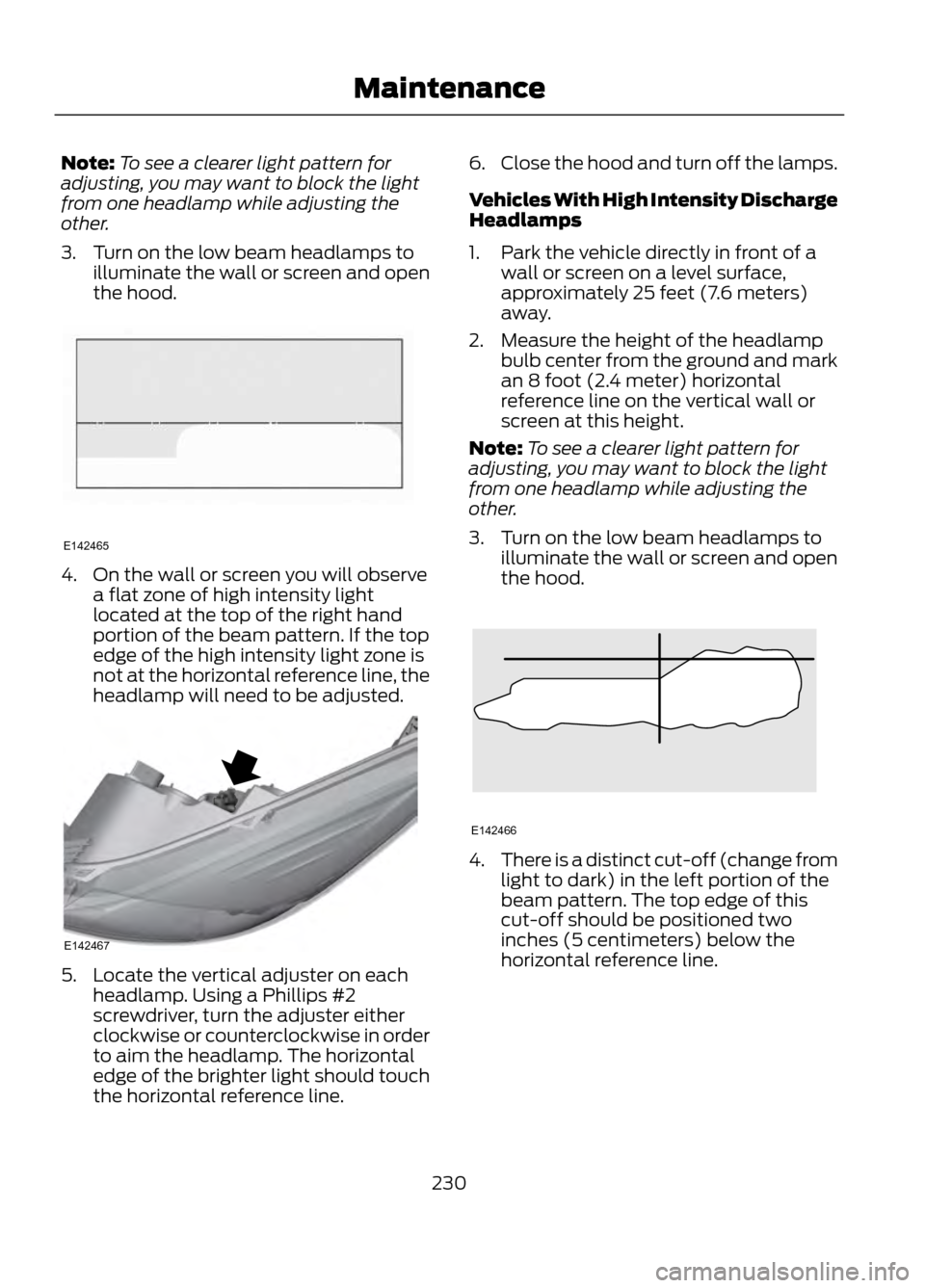
8 feet (2.4 meters)
A
Center height of lamp to ground
B
25 feet (7.6 meters)
C
Horizontal reference line
D
Vehicles With Halogen Headlamps
1. Park the vehicle directly in front of a wall or screen on a level surface,
approximately 25 feet (7.6 meters)
away.
2. Measure the height of the headlamp bulb center from the ground and mark
an 8 foot (2.4 meter) horizontal
reference line on the vertical wall or
screen at this height.
229
Maintenance
E142711
E142592
Page 230 of 423
Note:To see a clearer light pattern for
adjusting, you may want to block the light
from one headlamp while adjusting the
other.
3. Turn on the low beam headlamps to illuminate the wall or screen and open
the hood.
4. On the wall or screen you will observea flat zone of high intensity light
located at the top of the right hand
portion of the beam pattern. If the top
edge of the high intensity light zone is
not at the horizontal reference line, the
headlamp will need to be adjusted.
5. Locate the vertical adjuster on eachheadlamp. Using a Phillips #2
screwdriver, turn the adjuster either
clockwise or counterclockwise in order
to aim the headlamp. The horizontal
edge of the brighter light should touch
the horizontal reference line. 6.
Close the hood and turn off the lamps.
Vehicles With High Intensity Discharge
Headlamps
1. Park the vehicle directly in front of a wall or screen on a level surface,
approximately 25 feet (7.6 meters)
away.
2. Measure the height of the headlamp bulb center from the ground and mark
an 8 foot (2.4 meter) horizontal
reference line on the vertical wall or
screen at this height.
Note: To see a clearer light pattern for
adjusting, you may want to block the light
from one headlamp while adjusting the
other.
3. Turn on the low beam headlamps to illuminate the wall or screen and open
the hood.
4.There is a distinct cut-off (change from
light to dark) in the left portion of the
beam pattern. The top edge of this
cut-off should be positioned two
inches (5 centimeters) below the
horizontal reference line.
230
Maintenance
E142465
E142467
E142466
Page 247 of 423
Information on P Type Tires
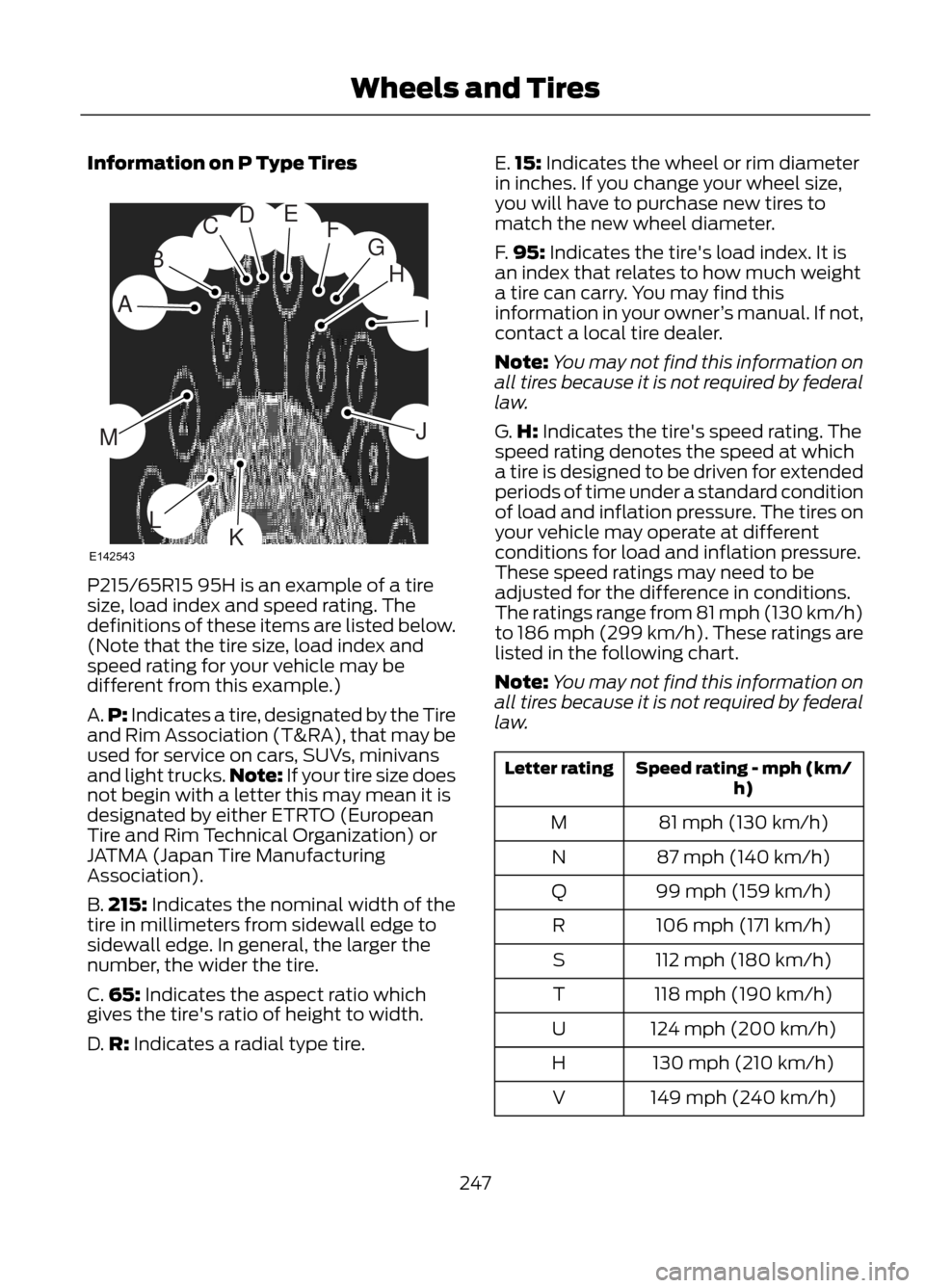
P215/65R15 95H is an example of a tire
size, load index and speed rating. The
definitions of these items are listed below.
(Note that the tire size, load index and
speed rating for your vehicle may be
different from this example.)
A.P: Indicates a tire, designated by the Tire
and Rim Association (T&RA), that may be
used for service on cars, SUVs, minivans
and light trucks. Note: If your tire size does
not begin with a letter this may mean it is
designated by either ETRTO (European
Tire and Rim Technical Organization) or
JATMA (Japan Tire Manufacturing
Association).
B. 215: Indicates the nominal width of the
tire in millimeters from sidewall edge to
sidewall edge. In general, the larger the
number, the wider the tire.
C. 65: Indicates the aspect ratio which
gives the tire's ratio of height to width.
D. R: Indicates a radial type tire. E.
15: Indicates the wheel or rim diameter
in inches. If you change your wheel size,
you will have to purchase new tires to
match the new wheel diameter.
F. 95: Indicates the tire's load index. It is
an index that relates to how much weight
a tire can carry. You may find this
information in your owner ’s manual. If not,
contact a local tire dealer.
Note: You may not find this information on
all tires because it is not required by federal
law.
G. H: Indicates the tire's speed rating. The
speed rating denotes the speed at which
a tire is designed to be driven for extended
periods of time under a standard condition
of load and inflation pressure. The tires on
your vehicle may operate at different
conditions for load and inflation pressure.
These speed ratings may need to be
adjusted for the difference in conditions.
The ratings range from 81 mph (130 km/h)
to 186 mph (299 km/h). These ratings are
listed in the following chart.
Note: You may not find this information on
all tires because it is not required by federal
law.
Speed rating - mph (km/ h)
Letter rating
81 mph (130 km/h)
M
87 mph (140 km/h)
N
99 mph (159 km/h)
Q
106 mph (171 km/h)
R
112 mph (180 km/h)
S
118 mph (190 km/h)
T
124 mph (200 km/h)
U
130 mph (210 km/h)
H
149 mph (240 km/h)
V
247
Wheels and Tires
H
I
J
KL
M
A
B
CDEFG
E142543
Page 250 of 423
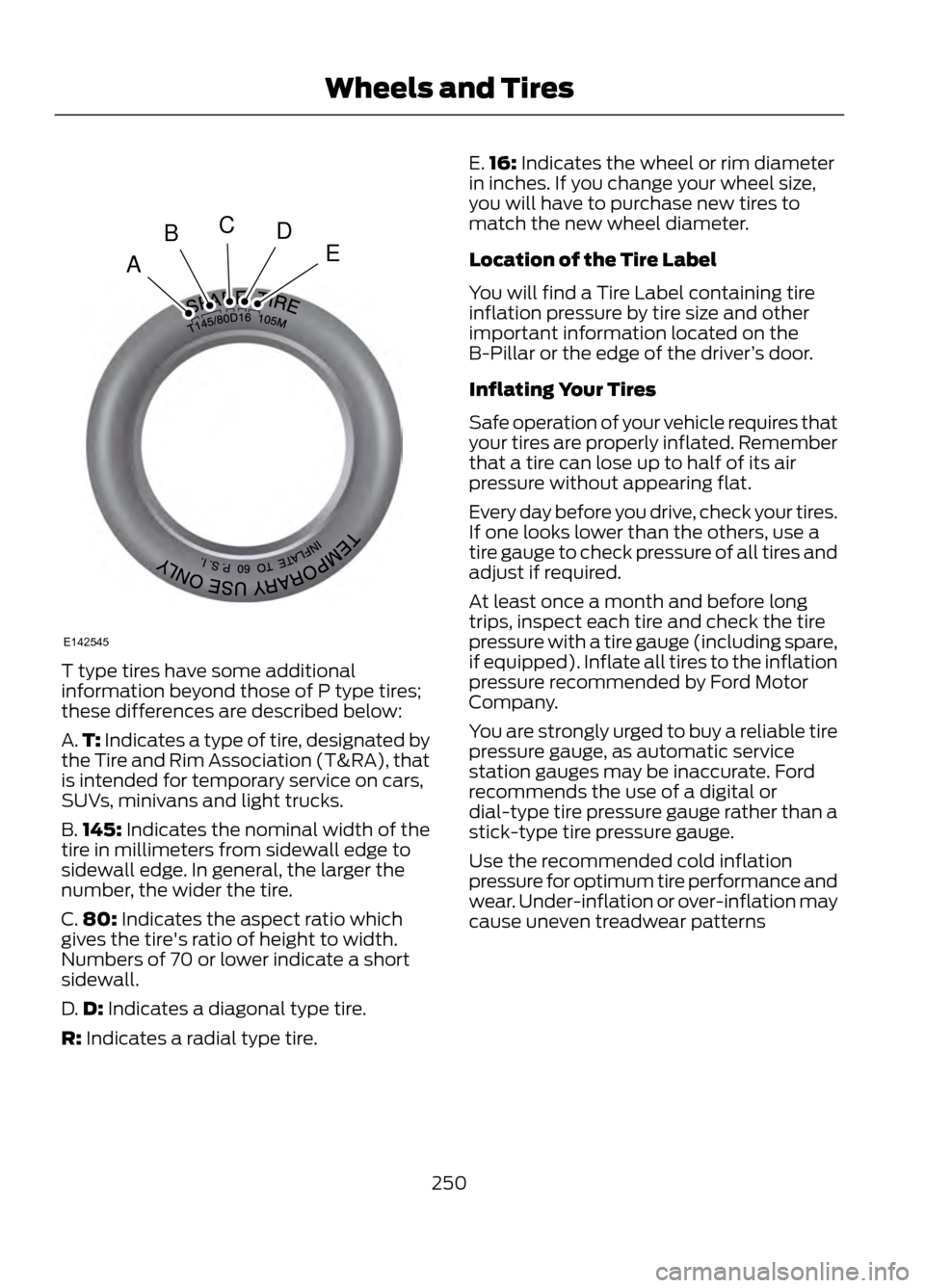
T type tires have some additional
information beyond those of P type tires;
these differences are described below:
A.T: Indicates a type of tire, designated by
the Tire and Rim Association (T&RA), that
is intended for temporary service on cars,
SUVs, minivans and light trucks.
B. 145: Indicates the nominal width of the
tire in millimeters from sidewall edge to
sidewall edge. In general, the larger the
number, the wider the tire.
C. 80: Indicates the aspect ratio which
gives the tire's ratio of height to width.
Numbers of 70 or lower indicate a short
sidewall.
D. D: Indicates a diagonal type tire.
R: Indicates a radial type tire. E.
16: Indicates the wheel or rim diameter
in inches. If you change your wheel size,
you will have to purchase new tires to
match the new wheel diameter.
Location of the Tire Label
You will find a Tire Label containing tire
inflation pressure by tire size and other
important information located on the
B-Pillar or the edge of the driver ’s door.
Inflating Your Tires
Safe operation of your vehicle requires that
your tires are properly inflated. Remember
that a tire can lose up to half of its air
pressure without appearing flat.
Every day before you drive, check your tires.
If one looks lower than the others, use a
tire gauge to check pressure of all tires and
adjust if required.
At least once a month and before long
trips, inspect each tire and check the tire
pressure with a tire gauge (including spare,
if equipped). Inflate all tires to the inflation
pressure recommended by Ford Motor
Company.
You are strongly urged to buy a reliable tire
pressure gauge, as automatic service
station gauges may be inaccurate. Ford
recommends the use of a digital or
dial-type tire pressure gauge rather than a
stick-type tire pressure gauge.
Use the recommended cold inflation
pressure for optimum tire performance and
wear. Under-inflation or over-inflation may
cause uneven treadwear patterns
250
Wheels and Tires
A
BCDE
E142545
Page 253 of 423
When the tread is worn down to one
sixteenth of an inch (2 mm), tires must be
replaced to help prevent your vehicle from
skidding and hydroplaning. Built-in
treadwear indicators, or wear bars, which
look like narrow strips of smooth rubber
across the tread will appear on the tire
when the tread is worn down to one
sixteenth of an inch (2 mm)
When the tire tread wears down to the
same height as these wear bars, the tire is
worn out and must be replaced.
Damage
Periodically inspect the tire treads and
sidewalls for damage (such as bulges in
the tread or sidewalls, cracks in the tread
groove and separation in the tread or
sidewall). If damage is observed or
suspected have the tire inspected by a tire
professional. Tires can be damaged during
off-road use, so inspection after off-road
use is also recommended.
Age
WARNING
Tires degrade over time depending
on many factors such as weather,
storage conditions, and conditions
of use (load, speed, inflation pressure, etc.)
the tires experience throughout their lives.
In general, tires should be replaced after
six years regardless of tread wear.
However, heat caused by hot climates or
frequent high loading conditions can
accelerate the aging process and may
require tires to be replaced more
frequently.
You should replace your spare tire when
you replace the road tires or after six years
due to aging even if it has not been used.
U.S. DOT Tire Identification Number
(TIN)
Both U.S. and Canada Federal regulations
require tire manufacturers to place
standardized information on the sidewall
of all tires. This information identifies and
describes the fundamental characteristics
of the tire and also provides a U.S. DOT
Tire Identification Number for safety
standard certification and in case of a
recall.
This begins with the letters DOT and
indicates that the tire meets all federal
standards. The next two numbers or letters
are the plant code designating where it
was manufactured, the next two are the
tire size code and the last four numbers
represent the week and year the tire was
built. For example, the numbers 317 mean
the 31st week of 1997. After 2000 the
numbers go to four digits. For example,
2501 means the 25th week of 2001. The
numbers in between are identification
codes used for traceability. This
information is used to contact customers
if a tire defect requires a recall.
Tire Replacement Requirements
Your vehicle is equipped with tires
designed to provide a safe ride and
handling capability.
WARNINGS
Only use replacement tires and
wheels that are the same size, load
index, speed rating and type (such
as P-metric versus LT-metric or all-season
versus all-terrain) as those originally
provided by Ford. The recommended tire
and wheel size may be found on either the
Safety Compliance Certification Label
(affixed to either the door hinge pillar,
door-latch post, or the door edge that
meets the door-latch post, next to the
driver's seating position), or the Tire Label
which is located on the B-Pillar or edge of
the driver ’s door. If this information is not
253
Wheels and Tires
Page 418 of 423
Manual Seats.................................................123Adjusting the Height of the Driver's
Seat..................................................................... 123
Moving the Seat Backward and Forward.............................................................. 123
Recline Adjustment........................................... 124
Media Hub........................................................110
Memory Function..........................................125 Recalling a Stored Seat Position..................126
Saving a Passive Setting.................................. 126
Saving a Pre-Set Position................................ 126
Menu.................................................................326 Active Park Assist............................................... 327
Changing Your Door Keypad Code..............327
Display Settings................................................. 326
Rear View Camera............................................. 327
Settings.................................................................. 327
Setting the Clock............................................... 326
Sound..................................................................... 327
Valet Mode............................................................ 327
Message Center See: Information Displays................................. 84
Mirrors See: Heated Windows and Mirrors...............119
See: Windows and Mirrors................................ 74
Mobile Communications Equipment.......12
Moonroof............................................................77 Bounce-Back......................................................... 78
Opening and Closing the Moonroof...............77
Opening and Closing the Sunscreen.............77
Venting the Moonroof......................................... 78
Motorcraft Parts...........................................267
MyFord Touch®.............................................315 General Information.......................................... 315
MyKey®..............................................................49 Principle of Operation........................................ 49
MyKey Troubleshooting................................51 N
Navigation........................................................371
cityseekr................................................................. 373
Map Mode............................................................. 374
Navigation Map Updates................................. 377
Navigation Voice Commands........................ 377
Point of Interest (POI) Categories...............372
Quick-touch Buttons........................................ 376
Setting a Destination......................................... 371
Setting Your Navigation Preferences..........373
O
Oil Check See: Engine Oil Check........................................ 221
Opening and Closing the Hood................217
Ordering Additional Owner's Literature.....................................................205
Obtaining a French Owner ’s Manual.........205
Overhead Console........................................134
P
Parking Aid.......................................................161 Front Sensing System....................................... 162
Rear Sensing System......................................... 161
Parking Aids.....................................................161
Parking brake See: Parking Brake.............................................. 157
Parking Brake..................................................157
Passive Anti-Theft System.........................62 SecuriLock®........................................................... 62
PATS See: Passive Anti-Theft System..................... 62
Perchlorate........................................................10
Personal Safety System ™..........................34
How Does the Personal Safety System
Work?.................................................................. 34
Phone...............................................................352 Making Calls........................................................ 353
Pairing Subsequent Phones.......................... 353
Pairing Your Phone for the First Time........352
Phone Menu Options....................................... 353
Phone Settings................................................... 356
Receiving Calls.................................................... 353
Text Messaging................................................... 354
418
Index
Page 419 of 423
Power Door LocksSee: Locking and Unlocking............................. 54
Power Liftgate..................................................57 Obstacle Detection............................................. 59
Opening and Closing the Liftgate..................58
Setting the Liftgate Open Height................... 59
Power Seats....................................................124 Power Lumbar...................................................... 125
Power Steering Fluid Check.....................225
Power Windows..............................................74 Accessory Delay.................................................... 75
Bounce-Back.......................................................... 74
One-Touch Down................................................. 74
One-Touch Up....................................................... 74
Window Lock.......................................................... 74
R
Rear Seat Armrest.........................................127
Rear Seats.......................................................126 Folding the Seatback........................................ 126
Recline Adjustment........................................... 126
Unfolding the Seatback................................... 126
Rear Under Floor Storage...........................177 Adjustable Load Floor........................................ 177
Cargo Management System........................... 177
Passenger Compartment Floor...................... 177
Rear View Camera........................................167 Using the Rear View Camera System.........167
Rear View Camera See: Rear View Camera.................................... 167
Rear Window Wiper and Washers..........69 Rear Window Washer......................................... 69
Rear Window Wiper............................................ 69
Recommended Towing Weights............188
Refueling..........................................................142 Easy Fuel® No Cap Fuel System..................143
Remote Control..............................................44 Car Finder................................................................ 46
Integrated Keyhead Transmitters .................44
Intelligent Access Key......................................... 45
Remote Start ......................................................... 47
Replacing the Battery......................................... 45
Sounding a Panic Alarm.................................... 47
Remote Start...................................................119 Automatic Settings............................................ 120
Heated and Cooled Devices........................... 120
Last Settings........................................................ 120Removing a Headlamp...............................231
Repairing Minor Paint Damage...............237
Replacement Parts
Recommendation.........................................11
Collision Repairs..................................................... 11
Scheduled Maintenance and Mechanical Repairs................................................................... 11
Warranty on Replacement Parts...................... 11
Replacing a Lost Key or Remote Control............................................................48
Reporting Safety Defects (Canada Only).............................................................206
Reporting Safety Defects (U.S. Only)..............................................................205
Roadside Assistance...................................197 Vehicles Sold In Canada : Getting Roadside
Assistance........................................................ 197
Vehicles Sold In Canada : Using Roadside Assistance........................................................ 197
Vehicles Sold In The U.S.: Getting Roadside Assistance........................................................ 197
Vehicles Sold In The U.S. : Using Roadside Assistance........................................................ 197
Roadside Emergencies...............................197
Roof Racks and Load Carriers..................178 Adjusting the Crossbar..................................... 178
Running Out of Fuel......................................141 Refilling With a Portable Fuel
Container........................................................... 141
S
Safety Belt Height Adjustment................30
Safety Belt Minder..........................................31 Belt-Minder®.......................................................... 31
Safety Belts......................................................26 Principle of Operation........................................ 26
Safety Belt Warning Lamp and Indicator Chime..............................................................30
Conditions of operation..................................... 30
Safety Canopy®..............................................41
Safety Precautions......................................140
Satellite Radio................................................110 Satellite Radio Electronic Serial Number
(ESN).................................................................... 111
Satellite Radio Reception Factors..................111
SIRIUS® Satellite Radio Service..................... 111
Troubleshooting................................................... 112
419
Index