instrument panel FORD ESCAPE 2013 3.G User Guide
[x] Cancel search | Manufacturer: FORD, Model Year: 2013, Model line: ESCAPE, Model: FORD ESCAPE 2013 3.GPages: 423, PDF Size: 4.59 MB
Page 117 of 423
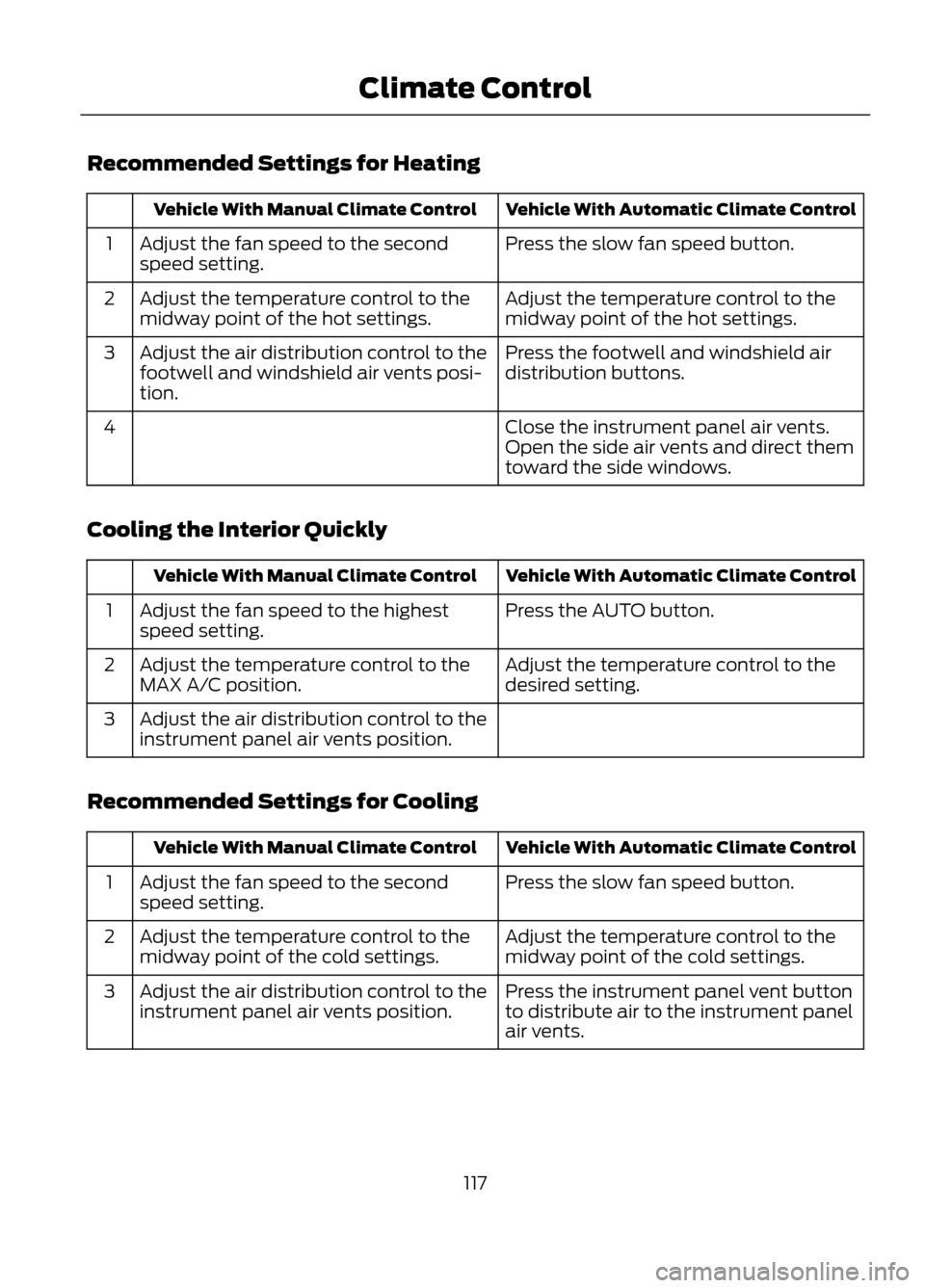
Recommended Settings for Heating
Vehicle With Automatic Climate Control
Vehicle With Manual Climate Control
Press the slow fan speed button.
Adjust the fan speed to the second
speed setting.
1
Adjust the temperature control to the
midway point of the hot settings.
Adjust the temperature control to the
midway point of the hot settings.
2
Press the footwell and windshield air
distribution buttons.
Adjust the air distribution control to the
footwell and windshield air vents posi-
tion.
3
Close the instrument panel air vents.
Open the side air vents and direct them
toward the side windows.
4
Cooling the Interior Quickly
Vehicle With Automatic Climate Control
Vehicle With Manual Climate Control
Press the AUTO button.
Adjust the fan speed to the highest
speed setting.
1
Adjust the temperature control to the
desired setting.
Adjust the temperature control to the
MAX A/C position.
2
Adjust the air distribution control to the
instrument panel air vents position.
3
Recommended Settings for Cooling
Vehicle With Automatic Climate Control
Vehicle With Manual Climate Control
Press the slow fan speed button.
Adjust the fan speed to the second
speed setting.
1
Adjust the temperature control to the
midway point of the cold settings.
Adjust the temperature control to the
midway point of the cold settings.
2
Press the instrument panel vent button
to distribute air to the instrument panel
air vents.
Adjust the air distribution control to the
instrument panel air vents position.
3
117
Climate Control
Page 118 of 423
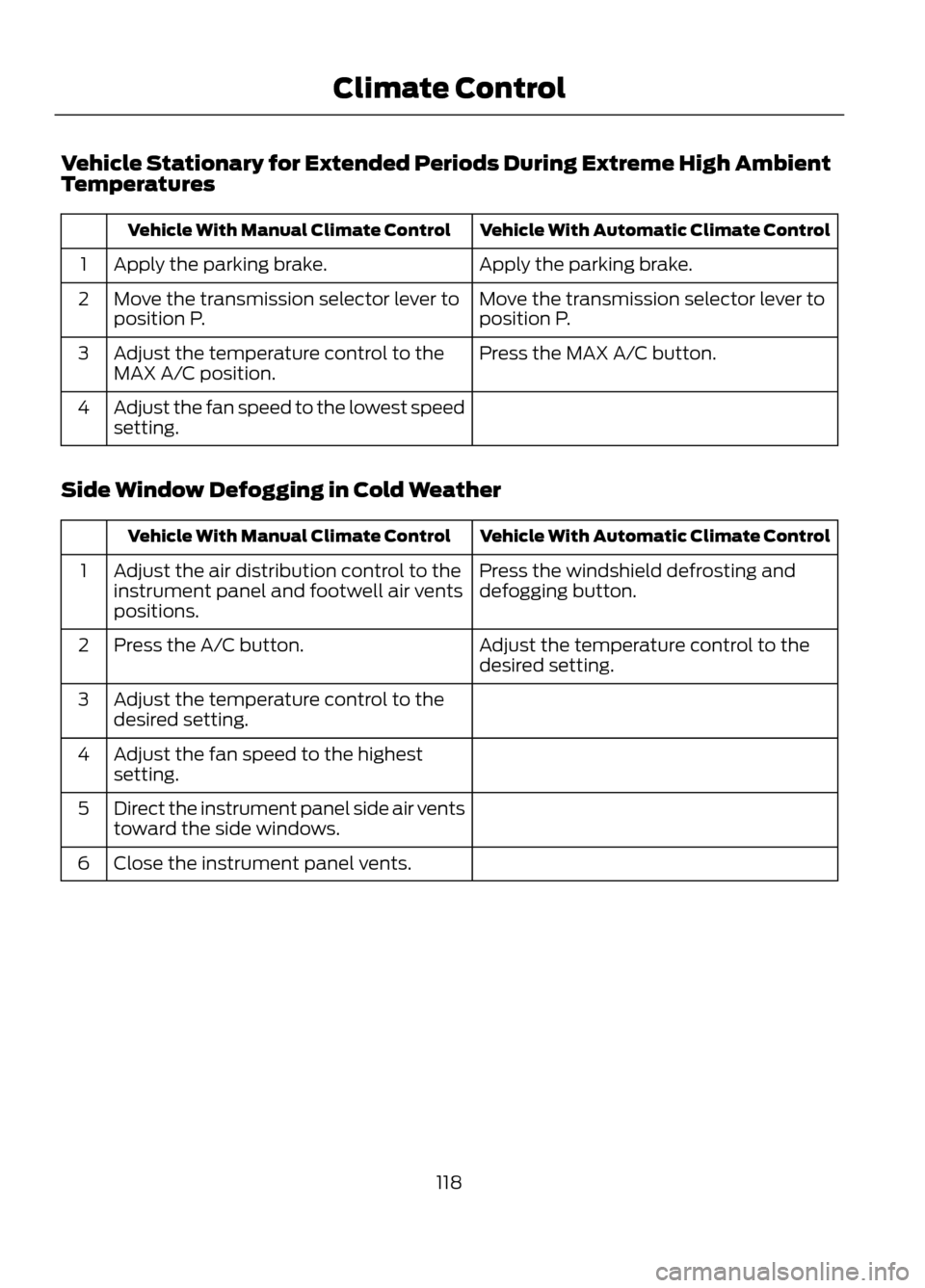
Vehicle Stationary for Extended Periods During Extreme High Ambient
Temperatures
Vehicle With Automatic Climate Control
Vehicle With Manual Climate Control
Apply the parking brake.
Apply the parking brake.
1
Move the transmission selector lever to
position P.
Move the transmission selector lever to
position P.
2
Press the MAX A/C button.
Adjust the temperature control to the
MAX A/C position.
3
Adjust the fan speed to the lowest speed
setting.
4
Side Window Defogging in Cold Weather
Vehicle With Automatic Climate Control
Vehicle With Manual Climate Control
Press the windshield defrosting and
defogging button.
Adjust the air distribution control to the
instrument panel and footwell air vents
positions.
1
Adjust the temperature control to the
desired setting.
Press the A/C button.
2
Adjust the temperature control to the
desired setting.
3
Adjust the fan speed to the highest
setting.
4
Direct the instrument panel side air vents
toward the side windows.
5
Close the instrument panel vents.
6
118
Climate Control
Page 119 of 423
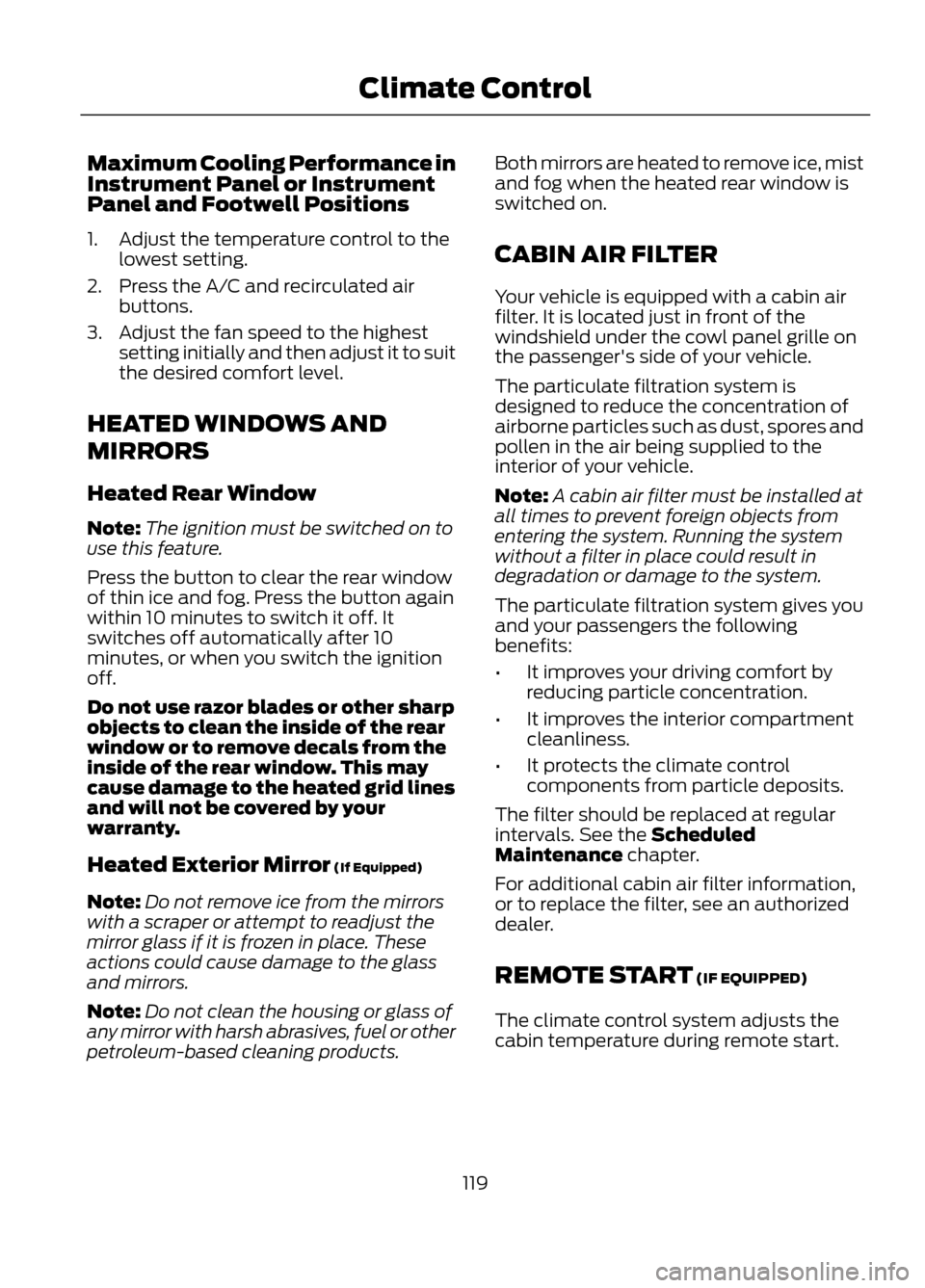
Maximum Cooling Performance in
Instrument Panel or Instrument
Panel and Footwell Positions
1. Adjust the temperature control to thelowest setting.
2. Press the A/C and recirculated air buttons.
3. Adjust the fan speed to the highest setting initially and then adjust it to suit
the desired comfort level.
HEATED WINDOWS AND
MIRRORS
Heated Rear Window
Note: The ignition must be switched on to
use this feature.
Press the button to clear the rear window
of thin ice and fog. Press the button again
within 10 minutes to switch it off. It
switches off automatically after 10
minutes, or when you switch the ignition
off.
Do not use razor blades or other sharp
objects to clean the inside of the rear
window or to remove decals from the
inside of the rear window. This may
cause damage to the heated grid lines
and will not be covered by your
warranty.
Heated Exterior Mirror (If Equipped)
Note: Do not remove ice from the mirrors
with a scraper or attempt to readjust the
mirror glass if it is frozen in place. These
actions could cause damage to the glass
and mirrors.
Note: Do not clean the housing or glass of
any mirror with harsh abrasives, fuel or other
petroleum-based cleaning products. Both mirrors are heated to remove ice, mist
and fog when the heated rear window is
switched on.
CABIN AIR FILTER
Your vehicle is equipped with a cabin air
filter. It is located just in front of the
windshield under the cowl panel grille on
the passenger's side of your vehicle.
The particulate filtration system is
designed to reduce the concentration of
airborne particles such as dust, spores and
pollen in the air being supplied to the
interior of your vehicle.
Note:
A cabin air filter must be installed at
all times to prevent foreign objects from
entering the system. Running the system
without a filter in place could result in
degradation or damage to the system.
The particulate filtration system gives you
and your passengers the following
benefits:
• It improves your driving comfort by
reducing particle concentration.
• It improves the interior compartment
cleanliness.
• It protects the climate control
components from particle deposits.
The filter should be replaced at regular
intervals. See the Scheduled
Maintenance chapter.
For additional cabin air filter information,
or to replace the filter, see an authorized
dealer.
REMOTE START (IF EQUIPPED)
The climate control system adjusts the
cabin temperature during remote start.
119
Climate Control
Page 136 of 423
WARNINGS
Always check that the steering wheel
lock is deactivated before
attempting to move your vehicle.
Note:A valid key must be located inside
your vehicle to switch the ignition on and
start the engine.
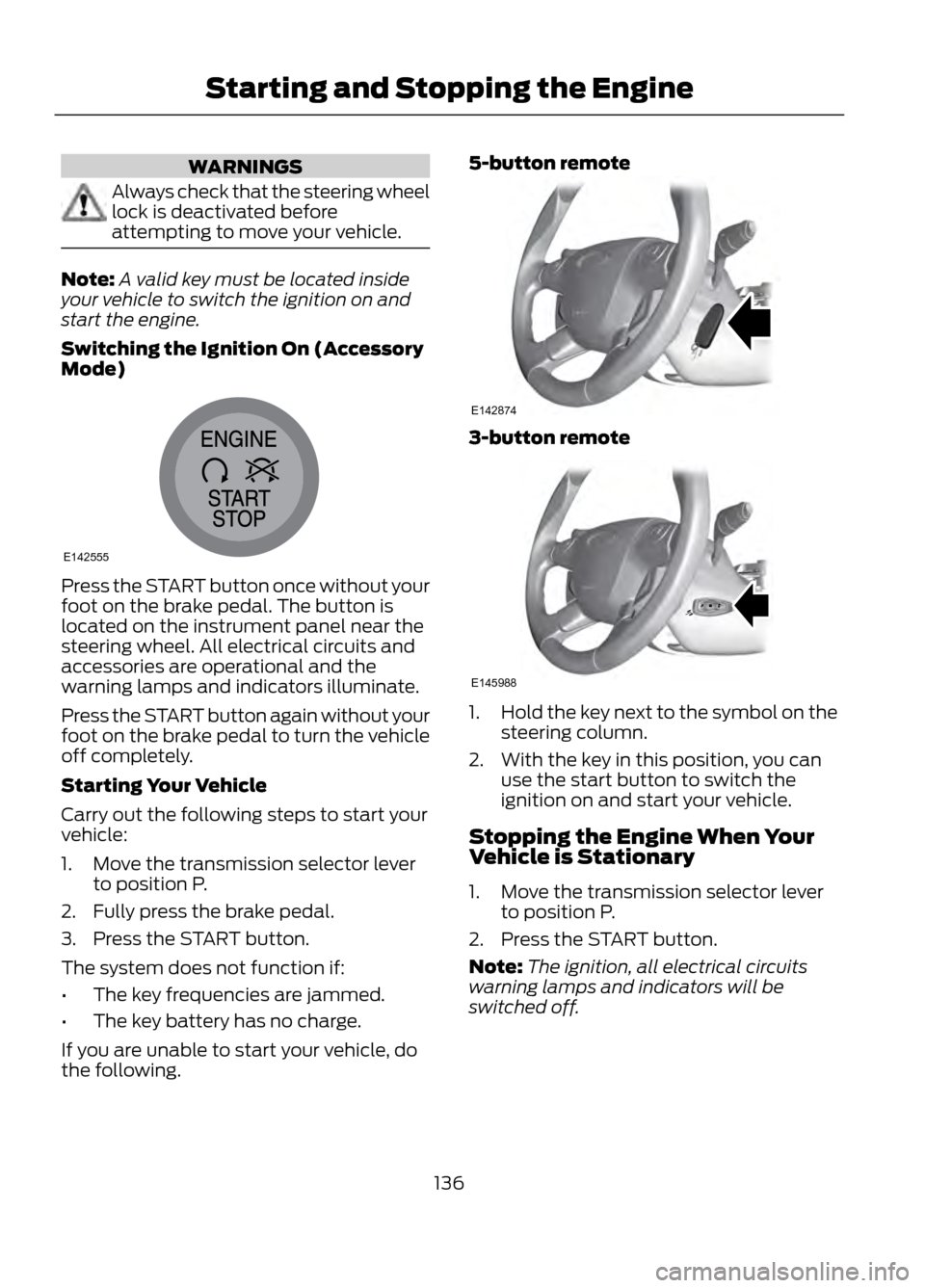
Switching the Ignition On (Accessory
Mode)
Press the START button once without your
foot on the brake pedal. The button is
located on the instrument panel near the
steering wheel. All electrical circuits and
accessories are operational and the
warning lamps and indicators illuminate.
Press the START button again without your
foot on the brake pedal to turn the vehicle
off completely.
Starting Your Vehicle
Carry out the following steps to start your
vehicle:
1. Move the transmission selector lever to position P.
2. Fully press the brake pedal.
3. Press the START button.
The system does not function if:
• The key frequencies are jammed.
• The key battery has no charge.
If you are unable to start your vehicle, do
the following. 5-button remote
3-button remote
1.
Hold the key next to the symbol on the
steering column.
2. With the key in this position, you can use the start button to switch the
ignition on and start your vehicle.
Stopping the Engine When Your
Vehicle is Stationary
1. Move the transmission selector lever to position P.
2. Press the START button.
Note: The ignition, all electrical circuits
warning lamps and indicators will be
switched off.
136
Starting and Stopping the Engine
E142555
E142874
E145988
Page 148 of 423
SelectShift Automatic®
Transmission (If Equipped)
Your SelectShift automatic transmission
gives you the ability to manually change
gears if you'd like. To use SelectShift, move
the gearshift lever into S (Sport). Now you
can use the +/- buttons on the side of your
gearshift lever to select gears.
When using the toggle for manual shifting:
•Press the (+) button to upshift.
• Press the (-) button to downshift.
Note: After you have assumed manual
control with SelectShift your vehicle will
remain in this mode until you return the
gearshift lever from (S) Sport, back to (D)
Drive.
Upshift to the recommended shift speeds
according to the following chart:
Upshifts when accelerating (recom- mended for best fuel economy)
Shift from:15 mph (24 km/h)
1 - 2
25 mph (40 km/h)
2 - 3
40 mph (64 km/h)
3 - 4
45 mph (72 km/h)
4 - 5
50 mph (80 km/h)
5 - 6
The instrument cluster will display the
selected gear that you are currently in.
SelectShift will automatically make some
shifts for you in the event that your engine
speed is running at too high, or to low an
RPM.
Note: Engine damage may occur if
excessive engine revving is held without
shifting. Brake-Shift Interlock
WARNINGS
Do not drive your vehicle until you
verify that the brake lamps are
working.
When doing this procedure, you will
be taking the vehicle out of park
which means the vehicle can roll
freely. To avoid unwanted vehicle
movement, always fully set the parking
brake prior to doing this procedure. Use
wheel chocks if appropriate.
If the parking brake is fully released,
but the brake warning lamp remains
illuminated, the brakes may not be
working properly. See your authorized
dealer.
Use the brake shift interlock lever to move
the gearshift lever from the park position
in the event of an electrical malfunction or
if your vehicle has a dead battery.
Apply the parking brake and turn the
ignition off before performing this
procedure.
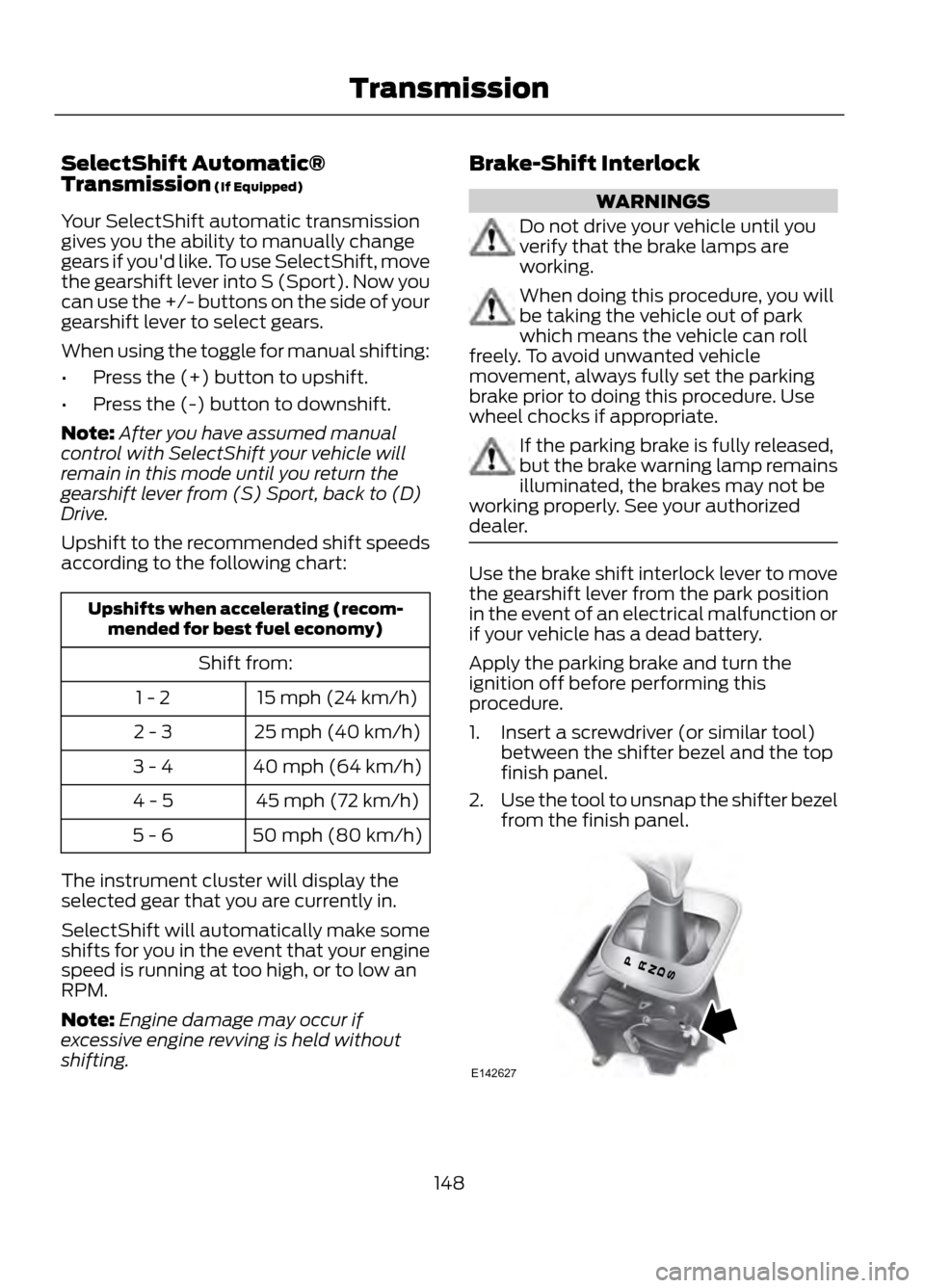
1. Insert a screwdriver (or similar tool) between the shifter bezel and the top
finish panel.
2. Use the tool to unsnap the shifter bezel
from the finish panel.
148
Transmission
E142627
Page 198 of 423
Canadian customers who need to obtain
roadside information, call
1-800-665-2006 or visit our website at
www.ford.ca.
HAZARD WARNING FLASHERS
Note:With extended use, the flashers may
run down your battery.
The hazard flasher control is
located on the instrument panel
by the radio. Use it when your
vehicle is disabled and is creating a safety
hazard for other motorists.
• Press the flasher control and all front
and rear direction signals will flash.
• Press the flasher control again to turn
them off.
FUEL CUT-OFF SWITCH
WARNING
Failure to inspect and if necessary
repair fuel leaks after a collision may
increase the risk of fire and serious
injury. Ford Motor Company recommends
that the fuel system be inspected by an
authorized dealer after any collision.
In the event of a moderate to severe
collision, this vehicle is equipped with a
fuel pump shut-off feature that stops the
flow of fuel to the engine. Not every impact
will cause a shut-off.
Should your vehicle shut off after a
collision, you may restart your vehicle by
doing the following:
1. Turn the ignition off.
2. Turn the ignition on.
3. Repeat steps 1 and 2 to re-enable fuel pump. Note:
If your vehicle has the push button
start system, press the stop/start button
twice to reactivate the fuel system.
JUMP-STARTING THE VEHICLE
WARNINGS
The gases around the battery can
explode if exposed to flames, sparks,
or lit cigarettes. An explosion could
result in injury or vehicle damage.
Batteries contain sulfuric acid which
can burn skin, eyes and clothing, if
contacted.
Do not attempt to push-start your
automatic transmission vehicle. Automatic
transmissions do not have push-start
capability. Attempting to push-start a
vehicle with an automatic transmission
may cause transmission damage.
Preparing Your Vehicle
Note: Use only a 12-volt supply to start your
vehicle.
Note: Do not disconnect the battery of the
disabled vehicle as this could damage the
vehicle's electrical system.
1. Park the booster vehicle close to the hood of the disabled vehicle making
sure the two vehicles do not touch. Set
the parking brake on both vehicles and
stay clear of the engine cooling fan and
other moving parts.
2. Check all battery terminals and remove
any excessive corrosion before you
attach the battery cables. Ensure that
vent caps are tight and level.
3. Turn the heater fan on in both vehicles
to protect from any electrical surges.
Turn all other accessories off.
198
Roadside Emergencies
Page 217 of 423
GENERAL INFORMATION
Have your vehicle serviced regularly to help
maintain its roadworthiness and resale
value. There is a large network of Ford
authorized dealers that are there to help
you with their professional servicing
expertise. We believe that their specially
trained technicians are best qualified to
service your vehicle properly and expertly.
They are supported by a wide range of
highly specialized tools developed
specifically for servicing your vehicle.
To help you service your vehicle, we
provide scheduled maintenance
information which makes tracking routine
service easy. See Scheduled
Maintenance (page 396).
If your vehicle requires professional service,
your authorized dealer can provide the
necessary parts and service. Check your
Warranty Guide to find out which parts and
services are covered.
Use only recommended fuels, lubricants,
fluids and service parts conforming to
specifications. Motorcraft® parts are
designed and built to provide the best
performance in your vehicle.
Precautions
•Do not work on a hot engine.
• Make sure that nothing gets caught in
moving parts.
• Do not work on a vehicle with the
engine running in an enclosed space,
unless you are sure you have enough
ventilation.
• Keep all open flames and other burning
material (such as cigarettes) away
from the battery and all fuel related
parts. Working with the Engine Off
1. Set the parking brake and shift to P
(Park).
2. Turn off the engine and remove the key
(if equipped).
3. Block the wheels.
Working with the Engine On
WARNING
To reduce the risk of vehicle damage
and/or personal burn injuries, do not
start your engine with the air cleaner
removed and do not remove it while the
engine is running.
1. Set the parking brake and shift to P (Park).
2. Block the wheels
OPENING AND CLOSING THE
HOOD
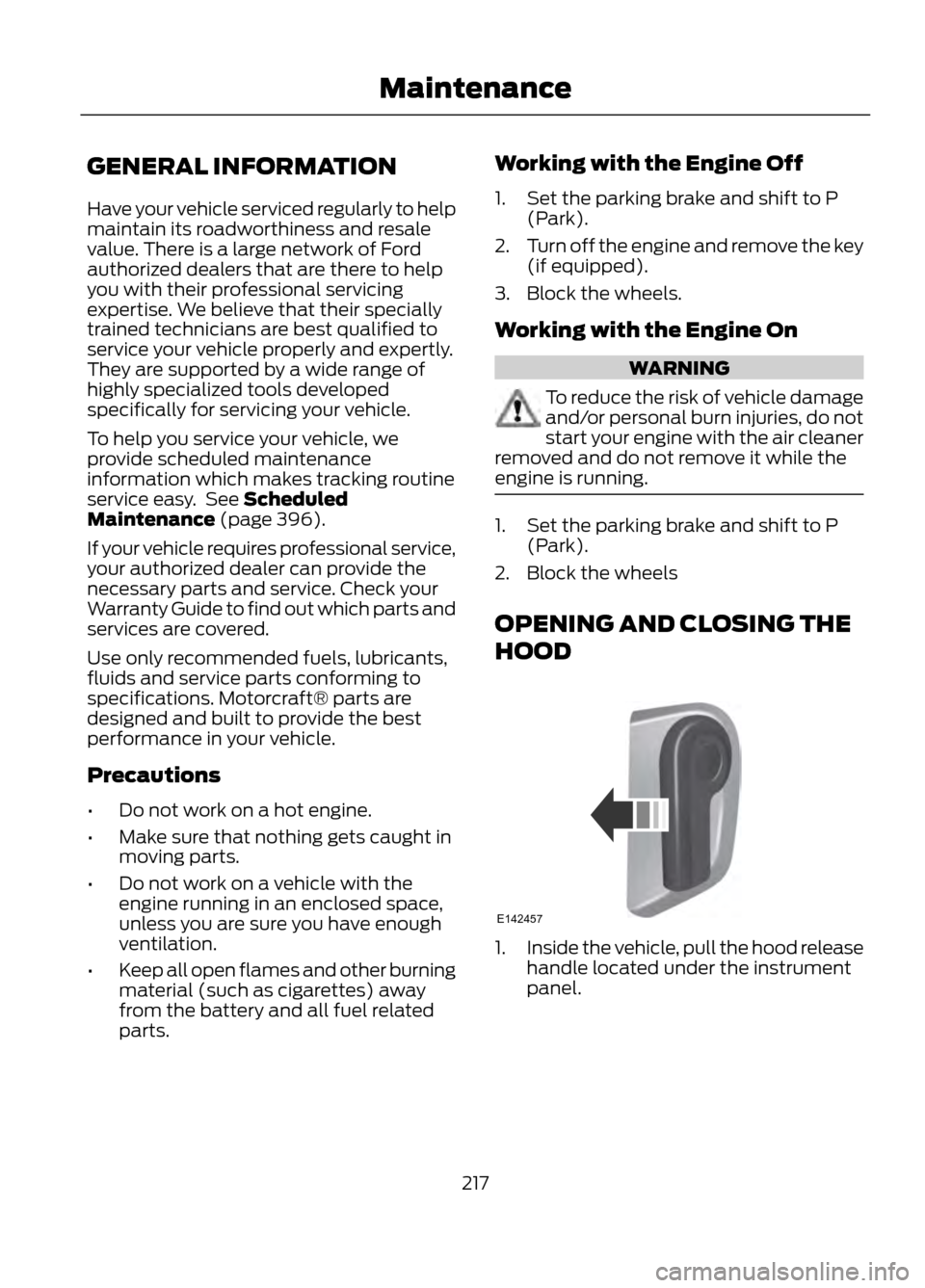
1. Inside the vehicle, pull the hood release
handle located under the instrument
panel.
217
Maintenance
E142457
Page 235 of 423
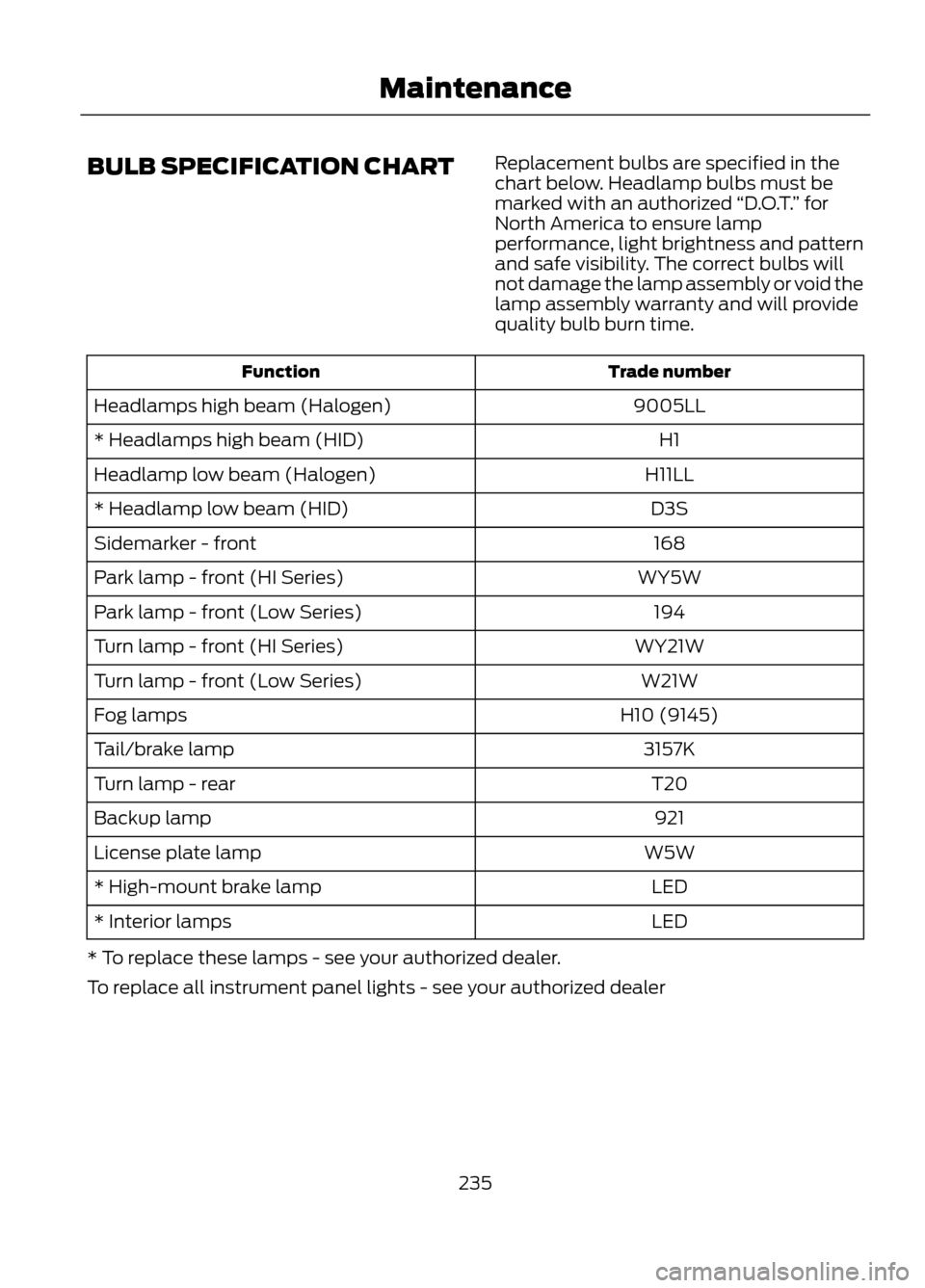
BULB SPECIFICATION CHARTReplacement bulbs are specified in the
chart below. Headlamp bulbs must be
marked with an authorized
“D.O.T.” for
North America to ensure lamp
performance, light brightness and pattern
and safe visibility. The correct bulbs will
not damage the lamp assembly or void the
lamp assembly warranty and will provide
quality bulb burn time.
Trade number
Function
9005LL
Headlamps high beam (Halogen)
H1
* Headlamps high beam (HID)
H11LL
Headlamp low beam (Halogen)
D3S
* Headlamp low beam (HID)
168
Sidemarker - front
WY5W
Park lamp - front (HI Series)
194
Park lamp - front (Low Series)
WY21W
Turn lamp - front (HI Series)
W21W
Turn lamp - front (Low Series)
H10 (9145)
Fog lamps
3157K
Tail/brake lamp
T20
Turn lamp - rear
921
Backup lamp
W5W
License plate lamp
LED
* High-mount brake lamp
LED
* Interior lamps
* To replace these lamps - see your authorized dealer.
To replace all instrument panel lights - see your authorized dealer
235
Maintenance
Page 239 of 423
•If grease or tar is present on the
material, spot-clean the area first with
Motorcraft® Spot and Stain Remover.
In Canada, use Motorcraftt
Multi-Purpose Cleaner.
• If a ring forms on the fabric after spot
cleaning, clean the entire area
immediately (but do not oversaturate)
or the ring will set.
• Do not use household cleaning
products or glass cleaners, which can
stain and discolor the fabric and affect
the flame retardant abilities of the seat
materials.
CLEANING THE INSTRUMENT
PANEL AND INSTRUMENT
CLUSTER LENS
WARNING
Do not use chemical solvents or
strong detergents when cleaning the
steering wheel or instrument panel
to avoid contamination of the airbag
system.
Clean the instrument panel and cluster
lens with a clean, damp, white cotton
cloth, then use a clean and dry white
cotton cloth to dry these areas.
• Avoid cleaners or polishes that increase
the gloss of the upper portion of the
instrument panel. The dull finish in this
area helps protect the driver from
undesirable windshield reflection.
• Be certain to wash or wipe your hands
clean if you have been in contact with
certain products such as insect
repellent and suntan lotion in order to
avoid possible damage to the interior
painted surfaces. •
Do not use household or glass cleaners
as these may damage the finish of the
instrument panel, interior trim and
cluster lens.
• Do not allow air fresheners and hand
sanitizers to spill on interior surfaces.
If a spill occurs, wipe off immediately.
Damage may not be covered by your
warranty.
If a staining liquid like coffee/juice has
been spilled on the instrument panel or on
interior trim surfaces, clean as follows:
1. Wipe up spilled liquid using a clean, white, cotton cloth.
2. Wipe the surface with a damp, clean, white cotton cloth. For more thorough
cleaning, use a mild soap and water
solution. If the spot cannot be
completely cleaned by this method,
the area may be cleaned using a
commercially available cleaning
product designed for automotive
interiors.
3. If necessary, apply more soap and water solution or cleaning product to
a clean, white, cotton cloth and press
the cloth onto the soiled area–allow
this to set at room temperature for 30
minutes.
4. Remove the soaked cloth, and if it is not soiled badly, use this cloth to clean
the area by using a rubbing motion for
60 seconds.
5. Following this, wipe area dry with a clean, white, cotton cloth.
CLEANING LEATHER SEATS (IF
EQUIPPED)
• Remove dust and loose dirt with a
vacuum cleaner.
• Clean spills and stains as quickly as
possible.
239
Vehicle Care
Page 269 of 423
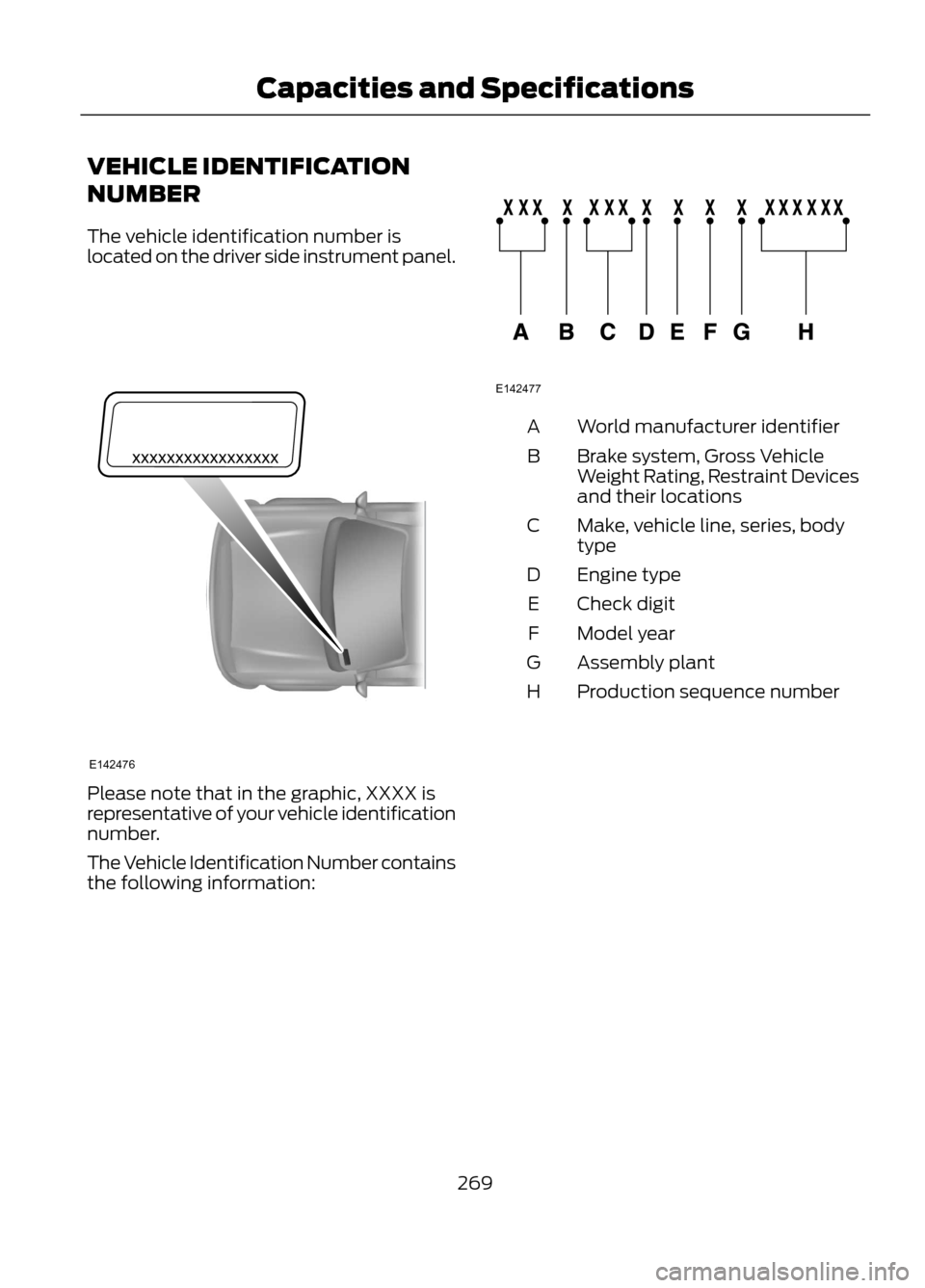
VEHICLE IDENTIFICATION
NUMBER
The vehicle identification number is
located on the driver side instrument panel.
Please note that in the graphic, XXXX is
representative of your vehicle identification
number.
The Vehicle Identification Number contains
the following information:
World manufacturer identifier
A
Brake system, Gross Vehicle
Weight Rating, Restraint Devices
and their locations
B
Make, vehicle line, series, body
type
C
Engine type
D
Check digit
E
Model year
F
Assembly plant
G
Production sequence number
H
269
Capacities and Specifications
E142476
E142477