CD player FORD ESCAPE 2013 3.G Owner's Manual
[x] Cancel search | Manufacturer: FORD, Model Year: 2013, Model line: ESCAPE, Model: FORD ESCAPE 2013 3.GPages: 423, PDF Size: 4.59 MB
Page 351 of 423
A/V Inputs
Note:For safety reasons, connecting or
adjusting the settings on your portable
music player should not be attempted while
the vehicle is moving. Also, the portable
music player should be stored in a secure
location, such as the center console or the
glove box, when the vehicle is in motion. The
audio extension cable must be long enough
to allow the portable music player to be
safely stored while the vehicle is in motion.
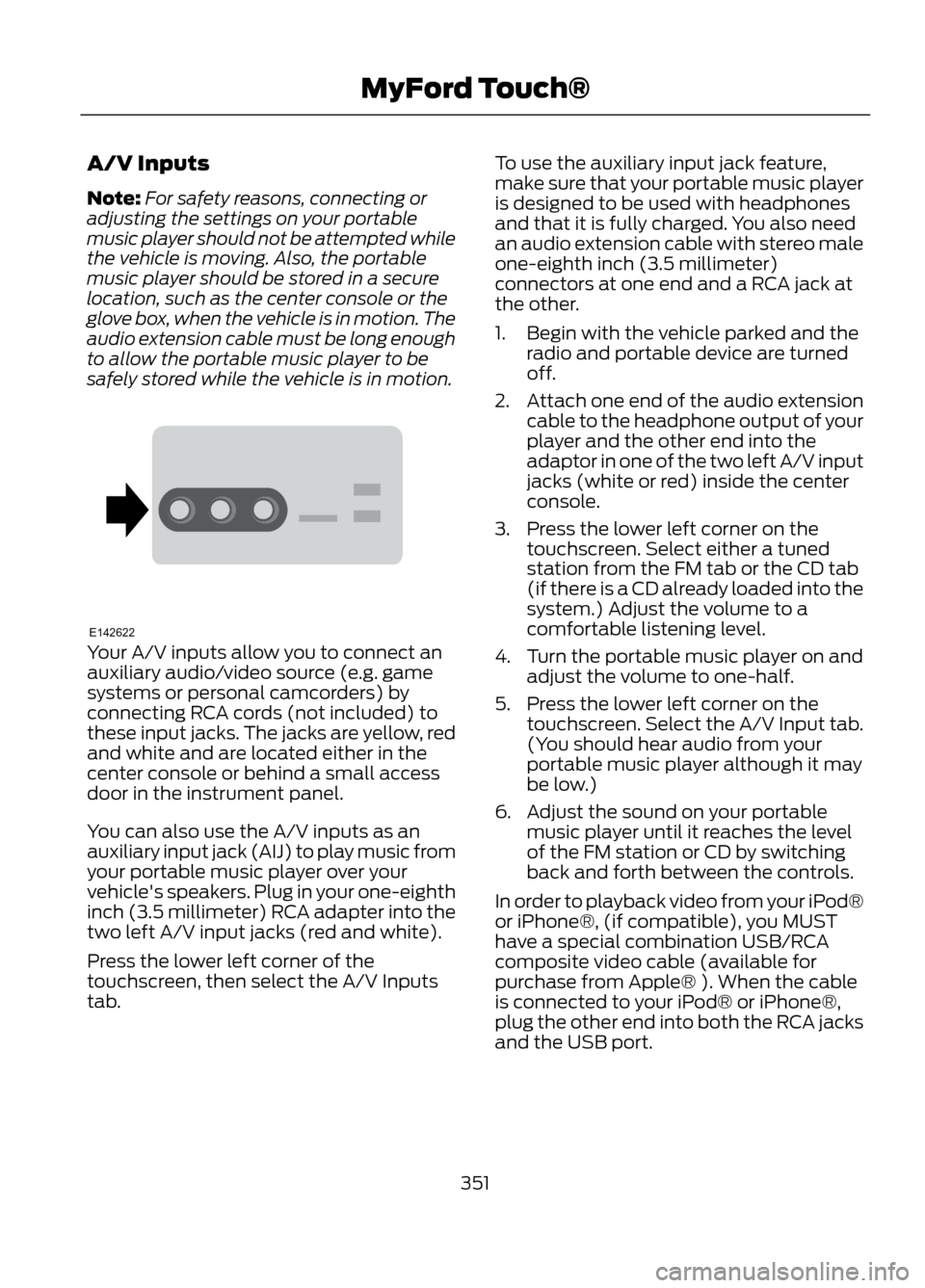
Your A/V inputs allow you to connect an
auxiliary audio/video source (e.g. game
systems or personal camcorders) by
connecting RCA cords (not included) to
these input jacks. The jacks are yellow, red
and white and are located either in the
center console or behind a small access
door in the instrument panel.
You can also use the A/V inputs as an
auxiliary input jack (AIJ) to play music from
your portable music player over your
vehicle's speakers. Plug in your one-eighth
inch (3.5 millimeter) RCA adapter into the
two left A/V input jacks (red and white).
Press the lower left corner of the
touchscreen, then select the A/V Inputs
tab. To use the auxiliary input jack feature,
make sure that your portable music player
is designed to be used with headphones
and that it is fully charged. You also need
an audio extension cable with stereo male
one-eighth inch (3.5 millimeter)
connectors at one end and a RCA jack at
the other.
1. Begin with the vehicle parked and the
radio and portable device are turned
off.
2. Attach one end of the audio extension
cable to the headphone output of your
player and the other end into the
adaptor in one of the two left A/V input
jacks (white or red) inside the center
console.
3. Press the lower left corner on the touchscreen. Select either a tuned
station from the FM tab or the CD tab
(if there is a CD already loaded into the
system.) Adjust the volume to a
comfortable listening level.
4. Turn the portable music player on and adjust the volume to one-half.
5. Press the lower left corner on the touchscreen. Select the A/V Input tab.
(You should hear audio from your
portable music player although it may
be low.)
6. Adjust the sound on your portable music player until it reaches the level
of the FM station or CD by switching
back and forth between the controls.
In order to playback video from your iPod®
or iPhone®, (if compatible), you MUST
have a special combination USB/RCA
composite video cable (available for
purchase from Apple® ). When the cable
is connected to your iPod® or iPhone®,
plug the other end into both the RCA jacks
and the USB port.
351
MyFord Touch®
E142622
Page 352 of 423
Note:Do not connect the audio input jack
to a line level output. The AIJ only works
correctly with devices that have a
headphone output with a volume control.
Note: Do not set the portable music
player's volume level higher than is
necessary to match the volume of the CD
or FM radio as this causes distortion and
reduces sound quality.
Note: If the music sounds distorted at lower
listening levels, turn the portable music
player volume down. If the problems
persists, replace or recharge the batteries
in the portable music player.
Note: The portable music player must be
controlled in the same manner when it is
used with headphones as the AIJ does not
provide control (play, pause, etc.) over the
attached portable music player.
PHONE
Hand's-free calling is one of the main
features of SYNC. Once your phone is
paired, you can access many options using
the touchscreen or voice commands. While
the system supports a variety of features,
many are dependent on your mobile
phone's functionality.
At a minimum, most mobile phones with
Bluetooth wireless technology support the
following functions:
• Answering an incoming call
• Ending a call
• Using privacy mode
• Dialing a number
• Redial
• Call waiting notification
• Caller ID Other features such as text messaging
using Bluetooth and automatic phonebook
download are phone-dependent features.
To check your phone's compatibility, refer
to your phone's user manual and visit
www.SYNCMyRide.com or
www.syncmaroute.ca.
Pairing Your Phone for the First
Time
WARNING
Driving while distracted can result in
loss of vehicle control, accident and
injury. Ford strongly recommends
that drivers use extreme caution when
using any device that may take their focus
off the road. Your primary responsibility is
the safe operation of the vehicle. We
recommend against the use of any
handheld device while driving, encourage
the use of voice-operated systems when
possible and that you become aware of
applicable state and local laws that may
affect use of electronic devices while
driving.
The first thing you must do to use SYNC's
phone features is to pair your
Bluetooth-enabled mobile phone with
SYNC. This allows you to use your phone
in a hands-free manner.
Note: Make sure the vehicle ignition and
radio are turned on and that the
transmission is in position P.
1. Touch Add Phone in the upper left corner of the touchscreen.
2. When prompted, select Add.
3. Select Add Device.
4. Make sure that Bluetooth is set to On and that your mobile phone is in the
proper mode. Refer to your phone's
user guide if necessary.
352
MyFord Touch®
Page 415 of 423
E
Eco Mode.........................................................175Resetting Eco Mode........................................... 175
Type 1....................................................................... 175
Type 2 and 3.......................................................... 175
Economical Driving......................................194
Emission Control System..........................143 On-Board Diagnostics (OBD-II)................... 144
Readiness for Inspection/Maintenance (I/M) Testing................................................... 145
End User License Agreement.................380 SYNC® End User License Agreement
(EULA)............................................................. 380
Engine Block Heater....................................138 Using the Engine Block Heater...................... 139
Engine Coolant Check................................222 Adding Engine Coolant.................................... 222
Checking the Engine Coolant........................ 222
Recycled Engine Coolant................................ 223
Severe Climates................................................. 224
What you Should Know About Fail-Safe Cooling.............................................................. 224
Engine Immobilizer See: Passive Anti-Theft System..................... 62
Engine Oil Check...........................................221 Adding Engine Oil................................................ 221
Resetting the Oil Life Monitoring System.............................................................. 222
Engine Oil Dipstick - 1.6L EcoBoost®...................................................221
Engine Oil Dipstick - 2.5L/2.0L EcoBoost®...................................................221
Engine Specifications.................................267 Drivebelt Routing................................................ 267
Entertainment...............................................332 A/V Inputs............................................................. 351
AM/FM Radio...................................................... 333
Bluetooth Audio................................................. 350
Browsing Device Content................................ 332
CD........................................................................\
.... 344
SD Card Slot and USB Port........................... 346
SIRIUS® Satellite Radio (If Activated)........................................................ 339
Supported Media Players, Formats and Metadata Information................................ 349Essential Towing Checks..........................190
Before Towing a Trailer.................................... 190
Hitches................................................................... 190
Safety Chains...................................................... 190
Trailer Brakes....................................................... 190
Trailer Lamps....................................................... 190
When Towing a Trailer....................................... 191
Event Data Recording See: Data Recording.............................................. 9
Export Unique Options..................................13
Exterior Mirrors.................................................75 Blind Spot Monitor............................................... 76
Fold-Away Exterior Mirrors................................ 75
Heated Exterior Mirrors....................................... 75
Integrated Blind Spot Mirrors........................... 76
Memory Mirrors..................................................... 75
Power Exterior Mirrors......................................... 75
F
Fastening the Safety Belts..........................27 How to Extract Safety Belts in the Rear
Outboard Positions........................................ 29
Restraint of Pregnant Women......................... 27
Safety Belt Extension Assembly.................... 29
Safety Belt Locking Modes............................... 28
Floor Mats.......................................................195
Fog Lamps - Front See: Front Fog Lamps......................................... 72
Ford Credit..........................................................11 (U.S. Only)................................................................. 11
Ford Extended Service Plan (ESP).......276 SERVICE PLANS (CANADA ONLY).............277
SERVICE PLANS (U.S. only).......................... 276
Four-Wheel Drive...........................................151
Front Fog Lamps.............................................72
Front Passenger Sensing System.............37
Fuel and Refueling.......................................140
Fuel Consumption........................................145 Calculating Fuel Economy.............................. 146
Filling the Tank.................................................... 146
Fuel Cut-Off Switch....................................198
Fuel Filter........................................................225
Fuel Quality......................................................141 Choosing the Right Fuel.................................... 141
Octane Recommendations............................. 141
Fuses................................................................207
415
Index
Page 421 of 423
U
Under Hood Overview - 1.6LEcoBoost®...................................................218
Under Hood Overview - 2.0L EcoBoost®...................................................219
Under Hood Overview - 2.5L...................220
Universal Garage Door Opener...............128 Homelink® Wireless Control System.........128
USB Port...........................................................110
Using Cruise Control....................................170 Switching Off Cruise Control.......................... 170
Switching On Cruise Control.......................... 170
Using Four-Wheel Drive..............................151 Driving in Special Conditions With
Four-Wheel Drive........................................... 152
Using MyKey With Remote Start Systems..........................................................50
Vehicles Equipped with Intelligent Access Key (Push Button Start)................................ 51
Vehicles Equipped with Traditional Keys....................................................................... 51
Using Snow Chains.....................................256
Using Stability Control...............................160 AdvanceTrac® with Roll Stability Control ™
(RSC®)............................................................. 160
Using SYNC® With Your Media Player.............................................................301
Accessing Your Play Menu............................. 305
Connecting Your Digital Media Player to the USB Port........................................................... 301
Media Menu Features...................................... 303
Media Voice Commands................................. 301
System Settings................................................ 306
What's Playing?.................................................. 301
Using SYNC® With Your Phone.............283 Accessing Features through the Phone
Menu................................................................. 288
Accessing Your Phone Settings..................... 291
Making Calls........................................................ 286
Pairing a Phone for the First Time...............283
Pairing Subsequent Phones.......................... 284
Phone Options during an Active Call.........286
Phone Voice Commands................................ 284
Receiving Calls................................................... 286
System Settings................................................. 292
Text Messaging.................................................. 289Using Traction Control................................158
System Indicator Lights and
Messages.......................................................... 158
Using Voice Recognition............................281 Helpful Hints........................................................ 281
Initiating a Voice Session................................. 281
System Interaction and Feedback..............282
Utilizing the Mediation/Arbitration Program (Canada Only)........................203
V
Vehicle Care...................................................236 General Information......................................... 236
Vehicle Certification Label.......................270
Vehicle Identification Number................269
Vehicle Storage............................................240 Battery.................................................................... 241
Body........................................................................\
. 241
Brakes...................................................................... 241
Cooling system.................................................... 241
Engine...................................................................... 241
Fuel system........................................................... 241
General.................................................................. 240
Miscellaneous...................................................... 241
Removing Vehicle From Storage..................242
Tires........................................................................\
. 241
Ventilation See: Climate Control.......................................... 113
VIN See: Vehicle Identification Number............269
Voice Control...................................................66 MyFord Touch® Controls.................................. 66
421
Index