transmission FORD ESCAPE 2013 3.G Service Manual
[x] Cancel search | Manufacturer: FORD, Model Year: 2013, Model line: ESCAPE, Model: FORD ESCAPE 2013 3.GPages: 423, PDF Size: 4.59 MB
Page 262 of 423
Tire Change Procedure
WARNINGS
When one of the front wheels is off
the ground, the transmission alone
will not prevent the vehicle from
moving or slipping off the jack, even if the
vehicle is in position P.
To help prevent the vehicle from
moving when you change a tire, be
sure the parking brake is set, then
block (in both directions) the wheel that
is diagonally opposite (other side and end
of the vehicle) to the tire being changed.
If the vehicle slips off the jack, you or
someone else could be seriously
injured.
Do not attempt to change a tire on
the side of the vehicle close to
moving traffic. Pull far enough off the
road to avoid the danger of being hit when
operating the jack or changing the wheel.
To lessen the risk of personal injury,
do not put any part of your body
under the vehicle while changing a
tire. Do not start the engine when your
vehicle is on the jack. The jack is only
meant for changing the tire.
Note: Passengers should not remain in the
vehicle when the vehicle is being jacked.
1. Park on a level surface, set the parking
brake and activate the hazard flashers.
2. Place the gearshift lever in position P and turn the engine off.
3. Remove the carpeted wheel cover.
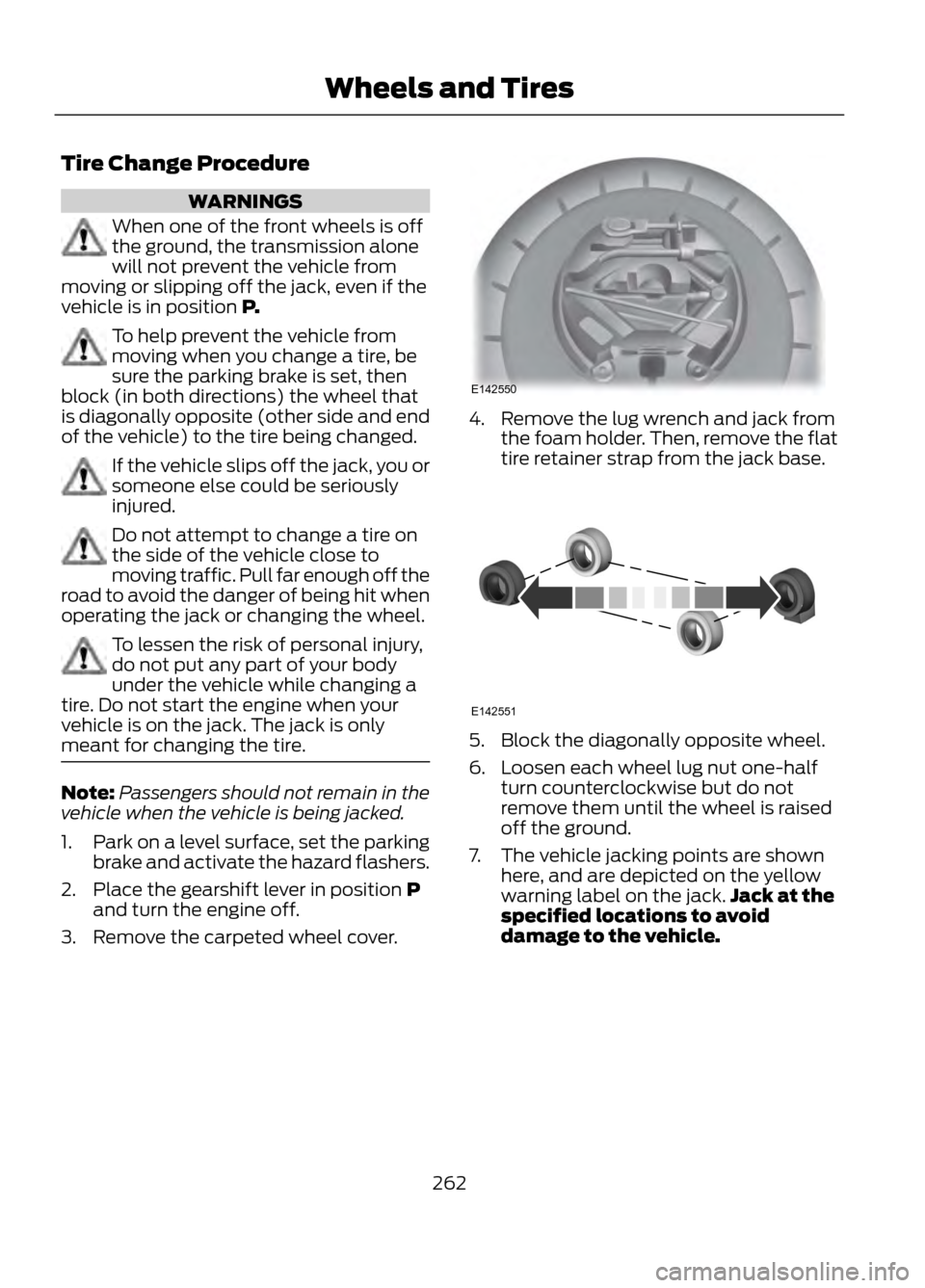
4. Remove the lug wrench and jack from the foam holder. Then, remove the flat
tire retainer strap from the jack base.
5. Block the diagonally opposite wheel.
6. Loosen each wheel lug nut one-halfturn counterclockwise but do not
remove them until the wheel is raised
off the ground.
7. The vehicle jacking points are shown here, and are depicted on the yellow
warning label on the jack. Jack at the
specified locations to avoid
damage to the vehicle.
262
Wheels and Tires
E142550
E142551
Page 270 of 423
VEHICLE CERTIFICATION
LABEL
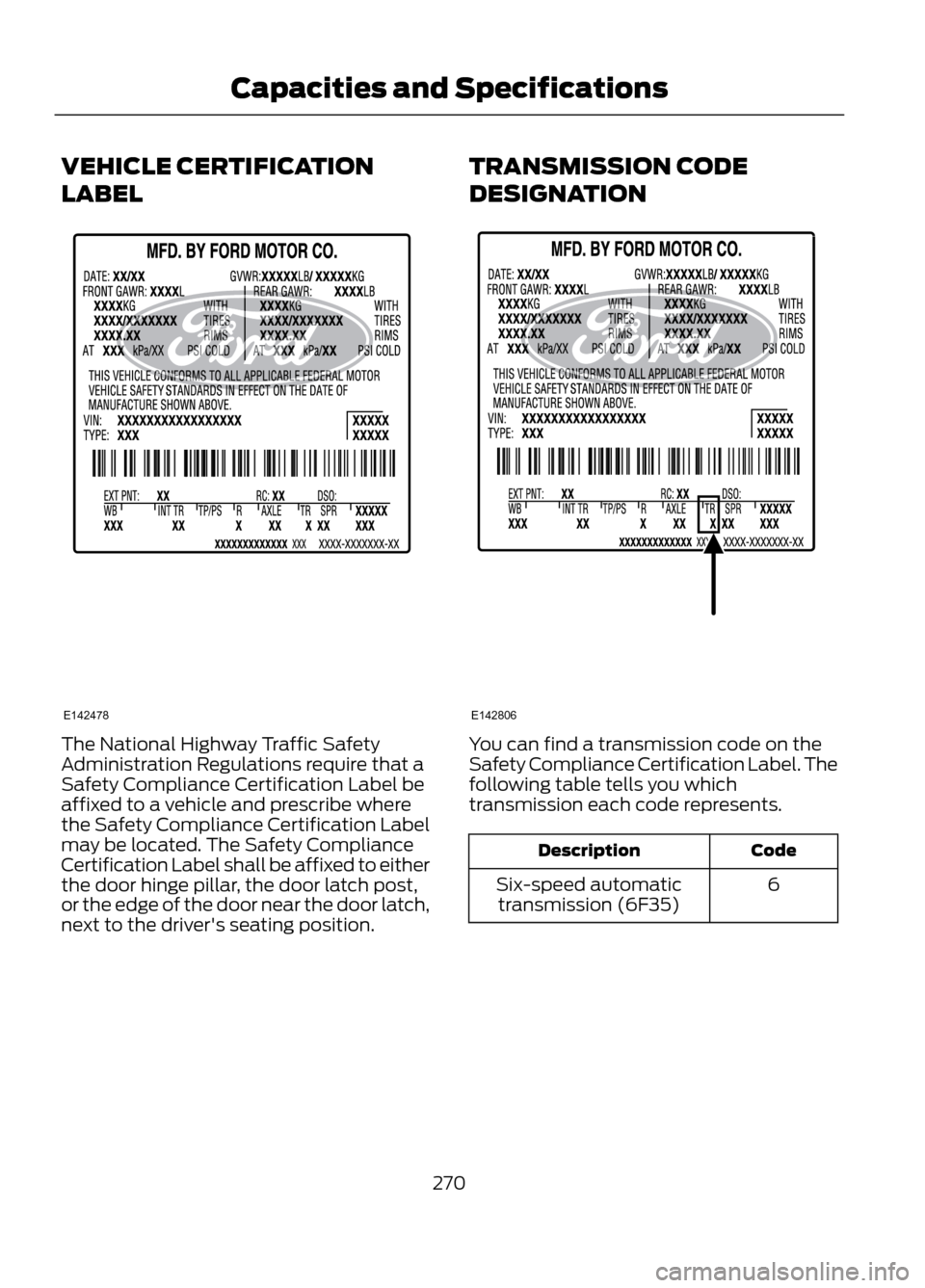
The National Highway Traffic Safety
Administration Regulations require that a
Safety Compliance Certification Label be
affixed to a vehicle and prescribe where
the Safety Compliance Certification Label
may be located. The Safety Compliance
Certification Label shall be affixed to either
the door hinge pillar, the door latch post,
or the edge of the door near the door latch,
next to the driver's seating position.TRANSMISSION CODE
DESIGNATIONYou can find a transmission code on the
Safety Compliance Certification Label. The
following table tells you which
transmission each code represents.
Code
Description
6
Six-speed automatic
transmission (6F35)
270
Capacities and Specifications
E142478
E142806
Page 271 of 423
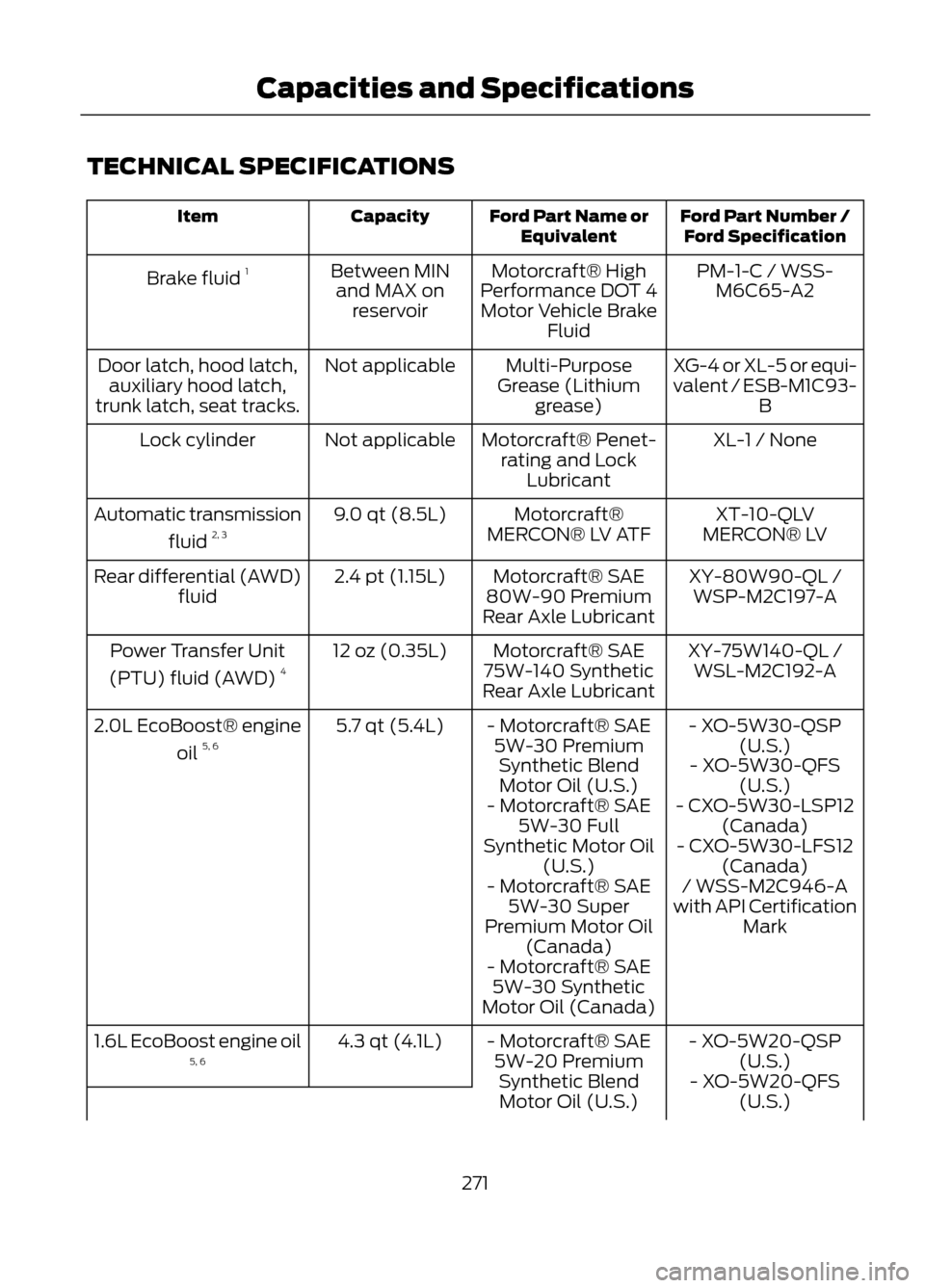
TECHNICAL SPECIFICATIONS
Ford Part Number /Ford Specification
Ford Part Name or
Equivalent
Capacity
Item
PM-1-C / WSS-M6C65-A2
Motorcraft® High
Performance DOT 4 Motor Vehicle Brake Fluid
Between MIN
and MAX on reservoir
Brake fluid
1
XG-4 or XL-5 or equi-
valent / ESB-M1C93-B
Multi-Purpose
Grease (Lithium grease)
Not applicable
Door latch, hood latch,
auxiliary hood latch,
trunk latch, seat tracks.
XL-1 / None
Motorcraft® Penet-
rating and Lock Lubricant
Not applicable
Lock cylinder
XT-10-QLV
MERCON® LV
Motorcraft®
MERCON® LV ATF
9.0 qt (8.5L)
Automatic transmission
fluid 2, 3
XY-80W90-QL /WSP-M2C197-A
Motorcraft® SAE
80W-90 Premium
Rear Axle Lubricant
2.4 pt (1.15L)
Rear differential (AWD)
fluid
XY-75W140-QL /WSL-M2C192-A
Motorcraft® SAE
75W-140 Synthetic
Rear Axle Lubricant
12 oz (0.35L)
Power Transfer Unit
(PTU) fluid (AWD) 4
- XO-5W30-QSP(U.S.)
- Motorcraft® SAE
5W-30 PremiumSynthetic BlendMotor Oil (U.S.)
5.7 qt (5.4L)
2.0L EcoBoost® engine
oil 5, 6
- XO-5W30-QFS(U.S.)
- Motorcraft® SAE 5W-30 Full
Synthetic Motor Oil (U.S.) - CXO-5W30-LSP12
(Canada)
- CXO-5W30-LFS12 (Canada)
- Motorcraft® SAE 5W-30 Super
Premium Motor Oil (Canada) / WSS-M2C946-A
with API Certification Mark
- Motorcraft® SAE 5W-30 Synthetic
Motor Oil (Canada)
- XO-5W20-QSP(U.S.)
- Motorcraft® SAE
5W-20 PremiumSynthetic BlendMotor Oil (U.S.)
4.3 qt (4.1L)
1.6L EcoBoost engine oil
5, 6
- XO-5W20-QFS(U.S.)
271
Capacities and Specifications
Page 273 of 423
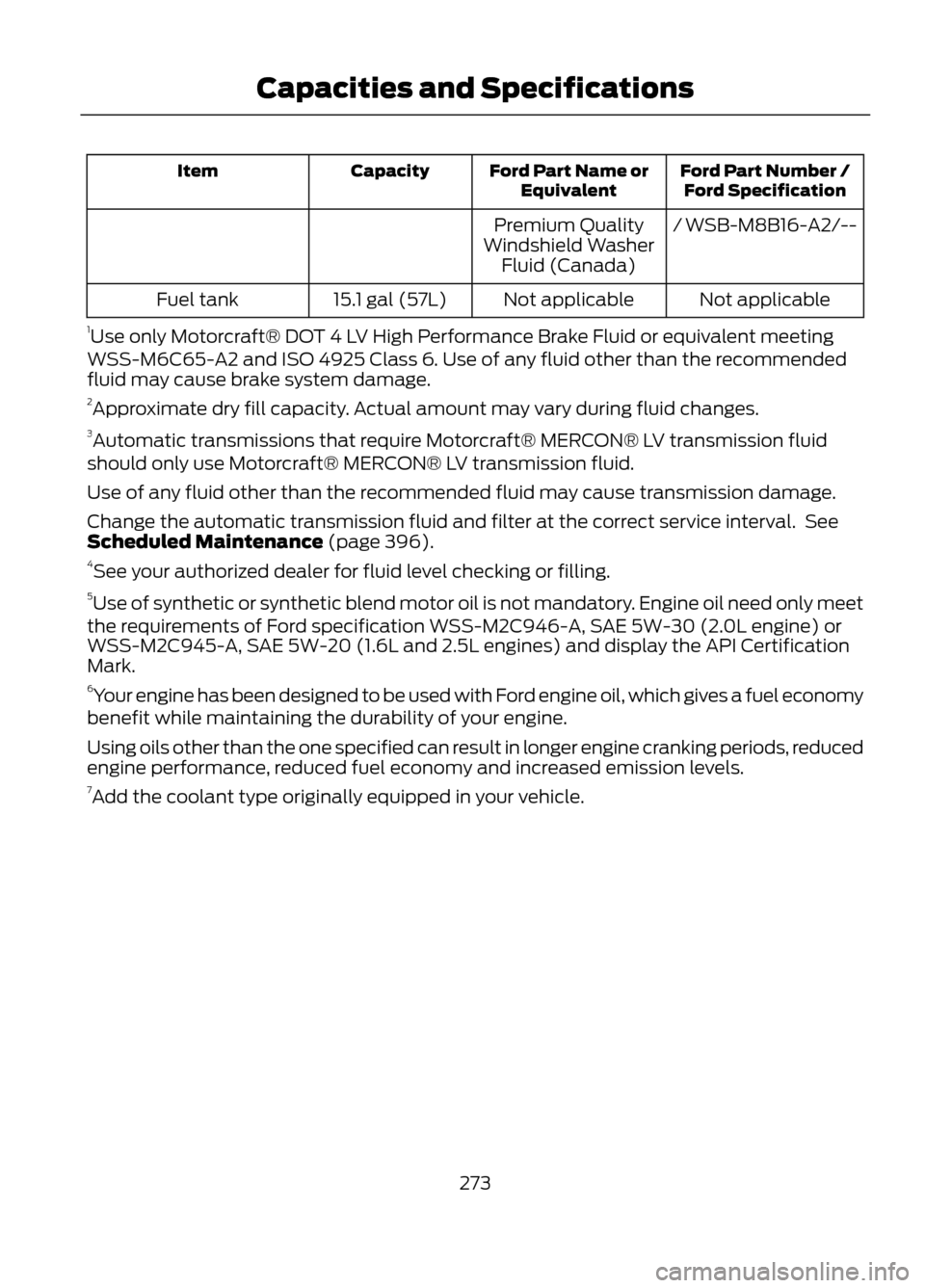
Ford Part Number /Ford Specification
Ford Part Name or
Equivalent
Capacity
Item
/ WSB-M8B16-A2/--
Premium Quality
Windshield Washer Fluid (Canada)
Not applicable
Not applicable
15.1 gal (57L)
Fuel tank
1 Use only Motorcraft® DOT 4 LV High Performance Brake Fluid or equivalent meeting
WSS-M6C65-A2 and ISO 4925 Class 6. Use of any fluid other than the recommended
fluid may cause brake system damage.
2 Approximate dry fill capacity. Actual amount may vary during fluid changes.
3 Automatic transmissions that require Motorcraft® MERCON® LV transmission fluid
should only use Motorcraft® MERCON® LV transmission fluid.
Use of any fluid other than the recommended fluid may cause transmission damage.
Change the automatic transmission fluid and filter at the correct service interval. See
Scheduled Maintenance (page 396).
4 See your authorized dealer for fluid level checking or filling.
5 Use of synthetic or synthetic blend motor oil is not mandatory. Engine oil need only meet
the requirements of Ford specification WSS-M2C946-A, SAE 5W-30 (2.0L engine) or
WSS-M2C945-A, SAE 5W-20 (1.6L and 2.5L engines) and display the API Certification
Mark.
6 Your engine has been designed to be used with Ford engine oil, which gives a fuel economy
benefit while maintaining the durability of your engine.
Using oils other than the one specified can result in longer engine cranking periods, reduced
engine performance, reduced fuel economy and increased emission levels.
7 Add the coolant type originally equipped in your vehicle.
273
Capacities and Specifications
Page 283 of 423
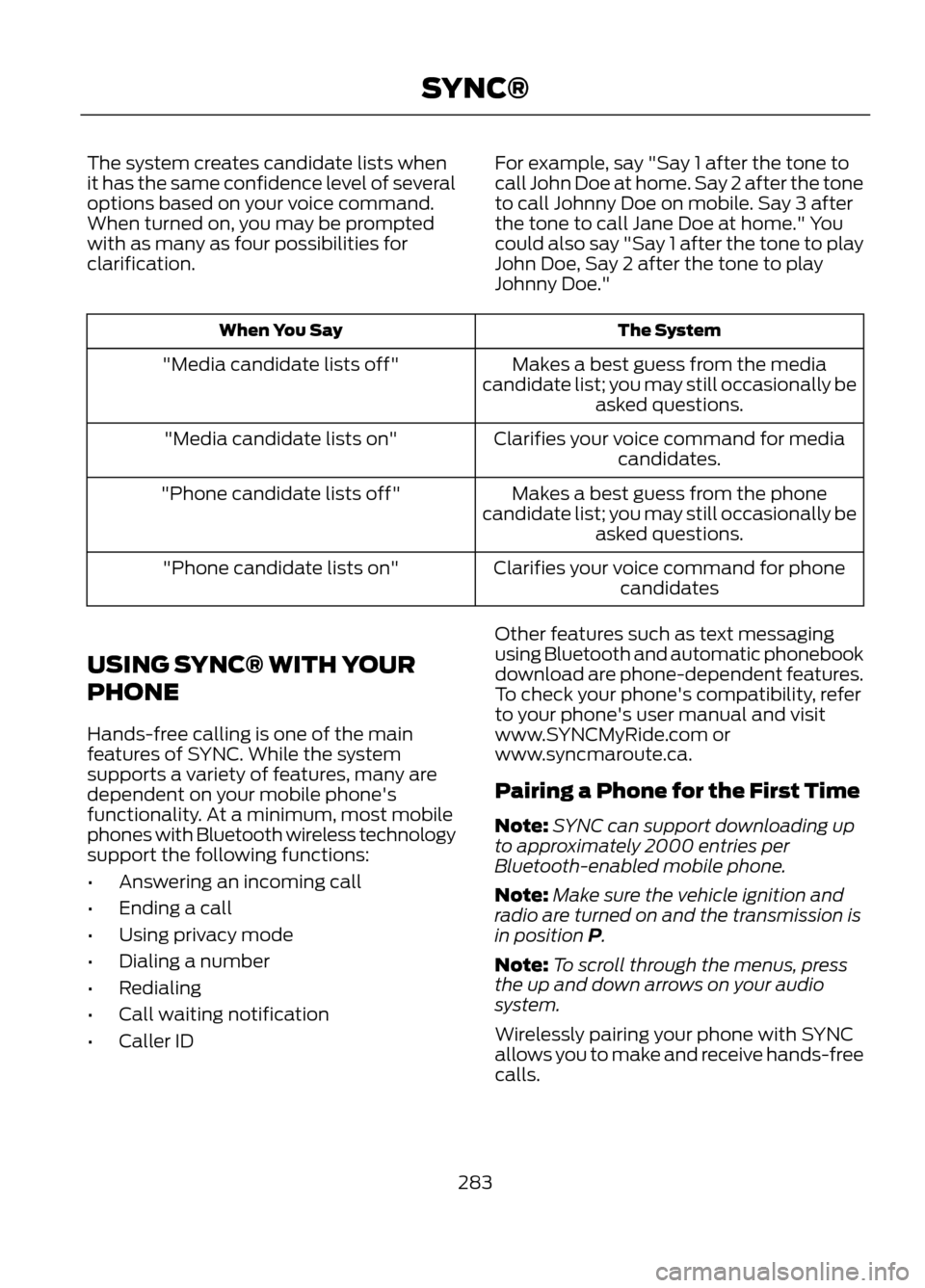
The system creates candidate lists when
it has the same confidence level of several
options based on your voice command.
When turned on, you may be prompted
with as many as four possibilities for
clarification.For example, say "Say 1 after the tone to
call John Doe at home. Say 2 after the tone
to call Johnny Doe on mobile. Say 3 after
the tone to call Jane Doe at home." You
could also say "Say 1 after the tone to play
John Doe, Say 2 after the tone to play
Johnny Doe."
The System
When You Say
Makes a best guess from the media
candidate list; you may still occasionally be asked questions.
"Media candidate lists off"
Clarifies your voice command for mediacandidates.
"Media candidate lists on"
Makes a best guess from the phone
candidate list; you may still occasionally be asked questions.
"Phone candidate lists off"
Clarifies your voice command for phonecandidates
"Phone candidate lists on"
USING SYNC® WITH YOUR
PHONE
Hands-free calling is one of the main
features of SYNC. While the system
supports a variety of features, many are
dependent on your mobile phone's
functionality. At a minimum, most mobile
phones with Bluetooth wireless technology
support the following functions:
• Answering an incoming call
• Ending a call
• Using privacy mode
• Dialing a number
• Redialing
• Call waiting notification
• Caller ID Other features such as text messaging
using Bluetooth and automatic phonebook
download are phone-dependent features.
To check your phone's compatibility, refer
to your phone's user manual and visit
www.SYNCMyRide.com or
www.syncmaroute.ca.
Pairing a Phone for the First Time
Note:
SYNC can support downloading up
to approximately 2000 entries per
Bluetooth-enabled mobile phone.
Note: Make sure the vehicle ignition and
radio are turned on and the transmission is
in position P.
Note: To scroll through the menus, press
the up and down arrows on your audio
system.
Wirelessly pairing your phone with SYNC
allows you to make and receive hands-free
calls.
283
SYNC®
Page 284 of 423
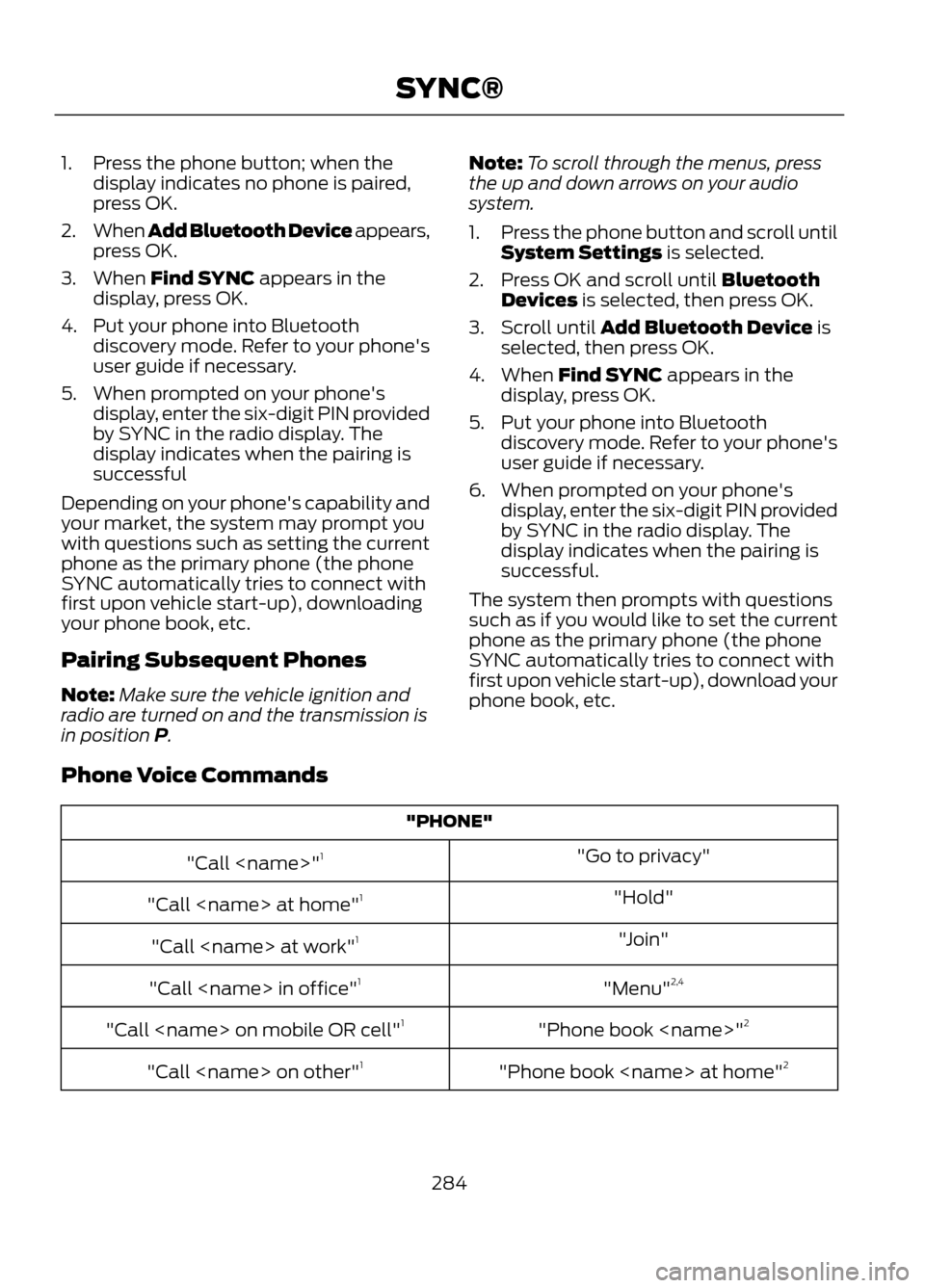
1. Press the phone button; when thedisplay indicates no phone is paired,
press OK.
2. When Add Bluetooth Device appears,
press OK.
3. When Find SYNC appears in the display, press OK.
4. Put your phone into Bluetooth discovery mode. Refer to your phone's
user guide if necessary.
5. When prompted on your phone's display, enter the six-digit PIN provided
by SYNC in the radio display. The
display indicates when the pairing is
successful
Depending on your phone's capability and
your market, the system may prompt you
with questions such as setting the current
phone as the primary phone (the phone
SYNC automatically tries to connect with
first upon vehicle start-up), downloading
your phone book, etc.
Pairing Subsequent Phones
Note: Make sure the vehicle ignition and
radio are turned on and the transmission is
in position P. Note:
To scroll through the menus, press
the up and down arrows on your audio
system.
1. Press the phone button and scroll until
System Settings is selected.
2. Press OK and scroll until Bluetooth Devices is selected, then press OK.
3. Scroll until Add Bluetooth Device is selected, then press OK.
4. When Find SYNC appears in the display, press OK.
5. Put your phone into Bluetooth discovery mode. Refer to your phone's
user guide if necessary.
6. When prompted on your phone's display, enter the six-digit PIN provided
by SYNC in the radio display. The
display indicates when the pairing is
successful.
The system then prompts with questions
such as if you would like to set the current
phone as the primary phone (the phone
SYNC automatically tries to connect with
first upon vehicle start-up), download your
phone book, etc.
Phone Voice Commands
"PHONE" "Go to privacy"
"Call
"Hold"
"Call
"Join"
"Call
"Menu"2,4
"Call
"Phone book
"Call
"Phone book
"Call
284
SYNC®
Page 352 of 423
Note:Do not connect the audio input jack
to a line level output. The AIJ only works
correctly with devices that have a
headphone output with a volume control.
Note: Do not set the portable music
player's volume level higher than is
necessary to match the volume of the CD
or FM radio as this causes distortion and
reduces sound quality.
Note: If the music sounds distorted at lower
listening levels, turn the portable music
player volume down. If the problems
persists, replace or recharge the batteries
in the portable music player.
Note: The portable music player must be
controlled in the same manner when it is
used with headphones as the AIJ does not
provide control (play, pause, etc.) over the
attached portable music player.
PHONE
Hand's-free calling is one of the main
features of SYNC. Once your phone is
paired, you can access many options using
the touchscreen or voice commands. While
the system supports a variety of features,
many are dependent on your mobile
phone's functionality.
At a minimum, most mobile phones with
Bluetooth wireless technology support the
following functions:
• Answering an incoming call
• Ending a call
• Using privacy mode
• Dialing a number
• Redial
• Call waiting notification
• Caller ID Other features such as text messaging
using Bluetooth and automatic phonebook
download are phone-dependent features.
To check your phone's compatibility, refer
to your phone's user manual and visit
www.SYNCMyRide.com or
www.syncmaroute.ca.
Pairing Your Phone for the First
Time
WARNING
Driving while distracted can result in
loss of vehicle control, accident and
injury. Ford strongly recommends
that drivers use extreme caution when
using any device that may take their focus
off the road. Your primary responsibility is
the safe operation of the vehicle. We
recommend against the use of any
handheld device while driving, encourage
the use of voice-operated systems when
possible and that you become aware of
applicable state and local laws that may
affect use of electronic devices while
driving.
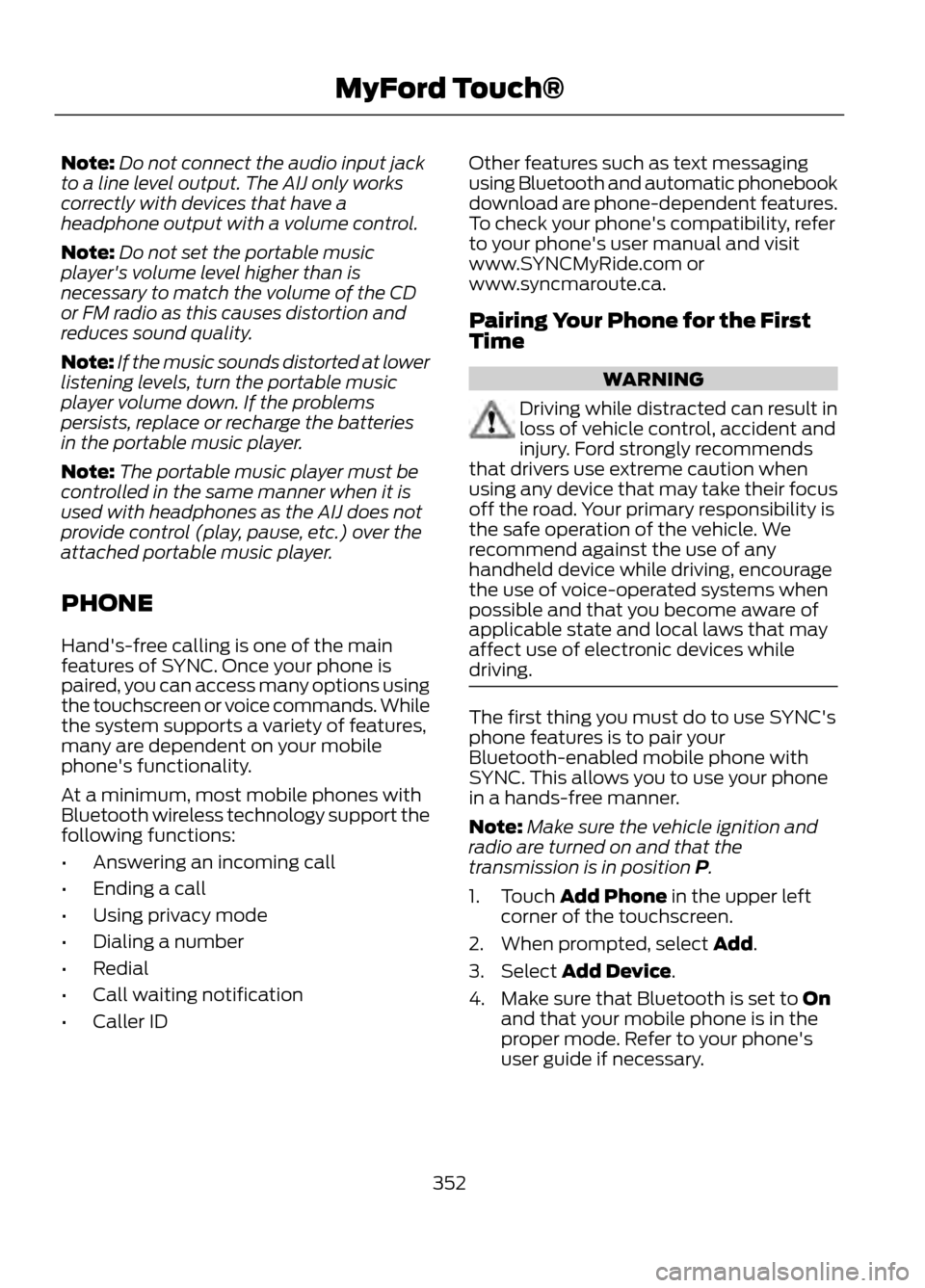
The first thing you must do to use SYNC's
phone features is to pair your
Bluetooth-enabled mobile phone with
SYNC. This allows you to use your phone
in a hands-free manner.
Note: Make sure the vehicle ignition and
radio are turned on and that the
transmission is in position P.
1. Touch Add Phone in the upper left corner of the touchscreen.
2. When prompted, select Add.
3. Select Add Device.
4. Make sure that Bluetooth is set to On and that your mobile phone is in the
proper mode. Refer to your phone's
user guide if necessary.
352
MyFord Touch®
Page 353 of 423
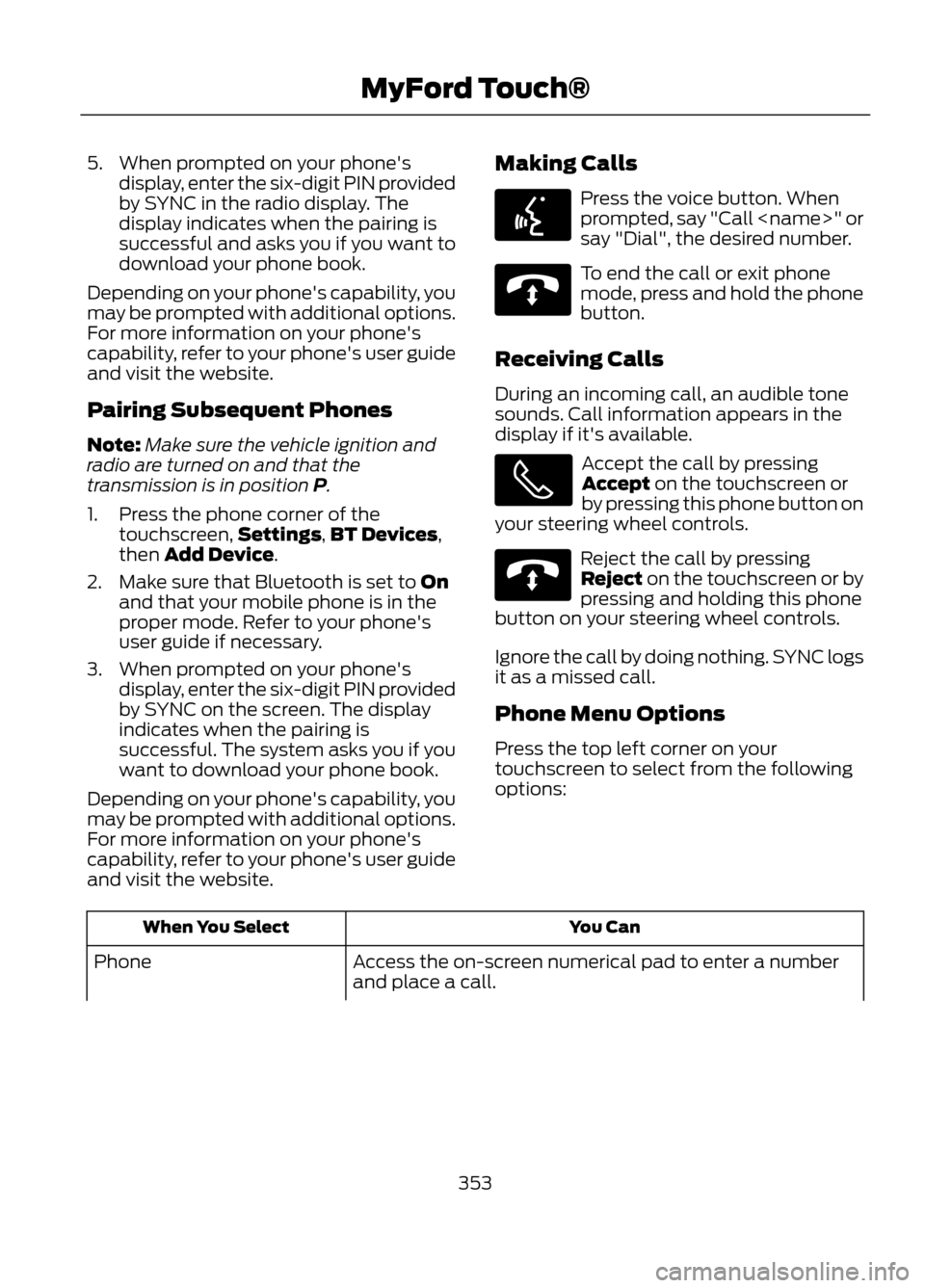
5. When prompted on your phone'sdisplay, enter the six-digit PIN provided
by SYNC in the radio display. The
display indicates when the pairing is
successful and asks you if you want to
download your phone book.
Depending on your phone's capability, you
may be prompted with additional options.
For more information on your phone's
capability, refer to your phone's user guide
and visit the website.
Pairing Subsequent Phones
Note: Make sure the vehicle ignition and
radio are turned on and that the
transmission is in position P.
1. Press the phone corner of the touchscreen, Settings,BT Devices,
then Add Device.
2. Make sure that Bluetooth is set to On and that your mobile phone is in the
proper mode. Refer to your phone's
user guide if necessary.
3. When prompted on your phone's display, enter the six-digit PIN provided
by SYNC on the screen. The display
indicates when the pairing is
successful. The system asks you if you
want to download your phone book.
Depending on your phone's capability, you
may be prompted with additional options.
For more information on your phone's
capability, refer to your phone's user guide
and visit the website. Making Calls
Press the voice button. When
prompted, say "Call
say "Dial", the desired number.
To end the call or exit phone
mode, press and hold the phone
button.
Receiving Calls
During an incoming call, an audible tone
sounds. Call information appears in the
display if it's available.
Accept the call by pressing
Accept on the touchscreen or
by pressing this phone button on
your steering wheel controls.
Reject the call by pressing
Reject on the touchscreen or by
pressing and holding this phone
button on your steering wheel controls.
Ignore the call by doing nothing. SYNC logs
it as a missed call.
Phone Menu Options
Press the top left corner on your
touchscreen to select from the following
options:
You Can
When You Select
Access the on-screen numerical pad to enter a number
and place a call.
Phone
353
MyFord Touch®
E142599
E142632
E142632
Page 383 of 423
•Links to Third Party Sites: The MS
SOFTWARE may provide you with the
ability to link to third party sites through
the use of the SOFTWARE. The third
party sites are not under the control of
MS, Microsoft Corporation, their
affiliates and/or their designated
agent. Neither MS nor Microsoft
Corporation nor their affiliates nor their
designated agent are responsible for
(i) the contents of any third party sites,
any links contained in third party sites,
or any changes or updates to third
party sites, or (ii) webcasting or any
other form of transmission received
from any third party sites. If the
SOFTWARE provides links to third
party sites, those links are provided to
you only as a convenience, and the
inclusion of any link does not imply an
endorsement of the third party site by
MS, Microsoft Corporation, their
affiliates and/or their designated
agent.
• Obligation to Drive Responsibly:
You recognize your obligation to drive
responsibly and keep attention on the
road. You will read and abide with the
DEVICE operating instructions
particularly as they pertain to safety
and assumes any risk associated with
the use of the DEVICE.
UPGRADES AND RECOVERY MEDIA:
If the SOFTWARE is provided by FORD
MOTOR COMPANY separate from the
DEVICE on media such as a ROM chip, CD
ROM disk(s) or via web download or other
means, and is labeled "For Upgrade
Purposes Only" or "For Recovery Purposes
Only" you may install one (1) copy of such
SOFTWARE onto the DEVICE as a
replacement copy for the existing
SOFTWARE, and use it in accordance with
this EULA, including any additional EULA
terms accompanying the upgrade
SOFTWARE. INTELLECTUAL PROPERTY RIGHTS:
All title and intellectual property rights in
and to the SOFTWARE (including but not
limited to any images, photographs,
animations, video, audio, music, text and
"applets" incorporated into the
SOFTWARE), the accompanying printed
materials, and any copies of the
SOFTWARE, are owned by MS, Microsoft
Corporation, FORD MOTOR COMPANY, or
their affiliates or suppliers. The
SOFTWARE is licensed, not sold. You may
not copy the printed materials
accompanying the SOFTWARE. All title
and intellectual property rights in and to
the content which may be accessed
through use of the SOFTWARE is the
property of the respective content owner
and may be protected by applicable
copyright or other intellectual property
laws and treaties. This EULA grants you no
rights to use such content. All rights not
specifically granted under this EULA are
reserved by MS, Microsoft Corporation,
FORD MOTOR COMPANY, third party
software and service providers, their
affiliates and suppliers. Use of any on-line
services which may be accessed through
the SOFTWARE may be governed by the
respective terms of use relating to such
services. If this SOFTWARE contains
documentation that is provided only in
electronic form, you may print one copy of
such electronic documentation.
EXPORT RESTRICTIONS: You
acknowledge that the SOFTWARE is
subject to U.S. and European Union export
jurisdiction. You agree to comply with all
applicable international and national laws
that apply to the SOFTWARE, including
the U.S. Export Administration Regulations,
as well as end-user, end-use and
destination restrictions issued by U.S. and
other governments. For additional
information, see
http://www.microsoft.com/exporting/.
383
Appendices
Page 398 of 423
Check Every Six Months
•Battery connections. Clean if
necessary.
• Body and door drain holes for
obstructions. Clean if necessary.
• Cooling system fluid level and coolant
strength.
• Door weatherstrips for wear. Lubricate
if necessary.
• Hinges, latches and outside locks for
proper operation. Lubricate if
necessary.
• Parking brake for proper operation.
• Safety belts and seat latches for wear
and function. •
Safety warning lamps (brake, ABS,
airbag and safety belt) for operation.
• Washer spray and wiper operation.
Clean or replace blades as necessary.
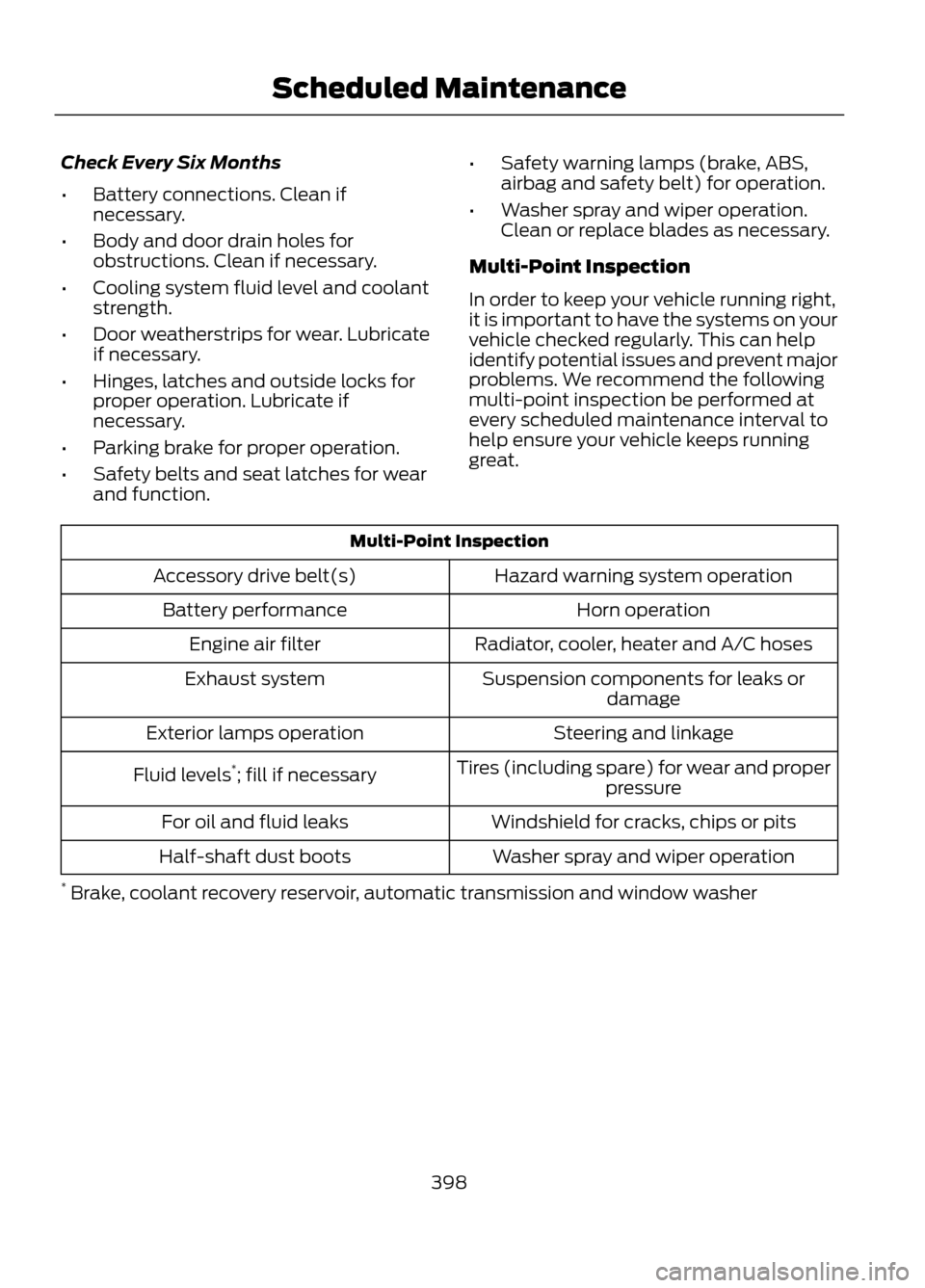
Multi-Point Inspection
In order to keep your vehicle running right,
it is important to have the systems on your
vehicle checked regularly. This can help
identify potential issues and prevent major
problems. We recommend the following
multi-point inspection be performed at
every scheduled maintenance interval to
help ensure your vehicle keeps running
great.
Multi-Point Inspection Hazard warning system operation
Accessory drive belt(s)
Horn operation
Battery performance
Radiator, cooler, heater and A/C hoses
Engine air filter
Suspension components for leaks ordamage
Exhaust system
Steering and linkage
Exterior lamps operation
Tires (including spare) for wear and properpressure
Fluid levels
*
; fill if necessary
Windshield for cracks, chips or pits
For oil and fluid leaks
Washer spray and wiper operation
Half-shaft dust boots
* Brake, coolant recovery reservoir, automatic transmission and window washer
398
Scheduled Maintenance